 MCLG-106
Game says I have run out of storage space, despite having ample storage
The game tells me I don't have enough storage space, despite the world file only taking up 32 GB and I have 5T remaining to spare.
This means I am unable to play the world or create a new one.
This happened after I was defeating the last of the spore hord portals. Prior to this, the game was incredibly leggy and I would continuously move slowly, but I'm not sure if they're related or not.
Linked Issues
is duplicated by5
 MCPE-55010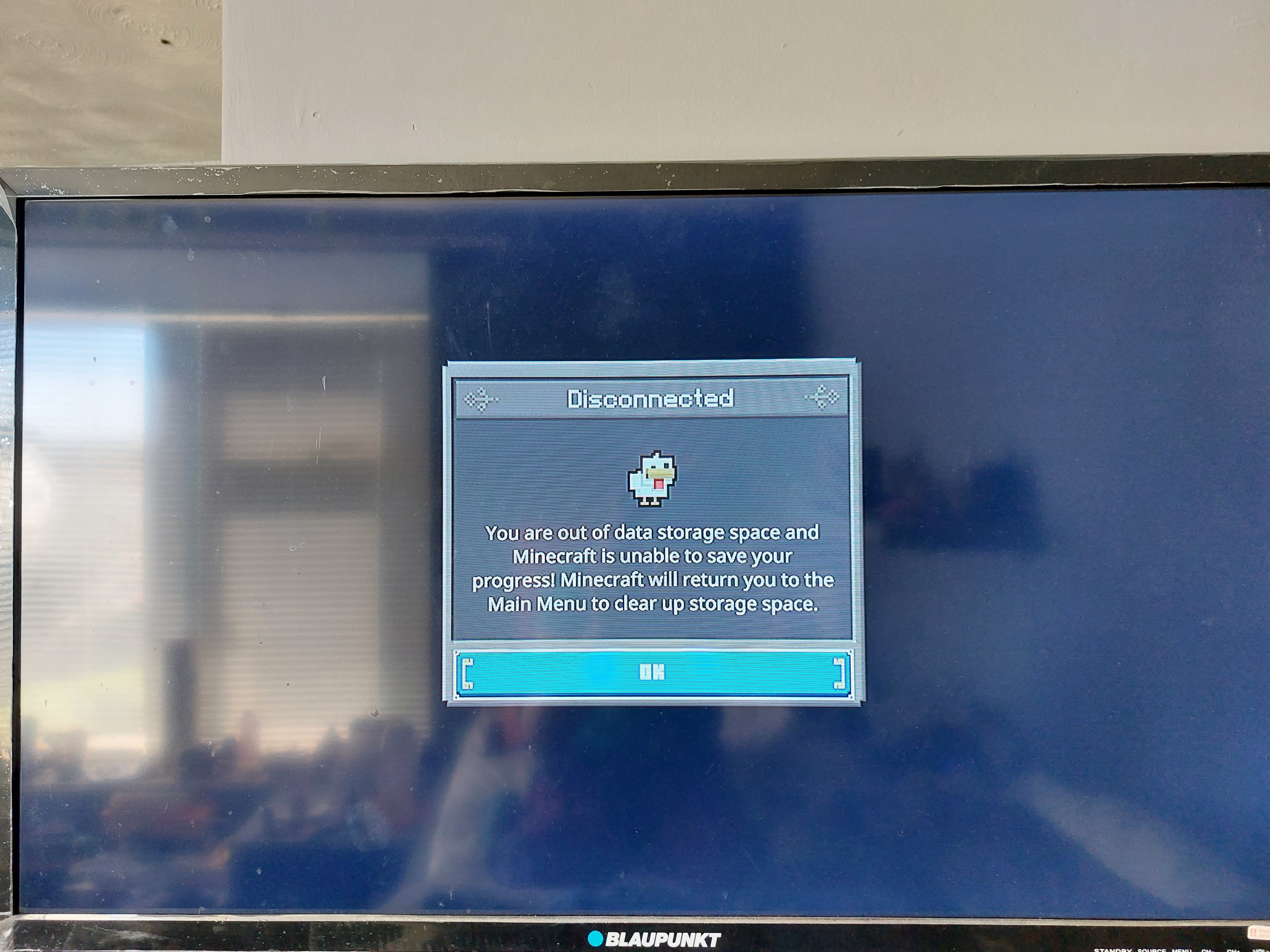



Created Issue:
Game says I have run out of storage space, despite having ample storage
The game tells me I don't have enough storage space, despite the world file only taking up 32 GB and I have 5T remaining to spare.
This means I am unable to play the world or create a new one.
This happened after I was defeating the last of the spore hord portals. Prior to this, the game was incredibly leggy and I would continuously move slowly, but I'm not sure if they're related or not.
Attachments1
![[Mojang] Mega_Spud (Jay Wells)](../../../data/avatars/users/92696.png)
is duplicated by
relates to
![[Mod] Greymagic27](../../../data/avatars/users/92875.png)
is duplicated by
MCLG-238
![[Mod] GoldenHelmet](../../../data/avatars/users/18951.svg)
relates to
is duplicated by
![[Bot] Arisa](../../../data/avatars/users/43007.png)
is duplicated by
is duplicated by
Is this still an issue in the latest release?
Xbox/Windows: 1.17.31319
Nintendo Switch: 1.17.31676
PlayStation: 1.05
Steam: 11203127
is duplicated by
is duplicated by
![[Mojang] Big Beak](../../../data/avatars/users/88062.png)
![[Mod] turbo](../../../data/avatars/users/92867.png)
Thank you for your report!
We're actually already tracking this issue at MCLG-106, so we will resolve and link this ticket as a duplicate.
If you would like to add a vote and any extra information to the main ticket it would be appreciated.
If you haven't already, you might like to make use of the search feature, to see if the issue has already been mentioned.
Quick Links:
📓 Issue Guidelines – 💬 Mojang Support – 📧 Suggestions – 📖 Minecraft Wiki


Thank you for your report!
We're tracking this issue in MCLG-106, so this ticket is being resolved and linked as a duplicate.
If you would like to add a vote and any extra information to the main ticket it would be appreciated.
If you haven't already, you might like to make use of the search feature to see if the issue has already been mentioned.
Quick Links:
📓 Bug Tracker Guidelines – 💬 Community Support – 📧 Mojang Support
📓 Project Summary – ✍️ Feedback and Suggestions – 📖 Game Wiki – 📖 FAQs
– I am a bot. This action was performed automatically! The ticket was resolved by one of our moderators, and I left this message to give more information to you.
Thank you for your report!
We're tracking this issue in MCLG-106, so this ticket is being resolved and linked as a duplicate.
If you would like to add a vote and any extra information to the main ticket it would be appreciated.
If you haven't already, you might like to make use of the search feature to see if the issue has already been mentioned.
Quick Links:
📓 Bug Tracker Guidelines – 💬 Community Support – 📧 Mojang Support
📓 Project Summary – ✍️ Feedback and Suggestions – 📖 Game Wiki – 📖 FAQs
– I am a bot. This action was performed automatically! The ticket was resolved by one of our moderators, and I left this message to give more information to you.
Thank you for your report!
We're tracking this issue in MCLG-106, so this ticket is being resolved and linked as a duplicate.
If you would like to add a vote and any extra information to the main ticket it would be appreciated.
If you haven't already, you might like to make use of the search feature to see if the issue has already been mentioned.
Quick Links:
📓 Bug Tracker Guidelines – 💬 Community Support – 📧 Mojang Support
📓 Project Summary – ✍️ Feedback and Suggestions – 📖 Game Wiki – 📖 FAQs
Might be related to MCLG-106???
Thank you for your report!
We're tracking this issue in MCLG-106, so this ticket is being resolved and linked as a duplicate.
If you would like to add a vote and any extra information to the main ticket it would be appreciated.
If you haven't already, you might like to make use of the search feature to see if the issue has already been mentioned.
Quick Links:
📓 Bug Tracker Guidelines – 💬 Community Support – 📧 Mojang Support
📓 Project Summary – ✍️ Feedback and Suggestions – 📖 Game Wiki – 📖 FAQs
– I am a bot. This action was performed automatically! The ticket was resolved by one of our moderators, and I left this message to give more information to you.
I am also getting this issue on PS4. I am about 10 hours into the game on legendary but cannot progress any further because after playing for a couple minutes I get this same error. I've tried clearing up save data space and storage space on my PS4 but that didn't help so I think it has something to do with the world not being able to save or the save file being too large. My world has probably a couple thousand structures between the villages because there are so many towers and walls everywhere (although this crash has happened both inside and out of villages, so I think it has something to do with the save file).
Confirmed: Community consensus by
MCLG-108I'll add some additional details. Whenever I check if this issue is persisting, I am deleting all my saved data on my PS4 system storage, and re-downloading my cloud save which shows as 134.3 MB. On the main menu file select screen, pressing start to "Rename/Delete Files" shows my save as 38.1 MB. Pressing triangle to view the autosaves shows 4 autosaves with the top one being the "newest".
If I the next most recent autosave (the one from the previous day) I can play for about 30 minutes to an hour before eventually encountering the issue again.
An update: it has now occurred for a second time. Both times it happened after I was defeating the last of the three big horde spore portals, and after the bar fell below 100%. First time was under 50% and second time was at 97%, so I feel that may be relevant, as the time played was different- first world had 13 hours, while the second time was at 8 hours.
Sounds like the same bug that afflicts Minecraft Bedrock Edition, MCPE-55010.
More info after another couple days of attempting to play:
Having the same exact issue on PS4. Plenty of space on hard drive, but once I get this message, I'm unable to load into my world. I have to open a previous auto save file (which is too old) in order to keep playing. Keep having setbacks which isn't fun redoing stuff.
Edit: Welp, now it's worse. Lost all progress, hit day 38 and tried loading a previous auto save and it just deleted my whole campaign. Now it won't let me start a new campaign. Wow, not happy wasting my time and paying for this. I'd say this is urgent to be fixed if I can never progress.
I have this same issue on PS4 and makes the game completely unplayable.
There are hundreds of GB free on my hard drive, my save is about 35MB, yet it says I am out of space and will not let me play the game.
I have uploaded my saved data to the cloud and re-downloaded it, I have deleted the game and reinstalled, I am constantly checking for updates and playing the latest version.
It is extremely frustrating and disappointing to have paid for this game, only to be blocked from playing it.
Having the same exact issue. Can't even continue my campaign. (I have about 100 GB available so it's not a storage issue) it happened right when I took out the 3 large yellow piglin outposts. Someone online they had the same issue right after that.
[~Angelo Corrente] Are you also on PlayStation 4 ?
Lunarian Yes, I am.
I'm on PS4 and having the same issue. There is enough storage space on my console. This has happened to me twice. When I check the file management on the game, it shows that my world is about 37MB. Below it shows the storage used is 256MB/9126MB which doesn'tmake sense. This is making the game unplayable which is frustrating since I have been obsessed with the game!
PLEASE HELP! How do I fix this issue? I pre bought the deluxe edition on STEAM and I haven't been able to play for 1 minute yet! When I try to start a campain I get the message Not enough space even though I have more then enough and when I try to get into the market the screen just turns black. I can see signs here that issue is resolved but I cant find out how or if I need to click somewhere to find out how. I'm an absolute novice to this. Just want to play. Thanks
Same issue since almost Day One on PS4. No rhyme or reason. Sometimes pops up after an hour. Sometimes pops up after a minute. Tried numerous solutions:
All solutions failed.
That just happened to me just today I was playing my world, I died and then my game crashed it took me back to the main manual Then I went back to campaign I try load my world again I keep getting disconnected then I rebooted the game and now my world isn't showing up anymore it's completely deleted.
This was on windows 10
Thanks for the reports! We're continuing to look into what's causing the prompt to falsely appear.
Should have a fix for this in our next update soon!
Same exact thing for me, my legendary difficulty world was completely wiped right after it saying there was no more space, spent a few hours on it and gone in an instant...come on Mojang
My game fails to show the correct amount of storage left on my drive. It shows much less than what I have available on my drive.
Same issue here. Attempting to defeat the last horde of the spore and the game now says there is not enough storage when there is plenty. Very frustrating!!
Affects PlayStation 5 per
MCLG-414.Still happening on PS5, crazy how they haven’t fixed this yet. Want to play the game that I bought but I can’t. Loads into Lost Legends but before it fully loads it kicks me out and says not enough storage, so stupid.
Related to
MCLG-17Same issue still happening on PS4, also when finishing off horde of the spore. Have been unable to play at all, cannot even create a new campaign, since May. Plenty of storage space. We’re very frustrated.
it sometimes says that I have only 5% storage used, then it says I’m out of storage space. Cleared some space and now all my campaigns are deleted, plus now the game won’t open without giving me an error message.
It has now been since May that I’ve been able to play this game. New update installed still can’t play. This was the biggest waste of money and I’m incredibly disappointed. I’ve been holding off contacting PlayStation for a refund but I’m over this. A fix was promised months ago and still nothing. Ridiculous.
I agree with the last comment. Thinking of getting a refund after this from PlayStation. Game breaking and they can't seem to fix it.
What an embarrassment. Bug is still in the console version. Definite a waste of my money.
The same thing has happened to me it is an absolute disgrace that they haven't fixed this since release, I will be getting a refund from PlayStation and it's sad because despite all the negative reviews I actually wanted to give this game a chance and was really enjoying it but it really seems like Mojang couldn't give a care in the world about this game and its horrible unplayable state.
I don't know how you guys come up with such amazing ideas and always manage to fumble them away, the same thing happened with Minecraft Dungeons but at least that game is still playable.
Thanks for the reports everyone! We're still investigating the cause of this issue and we'll keep everyone updated as we learn more.
Thank God at least someone responded hopefully they fix it this time.
Sony Support isn’t active right now so I haven’t got a refund yet maybe they’ll fix it so I won’t have to get a refund.
I don’t understand why this is still needing to be investigated when it has been going on for over 3 months.
I agree with the previous comment it is a bit sad but hopefully that wasn't just one of their responses where they don't actually do anything like the previous ones in May etc.
It seems to always happen at 256MB from what I can see on the subreddit and reports hopefully they can fix this please I don’t wanna get scammed 🤞
Still being investigated?
I've just encountered this on my Playstation 4. Have TB's of space and now can't load either of the two campaign save slots.
Additional improvements to this were made in the November update that released today. Please comment on if the issue has been resolved.
Not resolved
mine working just fine on switch
Not resolved on ps4
Hello, I have the same problem on my PS4. The game shows the same message when it tries to auto-save (I guess). It doesn't want to load and create new world because of this bug. When I try to play a world wich already exist, the game shows this message after 5 minutes of play, the progress is not save, and it returns to the main menu. I check my storage and it's not full at all. This situation makes the game unplayable at all. Thank you for your time.
Is this fixed in the latest release?