Hopper minecarts pull items from other hopper/chest-minecarts which are diagonally up to the south or east
The bug here is actually a +0.5 offset in each direction in the reference point that the check range for container entities is based on. This is just like MCPE-167490 but in the opposite direction. See comment
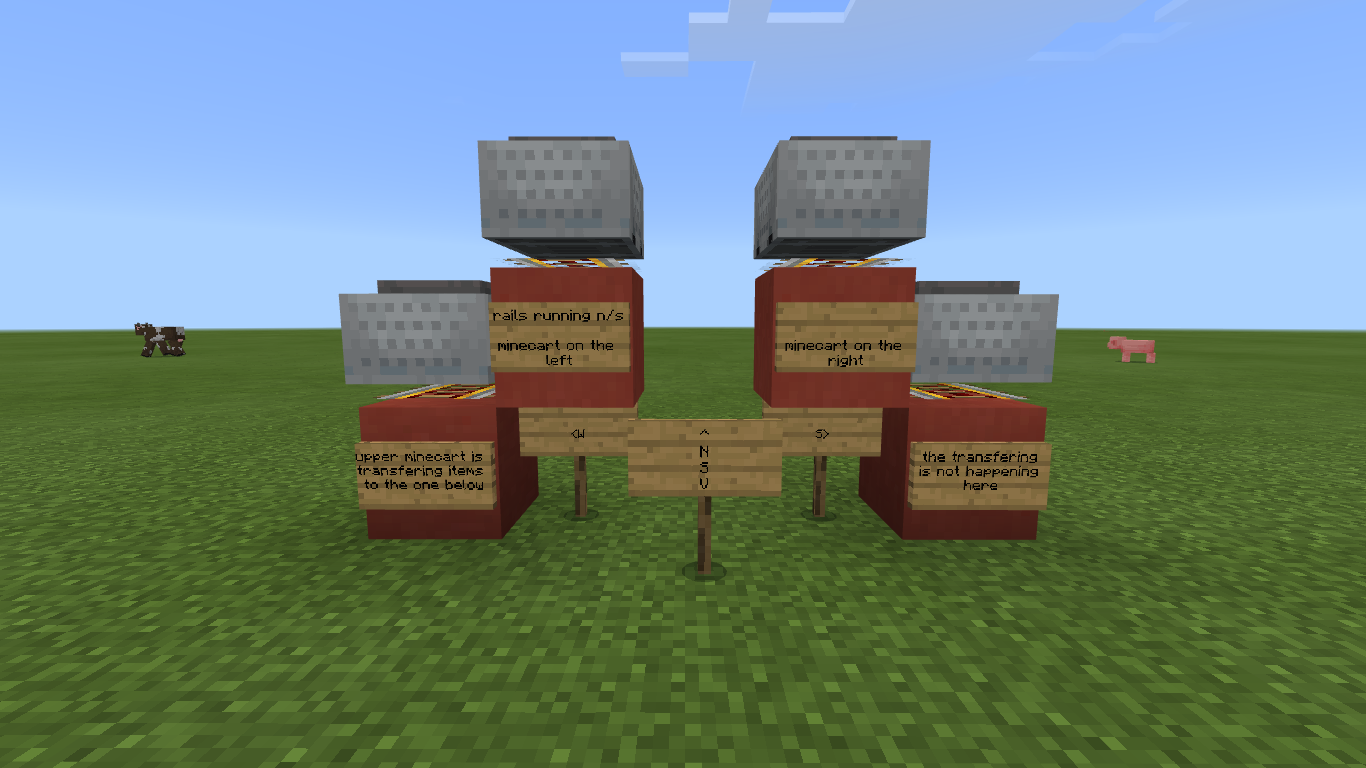
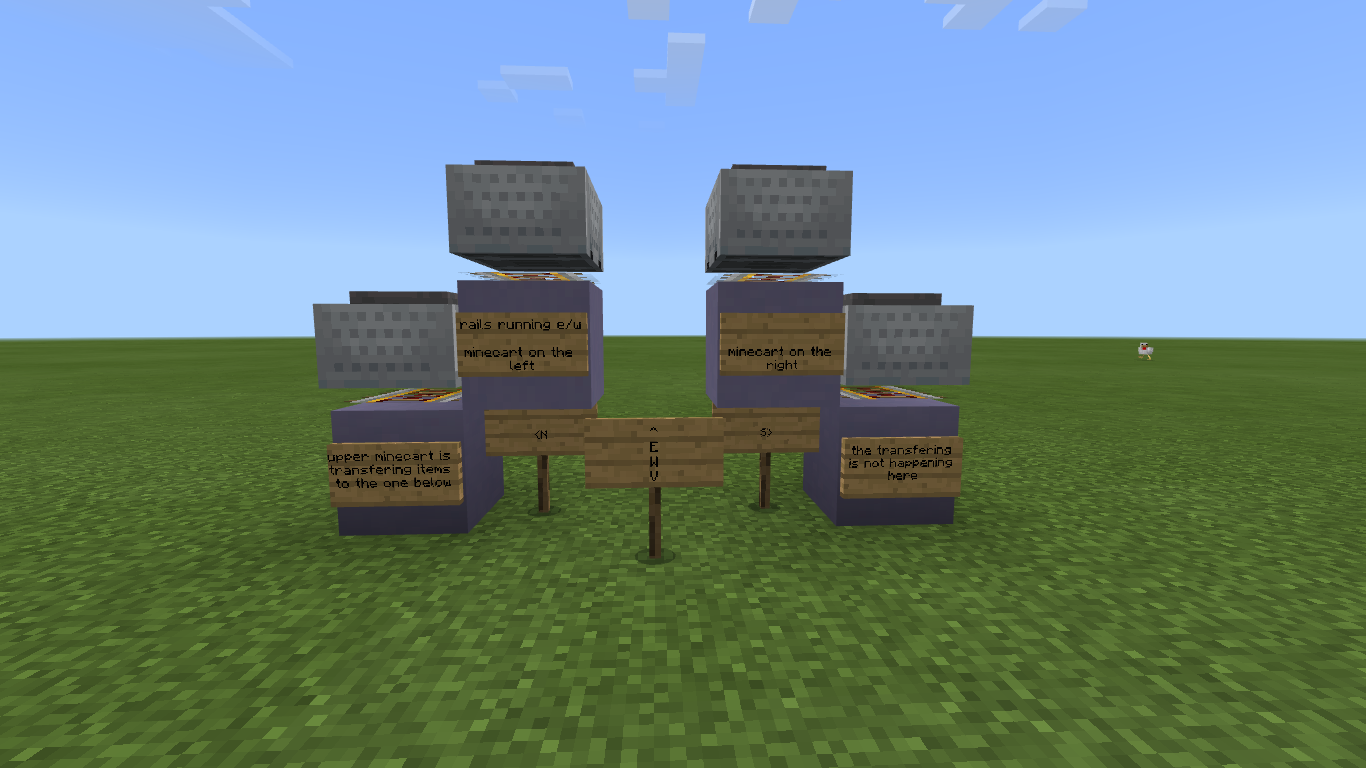
If you have a hopper minecart one one level and another hopper minecart one level below and to the left (north side on an east/west orientation or the west side in a north/south orientation) you will get item transfer from the top hopper minecart to the bottom hopper minecart. This will not occur with a hopper minecart to the right of the top hopper. Sometimes this transfer will not occur if the bottom hopper minecart has a block with an inventory above it. I don't know why this isn't consistent.
Linked Issues
is duplicated by24
 MCPE-45926Strange behavior of the Minecart With Hopper.DuplicateMCPE-46001Hopper in Minecraft pulls from chest a block away and pulls way too fastDuplicateMCPE-47464Bad distribution of objects in Hoppers.DuplicateMCPE-47763Hopper mine cart cross contaminationDuplicateMCPE-57558Minecarts with Hoppers pass items without being on same X or Z.DuplicateMCPE-60245minecart with hoppers interacting incorrectlyDuplicateMCPE-61362Minecart with Hopper interacting with other Minecart with Hoppers incorrectly (ONLY with other Minecart with Hoppers)DuplicateMCPE-68552Issues with Minecart orientation and hitboxesDuplicateMCPE-74581Hopper minecart consuming anythingDuplicateMCPE-75718cart with funnel is picking up items diagonally from cart with chestDuplicateMCPE-78484MINECART WITH HOPPERS EXCHANGING ITEM SIDE BY SIDEDuplicateMCPE-82223Minecart with Hopper and Minecart with Chest are brokenDuplicateMCPE-86286Hopper minecarts pull items from diagonally aboveDuplicateMCPE-87738Fuel Hopper Minecart in supersmelter is picking up items diagonally DuplicateMCPE-88906Hopper minecart steeling items from higher adjacent hopper minecarts DuplicateMCPE-89769Hopper Minecart hitboxes overlap when they are diagonal of each other DuplicateMCPE-98394Problem with hopper minecartsDuplicateMCPE-135673Minecart with hopper picking up diagonallyDuplicateMCPE-136999hopper minecart get fill from diagonal DuplicateMCPE-152940Hopper minecart pulls items from too far awayDuplicateMCPE-153314Hopper minecart sucking items on a diagonal from anotherDuplicateMCPE-156231Hopper minecarts diagonal to others can sometimes pick up itemsDuplicateMCPE-162894Minecart With Hopper mistakenly pulls in items from another Minecart With HopperDuplicateMCPE-186201Hopper minecarts weird behaviorDuplicate
Attachments11
![[Mod] GoldenHelmet](../../../data/avatars/users/18951.svg)




- Unresolved
 Saoirse Gorgon
- 278
- 70
- Confirmed
- 392088, 1297713
- Multiple
- Windows 10 version 1909
- hopper_minecart
1.17.10 - 1.21.44 Hotfix
1.17.10 1.16.100.58 Beta 1.16.20.54 Beta 1.16.20.53 Beta 1.16.0.67 Beta 1.16.0.66 Beta 1.16.0.64 Beta 1.16.0.63 Beta 1.16.0.61 Beta 1.16.0.59 Beta 1.16.0.57 Beta 1.16.0.55 Beta 1.16.0.53 Beta 1.15.0.55 Beta 1.15.0.54 Beta 1.13.3 1.13.1 1.14.30 Hotfix 1.14.60 Hotfix 1.16.0 1.16.1 1.16.10 1.16.21 1.16.20 1.17.0 1.18.2 Hotfix 1.18.12 Hotfix 1.18.31 1.19.31 Hotfix 1.19.71 1.20.51 Hotfix 1.21.22 Hotfix 1.21.44 Hotfix
Created Issue:
Hopper minecarts transfer items to other hopper minecarts which are diagonally down to the left one block
If you have a hopper minecart one one level and another hopper minecart one level below and to the left (north side on an east/west orientation or the west side in a north/south orientation) you will get item transfer from the top hopper minecart to the bottom hopper minecart. This will not occur with a hopper minecart to the right of the top hopper. Sometimes this transfer will not occur if the bottom hopper minecart has a block with an inventory above it. I don't know why this isn't consistent.
Attachments2
- Unresolved
- Open
- Unconfirmed
- Windows
- Windows 10 version 1909
- 1.13.1
is duplicated by
![[MCPE Mod] Celesian](../../../data/avatars/users/81635.png)
is duplicated by
![[Mod] OcelotOnesie](../../../data/avatars/users/43220.png)

1.15.0.54 also
![[Mojang] Mega_Spud (Jay Wells)](../../../data/avatars/users/92696.png)
is duplicated by
1.15.0.55 also
1.16.0.53 also
is duplicated by
is duplicated by
1.16.0.55 also
Hopper minecartstransferitemstoother hopper minecarts which are diagonallydownto theleft one blockHopper minecarts pull items from other hopper minecarts which are diagonally up to the south or east
is duplicated by
is duplicated by
![[Bot] Arisa](../../../data/avatars/users/43007.png)

relates to
No, still relevant.
is duplicated by
![[Mod] Jarl-Penguin](../../../data/avatars/users/92849.png)
1.16.0.61 also
1.16.0.63 also
is duplicated by
is duplicated by
If you have a hopper minecart one one level and another hopper minecart one level below and to the left (north side on an east/west orientation or the west side in a north/south orientation) you will get item transfer from the top hopper minecart to the bottom hopper minecart. This will not occur with a hopper minecart to the right of the top hopper. Sometimes this transfer will not occur if the bottom hopper minecart has a block with an inventory above it. I don't know why this isn't consistent.
If you have a hopper minecart one one level and another hopper minecart one level below and to the left (north side on an east/west orientation or the west side in a north/south orientation) you will get item transfer from the top hopper minecart to the bottom hopper minecart. This will not occur with a hopper minecart to the right of the top hopper. Sometimes this transfer will not occur if the bottom hopper minecart has a block with an inventory above it. I don't know why this isn't consistent.
is duplicated by
relates to
is duplicated by
1.16.0.64 also
i can make a damn super smelter because of this bug pls fix it devs
is duplicated by
is duplicated by
is duplicated by
is duplicated by
Affects 1.16.20.53
relates to
is duplicated by
Pic_ 2_Minecraft 13_11_2020 02_37_57.png
Hi everyone,
I don't have a solution but somekind of work-around:

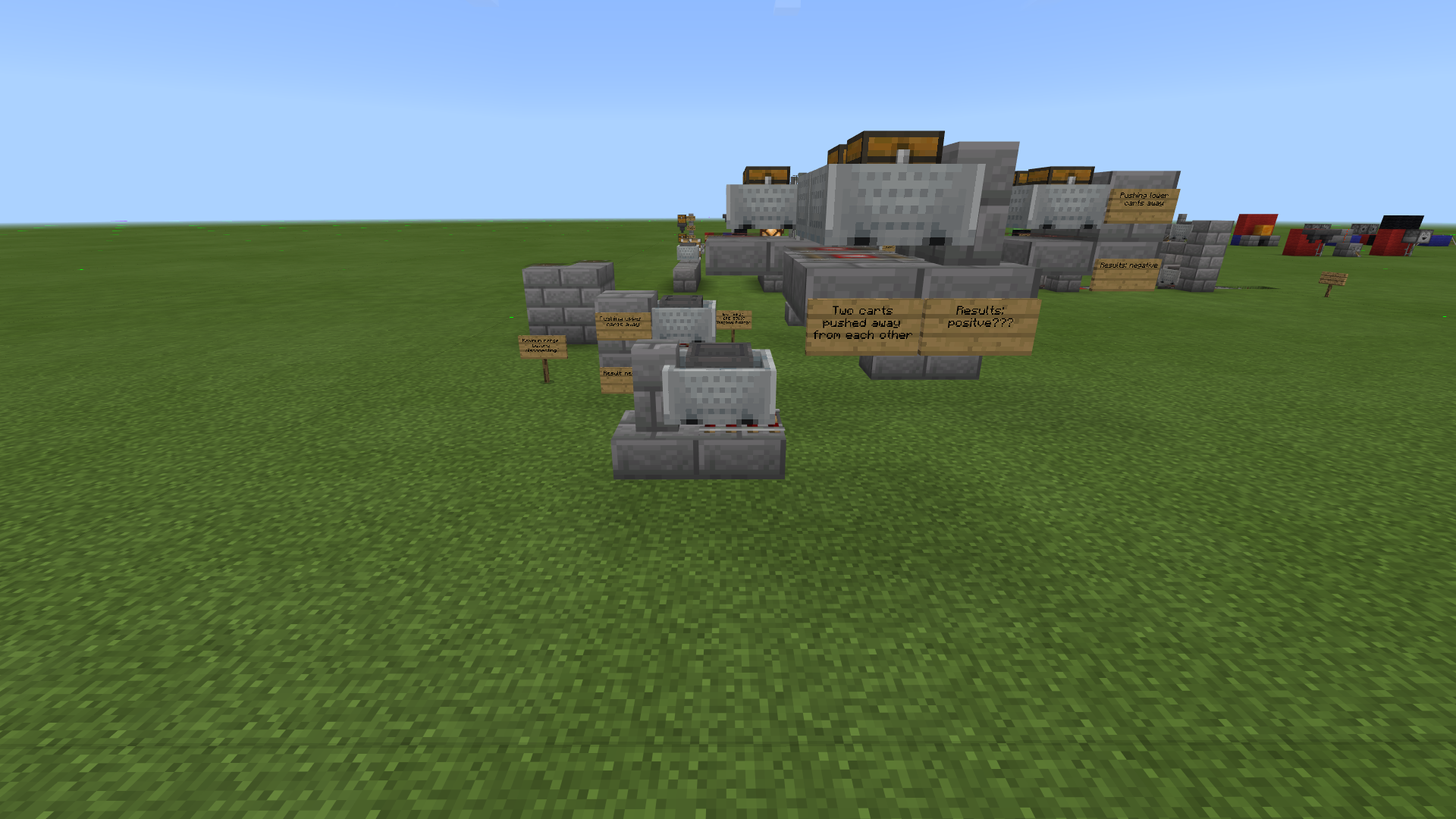
I placed activated minecart next to detector minecart that I call "dummy" minecart with hoppers facing away from each other, SE designs needs to bo moved 1 block further accordingly. connect redstone and fill up filter with 2 of desired items and fill up remaining slots like so (pic 1)while leaving "infected" hopper minecart empty then, run each system individually by using hopper minecarts until each hopper has about 15 items +4 slots filled (pic 2).
after success you can destroy "dummy" minecart and connect rail system above
PS. the hoppers in the middle of Y axis will still "suck up" from neighbour but it wont break the system. and South-East designs look bit odd (pic 3)
relates to
is duplicated by
is duplicated by
is duplicated by
is duplicated by
is duplicated by
is duplicated by
relates to
is duplicated by
relates to
relates to
NoteThe bug here is actually a +0.5 offset in each direction in the reference point that the check range for containers entities is based on. This is just like MCPE-167490 but in the opposite direction. See comment
If you have a hopper minecart one one level and another hopper minecart one level below and to the left (north side on an east/west orientation or the west side in a north/south orientation) you will get item transfer from the top hopper minecart to the bottom hopper minecart. This will not occur with a hopper minecart to the right of the top hopper. Sometimes this transfer will not occur if the bottom hopper minecart has a block with an inventory above it. I don't know why this isn't consistent.
NoteThe bug here is actually a +0.5 offset in each direction in the reference point that the check range for containers entities is based on. This is just like MCPE-167490 but in the opposite direction. See
commentIf you have a hopper minecart one one level and another hopper minecart one level below and to the left (north side on an east/west orientation or the west side in a north/south orientation) you will get item transfer from the top hopper minecart to the bottom hopper minecart. This will not occur with a hopper minecart to the right of the top hopper. Sometimes this transfer will not occur if the bottom hopper minecart has a block with an inventory above it. I don't know why this isn't consistent.
NoteThe bug here is actually a +0.5 offset in each direction in the reference point that the check range for containers entities is based on. This is just like MCPE-167490 but in the opposite direction. See comment
If you have a hopper minecart one one level and another hopper minecart one level below and to the left (north side on an east/west orientation or the west side in a north/south orientation) you will get item transfer from the top hopper minecart to the bottom hopper minecart. This will not occur with a hopper minecart to the right of the top hopper. Sometimes this transfer will not occur if the bottom hopper minecart has a block with an inventory above it. I don't know why this isn't consistent.
NoteThe bug here is actually a +0.5 offset in each direction in the reference point that the check range for containers entities is based on. This is just like MCPE-167490 but in the opposite direction. See comment
If you have a hopper minecart one one level and another hopper minecart one level below and to the left (north side on an east/west orientation or the west side in a north/south orientation) you will get item transfer from the top hopper minecart to the bottom hopper minecart. This will not occur with a hopper minecart to the right of the top hopper. Sometimes this transfer will not occur if the bottom hopper minecart has a block with an inventory above it. I don't know why this isn't consistent.
Note from [Mod] GoldenHelmetThe bug here is actually a +0.5 offset in each direction in the reference point that the check range for containers entities is based on. This is just like MCPE-167490 but in the opposite direction. See comment
If you have a hopper minecart one one level and another hopper minecart one level below and to the left (north side on an east/west orientation or the west side in a north/south orientation) you will get item transfer from the top hopper minecart to the bottom hopper minecart. This will not occur with a hopper minecart to the right of the top hopper. Sometimes this transfer will not occur if the bottom hopper minecart has a block with an inventory above it. I don't know why this isn't consistent.
Note from [Mod] GoldenHelmetThe bug here is actually a +0.5 offset in each direction in the reference point that the check range for container
sentities is based on. This is just like MCPE-167490 but in the opposite direction. See comment
If you have a hopper minecart one one level and another hopper minecart one level below and to the left (north side on an east/west orientation or the west side in a north/south orientation) you will get item transfer from the top hopper minecart to the bottom hopper minecart. This will not occur with a hopper minecart to the right of the top hopper. Sometimes this transfer will not occur if the bottom hopper minecart has a block with an inventory above it. I don't know why this isn't consistent.
![[MCQA] v-magwar](../../../data/avatars/users/18935.svg)
Thank you for your report!
However, this issue is a Duplicate of MCPE-57637.
If you would like to add a vote and any extra information to the main ticket it would be appreciated.
Although this report is older, the newer report is more focused and specific in its description of the behavior of hopper minecarts pulling from other hopper minecarts diagonally above.
If you still feel there is a problem with the speed of hopper minecart transfer, I suggest you pursue that through the feedback site, or create a new report detailing how the behavior you observe differs from what you expect.
Quick Links:
📓 Issue Guidelines – 💬 Community Support – 📧 Customer Support – 📖 Game Wiki
Thank you for your report!
However, this issue is a Duplicate of MCPE-57637.
If you would like to add a vote and any extra information to the main ticket it would be appreciated.
If you haven't already, you might like to make use of the search feature to see if the issue has already been mentioned.
Quick Links:
📓 Issue Guidelines – 💬 Community Support – 📧 Customer Support – 📖 Game Wiki
Thank you for your report!
However, this issue is a Duplicate of MCPE-57637.
If you would like to add a vote and any extra information to the main ticket it would be appreciated.
If you haven't already, you might like to make use of the search feature to see if the issue has already been mentioned.
Quick Links:
📓 Issue Guidelines – 💬 Community Support – 📧 Customer Support – 📖 Game Wiki
Thank you for your report!
We're actually already tracking this issue at MCPE-55277 and MCPE-57637, so I will resolve and link this ticket as a duplicate.
If you would like to add a vote and any extra information to the main tickets it would be appreciated.
If you haven't already, you might like to make use of the search feature to see if the issue has already been mentioned.
In the future, please put only one bug in each ticket.
Quick Links:
📓 Issue Guidelines – 💬 Community Support – 📧 Customer Support – 📖 Game Wiki
Thank you for your report!
We're actually tracking this issue in MCPE-57637, so I've resolved and linked this ticket as a duplicate.
If you would like to add a vote and any extra information to the main ticket it would be appreciated.
If you haven't already, you might like to make use of the search feature to see if the issue has already been mentioned.
Quick Links:
📓 Issue Guidelines – 💬 Community Support – 📧 Customer Support – 📖 Game Wiki
I think it's related to MCPE-57637
But I need an approval from someone...
The video you linked is a Java edition tutorial so isn't guaranteed to work in Bedrock.
I believe the bug you're experiencing here is MCPE-57637 but without a copy of the world its hard to know for sure and i dont have the time to re-create the smelter (and it would also be subject to the direction it was built.
I'm going to ask this be closed as Wrong Project but if you believe your issue isn't that mentioned in MCPE-57637 and is a problem please feel free to create it ni the MCPE project after searching for an existing report.
Ionic
Thank you for your report!
However, this issue is Incomplete.
Your report does not contain enough information. As such, we're unable to reproduce the problem. However, it is likely this is a duplicate of MCPE-57637 so please check that ticket and add a vote or additional information if appropriate. Unless the issue only happens on Realms, please use the MCPE project for future reports also.
Please review the guidelines linked below before making further reports.
Quick Links:
📓 Issue Guidelines – 💬 Community Support – 📧 Customer Support – ✍️ Feedback and Suggestions – 📖 Game Wiki
![[MCPE Mod] Dr.Awesome4333](../../../data/assets/gravatar/drawesome4333.png)
Can you please add a photo of your setup?
It could be a case of MCPE-57637
Well I hope you found your coal down there in the other hopper minecart!
I will have this ticket resolved as a duplicate of MCPE-57637. Please add a vote there to show your interest in getting the bug fixed!
Most likely OP was experiencing MCPE-57637.
I don't think this is the same issue as MCPE-57637 because in that report it is a hopper minecart doing the pulling. However, it could be related. Come to think of it, both could be partially due to a problem with the hopper minecart hitbox. Is this still happening in 1.16.0.57 and later?
Thank you for your report!
We're actually already tracking this issue at MCPE-57637, so I will resolve and link this ticket as a duplicate.
If you would like to add a vote and any extra information to the main ticket it would be appreciated.
If you haven't already, you might like to make use of the search feature to see if the issue has already been mentioned.
Quick Links:
📓 Issue Guidelines – 💬 Community Support – 📧 Customer Support – ✍️ Feedback and Suggestions – 📖 Game Wiki
Confirmed the unexpected pulling in 1.14.60 with solid blocks above the hopper. As stated in the description, in 1.14.60 it does not occur when blocks with inventory are placed above the hopper. I am not in beta so I cannot test in 1.16 yet, but the video linked in the description shows it clearly enough to confirm. I believe that the 1.14.60 behavior is a bug, and in 1.16 betas it is just worst.
This bug can be reproduced manually by using an unpowered powered rail on the decline, placing the hopper minecart on it, and nudging the hopper minecart until its lower corner is visually halfway down the slanted powered rail. From that point to a couple nudges higher, the hopper below continuously pulls items from the hopper minecart above.

This occurs in every direction, so I would say that the bug is in the hopper/chest-minecart hitbox or the positioning on the inclined rail rather than the hopper block. In that way it is unrelated to the buggy pulling in MCPE-57637.
Thank you for your report!
We're actually already tracking this issue at MCPE-57637, so I will resolve and link this ticket as a duplicate.
If you would like to add a vote and any extra information to the main ticket it would be appreciated.
If you haven't already, you might like to make use of the search feature to see if the issue has already been mentioned.
Quick Links:
📓 Issue Guidelines – 💬 Community Support – 📧 Customer Support – ✍️ Feedback and Suggestions – 📖 Game Wiki
This issue was discovered while investigating MCPE-68912. It appears to be a direct consequence of the fix for MCPE-54244. It appears that since hoppers and hopper-minecarts no longer stop searching for inventories and items at the first hopper/chest-minecart they find, they also no longer stop searching for inventories and items when they find a block with inventory to pull from.
This new logic in conjunction with the ability of hopper-minecarts to pull from hopper/chest-minecarts 2 blocks above (see MCPE-57637) allows for pulling to bypass blocks with inventory, including hoppers, in a column. Here are examples:


Thank you for your report!
However, this issue has been closed as a Duplicate of MCPE-57637 due to the more general or descriptive summary.
Your votes, additional information and observations are very useful, so if you can add them to the comments section of the parent issue it would be appreciated.
Quick Links:
📓 Issue Guidelines – 💬 Mojang Support – 📧 Suggestions – 📖 Minecraft Wiki
Thank you for your report!
We're tracking this issue in MCPE-57637, so this ticket is being resolved and linked as a duplicate.
If you would like to add a vote and any extra information to the main ticket it would be appreciated.
If you haven't already, you might like to make use of the search feature to see if the issue has already been mentioned.
Quick Links:
📓 Issue Guidelines – 💬 Community Support – 📧 Customer Support – ✍️ Feedback and Suggestions – 📖 Game Wiki
Ok thank you very much. Your new video and test world show diagonal pulling by hopper-minecarts. That is being tracked now at MCPE-57637, so this ticket will be resolved as a duplicate.
The video linked in your description seems to show a timing issue with hoppers pulling. That would be a different issue. But your description matches the new video better.
We're tracking this issue as MCPE-57637, so this ticket is being resolved and linked as a duplicate.
If you would like to add a vote and any extra information to the main ticket it would be appreciated.
If you aren't already, please don't forget to use the search feature, the less time volunteers spend linking duplicates the more time we have to update new reports.
Voting on an existing report has a greater impact on getting the bugs most important to you fixed!
Quick Links:
📓 Issue Guidelines – 💬 Community Support – 📧 Customer Support – ✍️ Feedback and Suggestions – 📖 Game Wiki
Thank you for your report!
We're actually already tracking this issue at MCPE-57637, so I will resolve and link this ticket as a duplicate.
If you would like to add a vote and any extra information to the main ticket it would be appreciated.
If you haven't already, you might like to make use of the search feature to see if the issue has already been mentioned.
Quick Links:
📓 Issue Guidelines – 💬 Community Support – 📧 Customer Support – ✍️ Feedback and Suggestions – 📖 Game Wiki
Thank you for your report!
We're actually already tracking this issue at MCPE-57637, so I will resolve and link this ticket as a duplicate.
If you would like to add a vote and any extra information to the main ticket it would be appreciated.
If you haven't already, you might like to make use of the search feature to see if the issue has already been mentioned.
Quick Links:
📓 Issue Guidelines – 💬 Community Support – 📧 Customer Support – ✍️ Feedback and Suggestions – 📖 Game Wiki
Thank you for your report!
We're actually already tracking this issue at MCPE-57637, so I will resolve and link this ticket as a duplicate.
If you would like to add a vote and any extra information to the main ticket it would be appreciated.
If you haven't already, you might like to make use of the search feature to see if the issue has already been mentioned.
Quick Links:
📓 Issue Guidelines – 💬 Community Support – 📧 Customer Support – ✍️ Feedback and Suggestions – 📖 Game Wiki
Thank you for your report!
We're actually already tracking this issue at MCPE-57637, so I will resolve and link this ticket as a duplicate.
If you would like to add a vote and any extra information to the main ticket it would be appreciated.
If you haven't already, you might like to make use of the search feature to see if the issue has already been mentioned.
Quick Links:
📓 Issue Guidelines – 💬 Community Support – 📧 Customer Support – ✍️ Feedback and Suggestions – 📖 Game Wiki
I'm glad you figure it out. Perhaps you put some coal in the wrong hopper by mistake. Or, if you have hopper minecarts nearby they do have glitches to be wary of, MCPE-57637 and MCPE-68912.
This issue is very similar to MCPE-57637, except that it only applies to hoppers in a very specific configuration. It also appears to be at least partly a hopper problem and not just a minecart with hopper problem.
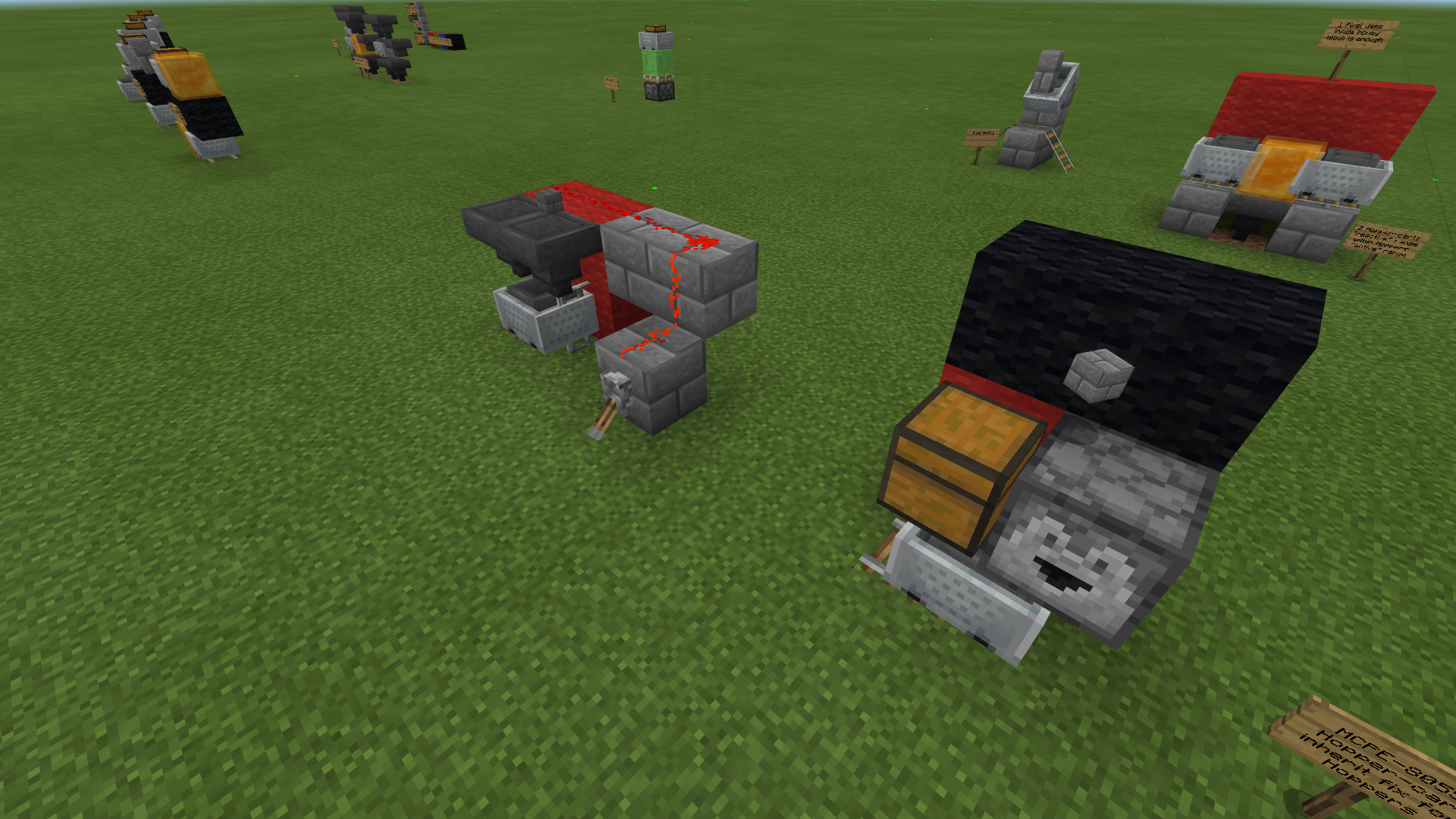
The attached world contains the following demo build:


Steps to reproduce:
- Open the attached demo world.
- Place a few stacks of any item in the hopper.
- Ensure the hopper minecart is empty.
- Press the button to send the hopper minecart to the other end of the track.
- Look at the hopper minecart's inventory.
Expected results;
The inventory is empty.
Actual results:
The inventory contains one item for each time it passed the hopper.
Notes:
The problematic behavior depends on all of the following being true:
- The hopper's output funnel must be pointed downward. If it's pointed to the side, no item is transferred.
- The hopper must be enabled (deactivated, i.e. it must not be powered directly by a redstone component nor adjacent to a powered solid block). Activating the hopper disables its ability to push an item out, which makes it seem like that's a crucial element of what's happening, and that would suggest that it's at least partly a hopper bug.
- Either there must not be a container-type block below the hopper, or the container must not be able to accept the items being pushed by the hopper (no empty slots and no partial stacks of the same item type).
- The hopper minecart must roll through a curve adjacent to but one block below the hopper. If the track is straight or on the same level as the hopper, no item is transferred.
Note that a hopper pointing downward to another hopper (or hopper minecart, as in this case) is the special configuration that transfers items between them at double the normal speed. I tend to think of this is the upper hopper pushing one item and the lower hopper or minecart pulling one item, both in the same redstone tick. That's why this seems like this could be partly a hopper bug.
I believe what's happening is that as the hopper minecart rolls through the curve, its collision box intersects the block space below the hopper, so it tries to pull items from the hopper just as it should if it were moving below it on a straight track. However, this is relatively recent behavior, and it's also puzzling because in configurations such as this there is usually a second hopper below the first. So the minecart should be crashing into the lower hopper. yet there is no indication of interference. The demo world is a much simplified version of my auto-smelter, which worked properly when I built it last year. It no longer works exactly right because when the hopper minecart, which is loading the items to be smelted into furnaces, is making its final trip or two, its inventory usually has an empty slot that allows it to accept bamboo from the fuel hopper as it passes by. The bamboo then winds up in the input slots of some of the furnaces. All the desired items have been smelted by the time this happens, so the machine is still usable, but it's inconvenient to have to remove the unsmeltable bamboo from the input slot of each furnace after the job is done.
This also occurs if you replace the hopper-minecart with a chest-minecart. It does not occur if you replace the hopper with a barrel. So it is clearly the hopper pushing, not the hopper-minecart pulling.
This could be related to the fix to MCPE-47541, if that included an adjustment to the hopper’s push range or push detection function to accommodate its new hitbox and collision box. Or, it could be related to the fix to the push-side of MCPE-54244.
Update: I was not able to get the errant transfer to occur after placing either a hopper or barrel under the misbehaving hopper. I think that means it is unlikely to be related to MCPE-54244. Edit: actually this can occur if the hopper is not able to push items into the block with inventory underneath; see Auldrick's comment below.
Since It’s due to the hitbox of the hopper-minecart overlapping the range of the hopper, this issue is more related to MCPE-68912 than it is to MCPE-57637
I can think of no other mechanic that serializes item paths when multiple paths are present.
Actually this is how hoppers and hopper-minecarts work when checking for items to pull or collect as well. While testing MCPE-38963 I found that hoppers and hopper minecarts run 3 separate checks of the chunk data in series, always in the same order. They look in turn for
- blocks with inventory
- hopper/chest-minecarts
- collectible items
Prior to 1.16 they would stop checking at the first thing they found in range. This had a few notable consequences:
- A block with inventory above a hopper/hopper-MC would "lock" it from sucking in free-floating items or items in a hopper/chest-MC. For example, items pushed up against the side of a chest by a water stream could not be collected into a hopper below the chest.
- If there were multiple hopper/chest-minecarts above a hopper, then the hopper would only be able to pull from the first of those hopper/chest-minecarts in the chunk entity list, even if that one was empty and others in the space contained items. This was reported as a bug in
MCPE-54244. - If there were multiple free-floating items above a hopper/hopper-MC (or in the same block as a hopper-MC), then the hopper/hopper-MC would only be able to collect the first of those items in the chunk entity list, even if it already contained partial stacks of the other items. In other words, an item that did not match any of the partial stacks in a hopper/hopper-MC would "lock" the hopper/hopper-MC from collecting matching items. This was reported as a bug in
MCPE-38963.
In 1.16 MCPE-54244 was fixed, but the fix eliminated both (1) and (2). The elimination of (1) is reported as a bug in MCPE-80555, and it was discovered in connection with MCPE-68912. The behavior reported in the present ticket is analogous, the difference being that it concerns the pushing function of hoppers rather than pulling.
In other words, just like
- hoppers pulling from an hopper/chest-MC that crosses the block above them on a slanted track (
MCPE-68912) is a behavior that always existed but was not discovered and did not have much impact until the fix toMCPE-54244reversed (1) and created the behavior reported inMCPE-80555,
so
- hoppers pushing into a hopper/chest-MC that crosses the block under them on a curved track is a behavior always existed but was not discovered and did not have much impact until the fix to
MCPE-54244enabled the hopper to push into the hopper/chest-MC even if there was a block with inventory below the hopper.
Both the errant pulling reported in MCPE-68912 and the errant pushing reported in the present ticket are blocked when the hopper is actively transferring to/from the block with inventory.
Neither of these issues actually relates to MCPE-57637 at all, since the issue there is the incorrect spatial range of the hopper-minecart's search for entities. Here and in MCPE-68912 the issue is how hoppers handle hopper/chest-minecart collision boxes that partially cross their correct search range (something that was unnoticed until (1) above was reversed).
(For the record, (3) was not impacted by the fix to MCPE-54244, so it still occurs.)
Thank you for your report!
We're actually already tracking this issue at MCPE-57637, so I will resolve and link this ticket as a duplicate.
If you would like to add a vote and any extra information to the main ticket it would be appreciated.
If you haven't already, you might like to make use of the search feature to see if the issue has already been mentioned.
Quick Links:
📓 Issue Guidelines – 💬 Community Support – 📧 Customer Support – ✍️ Feedback and Suggestions – 📖 Game Wiki
Hello,
I think we’re all familiar with hopper-minecarts pulling from other minecarts with inventory diagonally on X+1, Y+2, Z+1 going back years now MCPE-57637 and recently hopper-carts began going even more crazy with the fix for MCPE-54244 where new items in “infected” hopper-mc MUST be drained first.
I had done some reading and I believe the main reason behind this bug existing for so long is the lack of details on previous tickets to explain how serious this issue is and its connection and history of fixes I believe are related all together:
MCPE-57637, MCPE-54244, MCPE-80555, MCPE-94293, MCPE-59302, MCPE-68912
Lets start building:
1. Place chest and attach hopper to top side and then add 1 upside down slab to side of hopper and 4 more slabs to the other side to make flat surface for 3 activator rails.
2. Then place full block on top of slab furthest way from hopper and add redstone torch and repeater towards activator rails and place activator rails on 3 remaining blocks, on the full block, place lever on top and then place observer facing out and place lever on its face as well.
3. Add 2x2 inverted slabs on top of activator rail and place 4 detector rails on top of slabs, parallel to rails bellow.
4. Block each of detector rail exits with full blocks.
5. Add frames with items for orientation for example:
White – X=X, Y=Y+2, Z=Z; - Correct pull
Red – X=X+1, Y=Y+2, Z=Z; - 1 off to Right
Green – X=X+1, Y=Y+2, Z=Z+1; 1 off to Right and Bottom
Blue – X=X, Y=Y, Z=Z+1; 1 off to Bottom
6. Place hopper-cart on activator rail and use lever on observer to send a test pulse.
7. Place 4 remaining hopper-carts on top for each colour code in order: Blue, Green, Red, White.
8. Fill containers with matching colours
9. Use either of levers.
Experiment
Expected Results:
- On Pulse - Chest contain white wool
- On Switch – Hopper-mc pulls white wool from hopper-mc directly above it.
Actual Results:
- On Pulse – Chest contain blue wool
- On Switch – Hopper-mc pulled from each container above in the same order I placed them it. Blue, Green, Red, White
Additional Observation:
- For hopper-mc to pull white wool, red wool container must be empty; to pull red wool, green container must be empty; to pull green wool, blue container must be empty.
- This order is fixed. While white wool is pulled, if any other containers receive more wool, it will force pulling from that container instead. I assume
MCPE-54244is related to this. - Pull order is based on order in which hopper-minecarts were placed.
- If 2x2 square of hopper-minecarts cross chunk border the pulling hopper-mc would only remember order of those within its own chunk.
- Hopper-mc pushed towards brick wall pole is still able to pull diagonally. Tile-able designs require each hopper-mc to be placed individually and be equally pushed to the brick wall to prevent cross-contamination (very time consuming).
- Most effective way to keep hopper-carts pulling from Y+2 only was by having content in that container only when bottom hopper-cart is placed.
In summary:
Hopper-carts pull diagonally if given a chance to
Hopper-cart bellow can pull from chest-minecarts
Must pull in the same order minecart-containers above were placed – has the ability to prioritize pulling
Pushing towards brick wall did not affect pulling range
Also suggest that the source of the bug is a result of upper minecarts having their “collision box?” overlaying each other at the edge of scan from minecart bellow
Diagonal pulling only pulls from minecarts towards positive X Y Z and since I could not find any information as to how does hopper-minecart actually scans for target (mathematical formula), I can only assume this is caused by the lack of off-set for the calculation resulting in either bottom hopper-cart scanning extra area towards positive or hopper-cart invading scanned area of a hopper bellow with extra size towards negative. It could be both actually although I guess it is the second one.
I am aware that this could be considered a “duplicate” ticket and I really hope Moderators won’t close it so that players can find it and learn how to manage this diagonal pulling effect until developers can deal with it. I should probably point out that his is a new behaviour that I assume is the result of fix to MCPE-54244 and unresolved issue MCPE-57637 which exists for about 2 years now with label “won’t fix” or “work-as-intended” and now not only “can” pull diagonally but now hopper “must” stop pulling from hopper-cart directly above to pull from “infected” hopper-carts first if they have items inside.
This bug affects builds such as: Storage/item-transportation systems, Super-smelters which are the most complicated and time-consuming builds with practical application in survival worlds. It took me two days of experimenting in creative world with different combinations until I found a behaviour pattern that I want to share with you…
2 Clips attached and world in creative mode with example ready, one shows the “new” bug, the other solution – Make sure to focus on the order of hopper-carts being placed. (I am facing East on clips (X=X++))
That’s all I can do for now, I gathered the all information I could, so don’t hesitate to ask me any questions, I will answer as soon as I can.
Thank you very much for reading,
P.S. Ticket MCPE-46706 describes a behaviours which have very similar "angle" of operation - perhaps it is worth reading through as well.
Hello everyone,
For the transparency of this report - I will split redstone blocks behaviours into two categories:
Active - what does it do?; Reactive - what blocks does it affect?; And also to save on word count I will use made-up names for things like:
Hopper-cart - Hopper with minecart
Container-cart - Hopper with minecart and chest with minecart
Any-cart - Any type of minecart
For example: A hoppers ability to pull items from above and push them bellow is an active property and the 2 chests from which it pulls from and then transfers to, is a reactive property.
I will now present a number of experiments and briefly state my observations.
Experiment A - done for information purpose:
The hopper-cart active component only affects hopper directly above and reactive part comes from hopper above it and bellow. Adjacent hoppers are unaffacted, works like expected.
Experiment B - good example of when action and reaction becomes important:
Hopper-cart is pushed towards honey block. three hoppers can now push items into hopper-cart but hopper-cart can only pull from hopper to the left. Meaning, moving hopper-cart shifted its reactive range but the active range remained unchainged.
Experiment C - any-cart bouncing off air:
Honestly, this one is hilarious to watch. Off-rail any-cart on top of a slime block risen by a button activated piston results in launching any-cart very high into the air and first few bounces of a slime block appear to take place about a block higher almost as if it bounced off invisible block. I can't comprehend this one but it does seem relevant enough to include.
Experiment D - any-cart phase into block as if placed on ramp down rails:
Pushing any-cart towards a brick wall stop with a rail track 1 block bellow placed perpendicularly to the one above results in any-cart phasing right into a solid block. long story short, any-carts reacts to presense of two rails.
Experiment E - ejecting any-carts
Any-cart moved towards iron bar pole results in ejecting any-cart 1 block further than actual reach of extended pistons with rails. This does not happend when the same spot is obstructed by a solid block. it is relevant to reactivity issue however, I think that this particular behaviour can be useful in redstone contraptions. Could it be intended?
Experiment F - function rails react to any-cart but any-cart won't react to rails
Ticket MCPE-33886 could be indirectly relevant to this issue, maybe?. Nevertheless, at the scenario of placing detector rail from inventory resulted in rail only being able to give redstone signal output through comparator. for the sake of precision of results, piston is used to push function rail at the place of iron bar. At this point, detector rail reacts to the presense of container-cart but when activator rails are pushed instead and then powered, they will not deactivate the hopper-cart. This indicate that any-carts are in range for rails reactivity but the rails are outside of any-carts reactivity.
In summary, based on the observation, I can consider the fallowing statements to be true:
Active behaviours of anycarts can only be trigged by the exact same rail that supports it. If minecarts are pushed any further than iron bars that are used to stop them, they fall off rail resulting in shifting to next rail accordingly.
Reactive behaviours of any-cart require itself to be at a pixel deep inside adjacent block that is also a reactive part to any active component from elsewhere.
Clearly Active elements are Data-Driven and Reactive elements are Hitbox-Driven.
These are merely the ones that I am aware of and I couldn't find any directly relevant tickets (apart from MCPE-33886) and I firmly believe some of these behaviours are a by-product of a hopper + hopper-cart serializing control which is better described in the comment section under ticket: MCPE-94293.
Honestly, I am very uncertain of the level of impact these can have on players and truth is I came accross them while studying MCPE-57637 issue. I wrote this thing down with mentality that "it is better to write it down and have it closed than not writing it all" of course until these go out of control at point of which I assume, a lot of people would make their own tickets.
Thank you very much for your time. 
Attached content:
Screenshots of "Experiments"
.rar archive of MC world that I used for this
Three things are going on there, I think.
- Logically two hopper-minecarts under a container can only pull an equal share of items from that container if there are multiple items in the container to begin with, or if items are being added to the container at twice the rate that each hopper-minecart is pulling.
- The game likely processes entities actions in the order that those entities were added to their chunk's data. So I would guess that you placed the hopper minecarts left-to-right, and that entails that for any pair, the hopper-mc on the left will always pull before the hopper-minecart on the right. That's why you're seeing the leftward bias in where items end up.
- There is a bug causing diagonal pulling by hopper minecarts in some directions: MCPE-57637. That may or may not be impacting what you've built here.
Based on (1) and (2), what you're seeing isn't a bug, its just a logical consequence of what you've built and how the game works. There are other ways to split items from one container to multiple destinations. What you're trying to achieve may require using redstone timing circuits to control hopper or hopper-minecart activity.
Does MCPE-57637 describe your issue? (This is a common problem with super smelters.)
Thank you for your report!
We're tracking this issue in MCPE-57637, so this ticket is being resolved and linked as a duplicate.
If you would like to add a vote and any extra information to the main ticket it would be appreciated.
If you haven't already, you might like to make use of the search feature to see if the issue has already been mentioned.
Quick Links:
📓 Bug Tracker Guidelines – 💬 Community Support – 📧 Mojang Support
📓 Project Summary – ✍️ Feedback and Suggestions – 📖 Game Wiki
Thank you for your report!
We're tracking this issue in MCPE-57637, so this ticket is being resolved and linked as a duplicate.
If you would like to add a vote and any extra information to the main ticket it would be appreciated.
If you haven't already, you might like to make use of the search feature to see if the issue has already been mentioned.
Quick Links:
📓 Bug Tracker Guidelines – 💬 Community Support – 📧 Mojang Support
📓 Project Summary – ✍️ Feedback and Suggestions – 📖 Game Wiki
Thank you for your report!
We're tracking this issue in MCPE-57637, so this ticket is being resolved and linked as a duplicate.
If you would like to add a vote and any extra information to the main ticket it would be appreciated.
If you haven't already, you might like to make use of the search feature to see if the issue has already been mentioned.
Quick Links:
📓 Bug Tracker Guidelines – 💬 Community Support – 📧 Mojang Support
📓 Project Summary – ✍️ Feedback and Suggestions – 📖 Game Wiki
– I am a bot. This action was performed automatically! The ticket was resolved by one of our moderators, and I left this message to give more information to you.
Thank you for your report!
We're tracking this issue in MCPE-57637, so this ticket is being resolved and linked as a duplicate.
If you would like to add a vote and any extra information to the main ticket it would be appreciated.
If you haven't already, you might like to make use of the search feature to see if the issue has already been mentioned.
Quick Links:
📓 Bug Tracker Guidelines – 💬 Community Support – 📧 Mojang Support
📓 Project Summary – ✍️ Feedback and Suggestions – 📖 Game Wiki
Thank you for your report!
We're tracking this issue in MCPE-57637, so this ticket is being resolved and linked as a duplicate.
If you would like to add a vote and any extra information to the main ticket it would be appreciated.
If you haven't already, you might like to make use of the search feature to see if the issue has already been mentioned.
Quick Links:
📓 Bug Tracker Guidelines – 💬 Community Support – 📧 Mojang Support
📓 Project Summary – ✍️ Feedback and Suggestions – 📖 Game Wiki
Thank you for your report!
We're tracking this issue in MCPE-57637, so this ticket is being resolved and linked as a duplicate.
If you would like to add a vote and any extra information to the main ticket it would be appreciated.
If you haven't already, you might like to make use of the search feature to see if the issue has already been mentioned.
Quick Links:
📓 Bug Tracker Guidelines – 💬 Community Support – 📧 Mojang Support
📓 Project Summary – ✍️ Feedback and Suggestions – 📖 Game Wiki
– I am a bot. This action was performed automatically! The ticket was resolved by one of our moderators, and I left this message to give more information to you.
Thank you for your report!
We're tracking this issue in MCPE-57637, so this ticket is being resolved and linked as a duplicate.
If you would like to add a vote and any extra information to the main ticket it would be appreciated.
If you haven't already, you might like to make use of the search feature to see if the issue has already been mentioned.
Quick Links:
📓 Bug Tracker Guidelines – 💬 Community Support – 📧 Mojang Support (Technical Issues) – 📧 Microsoft Support (Account Issues)
📓 Project Summary – ✍️ Feedback and Suggestions – 📖 Game Wiki
– I am a bot. This action was performed automatically! The ticket was resolved by one of our moderators, and I left this message to give more information to you.
Confirmed in 1.14.30 exactly as the reporter describes. Hopper minecarts will pull from other hopper minecarts that are 1 block above to the south or east when there is no block with an inventory above the pulling hopper minecart.
With further testing after reviewing duplicate reports I have determined:
To sum up, hopper minecarts pull from other hopper minecarts and minecarts with chest that are relatively positioned (+1 X OR +1Z) AND (+1Y OR +2Y).
Note that a duplicate of this report,
MCPE-61362, points out thatA moderator in outside discussion raised the question whether pulling from an inventory at +2 Y is intended at all. So, I have uploaded a video showing a hopper minecart pulling from a minecart with chest 2 blocks directly above it (+0 X, +2 Y, +0 Z) to confirm that it does not happen only when the entity with inventory is offset in the X or Z direction.
Just saw this issue on my creative world today. Doesn't have inthe issue in the one axis on my super smelter, then I added a corner, and suddenly getting spillage from the one Hopper minecart to the other. I'm on the Xbox One and have the most recent update. I would greatly appreciate a fix for this one. Thanks!
1.16.0.57 also
Does the fix to minecart hitboxes in 1.16.0.57 (MCPE-59302) not impact this bug?Nope, it's unrelated. This bug is in the the hopper-minecart search function.
Now, the fix for
MCPE-54244in 1.15.0.53 does impact this bug, because that fix allows hoppers and hopper-minecarts to ignore blocks with inventory above them and continue searching through hopper/chest-minecarts above and/or to the S or E side of those blocks. So now this bug is worse. (SeeMCPE-80555.)also the latest 1.16.0.66
Affects 1.16.0.67
I am Currently having this issue where a minecart hopper is "steeling" from an adjacent hopper one block above: attached is you tube video link: https://youtu.be/mhNsP4oifu4
It was discovered whilst following a tutorial for a Bedrock super smelter and occurred both before and after the 1.16.1 hotfix for player skins (unrelated but thanks for that fix)
this is on PC Bedrock
my apology's for having created an unnecessary thread elsewhere
Affect 1.16.1 as well.
Affects 1.16.20.54 Beta
the hopper is hopping items too fast
affects 1.16.20
In an earlier comment I mentioned that hopper minecarts can pull from hopper/chest minecarts 2 blocks directly above (+0 X, +2 Y, + 0 Z). That behavior was not included in the original report here, but the question was raised whether it might also be unintentional and therefore related to this bug. After giving it some thought I want to urge that it be left alone in the fix to this bug.
Pulling from +2 Y straight above has not been reported to have any negative impact and it does not introduce any inconsistency. You could say it's inconsistent with not pulling from container blocks at +2 Y, however, it is consistent with pulling item entities from +2 Y. It can only be consistent with one or the other. Leaving it as-is is surely the simplest option (in terms of recoding). More importantly, hopper minecarts pulling from hopper/chest minecarts at +2 Y opens up design posssibilities, including the following.
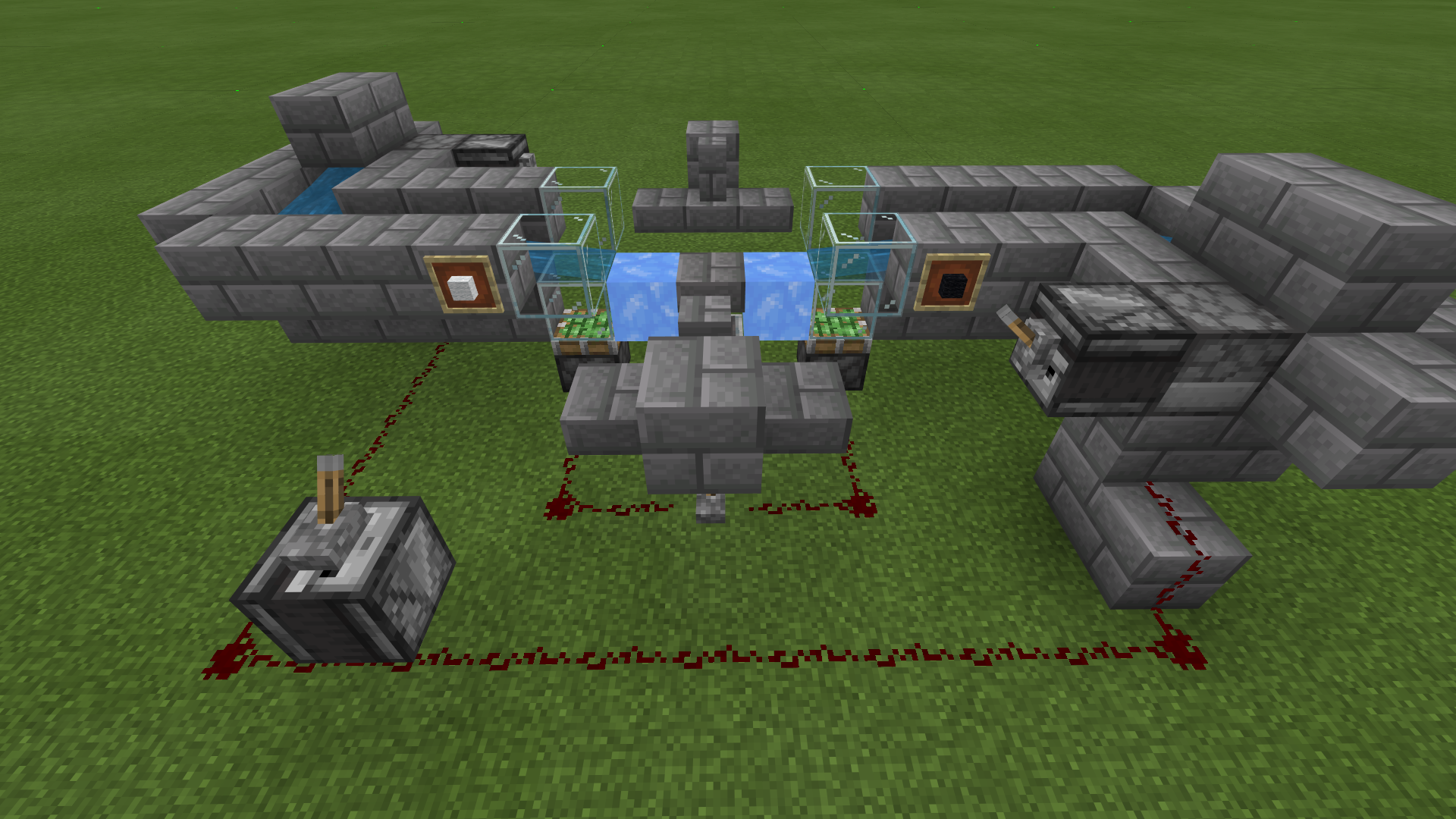
Currently you can make a fast item sorting filter by placing, from the bottom up, hopper + activator rail w/ hopper minecart + glass/upper-slab + detector rail w/ hopper minecart + solid block (especially ice). Behind this column a comparator reads the minecart on the detector rail, and sends a signal to a block that inverts a torch that powers the activator rail. This setup allows items to be sorted from on top of the ice (possibly from a water stream) much more quickly than a filter made with hoppers, so it can be useful for bulk storage. But using hopper minecarts in a filter in this way depends on them sitting on the right kinds of rails, which would not be possible if they could not pull from other hopper minecarts at +2 Y. If you just fix the diagonal pulling, then it will be safely 1-wide tileable. Here is a picture:

Affects 1.16.200.53 Beta.
Dear Mod's and Dev's,
I hope you will read this as I did a number of experiments which collectively answer the question "why does it happend?".
So, we all know that this applies only to the container-carts.
Only towards X+1, Y+2, Z+1.
Issue 1: do hopper-carts scan larger area towards positive coordinates?

Answer: No, based on seen contraption made to deal with random droppers drop and uneven acceleration from water, also with hopper-cart placed on different Y levels observation confirms that scan range is not the case of an issue.
Issue 2: hitboxes of container chest overlapping?

Answer: Also no, different configurations also evidence that this bug does not care for the respective rail placement (e.g. bottom rail facing N-S and upper W-E)
Issue 3: What makes a hopper - hopper?
Answer: A short line of code "minecraft:item_hopper" - not really helpful but name itself doesn't specify if thats a hopper-cart or hopper block.
Note: Hopper to hopper-cart is in its essense a trade-off of ability to push items for the mobility and additional pulling range. Although, using shared "components_groups" theoretically, suggest that any changes targetted to hopper behaviour will result in same behaviour change to hopper-cart, right?
Issue 4: Did recent changes to hoppers had an impact on hopper-carts?
Part_A: Fix from ticket

MCPE-80555denies hoppers the ability to pull through blocks.Part_A - Anwer: Fix intended to prevent hoppers from collecting free-floating items above blocks with inventory applied to Hopper-carts!
Part_B: Fix from ticket

MCPE-54244give hoppers bellow ability to scan entities above when they're stacked.Part_B - Answer: The fix intended for Hoppers alone applied to Hopper-cart!
Issue 5: Will container-carts slammed into honey block be within pulling range of hopper underneath?

Note: If both container-carts have equal "reactive" range to "active" pulling by a hopper bellow would further suggest that:
Behaviour to manage distance form entities towards X+ and X- must've been mathematically corrected and then hard-coded into the game.
Since hopper-carts are basically a "buff" for hoppers range of pulling indicates these two are being treated same by the behaviour control code that controls things like hopper serializing (detailed description found in comments section of tickets
MCPE-94293andMCPE-68912)Finally, with full confidence in my findings, I say that the reason this happens in game is because hopper-carts inherit behaviour controls that were intented only for hoppers.
@Krzysztof Matela: thank you for contributing your testing results. Your discoveries #2-4 are correct. However, I think your conclusion, that this bug is due to hopper-carts using behavior intended for hoppers, is not correct. As best I understand your points, I think you have overlooked a couple of facts:
Update: moved chart to a newer comment.
Affects 1.17
this bugs also didn't fixed in 1.18.12,
Affects 1.19.20
Affects 1.19.63. Built up a storage system for a mob grinder and had used a lot of hopper minecarts. The minecart would take items from the item filter to the south, and would basically break the entire system because it would drain one minecart (allowing it to take anything that passes over it, which is made even worse after the fix of
MCPE-38963) and has the ability to break filters around it. It was very annoying to discover what I thought was a redstone issue was actually a 3 year old bug...Affects 1.19.70 and the current betas/previews. This bug affects a multitude of possible storage systems and pretty much anything that uses hopper minecarts with precision.
With the fixing of
MCPE-38963we are now almost one step away from good item sorting systems. If this bug was fixed it would go a LONG way to achieve that goal.Still in 1.20.41
Still an issue.
1.20.81.01 still affected
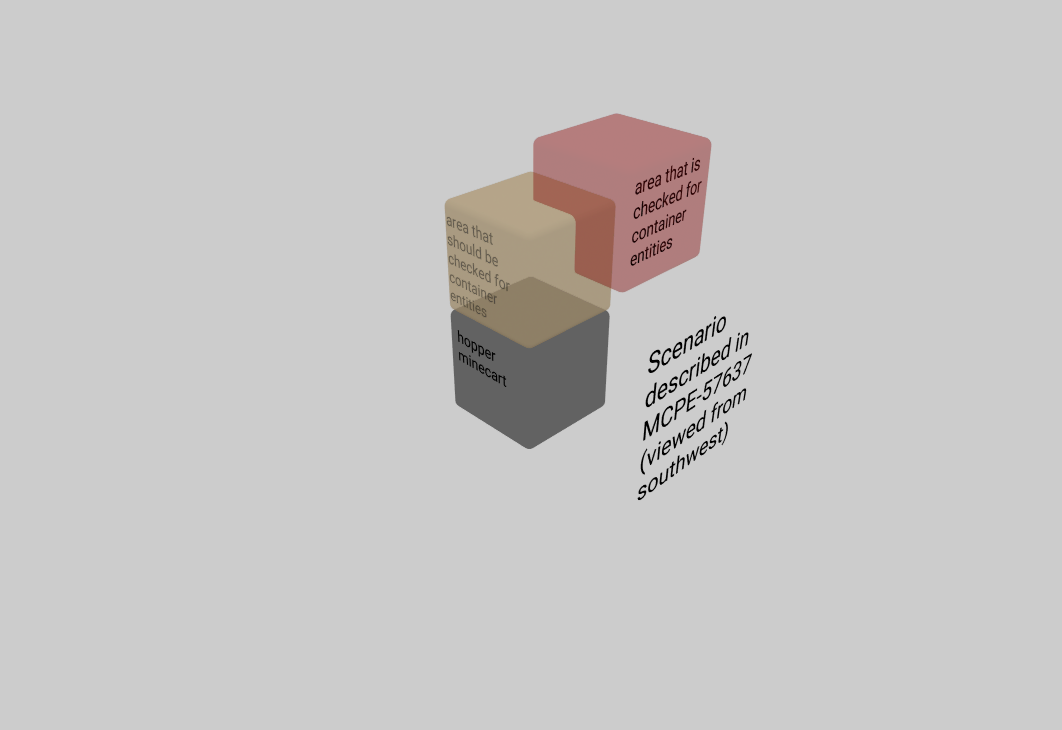
The bug here is actually a +0.5 offset in each direction in the reference point that the check range for containers entities is based on. The breadth of the range is correct. This is just like MCPE-167490 but in the opposite direction. The likely origin of the bug is that the code for hopper minecarts pulling from container entities was copied from the code for hoppers pulling from container entities without accounting for the fact that the hopper' position is the lower north-west corner of a block space (integer coordinate), while the position of a hopper minecart on a rail is the center of a block space.

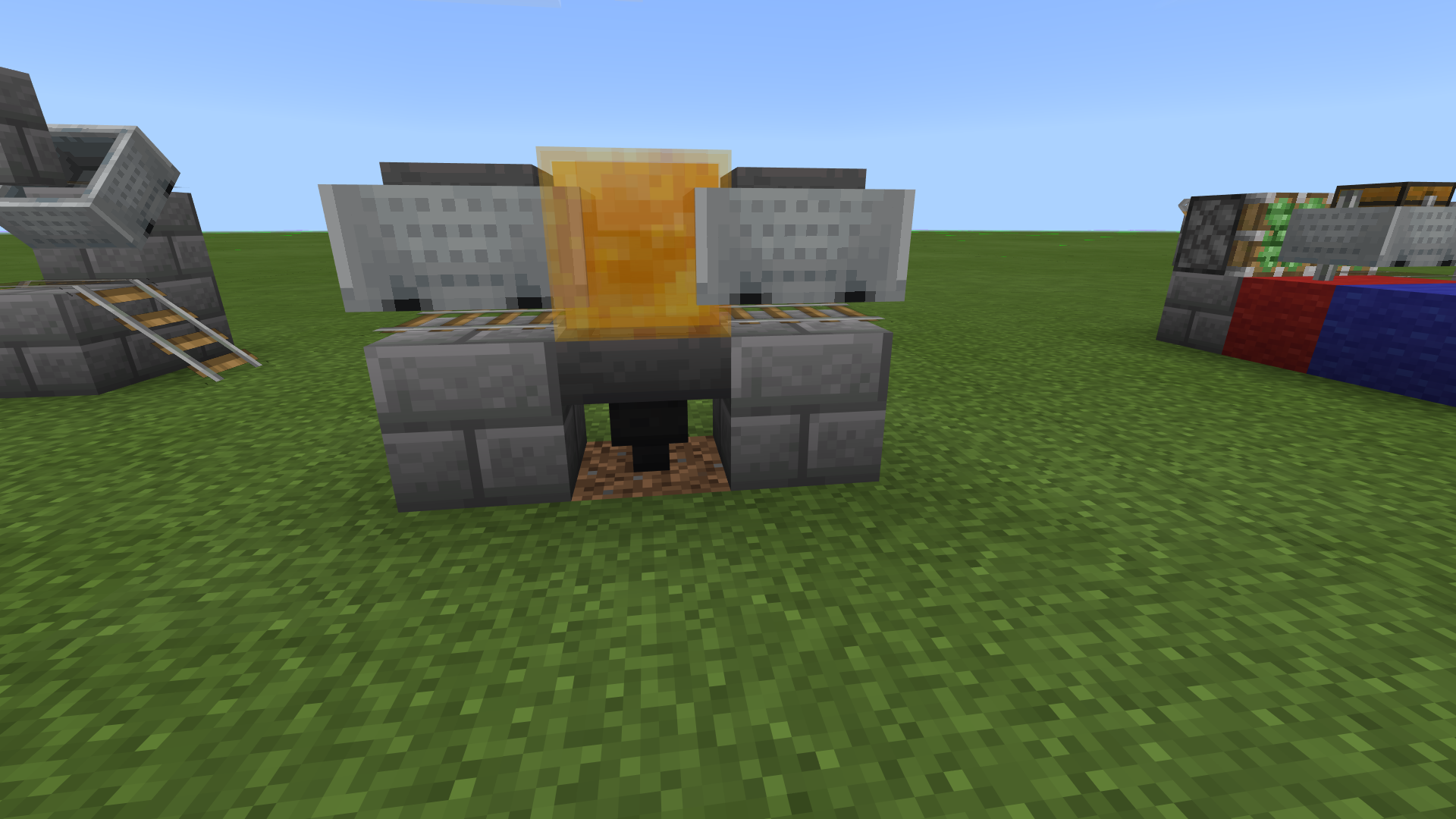
Based on this image, you can see why hopper minecarts pull from hopper/chest minecarts and chest boats up and to the southeast. You can also see why hopper minecarts cannot pull from a chest boat that is resting directly on top of them or a block next o them and hanging over. The boat collision box is less that 0.455 blocks high, so it can fit under the area where hopper minecarts check for storage entities.
Below is a full table of check ranges for hoppers and hopper minecarts based on my testing. The bugged offset range behind this bug is highlighted in red.
+1 Y
+0 Z
chest-boat
+0 <= X < +1
+1 <= Y < +2
+0 <= Z < +1
+0 <= X < +1
+0.625 < Y < +2
+0 <= Z < +1
+0.04 <= Y < +0.96
+0 Z
chest-boat
-0.0 <= X < +1
+1.0 <= Y < +2
-0.0 <= Z < +1
-1.5 <= X < +1.5
-0.5 <= Y < +0
-1.5 <= Z < +1.5
and
-0.5 <= X < +0.5
+0 <= Y < +1
-0.5 <= Z < +0.5
and
-0.5 <= X < +0.5
+0.5 <= Y < +2
-0.5 <= Z < +0.5