 Xavom
Xavom
- Xavom
- xavom
- America/Phoenix
- Yes
- No

 MCL-8407
![[Mojang] Grum (Erik Broes)](../../../data/assets/gravatar/grum.png)
 MC-122352
![[Mojang] Georgii Gavrichev](../../../data/avatars/users/22428.png)
![[Mojang] Searge (Michael Stoyke)](../../../data/assets/gravatar/searge.png)
![[Mojang] slicedlime](../../../data/assets/gravatar/slicedlime.jpeg)

 WEB-6834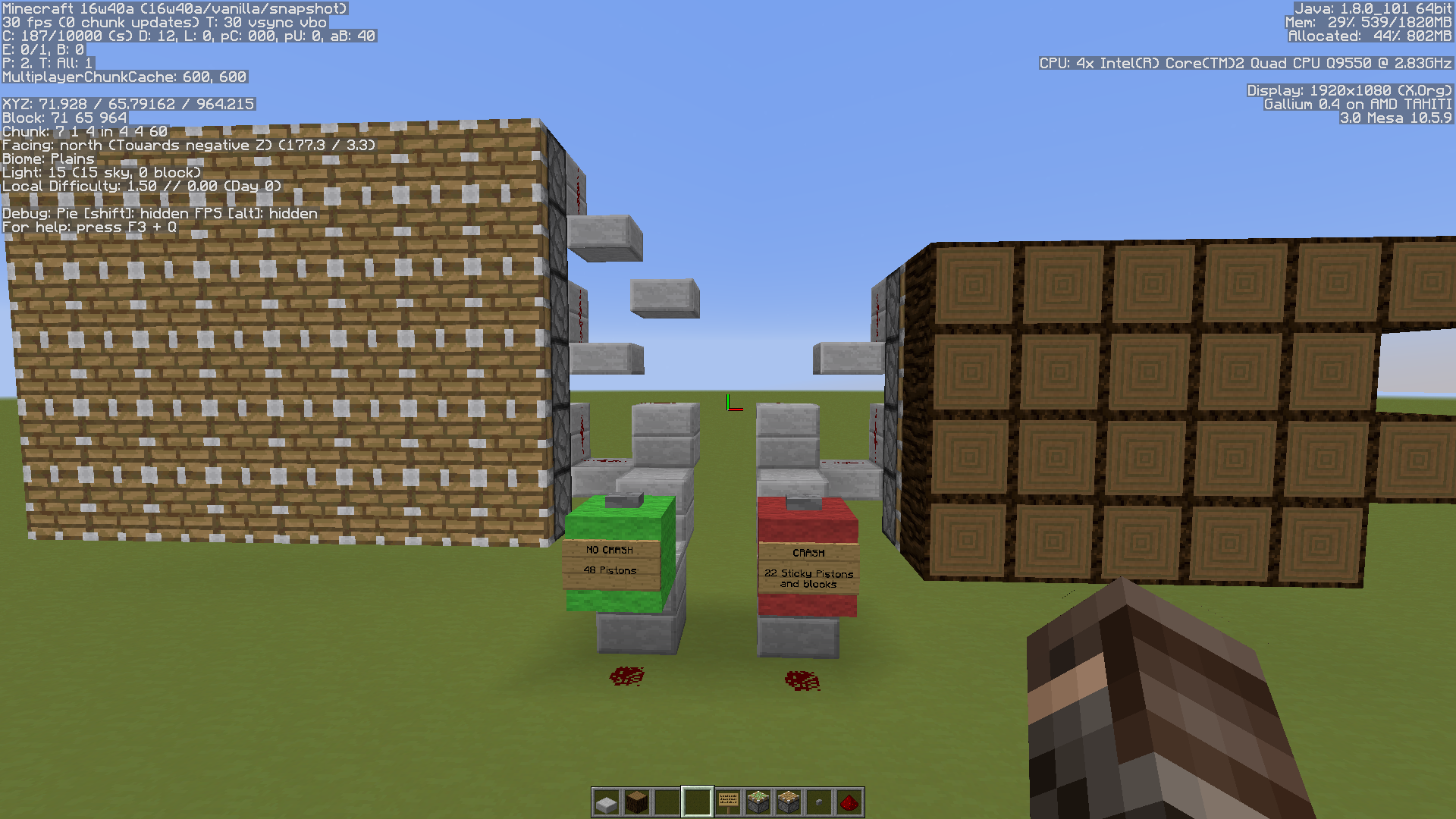

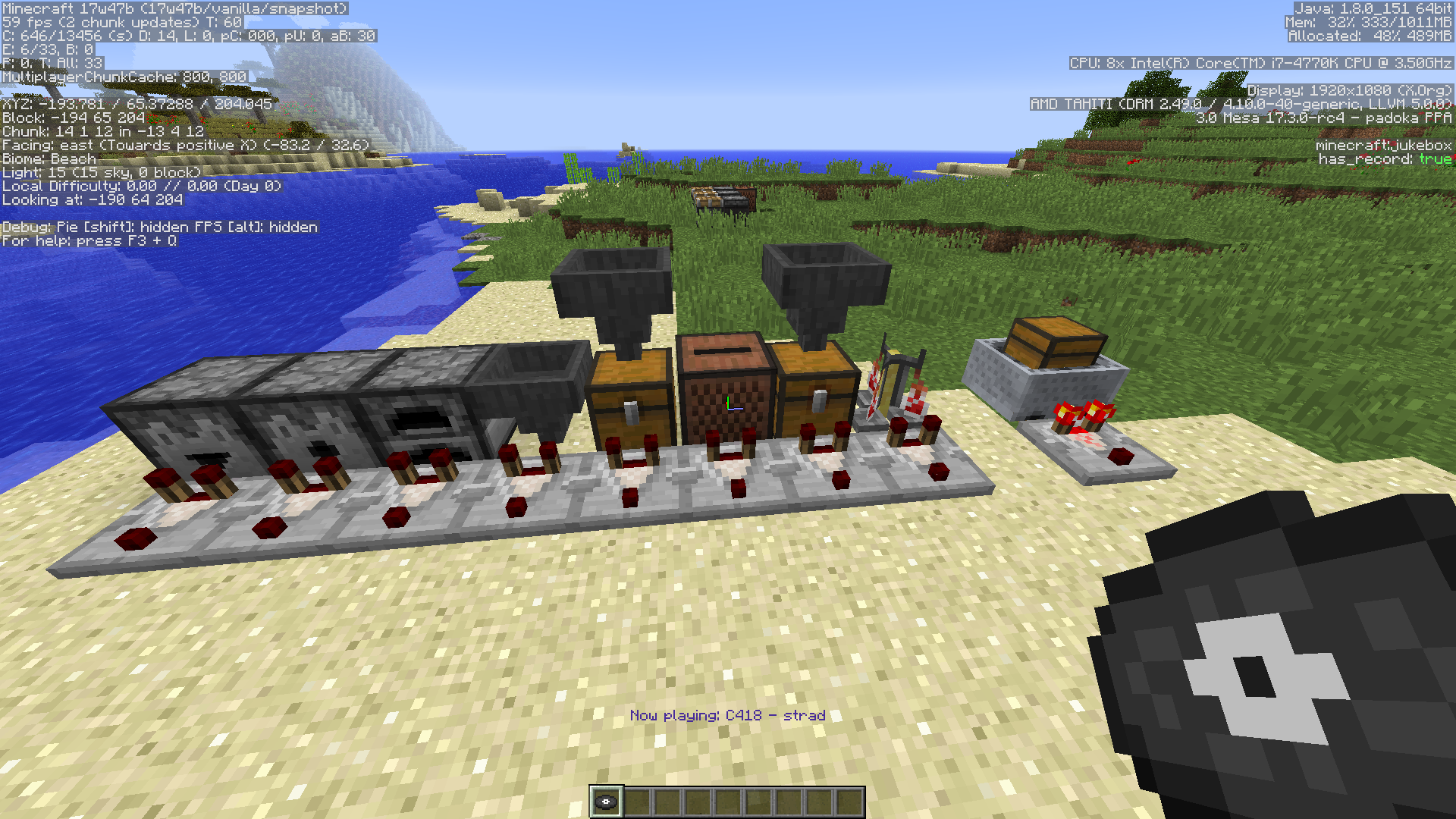
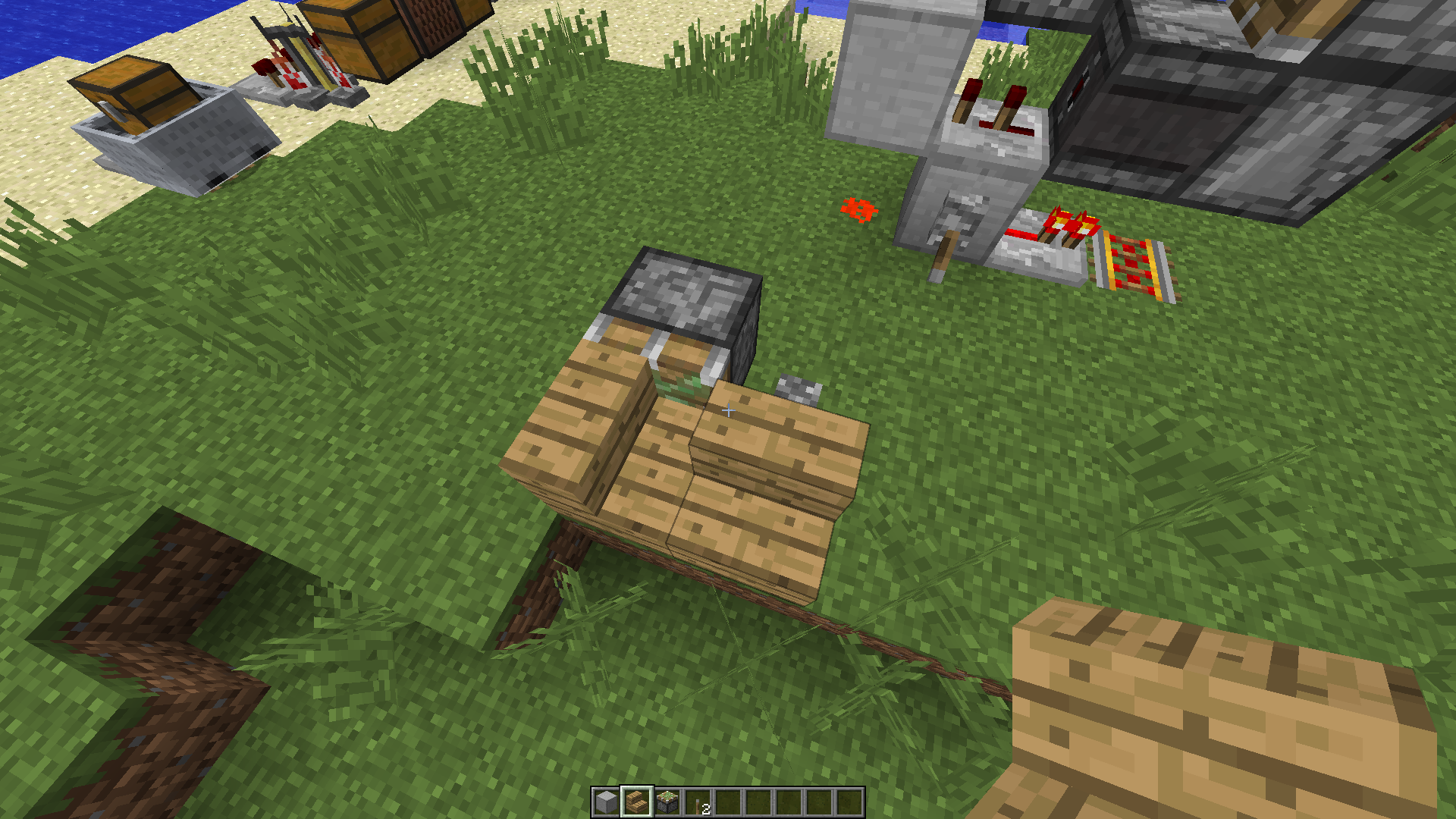
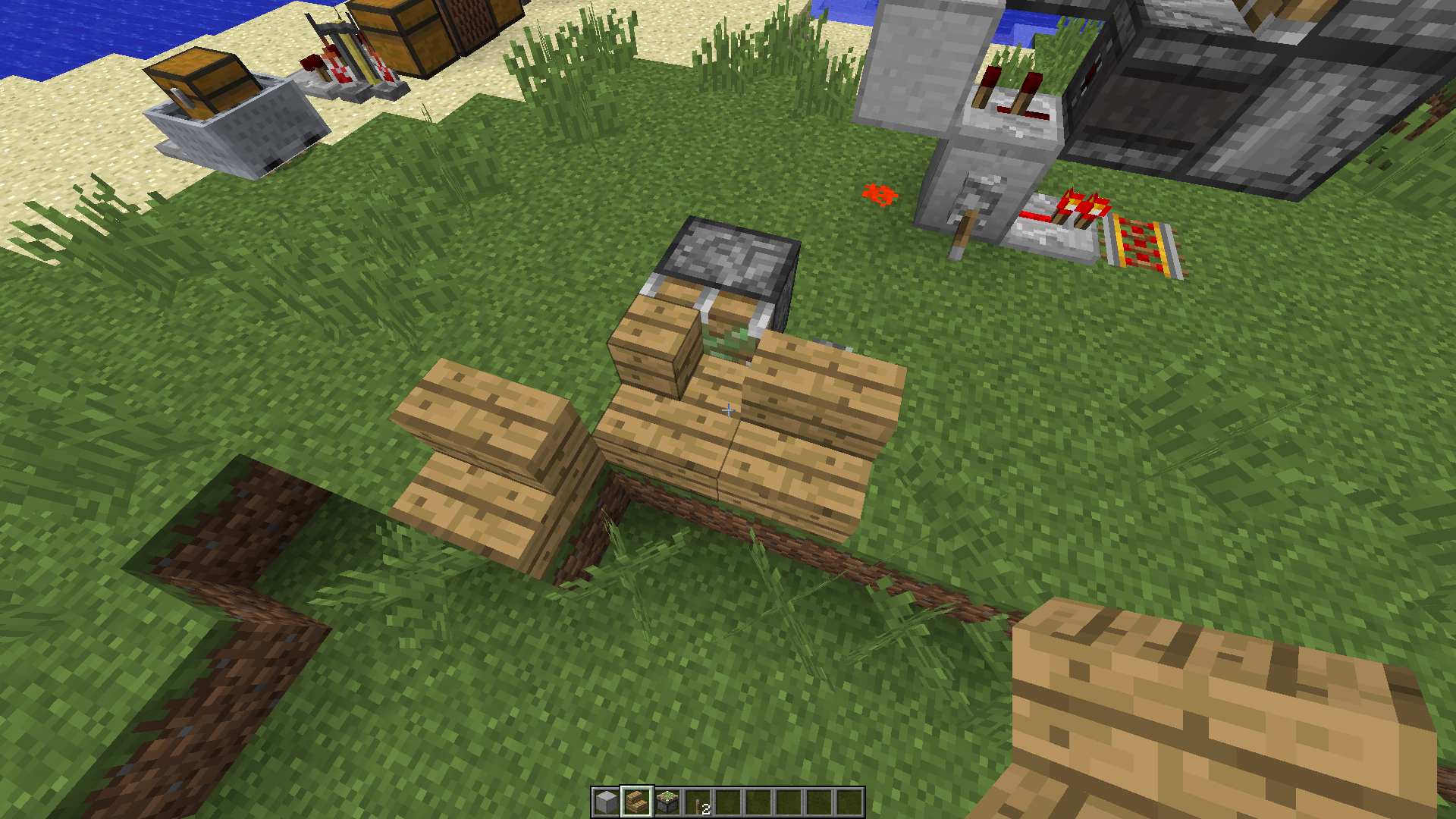
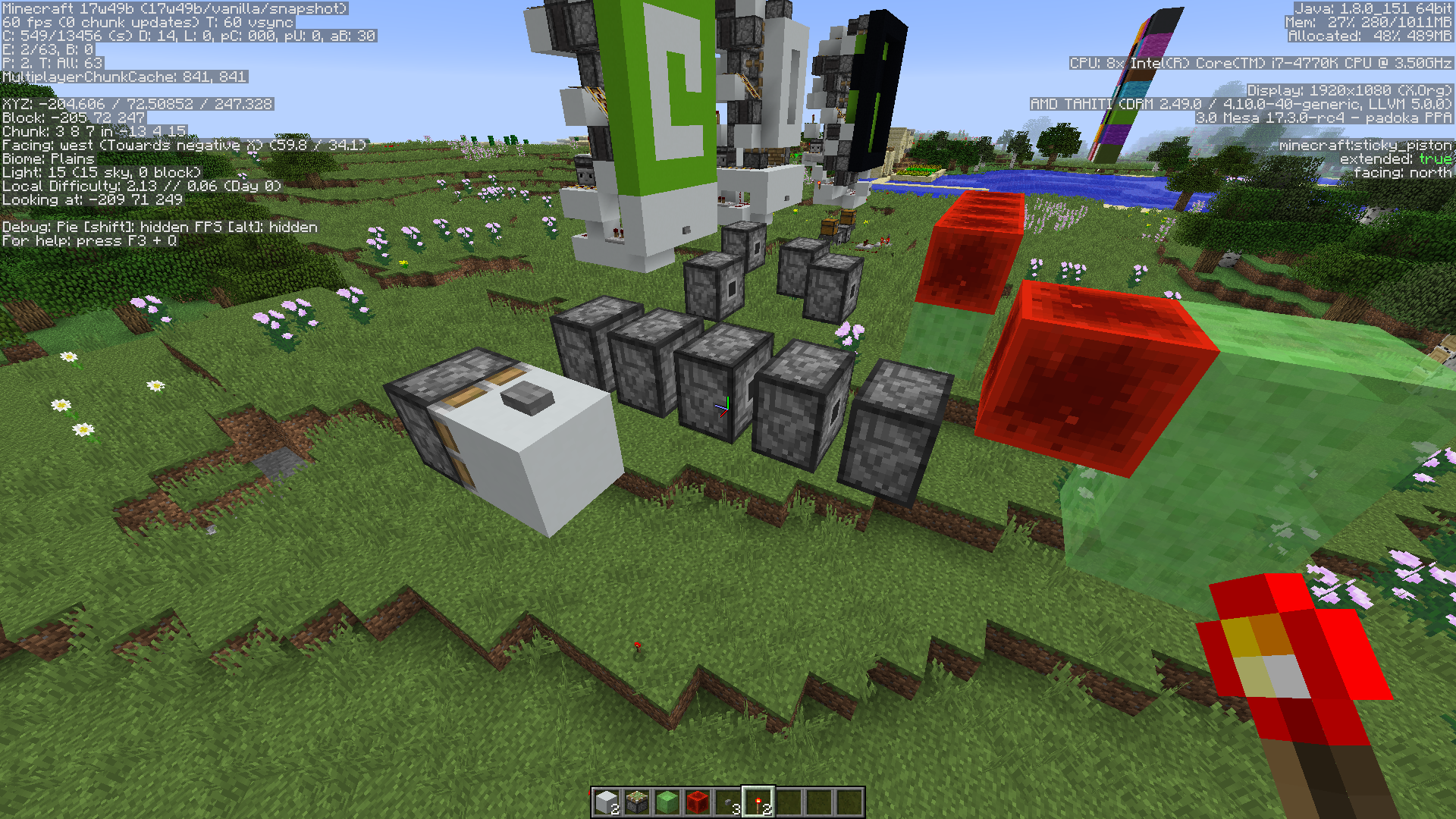

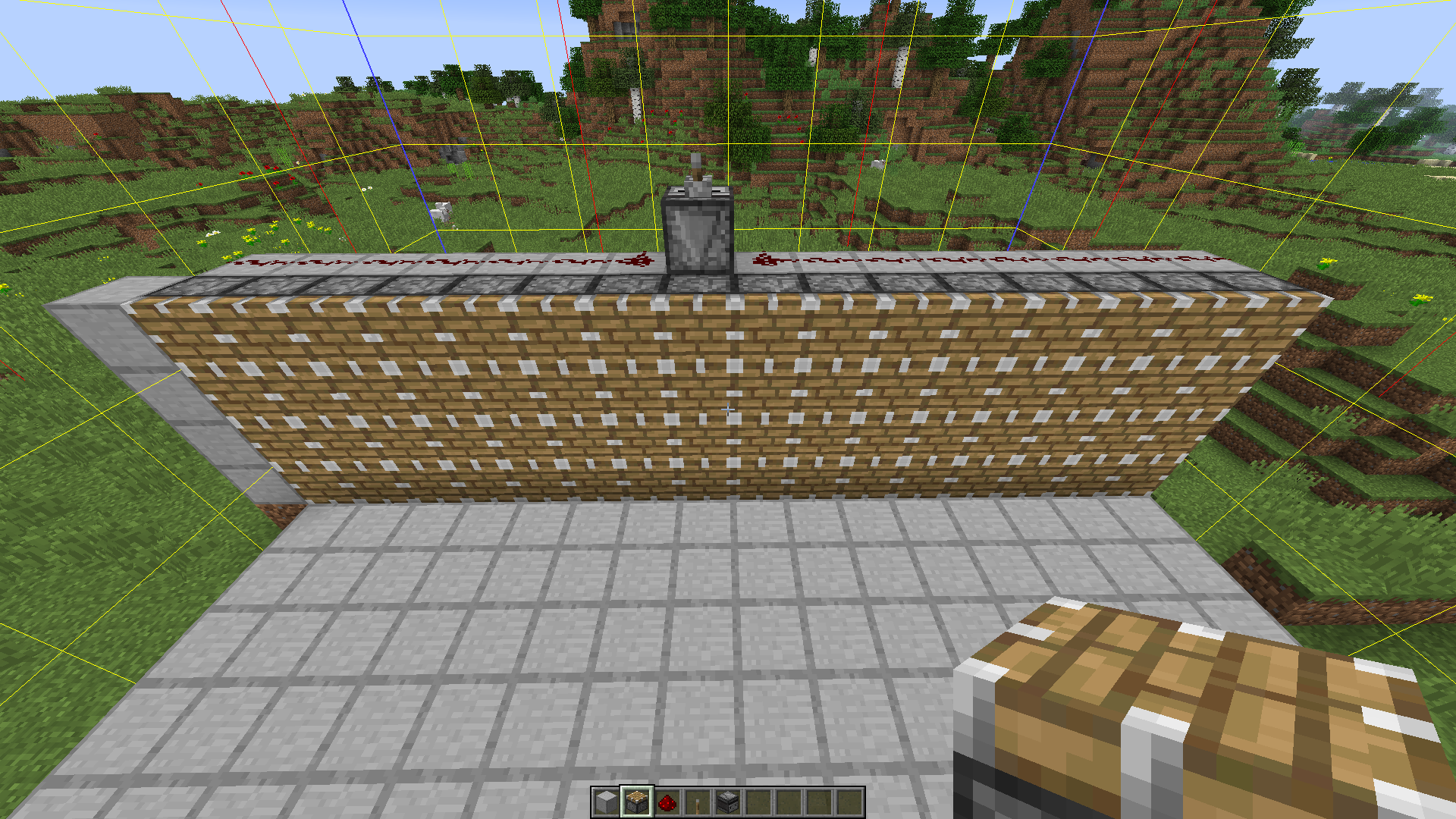



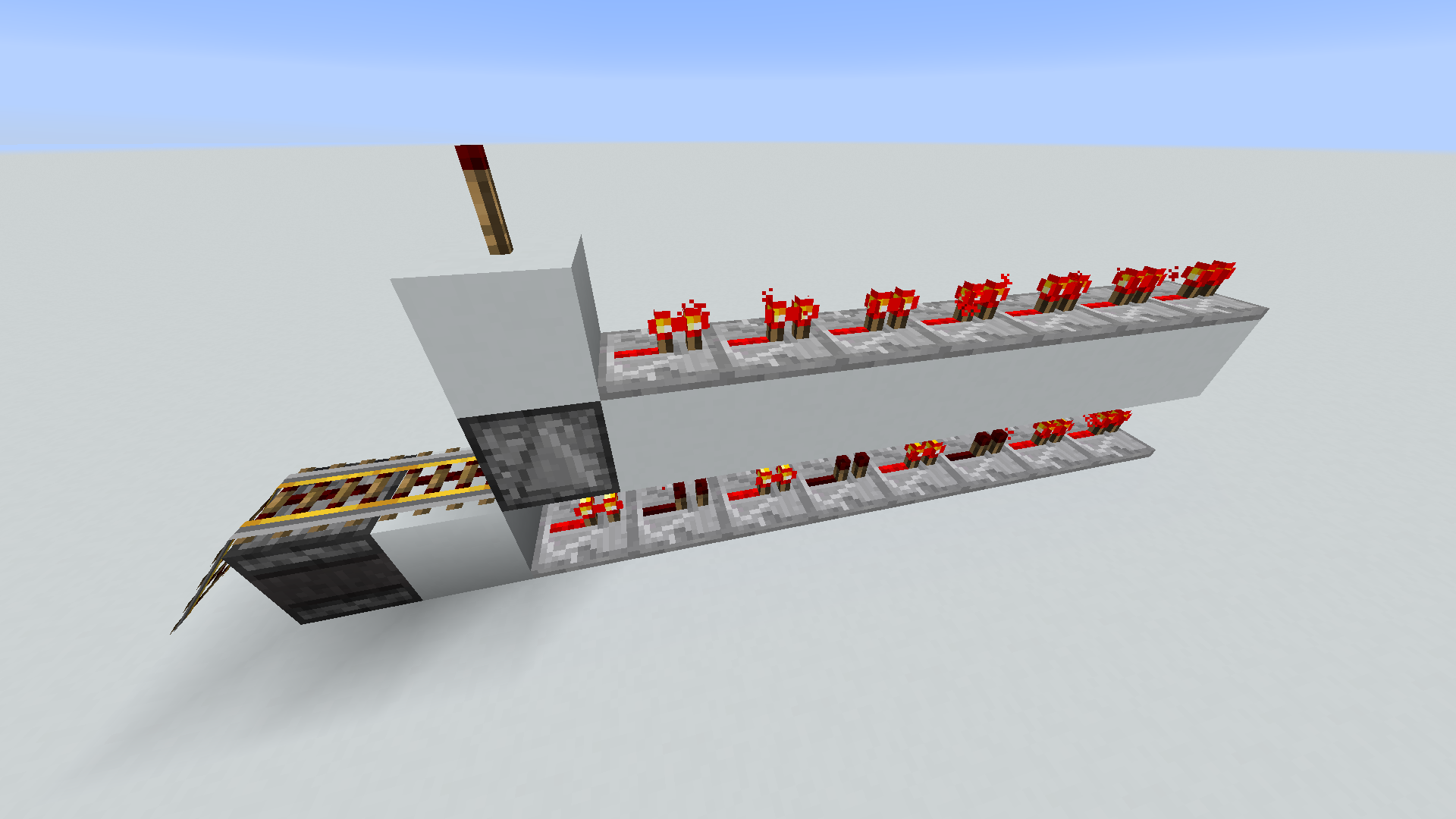
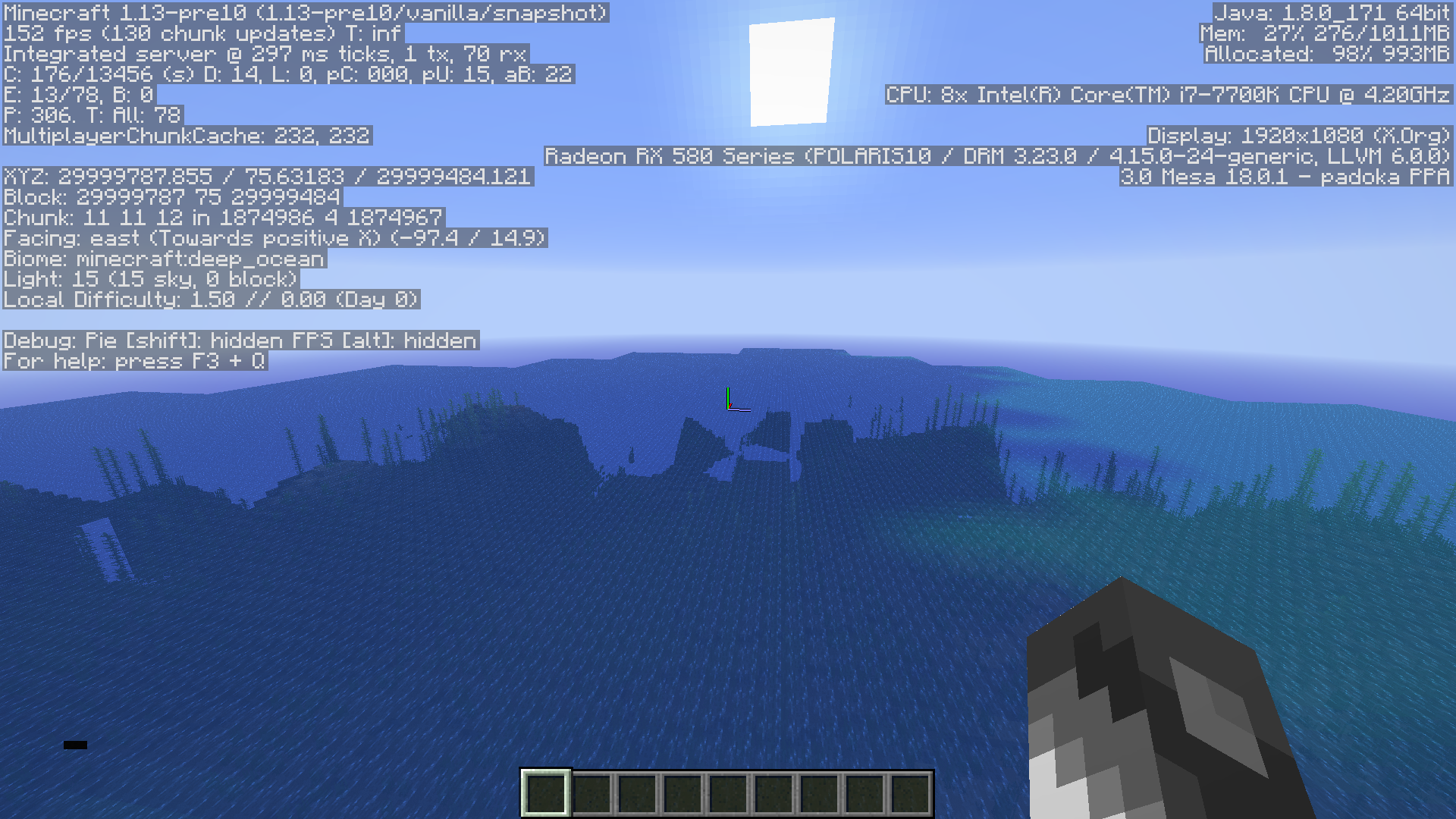
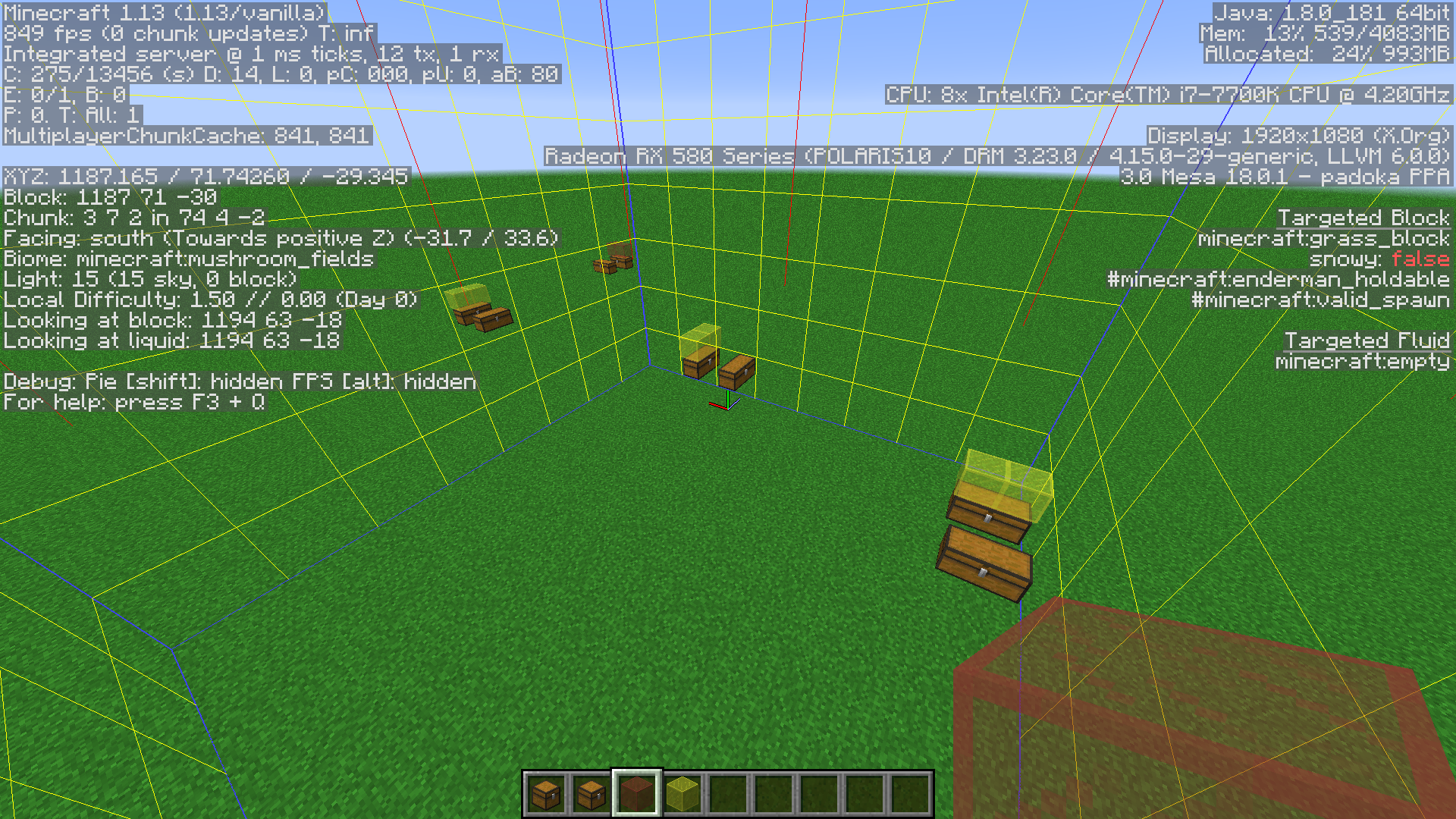
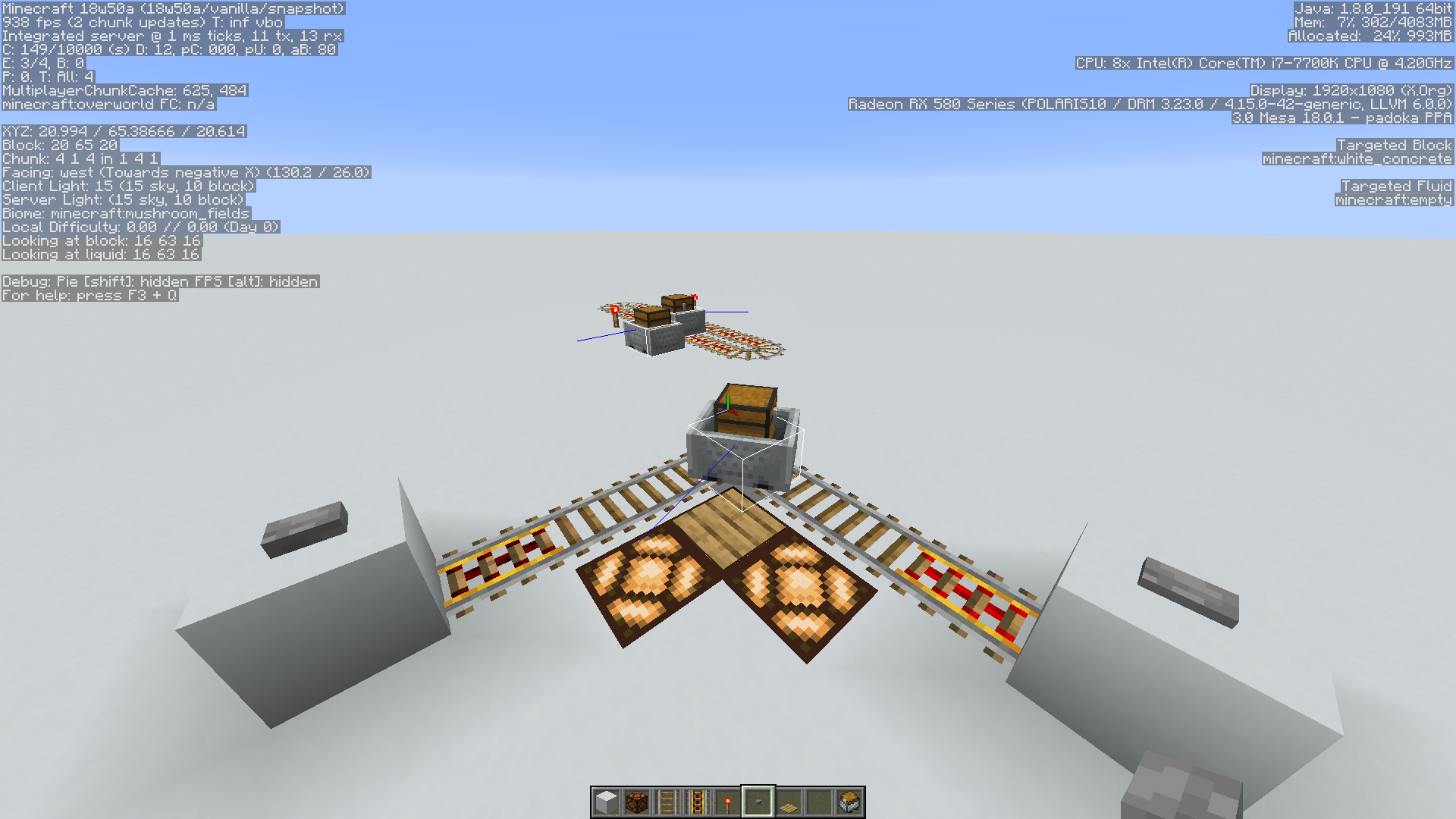


22 sticky pistons and blocks triggered causes crash.
Minecraft Launcher 1.6.84-j does not set game window resolution to that of the profile
 funky_sticky.mp4
To duplicate:
- Place a sticky piston facing horizontal or up
- Place a solid block attached to the piston head
- Place a button on top of the solid block, and push the button
What happens:
The sticky piston pushes the block and loses it's piston head, and cannot be updated.
Sticky pistons lose piston head when pushing the block which powers itPistons lose piston head when pushing the block which powers it
To duplicate:
- Place a
stickypiston facing horizontal or up- Place a solid block attached to the piston head
- Place a button on top of the solid block, and push the button
What happens:
Thestickypiston pushes the block and loses it's piston head, and cannot be updated.
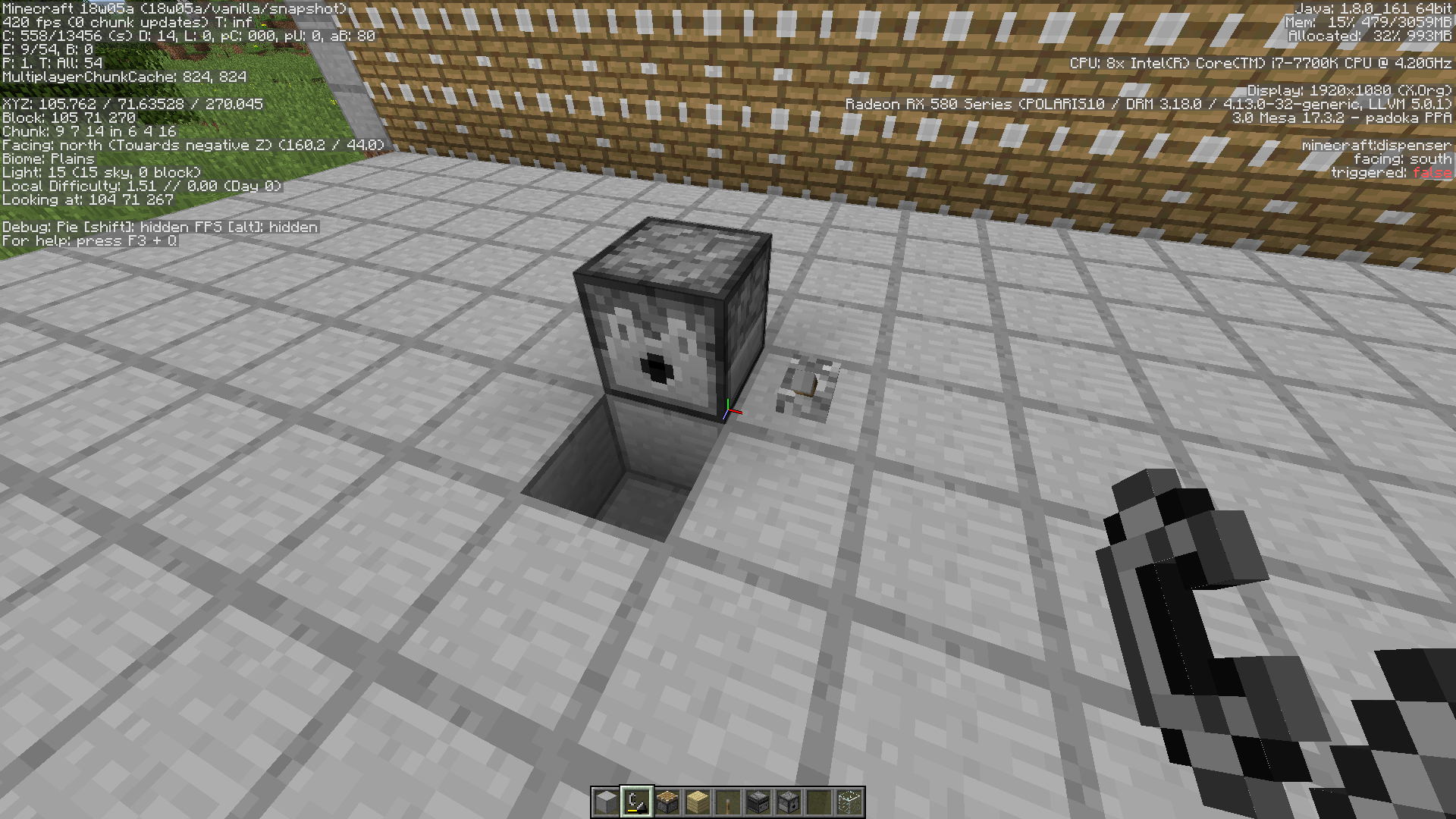
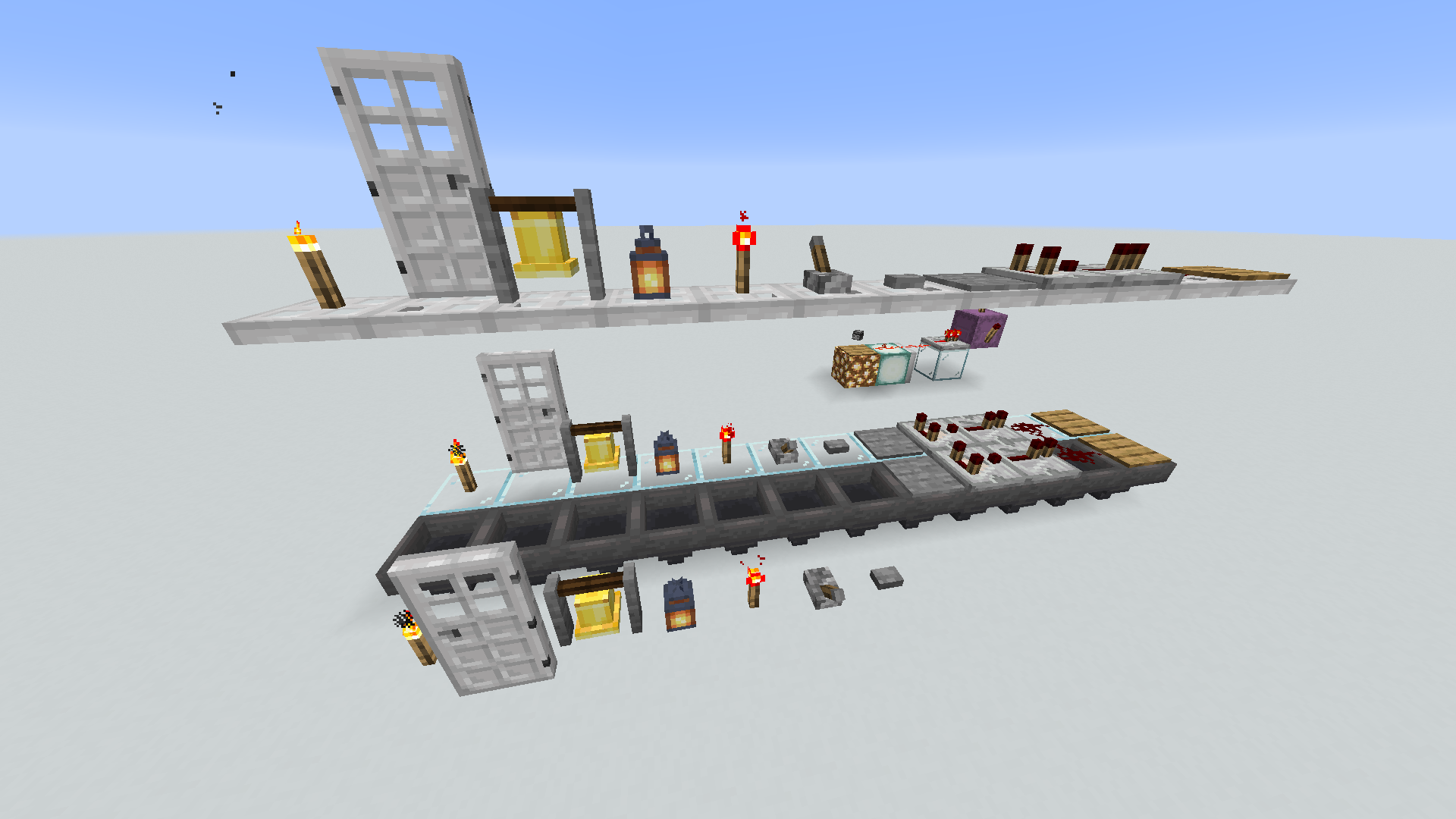
Can't place bells, buttons, lanternsorlevers on top of hoppersCan't place bells, buttons, lanterns, levers, torches, doors on top of hoppers
Can't place bells, buttons, lanterns, levers, torches, redstone torches, or doors on top of hoppers
Issue:
When generating a new world the game crashes with "Exception generating new chunk" error shortly after the world loads.
I am able to recreate it using the seed: 8223045022386406090 and using different world names as well. [^Attached crash report.
Issue:
When generating a new world the game crashes with "Exception generating new chunk" error shortly after the world loads.
I am able to recreate it using the seed: 8223045022386406090 and using different world names as well.[^Attached crash report.Issue:
When generating a new world the game crashes with "Exception generating new chunk" error shortly after the world loads.
I am able to recreate it using the seed: 8223045022386406090 and using different world names as well. Attached crash report: crash-2018-05-08_10.48.17-server.txt
Expected Behavior
When a player is using invisibility, wearing no armor, and sneaking, the hostile mob phantom should not be able to detect/target then attack the player beyond 20% of the normal range.
*Actual Behavior*
When the hostile mob phantom spawns due to the players rest statistic, it immediately targets and attacks the player regardless of the invisibility effect or conditions prior to spawning.
The game crashes as soon as the display (monitor) is turned on after being off.
Looking at the crash time stamp it appears to happen when the display is turn on after being off.
Attached crash report crash-2018-07-19_19.26.15-client.txtEDIT: This only happens If Pause on lost focus is Enabled.
Description: Unexpected error

java.lang.NullPointerException: Unexpected error
	at org.lwjgl.system.Checks.check(Checks.java:99)
	at org.lwjgl.glfw.GLFW.nglfwGetVideoMode(GLFW.java:1340)
	at org.lwjgl.glfw.GLFW.glfwGetVideoMode(GLFW.java:1363)
	at cfi.a(SourceFile:1833)
	at adr.b(SourceFile:104)
	at cfi.c(SourceFile:907)
	at cfi.a(SourceFile:392)
	at net.minecraft.client.main.Main.main(SourceFile:144)

	OpenGL: Radeon RX 580 Series (POLARIS10 / DRM 3.23.0 / 4.15.0-24-generic, LLVM 6.0.0) GL version 3.0 Mesa 18.0.1 - padoka PPA, X.Org
I came across this issue while attempting to play on a 1.14 SMP server. The hopper hitbox can trap you in a "crouch mode" (underwater) in which you cannot escape while in survival. The player seems to be forced in crouch mode without control to free from this mode.
Steps to recreate:
Go into a water 2 or more deep. Place a chest (or stone wall), place blocks on 3 sides, place a hopper above the chest. While swimming, swim up to the chest and stop. As soon as you go into crouch mode you are stuck and cannot move away.
I'd like this to be WAI. Hoglin’s are passive and piglin’s seem to be somewhere in between seeing as they are passive to players wearing a gold armor. Do all mobs necessarily have to follow a similar set of characteristics in each dimension, the undead were “changed” to sink and not drown in water. It’s refreshing to see changes to the norm.
Frequently after
haveI open more than one instance of Minecraft and log onto a server, exit them, later when I try to log onto a server I get the message:"Failed to log in:Invalid session (Try restarting your game and the launcher)"
If I close the game and restart the launcher it just keeps happening. I have the option to keep the launcher running unchecked in settings.
This started happening again around mid January 2023.
What I noticed is that after exiting the games completely (Quit Game), minecraft-launcher would still be in memory, and sometimes giving the Failed to log message. Not just for a few minutes, which happens sometimes. I have done this many times and even with both of my accounts. To resolve the inability to log onto a server I must manually end the processes, or restart the system every time.

Xavom I don't see much of a problem, if, as you stated, it got no implications whatsoever for mobs, water, minecarts, items etc., but is solely on the player's/client-side.
Not only can you do fun stuff with such ghostblocks like e.g. a ghostblock elevator: https://www.youtube.com/watch?v=sFAlX7TKz1s
or a ghostblock drawbridge where only you, but not hostiles can walk: https://www.youtube.com/watch?v=Og6bdoy92o0
In general, the Survival tech community embraces this bug for their contraptions, and it is not game-breaking, so, personally, and in favour of the tech community, I don't see any issues, even more so as ghostblocks are only a temporary thing and vanish or can be eliminated easily };]
I can also see good use for sophisticated, mind-boggling map technology.
I'm not sure about loss of items in waterstreams nor how ghostblocks affect loading/unloading of chunks, maybe [Mojang] Panda can help here.
It could be a really good argument in removing them, if it affects the gameplay negatively in any way, but I don't know enough about them to confirm this.
I'm aware that bugs need to be fixed, but I'd rather see the priority with really game-breaking bugs, for the Survival as well as Creative community, and let the tech community have fun with bugs that are rather "good bugs".
![[Mojang] Panda](../../../data/avatars/users/41658.png)
Meri Diana Sorry for falling into your back there Meri but I don't think the argument should be about whether ghost blocks need fixing or not.
While it's in some cases fun to play with them, they are still super derpy and unreliable behaviour that should be fixed eventually.
Xavom Items shouldn't be affected by ghost blocks. At least not really, but just client side. It might look like the item disappeared but after reconnecting it should be in the right position again. The loss of items is almost certainly unrelated to ghost blocks.
Ghost blocks are blocks that just exist on the client side of the game, but not for the server. You can't mine them to get the block back and they will disappear when relogging or when updating them (e.g. right clicking).
The title should probably be updated as this is by far not as severe as duplicating blocks 
[Mojang] Panda Don't worry about "falling into my back", I trust your word 😸
That being said, of course I also say all bugs need to be fixed at some point, I just feel this one doesn't have to as much as others have to atm ;-;
So as it's client-side we can deduct what Xavom said about having effect on the chunk loading is not correct?
That would have been the sole argument for me to sort of priotize this bug here more.
- And, yes, the title (and description "You probably don't want this to be exploited to the extreme. Right?") should definitely be updated 😸
Meri Diana
I agree with that.
What Xavom said is most likely unrelated to ghost blocks, unless it only happens in single player and would be caused by some cross connection between the client and the internal server. But I don't think that is the case.
Is there a bug post about what he described?
The cool down timer of hoppers is used for picking up and pushing out items.
This leads to hoppers that push out items, to only pick up items every 8th game tick.
If items happen to cross the hopper only outside of these ticks, the hopper might never pick up items, even though there are free slots in it.
What I expected to happen was the hopper picking up items.
What actually happened was the hopper not picking up items in certain cases.
Ways to reproduce
With hoppers
(by Xavom)
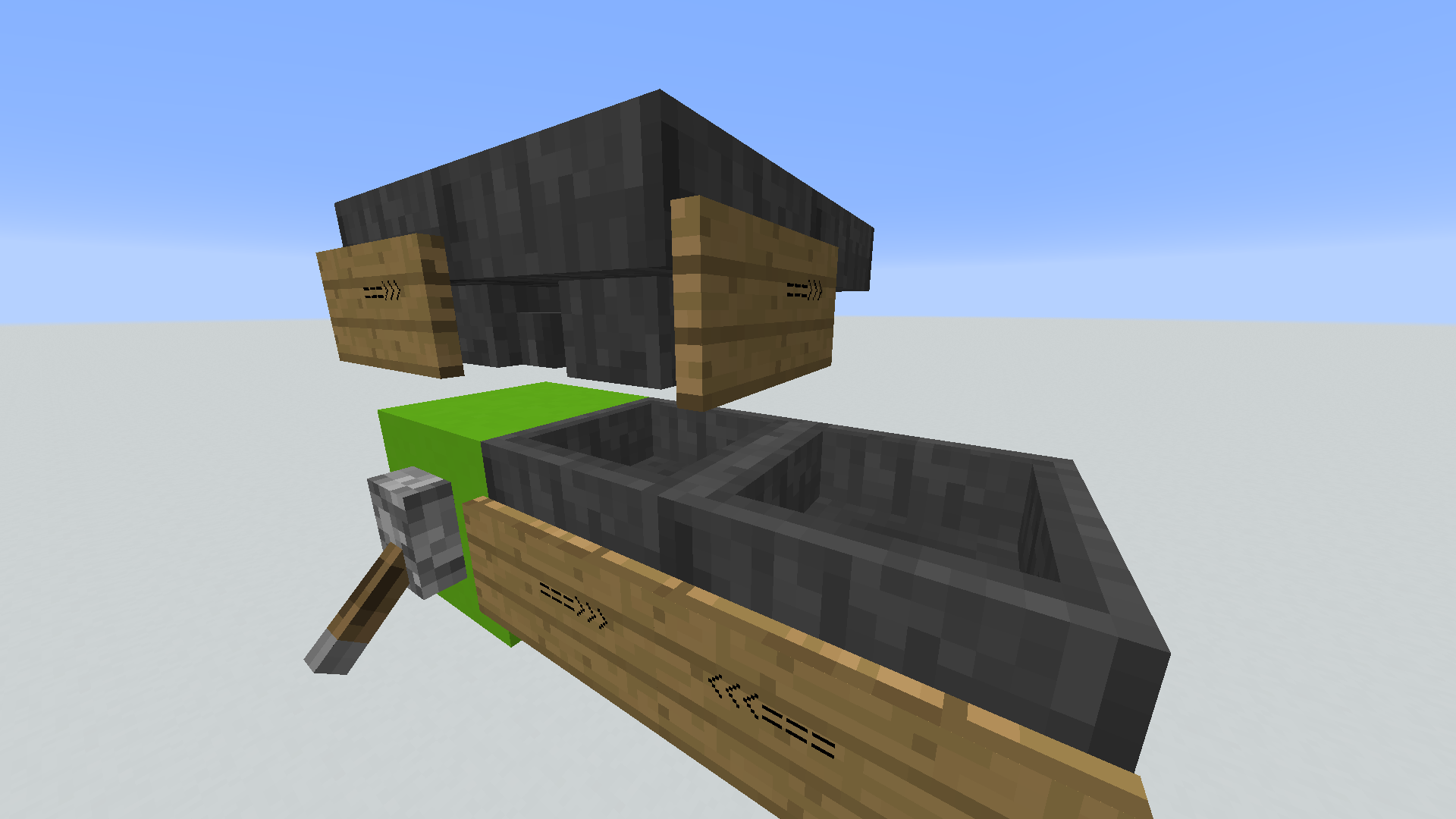
there's 4 hoppers in a loop on the top, and you should first power the block then put one item in each set of looping hoppers
With hopper minecart
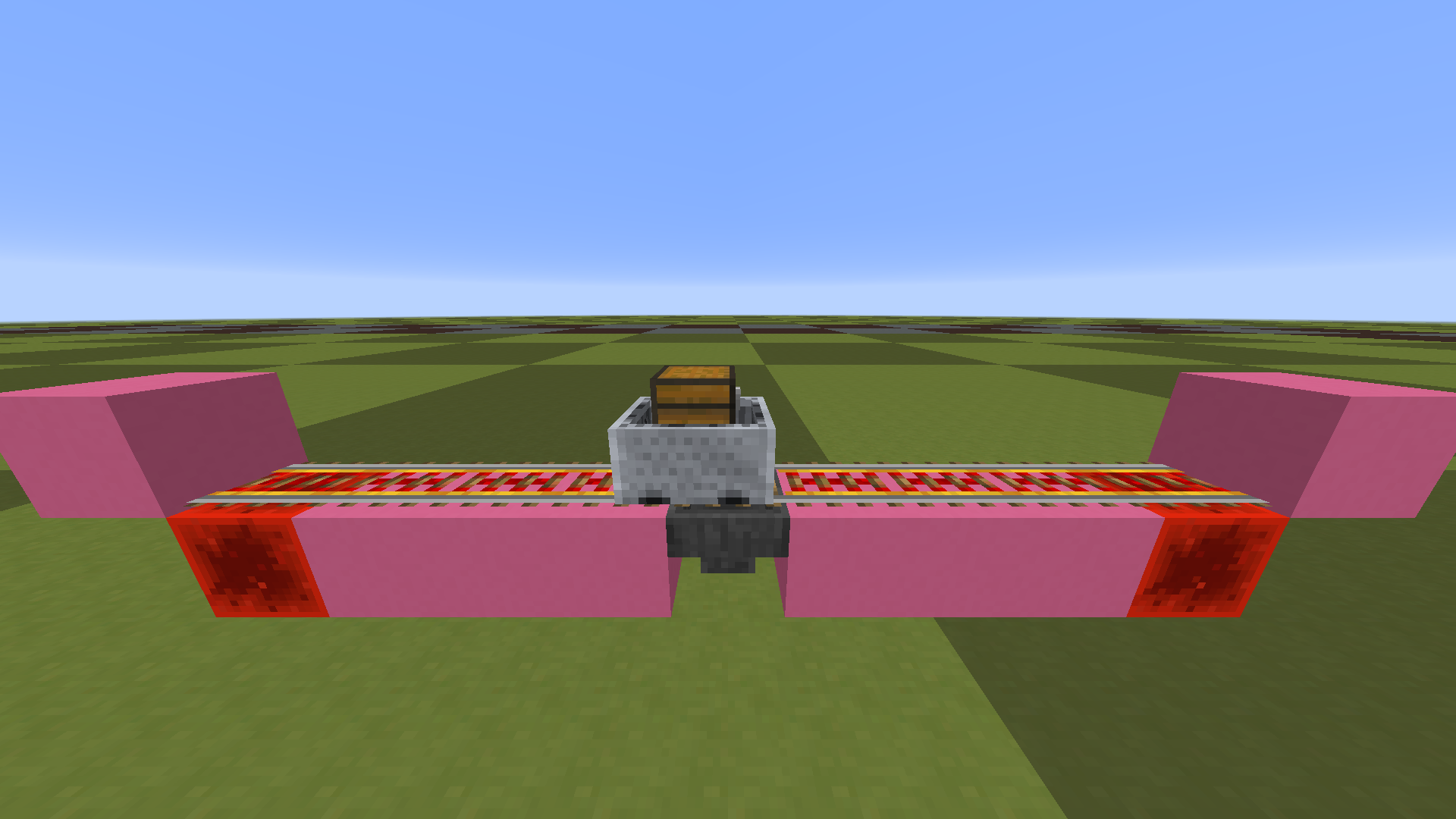
The minecart is driving back and forth on a 9 block long track.
In the center there is a hopper below the rail with some items in it pointing into another hopper that points back (pushing items back and forth between each other).
Depending on when the minecart started driving, the hopper will not pick up items from it.
Note that this is only the case when the hopper is pushing out items. If you break the second hopper it would pick up items fine.
The test setup is attached as structure file. mc-120596.nbt

The bug
The capitalisation of the line lang:en_US in the file options.txt (as found in profiles created in MC 1.8) prevents any resource from being loaded, therefore even the start menu displays the pink-black "missing texture" texture only.
Symptons are described in bug MC-122148, but the cause was misidentified (it has nothing to do with third-party resourcepacks being used) and the bug was not reopened, when Xavom pointed out the root cause (kudos to him/her). Hence this new report.
How to reproduce
- Create a new profile for MC 1.8
- Start this profile and change an option, such that options.txt is being written to disk, then close game
- Verify, that the options.txt file contains a line lang:en_US or similar with uppercase country code
- Change profile to use an affected snapshot version, e.g. 17w48a
- Start the game
The fix
The parser of the options.txt file needs to be able to deal with the capitalisation as found in MC 1.8 profiles, especially the language codes which are e.g. en_US in the older and en_us in the new version of Minecraft profiles.
TLDR:
- Minecarts can derail if at least 2 are on same track, bump each other and possibly accelerate (needs more testing)
- Reproducible for Minecraft 1.13 snapshots (noticed in 17w50a), confirmed for 1.12.2 by Xavom and [Mojang] Panda
- Derailing happens in the curves of a track
Derailing (of 1 of 2 carts, 1 containing an entity incl. player) seems to only happen with rails laid out in East-West direction, unless you have 3 carts on a track in North-South direction; derailing positively confirmed in this case for 2 carts containing mobs, 1 cart empty-
Currently unsure about directionality, in 1.15.2 pre-1, derailing happens for me at the moment solely in North-South-direction, if 2 entities are in a minecart, one can derail. (needs more case testing)- Derailing does not seem to happen if it's 2 carts only (with no entities) on a track as it seems you can't make them accelerate/not bump each other enough
 , they rather seem to drive together like train waggons (needs more testing)
 - Empty carts which are on neighbouring rail lines, laid out East-West show a different behaviour than empty carts on neighbouring rail lines, laid out South-North; it seems the minecart collision box differs here, see video:

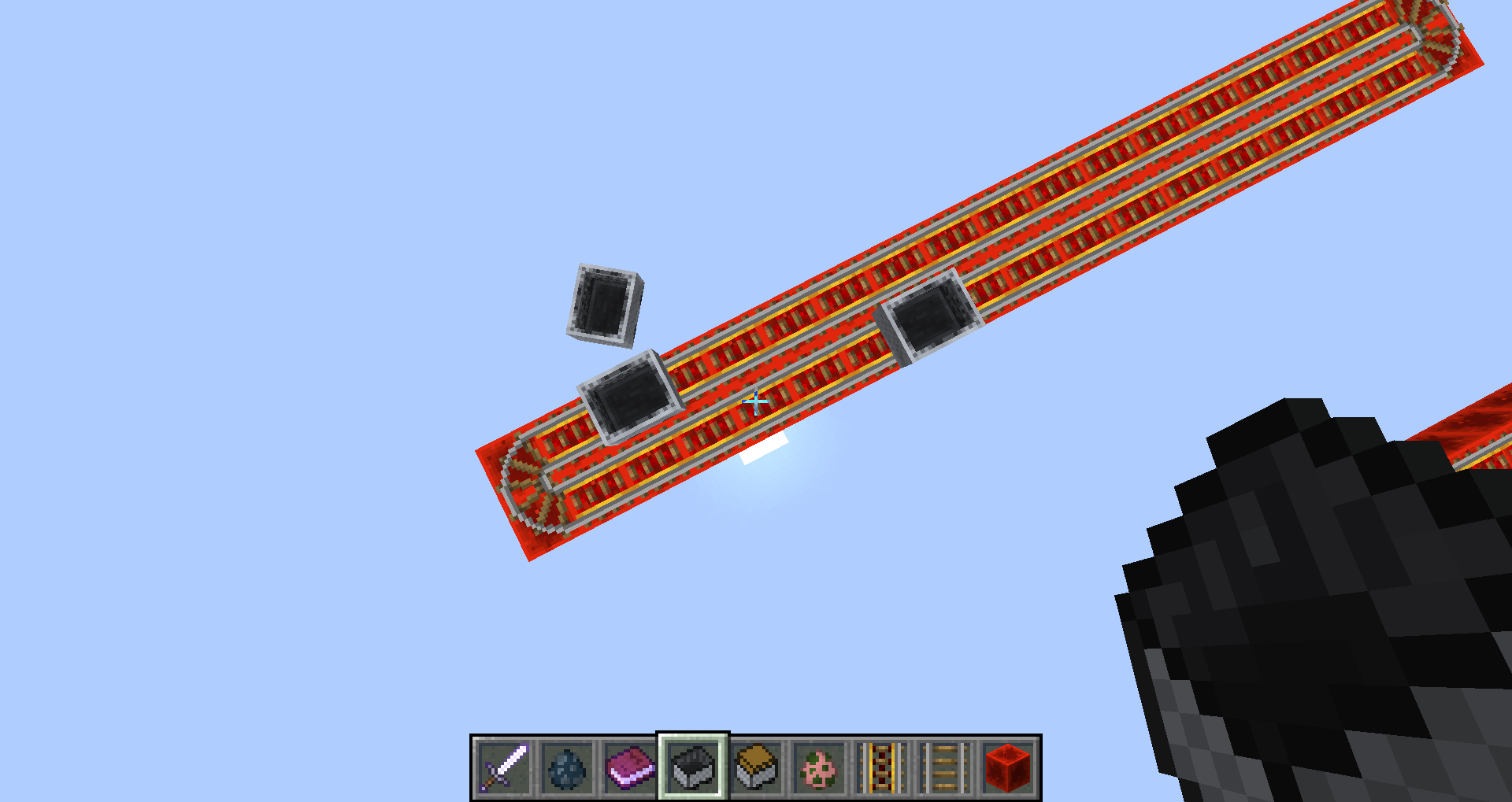

Also empty (not containing an entity) Minecarts can derail if there are at least 3 of them on a track;
this includes also the North-South-direction.
Currently suspected this is the case because in this setup they may not all be driving in the same direction, but one of them will be driving in the opposite direction, and the upfollowing "bumpings" or suspected accelerations may propel one of the carts out in a curve.
The same suspected accelerations seem to be happening if one of the carts stops and gets bumped by one of the others.
Because of MC-92165 I host I've got various different cart test tracks spread on my several bug test worlds; I noticed a derailed cart in 17w50a and after conducting some simple tests, this can be reproduced relatively fast. Use mc-123367.nbt in 17w50a or mc-123367_1-12-2.nbt in 1.12.2 to test it yourselves.
The derailing of 2 carts on same track only, one containing an entity (incl. player), seems to be directional (but needs more testing to be sure).
Short video proving this behaviour with one test conducted, see above.
Longer video with several tests in the same manner can be watched here: https://youtu.be/NdC3-KfTXls
I also noticed that when carts bump into each other, they seem to be more prone to simply stop their movement if rails are laid out in East-West-direction. This happens usually at the curves of a track (watch also Youtube video to see it in action).
I currently didn't see any derailing when it was 2 minecarts only, with no entities inside one of them, but more tests have to be conducted to verify this. This may be because of a needed gain in acceleration of a cart for derailing, which seems to happen by "bumping" into each other, which seems to be more often the case if one of them holds an entity (maybe due to the entity's hitbox sometimes bumping the other cart into the other direction).
Note that in the test track the 2 rail lines got no gap between them, which could maybe cause an interference between the minecart's and some entities' hitboxes.
Derailing happens in the curves of a track, same like the carts sometimes stopping their movement after bumping against each other.
Currently, I don't seem to be able to reproduce the derailing (pig in 1 cart, 1 cart empty) if the tracks are laid out in North-South-direction.
The stopped movement of the cart also seems to occur much more rarely with North-South rail tracks.
Needs more testing.
Additional info by Unarybit:
If you build rails like in the picture with a mob in a minecart on it and the player stands inside the "rail ring" at the height of the mob collision box, he is pushed around. It does not happen with just the minecart or outside the "rail ring". The effect is more visible when you fly.

The player is pushed around when the minecart is in the N / E (white) corner and the player is in the area of the white blocks.
The player is pushed around when the minecart is in the N / W (black) corner, and the player is in the area of the black blocks.
As you can see in this video:
In 18w22c I no longer experience a game crash when I (re)test these commented on seeds:
8223045022386406090 commented on by Meri Diana and Xavom
-7269461605076408993 commented on by greener.ca
-6968998364217797098 commented on by Bret Ryder at/near chunk 55,71
The 3rd on the list, I approached said chunk from 4 directions each in different tests. I also launched the game with default JVM arguments, and using -Xmx3G (memory bug: MC-121318).

Xavom Thanks for pointing this out, I forgot to clarify these particular things.
All machines are running the latest Windows 10 (x64) all the time. However, along with the testing I had several OS re-installs on two of them. (The second one in the "environment" field is my friend's PC, we ran multiple tests not long ago)
My main and "secondary" PCs (the 1st & 3rd) were running on Windows 7 (x64) quite a while ago. I had initially performed the first tests back then when I created this issue.
I've tested multiple operating systems, including Windows 7, Linux Ubuntu (Server & Desktop edittions), Windows 10 (the older versions) and currently the latest versions / updates.
None of the physical machines was / is running Virtual Machine in the background, nor other external softwares / background processes.
The client was running on a different device (laptop) and the connection between the server(s) and the client(s) had no effect in any way while testing.
Additional info:
I, along with friends of mine can confirm the issues, we were experiencing. During the tests there were other, actual players for more realistic and accurate results. (Not idle / AFK clients, just connected from one place)
Xavom Yeah, it's inconsistent too.
Let's say for example - If the redstone lamps were changing from opaque to transparent, depending on that in what state they currently are (powered / unpowered)... Or if the same thing applied to observers, daylight sensors, droppers, dispensers, etc.. etc..
Along with that it looks weird and funky, it serves no purpose, nor gives any benefits at all.
After some more digging, I can confirm that more TileEntities get created for double chests on the server side than common sense permits.
Surprisingly in the cases where items get lost right away, that half of the chest does not get loaded from NBT at all, so it might be two issues as Xavom suspected.
I strongly suspect the method bna.E() to play an important role in this.
From what I can tell it's a method in Chunk.java which handles (legacy?) TileEntities on loading.
However it creates three TileEntities for a double chest.
First in bna.E(SourceFile:1125) two TileEntities get created due to bnk.b(SourceFile:151) and bnk.b(SourceFile:153) later in the stack trace.
And then later in bna.E(SourceFile:1168) presumably the chest gets loaded from NBT which creates another TileEntity.
For a double chest that keeps its content on the first loading in 1.13:
ChestTE created (bna.E(SourceFile:1125))
ChestTE created (bna.E(SourceFile:1125))
ChestTE created (bna.E(SourceFile:1168))
ChestTE content loaded (bna.E(SourceFile:1168))
ChestTE created (bna.E(SourceFile:1168))
ChestTE content loaded (bna.E(SourceFile:1168))
For the one in MC-134205_4.zip (losing half the inventory):
ChestTE created (bna.E(SourceFile:1125))
ChestTE created (bna.E(SourceFile:1125))
ChestTE created (bna.E(SourceFile:1168))
ChestTE content loaded (bna.E(SourceFile:1168))
So in the cases where the chest content gets lost right away, it seems like it actually ends up not loading that half of the chest at all for some reason.
However the duplicate creations in the case where it keeps the content are likely not cleaned up properly either, as this could explain the behaviour in MC-134205_3.zip Video.
Summed up interesting methods/lines to start looking for the issue:
bna.E(SourceFile:1125)
bna.E(SourceFile:1168)
bnk.b(SourceFile:151)
bnk.b(SourceFile:153)
![[Mod] Neko](../../../data/avatars/users/92901.png)
Xavom: This is your ticket. You do not need to comment whether your bug is still an issue.
Xavom Mojira-Reddit I would say?
Could you please wrap your PNG like so, to minimize it optically?
! 2018-12-14_11.35.00.png|thumbnail !
(no blanks between the "!" and the rest of the text)
(You need to add a "|thumbnail" after the png name as well. Sorry for the notifications @ watchers)
Xavom 1.16.2 is no longer supported. Only 1.16.3 is supported (currently)
As stated by Meri Diana "these are just ghostblocks..." however they do block player movement, you can stand on them and cannot walk through them, while mobs, water, mine carts, items, etc can.
Related? :
Items such as a that in a water stream from a farm, while not restricted in movement seem to glitch erratically and loss of items is the result. This item movement behavior seems to also be related to the unloading / loading of chunks.
Meri Diana to clarify my original comment, I never stated that items were effecting chunk loading, but the other way around
Panda the loss of items I experienced may, or may not be related to ghost blocks. I thought it worth mentioning here since this loss of items has happened to me several times in 1.9-pre2 and each time there were ghost blocks nearby. There is more to that story but this is not bug report to post it in. This has been difficult to recreate and never happens when I need it to. So to stay on topic, chunk loading seems to be causing ghost blocks, and dropped items behavior as well. In the pictures you will see I was testing if ghost blocks can effect item movement. This took a total of 3 minutes. I used 3 wool items in a water stream: 1 yellow, 1 red, and 1 blue. I moved away from the test area by 100 to 150 meters and returned. I did this several times and each time took a screen shot. I noticed I did not see the blue wool anywhere in the test area. I dropped into the water stream to pick them up but the blue wool item never came into my inventory. After I restarted the world there still was no blue wool item anywhere.
5 Screen shots:
http://imgur.com/a/UGHNd
Confirmed. I have a world that uses a decent amount of pistons as this does. I've removed redstone until the world no longer crashes, and when adding just 1 redstone (dust, repeater, comparator) that gets updated, not even powered, the world cashes. My last crash killed the world. Restore time...
http://imgur.com/MsTwOXB
Adding the repeater at the crosshair in the center of this picture, then activating the machine, the world crashes. Redstone wire has been removed where shown in an attempt to isolate.
I've noticed that while I can trigger 48 pistons without a crash, triggering 22 sticky pistons with blocks does. Added screenshot and world download (16w40a Crash Test) as attachments.
Should add these to the list: (as changes to these states are NOT detected for the following blocks 1.11-pre1)
Problem confirmed using either a hopper or a dropper to feed intem into the side of the brewing stand. Once each bottle slot has a bottle removed via a hopper below the stand, no more water bottles can be fed into that slot via hopper or dropper from any side direction (N S E W).
Jeb tweeted a 1.12 snapshot coming soon. So question is, this is going on over a month with 120+ votes, and many other similar bug reports marked as resolved, and still no assignee. Are we to wait for 1.12 for a fix?
Thank you Grum. Could you (pre) share those related fixes ?
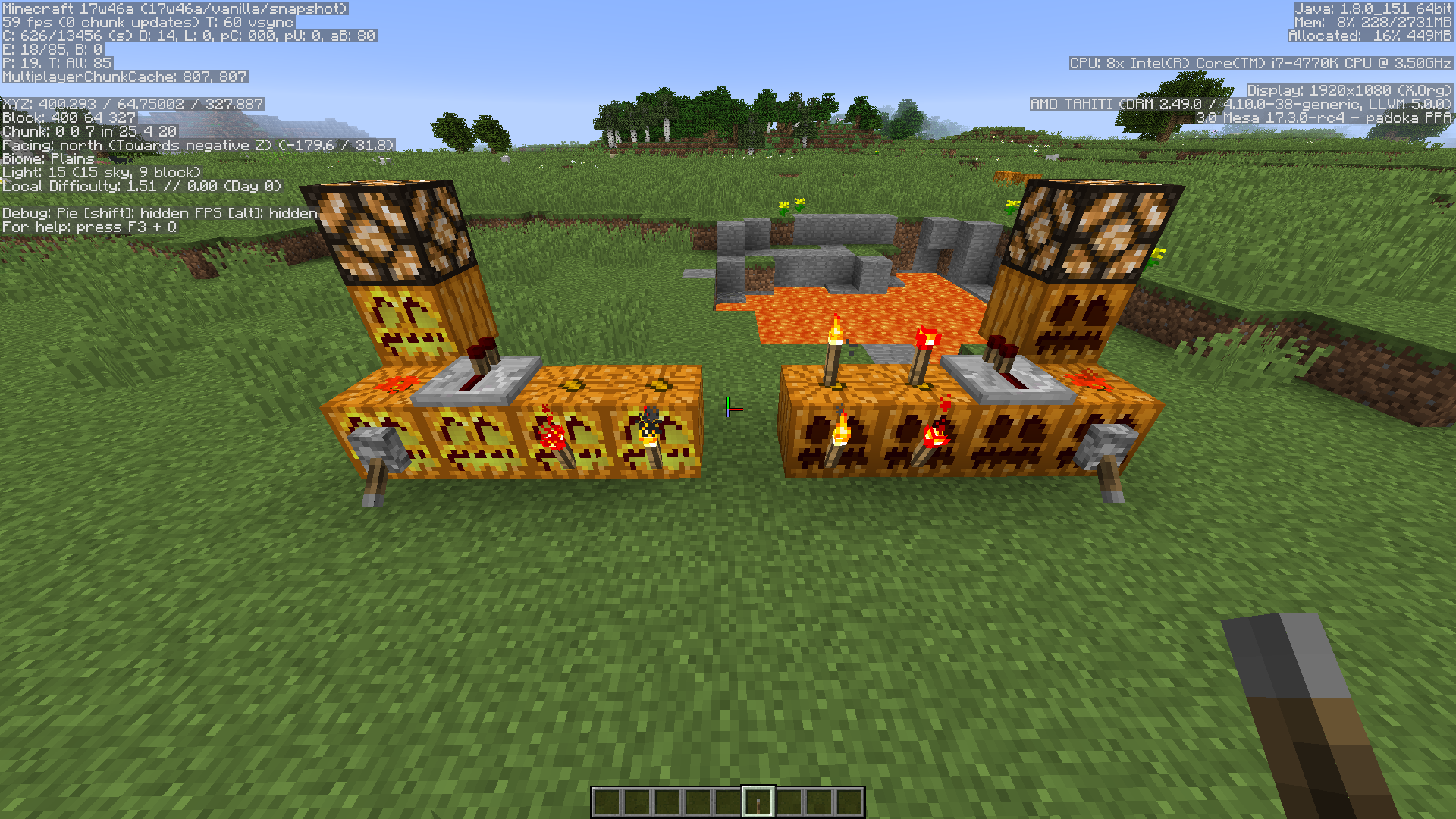
Inconsistencies. One CAN place a repeater on a lit_pumpkin though not on glowstone or sea lanterns. One can place redstone wire on a staircase of glowstone which will limit the direction of signal only upwards (diode) yet when on a lit_pumpkin redstone signal is bidirectional. This is confusing since a pumpkin does not inherit these properties, yet crafting it to a jack o'lantern does. This behavior can break many designs that use lit_pumpkins as both light sources and attachable blocks (ie: redstone).
In release version 1.12 one still cannot place torches or redstone torches on top of a Jack o'Lantern. Create new bug report or update this status? Thank you for the fix by the way.
Confirmed in version 1.12 the issue of redstone wire visual render not matching connectivity. wire_render_1.12.png
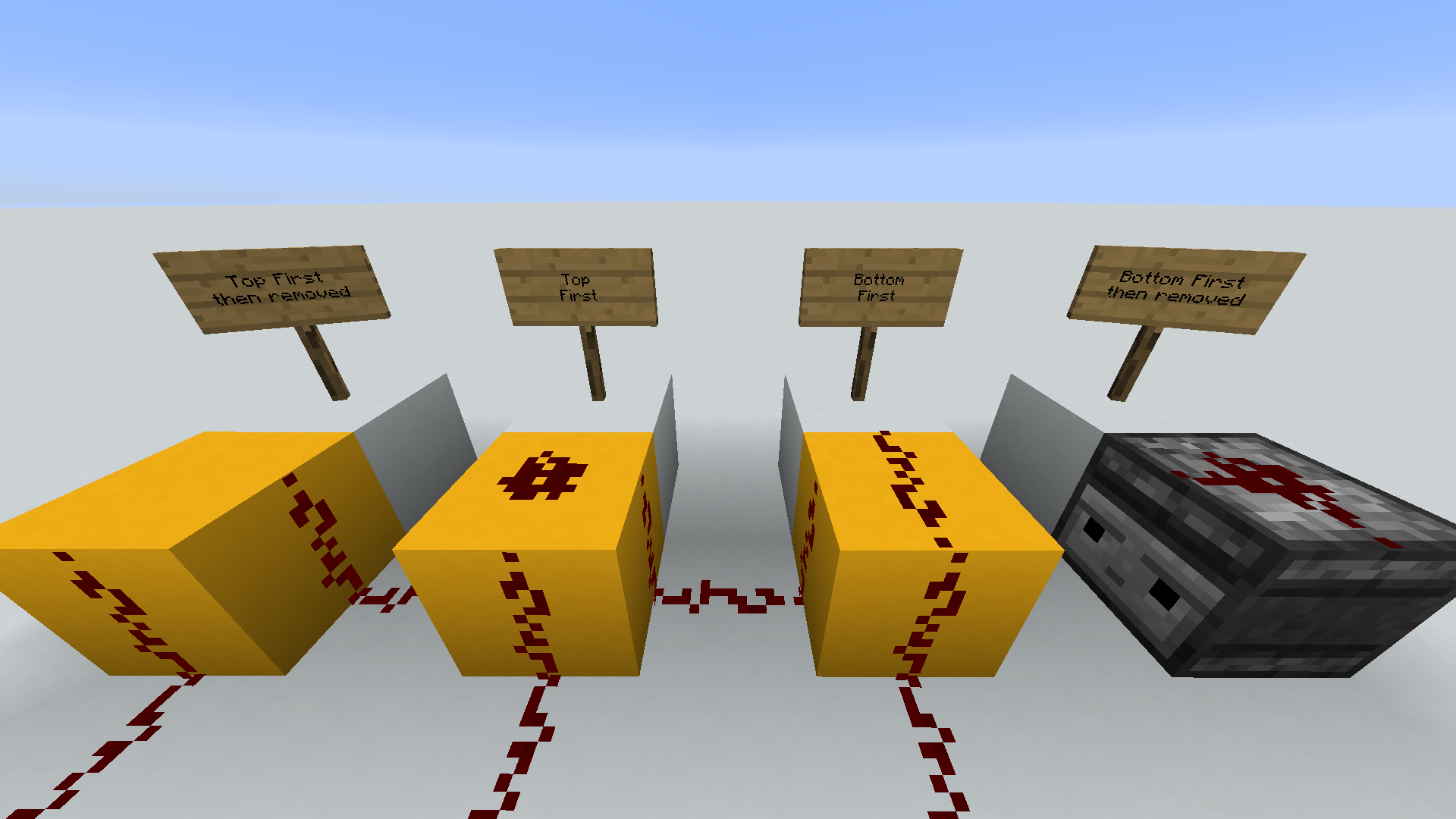
In version 1.12, these are the blocks I have found that now impact vine growth below them. In the Image from left to right:
EDIT - Not in image:
@[Mod] Skylinerw Maybe what Aaron Atkins was referring to is the fact that the change of time on a clock in an item frame cannot be detected currently, the event (questionable) not causing a block update. Which detecting the change of time event with a clock would be a nice feature I think.
Confirmed Link Mint 18.2 using either latest builds for Java8 or Java9
Edit: While attempting to play vanilla 1.12.2, 1.12.1
Edit: The launcher title is "Minecraft Launcher unknown"
Game Output:
Error: Could not find or load main class net.minecraft.client.main.Main
Caused by: java.lang.ClassNotFoundException: net.minecraft.client.main.Main
Launcher Log (end):
[10:58:32 INFO]: Job 'Version & Libraries' finished successfully (took 0:00:00.214)
[10:58:32 INFO]: Launching game
[10:58:32 INFO]: Unpacking natives to /home/xavom/.minecraft/versions/1.12.2/1.12.2-natives-870597135905
[10:58:32 INFO]: Launching in /home/xavom/.minecraft/saves/1.12
[10:58:33 INFO]: Half command: /usr/lib/jvm/java-9-oracle/bin/java -Xmx2G net.minecraft.client.main.Main
[10:58:33 INFO]: Looking for orphaned versions to clean up...
[10:58:33 INFO]: Looking for old natives & assets to clean up...
[10:58:33 ERROR]: java.io.IOException: Stream closed
[10:58:33 ERROR]: Game ended with bad state (exit code 1)
[10:58:33 INFO]: Ignoring visibility rule and showing launcher due to a game crash
[10:58:33 INFO]: Deleting /home/xavom/.minecraft/versions/1.12.2/1.12.2-natives-870597135905
Mod's Based on comments it seems there are 2 more environments to ad:
OS X
openSUSE
Please make sure you include your environment (operating system) and launcher version.
New launcher 1.6.84-j allows the game to run. However, this new launcher is not setting the profile resolution. -new bug
Edit: Can anyone please Confirm This
@Jan Dehaes Thanks for pointing this out. I've not been able to reproduce this error changing JVM arguments using java version "1.8.0_151" since the launcher update.
Confirmed on Java Edition under Linux with resourcepacks folder empty.
java version "1.8.0_151"
Launching the game using the default JVM arguments (un-ticked)
The latest log file is filled with errors, this is just the first 20 lines:
[10:40:48] [Client thread/INFO]: Setting user: Xavom
[10:40:48] [Client thread/INFO]: LWJGL Version: 3.1.2 build 29
[10:40:49] [Client thread/INFO]: Reloading ResourceManager: Default
[10:40:49] [Client thread/INFO]: Caught error stitching, removing all assigned resourcepacks
java.lang.IllegalArgumentException: Non [a-z0-9/._-] character in path
at mp.<init>(SourceFile:31) ~[17w47a.jar:?]
at mp.<init>(SourceFile:44) ~[17w47a.jar:?]
at cjd.a(SourceFile:35) ~[17w47a.jar:?]
at cjc.a(SourceFile:60) ~[17w47a.jar:?]
at sc.c(SourceFile:132) ~[17w47a.jar:?]
at sc.a(SourceFile:115) ~[17w47a.jar:?]
at bmg.f(SourceFile:643) [17w47a.jar:?]
at bmg.al(SourceFile:427) [17w47a.jar:?]
at bmg.a(SourceFile:354) [17w47a.jar:?]
at net.minecraft.client.main.Main.main(SourceFile:134) [17w47a.jar:?]
[10:40:49] [Client thread/INFO]: Reloading ResourceManager:
[10:40:49] [Client thread/WARN]: Missing sound for event: minecraft:ambient.cave
[10:40:49] [Client thread/WARN]: Missing sound for event: minecraft:block.anvil.break
[10:40:49] [Client thread/WARN]: Missing sound for event: minecraft:block.anvil.destroy
[10:40:49] [Client thread/WARN]: Missing sound for event: minecraft:block.anvil.fall
I think I may have found the cause of this issue. I have my profiles based on each version, and play from different game directories.
~/.minecraft/saves/1.12
~/.minecraft/saves/1.13
The options.txt file in my 1.13 directory was the issue, though it worked fine on previous 1.13 snapshots.
I deleted my ~/.minecraft/saves/1.13/options.txt file, started a new game, change options to recreate options.txt.
Comparing old and new I've narrowed down the line in options.txt that caused this issue:
Search for: lang:en_US
Replace as: lang:en_us
Apparently Dirt & Coarse Dirt no longer have a snowy state, thus observers cannot detect this state change.
Strange thing happened with his bug.
I was testing a noteblock with a block on top the other day in 17w47a, no sound was played.
I loaded the same world in 17w47b, before seeing this report, and tested it again: Plays no sound.
Looking through the bugs I see this report and try it again: Plays no sound.
I place a new noteblock nearby, put a block on top: Plays sound.
Confirmed with:
When placing items manually in a chest, the comparator is updated only when closing.
Comparators also seem slow to update when reading minecarts with hopper or chest.
Confirmed
Affects sticky pistons with a block attached receiving a 1 tick redstone pulse.
The sticky piston retracts the head and leaves one behind.
Suggest the title should be revised indicating this has to with sticky pistons under these conditions.
I am especially noticing a difference with the piston sound being too severe a change in panning.
Have a piston in front of you running on a clock (ie: 3 on 3 off), and slowly turn left and right pausing at about 45 degrees from center.
The location of the sound does not agree with your rotation and seems to move too quickly, and too much to one side.
With stairs the orientation is updated when pushing, but not when retracting.
Confirmed. Observer is now outputting 1 0 1 when detecting any of these blocks receiving a 2 tick redstone pulse:
Also Confirmed:
Also affects versions: (no resource packs)
I been able to reproduce this bug in 17w49b using 64 pistons or more in a chunk. I cannot get this to happen every time the pistons retract though. Sometimes of the first try, some on the 7th, etc.
This happens to pistons receiving a 0-tick pulse with a movable block on it's head. Request best title revision from Mods.
http://youtu.be/C6lXr0qK1cw?t=3m16s
Can confirm using 64 pistons in 1 chunk.
crash report with java.lang.NullPointerException: Ticking block entity , similar to those that are already attached.
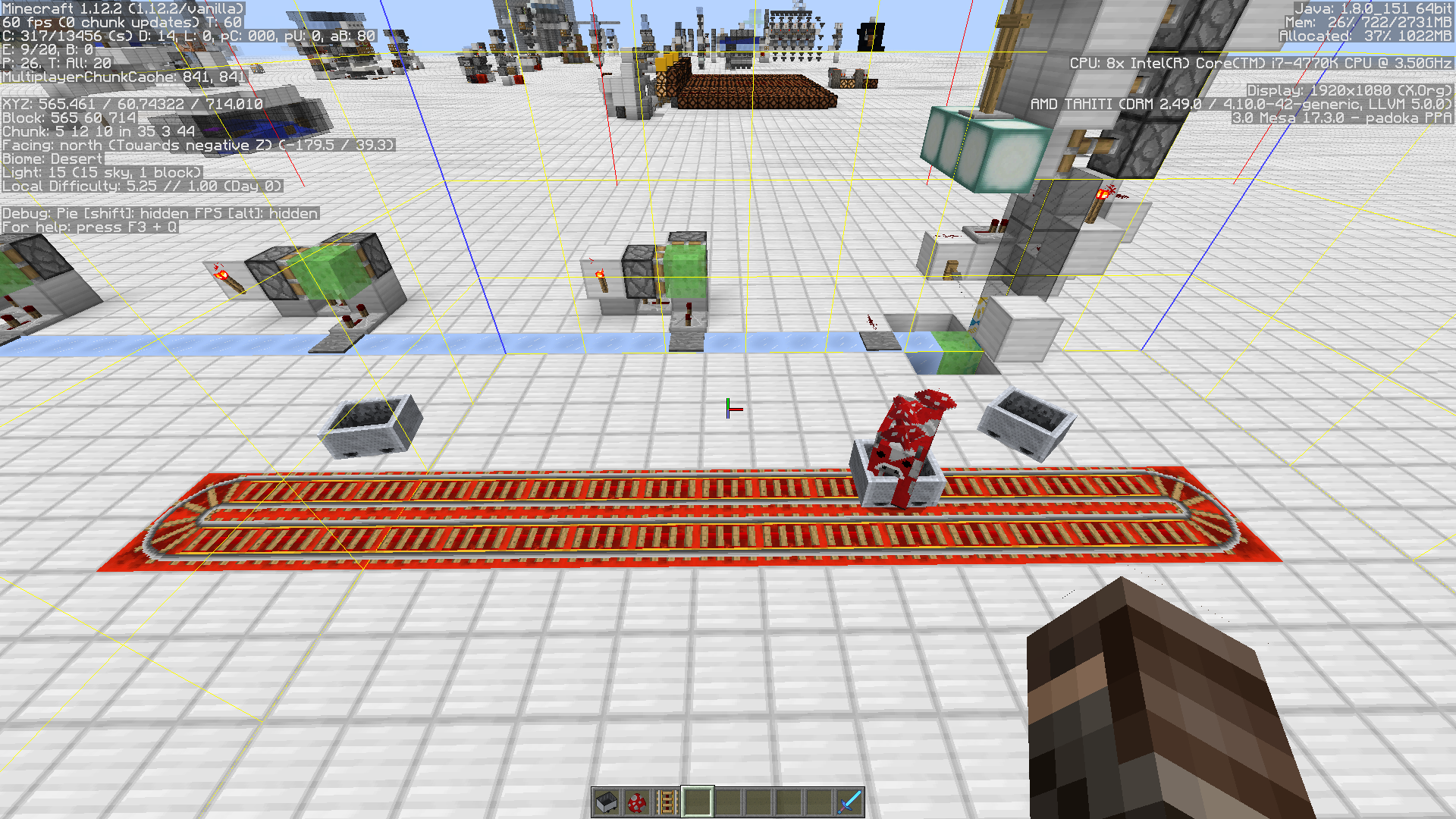
I have been able to reproduce this several times with a mooshroom or pig in the mine cart, and tracks in the east/west direction in version 1.12.2.
I could not reproduce when using a villager in the mine cart. Added image X-2017-12-19_11.21.45.png
Can confirm in 1.12.2 derailing with the following:
I have tested others as well, but I cannot rule them out. For example the donkey I tested and was unable to reproduce the derail, yet with the mule is on the 2nd try. The mooshroom was quick while the cow took more than 10 attempts.
I would suggest the attachment added by user Paulo be removed and that account be suspended or blocked for being a useless troll.
May just be me but this effect seems to have gotten worse a few snapshots back. Please if you assessing this, use decent headphones and compare to 1.12.2. Pistons sounds are the most noticeable.
Confirmed. Affects snapshot 18w10d.

Bug where when pushing a piston into a bubble column(s) the blocks in that direction of pushing can also be pushed.
Video demonstrating the issue.
WAI? really? Completely disagree with the current resolution. I can place redstone dust, pressure plates, torches, repeater, comparator, rails, even a flower pot. But not a lever or a button? I question the reasoning behind this WAI resolution.
I left Environment field blank since it may not be specific, though here is mine:
OS: Linux ver 4.13.0-39-generic #44~16.04.1-Ubuntu SMP Thu Apr 5 16:43:10 UTC 2018 x86_64 x86_64 x86_64 GNU/Linux
Java: ver "1.8.0_171" (Oracle)
Launcher: Minecraft Launcher 1.6.89-j (through bootstrap 5)
Same is happening with potions. Out of view and no sound during drinking, sometimes cannot drink.
Confirmed in snapshot 18w19b. Crash happens at spwan with seed: 8223045022386406090
Tested this seed 3 times. Attached crash-2018-05-09_12.18.06-server.txt
OS: Linux ver 4.13.0-41-generic #46~16.04.1-Ubuntu SMP Thu May 3 10:06:43 UTC 2018 x86_64 x86_64 x86_64 GNU/Linux
Java: ver "1.8.0_171" (Oracle)
Launcher: Minecraft Launcher 1.6.89-j (through bootstrap 5)
Someone had attached a crash report: crash-2018-05-05_01.05.20-server.txt with the seed: -7269461605076408993
Using this seed the world never loads for me, sitting at "Loading world" with no progress or cpu usage. I have to kill the process. A crash report is created. crash-2018-05-10_08.44.00-server.txt
For lava bucket in 18w19b, I cannot place lava adjacent to and when clicking on: stairs, (double) slabs, fences, walls, chests, trapdoors, ladder, sign, item frame. Regardless of shift.
The chests are always opened.
For ladders there is bucket animation.
For Item frames the bucket is placed into it.
This is inconsistent considering that shift is used with placing adjacent to the targeted block, so as to not access or change the target.
This bug is making it difficult to even evaluate the snapshots. I currently am experiencing ~30% of new random seed worlds crashing with this exception. Sometimes near to spawn, others about 5 to 10 minutes into the game both survival and creative. I propose bumping up the priority on this if at all possible, to allow us to test an review new features and fixes. Respectfully, until then it's somewhat a waste of time to load a snapshot.
Snapshot 18w22b: Observers do not detect "Nether portals be lit/activated" shown as fixed in 16w44a.
In 18w22c I no longer experience a game crash when I (re)test these commented on seeds:
8223045022386406090 commented on by Meri Diana and Xavom
-7269461605076408993 commented on by greener.ca
-6968998364217797098 commented on by Bret Ryder at/near chunk 55,71
The 3rd on the list, I approached said chunk from 4 directions each in different tests. I also launched the game with default JVM arguments, and using -Xmx3G (memory bug:
MC-121318).Bret Ryder I have experienced that same game stutter near chunk 55,71 only when using the default JVM arguments.
You had commented crashing "chunk 55, 71 (multiple times) and chunk 57, 71 (once)".
In your latest comment you were nowhere near that point when it crashed. I have retested both of these areas and have not experienced any issue.
Perhaps it would be helpful if you provide that crash report and/or retest that seed/areas and report back providing that crash report. There is a frozen ocean next to 3,55. Some of the crashes I've experienced in the past happened near this biome type.
Bret Ryder I tried several more times using the info in your crash report. The crash location was about 651, 64, 1054. I even tried your JVM arguments. The only time I experienced anything (100% memory stops/starts) was when I created the world in 1.12.2 first, then loaded in 18w22c using default JVM's . But still no crash.
Could the issue here be that your world was generated in a previous snapshot?
Have or can you generate from 18w22c and head to the crash site?
Early Reflections Was the world file you experience this in generated in a previous snapshot? If so could please generate again using the same seed in18w22c and try to reproduce it?
I am currently testing all of the seeds from the attached crash reports that refer to "We are asking a region for a chunk out of bound".
18w22c:
I have tested the seeds from the attached crash reports having runtime exception "We are asking a region for a chunk out of bound". For each seed, in creative, I flew towards the player location in the report. Then canvased an area of roughly 12 x 12 chunks centered on that crash site. In each case I did not experience and issues.
Early Reflections Since this bug with this error is resolved, I suggest maybe to contribute your information to the ticket suggested by VideoklipBG,
MC-118106the description there is very close to yours. Although as Kumasasa said this could a be new issue. I would search and create a new ticket if needed. The previous error (crash report) and the new issue you're experiencing are not the same per title as this bug here.As soon as I free up today, I'll try to recreate what you're experiencing.
VideoklipBG I see you have 3 machines listed/tested but just to clarify:
Pistons are transparent when extended and opaque when not. How is this beneficial to any part of the game, play style, performance? It's not, a block that changes opacity is not good thing. Pistons must be a transparent block.
Slime blocks have also been changed to have similar transparency properties to leaves block, decreasing light level over distance. Can't help but put these two together since it targets flying machines. But that's another ticket.
Possibly related to MC-122988 in which hostiles can see and attack through a block in their head .
Thanks [`Drakan1 ] for adding that video. I'm never sure what the proper etiquette is when linking the work of someone else.
I've bee testing this today in 1.13-pre2 and have experienced a crash "Exception while ticking". Trying to recreate and not sure if it is related to bug or not.
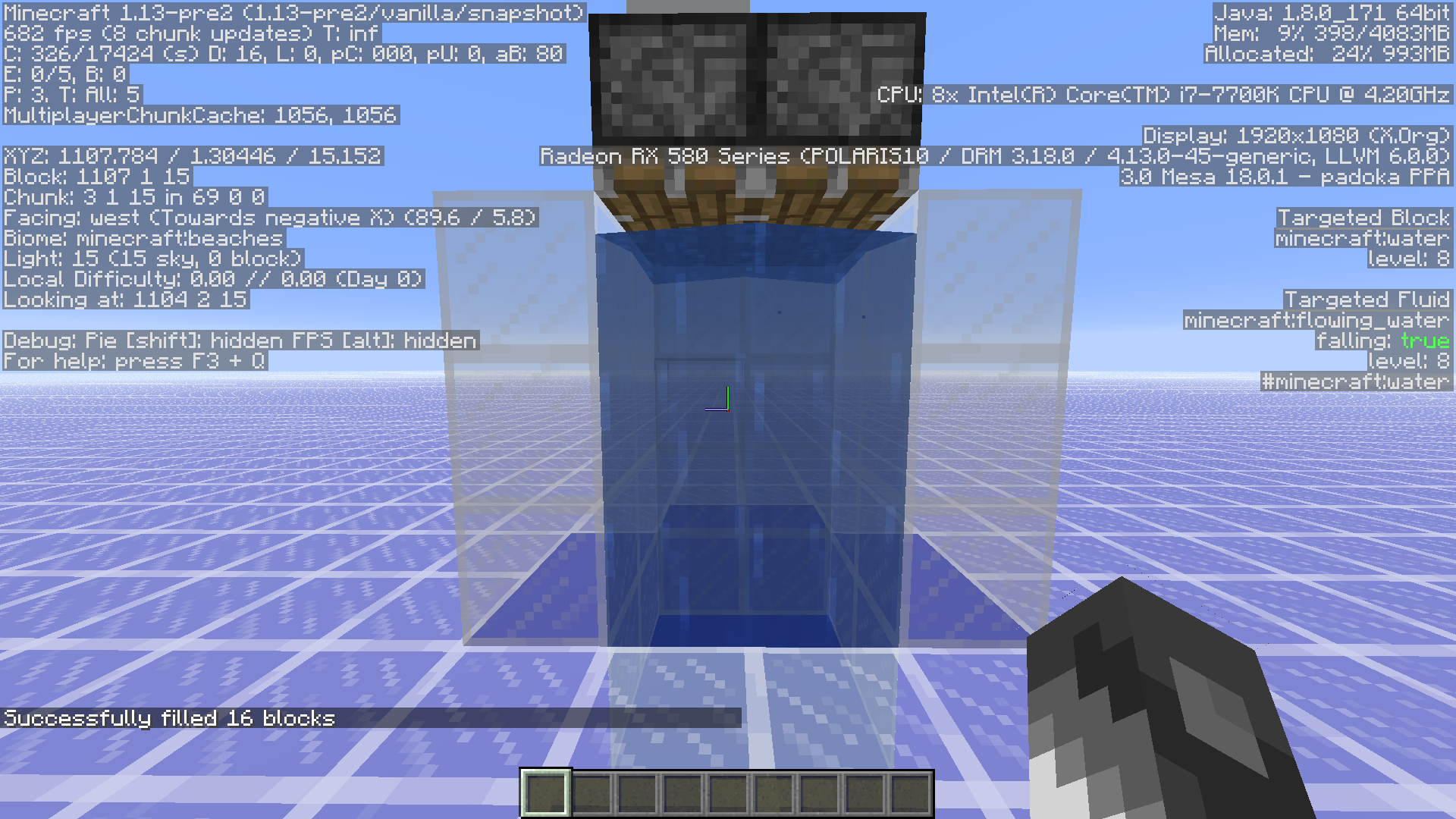
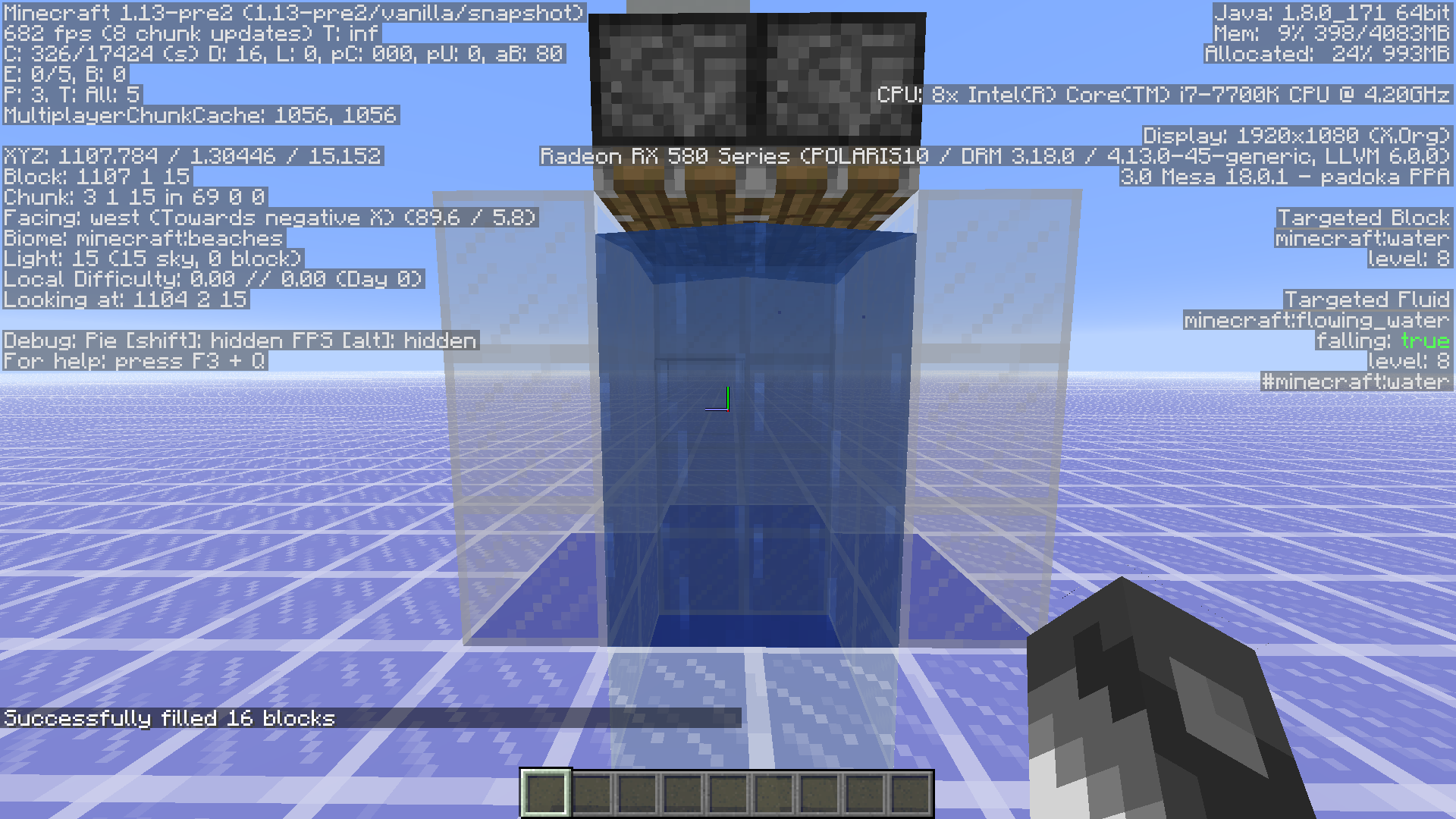
The Targeted Fluid of a water block is changed to flowing_water and falling to true if a player places a water block on top of it. Easy to recreate by making a 3 tall column of blocks and placing 3 water against it from the floor up. then remove the top water block and all of the water is deleted.
Affects Version Minecraft 1.13-pre2
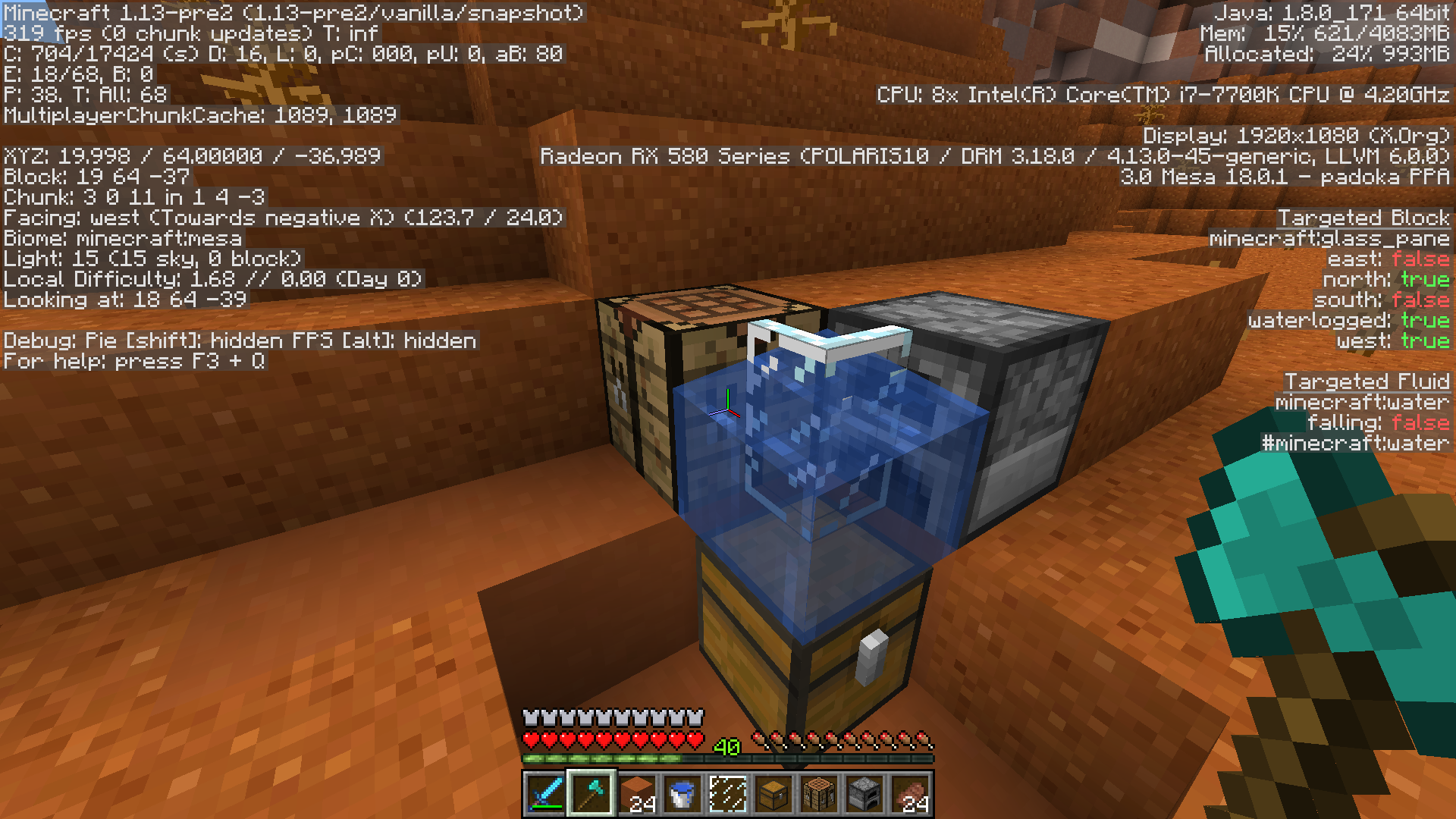
Cannot access or target a block through a waterlogged block, though the hit box when not waterlogged would allow so.
I disagree with the current "Works As Intended " resolution as it contradicts the current hostile spawning rules within mushroom island biomes. The phantom mob now is at best just another hostile that makes the game less enjoyable considering the other issues such as targeting invisible players from a distance. Basically this mob is too OP.
Consider this: Several servers such as Hermitcraft, use the mushroom island biome for a peaceful place for base and games building. The mushroom island biome should remain a biome that no hostiles can spawn within.
This issue seems to fixed with launcher 1.6.89-j
In options.txt I've changed overrideWidth and overrideHeight back to 0, and even left them blank. Now the game launches in my profile resolution as it should / expected. When switching to full screen and back the correct resolution is again restored.
Can anyone else confirm?
I've not yet seen 1.6.91 (java)
This crash happens if you [X] out of the beacon too, you do not have to add/change the effect.
Paul Tessier I don't think the torch or vine should be since water displaces them currently in 1.12.2. Although, it might be nice if vines could grow down into water source blocks and maybe break off if flowing? Cool vine farm.
Affects 1.13-pre7. Could this also be related to
MC-123850(resolved in 1.13-pre7)?Confirmed in 1.13-pre8. Added a picture showing another example of how to reproduce.

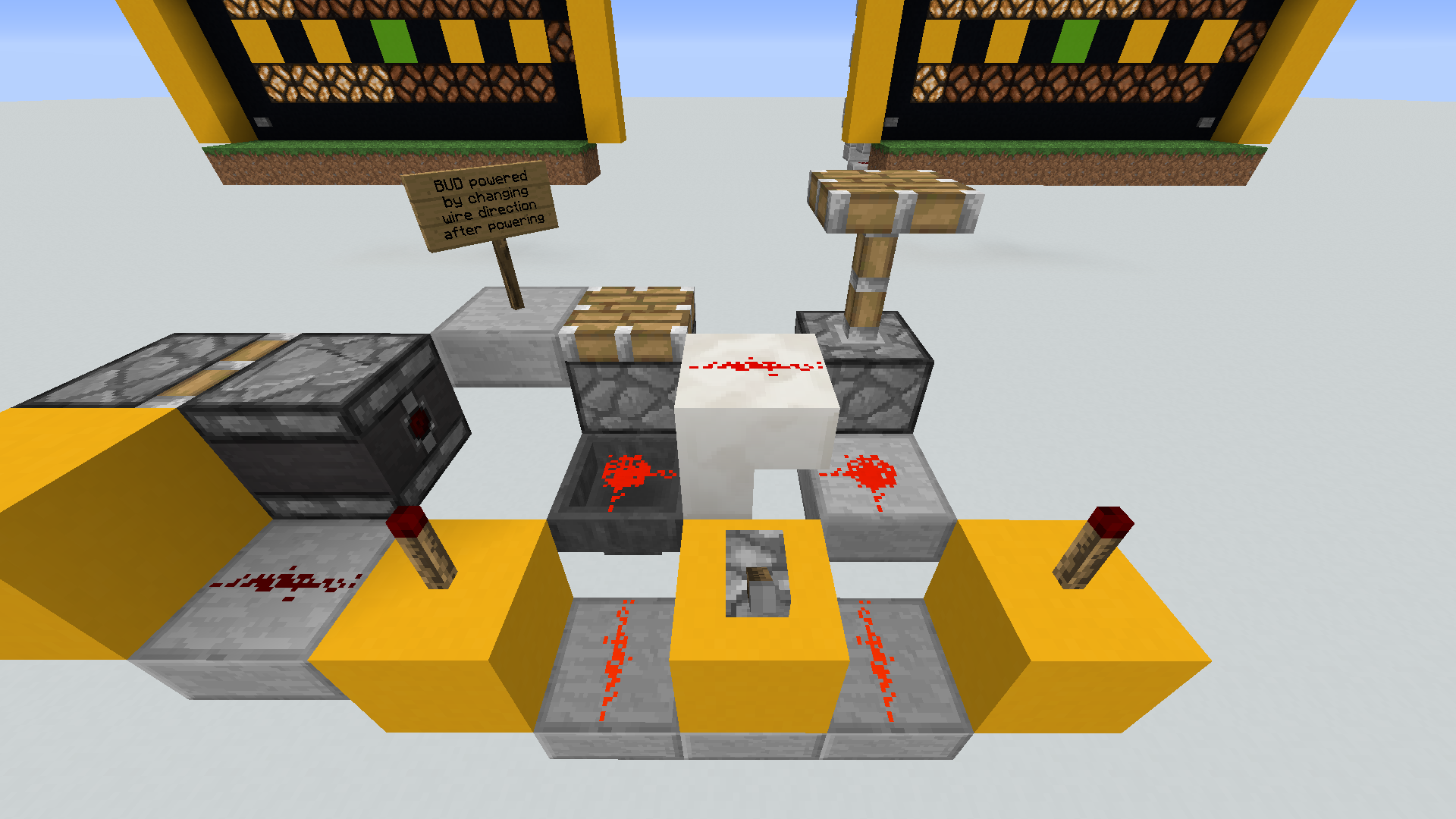
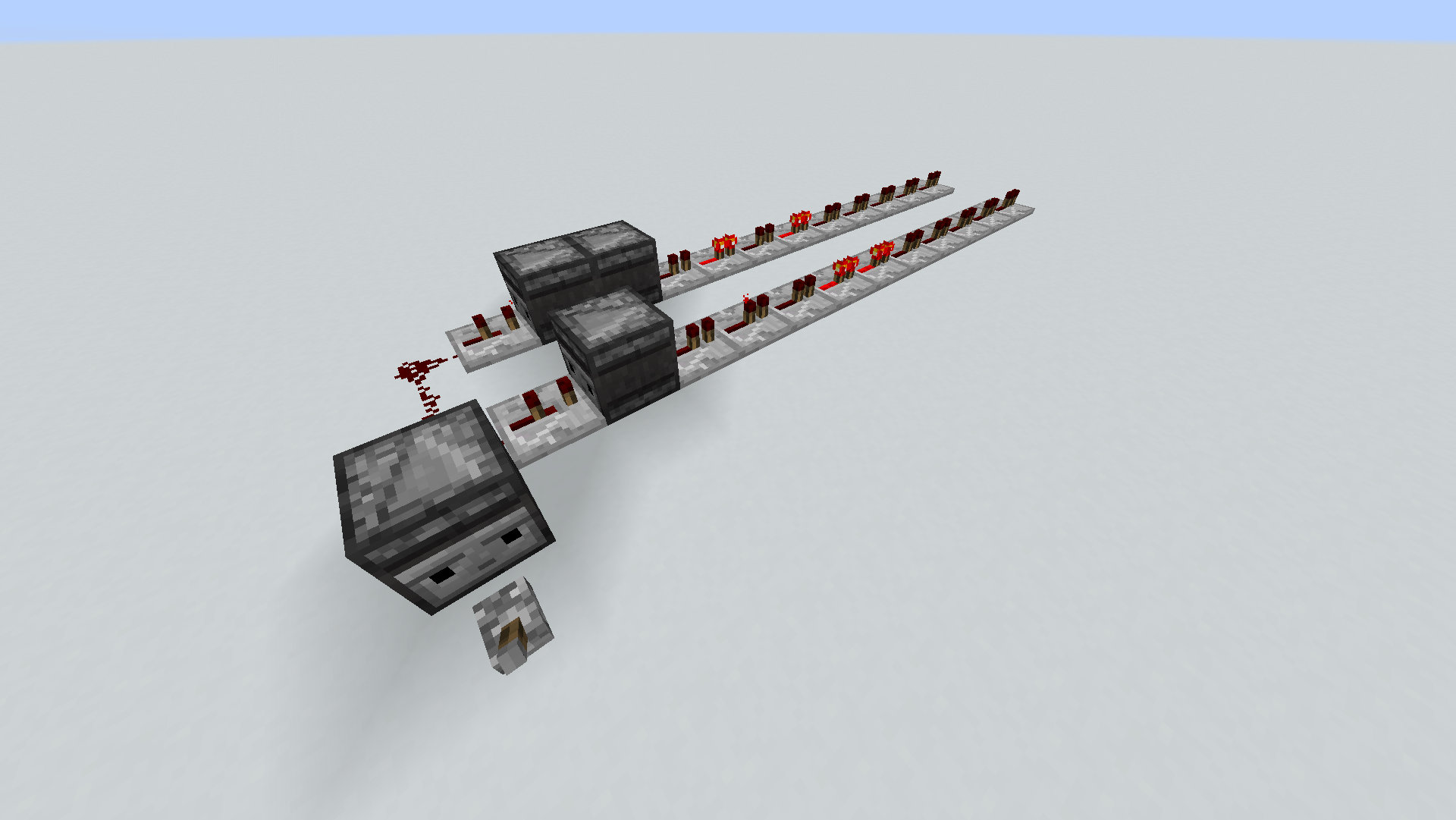
4 hoppers above forming a loop with 1 item over the green block. 2 hoppers below pointing into each other with a different item next to the green block. Turn the switch off to unlock the starting hoppers and the lower hopper will never pull the item out of the upper hopper.
EDIT: Build this starting with the green block, then power the block with the lever so that the hoppers are locked when it is built.
Confirmed in 1.13-pre8: Observer does not work as it should.
Seems to be fixed in 1.13-pre8. Can others confirm?
This bug was introduced in 1.13-pre4, and affects all subsequent versions.
I'd like this fixed before the release.
The clock driving this circuit is common. The top observer that detects the output repeater outputs a constant signal. It would be the same if the lower repeaters were a continuation of the rails.

I just tried updating a 1.12.2 world that had buttons on hoppers. As soon as the hoppers were locked or unlocked, the buttons popped off and went into the hoppers. Inconsistent behavior from 1.12.2.
This is not completely fixed in 1.13-pre10
As [Mojang] Gnembon commented, this affects "all living entities" ie: mobs and players. Players still slow down in lesser water levels. This is inconsistent with previous versions.
Jessica Washer While not actually a change "a day" before the release, I agree: no time to evaluate. [~FVbico ] :Yes logically correct. [Mojang] Cory Scheviak IMO, All living entities should move along in water streams as in previous versions. Otherwise this breaks many in place precedence mechanics. So many 1.12.2 worlds I've attempted to update are broken in one way or another, this being one more last minute break. I seriously question why.
Attempted optimization on 5 different worlds with each a different version. Does not update the version.
Can confirm affecting 1.13-pre10. Using same seed as Way White comment.
crash-2018-07-18_06.20.34-server.txt
EDIT: Also, cannot reload the world without it crashing. I was however, after a few attempts, able to pop of this screen shot.

Affects 1.13 "Aquatic Update" I would think by now this would have been addressed considering 1.13 is so much about the water. Please consider how many are wanting to start a new water world, yet only to find ocean monuments that don't spawn guardians.
Thank you for that pointing out Kirill
All of these blocks on the "affected list" were/are full blocks:
I've upgraded to Linux kernel 4.15.0-29 and loaded a new world to test this again. Same results crashes if Pause on lost focus is Enabled and the display is turned off and then on. Added another crash report if it is helpful.
crash-2018-07-20_13.41.30-client.txt
Jakub Marcowski I was able to duplicate this bug using your world from your ticket resolved as duplicate . I was the double chest facing north full of saddles that turned up empty. ALL of the chests facing either north or east had the inventories switched. Not good since if I was using a hopper to draw items out of it, after converting it would out of sync. Could you please add you comment and the 1.12.2 world file here?
I was able to duplicate this in a new and 1.13 optimized 1.12.2 world. One half of the double chest contents are gone.
I am able to recreate this. See the attached screen shot:

The contents of the chest highest and furthest south east is deleted if one half of the chest is at a chunk border. In the images the yellow glass represents chests with 1/2 deleted, while the red glass, in the background, represents the entire contents deleted.
I noticed in testing that the highest and most South or East double chest (south seems favored), with only one side (left or right) at a chunk border, would have contents missing upon opening in 1.13. If there is another chest further South or East within the chunk, with the long side (front or back) not along a chunk border, then the chests contents are not missing.
I opened the MC-134205_3.zip world that [Mojang] Panda added and switched on the command block. I was able to target on a chest that when opened would switch between half and full. Never replaced with glass though. Although other chests had been replaced with glass after several minutes. I am using Java 1.8.0_181 64-bit.
Many attempts at this and I noticed that often the game would kick out of the chest inventory GUI. I had the world running in the background with the chest open. Suddenly it paused and went to the Game Menu. The chest was not at a chunk border.
What [Mojang] Panda has revealed I assume is related, but Is it a different issue that this ticket?
I had one when it first happened today. I added one and it still happened. Just now with a total of 2 resource packs I cannot reproduce it. I removed them, restarted the game and still can't. I remember this happening in the past, and it was random then too. That was in 1.12.2 and I had 3 resource packs.
MC-103665does not describe my issue. It has happened when no world had been loaded/running, and only happens when clicking the button to open the folder. The game would freeze, not responding to buttons, clicks, mouse overs on buttons did not respond.It has happened now a few more times. Here is a video of it after a system restart, I opened obs, then Minecraft, and pressed record.
Although you don't see the folder open, it does. I only capture the Minecraft window when recording.
[Mod] Urielsalis Yes as far as I know and since the game does not show it as incompatible as it does with packs for older versions.
I think this is a duplicate.
I'll comment here anyway since I see no reason why we cannot place water against a partial block with being forced to have another block in place to do so. Just like ow pumpkins used to be. Shift clicking would be one option.
Works As Intended I believe. The two previous comments are correct.
I believe this is a duplicate of
MC-133181.Can't place these on top of the hopper though!
MC-122352Still cannot place buttons or levers on top of a hopper, but we can place them on the bottom.
I can place buttons and levers on the bottom of a hopper but I cannot place them on the top of a hopper.
Still Unassigned in more than a year?
Confirmed in EVERY 1.13 snapshot.
Playing 1.13 on a multi player survival server is near impossible. The tick lag / client server sync is so far off it is near unplayable. Example: Bridging over a ravine, the void, the nether, you place a block, you see the block, you move to said block... the block is now gone and so are you... and all that you've worked for. Misplace a gravity block while in water and you take a ride down into the void. A hostile mob attacks me, I attack back, the hostile mob floats in the air while I perform a "Matrix" move on it. I'm not that OP. I watch videos were what once could be done now is near impossible, all the while playing on a respectable white listed SMP server experiencing the exact same issues. Missing items from player inventory, furnaces that only smelt some of the items yet burn the fuel for all of them. When the server restarts, the game is somewhat playable, and yet predictably becomes more and more unplayable in a short period of time.
I am sorry Mojang but I feel like I'm beta testing right now. I'm not sure how I can help, but this is really bad. Please help me help you.
Affects 1.13.1 :/
The ticket shown that this duplicates is not the same as this one, ie: does not duplicate. That has to do with water flowing through slabs/stairs, this ticket addresses the fact that you cannot place water adjacent to such blocks without it becoming waterlogged.
I have been playing on a 1.13 multi-player server where the issue of items in player inventories go missing has happened several times. One player that is usually playing 6+ hours lost the entire inventory.
Confirmed. I have experienced crashes with this description several times while playing on a multiplayer server. Unlike a prior comment this has happened while in chunks that had already been generated.
Affects version 1.13.2-pre1. Impossible to place water adjacent to water log-able blocks with the use of helper blocks.
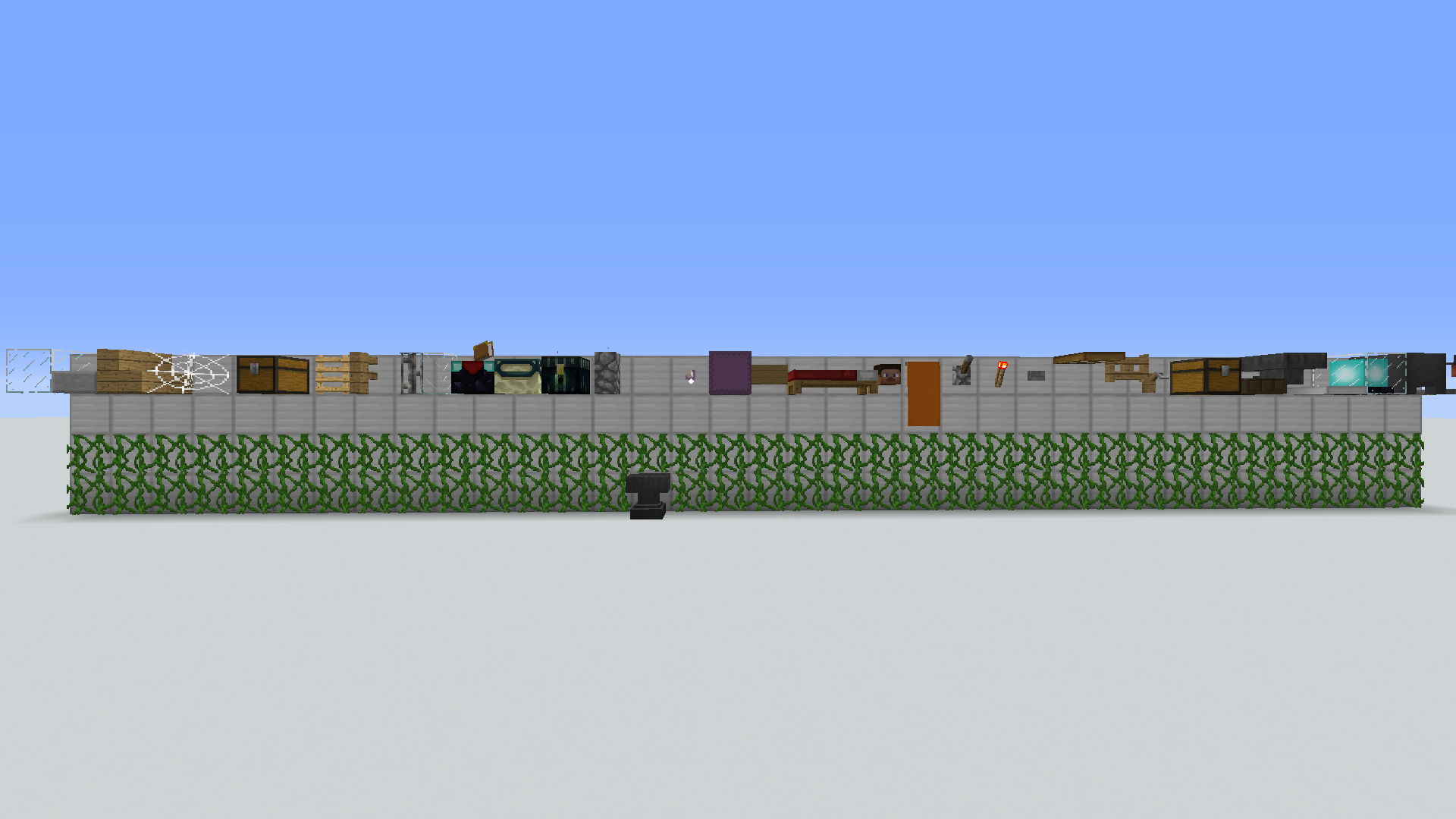
1.13.2-pre1: As far as I can tell the current list of affected blocks/events have no state that an observer could detect:
Perhaps additional states to these blocks could be added. Shulker boxes do change size where it can move entities. I think the (ds)active state of a beacon should be detectable.
This now also affects Bell and Lantern. Yet these, along with levers and buttons, can be placed on the bottom of hoppers.
Seems to make no difference what state Pause on Lost Focus is.
I've not been able to duplicate this in the 1.14 snapshots. Something must have changed to prevent this starting with 18w43a.
Affects:
Confirmed for 18w50a.
Perhaps this is caused by the minecart hitbox being offset in the direction of the curve while, and even before, traveling through it. Placing a wooden pressure plate (or a hopper to draw items out of a chest or hopper minecart) at the inside of the turn confirms this. While this being a nice feature when needed, for me it seems more of a problem.
If this is the case, maybe a solution would be to force the hitbox alignment to the x,z center of the block the track is on, while rendering the minecart along the center of the curve. Maybe a slightly smaller hitbox along with this could provide additional benefit.
Is there a non-toxic forum to discuss these issues?
19w02a: bug still does not exist since 18w43a. Is this "resolved"?
Until the snapshot confirms the fix... it is not fixed.
Still an issue in 19w13b. Can reproduce over and over. I've been trying to grab a screen shot. This happens when the workstation is destroyed as the villager seems to focus on it.
EDIT: Here is a video of how I reproduce it (too big to upload here) : https://youtu.be/-tOcJH_LlGg
I've noticed after many crashes that there seems to be a ghost workstations left, since without any in the world a new villager takes the profession of what was previously there. Have to move several chunks away.
Another way to reproduce this is by moving the villager's composter just after the villager resets trades. https://youtu.be/fUUXfr0bXBw
I disagree with the current resolution.
MC-148933only mentions not being able to swim while sneaking.This ticket has to do with not being able to escape that position nor the block(s) you are in while under water.
Specifically if it is a hopper over a water logged block that does not have a full (x,z) collision box, with blocks on 3 sides.
That is incorrect. You cannot, in this case move away. Just try it exactly as described. These two tickets are related, but not the same. I have experienced the other issue, and can always move away, not with this one though.
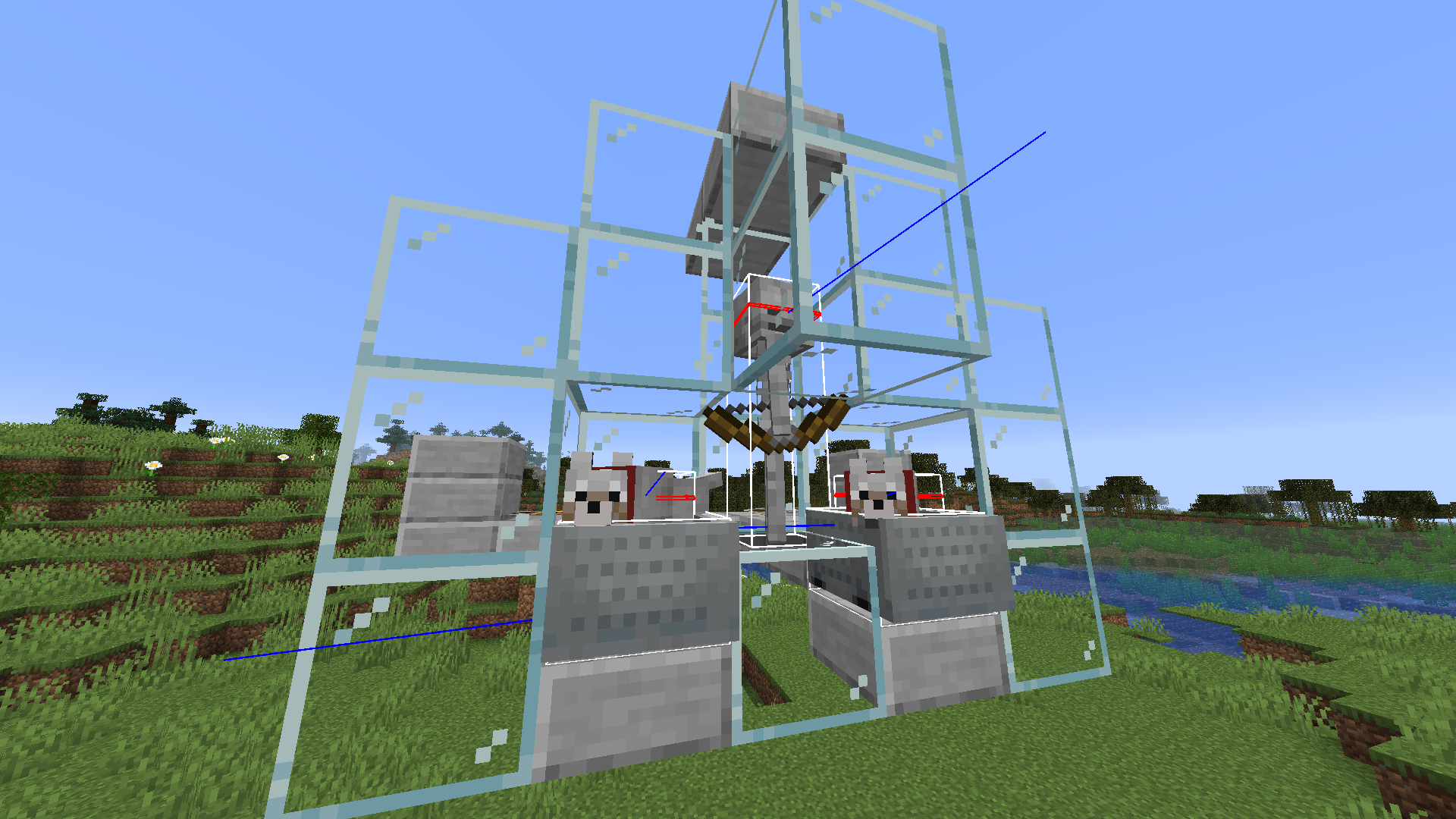
Dogs and wolves have always been able to attack skeletons in this way.

Confirmed for 1.14.1
Have to say that I'm not a fan if the odds on mending books has changed. I've fished with a maxed out rod for 12 or more hours and still not a sinle book with mending. 1.13.2 seems to have greater chances.
This is not a duplicate.
Affects 1.14.2 Pre-Release 4
Affects 1.14.2
This bug may also be causing this:
MC-151280This is still a thing. Affects version 1.14.2, even though the status of
MC-148933shows as resolved. Something needs to change here. The status of the referred to ticketMC-149207shows as open still. Perhaps if that were addressed this one might be fixed. Until then this ticket should be opened. A player should not have to break anything to get out of crouch mode if there is an open path to do so.I can confirm that this bug does affect 1.14.2
How I do it: In creative mode spawn in a villager and set the time of day to 2000. Nearby, place a workstation without a gui such as a lectern. Get very close and target the side closest to you, then simply press and HOLD right then left mouse buttons to break and replace repeatedly. Eventually the game will crash.
Added: crash-2019-05-28_21.58.13-server.txt
Unlisted Video: https://youtu.be/M2QQ1SBwHGM
I can confirm that this bug does affect 1.14.2
How I do it: In creative mode spawn in a villager and set the time of day to 2000. Nearby, place a workstation without a gui such as a lectern. Get very close and target the side closest to you, then simply press and HOLD right then left mouse buttons to break and replace repeatedly. Eventually the game will crash.
Added: crash-2019-05-28_21.58.13-server.txt
Unlisted Video: https://youtu.be/M2QQ1SBwHGM
I can confirm that this bug does affect 1.14.2
How I do it: In creative mode spawn in a villager and set the time of day to 2000. Nearby, place a workstation without a gui such as a lectern. Get very close and target the side closest to you, then simply press and HOLD right then left mouse buttons to break and replace repeatedly. Eventually the game will crash.
Added: crash-2019-05-28_21.58.13-server.txt
Unlisted Video: https://youtu.be/M2QQ1SBwHGM
The question is now if a villager will refresh trades during the correct times of day. In 1.14.2 I have had villagers go several days while I wait form them to refresh. It's as if they cannot find the workplace. Anyone know the ticket for that?
Appears to have been fixed in 1.14.3 Pre-Release 2
Galaxy so many of us that ACTUALLY play this game agree that the mushroom biome(s) should have NEVER allow for the useless phantoms to spawn. I'm up for any discussion on this although sadly it's my opinion Mojang is not going to listen.
Think about an SMP server where you really need to have that one area which will NOT allow any hostile mob spawns. For me this would a gaming, or shopping district in which you can build and not have to worry about light levels or spawn-able blocks to keep it or visitors from being destroyed. The fact that Mojang has turned it's back on the Survival Multiplayer servers is truly sad. Unless you have a percentage based player sleep system, to play and create with friends is kind of dead because of the phantom mob. One additional note: When I watched Jeb announce / unveil the phantom mob, never once was it suggested that it could spawn anywhere, nor break existing spawn rules. If we would have known this at that time, this ticket would have never been created.
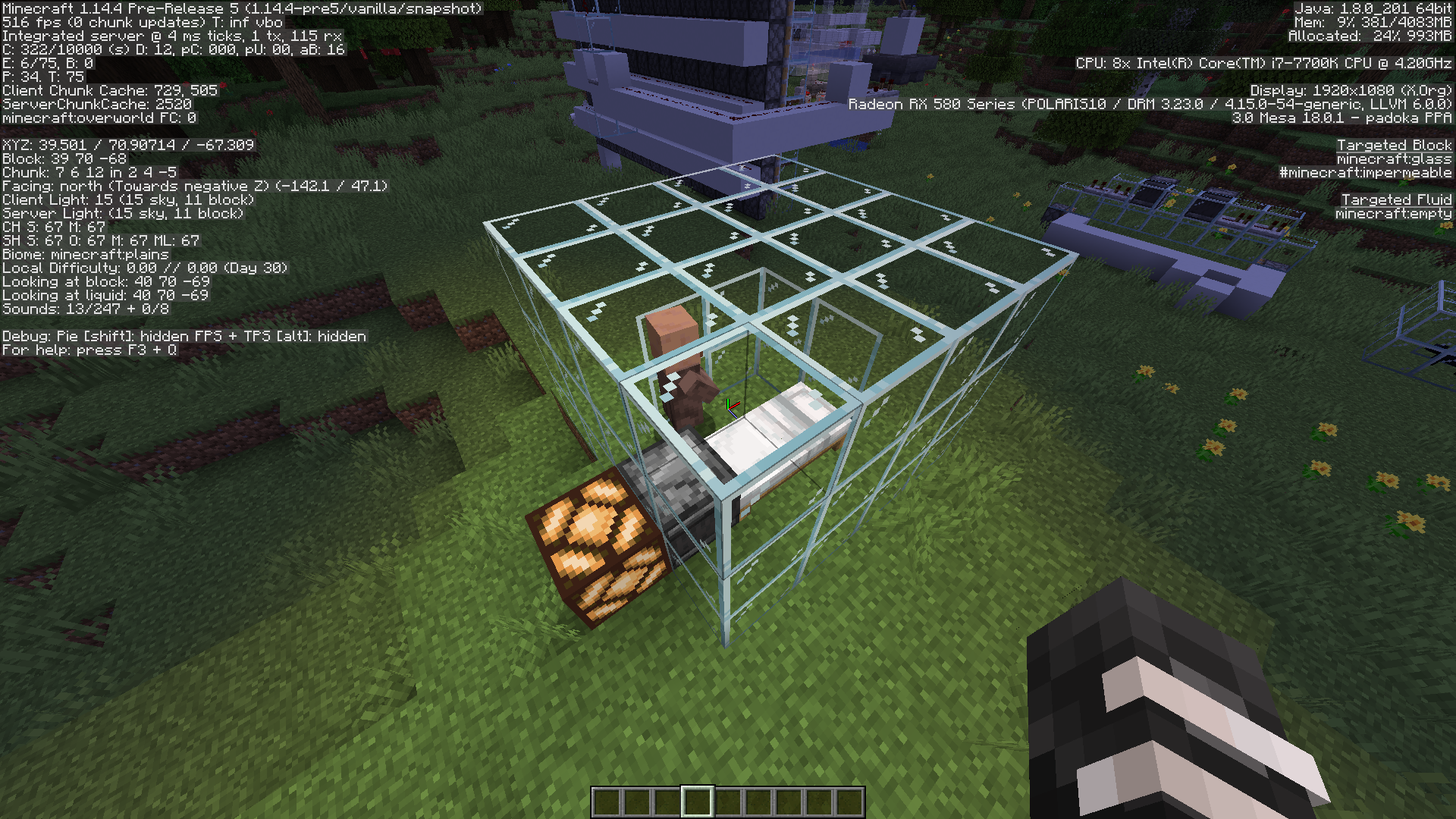
Affects 1.14.4 Pre-Realses 3, 4, 5. What is happening is that the villager keeps getting out of bed during the night. The villager is enclosed in a room, no hostiles are around. This happens several times throughout the night. Also, sometimes the villager does not stand up at all yet an observer detects the state change of the bed.
This does not happen in 1.14.3.
Does anyone have insight as to why villagers will not stay in bed all night in 1.14.4 Pre* ? I've tried giving them workstations, food, a roof, a door.
CONFIRMED: Affects 1.14.4 Pre-Release 3 through 6. Note: to replicate, make sure the villager has gone through several day/night cycles. Testing in day 0 did not seem to replicate, use /time add as opposed to /time set.
Mods/Helpers can we please get a status update to "Confirmed" and the affected versions? Perhaps what is now happening requires a new ticket?
Perhaps related to
MC-157024fatal server crash when using /locate command.Server console output when using /locate Village:
[10:31:07] [Server Watchdog/FATAL]: A single server tick took 60.00 seconds (should be max 0.05)
[10:31:07] [Server Watchdog/FATAL]: Considering it to be crashed, server will forcibly shutdown.
1.14.3_crash-2019-07-17_17.23.37-server.txt 1.14.4_crash-2019-07-17_19.59.15-server.txt
Affects 1.14.4 Pre-Realease 7
My servers are crashing because of this
Server console output when using /locate Village:
[10:31:07] [Server Watchdog/FATAL]: A single server tick took 60.00 seconds (should be max 0.05)
[10:31:07] [Server Watchdog/FATAL]: Considering it to be crashed, server will forcibly shutdown.
EDIT: This is happening when the world is generated with generate-structures=false.
This is happening when the world is generated with generate-structures=false.
Sorry to disagree with the resolution... I suspected as much hence why I reported my finding in both tickets. This crashes a server/world since there is no check for generation when the locate command is executed. Who would use this command in such a world, don't know and don't care, still it can crash a server.
Affects 1.14.4 - and still will stop any single player or server in it's tracks if the world was generated with generate-structures=false. To recreate in single player : while in "Create New World" click on "More World Options", then click on Generate Structures to turn it off. Create the new world and execute the command /locate Village. Then wait while it comes to a complete halt.
1.14.4 Survival SMP whitelisted server launched today. Roughly 48 players on and off. Within the first 2 hours the server had crashed at least 3 times. Rubber banding, block lag, near zero chunk loading, cannot eat, cannot pickup items. My dog would never teleport to me even. You can't travel by boat or horse since the server complains it moved to fast. This is insane and purely SUCKS! The SMP experience is being ignored in my opinion. While I'm on a rant, it's interesting that the 1.14.x lighting glitch seemed to go temp fixed/ignored until Hermitcraft tweeted about the issue.
Thank you for reopening. While this is in progress, can we suggest to add equiping armor on them as well?
I would like to suggest running your test again with 6 bees and only 1 hive (nest or hive). Keep 1 block of air all around it. In the latest snapshot. If there is no issues please comment as such here so the helpers and keep things updated.
Affects Version/s: 1.15 Pre-Release 3, 1.15 Pre-Release 4
It seems to be fixed in 1.15-pre6.
Affects 1.15.2 and 20w60a
True that previous nether only mobs are fire resistant. Yet I see this not as a bug since the new biome is (part of) where they spawn.
There is no reason as I know of that that ALL nether mobs must be fire resistant, this simply makes no sense. These two are of a specific nether biome(s) as well. Not so long ago the undead mobs had changed to sink in water where none did before.
This feature has been in the game for a very long time. I'm fairly sure it works as intended.
This is basically a redstone diode. Redstone signal can travel only along and upward in Y level when on transparent or non full blocks such as stairs, slabs, hoppers, glass. In the 3rd picture, the signal travels up and onto the glass block, but will not travel down the next side. This is not a bug, and works as intended.
Affects 1.16.2
The OP has installed the game in a (VirtualBox) virtual machine with only 2 gigs of memory, an i5 cpu using 2 cores, and almost 1 gig of memory is already in use by the OS. This is NOT a bug. The install is at a crawl because of VirtualBox and the lack of resources.
There is for sure a slowdown with every launcher update as I've seen.
This latest running Armadillo launcher again is noticeably slower at loading times. Do we need to watch this thing run without any indication of actual progress? You know 10%, 59/100, anything.
There are times where it takes around 19 seconds to load. I can restart my system in less time than that, or update my kernel.
I am running the java version of the game on Linux.
Kernel: 5.15.0-112
Processor: AMD Ryzen 9 5900X 12-Core
Memory: 64GB
Graphics: AMD Radeon RX 6700XT 12GB
So my hardware is a bit better perhaps than that of the OP, but it seems to scale. My opinion is perhaps we need less overhead, bloatness, etc. and let players just load the game. Does anyone really care about all of this extra junk info that has to be downloaded when the launcher starts? Maybe move those tasks when someone actually clicks on it to get the latest info.