 Early Reflections
- EarlyReflections
- earlyreflections
- America/New_York
- Yes
- No
 MC-55260
![[Mojang] Grum (Erik Broes)](../../../data/assets/gravatar/grum.png)
![[Mojang] Georgii Gavrichev](../../../data/avatars/users/22428.png)
 Low
Low




Create normal superf
alt world. Creative mode, normal difficulty. Set it to day time to prevent other mobs from spawning.See slimes spawning and despawning instantly in the distance. Very rarely, one will survive and won't despawn. But still, very rarely.
Note: I haven't tested with magma cubes, but I assume it's the same issue. On our snapshot server, I haven't seen a single one in 3 hours of gameplay.
Create normal superflat world. Creative mode, normal difficulty. Set it to day time to prevent other mobs from spawning.
See slimes spawning and despawning instantly in the distance. Very rarely, one will survive and won't despawn. But still, very rarely.
Note: I haven't tested with magma cubes, but I assume it's the same issue. On our snapshot server, I haven't seen a single one in 3 hours of gameplay.
Server lag gradually increases over time, eventually leading to a crash.
I usually just restart the server when lag becomes unbearable. I can play for several hours without noticeable lag when I'm alone on server. Issue escalates very quickly as the number of player increases.
Strangely enough, placing water sources seems to accelerate the problem, as I get intense lag spikes (server-side lag, not client-side) when placing source blocks, no matter where.
Reverting server to 15w47c usually solves the problem.
Attached crash log.
Moving minecarts will not pick up entities placed on the rails.
- Create new world.
- Place some rails, and some powered rails.
- Place a minecart.
- Place any animal/mob on the rails.
- Have the minecart moving into it.
- Minecart stops instead of picking up the entity.
You can make the minecart pick up the entity by "punching" the entity in the minecart when they're next to each other.
Reddit thread:
https://www.reddit.com/r/Mojira/comments/459vtt/are_the_new_limited_minecarts_definitive/
Moving minecarts will not pick up entities placed on the rails.
- Create new world.
- Place some rails, and some powered rails.
- Place a minecart.
- Place any animal/mob on the rails.
- Have the minecart moving into it.
- Minecart stops instead of picking up the entity.
You can make the minecart pick up the entity by "punching" the entity in the minecart when they're next to each other.
Reddit thread:
https://www.reddit.com/r/Mojira/comments/459vtt/are_the_new_limited_minecarts_definitive/Video:
https://youtu.be/d0EQvFNb9bQ
The new minecarts are the old boats and the other way around. I hope it's not gonna take 7 years to get the good old minecarts back!
@Raymond Self
I used to think the same too. I then came to the realisation that very bad bugs (like this) can have more complex roots and can be a lot harder to isolate, and fix. Thus, they tend to last a lot longer. The portals bug may be indirectly caused by some other bug not related to portals at all. It could be caused by the new "anti-cheat" system put in place, seeing the player doing "illegal moves" or moving too fast when travelling through portals.
JimmyZJX's fix is welcome in our case, but might get ditched in forthcoming snapshots. We don't know how Mojang devs will react to community members doing fixes for them. They could be acknowledged and integrated with thanks (hopefully) or could result in finger-slappings and warnings to not "interfere with the devs", we don't know yet!
I know the devs will work hard, as they always do, to make sure these showstopper bugs won't make it into the release. There's quite a few of them. Since 15w47c, snapshots have been VERY flaky and unreliable, lagging and crashing badly. But this is normal for snapshots.
1.13-pre6 Server stops ticking and crashes while running 1.12.2 world
1.13-pre6 Server stops ticking and crashes while running 1.12.2 world1.13-pre6 Server stops ticking and crashes when running 1.12.2 world
1.13-pre7, server still crashes running my 1.12.2 world.
Game crashes whenoptimizing worldGame crashes when using "Optimize World"
According to multiple statements from Mojang, claiming the aim for feature parity, it is. One has to change.
Would like to try testing or reproducing what @violine1101 experienced, but can't because of
MC-146359. Any chance of a "c" snapshot before the weekend?
This needs to be reopened. The fix provided here to revert to OpenAL 1.15 doesn't work anymore in 1.14 snapshots (as of 19w12b). So the sound is all over the place again.
And Fry, when an object is in front of you, but its sound comes out extreme left or right, it's wrong for everybody, so it's objective, not subjective.
With recent changes to glass (and stained glass) from non-solid to solid to (almost) non-solid again, mobs now spawn on it. May be related to
MC-139394.
Edit: Further tests showed monsters also spawning on most transparent blocks, as long as they provide a full surface. Tested Glowstone and Sea Lanterns in the Nether, since light doesn't affect most Nether monsters.
Hostile mobs spawning on toptrapdoorsHostile mobs spawning on top Trapdoors, Glowstone and Sea Lanterns
Hostile mobs spawning on topTrapdoors, GlowstoneandSea LanternsHostile mobs spawning on top of Iron, Crimson and Warped Trapdoors

@Early Reflections: That's MC-83350
Early Reflections: This is MC-88922
Early Reflections: Snapshots/development versions are unsupported, you use them on your own risk. If they corrupt your world - tough luck, make sure it's reported and move on. Yes, I don't know if this issue is world specific or if something else is the cause, but as long as we don't get *definite confirmation that it isn't* we will not reopen it since a developer specifically went and fixed this bug. Bugs are valid if they
- occur in either the latest release version or the latest snapshot, and
- affect worlds created in either of these two versions that's not newer than the version of the bug itself
I hope this explains our reasoning more. If you're still experiencing this issue on a world created in 1.8.8 or 15w42a, which has never been opened in any other version and has not been downgraded through versions (15w42a->1.8.8 is unsupported, for example), we can reopen this ticket.
This is not to complain, it's just to understand, and to not lose my time reporting or voting for issues for nothing.
I can't tell you how Mojang work but I can tell you that voting, commenting and reporting helps a lot.
Early Reflections, quote from https://mojang.com/2016/01/minecraft-snapshot-16w03a/ :
Some things that were broken in the previous snapshot (16w02a) are not fixed or changed back in this snapshot, because we had to focus on few very important bigger tasks to work on before we can go back working on smaller changes. This is nothing to worry about and perfectly normal so close to finishing a release, so don’t get upset if you see things that are still in the same state as last week. We’ll take care of them soon and definitely before we call Minecraft 1.9 done.
Early Reflections Like I said, redstone-related lag could go here
Early Reflections That's exactly what I meant why people ignore the snapshot mention:
They don't know what caused it, and, frankly, if someone notices lag, they usually won't test if the very same lag already occured in previous snapshots..
So they will post in here.
That's why it'd be great of anybody could tell us what exactly got changed, what was the issue, and how much of it got fixed now, so people won't insert their lag problem in here, if it doesn't match the "requirements" (the reason for the lag after 15w47c), and will rather open new bugposts or comment on the according bugposts for their specific lag problem.
![[Mod] CubeTheThird](../../../data/assets/gravatar/cubethethird.jpeg)
@Early Reflections, make sure you are watching the report. Your settings may be configured to not watch issues when you create them.
@Early Reflections: So you knew this ticket was resolved as WAI and you still confirmed it as WAI? If you don't have a very good reason for that you should consider this your final warning.
[Mod] md_5 We are aware of the actual version, several people have stated that all releases 15w47c and earlier did not suffer from this bug. This bug report is EXPLICITLY about lag that started in 15w49a. If you are looking at lag that existed before 15w49a, then it is NOT this bug.
Early Reflections once typo-ed 15w49a as 15w47a, but apart from that it's been consistent.
So it is back at the head of the comments, the lag we are discussing here WAS NOT PRESENT in 15w47c, it STARTED in 15w49a

Are the "network issues" mentioned here refer to server-side or client-side network issues? Like, if some server is too slow or fails to return a ping?
@Early Reflections at least the case described in the code analysis of the report is caused by client-side network issues, but it could be more visible if the server takes long to send packets back since the time span is longer then which makes it more likely that you have network issues during that.
@Timbawolf27 what do you mean by "I get the same message"? As [Mod] Pokechu22 said before "ticking screen" is only a crash report category. Additionally the error message and situation you are describing sounds pretty unrelated to this report. It is probably rather MC-115942.

Early Reflections Was the world file you experience this in generated in a previous snapshot? If so could please generate again using the same seed in18w22c and try to reproduce it?
I am currently testing all of the seeds from the attached crash reports that refer to "We are asking a region for a chunk out of bound".
Early Reflections, please create tickets about the two errors. Attach the crash report / launcher_log. Leave there a reference to this ticket.
Early Reflections, this is a bunch of new issues. Please create the appropriate tickets with the server log(s) attached.

Early Reflections I'm experiencing the exact same issues, along with many others. I have created MC-118106 a long time ago and recently updated it.
Early Reflections Well, 1.12 runs faster than most the recent snapshots, especially. But I'm also experiencing the insanely slow 1.12 world loading / conversion to 18w snapshots, including 1.13-pre1 currently.
Early Reflections Since this bug with this error is resolved, I suggest maybe to contribute your information to the ticket suggested by VideoklipBG, MC-118106 the description there is very close to yours. Although as Kumasasa said this could a be new issue. I would search and create a new ticket if needed. The previous error (crash report) and the new issue you're experiencing are not the same per title as this bug here.
As soon as I free up today, I'll try to recreate what you're experiencing.

After a little more testing I can echo Early Reflections's comments and findings. As a server admin the way things are currently handled is going to cause absolute chaos for our server, we cannot explain to players that massive dips in performance might be because people are reloading 1.12 areas in 1.13 for the first time since the update, and even then it might just be the generally worse performance. Do we just need to wait/hope for a mod to find this and mark it as 'not fixed'? Can't even get other community members voting for it while it's marked as fixed!
Early Reflections – Is this initial chunk conversion lag-inducing only for the initial conversion for anyone, or for everyone? Meaning, if I download my (large) server world, fly all around it and deal with the lag for hours on end while the chunks are updated in 1.13, then re-upload it, will that prevent other people from getting the same lag? There has to be a better way for Mojang to handle this upgrade.
Worth noting that as Early Reflections and I seem to be experiencing, even after this conversion is done in areas, performance still isn't close to what 1.12.2 offers in the same areas, and I at least am getting frame drops and stutters in some areas where issues never existed before.

Early Reflections Are you sure this is still ? I upgrading a 1.12.2 world in 1.13 and it does work.
Pierrot Charles, the comment of Early Reflections is about a month old.
What did you mean with your comment?
![[Mod] Asteraoth](../../../data/avatars/users/92886.png)
Early Reflections, just wondering if you are still experiencing this in 1.13.1.
In 14w20b:
I wouldn't exactly call it a fix, it killed slime spawning totally! In my slime farm, there's plenty of space for them to spawn, still, they don't anymore.
In a huge underground cave (about 120 x 120 x 4), there used to be dozens of slimes all the time since the area probably covers over a dozen slime chunks. But now, after spending nearly 3 hours down there, I yet have to see a single one.
I haven't seen any magma cube in this snapshot (14w20b) either.
Edit: I've tested 14w20b in a superflat creative world. Slimes DO spawn, but they all despawn instantly.
No. I'm on 14w20b. The problem in 20a affected all mobs, in 20b it seems to only affect slimes and magma cubes. Not exactly a duplicate of
MC-55204.Issue is marked as resolved. I'm sorry, it's not. It was assumed I was using 14w20a.
Yes it does exactly the same as in peaceful mode, I saw it often, but in any difficulty, even hard.
Here's the report:
Edit: sent as attachment.
—
Hope it helps!
Oh my... OK it seems Java auto-update doesn't update the 64 bit version, as my 32 bit version is 7u55, not 45. Sorry for that. Fixed!
Would you also want me to generate a crash report during night time, as you'll see all the hostile mobs too?
OK I attached a nighttime crash report. Bunch of mobs, no slimes.
Yes I noticed too. I hope it gets fixed. All those awesome new features with pistons and slime blocks are worthless if spawn rates remain at 3-4% of what they were before.
In 14w20a, something was changed in the slime's spawning system.
From wiki on 14w20a:
"Slime sizing was moved to a post-spawn method, so the slime's canSpawn() method would report spawnability based on the initial size, not the final size. There is an added secondary check which fixes the issue."
My bet is, this secondary check is exactly what is causing the issue. The canSpawn() method allows the spawning, the secondary check denies it over 90% of the times. You see them spawn, then vanish, all within a tick or two.
Definitely needs fixing!
I have a classic slime farm on our server (still running 14w20b), and before that issue it could fill a double-chest of slimeballs in under 8 hours. Now it's been 9 days, probably more than 60 hours of gameplay, I have a bit more than a single chest of slimeballs. I can't supply anymore!
Confirmed. Can anyone also confirm that item frames don't display the names of named items in them?
I haven't seen any difference from previous snapshots. Exact same behaviour as in 14w20b. My creative superflat world still does the same. Slimes spawn then immediately despawn. I can see them flash here and there non-stop. After 15 minutes, one large slime managed to survive the 2nd "canSpawn" call and started wandering away.
On my survival server, my slime farm yielded 3 chests of slime balls in 5 weeks. Before 14w20a, it took slightly less than 8 hours to fill a double-chest. Here again nothing has changed. Spawn rates are down 95%.
I would like to know how you managed to get your "looks fixed" behaviour, because here there no difference.
Edit: My bad. I was still using 14w25a. You're right. It definitely looks fixed in 14w25b! I got dozens of spawns in under a minute in my superflat test world.
Thank you very much for fixing this! Great work!
Confirmed. All my 2-ticks monostables are now broken.
It probably was a "collateral" fix! Some other bug must have been causing this issue, and they must have fixed that other bug.
Exact same problem here. Even when starting clean with a fresh jar in an empty folder.
Oh yes! A "b" snapshot by tomorrow would be awesome! Can't wait until next week's snapshot! I haven't updated the snapshot server I run to 33a for this reason. In the lasts months, I've always skipped the "a" snapshots anyway, since there's almost always a "b" released the next day. Keep up the good work Mojangsters! It's really appreciated. i'm sure 1.8 will be a hit!
They still behave the same in 1.8 release. I definitely think this is a bug and not a feature. The current tracking AI makes farming them nearly impossible. This ruins pretty much all existing farm designs. And honestly, it makes no sense for them to shoot into walls!
Confirmed for 1.8. Even with Web Links set to ON in options, clicking on them has no effect.
Confirmed for me. Floating peonies all over the place. 1.8.1-pre2 server, 1.8.1-pre2 client. Attached image, you can see them in savanna, where they don't belong! Stay around and they all disappear after a while
I can confirm this too. And not only for players, but for all entities. I have a guardians farm that sends a bunch of guardians to the nether, 150-200 at a time. Now most of them spawn outside the farm and spread everywhere but where they used to go before the 1.8.1-pre3 update. I've encased the destination portal in solid blocks to prevent them from spreading everywhere, but now most of them just die inside the surrounding walls.
I haven't tested thoroughly, but it seems that this problem only affects north-south portals, east-west portals seem to work fine. I'll do some more testing to confirm.
Edit: In the attached screenshot, the portal is oriented north-south, which seems to confirm this a bit more.
Edit 2: Finally, orientation of the portal doesn't make a difference. Reverted server to 1.8.1-pre2 because players keep dying inside walls!
Bob Dobbs,
It affects all portals. Old ones and new ones. They're all broken, and very dangerous. They make you spawn in solid blocks, or in mid-air over a lava lake. Stick to 1.8, or 1.8.1-pre2. You can use the pre3 or pre4 client on 1.8 servers, but the server itself cannot run pre3 or pre4.
Jens Pott (or mod): can you update the "affects version/s" detail info to show 1.8.1-pre4 too?
Bob: I did that too in a couple of different worlds. The bug seems very inconsistent. My 1st attempt made me spawn 1 block in the ground, 1 block away from the portal... But as the ground was only 1 block thick, I fell into lava below. The next 8 tests still made me spawn away from the portal, into the ground, but I was safe because I had a solid block under me. The 10th attempt made me spawn right into the portal frame, I freed myself, only to fall 35 blocks to my death.
The fact is, when you go through a portal, you should always spawn inside the portal frame, no matter what. That NEVER happens. It's always at least 1 or 2 blocks offset, outside the portal frame.
Bob: I'd really like to know how to enable this on a 1.8 vanilla server. There's nothing in the "server.properties" file that's even remotely related to web links in chat. If there's an option to turn web links on/off, it's totally undocumented! I've been running a pure-vanilla server since mid-january, and I tried pretty much everything to no avail.
Not to contradict you, but most servers that are "vanilla" actually aren't. Most of them still use bukkit/spigot for minimal protection, resource management and player tracking, while giving no perks whatsoever to the players, for a close-to-real vanilla experience. I bet all those servers you talk about use that! Then again, I might be wrong... it happened before! XD
As long as you don't respawn INSIDE the portal frame, I'll consider them broken. You never know what that block in front of the portal is gonna be. It could be a lava block, it could be an air block with a 50 block drop. The portal will not place you on the nearest safe block, it will place you on that block, no matter what it is. Dangerous and unreliable.
It is not fixed. Going through a portal still places you outside the portal frame at the destination. If there are no blocks there, you fall to whatever lies beneath. Unreliable and unsafe. Why would the game place you on an air block in the first place? You should ALWAYS spawn INSIDE the portal frame, no matter the conditions. You go through a portal, and at the destination you have an obsidian block under your feet. Simple and safe. That has always been the case until 1.8.1-pre3.
I just saw Dinnerbone was assigned to the case, so my hopes went high again! But I feel 1.8.1 was released too quickly and feels kinda botched. 1.8.1 should have been a pre-6 snapshot with a showstopper bug like this one. Especially when considering that most bugfixes were purely cosmetics, nbt tag stuff, and spectator mode glitches. It's almost as if my car had no more brakes and a big radiator leak, went to the garage, and the mechanic only repaired a tiny scratch on the paint and changed the carpet inside the trunk!
Ray Yates: Revert your server to 1.8.1-pre2 (or plain 1.8) to fix the issue. I had to do the same. You can keep the 1.8.1 client release without any problems, unless you also play in singleplayer, in which case, you should also downgrade your client to 1.8.1-pre2.
This still happens in 1.8.1. It's kinda strange though. On my server I have 2 identical farm setups, with a hopper-minecart collecting stuff.
In one of them, I have to replace the minecart at least twice per week, and in the other, I never had to replace it, not even once. It's been running for months without any issues.
The only difference between the setups is the orientation. The disappearing one has the unpowered power-rail oriented east-west, while the functioning one is oriented north-south.
I hope this helps!
EDIT: I forgot to mention, sometimes, instead of disappearing, the hopper-minecart duplicates, including inventory. So I end up with 2 minecarts clashing with each other. One day after I logged in, there were 5 minecarts in the farm!
Anomie X:
This is an amazing find, hats off!
Mods:
Please forward this fix to Mojang. The simplicity of the fix, and the fact that it comes from someone in the community stands as a good potential proof that Mojang never even looked into that deadly bug in 6 months. I'm at the point where I'm about to submit a new entry: "MC-XXXXX - Bug Tracker not working".
And now for the comment-deleting stuff, I agree with Joseph Charron that it is very unprofessional, and rude. I understand it could get messy (look at the subreddit, it's so messy we can't find anything in there). But I think opinions count, as it reflects how we feel about a product we paid for, and how we expect Mojang to acknowledge that by actually fixing stuff that REALLY requires fixing. This bug is frustratingly KILLING us, spectator-mode glitches aren't. - Comment deleted? -
Thank you a ton Dinnerbone for fixing this for us!
Confirmed in 15w31c. No portals at all. Plain survival on new world, no commands, no eggs. Heavy console spamming (4 to 8 errors/minute) causing significant server lags.
It's even worse in 15w32a. Animals just keep vanishing everywhere. Impossible to keep them in a pen. Everyone on my server lost their animals. Animals in the wild don't seem to be affected, which is kinda weird.
This is NOT a dupe of
MC-65040. Animals despawn, they don't become invisible. It has become a very serious issue in 15w32a/b, as every single animal in farms just disappear.It seems it has to do with collision boxes, as animals in the wild aren't affected at all. Put some animals (pigs, sheeps, cows, chickens, wolves etc.) in a pen so they're more or less packed. Load/unload the chunk a couple of times, animals gone completely.
Edit: unnecessary part removed.
15w32c seems to be a temporary fix for the vanishing entities. Console still spams with errors but different ones. Instead of being removed, entity removal remains "pending". It's a welcome semi-fix, now we can farm!
Issue shouldn't be marked as fixed as it's only partially fixed, as of 15w33b. Entities are no longer removed (esp. animals) and console in no longer spamming "duplicate UUID" errors. But the issue about entities going through nether portals still exists. Nether portals simply destroy anything going through them, except for players.
I'm experiencing the same issue on my 15w33b server where almost all my villagers disappear (become ghosts) from my villager farm. I haven't found a way to reproduce it but it seems to be related to chunks loading/unloading. Server's render distance is set to 10 chunks. Only solution is to restart the server, several times a day.
This issue is a puzzle to reproduce. It does seem to be related to chunks loading/unloading but when I try to reproduce the problem it doesn't manifest itself.
In 15w37 however, it's worse than ever. Whenever I log onto my server, ALL my farms are "empty". No cows, no sheeps, no chickens, no villagers, no minecarts, no armor stands. I have to teleport far away (or go to the nether), wait 30 seconds then come back to make them reappear. Using /testfor @e when close to the invisible entities results in a "that entity cannot be found" error.
My iron golem farm isn't producing anything for more than 75% of the time, since most of the times villagers are gone (invisible villagers don't register in villages).
It's weird to see that this issue is more than a year old and nothing is being done on such a showstopper. However, I haven't seen this problem very much until the 1.9 snapshots. In 1.8 it seemed to happen but very rarely and on very few entities. In the 1.9 snapshots it's "always" occuring. My iron farm is almost never producing anything, my villager trading station is pretty much empty all the time.
Please have someone look into this, as it's become very annoying and is disabling every single automatic farm (relying on entities), making the game almost unplayable and useless. I understand it wasn't such of an issue before as it rarely happened. But now the problem is present all the time and has become a huge issue.
@Vincent Lee:
Well, it seems it's really weird then! I wouldn't classify it as a "permanent disappearance" because they do reappear on chunk unloading/reloading, but more as a "total disabling and disappearing" of them, both server-side and client-side.
Invisible farmers don't farm, invisible hopper-minecarts don't run and don't collect anything, invisible animals have no hitboxes and cannot be heard/moved/fed/killed, invisible chickens don't lay eggs, invisible baby entities never grow up.
If this was only client-side, all of the above would be false. They would just be invisible, but still do their work.
I will try to post a video showing this before tomorrow.
Here's a video showing the problem: https://youtu.be/0mfzklwtNBc
Here's a video showing a villager "controlling" a minecart. It's standing on an unpowered rail and should remain still as long as there's no power. But as soon as the villager tries to move or turn, the minecart goes off. This is in snapshot 15w38a.
https://youtu.be/ASM7yMUw1e4
Edit: Still present in 15w40b.
Edit 2: looks like it's been fixed in 15w41b.
I can confirm this too. If any item is shift-clicked and has no possible destination, it vanishes. Also shift-clicking any item to send it to hotbar just destroys it. 15w38b.
Edit: I just noticed it's been fixed for future version.
The current fix in 15w38b did the trick for my case. None of the issues I had ever occured again. Entities simply became "invalid" entities server-side, I guess. Thanks a ton for this!
On the other hand, since the fix, console spams a lot of "Tried to add entity X with pending removal and duplicate UUID xxxxxxxx-xxxx-xxxx-xxxx-xxxxxxxxxxxx" errors. But it's basically a non-issue at this point!
Confirmed for me. Both my automatic wheat and beetroot farms have stopped working. Every 2-3 minutes the villager finally decides to harvest/replant a patch or two. More often than not, he harvests and doesn't replant at all. He's just constantly looking down, doing nothing, as if totally depressed!
@redstonehelper On my server, the world was created in 15w31a (1st snapshot). Nether portals work ok, although we sometimes get some suffocation damage from spawning into the obsidian frame. But going to the End is broken. It transports us to the same coords as the overworld portal.
Your comment suggests our world is now definitely broken, and our only solution is a map reset and a complete startover? I totally don't agree. If it totally breaks older worlds, I wouldn't call it "fixed". Reverting the server to 15w40b fixes the issue, so I wouldn't call our world corrupted either since it works perfectly fine. I understand it "could" be corrupted somehow as I don't know all the internal mechanics but still... my verdict is 15w42a is still broken when it comes to End portals.
End Gateways seem to work fine.
@redstonehelper Understood. I'll try to do some further testing.
@Kumasasa You cannot say never! My production server is actually a snapshot server. I understand all the risks involved, and I do regular backups too. I'm not complaining here, just reporting an existing issue! If I cannot reproduce the problem using a fresh new world created in 1.8.8 and reopened in 14w42a, then I'll consider it fixed. I'll push the testing!
Still in 15w44a.
Still in 15w44a. Mining frost block with silk touch results in an unknown item entity. Picking it up crashes server and kicks everybody out.
Controllable minecarts have been fixed in 15w44b, making this bug resurface.
Still in 15w45a.
Still in 15w46a.
I always thought that was a feature! Like after sprinting for a while you have to catch your breath a little... But I welcome the change!
@Vincenzo Cilino Don't worry it'll get fixed! I can't imagine them going into the release in their current state. Minecarts are totally useless currently, as we can't use them to transport entities, and we can't use them to travel either (chunks don't load and we get stuck in them, forcing a relog or crashing).
Of course it's annoying but we have to be more patient with showstopper bugs like this. Cosmetic bugs get fixed quickly because they're easier to isolate, are more obvious, thus easier to fix.
But I agree minecarts should receive some sort of priority because they are REALLY broken. This one,
MC-89915&MC-64836are the most important ones.Confirmed still in 15w47a.
Still in 15w47a.
11 votes? I guess no one uses minecarts to transport mobs/animals. Is there any quicker/better way that I'm not aware of?
Not to be nitpicking but, how exactly does the bug system work? 1 week old, insignificant bugs with 2 votes get fixed right away (I understand they can be easy fixes) while a very important one like this, that exist since a good while, that crashes the game or the server, has accumulated 97 votes, is not even being looked into or assigned to anyone yet?
Minecarts have been unuseable for almost 2 months now and none of the related bugs have even been assigned yet (this one is the most important, then MC-92165 and
MC-64836).This is not to complain, it's just to understand, and to not lose my time reporting or voting for issues for nothing.
I can tell Mojang's devs are doing an amazing job at fixing bugs. It's just that I feel this is a very MAJOR issue and definitely deserves some attention. I don't understand why it doesn't.
I'll keep my fingers crossed, in hope I won't eventually have to report "still in 1.9.1". jk
jk
@Oliver Tasche, @Orion B.
Yeah I've been playing snapshots for quite a while too and I must agree with everything you said! I'm not being impatient as I do take these with a smile and acknowledge devs are doing an amazing job already. I was being curious as to how the system actually works. I was assuming the seriousness of a bug plus the number of votes would accelerate the process.
I also understand that, although the issue isn't being assigned, some other issue might get fixed and indirectly fixes this one in the process. Indirect fixes have happened quite a bit before!
I agree that most, if not all, of the issues I've been involed with in the last years have been directly or indirectly fixed, given enough time. I'm not questioning "if" it works, because it obviously does. I'm just questioning "how" it works, out of curiosity, and also to better adapt to said inner workings.
Also, I consider my english to be pretty good, but still, it's not my native language, and the way I say things can turn out being badly worded and wrongly interpreted, like sounding impatient. I sincerely apologise for that!
@moss gridley
Present issue being the most annoying, the 2nd worse is MC-92165 (near impossible to transport entities), and to a lesser degree
MC-64836(entities control minecarts, if you manage to get them in).I'm really sick of minecarts in the current state too. I think they're important enough to be considered seriously.
142 voters isn't enough, it hasn't been assigned yet...
"Fix version: Far Future Version - 1.10"
Is this serious?
How can this be marked "works as intended"?
The server process shoots so much stuff to the console it barely has CPU time to do anything else. On my server, this comes up every 2 seconds for every player online, with 3 lines for each. Everyone sends too many packets. The server lags very very badly.
A night (or day) should last 10 minutes. On my server, when we're only 2 players, it lasts between 18 and 22 minutes. If this works as intended, then there's been some really bad decisions taken somewhere.
Edit: reverted server to 15w47c. Console spamming is still there, but CPU and RAM usage are back to normal and the bad lag is gone.
Now I know the console spamming and the CPU/RAM usages might not be related at all, since reverting to 47c got rid of the said CPU/RAM usage, but not the console spamming. 15w49b just seems to be bleeding RAM to death causing it to lag more and more until it just dies. The server stops with a crash report as soon as it takes more than 60 seconds to process 1 game tick.
I can upload the last crash report of 49b if anyone thinks it might be related to this issue. I don't think it is, but we never know.
Still in 15w50a.
Still in 15w50a.
And how come did I have to revote for this issue? The tracker forgot my previous vote?
Edit: moved "complaint" part to Reddit.
@redstonehelper
Oh! I didn't notice that. Thank you for pointing this out!
I haven't experienced any server crashes in 15w50a, but I have in 15w49b. 47c didn't have that problem at all.
The spikes send to stem from increasingly CPU and RAM usage. This is on a dedicated Linux host running Java 8, not locally. The spikes keep increasing and increasing until at one point, the server doesn't respond anymore, requiring a restart.
I have no evidence, but the symptoms look to me like a very bad memory leak. RAM gets saturated and improperly cleaned up. At one point all the CPU does is run the Java garbage collector and the server process grinds to a crawl. My bet is if I'd let it run longer it would eventually stop all by itself.
I simply restart the server whenever it becomes unplayable, usually after 4-5 hours, when all alone, and after 45 to 60 minutes when we're 2. With 3 players, it becomes unplayable after only 5 to 10 minutes.
I'm surprise to not find any related/duplicate about this one. I'm surely not an isolated case!
It would help a lot if devs would include a TPS meter (showing TPS server-side) in the debug screen.
@redstonehelper
I don't think so, but it's possible it may be related to it, idk. The crashes and increasing server lags don't seem to be stemming from flowing water/lava.
MC-91676seems to only involve flowing lava. I've experienced the flowing lava issue, especially in the nether.In my case, I have no idea what causes the ever increasing server lag. I've mentioned lag spikes caused by placing water sources, but already flowing water doesn't seem to be an issue. Placing water sources that initiate flowing DO cause very major lag spikes though, server-side (when I place a water source, everyone experiences the spike).
The problem has all the symptoms of a very bad memory leak, but I have no tools to monitor/confirm that on my rented host, which is a basic 1 GB package. I will ask for a CPU and RAM meter on my Multicraft panel, but I've been told that those are quite inaccurate and next to useless.
The lag increases gradually just by playing and running around very normally. A server-side TPS meter would be a useful tool to have in the debug screen. I think it would help in isolating the cause of the issue.
I found no way to reproduce the issue. I just have to "play" and wait for it to happen. Although, like I said, the problem arises exponentially faster as more players are online. Most of the times I'm all alone and the problem can take several hours to show up.
I have a hard time believing I'm alone with this problem. 51b is even worse. This is not a host issue, otherwise previous versions would also exhibit the problem. I've restarted the server 3 times, only today, and all 3 times I was alone casually playing on it.
At one point, it took a zombie a full minute to walk 12 blocks towards me.
I have the impression it has to do with the mob A.I. because it's A LOT worse during nighttime.
Any clues?
How can this be a duplicate of
MC-93093? 15w47c was already spamming the console with that message, but it didn't have the huge lag spikes.Everything past 15w47c is basically unplayable on a remote host. I haven't experienced those lags in singleplayer either, but I haven't tested much.
This definitely has NOTHING to do with
MC-93093. It's more a duplicate ofMC-94289, which I submitted myself.I uploaded a 2.5 minutes console snippet of server running 15w51b. Just me standing idle doing nothing.
I have this too, and a lot of it. Most likely some debugging info.
This is a Bug. If anything makes something unplayable, it's a bug, or a poorly designed feature.
Not only baby zombies, but endermen sort of move the same way too. They move so fast and so chaotically that they're unpredictable and extremely hard to hit. And with the new weapon mechanics, you have to wait between each hit. The mobs, they don't wait. You hit, you miss, they hit you twice. You hit again, you miss again, they hit you twice again. And that's only against ONE of them. Try fighthing 2 or 3 endermen, or baby zombies, at the same time. You probably could get away with this, but only if you're already a ninja in real life. It's VERY annoying.
When you're cornered, you spam, there's no other way. Players have been doing that for the past 5 years. I predict a big majority of them will get annoyed by this radical change, very fast.
I'm not very fond of the new "wimpy" swords either. Not only do they have a cooldown, but they damage a lot less per hit than in 1.8 (unless you crit). Hostile mobs are getting smarter and faster. The balance is broken. A broken balance is a bug.
In 1.8, you only need a sharpness 2 diamond sword to one-hit kill a cow (no crit). In 1.9, you need sharpness 5 to do the same, without crit. Swords are too weak.
I consider this a bug. A severe imbalance is a bug. See my comment in
MC-92312.@Zack Maji
OK, I'll post there. But I still maintain that this is a bug. The way baby zombies move cannot be intentional. Their behaviour is simply too erratic to have been coded deliberately (or the dev had to much coffee? ). I literally saw two of them flee away from me after hitting me and commit suicide by jumping into a ravine. What were they tracking? The closest villager was like 400 blocks away.
They should be slowed down, a lot, to be just slightly less than twice the speed of regular zombies. And bugs in their tracking A.I. should be fixed to prevent such erratic behaviour.
EDIT: Well, I cannot post to r/minecraftsuggestions/ because not enough karma... I think that's a bit stupid. I can post suggestions right here, right now, with pretty much the same people reading them, and the same mods.
That has been discussed over and over and I still wonder why you force users to use that incredible mess called Reddit. Allow us to discuss here, or have your very own discussion board where all registered users are free to talk without having to be "popular" and have X "karma points". Reddit is a nightmare wrapped in a disaster.
@theo Oh you managed to get it in singleplayer too? Nice find. I had the feeling it was related to pathfinding somehow. Pretty sure it's the new zombie AI. That's what made the game crash in 49a, it was quickly patched in 49b but I guess it was just some sort of temporary band aid solution.
How do you dump profiles like these? Is it built-in to the debug profiler in-game?
@theo
Thank you. I'm used to /timings in Spigot and didn't even know vanilla had this! Pretty useful.
You're right. For some reason I thought the changes to pathfinding AI since 15w47c only concerned zombies, while it was global. I follow change logs closely, I have no clue where I got that idea. Perhaps in video somewhere... :/
@JimmyZJX
For the very 1st time in 10 weeks, the end portal placed me on the right spot! Is your fix only for the End portals? Nether portals have that issue too, just less consistently.
Anyhow, very well done, thank you!
@JimmyZJX
You're welcome!
I've never experienced that issue with the nether portals myself. But a friend, who's ping is much higher, can't even use them. He's either placed at the last valid coords or keeps on playing ping pong between nether and overworld until he logs off. My ping is always around 80 to 90 ms. His can go from 100 to 250 ms.
I often take damage when exiting a portal too. As if, for a tick or two, the game places me at last valid coords (inside of blocks) then returns me to the valid coords inside the exit portal.
In any case, expect some feedback as soon as I see it happen. The next few days may not be too MC-focused though!
Happy holidays!
This server lag is real and very intense, to the point of eventually crashing it. I can pretty much reproduce it. I have a villager trapped a fenced pen and a valid village 40 blocks from him. As soon as he starts pathfinding to the village, without being able to reach it, the cpu usage skyrockets, packets get delayed more and more causing unbearable server lag.
This is on a dedicated server. I haven't tried in single player. I'll try to find a conclusive way to reproduce it.
Marked as "Works as intended"... As far as I can remember, web links never worked in snapshots. For what reason exactly? Just curious!
Edit: I've just read the answer two posts above... Slaps face
@William (Andy) Smith
Anything beyond 47c is unplayable because of the big changes in "improved" mob pathfinding introduced in 49a. It crashed a lot and a "band-aid" fix was released in 49b. I say "band-aid" because, well, every time my server chokes up, the profiling always points to pathfinding eating up 99% of the game ticks. And I know pathfinding is broken simply by looking at mob behaviour. They can't even get to you if they have to climb anything oriented north-south. Baby zombies and endermen move like flies and are next to impossible to hit, and we can't spam them anymore, expecting a hit or two. So we die, no matter what, because them, they NEVER miss you.
And here comes the infamous "Don't discuss here" that I trigger every time I try to help... Note to this mod that I won't name: This is relevant to the issue!
Confirmed. Exactly as described, except when you redo them, they will only work until their chunks unload.
Confirmed in 16w02a.
It felt better for about 30 minutes then CPU and RAM meters skyrocketed and tps fell way down to around 12. This needs SERIOUS attention. The whole dev team should only focus on this single issue alone for the next snapshot. Keep the minor bugs, cosmetics and rendering triffles for dessert. The community NEEDS useable snapshots to help speed up remaining fixes!
I know they can be unstable and flaky, and I'm ok with that. But in my experience (since 13w01a), no snapshot in history were THAT bad, and for so long.
Mojang says that we should never use snapshot for live servers. I'm sorry but live servers running snapshots are required for real-world feedback. Here's a real-world feedback: everyone left my server during the holidays. I ended up all alone and most of my friends got mad at me, because I insisted on keeping 15w51b running during that time. I should have kept 47c, but then I couldn't report any issues because it's not the latest snapshot. They're not coming back. I'll test all alone from now on.
@MrJacen
What you describe is
MC-95547.With great expectations come big disappointments. 16w03a. Tried it for only 3 minutes. The first few mobs that spawned brought my server down to its knees, 100% CPU, 100% RAM, 7 to 9 TPS. I could hear the machine scream for mercy!
@redstonehelper
Yes. My server's End portal still places me at the same coordinates as the overworld, right into the void.
@Kumasasa
I'm perfectly aware of that, as I've read it whole thing before doing anything else. The fact is, this is not an issue with the previous snapshot (16w02a), it's been a MAJOR issue in ALL snapshots since 15w47a.
Look at the fixes:
MC-779 - MINOR, cosmetics
MC-68383- MINOR, cosmeticsMC-71006- MINOR, cosmeticsMC-80826- NOT URGENT, doesn't affect playabilityMC-95539- NOT URGENT, annoying but not a showstopperMC-95541- NOT URGENT, doesn't affect playabilityMC-95612- MAJOR but doesn't affect playabilityOn the other hand:
MC-89928- VERY MAJOR, unaddressed for over 3 months. Makes the End inaccessible without cheats. Ironically, it's the new anti-cheat system that causes it.MC-94438(This one) - VERY MAJOR, unaddressed for almost 2 months. Seriously affects playability. TBH it's literally unplayable.I'm not pissed off, I'm just being critical. I know I can be hard on you guys. I don't question your job, what you're doing is amazing and demanding, especially with pricks like me. But I definitely question the devs' sense of priorities. They seem to be doing what they please, regardless of what's important or not. But, oh well, it's just a game, and it's not my baby, it's theirs. I shouldn't be putting my heart into it, but I just love it too much.
@redstonehelper
You DIDN'T have to point that out. Look at my post from jan 14th about minimum playability and real-world feedbacks. I'm tired of this being pointed out every single time. I KNOW IT, OK?
I accept flaws and bugs and stuff... that's why I try to help debug the thing. I just don't accept them lasting forever and never being looked into.
@Sebastian
I totally share your opinion and excitement. 1.9 will an awesome release, once it works!
This is definitely related to
MC-94438, probably even a duplicate.@Kumasasa
You're gonna hate me for this, if you don't already. Reddit is a cesspool. Everything not of the 1st page doesn't get any attention and everything is mixed together in a totally indecipherable mess. And on top of that, you redirect us to the wrong place. It should be https://reddit.com/r/mojira for discussing bugs.
If you really want to stick with Reddit, I'd suggest that for every single new bug report on the tracker, a reddit thread be created automatically for it. And on the bug tracker page, a direct link to that exact discussion thread. Otherwise any relevant discussion gets buried under pages of irrelevant threads, never to be seen or found.
The best idea would be to have your very own, properly organized discussion forum. But that won't happen. Am I the only one who finds it a bit ridiculous to not be able to discuss bugs on a bug tracker?
Confirmed in 16w04a.
Here's 122 seconds of console output (truncated for space):
28.01 16:43:50 [Server] Running 32932ms behind, skipping 658 tick(s)
28.01 16:43:00 [Server] Running 4635ms behind, skipping 92 tick(s)
28.01 16:42:56 [Server] Running 19285ms behind, skipping 385 tick(s)
28.01 16:42:26 [Server] Running 10145ms behind, skipping 202 tick(s)
28.01 16:42:12 [Server] Running 14060ms behind, skipping 281 tick(s)
28.01 16:41:48 [Server] Running 9376ms behind, skipping 187 tick(s)
For 122 seconds (2440 ticks), the server skipped 1805 ticks, roughly 90 seconds. That means the server was running at about 5 tps during that time. Useless to say I cannot real-world-test anything under these conditions. What does it take for this issue to at least get a "confirmed" status?
@FVbico
He didn't complain about it not being assigned. He simply mentioned the still "unconfirmed" status. I agree it's a bit weird. Do they "deny" the issue?
The most likely culprit is a change introduced in 15w49a, the "improved pathfinding". But 49a was so unstable it crashed all the time. 49b was released the day after to fix the crash issue. My guess is the issue wasn't really fixed, a band-aid was simply applied on the issue to prevent it from crashing. It's been running very badly since that "fix".
I think that's a good starting point to look at.
In my case, the server ticks can fall down as low as 5 tps whenever there are mobs around. And my world doesn't have a single command block in it. However, it does have a simple repeater clock for an item elevator.
Confirmed in 16w05a. And a lot worse than before, by an order of magnitude.
@Connor Johnston
Confirmed. You get the same results when placing lava too. You can also get close to a total jam when firing up a torch-burnout redstone clock. 16w05b
I found a very good example here. Check out Snocrash's XP & Gold farm, the one fixed for 1.9: https://www.youtube.com/watch?v=Nss_ix6yZqg
Download world file in the video description and open it in any snapshot past 15w47c. Use as described in the video. Enjoy the issue in its full glory! It jams so much that after a few seconds, the only way out is to force quit the game. It works perfectly fine in 15w47c.
Still in 16w06a.
Not fixed. At first launch of 16w06a. I heard music play in title screen and was pleasantly surprised. But it didn't play at all in any of my worlds or on my server. Now it doesn't play anymore even in the title screen. I've toggled the music option on and off several times, but to no avail. No more music.
I spent more time looking into this one. At launch, the title music plays without issues. I don't have a clue as to why it didn't work at all at first. After joining a world, either local or remote, the music usually kicks in after a few seconds. Again I don't know why I had none earlier. After the first song finished playing, no more music. I continued playing for about 30 minutes without any music. When I left to the title screen, still no music. I relaunched the game and the music came back, both on the title screen and in game. But again, only for one song.
Because of
MC-94438, the lag spikes are pretty constant on my server. During daytime the server usually runs at around 16-18 TPS and during the night it runs at about 12-14 TPS. So daytime lasts around 11 to 13 minutes and nighttime lasts around 16 to 18 minutes.I reduced my view distance to 6 chunks, stayed on for a full day cycle (+- 25 mins), and got the same result. No more music after first song is finished. The song does play completely though, nothing stops it. There's just nothing afterward.
Edit: Murphy's law; seconds after posting this, music kicked in! But that's still over 18 mins after 1st song finished.
@Ozone Smith
It is.
https://www.reddit.com/r/Mojira/comments/459vtt/are_the_new_limited_minecarts_definitive/
Still in 16w07a, but to a lot lesser degree.
Amazing progress has been made on this issue. It lags a lot less than in previous snapshots. But there's still a lot of skipped ticks when there's a reasonable amount of mobs around, and we can still feel the TPS going down, and see the choppy sky movement.
The SnoCrash gold farm example I posted above is a very good example of the issue in action. Try it in 15w47c and then in 16w07a to see the difference. On the other hand, the test world uploaded by Jay showing the issue now runs perfectly smooth.
@Jono
I would tend to agree with what you're saying. 16w07a brings massive improvement over the previous snapshots, almost to the point of full useability.
Where I disagree is the issue being resolved. The most basic mob farm that uses redstone to collect the loot does still introduce noticeable server lag. I'm alone on my server (on a dedicated host) and I still notice it. So if it does it in my semi-basic setup, with only one person on the server, I can easily imagine the server slowing down to a crawl with 10 people on and 3 or 4 mob farms active.
When my server was running 1.8, there was no noticeable server lag with 12 people on and 3 active mob farms. Running my server on 15w47c is smooth as butter, with no lag at all. Every snapshot after 47c was unuseable.
In conclusion, the issue is definitely on the right path to being fixed, but in my opinion it's still unresolved and in an unreleasable state. I trust the devs to figure that one out!
@Meri Diana
I agree. The problem is, I don't know if it's redstone-related or mob pathfinding-related. The mobs by themselves don't seem to cause any significant lag in 16w07a. Same for redstone, by itself I don't see anything bad. But the two combined makes the issue very noticeable.
Like I said before, and also like @Pongo Sapiens said, something very specific introduced in 16w49a is the cause of this issue. 49a didn't change any redstone behaviour but did bring significant pathfinding changes.
@Meri Diana
In this case I totally agree. It would be nice to have some feedback from the devs about this issue, at least if it's AI-related or redstone-related, or both combined.
@Jeffrey King
I know, the mobs controlling minecarts is
MC-64836. And it won't get fixed for 1.9. It's very likely that this issue will make it into the release too.We can discuss these issues on the reddit thread I created for that (my previous post). Unfortunately, no one cares about reddit, not even Mojang, the Devs, the mods, and the community.
It will eventually get fixed, just not for 1.9.
@ProfMobius
On my server, the problem is easily reproduced 100% of the times. I made a bedrock platform at the destination and a command block that teleports the player(s) to the right place. But my world is around 600 MB too. It would almost be easier for me to whitelist you on it if you wanna experience it.
@Martha
For me it's 100% of the times. But I always go through it from below.
@Pixie
I did the test like you said and I got the exact same results you described. I think this Snocrash farm is a very good reference point for this issue. Another test world posted here (by Jay I think but not sure, haven't found the post) demonstrated the issue very well too in a much simpler way.
Before creating a new issue, the one I've experienced may be related to this one. Horses don't have to be leashed to not climb blocks. Horses by themselves and in the wild won't climb blocks either while roaming around. I've kept my horse in a one-deep 3x3 hole for months and it never escaped. I've captured a few skeletal horses and threw them in a one-deep depression at the foot of a hill. They never escaped out of it either.
If not related, I'll create a separate issue for it.
@redstonehelper
Oh! Thank you.
@Chris Chappell
Good news is the issue has been marked as "fixed in next upcoming snapshot (pre-release 2)".
End portals now work as they should on my server. I still take damage going to the nether in some portals, but the world has been created using 15w31a.
@redstonehelper
If I take damage in a world created in any official release (1.8, 1.7, 1.6 etc.), is it still an issue, or will 1.9 only support worlds created in 1.9? I ask this because I think it doesn't really matter what version you were using when creating a world. The math involved will be the exact same no matter what version created that world.
I take as an example Etho's Let's Play series. He created his current world using Beta 1.9 Pre-release 2, four and a half years ago. His portals have been working flawlessly for that whole time, in every releases and snapshots. If his portals cause him damage in 1.9, he's doomed to live with it because his world has been created in a pre-release, even though they've been working fine all that time?
@redstonehelper
That does make a lot of sense. Thanks!
@ProfMobius
For me, #2 is fixed. But I suggest waiting for confirmation from others too!
@FVbico
World border is at 30,000,000 from 0, 0. Thus the world size is 60,000,000 x 60,000,000!
I've added a Reddit thread to discuss this issue, it's in the description. Mods keep saying we should discuss issues there but even them and the devs don't seem to be paying any attention to Reddit. It's a bit paradoxal. It reminds me of a South Park episode where one says "If you have any comments or suggestions to make, put them in writing and deposit them in the trash bin behind the building."
We should all discuss this over there. I have issues accepting crippled minecarts in the upcoming release because, yes, this is going into the 1.9 release if the trend doesn't change.
@mods
I receive email notifications for all the issues I voted on and those that I'm watching. I receive nothing for this one, which I created.
@Matti Ruohonen
Good video showing the issues, and a decent workaround. I've put the link to it in the description. Thank you!
@CubeTheThird
Ok good to know that! After posting my previous comment, I suddenly received all the emails for the comments before it. Weird. Settings are OK. I just didn't receive anything up until now.
@Devs:
Use Snocrash's farm as reference. Do your tests with it. When it runs as smoothly as in 15w47c, the issue will be solved. Currently, it's not. It's running extremely slow and it underlines the issue perfectly.
Still in 1.9-pre-release 3.
Still in 1.9.Pre-release 4. I guess we can safely say "still in 1.9".
@James Koon
This "player x moved too quickly" thing is definitely the anti-cheat system kicking in. In my base I have several Speed 2 beacons and I get this message in the console all the time, just by running around my base. I get lots of rubberbanding too, because of this. I also get it A LOT when riding a horse under Speed 2 (like every second). With the Elytra, it simply makes us stop moving. The anti-cheat system seems to be causing more harm than good at this point and I would strongly suggest disabling it altogether for the release, unless, of course, it's not too intertwined with the rest of the codebase, which it probably is!
@Matthew Barnes
I'm 99.9% sure it's a temporary workaround.
Not working in 1.9 release.
@redstonehelper
Sorry. I misinterpreted the WAI as only applying to snapshots. The option is still in the game to enable/disable them. As far as I can remember, weblinks never worked in snapshots and that was indeed intended. My bad!
I don't think I deserve a warning, even more a final one, for such a minor misinterpretation. Or did I do something seriously wrong to upset you, that I'm not aware of?
OK thank you. Sorry if I misbehaved. Warning taken!
@ziggurism
They may be related, but I don't think it's a duplicate.
MC-17630specify pathfinding to unreachable targets while this one concerns both reachable and unreachable targets. Of course this is if pathfinding is the definitive cause.In Snocrash's farm, zombie pigmen see you as a reachable target, and they have multiple possible paths to reach you.
Confirming 1.9.1-pre1, 2 & 3.
This can be reopened. We can no longer attach leads to ocelots in 1.9 and 1.9.1-prereleases.
I can confirm it too for 1.9 release and 1.9.1-pre3.
Taking Snocrash's farm as reference, no matter how much memory I assign to the client (I tried 8GB), it doesn't matter a bit. Everything slows down to a crawl.
I'd tend to agree with Kyle Koder (above) about the pathfinding being pushed above its limits, gobbling up every resources available. Perhaps the routines create and delete too many objects/variables through recursion, pushing a big demand over the garbage collector.
Confirmed in 1.9.1.
This Reddit thread shows the piece of code responsible for this behaviour. It's clearly intentional, therefore not a bug. Should this issue be marked as resolved (works as intended)?
@FVbico
Good idea. Thank you!
I can confirm that setting the maxEntityCramming gamerule to 0 before updating to 1.11 does work without problems. That's what I've done on my server, after doing some tests to actually confirm. I'm definitely in favor of having that gamerule set to 0 by default and leave the management of it to the server owners/admins if need be.
I confirm. The hopper clock (2 hoppers feeding a single item into each other) has a weird timing issue. The item seems to be traveling too fast to trigger comparators connected to them.
Invisible creeper are the worst. I never really suffered from this issue before 1.11 but now it seems to happen all the time. Reloading the resources (f3+t) fixes the problem, but only temporarily.
Confirmed here too.
Confirmed in 17w14a.
I'm wondering what this has to do with a supposedly problematic internet connection. My connection cannot be at fault all day and every day when it works perfectly fine for everything else.
The crash occurs over 95% of the times when I minimize the game window. It also happens when I play single player, without ever going to the multiplayer list. There's no server pinging happening and it still crashes at ticking screen, over 90% of the times when the game window is minimized.
That never happened to me before 17w14a and it seems worse in 17w15a.
OK, I was dead wrong about it occurring in single player without netty being involved. After spending over an hour in troubleshooting mode and being unsuccessful in reproducing the issue, I decided to go to the multiplayer server list.
It only took a few seconds from there. I minimized the window to go back to browsing and there goes the crash and netty is right there in the first lines:
at io.netty.bootstrap.Bootstrap.checkAddress(Bootstrap.java:358)
at io.netty.bootstrap.Bootstrap.doResolveAndConnect(Bootstrap.java:180)
at io.netty.bootstrap.Bootstrap.connect(Bootstrap.java:162)
at io.netty.bootstrap.Bootstrap.connect(Bootstrap.java:143)
I checked all previous crash reports since this issue started (april 5th), and these 4 lines of the stack trace are always identical.
I guess it did happen after closing my single player world because I probably went to the multiplayer server list screen some time before.
Are the "network issues" mentioned here refer to server-side or client-side network issues? Like, if some server is too slow or fails to return a ping?
@Marcono1234
Understood. However, I don't think I have network issues or I would have symptoms of it showing in other instances on my system. The fact that only Minecraft crashes tells me it's the sole culprit by not handling the situation gracefully. Throwing errors in the logs would be far better than crashing, in my opinion.
Confirmed for 17w16a.
Also in 17w16b.
Confirmed. World is unusable after entering the End. I get disconnected with "Internal server error" as soon as I relog. Nothing to do with the Ender Dragon. Mine is already dead.
Confirming 17w17b.
@Mitschi'
You can still play the snapshots. It doesn't crash right away and all the times, unless your client is having some other issues.
@Grum
Thank you so much!
This bug is back in full-force in 18w22a. Confirmed by loading several backups of older worlds (mostly 1.12.2). Nothing at all is connected. Fences, gates, iron bars, glass panes etc. Cobblestone walls become invisible with no collision box, as if they don't exist at all. Stairs also exhibit some "connectivity issues", especially corners.
They only fix themselves with a connection update. Block updates alone don't suffice. Placing a non-connecting block next to it has no effect. Stairs don't update. They have to be broken and replaced.
Confirming this for 18w22b. Crashes seconds after loading. Totally unable to test 1.12.2 world.
I don't understand quite clearly. Other bugs refer as duplicates of this one. Those other bugs mention leaves decaying that shouldn't do so. I can confirm this too. When I import my 1.12.2 world in 18w22b, all the leaves that I've manually placed in the last 3 years have all decayed.
My vanilla data packs are not disabled either. The command "/datapack list enabled" returns "There are 1 data packs enabled: vanilla". Yet persistent leaves are still decaying.
This needs to be reopened. The issue is still very present in 18w22b. Loaded my 1.12.2 world in 18w22b and everything was disconnected as per bug description.
qmagnet, yes. When I test the latest snapshot, I always go to the most recent backup of my 1.12.2 server world, to start "fresh". I've pinpointed the issue to a huge chorus plant that I have, which breaks at the base upon loading in 1.13, causing a more or less significant lag spike.
If I open the world in 1.12.2 and break the chorus tree beforehand, the world then converts "correctly" in 1.13. There will still be some disconnected blocks here and there, but to a much lesser extent.
My best guess is that for one or a few ticks, all connectable blocks are disconnected upon loading. Then after that delay has passed, the connections take place. If a lag spike occurs at that time, the connections never take place.
In my case, I don't mind the issue too much as I have some kind of workaround (destroy that plant before updating the world) but it shows that something can, and will, prevent a proper conversion. A lot of people have things in their world that may cause lag spikes and TPS drops at loading.
@Grum, sure. Let me prepare this and upload it. It may take a little while, as I only have 1Mb/s upload speed. I'll message you the link and info on Reddit shortly (unless someone tells me how to do it here!).
No. It may not be reproducible in this particular case, but I just cannot walk around in my world without it happening within 3 minutes. Also, when it occurs, some existing chunks may get wiped out, regenerating as new chunks when visited.
Xavom, it's a 3 year old world, currently running perfectly fine in 1.12.2. I was a bit mistaken about the error though. Although I've seen "We are asking a region for a chunk out of bound" a few times, it's not often. The errors I get the most are "Couldn't load chunk" and "Couldn't load protochunk". They're extremely frequent. I haven't been able to run that world for more than 3 minutes since 18w22a.
Everything runs fine when I create a brand new world in 18w22c, using the same seed. I can't recreate the issue.
I can't find any report about those two errors. It may or may not be related to this issue.
@Kumasasa
It won't be necessary. It seems I was testing in 22b, thinking it was 22c (the launcher said 22c for some reason). These errors don't occur in 22c. I get huge lag spikes instead of crashes and ~6-10 TPS instead of 20.
Sorry for the mistake!
I don't get crashes with 18w22c. But the lag spikes and tps drops are unbearable. Chunk loading speed is also excruciating slow, at roughly 2 seconds per chunk. This is all in single player.
I've decided to test my world on a server, since it's already a server world. Things got dirty, fast. A server cannot run my 1.12.2 world at all. Errors spam the console (like 1 full page per tick) as soon as I try to log on. After a few seconds, the server just crashes. Nothing that can be done. Impossible to log onto it.
Also, if I convert my 1.12.2 world to 18w22c in single player beforehand, it will run on the server afterward. As if the server cannot convert the world properly. But still, the server will lag very badly, with TPS not exceeding 8-10 (1st night lasted ~25 minutes), and numerous "Can't keep up" messages hammering the console repeatedly.
I can confirm this. All the leaves I've placed manually in my world in the last 3 years didn't survive the 18w22c snapshot.
@Kumasasa
I don't get the error spamming in 1.13-pre1, but I do still get the "Can't keep up" messages. The problem remains exactly the same though. I'll wait for some feedback from Grum before creating a new ticket, as he will be investigating the problems using my world. I may be an isolated case or there could be a problem with the world itself.
@VideoklipBG
I don't know. That issue dates back to 1.12. The issue I'm having is brand new (since 18w20a). I've never encountered it before. This world runs perfectly fluid on a 1.12.2 smp server.
@VideoklipBG
I agree. The conversion process really needs good optimization. In its current state, it can be a huge problem for populous vanilla servers.
@Xavom
OK I will do that. Although that report is "old" and my problems only happen in 1.13, it describes the problems quite precisely.
Please change the status back to confirmed. This cannot be intended behavior. The sound isn't working properly, and it's Mojang's job to make sure it is. I know that OpenAL is part of LWJGL. But OpenAL is broken in LWJGL3. It's Mojang's responsibility to not use broken third party software in their production release.
At least implement the workaround internally in the release. Do not force the player base to apply the workaround. Most of them won't even be able to do it.
Please, disregard this if there's an actual plan for a fix!
1.13-pre7. Server still crashes trying to run my 1.12.2 world.
1.13-pre7. Running 1.12.2 world. Server can't even maintain 13 to 15 tps. (1.12.2 runs at 20 with room to spare). Chunk loading/conversion can take more than 60 ticks and trigger watchdog.
Problem seems to stem mainly from chunk conversion, which appears to be done on-the-fly when 1.12.2 chunks are being loaded. That process is painfully slow. Some heavily populated chunks can take forever to convert. Worlds should be 100% converted at world load, no matter the time it takes. Otherwise, server owners will have to deal with performance issues and multiple crashes.
The only way I can actually explore my 1.12.2 world is by advancing on a chunk-by-chunk basis. Rubberbanding is the norm. There are areas where I can sneak faster than chunks can convert and load. And that's me, all alone by myself on my server. Now if we were 5 or 10, the server simply wouldn't run at all.
Once the chunks are converted to 1.13, performance goes up, but nowhere near normal operation. I've been standing still in a "not too busy" area of my world for 20 minutes, and still got bombarded with "Can't keep up!" messages in the console. All of them well over 60 ticks each.
@Jfarf_Gl, it's global. If you fly around converting all the chunks and re-upload that converted world, it should be fine for everyone else.
After further testing, this issue may be related to, or caused by
MC-132135Also confirming issue for 1.13-pre8.
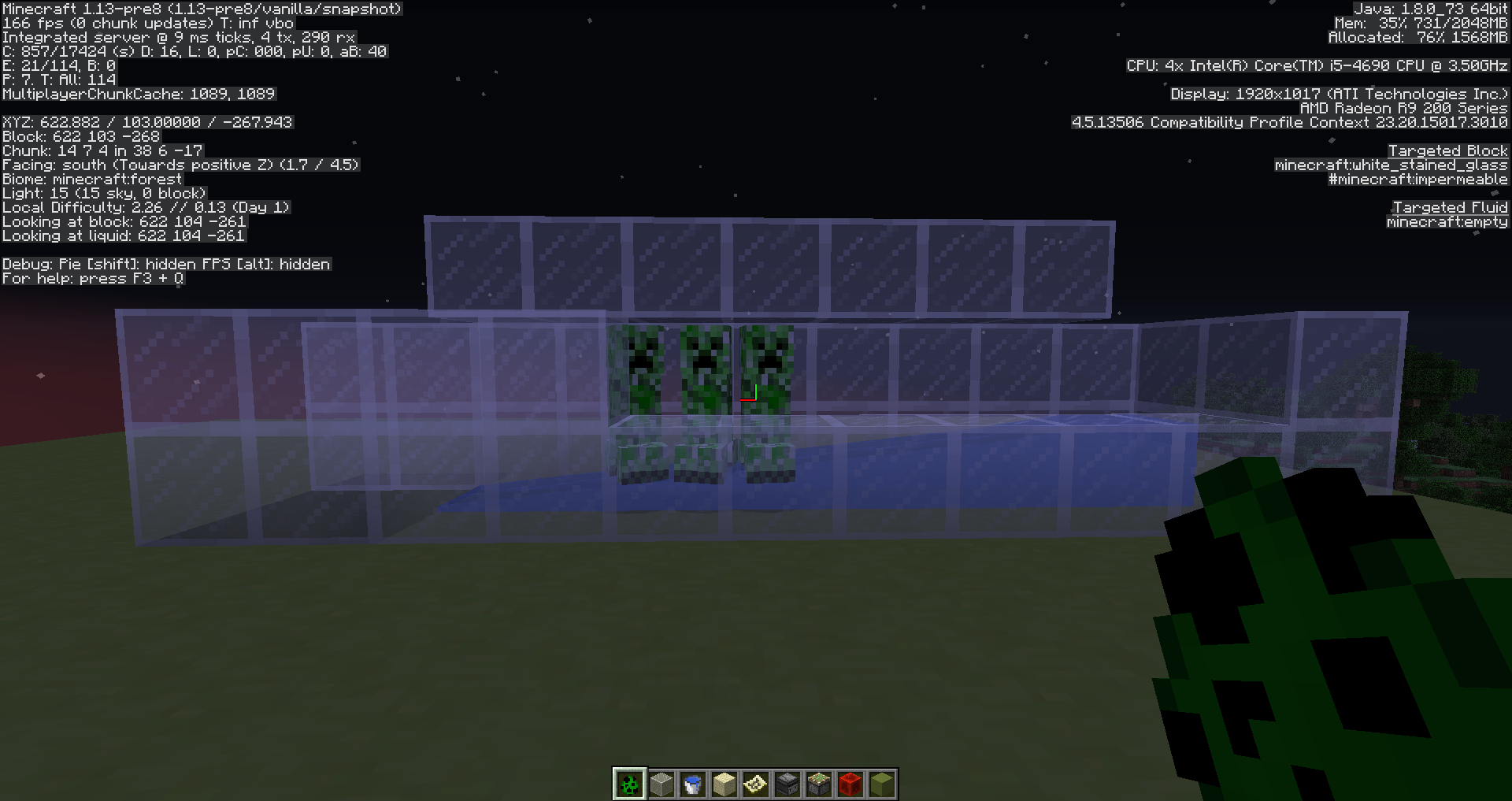
Not only the lowest level, but the 4 lowest levels won't push mobs, if there's a block above their head. See attached screenshot.
Edit: it seems to be affected by how tall the mob is. In this case the creepers are shorter than skeletons or zombies. The latter will travel to the last block, but very slowly.
Most mobs will float above the stream, and stop being transported when they no longer touch it. Zombies and skeletons sink into the stream and get transported further, sometimes even to the end of it.
@Fabian Röling
Doing so will make it public, which I try to avoid. Is there any way to send you a link privately here?
@Fabian Röling
I want to keep it private cause it's a server world. I wouldn't like my people to download it, get the seed, locate stuff etc.
Link should be in your email, if I got it right!
No problems with the semi-private comment!
Have you tried going to the coordinates indicated in the description? The busiest chunks are in that area (Grum told me the worst chunk took 13 secs to convert, and that's only one chunk). Also, in single player, you may not notice when the server stops ticking. You don't get timed out or kicked out. There's no "60 seconds to process a tick" watchdog kicking in. You have to test it as a server. Preferably on a different machine than the client.
32 chunks and no stopping? Running as a server or single player? I can reproduce it on 3 machines, with 100% failure (one is a dedicated host, I don't know the exact specs), at only 10 chunks (server default). The only way I can make it without the server stopping is to reduce view distance to 1 or 2 chunks, and advance toward those coords, very slowly, chunk by chunk.
I had some pretty bad tps before, even more than 60 seconds per tick, but not in that world
You cannot get more than 60 seconds per tick on a server. Watchdog will kick in and shut down the server. This is the problem I'm experiencing. This is due to how slow 1.13 converts old chunks to the new format. Mojang reproduced the problem, and are working on a fix that should come out today.
If one chunk takes 13 secs to convert and load, then you only need 5 similar chunks to trigger the watchdog. On a 10 chunks view distance, more than 400 chunks are loading.
What I may suggest you try:
Reload this world (new from the .zip) in 1.12.2. Teleport to 640 81 -192. Close world. Run it in a 1.13-pre8 server. Log back in. If problem doesn't show up, resolve this ticket as related to
MC-132135.Thanks for your help!
We learn something new every day! I thought at first that it was some undocumented feature and there I see "max-tick-time=60000" in the server.properties file... Remind me to slap my own face when I say silly stuff!
The next prerelease should in theory fix this issue, because chunk conversion will no longer happen on the fly, and instead will all be handled on initial load.
Really? Grum told me they managed to get the conversion time down by a factor of 4 but should be even quicker after all optimizations. But I'm all for a "convert-on-world-load" solution. I think it's even better, in fact.
You can close or resolve this report. World no longer crashes in 1.13-pre9.
Confirming for 1.13-pre9. Although there's a big improvement over previous pre-releases, there's still a lot of rubberbanding and "Can't keep up!" messages in the console.
1.13-pre9
Why is this being ignored? Please reopen.
Mods: this cannot be a duplicate of
MC-12949in any ways. This report is for a feature introduced today (07-17-2018).MC-12949is more than 5 years old.Confirming for 1.13-pre10. If anything, it's even worse than pre-9, according to my debug profiler log (see attachment). World has even gone through an "Optimize World" process before testing.
@Jfarf_Gl
Depending on how large your world is, allocate tons of RAM to the JVM before clicking that button. My 700 MB world required 4 GB allocated to it, or it would crash from an out of memory error (
MC-133808).@Cory Scheviak
Constant speed had many practical uses. We could rely on something consistent. Does the new implementation carry any practical reasoning, or just simple reality-based "less water should push less" reasoning? I'm fine with either cases, though, but not so much if it's just change for the sake of change.
@Jfarf_Gl
While it may not be the ideal solution, it's still a great tool. Especially for large worlds on bigger servers. Shedding away the need to convert chunks on the fly.
It's most likely a serious memory leak. Unfortunately, my perfectly legit bug report has been wrongly resolved by some bot marking it as a duplicate of an unrelated 5 years old bug. And mods have been ignoring my comment to reopen the report. They've been active everywhere else, though.
MC-133808.What do you mean? I just try to bring their attention to the fact that this issue is legit and definitely not the duplicate of a 5 years old issue. Being "resolved" means that no one can vote on it, and the release is tomorrow.
@Jfarf_Gl
Use the built-in debug profiler:
Let it run for a little while, then stop it:
The look for the profiler log in the world's debug subfolder. You won't see your tps in real-time, but you'll get an idea of the average tps you got during the profiling.
@DaUltraMarine
I can't confirm for sure, but after doing the optimization, my DIM-1 subfolder (Nether) grew in size. However, my DIM1 subfolder (The End) remained byte-for-byte identical.
My best guess is that converting The End is useless, as region files and chunks have very little data compared to the other dimensions. They're already lightning fast to load.
@Jfarf_Gl
I did manage to get some more tps by doing some cleaning in my world. According to my own debug profiler log, I saw that hopper minecarts took up quite a bit of ticking. My average tps got up to 18.87, which is pretty good in the circumstances. But that was me standing still for 2 minutes. Just flying around got it down again to 17.
I also see that villagers take up most of the ticking. I didn't bother getting rid of them. I know I would have gotten back most of the missing ticks.
But still, the point is I can't manage to get the server up to ~20 tps without #1, getting rid of all the hopper minecarts in one of my contraption and #2, getting rid of most of my villagers. Now, 1.12.2 can handle all of those at ~20 tps without any hiccups. (when I say ~20 tps, I mean around 19.95, as per profiler logs).
My conclusion is that entities (mostly mobs and animals) gobble up more ticking resources than before. I may be wrong though, but that's what I see.
So, from my point of view, this report still stands for bad overall performance. But is it due to being a 1.12.2 world? I don't think so. I suggest you update the report to "confirmed for 1.13-pre10" but change the title by removing the 1.12.2 world reference. It's just overall poor performance.
Intended? According to this comment, Bedrock is wrong?
Also, I'm not taking about placed pumpkins, I'm talking about stored pumpkins.
@Jfarf_Gl
This is likely a direct effect of the flattening. Everything in 1.13 has a unique string ID. Before 1.13, all the ids were integers, internally. It's much slower to process and parse strings than dealing with integers, which is the fastest possible route.
Also, dealing with strings all over the place is both more demanding on CPU and memory. That's why I once said that some aspects of 1.13 are inherently slower and more demanding "by design". All the imaginable optimizations will never bring back 1.12.2 performance levels in a lot of cases.
You can do a search for "Clean code vs efficient code". Clean code is preferable because it makes coding easier and more readable. It's also a lot easier to maintain and expand upon it. It's more "future proof". But it's also a lot harder to make it really efficient (fast).
Also, clean code means "no more shortcuts" and "hacks". Those are questionable because they can be unstable and unreliable. Updates can break them. But they also (usually) provide a much faster route to a result (like bypassing an API to write directly to the memory or the frame buffer).
My best guess is that the old Minecraft codebase made use of shortcuts and hacks so much that it became a mess (spaghetti code) that had to be dealt with ASAP or it would have become unmanageable.
@Jfarf_Gl
Yes, chunk loading performance is definitely an issue. Here's a comment from Amidst developer describing how 1.13 chunk loading is actually up to 35x slower than before:
https://github.com/toolbox4minecraft/amidst/issues/395#issuecomment-386838958
The whole thread is worth reading. This was a while ago and things probably got a bit better since, but nowhere near 1.12.2 levels.
I can't remember exactly when (probably in the 1.8 development phase), but Dinnerbone once pulled off a little miracle by threading chunk loading code, making them load almost 10x faster. Well, it's time someone pulls off another one.
@Jeff Gaunt
It seems to be especially laggy around redstone circuits
Yes. I've read somewhere (can't find source anymore, sorry) that redstone dust, which was already screaming for fixes because of lag (badly implemented floodfills), is a lot worse in 1.13. We need someone to actually confirm that.
Confirming for 18w30a.
Confirming for 18w30b.
Confirming for 18w31a. Things got better. I do get more encouraging numbers. It's not there yet, but it's on the right track.
Confirming for 1.13.1-pre1.
Some stuff definitely got better, such as chunk creation/loading. But something really bad also happened that hits the mspt really hard (probably entity collision management). I can't even make it go below 80, just by being around my base, but the average being around ~100. I could sometimes get ~60 in previous snapshots, which was already bad enough.
As reference, my average mspt in 1.12.2 is ~35, standing at the same exact place.
Confirming for 1.13.1, even though it's light years better than in 1.13. Redstone is still begging for optimization, especially Redstone Dust updates. They were already painful before, but since the flattening, they are agonizingly sluggish.
@Jfarf_Gl
It seems like your issue isn't exactly with chunk loading but rather chunk rendering, client-side. The chunks actually load correctly, but take forever to render, or never do unless you walk close or right into them in order to see them. When you fly with Elytra you can see them appear in a more or less random checkerboard pattern. Chunk rendering is still very clunky. Although it isn't affecting speed directly, it still falls into the "bad performance" category, for sure.
This bug with the Cod AI is new to 1.13.x, and is a critical issue. It breaks the game. It's not a duplicate of
MC-91621, which is 3 years old. Bugs this critical usually get fixed quickly because they're game-breaking.MC-91621is not critical, it managed to live happily for 3 years, unassigned.One of my friends on my server has a mob farm high up over an ocean and we can't go anywhere near it without bringing the server down its knees.
Please reopen this critical issue.
@rockenroll4life
From what we saw in your recent Tweet, you already have a fix for this. We we also saw is that it's only for the 1.14 development phase. This bug is critical and game-breaking in many ways. Why should some people have to wait until a stable 1.14 release, months away from now, to benefit from that fix when it could be included into a minor 1.13.2 shortly? It would be welcome with open arms and huge relief.
@Asteraoth
No. It went smoothly within the 2GB allocated that one time I retried it in 1.13.1.
Confirmed for 19w11a
@Bartosz Bok
Yes. I use the following Java argument
-Dorg.lwjgl.openal.libname="C:\openal_1.15.1\Win64\OpenAL32.dll"
Since 1.13.x, you're using OpenAL 1.17, which is totally broken. Sound panning doesn't work at all and sounds come out from all over the place. I voiced about this and Fry closed the ticket "Works as intended" saying "sound is subjective". I'm sorry but it's not "subjective" when something to the left of you sounds to the right, it's "objective" as "wrong for everybody". Game is literally unplayable without this switch. It's extremely irritating and it's impossible to locate sources of sounds (a mob to your left can be heard extreme right or vice-versa). I was also quite vocal about Mojang using completely broken third-party software in full releases.
Removing the argument makes the game run. But breaks the sound system fix and sound is all over the place again.
I can confirm @violine1101's observations. Mobs still do take damage when the piston extends, but not afterward.