Redstone wire uses different criteria for connecting visually and logically
The bug
Redstone wire in some situations uses different logic for connecting visually (in which direction the dust texture goes) and logically (what gets powered).
Affected situations
List might be incomplete
Last updated for 18w05a
| Situation | Looks like | Is actually | Screenshot |
|---|---|---|---|
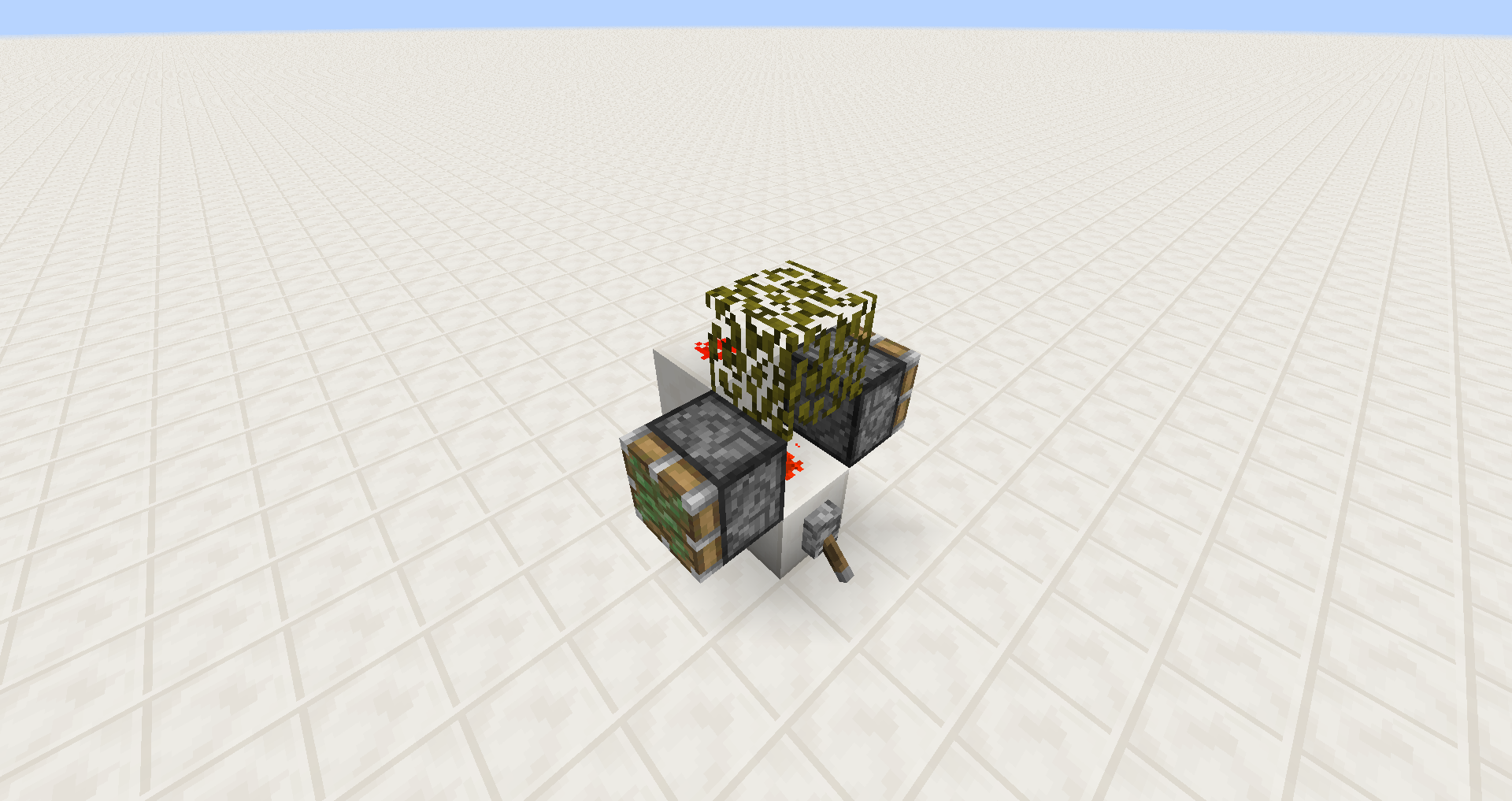
| Redstone wire connecting upwards to slab / stairs / glowstone | line | dot | Redstone redirection - 14w46a behaviour.png |
 Glowstone should possibly not show redstone wire on its side since all other blocks which only transfer a redstone signal upwards have no wire on their side.
Code analysis and suggested fix
See comment
Linked Issues
is duplicated by23
 MC-53752Redstone & Stair GlitchDuplicateMC-56348redstone not trailing downward while on a hopperDuplicateMC-66076Redstone dust placed on and beside redstone block does not render the vertical redstone tracesDuplicateMC-70064Redstone Does Not Work Properly And Redstone Single Dust Texture BrokenDuplicateMC-72995Redstone dust doesn't render on the side of redstone blocksDuplicateMC-73931Redstone wire doesn't render vertically on redstone blockDuplicateMC-75988Visual glitch involving redstoneDuplicateMC-97846Redstone dot/wire doesn't changeDuplicateMC-98858Redstone Wire not appearing on Redstone BlockDuplicateMC-101639Piston Redstone IssueDuplicateMC-104725incorrect redstone glitch renderingDuplicateMC-108512Redstone line going up a slab acts as a dot, powering mechanism components next to it, even though it appears to not be pointed at them.DuplicateMC-110463Piston on top of redstone bugDuplicateMC-111763Redstone Wire on Redstone Blocks Graphical IssueDuplicateMC-124642Slabs and redstone pointingDuplicateMC-136564Pistons are activated without reasons in a precise eventDuplicateMC-144031redstone dust powers blocks it isn't facingDuplicateMC-154273slab diode redstone piston bugDuplicateMC-157619Redstone doesn't behave normally when placed on blocks that don't conduct redstone powerDuplicateMC-157865Redstone still powers sides when traveling up glass/half slabDuplicateMC-168515Redstone False PowerDuplicateMC-168886Up-pistons are not powered when the adjacent power line bends onto the piston faceDuplicateMC-181176Redstone dust incorrect display with slabsDuplicate
relates to7
MC-3311Transparent blocks disallow downwards redstone connectivityWorks As IntendedMC-3703Redstone changing orientation doesn't update previously powered blocks correctly NormalMC-8645Redstone wire receiving level 1 power from a block, pointing at another block with wire on it will not power that blockFixedMC-9405Top piece of staircase redstone dust doesn't power blocks on the same height in the direction it is powered from unless only connected to something on the other sideFixedMC-181524Redstone does not visually connect when going up soul sandFixedMC-181636Redstone does not visually connect when going up non-full blocksWorks As IntendedMC-181764Redstone behaviour: Redstone dust visually "connects" to blocks it shouldn'tInvalid
Attachments15


![[Mod] violine1101](../../../data/avatars/users/92858.png)
![[Mod] Urielsalis](../../../data/assets/gravatar/urielsalis.jpeg)





- Fixed
![[Mod] redstonehelper](../../../data/avatars/users/10122.svg) [Mod] redstonehelper
[Mod] redstonehelper- True Kuehli
- 60
- 38
- Confirmed
 Important
- Redstone
- glowstone redstone_wire slabs stairs
1.4.2 - 20w17a
1.4.2 1.7.10 1.8-pre3 1.8.8 15w40b 15w44b 15w45a 15w46a 15w49a 15w49b 1.8.9 15w50a 15w51a 15w51b 16w02a 16w04a 1.9-pre1 1.9-pre2 1.9 1.9.1 1.9.2 1.9.3-pre3 1.10.2 16w32a 16w32b 16w33a 16w35a 16w40a 1.11.2 1.12 1.12.1 1.12.2 17w43a 17w43b 17w47b 18w01a 18w05a 1.13-pre3 1.13-pre6 1.13-pre7 1.13.1 1.13.2 19w04b 19w05a 19w06a 1.14.4 1.15-pre2 1.15.1 1.15.2 20w12a 20w17a- 15w46a 20w18a
Created Issue:
Redstone-Wire Graphic Bug
If you try to block a redstone-wire with a leaf-block the wires don't seem to be connected, but they work like they would be connected. Hope you understand, what I mean.
Environment
Operating system: Windows 7 Ultimate 64 Bit
Java Version: Version 7 Update 7(Built 1.7.0_07-b10)
Attachments2
2012-11-04_19.58.png
- Unresolved
- Open
- Public
- Unconfirmed
- Creative
- Bug Graphical Leaf Redstone Wire
- 1.4.2


is duplicated by
![[Mod] Ezekiel (ezfe)](../../../data/assets/gravatar/ezekielelin.jpeg)
Operating system: Windows 7 Ultimate 64 Bit
Java Version: Version 7 Update 7(Built 1.7.0_07-b10)
Redstone-Wire Graphic BugRedstone wire uses different criteria for connecting visually and logically
is duplicated by
relates to
If you try to block a redstone-wire with a leaf-block the wires don't seem to be connected, but they work like they would be connected. Hope you understand, what I mean.Redstone wire can conduct power even through non-solid blocks such as leaves or slabs. However, there are different criteria used for when to render redstone wire as connected for when redstone actually is connected logically. This leads to situations where redstone wire is is conducting power but not connected visually:
- Redstone wire going up blocks will render on the side of blocks only if they are full blocks. However, redstone can logically connect upwards as long as the upper redstone wire is on a block that can hold redstone wire, which is any block with a solid top side. This creates inconsistencies with hoppers and upside down stairs/slabs. See screenshot 1, the redstone isn't rendered on the side of stairs/slabs/hoppers.
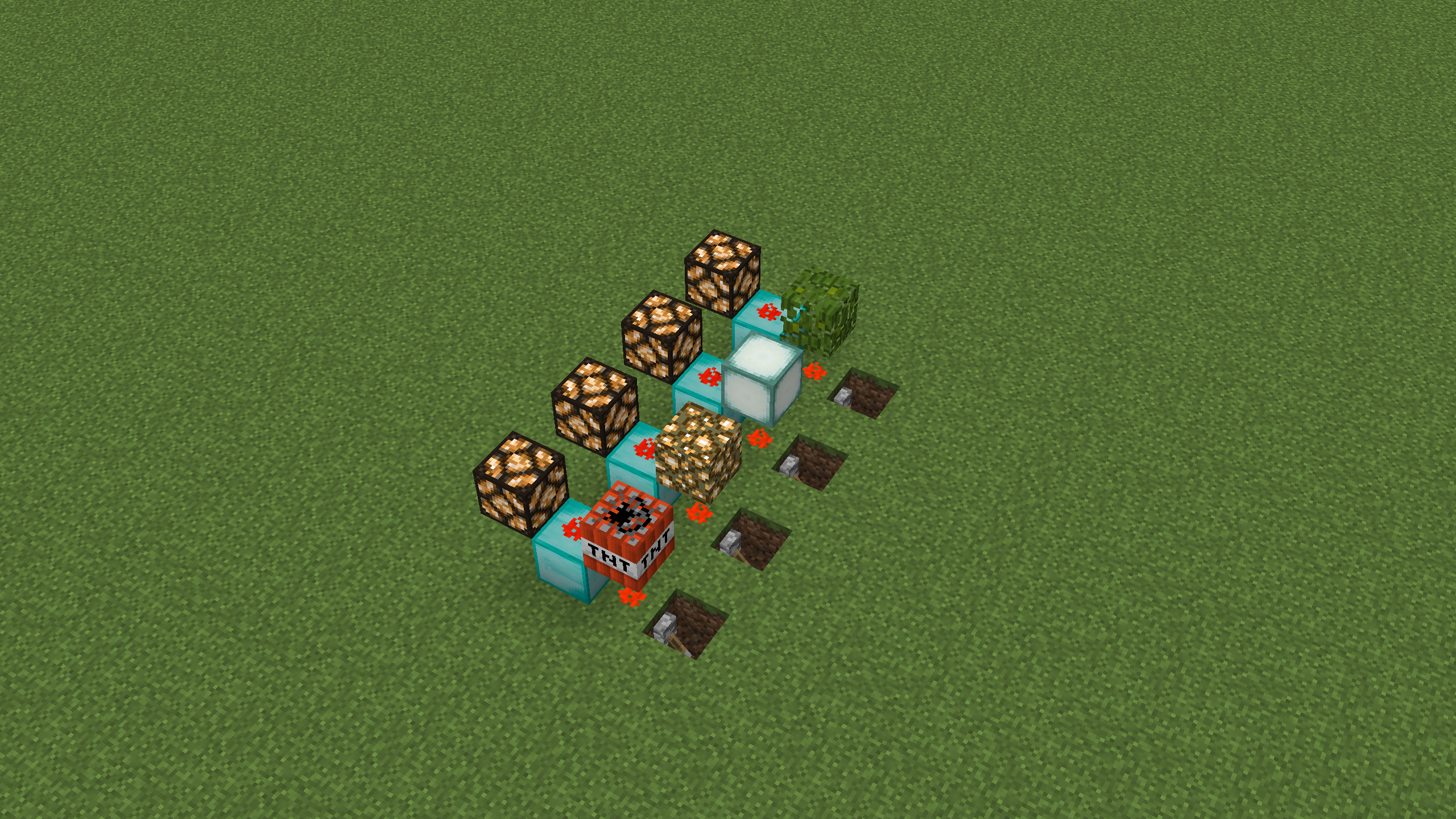
- Redstone wire going up a block will only render as such if the block above the bottom piece of redstone dust isn't a full block. However, redstone will connect logically if the block above the lower piece of redstone dust is transparent. This creates inconsistencies with TNT, glowstone, sea lanterns and leaves. See screenshot 2, the redstone isn't rendered on the side of the diamond block.
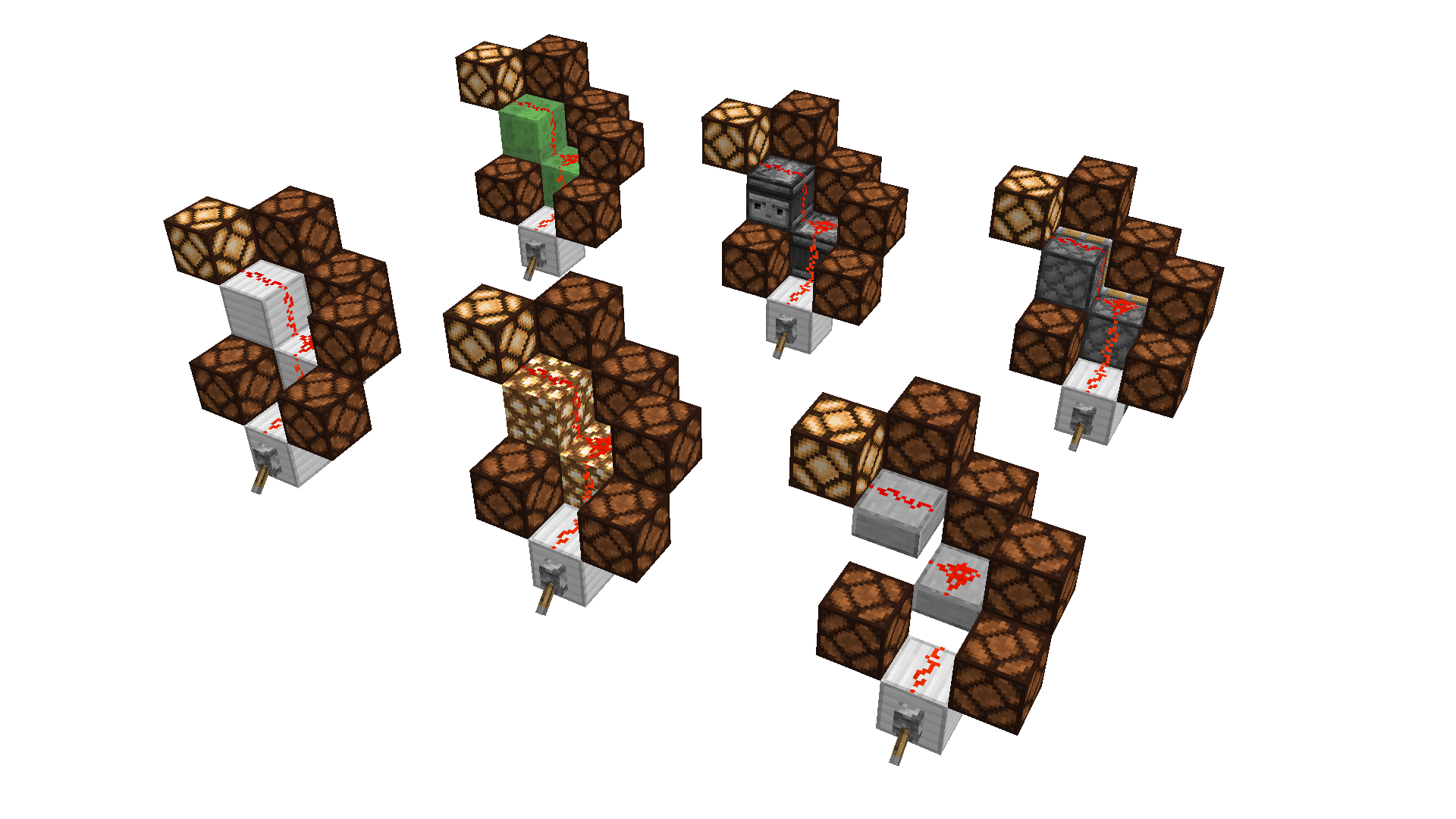
In both screenshots, the redstone lamps are there to show that the upper redstone wire is actually powered.
Redstone wire can conduct power even through non-solid blocks such as leaves or slabs. However, there are different criteria used for when to render redstone wire as connected for when redstone actually is connected logically. This leads to situations where redstone wire is is conducting power but not connected visually:
- Redstone wire going up blocks will render on the side of blocks only if they are full blocks. However, redstone can logically connect upwards as long as the upper redstone wire is on a block that can hold redstone wire, which is any block with a solid top side. This creates inconsistencies with hoppers and upside down stairs/slabs. See screenshot 1, the redstone isn't rendered on the side of stairs/slabs/hoppers.
- Redstone wire going up a block will only render as such if the block above the bottom piece of redstone dust isn't a full block. However, redstone will connect logically if the block above the lower piece of redstone dust is transparent. This creates inconsistencies with TNT, glowstone, sea lanterns and leaves. See screenshot 2, the redstone isn't rendered on the side of the diamond block or connected towards it.
In both screenshots, the redstone lamps are there to show that the upper redstone wire is actually powered.
Redstone wire can conduct power even through non-solid blocks such as leaves or slabs. However, there are different criteria used for when to render redstone wire as connected for when redstone actually is connected logically. This leads to situations where redstone wire is is conducting power but not connected visually:
- Redstone wire going up block
swill renderon the side of blocks only if they arefull blocks. However, redstone can logically connect upwards as long as theupper redstone wire is on a block thatcan hold redstone wire, which is any block with a solid top side. This creates inconsistencies with hoppers and upside down stairs/slabs. See screenshot 1, the redstone isn't rendered on the side of stairs/slabs/hoppers.- Redstone wire going up a block will only render as such if the block above the bottom piece of redstone dust isn't a full block. However, redstone will connect logically if the block above the lower piece of redstone dust is transparent. This creates inconsistencies with TNT, glowstone, sea lanterns and leaves. See screenshot 2, the redstone isn't rendered on the side of the diamond block or connected towards it.
In both screenshots, the redstone lamps are there to show that the upper redstone wire is actually powered.
Redstone wire can conduct power even through non-solid blocks such as leaves or slabs. However, there are different criteria used for when to render redstone wire as connected for when redstone actually is connected logically. This leads to situations where redstone wire is is conducting power but not connected visually:
- Redstone wire going up a block will only render as such if the block under the top piece of redstone dust is a full block. However, redstone can logically connect upwards as long as the block under the upper piece of redstone wire can hold redstone wire, which is any block with a solid top side. This creates inconsistencies with hoppers and upside down stairs/slabs. See screenshot 1, the redstone isn't rendered on the side of stairs/slabs/hoppers.
- Redstone wire going up a block will only render as such if the block above the bottom piece of redstone dust isn't a full block. However, redstone will connect logically if the block above the lower piece of redstone dust is transparent. This creates inconsistencies with TNT, glowstone, sea lanterns and leaves. See screenshot 2, the redstone isn't rendered on the side of the diamond block or connected towards it.
In both screenshots, the redstone lamps are there to show that the upper redstone wire is actually powered.

Redstone wire can conduct power even through non-solid blocks such as leaves or slabs. However, there are different criteria used for when to render redstone wire as connected for when redstone actually is connected logically. This leads to situations where redstone wire is is conducting power but not connected visually:
- Redstone wire going up a block will only render as such if the block under the top piece of redstone dust is a full block. However, redstone can logically connect upwards as long as the block under the upper piece of redstone wire can hold redstone wire, which is any block with a solid top side. This creates inconsistencies with hoppers and upside down stairs/slabs. See screenshot 1, the redstone isn't rendered on the side of stairs/slabs/hoppers/redstone blocks.
- Redstone wire going up a block will only render as such if the block above the bottom piece of redstone dust isn't a full block. However, redstone will connect logically if the block above the lower piece of redstone dust is transparent. This creates inconsistencies with TNT, glowstone, sea lanterns and leaves. See screenshot 2, the redstone isn't rendered on the side of the diamond block or connected towards it.
In both screenshots, the redstone lamps are there to show that the upper redstone wire is actually powered.
is duplicated by
is duplicated by
relates to

![[Mojang] Grum (Erik Broes)](../../../data/assets/gravatar/grum.png)
![[Mojang] Jeb (Jens Bergensten)](../../../data/assets/gravatar/jeb.jpeg) [Mojang] Jeb (Jens Bergensten)
[Mojang] Jeb (Jens Bergensten)A comment with security level 'global-moderators' was removed.
Redstone wire can conduct power even through non-solid blocks such as leaves or slabs. However, there are different criteria used for when to render redstone wire as connected for when redstone actually is connected logically. This leads to situations where redstone wire is is conducting power but not connected visually:
- Redstone wire going up a block will only render as such if the block under the top piece of redstone dust is a full block. However, redstone can logically connect upwards as long as the block under the upper piece of redstone wire can hold redstone wire, which is any block with a solid top side. This creates inconsistencies with hoppers and upside down stairs/slabs. See screenshot 1, the redstone isn't rendered on the side of stairs/slabs/hoppers/redstone blocks.
- Redstone wire going up a block will only render as such if the block above the bottom piece of redstone dust isn't a full block. However, redstone will connect logically if the block above the lower piece of redstone dust is transparent. This creates inconsistencies with TNT, glowstone, sea lanterns and leaves. See screenshot 2, the redstone isn't rendered on the side of the diamond block or connected towards it.
In both screenshots, the redstone lamps are there to show that the upper redstone wire is actually powered.
Update, situation as of 15w46a: Redstone still doesn't render going up the sides of redstone blocks, hoppers, upside down slabs and stairs (screenshot1). The situation in screenshot 2 remains unchanged entirely.
Redstone wire can conduct power even through non-solid blocks such as leaves or slabs. However, there are different criteria used for when to render redstone wire as connected for when redstone actually is connected logically. This leads to situations where redstone wire is is conducting power but not connected visually:
- Redstone wire going up a block will only render as such if the block under the top piece of redstone dust is a full block. However, redstone can logically connect upwards as long as the block under the upper piece of redstone wire can hold redstone wire, which is any block with a solid top side. This creates inconsistencies with hoppers and upside down stairs/slabs. See screenshot 1, the redstone isn't rendered on the side of stairs/slabs/hoppers/redstone blocks.
- Redstone wire going up a block will only render as such if the block above the bottom piece of redstone dust isn't a full block. However, redstone will connect logically if the block above the lower piece of redstone dust is transparent. This creates inconsistencies with TNT, glowstone, sea lanterns and leaves. See screenshot 2, the redstone isn't rendered on the side of the diamond block or connected towards it.
In both screenshots, the redstone lamps are there to show that the upper redstone wire is actually powered.
Update, situation as of 15w46a: Redstone still doesn't render going up the sides of redstone blocks, hoppers, upside down slabs and stairs (screenshot1). The situation in screenshot 2 remains unchanged entirely.
Redstone wire can conduct power even through non-solid blocks such as leaves or slabs. However, there are different criteria used for when to render redstone wire as connected for when redstone actually is connected logically. This leads to situations where redstone wire is is conducting power but not connected visually:
- Redstone wire going up a block will only render as such if the block under the top piece of redstone dust is a full block. However, redstone can logically connect upwards as long as the block under the upper piece of redstone wire can hold redstone wire, which is any block with a solid top side. This creates inconsistencies with hoppers and upside down stairs/slabs. See screenshot 1, the redstone isn't rendered on the side of stairs/slabs/hoppers/redstone blocks.
Redstone wire going up a block will onlyrender assuch if the block above the bottom piece of redstone dust isn't a full block. However, redstone will connect logically if the block above the lower piece of redstone dust is transparent. This creates inconsistencies with TNT, glowstone, sea lanterns and leaves. See screenshot 2, the redstone isn't rendered on the side of the diamond block or connected towards it.In both screenshots, the redstone lamps are there to show that the upper redstone wire is actually powered.
Update, situation as of 15w46a: Redstone still doesn't render going up the sides of redstone blocks, hoppers, upside down slabs and stairs (screenshot1). The situation in screenshot 2 remains unchanged entirely.
Redstone wire can conduct power even through non-solid blocks such as leaves or slabs. However, there are different criteria used for when to render redstone wire as connected for when redstone actually is connected logically. This leads to situations where redstone wire is is conducting power but not connected visually:
- Redstone wire going up a block will only render as such if the block under the top piece of redstone dust is a full block. However, redstone can logically connect upwards as long as the block under the upper piece of redstone wire can hold redstone wire, which is any block with a solid top side. This creates inconsistencies with hoppers and upside down stairs/slabs. See screenshot 1, the redstone isn't rendered on the side of stairs/slabs/hoppers/redstone blocks.
- Also see "Redstone redirection - 1.8, up" - the redstone is rendering as going up the side of the full block with redstone on top even though it isn't logically oriented that way
- Redstone wire going up a block will only render as such if the block above the bottom piece of redstone dust isn't a full block. However, redstone will connect logically if the block above the lower piece of redstone dust is transparent. This creates inconsistencies with TNT, glowstone, sea lanterns and leaves. See screenshot 2, the redstone isn't rendered on the side of the diamond block or connected towards it.
In both screenshots, the redstone lamps are there to show that the upper redstone wire is actually powered.
Update, situation as of 15w46a: Redstone still doesn't render going up the sides of redstone blocks, hoppers, upside down slabs and stairs (screenshot1). The situation in screenshot 2 remains unchanged entirely.
Redstone wire can conduct power even through non-solid blocks such as leaves or slabs. However, there are different criteria used for when to render redstone wire as connected for when redstone actually is connected logically. This leads to situations where redstone wire is is conducting power but not connected visually:
- Redstone wire going up a block will only render as such if the block under the top piece of redstone dust is a full block. However, redstone can logically connect upwards as long as the block under the upper piece of redstone wire can hold redstone wire, which is any block with a solid top side. This creates inconsistencies with hoppers and upside down stairs/slabs. See screenshot 1, the redstone isn't rendered on the side of stairs/slabs/hoppers/redstone blocks.
- Also see "Redstone redirection - 1.8, up" - the redstone is rendering as going up the side of the full block with redstone on top even though it isn't logically oriented that way
- Redstone wire going up a block will only render as such if the block above the bottom piece of redstone dust isn't a full block. However, redstone will connect logically if the block above the lower piece of redstone dust is transparent. This creates inconsistencies with TNT, glowstone, sea lanterns and leaves. See screenshot 2, the redstone isn't rendered on the side of the diamond block or connected towards it.
In both screenshots, the redstone lamps are there to show that the upper redstone wire is actually powered.
Update, situation as of 15w46a: Redstone still doesn't render going up the sides of redstone blocks, hoppers, upside down slabs and stairs (screenshot1). The situation in screenshot 2 remains unchanged entirely.
Redstone wire can conduct power even through non-solid blocks such as leaves or slabs. However, there are different criteria used for when to render redstone wire as connected for when redstone actually is connected logically. This leads to situations where redstone wire is is conducting power but not connected visually:
- Redstone wire going up a block will only render as such if the block under the top piece of redstone dust is a full block. However, redstone can logically connect upwards as long as the block under the upper piece of redstone wire can hold redstone wire, which is any block with a solid top side. This creates inconsistencies with hoppers and upside down stairs/slabs. See screenshot 1, the redstone isn't rendered on the side of stairs/slabs/hoppers/redstone blocks.
- Also see "Redstone redirection - 1.8, up" - the redstone is rendering as going up the side of the full block with redstone on top even though it isn't logically oriented that way
- Redstone wire going up a block will only render as such if the block above the bottom piece of redstone dust isn't a full block. However, redstone will connect logically if the block above the lower piece of redstone dust is transparent. This creates inconsistencies with TNT, glowstone, sea lanterns and leaves. See screenshot 2, the redstone isn't rendered on the side of the diamond block or connected towards it.
In both screenshots, the redstone lamps are there to show that the upper redstone wire is actually powered.
![[Mod] Torabi](../../../data/assets/gravatar/torabi.png)
![[Mod] CubeTheThird](../../../data/assets/gravatar/cubethethird.jpeg)
is duplicated by
is duplicated by

is duplicated by
is duplicated by

Update, situation as of 15w46a: Redstone still doesn't render going up the sides of redstone blocks, hoppers, upside down slabs and stairs (screenshot1). The situation in screenshot 2 remains unchanged entirely.Redstone wire can conduct power even through non-solid blocks such as leaves or slabs. However, there are different criteria used for when to render redstone wire as connected for when redstone actually is connected logically. This leads to situations where redstone wire is is conducting power but not connected visually:
- Redstone wire going up a block will only render as such if the block under the top piece of redstone dust is a full block. However, redstone can logically connect upwards as long as the block under the upper piece of redstone wire can hold redstone wire, which is any block with a solid top side. This creates inconsistencies with hoppers and upside down stairs/slabs. See screenshot 1, the redstone isn't rendered on the side of stairs/slabs/hoppers/redstone blocks.
- Also see "Redstone redirection - 1.8, up" - the redstone is rendering as going up the side of the full block with redstone on top even though it isn't logically oriented that way
- Redstone wire going up a block will only render as such if the block above the bottom piece of redstone dust isn't a full block. However, redstone will connect logically if the block above the lower piece of redstone dust is transparent. This creates inconsistencies with TNT, glowstone, sea lanterns and leaves. See screenshot 2, the redstone isn't rendered on the side of the diamond block or connected towards it.
In both screenshots, the redstone lamps are there to show that the upper redstone wire is actually powered.
Redstone wire in some situations uses different logic for connecting visually (in which direction the dust texture goes) and logically (what gets powered).
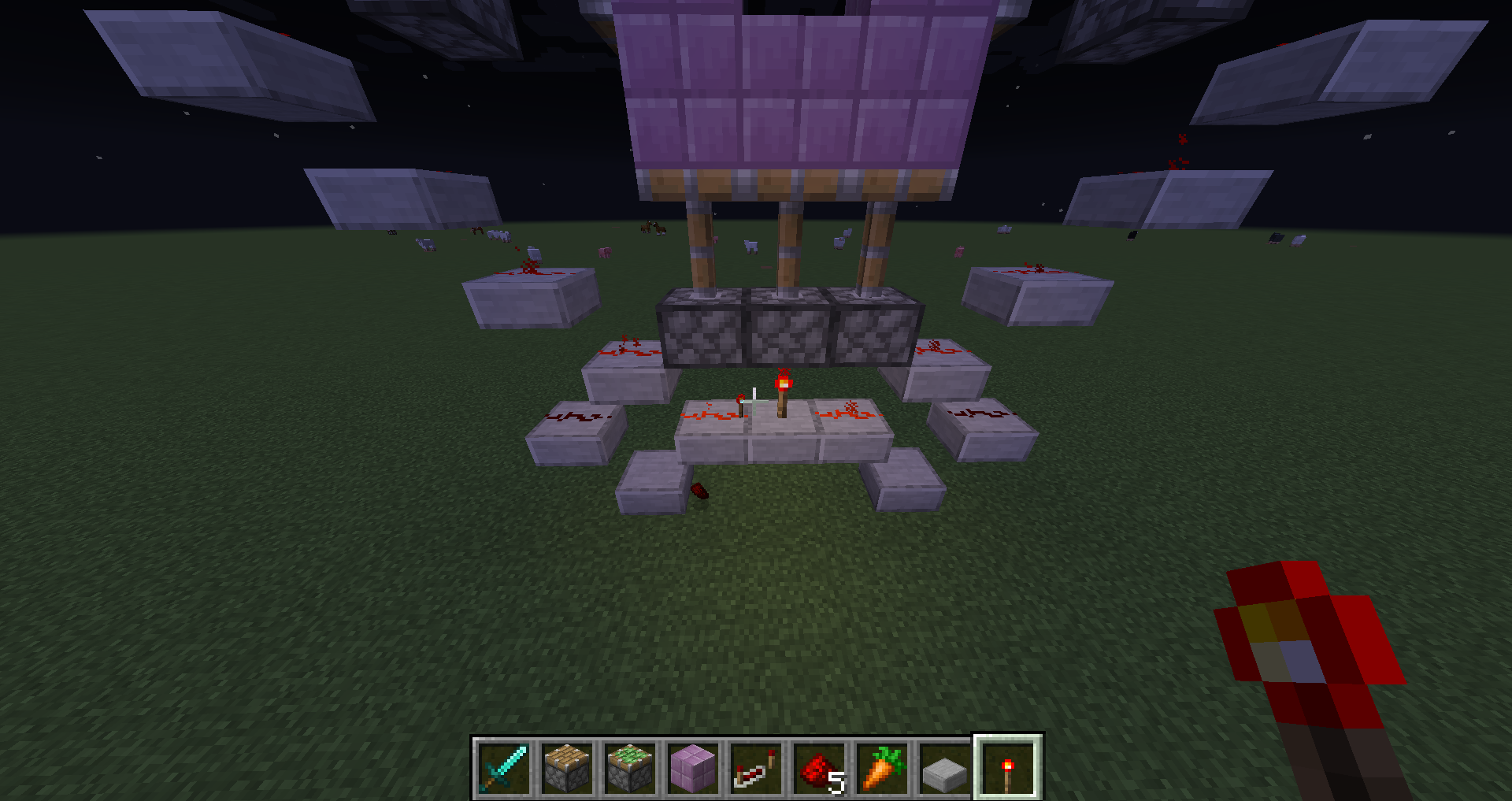
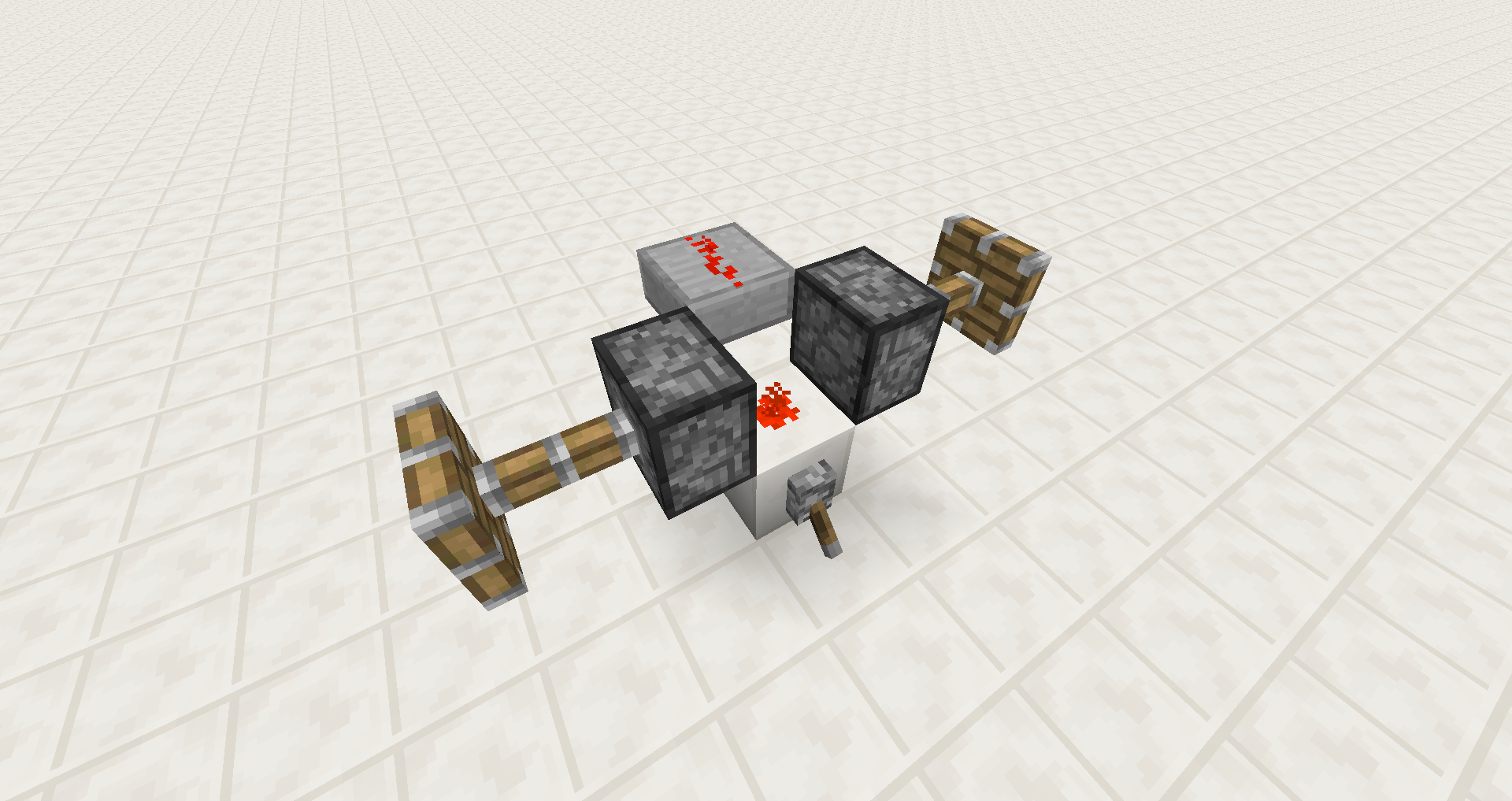
This can be seen in the attachment Redstone redirection - 14w46a behaviour.png. There the redstone dust on the quartz block appears to be connected with the dust on the slab in a straight line, but it powers the two pistons on the sides as if it was a cross or a dot.
Another inconsistency is visible in screenshot1.png
is duplicated by
is duplicated by

![[Mod] Neko](../../../data/avatars/users/92901.png)

is duplicated by
is duplicated by

Redstone wire in some situations uses different logic for connecting visually (in which direction the dust texture goes) and logically (what gets powered).
This can be seen in the attachment Redstone redirection - 14w46a behaviour.png
Another inconsistency is visible in screenshot1.pngThe bug
Redstone wire in some situations uses different logic for connecting visually (in which direction the dust texture goes) and logically (what gets powered).
This can be seen in the attachment Redstone redirection - 14w46a behaviour.png
Another inconsistency is visible in screenshot1.pngSituations
Wire preferring SIDE instead of UP
Redstone wire prefers SIDE as value instead of UP if it can connect to a redstone component. This can be seen with redstone blocks and observers.
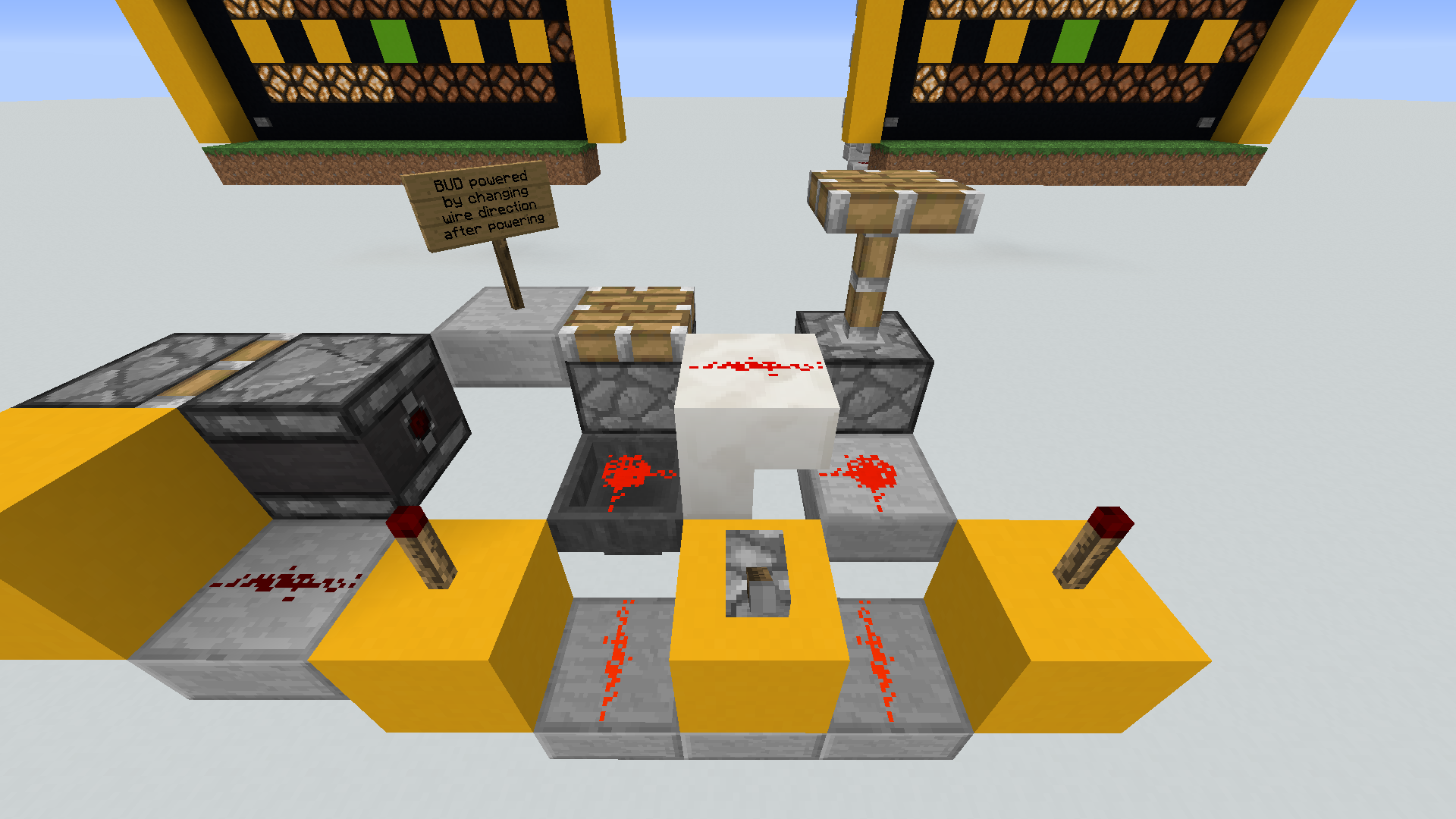
Activating an observer with redstone wire behind and on top of it powers the dust on top as well. Therefor it should prefer UP over SIDE , as UP looks like it is connected to the side as well.
The bug
Redstone wire in some situations uses different logic for connecting visually (in which direction the dust texture goes) and logically (what gets powered).
This can be seen in the attachment Redstone redirection - 14w46a behaviour.png
Another inconsistency is visible in screenshot1.pngSituations
Wire preferring SIDE instead of UP
Redstone wire prefers SIDE as value instead of UP if it can connect to a redstone component. This can be seen with redstone blocks and observers.
Activating an observer with redstone wire behind and on top of it powers the dust on top as well. Therefor it should prefer UP over SIDE, as UP looks like it is connected to the side as well.
The bug
Redstone wire in some situations uses different logic for connecting visually (in which direction the dust texture goes) and logically (what gets powered).
This can be seen in the attachment Redstone redirection - 14w46a behaviour.png
Another inconsistency is visible in screenshot1.png
![[Mod] NeunEinser](../../../data/avatars/users/39263.png)
![[Mod] Michael Wobst](../../../data/avatars/users/37868.png)
is duplicated by
Redstone wire in some situations uses different logic for connecting visually (in which direction the dust texture goes) and logically (what gets powered).
This can be seen in the attachment Redstone redirection - 14w46a behaviour.png. There the redstone dust on the quartz block appears to be connected with the dustonthe slab in a straight line, but it powers the two pistonson the sides as if it was a cross or a dot.
Another inconsistency is visible in screenshot1.pngThe bug
Redstone wire in some situations uses different logic for connecting visually (in which direction the dust texture goes) and logically (what gets powered).
Affected situations
List might be incomplete
Last updated for 18w05a
Situation Looks like Is actually Screenshot Redstone wire connecting upwards to slab / stairs / glowstone line dot Redstone redirection - 14w46a behaviour.png
is duplicated by
is duplicated by
![[Mojang] Nathan Adams](../../../data/assets/gravatar/dinnerbone.png) [Mojang] Jeb (Jens Bergensten)
[Mojang] Jeb (Jens Bergensten)is duplicated by
is duplicated by
![[Mod] SPGoding](../../../data/avatars/users/44622.png)

is duplicated by
is duplicated by
![[Mojang] Adrian Östergård](../../../data/assets/gravatar/nighter.jpeg) Important
ImportantThe bug
Redstone wire in some situations uses different logic for connecting visually (in which direction the dust texture goes) and logically (what gets powered).
Affected situations
List might be incomplete
Last updated for 18w05a
Situation Looks like Is actually Screenshot Redstone wire connecting upwards to slab / stairs / glowstone line dot Redstone redirection - 14w46a behaviour.png
Code analysis and suggested fix
See comment
is duplicated by
![[Bot] Arisa](../../../data/avatars/users/43007.png)
![[Mojang] Panda](../../../data/avatars/users/41658.png)
is duplicated by
![[Mod] Pokechu22](../../../data/avatars/users/92931.png)
relates to
is duplicated by
relates to
relates to

Mb, this is a duplicate of MC-2255.
Thank you for your report!
However, this issue is a Duplicate of MC-2255.
If you have additional information, please add it to that report.
Please search before reporting, as it's likely that one exists already.
Quick Links:
📓 Issue Guidelines – 💬 Community Support – 📧 Customer Support – 📖 Game Wiki
Duplicate of MC-2255
Thank you for your report!
We're actually already tracking this issue in MC-2255, so I resolved and linked this ticket as a duplicate.
If you would like to add a vote and any extra information to the main ticket it would be appreciated.
If you haven't already, you might like to make use of the search feature in the future to see if the issue has already been reported.
Quick Links:
📓 Issue Guidelines – 💬 Community Support – 📧 Customer Support – 📖 Game Wiki
Thank you for your report!
However, this issue is a Duplicate of MC-2255.
If you would like to add a vote and any extra information to the main ticket it would be appreciated.
If you haven't already, you might like to make use of the search feature to see if the issue has already been mentioned.
Quick Links:
📓 Issue Guidelines – 💬 Community Support – 📧 Customer Support – 📖 Game Wiki
Wouldn't this be a duplicate of MC-2255 then?
Nope
Fixing MC-2255 would only half fix this bug
But you need the entire fix activate to see any changes

U suppose that MC-2255 is the problem here. When I was looking for tickets related to it, I only searched for pistons, I didn't think that this might somehow be connected to visual indicators not being in sync with underlying mechanics.
Since this is the case, I suppose it doesn't matter which way it swings: whether the power is diverted from the lantern and directed onto the piston, or whether the textures/models change somehow to indicate that the power actually flows straight to the next block and also up to the block above on the side, but not to the block underneath it (on the side, on the same level as the redstone conduit). The real problem is that there's only one way to convey the flow of power to the player, by the visual display, and the way this visual display works does not convey it at current moment because the way these things are displayed is not consistent between different use cases. To achieve consistency, either the way redstone transitions are displayed has to change, or the way power travels through redstone lines has to be changed, or both have to be changed. Unless, of course, consistency is not pursued in this aspect, and this becomes a moot point altogether, so we can simply document the way it works, agree that it's the correct behaviour, and move along.
According to my tests, this is not special behaviour for only pistons. Resolved this as MC-2255. You can still create a new ticket after MC-2255 has been fixed and this issue is not happening anymore.
That said, MC-2255 might need a better description / some more info in it, might work on that when I find some more time.
Thank you for your report!
We're actually already tracking this issue in MC-2255, so I resolved and linked this ticket as a duplicate.
If you would like to add a vote and any extra information to the main ticket it would be appreciated.
If you haven't already, you might like to make use of the search feature in the future to see if the issue has already been reported.
Quick Links:
📓 Issue Guidelines – 💬 Community Support – 📧 Customer Support – ✍️ Feedback and Suggestions – 📖 Game Wiki
This appears to be MC-2255 (Redstone wire uses different criteria for connecting visually and logically), which was fixed in snapshot 20w18a for 1.16.
Relates to MC-2255, MC-181512, MC-181524 and MC-181636
When a line of redstone dust is travelling up the side of a block, and is directly next to another line of redstone doing the same thing, the length of redstone which is travelling upwards will not actually visually connect to the adjacent lines, which makes no sense as the lines are indeed connected logically, as can be seen by powering them. Visually the result is several directly adjacent parallel lines of redstone, which is impossible to get on flat ground surfaces and is just nonsensical.
This could be fixed by introducing new block states for redstone - currently each compass direction can have the values none, side and up - this could be expanded so that each compass direction has six different possibilities, namely none, side, up, up_left, up_right and up_left_right. There could perhaps be a way to achieve this in even less states, but I'm not entirely sure.

This was labelled as a duplicate of MC-2255. That was resolved and this bug still persists. It isn't resolved. https://i.imgur.com/X0urKYs.png
But with Glowstone and Leaves there's no Redstone on the side of the upper block. If you put there glass instead of the Leaves it's connected on the side, so I don't think it's a feature... AND: It's shown as a redstone-point, but it still works as a redstone-line.
It's the same with glowstone and slabs i think.
both redstone pieces would be points, because they are disconnected by the leaves. But because redstone automatically attaches to the torch it will turn into a line. Even without leaves and further redstone the redstone next to the lamp would turn into a line.
We will see what will happen with redstone when jeb rewrites the whole thing. DOn't expect this to be fixed before 1.5
I doubt this is intended because it's inconsistent as True Kuehli pointed out. Confirmed in 15w40b.
Reopening and cleaning up/clarifying ticket.
Not fixed in 15w46a, reopening.
Why was this reopened? I fixed the old report and this is a new problem that should be "won't fix", but I don't want to change this report to "won't fix" because it was fixed!
Redstone dust should not float in the air, but dust on the ground should point to connections.
@Jeb, sorry for the long post again, but I'd really like you to read this. I wrote a clarification of how it works, how it used to work and how it should work, as I did on the bug report of the redstone blocks (
MC-5951).When redstone dust goes up on a slab, as you know, it acts as a diode. Redstone power does go UP, but it does not travel back DOWN. Redstone always points towards power SOURCES or where its powered FROM. Thus, the redstone on top of the slab is redirected towards the source next to the slab, but the redstone next to the slab is NOT receiving power from the redstone on top of the slab and doesn't redirect. (Or stair, glowstone, lamp, anything).
Thus, the redstone next to the slab should NOT direct towards the slab. This works perfecly in 1.8 and before, as shown in the screenshot "Redstone redirection - 1.8 behaviour" which I attached. The opposite is what's shown in "Redstone redirection - 14w46a behaviour", and this is a new bug. If you want me to make a separate report, tell me, but I thought this overview might be helpful.
Besides - you don't seem to be aware of this - the redstone next to the slab still powers in all directions (if its not redirected from elsewhere). This is still the case in 14w46a (See screenshot "Redstone redirection - 14w46a behaviour") and, once again, has been the case since you could place redstone on glowstone and other non-solid blocks. This is such a fundamental component of redstone that I consider it something that should stay untouched, as the fact it works this way has been used in designing many, many, many redstone things. I wasn't aware in the last post that redstone still powers in all directions even when it has a slab with redstone on top of it next to it (and its redirected now), which I am very relieved about. But that's what makes this change so weird.
On another note, this bug was mainly meant for something else to be fixed - the behaviour in "screenshot 2". Diamond blocks are solid blocks and the redstone goes up and down. The blocks at diagonal that seem to block the redstone's path are not solid blocks, and thus they do not block the redstone's path. The glitch here is that the redstone does appear to be cut, but 'logically' as the reporter names it, it's not, and the redstone doesn't power to the side of it (As shown in "Redstone redirection - blocking with leaves"). This is definitely a bug.
I think the reporter also meant for redstone to show a vertical path when travelling up onto slabs, stairs, etcetera. As the game works now, it will show this vertical line if the redstone power travels down the block. That's not the case with the slabs and I do agree with not having redstone in mid-air. Besides, it would be kinda weird to have a dot on the ground and then a vertical line going down, wouldn't it?
I'll mention this again, redstone always points towards where it's powered FROM (unless powered from directly above/below, or through a block). If it's a dot, it powers in all directions, and if it's not, it powers on the side adjacent to where its powered from. When it's powered from 2 sides, it doesn't point 'into' or power any side.
In "screenshot 1", it shows 4 situations of diodes, where there's a dot on the ground and then redstone on top of the non-solid block next to it. On the left however, it's not a dot, because the redstone block is a source of power. Just thought I'd clear this up.
So, I suggest, once again, that you revert this bug to what it was as well, and fix the situation shown in "screenshot 2".
I think this makes total sense. I hope I'm not annoying you with my rants!
@[Mojang] Jeb (Jens Bergensten):
I reopened this because not the whole issue was fixed. Here's a tl;dr of the issues this ticket is about:
I won't go into the issues caused by your fix, see DicoTheRedstoner's comment for that. In short, it's even more confusing now.
For the future: If you only fix part of an issue, leave a comment explaining that so tickets aren't reopened even if you consider them done. I will leave this one open so you can decide what to do with it. In my opinion it'd be best if the whole fix was undone and the ticket marked "Won't Fix".
@[Mod] redstonehelper
Thanks for the cleaner overview of what the report is about.
Instead of doing nothing, an issue that could be fixed is the redstone not visually connecting when traveling up through non-solid full blocks, I'm talking about your third point. We could make a new label for that.
Otherwise I completely agree with you. The hopper/slab/glowstone/lamp behaviour is rather confusing, but it makes sense if you know how redstone works. You kinda want to know if the dust powers the block it's next to, and with this 'fix', it will not actually do that properly in all cases.
Redstone does render going up onto glowstone blocks in 1.8 (see screenshot: "Redstone redirection - 1.8, up onto glowstone"), which makes it more confusing indeed because glowstone has the same properties when working with redstone dust (you cant place comparators/repeaters on top of it though). Another bug you could make a separate label for...
i don't think that it can be fixed, because redstone signal on some blocks can travel only up, but can't travel down. How to show this?
@DicoTheRedstoner: I added a bullet point about your screenshot, did I describe it accurately? Do you suggest any changes to the description?
@redstonehelper I actually have no idea what that is and I dont see any comment on the screenshots! :/
@DicoTheRedstoner: I changed the description:
@[Helper] Michał a simple line on solid blocks can be misleading, too:

http://s13.postimg.org/enlm87pj9/2015_11_21_04_19_56.png
just a little image showing how redstone connects:
edit: fixed a mistake in the picture
red: from
blue: to
purple: red+blue
But coloring as an indicator doesn't make much sense.(blue and purple REDstone?! And it's harder to see the power level)
@An_yMiner: See
MC-9405for that.confirmed 15w49a
affects 15w49b
affects 15w50a
affects 15w51b
Seems to work as expected in 15w51b for the most part. Redstone dust connects through transparent blocks and transparent blocks that can have redstone put on them act like slabs (stairs, hoppers).
Redstonedust still does not run down the side of redstone blocks but redstone blocks are power sources so I don't think it really matters.
Don't know if it affects anything but I am using java 9
The redstone dust next to the slabs in that pic should be a dot, as it powers to the side as well. For the rest though, thats new behaviour, where it connects through unsolid blocks.
Wouldn't it be that the single redstone line leading to the slab powering to the side like a dot be the bug rather then the other way around?
Lines don't power to the side and redstone is suppose to point to connections. The connection in this case being up the slab, or other bock the acts like a slab. Also dots (and lines into blocks) do not transmit power up. So I believe that the line into the slab is correct, and the line powering like a dot a well is the bug.
If you read my earlier comments, you would know why this is. Redstone connects to sources of power, not to power destinations.
The redstone on the slab doesn't power the redstone next to the slab, thus the redstone next to the slab shouldn't connect. As a dot, it powers to all sides, so why would it make sense for it to be a line?
Because when redstone dust powers other redstone dust most people expect them to be connected.
Because redstone dots can power the block next to them but it can not power redstone dust on top of that block. So if it is going to power redstone dust on top of a slab next to it it should be a line, the same as if it was going up a solid bock. (Atleast this is what i expect it to do)
affects 16w02a
Yes Pixie, but as I said, the redstone dust on top of the slab *is not powering the redstone next to the slab*. Redstone dust does not connect to pistons, they are not a power source. They do connect to redstone torches, as they are a power source. An exception to this rule is powering redstone through blocks.
Since redstone dust is a power source for redstone dust around it, redstone dust connects to eachother visually. But since a slab creates a 1-way connection (diode), only the dust on top of the slab redirects.
affects 16w04a
confirmed for 1.9 pre-1
confirmed for 1.9 pre-2
@[Mojang] Jeb (Jens Bergensten):
This is how the redstone is supposed to be when it goes up to a slab or transparent block (only those who can handle redstone of course):
https://bugs.mojang.com/secure/attachment/104663/Redstone%20redirection%20-%201.8%20behaviour.png
This is the current visual glitch:
https://bugs.mojang.com/secure/attachment/104664/Redstone%20redirection%20-%2014w46a%20behaviour.png
NOTICE that the pistons are powered, it is INTENDED, don't change how the mechanic works BUT how it looks.
Thank you!
confirmed for 1.9.2
I can confirm for 1.10.2 what's in Redstone redirection - 14w46a behaviour.png , but all other pictures either contain intended behaviour or are not present in 1.10.2. Can anyone confirm something from the other pictures in 1.10.2?
The description should be accurate. Old screenshots may still be attached.
Changed the whole description to match the fact that only two of the screenshots are currently how it's in the game currently. In that process I also shortened it quite a bit, if someone wants to look if there's something missing, there's a "history" tab above the comments.
Affects 16w40a.
The redstone block bug (and observer block as well) might be intended. It looks like they act like slabs in the way that the power can only go up but not down.
Confirmed in version 1.12 the issue of redstone wire visual render not matching connectivity. wire_render_1.12.png
In the older "redstone redirection - 1.8 behaviour.png" picture we can see, that the redstone used to be a dot. And the dot once was a cross.
So like a single dot powering all 4 horizontal adjacent blocks, this behaviour was once consistent with the texture and should therefore be called intended.
So I suggest fixing the issue by remerging it with the dot visualisation, and then getting rid off those inconsistencies together, by displaying connections to all adjacent blocks.
PS.: Consistency helps a lot learning redstone. So I think this bug is not as unimportant as it might seem.
This is not only about the dot, for example look at this picture:

Confirmed. Annoying
Alawnely, in which version?
@Fabian Röling:
Maybe I didn't manage to say what I was trying to say. So let me take it in chronological order:
Minecraft 1.0 (1.0.0-RC1): The single redstone dust texture changed from a + to a dot. From this on it doesn't look like it is connected to all 4 adjacent blocks anymore but it still powers them.
Minecraft 1.3.1 (12w25a) until Minecraft 1.8: Redstone can now be placed on upside down halfslabs. It is possible to create what we see in the 1.8 picture. While it is irritating, it is still consistent with other behaviour, because we know, that the dot represents a connection to all 4 sides (while not showing them).
Since Minecraft 14w46a: The redstone now connects to the redstone on the slab, but still not to the pistons making it super counterintuitive why it powers them. It really should have stayed a "+" in the first place.
Also notice, how the behaviour never changed. It's just a problem of how to show it.
I hope that clarifies what I tried to say in my last post.
Yours sincerely, Shildifreak
(About the other mentioned issue of the redstone not going up the side of nonsolid blocks: In my opinion thats already how it's supposed to be, because it corresponds to the signal going up the block, but not down. If one would now add the redstone texture on the side of an upside down stair/observer/glowstone/etc. that would make things even more mixed up and irritating.)
Can confirm for 17w43a/b
Can confirm for 17w47b
I tried cleaning up the report since I was not able to reproduce or see some of the described behavior.
Please comment in case a situation is missing. Redstone blocks and hoppers look like a different bug and are reported as
MC-124698.Can confirm for 1.13-pre3
Affects 1.13-pre6
Already included in affected versions
Affects 1.13-pre7. Could this also be related to
MC-123850(resolved in 1.13-pre7)?This seems to be resolved in the latest 1.14 snapshots (tested in 19w14b).
Nope, I still get the same result as in the Redstone redirection - 14w46a behaviour.png screenshot in 19w14b.
add minecraft 1.14.4
Vanilla:
This seems WAI because there is a check specifically just for glowstone

(The check was merged with isFaceSturdy() in 1.13)
Other blocks like observers and pistons now have redstone visually running up the side too
Slabs don't have a solid face on the side so it doesn't show the vertical redstone
Visual Fix:
Change the direction redstone visually faces matching the logical direction

Code to change is in RedstoneWireBlock.java under getConnectingSide();
Currently, it checks if the block next to the dust is isFaceSturdy() OR Hopper
Then checks if the block is isCollisionShapeFullBlock() returns upwards if true else side if false
To change the visual, this should be changed to if isRedstoneConductor() connect Upwards
This is to be more consistent with isPowerSourceAt()
This has a side effect that redstone won't show visually on the side of non-isRedstoneConductor() blocks
Logical Fix:
Change the direction of dust logically to match vanilla visuals

Code to change is in RedstoneWireBlock.java under isPowerSourceAt();
Currently it checks if the block next to the dust is isRedstoneConductor() and the block above is not isRedstoneConductor() then calls shouldConnectTo()
The check for if the block to the side is isRedstoneConductor() should be changed to isFaceSturdy() OR Hopper
This is to be more consistent with getConnectingSide();
20w12a
Redstone(unpowered) present, all go up
Redstone not present, only middle goes up
adding the redstone after the fact doesnt make the pistons go up either
@urielsasis After investigation it seems that your bug is
MC-9405Related, but resolved as won't fix.
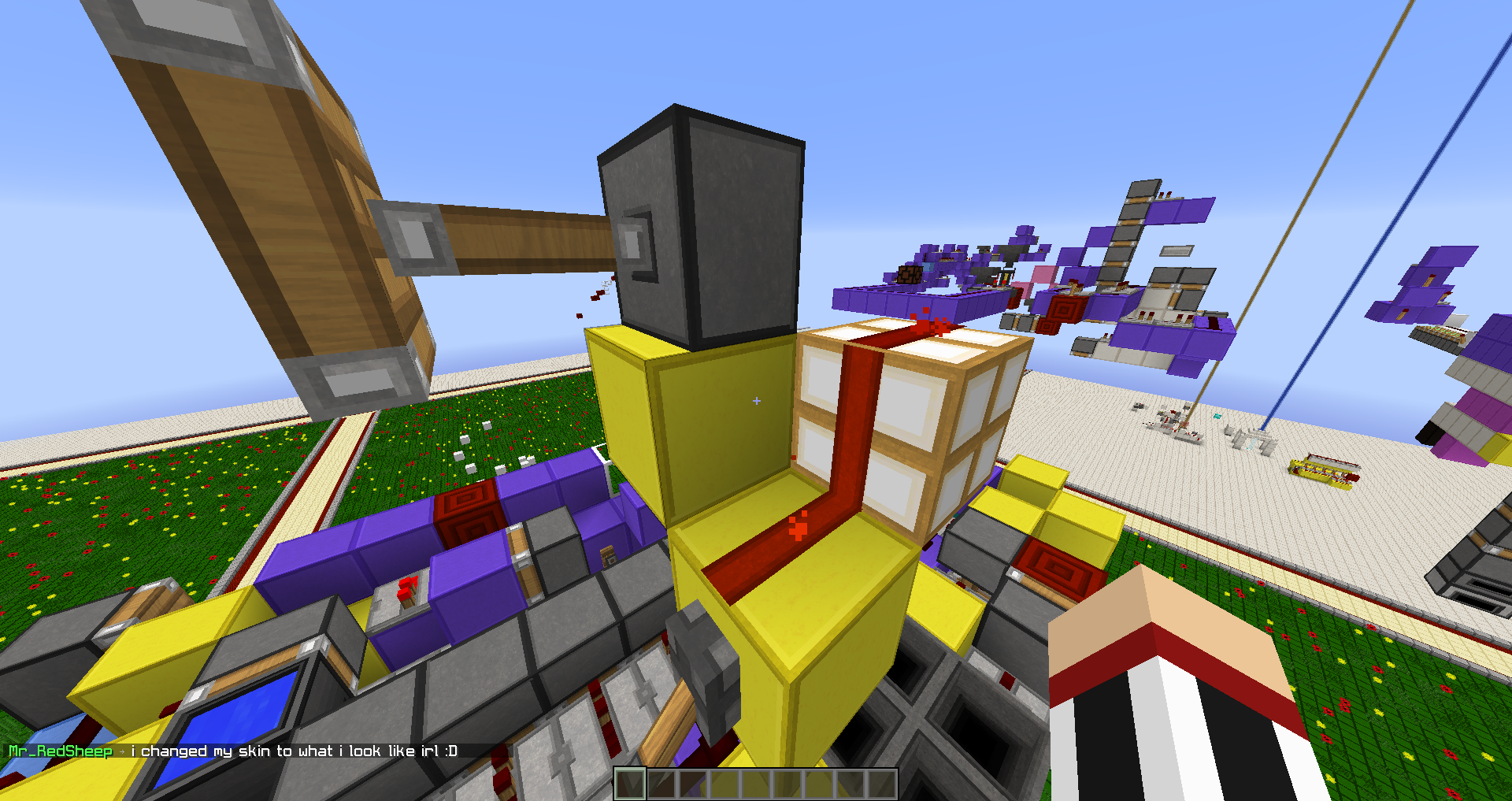
The " Glowstone should possibly not show redstone wire on its side since all other blocks which only transfer a redstone signal upwards have no wire on their side." is no longer true, redstone blocks and glass both show the redstone going up the sides
This has been fixed in 20w18a.
https://www.minecraft.net/en-us/article/minecraft-snapshot-20w18a