Structure block selection box is affected by rotation arguments in save mode
The bug
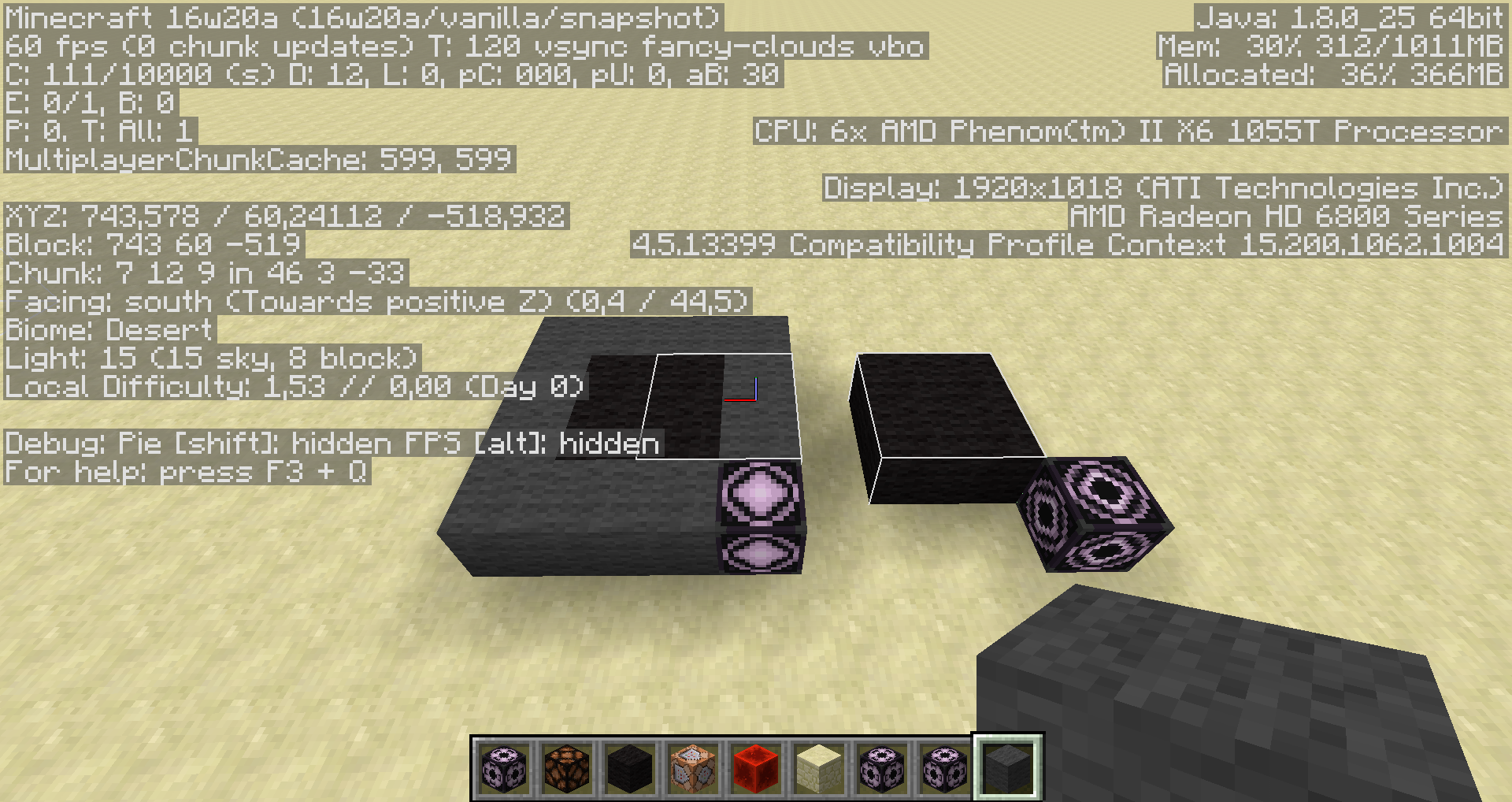
When the rotation arguments are changed for a structure block (because you edited it in load mode before) the selection box in save mode is affected by these arguments. However the structure that is saved and showed invisible blocks ignore the rotation values.
How to reproduce (Saving a structure)
- Use the following command (changed rotation)
/setblock ~ ~ ~ structure_block{metadata:"",mirror:"NONE",ignoreEntities:1b,powered:0b,author:"-",rotation:"CLOCKWISE_90",posX:1,mode:"SAVE",posY:0,sizeX:2,posZ:1,showair:0b,name:"test_structure",sizeY:1,sizeZ:2,showboundingbox:1b} - Place blocks inside the selection box
- Save the structure
- Load the structure
→ Not all the blocks are copied
How to reproduce (Showing invisible blocks)
Use the following command
/setblock ~ ~1 ~ minecraft:structure_block{metadata:"",mirror:"NONE",ignoreEntities:1b,powered:0b,seed:0L,rotation:"CLOCKWISE_90",posX:0,mode:"SAVE",posY:1,sizeX:3,posZ:0,integrity:1.0f,showair:1b,sizeY:1,sizeZ:2,showboundingbox:1b}
→ Observe that some showed invisible blocks are not inside the selection box
Linked Issues
is duplicated by6
 MC-102493Save structure block bounding box rotation wrongDuplicateMC-121183structure_block load / save selectionDuplicateMC-134466Structure Block Outline IncorrectDuplicateMC-136770Structure Block bounding box sometimes show incorrectlyDuplicateMC-141015Structure Blocks In Save Mode Displaying Wrong Save RegionDuplicateMC-238252Structure Block Saving Visual Box is Visually Affected by Load's Rotation ArgumentsDuplicate

- Unresolved
 Nethonos
 Marcono1234
- 33
- 9
- Confirmed
 Low
Low- Platform
- Structures
- rotation save selection structure_block
16w20a - 25w05a
16w20a 16w21b 1.10.2 16w32a 16w32b 16w33a 16w36a 16w38a 16w39a 16w39b 16w39c 16w40a 16w41a 16w42a 16w43a 16w44a 1.11-pre1 1.11 16w50a 1.11.1 1.11.2 17w06a 17w13b 17w15a 17w16b 17w17b 17w18b 1.12-pre2 1.12.2 17w50a 18w20c 1.13 1.13.1 1.13.2 18w48a 18w48b 18w49a 18w50a 19w05a 19w06a 19w07a 1.15.2 20w14a 20w15a 20w16a 20w17a 20w18a 20w19a 20w20a 20w20b 20w21a 20w22a 1.16-pre4 1.16-pre5 1.16-pre6 1.16-pre7 1.16-pre8 1.16-rc1 1.16 1.16.1 20w28a 1.16.2 1.16.4 1.16.5 21w11a 21w15a 21w16a 21w18a 21w19a 21w20a 1.17-pre1 1.17-pre2 1.17-pre3 1.17-pre4 1.17-pre5 1.17-rc1 1.17-rc2 1.17 1.17.1 1.18-pre6 1.18 1.18.2 1.20.2 23w42a 1.21.4 25w05a
Created Issue:
Structure block selection box is affected by rotation arguments in save mode
The bug
When the rotation arguments are changed for a structure block (because you edited it in load mode before) the selection box in save mode is affected by these arguments. However the structure that is saved ignores the rotation values.
How to reproduce
- Use the following command (changed rotation)
/setblock ~ ~ ~ structure_block 0 replace {metadata:"",mirror:"NONE",ignoreEntities:1b,powered:0b,author:"-",rotation:"CLOCKWISE_90",posX:1,mode:"SAVE",posY:0,sizeX:2,posZ:1,showair:0b,name:"test_structure",sizeY:1,sizeZ:2,showboundingbox:1b}- Place blocks inside the selection box
- Save the structure
- Load the structure
→ Not all the blocks are copied

A comment with security level 'global-moderators' was removed.
is duplicated by

![[Mojang] Searge (Michael Stoyke)](../../../data/assets/gravatar/searge.png) [Mojang] Searge (Michael Stoyke)
[Mojang] Searge (Michael Stoyke)The bug
When the rotation arguments are changed for a structure block (because you edited it in load mode before) the selection box in save mode is affected by these arguments. However the structure that is saved ignore
sthe rotation values.How to reproduce
- Use the following command (changed rotation)
/setblock ~ ~ ~ structure_block 0 replace {metadata:"",mirror:"NONE",ignoreEntities:1b,powered:0b,author:"-",rotation:"CLOCKWISE_90",posX:1,mode:"SAVE",posY:0,sizeX:2,posZ:1,showair:0b,name:"test_structure",sizeY:1,sizeZ:2,showboundingbox:1b}- Place blocks inside the selection box
- Save the structure
- Load the structure
→ Not all the blocks are copiedThe bug
When the rotation arguments are changed for a structure block (because you edited it in load mode before) the selection box in save mode is affected by these arguments. However the structure that is saved and showed invisible blocks ignore the rotation values.
How to reproduce (Saving a structure)
- Use the following command (changed rotation)
/setblock ~ ~ ~ structure_block 0 replace {metadata:"",mirror:"NONE",ignoreEntities:1b,powered:0b,author:"-",rotation:"CLOCKWISE_90",posX:1,mode:"SAVE",posY:0,sizeX:2,posZ:1,showair:0b,name:"test_structure",sizeY:1,sizeZ:2,showboundingbox:1b}- Place blocks inside the selection box
- Save the structure
- Load the structure
→ Not all the blocks are copiedHow to reproduce (Showing invisible blocks)
The bug
When the rotation arguments are changed for a structure block (because you edited it in load mode before) the selection box in save mode is affected by these arguments. However the structure that is saved and showed invisible blocks ignore the rotation values.
How to reproduce (Saving a structure)
- Use the following command (changed rotation)
/setblock ~ ~ ~ structure_block 0 replace {metadata:"",mirror:"NONE",ignoreEntities:1b,powered:0b,author:"-",rotation:"CLOCKWISE_90",posX:1,mode:"SAVE",posY:0,sizeX:2,posZ:1,showair:0b,name:"test_structure",sizeY:1,sizeZ:2,showboundingbox:1b}- Place blocks inside the selection box
- Save the structure
- Load the structure
→ Not all the blocks are copiedHow to reproduce (Showing invisible blocks)
The bug
When the rotation arguments are changed for a structure block (because you edited it in load mode before) the selection box in save mode is affected by these arguments. However the structure that is saved and showed invisible blocks ignore the rotation values.
How to reproduce (Saving a structure)
- Use the following command (changed rotation)
/setblock ~ ~ ~ structure_block 0 replace {metadata:"",mirror:"NONE",ignoreEntities:1b,powered:0b,author:"-",rotation:"CLOCKWISE_90",posX:1,mode:"SAVE",posY:0,sizeX:2,posZ:1,showair:0b,name:"test_structure",sizeY:1,sizeZ:2,showboundingbox:1b}- Place blocks inside the selection box
- Save the structure
- Load the structure
→ Not all the blocks are copiedHow to reproduce (Showing invisible blocks)
Use the following command
/setblock ~ ~1 ~ minecraft:structure_block 0 replace {metadata:"",mirror:"NONE",ignoreEntities:1b,powered:0b,seed:0L,rotation:"CLOCKWISE_90",posX:0,mode:"SAVE",posY:1,sizeX:3,posZ:0,integrity:1.0f,showair:1b,sizeY:1,sizeZ:2,showboundingbox:1b}→ Observe that showed invisible blocks are not inside the selection box
The bug
When the rotation arguments are changed for a structure block (because you edited it in load mode before) the selection box in save mode is affected by these arguments. However the structure that is saved and showed invisible blocks ignore the rotation values.
How to reproduce (Saving a structure)
- Use the following command (changed rotation)
/setblock ~ ~ ~ structure_block 0 replace {metadata:"",mirror:"NONE",ignoreEntities:1b,powered:0b,author:"-",rotation:"CLOCKWISE_90",posX:1,mode:"SAVE",posY:0,sizeX:2,posZ:1,showair:0b,name:"test_structure",sizeY:1,sizeZ:2,showboundingbox:1b}- Place blocks inside the selection box
- Save the structure
- Load the structure
→ Not all the blocks are copiedHow to reproduce (Showing invisible blocks)
Use the following command
/setblock ~ ~1 ~ minecraft:structure_block 0 replace {metadata:"",mirror:"NONE",ignoreEntities:1b,powered:0b,seed:0L,rotation:"CLOCKWISE_90",posX:0,mode:"SAVE",posY:1,sizeX:3,posZ:0,integrity:1.0f,showair:1b,sizeY:1,sizeZ:2,showboundingbox:1b}→ Observe that some showed invisible blocks are not inside the selection box
is duplicated by
The bug
When the rotation arguments are changed for a structure block (because you edited it in load mode before) the selection box in save mode is affected by these arguments. However the structure that is saved and showed invisible blocks ignore the rotation values.
How to reproduce (Saving a structure)
- Use the following command (changed rotation)
/setblock ~ ~ ~ structure_block0 replace{metadata:"",mirror:"NONE",ignoreEntities:1b,powered:0b,author:"-",rotation:"CLOCKWISE_90",posX:1,mode:"SAVE",posY:0,sizeX:2,posZ:1,showair:0b,name:"test_structure",sizeY:1,sizeZ:2,showboundingbox:1b}- Place blocks inside the selection box
- Save the structure
- Load the structure
→ Not all the blocks are copiedHow to reproduce (Showing invisible blocks)
Use the following command
/setblock ~ ~1 ~ minecraft:structure_block0 replace{metadata:"",mirror:"NONE",ignoreEntities:1b,powered:0b,seed:0L,rotation:"CLOCKWISE_90",posX:0,mode:"SAVE",posY:1,sizeX:3,posZ:0,integrity:1.0f,showair:1b,sizeY:1,sizeZ:2,showboundingbox:1b}→ Observe that some showed invisible blocks are not inside the selection box
The bug
When the rotation arguments are changed for a structure block (because you edited it in load mode before) the selection box in save mode is affected by these arguments. However the structure that is saved and showed invisible blocks ignore the rotation values.
How to reproduce (Saving a structure)
- Use the following command (changed rotation)
/setblock ~ ~ ~ structure_block{metadata:"",mirror:"NONE",ignoreEntities:1b,powered:0b,author:"-",rotation:"CLOCKWISE_90",posX:1,mode:"SAVE",posY:0,sizeX:2,posZ:1,showair:0b,name:"test_structure",sizeY:1,sizeZ:2,showboundingbox:1b}- Place blocks inside the selection box
- Save the structure
- Load the structure
→ Not all the blocks are copiedHow to reproduce (Showing invisible blocks)
Use the following command
/setblock ~ ~1 ~ minecraft:structure_block{metadata:"",mirror:"NONE",ignoreEntities:1b,powered:0b,seed:0L,rotation:"CLOCKWISE_90",posX:0,mode:"SAVE",posY:1,sizeX:3,posZ:0,integrity:1.0f,showair:1b,sizeY:1,sizeZ:2,showboundingbox:1b}→ Observe that some showed invisible blocks are not inside the selection box
![[Mod] Michael Wobst](../../../data/avatars/users/37868.png) [Mojang] Searge (Michael Stoyke)
[Mojang] Searge (Michael Stoyke)
![[Mod] Neko](../../../data/avatars/users/92901.png)
is duplicated by
is duplicated by

The bug
When the rotation arguments are changed for a structure block (because you edited it in load mode before) the selection box in save mode is affected by these arguments. However the structure that is saved and showed invisible blocks ignore the rotation values.
How to reproduce (Saving a structure)
- Use the following command (changed rotation)
/setblock ~ ~ ~ structure_block{metadata:"",mirror:"NONE",ignoreEntities:1b,powered:0b,author:"-",rotation:"CLOCKWISE_90",posX:1,mode:"SAVE",posY:0,sizeX:2,posZ:1,showair:0b,name:"test_structure",sizeY:1,sizeZ:2,showboundingbox:1b}- Place blocks inside the selection box
- Save the structure
- Load the structure
→Not all the blocks are copiedHow to reproduce (Showing invisible blocks)
Use the following command
/setblock ~ ~1 ~ minecraft:structure_block{metadata:"",mirror:"NONE",ignoreEntities:1b,powered:0b,seed:0L,rotation:"CLOCKWISE_90",posX:0,mode:"SAVE",posY:1,sizeX:3,posZ:0,integrity:1.0f,showair:1b,sizeY:1,sizeZ:2,showboundingbox:1b}→ Observe that some showed invisible blocks are not inside the selection box
The bug
When the rotation arguments are changed for a structure block (because you edited it in load mode before) the selection box in save mode is affected by these arguments. However the structure that is saved and showed invisible blocks ignore the rotation values.
How to reproduce (Saving a structure)
- Use the following command (changed rotation)
/setblock ~ ~ ~ structure_block{metadata:"",mirror:"NONE",ignoreEntities:1b,powered:0b,author:"-",rotation:"CLOCKWISE_90",posX:1,mode:"SAVE",posY:0,sizeX:2,posZ:1,showair:0b,name:"test_structure",sizeY:1,sizeZ:2,showboundingbox:1b}- Place blocks inside the selection box
- Save the structure
- Load the structure
→How to reproduce (Showing invisible blocks)
Use the following command
/setblock ~ ~1 ~ minecraft:structure_block{metadata:"",mirror:"NONE",ignoreEntities:1b,powered:0b,seed:0L,rotation:"CLOCKWISE_90",posX:0,mode:"SAVE",posY:1,sizeX:3,posZ:0,integrity:1.0f,showair:1b,sizeY:1,sizeZ:2,showboundingbox:1b}→
![[Mojang] Nathan Adams](../../../data/assets/gravatar/dinnerbone.png)
![[Helper] Johnibur](../../../data/avatars/users/28381.png)
![[Mod] violine1101](../../../data/avatars/users/92858.png)
![[Mojang] Adrian Östergård](../../../data/assets/gravatar/nighter.jpeg)
Confirmed for 1.15.2 and 20w13a
Confirmed for 20w21a
Confirmed for 20w22a
Confirmed for 20w20b
Confirmed for 20w20a
Confirmed for 20w19a
Confirmed for 20w18a
Confirmed for 20w17a
Confirmed for 20w16a
Confirmed for 20w15a
Confirmed for 20w14a
is duplicated by
![[Bot] Arisa](../../../data/avatars/users/43007.png)
![[Mod] ampolive](../../../data/avatars/users/18949.svg)
![[Mod] j_p_smith](../../../data/avatars/users/92851.png)
![[Mod] markderickson](../../../data/avatars/users/18946.svg)
is duplicated by
![[Mojang] slicedlime](../../../data/assets/gravatar/slicedlime.jpeg)
Thank you for your report!
However, this issue is a Duplicate of MC-102082.
It has been linked to this report. If you have additional information, please add it to that report.
Please search before reporting, as it's likely that one exists already.
Quick Links:
📓 Issue Guidelines – 💬 Community Support – 📧 Customer Support – 📖 Game Wiki
Thank you for your report!
However, this issue has been closed as a Duplicate of MC-102082.
It has been linked to this report. If you have additional information, please add it to the duplicated report.
Please search before reporting, as it's likely that one exists already.
Quick Links:
📓 Issue Guidelines – 💬 Community Support – 📧 Customer Support – 📖 Game Wiki
That sounds like MC-102082
Duplicate of MC-102082.
Thank you for your report!
We're tracking this issue in MC-102082, so this ticket is being resolved and linked as a duplicate.
If you would like to add a vote and any extra information to the main ticket it would be appreciated.
If you haven't already, you might like to make use of the search feature to see if the issue has already been mentioned.
Quick Links:
📓 Bug Tracker Guidelines – 💬 Community Support – 📧 Mojang Support
📓 Project Summary – ✍️ Feedback and Suggestions – 📖 Game Wiki
– I am a bot. This action was performed automatically! The ticket was resolved by one of our moderators, and I left this message to give more information to you.
Closing as a duplicate of MC-102082, because per the previous informative comment, this issue seems to have the same cause as described in the aforementioned ticket. Thanks 
Quick Links:
📓 Bug Tracker Guidelines – 💬 Community Support – 📧 Mojang Support
📓 Project Summary – ✍️ Feedback and Suggestions – 📖 Game Wiki
I've had a similar issue. When you try to load in a structure block with a different rotation, it dosen't update it relatively. For example, if your structure is a 3x3 as follows (I represented this using characters):
x x x
x X x
x x x
The capital "X" is the centre of the structure. When you rotate it, its no longer the centre, even though you have set the relative coordinates there before.
Please fix this! It would allow me to add more diverse, rotatable structures in the world through my Dynamo command block machine without having them cut into mountains or trees, which makes me cringe because mountains sliced like cake look so ugly... :S
Confirmed in 17w50a. Found this one today.
confirmed for 18w20c
Confirmed for 18w50a
This is still the case in 1.14.3
@Nethonos, would you like to become the reporter so you can update the affected versions yourself?
Confirmed for 1.16-pre4
@Marcono1234 yes I would like it.
Thanks, you are now the reporter.
Confirmed in 1.18.2.