 Evtema3
- Evtema3
- evtema3
- America/Havana
- Yes
- No
 MC-80938
![[Mojang] Jeb (Jens Bergensten)](../../../data/assets/gravatar/jeb.jpeg)
 MCL-7140
![[Mojang] Grum (Erik Broes)](../../../data/assets/gravatar/grum.png)
![[Mojang] Georgii Gavrichev](../../../data/avatars/users/22428.png)
![[Mojang] Bartosz Bok](../../../data/avatars/users/10122.svg)
![[Mojang] slicedlime](../../../data/assets/gravatar/slicedlime.jpeg)
 Normal




 REALMS-11883
When setting a furnace to have a CookTime of 200s, a CookTimeTotal of 1s, a BurnTime of 200s, and any smeltable item in slot 0b, then it's GUI texture extends over to the right.
/setblock ~ ~1 ~ furnace 1 0 {BurnTime:200s,CookTime:1s,CookTimeTotal:1s,Items:[
Unknown macro: {Slot}]}
If the CookTime is lower than 200s, then the GUI texture will extend very fast.
When setting a furnace to have a CookTime of 200s, a CookTimeTotal of 1s, a BurnTime of 200s, and any smeltable item in slot 0b, then it's GUI texture extends over to the right.
(Due to the curly bracket being used as a macro symbol, I had to change the curly brackets to parenthesis.)
/setblock ~ ~1 ~ furnace 1 0 (BurnTime:200s,CookTime:1s,CookTimeTotal:1s,Items:[(Slot:0b,id:"minecraft:log",Count:1b)])
If the CookTime is lower than 200s, then the GUI texture will extend very fast.
When setting a furnace to have a CookTime of 200s, a CookTimeTotal of 1s, a BurnTime of 200s, and any smeltable item in slot 0b, then it's GUI texture extends over to the right.
(Due to the curly bracket being used as a macro symbol, I had to change the curly brackets to parenthesis.)
/setblock ~ ~1 ~ furnace 1 0 (BurnTime:200s,CookTime:1s,CookTimeTotal:1s,Items:[(Slot:0b,id:"minecraft:log",Count:1b)])
If the CookTime is lower than 200s, then the GUI texture will extend very fast.
When setting a furnace to have a CookTime of 200s, a CookTimeTotal of 1s, a BurnTime of 200s, and any smeltable item in slot 0b, then it's GUI texture extends over to the right.
(Due to the curly bracket being used as a macro symbol, I had to change the curly brackets to parenthesis.)
/setblock ~ ~1 ~ furnace 1 0 {BurnTime:200s,CookTime:1s,CookTimeTotal:1s,Items:[
Unknown macro: {Slot}]}
If the CookTime is lower than 200s, then the GUI texture will extend very fast.
When setting a furnace to have a CookTime of 200s, a CookTimeTotal of 1s, a BurnTime of 200s, and any smeltable item in slot 0b, then it's GUI texture extends over to the right.
(Due to the curly bracket being used as a macro symbol, I had to change the curly brackets to parenthesis.)
/setblock ~ ~1 ~ furnace 1 0 {BurnTime:200s,CookTime:1s,CookTimeTotal:1s,Items:[
Unknown macro: {Slot}]}
If the CookTime is lower than 200s, then the GUI texture will extend very fast.
When setting a furnace to have a CookTime of 200s, a CookTimeTotal of 1s, a BurnTime of 200s, and any smeltable item in slot 0b, then it's GUI texture extends over to the right.
/setblock ~ ~1 ~ furnace 1 0 {BurnTime:200s,CookTime:1s,CookTimeTotal:1s,Items:[
Unknown macro: {Slot}]}
If the CookTime is lower than 200s, then the GUI texture will extend very fast.
When setting a furnace to have a CookTime of 200s, a CookTimeTotal of 1s, a BurnTime of 200s, and any smeltable item in slot 0b, then it's GUI texture extends over to the right.
/setblock ~ ~
1~ furnace1 0 {BurnTime:200s,CookTime:1s,CookTimeTotal:1s,Items:[Unknown macro: {Slot}]}
If the CookTime is lower than 200s, then the GUI texture will extend very fast.
When setting a furnace to have a CookTime of 200s, a CookTimeTotal of 1s, a BurnTime of 200s, and any smeltable item in slot 0b, then it's GUI texture extends over to the right.
/setblock ~ ~ ~ furnace 0 replace {CookTimeTotal:1,BurnTime:999,CookTime:1,Items:[
Unknown macro: {id}]}
If the CookTime is lower than 200s, then the GUI texture will extend very fast.
On Vanilla 1.8.6 using Vattic's Faithful Resource Pack and mrpingouin's revised command. I'm new here, so I don't know how to fix the macro curly bracket issue.
When setting a furnace to have a CookTime of 200s, a CookTimeTotal of 1s, a BurnTime of 200s, and any smeltable item in slot 0b, then it's GUI texture extends over to the right.
/setblock ~ ~ ~ furnace 0 replace {CookTimeTotal:1,BurnTime:999,CookTime:1,Items:[
Unknown macro: {id}]}
If the CookTime is lower than 200s, then the GUI texture will extend very fast.
When setting a furnace to have a CookTime of 200s, a CookTimeTotal of 1s, a BurnTime of 200s, and any smeltable item in slot 0b, then it's GUI texture extends over to the right.
/setblock ~ ~ ~ furnace 0 replace {CookTimeTotal:1,BurnTime:999,CookTime:1,Items:[
Unknown macro: {//id}]}
If the CookTime is lower than 200s, then the GUI texture will extend very fast.
When setting a furnace to have a CookTime of 200s, a CookTimeTotal of 1s, a BurnTime of 200s, and any smeltable item in slot 0b, then it's GUI texture extends over to the right.
/setblock ~ ~ ~ furnace 0 replace {CookTimeTotal:1,BurnTime:999,CookTime:1,Items:[
Unknown macro: {//id}]}
If the CookTime is lower than 200s, then the GUI texture will extend very fast.
When setting a furnace to have a CookTime of 200s, a CookTimeTotal of 1s, a BurnTime of 200s, and any smeltable item in slot 0b, then it's GUI texture extends over to the right.
/setblock ~ ~ ~ furnace 0 replace {CookTimeTotal:1,BurnTime:999,CookTime:1,Items:[
Unknown macro: {(empty line)id}]}
If the CookTime is lower than 200s, then the GUI texture will extend very fast.
When setting a furnace to have a CookTime of 200s, a CookTimeTotal of 1s, a BurnTime of 200s, and any smeltable item in slot 0b, then it's GUI texture extends over to the right.
/setblock ~ ~ ~ furnace 0 replace {CookTimeTotal:1,BurnTime:999,CookTime:1,Items:[
Unknown macro: { (empty line) id}]}
If the CookTime is lower than 200s, then the GUI texture will extend very fast.
When setting a furnace to have a CookTime of 200s, a CookTimeTotal of 1s, a BurnTime of 200s, and any smeltable item in slot 0b, then it's GUI texture extends over to the right.
/setblock ~ ~ ~ furnace 0 replace {CookTimeTotal:1,BurnTime:999,CookTime:1,Items:[
Unknown macro: {(empty line)id}]}
If the CookTime is lower than 200s, then the GUI texture will extend very fast.
2015-06-03_15.39.12.png
When setting a furnace to have a CookTime of
200s, a CookTimeTotal of 1s, aBurnTime of 200s, and any smeltable item in slot 0b, then it's GUI texture extends over to the right./setblock ~ ~ ~ furnace 0 replace {CookTimeTotal:1,BurnTime:999,CookTime:1,Items:[{id:log,Count:1}]}If the CookTime is lower than 200s, then the GUI texture will extend very fast.
When setting a furnace to have a CookTime of 1s, a CookTimeTotal of 1s, any variable of BurnTime greater than 1, and any smeltable item in slot 0b, then it's GUI texture extends further than it should over to the right.
/setblock ~ ~ ~ furnace 0 replace {CookTimeTotal:1,BurnTime:999,CookTime:1,Items:[{id:log,Count:1}]}
Is there any way to fix the Unknown Macro issue? I can't put the command into the description.
This is a permanent bug fix by SeargeDP to patch a security issue where you could modify the game to gain operator rights on any server and stop any server that you had creative mode on. There is no way to exactly resurrect this previous feature, but, on his YouTube channel, CrushedPixel has showcased an MCEdit filter made by TexelElf and TrazLander which replaces dispenser randomizers with better Mob Spawner Minecart based randomizers.
This Wednesday, the day of the DDOSing attacks, I was trying to play multiplayer with a friend. I had set up a LAN world for us both to join, and it worked for a little while. Then, sessions were timed out a half an hour later. We kept on refreshing the help.mojang.com page to see when the session status would be back up. In a time when they were up, my friend joined a multiplayer server and got to stay on it. When I tried, I saw unloaded chunks and I could move around, but players around me were frozen and skinless. Then, I was disconnected with the following error: "An existing connection was forcibly closed by the remote host". At the time, I thought it was caused by the DDOSing
. But,it turned out to bemore thanthat.
I've had this issue for about 5 days now, and I'm unable to connect to any servers properly. I've been told to check my internet speed, and I had a 13 ms Ping, a 22.10 ms Download Speed, and a 21.51 ms Upload Speed. That should be adequate for Minecraft, but I'm still unable to connect. I've restarted Minecraft, restarted my computer,andrestarted my router, and tried to connect to servers in older 1.8 versions, but nothing has worked. I just wanted to know if anyone else has had similar issues and how they can be fixed. This is a very big annoyance, and I just want to be able to play multiplayer like I used to.This Wednesday, the day of the DDOSing attacks, I was trying to play multiplayer with a friend. I had set up a LAN world for us both to join, and it worked for a little while. Then, sessions were timed out a half an hour later. We kept on refreshing the help.mojang.com page to see when the session status would be back up. In a time when they were up, my friend joined a multiplayer server and got to stay on it. When I tried, I saw unloaded chunks and I could move around, but players around me were frozen and skinless. Then, I was disconnected about 15 seconds later with the following error: "An existing connection was forcibly closed by the remote host". At the time, I thought it was caused by the DDOSing, but it turned out to be an issue beyond that.
At the time of submitting this bug report, I've had this issue for about 5 days now. I've been told to check my internet speed, and I had a 13 ms Ping, a 22.10 ms Download Speed, and a 21.51 ms Upload Speed. That should be adequate for Minecraft, but I'm still unable to connect to servers. I've restarted Minecraft, restarted my computer, restarted my router, and tried to connect to servers in older 1.8 versions, but nothing has worked. I just wanted to know if anyone else has had similar issues and how they can be fixed. This is a very big annoyance, and I just want to be able to play multiplayer like I used to.
Can'tconnecttoany servers - An existing connection was forcibly closed by the remote hostDisconnected from any server after 15 seconds - An existing connection was forcibly closed by the remote host
This Wednesday, the day of the DDOSing attacks, I was trying to play multiplayer with a friend. I had set up a LAN world for us both to join, and it worked for a little while. Then, sessions were timed out a half an hour later. We kept on refreshing the help.mojang.com page to see when the session status would be back up. In a time when they were up, my friend joined a multiplayer server and got to stay on it. When I tried, I saw unloaded chunks and I could move around, but players around me were frozen and skinless. Then, I was disconnected about 15 seconds later with the following error: "An existing connection was forcibly closed by the remote host". Sometimes, it's "Disconnected", sometimes it's "Timed Out", and sometimes, it's "An existing connection was aborted by the software in your hosting machine". At the time, I thought it was caused by the DDOSing, but it turned out to be an issue beyond that.
At the time of submitting this bug report, I've had this issue for about 5 days now. I've been told to check my internet speed, and I had a 13 ms Ping, a 22.10 ms Download Speed, and a 21.51 ms Upload Speed. That should be adequate for Minecraft, but I'm still unable to connect to servers. I've restarted Minecraft, restarted my computer, restarted my router, and tried to connect to servers in older 1.8 versions, but nothing has worked. I just wanted to know if anyone else has had similar issues and how they can be fixed. This is a very big annoyance, and I just want to be able to play multiplayer like I used to.
This Wednesday, the day of the DDOSing attacks, I was trying to play multiplayer with a friend. I had set up a LAN world for us both to join, and it worked for a little while. Then, sessions were timed out a half an hour later. We kept on refreshing the help.mojang.com page to see when the session status would be back up. In a time when they were up, my friend joined a multiplayer server and got to stay on it. When I tried, I saw unloaded chunks and I could move around, but players around me were frozen and skinless. Then, I was disconnected about 15 seconds later with the following error: "An existing connection was forcibly closed by the remote host". Sometimes, it's "Disconnected", sometimes it's "Timed Out", and sometimes, it's "An existing connection was aborted by the software in your hosting machine". At the time, I thought it was caused by the DDOSing, but it turned out to be an issue beyond that.
At the time of submitting this bug report, I've had this issue for about 5 days now. I've been told to check my internet speed, and I had a 13 ms Ping, a 22.10 ms Download Speed, and a 21.51 ms Upload Speed. That should be adequate for Minecraft, but I'm still unable to connect to servers. I've restarted Minecraft, restarted my computer, restarted my router, and tried to connect to servers in older 1.8 versions, but nothing has worked. I just wanted to know if anyone else has had similar issues and how they can be fixed. This is a very big annoyance, and I just want to be able to play multiplayer like I used to be able to do.
This Wednesday, the day of the DDOSing attacks, I was trying to play multiplayer with a friend. I had set up a LAN world for us both to join, and it worked for a little while. Then, sessions were timed out a half an hour later. We kept on refreshing the help.mojang.com page to see when the session status would be back up. In a time when they were up, my friend joined a multiplayer server and got to stay on it. When I tried, I saw unloaded chunks and I could move around, but players around me were frozen and skinless. Then, I was disconnected about 15 seconds later with the following error: "An existing connection was forcibly closed by the remote host". Sometimes, it's "Disconnected", sometimes it's "Timed Out", and sometimes, it's "An existing connection was aborted by the software in your hosting machine". At the time, I thought it was caused by the DDOSing, but it turned out to be an issue beyond that.
At the time of submitting this bug report, I've had this issue for about 5 days now. I've been told to check my internet speed, and I had a 13 ms Ping, a 22.10 ms Download Speed, and a 21.51 ms Upload Speed. That should be adequate for Minecraft, but I'm still unable to connect to servers. I've restarted Minecraft, restarted my computer, restarted my router, and tried to connect to servers in older 1.8 versions, but nothing has worked. I just wanted to know if anyone else has had similar issues and how they can be fixed. This is a very big annoyance, and I just want to
be able toplay multiplayer like I used to be able to do.
This Wednesday, the day of the DDOSing attacks, I was trying to play multiplayer with a friend. I had set up a LAN world for us both to join, and it worked for a little while. Then, sessions were timed out a half an hour later. We kept on refreshing the help.mojang.com page to see when the session status would be back up. In a time when they were up, my friend joined a multiplayer server and got to stay on it. When I tried, I saw unloaded chunks and I could move around, but players around me were frozen and skinless. Then, I was disconnected about 15 seconds later with the following error: "An existing connection was forcibly closed by the remote host". Sometimes, it's "Disconnected", sometimes it's "Timed Out", and sometimes, it's "An existing connection was aborted by the software in your hosting machine". At the time, I thought it was caused by the DDOSing, but it turned out to be an issue beyond that.
At the time of submitting this bug report, I've had this issue for about 5 days now. I've been told to check my internet speed, and I had a 13 ms Ping, a 22.10 ms Download Speed, and a 21.51 ms Upload Speed. That should be adequate for Minecraft, but I'm still unable to connect to servers. I've restarted Minecraft, restarted my computer, restarted my router, and tried to connect to servers in older 1.8 versions, but nothing has worked. I just wanted to know if anyone else has had similar issues and how they can be fixed. This is a very big annoyance, and I just want to play multiplayer like I used to be able to do.
EDIT: It fixed itself somehow a little while ago, so this bug report isn't necessary anymore.
When you hold any item in the offhand when using the Alex (3 wide arm) player model, that item is rendered on the side of the offhand rather than inside it like the main hand.
If I'm in Survival Mode, holding a Spectral Arrow in my offhand slot, and drawing an arrow using a bow in my main hand, then I will see a single Spectral Arrow in my offhand slot but another arrow being drawn in a bow in my main hand. This doesn't make much sense - I'm holding two arrows at once! Plus, if I'd look in my inventory, then I wouldn't see another arrow - only the Spectral Arrow. How could I be firing two at once? Only when I'd shoot the Spectral Arrow, the Spectral Arrow in the offhand slot would disappear.
What should happen instead is that the Spectral Arrow should disappear when I'm drawing the bow, and reappear if I stop drawing the bow. If I shoot the arrow
, then it should remove 1 arrow from my offhand slot. This should only happenin Survival/Adventure mode,since you have infinite arrows in Creative Mode and you can't see what's in your main hand or offhand in Spectator Mode.If I'm in Survival Mode, holding a Spectral Arrow in my offhand slot, and drawing an arrow using a bow in my main hand, then I will see a single Spectral Arrow in my offhand slot but another arrow being drawn in a bow in my main hand. This doesn't make much sense - I'm holding two arrows at once! Plus, if I'd look in my inventory, then I wouldn't see another arrow - only the Spectral Arrow. How could I be firing two at once? Only when I'd shoot the Spectral Arrow, the Spectral Arrow in the offhand slot would disappear.
What should happen instead is that the Spectral Arrow should disappear when I'm drawing the bow, and reappear if I stop drawing the bow. If I shoot the arrow in Survival/Adventure mode (since you have infinite arrows in Creative Mode and you can't see what's in your main hand or offhand in Spectator Mode), then it should remove 1 arrow from my offhand slot.
If I'm in Survival Mode, holding a Spectral Arrow in my offhand slot, and drawing an arrow using a bow in my main hand, then I will see a single Spectral Arrow in my offhand slot but another arrow being drawn in a bow in my main hand. This doesn't make much sense - I'm holding two arrows at once! Plus, if I'd look in my inventory, then I wouldn't see another arrow - only the Spectral Arrow. How could I be firing two at once? Only when I'd shoot the Spectral Arrow, the Spectral Arrow in the offhand slot would disappear.
What should happen instead is that the Spectral Arrow should disappear when I'm drawing the bow, and reappear if I stop drawing the bow. If I shoot the
arrow in Survival/Adventure mode (since you have infinite arrows in Creative Mode and you can't see what's in your main hand or offhand in Spectator Mode), then it should remove 1arrow from my offhand slot.If I'm in Survival Mode, holding a Spectral Arrow in my offhand slot, and drawing an arrow using a bow in my main hand, then I will see a single Spectral Arrow in my offhand slot but another arrow being drawn in a bow in my main hand. This doesn't make much sense - I'm holding two arrows at once! Plus, if I'd look in my inventory, then I wouldn't see another arrow - only the Spectral Arrow. How could I be firing two at once? Only when I'd shoot the Spectral Arrow, the Spectral Arrow in the offhand slot would disappear.
What should happen instead is that the Spectral Arrow should disappear when I'm drawing the bow, and reappear if I stop drawing the bow. If I shoot the Spectral Arrow in Survival/Adventure mode (since you have infinite arrows in Creative Mode and you can't see what's in your main hand or offhand in Spectator Mode), then it should remove 1 Spectral Arrow from my offhand slot. This should apply to every kind of arrow - default, tipped, and spectral.
When I try to spawn an entity using a Spawn Egg and use the [code] /testfor [code] command on it, then it will tell me "That entity cannot be found". It only works when I reopen the world.
When I try to spawn an entity using a Spawn Egg and use the /testfor command on it, then it will tell me "That entity cannot be found". It only works when I reopen the world.
When I try to spawn an entity using a Spawn Egg and use the
/testfor command on it, then it will tell me "That entity cannot be found". It only works when I reopen the world.When I try to spawn an entity using a Spawn Egg and use the
/testforcommand on it, then it will tell me "That entity cannot be found". It only works when I reopen the world.
When I try to spawn an entity using a Spawn Egg and use the/testfor
command on it, then it will tell me "That entity cannot be found". It only works when I reopen the world.I spawned a Creeper using a Spawn Egg and ran this command on it.
/testfor @e[type=Creeper]The message I got back was "That entity cannot be found". Once I reopened my world, it did find the Creeper.
Shield doesn't go around3-wide offhandShield doesn't go around Alex model offhand
When you hold a shield in your offhand with the Alex model on, then it
appears to be offset and your hand doesn't fit in the handle.When you hold a shield in your offhand with the Alex model on, then it's offset.
When you hold a shield in your offhand with the Alex player model on, then it's offset. This probably has to do with the offhand being optimized for the Steve player model, and not the Alex player model.
When
you hold a shield in your offhand with the Alex player model on, then it's offset. This probably has to do with the offhand being optimized for the Steve player model, and not the Alex player model.When a player with the Alex player model holds a shield in their offhand, it's offset and doesn't visually go around their hand. This probably has to do with the offhand being optimized for the Steve player model, and not the Alex player model.
If I was to hold a wooden trapdoor in my main hand, I could hold my sneak key and then place it onto the side of a crafting table. But, if I was to hold a wooden trapdoor in my offhand and nothing in my main hand, I would hold my sneak key and open up the crafting table GUI. It appears as though sneak placement hasn't been incorporated to the offhand, so I hope that this is fixed in the near future.
Walking/sprinting on top of a slime block pushed by a piston doesn'twork properlyWalking/sprinting on top of a slime block pushed by a piston doesn't bounce players
I only
tested this while walking and sprinting on top of one, but if you walk or sprint on top of a slime block being pushed upwards by a piston, then it will push you up by exactly one block (like any other block on top of a piston) instead of giving you upwards motion like a slime block usually would.I only found this bug while testing walking and sprinting on top of one, but if you walk or sprint on top of a slime block being pushed upwards by a piston, then it will push you up by exactly one block (like any other block on top of a piston) instead of giving you upwards motion like a slime block usually would. Afterwards, I tested standing motionless on it and did receive upwards motion.
Walking/sprintingon top ofa slime block pushed by a piston doesn't bounce playersWalking/sprinting near a slime block pushed by a piston doesn't bounce players
I only found this bug while testing walking and sprinting on top and on the side of one, but if you walk or sprint on top of a slime block being pushed upwards by a piston, then it will push you up by exactly one block (like any other block on top of a piston) instead of giving you upwards motion like a slime block usually would. Afterwards, I tested standing motionless on it/beside it and did receive upwards motion.
Walking/sprintingneara slime block pushed by a piston doesn't bounce playersWalking/sprinting to the side of/above/below a slime block pushed by a piston doesn't bounce players
Walking/sprintingto the side of/above/belowa slime block pushed by a piston doesn't bounce playersWalking/sprinting near a slime block pushed in any orientation by a piston doesn't bounce players
I only found this bug while testing walking and sprinting on top and on the side of one
, but if you walk or sprinton top of aslime block being pushedupwardsby a piston, then it will push you up by exactly one block (like any other blockon top ofa piston) instead of giving youupwardsmotion like a slime block usually would.Afterwards, I tested standing motionless on it/beside it and did receive upwards motion.I only found this bug while testing walking and sprinting on top, below, and on the side of one. If you walk or sprint near slime block being pushed in any orientation by a piston, then it will push you up/to the side/down by exactly one block (like any other block being pushed by a piston) instead of giving you increased motion like a slime block usually would.
Also, I tested standing motionless on it/beside it/below it and did receive increased motion.
When I was switching resource packs while holding a barrier, I noticed that the barrier particles were displaying beds when I disabled the resource pack and arrows when I enabled the resource pack. First, it showed the arrow/bed, then it displayed a barrier particle over it, then it cleared away the arrow/bed.
Note that in the resource pack, I did absolutely nothing to modify the texture of the barrier particle.
When I was switching resource packs while holding a barrier, I noticed that the barrier particles were displaying beds when I disabled the resource pack and arrows when I enabled the resource pack. First, it showed the arrow/bed, then it displayed a barrier particle over it, then it cleared away the arrow/bed.
Note that in the resource pack, I did
absolutely nothing to modify the texture ofthe barrierparticle.When I was switching resource packs while holding a barrier, I noticed that the barrier particles were displaying beds when I disabled the resource pack and arrows when I enabled the resource pack. First, it showed the arrow/bed, then it displayed a barrier particle over it, then it cleared away the arrow/bed.
Note that in the resource pack, I didn't so much as touch the barrier's texture.
When I was switching resource packs while holding a barrier, I noticed that the barrier particles were displaying beds when I disabled the resource pack and arrows when I enabled the resource pack. First, it showed the arrow/bed, then it displayed a barrier particle over it, then it cleared away the arrow/bed.
Note that in the resource pack, I didn't
so much as touchthe barrier'stexture.When I was switching resource packs while holding a barrier, I noticed that the barrier particles were displaying beds when I disabled the resource pack and arrows when I enabled the resource pack. First, it showed the arrow/bed, then it displayed a barrier particle over it, then it cleared away the arrow/bed.
Note that in the resource pack, I didn't modify the barrier texture whatsoever.
When I was switching resource packs while holding a barrier, I noticed that the barrier particles were displaying beds when I disabled the resource pack and arrows when I enabled the resource pack. First, it showed the arrow/bed, then it displayed a barrier particle over it, then it cleared away the arrow/bed.
Note that in the resource pack, I didn't modify the barrier texture
whatsoever.When I was switching resource packs while holding a barrier, I noticed that the barrier particles were displaying beds when I disabled the resource pack and arrows when I enabled the resource pack. First, it showed the arrow/bed, then it displayed a barrier particle over it, then it cleared away the arrow/bed.
Note that in the resource pack, I didn't modify the barrier texture, and I didn't edit the screenshots either.
When I ran a playsound command on this snapshot it made no noise whatsoever. Then, when I switched back to 15w42a, it did make a noise.
Command to reproduce:
/playsound note.harp @p ~ ~ ~ 1 1 1
When I ran a playsound command on this snapshot it made no noise whatsoever. Then, when I switched back to 15w42a, it did make a noise.
Command to reproduce:
/playsound note.harp @p ~ ~ ~ 1 1 1
When I ran a playsound command on this snapshot it made no noise
whatsoever. Then, when I switched back to 15w42a, it did make a noise.Command to reproduce:
/playsound note.harp @p ~ ~ ~ 1 1 1When I ran a playsound command (both in chat and in a command block) on this snapshot, it made no noise. However, ingame sounds still worked fine. Then, when I switched back to 15w42a, it did make a noise once I ran the command.
Command to reproduce:
/playsound note.harp @p ~ ~ ~ 1 1 1
When I ran a playsound command (both in chat and in a command block) on this snapshot, it made no noise. However, ingame sounds still worked fine. Then, when I switched back to 15w42a, it did make a noise once I ran the same command.
Command to reproduce:
/playsound note.harp @p ~ ~ ~ 1 1 1
When I ran a playsoundcommand (both in chat and in a command block) on this snapshot, it made no noise. However, ingame sounds still worked fine. Then, when I switched back to 15w42a, it did make a noise once I ran the same command.
Command to reproduce:/playsound note.harp @p ~ ~ ~ 1 1 1When I ran a
/playsoundcommand (both in chat and in a command block) on this snapshot, it made no noise. However, ingame sounds still worked fine. Then, when I switched back to 15w42a, it did make a noise once I ran the same command.
Command to reproduce:
/playsound note.harp @p ~ ~ ~ 1 1 1EDIT: Bentroen figured out that sounds which don't have subtitles linked to them still work when run by
/playsound. For instance:
/playsound note.harp @p ~ ~ ~ 1 1 1
When I ran a
/playsoundcommand (both in chat and in a command block) on this snapshot, it made no noise. However, ingame sounds still worked fine. Then, when I switched back to 15w42a, it did make a noise once I ran the same command.
Command to reproduce:
/playsound note.harp @p~ ~ ~ 1 1 1EDIT: Bentroen figured out that sounds which don't have subtitles linked to them still work when run by
/playsound. For instance:
/playsoundnote.harp @p ~ ~ ~ 1 1 1When I ran a playsound command (both in chat and in a command block) on this snapshot, it made no noise. However, ingame sounds still worked fine. Then, when I switched back to 15w42a, it did make a noise once I ran the same command.
Command to reproduce:
/playsound note.harp @pEDIT: Bentroen figured out that sounds which don't have subtitles linked to them still work when run by a playsound command. For instance:
/playsound record.cat @p
When I ran a playsound command (both in chat and in a command block) on this snapshot, it made no noise. However, ingame sounds still worked fine. Then, when I switched back to 15w42a, it did make a noise once I ran the same command.
Command to reproduce:
/playsound note.harp @pEDIT: Bentroen figured out that sounds which don't have subtitles linked to them still work when run by a playsound command. For instance:
/playsound record.cat @pThis command when run in 15w43b in chat and in a command block will play C418's "cat" to the nearest player - behavior expected of every sound rather than those without subtitles.
When I ran a playsound command (both in chat and in a command block) on this snapshot, it made no noise. However, ingame sounds still worked fine. Then, when I switched back to 15w42a, it did make a noise once I ran the same command.
Command to reproduce:
/playsound note.harp @pEDIT: Bentroen figured out that sounds which don't have subtitles linked to them still work when run by a playsound command. For instance:
/playsound record.cat @pThis command when run in 15w43b in chat
andin a command block will play C418's "cat" to the nearest player - behavior expected of every sound rather than those without subtitles.When I ran a playsound command (both in chat and in a command block) on this snapshot, it made no noise. However, ingame sounds still worked fine. Then, when I switched back to 15w42a, it did make a noise once I ran the same command.
Command to reproduce:
/playsound note.harp @pEDIT: Bentroen figured out that sounds which don't have subtitles linked to them still work when run by a playsound command. For instance:
/playsound record.cat @pThis command when run in 15w43b either in chat or in a command block will play C418's "cat" to the nearest player - behavior expected of every sound rather than those without subtitles.
When I ran a playsound command (both in chat and in a command block) on this snapshot, it made no noise. However, ingame sounds still worked fine. Then, when I switched back to 15w42a, it did make a noise once I ran the same command.
Command to reproduce:
/playsound note.harp @pEDIT: Bentroen
figured out that sounds which don't have subtitles linked to themstill work when run by a playsound command. For instance:/playsound record.cat @pThis command
when runin 15w43beither in chat or in a command block will play C418's "cat" to the nearest player - behavior expected of every sound rather than those without subtitles.When I ran a playsound command (both in chat and in a command block) on this snapshot, it made no noise. However, ingame sounds still worked fine. Then, when I switched back to 15w42a, it did make a noise once I ran the same command.
Command to reproduce:
/playsound note.harp @pEDIT: Bentroen discovered that some sounds still work when run by a playsound command. For instance:
/playsound record.cat @pThis command (at least in 15w43b) will play the correct sound, and this may be caused by it not having any subtitle whereas other sounds do.
When I ran a playsound command (both in chat and in a command block) on this snapshot, it made no noise. However, ingame sounds still worked fine. Then, when I switched back to 15w42a, it did make a noise once I ran the same command.
Command to reproduce:
/playsound note.harp @pEDIT: Bentroen discovered that some sounds still work when run by a playsound command. For instance:
/playsound record.cat @pThis command (at least in 15w43b) will play the correct sound, and this may be caused by it not having any subtitle whereas other sounds do.
EDIT 2: yayo and user-f2760 made me realize that this isn't a bug - it's an intended feature. As a result of the addition of subtitles, Grum had to play around with a lot of the sound file names which ended up breaking some playsound commands we all were used to. It's not that bad, we just need to adjust to the new sound names.
When I ran a playsound command (both in chat and in a command block) on this snapshot, it made no noise. However, ingame sounds still worked fine. Then, when I switched back to 15w42a, it did make a noise once I ran the same command.
Command to reproduce:
/playsound note.harp @pEDIT: Bentroen discovered that some sounds still work when run by a playsound command. For instance:
/playsound record.cat @pThis command (at least in 15w43b) will play the correct sound, and this may be caused by it not having any subtitle whereas other sounds do.
EDIT 2: yayo and user-f2760 made me realize that this isn't a bug - it's an intended feature. As a result of the addition of subtitles, Grum had to play around with a lot of the sound file names which ended up breaking some playsound commands we all were used to. It's not that bad, we just need to adjust to the new sound names. These can be found in the attatched sounds.json file,
When I ran a playsound command (both in chat and in a command block) on this snapshot, it made no noise. However, ingame sounds still worked fine. Then, when I switched back to 15w42a, it did make a noise once I ran the same command.
Command to reproduce:
/playsound note.harp @pEDIT: Bentroen discovered that some sounds still work when run by a playsound command. For instance:
/playsound record.cat @pThis command (at least in 15w43b) will play the correct sound, and this may be caused by it not having any subtitle whereas other sounds do.
EDIT 2: yayo and user-f2760 made me realize that this isn't a bug - it's an intended feature. As a result of the addition of subtitles, Grum had to play around with a lot of the sound file names which ended up breaking some playsound commands we all were used to. It's not that bad, we just need to adjust to the new sound names. These can be found in the attatched sounds.json file
,When I ran a playsound command (both in chat and in a command block) on this snapshot, it made no noise. However, ingame sounds still worked fine. Then, when I switched back to 15w42a, it did make a noise once I ran the same command.
Command to reproduce:
/playsound note.harp @pEDIT: Bentroen discovered that some sounds still work when run by a playsound command. For instance:
/playsound record.cat @pThis command (at least in 15w43b) will play the correct sound, and this may be caused by it not having any subtitle whereas other sounds do.
EDIT 2: yayo and user-f2760 made me realize that this isn't a bug - it's an intended feature. As a result of the addition of subtitles, Grum had to play around with a lot of the sound file names which ended up breaking some playsound commands we all were used to. It's not that bad, we just need to adjust to the new sound names. These can be found in the attatched sounds.json file (thanks to whoever attatched it!).
When I ran a playsound command (both in chat and in a command block) on this snapshot, it made no noise. However, ingame sounds still worked fine. Then, when I switched back to 15w42a, it did make a noise once I ran the same command.
Command to reproduce:
/playsound note.harp @pEDIT: Bentroen discovered that some sounds still work when run by a playsound command. For instance:
/playsound record.cat @pThis command (at least in 15w43b) will play the correct sound, and this may be caused by it not having any subtitle whereas other sounds do.
EDIT 2:
yayoand user-f2760 made me realize that this isn't a bug - it's an intended feature. As a result of the addition of subtitles, Grum had to play around with a lot of the sound file names which ended up breaking some playsound commands we all were used to. It's not that bad, we just need to adjust to the new sound names. These can be found in the attatched sounds.json file (thanks to whoever attatched it!).When I ran a playsound command (both in chat and in a command block) on this snapshot, it made no noise. However, ingame sounds still worked fine. Then, when I switched back to 15w42a, it did make a noise once I ran the same command.
Command to reproduce:
/playsound note.harp @pEDIT: Bentroen discovered that some sounds still work when run by a playsound command. For instance:
/playsound record.cat @pThis command (at least in 15w43b) will play the correct sound, and this may be caused by it not having any subtitle whereas other sounds do.
EDIT 2: Dlawso the Really Lucky Rabbit and user-f2760 made me realize that this isn't a bug - it's an intended feature. As a result of the addition of subtitles, Grum had to play around with a lot of the sound file names which ended up breaking some playsound commands we all were used to. It's not that bad, we just need to adjust to the new sound names. These can be found in the attatched sounds.json file (thanks to whoever attatched it!).
When I ran a playsound command (both in chat and in a command block) on this snapshot, it made no noise. However, ingame sounds still worked fine. Then, when I switched back to 15w42a, it did make a noise once I ran the same command.
Command to reproduce:
/playsound note.harp @pEDIT: Bentroen discovered that some sounds still work when run by a playsound command. For instance:
/playsound record.cat @pThis command (at least in 15w43b) will play the correct sound, and this may be caused by it not having any subtitle whereas other sounds do.
EDIT 2: Dlawso the Really Lucky Rabbit and user-f2760 made me realize that this isn't a bug - it's an intended feature.
As a result of the addition of subtitles,Grum had toplay around witha lot of the sound file names which ended up breaking some playsound commands we all were used to. It's not that bad, we just need to adjust to the new sound names. These can be found in the attatched sounds.json file (thanks to whoever attatched it!).When I ran a playsound command (both in chat and in a command block) on this snapshot, it made no noise. However, ingame sounds still worked fine. Then, when I switched back to 15w42a, it did make a noise once I ran the same command.
Command to reproduce:
/playsound note.harp @pEDIT: Bentroen discovered that some sounds still work when run by a playsound command. For instance:
/playsound record.cat @pThis command (at least in 15w43b) will play the correct sound, and this may be caused by it not having any subtitle whereas other sounds do.
EDIT 2: Dlawso the Really Lucky Rabbit and user-f2760 made me realize that this isn't a bug - it's an intended feature. Grumm had to modify a lot of the sound file names to distinguish different sounds. which ended up breaking some playsound commands we all were used to. It's not that bad, we just need to adjust to the new sound names. These can be found in the attatched sounds.json file (thanks to whoever attatched it!).
When I ran a playsound command (both in chat and in a command block) on this snapshot, it made no noise. However, ingame sounds still worked fine. Then, when I switched back to 15w42a, it did make a noise once I ran the same command.
Command to reproduce:
/playsound note.harp @pEDIT: Bentroen discovered that some sounds still work when run by a playsound command. For instance:
/playsound record.cat @pThis command (at least in 15w43b) will play the correct sound, and this may be caused by it not having any subtitle whereas other sounds do.
EDIT 2: Dlawso the Really Lucky Rabbit and user-f2760 made me realize that this isn't a bug - it's an intended feature. Grumm had to modify a lot of the sound file names to distinguish different sounds
.which ended up breaking some playsound commands we all were used to.It's not that bad, we just need to adjust to the new sound names. These can befound in the attatched sounds.json file (thanks to whoever attatched it!).When I ran a playsound command (both in chat and in a command block) on this snapshot, it made no noise. However, ingame sounds still worked fine. Then, when I switched back to 15w42a, it did make a noise once I ran the same command.
Command to reproduce:
/playsound note.harp @pEDIT: Bentroen discovered that some sounds still work when run by a playsound command. For instance:
/playsound record.cat @pThis command (at least in 15w43b) will play the correct sound, and this may be caused by it not having any subtitle whereas other sounds do.
EDIT 2: Dlawso the Really Lucky Rabbit and user-f2760 made me realize that this isn't a bug - it's an intended feature. Grumm had to modify a lot of the sound file names to distinguish different sounds for subtitles, which ended up breaking some playsound commands we all were used to. We just need to adjust to the new sound names - found in the attatched sounds.json file (thanks to whoever attatched it!).
When I ran a playsound command (both in chat and in a command block) on this snapshot, it made no noise. However, ingame sounds still worked fine. Then, when I switched back to 15w42a, it did make a noise once I ran the same command.
Command to reproduce:
/playsound note.harp @pEDIT: Bentroen discovered that some sounds still work when run by a playsound command. For instance:
/playsound record.cat @pThis command (at least in 15w43b) will play the correct sound, and this may be caused by it not having any subtitle whereas other sounds do.
EDIT 2: Dlawso the Really Lucky Rabbit and user-f2760 made me realize that this isn't a bug - it's an intended feature. Grumm had to modify a lot of the sound file names to distinguish different sounds for subtitles, which ended up breaking some playsound commands we all were used to. We just need to adjust to the new sound names
-found in the attatched sounds.json file (thanks to whoever attatched it!).When I ran a playsound command (both in chat and in a command block) on this snapshot, it made no noise. However, ingame sounds still worked fine. Then, when I switched back to 15w42a, it did make a noise once I ran the same command.
Command to reproduce:
/playsound note.harp @pEDIT: Bentroen discovered that some sounds still work when run by a playsound command. For instance:
/playsound record.cat @pThis command (at least in 15w43b) will play the correct sound, and this may be caused by it not having any subtitle whereas other sounds do.
EDIT 2: Dlawso the Really Lucky Rabbit and user-f2760 made me realize that this isn't a bug - it's an intended feature. Grumm had to modify a lot of the sound file names to distinguish different sounds for subtitles, which ended up breaking some playsound commands we all were used to. We just need to adjust to the new sound names, found in the attatched sounds.json file (thanks to whoever attatched it!).
-When I ran a playsound command (both in chat and in a command block) on this snapshot, it made no noise. However, ingame sounds still worked fine. Then, when I switched back to 15w42a, it did make a noise once I ran the same command.
Command to reproduce:
/playsound note.harp @pEDIT: Bentroen discovered that some sounds still work when run by a playsound command. For instance:
/playsound record.cat @pThis command (at least in 15w43b) will play the correct sound, and this may be caused by it not having any subtitle whereas other sounds do.-
EDIT 2: Dlawso the Really Lucky Rabbit and user-f2760 made me realize that this isn't a bug - it's an intended feature. Grumm had to modify a lot of the sound file names to distinguish different sounds for subtitles, which ended up breaking some playsound commands we all were used to. We just need to adjust to the new sound names, found in the attatched sounds.json file (thanks to whoever attatched it!).
-When I ran a playsound command (both in chat and in a command block) on this snapshot, it made no noise. However, ingame sounds still worked fine. Then, when I switched back to 15w42a, it did make a noise once I ran the same command.
Command to reproduce:
/playsound note.harp @pEDIT: Bentroen discovered that some sounds still work when run by a playsound command. For instance:
/playsound record.cat @pThis command (at least in 15w43b) will play the correct sound, and this may be caused by it not having any subtitle whereas other sounds do.-
EDIT 2: Dlawso the Really Lucky Rabbit and user-f2760 made me realize that this isn't a bug - it's an intended feature. Grumm had to modify a lot of the sound file names to distinguish different sounds for subtitles, which ended up breaking some playsound commands we all were used to. We just need to adjust to the new sound names, found in the attatched sounds.json file (thanks to whoever attatched it!).
When I ran a playsound command (both in chat and in a command block) on this snapshot, it made no noise. However, ingame sounds still worked fine. Then, when I switched back to 15w42a, it did make a noise once I ran the same command.
Command to reproduce:-
/playsound note.harp @p-
EDIT: Bentroen discovered that some sounds still work when run by a playsound command. For instance:/playsound record.cat @pThis command (at least in 15w43b) will play the correct sound, and this may be caused by it not having any subtitle whereas other sounds do.-
EDIT 2: Dlawso the Really Lucky Rabbit and user-f2760 made me realize that this isn't a bug - it's an intended feature. Grumm had to modify a lot of the sound file names to distinguish different sounds for subtitles, which ended up breaking some playsound commands we all were used to. We just need to adjust to the new sound names, found in the attatched sounds.json file (thanks to whoever attatched it!).
When I ran a playsound command (both in chat and in a command block) on this snapshot, it made no noise. However, ingame sounds still worked fine. Then, when I switched back to 15w42a, it did make a noise once I ran the same command.
Command to reproduce:-
/playsound note.harp @p-
EDIT: Bentroen discovered that some sounds still work when run by a playsound command. For instance:/playsound record.cat @pThis command (at least in 15w43b) will play the correct sound, and this may be caused by it not having any subtitle whereas other sounds do.-
EDIT 2: Dlawso the Really Lucky Rabbit and user-f2760 made me realize that this isn't a bug - it's an intended feature. Grumm had to modify a lot of the sound file names to distinguish different sounds for subtitles, which ended up breaking some playsound commands we all were used to. We just need to adjust to the new sound names, found in the attatched sounds.json file (thanks to whoever attatched it!).
When I ran a playsound command (both in chat and in a command block) on this snapshot, it made no noise. However, ingame sounds still worked fine. Then, when I switched back to 15w42a, it did make a noise once I ran the same command.
Command to reproduce:/playsound note.harp @p
EDIT: Bentroen discovered that some sounds still work when run by a playsound command. For instance:/playsound record.cat @p
This command (at least in 15w43b) will play the correct sound, and this may be caused by it not having any subtitle whereas other sounds do.EDIT 2: Dlawso the Really Lucky Rabbit and user-f2760 made me realize that this isn't a bug - it's an intended feature. Grumm had to modify a lot of the sound file names to distinguish different sounds for subtitles, which ended up breaking some playsound commands we all were used to. We just need to adjust to the new sound names, found in the attatched sounds.json file (thanks to whoever attatched it!).
When I ran a playsound command (both in chat and in a command block) on this snapshot, it made no noise. However, ingame sounds still worked fine. Then, when I switched back to 15w42a, it did make a noise once I ran the same command.
Command to reproduce:/playsound note.harp @p
EDIT: Bentroen discovered that some sounds still work when run by aplaysound command. For instance:/playsound record.cat @p
This command (at least in 15w43b) will play the correct sound, and this may be caused by it not having any subtitle whereas other sounds do.EDIT 2: Dlawso the Really Lucky Rabbit and user-f2760
made me realize that this isn't a bug - it's an intended feature. Grumm had to modify a lot of the sound file names to distinguish different sounds for subtitles, which ended up breaking some playsoundcommands we all were used to. We just need to adjust to the new sound names, found in the attatched sounds.json file (thanks to whoever attatched it!).
When I ran a playsound command (both in chat and in a command block) on this snapshot, it made no noise. However, ingame sounds still worked fine. Then, when I switched back to 15w42a, it did make a noise once I ran the same command.
Command to reproduce:/playsound note.harp @p
EDIT: Bentroen discovered that some sounds still work when run by a playsound command. For instance:/playsound record.cat @p
This command (at least in 15w43b) will play the correct sound, and this may be caused by it not having any subtitle whereas other sounds do.EDIT 2: Dlawso the Really Lucky Rabbit and user-f2760 made me realize that this isn't a bug - it's an intended feature. Grumm had to modify a lot of the sound file names to distinguish different sounds for subtitles, which ended up breaking some playsound commands we all were used to. We just need to adjust to the new sound names, found in the attatched sounds.json file (thanks to whoever attatched it!).
/playsound plays no sound -- WAI
When I ran a playsound command (both in chat and in a command block) on this snapshot, it made no noise. However, ingame sounds still worked fine. Then, when I switched back to 15w42a, it did make a noise once I ran the same command.
Command to reproduce:/playsound note.harp @p
EDIT: Bentroen discovered that some sounds still work when run by a playsound command. For instance:/playsound record.cat @p
This command (at least in 15w43b) will play the correct sound, and this may be caused by it not having any subtitle whereas other sounds do.EDIT 2: Dlawso the Really Lucky Rabbit and user-f2760 made me realize that this isn't a bug - it's an intended feature. Grum
mhad to modify a lot of the sound file names to distinguish different sounds for subtitles, which ended up breaking some playsound commands we all were used to. We just need to adjust to the new sound names, found in the attatched sounds.json file (thanks to whoever attatched it!).
Recently in 1.9 Pre-Release 1, a change was made to Elytra in which players and entities wearing them must press space while in midair to activate gliding. It works properly for players, but a presumably unintended consequence of the change is that any other entity besides the player cannot use Elytra to glide as it isn't programmed for them to use keyboard input (ex. they can't swap weapons between offhand and main hand by themselves because they aren't programmed to use the 'F' key). This mechanic was greatly appreciated as it allowed for both fun in creative mode (we had real flying pigs!) and amazing mapmaking opportunities like raycasting . I would hate to see this mechanic go!
Recently in 1.9 Pre-Release 1, a change was made to Elytra in which players and entities wearing them must press space while in midair to activate gliding. It works properly for players, but a presumably unintended consequence of the change is that any other entity besides the player cannot use Elytra to glide as it isn't programmed for them to use keyboard input (ex. they can't swap weapons between offhand and main hand by themselves because they aren't programmed to use the 'F' key). This mechanic was greatly appreciated as it allowed for both fun in creative mode (we had real flying pigs!) and amazing mapmaking opportunities like raycasting . I would hate to see this mechanic go, so please revisit this before 1.9's full release!
Recently in 1.9 Pre-Release 1, a change was made to Elytra in which players and entities wearing them must press space while in midair to activate gliding. It works properly for players, but a presumably unintended consequence of the change is that any other entity besides the player cannot use Elytra to glide
as it isn't programmed for them to use keyboard input (ex. they can't swap weapons between offhand and main hand by themselves because theyaren't programmed tousethe'F' key). This mechanic was greatly appreciated as it allowed for both fun in creative mode (we had real flying pigs!) and amazing mapmaking opportunities likeraycasting . I would hate to see this mechanic go, so please revisit this before 1.9's full release!Recently in 1.9 Pre-Release 1, a change was made to Elytra in which players and entities wearing them must press space while in midair to activate gliding. It works properly for players, but a presumably unintended consequence of the change is that any other entity besides the player cannot use Elytra to glide since the entities aren't programmed to recognize when they can glide (not that that would really be the solution for mobs with NoAI:1b or mobs like Armor Stands with no AI anyways). This mechanic was greatly appreciated as it allowed for both fun in creative mode (we had real flying pigs!) and amazing mapmaking opportunities like raycasting . I would hate to see this mechanic go, so please revisit this before 1.9's full release!
Recently in 1.9 Pre-Release 1, a change was made to Elytra in which players and entities wearing them must press space while in midair to activate gliding. It works properly for players, but a presumably unintended consequence of the change is that any other entity besides the player cannot use Elytra to glide since the entities aren't programmed to recognize when they can glide (not that that would really be the solution for mobs with NoAI:1b or mobs like Armor Stands with no AI anyways). This mechanic was greatly appreciated as it allowed for both fun in creative mode (we had real flying pigs!) and amazing mapmaking opportunities like raycasting . I would hate to see this mechanic go, so please revisit this before 1.9's full release! I would assume that the solution is to use the old gliding activation code for every entity but the player and use the new code for no other entity but the player.
Recently in 1.9 Pre-Release 1, a change was made to Elytra in which
players andentities wearing themmust press space while in midairto activate gliding. It works properly for players, but a presumably unintended consequence of the change is that any other entity besides the player cannot use Elytra to glide since the entities aren't programmed to recognize when they can glide (not that that would really be the solution for mobs with NoAI:1b or mobs like Armor Stands with no AI anyways). This mechanic was greatly appreciated as it allowed for both fun in creative mode (we had real flying pigs!) and amazing mapmaking opportunities like raycasting . I would hate to see this mechanic go, so please revisit this before 1.9's full release! I would assume that the solution is to use the old gliding activation code for every entity but the player and use the new code for no other entity but the player.Recently in 1.9 Pre-Release 1, a change was made to Elytra in which entities wearing them while in midair must use the jump input to activate gliding. It works properly for players, but a presumably unintended consequence of the change is that any other entity besides the player cannot use Elytra to glide since the entities aren't programmed to recognize when they can glide (not that that would really be the solution for mobs with NoAI:1b or mobs like Armor Stands with no AI anyways). This mechanic was greatly appreciated as it allowed for both fun in creative mode (we had real flying pigs!) and amazing mapmaking opportunities like raycasting . I would hate to see this mechanic go, so please revisit this before 1.9's full release! I would assume that the solution is to use the old gliding activation code for every entity but the player and use the new code for no other entity but the player.
Recently in 1.9 Pre-Release 1, a change was made to Elytra in which entities wearing them while in midair must use the jump input to activate gliding. It works properly for players, but a presumably unintended consequence of the change is that any other entity besides the player cannot use Elytra to glide since the entities
aren'tprogrammed to recognizewhen they can glide (not that that would really be the solution for mobs withNoAI:1b or mobs like Armor Stands with no AI anyways). This mechanic was greatly appreciated as it allowed for both fun in creative mode (we had real flying pigs!) and amazing mapmaking opportunities like raycasting . I would hate to see this mechanic go, so please revisit this before 1.9's full release! I would assume that the solution is to use the old gliding activation code for every entity but the player and use the new code for no other entity but the player.Recently in 1.9 Pre-Release 1, a change was made to Elytra in which entities wearing them while in midair must use the jump input to activate gliding. It works properly for players, but a presumably unintended consequence of the change is that any other entity besides the player cannot use Elytra to glide since the entities don't know how to activate the jump input. This mechanic was greatly appreciated as it allowed for both fun in creative mode (we had real flying pigs!) and amazing mapmaking opportunities like raycasting . I would hate to see this mechanic go, so please revisit this before 1.9's full release! I would assume that the solution is to use the old gliding activation code for every entity but the player and use the new code for no other entity but the player.
Mobs with Elytra equipped donot glide anymoreMobs with Elytra equipped don't glide anymore
When I was playing around with Observer blocks in the newest snapshot, I discovered an inconsistency from the Pocket Editions of Minecraft - that Observers don't detect item frame updates.
This seems like it's caused by the fact that item frames are considered blocks by PE but entities by PC, and since the Observer block is supposed to only detect block updates, this could technically be considered as intended behavior.
However, this inconsistency between versions still remains, and seeing as item frames already interact with redstone through Comparators, it should be possible for them to interact with Observers too and it makes more sense in the long run.
(This last part may seem a bit suggestion-like, so if deemed more appropriate, I would be glad to post to /r/minecraftsuggestions instead. The main bug here is the feature i
nconsistency, and it's really up to the developers on how they should deal with it.)When I was playing around with Observer blocks in 16w39a, I discovered an inconsistency between the PC Edition and the Pocket Edition of Minecraft - that Observers don't detect item frame updates. This seems like it's caused by the fact that item frames are considered blocks by PE but entities by PC, and since the Observer block is supposed to only detect block updates, this could technically be considered as intended behavior.
However, this inconsistency between versions still remains, and seeing as item frames already interact with redstone through Comparators, it should be possible for them to interact with Observers too and it makes more sense in the long run.
(This last part may seem a bit suggestion-like, so if deemed more appropriate, I would be glad to post to /r/minecraftsuggestions instead. The main bug here is the feature imparity, and it's really up to the developers on how they should deal with it.)
Observers don't strongly power pistons likeonMC:PE (Please read description before voting)Pistons don't receive activation power from blocks in front of Observers like MC:PE (Please read description before voting)
This video and my own experiences in MC:PE have shown that, when there's a block in front of an observer and the observer detects a block update, th
atblock doesn't activate anything but pistons and sticky pistons. However, as of 16w41a, observers don't strongly power anything, rather they only activate blocks directly in front of them.If this inconsistency, like all the other ones, is resolved as favoring MC:PE's observers over the Java ones, then blocks in front of observers would once again be able to activate pistons and sticky pistons but the behavior wouldn't apply to any other redstone components.
This change would allow for much more potential with observers than what we have currently, and in my opinion, it would be a simple and sensible change. Please consider this when you decide on how this will be resolved.
This video and my own experiences in MC:PE have shown that, when there's a block in front of an observer and the observer detects a block update, the block in front of the observer's output doesn't activate anything but pistons and sticky pistons. However, as of 16w41a, observers don't strongly power anything, rather they only activate blocks directly in front of them.
If this inconsistency, like all the other ones, is resolved as favoring MC:PE's observers over the Java ones, then blocks in front of observers would once again be able to activate pistons and sticky pistons but the behavior wouldn't apply to any other redstone components.
This change would allow for much more potential with observers than what we have currently, and in my opinion, it would be a simple and sensible change. Please consider this when you decide on how this will be resolved.
Pistons don't receive activation power from blocks in front of Observers like MC:PE (Please read description beforevoting)Pistons don't receive activation power from blocks in front of Observers like MC:PE (Please read description before resolving)
When opening/closing a double chest in 17w47a, it plays the open/close sound twice at a time (presumably once for each chest). It should only play once for the whole double chest.
EDIT: At the time that I was writing this suggestion, it seems another was posted. Disregard this duplicate. My mistake!)
When opening/closing a double chest in 17w47a, it plays the open/close sound twice at a time (presumably once for each chest). It should only play once for the whole double chest.
EDIT: At the time that I was writing this suggestion, it seems another was posted. Disregard this duplicate. My mistake!
)
Tuning a note block with a blockaboveemits particle and soundTuning a note block with a block on top emits particle and sound
When tuning a note block with a block on top in 1.12.2, it doesn't play any sound or emit a particle as expected. However, when tuning a note block in 17w47b (and possibly earlier snapshots), it does play a sound and emit a particle regardless of whether there's a block on top or not. It should only do this when there's air directly above the note block
,based on the prior behavior.
When powering a sticky piston (having a movable block in front) with a short pulse (e.g. monostable circuit, observer, etc.), it pushes the block forwards as expected but leaves behind an extra arm. This does not occur when a sticky piston retracts a block or when a regular piston pushes a block. According to
MC-5726and prior versions, the sticky piston should only push the block forwards and then immediately retract.https://gfycat.com/CheerfulAnxiousDipper (file was too large to attach)
When powering a sticky piston (
havinga movable block in front) with a short pulse (e.g. monostable circuit, observer, etc.), it pushes the block forwards as expected but leaves behind an extra arm. This does not occur when a sticky piston retracts a block or when a regular piston pushes a block. According toMC-5726and prior versions, the sticky piston should only push the block forwards and then immediately retract.https://gfycat.com/CheerfulAnxiousDipper (file was too large to attach)
When powering a sticky piston (with a movable block in front) with a short pulse (e.g. monostable circuit, observer, etc.), it pushes the block forwards as expected but leaves behind an extra arm. This does not occur when a sticky piston retracts a block or when a regular piston pushes a block. According to
MC-5726and prior versions, the sticky piston should only push the block forwards and then immediately retract.https://gfycat.com/CheerfulAnxiousDipper (file was too large to attach)
In 1.12.2, using a piston to push frosted ice would make it melt instantly under the correct light conditions. Now, pushing frosted ice under the correct light conditions makes it take longer to begin melting, and it appears to stay
inits current age for a while before melting. A good resolution would be either for it to turn into water instantly after being pushed like in previous versions, or for it to begin melting as soon as it has been pushed if so intended. (I'm not sure if the previous behavior was WAI, but it was never reported.)Here's a video to demonstrate the bug: https://gfycat.com/FluffyCapitalAntelopegroundsquirrel
(It may seem like it in the video, but the pushed frosted ice does not require a block update to begin melting and seems to depend solely on random ticks.)In 1.12.2, using a piston to push frosted ice would make it melt instantly under the correct light conditions. Now, pushing frosted ice under the correct light conditions makes it take longer to begin melting, and it appears to stay at its current age for a while before melting. A good resolution would be either for it to turn into water instantly after being pushed like in previous versions, or for it to begin melting as soon as it has been pushed if so intended. (I'm not sure if the previous behavior was WAI, but it was never reported.)
Here's a video to demonstrate the bug: https://gfycat.com/FluffyCapitalAntelopegroundsquirrel
(It may seem like it in the video, but the pushed frosted ice does not require a block update to begin melting and seems to depend solely on random ticks.)
Pushing frosted ice preempts melting even under correct conditions
Pushing frosted ice preempts melting even under correct conditionsMoving frosted ice preempts melting even under correct conditions
In 1.12.2, using a piston to push frosted ice would make it melt instantly under the correct light conditions. Now, pushing frosted ice under the correct light conditions makes it take longer to begin melting, and it appears to stay at its current age for a while before melting. A good resolution would be either for it to turn into water instantly after being pushed like in previous versions, or for it to begin melting as soon as it has been pushed if so intended. (I'm not sure if the previous behavior was WAI, but it was never reported.)
Here's a video to demonstrate the bug: https://gfycat.com/FluffyCapitalAntelopegroundsquirrel
(It may seem like it in the video, but the pushed frosted ice does not require a block update to begin melting and seems to depend solely on random ticks.)Here’s another video by ilmango demonstrating the bug in 18w08a: https://m.youtube.com/watch?feature=youtu.be&t=4m27s&v=3W5fh69D8zg
In 1.12.2, using a piston to push frosted ice would make it melt instantly under the correct light conditions. Now, pushing frosted ice under the correct light conditions makes it take longer to begin melting, and it appears to stay at its current age for a while before melting. A good resolution would be either for it to turn into water instantly after being pushed like in previous versions, or for it to begin melting as soon as it has been pushed if so intended. (I'm not sure if the previous behavior was WAI, but it was never reported.)
Here's a video to demonstrate the bug: https://gfycat.com/FluffyCapitalAntelopegroundsquirrel
(It may seem like it in the video, but the pushed frosted ice does not require a block update to begin melting and seems to depend solely on random ticks.)Here’s another video by ilmango demonstrating the bug in 18w08a: https://
m.youtube.com/watch?feature=youtu.be&t=4m27s&v=3W5fh69D8zgIn 1.12.2, using a piston to push frosted ice would make it melt instantly under the correct light conditions. Now, pushing frosted ice under the correct light conditions makes it take longer to begin melting, and it appears to stay at its current age for a while before melting. A good resolution would be either for it to turn into water instantly after being pushed like in previous versions, or for it to begin melting as soon as it has been pushed if so intended. (I'm not sure if the previous behavior was WAI, but it was never reported.)
Here's a video to demonstrate the bug: https://gfycat.com/FluffyCapitalAntelopegroundsquirrel
(It may seem like it in the video, but the pushed frosted ice does not require a block update to begin melting and seems to depend solely on random ticks.)Here’s another video by ilmango demonstrating the bug in 18w08a: https://youtu.be/3W5fh69D8zg?t=4m27s
When using pistons to push either magma in place of soul sand or soul sand in place of magma, an existing bubble column does not change its direction. This can result in upwards bubble columns with magma below or downwards bubble columns with soul sand below that do not update to recognize they should be in a different direction. This even occurs when the soul sand or magma receives a block update.
Here's a video to demonstrate this bug: https://gfycat.com/PoshPolishedAntelopegroundsquirrel
Player head items no longer store/evaluate the SkullOwner data tag when a username string is provided. (SkullOwner compounds with Id and Properties still work.)
Sample command: /give @s player_head {SkullOwner:"MHF_Question"}
Expected behavior: Receive MHF_Question's head
Actual behavior: Receive blank player head
Player head items no longer store/evaluate the SkullOwner data tag when a username string is provided. (SkullOwner compounds with Id and Properties still work.)
Sample command:
/give @s player_head {SkullOwner:"MHF_Question"}Expected behavior: Receive MHF_Question's head
Actual behavior: Receive blank player head
Player head items no longer store/evaluate the SkullOwner data tag when a username string is provided. (SkullOwner compounds with Id and Properties still work.)
Sample command:
/give @s player_head{SkullOwner:"MHF_Question"}Expected behavior: Receive MHF_Question's head
Actual behavior: Receive blank player head
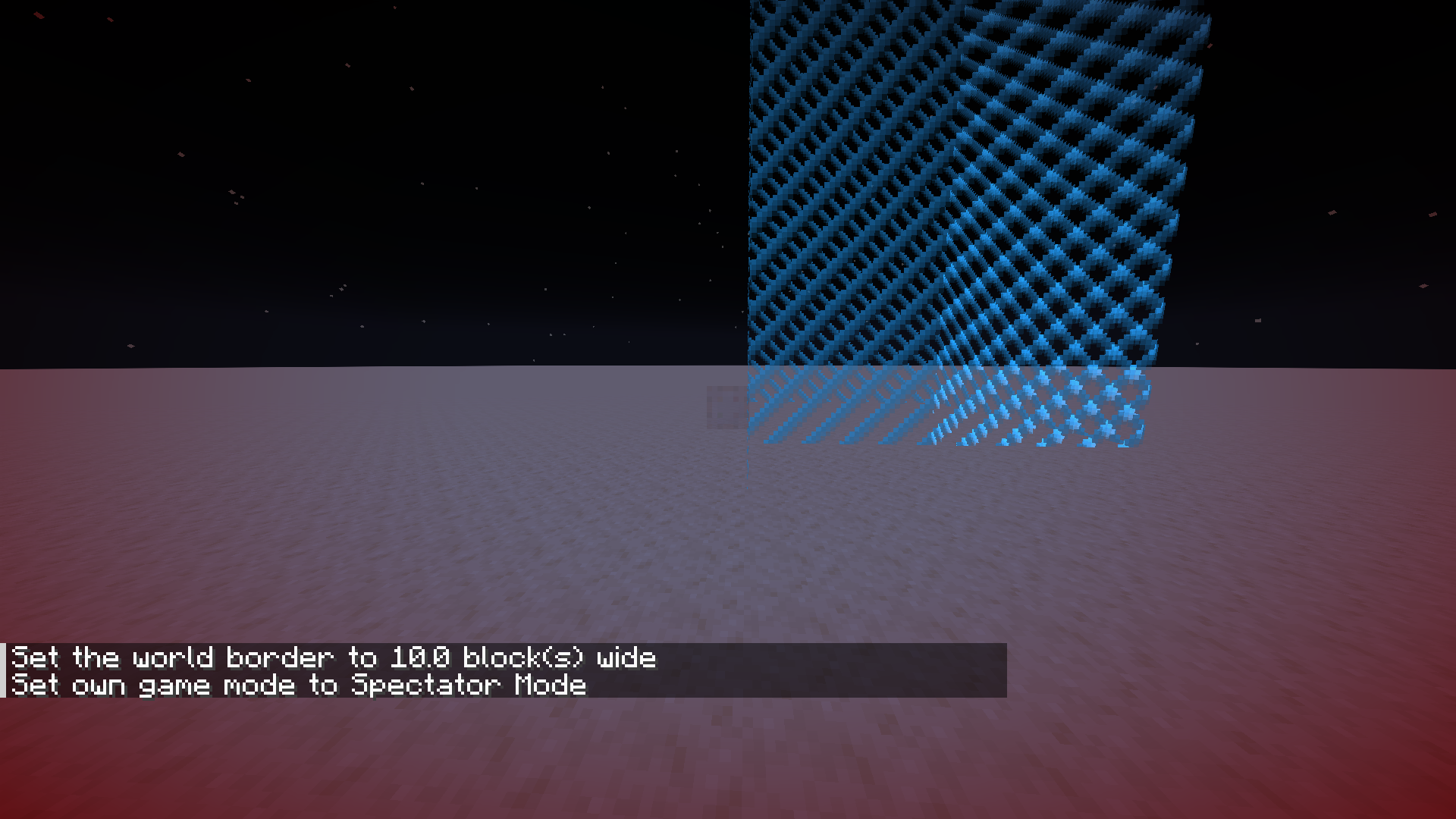
In 1.17.1 and prior, running through the corner of the world border while outside of it would allow you to pass into it without issue. As of 1.18.1, you get stuck on the outer corner of the world border while trying to run through it, as well as a block beyond the corner in either horizontal axis. This corner collision behavior feels unintuitive and inconsistent with that of the sides of the world border, which are only solid when you are inside it.
Note: I am reporting this because it relates to a feature I use in a minigame about running into the world border while outside of it. The first video attached demonstrates how the world border behaves in this minigame as of 1.18.1 (which I believe to be broken), and the second video demonstrates how the world border previously behaved as of 1.17.1.
In 1.17.1 and prior, running through the corner of the world border while outside of it would allow you to pass into it without issue. As of 1.18.1, you get stuck on the outer corner of the world border while trying to run through it, as well as a block beyond the corner in either horizontal axis. This corner collision behavior feels unintuitive and inconsistent with that of the sides of the world border, which are only solid when you are inside it.
Note: I am reporting this because it relates to a feature I use in a minigame about running into the world border while outside of it. The first video attached demonstrates how the world border
behaves in this minigameas of 1.18.1(which I believe to be broken), and the second videodemonstrates how the world borderpreviously behavedas of 1.17.1.In 1.17.1 and prior, running through the corner of the world border while outside of it would allow you to pass into it without issue. As of 1.18.1, you get stuck on the outer corner of the world border while trying to run through it, as well as a block beyond the corner in either horizontal axis. This corner collision behavior feels unintuitive and inconsistent with that of the sides of the world border, which are only solid when you are inside it.
Note: I am reporting this because it relates to a feature I use in a minigame about running into the world border while outside of it. The first video attached demonstrates how the world border previously behaved as of 1.17.1, and the second video shows how the world border behaves in this minigame as of 1.18.1 (which I believe to be broken).
In 1.17.1 and prior, running through the corner of the world border while outside of it would allow you to pass into it without issue. As of 1.18.1, you get stuck on the outer corner of the world border while trying to run through it, as well as a block beyond the corner in either horizontal axis. This corner collision behavior feels unintuitive and inconsistent with that of the sides of the world border, which are only solid when you are inside it.
Note: I am reporting this because it relates to a feature I use in a minigame about running into the world border while outside of it. The first video attached demonstrates how the world border previously behaved as of 1.17.1, and the second video shows how the world border behaves
in this minigameas of 1.18.1 (which I believe to be broken).In 1.17.1 and prior, running through the corner of the world border while outside of it would allow you to pass into it without issue. As of 1.18.1, you get stuck on the outer corner of the world border while trying to run through it, as well as a block beyond the corner in either horizontal axis. This corner collision behavior feels unintuitive and inconsistent with that of the sides of the world border, which are only solid when you are inside it.
Note: I am reporting this because it relates to a feature I use in a minigame about running into the world border while outside of it. The first video attached demonstrates how the world border previously behaved in this minigame as of 1.17.1, and the second video shows how the world border behaves as of 1.18.1 (which I believe to be broken).
Outer corner of world borderissolidOuter corners of world border are solid
In 1.17.1 and prior, running through the corner of the world border while outside of it would allow you to pass into it without issue. As of 1.18.1, you get stuck on the outer corner of the world border while trying to run through
it, as well as a block beyond the corner in either horizontal axis. This corner collision behavior feels unintuitive and inconsistent with that of the sides of the world border, which are only solid when you are inside it.Note: I am reporting this because it relates to a feature I use in a minigame about running into the world border while outside of it. The first video attached demonstrates how the world border previously behaved in this minigame as of 1.17.1, and the second video shows how the world border behaves as of 1.18.1 (which I believe to be broken).
In 1.17.1 and prior, running through the corners of the world border while outside of it would allow you to pass into it without issue. As of 1.18.1, you get stuck on the outer corners of the world border while trying to run through them, as well as a block beyond the corners in either horizontal axis. This corner collision behavior feels unintuitive and inconsistent with that of the sides of the world border, which are only solid when you are inside it.
Note: I am reporting this because it relates to a feature I use in a minigame about running into the world border while outside of it. The first video attached demonstrates how the world border previously behaved in this minigame as of 1.17.1, and the second video shows how the world border behaves as of 1.18.1 (which I believe to be broken).
In 1.17.1 and prior, running through the corners of the world border while outside of it would allow you to pass into it without issue. As of 1.18.1, you get stuck on the outer corners of the world border while trying to run through them, as well as a block beyond the corners in either horizontal axis. This corner collision behavior feels unintuitive and inconsistent with that of the sides of the world border, which are only solid when you are inside it.
Note: I am reporting this because it relates to a feature I use in a minigame about running into the world border while outside of it. The first video attached demonstrates how the world border previously behaved in this minigame as of 1.17.1, and the second video shows how the world border behaves as of 1.18.1 (which I believe to be broken).
EDIT: As commented by @YZEROgame,
In 1.17.1 and prior, running through the corners of the world border while outside of it would allow you to pass into it without issue. As of 1.18.1, you get stuck on the outer corners of the world border while trying to run through them, as well as a block beyond the corners in either horizontal axis. This corner collision behavior feels unintuitive and inconsistent with that of the sides of the world border, which are only solid when you are inside it.
Note: I am reporting this because it relates to a feature I use in a minigame about running into the world border while outside of it. The first video attached demonstrates how the world border previously behaved in this minigame as of 1.17.1, and the second video shows how the world border behaves as of 1.18.1 (which I believe to be broken).
EDIT: As commented by @YZEROgame,
In 1.17.1 and prior, running through the corners of the world border while outside of it would allow you to pass into it without issue. As of 1.18.1, you get stuck on the outer corners of the world border while trying to run through them, as well as a block beyond the corners in either horizontal axis. This corner collision behavior feels unintuitive and inconsistent with that of the sides of the world border, which are only solid when you are inside it.
Note: I am reporting this because it relates to a feature I use in a minigame about running into the world border while outside of it. The first video attached demonstrates how the world border previously behaved in this minigame as of 1.17.1, and the second video shows how the world border behaves as of 1.18.1 (which I believe to be broken).
EDIT: As mentioned by YZEROgame, this only applies to world borders that are actively increasing or decreasing in size.
In 1.17.1 and prior, running through the corners of the world border while outside of it would allow you to pass into it without issue. As of 1.18.1, you get stuck on the outer corners of the world border while trying to run through them, as well as a block beyond the corners in either horizontal axis. This corner collision behavior feels unintuitive and inconsistent with that of the sides of the world border, which are only solid when you are inside it.
Note: I am reporting this because it relates to a feature I use in a minigame about running into the world border while outside of it. The first video attached demonstrates how the world border previously behaved in this minigame as of 1.17.1, and the second video shows how the world border behaves as of 1.18.1 (which I believe to be broken).
EDIT: As mentioned by @YZEROgame, this only applies to world borders that are actively increasing or decreasing in size.
In 1.17.1 and prior, running through the corners of the world border while outside of it would allow you to pass into it without issue. As of 1.18.1, you get stuck on the outer corners of the world border while trying to run through them, as well as a block beyond the corners in either horizontal axis. This corner collision behavior feels unintuitive and inconsistent with that of the sides of the world border, which are only solid when you are inside it.
Note: I am reporting this because it relates to a feature I use in a minigame about running into the world border while outside of it. The first video attached demonstrates how the world border previously behaved in this minigame as of 1.17.1, and the second video shows how the world border behaves as of 1.18.1 (which I believe to be broken).
EDIT: As mentioned by @YZERO
game, this only applies to world borders that are actively increasing or decreasing in size.
In 1.17.1 and prior, running through the corners of
theworld border while outside of it would allow you to pass into it without issue. As of 1.18.1, you get stuck on the outer corners of the world border while trying to run through them, as well as a block beyond the corners in either horizontal axis. This corner collision behavior feels unintuitive and inconsistent with that of the sides of the world border, which are only solid when you are inside it.
Note:I am reporting this because itrelates to a feature I use in a minigame about running into the world border while outside of it. The first video attached demonstrates how the world border previously behaved in this minigame as of 1.17.1, and the second video shows how the world border behaves as of 1.18.1 (which I believe to be broken).EDIT: As mentioned by @YZERO, this only applies to world borders that are actively increasing or decreasing in size.
The Issue
In 1.17.1 and prior, running through the corners of a growing/shrinking world border while outside of it would allow you to pass into it without issue. As of 1.18.1, you get stuck on the outer corners of the world border while trying to run through them, as well as a block beyond the corners in either horizontal axis. This corner collision behavior feels unintuitive and inconsistent with that of the sides of the world border, which are only solid when you are inside it.
Steps to Reproduce
- Establish center of world border: /worldborder center ~ ~
- Set world border width to something manageable: /worldborder set 3
- Add distance over an extended duration: /worldborder add 1 10000
- Fly outside of the world border
- Observe collision behavior when walking into/around corners of growing world border
- Subtract distance over an extended duration: /worldborder add 1 10000
- Observe collision behavior when walking into/around corners of shrinking world border
Note
I am reporting this because it impacts a minigame I made about running into the world border while outside of it, with growing and shrinking world borders used cosmetically to change the world border color. The first video attached demonstrates how the world border previously behaved in this minigame as of 1.17.1, and the second video shows how the world border behaves as of 1.18.1 and all future affected versions (which I believe to be broken).
The Issue
In 1.17.1 and prior, running through the corners of a growing
/shrinking world border while outside of it would allow you to pass into it without issue. As of 1.18.1, you get stuck on the outer corners of the world border while trying to run through them, as well as a block beyond the corners in either horizontal axis. This corner collision behavior feels unintuitive and inconsistent with that of the sides of the world border, which are only solid when you are inside it.Steps to Reproduce
- Establish center of world border: /worldborder center ~ ~
- Set world border width to something manageable: /worldborder set 3
- Add distance over an extended duration: /worldborder add 1 10000
- Fly outside of the world border
- Observe collision behavior when walking into/around corners of growing world border
- Subtract distance over an extended duration: /worldborder add 1 10000
- Observe collision behavior when walking into/around corners of shrinking world border
Note
I am reporting this because it impacts a minigame I made about running into the world border while outside of it, with growing and shrinking world borders used cosmetically to change the world border color. The first video attached demonstrates how the world border previously behaved in this minigame as of 1.17.1, and the second video shows how the world border behaves as of 1.18.1 and all future affected versions (which I believe to be broken).
The Issue
In 1.17.1 and prior, running through the corners of a growing or shrinking world border while outside of it would allow you to pass into it without issue. As of 1.18.1, you get stuck on the outer corners of the world border while trying to run through them, as well as a block beyond the corners in either horizontal axis. This corner collision behavior feels unintuitive and inconsistent with that of the sides of the world border, which are only solid when you are inside it.
Steps to Reproduce
- Establish center of world border: /worldborder center ~ ~
- Set world border width to something manageable: /worldborder set 3
- Add distance over an extended duration: /worldborder add 1 10000
- Fly outside of the world border
- Observe collision behavior when walking into/around corners of growing world border
- Subtract distance over an extended duration: /worldborder add 1 10000
- Observe collision behavior when walking into/around corners of shrinking world border
Note
I am reporting this because it impacts a minigame I made about running into the world border while outside of it, with growing and shrinking world borders used cosmetically to change the world border color. The first video attached demonstrates how the world border previously behaved in this minigame as of 1.17.1, and the second video shows how the world border behaves as of 1.18.1 and all future affected versions (which I believe to be broken).
The Issue
In 1.17.1 and prior, running through the corners of a growing or shrinking world border while outside of it would allow you to pass into it without issue. As of 1.18.1, you get stuck on the outer corners of the world border while trying to run through them, as well as a block beyond the corners in either horizontal axis. This corner collision behavior feels unintuitive and inconsistent with that of the sides of the world border, which are only solid when you are inside it.
Steps to Reproduce
- Establish center of world border: /worldborder center ~ ~
- Set world border width to something manageable: /worldborder set 3
- Add distance over an extended duration: /worldborder add 1 10000
- Fly outside of the world border
- Observe collision behavior when walking into/around corners of growing world border
- Subtract distance over an extended duration: /worldborder add -1 10000
- Observe collision behavior when walking into/around corners of shrinking world border
Note
I am reporting this because it impacts a minigame I made about running into the world border while outside of it, with growing and shrinking world borders used cosmetically to change the world border color. The first video attached demonstrates how the world border previously behaved in this minigame as of 1.17.1, and the second video shows how the world border behaves as of 1.18.1 and all future affected versions (which I believe to be broken).
The Issue
In 1.17.1 and prior, running through the corners of a growing or shrinking world border while outside of it would allow you to pass into it without issue. As of 1.18.1, you get stuck on the outer corners of the world border while trying to run through them, as well as a block beyond the corners in either horizontal axis. This corner collision behavior feels unintuitive and inconsistent with that of the sides of the world border, which are only solid when you are inside it.
Steps to Reproduce
- Establish center of world border: /worldborder center ~ ~
- Set world border width to something manageable: /worldborder set 3
- Add distance over an extended duration: /worldborder add 1 10000
- Fly (via spectator mode) or teleport outside of the world border
- Observe collision behavior when walking into/around corners of growing world border from the outside
- Subtract distance over an extended duration: /worldborder add -1 10000
- Observe collision behavior when walking into/around corners of shrinking world border from the outside
Note
I am reporting this because it impacts a minigame I made about running into the world border while outside of it, with growing and shrinking world borders used cosmetically to change the world border color. The first video attached demonstrates how the world border previously behaved in this minigame as of 1.17.1, and the second video shows how the world border behaves as of 1.18.1 and all future affected versions (which I believe to be broken).
Outer corners ofgrowing/shrinkingworld border are solid
The Issue
In 1.17.1 and prior, running through the corners of a
growing or shrinkingworld border while outside of it would allow you to pass into it without issue. As of1.18.1, you get stuck on the outer corners of the world border while trying to run through them, as well as a block beyond the corners in either horizontal axis. This corner collision behavior feels unintuitive and inconsistent with that of the sides of the world border, which are only solid when you are inside it.Steps to Reproduce
- Establish center of world border: /worldborder center ~ ~
- Set world border width to something manageable: /worldborder set 3
- Add distance over an extended duration: /worldborder add 1 10000
- Fly (via spectator mode) or teleport outside of the world border
- Observe collision behavior when walking into/around corners of growing world border from the outside
- Subtract distance over an extended duration: /worldborder add -1 10000
- Observe collision behavior when walking into/around corners of
shrinkingworld border from the outsideNote
I am reporting this because it impacts a minigame I made about running into the world border while outside of it
, with growing and shrinking world borders used cosmetically to change the world border color. The first video attached demonstrates how the world border previously behaved in this minigame as of 1.17.1, and the second video shows how the world border behaves as of 1.18.1 and all future affected versions (which I believe to be broken).The Issue
In 1.17.1 and prior, running through the corners of a world border while outside of it would allow you to pass into it without issue. As of the latest affected version, you get stuck on the outer corners of the world border while trying to run through them, as well as a block beyond the corners in either horizontal axis. This corner collision behavior feels unintuitive and inconsistent with that of the sides of the world border, which are only solid when you are inside it.
Steps to Reproduce
- Establish center of world border: /worldborder center ~ ~
- Set world border width to something manageable: /worldborder set 3
- Fly (via spectator mode) or teleport outside of the world border
- Observe collision behavior when walking into/around corners of world border from the outside
Note
I am reporting this because it impacts a minigame I made about running into the world border while outside of it. The first video attached demonstrates how the world border previously behaved in this minigame as of 1.17.1, and the second video shows how the world border behaves as of 1.18.1 and all future affected versions (which I believe to be broken).
Outer cornersof world border are solidWorld border corners extend too far outwards
The Issue
In 1.17.1 and prior, running through the corners of a world border while outside of it would allow you to pass into it without issue. As of the latest affected version, you get stuck on the outer corners of the world border while trying to run through them, as well as a block beyond the corners in either horizontal axis. This corner collision behavior feels unintuitive and inconsistent with that of the sides of the world border, which are only solid when you are inside it.
Steps to Reproduce
- Establish center of world border: /worldborder center ~ ~
- Set world border width to something manageable: /worldborder set 3
- Fly (via spectator mode) or teleport outside of the world border
- Observe collision behavior when walking into/around corners of world border from the outside
- Observe
Note
I am reporting this because it impacts a minigame I made about running into the world border while outside of it. The first video attached demonstrates how the world border previously behaved in this minigame as of 1.17.1, and the second video shows how the world border behaves as of 1.18.1 and all future affected versions (which I believe to be broken).
World border cornersextend too far outwardsWorld border corner collision extends too far outwards
This behavior may now extend to non-shrinking/growing world borders. I am not sure when this change occurred but that's what I have observed as of 1.19.4 Prerelease 1.
Confirmed in 1.19.3.
World border corner collision extends one block too far outwards
The Issue
In 1.17.1 and prior, running through the corners of a world border while outside of it would allow you to pass into it without issue. As of the latest affected version, you get stuck on the outer corners of the world border while trying to run through them, as well as a block beyond the corners in either horizontal axis. This corner collision behavior feels unintuitive and inconsistent with that of the sides of the world border, which are only solid when you are inside it.
Steps to Reproduce
- Establish center of world border: /worldborder center ~ ~
- Set world border width to something manageable: /worldborder set 3
- Fly (via spectator mode) or teleport outside of the world border
- Observe collision behavior when walking into/around corners of world border from the outside
- Observe
Note
I am reporting this because it impacts a minigame I made about running into the world border while outside of it. The first video attached demonstrates how the world border previously behaved in this minigame as of 1.17.1, and the second video shows how the world border behaves as of 1.18.1 and all future affected versions (which I believe to be broken).
Minecarts and boats briefly visually stutter when crossing over 0 0 while being rotated horizontally by a teleport command (either counterclockwise or clockwise). This presumably has to do with how Minecraft handles rotation wrapping. This does not affect any other entities in my current testing.
Example commands to reproduce:
# Happens clockwise execute as @e[type=minecart] at @s run tp @s ~ ~ ~ ~5 ~ # Happens counterclockwise execute as @e[type=boat] at @s run tp @s ~ ~ ~ ~-5 ~ # Does not affect other mobs, e.g. cows execute as @e[type=cow] at @s run tp @s ~ ~ ~ ~5 ~Possibly relates to MC-120545.
Minecarts and boats briefly visually stutter when crossing over
00 while being rotated horizontally by a teleport command (either counterclockwise or clockwise). This presumably has to do with how Minecraft handles rotation wrapping. This does not affect any other entities in my current testing.Example commands to reproduce:
# Happens clockwise execute as @e[type=minecart] at @s run tp @s ~ ~ ~ ~5 ~ # Happens counterclockwise execute as @e[type=boat] at @s run tp @s ~ ~ ~ ~-5 ~ # Does not affect other mobs, e.g. cows execute as @e[type=cow] at @s run tp @s ~ ~ ~ ~5 ~Possibly relates to MC-120545.
Minecarts and boats (along with their variant entity types) briefly visually stutter when crossing over a yaw rotation of 0 while being rotated horizontally by a teleport command (either counterclockwise or clockwise). This presumably has to do with how Minecraft handles rotation wrapping. This does not affect any other entities in my current testing.
Example commands to reproduce:
# Happens clockwise execute as @e[type=minecart] at @s run tp @s ~ ~ ~ ~5 ~ # Happens counterclockwise execute as @e[type=boat] at @s run tp @s ~ ~ ~ ~-5 ~ # Does not affect other mobs, e.g. cows execute as @e[type=cow] at @s run tp @s ~ ~ ~ ~5 ~ # Affects chest boats also, which may have a different pitch rotation summon chest_boat ~ ~ ~ {Type:"oak",Rotation:[30F,60F]} execute as @e[type=chest_boat] at @s run tp @s ~ ~ ~ ~5 ~Possibly relates to MC-120545.
Minecarts and boats visually stutter when rotatingover 0 0Minecarts and boats visually stutter when rotating across 0 degree yaw
Minecarts and boats (along with their variant entity types) briefly visually stutter when crossing over a yaw rotation
of 0while being rotated horizontally by a teleport command (either counterclockwise or clockwise). This presumably has to do with how Minecraft handles rotation wrapping. This does not affect any other entities in my current testing.Example commands to reproduce:
# Happens clockwise execute as @e[type=minecart] at @s run tp @s ~ ~ ~ ~5 ~ # Happens counterclockwise execute as @e[type=boat] at @s run tp @s ~ ~ ~ ~-5 ~ # Does not affect other mobs, e.g. cows execute as @e[type=cow] at @s run tp @s ~ ~ ~ ~5 ~ # Affects chest boats also, which may have a different pitch rotation summon chest_boat ~ ~ ~ {Type:"oak",Rotation:[30F,60F]} execute as @e[type=chest_boat] at @s run tp @s ~ ~ ~ ~5 ~Possibly relates to MC-120545.
Minecarts and boats (along with their variant entity types) briefly visually stutter when crossing over a 0 degree yaw rotation while being rotated horizontally by a teleport command (either counterclockwise or clockwise). This presumably has to do with how Minecraft handles rotation wrapping. This does not affect any other entities in my current testing.
Example commands to reproduce:
# Happens clockwise execute as @e[type=minecart] at @s run tp @s ~ ~ ~ ~5 ~ # Happens counterclockwise execute as @e[type=boat] at @s run tp @s ~ ~ ~ ~-5 ~ # Does not affect other mobs, e.g. cows execute as @e[type=cow] at @s run tp @s ~ ~ ~ ~5 ~ # Affects chest boats also, which may have a different pitch rotation (not exclusive to 0 0 line) summon chest_boat ~ ~ ~ {Type:"oak",Rotation:[30F,60F]} execute as @e[type=chest_boat] at @s run tp @s ~ ~ ~ ~5 ~Possibly relates to MC-120545.
Minecarts and boats (along with their variant entity types) briefly visually stutter when crossing over a 0 degree yaw rotation while being rotated horizontally by a teleport command (either counterclockwise or clockwise). This presumably has to do with how Minecraft handles rotation wrapping. This does not affect any other entities in my current testing.
Example commands to reproduce:
# Happens clockwise execute as @e[type=minecart] at @s run tp @s ~ ~ ~ ~5 ~ # Happens counterclockwise execute as @e[type=boat] at @s run tp @s ~ ~ ~ ~-5 ~ # Does not affect other mobs, e.g. cows execute as @e[type=cow] at @s run tp @s ~ ~ ~ ~5 ~ # Affects chest boats also, which may have a different pitch rotation (not exclusive to 0 0 line) summon chest_boat ~ ~ ~ {Type:"oak",Rotation:[30F,60F]} execute as @e[type=chest_boat] at @s run tp @s ~ ~ ~ ~5 ~Possibly relates to MC-120545.
Minecarts and boats (along with their variant entity types) briefly visually stutter when crossing over a 0 degree yaw rotation while being rotated horizontally by a teleport command (either counterclockwise or clockwise). This presumably has to do with how Minecraft handles rotation wrapping. This does not affect any other entities in my current testing.
Example commands to reproduce:
# Happens clockwise execute as @e[type=minecart] at @s run tp @s ~ ~ ~ ~5 ~ # Happens counterclockwise execute as @e[type=boat] at @s run tp @s ~ ~ ~ ~-5 ~ #Does not affect other mobs, e.g. cows execute as @e[type=cow] at @s run tp @s ~ ~ ~ ~5 ~ # Affects chest boats also, which may havea different pitch rotation (not exclusive to 0 0 line) summon chest_boat ~ ~ ~ {Type:"oak",Rotation:[0F,60F]} execute as @e[type=chest_boat] at @s run tp @s ~ ~ ~ ~5 ~Possibly relates to MC-120545.
Minecarts and boats (along with their variant entity types) briefly visually stutter when crossing over a 0 degree yaw rotation while being rotated horizontally by a teleport command (either counterclockwise or clockwise). This presumably has to do with how Minecraft handles rotation wrapping. This does not affect any other entities in my current testing.
Example commands to reproduce:
# Happens clockwise execute as @e[type=minecart] at @s run tp @s ~ ~ ~ ~5 ~ # Happens counterclockwise execute as @e[type=boat] at @s run tp @s ~ ~ ~ ~-5 ~ # Happens when the entity has a different pitch rotation (not exclusive to 0 0 line) summon chest_boat ~ ~ ~ {Type:"oak",Rotation:[0F,60F]} execute as @e[type=chest_boat] at @s run tp @s ~ ~ ~ ~5 ~ # Does not affect other mobs, e.g. cows execute as @e[type=cow] at @s run tp @s ~ ~ ~ ~5 ~Possibly relates to MC-120545.
Minecarts and boats (along with their variant entity types) briefly visually stutter when crossing over a 0 degree yaw rotation while being rotated horizontally
by a teleportcommand (either counterclockwise or clockwise). This presumably has to do with how Minecraft handles rotation wrapping. This does not affect any other entities in my current testing.Example commands to reproduce:
# Happens clockwise execute as @e[type=minecart] at @s run tp @s ~ ~ ~ ~5 ~ # Happens counterclockwise execute as @e[type=boat] at @s run tp @s ~ ~ ~ ~-5 ~ # Happens when the entity has a different pitch rotation (not exclusive to 0 0 line) summon chest_boat ~ ~ ~ {Type:"oak",Rotation:[0F,60F]} execute as @e[type=chest_boat] at @s run tp @s ~ ~ ~ ~5 ~ # Does not affect other mobs, e.g. cows execute as @e[type=cow] at @s run tp @s ~ ~ ~ ~5 ~Possibly relates to MC-120545.
Minecarts and boats (along with their variant entity types) briefly visually stutter when crossing over a 0 degree yaw rotation while being rotated horizontally via commands (either counterclockwise or clockwise). This presumably has to do with how Minecraft handles rotation wrapping. This does not affect any other entities in my current testing.
Example commands to reproduce (note that the same behavior occurs when writing to Rotation[0] via /data or /execute store result|success entity):
# Happens clockwise execute as @e[type=minecart] at @s run tp @s ~ ~ ~ ~5 ~ # Happens counterclockwise execute as @e[type=boat] at @s run tp @s ~ ~ ~ ~-5 ~ # Happens when the entity has a different pitch rotation (not exclusive to 0 0 line) summon chest_boat ~ ~ ~ {Type:"oak",Rotation:[0F,60F]} execute as @e[type=chest_boat] at @s run tp @s ~ ~ ~ ~5 ~ # Does not affect other mobs, e.g. cows execute as @e[type=cow] at @s run tp @s ~ ~ ~ ~5 ~Possibly relates to MC-120545.
When running /ride on the player every tick (or every other tick), if the player manually dismounts the vehicle entity, their position will become desynced (as in, they will no longer be riding the entity client-side but they still do server-side) until the vehicle entity dies or the player relogs. If the player crouches, their position will be briefly resynced, but this also dismounts the vehicle again.
When running /ride on the player every tick (or every other tick), if the player manually dismounts the vehicle entity, their position will become desynced (as in, they will no longer be riding the entity client-side but they still
doserver-side) until the vehicle entity dies or the player relogs. If the player crouches, their position will be briefly resynced, but this also dismounts the vehicle again.When running /ride on the player every tick (or every other tick), if the player manually dismounts the vehicle entity, their position will become desynced (as in, they will no longer be riding the entity client-side but they still are server-side) until the vehicle entity dies or the player relogs. If the player crouches, their position will be briefly resynced, but this also dismounts the vehicle again.
Description:
When playing a sound from a corrupted .ogg file (which would not be playable in any other application), Minecraft does not log any errors or warnings about the sound file being corrupted. Instead, the sound sits dormant on the sound pool. When enough of these sounds play, the maximum pool size of 247 may be reached and maintained, preventing any further sound events from playing until a client-side resource reload (F3+T). This even precludes the use of /stopsound.
Steps to Reproduce:
- Select attached resource pack (corruptsound
s.zip) from resource pack menu- Open Minecraft world and run the command /playsound silent master @s ~ ~ ~ in chat
- Observe "Sounds: 1/247" in F3 debug screen (once other sound events end, the 1/247 will always persist)
- Continue running command (at this point, feel free to use a ticking function or repeating command block) until F3 debug screen reads "Sounds: 247/247"
- Observe that no more sounds are able to play until the user performs a resource reload (F3+T)
- Further observe that these sounds cannot be stopped via /stopsound @s master silent
Notes:
I came across this issue while trying to replace some vanilla sounds (minecart riding, opening locked containers, etc.) with a sound file containing one sample of silence for a resource-pack-based minigame. The intention was to hide log warns about missing sounds for events while still preventing them from being audible or registering subtitles for the purposes of the minigame.
However, the .ogg file I used for this somehow became corrupted from what it was at first (the circumstances of which still confuse me). Once users started playing the game with this file included, they noticed sounds randomly cutting out after a while, which was only fixable via F3+T.
Further analysis determined that the silent.ogg file I had used was the culprit. This file, as well as its uncorrupted version (silent_uncorrupted.ogg), has been attached to this bug report and is also included in the attached corruptsound
s.zip resource pack used to reproduce the bug.The intention of this bug report is to prevent future confusion should others happen to accidentally use corrupt sound files for similar purposes. Minecraft should not silently accept and attempt to play from these files or allow them to clutter up the sound pool.
Description:
When playing a sound from a corrupted .ogg file (which would not be playable in any other application), Minecraft does not log any errors or warnings about the sound file being corrupted. Instead, the sound sits dormant on the sound pool. When enough of these sounds play, the maximum pool size of 247 may be reached and maintained, preventing any further sound events from playing until a client-side resource reload (F3+T or changing resource packs). This even precludes the use of /stopsound.
Steps to Reproduce:
- Select attached resource pack (corruptsound.zip) from resource pack menu
- Open Minecraft world and run the command /playsound silent master @s ~ ~ ~ in chat
- Observe "Sounds: 1/247" in F3 debug screen (once other sound events end, the 1/247 will always persist)
- Continue running command (at this point, feel free to use a ticking function or repeating command block) until F3 debug screen reads "Sounds: 247/247"
- Observe that no more sounds are able to play until the user performs a resource reload (F3+T or changing resource packs)
- Further observe that these sounds cannot be stopped via /stopsound @s master silent
Notes:
I came across this issue while trying to replace some vanilla sounds (minecart riding, opening locked containers, etc.) with a sound file containing one sample of silence for a resource-pack-based minigame. The intention was to hide log warns about missing sounds for events while still preventing them from being audible or registering subtitles for the purposes of the minigame.
However, the .ogg file I used for this somehow became corrupted from what it was at first (the circumstances of which still confuse me). Once users started playing the game with this file included, they noticed sounds randomly cutting out after a while, which was only fixable via F3+T or changing resource packs.
Further analysis determined that the silent.ogg file I had used was the culprit. This file, as well as its uncorrupted version (silent_uncorrupted.ogg), has been attached to this bug report and is also included in the attached corruptsound.zip resource pack used to reproduce the bug.
The intention of this bug report is to prevent future confusion should others happen to accidentally use corrupt sound files for similar purposes. Minecraft should not silently accept and attempt to play from these files or allow them to clutter up the sound pool.
Description:When playing a sound from a corrupted .ogg file (which would not be playable in any other application), Minecraft does not log any errors or warnings about the sound file being corrupted. Instead, the sound sits dormant on the sound pool. When enough of these sounds play, the maximum pool size of 247 may be reached and maintained, preventing any further sound events from playing until a client-side resource reload (F3+T or changing resource packs). This even precludes the use of /stopsound.
Steps to Reproduce:
- Select attached resource pack (corruptsound.zip) from resource pack menu
- Open Minecraft world and run the command /playsound silent master @s ~ ~ ~ in chat
- Observe "Sounds: 1/247" in F3 debug screen (once other sound events end, the 1/247 will always persist)
- Continue running command (at this point, feel free to use a ticking function or repeating command block) until F3 debug screen reads "Sounds: 247/247"
- Observe that no more sounds are able to play until the user performs a resource reload (F3+T or changing resource packs)
- Further observe that these sounds cannot be stopped via /stopsound @s master silent
Notes:
I came across this issue while trying to replace some vanilla sounds (minecart riding, opening locked containers, etc.) with a sound file containing one sample of silence for a resource-pack-based minigame. The intention was to hide log warns about missing sounds for events while still preventing them from being audible or registering subtitles for the purposes of the minigame.
However, the .ogg file I used for this somehow became corrupted from what it was at first (the circumstances of which still confuse me). Once users started playing the game with this file included, they noticed sounds randomly cutting out after a while, which was only fixable via F3+T or changing resource packs.
Further analysis determined that the silent.ogg file I had used was the culprit. This file, as well as its uncorrupted version (silent_uncorrupted.ogg), has been attached to this bug report and is also included in the attached corruptsound.zip resource pack used to reproduce the bug.
The intention of this bug report is to prevent future confusion should others happen to accidentally use corrupt sound files for similar purposes. Minecraft should not silently accept and attempt to play from these files or allow them to clutter up the sound pool.
The Issue:
When playing a sound from a corrupted .ogg file (which would not be playable in any other application), Minecraft does not log any errors or warnings about the sound file being corrupted. Instead, the sound sits dormant on the sound pool. When enough of these sounds play, the maximum pool size of 247 may be reached and maintained, preventing any further sound events from playing until a client-side resource reload (F3+T or changing resource packs). This even precludes the use of /stopsound.
Steps to Reproduce:
- Select attached resource pack (corruptsound.zip) from resource pack menu
- Open Minecraft world and run the command /playsound silent master @s ~ ~ ~ in chat
- Observe "Sounds: 1/247" in F3 debug screen (once other sound events end, the 1/247 will always persist)
- Continue running command (at this point, feel free to use a ticking function or repeating command block) until F3 debug screen reads "Sounds: 247/247"
- Observe that no more sounds are able to play until the user performs a resource reload (F3+T or changing resource packs)
- Further observe that these sounds cannot be stopped via /stopsound @s master silent
Notes:
I came across this issue while trying to replace some vanilla sounds (minecart riding, opening locked containers, etc.) with a sound file containing one sample of silence for a resource-pack-based minigame. The intention was to hide log warns about missing sounds for events while still preventing them from being audible or registering subtitles for the purposes of the minigame.
However, the .ogg file I used for this somehow became corrupted from what it was at first (the circumstances of which still confuse me). Once users started playing the game with this file included, they noticed sounds randomly cutting out after a while, which was only fixable via F3+T or changing resource packs.
Further analysis determined that the silent.ogg file I had used was the culprit. This file, as well as its uncorrupted version (silent_uncorrupted.ogg), has been attached to this bug report and is also included in the attached corruptsound.zip resource pack used to reproduce the bug.
The intention of this bug report is to prevent future confusion should others happen to accidentally use corrupt sound files for similar purposes. Minecraft should not silently accept and attempt to play from these files or allow them to clutter up the sound pool.
Corrupted .ogg files are not rejected by the sound engine, taking up space in the sound pool until resource reload
The Issue:
When playing a sound from a corrupted .ogg file (which would not be playable in any other application), Minecraft does not log any errors or warnings about the sound file being corrupted. Instead, the sound sits dormant on the sound pool. When enough of these sounds play, the maximum pool size of 247 may be reached and maintained, preventing any further sound events from playing until a client-side resource reload (F3+T or changing resource packs). This even precludes the use of /stopsound.
Steps to Reproduce:
- Select attached resource pack (corruptsound.zip) from resource pack menu
- Open Minecraft world and run the command /playsound silent master @s ~ ~ ~ in chat
- Observe "Sounds: 1/247" in F3 debug screen (once other sound events end, the 1/247 will always persist)
- Continue running command (at this point, feel free to use a ticking function or repeating command block) until F3 debug screen reads "Sounds: 247/247"
- Observe that no more sounds are able to play until the user performs a resource reload (F3+T or changing resource packs)
- Further observe that these sounds cannot be stopped via /stopsound @s master silent
Notes:
I came across this issue while trying to replace some vanilla sounds (minecart riding, opening locked containers, etc.) with a sound file containing one sample of silence for a resource-pack-based minigame. The intention was to hide log warns about missing sounds for events while still preventing them from being audible or registering subtitles for the purposes of the minigame.
However, the .ogg file I used for this somehow became corrupted from what it was at first (the circumstances of which still confuse me). Once users started playing the game with this file included, they noticed sounds randomly cutting out after a while, which was only fixable via F3+T or changing resource packs.
Further analysis determined that the silent.ogg file I had used was the culprit. This file, as well as its uncorrupted version (silent_uncorrupted.ogg), has been attached to this bug report and is also included in the attached corruptsound.zip resource pack used to reproduce the bug.
The intention of this bug report is to prevent future confusion should others happen to accidentally use corrupted sound files for similar purposes. Minecraft should not silently accept and attempt to play from these files or allow them to clutter up the sound pool.
The Issue:
When playing a sound from a corrupted .ogg file (which would not be playable in any other application), Minecraft does not log any errors or warnings about the sound file being corrupted. Instead, the sound sits dormant on the sound pool. When enough of these sounds play, the maximum pool size of 247 may be reached and maintained, preventing any further sound events from playing until a client-side resource reload (F3+T or changing resource packs). This even precludes the use of /stopsound.
Steps to Reproduce:
- Select attached resource pack (corruptsound.zip) from resource pack menu
- Open Minecraft world and run the command /playsound silent master @s ~ ~ ~ in chat
- Observe "Sounds: 1/247" in F3 debug screen (once other sound events end, the 1/247 will always persist)
- Continue running command (at this point, feel free to use a ticking function or repeating command block) until F3 debug screen reads "Sounds: 247/247"
- Observe that no more sounds are able to play until the user performs a resource reload (F3+T or changing resource packs)
- Further observe that these sounds cannot be stopped via
/stopsound @s master silentNotes:
I came across this issue while trying to replace some vanilla sounds (minecart riding, opening locked containers, etc.) with a sound file containing one sample of silence for a resource-pack-based minigame. The intention was to hide log warns about missing sounds for events while still preventing them from being audible or registering subtitles for the purposes of the minigame.
However, the .ogg file I used for this somehow became corrupted from what it was at first (the circumstances of which still confuse me). Once users started playing the game with this file included, they noticed sounds randomly cutting out after a while, which was only fixable via F3+T or changing resource packs.
Further analysis determined that the silent.ogg file I had used was the culprit. This file, as well as its uncorrupted version (silent_uncorrupted.ogg), has been attached to this bug report and is also included in the attached corruptsound.zip resource pack used to reproduce the bug.
The intention of this bug report is to prevent future confusion should others happen to accidentally use corrupted sound files for similar purposes. Minecraft should not silently accept and attempt to play from these files or allow them to clutter up the sound pool.
The Issue:
When playing a sound from a corrupted .ogg file (which would not be playable in any other application), Minecraft does not log any errors or warnings about the sound file being corrupted. Instead, the sound sits dormant on the sound pool. When enough of these sounds play, the maximum pool size of 247 may be reached and maintained, preventing any further sound events from playing until a client-side resource reload (F3+T or changing resource packs). This even precludes the use of /stopsound.
Steps to Reproduce:
- Select attached resource pack (corruptsound.zip) from resource pack menu
- Open Minecraft world and run the command /playsound silent master @s ~ ~ ~ in chat
- Observe "Sounds: 1/247" in F3 debug screen (once other sound events end, the 1/247 will always persist)
- Continue running command (at this point, feel free to use a ticking function or repeating command block) until F3 debug screen reads "Sounds: 247/247"
- Observe that no more sounds are able to play until the user performs a resource reload (F3+T or changing resource packs)
- Further observe that these sounds cannot be stopped via /stopsound @s master silent or /stopsound @s
Notes:
I came across this issue while trying to replace some vanilla sounds (minecart riding, opening locked containers, etc.) with a sound file containing one sample of silence for a resource-pack-based minigame. The intention was to hide log warns about missing sounds for events while still preventing them from being audible or registering subtitles for the purposes of the minigame.
However, the .ogg file I used for this somehow became corrupted from what it was at first (the circumstances of which still confuse me). Once users started playing the game with this file included, they noticed sounds randomly cutting out after a while, which was only fixable via F3+T or changing resource packs.
Further analysis determined that the silent.ogg file I had used was the culprit. This file, as well as its uncorrupted version (silent_uncorrupted.ogg), has been attached to this bug report and is also included in the attached corruptsound.zip resource pack used to reproduce the bug.
The intention of this bug report is to prevent future confusion should others happen to accidentally use corrupted sound files for similar purposes. Minecraft should not silently accept and attempt to play from these files or allow them to clutter up the sound pool.
The Issue
When playing a sound from a corrupted .ogg file (which would not be playable in any other application), Minecraft does not log any errors or warnings about the sound file being corrupted. Instead, the sound sits dormant on the sound pool. When enough of these sounds play, the maximum pool size of 247 may be reached and maintained, preventing any further sound events from playing until a client-side resource reload (F3+T or changing resource packs). This even precludes the use of /stopsound.
Steps to Reproduce
- Select attached resource pack (corruptsound.zip) from resource pack menu
- Open Minecraft world and run the command /playsound silent master @s ~ ~ ~ in chat
- Observe "Sounds: 1/247" in F3 debug screen (once other sound events end, the 1/247 will always persist)
- Continue running command (at this point, feel free to use a ticking function or repeating command block) until F3 debug screen reads "Sounds: 247/247"
- Observe that no more sounds are able to play until the user performs a resource reload (F3+T or changing resource packs)
- Further observe that these sounds cannot be stopped via /stopsound @s master silent or /stopsound @s
Notes
I came across this issue while trying to replace some vanilla sounds (minecart riding, opening locked containers, etc.) with a sound file containing one sample of silence for a resource-pack-based minigame. The intention was to hide log warns about missing sounds for events while still preventing them from being audible or registering subtitles for the purposes of the minigame.
However, the .ogg file I used for this somehow became corrupted from what it was at first (the circumstances of which still confuse me). Once users started playing the game with this file included, they noticed sounds randomly cutting out after a while, which was only fixable via F3+T or changing resource packs.
Further analysis determined that the silent.ogg file I had used was the culprit. This file, as well as its uncorrupted version (silent_uncorrupted.ogg), has been attached to this bug report and is also included in the attached corruptsound.zip
resource pack used to reproduce the bug.
The intention of this bug report is to prevent future confusion should others happen to accidentally use corrupted sound files for similar purposes. Minecraft should not silently accept and attempt to play from these files or allow them to clutter up the sound pool.
The Issue
When playing a sound from a corrupted .ogg file (which would not be playable in any other application), Minecraft does not log any errors or warnings about the sound file being corrupted. Instead, the sound sits dormant on the sound pool. When enough of these sounds play, the maximum pool size of 247 may be reached and maintained, preventing any further sound events from playing until a client-side resource reload (F3+T or changing resource packs). This even precludes the use of /stopsound.
Steps to Reproduce
- Select attached resource pack (corruptsound.zip
- Open Minecraft world and run the command /playsound silent master @s ~ ~ ~ in chat
- Observe "Sounds: 1/247" in F3 debug screen (once other sound events end, the 1/247 will always persist)
- Continue running command (at this point, feel free to use a ticking function or repeating command block) until F3 debug screen reads "Sounds: 247/247"
- Observe that no more sounds are able to play until the user performs a resource reload (F3+T or changing resource packs)
- Further observe that these sounds cannot be stopped via /stopsound @s master silent or /stopsound @s
Notes
I came across this issue while trying to replace some vanilla sounds (minecart riding, opening locked containers, etc.) with a sound file containing one sample of silence for a resource-pack-based minigame. The intention was to hide log warns about missing sounds for events while still preventing them from being audible or registering subtitles for the purposes of the minigame.
However, the .ogg file I used for this somehow became corrupted from what it was at first (the circumstances of which still confuse me). Once users started playing the game with this file included, they noticed sounds randomly cutting out after a while, which was only fixable via F3+T or changing resource packs.
Further analysis determined that the silent.ogg
The intention of this bug report is to prevent future confusion should others happen to accidentally use corrupted sound files for similar purposes. Minecraft should not silently accept and attempt to play from these files or allow them to clutter up the sound pool.
Cannot detect using spawn egg on water/waterlogged portion of blocks withused_item_on_block advancement criteriaCannot detect using spawn egg on water/waterlogged portion of blocks with item_used_on_block advancement criteria
The Issue
When using a spawn egg on water or the waterlogged portion of a non-whole block, an advancement with the correct
used_item_on_block criteria fails to be rewarded upon using the spawn egg.Steps to Reproduce
- Enable attached datapack (spawneggbug.zip
{
    "criteria": {
        "requirement": {
            "trigger": "minecraft:item_used_on_block",
            "conditions": {
                "item": {
                    "items": [
                        "minecraft:pig_spawn_egg"
                    ]
                }
            }
        }
    },
    "rewards": {
        "function": "spawneggbug:detect"
    }
}
- Enter Creative mode (note that this bug is not particular to Creative mode, but it is better for demonstration purposes)
- Obtain a pig spawn egg (note that this bug affects other spawn eggs; the datapack only tracks pig spawn eggs for demonstration purposes)
- Spawn a pig on land
- Observe pig spawns with "[Player] I placed a spawn egg!" message sent in chat (advancement succeeds)
- Spawn a pig in water (click on the water, not on any block wireframe)
- Observe pig spawns with no "[Player] I placed a spawn egg!" message in chat (advancement fails)
- Give yourself another pig spawn egg with the following command:
/give @s pig_spawn_egg{CanPlaceOn:["minecraft:campfire"]}
- Place a campfire underwater (note that this affects other waterloggable blocks; campfires are used for demonstration purposes)
- Enter Adventure mode
- Place second pig spawn egg against waterlogged nonsolid edge of the campfire
- Observe pig spawns with no "I placed a spawn egg!" message in chat (advancement fails)
These steps have also been recorded and attached to this report for ease of visualization (demonstration.mp4
Note
A scoreboard objective with minecraft.used:minecraft.[entity]_spawn_egg criteria is able to detect using spawn eggs in the cases where the advancement cannot. However, the expected behavior is still that the advancement could detect such cases as well.
The Issue
When using a spawn egg on water or the waterlogged portion of a non-whole block, an advancement with the correct item_used_on_block criteria fails to be rewarded upon using the spawn egg.
Steps to Reproduce
- Enable attached datapack (spawneggbug.zip
{
    "criteria": {
        "requirement": {
            "trigger": "minecraft:item_used_on_block",
            "conditions": {
                "item": {
                    "items": [
                        "minecraft:pig_spawn_egg"
                    ]
                }
            }
        }
    },
    "rewards": {
        "function": "spawneggbug:detect"
    }
}
- Enter Creative mode (note that this bug is not particular to Creative mode, but it is better for demonstration purposes)
- Obtain a pig spawn egg (note that this bug affects other spawn eggs; the datapack only tracks pig spawn eggs for demonstration purposes)
- Spawn a pig on land
- Observe pig spawns with "[Player] I placed a spawn egg!" message sent in chat (advancement succeeds)
- Spawn a pig in water (click on the water, not on any block wireframe)
- Observe pig spawns with no "[Player] I placed a spawn egg!" message in chat (advancement fails)
- Give yourself another pig spawn egg with the following command:
/give @s pig_spawn_egg{CanPlaceOn:["minecraft:campfire"]}
- Place a campfire underwater (note that this affects other waterloggable blocks; campfires are used for demonstration purposes)
- Enter Adventure mode
- Place second pig spawn egg against waterlogged nonsolid edge of the campfire
- Observe pig spawns with no "I placed a spawn egg!" message in chat (advancement fails)
These steps have also been recorded and attached to this report for ease of visualization (demonstration.mp4
Note
A scoreboard objective with minecraft.used:minecraft.[entity]_spawn_egg criteria is able to detect using spawn eggs in the cases where the advancement cannot. However, the expected behavior is still that the advancement could detect such cases as well.
The Issue
When using a spawn egg on water or the waterlogged portion of a non-whole block, an advancement with
thecorrect item_used_on_block criteria fails to be rewardedupon using the spawn egg.Steps to Reproduce
- Enable attached datapack (spawneggbug.zip
{
    "criteria": {
        "requirement": {
            "trigger": "minecraft:item_used_on_block",
            "conditions": {
                "item": {
                    "items": [
                        "minecraft:pig_spawn_egg"
                    ]
                }
            }
        }
    },
    "rewards": {
        "function": "spawneggbug:detect"
    }
}
- Enter Creative mode (note that this bug is not particular to Creative mode, but it is better for demonstration purposes)
- Obtain a pig spawn egg (note that this bug affects other spawn eggs; the datapack only tracks pig spawn eggs for demonstration purposes)
- Spawn a pig on land
- Observe pig spawns with "[P
layer] I placed a spawn egg!" message sent in chat (advancement succeeds)- Spawn a pig in water (click on the water, not on any block wireframe)
- Observe pig spawns with no "[P
layer] I placed a spawn egg!" message in chat (advancement fails)- Give yourself another pig spawn egg with the following command:
/give @s pig_spawn_egg{CanPlaceOn:["minecraft:campfire"]}
- Place a campfire underwater (note that this affects other waterloggable blocks; campfires are
used for demonstration purposes)- Enter Adventure mode
- Place second pig spawn egg against waterlogged nonsolid edge of the campfire
- Observe pig spawns with no "I placed a spawn egg!" message in chat (advancement fails)
These steps have also been recorded and attached to this report for ease of visualization (demonstration.mp4
Note
A scoreboard objective with minecraft.used:minecraft.[
entity]_spawn_egg criteria is able to detect using spawn eggs in the cases where the advancement cannot. However, the expected behavior is still that the advancement could detect such cases as well.The Issue
When using a spawn egg on water or the waterlogged portion of a non-whole block, an advancement with correct item_used_on_block criteria fails to be rewarded.
Steps to Reproduce
- Enable attached datapack (spawneggbug.zip
{
    "criteria": {
        "requirement": {
            "trigger": "minecraft:item_used_on_block",
            "conditions": {
                "item": {
                    "items": [
                        "minecraft:pig_spawn_egg"
                    ]
                }
            }
        }
    },
    "rewards": {
        "function": "spawneggbug:detect"
    }
}
- Enter Creative mode (note that this bug is not particular to Creative mode, but it is better for demonstration purposes)
- Obtain a pig spawn egg (note that this bug affects other spawn eggs; the datapack only tracks pig spawn eggs for demonstration purposes)
- Spawn a pig on land
- Observe pig spawns with "[PLAYERNAME] I placed a spawn egg!" message sent in chat (advancement succeeds)
- Spawn a pig in water (click on the water, not on any block wireframe)
- Observe pig spawns with no "[PLAYERNAME] I placed a spawn egg!" message in chat (advancement fails)
- Give yourself another pig spawn egg with the following command:
/give @s pig_spawn_egg{CanPlaceOn:["minecraft:campfire"]}
- Place a campfire underwater (note that this affects other waterloggable blocks; campfires are picked for demonstration purposes)
- Enter Adventure mode
- Place second pig spawn egg against waterlogged non-solid edge of the campfire
- Observe pig spawns with no "[PLAYERNAME] I placed a spawn egg!" message in chat (advancement fails)
These steps have also been recorded and attached to this report for ease of visualization (demonstration.mp4
Note
A scoreboard objective with minecraft.used:minecraft.[ENTITY]_spawn_egg criteria is able to detect using spawn eggs in the cases where the advancement cannot. However, the expected behavior is still that the advancement could detect such cases as well, since the item is technically used against a block.
Cannot detect using spawn egg onwater/waterlogged portion of blocks with item_used_on_block advancement criteriaCannot detect using spawn egg on fluids/waterlogged portion of blocks with item_used_on_block advancement criteria
The Issue
When using a spawn egg on
wateror the waterlogged portion of a non-whole block, an advancement with correct item_used_on_block criteria fails to be rewarded.Steps to Reproduce
- Enable attached datapack (spawneggbug.zip
{
    "criteria": {
        "requirement": {
            "trigger": "minecraft:item_used_on_block",
            "conditions": {
                "item": {
                    "items": [
                        "minecraft:pig_spawn_egg"
                    ]
                }
            }
        }
    },
    "rewards": {
        "function": "spawneggbug:detect"
    }
}
- Enter Creative mode (note that this bug is not particular to Creative mode, but it is better for demonstration purposes)
- Obtain a pig spawn egg (note that this bug affects other spawn eggs; the datapack only tracks pig spawn eggs for demonstration purposes)
- Spawn a pig on land
- Observe pig spawns with "[PLAYERNAME] I placed a spawn egg!" message sent in chat (advancement succeeds)
- Spawn a pig in water (click on the
water, not on any block wireframe)- Observe pig spawns with no "[PLAYERNAME] I placed a spawn egg!" message in chat (advancement fails)
- Give yourself another pig spawn egg with the following command:
/give @s pig_spawn_egg{CanPlaceOn:["minecraft:campfire"]}
- Place a campfire underwater (note that this affects other waterloggable blocks; campfires are picked for demonstration purposes)
- Enter Adventure mode
- Place second pig spawn egg against waterlogged non-solid edge of the campfire
- Observe pig spawns with no "[PLAYERNAME] I placed a spawn egg!" message in chat (advancement fails)
These steps have also been recorded and attached to this report for ease of visualization (demonstration.mp4
Note
A scoreboard objective with minecraft.used:minecraft.[ENTITY]_spawn_egg criteria is able to detect using spawn eggs in the cases where the advancement cannot. However, the expected behavior is still that the advancement could detect such cases as well, since the item is technically used against a block.
The Issue
When using a spawn egg on fluids (water and lava) or the waterlogged portion of a non-whole block, an advancement with correct item_used_on_block criteria fails to be rewarded.
Steps to Reproduce
- Enable attached datapack (spawneggbug.zip
{
    "criteria": {
        "requirement": {
            "trigger": "minecraft:item_used_on_block",
            "conditions": {
                "item": {
                    "items": [
                        "minecraft:pig_spawn_egg"
                    ]
                }
            }
        }
    },
    "rewards": {
        "function": "spawneggbug:detect"
    }
}
- Enter Creative mode (note that this bug is not particular to Creative mode, but it is better for demonstration purposes)
- Obtain a pig spawn egg (note that this bug affects other spawn eggs; the datapack only tracks pig spawn eggs for demonstration purposes)
- Spawn a pig on land
- Observe pig spawns with "[PLAYERNAME] I placed a spawn egg!" message sent in chat (advancement succeeds)
- Spawn a pig in water/lava (click on the fluid, not on any block wireframe)
- Observe pig spawns with no "[PLAYERNAME] I placed a spawn egg!" message in chat (advancement fails)
- Give yourself another pig spawn egg with the following command:
/give @s pig_spawn_egg{CanPlaceOn:["minecraft:campfire"]}
- Place a campfire underwater (note that this affects other waterloggable blocks; campfires are picked for demonstration purposes)
- Enter Adventure mode
- Place second pig spawn egg against waterlogged non-solid edge of the campfire
- Observe pig spawns with no "[PLAYERNAME] I placed a spawn egg!" message in chat (advancement fails)
These steps have also been recorded and attached to this report for ease of visualization (demonstration.mp4
Note
A scoreboard objective with minecraft.used:minecraft.[ENTITY]_spawn_egg criteria is able to detect using spawn eggs in the cases where the advancement cannot. However, the expected behavior is still that the advancement could detect such cases as well, since the item is technically used against a block.
The world border texture extends too far outwards on the outer corners of the world border. This is difficult to notice but most visible by precisely aligning yourself with a given corner any distance from the outside of the world border (see worldbordertexture.mp4
I have also attached a resource pack to turn the world border texture into solid white, for ease of visualization/replication:
May relate to MC-248304, which impacts world border collision behavior 1 block out from any corner.
The world border texture extends too far outwards on the outer corners of the world border. This is difficult to notice but most visible by precisely aligning yourself with a given corner any distance from the outside of the world border (see worldbordertexture.mp4
I have also attached a resource pack to turn the world border texture into solid white, for ease of visualization/replication:
May relate to MC-248304, which impacts world border collision behavior 1 block out from any corner.
The world border texture extends too far outwards on the outer corners of the world border. This is difficult to notice but most visible by precisely aligning yourself with a given corner any distance from the outside of the world border (see worldbordertexture.mp4
I have also attached a resource pack to turn the world border texture into solid white, for ease of visualization/replication: worldbordertexture.zip
May relate to MC-248304, which impacts world border collision behavior 1 block out from any corner.
The world border texture extends too far outwards on the outer corners of the world border. This is difficult to notice but most visible by precisely aligning yourself with a given corner any distance from the outside of the world border (see worldbordertexture.mp4
I have also attached a resource pack to turn the world border texture
intosolid white, for ease of visualization/replication: worldbordertexture.zipMay relate to MC-248304, which impacts world border collision behavior 1 block out from any corner.
The world border texture extends too far outwards on the outer corners of the world border. This is difficult to notice but most visible by precisely aligning yourself with a given corner any distance from the outside of the world border (see worldbordertexture.mp4
I have also attached a resource pack to turn the world border texture solid white, for ease of visualization/replication: worldbordertexture.zip
May relate to MC-248304, which impacts world border collision behavior 1 block out from any corner.
The world border texture extends too far outwards on the outer corners of the world border. The extended texture is only visible by precisely aligning yourself with a given corner any distance from the outside of the world border.
I have attached a resource pack to turn the world border texture solid white, for ease of visualization/replication (worldbordertexture.zip
May relate to MC-248304, which impacts world border collision behavior 1 block out from any corner.
The world border texture extends too far outwards on the outer corners of the world border. The extended texture is only visible by precisely aligning yourself with a given corner any distance from the outside of the world border.
I have attached a resource pack to turn the world border texture solid white, for ease of visualization/replication (worldbordertexture.zip
May relate to MC-248304, which impacts world border collision behavior 1 block out from any corner.
When holding an item with CanPlaceOn data while in Adventure Mode, you would expect to be able to see block outlines when you look at blocks that are specified in the item's CanPlaceOn list. This works perfectly for your mainhand, but fails for your offhand when you are not holding another interactable item in your mainhand. This is only a visual issue, as you may still place the item from your offhand against accepted blocks despite not being able to see the block outline.
When holding an item with CanPlaceOn data while in Adventure Mode, you would expect to be able to see block outlines when you look at blocks that are specified in the item's CanPlaceOn list. This works perfectly for your mainhand, but fails for your offhand when you are not holding another interactable item in your mainhand that would be used instead. This is only a visual issue, as you may still place the item from your offhand against accepted blocks despite not being able to see the block outline.
The Bug
When holding an item with CanPlaceOn data while in Adventure Mode, you would expect to be able to see block outlines when you look at blocks that are specified in the item's CanPlaceOn list. This works perfectly for your mainhand, but fails for your offhand when you are not holding another interactable item in your mainhand that would be used instead. This is only a visual issue, as you may still place the item from your offhand against accepted blocks despite not being able to see the block outline.
Steps to Reproduce
- Place down a sandstone block (could be any block, but use this for demonstration)
- Give yourself a pig spawn egg (could be any interactable item, but use this for demonstration) with the following command:
/give @s pig_spawn_egg{CanPlaceOn:["minecraft:sandstone"]}
- Enter Adventure Mode
- Look at sandstone block while holding the spawn egg in your mainhand
- Observe the block outline is visible for the sandstone and no other blocks
- Put the spawn egg into your offhand (and do not hold any other item in your mainhand that you could use/place on the sandstone instead)
- Observe no block outline is visible for the sandstone despite holding an item with applicable CanPlaceOn data in your offhand
- Use the spawn egg against the sandstone
- Observe the pig spawns despite no block outline being visible for the block the spawn egg was used on
The Bug
When holding an item with CanPlaceOn data while in Adventure Mode, you would expect to be able to see block outlines when you look at blocks that are specified in the item's CanPlaceOn list. This works perfectly for your mainhand, but fails for your offhand when you are not holding another interactable item in your mainhand that would be used instead. This is only a visual issue, as you may still place the item from your offhand against accepted blocks despite not being able to see the block outline.
Steps to Reproduce
- Place down a sandstone block (could be any block, but use this for demonstration)
- Give yourself a pig spawn egg (could be any interactable item, but use this for demonstration) with the following command:
/give @s pig_spawn_egg{CanPlaceOn:["minecraft:sandstone"]}
- Enter Adventure Mode
- Look at sandstone block while holding the spawn egg in your mainhand
- Observe the block outline is visible for the sandstone and no other blocks
- Put the spawn egg into your offhand (and do not hold any other item in your mainhand that you could use/place on the sandstone instead)
- Observe no block outline is visible for the sandstone despite holding an item with applicable CanPlaceOn data in your offhand
- Use the spawn egg against the sandstone
- Observe the pig spawns despite no block outline being visible for the block the spawn egg was used on
These steps have also been recorded and attached to this report for ease of visualization (canplaceonbug.mp4
The Bug
When holding an item with CanPlaceOn data while in Adventure Mode, you would expect to be able to see block outlines when you look at blocks that are specified in the item's CanPlaceOn list. This works perfectly for your mainhand, but fails for your offhand when you are not holding another interactable item in your mainhand that would be used instead. This is only a visual issue, as you may still place the item from your offhand against accepted blocks despite not being able to see the block outline.
Steps to Reproduce
- Place down a sandstone block, if there is not one nearby (could be any block, but use this for demonstration)
- Give yourself a pig spawn egg (could be any interactable item, but use this for demonstration) with the following command:
/give @s pig_spawn_egg{CanPlaceOn:["minecraft:sandstone"]}
- Enter Adventure Mode
- Look at sandstone block while holding the spawn egg in your mainhand
- Observe the block outline is visible for the sandstone and no other blocks
- Put the spawn egg into your offhand (and do not hold any other item in your mainhand that you could use/place on the sandstone instead)
- Observe no block outline is visible for the sandstone despite holding an item with applicable CanPlaceOn data in your offhand
- Use the spawn egg against the sandstone
- Observe the pig spawns despite no block outline being visible for the block the spawn egg was used on
These steps have also been recorded and attached to this report for ease of visualization (canplaceonbug.mp4
The Bug
When holding an item with CanPlaceOn data while in Adventure Mode, you would expect to be able to see block outlines when you look at blocks that are specified in the item's CanPlaceOn list. This works perfectly for your mainhand, but fails for your offhand when you are not holding another interactable item in your mainhand that would be used instead. This is only a visual issue, as you may still place the item from your offhand against a
cceptedblocks despite not being able to see the block outline.Steps to Reproduce
- Place down a sandstone block, if there is not one nearby (could be any block, but use this for demonstration)
- Give yourself a pig spawn egg (could be any interactable item, but use this for demonstration) with the following command:
/give @s pig_spawn_egg{CanPlaceOn:["minecraft:sandstone"]}
- Enter Adventure Mode
- Look at sandstone block while holding the spawn egg in your mainhand
- Observe the block outline is visible for the sandstone and no other blocks
- Put the spawn egg into your offhand (and do not hold any other item in your mainhand that you could use/place on the sandstone instead)
- Observe no block outline is visible for the sandstone despite holding an item with applicable CanPlaceOn data in your offhand
- Use the spawn egg against the sandstone
- Observe the pig spawns despite no block outline being visible for the block the spawn egg was used on
These steps have also been recorded and attached to this report for ease of visualization (canplaceonbug.mp4
The Bug
When holding an item with CanPlaceOn data while in Adventure Mode, you would expect to be able to see block outlines when you look at blocks that are specified in the item's CanPlaceOn list. This works perfectly for your mainhand, but fails for your offhand when you are not holding another interactable item in your mainhand that would be used instead. This is only a visual issue, as you may still place the item from your offhand against applicable blocks despite not being able to see the block outline.
Steps to Reproduce
- Place down a sandstone block, if there is not one nearby (could be any block, but use this for demonstration)
- Give yourself a pig spawn egg (could be any interactable item, but use this for demonstration) with the following command:
/give @s pig_spawn_egg{CanPlaceOn:["minecraft:sandstone"]}
- Enter Adventure Mode
- Look at sandstone block while holding the spawn egg in your mainhand
- Observe the block outline is visible for the sandstone and no other blocks
- Put the spawn egg into your offhand (and do not hold any other item in your mainhand that you could use/place on the sandstone instead)
- Observe no block outline is visible for the sandstone despite holding an item with applicable CanPlaceOn data in your offhand
- Use the spawn egg against the sandstone
- Observe the pig spawns despite no block outline being visible for the block the spawn egg was used on
These steps have also been recorded and attached to this report for ease of visualization (canplaceonbug.mp4
The Bug
When holding an item with CanPlaceOn data while in Adventure Mode, you would expect to be able to see block outlines when you look at blocks that are specified in the item's CanPlaceOn list. This works perfectly for your mainhand, but fails for your offhand when you are not holding another interactable item in your mainhand that would be used instead. This is only a visual issue, as you may still place the item from your offhand against applicable blocks despite not being able to see the block outline.
Steps to Reproduce
- Place down a sandstone block, if there is not one nearby (could be any block, but use this for demonstration)
- Give yourself a pig spawn egg (could be any interactable item, but use this for demonstration) with the following command:
/give @s pig_spawn_egg{CanPlaceOn:["minecraft:sandstone"]}
- Enter Adventure Mode
- Look at sandstone block while holding the spawn egg in your mainhand
- Observe the block outline is visible for the sandstone and no other blocks
- Put the spawn egg into your offhand (and do not hold any other item in your mainhand that you could use/place on the sandstone instead)
- Observe no block outline is visible for the sandstone despite holding an item with applicable CanPlaceOn data in your offhand
- Use the spawn egg against the sandstone
- Observe the pig spawns despite no block outline being visible for the block the spawn egg was used on
These steps have also been recorded and attached to this report for ease of visualization (canplaceonbug.mp4
The Bug
When holding an item with CanPlaceOn data while in Adventure Mode, you would expect to be able to see block outlines when you look at blocks that are specified in the item's CanPlaceOn list. This works perfectly for your mainhand, but fails for your offhand when you are not holding another interactable item in your mainhand that would be used instead. This is only a visual issue, as you may still place the item from your offhand against applicable blocks despite not being able to see the block outline.
Steps to Reproduce
- Place down a sandstone block, if there is not one nearby (could be any block, but use this for demonstration)
- Give yourself a pig spawn egg (could be any interactable item, but use this for demonstration) with the following command:
/give @s pig_spawn_egg[can_place_on={blocks:[sandstone]}]
- Enter Adventure Mode
- Look at sandstone block while holding the spawn egg in your mainhand
- Observe the block outline is visible for the sandstone and no other blocks
- Put the spawn egg into your offhand (and do not hold any other item in your mainhand that you could use/place on the sandstone instead)
- Observe no block outline is visible for the sandstone despite holding an item with applicable CanPlaceOn data in your offhand
- Use the spawn egg against the sandstone
- Observe the pig spawns despite no block outline being visible for the block the spawn egg was used on
These steps have also been recorded and attached to this report for ease of visualization (canplaceonbug.mp4
Text display background has incorrect transparency sorting.
Text displays with transparent backgrounds (like the default upon summoning) render their background overtop water, slime blocks, and other transparent objects incorrectly. This issue occurs even with Fabulous graphics on, which are intended to resolve transparency issues (as per
MC-9553).Note: setting see_through:1b in the text display's NBT does resolve the transparency sorting issue for the text background, but the obvious caveat is text rendering through blocks.
Text displays with transparent backgrounds (like the default upon summoning) render their background overtop water, slime blocks, and other transparent objects incorrectly. This issue occurs even with Fabulous graphics on, which are intended to resolve transparency issues (as per
MC-9553), as shown in in the first attached image.Note: setting see_through:1b in the text display's NBT (as shown in the second attached image) does resolve the transparency sorting issue for the text background, but the obvious caveat is text rendering through blocks.
Relates to
MC-262514.Apologies, I just realized these blocks are breakable.
Reinforced deepslate displays the first breaking animation frame when attempting to mine it -- INVALID
The Issue:
When the player's head is fully inside of an interaction entity and the player is also riding a boat, clicking on the interaction entity can play the hand animation with no registered interaction.
This issue seems to occur particularly when the area in which the player clicks happens to intersect the boat hitbox visually, although one would expect to instead be able to click the interaction in this instance (especially given that the hand animation plays).
This most likely affects other entities/setups also; I would expect it has something to do with MC-260305 and/or MC-196201.
Steps to Reproduce:
Run the following command once:
summon boat ~ ~ ~ {Passengers:[{id:"minecraft:item_display"},{id:"minecraft:camel",Age:-2147483648,Silent:1b,NoAI:1b,Passengers:[{id:"minecraft:interaction",response:1b}]}]}Then run the following four commands every tick:
execute as @e[type=boat] rotated as @s on passengers positioned as @s[type=camel] run tp @s ~ ~ ~ ~ ~ execute as @e[type=boat] rotated as @s on passengers run effect give @s[type=camel] invisibility infinite 0 true execute as @e[type=boat] on passengers on passengers on target run say hi execute as @e[type=boat] on passengers on passengers run data remove entity @s interactionAnd lastly, make yourself ride the boat:
ride @s mount @e[type=boat,limit=1,sort=nearest]Now, while inside the boat, try clicking on the interaction entity (which covers your entire head and is the closest entity to be clicked). Observe that:
- Sometimes the interactions register, and sometimes they do not (particularly when looking at the boat hitbox, even though the interaction entity does not intersect this).
- When the interaction fails, your hand moves as though the interaction was successful despite this not being the case.
- Moving around the boat can sometimes fix or cause the issue to occur again. It is very inconsistent and unpredictable.
See https://streamable.com/b21v2i for a video demonstration of these observations.
Notes:
I am using this entity setup in a minigame in order to have a boat in which left/right clicking is always a registrable action. A camel has been used in order to horizontally displace the interaction entity inside of the player at all times, and the interaction entity should then be able to reliably detect clicking regardless of the player's facing direction (which it does not due to this bug).
A similar setup with an invisible villager for right click detection worked just fine, except I realized I needed left click detection as well, for which an interaction entity is better suited.
Because of this issue, I have had to do some very janky workarounds with resummoning interaction entities in the hopes that a newly summoned interaction entity's hitbox takes precedence over the boat's hitbox. Even this does not work reliably, unfortunately.
The Issue:
When the player's head is fully inside of an interaction entity and the player is also riding a boat, clicking on the interaction entity can play the hand animation with no registered interaction.
This issue seems to occur particularly when the area in which the player clicks happens to intersect the boat hitbox visually, although one would expect to instead be able to click the interaction in this instance (especially given that the hand animation plays).
This most likely affects other entities/setups also; I would expect it has something to do with MC-260305 and/or MC-196201.
Steps to Reproduce:
Run the following command once:
summon boat ~ ~ ~ {Passengers:[{id:"minecraft:item_display"},{id:"minecraft:camel",Age:-2147483648,Silent:1b,NoAI:1b,Passengers:[{id:"minecraft:interaction",response:1b}]}]}Then run the following four commands every tick:
execute as @e[type=boat] rotated as @s on passengers positioned as @s[type=camel] run tp @s ~ ~ ~ ~ ~ execute as @e[type=boat] rotated as @s on passengers run effect give @s[type=camel] invisibility infinite 0 true execute as @e[type=boat] on passengers on passengers on target run say hi execute as @e[type=boat] on passengers on passengers run data remove entity @s interactionAnd lastly, make yourself ride the boat:
ride @s mount @e[type=boat,limit=1,sort=nearest]Now, while inside the boat, try clicking on the interaction entity (which covers your entire head and is the closest entity to be clicked). Observe that:
- Sometimes the interactions register, and sometimes they do not (particularly when looking at the boat hitbox, even though the interaction entity does not intersect this).
- When the interaction fails, your hand moves as though the interaction was successful despite this not being the case.
- Moving around the boat can sometimes fix or cause the issue to occur again. It is very inconsistent and unpredictable.
See https://streamable.com/b21v2i for a video demonstration of these observations.
Notes:
I am using this entity setup in a minigame in order to have a boat in which left/right clicking is always a registrable action.A camel has been used in order to horizontally displace the interaction entity inside of the player at all times, and the interaction entity should then be able to reliably detect clicking regardless of the player's facing direction (which it does not due to this bug).A similar setup with an invisible villager for right click detection worked just fine, except I realized I needed left click detection as well, for which an interaction entity is better suited.
Because of this issue, I have had to do some very janky workarounds with resummoning interaction entities in the hopes that a newly summoned interaction entity's hitbox takes precedence over the boat's hitbox. Even this does not work reliably, unfortunately.
The Issue:
When the player's head is fully inside of an interaction entity and the player is also riding a boat, clicking on the interaction entity can play the hand animation with no registered interaction.
This issue seems to occur particularly when the area in which the player clicks happens to intersect the boat hitbox visually, although one would expect to instead be able to click the interaction in this instance (especially given that the hand animation plays, which it does not normally do when clicking on your own boat).
This most likely affects other entities/setups also; I would expect it has something to do with MC-260305 and/or MC-196201.
Steps to Reproduce:
Run the following command once:
summon boat ~ ~ ~ {Passengers:[{id:"minecraft:item_display"},{id:"minecraft:camel",Age:-2147483648,Silent:1b,NoAI:1b,Passengers:[{id:"minecraft:interaction",response:1b}]}]}Then run the following four commands every tick:
execute as @e[type=boat] rotated as @s on passengers positioned as @s[type=camel] run tp @s ~ ~ ~ ~ ~ execute as @e[type=boat] rotated as @s on passengers run effect give @s[type=camel] invisibility infinite 0 true execute as @e[type=boat] on passengers on passengers on target run say hi execute as @e[type=boat] on passengers on passengers run data remove entity @s interactionAnd lastly, make yourself ride the boat:
ride @s mount @e[type=boat,limit=1,sort=nearest]Now, while inside the boat, try clicking on the interaction entity (which covers your entire head and is the closest entity to be clicked). Observe that:
- Sometimes the interactions register, and sometimes they do not (particularly when looking at the boat hitbox, even though the interaction entity does not intersect this).
- When the interaction fails, your hand moves as though the interaction was successful despite this not being the case.
- Moving around the boat can sometimes fix or cause the issue to occur again. It is very inconsistent and unpredictable.
See https://streamable.com/b21v2i for a video demonstration of these observations.
Notes:
I am using this entity setup in a minigame in order to have a boat in which left/right clicking is always a registrable action.
A camel has been used in order to horizontally displace the interaction entity inside of the player at all times, and the interaction entity should then be able to reliably detect clicking regardless of the player's facing direction (which it does not due to this bug). I have been able to rule out that the click goes to the camel when this issue occurs.
A similar setup with an invisible villager for right click detection worked just fine, except I realized I needed left click detection as well, for which an interaction entity is better suited.
Because of this issue, I have had to do some very janky workarounds with resummoning interaction entities in the hopes that a newly summoned interaction entity's hitbox takes precedence over the boat's hitbox. Even this does not work reliably, unfortunately.
The Issue:
When the player's head is fully inside of an interaction entity and the player is also riding a boat, clicking on the interaction entity can play the hand animation with no registered interaction.
This issue seems to occur particularly when the area in which the player clicks happens to intersect the boat hitbox visually, although one would expect to instead be able to click the interaction in this instance (especially given that the hand animation plays, which it does not normally do when clicking on your own boat).
This most likely affects other entities/setups also; I would expect it has something to do with MC-260305 and/or MC-196201.
Steps to Reproduce:
Run the following command once:
summon boat ~ ~ ~ {Passengers:[{id:"minecraft:item_display"},{id:"minecraft:camel",Age:-2147483648,Silent:1b,NoAI:1b,Passengers:[{id:"minecraft:interaction",response:1b}]}]}Then run the following four commands every tick:
execute as @e[type=boat] rotated as @s on passengers positioned as @s[type=camel] run tp @s ~ ~ ~ ~ ~ execute as @e[type=boat] rotated as @s on passengers run effect give @s[type=camel] invisibility infinite 0 true execute as @e[type=boat] on passengers on passengers on target run say hi execute as @e[type=boat] on passengers on passengers run data remove entity @s interactionAnd lastly, make yourself ride the boat:
ride @s mount @e[type=boat,limit=1,sort=nearest]Now, while inside the boat, try clicking on the interaction entity (which covers your entire head and is the closest entity to be clicked). Observe that:
- Sometimes the interactions register, and sometimes they do not (particularly when looking at the boat hitbox, even though the interaction entity does not intersect this).
- When the interaction fails, your hand moves as though the interaction was successful despite this not being the case.
- Moving around the boat can sometimes fix or cause the issue to occur again. It is very inconsistent and unpredictable.
See https://streamable.com/b21v2i for a video demonstration of these observations.
Notes:
I am using this entity setup in a minigame in order to have a boat in which left/right clicking is always a registrable action.
A camel has been used in order to horizontally displace the interaction entity inside of the player at all times, and the interaction entity should then be able to reliably detect clicking regardless of the player's facing direction (which it does not due to this bug). I have been able to rule out that the click goes to the camel when this issue occurs.
A similar setup with an invisible villager for right click detection worked just fine, except I realized I needed left click detection as well, for which an interaction entity is better suited. One would expect these entities to behave very similarly with regard to interaction priority.
Because of this issue, I have had to do some very janky workarounds with resummoning interaction entities in the hopes that a newly summoned interaction entity's hitbox takes precedence over the boat's hitbox. Even this does not work reliably, unfortunately.
When inside interaction entity and riding a boat, clicking can play hand animation with no detectable interaction
The Issue:
When the player's head is fully inside of an interaction entity and the player is also riding a boat, clicking on the interaction entity can play the hand animation with no
registeredinteraction.This issue seems to occur particularly when the area in which the player clicks happens to intersect the boat hitbox visually, although one would expect to instead be able to click the interaction in this instance (especially given that the hand animation plays, which it does not normally do when clicking on your own boat).
This most likely affects other entities/setups also; I would expect it has something to do with MC-260305 and/or MC-196201.
Steps to Reproduce:
Run the following command once:
summon boat ~ ~ ~ {Passengers:[{id:"minecraft:item_display"},{id:"minecraft:camel",Age:-2147483648,Silent:1b,NoAI:1b,Passengers:[{id:"minecraft:interaction",response:1b}]}]}Then run the following four commands every tick:
execute as @e[type=boat] rotated as @s on passengers positioned as @s[type=camel] run tp @s ~ ~ ~ ~ ~ execute as @e[type=boat] rotated as @s on passengers run effect give @s[type=camel] invisibility infinite 0 true execute as @e[type=boat] on passengers on passengers on target run say hi execute as @e[type=boat] on passengers on passengers run data remove entity @s interactionAnd lastly, make yourself ride the boat:
ride @s mount @e[type=boat,limit=1,sort=nearest]Now, while inside the boat, try clicking on the interaction entity (which covers your entire head and is the closest entity to be clicked). Observe that:
- Sometimes the interactions register, and sometimes they do not (particularly when looking at the boat hitbox, even though the interaction entity does not intersect this).
- When the interaction fails, your hand moves as though the interaction was successful despite this not being the case.
- Moving around the boat can sometimes fix or cause the issue to occur again. It is very inconsistent and unpredictable.
See https://streamable.com/b21v2i for a video demonstration of these observations.
Notes:
I am using this entity setup in a minigame in order to have a boat in which left/right clicking is always a registrable action.
A camel has been used in order to horizontally displace the interaction entity inside of the player at all times, and the interaction entity should then be able to reliably detect clicking regardless of the player's facing direction (which it does not due to this bug). I have been able to rule out that the click goes to the camel when this issue occurs.
A similar setup with an invisible villager for right click detection worked just fine, except I realized I needed left click detection as well, for which an interaction entity is better suited. One would expect these entities to behave very similarly with regard to interaction priority.
Because of this issue, I have had to do some very janky workarounds with resummoning interaction entities in the hopes that a newly summoned interaction entity's hitbox takes precedence over the boat's hitbox. Even this does not work reliably, unfortunately.
The Issue:
When the player's head is fully inside of an interaction entity and the player is also riding a boat, clicking on the interaction entity can play the hand animation with no detectable interaction.
This issue seems to occur particularly when the area in which the player clicks happens to intersect the boat hitbox visually, although one would expect to instead be able to click the interaction in this instance (especially given that the hand animation plays, which it does not normally do when clicking on your own boat).
This most likely affects other entities/setups also; I would expect it has something to do with MC-260305 and/or MC-196201.
Steps to Reproduce:
Run the following command once:
summon boat ~ ~ ~ {Passengers:[{id:"minecraft:item_display"},{id:"minecraft:camel",Age:-2147483648,Silent:1b,NoAI:1b,Passengers:[{id:"minecraft:interaction",response:1b}]}]}Then run the following four commands every tick:
execute as @e[type=boat] rotated as @s on passengers positioned as @s[type=camel] run tp @s ~ ~ ~ ~ ~ execute as @e[type=boat] rotated as @s on passengers run effect give @s[type=camel] invisibility infinite 0 true execute as @e[type=boat] on passengers on passengers on target run say hi execute as @e[type=boat] on passengers on passengers run data remove entity @s interactionAnd lastly, make yourself ride the boat:
ride @s mount @e[type=boat,limit=1,sort=nearest]Now, while inside the boat, try clicking on the interaction entity (which covers your entire head and is the closest entity to be clicked). Observe that:
- Sometimes the interactions register, and sometimes they do not (particularly when looking at the boat hitbox, even though the interaction entity does not intersect this).
- When the interaction fails, your hand moves as though the interaction was successful despite this not being the case.
- Moving around the boat can sometimes fix or cause the issue to occur again. It is very inconsistent and unpredictable.
See https://streamable.com/b21v2i for a video demonstration of these observations.
Notes:
I am using this entity setup in a minigame in order to have a boat in which left/right clicking is always a registrable action.
A camel has been used in order to horizontally displace the interaction entity inside of the player at all times, and the interaction entity should then be able to reliably detect clicking regardless of the player's facing direction (which it does not due to this bug). I have been able to rule out that the click goes to the camel when this issue occurs.
A similar setup with an invisible villager for right click detection worked just fine, except I realized I needed left click detection as well, for which an interaction entity is better suited. One would expect these entities to behave very similarly with regard to interaction priority.
Because of this issue, I have had to do some very janky workarounds with resummoning interaction entities in the hopes that a newly summoned interaction entity's hitbox takes precedence over the boat's hitbox. Even this does not work reliably, unfortunately.
The Issue:
When the player's head is fully inside of an interaction entity and the player is also riding a boat, clicking on the interaction entity can play the hand animation with no detectable interaction.
This issue seems to occur particularly when the area in which the player clicks happens to intersect the boat hitbox visually, although one would expect to instead be able to click the interaction in this instance (especially given that the hand animation plays, which it does not normally do when clicking on your own boat).
This most likely affects other entities/setups also; I would expect it has something to do with MC-260305 and/or MC-196201.
Steps to Reproduce:
Run the following command once:
summon boat ~ ~ ~ {Passengers:[{id:"minecraft:item_display"},{id:"minecraft:camel",Age:-2147483648,Silent:1b,NoAI:1b,Passengers:[{id:"minecraft:interaction",response:1b}]}]}Then run the following four commands every tick:
execute as @e[type=boat] rotated as @s on passengers positioned as @s[type=camel] run tp @s ~ ~ ~ ~ ~ execute as @e[type=boat] rotated as @s on passengers run effect give @s[type=camel] invisibility infinite 0 true execute as @e[type=boat] on passengers on passengers on target run say hi execute as @e[type=boat] on passengers on passengers run data remove entity @s interactionAnd lastly, make yourself ride the boat:
ride @s mount @e[type=boat,limit=1,sort=nearest]Now, while inside the boat, try clicking on the interaction entity (which covers your entire head and is the closest entity to be clicked). Observe that:
- Sometimes the interactions register, and sometimes they do not (particularly when looking at the boat hitbox, even though the interaction entity does not intersect this).
- When the interaction fails, your hand moves as though the interaction was successful despite this not being the case.
- Moving around the boat can sometimes fix or cause the issue to occur again. It is very inconsistent and unpredictable.
See https://streamable.com/b21v2i for a video demonstration of these observations.
Notes:
I am using this entity setup in a minigame in order to have a boat in which left/right clicking is always a
registrable action.A camel has been used in order to horizontally displace the interaction entity inside of the player at all times, and the interaction entity should then be able to reliably detect clicking regardless of the player's facing direction (which it does not due to this bug). I have been able to rule out that the click goes to the camel when this issue occurs.
A similar setup with an invisible villager for right click detection worked just fine, except I realized I needed left click detection as well, for which an interaction entity is better suited. One would expect these entities to behave very similarly with regard to interaction priority.
Because of this issue, I have had to do some very janky workarounds with resummoning interaction entities in the hopes that a newly summoned interaction entity's hitbox takes precedence over the boat's hitbox. Even this does not work reliably, unfortunately.
The Issue:
When the player's head is fully inside of an interaction entity and the player is also riding a boat, clicking on the interaction entity can play the hand animation with no detectable interaction.
This issue seems to occur particularly when the area in which the player clicks happens to intersect the boat hitbox visually, although one would expect to instead be able to click the interaction in this instance (especially given that the hand animation plays, which it does not normally do when clicking on your own boat).
This most likely affects other entities/setups also; I would expect it has something to do with MC-260305 and/or MC-196201.
Steps to Reproduce:
Run the following command once:
summon boat ~ ~ ~ {Passengers:[{id:"minecraft:item_display"},{id:"minecraft:camel",Age:-2147483648,Silent:1b,NoAI:1b,Passengers:[{id:"minecraft:interaction",response:1b}]}]}Then run the following four commands every tick:
execute as @e[type=boat] rotated as @s on passengers positioned as @s[type=camel] run tp @s ~ ~ ~ ~ ~ execute as @e[type=boat] rotated as @s on passengers run effect give @s[type=camel] invisibility infinite 0 true execute as @e[type=boat] on passengers on passengers on target run say hi execute as @e[type=boat] on passengers on passengers run data remove entity @s interactionAnd lastly, make yourself ride the boat:
ride @s mount @e[type=boat,limit=1,sort=nearest]Now, while inside the boat, try clicking on the interaction entity (which covers your entire head and is the closest entity to be clicked). Observe that:
- Sometimes the interactions register, and sometimes they do not (particularly when looking at the boat hitbox, even though the interaction entity does not intersect this).
- When the interaction fails, your hand moves as though the interaction was successful despite this not being the case.
- Moving around the boat can sometimes fix or cause the issue to occur again. It is very inconsistent and unpredictable.
See https://streamable.com/b21v2i for a video demonstration of these observations.
Notes:
I am using this entity setup in a minigame in order to have a boat in which left/right clicking is always a detectable action.
A camel has been used in order to horizontally displace the interaction entity inside of the player at all times, and the interaction entity should then be able to reliably detect clicking regardless of the player's facing direction (which it does not due to this bug). I have been able to rule out that the click goes to the camel when this issue occurs.
A similar setup with an invisible villager for right click detection worked just fine, except I realized I needed left click detection as well, for which an interaction entity is better suited. One would expect these entities to behave very similarly with regard to interaction priority.
Because of this issue, I have had to do some very janky workarounds with resummoning interaction entities in the hopes that a newly summoned interaction entity's hitbox takes precedence over the boat's hitbox. Even this does not work reliably, unfortunately.
The Issue:
When the player's head is fully inside of an interaction entity and the player is also riding a boat, clicking on the interaction entity can play the hand animation with no detectable interaction.
This issue seems to occur particularly when the area in which the player clicks happens to intersect the boat hitbox visually, although one would expect to instead be able to click the interaction in this instance (especially given that the hand animation plays, which it does not normally do when clicking on your own boat).
This most likely affects other entities/setups also; I would expect it has something to do with MC-260305 and/or MC-196201.
Steps to Reproduce:
Run the following command once:
summon boat ~ ~ ~ {Passengers:[{id:"minecraft:item_display"},{id:"minecraft:camel",Age:-2147483648,Silent:1b,NoAI:1b,Passengers:[{id:"minecraft:interaction",response:1b}]}]}Then run the following four commands every tick:
execute as @e[type=boat] rotated as @s on passengers positioned as @s[type=camel] run tp @s ~ ~ ~ ~ ~ execute as @e[type=boat] rotated as @s on passengers run effect give @s[type=camel] invisibility infinite 0 true execute as @e[type=boat] on passengers on passengers on target run say hi execute as @e[type=boat] on passengers on passengers run data remove entity @s interactionAnd lastly, make yourself ride the boat:
ride @s mount @e[type=boat,limit=1,sort=nearest]Now, while inside the boat, try clicking on the interaction entity (which covers your entire head and is the closest entity to be clicked). Observe that:
- Sometimes the interactions register, and sometimes they do not (particularly when looking at the boat hitbox, even though the interaction entity does not intersect this).
- When the interaction fails, your hand moves as though the interaction was successful despite this not being the case.
- Moving around the boat can sometimes fix or cause the issue to occur again. It is very inconsistent and unpredictable.
See https://streamable.com/b21v2i for a video demonstration of these observations.
Notes:
I am using this entity setup in a minigame in order to have a boat in which left/right clicking is always a detectable action.
A camel has been used in order to horizontally displace the interaction entity inside of the player at all times, and the interaction entity should then be able to reliably detect clicking regardless of the player's facing direction (which it does not due to this bug). I have been able to rule out that the click goes to the camel when this issue occurs.
A similar setup with an invisible villager for right click detection worked just fine, except I realized I needed left click detection as well, for which an interaction entity is better suited. One would expect these entities to behave very similarly with regard to interaction priority.
Because of this issue, I have had to do some very janky workarounds with resummoning interaction entities in the hopes that a newly summoned interaction entity's hitbox takes precedence over the boat's hitbox. Even this does not work reliably, unfortunately.
The Issue:
When the player's head is fully inside of an interaction entity and the player is also riding a boat, clicking on the interaction entity can play the hand animation with no detectable interaction.
This issue seems to occur particularly when the area in which the player clicks happens to intersect the boat hitbox visually, although one would expect to instead be able to click the interaction in this instance (especially given that the hand animation plays, which it does not normally do when clicking on your own boat).
This most likely affects other entities/setups also; I would expect it has something to do with MC-260305 and/or MC-196201.
Steps to Reproduce:
Run the following command once:
summon boat ~ ~ ~ {Passengers:[{id:"minecraft:item_display"},{id:"minecraft:camel",Age:-2147483648,Silent:1b,NoAI:1b,Passengers:[{id:"minecraft:interaction",response:1b}]}]}Then run the following four commands every tick:
execute as @e[type=boat] rotated as @s on passengers positioned as @s[type=camel] run tp @s ~ ~ ~ ~ ~ execute as @e[type=boat] rotated as @s on passengers run effect give @s[type=camel] invisibility infinite 0 true execute as @e[type=boat] on passengers on passengers on target run say hi execute as @e[type=boat] on passengers on passengers run data remove entity @s interactionAnd lastly, make yourself ride the boat:
ride @s mount @e[type=boat,limit=1,sort=nearest]Now, while inside the boat, try clicking on the interaction entity (which covers your entire head and is the closest entity to be clicked). Observe that:
- Sometimes the interactions register, and sometimes they do not (particularly when looking at the boat hitbox, even though the interaction entity does not intersect this).
- When the interaction fails, your hand moves as though the interaction was successful despite this not being the case.
- Moving around the boat can sometimes fix or cause the issue to occur again. It is very inconsistent and unpredictable.
Notes:
I am using this entity setup in a minigame in order to have a boat in which left/right clicking is always a detectable action.
A camel has been used in order to horizontally displace the interaction entity inside of the player at all times, and the interaction entity should then be able to reliably detect clicking regardless of the player's facing direction (which it does not due to this bug). I have been able to rule out that the click goes to the camel when this issue occurs.
A similar setup with an invisible villager for right click detection worked just fine, except I realized I needed left click detection as well, for which an interaction entity is better suited. One would expect these entities to behave very similarly with regard to interaction priority.
Because of this issue, I have had to do some very janky workarounds with resummoning interaction entities in the hopes that a newly summoned interaction entity's hitbox takes precedence over the boat's hitbox. Even this does not work reliably, unfortunately.
The Issue:
When the player's head is fully inside of an interaction entity and the player is also riding a boat, clicking on the interaction entity can play the hand animation with no detectable interaction.
This issue seems to occur particularly when the area in which the player clicks happens to intersect the boat hitbox visually, although one would expect to instead be able to click the interaction in this instance (especially given that the hand animation plays, which it does not normally do when clicking on your own boat).
This most likely affects other entities/setups also; I would expect it has something to do with MC-260305 and/or MC-196201.
Steps to Reproduce:
Run the following command once:
summon boat ~ ~ ~ {Passengers:[{id:"minecraft:item_display"},{id:"minecraft:camel",Age:-2147483648,Silent:1b,NoAI:1b,Passengers:[{id:"minecraft:interaction",response:1b}]}]}Then run the following four commands every tick:
execute as @e[type=boat] rotated as @s on passengers positioned as @s[type=camel] run tp @s ~ ~ ~ ~ ~ execute as @e[type=boat] rotated as @s on passengers run effect give @s[type=camel] invisibility infinite 0 true execute as @e[type=boat] on passengers on passengers on target run say hi execute as @e[type=boat] on passengers on passengers run data remove entity @s interactionAnd lastly, make yourself ride the boat:
ride @s mount @e[type=boat,limit=1,sort=nearest]Now, while inside the boat, try clicking on the interaction entity (which cover
syour entire head and is the closest entity to be clicked). Observe that:
- Sometimes the interactions register, and sometimes they do not (particularly when looking at the boat hitbox, even though the interaction entity does not intersect this).
- When the interaction fails, your hand moves as though the interaction was successful despite this not being the case.
- Moving around the boat can sometimes fix or cause the issue to occur again. It is very inconsistent and unpredictable.
Notes:
I am using this entity setup in a minigame in order to have a boat in which left/right clicking is always a detectable action.
A camel has been used in order to horizontally displace the interaction entity inside of the player at all times, and the interaction entity should then be able to reliably detect clicking regardless of the player's facing direction (which it does not due to this bug). I have been able to rule out th
at theclick goes to the camel when this issue occurs.A similar setup with an invisible villager for right click detection worked just fine, except I realized I needed left click detection as well, for which an interaction entity is better suited. One would expect these entities to behave very similarly with regard to interaction priority.
Because of this issue, I have had to do some very janky workarounds with resummoning interaction entities in the hopes that a newly summoned interaction entity's hitbox takes precedence over the boat's hitbox. Even this does not work reliably, unfortunately.
The Issue:
When the player's head is fully inside of an interaction entity and the player is also riding a boat, clicking on the interaction entity can play the hand animation with no detectable interaction.
This issue seems to occur particularly when the area in which the player clicks happens to intersect the boat hitbox visually, although one would expect to instead be able to click the interaction in this instance (especially given that the hand animation plays, which it does not normally do when clicking on your own boat).
This most likely affects other entities/setups also; I would expect it has something to do with MC-260305 and/or MC-196201.
Steps to Reproduce:
Run the following command once:
summon boat ~ ~ ~ {Passengers:[{id:"minecraft:camel",Age:-2147483648,Silent:1b,NoAI:1b,Passengers:[{id:"minecraft:interaction",response:1b}]}]}Then run the following four commands every tick:
execute as @e[type=boat] rotated as @s on passengers positioned as @s[type=camel] run tp @s ~ ~ ~ ~ ~ execute as @e[type=boat] rotated as @s on passengers run effect give @s[type=camel] invisibility infinite 0 true execute as @e[type=boat] on passengers on passengers on target run say hi execute as @e[type=boat] on passengers on passengers run data remove entity @s interactionAnd lastly, make yourself ride the boat:
ride @s mount @e[type=boat,limit=1,sort=nearest]Now, while inside the boat, try clicking on the interaction entity (which will cover your entire head and is the closest entity to be clicked). Observe that:
- Sometimes the interactions register, and sometimes they do not (particularly when looking at the boat hitbox, even though the interaction entity does not intersect this).
- When the interaction fails, your hand moves as though the interaction was successful despite this not being the case.
- Moving around the boat can sometimes fix or cause the issue to occur again. It is very inconsistent and unpredictable.
Notes:
I am using this entity setup in a minigame in order to have a boat in which left/right clicking is always a detectable action.
A camel has been used in order to horizontally displace the interaction entity inside of the player at all times, and the interaction entity should then be able to reliably detect clicking regardless of the player's facing direction (which it does not due to this bug). I have been able to rule out the possibility that the interaction click goes to the camel when this issue occurs.
A similar setup with an invisible villager for right click detection worked just fine, except I realized I needed left click detection as well, for which an interaction entity is better suited. One would expect these entities to behave very similarly with regard to interaction priority.
Because of this issue, I have had to do some very janky workarounds with resummoning interaction entities in the hopes that a newly summoned interaction entity's hitbox takes precedence over the boat's hitbox. Even this does not work reliably, unfortunately.
The Issue:
When the player's head is fully inside of an interaction entity and the player is also riding a boat, clicking on the interaction entity can play the hand animation with no detectable interaction.
This issue seems to occur particularly when the area in which the player clicks happens to intersect the boat hitbox visually, although one would expect to instead be able to click the interaction in this instance (especially given that the hand animation plays, which it does not normally do when clicking on your own boat).
This most likely affects other entities/setups also; I would expect it has something to do with MC-260305 and/or MC-196201.
Steps to Reproduce:
Run the following command once:
summon boat ~ ~ ~ {Passengers:[{id:"minecraft:camel",Age:-2147483648,Silent:1b,NoAI:1b,Passengers:[{id:"minecraft:interaction",response:1b}]}]}Then run the following four commands every tick:
execute as @e[type=boat] rotated as @s on passengers positioned as @s[type=camel] run tp @s ~ ~ ~ ~ ~ execute as @e[type=boat] rotated as @s on passengers run effect give @s[type=camel] invisibility infinite 0 true execute as @e[type=boat] on passengers on passengers on target run say hi execute as @e[type=boat] on passengers on passengers run data remove entity @s interactionAnd lastly, make yourself ride the boat:
ride @s mount @e[type=boat,limit=1,sort=nearest]Now, while inside the boat, try clicking on the interaction entity (which will cover your entire head and is the closest entity to be clicked). Observe that:
- Sometimes the interactions register, and sometimes they do not (particularly when looking at the boat hitbox, even though the interaction entity does not intersect this).
- When the interaction fails, your hand moves as though the interaction was successful despite this not being the case.
- Moving around the boat can sometimes fix or cause the issue to occur again. It is very inconsistent and unpredictable.
Notes:
I am using this entity setup in a minigame in order to have a boat in which left/right clicking is always a detectable action.
A camel has been used in order to horizontally displace the interaction entity inside of the player at all times, and the interaction entity should then be able to reliably detect clicking regardless of the player's facing direction (which it does not due to this bug). I have been able to rule out the possibility that the interaction click goes to the camel when this issue occurs.
A similar setup with an invisible villager for right click detection worked just fine, except I realized I needed left click detection as well, for which an interaction entity is better suited. One would expect these entities to behave very similarly with regard to interaction priority.
Because of this issue, I have had to do some very janky workarounds with resummoning interaction entities in the hopes that a newly summoned interaction entity's hitbox takes precedence over the boat's hitbox. Even this does not work reliably, unfortunately.
The Issue:
When the player's head is fully inside of an interaction entity and the player is also riding a boat, clicking on the interaction entity can play the hand animation with no detectable interaction.
This issue seems to occur particularly when the area in which the player clicks happens to intersect the boat hitbox visually, although one would expect to instead be able to click the interaction in this instance (especially given that the hand animation plays, which it does not normally do when clicking on your own boat).
This most likely affects other entities/setups also; I would expect it has something to do with MC-260305 and/or MC-196201.
Steps to Reproduce:
Run the following command once:
summon boat ~ ~ ~ {Passengers:[{id:"minecraft:camel",Age:-2147483648,Silent:1b,NoAI:1b,Passengers:[{id:"minecraft:item_display"},{id:"minecraft:interaction",response:1b}]}]}Then run the following four commands every tick:
execute as @e[type=boat] rotated as @s on passengers positioned as @s[type=camel] run tp @s ~ ~ ~ ~ ~ execute as @e[type=boat] on passengers on passengers on target run say hi execute as @e[type=boat] on passengers on passengers run data remove entity @s interactionAnd lastly, make yourself ride the boat:
ride @s mount @e[type=boat,limit=1,sort=nearest]Now, while inside the boat, try clicking on the interaction entity (which will cover your entire head and is the closest entity to be clicked). Observe that:
- Sometimes the interactions register, and sometimes they do not (particularly when looking at the boat hitbox, even though the interaction entity does not intersect this).
- When the interaction fails, your hand moves as though the interaction was successful despite this not being the case.
- Moving around the boat can sometimes fix or cause the issue to occur again. It is very inconsistent and unpredictable.
Notes:
I am using this entity setup in a minigame in order to have a boat in which left/right clicking is always a detectable action.
A camel has been used in order to horizontally displace the interaction entity inside of the player at all times, and the interaction entity should then be able to reliably detect clicking regardless of the player's facing direction (which it does not due to this bug). I have been able to rule out the possibility that the interaction click goes to the camel when this issue occurs.
A similar setup with an invisible villager for right click detection worked just fine, except I realized I needed left click detection as well, for which an interaction entity is better suited. One would expect these entities to behave very similarly with regard to interaction priority.
Because of this issue, I have had to do some very janky workarounds with resummoning interaction entities in the hopes that a newly summoned interaction entity's hitbox takes precedence over the boat's hitbox. Even this does not work reliably, unfortunately.
The Issue:
When the player's head is fully inside of an interaction entity and the player is also riding a boat, clicking on the interaction entity can play the hand animation with no detectable interaction.
This issue seems to occur particularly when the area in which the player clicks happens to intersect the boat hitbox visually, although one would expect to instead be able to click the interaction in this instance (especially given that the hand animation plays, which it does not normally do when clicking on your own boat).
This most likely affects other entities/setups also; I would expect it has something to do with MC-260305 and/or MC-196201.
Steps to Reproduce:
Run the following command once:
summon boat ~ ~ ~ {Passengers:[{id:"minecraft:camel",Age:-2147483648,Silent:1b,NoAI:1b,Passengers:[{id:"minecraft:item_display"},{id:"minecraft:interaction",response:1b}]}]}Then run the following four commands every tick:
execute as @e[type=boat] rotated as @s on passengers positioned as @s[type=camel] run tp @s ~ ~ ~ ~ ~ execute as @e[type=boat] on passengers on passengers on target run say hi execute as @e[type=boat] on passengers on passengers run data remove entity @s interactionAnd lastly, make yourself ride the boat:
ride @s mount @e[type=boat,limit=1,sort=nearest]Now, while inside the boat, try clicking on the interaction entity (which will cover your entire head and is the closest entity to be clicked). Observe that:
- Sometimes the interactions register, and sometimes they do not (particularly when looking at the boat hitbox, even though the interaction entity does not intersect this).
- When the interaction fails, your hand moves as though the interaction was successful despite this not being the case.
- Moving around the boat can sometimes fix or cause the issue to occur again. It is very inconsistent and unpredictable.
Notes:
I am using this entity setup in a minigame in order to have a boat in which left/right clicking is always a detectable action.
A camel has been used in order to horizontally displace the interaction entity inside of the player at all times, and the interaction entity should then be able to reliably detect clicking regardless of the player's facing direction (which it does not due to this bug). I have been able to rule out the possibility that the interaction click goes to the camel when this issue occurs.
A similar setup with an invisible villager for right click detection worked just fine, except I realized I needed left click detection as well, for which an interaction entity is better suited. One would expect these entities to behave very similarly with regard to interaction priority.
Because of this issue, I have had to do some very janky workarounds with resummoning interaction entities in the hopes that a newly summoned interaction entity's hitbox takes precedence over the boat's hitbox. Even this does not work reliably, unfortunately.
The Issue:
When the player's head is fully inside of an interaction entity and the player is also riding a boat, clicking on the interaction entity can play the hand animation with no detectable interaction.
This issue seems to occur particularly when the area in which the player clicks happens to intersect the boat hitbox visually, although one would expect to instead be able to click the interaction in this instance (especially given that the hand animation plays, which it does not normally do when clicking on your own boat).
This most likely affects other entities/setups also; I would expect it has something to do with MC-260305 and/or MC-196201.
Steps to Reproduce:
Load the provided boatbug.zip datapack into your world. While overtop water, run the command /function boatbug:setup to summon and ride a boat with an interaction entity anchored in front of the player's head.
Now, while inside the boat, try clicking on the interaction entity (which will cover your entire head and is the closest entity to be clicked). Observe that:
- Sometimes the interactions register, and sometimes they do not (particularly when looking at the boat hitbox, even though the interaction entity does not intersect this).
- When the interaction fails, your hand moves as though the interaction was successful despite this not being the case.
- Moving around the boat can sometimes fix or cause the issue to occur again. It is very inconsistent and unpredictable.
Notes:
I am using this entity setup in a minigame in order to have a boat in which left/right clicking is always a detectable action.
A camel has been used in order to horizontally displace the interaction entity inside of the player at all times, and the interaction entity should then be able to reliably detect clicking regardless of the player's facing direction (which it does not due to this bug). I have been able to rule out the possibility that the interaction click goes to the camel when this issue occurs.
A similar setup with an invisible villager for right click detection worked just fine, except I realized I needed left click detection as well, for which an interaction entity is better suited. One would expect these entities to behave very similarly with regard to interaction priority.
Because of this issue, I have had to do some very janky workarounds with resummoning interaction entities in the hopes that a newly summoned interaction entity's hitbox takes precedence over the boat's hitbox. Even this does not work reliably, unfortunately.
The Issue:
When the player's head is fully inside of an interaction entity and the player is also riding a boat, clicking on the interaction entity can play the hand animation with no detectable interaction.
This issue seems to occur particularly when the area in which the player clicks happens to intersect the boat hitbox visually, although one would expect to instead be able to click the interaction in this instance (especially given that the hand animation plays, which it does not normally do when clicking on your own boat).
This most likely affects other entities/setups also; I would expect it has something to do with MC-260305 and/or MC-196201.
Steps to Reproduce:
Load the provided boatbug.zipdatapack into your world. While overtop water, run the command /function boatbug:setup to summon and ride a boat with an interaction entity anchored in front of the player's head.Now, while inside the boat, try clicking on the interaction entity (which will cover your entire head and is the closest entity to be clicked). Observe that:
- Sometimes the interactions register, and sometimes they do not (particularly when looking at the boat hitbox, even though the interaction entity does not intersect this).
- When the interaction fails, your hand moves as though the interaction was successful despite this not being the case.
- Moving around the boat can sometimes fix or cause the issue to occur again. It is very inconsistent and unpredictable.
Notes:
I am using this entity setup in a minigame in order to have a boat in which left/right clicking is always a detectable action.
A camel has been used in order to horizontally displace the interaction entity inside of the player at all times, and the interaction entity should then be able to reliably detect clicking regardless of the player's facing direction (which it does not due to this bug). I have been able to rule out the possibility that the interaction click goes to the camel when this issue occurs.
A similar setup with an invisible villager for right click detection worked just fine, except I realized I needed left click detection as well, for which an interaction entity is better suited. One would expect these entities to behave very similarly with regard to interaction priority.
Because of this issue, I have had to do some very janky workarounds with resummoning interaction entities in the hopes that a newly summoned interaction entity's hitbox takes precedence over the boat's hitbox. Even this does not work reliably, unfortunately.
The Issue:
When the player's head is fully inside of an interaction entity and the player is also riding a boat, clicking on the interaction entity can play the hand animation with no detectable interaction.
This issue seems to occur particularly when the area in which the player clicks happens to intersect the boat hitbox visually, although one would expect to instead be able to click the interaction in this instance (especially given that the hand animation plays, which it does not normally do when clicking on your own boat).
This most likely affects other entities/setups also; I would expect it has something to do with MC-260305 and/or MC-196201.
Steps to Reproduce:
Load the provided boatbug.zip
Now, while inside the boat, try clicking on the interaction entity (which will cover your entire head and is the closest entity to be clicked). Observe that:
- Sometimes the interactions register, and sometimes they do not (particularly when looking at the boat hitbox, even though the interaction entity does not intersect this).
- When the interaction fails, your hand moves as though the interaction was successful despite this not being the case.
- Moving around the boat can sometimes fix or cause the issue to occur again. It is very inconsistent and unpredictable.
Notes:
I am using this entity setup in a minigame in order to have a boat in which left/right clicking is always a detectable action.
A camel has been used in order to horizontally displace the interaction entity inside of the player at all times, and the interaction entity should then be able to reliably detect clicking regardless of the player's facing direction (which it does not due to this bug). I have been able to rule out the possibility that the interaction click goes to the camel when this issue occurs.
A similar setup with an invisible villager for right click detection worked just fine, except I realized I needed left click detection as well, for which an interaction entity is better suited. One would expect these entities to behave very similarly with regard to interaction priority.
Because of this issue, I have had to do some very janky workarounds with resummoning interaction entities in the hopes that a newly summoned interaction entity's hitbox takes precedence over the boat's hitbox. Even this does not work reliably, unfortunately.
The Issue:
When the player's head is fully inside of an interaction entity and the player is also riding a boat, clicking on the interaction entity can play the hand animation with no detectable interaction.
This issue seems to occur particularly when the area in which the player clicks happens to intersect the boat hitbox visually, although one would expect to instead be able to click the interaction in this instance (especially given that the hand animation plays, which it does not normally do when clicking on your own boat).
This most likely affects other entities/setups also; I would expect it has something to do with MC-260305 and/or MC-196201.
Steps to Reproduce:
Load the provided boatbug.zip
Now, while inside the boat, try clicking on the interaction entity (which will cover your entire head and is the closest entity to be clicked). Observe that:
- Sometimes the interactions register, and sometimes they do not (particularly when looking at the boat hitbox, even though the interaction entity does not intersect this).
- When the interaction fails, your hand moves as though the interaction was successful despite this not being the case.
- Moving around the boat can sometimes fix or cause the issue to occur again. It is very inconsistent and unpredictable.
Notes:
I am using this entity setup in a minigame in order to have a boat in which left/right clicking is always a detectable action.
A camel has been used in order to horizontally displace the interaction entity inside of the player at all times, and the interaction entity should then be able to reliably detect clicking regardless of the player's facing direction (which it does not due to this bug). I have been able to rule out the possibility that the interaction click goes to the camel when this issue occurs.
A similar setup with an invisible villager for right click detection worked just fine, except I realized I needed left click detection as well, for which an interaction entity is better suited. One would expect these entities to behave very similarly with regard to interaction priority.
Because of this issue, I have had to do some very janky workarounds with resummoning interaction entities in the hopes that a newly summoned interaction entity's hitbox takes precedence over the boat's hitbox. Even this does not work reliably, unfortunately.
To add to the report: this issue also affects display entities (which are explicitly meant to be compatible with riding entities), along with armor stands and any other inanimate entities. It is not related only to the NoAI field in certain mobs’ NBT.
Moreover, spinning the boat too far in the opposite direction after the passenger’s head is already rotated incorrectly causes it to shake violently. Example (video taken from my vanilla minigame, where I tried to implement boat attachments; note that it shakes even faster ingame than the video managed to capture): https://streamable.com/0mzup8
The Issue
When a display entity is a passenger of a boat and you start turning the boat, it will not consistently match the rotation of the boat as expected, instead suddenly offsetting itself sideways. Moreover, if the display entity has a nonzero, low teleport_duration value, spinning the boat in the opposite direction causes the display entity to begin shaking violently for the duration of the spin before eventually flipping to the other side when the boat stops.
Demonstration
Video taken from a vanilla minigame in which I have implemented boat sails and cannons using display entities as passengers of a boat. I am using teleport_duration:3 for the display entities here to showcase the violent shaking behavior:
[^Display entity boat rotation bug.mp4]Steps to Reproduce
- Summon a boat over water with a display entity as a passenger through the following command:
/summon boat ~ ~ ~ {Passengers:[{id:"minecraft:item_display",item_display:"head",item:{id:"minecraft:black_banner",Count:1b},teleport_duration:3}]}
- Mount the boat and start spinning inside it.
- Notice the display entity rotates with the boat to an extent before suddenly offsetting sideways.
- Start spinning in the opposite direction from before.
- Notice the display entity starts shaking violently while it is already incorrectly rotated.
- Stop spinning the boat.
- Notice the display entity now flips its rotation to the other side.
- Repeat step 4 onwards to confirm that this shaking behavior occurs in either direction.
Feel free to test with other values of teleport_duration; high enough values seemingly mitigate the shaking altogether (as to be expected from client-side linear interpolation), but the rotation remains incorrect nonetheless.
Notes
Similar behavior affects living mobs with NoAI:1b (see MC-131080). This issue should not be marked as a duplicate since display entities are functionally different from NoAI mobs. However, like that issue, the behavior also relates to MC-108765 since much of the effects observed here are client-sided.
This issues relates to MC-90148 but differs in that the entities exhibit incorrect sideways rotation while the player is still controlling the boat, not just after they dismount. Therefore, it should not be marked as a duplicate.
This issue is also sufficiently different from
MC-90838since that behavior affects living mobs whose head rotations are independent from their bodies. Display entities do not have this same distinction, nor are they living mobs.Please do not dismiss this issue; display entities have valid and intended applications for riding (see attached comments from boq in the Minecraft Commands Discord), and their current inability to properly support boats limits mapmaking opportunities.
The Issue
When a display entity is a passenger of a boat and you start turning the boat, it will not consistently match the rotation of the boat as expected, instead suddenly offsetting itself sideways. Moreover, if the display entity has a nonzero, low teleport_duration value, spinning the boat in the opposite direction causes the display entity to begin shaking violently for the duration of the spin before eventually flipping to the other side when the boat stops.
Demonstration
Video taken from a vanilla minigame in which I have implemented boat sails and cannons using display entities as passengers of a boat. I am using teleport_duration:3 for the display entities here to showcase the violent shaking behavior: MC-267415.mp4
Steps to Reproduce
- Summon a boat over water with a display entity as a passenger through the following command:
/summon boat ~ ~ ~ {Passengers:[{id:"minecraft:item_display",item_display:"head",item:{id:"minecraft:black_banner",Count:1b},teleport_duration:3}]}
- Mount the boat and start spinning inside it.
- Notice the display entity rotates with the boat to an extent before suddenly offsetting sideways.
- Start spinning in the opposite direction from before.
- Notice the display entity starts shaking violently while it is already incorrectly rotated.
- Stop spinning the boat.
- Notice the display entity now flips its rotation to the other side.
- Repeat step 4 onwards to confirm that this shaking behavior occurs in either direction.
Feel free to test with other values of teleport_duration; high enough values seemingly mitigate the shaking altogether (as to be expected from client-side linear interpolation), but the rotation remains incorrect nonetheless.
Notes
Similar behavior affects living mobs with NoAI:1b (see MC-131080). This issue should not be marked as a duplicate since display entities are functionally different from NoAI mobs. However, like that issue, the behavior also relates to MC-108765 since much of the effects observed here are client-sided.
This issues relates to MC-90148 but differs in that the entities exhibit incorrect sideways rotation while the player is still controlling the boat, not just after they dismount. Therefore, it should not be marked as a duplicate.
This issue is also sufficiently different from
MC-90838since that behavior affects living mobs whose head rotations are independent from their bodies. Display entities do not have this same distinction, nor are they living mobs.Please do not dismiss this issue; display entities have valid and intended applications for riding (see attached comments from boq in the Minecraft Commands Discord), and their current inability to properly support boats limits mapmaking opportunities.
The Issue
When a display entity is a passenger of a boat and you start turning the boat, it will not consistently match the rotation of the boat as expected, instead suddenly offsetting itself sideways. Moreover, if the display entity has a nonzero, low teleport_duration value, spinning the boat in the opposite direction causes the display entity to begin shaking violently for the duration of the spin before eventually flipping to the other side when the boat stops.
Demonstration
Video taken from a vanilla minigame in which I have implemented boat sails and cannons using display entities as passengers of a boat. I am using teleport_duration:3 for the display entities here to showcase the violent shaking behavior: MC-267415.mp4
Steps to Reproduce
- Summon a boat over water with a display entity as a passenger through the following command:
/summon boat ~ ~ ~ {Passengers:[{id:"minecraft:item_display",item_display:"head",item:{id:"minecraft:black_banner",Count:1b},teleport_duration:3}]}- Mount the boat and start spinning inside it.
- Notice the display entity rotates with the boat to an extent before suddenly offsetting sideways.
- Start spinning in the opposite direction from before.
- Notice the display entity starts shaking violently while it is already incorrectly rotated.
- Stop spinning the boat.
- Notice the display entity now flips its rotation to the other side.
- Repeat step 4 onwards to confirm that this shaking behavior occurs in either direction.
Feel free to test with other values of teleport_duration; high enough values seemingly mitigate the shaking altogether (as to be expected from client-side linear interpolation), but the rotation remains incorrect nonetheless.
Notes
Similar behavior affects living mobs with NoAI:1b (see MC-131080). This issue should not be marked as a duplicate since display entities are functionally different from NoAI mobs. However, like that issue, the behavior also relates to MC-108765 since much of the effects observed here are client-sided.
This issues relates to MC-90148 but differs in that the entities exhibit incorrect sideways rotation while the player is still controlling the boat, not just after they dismount. Therefore, it should not be marked as a duplicate.
This issue is also sufficiently different from
MC-90838since that behavior affects living mobs whose head rotations are independent from their bodies. Display entities do not have this same distinction, nor are they living mobs.Please do not dismiss this issue; display entities have valid and intended applications for riding (see attached comments from boq in the Minecraft Commands Discord), and their current inability to properly support boats limits mapmaking opportunities.
The Issue
When a display entity is a passenger of a boat and you start turning the boat, it will not consistently match the rotation of the boat as expected, instead suddenly offsetting itself sideways. Moreover, if the display entity has a nonzero, low teleport_duration value, spinning the boat in the opposite direction causes the display entity to begin shaking violently for the duration of the spin before eventually flipping to the other side when the boat stops.
Demonstration
Video taken from a vanilla minigame in which I have implemented boat sails and cannons using display entities as passengers of a boat. I am using teleport_duration:3 for the display entities here to showcase the violent shaking behavior: MC-267415.mp4
Steps to Reproduce
- Summon a boat over water with a display entity as a passenger through the following command:
/summon boat ~ ~ ~ {Passengers:[{id:"minecraft:item_display",item_display:"head",item:{id:"minecraft:black_banner",Count:1b},teleport_duration:3}]}
- Mount the boat and start spinning inside it.
- Notice the display entity rotates with the boat to an extent before suddenly offsetting sideways.
- Start spinning in the opposite direction from before.
- Notice the display entity starts shaking violently while it is already incorrectly rotated.
- Stop spinning the boat.
- Notice the display entity now flips its rotation to the other side.
- Repeat step 4 onwards to confirm that this shaking behavior occurs in either direction.
Feel free to test with other values of teleport_duration; high enough values seemingly mitigate the shaking altogether (as to be expected from client-side linear interpolation), but the rotation remains incorrect nonetheless.
Notes
Similar behavior affects living mobs with NoAI:1b (see MC-131080). This issue should not be marked as a duplicate since display entities are functionally different from NoAI mobs. However, like that issue, the behavior also relates to MC-108765 since much of the effects observed here are client-sided.
This issues relates to MC-90148 but differs in that the entities exhibit incorrect sideways rotation while the player is still controlling the boat, not just after they dismount. Therefore, it should not be marked as a duplicate.
This issue is also sufficiently different from
MC-90838since that behavior affects living mobs whose head rotations are independent from their bodies. Display entities do not have this same distinction, nor are they living mobs.Please do not dismiss this issue; display entities have valid and intended applications for riding (see attached comments from boq in the Minecraft Commands Discord), and their current inability to properly support boats limits mapmaking opportunities.
The Issue
When a display entity is a passenger of a boat and you start turning the boat, it will not consistently match the rotation of the boat as expected, instead suddenly offsetting itself sideways.
Moreover, if the display entity has a nonzero, low teleport_durationvalue, spinning the boat in the opposite direction causes the display entity to begin shaking violently for the duration of the spin before eventually flipping to the other side when the boat stops.Demonstration
Video taken from a vanilla minigame in which I have implemented boat sails and cannons using display entities as passengers of a boat. I am using teleport_duration:3 for the display entities here to showcase the violent shaking behavior: MC-267415.mp4
Steps to Reproduce
- Summon a boat over water with a display entity as a passenger through the following command:
/summon boat ~ ~ ~ {Passengers:[{id:"minecraft:item_display",item_display:"head",item:{id:"minecraft:black_banner",Count:1b},teleport_duration:3}]}
- Mount the boat and start spinning inside it.
- Notice the display entity rotates with the boat to an extent before suddenly offsetting sideways.
- Start spinning in the opposite direction from before.
- Notice the display entity starts shaking violently while it is already incorrectly rotated.
- Stop spinning the boat.
- Notice the display entity now flips its rotation to the other side.
- Repeat step 4 onwards to confirm that this shaking behavior occurs in either direction.
Feel free to test with other values of teleport_duration; high enough values seemingly mitigate the shaking altogether (as to be expected from client-side linear interpolation), but the rotation remains incorrect nonetheless.
Notes
Similar behavior affects living mobs with NoAI:1b (see MC-131080). This issue should not be marked as a duplicate since display entities are functionally different from NoAI mobs. However, like that issue, the behavior also relates to MC-108765 since much of the effects observed here are client-sided.
This issues relates to MC-90148 but differs in that the entities exhibit incorrect sideways rotation while the player is still controlling the boat, not just after they dismount. Therefore, it should not be marked as a duplicate.
This issue is also sufficiently different from
MC-90838since that behavior affects living mobs whose head rotations are independent from their bodies. Display entities do not have this same distinction, nor are they living mobs.Please do not dismiss this issue; display entities have valid and intended applications for riding (see attached comments from boq in the Minecraft Commands Discord), and their current inability to properly support boats limits mapmaking opportunities.
The Issue
When a display entity is a passenger of a boat and you start turning the boat, it will not consistently match the rotation of the boat as expected, instead suddenly offsetting itself sideways. If the display entity has a nonzero, low teleport_duration value, spinning the boat in the opposite direction also causes the display entity to begin shaking violently for the duration of the spin before eventually flipping to the other side when the boat stops.
Demonstration
Video taken from a vanilla minigame in which I have implemented boat sails and cannons using display entities as passengers of a boat. I am using teleport_duration:3 for the display entities here to showcase the violent shaking behavior: MC-267415.mp4
Steps to Reproduce
- Summon a boat over water with a display entity as a passenger through the following command:
/summon boat ~ ~ ~ {Passengers:[{id:"minecraft:item_display",item_display:"head",item:{id:"minecraft:black_banner",Count:1b},teleport_duration:3}]}
- Mount the boat and start spinning inside it.
- Notice the display entity rotates with the boat to an extent before suddenly offsetting sideways.
- Start spinning in the opposite direction from before.
- Notice the display entity starts shaking violently while it is already incorrectly rotated.
- Stop spinning the boat.
- Notice the display entity now flips its rotation to the other side.
- Repeat step 4 onwards to confirm that this shaking behavior occurs in either direction.
Feel free to test with other values of teleport_duration; high enough values seemingly mitigate the shaking altogether (as to be expected from client-side linear interpolation), but the rotation remains incorrect nonetheless.
Notes
Similar behavior affects living mobs with NoAI:1b (see MC-131080). This issue should not be marked as a duplicate since display entities are functionally different from NoAI mobs. However, like that issue, the behavior also relates to MC-108765 since much of the effects observed here are client-sided.
This issues relates to MC-90148 but differs in that the entities exhibit incorrect sideways rotation while the player is still controlling the boat, not just after they dismount. Therefore, it should not be marked as a duplicate.
This issue is also sufficiently different from
MC-90838since that behavior affects living mobs whose head rotations are independent from their bodies. Display entities do not have this same distinction, nor are they living mobs.Please do not dismiss this issue; display entities have valid and intended applications for riding (see attached image-2023-12-18-15-11-30-159.png
The Issue
When a display entity is a passenger of a boat and you start turning the boat, it will not consistently match the rotation of the boat as expected, instead suddenly offsetting itself sideways. If the display entity has a nonzero, low teleport_duration value, spinning the boat in the opposite direction also causes the display entity to begin shaking violently for the duration of the spin before eventually flipping to the other side when the boat stops.
Demonstration
Video taken from a vanilla minigame in which I have implemented boat sails and cannons using display entities as passengers of a boat. I am using teleport_duration:3 for the display entities here to showcase the violent shaking behavior: MC-267415.mp4
Steps to Reproduce
- Summon a boat over water with a display entity as a passenger through the following command:
/summon boat ~ ~ ~ {Passengers:[{id:"minecraft:item_display",item_display:"head",item:{id:"minecraft:black_banner",Count:1b},teleport_duration:3}]}
- Mount the boat and start spinning inside it.
- Notice the display entity rotates with the boat to an extent before suddenly offsetting sideways.
- Start spinning in the opposite direction from before.
- Notice the display entity starts shaking violently while it is already incorrectly rotated.
- Stop spinning the boat.
- Notice the display entity now flips its rotation to the other side.
- Repeat step 4 onwards to confirm that this shaking behavior occurs in either direction.
Feel free to test with other values of teleport_duration; high enough values seemingly mitigate the shaking altogether (as to be expected from client-side linear interpolation), but the rotation remains incorrect nonetheless.
Notes
Similar behavior affects living mobs with NoAI:1b (see MC-131080). This issue should not be marked as a duplicate since display entities are functionally different from NoAI mobs. However, like that issue, the behavior also relates to MC-108765 since much of the effects observed here are client-sided.
This issues relates to MC-90148 but differs in that the entities exhibit incorrect sideways rotation while the player is still controlling the boat, not just after they dismount. Therefore, it should not be marked as a duplicate.
This issue is also sufficiently different from
MC-90838since that behavior affects living mobs whose head rotations are independent from their bodies. Display entities do not have this same distinction, nor are they living mobs.Please do not dismiss this issue; display entities have valid and intended applications for riding (see attached image-2023-12-18-15-11-30-159.png
The Issue
When a display entity is a passenger of a boat and you start turning the boat, it will not consistently match the rotation of the boat as expected, instead suddenly offsetting itself sideways. If the display entity has a nonzero, low teleport_duration value, spinning the boat in the opposite direction also causes the display entity to begin shaking violently for the duration of the spin before eventually flipping to the other side when the boat stops.
Demonstration
Video taken from a vanilla minigame in which I have implemented boat sails and cannons using display entities as passengers of a boat. I am using teleport_duration:3 for the display entities here to showcase the violent shaking behavior: MC-267415.mp4
Steps to Reproduce
- Summon a boat over water with a display entity as a passenger through the following command:
/summon boat ~ ~ ~ {Passengers:[{id:"minecraft:item_display",item_display:"head",item:{id:"minecraft:black_banner",Count:1b},teleport_duration:3}]}
- Mount the boat and start spinning inside it.
- Notice the display entity rotates with the boat to an extent before suddenly offsetting sideways.
- Start spinning in the opposite direction from before.
- Notice the display entity starts shaking violently while it is already incorrectly rotated.
- Stop spinning the boat.
- Notice the display entity now flips its rotation to the other side.
- Repeat step 4 onwards to confirm that this shaking behavior occurs in either direction.
Feel free to test with other values of teleport_duration; high enough values seemingly mitigate the shaking altogether (as to be expected from client-side linear interpolation), but the rotation remains incorrect nonetheless.
Notes
Similar behavior affects living mobs with NoAI:1b (see MC-131080). This issue should not be marked as a duplicate since display entities are functionally different from NoAI mobs. However, like that issue, the behavior also relates to MC-108765 since much of the effects observed here are client-sided.
This issues relates to MC-90148 but differs in that the entities exhibit incorrect sideways rotation while the player is still controlling the boat, not just after they dismount. Therefore, it should not be marked as a duplicate.
This issue is also sufficiently different from
MC-90838since that behavior affects living mobs whose head rotations are independent from their bodies. Display entities do not have this same distinction, nor are they living mobs.Please do not dismiss this issue; display entities have valid and intended applications for riding (see attached image-2023-12-18-15-11-30-159.png
The Issue
When a display entity is a passenger of a boat and you start turning the boat, it will not consistently match the rotation of the boat as expected, instead suddenly offsetting itself sideways. If the display entity has a nonzero, low teleport_duration value, spinning the boat in the opposite direction also causes the display entity to begin shaking violently for the duration of the spin before eventually flipping to the other side when the boat stops.
Demonstration
Video taken from a vanilla minigame in which I have implemented boat sails and cannons using display entities as passengers of a boat. I am using teleport_duration:3 for the display entities here to showcase the violent shaking behavior: MC-267415.mp4
Steps to Reproduce
- Summon a boat over water with a display entity as a passenger through the following command:
/summon boat ~ ~ ~ {Passengers:[{id:"minecraft:item_display",item_display:"head",item:{id:"minecraft:black_banner",Count:1b},teleport_duration:3}]}- Mount the boat and start spinning inside it.
- Notice the display entity rotates with the boat to an extent before suddenly offsetting sideways.
- Start spinning in the opposite direction from before.
- Notice the display entity starts shaking violently while it is already incorrectly rotated.
- Stop spinning the boat.
- Notice the display entity now flips its rotation to the other side.
- Repeat step 4 onwards to confirm that this shaking behavior occurs in either direction.
Feel free to test with other values of teleport_duration; high enough values seemingly mitigate the shaking altogether (as to be expected from client-side linear interpolation), but the rotation remains incorrect nonetheless.
Notes
Similar behavior affects living mobs with NoAI:1b (see MC-131080). This issue should not be marked as a duplicate since display entities are functionally different from NoAI mobs. However, like that issue, the behavior also relates to MC-108765 since much of the effects observed here are client-sided.
This issues relates to MC-90148 but differs in that the entities exhibit incorrect sideways rotation while the player is still controlling the boat, not just after they dismount. Therefore, it should not be marked as a duplicate.
This issue is also sufficiently different from
MC-90838since that behavior affects living mobs whose head rotations are independent from their bodies. Display entities do not have this same distinction, nor are they living mobs.Please do not dismiss this issue; display entities have valid and intended applications for riding (see attached image-2023-12-18-15-11-30-159.png
Seeing as this report is duplicated by a confirmed issue, should it not also be marked as confirmed?
post_effect/spider.json changes post/blit ColorModulate uniform from [1,1,1,1] to [1,0.8,0.8,1], making it red. Previously when using that program again elsewhere it would use the default value in the post/x.json, but now it keeps whatever post_effect overrides were done previously until they're overridden again by another post_effect. This means the post/blit in post_effect/invert.json for endermen has the same red ColorModulate uniform applied after spectating a spider. See
Note: This happens with all post shader uniforms, but this is the only place where it can be observed without resource packs.
post_effect/spider.json changes post/blit ColorModulate uniform from [1,1,1,1] to [1,0.8,0.8,1], making it red. Previously when using that program again elsewhere it would use the default value in the post/x.json, but now it keeps whatever post_effect overrides were done previously until they're overridden again by another post_effect. This means the post/blit in post_effect/invert.json for endermen has the same red ColorModulate uniform applied after spectating a spider.
SeeNote: This happens with all post shader uniforms, but this is the only place where it can be observed without resource packs.
post_effect/spider.json changes post/blit ColorModulate uniform from [1,1,1,1] to [1,0.8,0.8,1], making it red. Previously when using that program again elsewhere it would use the default value in the post/x.json, but now it keeps whatever post_effect overrides were done previously until they're overridden again by another post_effect. This means the post/blit in post_effect/invert.json for endermen has the same red ColorModulate uniform applied after spectating a spider.
See postshaderuniformbug.png
Note: This happens with all post shader uniforms, but this is the only place where it can be observed without resource packs.
post_effect/spider.json changes post/blit ColorModulate uniform from [1,1,1,1] to [1,0.8,0.8,1], making it red. Previously when using that program again elsewhere it would use the default value in the post/x.json, but now it keeps whatever post_effect overrides were done previously until they're overridden again by another post_effect
.This means the post/blit in post_effect/invert.json forendermen has the same redColorModulate uniform applied after spectating a spider.See postshaderuniformbug.png
visual comparison of the enderman shader before and after spectating a spider.Note: This happens with all post shader uniforms, but th
is isthe only place where it can be observed without resource packs.post_effect/spider.json changes post/blit ColorModulate uniform from [1,1,1,1] to [1,0.8,0.8,1], making it red. Previously when using that program again elsewhere it would use the default value in the post/x.json, but now it keeps whatever post_effect overrides were done previously until they're overridden again by another post_effect.
This means the post/blit in post/invert.json for spectating endermen or post/transparency.json for Fabulous Graphics has the same red ColorModulate uniform applied after spectating a spider.
See postshaderuniformbug.png
See javaw_9GgvnisUf3.gif
Note: This happens with all post shader uniforms, but these are the only places where it can be observed without resource packs.
Post shader ColorModulate uniform not reset properlybetweenspectating spidersand endermenPost shader ColorModulate uniform not reset properly after spectating spiders
post
_effect/spider.json changes post/blit ColorModulate uniform from [1,1,1,1] to [1,0.8,0.8,1], making it red. Previously when using that program again elsewhere it would use the default value in the post/x.json, but now it keeps whatever post_effect overrides were done previously until they're overridden again by another post_effect.This means
thepost/blit in post/invert.json for spectating endermen or post/transparency.json for Fabulous Graphics has the same red ColorModulate uniform applied after spectating a spider.See postshaderuniformbug.png
See javaw_9GgvnisUf3.gif
Note: This happens with all post shader uniforms, but these are the only places where it can be observed without resource packs.
post/spider.json changes post/blit ColorModulate uniform from [1,1,1,1] to [1,0.8,0.8,1], making it red. Previously when using that program again elsewhere it would use the default value in the post/x.json, but now it keeps whatever post effect overrides were done previously until they're overridden again by another post effect.
This means post/blit in post/invert.json for spectating endermen or post/transparency.json for Fabulous Graphics has the same red ColorModulate uniform applied after spectating a spider.
See postshaderuniformbug.png
See javaw_9GgvnisUf3.gif
Note: This happens with all post shader uniforms, but these are the only places where it can be observed without resource packs.
post/spider.json changes post/blit ColorModulate uniform from [1,1,1,1] to [1,0.8,0.8,1], making it red. Previously when using that program again elsewhere it would use the default value in the post/x.json, but now it keeps whatever post effect overrides were done previously until they're overridden again by another post effect.
This means post/blit in post/invert.json for spectating endermen or post/transparency.json for Fabulous Graphics has the same red ColorModulate uniform applied after spectating a spider.
See postshaderuniformbug.png
See javaw_9GgvnisUf3.gif
Note: This happens with all post shader uniforms, but the
se arethe only placeswhere it can be observed without resource packs.post/spider.json changes post/blit ColorModulate uniform from [1,1,1,1] to [1,0.8,0.8,1], making it red. Previously when using that program again elsewhere it would use the default value in the post/x.json, but now it keeps whatever post effect overrides were done previously until they're overridden again by another post effect.
This means post/blit in post/invert.json for spectating endermen or post/transparency.json for Fabulous Graphics has the same red ColorModulate uniform applied after spectating a spider.
See postshaderuniformbug.png
See javaw_9GgvnisUf3.gif
Note: This happens with all post shader uniforms, but the spider shader is the only place where it can be observed without resource packs.
post/spider.json changes post/blit ColorModulate uniform from [1,1,1,1] to [1,0.8,0.8,1], making it red. Previously when using that program again elsewhere it would use the default value in the post/x.json, but now it keeps whatever post effect overrides were done previously until they're overridden again by another post effect.
This means post/blit in post/invert.json for spectating endermen or post/transparency.json for Fabulous Graphics has the same red ColorModulate uniform applied after spectating a spider.
See postshaderuniformbug.png
See javaw_9GgvnisUf3.gif
Note: This happens with all post shader uniforms, but the spider shader is the only place where it can be observed without resource packs.
Description
post/spider.json changes post/blit ColorModulate uniform from [1,1,1,1] to [1,0.8,0.8,1], making it red. Previously when using that program again elsewhere it would use the default value in the post/x.json, but now it keeps whatever post effect overrides were done previously until they're overridden again by another post effect.
This means post/blit in post/invert.json for spectating endermen or post/transparency.json for Fabulous Graphics has the same red ColorModulate uniform applied after spectating a spider.
See postshaderuniformbug.png
See javaw_9GgvnisUf3.gif
Note: This happens with all post shader uniforms, but the spider shader is the only place where it can be observed without resource packs.
Steps to Reproduce
- Open a creative world in an affected version (e.g. 24w39a).
- Set graphics quality to Fabulous Graphics.
- Spawn an enderman and a spider.
- Enter spectator mode.
- Spectate the enderman. Notice that the screen colors are precisely inverted while spectating the enderman.
- Stop spectating the enderman. Notice that the screen is returned to normal.
- Spectate the spider. Notice that the screen is tinted red and distorted while spectating the spider.
- Stop spectating the spider. Notice that the screen remains tinted red. This is because the ColorModulate uniform has not been properly reset from spectating the spider and it is applied in the transparency post shader.
- Set graphics quality to Fast Graphics. Notice that the screen is no longer tinted red. This is because no post shader is applied anymore.
- Spectate the enderman again. Notice that the screen colors are inverted once again, but with a red tint applied which makes it subtly different from before. This is because the ColorModulate uniform has not been properly reset from spectating the spider and it is applied in the enderman's post shader.
- Repeat these same steps in Minecraft Java Edition 1.21.1. Notice that the observed behavior does not occur.
Description
post/spider.json changes post/blit ColorModulate uniform from [1,1,1,1] to [1,0.8,0.8,1], making it red. Previously when using that program again elsewhere it would use the default value in the post/x.json, but now it keeps whatever post effect overrides were done previously until they're overridden again by another post effect.
This means post/blit in post/invert.json for spectating endermen or post/transparency.json for Fabulous Graphics has the same red ColorModulate uniform applied after spectating a spider.
See postshaderuniformbug.png
See javaw_9GgvnisUf3.gif
Note: This happens with all post shader uniforms, but the spider shader is the only place where it can be observed without resource packs.
Steps to Reproduce
- Open a creative world in an affected version (e.g. 24w39a).
- Set graphics quality to Fabulous Graphics.
- Spawn an enderman and a spider.
- Enter spectator mode.
- Spectate the enderman. Notice that the screen colors are precisely inverted while spectating the enderman.
- Stop spectating the enderman. Notice that the screen is returned to normal.
- Spectate the spider. Notice that the screen is tinted red and distorted while spectating the spider.
- Stop spectating the spider. Notice that the screen remains tinted red. This is because the ColorModulate uniform has not been properly reset from spectating the spider and it is applied in the transparency post shader.
- Set graphics quality to Fast Graphics. Notice that the screen is no longer tinted red. This is because no post shader is applied anymore.
- Spectate the enderman again. Notice that the screen colors are inverted once again, but with a red tint applied which makes it subtly different from before. This is because the ColorModulate uniform has not been properly reset from spectating the spider and it is applied in the enderman's post shader.
- Repeat these same steps in Minecraft Java Edition 1.21.1. Notice that the observed behavior does not occur.
The Issue
post/spider.json changes post/blit ColorModulate uniform from [1,1,1,1] to [1,0.8,0.8,1], making it red. Previously when using that program again elsewhere it would use the default value in the post/x.json, but now it keeps whatever post effect overrides were done previously until they're overridden again by another post effect.
This means post/blit in post/invert.json for spectating endermen or post/transparency.json for Fabulous Graphics has the same red ColorModulate uniform applied after spectating a spider.
See postshaderuniformbug.png
See javaw_9GgvnisUf3.gif
Note: This happens with all post shader uniforms, but the spider shader is the only place where it can be observed without resource packs.
Steps to Reproduce
- Open a creative world in an affected version (e.g. 24w39a).
- Set graphics quality to Fabulous Graphics.
- Spawn an enderman and a spider.
- Enter spectator mode.
- Spectate the enderman. Notice that the screen colors are precisely inverted while spectating the enderman.
- Stop spectating the enderman. Notice that the screen is returned to normal.
- Spectate the spider. Notice that the screen is tinted red and distorted while spectating the spider.
- Stop spectating the spider. Notice that the screen remains tinted red. This is because the ColorModulate uniform has not been properly reset from spectating the spider and it is applied in the transparency post shader.
- Set graphics quality to Fast Graphics. Notice that the screen is no longer tinted red. This is because no post shader is applied anymore.
- Spectate the enderman again. Notice that the screen colors are inverted once again, but with a red tint applied which makes it subtly different from before. This is because the ColorModulate uniform has not been properly reset from spectating the spider and it is applied in the enderman's post shader.
- Repeat these same steps in Minecraft Java Edition 1.21.1. Notice that the observed behavior does not occur.
The Issue
post/spider.json changes post/blit ColorModulate uniform from [1,1,1,1] to [1,0.8,0.8,1], making it red. Previously when using that program again elsewhere it would use the default value in
thepost/x.json, but now it keeps whatever post effect overrides were done previously until they're overridden again by another post effect.This means post/blit in post/invert.json for spectating endermen or post/transparency.json for Fabulous Graphics has the same red ColorModulate uniform applied after spectating a spider.
See postshaderuniformbug.png
See javaw_9GgvnisUf3.gif
Note: This happens with all post shader uniforms, but the spider shader is the only place where it can be observed without resource packs.
Steps to Reproduce
- Open a creative world in an affected version (e.g. 24w39a).
- Set graphics quality to Fabulous Graphics.
- Spawn an enderman and a spider.
- Enter spectator mode.
- Spectate the enderman. Notice that the screen colors are precisely inverted while spectating the enderman.
- Stop spectating the enderman. Notice that the screen is returned to normal.
- Spectate the spider. Notice that the screen is tinted red and distorted while spectating the spider.
- Stop spectating the spider. Notice that the screen remains tinted red. This is because the ColorModulate uniform has not been properly reset from spectating the spider and it is applied in the transparency post shader.
- Set graphics quality to Fast Graphics. Notice that the screen is no longer tinted red. This is because no post shader is applied anymore.
- Spectate the enderman again. Notice that the screen colors are inverted once again, but with a red tint applied which makes it subtly different from before. This is because the ColorModulate uniform has not been properly reset from spectating the spider and it is applied in the enderman's post shader.
- Repeat these same steps in Minecraft Java Edition 1.21.1. Notice that the observed behavior does not occur.

![[Mod] Les3awe](../../../data/avatars/users/79847.png)

New picture uploaded in Vanilla 1.8.6.
Thank you. Will keep in mind for future reference.
Confirmed for 1.8.7.
Wow... I searched 15w31c bugs and found nothing like what I reported... I searched Alex model items positioned incorrectly, and didn't find that bug at all. Oh, well. At least I can confirm this bug is real.
Confirmed for 15w33b.
Thank you, will do. Sorry for the inconvenience.
Confirmed 15w37a
Every time I switched resource packs, it did beds and arrows, but the most recent two screenshots have a carrot on a stick and what appears to be a cloud... Maybe it's random?
It's highly recommended to not open a world using an older version after opening it using a more recent version. Unless you have a backup, your world could be corrupted.
To Bentroen: Yes, that command worked for me - subtitles are probably the cause of the bug. Good find!
To user-f2760 + Dlawso the Really Lucky Rabbit: So, this really isn't a bug then, it's just what intentionally results from playing nonexistent sounds. It'll take a while to get used to the new sounds, but I'm glad this issue has been resolved. Thanks for the help!
There's no texture for snowy dirt and snowy coarse dirt, so why do the block states even exist?
I'm sorry, but I have a hard time understanding how this ticket duplicates an invalid ticket.
MC-89115is referring to a crash when applying a resource pack (more specifically, PureBDCraft) and has nothing else, and this ticket describes nothing related to a resource pack and is more focused on an odd server disconnection when riding a minecart.Your graphics card might not be able to support such high resolution resource packs, but if you want to determine the exact reason, you should include a crash report. If you don't really care about using the resource pack at all, then I'd suggest deleting the resource pack so you can actually play Minecraft again.
How about @r[type=!Player]?
Duplicates
MC-89030.Duplicate of
MC-89915.Either the achievement should require at least 2 diamonds, or its name should be changed to "Diamond to you!".
Try changing your "Use VBOs" setting - it seems to resolve graphic issues for most people.
I hope this isn't fixed, because you can do some pretty cool things with Armor Stands wearing Frost Walker boots.
@ ChaoticImme: If you experienced this at night, than this isn't a bug and should be resolved as WAI.
That's very disappointing. Maybe it's best to go to /r/MinecraftSuggestions then? I was really excited that command blockers finally had a simple vanilla way to accomplish raycasting, but I guess the hope's lost. Oh well, back to 300,000+ command blocks...
Although, now that I think about it, this is a mod's word on it. That bug you linked me doesn't have confirmation that it works as intended from a developer. I guess I'll see if I get a response from a developer. I mean, if they didn't intend for mobs to glide with Elytra in the first place, why wouldn't they prevent it earlier on?
Move them all 1 block in what direction? That can only be determined by using 300,000+ command blocks for each possible direction.
I'm talking about every possible direction, not just one. If you look left, move the block left. If you look right, move the block right. So on, so forth. Besides, this website isn't exactly a discussion thread so we probably should break this off.
Thanks! Already submitted to /r/MinecraftSuggestions, so hopefully we can get this back whether it's an added feature request or a bugfix.
@ Brian McNamara
Yes, but removing them would do the exact same thing, right? Plus, I barely ever see them in contraptions, so changing their behavior wouldn't be very detrimental.
I can confirm.
Oh, thank you! I did a quick search before submitting this bug report on "observer item frame" and found nothing for 16w39a, but it's good that there's another report which this can be applied to.
Also, here's a short video demonstrating that this is in fact a feature in MCPE: https://www.youtube.com/watch?v=YLAyF8fmN8M
I said in my bug report that while this could be considered WAI, there is still a feature imparity that should still be settled somehow.
You're right, but this bug report is obsolete. Observers not strongly powering blocks is a bug itself.
I just tested it in 16w44a and it is still an issue. Not only this but I found a similar problem with block breaking particles in general switching IDs when changing resource packs. If need be, I can make a separate ticket, but it seems like both of these are basically the same bug and could just be renamed "Preexistent particles display random/improper textures when changing resource packs" or something along those lines.
I just had this happen to me today in Minecraft 1.11.2, and I believe it might have been the cause of
MC-82705on my previous computer. This is a serious issue for mapmakers who take advantage of language files.That was a bug related to those blocks popping off when pistons extend. I'm relatively sure they're still intended to be placed on pistons (I guess the resolution to this bug will determine that), but the issue I'm referring to is that levers and buttons can't be placed on pistons anymore as of this snapshot.
Duplicate of
MC-122322; already resolved.I searched “flying” under 18w07c and didn’t find any issues, but I guess I forgot to check the other snapshots for similar reports before posting. My mistake.
Yeah, you're correct. It also seems to duplicate
MC-125513. I wish I could search for issues in not just 18w07c so I would know whether the bugs I find have already been reported from previous snapshots. Really annoying...Confirmed for 18w07c.
Confirmed for 1.13-pre9.
Yep, I immediately noticed this too. Still an issue in 19w08b.
I'm still noticing this issue in pre-release 3. It's a bit less frequent, but still noticeable.
That actually sounds exactly like it. I do use Discord overlay, so I'll try disabling that first and see if it helps. I'll report back asap. Thanks!
Yep, Discord was the culprit. It seems this is a duplicate of
MC-124460(thanks for referring me to that!).Confirmed as of 1.16.3.
Can confirm in 1.18.2. I've also noticed that if you are using a specific item while breaking the block, you can only continue to advance the break animation in adventure mode while holding this item. Having the same item (identical NBT) in another slot works also, but switching to any other held item fails.
Confirmed in 1.18.2.
I think this relates to
MC-238099(which I am aware has been resolved as a feature request, but it does cause unintended behavior here).This report is specific to CTRL+pick blocking a player head with SkullOwner and note_block_sound tags. An amended description would be:
You can't CTRL+pick block a placed player head with the note_block_sound tag if it has the SkullOwner tag. The given item is missing the NBT tag for the sound and does not play any sound once placed onto a note block. If the player head does not have the SkullOwner tag, then the note_block_sound tag is preserved from CTRL+pick block as expected.
Affects 1.19.3 pre-2.
Code analysis by ch-yx:
If the block is a player head with the SkullOwner tag, the item stack inherits the SkullOwner tag and nothing else once the head is pick-blocked, as the item stack is prematurely returned.
Confirmed in 1.19.3.
Duplicate of MC-152728.
As a workaround, you can run data merge block x y z {NonexistentTag:1b} on the sign every tick to force the client to update translations. However, this is not a desirable solution due to the constant performance cost per sign associated with block NBT modification; ideally, signs would update by themselves upon resource pack reload.
Confirmed in 1.19.3.
Can confirm. For what it's worth:
I have just had this issue occur to me on my vanilla 1.19.3 profile. This is not exclusive to mods. I am also now using the latest Windows 11 version. (launcher_log-2.txt )
)
Can confirm in 23w05a.
Can confirm in 1.19.3.
Based on code analysis by chenyuxuan, it appears as though the current code to check which side of the sign the player is facing assumes that all signs are centered in the block, which is not the case for wall signs. Therefore, if the player walks against the wall on which a wall sign is placed, they can edit the back side since they are now over the center of the block.
Confirmed in 1.19.4 and also affects text displays' text component.
[~Awesoman3000] Looks like it is, yes. My ticket should be marked as a duplicate since it was added later, but it would be nice if MC-248304 were added as a related issue and the bug were updated to reflect newly affected versions. (Also, looks like mine is confirmed and yours is community consensus?)
Can confirm in 1.20.1.
Can confirm in 23w33a.
[Mojang] Maxime Lebrot Apologies for the late response; this issue indeed still occurs when I set the world border size to a 10x10. I have been able to reproduce this on 1.20.4.
This issue was fixed after changes to container sprite locations/rendering behavior in Snapshot 23w32a.
As of Minecraft 1.20.1, the bugged behavior was still reproducible with the above command:
As of Snapshot 23w32a and in all subsequent releases, the texture appears normally when running the same command:
Upon further extensive testing in the latest release (1.20.4), I am unable to reproduce this issue anymore. I will update this ticket again if it occurs in the future, but for now, assume it is invalid.
Conure Use the placed_block advancement trigger instead; it is intended behavior that it does not work with item_used_on_block.
Updated, thanks sofia!
[Mod] Greymagic27 Here are the steps to reproduce (I will also amend the report to include these):
I performed these exact steps while I wrote them and observed the incorrect behavior.
This occurs due to the fix of
MC-277019, which incorrectly references CommandSourceStack.getEntity() in cases where there is no source entity. The teleport command should only care about the target entity. SeeMC-277419.I have noticed this issue on Snowy Skirmish.zip , a Minecraft Realms map which uses structures in the generated folder. Oskar (Java Realms Content Coordinator) and I have been able to demonstrate these being deleted from Realms.
Can confirm in 1.21.3.
Can confirm in 1.21.3.
This causes issues for editing sign block data also since the lines are stored in a common list and empty lines automatically default to empty strings. It is not currently possible to use text component compounds on single lines of sign text without writing every line of the sign at once to also be a compound. See MC-279252.
Not correct - it inserts the raw string into the sign.