Changing the name of an item and then emptying the text field in an anvil doesn't make the rename unavailable, keeps last non-empty name on output item
The bug
When renaming an item in an anvil and emptying the text field (e.g. using the backspace (←) or Del key) the name of the result item is not updated. Instead it uses the text which was last in the text field before it was emptied.
Expected would be that when emptying the text field:
- if the item has a custom name, the custom name was removed (similar to the current behavior when using only spaces as name)
- if the item has no custom name, no result item is shown
Reproduction steps (single backspace)
- Place a stone block in an anvil
- Backspace until the text field is empty
- Look at the output item
 It is named "S" and can be taken out
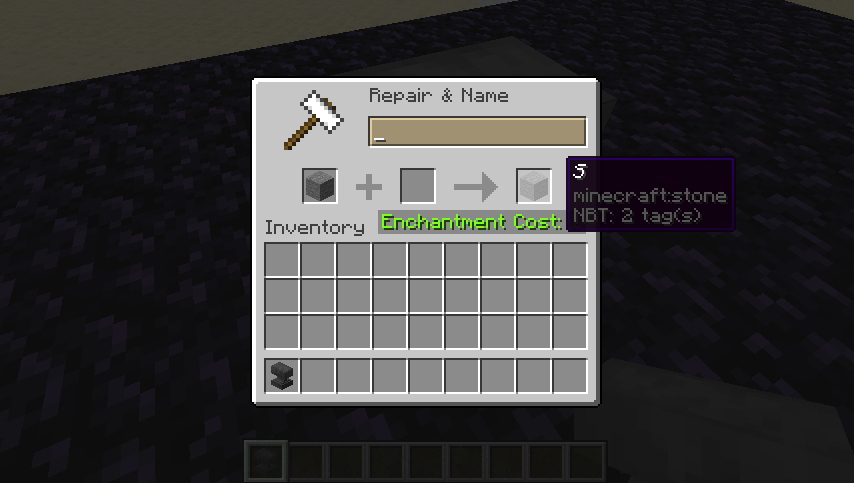
Reproduction steps (Ctrl + backspace)
- Place a stone block in an anvil
- Backspace once
- Ctrl + backspace (the text field is now empty)
- Look at the output item
It is named "Ston" and can be taken out
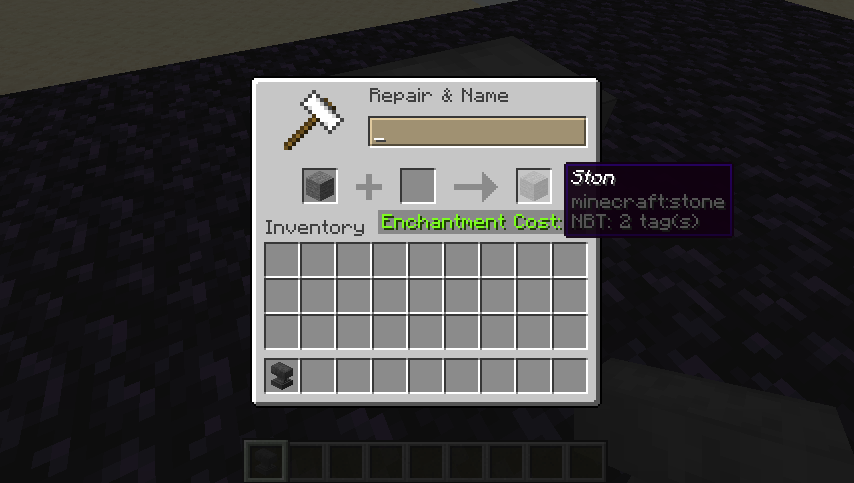
Workaround for removing custom name
Currently a custom item name can be removed by only using spaces in the new name. However, due to MC-125046 the item does not stack with other non-renamed items.
Code analysis
Mojang names
net.minecraft.client.gui.screens.inventory.AnvilScreen.onNameChanged(String) returns if the new name is empty.
Linked Issues
discovered while testing1
is duplicated by5
 MC-125494Cannot remove custom name with anvilDuplicateMC-131978After the name has been changed, the name can not be completely eliminated.DuplicateMC-133661Cannot undo renameDuplicateMC-135912Unable to remove name from renamed itemsDuplicateMC-149761Anvil output is not updated when deleting the last of an item's nameDuplicate

- Fixed
![[Mod] redstonehelper](../../../data/avatars/users/10122.svg) [Mod] redstonehelper
[Mod] redstonehelper- [Mojang] Gegy
- 30
- 16
- Confirmed
 Low
Low- Items UI
18w02a - 1.17.1
18w02a 18w06a 18w07b 18w11a 1.13-pre1 1.13-pre2 1.13-pre3 1.13-pre9 1.13 18w30a 18w30b 18w31a 18w32a 18w33a 1.13.1-pre1 1.13.1 1.13.2 18w47a 18w47b 18w48a 18w48b 18w49a 18w50a 19w02a 19w14b 1.14-pre1 1.14-pre2 1.14-pre3 1.14-pre5 1.14 1.14.1 1.14.2 1.14.3-pre1 1.14.3-pre2 1.14.3-pre3 1.14.3-pre4 1.14.3 1.14.4-pre1 1.14.4-pre2 1.14.4-pre3 1.14.4-pre4 1.14.4-pre5 1.14.4-pre6 1.14.4-pre7 1.14.4 19w34a 19w35a 19w37a 19w38b 19w38a 19w39a 19w40a 19w41a 19w42a 19w44a 19w45a 19w45b 19w46a 19w46b 1.15-pre1 1.15-pre2 1.15-pre3 1.15-pre4 1.15-pre5 1.15-pre7 1.15 1.15.1 1.15.1-pre1 1.15.2-pre1 1.15.2-pre2 1.15.2 20w06a 20w07a 20w08a 20w09a 20w10a 20w11a 20w12a 20w13a 20w13b 20w14a 20w15a 20w16a 20w17a 20w18a 20w19a 20w20b 20w21a 20w22a 1.16-pre1 1.16-pre2 1.16-pre3 1.16-pre4 1.16-pre5 1.16-pre7 1.16-pre8 1.16-rc1 1.16 1.16.1 20w27a 20w28a 20w29a 20w30a 1.16.2-pre1 1.16.2-pre2 1.16.2-rc1 1.16.2-rc2 1.16.2 1.16.3-rc1 1.16.3 1.16.4-pre1 1.16.4-pre2 1.16.4-rc1 1.16.4 20w45a 20w46a 20w48a 20w49a 20w51a 21w03a 1.16.5 21w05a 21w05b 21w06a 21w07a 21w08b 21w10a 21w11a 21w13a 21w14a 21w15a 21w16a 21w17a 21w18a 21w19a 21w20a 1.17-rc2 1.17 1.17.1- 1.20-pre2
Created Issue:
Changing the name of an item and then emptying the text field in an anvil doesn't make the rename unavailable, keeps last non-empty name on output item
To reproduce:
1. Place a stone block in an anvil
2. Backspace until the text field is empty
3. Look at the output item, it's named "S" and can be taken outor:
1. Place a stone block in an anvil
2. Backspace once
3. ctrl+backspace (the text field is now empty)
4. Look at the output item, it's named "Ston" and can be taken out
is duplicated by
![[Mod] tryashtar](../../../data/avatars/users/41963.png)
blocks
![[Mojang] Adrian Östergård](../../../data/assets/gravatar/nighter.jpeg)
![[Mojang] Georgii Gavrichev](../../../data/avatars/users/22428.png) [Mojang] Georgii Gavrichev
[Mojang] Georgii Gavrichev![[Mod] Neko](../../../data/avatars/users/92901.png)
is duplicated by
![[Mod] Michael Wobst](../../../data/avatars/users/37868.png)
is duplicated by


is duplicated by
![[Mod] Asteraoth](../../../data/avatars/users/92886.png)

![[Mojang] Nathan Adams](../../../data/assets/gravatar/dinnerbone.png) [Mojang] Georgii Gavrichev
[Mojang] Georgii Gavrichev![[Helper] Jack McKalling](../../../data/avatars/users/92859.png)
Cannot reproduce in 19w14b
![[Mod] Urielsalis](../../../data/assets/gravatar/urielsalis.jpeg)
![[Mod] violine1101](../../../data/avatars/users/92858.png)
![[Mod] Greymagic27](../../../data/avatars/users/92875.png)
is duplicated by
![[Bot] Arisa](../../../data/avatars/users/43007.png)
discovered while testing
discovered while testing
Screen Shot 2020-06-09 at 11.08.51 PM.png
To reproduce:
1. Place a stone block in an anvil
2. Backspace until the text field is empty
3. Look at the output item, it's named "S" and can be taken outor:
1. Place a stone block in an anvil
2. Backspace once
3. ctrl+backspace (the text field is now empty)4. Look at the output item, it's named "Ston" and can be taken outThe bug
When renaming an item in an anvil and emptying the text field (e.g. using the backspace (←) or Del key) the name of the result item is not updated. Instead it uses the text which was last in the text field before it was emptied.
Expected would be that when emptying the text field:
- if the item has a custom name, the custom name was removed (similar to the current behavior when using only spaces as name)
- if the item has no custom name, no result item is shown
Reproduction steps (single backspace)
- Place a stone block in an anvil
- Backspace until the text field is empty
- Look at the output item
Reproduction steps (Ctrl + backspace)
- Place a stone block in an anvil
- Backspace once
- Ctrl + backspace (the text field is now empty)
- Look at the output item
Code analysis
Mojang names
net.minecraft.client.gui.screens.inventory.AnvilScreen.onNameChanged(String) returns if the new name is empty.
The bug
When renaming an item in an anvil and emptying the text field (e.g. using the backspace (←) or Del key) the name of the result item is not updated. Instead it uses the text which was last in the text field before it was emptied.
Expected would be that when emptying the text field:
- if the item has a custom name, the custom name was removed (similar to the current behavior when using only spaces as name)
- if the item has no custom name, no result item is shown
Reproduction steps (single backspace)
- Place a stone block in an anvil
- Backspace until the text field is empty
- Look at the output item
Reproduction steps (Ctrl + backspace)
- Place a stone block in an anvil
- Backspace once
- Ctrl + backspace (the text field is now empty)
- Look at the output item
Code analysis
Mojang names
net.minecraft.client.gui.screens.inventory.AnvilScreen.onNameChanged(String) returns if the new name is empty.
The bug
When renaming an item in an anvil and emptying the text field (e.g. using the backspace (←) or Del key) the name of the result item is not updated. Instead it uses the text which was last in the text field before it was emptied.
Expected would be that when emptying the text field:
- if the item has a custom name, the custom name was removed (similar to the current behavior when using only spaces as name)
- if the item has no custom name, no result item is shown
Reproduction steps (single backspace)
- Place a stone block in an anvil
- Backspace until the text field is empty
- Look at the output item
Reproduction steps (Ctrl + backspace)
- Place a stone block in an anvil
- Backspace once
- Ctrl + backspace (the text field is now empty)
- Look at the output item
Code analysis
Mojang names
net.minecraft.client.gui.screens.inventory.AnvilScreen.onNameChanged(String) returns if the new name is empty.
The bug
When renaming an item in an anvil and emptying the text field (e.g. using the backspace (←) or Del key) the name of the result item is not updated. Instead it uses the text which was last in the text field before it was emptied.
Expected would be that when emptying the text field:
- if the item has a custom name, the custom name was removed (similar to the current behavior when using only spaces as name)
- if the item has no custom name, no result item is shown
Reproduction steps (single backspace)
- Place a stone block in an anvil
- Backspace until the text field is empty
- Look at the output item
Reproduction steps (Ctrl + backspace)
- Place a stone block in an anvil
- Backspace once
- Ctrl + backspace (the text field is now empty)
- Look at the output item
Workaround for removing custom name
Currently a custom item name can be removed by only using spaces in the new name. However, due to
MC-125046the item does not stack with other non-renamed items.Code analysis
Mojang names
net.minecraft.client.gui.screens.inventory.AnvilScreen.onNameChanged(String) returns if the new name is empty.
![[Mod] Chandler](../../../data/assets/gravatar/triwonder81.png)
![[Helper] Johnibur](../../../data/avatars/users/28381.png)

![[Mojang] slicedlime](../../../data/assets/gravatar/slicedlime.jpeg) [Mojang] Gegy
[Mojang] Gegyrelates to
relates to
relates to

As of 2018-08-20 for java edition 1.13 this is STILL an issue, and is continually repeatable: Shulker boxes with custom names whether done in a give command or with an anvil can have the custom name while in inventory, and when placed, but then after it is broken and picked up the name defaults to the original default name loosing its custom name (one would expect that it should still have the custom name until it is renamed).
And to be certain this is NOT the only part of the issue that is NOT resolved, for example it can sometimes still loose the custom name after leaving the game and coming back later although I cannot be certain of the conditions for that particular bug to be repeated, it does still happen seemingly in a random way.
There is another issue with bugs being marked as duplicates that, after tracking down all the lists of supposed duplication, resolve to open issues that describe clearly different issues than this one.
As of 2018-08-20 this is NOT a duplicate of an open issue! The following either describe similar but not exactly the same issue of sometimes different versions or nearly the same issue but marked as resolved due to a presupposed duplicate that resolves to an open issue that is clearly NOT the same:
https://bugs.mojang.com/browse/MC-107554 [Shulker Box Custom Names Doesnt Stay, resolved?]
https://bugs.mojang.com/browse/MC-107575 [The Shulker Box Loses its Name When Placed, resolved?]
https://bugs.mojang.com/browse/MC-107441 [Renamed shulker box doesn't keep his name when placed, resolved?]
https://bugs.mojang.com/browse/MC-107669 [Shulker Boxes do not retain name when placed, resolved?]
https://bugs.mojang.com/browse/MC-107390 [Shulker boxes (all types) do not remember their name when being placed, resolved?]
https://bugs.mojang.com/browse/MC-107388 [Shulker boxes don't retain custom names when placed or broken, resolved?]
https://bugs.mojang.com/browse/MC-107566 [Shulker Boxes lose their name when placed/broken, resolved?]
https://bugs.mojang.com/browse/MC-107706 [Shulker Boxes don't retain anvil re-name when placed down or broken, resolved?]
The only one that actually matches this issue is MC-107554, but it is marked as resolved due to duplication. All of those (including that one) are marked as resolved pointing to other issues that culminate to two open issues that are NOT the same issue covering this still existent issue in 1.13 as of 2018-08-20:
Open but not the same issue and doesn't cover 1.13:
https://bugs.mojang.com/browse/MC-113869 [renaming to empty retains name]
Open but clearly not the same issue:
https://bugs.mojang.com/browse/MC-124327 [renaming in anvil keeps text]
The larger point here is that this is not a duplicate that is resolved by any open issue, and to follow MC-113869 and/or MC-124327 does not make any sense as they do NOT cover this still existing issue in 1.13 as of 2018-08-20.
So where to go from here? If I post this new bug report will someone try to mark it as a duplicate of one of the others that point to issues that DO NOT cover the still existent issue, or will they heed this warning of non-duplication and maybe point those others to the clearly unresolved issue? I guess we shall see.
![[Helper] pine1needle](../../../data/avatars/users/41329.png)
This report is well written, but it is a duplicate of MC-124327.
In 1.20-pre2, MC-124327 was fixed. This means that when renaming an item in an anvil into an empty string resets the custom name.
However, items whose custom name has been removed in this way do not stack with items that have never been renamed.
To reproduce
- Get a stack of items
- Rename half of it in an anvil (to any name)
- Rename that half again, by making the name field in the anvil UI blank
- Try to combine the two halves of the stack again
Expected behaviour
An item whose custom name has been removed by renaming it to an empty string would stack with other unnamed items of the same type.
Observed behaviour
Even though the custom name has been removed, the item retains an additional NBT tag, which makes it unstackable with items that have never been renamed.
Video
Minecraft 1.20 Pre-release 2 - Multiplayer (LAN) 2023-05-17 23-45-22.mp4
I put an unnamed item to the anvil, and delete the original name of the item, I see the output's name is the first character of the original name.
I have this problem too. I first saw this issue back in 1.13pre5.
Can confirm for 1.13
Confirmed for 18w30b
Confirmed for 18w31a
Confirmed for 18w32a
Confirmed for 18w33a
Confirmed for 1.13.1-pre1
Confirmed for 19w14b
Confirmed for 1.14 pre-1
Confirmed for 1.14 pre-2
Confirmed for 1.14 pre-3
Confirmed for 1.14 pre-4
Confirmed for 1.14 pre-5
Confirmed for 1.14
Confirmed in 1.13.2 and 1.14.
There is a workaround, type a space on the naming slot, it should reset the name of the item(s).
Confirmed for 1.14.1 pre-1
Confirmed for 1.14.1 pre-2
Confirmed for 1.14.1
Still in 1.14.2. This happens whith default and custom names. In both cases you keep the first character when you empty the text field.
@Octopus Tea, I've try it and unfortunately doesn't work.
Confirmed for 1.15.2
I have found that if, while renaming the item, you press the space key once, you can revert the object back to its original name. Most likely Mojang didn't want to have objects with no name, so that is why they changed it.
Sorry everyone; didn't see that Octopus Tea already posted this workaround. But I am confirming that this workaround works for 1.15.2!
Yes, and the workaround still works in 1.16.1.
The spacebar trick allows the original name to be restored, but it doesn't allow stacking with similar items.
I tested with a book. Steps:
Expected results:
Renamed book can be stacked with items as before
Actual results:
Renamed book can not be stacked with items
Zach Wolf that is a different issue. Books not stacking with each other is due to their NBT. This bug report is about the function of the anvil before saving the custom name instead.
@Anonymous Turtle and Zach Wolf, thank you for providing the workaround. However, I have removed your attachments from this ticket because they might be irritating since they don't actually showed the bug and additionally had generic names such as 2020-07-....
I have updated the report and included the workaround, so I hope this change is alright for you.
As [Helper] Jack McKalling pointed out, the issue that the items do not stack is a different bug (tracked as
MC-125046).