 bdm68
bdm68
- bdm68
- bdm68
- Europe/Stockholm
- Yes
- No

 Normal
 Low
Low MC-130162MC-131604
![[Mojang] Grum (Erik Broes)](../../../data/assets/gravatar/grum.png)
 MCL-13268




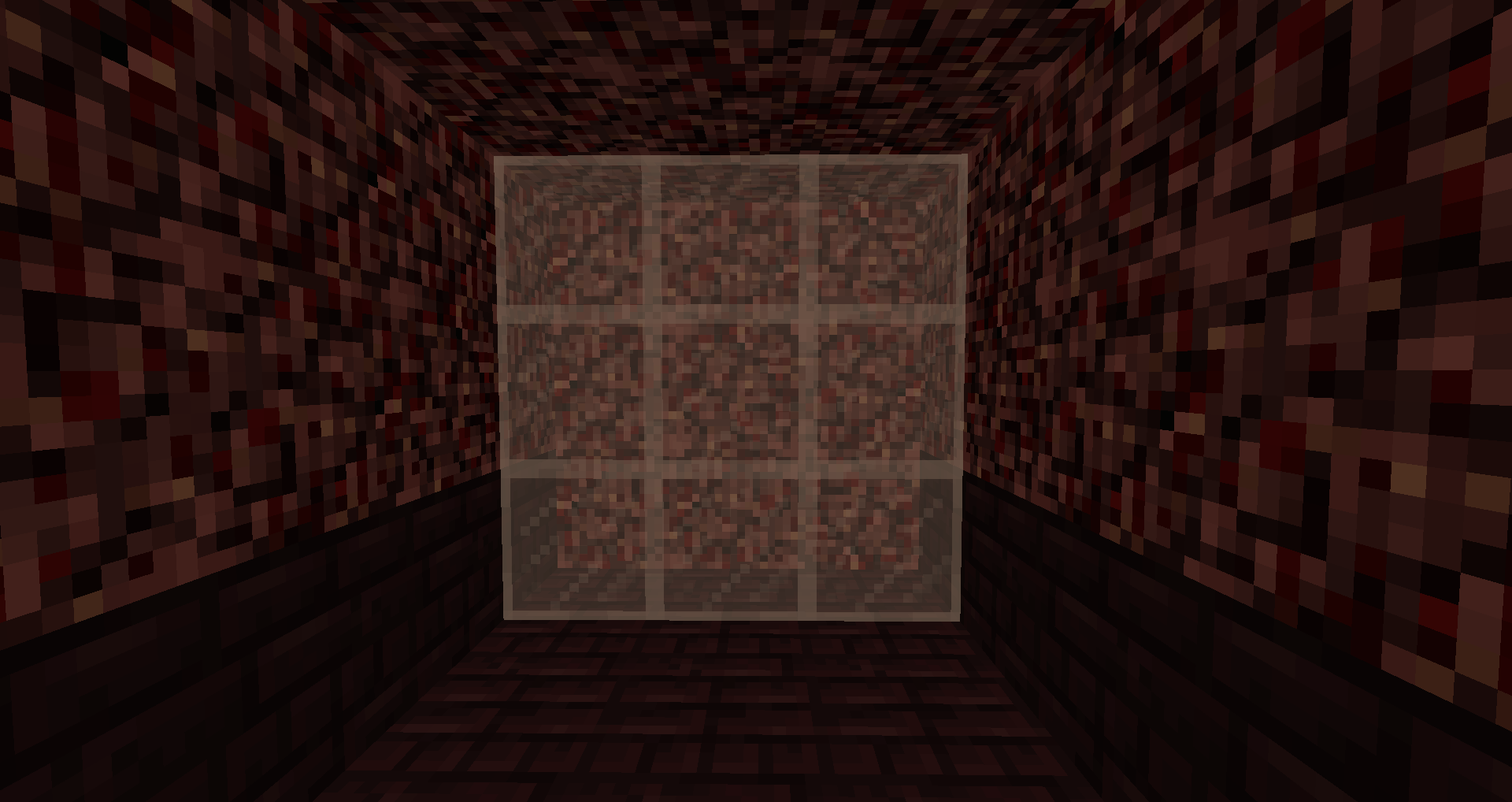














Chained hoppers do not always transfer items when unpoweredHoppers do not always transfer items when unpowered
2016-11-17_10.32.53.png
A chain of hoppers will not transfer items consistently if the hoppers below them become unpowered. Often, one hopper will not transfer items but the others will. This was working in 1.10.
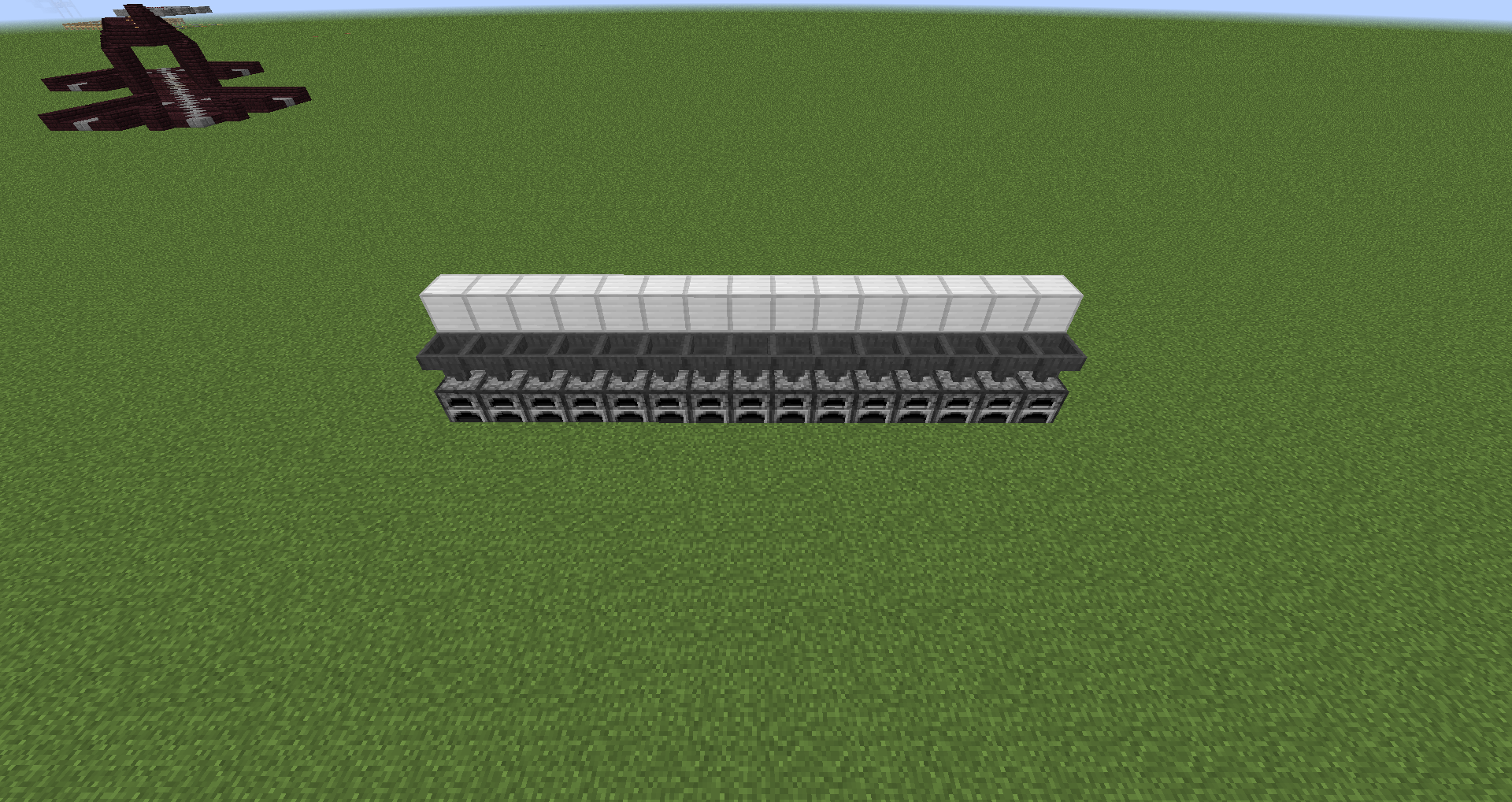
To demonstrate this, build as follows (see screenshots): (1) Place a line of containers between eight and 15 blocks long. (2) Place a hopper above each of these containers feeding into them. (3) Place a line of solid blocks one block behind and one block above these hoppers. (4) Place redstone dust on these blocks. (5) Place a line of hoppers above the first line of hoppers facing into the solid block. (6) Place a chain of hoppers above the second chain of hoppers that feeds down the line of hoppers. (7) At the end of the chain of hoppers, place a comparator facing away from the hopper facing into a solid block, place a redstone torch on the side of this solid block and a repeater between the redstone torch and the line of redstone. (8) At the start of the hopper chain, place another hopper with a feeder chest on top. (9) Place comparators next to the containers facing away from them. (10) Place a stack or two of items into the feeder chest. What you will see is one or maybe two of the containers not receiving items as indicated by the unpowered comparator.
.
In the screenshots, the hopper chain feeds items from west to east.EDIT: It is possible that the powered/unpowered hopper is not transferring items from the chained hopper above it because the chained hopper is actually empty at the time the powered hopper becomes unpowered.
The empty container appears to be seven from the end if the repeater has the default delay of 1. If the repeater has a longer delay, different containers won't receive items.
A chain of hoppers will not transfer items consistently if the hoppers below them become unpowered. Often, one hopper will not transfer items but the others will. This was working in 1.10.
To demonstrate this, build as follows (see screenshots): (1) Place a line of containers between eight and 15 blocks long. (2) Place a hopper above each of these containers feeding into them. (3) Place a line of solid blocks one block behind and one block above these hoppers. (4) Place redstone dust on these blocks. (5) Place a line of hoppers above the first line of hoppers facing into the solid block. (6) Place a chain of hoppers above the second chain of hoppers that feeds down the line of hoppers. (7) At the end of the chain of hoppers, place a comparator facing away from the hopper facing into a solid block, place a redstone torch on the side of this solid block and a repeater between the redstone torch and the line of redstone. (8) At the start of the hopper chain, place another hopper with a feeder chest on top. (9) Place comparators next to the containers facing away from them. (10) Place a stack or two of items into the feeder chest. What you will see is one or maybe two of the containers not receiving items as indicated by the unpowered comparator.
.
In the screenshots, the hopper chain feeds items from west to east.EDIT:
It is possible that the powered/unpowered hopper is not transferring items from the chained hopper above it because the chained hopper is actually empty at the time the powered hopper becomes unpowered.
The empty container appears to be seven from the end if the repeater has the default delay of 1. If the repeater has a longer delay, different containers won't receive items.A chain of hoppers will not transfer items consistently if the hoppers below them become unpowered. Often, one hopper will not transfer items but the others will. This was working in 1.10.
To demonstrate this, build as follows (see screenshots): (1) Place a line of containers between eight and 15 blocks long. (2) Place a hopper above each of these containers feeding into them. (3) Place a line of solid blocks one block behind and one block above these hoppers. (4) Place redstone dust on these blocks. (5) Place a line of hoppers above the first line of hoppers facing into the solid block. (6) Place a chain of hoppers above the second chain of hoppers that feeds down the line of hoppers. (7) At the end of the chain of hoppers, place a comparator facing away from the hopper facing into a solid block, place a redstone torch on the side of this solid block and a repeater between the redstone torch and the line of redstone. (8) At the start of the hopper chain, place another hopper with a feeder chest on top. (9) Place comparators next to the containers facing away from them. (10) Place a stack or two of items into the feeder chest. What you will see is one or maybe two of the containers not receiving items as indicated by the unpowered comparator.
.
In the screenshots, the hopper chain feeds items from west to east.EDIT: This bug breaks some industrial furnace designs. The above instructions will produce a common industrial furnace design if built correctly.
It is possible that the powered/unpowered hopper is not transferring items from the chained hopper above it because the chained hopper is actually empty at the time the powered hopper becomes unpowered.
The empty container appears to be seven from the end if the repeater has the default delay of 1. If the repeater has a longer delay, different containers won't receive items.
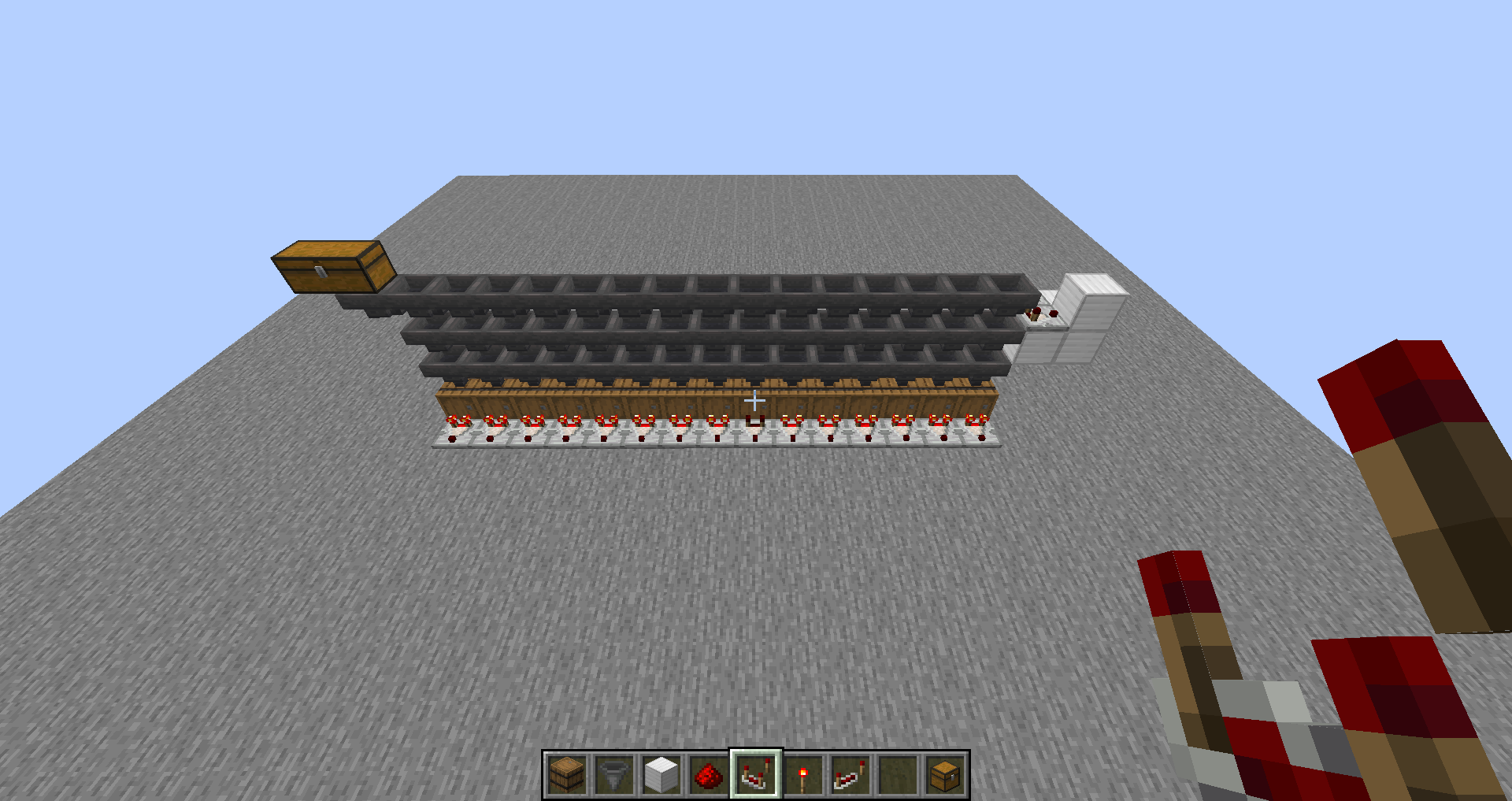
The Bug
A chain of hoppers will not transfer items consistently if the hoppers below them become unpowered. Often, one hopper will not transfer items but the others will. This was working in 1.10.
Steps to Reproduce
- Place a line of containers between eight and 15 blocks long:
- Place a hopper above each of these containers feeding into them.
- Place a line of solid blocks one block behind and one block above these hoppers.
- Place a line of hoppers above the first line of hoppers facing into the solid block.
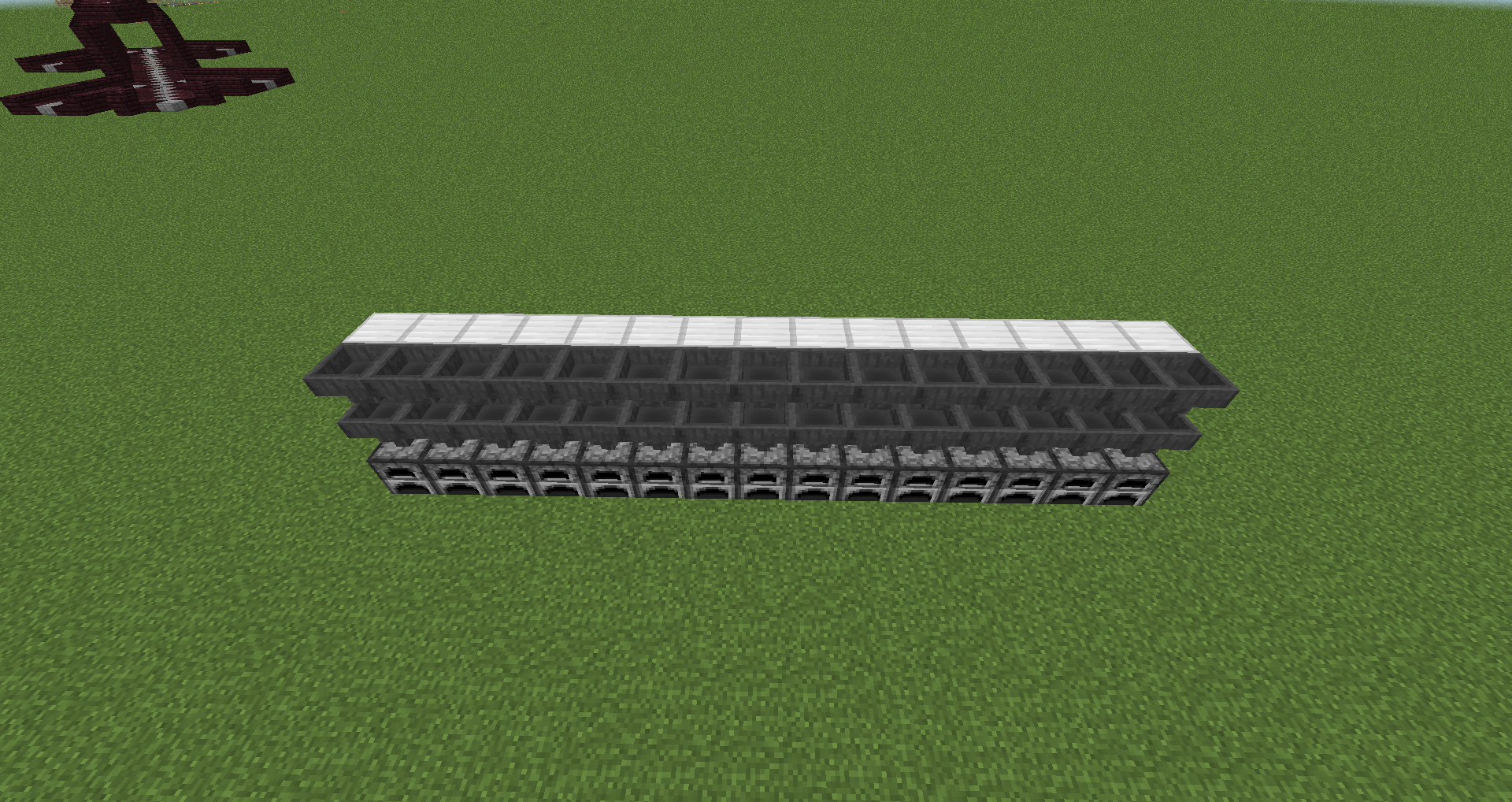
- Place a chain of hoppers above the second chain of hoppers that feeds down the line of hoppers.
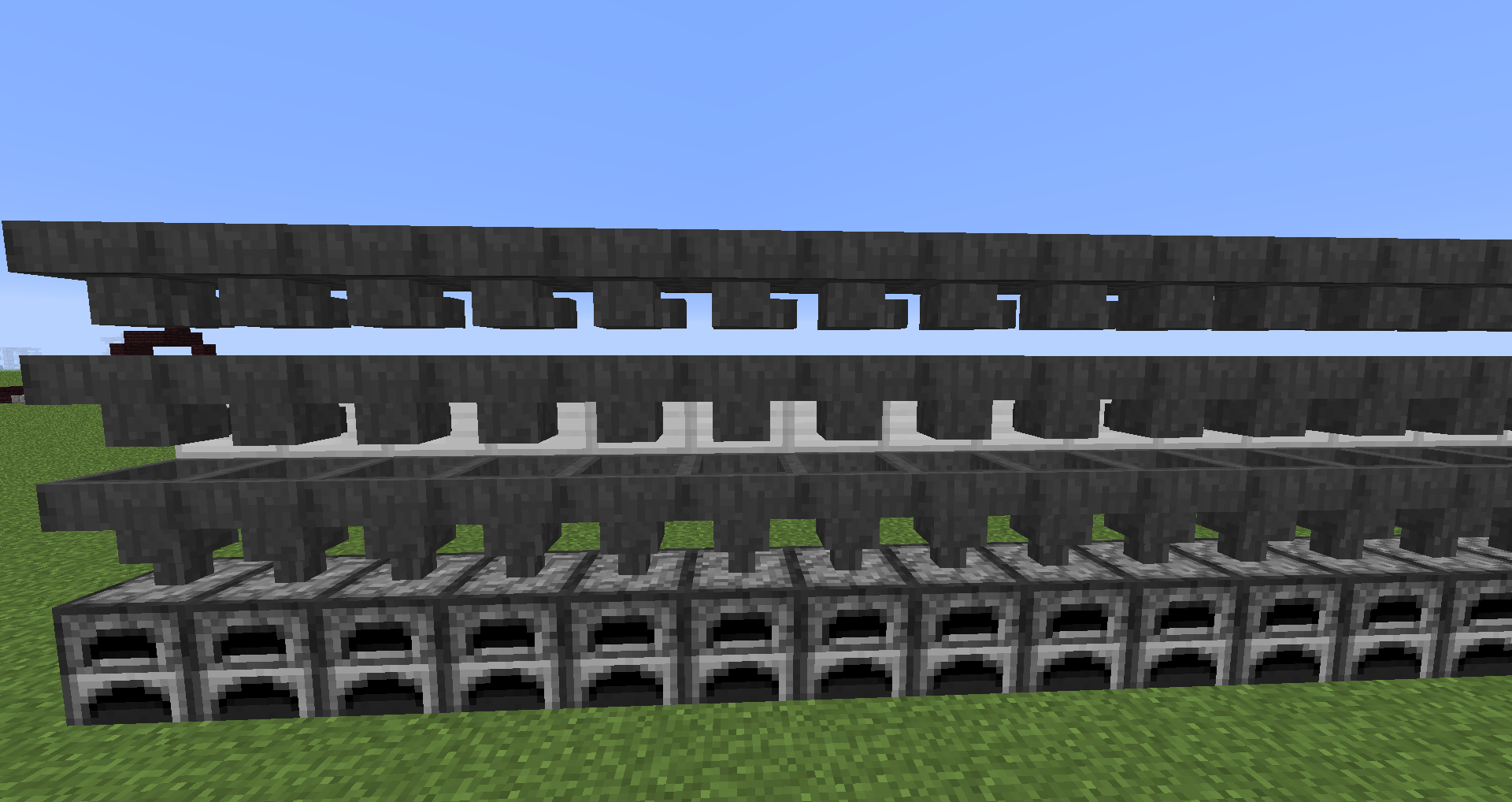
- At the end of the chain of hoppers, place a comparator facing away from the hopper facing into a solid block, place a redstone torch on the side of this solid block and a repeater between the redstone torch and the line of redstone.
- Place redstone dust on top of the solid blocks
- At the start of the hopper chain, place another hopper with a feeder chest on top.

- Place comparators next to the containers facing away from them.
- Place at least a stack of items into the feeder chest.
->SOme of the comparators are not lit, indicating no item went into them

Additional Information
EDIT: This bug breaks some industrial furnace designs. The above instructions will produce a common industrial furnace design if built correctly.
It is possible that the powered/unpowered hopper is not transferring items from the chained hopper above it because the chained hopper is actually empty at the time the powered hopper becomes unpowered.
The empty container appears to be seven from the end if the repeater has the default delay of 1. If the repeater has a longer delay, different containers won't receive items. Delay 1: hopper 7; delay 2: hopper 9; delay 3: hopper 11 and hopper 3; delay 4: hopper 13 and hopper 5.
May be related to MC45046, may be duplicate of MC73139.
When over the height limit (y > 256), and the player presses F5 to view themselves, under certain circumstances the player cannot be seen. When the camera is moved, the player may disappear when the camera is positioned at certain vertical angles.
Press F3 to display the debugging information. Note the vertical angle (the second angle that is displayed) on the "Facing" line. 90 degrees is straight up.
Press F5 to view the player from the front. (The bug also manifests itself when viewed from behind but the behaviour is different).Teleport to the given y coordinate.
At y=256, the player is rendered normally.
At y=258, the player disappears when the vertical angle is between 25.3 and 43.8 degrees.
At y=260, the player disappears when the vertical angle is between 18.0 and 52.7 degrees.
At y=262, the player disappears when the vertical angle is between 0.9 and 60.8 degrees, and also over 64.2 degrees.
At y=263, the player disappears when the vertical angle is over -5.6 degrees.As the height increases from this point, the cone of player visibility steadily shrinks.
At y=360, the player disappears when the vertical angle is over -47.2 degrees.
At y=512, the player disappears when the vertical angle is over -49.9 degrees.
At y=522, the player disappears when the vertical angle is under -89.8 degrees, and over -50.1 degrees. This is the lowest height where the player is also not seen from above (-90 degrees).From this point, the lower cone of invisibility grows rapidly until the player is no longer visible.
At y=540, the player disappears when the vertical angle is under -71.9 degrees, and over -50.3 degrees.
At y=601, the player disappears when the vertical angle is under -52.5 degrees, and over -50.4 degrees. This is the highest integer y coordinate where the player model renders at all.
At y=602 and higher, the player disappears at all viewing angles.
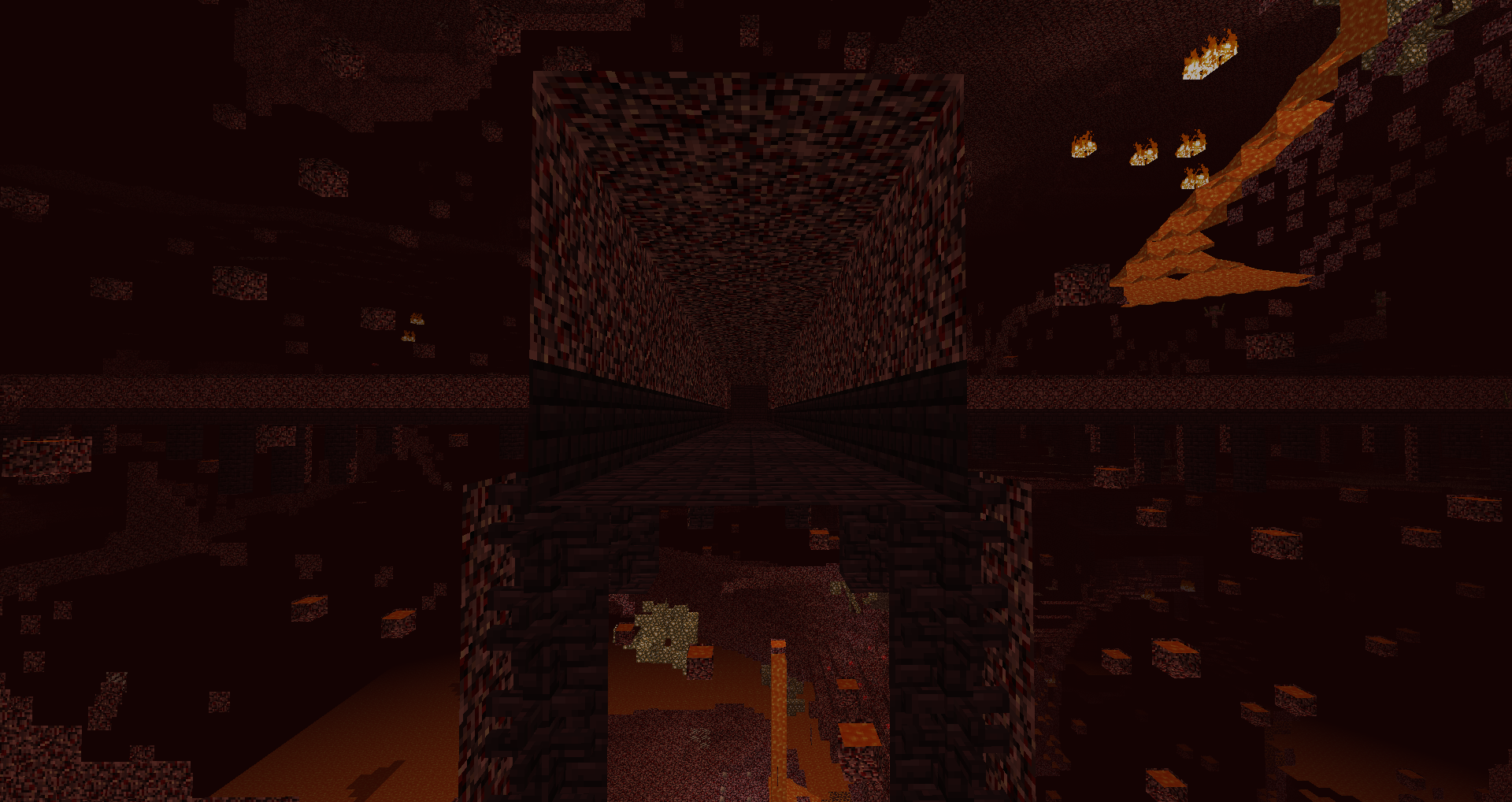
When a Nether Fortress attempts to generate the external broken bridge structure (represented by the ID "NeBEF" in Fortress.dat), and the structure is surrounded by Netherrack, no structure generates inside the bounding box. The fortress simply ends at a wall of Netherrack.
Seed: 2726140590913983575
Go to Nether
Gamemode spectator
Tp to -206 66 171
inside Netherack, no structure
face North, end of bridge can be seen
Tp to -58 66 139
outside Netherrack, structure appears correctly
I have checked this at multiple locations by teleporting to the middle of the bounding box while in spectator mode. I used an NBT editor to obtain the coordinates for these bounding boxes by looking up a sample of fortress segments with the id "NeBEF".
If the bridge end is outside netherrack, it generates normally inside its bounding box. If the bridge end is inside netherrack, all that is found inside the bounding box is netherrack. No bridge end structure is generating here; the bridge ends before the actual end segment. If you go outside to where the walkway ends and look at the netherrack at the apparent end, its coordinates coincide with the bounding box of the missing segment.


The bug
The chunk NBT data includes a field called LastUpdate that stores the timestamp in ticks when the player last updated he chunk. It is updating erratically in spawn chunks. When a player is in range of a spawn chunk, the field sometimes updates and sometimes does not.
Attached is an image of a world where I flew about the map in creative mode, generating the terrain as I went. The LastUpdate for each chunk is plotted as a heat map, with blue being old, red being recent and pink and white being the chunks with the newest updates. The location of the spawn chunks are clearly visible as an area with spotty colouring in the centre on the right side.

When generating terrain, the Worldgen worker threads crash with Out of memory errors. This is especially likely to happen while generating Jungle biomes.
The JVM has not actually run out of memory (the F3 screen shows free memory).Some examples of crashes from the log:
Caught exception in thread Thread[WorldGen-Worker-93,5,main] java.lang.OutOfMemoryError: unable to create new native thread at java.lang.Thread.start0(Native Method) at java.lang.Thread.start(Thread.java:714) at java.util.concurrent.ForkJoinPool.tryAddWorker(ForkJoinPool.java:1338) at java.util.concurrent.ForkJoinPool.deregisterWorker(ForkJoinPool.java:1460) at java.util.concurrent.ForkJoinWorkerThread.run(ForkJoinWorkerThread.java:167) Caught exception in thread Thread[WorldGen-Worker-46,5,main] java.lang.OutOfMemoryError: unable to create new native thread at java.lang.Thread.start0(Native Method) at java.lang.Thread.start(Thread.java:714) at java.util.concurrent.ForkJoinPool.tryAddWorker(ForkJoinPool.java:1338) at java.util.concurrent.ForkJoinPool.deregisterWorker(ForkJoinPool.java:1460) at java.util.concurrent.ForkJoinWorkerThread.run(ForkJoinWorkerThread.java:167) Caught exception in thread Thread[WorldGen-Worker-29,5,main] java.lang.OutOfMemoryError: unable to create new native thread at java.lang.Thread.start0(Native Method) at java.lang.Thread.start(Thread.java:714) at java.util.concurrent.ForkJoinPool.tryAddWorker(ForkJoinPool.java:1338) at java.util.concurrent.ForkJoinPool.deregisterWorker(ForkJoinPool.java:1460) at java.util.concurrent.ForkJoinWorkerThread.run(ForkJoinWorkerThread.java:167)When generating terrain, the Worldgen worker threads crash with Out of memory errors. This is especially likely to happen while generating Jungle biomes.
The crashing of the worker threads is severe. When it happens, the game stops responding to attempts to save the game. Pressing Save and Exit causes the game to hang without doing anything and the game must be terminated externally (eg with Task Manager).
Some examples of crashes from the log:
Caught exception in thread Thread[WorldGen-Worker-93,5,main] java.lang.OutOfMemoryError: unable to create new native thread at java.lang.Thread.start0(Native Method) at java.lang.Thread.start(Thread.java:714) at java.util.concurrent.ForkJoinPool.tryAddWorker(ForkJoinPool.java:1338) at java.util.concurrent.ForkJoinPool.deregisterWorker(ForkJoinPool.java:1460) at java.util.concurrent.ForkJoinWorkerThread.run(ForkJoinWorkerThread.java:167) Caught exception in thread Thread[WorldGen-Worker-46,5,main] java.lang.OutOfMemoryError: unable to create new native thread at java.lang.Thread.start0(Native Method) at java.lang.Thread.start(Thread.java:714) at java.util.concurrent.ForkJoinPool.tryAddWorker(ForkJoinPool.java:1338) at java.util.concurrent.ForkJoinPool.deregisterWorker(ForkJoinPool.java:1460) at java.util.concurrent.ForkJoinWorkerThread.run(ForkJoinWorkerThread.java:167) Caught exception in thread Thread[WorldGen-Worker-29,5,main] java.lang.OutOfMemoryError: unable to create new native thread at java.lang.Thread.start0(Native Method) at java.lang.Thread.start(Thread.java:714) at java.util.concurrent.ForkJoinPool.tryAddWorker(ForkJoinPool.java:1338) at java.util.concurrent.ForkJoinPool.deregisterWorker(ForkJoinPool.java:1460) at java.util.concurrent.ForkJoinWorkerThread.run(ForkJoinWorkerThread.java:167)
Affects 1.13 pre1. Generating terrain with command blocks (by periodically teleporting the player) causes memory to increase slowly over time, and eventually Minecraft no longer responds to the save button.
A simple way to reproduce this:
Create a redstone mechanism in the spawn chunks that executes the following command every 20 to 30 seconds: "execute at <player> run teleport <player> ~192 254 ~" with <player> being the player's name or another player selector with the same effect. This will create new chunks automatically. Have the F3 debug text visible, and watch the "Allocated" memory climb slowly over time even though the "Mem" indicator stays low.
If you do this, it helps to have a way to deactivate the mechanism, such as "setblock <x> <y> <z> minecraft:redstone:block" and "setblock <x> <y> <z> minecraft:dirt" with <x> <y> <z> being a certain place where the mechanism can be controlled in this way.
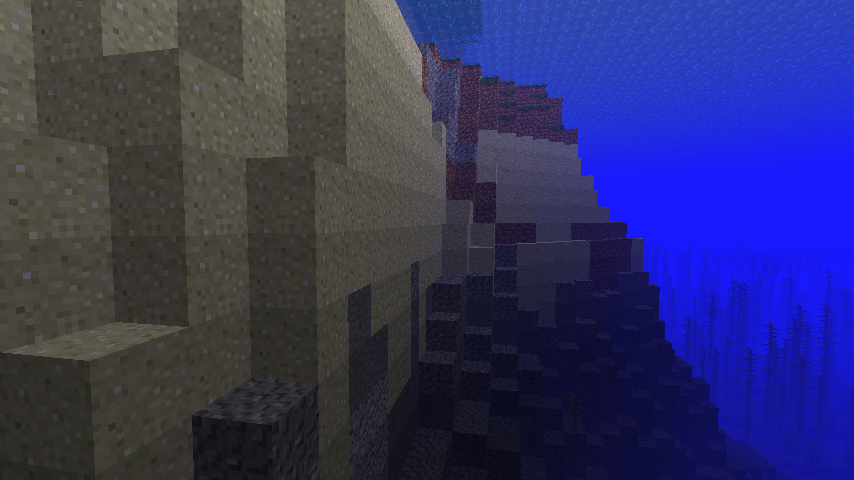
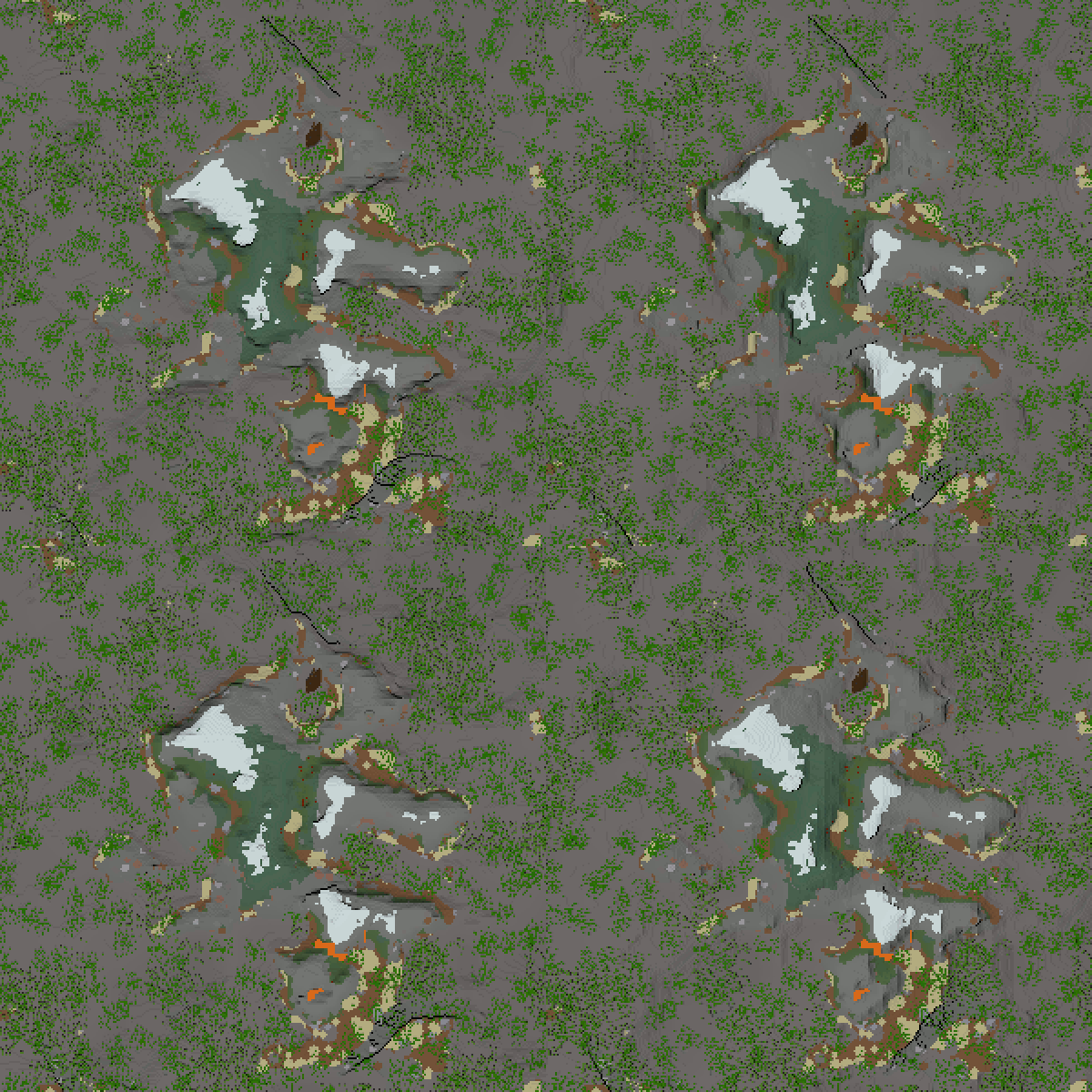
While testing a new mapper, I discovered distinct banding artifacts in some underwater terrain.
The confirmed bands run in an east-west direction and are always at the same y coordinates modulo 4. This causes them to run in straight lines across the map. In bulk, the bands show up as clear straight lines running across the map if the map is shaded to highlight differences in underwater terrain elevation. Up close, the bands can be seen as distinctive flat underwater cliffs. These bands only occur underwater.
North-south bands are strongly suspected to occur with similar behaviour.
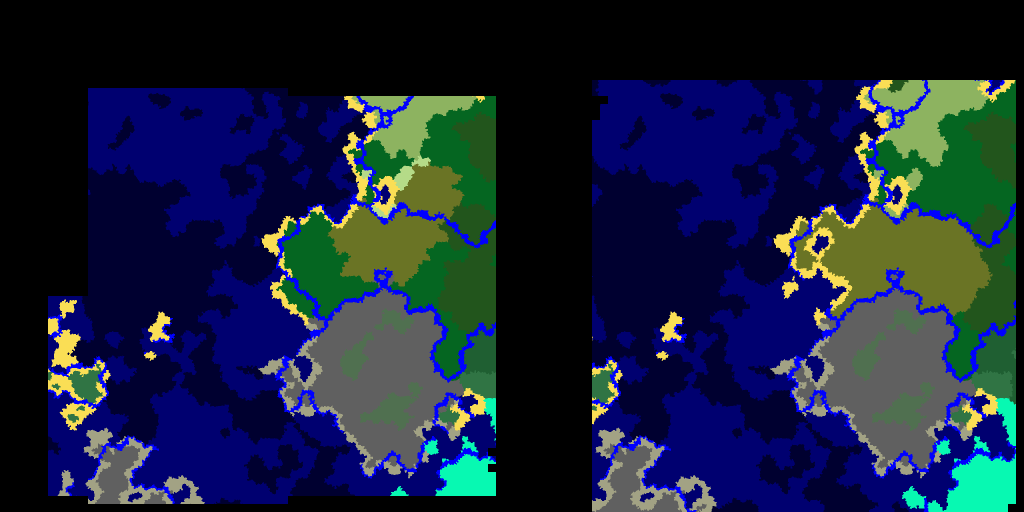
The screenshots show the issue. The terrain is shaded so that terrain is darkened as if lit from the north. It is implemented by reducing the brightness of a pixel by about 5% for every block the north block is higher than the south block.
Map seed is 13.
Screenshots:
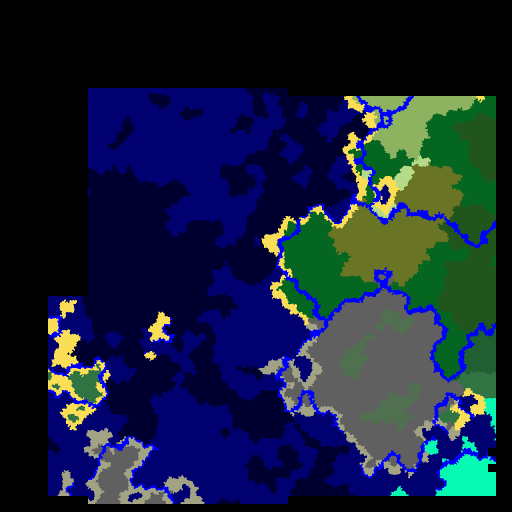
(1) Mapper output showing the terrain banding. Top left has coordinates -1024, -1024 and the centre is at the origin.
(2) Closeup of underwater terrain at (174, -264).
(3) Closeup of underwater terrain at (238, -248).This banding has also been confirmed in 1.12.2.
While testing a new mapper, I discovered distinct banding artifacts in some underwater terrain.
The confirmed bands run in an east-west direction and are always at the same y coordinates modulo 4. This causes them to run in straight lines across the map. In bulk, the bands show up as clear straight lines running across the map if the map is shaded to highlight differences in underwater terrain elevation. Up close, the bands can be seen as distinctive flat underwater cliffs. These bands only occur underwater.
North-south bands are strongly suspected to occur with similar behaviour.
The screenshots show the issue. The terrain is shaded so that terrain is darkened as if lit from the north. It is implemented by reducing the brightness of a pixel by about 5% for every block the north block is higher than the south block.
Map seed is 13.
Screenshots:
(1) Mapper output showing the terrain banding. Top left has coordinates -1024, -1024 and the centre is at the origin.
(2) Closeup of underwater terrain at (174, -264).
(3) Closeup of underwater terrain at (238, -248).This banding has also been confirmed in 1.12.2.
While testing a new mapper, I discovered distinct banding artifacts in some underwater terrain.
The confirmed bands run in an east-west direction and are always at the same y coordinates modulo 4. This causes them to run in straight lines across the map. In bulk, the bands show up as clear straight lines running across the map if the map is shaded to highlight differences in underwater terrain elevation. Up close, the bands can be seen as distinctive flat underwater cliffs. These bands only occur underwater.
North-south bands are strongly suspected to occur with similar behaviour.
The screenshots show the issue. The terrain is shaded so that terrain is darkened as if lit from the north. It is implemented by reducing the brightness of a pixel by about 5% for every block the north block is higher than the south block.
Map seed is 13.
Screenshots:
(1) Mapper output showing the terrain banding. Top left has coordinates -1024, -1024 and the centre is at the origin.
(2) Closeup of underwater terrain at (174, -764).
(3) Closeup of underwater terrain at (238, -748).This banding has also been confirmed in 1.12.2.
While testing a new mapper, I discovered distinct banding artifacts in some underwater terrain.
The confirmed bands run in an east-west direction and are always at the same y coordinates modulo 4. This causes them to run in straight lines across the map. In bulk, the bands show up as clear straight lines running across the map if the map is shaded to highlight differences in underwater terrain elevation. Up close, the bands can be seen as distinctive flat underwater cliffs. These bands only occur underwater.
North-south bands are strongly suspected to occur with similar behaviour.
The screenshots show the issue. The terrain is shaded so that terrain is darkened as if lit from the north. It is implemented by reducing the brightness of a pixel by about 5% for every block the north block is higher than the south block.
Map seed is 13.
Screenshots:
(1) Mapper output showing the terrain banding. Top left has coordinates -1024, -1024 and the centre is at the origin.
(2) Closeup of underwater terrain at (174, -764).
(3) Closeup of underwater terrain at (238, -748).This banding has also been confirmed in 1.12.2 and in 1.8.9.
While testing a new mapper, I discovered distinct banding artifacts in some underwater terrain.
The confirmed bands run in an east-west direction and are always at the same y coordinates modulo 4. This causes them to run in straight lines across the map. In bulk, the bands show up as clear straight lines running across the map if the map is shaded to highlight differences in underwater terrain elevation. Up close, the bands can be seen as distinctive flat underwater cliffs. These bands
only occur underwater.North-south bands are strongly suspected to occur with similar behaviour.
The screenshots show the issue. The terrain is shaded so that terrain is darkened as if lit from the north. It is implemented by reducing the brightness of a pixel by about 5% for every block the north block is higher than the south block.
Map seed is 13.
Screenshots:
(1) Mapper output showing the terrain banding. Top left has coordinates -1024, -1024 and the centre is at the origin.
(2) Closeup of underwater terrain at (174, -764).
(3) Closeup of underwater terrain at (238, -748).This banding has also been confirmed in 1.12.2 and in 1.8.9.
While testing a new mapper, I discovered distinct banding artifacts in some underwater terrain.
The confirmed bands run in an east-west direction and are always at the same y coordinates modulo 4. This causes them to run in straight lines across the map. In bulk, the bands show up as clear straight lines running across the map if the map is shaded to highlight differences in underwater terrain elevation. Up close, the bands can be seen as distinctive flat underwater cliffs. These bands are most obvious underwater near deep ocean islands.
North-south bands are strongly suspected to occur with similar behaviour. Consider these to exist as well.
The screenshots show the issue. The terrain is shaded so that terrain is darkened as if lit from the north. It is implemented by reducing the brightness of a pixel by about 5% for every block the north block is higher than the south block.
Map seed is 13.
Screenshots:
(1) Mapper output showing the terrain banding. Top left has coordinates -1024, -1024 and the centre is at the origin.
(2) Closeup of underwater terrain at (174, -764).
(3) Closeup of underwater terrain at (238, -748).This banding has also been confirmed in 1.12.2 and in 1.8.9.
I have a workaround. The launcher is crashing because it is running out of stack space. Increase the default stack size in Java to 1M. This worked for me on Windows 7 32-bit Java.
Go into your Java settings, select Configure Java. Go into the Java tab, click View, select User. In Runtime parameters, add -Xss1M to the end. Click OK to save it and then OK to exit.
If your crashes were caused by stack overflow, this should fix it.
When the game is paused at the main menu and it is generating chunks, it runs out of heap space.
Load the attached save game (
forthcoming).When the game loads, press F3 (to show memory) and then Escape to pause the game.
The game will crash after a few seconds when it exhausts memory.
When the game is paused at the main menu and it is generating chunks, it runs out of heap space.
Load the attached save game (T1_18w21a).
When the game loads, press F3 (to show memory) and then Escape to pause the game.
The game will crash after a few seconds when it exhausts memory.
(The save game is in three parts - part 1 has most of the game files and a few region files, and parts 2 and 3 have most of the region files.)
When the game is paused at the main menu and it is generating chunks, it runs out of heap space.
Load the attached save game (T1_18w21a).
When the game loads, press F3 (to show memory) and then Escape to pause the game. (This step is optional)
The game will crash after a few seconds when it exhausts memory.
(The save game is in three parts - part 1 has most of the game files and a few region files, and parts 2 and 3 have most of the region files.)
Exception generating new chunk - OutOfMemoryError: Java heap space (32 bit Java)
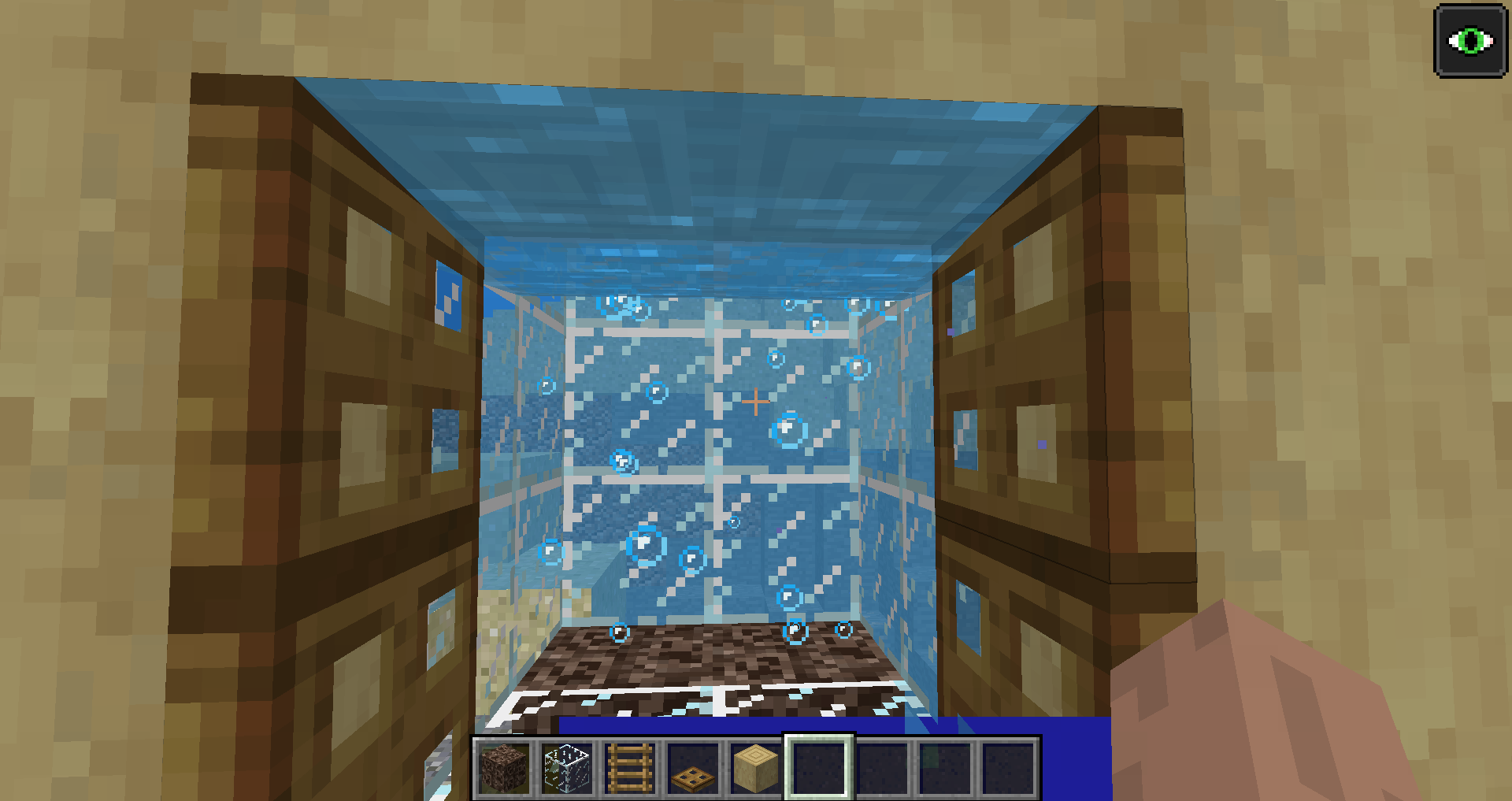
When a ladder or trapdoor are submerged underwater, their hitboxes behave as full blocks. It is not possible to select anything behind an underwater ladder or trapdoor because the hitbox is selected when it shouldn't be.
In the attached image, the hitbox for the trapdoor on the top right is selected even though the crosshairs are nowhere near the hitbox.
When an old world is loaded in 1.13.pre-1, the InhabitedTime variable is not being copied. This causes the Local Difficulty to be reset.
Load an old world in 1.12.2 and go to a location where the Local Difficulty is high. This is easiest to see on Hard. Press F3 and note the Local Difficulty.
Load the same world in 1.13.pre1. Press F3 and note the Local Difficulty. It is not the same.Equivalent reproduction steps:
Inspect at the InhabitedTime for a chunk in an old world from 1.12.2 or earlier.
Load the world in 1.13.pre1.
Inspect at the InhabitedTime for the same chunk. It is reset to zero.
InhabitedTime set to zero after world conversion (Local Difficulty)
When creating a new Debug world, the log gets several Null pointer exceptions. The log also generates a number of warnings relating to Moving Pistons.
{minecraft:moving_piston}
7:59:18 bmx Server thread warn Tried to load a block entity for block Block[facing=north,type=normal] but failed at location ej
{x=23, y=70, z=153}17:59:18 bmx Server thread warn Tried to load a block entity for block Block
{minecraft:moving_piston}[facing=east,type=normal] but failed at location ej
{x=23, y=70, z=157}17:59:18 bmx Server thread warn Tried to load a block entity for block Block
{minecraft:moving_piston}[facing=north,type=sticky] but failed at location ej
{x=23, y=70, z=155}17:59:18 bmx Server thread warn Tried to load a block entity for block Block
{minecraft:moving_piston}[facing=east,type=sticky] but failed at location ej
{x=23, y=70, z=159}17:59:18 bmx Server thread warn Tried to load a block entity for block Block
{minecraft:moving_piston}[facing=down,type=sticky] but failed at location ej
{x=23, y=70, z=175}17:59:18 bmx Server thread warn Tried to load a block entity for block Block
{minecraft:moving_piston}[facing=south,type=normal] but failed at location ej
{x=23, y=70, z=161}17:59:18 bmx Server thread warn Tried to load a block entity for block Block
{minecraft:moving_piston}[facing=west,type=normal] but failed at location ej
{x=23, y=70, z=165}17:59:18 bmx Server thread warn Tried to load a block entity for block Block
{minecraft:moving_piston}[facing=south,type=sticky] but failed at location ej
{x=23, y=70, z=163}17:59:18 bmx Server thread warn Tried to load a block entity for block Block
{minecraft:moving_piston}[facing=up,type=normal] but failed at location ej
{x=23, y=70, z=169}17:59:18 bmx Server thread warn Tried to load a block entity for block Block
{minecraft:moving_piston}[facing=west,type=sticky] but failed at location ej
{x=23, y=70, z=167}17:59:18 bmx Server thread warn Tried to load a block entity for block Block
{minecraft:moving_piston}[facing=down,type=normal] but failed at location ej
{x=23, y=70, z=173}17:59:18 bmx Server thread warn Tried to load a block entity for block Block
{minecraft:moving_piston}[facing=up,type=sticky] but failed at location ej
{x=23, y=70, z=171}followed by 12 of these:
17:59:18 bnj Server thread error Failed to save chunk
java.lang.NullPointerException
at he.a(SourceFile:93)
at bnj.a(SourceFile:347)
at bnj.a(SourceFile:224)
at tw.a(SourceFile:96)
at tw$$Lambda$1610/292907655.accept(Unknown Source)
at java.lang.Iterable.forEach(Iterable.java:75)
at tw.a(SourceFile:91)
at tb.d(SourceFile:282)
at tc.i_(SourceFile:200)
at net.minecraft.server.MinecraftServer.w(SourceFile:690)
at net.minecraft.server.MinecraftServer.v(SourceFile:623)
at dft.v(SourceFile:157)
at net.minecraft.server.MinecraftServer.run(SourceFile:526)
at java.lang.Thread.run(Thread.java:745)When creating a new Debug world, the log gets several Null pointer exceptions. The log also generates a number of warnings relating to Moving Pistons.
To reproduce, create a fresh Debug world. The errors will appear in the log.
7:59:18 bmx Server thread warn Tried to load a block entity for block Block
{minecraft:moving_piston}[facing=north,type=normal] but failed at location ej
{x=23, y=70, z=153}17:59:18 bmx Server thread warn Tried to load a block entity for block Block
{minecraft:moving_piston}[facing=east,type=normal] but failed at location ej
{x=23, y=70, z=157}17:59:18 bmx Server thread warn Tried to load a block entity for block Block
{minecraft:moving_piston}[facing=north,type=sticky] but failed at location ej
{x=23, y=70, z=155}17:59:18 bmx Server thread warn Tried to load a block entity for block Block
{minecraft:moving_piston}[facing=east,type=sticky] but failed at location ej
{x=23, y=70, z=159}17:59:18 bmx Server thread warn Tried to load a block entity for block Block
{minecraft:moving_piston}[facing=down,type=sticky] but failed at location ej
{x=23, y=70, z=175}17:59:18 bmx Server thread warn Tried to load a block entity for block Block
{minecraft:moving_piston}[facing=south,type=normal] but failed at location ej
{x=23, y=70, z=161}17:59:18 bmx Server thread warn Tried to load a block entity for block Block
{minecraft:moving_piston}[facing=west,type=normal] but failed at location ej
{x=23, y=70, z=165}17:59:18 bmx Server thread warn Tried to load a block entity for block Block
{minecraft:moving_piston}[facing=south,type=sticky] but failed at location ej
{x=23, y=70, z=163}17:59:18 bmx Server thread warn Tried to load a block entity for block Block
{minecraft:moving_piston}[facing=up,type=normal] but failed at location ej
{x=23, y=70, z=169}17:59:18 bmx Server thread warn Tried to load a block entity for block Block
{minecraft:moving_piston}[facing=west,type=sticky] but failed at location ej
{x=23, y=70, z=167}17:59:18 bmx Server thread warn Tried to load a block entity for block Block
{minecraft:moving_piston}[facing=down,type=normal] but failed at location ej
{x=23, y=70, z=173}17:59:18 bmx Server thread warn Tried to load a block entity for block Block
{minecraft:moving_piston}[facing=up,type=sticky] but failed at location ej
{x=23, y=70, z=171}followed by 12 of these:
17:59:18 bnj Server thread error Failed to save chunk
java.lang.NullPointerException
at he.a(SourceFile:93)
at bnj.a(SourceFile:347)
at bnj.a(SourceFile:224)
at tw.a(SourceFile:96)
at tw$$Lambda$1610/292907655.accept(Unknown Source)
at java.lang.Iterable.forEach(Iterable.java:75)
at tw.a(SourceFile:91)
at tb.d(SourceFile:282)
at tc.i_(SourceFile:200)
at net.minecraft.server.MinecraftServer.w(SourceFile:690)
at net.minecraft.server.MinecraftServer.v(SourceFile:623)
at dft.v(SourceFile:157)
at net.minecraft.server.MinecraftServer.run(SourceFile:526)
at java.lang.Thread.run(Thread.java:745)
After the Grindstone removes all enchantments from an item, it does not reset the prior work cost for the same item on an anvil. Items that are too expensive to work will still be too expensive after the grindstone has removed all the enchantments.
This behaviour is probably unintentional. It's easy to work around this behaviour by combining the item with another item with a lower work cost.
To replicate:
(Creative mode)
Enchant two swords with six enchantments using enchanted books from the creative menu: Sharpness V, Looting III, Unbreaking III, Sweeping Edge III, Knockback II, Fire Aspect II.
Get another two unenchanted swords.(Survival Mode)
Place the enchanted sword on an anvil -> It will be "Too expensive!"
Remove the enchantments with the grindstone.
Place this cleaned sword on an anvil -> It will be "Too expensive!"
Place this sword in the TOP slot of the grindstone with another clean sword in the bottom slot. Take the repaired sword.
Place this repaired sword on an anvil -> It will be "Too expensive!"Place the enchanted sword on an anvil -> It will be "Too expensive!"
Remove the enchantments with the grindstone.
Place this cleaned sword on an anvil -> It will be "Too expensive!"
Place this sword in the BOTTOM slot of the grindstone with another clean sword in the top slot. Take the repaired sword.
Place this repaired sword on an anvil -> It will be enchantable.Repairing items in the crafting table clears the repair cost, so this is the expected behaviour.

Nether portalsdo not relinkafter clearing cached data on Edit screenPlayers always emerge from Nether portals facing south after clearing cached data on Edit screen
When evoker fangs are summoned, they sometimes persist in memory. This can eventually cause lag and possible crashes if the command is invoked repeatedly because the number of fangs grows exponentially.
To reproduce:
1. Create a superflat world.
2. Set the time to eternal night so hostile mobs spawn.
3.Run the following command: `/execute at @e[type=!player] run summon minecraft:evoker_fangs`
4. Run the following command: `/kill @e[type=minecraft:evoker_fangs]` - this sometimes removes evoker fangs, proving they are not removed automatically. Expected outcome for kill command: "no entity was found".To see the leak, run step
3several times.Examples demonstrating exponential growth:
- running step
3once before killing the evoker_fangs entities removed 6 entities- running step
3twice removed 18 entities- running step
310 times removed 6138 entities- running step
314 times removed 98298 entities and the lag was noticeableWhen evoker fangs are summoned, they sometimes persist in memory. This can eventually cause lag and possible crashes if the command is invoked repeatedly because the number of fangs grows exponentially.
To reproduce:
1. Create a superflat world.
2. Set the time to eternal night so hostile mobs spawn.
3. Move about 4 blocks from spawn in each direction and return to spawn.
4. Run the following command: `/execute at @e[type=!player] run summon minecraft:evoker_fangs`
5. Run the following command: `/kill @e[type=minecraft:evoker_fangs]` - this sometimes removes evoker fangs, proving they are not removed automatically. Expected outcome for kill command: "no entity was found".To see the leak, run step 4 several times.
Examples demonstrating exponential growth:
- running step 4 once before killing the evoker_fangs entities removed 6 entities
- running step 4 twice removed 18 entities
- running step 4 10 times removed 6138 entities
- running step 4 14 times removed 98298 entities and the lag was noticeable
When evoker fangs are summoned, they sometimes persist in memory. This can eventually cause lag and possible crashes if the command is invoked repeatedly because the number of fangs grows exponentially.
To reproduce:
1. Create a superflat world.
2. Set the time to eternal night so hostile mobs spawn.
3. Move about 4blocks from spawn in each direction and return to spawn.
4. Run the following command: `/execute at @e[type=!player] run summon minecraft:evoker_fangs`
5. Run the following command: `/kill @e[type=minecraft:evoker_fangs]` - this sometimes removes evoker fangs, proving they are not removed automatically. Expected outcome for kill command: "no entity was found".To see the leak, run step 4 several times.
Examples demonstrating exponential growth:
- running step 4 once before killing the evoker_fangs entities removed 6 entities
- running step 4 twice removed 18 entities
- running step 4 10 times removed 6138 entities
- running step 4 14 times removed 98298 entities and the lag was noticeable
When evoker fangs are summoned, they sometimes persist in memory. This can eventually cause lag and possible crashes if the command is invoked repeatedly because the number of fangs grows exponentially.
To reproduce:
1. Create a superflat world.
2. Set the time to eternal night so hostile mobs spawn.
3. Move about 4 chunks from spawn in each direction and return to spawn.
4. Run the following command: `/execute at @e[type=!player] run summon minecraft:evoker_fangs`
5. Run the following command: `/kill @e[type=minecraft:evoker_fangs]` - this sometimes removes evoker fangs, proving they are not removed automatically. Expected outcome for kill command: "no entity was found".To see the leak, run step 4 several times.
Examples demonstrating exponential growth:
- running step 4 once before killing the evoker_fangs entities removed 6 entities
- running step 4 twice removed 18 entities
- running step 4 10 times removed 6138 entities
- running step 4 14 times removed 98298 entities and the lag was noticeable
When evoker fangs are summoned, they sometimes persist in memory. This can eventually cause lag and possible crashes if the command is invoked repeatedly because the number of fangs grows exponentially.To reproduce:
1. Create a superflat world.
2. Set the time to eternal night so hostile mobs spawn.
3. Move about 4 chunks from spawn in each direction and return to spawn.
4. Run the following command: `/execute at @e[type=!player] run summon minecraft:evoker_fangs`
5. Run the following command: `/kill @e[type=minecraft:evoker_fangs]` - this sometimes removes evoker fangs, proving they are not removed automatically. Expected outcome for kill command: "no entity was found".To see the leak, run step 4 several times.
Examples demonstrating exponential growth:
- running step 4 once before killing the evoker_fangs entities removed 6 entities
- running step 4 twice removed 18 entities
- running step 4 10 times removed 6138 entities
- running step 4 14 times removed 98298 entities and the lag was noticeable
It is possible to force the generation of persistent entities (not just evoker fangs) by summoning them into "ticking" chunks. These entities will not despawn on their own.
This can be seen by summoning entities at the location of other entities within "ticking" chunks. Such entities will persist in memory and can accumulate. This can eventually cause lag and possible crashes if the command is invoked repeatedly because the number of entities grows exponentially.
To reproduce:
1. Create a superflat world.
2. Set the time to eternal night so hostile mobs spawn.
3. Move about 4 chunks from spawn in each direction and return to spawn.
4. Run the following command: `/execute at @e[type=!player] run summon minecraft:evoker_fangs`
5. Run the following command: `/kill @e[type=minecraft:evoker_fangs]` - this sometimes removes evoker fangs, proving they are not removed automatically. Expected outcome for kill command: "no entity was found".To see the leak, run step 4 several times.
Examples demonstrating exponential growth:
- running step 4 once before killing the evoker_fangs entities removed 6 entities
- running step 4 twice removed 18 entities
- running step 4 10 times removed 6138 entities
- running step 4 14 times removed 98298 entities and the lag was noticeable
It is possible to force the generation of persistent entities
(not just evoker fangs)by summoning them into "ticking" chunks. These entities will not despawn on their own.This can be seen by summoning entities at the location of other entities within "ticking" chunks. Such entities will persist in memory and can accumulate. This can eventually cause lag and possible crashes if the command is invoked repeatedly because the number of entities grows exponentially.
To reproduce:
1. Create a superflat world.
2. Set the time to eternal night so hostile mobs spawn.
3. Move about 4 chunks from spawn in each direction and return to spawn.
4. Run the following command: `/execute at @e[type=!player] run summon minecraft:evoker_fangs`
5. Run the following command: `/kill @e[type=minecraft:evoker_fangs]` - this sometimes removes evoker fangs, proving they are not removed automatically. Expected outcome for kill command: "no entity was found".To see the leak, run step 4 several times.
Examples demonstrating exponential growth:
- running step 4 once before killing the evoker_fangs entities removed 6 entities
- running step 4 twice removed 18 entities
- running step 4 10 times removed 6138 entities
- running step 4 14 times removed 98298 entities and the lag was noticeable
Summoned evoker fangs causes memoryleakSummoned entities in "ticking" chunks do not despawn, causing resource leak
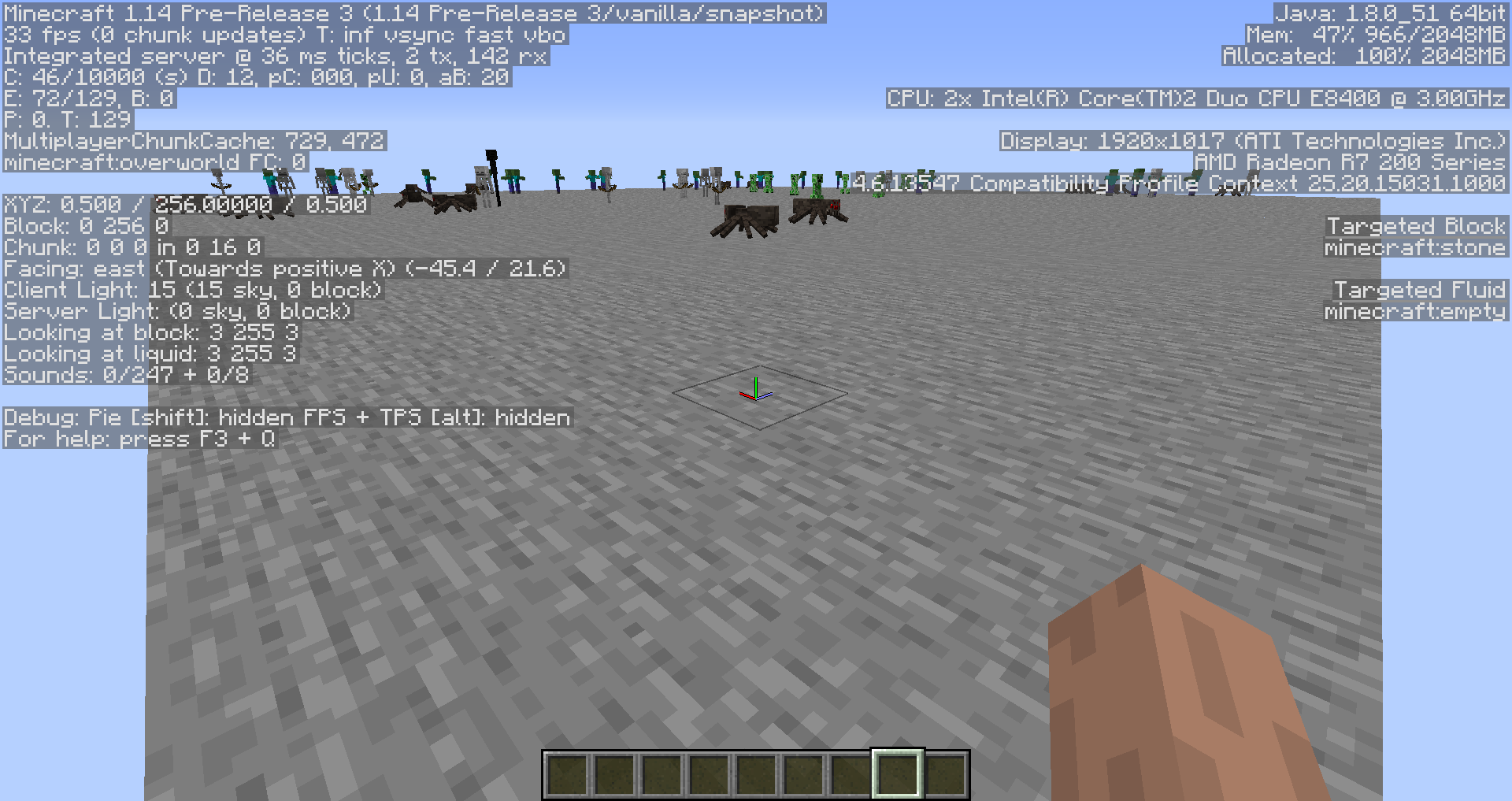
When cows, sheep and pigs are hit by a weapon enchanted with Knockback while they are walking to a specific location, they do not update their pathfinding. They will continue to move to the location they were originally pathfinding towards.
Potentially other mobs are affected as well.
This is easier to see if the mobs are hit by a weapon enchanted with a high level of Knockback. This was reproduced easily with Knockback 20. This level of Knockback will knock most mobs about 50 blocks.
To reproduce:
Create a superflat world in creative mode.
Enchant a stick with Knockback 20.
Find or spawn a cow, sheep or pig.
Wait until the mob is walking on its own to a new location.
Hit it with the Knockback stick. -> The mob will run towards the player, towards where they were originally going. They will run in a straight line for 50 blocks or so. It won't happen all the time but will happen fairly often.
When cows, sheep and pigs are hit by a weapon enchanted with Knockback while they are walking to a specific location, they do not update their pathfinding. They will continue to move to the location they were originally pathfinding towards.
Potentially other mobs are affected as well.
This is easier to see if the mobs are hit by a weapon enchanted with a high level of Knockback. This was reproduced easily with Knockback 20. This level of Knockback will knock most mobs about 50 blocks.
To reproduce:
Create a superflat world in creative mode.
Enchant a stick with Knockback 20.
Find or spawn a cow, sheep or pig.
Wait until the mob is walking on its own to a new location.
Hit it with the Knockback stick. -> The mob will run towards the player, towards where they were originally going. They will run in a straight line for 50 blocks or so. It won't happen all the time but will happen fairly often.When cows, sheep and pigs are hit by a weapon enchanted with Knockback while they are walking to a specific location, they do not update their pathfinding. They will continue to move to the location they were originally pathfinding towards.
Potentially other mobs are affected as well.
This is easier to see if the mobs are hit by a weapon enchanted with a high level of Knockback. This was reproduced easily with Knockback 20. This level of Knockback will knock most mobs about 50 blocks.
To reproduce:
Create a superflat world in creative mode.
{id:"minecraft:knockback",lvl:20}
Enchant a stick with Knockback 20, command is: "give @p minecraft:stick{Enchantments:[]} 1".
Find or spawn a cow, sheep or pig.
Wait until the mob is walking on its own to a new location.
Hit it with the Knockback stick. -> The mob will run towards the player, towards where they were originally going. They will run in a straight line for 50 blocks or so. It won't happen all the time but will happen fairly often.
If the player walks more than 21,474.83647 kilometres, the display overflows the 32-bit integer limit on conversion and is displayed as a negative distance in centimetres.
If the player walks more than 21,474.83647 kilome
tres, the display overflows the 32-bit integer limit on conversion and is displayed as a negative distance in centimetres.
If the player walks more than 21,474.83647 kilome
If the player walks more than 21,474.83647 kilometres, the display overflows the 32-bit integer limit on conversion and is displayed as a negative distance in centimetres.

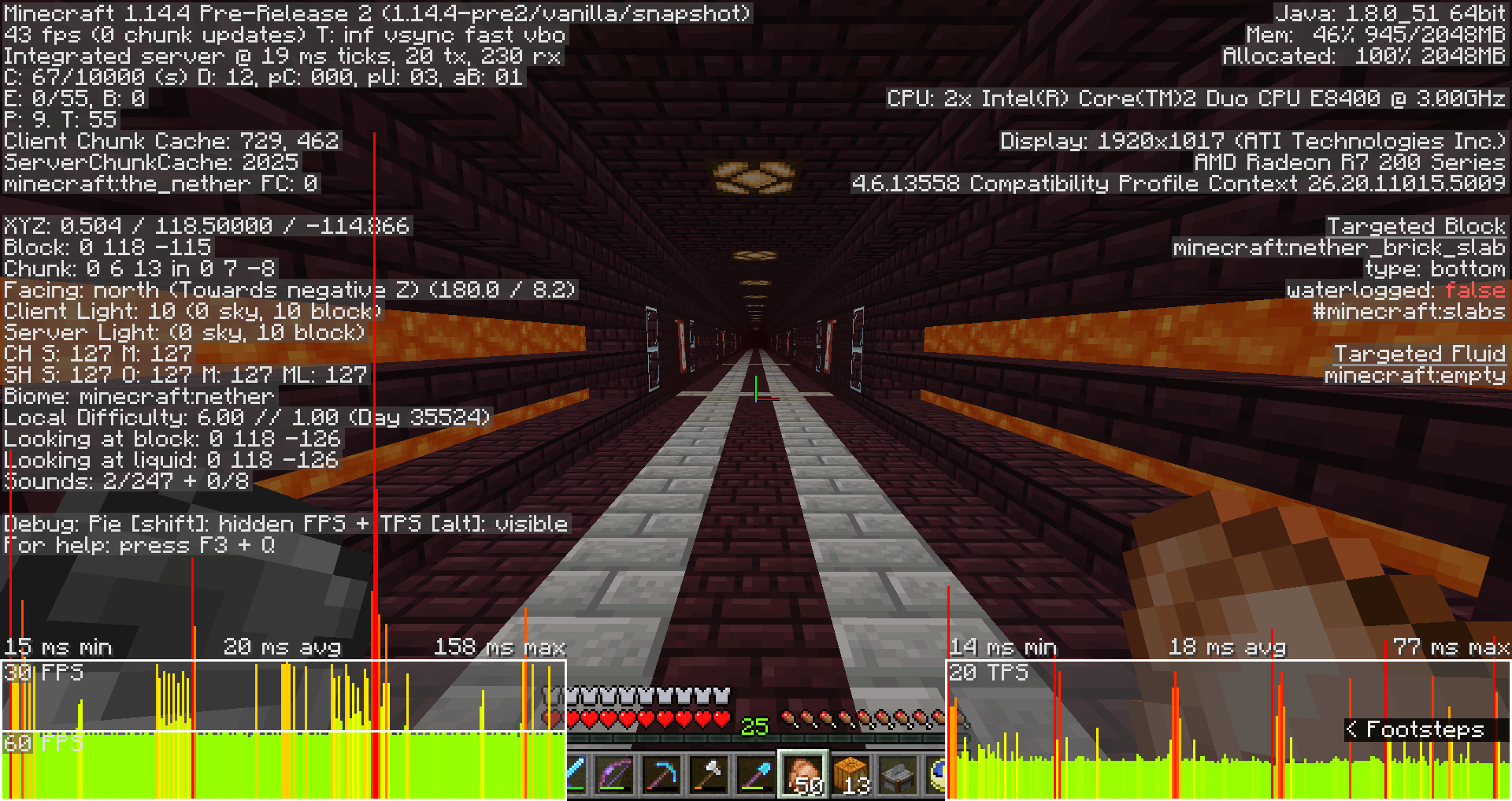

Hoppers harvesting honeycomb from bee hives and bee nests only pick up one honeycomb

Biome information in a chunkiscorruptedBiome information in a chunk may be corrupted
When viewing the player in a minecart from third person view (F5), the player's body and legs will turn from one side to the other depending on the position of the camera. The player's legs will snap from one side to the other and never face forwards.
To reproduce:
- Sit in a minecart
- Press F5 to display third-person view
- Turn the camera - the player's legs will snap from one side to the other
Updated steps to reproduce (2024-05-16):
1. Create a new Superflat world. (I used seed 1).
2. Unpack the zip file "MC161477-generated.zip" into the world save. It should create a new folder called "generated".
3. Place a structure block in the world and load the structure "mc161477". It will create a copy of the minecart tracks from the other zip file.
4. Place a minecart on the minecart tracks and get into the minecart.
5. Turn from side to side in the minecart -> the player's legs will snap from side to side and not face forward.
Player in minecart turns depending on camera positionin old worldsPlayer in minecart turns from side to side depending on camera position. Player in minecart cannot face forward
May be related to
MC-7196. That issue is a closed bug so a new report is needed.When caves generate in the Nether below the lava level, the caves are not aligned correctly at chunk boundaries. This is easiest to see with an external mapper that can map the world at arbitrary y levels.
The attached screenshot was produced with an external mapper. Seed is 1, mapping the region file at 0,0 to 511,511, at y=16. The chunk boundaries are shown with a lighter colour at x,z mod 0 and mod 15.
The issue can be reproduced as far back as 1.13 and possibly earlier.
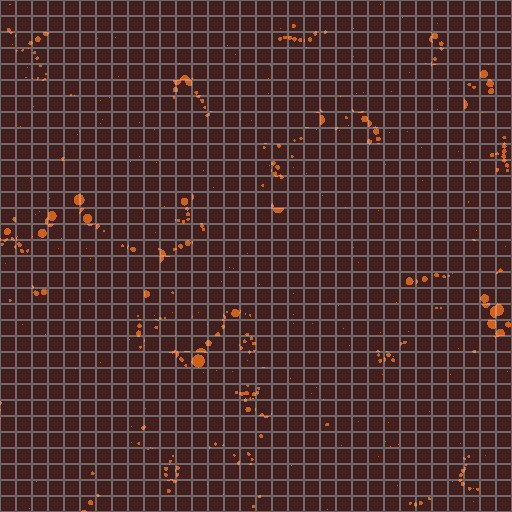

Nether caves below lava level do not align at chunk boundariesCircular caves below lava level in the Nether do not align at chunk boundaries
Nether fog flickers in the distance when moving near biome boundaries
Teleporting into ungenerated chunkneverdisplaysbiome information for new chunk untilreopening the debug screenTeleporting into ungenerated chunk doesn't display biome information for new chunk until debug screen is reopened (Waiting for chunk)
Teleporting into ungenerated chunk doesn't display biome information for new chunk until debug screen is reopened ("Waiting for chunk")
Chunks stop generating and commands no longer workedafter several hours
When a world is loaded in a newer version that has changed the biome generation, and a chunk has the status "biomes" with old biomes saved therein, the chunk with the old saved terrain has the correct decorations for the old biome in the middle of the chunk but not at the chunk borders. The terrain at the edge of the chunk ends up with the correct biome (the saved biome) and mismatching terrain decorations (the biome that would have generated had the chunk been empty instead of partially generated).
Seed1.zip is a 1.15.2 world save where this issue can be reproduced. Using an NBT editor, four chunks in a 2×2 square have been reset to the "biomes" status. These chunks are located in region 0,0 and chunk coordinates 22,24; 22,25; 23,24 and 23,25. The biomes in these chunks is minecraft:nether_wastes (biome id: 8) because this is a 1.15.2 world save. When the world loads in 20w21a, the player will be in the Nether in the vicinity of a nether portal. To reproduce the issue, go into spectator mode and fly towards 368,400 where the chunks are. The borders of these chunks will have crimson nylium and crimson fungus blocks. This should not occur because there is no crimson forest biome here. Here is a screenshot of this location after loading it in 20w21a:
When a world is loaded in a newer version that has changed the biome generation, and a chunk has the status "biomes" with old biomes saved therein, the chunk with the old saved terrain has the correct decorations for the old biome in the middle of the chunk but not at the chunk borders. The terrain at the edge of the chunk ends up with the correct biome (the saved biome) and mismatching terrain decorations (the biome that would have generated had the chunk been empty instead of partially generated).
Seed1.zip is a 1.15.2 world save where this issue can be reproduced. Using an NBT editor, four chunks in a 2×2 square have been reset to the "biomes" status. These chunks are located in region 0,0 and chunk coordinates 22,24; 22,25; 23,24 and 23,25. The biomes in these chunks is minecraft:nether_wastes (biome id: 8) because this is a 1.15.2 world save. When the world loads in 20w21a, the player will be in the Nether in the vicinity of a nether portal. To reproduce the issue, go into spectator mode and fly towards 368,400 where the chunks are. The borders of these chunks will have crimson nylium and crimson fungus blocks. This should not occur because there is no crimson forest biome here. Here is a screenshot of this location after loading it in 20w21a:
When a world is loaded in a newer version that has changed the biome generation, and a chunk has the status "biomes" with old biomes saved therein, the chunk with the old saved terrain has the correct decorations for the old biome in the middle of the chunk but not at the chunk borders. The terrain at the edge of the chunk ends up with the correct biome (the saved biome) and mismatching terrain decorations (the biome that would have generated had the chunk been empty instead of partially generated).
Seed1.zip is a 1.15.2 world save where this issue can be reproduced. Using an NBT editor, four chunks in a 2×2 square have been reset to the "biomes" status. These chunks are located in region 0,0 and chunk coordinates 22,24; 22,25; 23,24 and 23,25. The biomes in these chunks is minecraft:nether_wastes (biome id: 8) because this is a 1.15.2 world save. When the world loads in 20w21a, the player will be in the Nether in the vicinity of a nether portal. To reproduce the issue, go into spectator mode and fly towards 368,400 where the chunks are. The borders of these chunks will have crimson nylium and crimson fungus blocks. This should not occur because there is no crimson forest biome here. 2020-05-23_14.05.55.png is a screenshot of this location after loading it in 20w21a.
When a world is loaded in a newer version that has changed the biome generation, and a chunk has the status "biomes" with old biomes saved therein, the chunk with the old saved terrain has the correct decorations for the old biome in the middle of the chunk but not at the chunk borders. The terrain at the edge of the chunk ends up with the correct biome (the saved biome) and mismatching terrain decorations (the biome that would have generated had the chunk been empty instead of partially generated).
Seed1.zip is a 1.15.2 world save where this issue can be reproduced. Using an NBT editor, four chunks in a 2×2 square have been reset to the "biomes" status. These chunks are located in region 0,0 and chunk coordinates 22,24; 22,25; 23,24 and 23,25. The biomes in these chunks is minecraft:nether_wastes (biome id: 8) because this is a 1.15.2 world save. When the world loads in 20w21a, the player will be in the Nether in the vicinity of a nether portal. To reproduce the issue, go into spectator mode and fly towards 368,400 where the chunks are. The borders of these chunks will have crimson nylium and crimson fungus blocks. This should not occur because the
re is no crimson forest biome here. 2020-05-23_14.05.55.png is a screenshot of this location after loading it in 20w21a.When a world is loaded in a newer version that has changed the biome generation, and a chunk has the status "biomes" with old biomes saved therein, the chunk with the old saved terrain has the correct decorations for the old biome in the middle of the chunk but not at the chunk borders. The terrain at the edge of the chunk ends up with the correct biome (the saved biome) and mismatching terrain decorations (the biome that would have generated had the chunk been empty instead of partially generated).
Seed1.zip is a 1.15.2 world save where this issue can be reproduced. Using an NBT editor, four chunks in a 2×2 square have been reset to the "biomes" status. These chunks are located in region 0,0 and chunk coordinates 22,24; 22,25; 23,24 and 23,25. The biomes in these chunks is minecraft:nether_wastes (biome id: 8) because this is a 1.15.2 world save. When the world loads in 20w21a, the player will be in the Nether in the vicinity of a nether portal. To reproduce the issue, go into spectator mode and fly towards 368,400 where the chunks are. The borders of these chunks will have crimson nylium and crimson fungus blocks. This should not occur because the world save has no crimson forest biome here. 2020-05-23_14.05.55.png is a screenshot of this location after loading it in 20w21a.
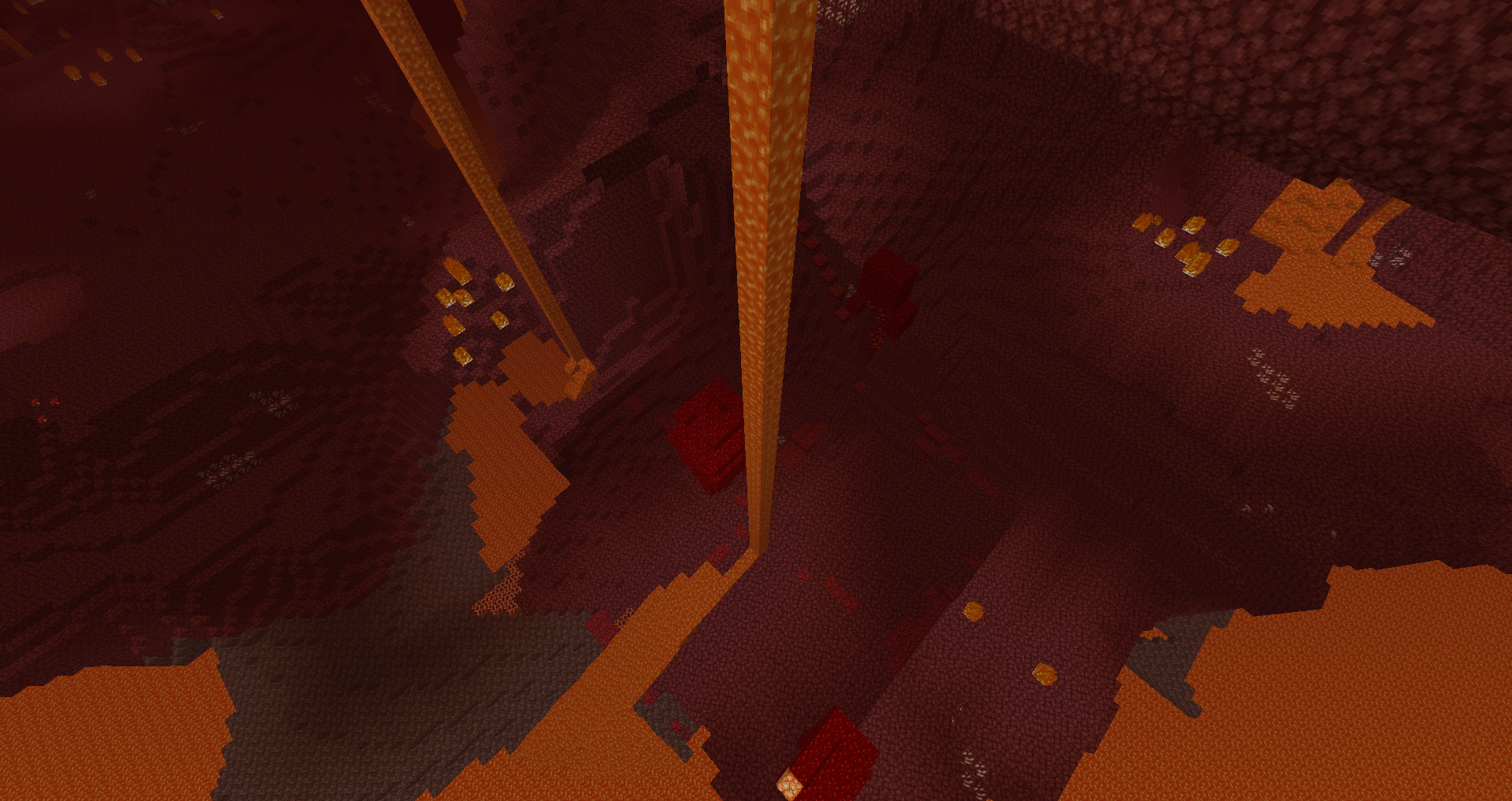
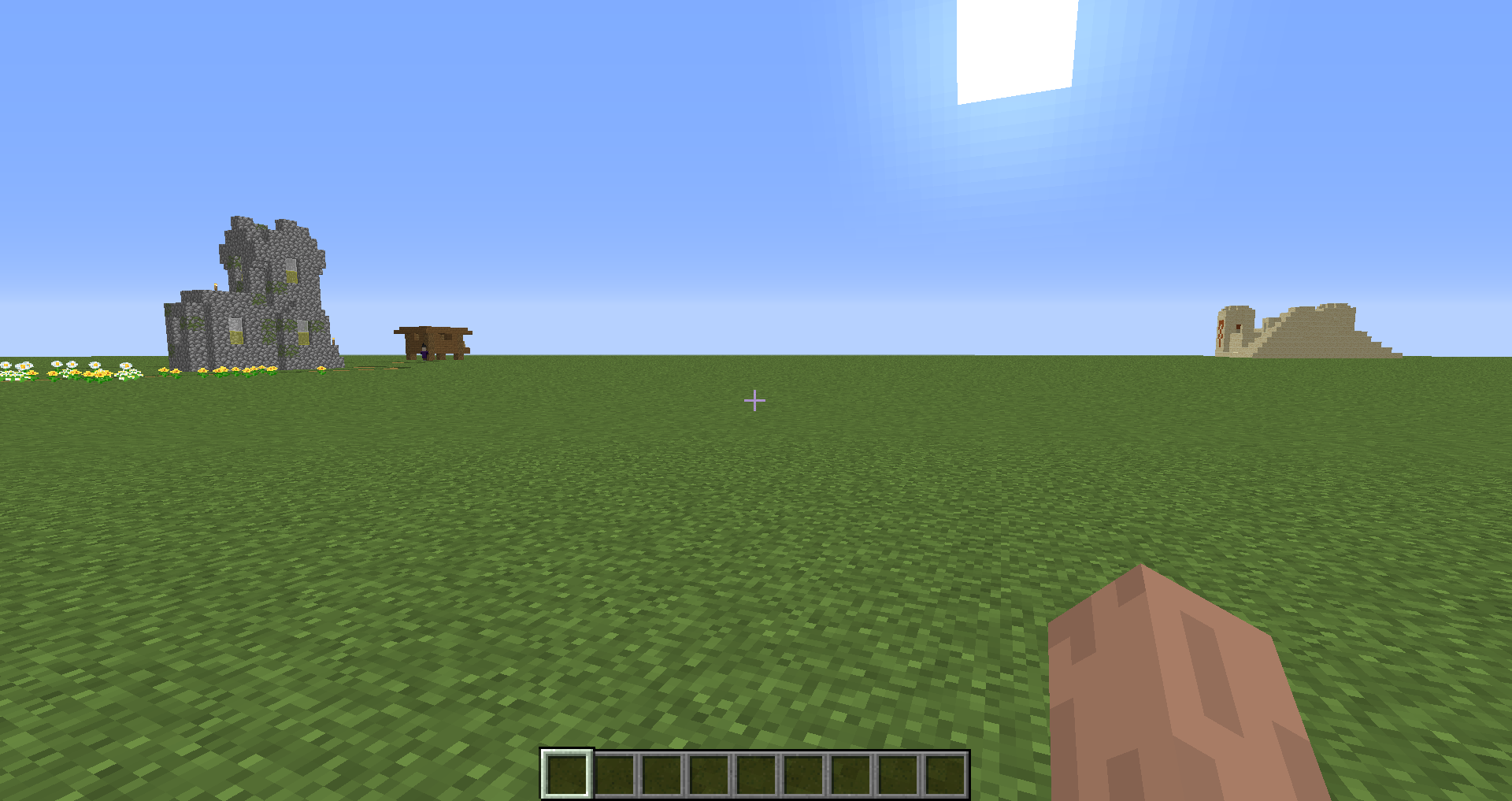
The Overworld superflat preset no longer generates with terrain decorations such as grass, trees
and water lakes. These settings are missing from the Overworld preset.If these are added manually by importing them from a 1.15.2 preset, they do not generate.
1.15.2: minecraft:bedrock,59*minecraft:stone,3*minecraft:dirt,minecraft:grass_block;minecraft:plains;pillager_outpost,village,biome_1,decoration,stronghold,mineshaft,lake,lava_lake,dungeon
1.16 pre-2: minecraft:bedrock,59*minecraft:stone,3*minecraft:dirt,minecraft:grass_block;minecraft:plains
Attached screenshot shows the missing decorations. It also has inappropriate structures as shown in
MC-180603.
Netherchunks include structure starts for strongholdsNBT for Nether and End chunks include structure starts for strongholds
When Nether chunks generate, the structure information includes starts and references to "stronghold" structures. These are Overworld structures, not Nether structures so these entries should not exist in Nether chunks.
To reproduce:
1. Generate some Nether chunks.
2. Use an NBT viewer such as NBTExplorer to examinea Netherchunk.
3. In the chunk, the Level > Structures > Starts includes an entry for "stronghold". This should not exist because this is an Overworld structure, not a Nether structure.When Nether chunks generate, the structure information includes starts and references to "stronghold" structures. These are Overworld structures, not Nether structures so these entries should not exist in Nether chunks.
To reproduce:
1. Generate some Nether or End chunks.
2. Use an NBT viewer such as NBTExplorer to examine these chunks.
3. In the chunk, the Level > Structures > Starts includes an entry for "stronghold". This should not exist because this is an Overworld structure, not a Nether or End structure.
ArrayIndexOutOfBoundsException Crash: Ticking entity (hopper minecarts)

Dismounting from minecart on stairs and full blocks after travel always dismounts on right instead of onto full blocks
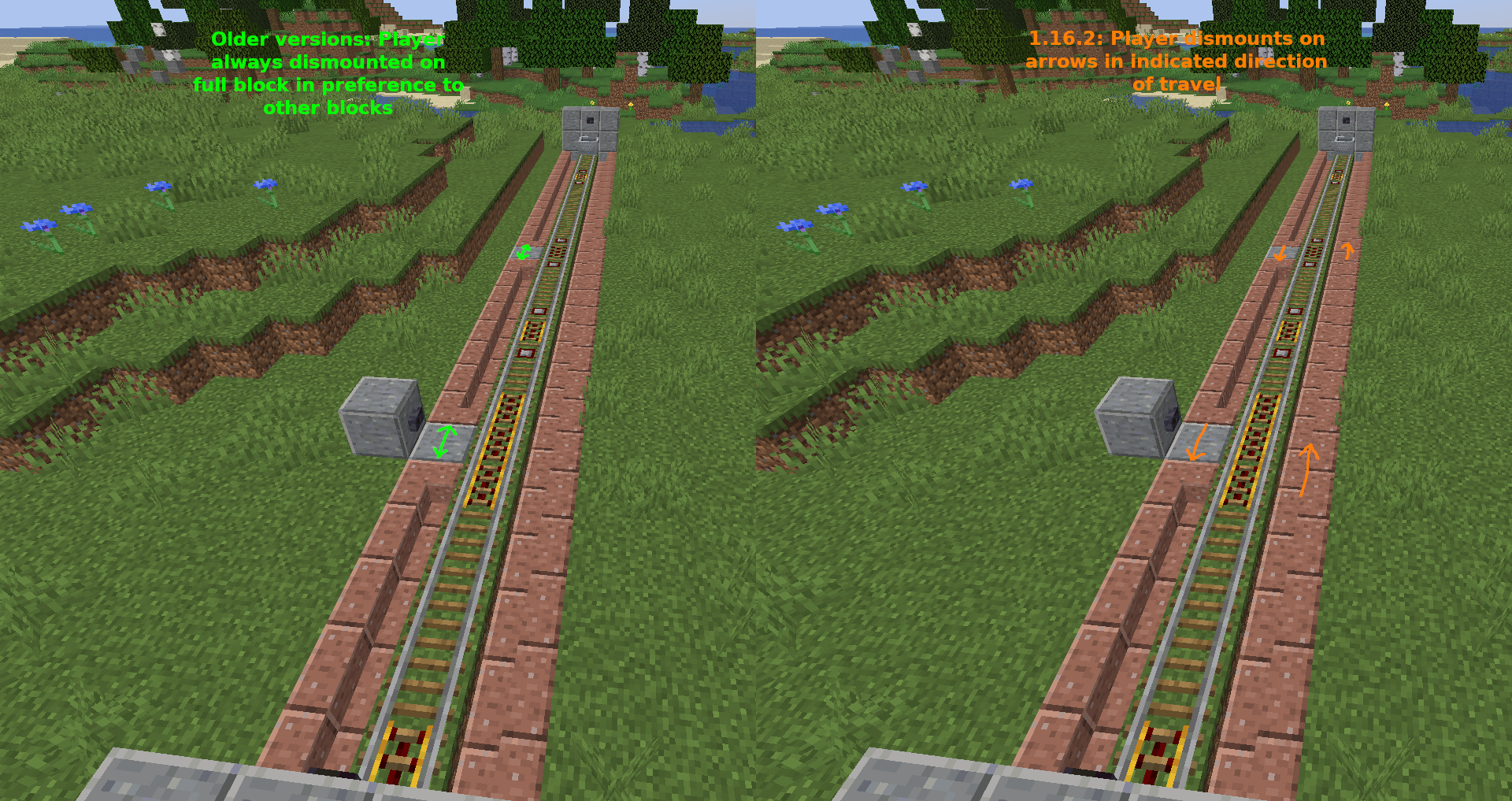
In previous versions, dismounting from a minecart after travelling would place the player on a solid block on either side in preference to stair blocks. (The stair blocks here are placed so that they do not have a solid top face.)
In 1.16.2, dismounting from a minecart after travelling always places the player on the right in relation to the direction of travel. All stair blocks are counted as full blocks regardless of orientation. Dismounting onto a full block still works correctly if the player has not been travelling.
The attached image (2020-08-21_22.15.39.png) shows the orientation of stairs, and places where the player can dismount from a minecart (manually at unpowered rails, and automatically at activator rails).
This may be related to the change to the respawning mechanic introduced in 20w30a.
To reproduce:
- Construct rails with stairs, unpowered powered rails and activator rails as shown in the illustrations.
- Travel from one end to another.
- At the activator rails, the player always dismounts on the right in relation to the direction of travel.
- Dismount manually at the unpowered activator rails after travelling -> The player always dismounts on the right.
- Enter the minecart at the unpowered rails and then exit -> The player is always placed on the full block adjacent to the rails (this is the correct behaviour that is no longer occurring after travelling in the minecart).
In previous versions, dismounting from a minecart after travelling would place the player on a solid block on either side in preference to stair blocks. (The stair blocks here are placed so that they do not have a solid top face.)
In 1.16.2, dismounting from a minecart after travelling always places the player on the right in relation to the direction of travel. All stair blocks are counted as full blocks regardless of orientation. Dismounting onto a full block still works correctly if the player has not been travelling.
The attached image (2020-08-21_22.15.39.png) shows the orientation of stairs, and places where the player can dismount from a minecart (manually at unpowered rails, and automatically at activator rails).
This may be related to the change to the respawning mechanic introduced in 20w30a.
To reproduce:
- Construct rails with stairs, unpowered powered rails and activator rails as shown in the illustrations.
- Travel from one end to another.
- At the activator rails, the player always dismounts on the right in relation to the direction of travel.
- Dismount manually at the unpowered
activatorrails after travelling -> The player always dismounts on the right.- Enter the minecart at the unpowered rails and then exit -> The player is always placed on the full block adjacent to the rails (this is the correct behaviour that is no longer occurring after travelling in the minecart).
In previous versions, dismounting from a minecart after travelling would place the player on a solid block on either side in preference to stair blocks. (The stair blocks here are placed so that they do not have a solid top face.)
In 1.16.2, dismounting from a minecart after travelling always places the player on the right in relation to the direction of travel. All stair blocks are counted as full blocks regardless of orientation. Dismounting onto a full block still works correctly if the player has not been travelling.
The attached image (2020-08-21_22.15.39.png) shows the orientation of stairs, and places where the player can dismount from a minecart (manually at unpowered rails, and automatically at activator rails).
This may be related to the change to the respawning mechanic introduced in 20w30a.
To reproduce:
- Construct rails with stairs, unpowered powered rails and activator rails as shown in the illustrations.
- Travel from one end to another.
- At the activator rails, the player always dismounts on the right in relation to the direction of travel.
- Dismount manually at the unpowered powered rails after travelling -> The player always dismounts on the right.
- Enter the minecart at the unpowered rails and then exit -> The player is always placed on the full block adjacent to the rails (this is the correct behaviour that is no longer occurring after travelling in the minecart).
In previous versions, dismounting from a minecart after travelling would place the player on a solid block on either side in preference to stair blocks. (The stair blocks here are placed so that they do not have a solid top face.)
In 1.16.2, dismounting from a minecart after travelling always places the player on the right in relation to the direction of travel. All stair blocks are counted as full blocks regardless of orientation.
Dismounting onto a full block still works correctly if the player has not been travelling.
The attached image (2020-08-21_22.15.39.png) shows the orientation of stairs, andplaceswherethe playercan dismount from a minecart (manually at unpowered rails, and automatically at activator rails).Th
is may be related to the change to the respawning mechanic introduced in 20w30a.To reproduce:
- Construct rails with stairs, unpowered powered rails and activator rails as shown in the illustrations.
- Travel from one end to another.
- At the activator rails, the player always dismounts on the right in relation to the direction of travel.
- Dismount manually at the unpowered powered rails after travelling -> The player always dismounts on the right.
- Enter the minecart at the unpowered rails and then exit -> The player is always placed on the full block adjacent to the rails (this is the correct behaviour that is no longer occurring after travelling in the minecart).
In previous versions, dismounting from a minecart after travelling would place the player on a solid block on either side in preference to stair blocks. (The stair blocks here are placed so that they do not have a solid top face.)
In 1.16.2, dismounting from a minecart after travelling always places the player on the right in relation to the direction of travel. All stair blocks are counted as full blocks regardless of orientation.
If the player has not been travelling, dismounting always places the player on the block that is north of the minecart . This is also incorrect.
The attached image (2020-08-21_22.15.39.png) shows the orientation of stairs, and places where the player can dismount from a minecart (manually at unpowered rails, and automatically at activator rails).
This may be related to the change to the respawning mechanic introduced in 20w30a.
To reproduce:
- Construct rails with stairs, unpowered powered rails and activator rails as shown in the illustrations.
- Travel from one end to another.
- At the activator rails, the player always dismounts on the right in relation to the direction of travel.
- Dismount manually at the unpowered powered rails after travelling -> The player always dismounts on the right.
- Enter the minecart at the unpowered rails and then exit -> The player is always placed on the full block adjacent to the rails (this is the correct behaviour that is no longer occurring after travelling in the minecart).
In previous versions, dismounting from a minecart after travelling would place the player on a solid block on either side in preference to stair blocks. (The stair blocks here are placed so that they do not have a solid top face.)
In 1.16.2, dismounting from a minecart after travelling always places the player on the right in relation to the direction of travel. All stair blocks are counted as full blocks regardless of orientation.
If the player has not been travelling, dismounting always places the player on the block that is north of the minecart
. This is also incorrect.The attached image (2020-08-21_22.15.39.png) shows the orientation of stairs, and places where the player can dismount from a minecart (manually at unpowered rails, and automatically at activator rails).
This may be related to the change to the respawning mechanic introduced in 20w30a.
To reproduce:
- Construct rails with stairs, unpowered powered rails and activator rails as shown in the illustrations.
- Travel from one end to another.
- At the activator rails, the player always dismounts on the right in relation to the direction of travel.
- Dismount manually at the unpowered powered rails after travelling -> The player always dismounts on the right.
Enter theminecartat theunpowered rails and then exit -> The player is always placed on thefullblock adjacent to the rails(this is the correct behaviour that is no longer occurring after travelling in the minecart).In previous versions, dismounting from a minecart after travelling would place the player on a solid block on either side in preference to stair blocks. (The stair blocks here are placed so that they do not have a solid top face.)
In 1.16.2, dismounting from a minecart after travelling always places the player on the right in relation to the direction of travel. All stair blocks are counted as full blocks regardless of orientation.
If the player has not been travelling and the minecart has just been placed, dismounting always places the player on the block that is north of the minecart. This is also incorrect.
The attached image (2020-08-21_22.15.39.png) shows the orientation of stairs, and places where the player can dismount from a minecart (manually at unpowered rails, and automatically at activator rails).
This may be related to the change to the respawning mechanic introduced in 20w30a.
To reproduce:
- Construct rails with stairs, unpowered powered rails and activator rails as shown in the illustrations.
- Travel from one end to another.
- At the activator rails, the player always dismounts on the right in relation to the direction of travel.
- Dismount manually at the unpowered powered rails after travelling -> The player always dismounts on the right.
- Place a minecart on unpowered rails, enter the minecart and then exit -> The player is always placed on the block adjacent to the rails towards the north.
Dismounting from minecarton stairs and full blocks after travel always dismounts on right instead of onto full blocksDismounting from minecart does not place entity in the correct location
In previous versions, dismounting from a minecart after travelling would place the player on a solid block on either side in preference to stair blocks. (The stair blocks here are placed so that they do not have a solid top face.)
In 1.16.2, dismounting from a minecart after travelling always places the player on the right in relation to the direction of travel. All stair blocks are counted as full blocks regardless of orientation. This breaks all minecart systems that dismount on left, and all bidirectional minecart tracks.
If the player has not been travelling and the minecart has just been placed, dismounting always places the player on the block that is north of the minecart. This is also incorrect.
The attached image (2020-08-21_22.15.39.png) shows the orientation of stairs, and places where the player can dismount from a minecart (manually at unpowered rails, and automatically at activator rails).
This may be related to the change to the respawning mechanic introduced in 20w30a.
To reproduce:
- Construct rails with stairs, unpowered powered rails and activator rails as shown in the illustrations.
- Travel from one end to another.
- At the activator rails, the player always dismounts on the right in relation to the direction of travel.
- Dismount manually at the unpowered powered rails after travelling -> The player always dismounts on the right.
- Place a minecart on unpowered rails, enter the minecart and then exit -> The player is always placed on the block adjacent to the rails towards the north.
Dismounting from minecartdoes not place entity in the correct locationDismounting from minecart no longer searches for full block adjacent to the track before placing entity
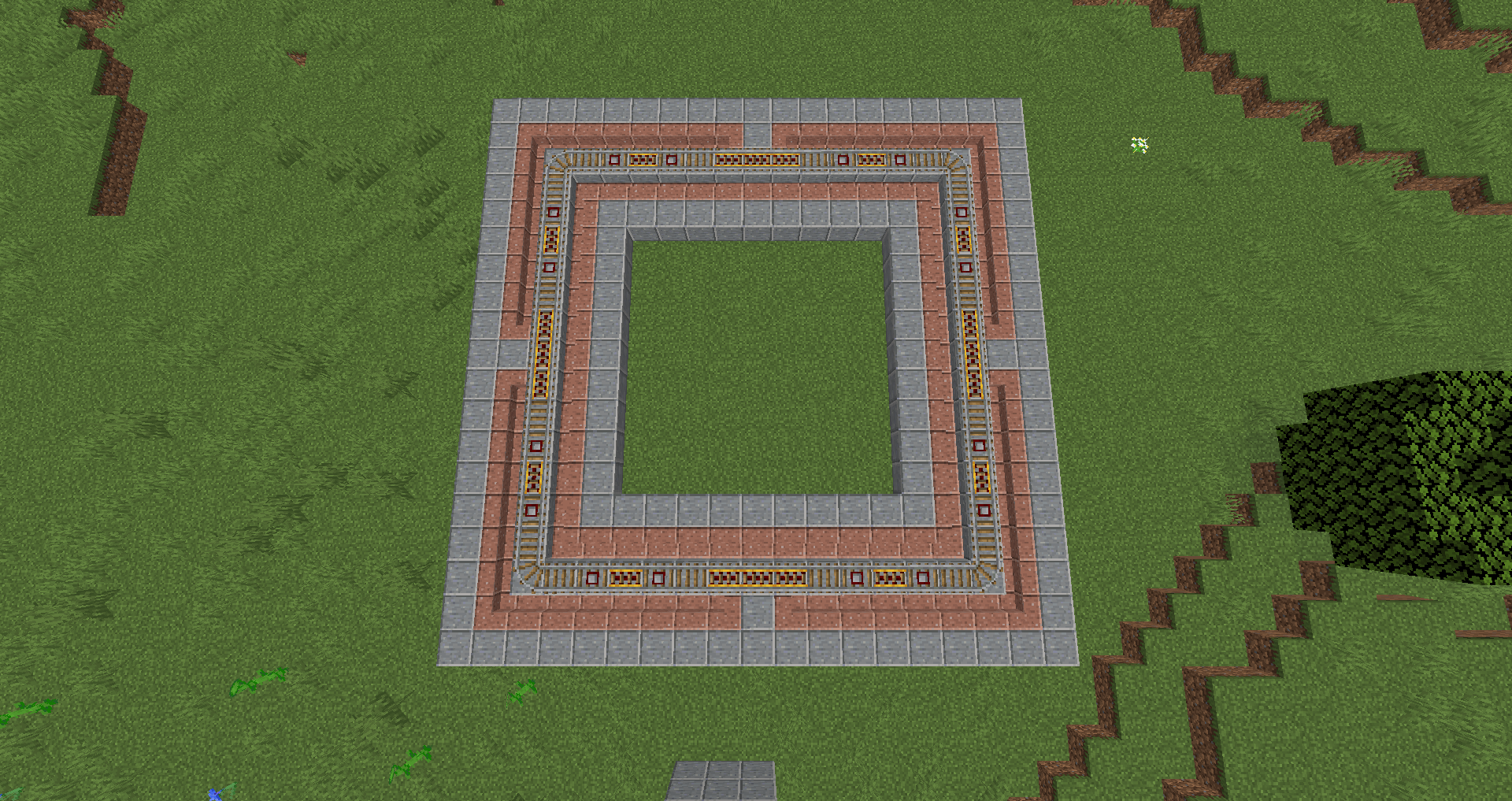
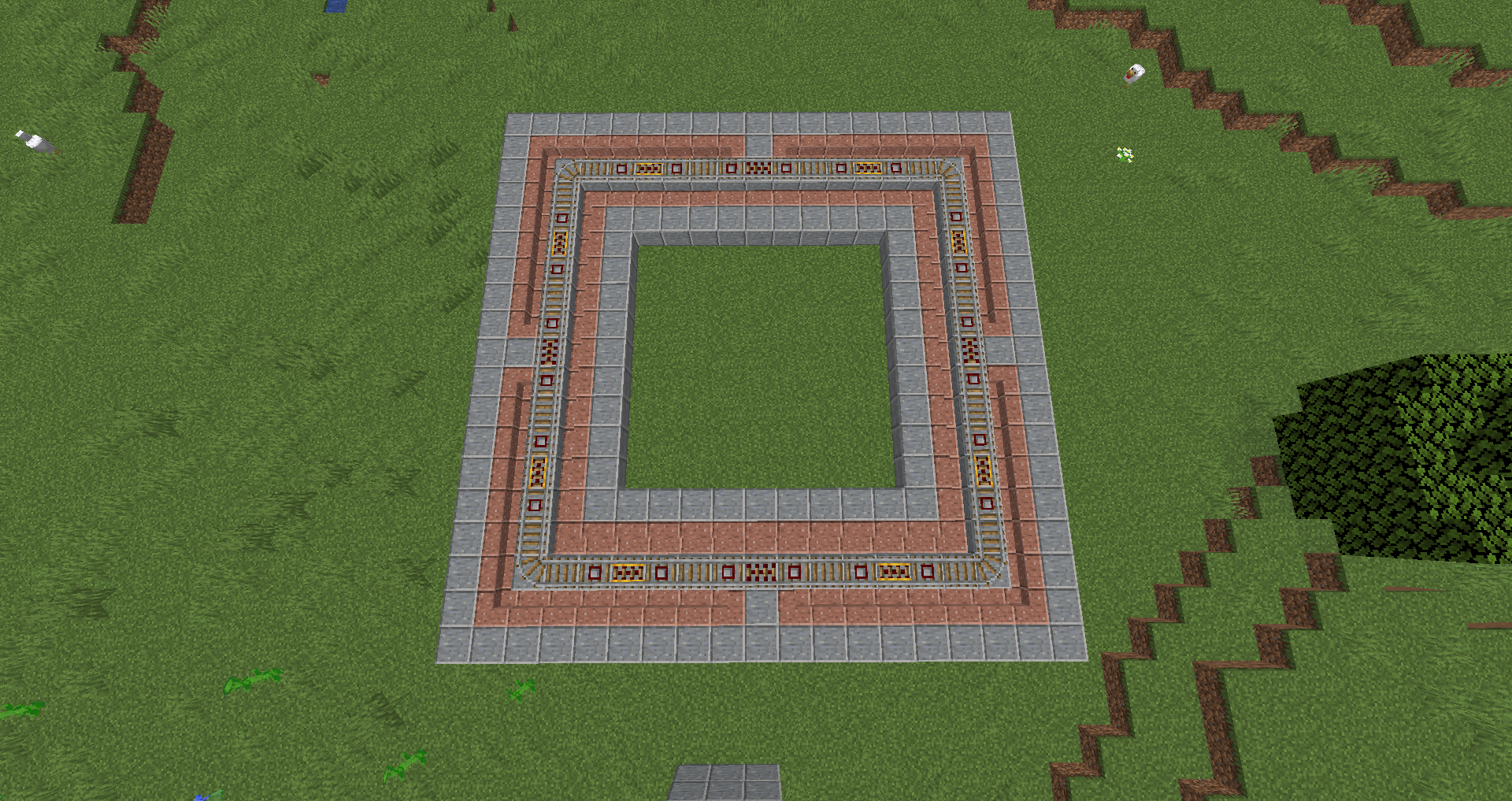
In previous versions, dismounting from a minecart after travelling would place the player on a solid block on either side in preference to stair blocks. (The stair blocks here are placed so that they do not have a solid top face.)
In 1.16.2, dismounting from a minecart after travelling always places the player on the right in relation to the direction of travel. All stair blocks are counted as full blocks regardless of orientation. This breaks
allminecart systems that dismount on left, andallbidirectional minecart tracks.If the player has not been travelling and the minecart has just been placed, dismounting always places the player on the block that is north of the minecart. This is also incorrect.
The attached image (2020-08-21_22.15.39.png) shows the orientation of stairs, and places where the player can dismount from a minecart (manually at unpowered rails, and automatically at activator rails).
This may be related to the change to the respawning mechanic introduced in 20w30a.
To reproduce:
- Construct rails with stairs, unpowered powered rails and activator rails as shown in the illustrations.
- Travel from one end to another.
- At the activator rails, the player always dismounts on the right in relation to the direction of travel.
- Dismount manually at the unpowered powered rails after travelling -> The player always dismounts on the right.
- Place a minecart on unpowered rails, enter the minecart and then exit -> The player is always placed on the block adjacent to the rails towards the north.
In previous versions, dismounting from a minecart after travelling would place the player on a solid block on either side in preference to stair blocks. (The stair blocks here are placed so that they do not have a solid top face.)
In 1.16.2, dismounting from a minecart after travelling always places the player on the right in relation to the direction of travel. All stair blocks are counted as full blocks regardless of orientation. This breaks particular minecart systems that dismount on left, and bidirectional minecart tracks.
If the player has not been travelling and the minecart has just been placed, dismounting always places the player on the block that is north of the minecart. This is also incorrect.
The attached image (2020-08-21_22.15.39.png) shows the orientation of stairs, and places where the player can dismount from a minecart (manually at unpowered rails, and automatically at activator rails).
This may be related to the change to the respawning mechanic introduced in 20w30a.
To reproduce:
- Construct rails with stairs, unpowered powered rails and activator rails as shown in the illustrations.
- Travel from one end to another.
- At the activator rails, the player always dismounts on the right in relation to the direction of travel.
- Dismount manually at the unpowered powered rails after travelling -> The player always dismounts on the right.
- Place a minecart on unpowered rails, enter the minecart and then exit -> The player is always placed on the block adjacent to the rails towards the north.
Crash reports do not include the current dimension for the player or other entities
When a crash report is generated, the players' positions are listed but not the players' current dimension. If the crash reports includes other entities, the dimension is not listed for these either but the coordinates are.
A sample crash report is attached (which was also attached to
MC-198373). In the "System details" section, a player list is included that only includes player name, world name, x, y and z. The dimension is missing which makes the coordinates ambiguous.
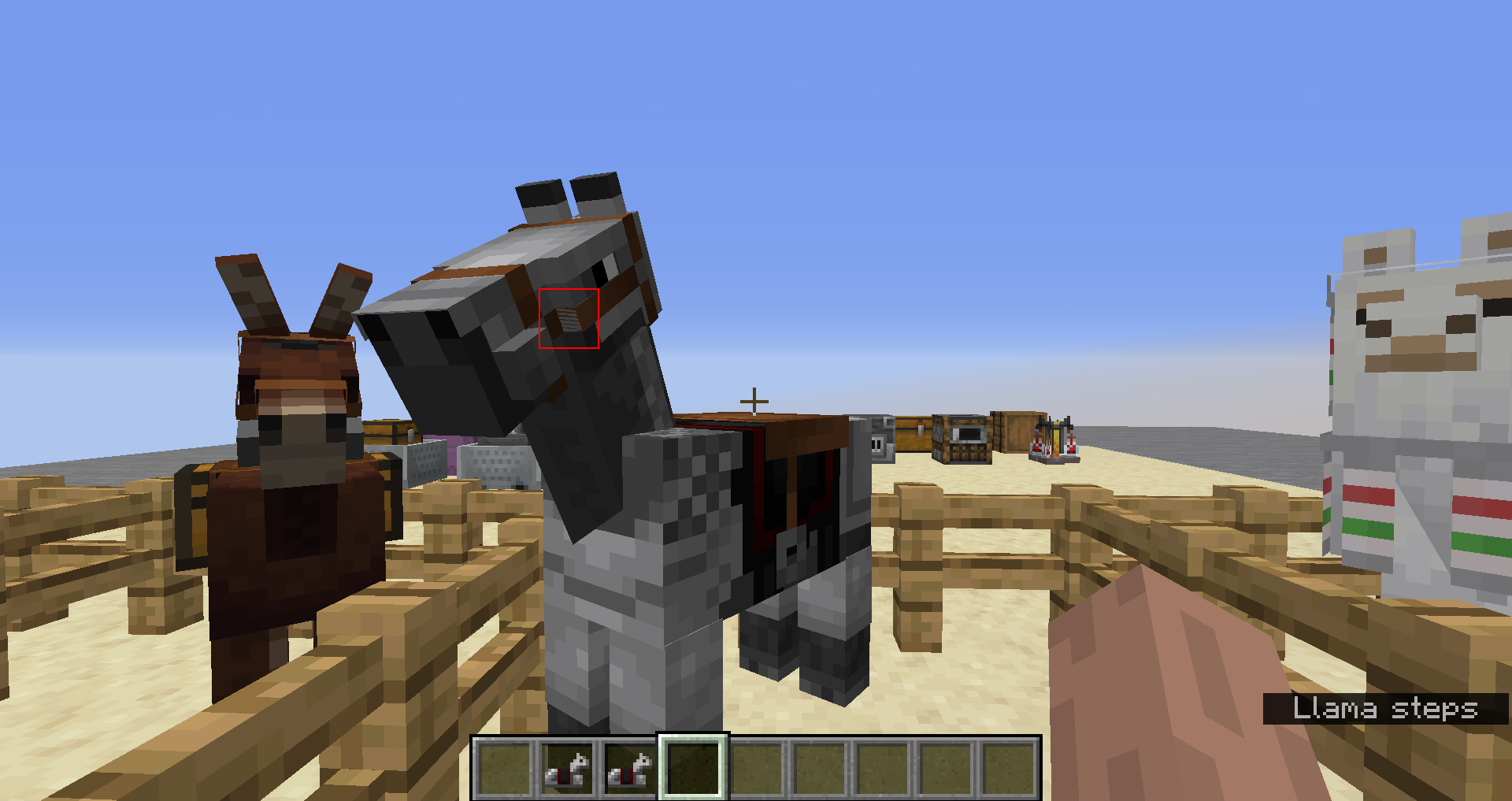
When using a bed, there is noticeable lag
beforethe player sleeps in the bed.This seems to happen more when a bed is used for the first time after loading the world, in the vicinity of a village.When using a bed, there is noticeable lag when the player sleeps in the bed.
This seems to happen mostly when a bed is used for the first time after loading the world. After the first use of a bed, subsequent uses appear normal. It is difficult to reproduce in a newly-created world.

When using a bed, there is noticeable lag when the player sleeps in the bed.
This seems to happen mostly when a bed is used for the first time after loading the world. After the first use of a bed, subsequent uses appear normal. It is difficult to reproduce in a newly-created world.
The issue is most likely to occur when a player uses a bed for the first time when sleeping is not possible. A clear lag spike occurs before the game displays the message: "You can sleep only at night and during thunderstorms". Sometimes it happens before sleeping in a bed successfully but this is less common. It will only happen once.
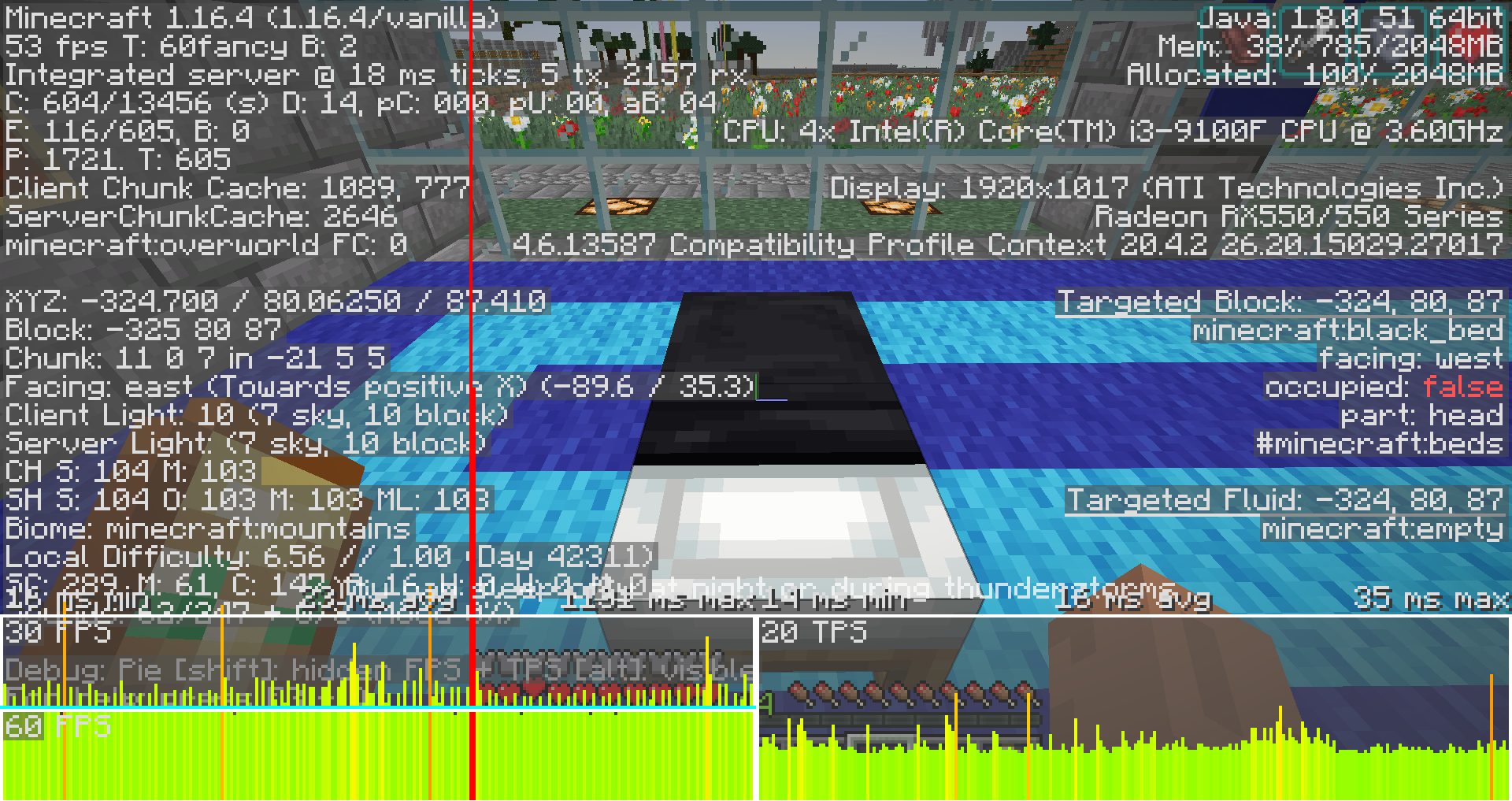
Beds and respawn anchors cause lag when used
When using a bed, there is noticeable lag when the player sleeps in the bed.
This seems to happen mostly when a bed is used for the first time after loading the world. After the first use
of a bed, subsequent uses appear normal. It is difficult to reproduce in a newly-created world.The issue is most likely to occur when a player uses a bed for the first time when sleeping is not possible. A clear lag spike occurs before the game displays the message: "You can sleep only at night and during thunderstorms". Sometimes it happens before sleeping in a bed successfully but this is less common. It will only happen once.
When using a bed or a respawn anchor, there is noticeable lag. This happens when the player sleeps in the bed or sets the spawn point.
This seems to happen mostly when a bed or respawn anchor is used for the first time after loading the world. After the first use, subsequent uses appear normal. It is difficult to reproduce in a newly-created world.
The issue is most likely to occur when a player uses a bed or respawn anchor for the first time when sleeping is not possible. A clear lag spike occurs before the game displays the message: "You can sleep only at night and during thunderstorms". Sometimes it happens before sleeping in a bed successfully but this is less common. It will only happen once per session.
The Bug
When terrain is being generated, sometimes snow will generate under trees instead of on top of them.
This happens because the snow is placed first in
an 8x8 section ofa chunk. When the rest of the chunk is decorated, a tree can generatein another 8x8 sectionthat projects into the previously-decorated8x8section. Result: snowisplaced under the portion of the tree that projects over the older section and not on top of it. The borders of the misplaced snow are always aligned with themiddle of the chunk.A similar effect can be seen in ice spikes biomes. Some patches of compressed ice are generated flush with the ground. Sometimes these generate partially covered in snow even though compressed ice is usually snow-free.
A suggested fix: add a sanity check for snow cover in newly-generated chunks, and adjust it as needed. (Move it to the tops of newly-generated trees, or remove it from newly-generated ice spikes.)
Steps to Reproduce
- Locate and enter a biome that generates both snow and trees, for example, a "snowy_taiga".
- Fly over the trees within this biome and take note as to whether or not if snow is sometimes able to generate below trees.
Observed Behavior
Snow sometimes generates below trees instead of on top of them.
Expected Behavior
Snow would always generate on top of trees instead of below them.
The Bug
When terrain is being generated, sometimes snow will generate under trees instead of on top of them.
This happens because the snow is placed first in a chunk. When the rest of the chunk is decorated, a tree can generate elsewhere (such as a neighbouring chunk) that projects into the previously-decorated section. Result: snow ends up placed under the portion of the tree that projects over the older section and not on top of it. The borders of the misplaced snow are always aligned with the edge of the chunk. (Amended from earlier version: the original report stated that the behaviour occurred for 8×8 quarter-chunks; this is no longer happening.)
A similar effect can be seen in ice spikes biomes. Some patches of compressed ice are generated flush with the ground. Sometimes these generate partially covered in snow even though compressed ice is usually snow-free.
A suggested fix: add a sanity check for snow cover in newly-generated chunks, and adjust it as needed. (Move it to the tops of newly-generated trees, or remove it from newly-generated ice spikes.)
Steps to Reproduce
- Locate and enter a biome that generates both snow and trees, for example, a "snowy_taiga".
- Fly over the trees within this biome and take note as to whether or not if snow is sometimes able to generate below trees.
Observed Behavior
Snow sometimes generates below trees instead of on top of them.
Expected Behavior
Snow would always generate on top of trees instead of below them.
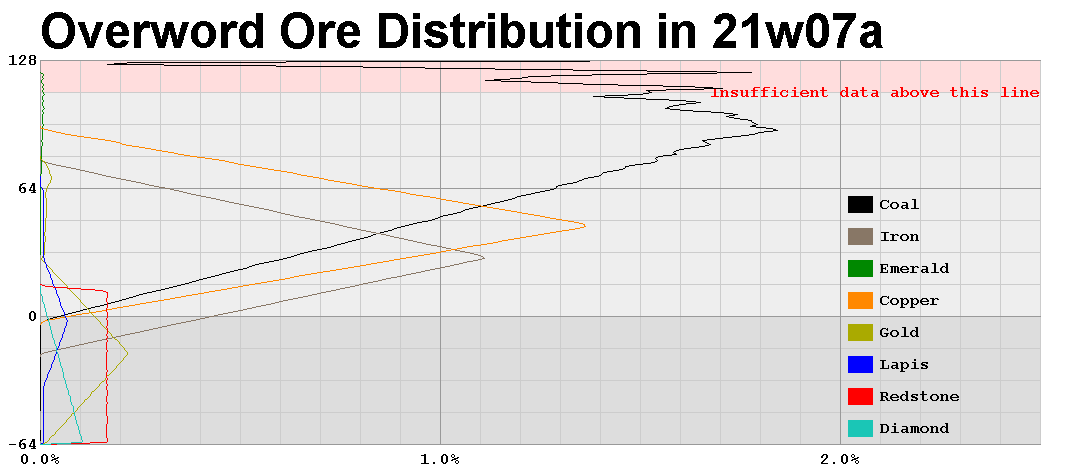
Height distribution of iron and coal ores has sharp jumpsDistribution of iron and coal ores has sharp jumps at particular heights
The bug
The height generation of iron and coal ores jumps sharply at certain Y levels, due to overlapping of flat and ramped distributions. For coal it is around Y=
This is happening for coal and iron because a flat ore distribution overlaps with the tail of a triangular distribution but the flat distribution does not extend over the whole of the triangular distribution. Compare this to the likely correct behaviour of redstone ore above Y=-64 where the flat distribution does not overlap in this way above Y=-64. However, redstone ore may also be affected below Y=-64 if the flat distribution ends before the triangular distribution (I have not tested this because it requires a custom world).
This is a mathematical problem in the code and it can be fixed with a mathematical solution. Two fixes are possible: (1) Create a "ramp" distribution that behaves like a triangular distribution but only extending in one direction. The ramp can be combined with a flat distribution to create ramps. (2) Amend the triangular distribution to include a maximum value.
How these fixes would look with a simplified numeric progression. (1) 0, 1, 2, 3, 4, 5, 0. (2, clamped at 4) 0, 1, 2, 3, 4, 4, 4, 4, 4, 3, 2, 1, 0.
The bug
The height generation of iron and coal ores jumps sharply at certain Y levels, due to overlapping of flat and ramped distributions. For coal it is around Y=136 and for iron it is a smaller jump at around Y=-8.
This is happening for coal and iron because a flat ore distribution overlaps with the tail of a triangular distribution but the flat distribution does not extend over the whole of the triangular distribution. Compare this to the likely correct behaviour of redstone ore above Y=-64 where the flat distribution does not overlap in this way above Y=-64. However, redstone ore may also be affected below Y=-64 if the flat distribution ends before the triangular distribution (I have not tested this because it requires a custom world).
This is a mathematical problem in the code and it can be fixed with a mathematical solution. Two fixes are possible: (1) Create a "ramp" distribution that behaves like a triangular distribution but only extending in one direction. The ramp can be combined with a flat distribution to create ramps. (2) Amend the triangular distribution to include a maximum value.
How these fixes would look with a simplified numeric progression. (1) 0, 1, 2, 3, 4, 5, 0. (2, clamped at 4) 0, 1, 2, 3, 4, 4, 4, 4, 4, 3, 2, 1, 0.


Out of memory crash: World generation exhauses Java heap spaceOut of memory crash: World generation exhausts Java heap space
Old worlds with oak logs at 0,0,0 do not upgrade chunkat 0,0Old worlds with oak logs at 0,0,0 do not upgrade chunk column at 0,0,0 to 0,-64,0
Old worlds (greater than about 8 years old) sometimes have oak logs at 0,0,0 due to an old bug. When these worlds upgrade in 21w43a, the column between 0,0,
-1and0,0,-64 does not upgrade with deepslate and bedrock.Suggested fix #1: When upgrading an older world, check for oak logs at 0,0,0 in the Overworld. If such an oak log is found, ask the user if they want to replace this oak log with bedrock before upgrading the world. Then upgrade the world as usual. This caters to those rare worlds where this oak log exists due to a bug, and also caters to those even rarer worlds where these oak logs are placed intentionally by the player.
Suggested fix #2: Treat oak logs at 0,0,0 the same as bedrock.
Old worlds (greater than about 8 years old) sometimes have oak logs at 0,0,0 due to an old bug. When these worlds upgrade in 21w43a, the column between 0,0,0 and 0,-64,0 does not upgrade with deepslate and bedrock.
Suggested fix #1: When upgrading an older world, check for oak logs at 0,0,0 in the Overworld. If such an oak log is found, ask the user if they want to replace this oak log with bedrock before upgrading the world. Then upgrade the world as usual. This caters to those rare worlds where this oak log exists due to a bug, and also caters to those even rarer worlds where these oak logs are placed intentionally by the player.
Suggested fix #2: Treat oak logs at 0,0,0 the same as bedrock.

Debug screen ignores biomes from world saveBiomes in old chunks are not copied to new caves when chunks are extended
If an old world is upgraded, the biomes in the
debug screen are initially correct, and then change to the biomes that would appear in that location if the terrain had been freshly generated.
The biomes in the world save are unchanged above Y=0.It appears the biomes in the save files are not been reported correctly.
If an old world is upgraded, the biomes in the old chunks are not copied when the new caves are generated. The biomes are copied above Y=256 but not below Y=0.
NOTE: This was originally reported as an incorrect debug screen, until I looked at the world save and figured out what was really going on.
Biomes in old chunks are not copied to new caves below Y=0 when chunks are extended
If an old world is upgraded, the biomes in the old chunks are not copied when the new caves are generated. The biomes are copied above Y=256 but not below Y=0.
NOTE: This was originally reported as an incorrect debug screen, until I looked at the world save and figured out what was really going on.
Steps to reproduce:
1. Create a new world in an older version. (I used 1.6.4 and 1.15.2 and seed 1 for both.)
2. Save this world.
3. Load this world in the latest snapshot (21w44a).
4. Go into spectator mode and inspect the biomes in upgraded old chunks -> Below Y=0, the biomes are not consistent with the biomes at higher y levels.
When a world created in versions 1.17.1 or older are updated with 21w43a, the biomes at the edge of the new terrain has not been blended even though the terrain has been blended.
This is most visible where the old terrain is a land biome and the new terrain is an ocean biome. The terrain will end up with large strips of various ocean biomes above the water level.
To reproduce:
1. Create a new world with seed 1 using an older version, 1.17.1 or older.
2. After entering the world, allow terrain to generate without moving and then exit.
3. Load this world using the test version (eg. 21w43a).
4. Head south from the world spawn until the ocean is reached.
5. Expected: Biomes of new chunks to blend smoothly with the old chunks along with the terrain. Actual: An abrupt transition to (new) ocean next to the (old) forest.
Swamps surrounded by deserts where stony peaks were expected
Swamps generate surrounded by deserts in locations where stony peaks were expected

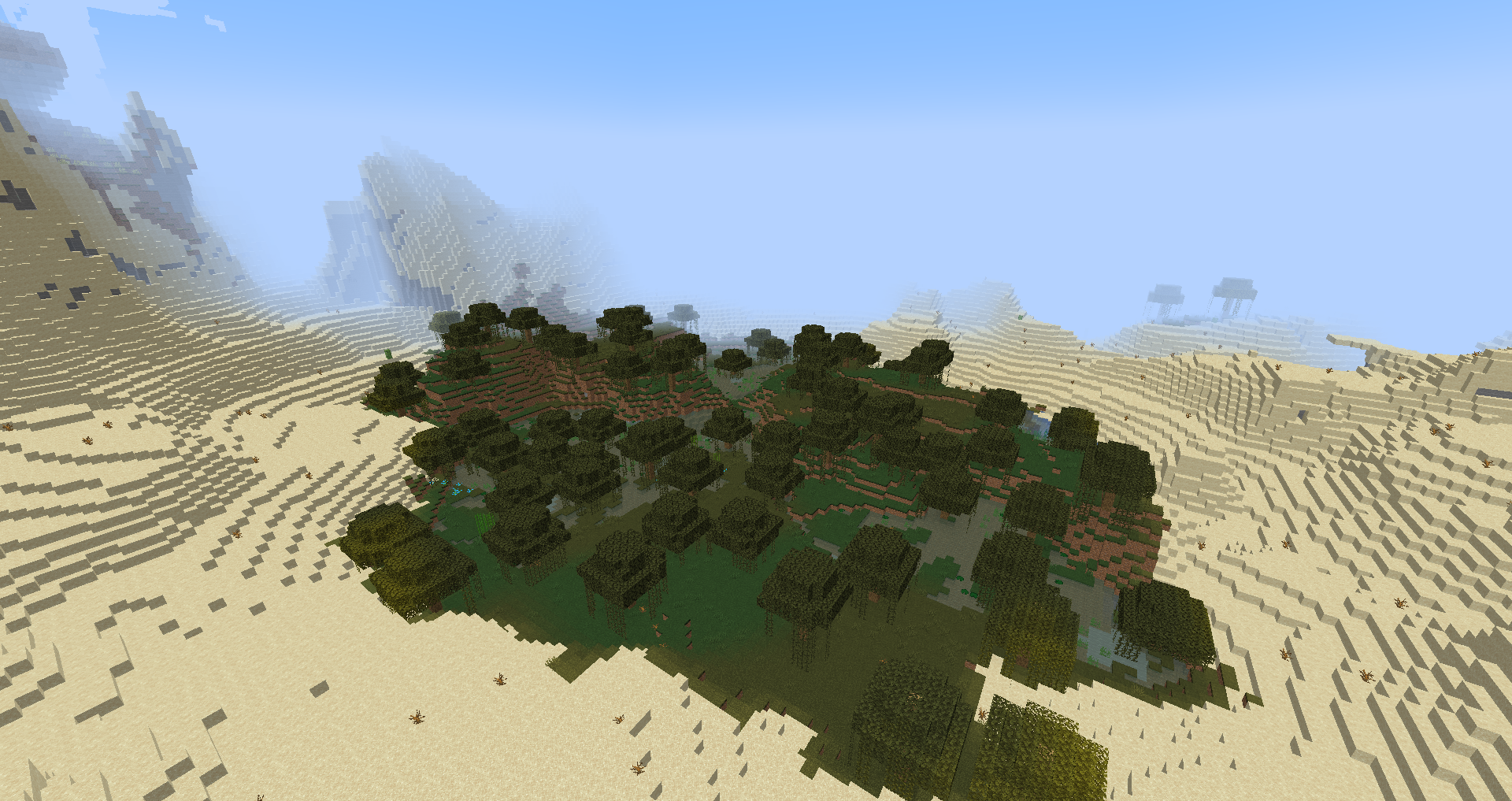
Swamps generate surrounded by deserts in locations wherestony peaks wereexpectedSwamps generate surrounded by deserts in locations where a dry biome was expected
For some terrain generation values, swamps occasionally generate surrounded by deserts. This seems out of place, as one would expect some other terrain to generate here. I think the terrain should be s
tony peaks(high Temperature, high Elevation).Sample affected values from seed 5116735402577285868:
x:-17232 z:-5736 (swamp) C0.402 E0.660 T0.742 H-0.026 W0.240 | (nearby desert) C0.276 E0.672 T0.757 H-0.150 W0.403
x:-13348 z:8104 (swamp) C0.219 E0.623 T0.753 H0.021 W1.157 | (nearby desert) C0.214 E0.627 T0.752 H-0.012 W0.894
x:5288 z:7832 (swamp) C0.149 E0.746 T0.640 H0.328 W0.272 | (nearby desert) C0.274 E0.840 T0.606 H0.234 W-0.392
x:-13856 z:520 (swamp) C0.057 E0.623 T0.578 H0.296 W0.032 | (nearby desert) C0.113 E0.591 T0.588 H0.241 W-0.436All these have a high E (e
levation) value around 0.7, and a high T (temperature) value around 0.6, which is why I believe these swamps should be stony peaks.Related issue:
MC-237621.For some terrain generation values, swamps occasionally generate surrounded by deserts. This seems out of place, as one would expect some other terrain to generate here. I think the terrain should be something else that's dry and flat (high Temperature, high Erosion).
Sample affected values from seed 5116735402577285868:
x:-17232 z:-5736 (swamp) C0.402 E0.660 T0.742 H-0.026 W0.240 | (nearby desert) C0.276 E0.672 T0.757 H-0.150 W0.403
x:-13348 z:8104 (swamp) C0.219 E0.623 T0.753 H0.021 W1.157 | (nearby desert) C0.214 E0.627 T0.752 H-0.012 W0.894
x:5288 z:7832 (swamp) C0.149 E0.746 T0.640 H0.328 W0.272 | (nearby desert) C0.274 E0.840 T0.606 H0.234 W-0.392
x:-13856 z:520 (swamp) C0.057 E0.623 T0.578 H0.296 W0.032 | (nearby desert) C0.113 E0.591 T0.588 H0.241 W-0.436All these have a high E (erosion) value around 0.7, and a high T (temperature) value around 0.6.
Related issue:
MC-237621.

When an older world is upgraded to 1.18 pre-6, under specific circumstances a pillager outpost will generate but not spawn pillagers.
The cause is structure references for pillager outposts (Level > Structures > References > pillager_outpost) pointing to chunks that have not yet generated. When these chunks are loaded in the world in 1.18 pre-6, the structure will generate but the structure information is not saved in the chunk (Level > Structures > Starts > pillager_outpost is INVALID).
I have attached a world save that reproduces the issue.
The structure is a pillager outpost at 80, 320. The corresponding chunk containing the outpost is NOT present in the save file (region 0,0 chunk 5,20) but adjacent chunks that reference it are present (eg: region 0,0 chunk 5,19). This adjacent chunk has a reference pointing to the chunk at 5,20 (Level > Structures > References > pillager_outpost: 05 00 00 00 14 00 00 00 hex decodes as 5,20).
If the chunk containing the pillager outpost is present in the save files, (the outpost has generated), the outpost will spawn pillagers as normal. It requires this edge case to produce a defective outpost.
I attempted to create a custom world that has larger oceans by altering the "continentalness" noise setting for all biomes. I did this with software, by altering the continentalness of all biomes with a simple function f(x) = -0.3x² + x + 0.3 for values between -1 and 1 and leaving values outside these ranges unaltered. (The function maps -1 to -1, +1 to +1 and shifts the location of intermediate values towards the positive direction so that shores are moved from -0.15 to near +0.15).
When I did this, the ocean biomes were enlarged as expected. However, the terrain was not changed. This creates large expanses of ocean biomes that are above sea level.
I used a world generation datapack that can be found here: https://drive.google.com/file/d/1OyLG704MKEILKQGY9utUreFms7G7v2jw/view?usp=sharing
I substituted the "Overworld" biome settings in "data/minecraft/dimension" with the attached "overworld.json".
The result were the attached biome map "oceans_biome.png" and world map "oceans_world.jpg".I attempted to create a custom world that has larger oceans by altering the "continentalness" noise setting for all biomes. I did this with software, by altering the continentalness of all biomes with a simple function f
When I did this, the ocean biomes were enlarged as expected. However, the terrain was not changed. This creates large expanses of ocean biomes that are above sea level.
I used a world generation datapack that can be found here: https://drive.google.com/file/d/1OyLG704MKEILKQGY9utUreFms7G7v2jw/view?usp=sharing
I substituted the "Overworld" biome settings in "data/minecraft/dimension" with the attached "overworld.json".
The result were the attached biome map "oceans_biome.png" and world map "oceans_world.jpg".Note: The "overworld.json" has wonky whitespace, which I intend to fix later. However, the placement of whitespace isn't important in JSON files.
I attempted to create a custom world that has larger oceans by altering the "continentalness" noise setting for all biomes. I did this with software, by altering the continentalness of all biomes with a simple function f
When I did this, the ocean biomes were enlarged as expected. However, the terrain was not changed. This creates large expanses of ocean biomes that are above sea level.
I used a world generation datapack that can be found here: https://drive.google.com/file/d/1OyLG704MKEILKQGY9utUreFms7G7v2jw/view?usp=sharing
I substituted the "Overworld" biome settings in "data/minecraft/dimension" with the attached "overworld.json".
The result were the attached biome map "oceans_biome.png" and world map "oceans_world.jpg".Note: The "overworld.json" has wonky whitespace, which I intend to fix later. However, the placement of whitespace between tokens isn't important in JSON files.
Custom worlds: If oceans are enlarged by adjusting "continentalness" settings, the world spawn point can be placed in the ocean
I adjust
edthe "continentalness" setting to enlarge oceansbyediting7500 biome settings in minecraft/dimension/overworld.json and 18 noise settings in minecraft/worldgen/noise_settings/overworld.json. This worked fine, except the spawn point for the worldcan bein the ocean.The spawn point matches closely the spawn point for the unmodified world. It appears the algorithm for spawn point is not taking into account these changes to the terrain generation.
Suggested fixes:
(1) When searching for the spawn point, remove hardcoded settings and take into account any changes to the terrain. A possible way of doing this is to expose the settings for the spawn point algorithm. For example, if the "continentalness" for beaches is changed from -0.15 to +0.30, it should be possible to configure this for the purposes of locating a spawn point.
(2) Searching for the spawn point should not use steps of 16 at all distances, but use larger steps farther out. This could locate a spawn point faster, at the cost of lower precision.Attachments: dimension.overworld.json, worldgen.noise_settings.overworld.json.
I created a custom world by adjusting the "continentalness" setting to enlarge oceans. I edited 7500 biome settings in minecraft/dimension/overworld.json and 18 noise settings in minecraft/worldgen/noise_settings/overworld.json. This worked fine, except the spawn point for the world was in the ocean.
The spawn point matches closely the spawn point for the unmodified world with the same seed. It appears the algorithm for spawn point is not taking into account these changes to the terrain generation.
To reproduce:
1. Create a vanilla datapack, or use this one: https://drive.google.com/file/d/1OyLG704MKEILKQGY9utUreFms7G7v2jw/view?usp=sharing (described here: https://www.reddit.com/r/minecraft_configs/comments/rbfyay/i_set_up_a_vanilla_118_worldgen_datapack_template/).
2. Copy the altered files to the correct locations.
3. Start a new world with the datapack. Give the world a seed of 1. --> Player spawns in the ocean.Suggested fixes:
(1) When searching for the spawn point, remove hardcoded settings and take into account any changes to the terrain. A possible way of doing this is to expose the settings for the spawn point algorithm. For example, if the "continentalness" for beaches is changed from -0.15 to +0.30, it should be possible to configure this for the purposes of locating a spawn point.
(2) Searching for the spawn point should not use steps of 16 at all distances, but use larger steps farther out. This could locate a spawn point faster, at the cost of lower precision.Attachments: dimension.overworld.json, worldgen.noise_settings.overworld.json.
Fluid level next to froglights islower than other blocksFluid level next to froglights is too low

When saving a world, "Not a string" appears as an error message in the chat. This seems to occur whenever there's a warden in the world when saving the game, up to once per warden.
To reproduce:
1. Create a superflat world.
2. Use spawn eggs to spawn a Warden and a couple of Zoglins.
3. When they start to fight, save the world -> "Not a string" appears in the log.
4. When all the zoglins are killed, save the world -> The message does not appear.
When saving a world, "Not a string" appears as an error message in the chat. This seems to occur whenever there's a warden in the world when saving the game, up to once per warden.
To reproduce:
1. Create a superflat world.
2. Use spawn eggs to spawn a Warden and a couple of Zoglins.
3. When they start to fight, save the world or pause the game -> "Not a string" appears in the log.
4. When all the zoglins are killed, save the world or pause the game -> The message does not appear.

When generating chunks, the server can occasionally get overloaded and new chunks can take many seconds to generate. This appears to happen more severely when the game has been running for a while.
I generated the chunks using a redstone mechanism (attached as g1
6). The redstone mechanism teleports the player around the map in a grid pattern spaced 192 blocks apart, teleporting the player about once every 13 seconds.The mechanism was modified so the player generated chunks over a larger area (from about -8448 -8256 to 8448 8256).After a while, the server started spamming the chat with "overloaded" messages. They happened occasionally at first, with small numbers around a few seconds, but gradually got more frequent with longer pause times.
09:56:01.367 Can't keep up! Is the server overloaded? Running 3688ms or 73 ticks behind
09:59:10.343 Can't keep up! Is the server overloaded? Running 3365ms or 67 ticks behind
10:12:36.215 Can't keep up! Is the server overloaded? Running 5886ms or 117 ticks behind
11:19:57.706 Can't keep up! Is the server overloaded? Running 2377ms or 47 ticks behind
11:22:52.019 Can't keep up! Is the server overloaded? Running 2390ms or 47 ticks behind
11:29:24.384 Can't keep up! Is the server overloaded? Running 2155ms or 43 ticks behind
11:30:09.836 Can't keep up! Is the server overloaded? Running 8156ms or 163 ticks behind
11:30:38.273 Can't keep up! Is the server overloaded? Running 3444ms or 68 ticks behind
11:31:25.252 Can't keep up! Is the server overloaded? Running 9523ms or 190 ticks behind
11:32:27.124 Can't keep up! Is the server overloaded? Running 24395ms or 487 ticks behind
11:35:23.968 Can't keep up! Is the server overloaded? Running 51889ms or 1037 ticks behind
11:36:50.947 Can't keep up! Is the server overloaded? Running 49518ms or 990 ticks behind
11:38:46.258 Can't keep up! Is the server overloaded? Running 77829ms or 1556 ticks behind
11:39:55.496 Can't keep up! Is the server overloaded? Running 44267ms or 885 ticks behind
11:42:15.089 Can't keep up! Is the server overloaded? Running 39609ms or 792 ticks behind
11:43:45.484 Can't keep up! Is the server overloaded? Running 52905ms or 1058 ticks behind
11:45:11.470 Can't keep up! Is the server overloaded? Running 48491ms or 969 ticks behind
11:50:05.431 Can't keep up! Is the server overloaded? Running 31503ms or 630 ticks behind
11:52:28.747 Can't keep up! Is the server overloaded? Running 43318ms or 866 ticks behind
11:53:56.848 Can't keep up! Is the server overloaded? Running 50619ms or 1012 ticks behind
11:55:10.338 Can't keep up! Is the server overloaded? Running 48509ms or 970 ticks behind
11:56:59.778 Can't keep up! Is the server overloaded? Running 71949ms or 1438 ticks behindAttachments:
g16.nbt - place this structure in the spawn chunks using a structure blockWhen generating chunks, the server can occasionally get overloaded and new chunks can take many seconds to generate. This appears to happen more severely when the game has been running for a while.
I generated the chunks using a redstone mechanism (attached as g19.nbt). The redstone mechanism teleports the player around the map in a grid pattern spaced 192 blocks apart, teleporting the player about once every 13 seconds.
After a while, the server started spamming the chat with "overloaded" messages. They happened occasionally at first, with small numbers around a few seconds, but gradually got more frequent with longer pause times.
09:56:01.367 Can't keep up! Is the server overloaded? Running 3688ms or 73 ticks behind
09:59:10.343 Can't keep up! Is the server overloaded? Running 3365ms or 67 ticks behind
10:12:36.215 Can't keep up! Is the server overloaded? Running 5886ms or 117 ticks behind
11:19:57.706 Can't keep up! Is the server overloaded? Running 2377ms or 47 ticks behind
11:22:52.019 Can't keep up! Is the server overloaded? Running 2390ms or 47 ticks behind
11:29:24.384 Can't keep up! Is the server overloaded? Running 2155ms or 43 ticks behind
11:30:09.836 Can't keep up! Is the server overloaded? Running 8156ms or 163 ticks behind
11:30:38.273 Can't keep up! Is the server overloaded? Running 3444ms or 68 ticks behind
11:31:25.252 Can't keep up! Is the server overloaded? Running 9523ms or 190 ticks behind
11:32:27.124 Can't keep up! Is the server overloaded? Running 24395ms or 487 ticks behind
11:35:23.968 Can't keep up! Is the server overloaded? Running 51889ms or 1037 ticks behind
11:36:50.947 Can't keep up! Is the server overloaded? Running 49518ms or 990 ticks behind
11:38:46.258 Can't keep up! Is the server overloaded? Running 77829ms or 1556 ticks behind
11:39:55.496 Can't keep up! Is the server overloaded? Running 44267ms or 885 ticks behind
11:42:15.089 Can't keep up! Is the server overloaded? Running 39609ms or 792 ticks behind
11:43:45.484 Can't keep up! Is the server overloaded? Running 52905ms or 1058 ticks behind
11:45:11.470 Can't keep up! Is the server overloaded? Running 48491ms or 969 ticks behind
11:50:05.431 Can't keep up! Is the server overloaded? Running 31503ms or 630 ticks behind
11:52:28.747 Can't keep up! Is the server overloaded? Running 43318ms or 866 ticks behind
11:53:56.848 Can't keep up! Is the server overloaded? Running 50619ms or 1012 ticks behind
11:55:10.338 Can't keep up! Is the server overloaded? Running 48509ms or 970 ticks behind
11:56:59.778 Can't keep up! Is the server overloaded? Running 71949ms or 1438 ticks behind
11:59:17.658 Can't keep up! Is the server overloaded? Running 100429ms or 2008 ticks behind
12:01:06.817 Can't keep up! Is the server overloaded? Running 84187ms or 1683 ticks behindThe chunk generation ended successfully shortly thereafter (by reaching the end of the grid) but it was very slow towards the end.
I quit the world at this point. Saving the world took about 100 seconds with the disk pegged at close to 100% the whole time.
Attachments:
g19.nbt - place this structure in the spawn chunks using a structure block
When generating chunks, the server can occasionally get overloaded and new chunks can take many seconds to generate. This appears to happen more severely when the game has been running for a while.
I generated the chunks using a redstone mechanism (attached as g19.nbt). The redstone mechanism teleports the player around the map in a grid pattern spaced 192 blocks apart, teleporting the player about once every 13 seconds.
After a while, the server started spamming the chat with "overloaded" messages. They happened occasionally at first, with small numbers around a few seconds, but gradually got more frequent with longer pause times.
09:56:01.367 Can't keep up! Is the server overloaded? Running 3688ms or 73 ticks behind
09:59:10.343 Can't keep up! Is the server overloaded? Running 3365ms or 67 ticks behind
10:12:36.215 Can't keep up! Is the server overloaded? Running 5886ms or 117 ticks behind
11:19:57.706 Can't keep up! Is the server overloaded? Running 2377ms or 47 ticks behind
11:22:52.019 Can't keep up! Is the server overloaded? Running 2390ms or 47 ticks behind
11:29:24.384 Can't keep up! Is the server overloaded? Running 2155ms or 43 ticks behind
11:30:09.836 Can't keep up! Is the server overloaded? Running 8156ms or 163 ticks behind
11:30:38.273 Can't keep up! Is the server overloaded? Running 3444ms or 68 ticks behind
11:31:25.252 Can't keep up! Is the server overloaded? Running 9523ms or 190 ticks behind
11:32:27.124 Can't keep up! Is the server overloaded? Running 24395ms or 487 ticks behind
11:35:23.968 Can't keep up! Is the server overloaded? Running 51889ms or 1037 ticks behind
11:36:50.947 Can't keep up! Is the server overloaded? Running 49518ms or 990 ticks behind
11:38:46.258 Can't keep up! Is the server overloaded? Running 77829ms or 1556 ticks behind
11:39:55.496 Can't keep up! Is the server overloaded? Running 44267ms or 885 ticks behind
11:42:15.089 Can't keep up! Is the server overloaded? Running 39609ms or 792 ticks behind
11:43:45.484 Can't keep up! Is the server overloaded? Running 52905ms or 1058 ticks behind
11:45:11.470 Can't keep up! Is the server overloaded? Running 48491ms or 969 ticks behind
11:50:05.431 Can't keep up! Is the server overloaded? Running 31503ms or 630 ticks behind
11:52:28.747 Can't keep up! Is the server overloaded? Running 43318ms or 866 ticks behind
11:53:56.848 Can't keep up! Is the server overloaded? Running 50619ms or 1012 ticks behind
11:55:10.338 Can't keep up! Is the server overloaded? Running 48509ms or 970 ticks behind
11:56:59.778 Can't keep up! Is the server overloaded? Running 71949ms or 1438 ticks behind
11:59:17.658 Can't keep up! Is the server overloaded? Running 100429ms or 2008 ticks behind
12:01:06.817 Can't keep up! Is the server overloaded? Running 84187ms or 1683 ticks behindThe chunk generation ended successfully shortly thereafter (by reaching the end of the grid) but it was very slow towards the end.
I quit the world at this point. Saving the world took about 100 seconds with the disk pegged at close to 100% the whole time.
To reproduce, create a fresh world in creative mode, place the structure in the spawn chunks and let it run unattended for up to 25 hours.
Attachments:
g19.nbt - place this structure in the spawn chunks using a structure block
When generating chunks, the server can occasionally get overloaded and new chunks can take many seconds to generate. This appears to happen more severely when the game has been running for a while.
I generated the chunks using a redstone mechanism (attached as g19.nbt). The redstone mechanism teleports the player around the map in a grid pattern spaced 192 blocks apart, teleporting the player about once every 13 seconds.
After a while, the server started spamming the chat with "overloaded" messages. They happened occasionally at first, with small numbers around a few seconds, but gradually got more frequent with longer pause times.
09:56:01.367 Can't keep up! Is the server overloaded? Running 3688ms or 73 ticks behind
09:59:10.343 Can't keep up! Is the server overloaded? Running 3365ms or 67 ticks behind
10:12:36.215 Can't keep up! Is the server overloaded? Running 5886ms or 117 ticks behind
11:19:57.706 Can't keep up! Is the server overloaded? Running 2377ms or 47 ticks behind
11:22:52.019 Can't keep up! Is the server overloaded? Running 2390ms or 47 ticks behind
11:29:24.384 Can't keep up! Is the server overloaded? Running 2155ms or 43 ticks behind
11:30:09.836 Can't keep up! Is the server overloaded? Running 8156ms or 163 ticks behind
11:30:38.273 Can't keep up! Is the server overloaded? Running 3444ms or 68 ticks behind
11:31:25.252 Can't keep up! Is the server overloaded? Running 9523ms or 190 ticks behind
11:32:27.124 Can't keep up! Is the server overloaded? Running 24395ms or 487 ticks behind
11:35:23.968 Can't keep up! Is the server overloaded? Running 51889ms or 1037 ticks behind
11:36:50.947 Can't keep up! Is the server overloaded? Running 49518ms or 990 ticks behind
11:38:46.258 Can't keep up! Is the server overloaded? Running 77829ms or 1556 ticks behind
11:39:55.496 Can't keep up! Is the server overloaded? Running 44267ms or 885 ticks behind
11:42:15.089 Can't keep up! Is the server overloaded? Running 39609ms or 792 ticks behind
11:43:45.484 Can't keep up! Is the server overloaded? Running 52905ms or 1058 ticks behind
11:45:11.470 Can't keep up! Is the server overloaded? Running 48491ms or 969 ticks behind
11:50:05.431 Can't keep up! Is the server overloaded? Running 31503ms or 630 ticks behind
11:52:28.747 Can't keep up! Is the server overloaded? Running 43318ms or 866 ticks behind
11:53:56.848 Can't keep up! Is the server overloaded? Running 50619ms or 1012 ticks behind
11:55:10.338 Can't keep up! Is the server overloaded? Running 48509ms or 970 ticks behind
11:56:59.778 Can't keep up! Is the server overloaded? Running 71949ms or 1438 ticks behind
11:59:17.658 Can't keep up! Is the server overloaded? Running 100429ms or 2008 ticks behind
12:01:06.817 Can't keep up! Is the server overloaded? Running 84187ms or 1683 ticks behindThe chunk generation ended successfully shortly thereafter (by reaching the end of the grid) but it was very slow towards the end.
I quit the world at this point. Saving the world took about 100 seconds with the disk pegged at close to 100% the whole time.
To reproduce, create a fresh world in creative mode, place the structure in the spawn chunks and let it run unattended for up to 25 hours.
Attachments:
g19.nbt - place this structure in the spawn chunks using a structure blockWhen generating chunks, the server can occasionally get overloaded and new chunks can take many seconds to generate. This appears to happen more severely when the game has been running for a while.
I generated the chunks using a redstone mechanism (attached as g19.nbt). The redstone mechanism teleports the player around the map in a grid pattern spaced 192 blocks apart, teleporting the player about once every 13 seconds.
After a while, the server started spamming the chat with "overloaded" messages. They happened occasionally at first, with small numbers around a few seconds, but gradually got more frequent with longer pause times.
09:56:01.367 Can't keep up! Is the server overloaded? Running 3688ms or 73 ticks behind
09:59:10.343 Can't keep up! Is the server overloaded? Running 3365ms or 67 ticks behind
10:12:36.215 Can't keep up! Is the server overloaded? Running 5886ms or 117 ticks behind
11:19:57.706 Can't keep up! Is the server overloaded? Running 2377ms or 47 ticks behind
11:22:52.019 Can't keep up! Is the server overloaded? Running 2390ms or 47 ticks behind
11:29:24.384 Can't keep up! Is the server overloaded? Running 2155ms or 43 ticks behind
11:30:09.836 Can't keep up! Is the server overloaded? Running 8156ms or 163 ticks behind
11:30:38.273 Can't keep up! Is the server overloaded? Running 3444ms or 68 ticks behind
11:31:25.252 Can't keep up! Is the server overloaded? Running 9523ms or 190 ticks behind
11:32:27.124 Can't keep up! Is the server overloaded? Running 24395ms or 487 ticks behind
11:35:23.968 Can't keep up! Is the server overloaded? Running 51889ms or 1037 ticks behind
11:36:50.947 Can't keep up! Is the server overloaded? Running 49518ms or 990 ticks behind
11:38:46.258 Can't keep up! Is the server overloaded? Running 77829ms or 1556 ticks behind
11:39:55.496 Can't keep up! Is the server overloaded? Running 44267ms or 885 ticks behind
11:42:15.089 Can't keep up! Is the server overloaded? Running 39609ms or 792 ticks behind
11:43:45.484 Can't keep up! Is the server overloaded? Running 52905ms or 1058 ticks behind
11:45:11.470 Can't keep up! Is the server overloaded? Running 48491ms or 969 ticks behind
11:50:05.431 Can't keep up! Is the server overloaded? Running 31503ms or 630 ticks behind
11:52:28.747 Can't keep up! Is the server overloaded? Running 43318ms or 866 ticks behind
11:53:56.848 Can't keep up! Is the server overloaded? Running 50619ms or 1012 ticks behind
11:55:10.338 Can't keep up! Is the server overloaded? Running 48509ms or 970 ticks behind
11:56:59.778 Can't keep up! Is the server overloaded? Running 71949ms or 1438 ticks behind
11:59:17.658 Can't keep up! Is the server overloaded? Running 100429ms or 2008 ticks behind
12:01:06.817 Can't keep up! Is the server overloaded? Running 84187ms or 1683 ticks behindThe chunk generation ended successfully shortly thereafter (by reaching the end of the grid) but it was very slow towards the end.
I quit the world at this point. Saving the world took about 100 seconds with the disk pegged at close to 100% the whole time.
To reproduce:
1. Create a fresh world in creative mode.
2. Copy the structure file "g19.nbt" into "/generated/minecraft/structures" in the world save.
3. use a structure block to place the mechanism "g19" in the spawn chunks, start the mechanism, and let it run unattended for up to 25 hours.Attachments:
g19.nbt - place this structure in the spawn chunks using a structure block
When generating chunks, the server can occasionally get overloaded and new chunks can take many seconds to generate. This appears to happen more severely when the game has been running for a while.
I generated the chunks using a redstone mechanism (attached as g19.nbt). The redstone mechanism teleports the player around the map in a grid pattern spaced 192 blocks apart, teleporting the player about once every 13 seconds.
After a while, the server started spamming the chat with "overloaded" messages. They happened occasionally at first, with small numbers around a few seconds, but gradually got more frequent with longer pause times.
09:56:01.367 Can't keep up! Is the server overloaded? Running 3688ms or 73 ticks behind
09:59:10.343 Can't keep up! Is the server overloaded? Running 3365ms or 67 ticks behind
10:12:36.215 Can't keep up! Is the server overloaded? Running 5886ms or 117 ticks behind
11:19:57.706 Can't keep up! Is the server overloaded? Running 2377ms or 47 ticks behind
11:22:52.019 Can't keep up! Is the server overloaded? Running 2390ms or 47 ticks behind
11:29:24.384 Can't keep up! Is the server overloaded? Running 2155ms or 43 ticks behind
11:30:09.836 Can't keep up! Is the server overloaded? Running 8156ms or 163 ticks behind
11:30:38.273 Can't keep up! Is the server overloaded? Running 3444ms or 68 ticks behind
11:31:25.252 Can't keep up! Is the server overloaded? Running 9523ms or 190 ticks behind
11:32:27.124 Can't keep up! Is the server overloaded? Running 24395ms or 487 ticks behind
11:35:23.968 Can't keep up! Is the server overloaded? Running 51889ms or 1037 ticks behind
11:36:50.947 Can't keep up! Is the server overloaded? Running 49518ms or 990 ticks behind
11:38:46.258 Can't keep up! Is the server overloaded? Running 77829ms or 1556 ticks behind
11:39:55.496 Can't keep up! Is the server overloaded? Running 44267ms or 885 ticks behind
11:42:15.089 Can't keep up! Is the server overloaded? Running 39609ms or 792 ticks behind
11:43:45.484 Can't keep up! Is the server overloaded? Running 52905ms or 1058 ticks behind
11:45:11.470 Can't keep up! Is the server overloaded? Running 48491ms or 969 ticks behind
11:50:05.431 Can't keep up! Is the server overloaded? Running 31503ms or 630 ticks behind
11:52:28.747 Can't keep up! Is the server overloaded? Running 43318ms or 866 ticks behind
11:53:56.848 Can't keep up! Is the server overloaded? Running 50619ms or 1012 ticks behind
11:55:10.338 Can't keep up! Is the server overloaded? Running 48509ms or 970 ticks behind
11:56:59.778 Can't keep up! Is the server overloaded? Running 71949ms or 1438 ticks behind
11:59:17.658 Can't keep up! Is the server overloaded? Running 100429ms or 2008 ticks behind
12:01:06.817 Can't keep up! Is the server overloaded? Running 84187ms or 1683 ticks behindThe chunk generation ended successfully shortly thereafter (by reaching the end of the grid) but it was very slow towards the end.
I quit the world at this point. Saving the world took about 100 seconds with the disk pegged at close to 100% the whole time.
To reproduce:
1. Create a fresh world in creative mode.
2. Copy the structure file "g19.nbt" into "/generated/minecraft/structures" in the world save.
3.use a structure block to place the mechanism "g19" in the spawn chunks, start the mechanism, and let it run unattended for up to 25 hours.Attachments:
g19.nbt - place this structure in the spawn chunks using a structure blockWhen generating chunks, the server can occasionally get overloaded and new chunks can take many seconds to generate. This appears to happen more severely when the game has been running for a while.
I generated the chunks using a redstone mechanism (attached as g19.nbt). The redstone mechanism teleports the player around the map in a grid pattern spaced 192 blocks apart, teleporting the player about once every 13 seconds.
After a while, the server started spamming the chat with "overloaded" messages. They happened occasionally at first, with small numbers around a few seconds, but gradually got more frequent with longer pause times.
09:56:01.367 Can't keep up! Is the server overloaded? Running 3688ms or 73 ticks behind
09:59:10.343 Can't keep up! Is the server overloaded? Running 3365ms or 67 ticks behind
10:12:36.215 Can't keep up! Is the server overloaded? Running 5886ms or 117 ticks behind
11:19:57.706 Can't keep up! Is the server overloaded? Running 2377ms or 47 ticks behind
11:22:52.019 Can't keep up! Is the server overloaded? Running 2390ms or 47 ticks behind
11:29:24.384 Can't keep up! Is the server overloaded? Running 2155ms or 43 ticks behind
11:30:09.836 Can't keep up! Is the server overloaded? Running 8156ms or 163 ticks behind
11:30:38.273 Can't keep up! Is the server overloaded? Running 3444ms or 68 ticks behind
11:31:25.252 Can't keep up! Is the server overloaded? Running 9523ms or 190 ticks behind
11:32:27.124 Can't keep up! Is the server overloaded? Running 24395ms or 487 ticks behind
11:35:23.968 Can't keep up! Is the server overloaded? Running 51889ms or 1037 ticks behind
11:36:50.947 Can't keep up! Is the server overloaded? Running 49518ms or 990 ticks behind
11:38:46.258 Can't keep up! Is the server overloaded? Running 77829ms or 1556 ticks behind
11:39:55.496 Can't keep up! Is the server overloaded? Running 44267ms or 885 ticks behind
11:42:15.089 Can't keep up! Is the server overloaded? Running 39609ms or 792 ticks behind
11:43:45.484 Can't keep up! Is the server overloaded? Running 52905ms or 1058 ticks behind
11:45:11.470 Can't keep up! Is the server overloaded? Running 48491ms or 969 ticks behind
11:50:05.431 Can't keep up! Is the server overloaded? Running 31503ms or 630 ticks behind
11:52:28.747 Can't keep up! Is the server overloaded? Running 43318ms or 866 ticks behind
11:53:56.848 Can't keep up! Is the server overloaded? Running 50619ms or 1012 ticks behind
11:55:10.338 Can't keep up! Is the server overloaded? Running 48509ms or 970 ticks behind
11:56:59.778 Can't keep up! Is the server overloaded? Running 71949ms or 1438 ticks behind
11:59:17.658 Can't keep up! Is the server overloaded? Running 100429ms or 2008 ticks behind
12:01:06.817 Can't keep up! Is the server overloaded? Running 84187ms or 1683 ticks behindThe chunk generation ended successfully shortly thereafter (by reaching the end of the grid) but it was very slow towards the end.
I quit the world at this point. Saving the world took about 100 seconds with the disk pegged at close to 100% the whole time.
To reproduce:
1. Create a fresh world in creative mode.
2. Copy the structure file "g19.nbt" into "/generated/minecraft/structures" in the world save.
3. Use a structure block to place the mechanism "g19" in the spawn chunks.
4. Start the mechanism.
5. Let the game run unattended for up to 25 hours.Attachments:
g19.nbt - place this structure in the spawn chunks using a structure block
JVM arguments: "-Xmx2G -XX:+UnlockExperimentalVMOptions -XX:+UseG1GC -XX:G1NewSizePercent=20 -XX:G1ReservePercent=20 -XX:MaxGCPauseMillis=50 -XX:G1HeapRegionSize=32M"
Windows 10, bundled Java runtime.
Chunk generation can take many secondsif the game has been running for a whileChunk generation causes memory leak if the game has been running for a while
Chunk generation causes memory leakif the game has been running for a while
When chunks are blended, biomes in blended chunks are not blended above Y=255.
To reproduce:
1. Create a new world in 1.17.1 (or an older version).
2. Save this world without moving.
3. Load this world in 1.19.3 (or any version 1.18 or newer).
4. Move around a bit to generate new terrain.
5. Inspect the biomes in blended chunks --> Biomes are blended up to Y=255, but only new biomes appear at Y=256 and above.Related:
MC-240570Attached are two biome maps I created with a private mapper for a world I created in 1.17.1 with seed 1 and then loaded in 1.19.3. Biome map "Y252" was created at Y=252 that demonstrates correct biome blending. Biome map "Y256" was created at Y=256 that demonstrates biome blending is inoperative at this height.


When chunks are blended, biomes in blended chunks are not blended above Y=255.
To reproduce:
1. Create a new world in 1.17.1 (or an older version).
2. Save this world without moving.
3. Load this world in 1.19.3 (or any version 1.18 or newer).
4. Move around a bit to generate new terrain.
5. Inspect the biomes in blended chunks --> Biomes are blended up to Y=255, but only new biomes appear at Y=256 and above, or below Y=0.Related:
MC-240570Attached are two biome maps I created with a private mapper for a world I created in 1.17.1 with seed 1 and then loaded in 1.19.3. Biome map "Y252" was created at Y=252 that demonstrates correct biome blending. Biome map "Y256" was created at Y=256 that demonstrates biome blending is inoperative at this height.
Chunk blending does not blend biomes at Y=256 and above or below Y=0
When chunks are blended, biomes in blended chunks are not blended above Y=255 or below Y=0.
To reproduce:
1. Create a new world in 1.17.1 (or an older version).
2. Save this world without moving.
3. Load this world in 1.19.3 (or any version 1.18 or newer).
4. Move around a bit to generate new terrain.
5. Inspect the biomes in blended chunks --> Biomes are blended up to Y=255, but only new biomes appear at Y=256 and above, or below Y=0.Related:
MC-240570Attached are two biome maps I created with a private mapper for a world I created in 1.17.1 with seed 1 and then loaded in 1.19.3. Biome map "Y252" was created at Y=252 that demonstrates correct biome blending. Biome map "Y256" was created at Y=256 that demonstrates biome blending is inoperative at this height.

When the moon is lower in the sky, the moon is rendered brighter. When the moon is rising, it is noticeably brighter than its appearance when it is higher in the sky. This is the opposite behaviour of what actually happens for the real moon. The real moon is less bright when it is rising than when it is nearly overhead due to atmospheric extinction of light. An extreme case can be seen when the moon is seen low down in the void: the moon loses all its texture and appears like the sun.
The moon is rendered using the same rendering code as the sun. This is technically incorrect because the moon is not a self-luminous body. Instead of using the same rules for both, the moon should be darkened instead of lightened, and this adjustment should be based on the position of the sun (and not the moon). A simple 50% darkening of the colours of the moon should suffice when the sun is above the horizon (eg: 0xffffff white darkens to 0x7f7f7f) , with similar transition rules as the rendering of the sun uses.
To reproduce:
1. Create a superflat world (gamerule: doDayLightCycle = false).
2. Face east.
3. Set the time to 14500. -> The moon is higher in the sky and appears dimmer: this behaviour is correct.
4. Set the time to 12950. -> The moon is on the horizon and appears too bright. Compare to the appearance in the previous step.
5. Teleport to Y=320.
6. Look down.
7. Set the time to 6000. -> The moon appears below the player, and is so bright that it loses its finer texture and looks like the sun.Attachments:
- moon.png: shows the difference between moon at time=12950 and time=14500.
- moon 6000.png: shows the moon below the player when the player is at Y=~300 in a superflat world.
- moon 6000 possible fix.png: How the moon may look below the player when this is fixed. Created in Gimp by creating a sky-coloured background and superimposing a cropped image of the moon taken overhead, darkened with Curves by 50% and combining the layers in Addition mode.
This bug report was created at the request of a moderator on /r/mojira. The discussion of this issue can be seen here: https://www.reddit.com/r/Mojira/comments/zjonwq/request_to_reopen_mc45044_two_suns_because_the/
This is an old bug that was originally reported as
MC-45044(plus others), but that report was closed as "Working as intended" because the bug was not described very well.
When the moon is lower in the sky, the moon is rendered brighter. When the moon is rising, it is noticeably brighter than its appearance when it is higher in the sky. This is the opposite behaviour of what actually happens for the real moon. The real moon is less bright when it is rising than when it is nearly overhead due to atmospheric extinction of light. An extreme case can be seen when the moon is seen low down in the void: the moon loses all its texture and appears like the sun.
The moon is rendered using the same rendering code as the sun. This is technically incorrect because the moon is not a self-luminous body. Instead of using the same rules for both, the moon should be darkened instead of lightened, and this adjustment should be based on the position of the sun (and not the moon). A simple 50% darkening of the colours of the moon should suffice when the sun is above the horizon (eg: 0xffffff white darkens to 0x7f7f7f) , with similar transition rules as the rendering of the sun uses.
To reproduce:
1. Create a superflat world (gamerule: doDayLightCycle = false).
2. Face east.
3. Set the time to 14500. -> The moon is higher in the sky and appears dimmer: this behaviour is correct.
4. Set the time to 12950. -> The moon is on the horizon and appears too bright. Compare to the appearance in the previous step.
5. Teleport to Y=320.
6. Look down.
7. Set the time to 6000. -> The moon appears below the player, and is so bright that it loses its finer texture and looks like the sun.Attachments:
- moon.png: shows the difference between moon at time=12950 and time=14500.
- moon 6000.png: shows the moon below the player when the player is at Y=~300 in a superflat world.
- moon 6000 possible fix.png: How the moon may look below the player when this is fixed. Created in Gimp by creating a sky-coloured background and superimposing a cropped image of the moon taken overhead, darkened with Curves by 50% and combining the layers in Addition mode.
- moon 6000 possible fix.xcf: The Gimp file used to create the above.
This bug report was created at the request of a moderator on /r/mojira. The discussion of this issue can be seen here: https://www.reddit.com/r/Mojira/comments/zjonwq/request_to_reopen_mc45044_two_suns_because_the/
This is an old bug that was originally reported as
MC-45044(plus others), but that report was closed as "Working as intended" because the bug was not described very well.


When the game renders celestial objects in the sky, the objects are rendered with the sun and moon rendered before the stars. This will cause stars to appear in front of the sun and moon, if a sun and moon texture is larger than usual.
It would make more sense if the stars are rendered before the sun and moon because they are farther away from the player.
Code analysis shows celestials are render in the order sun, moon, stars. A more logical order would be stars, sun, moon. (This would make no obvious difference with vanilla textures because the sun and moon are placed in gaps in the star field.)
To reproduce:
1. Enable the "Jupiter Moon" resource pack (it replaces the moon with Jupiter, also has a round sun)
2. Create any world (I used a void world)
3. Set time to 18000
4. Look up and inspect Jupiter -> stars are drawn on top of the "moon"

bdm68, after having this issue, please attach the crash report and the launcher log.
![[Mojang] Adrian Östergård](../../../data/assets/gravatar/nighter.jpeg)
bdm68 - please upload your world as a zip on a file sharing service and link it here so we can take a look at it.

bdm68 "Most NBT tags are not kept when a mob converts to another mob" > that's MC-88967
When you have e.g. a renamed pig and it gets struck by lightning, it gets turned into a Pigman which still got the name of the pig, but its PersistenceRequired tag which was 1b by renaming is gone (= 0b), which results in despawning of the Pigman.
The same goes for e.g. a Villager turning into a Witch, the Witch will keep the Villagers' name, but will despawn/her PersistenceRequired tag will not be set automatically to 1b.
You can check that with
/data get entity @e[type=!player,limit=1,sort=nearest]
![[Mod] Neko](../../../data/avatars/users/92901.png)
bdm68: I wasn't able to reproduce with the same steps. The mobs that were there start to burn and no mobs continue to spawn. The F3 screen also shows that the server light is 15.
bdm68 Server does not look overloaded, runs at 20tps with lots of idle time, so it looks more like chunk delivery/rendering issue. Can you show your F3 screen?
bdm68, could you please provide a download link for your world?

@bdm68, is the server really getting stuck for you, i.e. not doing anything regardless of how long you wait, or does is just take long to load the nether?
![[Mod] violine1101](../../../data/avatars/users/92858.png)
Does this issue still happen in 1.15-pre1? I tried to reproduce with bdm68's description of the issue, but wasn't successful.

It's not just banners from previous versions. Here's steps to reproduce my end of the banner stacking, bdm68.
1. Kill a captain Illager to get his banner. It can be any type of captain, to my knowledge all of the captain banners will stack together.
2. Collect some of the banners from an outpost.
Despite the fact they're supposed to be the same exact banner, ones that are dropped from captains, and broken blocks are different in that the block drop versions do not stack because they don't have their banner info hidden, whilist captain banners do.
Another thing to note; if you place a captain banner and break it, it will stack with banners from the outposts.
If the original submitter of this is no longer active, I'd like to request ownership of this issue.
![[Mod] turbo](../../../data/avatars/users/92867.png)
The description needs to be updated, this seems to only happen along chunk borders now, and [Helper] clam lol was unable to reproduce the bit about ice patches.
[Helper] clam lol requests ownership, but wants to ask the current owner of this ticket for their consent first. @bdm68 please respond if that's okay with you. 
I ran the /entitydata command with a dummy value
{LeftHanded:0b}to see what was going on. I found these fields in the data dump that look like they could be the problem.
DragonPhase:10
Motion:[0:NaNd,1:NaNd,2:NaNd]
I experimented by creating a copy of the world, deleting the DIM1 directory and copying the DIM1 directory with the bugged dragon into this world save.
Experiment 1: /entitydata @e[type=EnderDragon]
{DragonPhase:0}did not fix it.
Experiment 2: /entitydata @e[type=EnderDragon]
{DragonPhase:0,NoAI:0}did not fix it.
Experiment 3: /entitydata @e[type=EnderDragon]
{DragonPhase:0,NoAI:0,Motion:[0:-1.0d,1:-0.25d,2:-0.25d]}moved the dragon, but it then hovered again in the air without moving (but could be damaged in the body with arrows but not in the head). Killing the dragon did not create the end portal.
My observations of some lighting glitches: they seem to occur if a light source is removed, such as a torch. They seem to be incorrect calculations of sky light in that area.
Go into a forest, place a torch on the ground then remove it. Trees in the vicinity will have lighting issues underneath them. Place an opaque block on the ground, then remove it. Nearby lighting issues will be fixed when the block is placed.
From this observation, it appears that when a light source is removed, the calculation of light intensity in that area appears to be skipping a calculation of sky light that is not being skipped when a block is placed or broken. This may also happen when trees or terrain is generated in new chunks.
The lighting issues will not always go away on their own. A common place to find lighting issues is on overhangs, such as a tree on the edge of a cliff or overhanging terrain. Lighting underneath the tree will often be incorrect. It is possible to stand in that darkened area and examine the light levels in the Debug screen. When you do this, you will find that the Sky light is much lower than expected. These dark areas are not generally aligned with chunk boundaries, so this is not the same issue as the one where cubic chunks with just air blocks are not saving lighting information.
Confirmed in 1.9.4.
The cause of the issue is that the sound engine is being restarted as soon as the Mipmap slider is moved. This can be seen easily if the Launcher window is visible.
Try the following:
[11:54:47] [Client thread/INFO]: SoundSystem shutting down...
[11:54:47] [Client thread/WARN]: Author: Paul Lamb, www.paulscode.com
[11:54:47] [Sound Library Loader/INFO]: Starting up SoundSystem...
[11:54:47] [Thread-10/INFO]: Initializing LWJGL OpenAL
[11:54:47] [Thread-10/INFO]: (The LWJGL binding of OpenAL. For more information, see http://www.lwjgl.org)
[11:54:47] [Thread-10/INFO]: OpenAL initialized.
[11:54:48] [Sound Library Loader/INFO]: Sound engine started
[11:54:48] [Client thread/INFO]: Created: 1024x512 textures-atlas
Moving the slider should NOT cause the sound driver to restart.
The texture atlas is also being recreated. This should not be happening either. This should happen when the Done button is clicked, not when the slider is moved.
Attached is the unmodified 1.8 level.dat file that goes with the original report, from 28 January. File name is 5116735402577285868-level.dat. This is why everyone should keep backups, they are so useful sometimes.
Auto jump also has this bug in the PC version (1.10).
I have a hunch that the bug in swamps may involve the terrain generation changes introduced in version 1.8. In that version, the terrain in swamps at sea level was changed so some blocks at sea level were randomly replaced with water blocks (see attached image). If you go to the coordinates of the stray chunks and divide them by 16, you are likely to find this kind of terrain modification nearby (within 16 blocks). It happens with the coordinates in the OP, and the coordinates in all five of the ones in Chikyuno's post.
There are other similar issues with stray chunks in the terrain generation that are not related to swamps. I have previously seen stray chunks in the Nether though I have not been able to reproduce this. I have also seen stray chunks in superflat worlds with different behaviour.
The generation of this kind of terrain may be the cause of the issue in swamps (see attached image).
1.11. The behaviour of this bug is not random, but happens more often in certain circumstances.
I was mining a diagonal tunnel in the Nether using Efficiency 4 diamond picks. My mining technique is not just to dig at random, but to try digging out only the blocks that need to be removed with some precision at the edges but just mine everything in the middle of the tunnel. For the edges and corners, this technique involves standing in such a position that blocks that are not to be removed are out of range of the pick, but when digging the middle of the tunnel I just mine everything. I have noticed that with this digging technique the ghost blocks tend to appear with much higher frequencies at the corners of the tunnel than they appear elsewhere. On average I will get about one of these ghost blocks per chunk, mostly at the corners.
The impression I get is that there is some disagreement between the client and server as to whether a block is in range of a tool.
Still present in 1.11.2 for off pulses. Something's not right when some repeaters in a chain will let through the off pulse and others in the chain do not despite having the same delay setting.
So far as I know, repeaters are supposed to lengthen short pulses and many redstone contraptions rely on this. If this is changed, this would be a change to fundamental behaviour of repeaters that is unlikely to be popular. This change should not be considered without discussing it with the player base.
Still an issue with 1.11.2. Date printing in US format on non-US locales.
This bug needs to be fixed because it is exploitable. When the chunks don't render, it can reveal underground structures including caves and strongholds. All someone has to do to exploit this bug is to turn down their frame rate to a low level and underground structures in visible chunks can be seen through the invisible chunks.
I have checked this at multiple locations by teleporting to the middle of the bounding box while in spectator mode. I used an NBT editor to obtain the coordinates for these bounding boxes by looking up a sample of fortress segments with the id "NeBEF".
If the bridge end is outside netherrack, it generates normally inside its bounding box. If the bridge end is inside netherrack, all that is found inside the bounding box is netherrack. No bridge end structure is seen here; the bridge appears to end before the actual end segment. If you go outside to where the walkway ends and look at the netherrack at the apparent end, its coordinates coincide with the bounding box of the missing segment.
After closer examination, I have determined that the missing segment IS being generated, but the netherrack is not being replaced by air blocks. I suspect the cause is: Missing structure void blocks.
I have added three screenshots. One shows a normal structure with the bounding box encased in white concrete. One shows the view inside a structure inside netherrack - the end of the bridge can be seen nearby. The third shows the missing end, with netherrack at the edge of the bounding box replaced by white glass. In the last screenshot, the structure can be seen continuing inside the netherrack.
I have experienced a similar issue relating to the distance to the world border. If the world border is within the render distance, the world freezes. Lit TNT does not explode, zombies don't chase villagers, wolves don't chase skeletons, etc. Lowering the render distance so the world border is no longer in range will unfreeze the world.
Yes, this is clearly not intended if you're exploring a cave system and can give yourself night vision just by standing in flowing water. Players can carry a bucket of water with them to give themselves night vision wherever they want. Clearly exploitable.
I have successfully reproduced the bug in a Superflat world.
Instructions:
1. Create a new Superflat world.
2. Use the Overworld preset. Change the biome ID from 1 to 29 (Roofed Forest).
3. Use a seed of 1. (Any seed can probably be used but this is the seed I chose).
4. Use Creative mode.
5. Create the world.
6. Fly around the world for a while generating new chunks. Eventually you'll see one of these odd chunks. I found a Wood chunk within 30 seconds and then a Leaf chunk. (I also found a Desert temple at 234, y, 169 which is another bug).
Can confirm for 18w09a. I have seen igloos, desert temples, villages, zombie villages, jungle temples, witch huts and the new ocean structures in a Superflat world that is entirely Roofed Forest.
I used the 18w09a snapshot. I had some difficulty recreating the issue from a fresh instance of MC. I originally reproduced it after creating about four worlds in the same MC session, one after the other (all with the same seed but different kinds of worlds: Default, superflat plains (with "biome-1" altered to an invalid "biome_29" setting), superflat roofed forest). The last one had the strange wood and leaf structures.
I have attached a file called "TestRoofedForest.zip" that exhibits the issue. Two points of interest are at 216 80 136 (leaf blocks) and 151 80 -72 (wood blocks).
I didn't save the log file. I'm trying to reproduce the issue again so I can get a new log file.
I have successfully reproduced the issue by creating a DEBUG world. A log file is attached.
MC-127142-logfile.txt
It appears to be an old bug because I have seen evidence of it in old maps. I will check a selection of older versions including 1.12.2 and 1.8.9.
Confirmed for 1.12.2.
The image "InhabitedTime-1-12-2.png" shows the issue. I created a new world with seed 1 in creative mode then stayed in one place for 25 minutes. World age was 29,367 ticks (Time field from level.dat). The inhabited time for the loaded chunks is plotted in the image. Chunks that exist have InhabitedTime plotted in greyscale, chunks that do not exist are shown in blue.
Inhabited chunks had four distinct values for InhabitedTIme that can be seen clearly in the image: 0, 7998, 15999, 24000.
It is particularly interesting that some chunks in the middle - near the player - have an InhabitedTime of 0, even though the player is nearby.
Save files showing the bug in 1.12.2 are attached as "Test127407-1122.zip".
Confirmed in 1.8.9, see the image "InhabitedTime-1-8-9.png" for details. Save file for 1.8.9 is attached as "Test127407-1089.zip".
This seemed to happen because I was pushing the JVM rather hard with experimental options at the same time that I was stress testing the terrain generation by running it as fast as possible for up to an hour. This is likely the cause of the failure. I have yet to reproduce this with more sensible JVM options (-Xmx1024M and nothing else).
The JVM parameters: -Xms1024m -Xmx1024m -XX:+UnlockExperimentalVMOptions -XX:+UseG1GC -XX:G1NewSizePercent=20 -XX:G1ReservePercent=20 -XX:MaxGCPauseMillis=50 -XX:G1HeapRegionSize=16M
This will need to be retested for 18w15a due to the fix in that version for
MC-125083(New world generator doesn't generate snow on trees in snow biomes).It has happened again in 18w15a with vanilla JVM settings (-Xmx1024M):
Caught exception in thread Thread[WorldGen-Worker-295,5,main]
java.lang.OutOfMemoryError: unable to create new native thread
at java.lang.Thread.start0(Native Method)
at java.lang.Thread.start(Thread.java:714)
at java.util.concurrent.ForkJoinPool.tryAddWorker(ForkJoinPool.java:1338)
at java.util.concurrent.ForkJoinPool.deregisterWorker(ForkJoinPool.java:1460)
at java.util.concurrent.ForkJoinWorkerThread.run(ForkJoinWorkerThread.java:167)
It is an old bug. It exists in 1.12.2 and 1.8.9, and probably exists in all versions between. It is probably older than 1.8.9.
See MC-127407 for a sample of save files that show this issue in 1.12.2 and 1.8.9. It may be related to MC-127407.
Yes, the underwater screenshots were taken at that location (selected locations on the south side of the triple island near the top of the map). I have uploaded a cropped version of the top of the map with the approximate coordinates marked with crosses. Examination of the map shows a number of other instances, mostly near deep ocean islands. I intend to perform a statistical analysis later.
The impression I get after examining several instances is that the terrain is compressing five blocks of horizontal generation into four by omitting every fifth block. This is mostly apparent near deep ocean islands, which appear to be a special case in terrain generation.
Confirmed: the banding occurs in both directions. See the animation "TestSeed13 Animation.gif" for a demonstration centred near the triple island at the top of the original map.
Similar banding has been observed in Extreme Hills biomes. See the animation "TestSeed13 Animation Extreme Hills.gif". This Extreme Hills island can be found near the centre of the map at approximate coordinates 500,400.
I have a similar crash in 18w15a when loading a superflat test world with only a few different blocks. This test world was created in 1.12.2. World is attached as "x112113crash.zip".
Crash log:
---- Minecraft Crash Report ----
// There are four lights!
Time: 16/04/18 4:43 PM
Description: Exception in server tick loop
java.lang.RuntimeException: java.util.concurrent.ExecutionException: java.lang.ArrayIndexOutOfBoundsException: 827
at net.minecraft.server.MinecraftServer.i_(SourceFile:394)
at dal.a(SourceFile:115)
at dal.d(SourceFile:131)
at net.minecraft.server.MinecraftServer.run(SourceFile:502)
at java.lang.Thread.run(Thread.java:745)
Caused by: java.util.concurrent.ExecutionException: java.lang.ArrayIndexOutOfBoundsException: 827
at java.util.concurrent.CompletableFuture.get(CompletableFuture.java:2272)
at net.minecraft.server.MinecraftServer.i_(SourceFile:392)
... 4 more
Caused by: java.lang.ArrayIndexOutOfBoundsException: 827
at it.unimi.dsi.fastutil.longs.Long2LongLinkedOpenHashMap$MapIterator.nextEntry(Long2LongLinkedOpenHashMap.java:1207)
at it.unimi.dsi.fastutil.longs.Long2LongLinkedOpenHashMap$EntryIterator.next(Long2LongLinkedOpenHashMap.java:1299)
at it.unimi.dsi.fastutil.longs.Long2LongLinkedOpenHashMap$EntryIterator.next(Long2LongLinkedOpenHashMap.java:1288)
at aum.a(SourceFile:25)
at aum.get(SourceFile:49)
at it.unimi.dsi.fastutil.longs.AbstractLong2ObjectFunction.get(AbstractLong2ObjectFunction.java:148)
at java.util.Map.computeIfAbsent(Map.java:955)
at sz.a(SourceFile:42)
at sz.a(SourceFile:23)
at zx.c(SourceFile:102)
at sg.d(SourceFile:153)
at bor.a(SourceFile:231)
at bor.a(SourceFile:80)
at bqv.a(SourceFile:16)
at bqv.a(SourceFile:13)
at bkw.a(SourceFile:27)
at avl.a(SourceFile:479)
at bjy.a(SourceFile:143)
at su.a(SourceFile:12)
at st.a(SourceFile:33)
at biq.a(SourceFile:85)
at sz.a(SourceFile:54)
at sz.a(SourceFile:23)
at zx$a.a(SourceFile:143)
at zx$a$$Lambda$900/6329757.apply(Unknown Source)
at java.util.concurrent.CompletableFuture$AsyncApply.exec(CompletableFuture.java:501)
at java.util.concurrent.ForkJoinTask.doExec(ForkJoinTask.java:289)
at java.util.concurrent.ForkJoinPool$WorkQueue.runTask(ForkJoinPool.java:902)
at java.util.concurrent.ForkJoinPool.scan(ForkJoinPool.java:1689)
at java.util.concurrent.ForkJoinPool.runWorker(ForkJoinPool.java:1644)
at java.util.concurrent.ForkJoinWorkerThread.run(ForkJoinWorkerThread.java:157)
A detailed walkthrough of the error, its code path and all known details is as follows:
---------------------------------------------------------------------------------------
– System Details –
Details:
Minecraft Version: 18w15a
Operating System: Windows 7 (x86) version 6.1
Java Version: 1.8.0_25, Oracle Corporation
Java VM Version: Java HotSpot(TM) Client VM (mixed mode), Oracle Corporation
Memory: 70084416 bytes (66 MB) / 199000064 bytes (189 MB) up to 1037959168 bytes (989 MB)
JVM Flags: 2 total; -XX:HeapDumpPath=MojangTricksIntelDriversForPerformance_javaw.exe_minecraft.exe.heapdump -Xmx1G
Profiler Position: N/A (disabled)
Player Count: 0 / 8; []
Data Packs: vanilla
Type: Integrated Server (map_client.txt)
Is Modded: Probably not. Jar signature remains and both client + server brands are untouched.
I have been unable to run 18w19b and 18w20a because it crashes on startup (
MC-129374).I have been having the same issue. There are no logs, it simply crashes immediately on startup.
I am also experiencing this crash on Windows 7 with the same Java version as the OP (Java Version 8 Update 171 32bit). Is anyone experiencing this on 64-bit Java or is this a Java 32-bit issue?
Still waiting for
MC-129374to be fixed before I can test this.I can confirm that the -Xss1024K workaround has got the 18w20c snapshot working for me after it refused to work without it. Good find.
MC-129374hasn't been fixed yet, but I have been able to get 18w20c working by increasing the stack size.The issue is still present in 18w20c. I am not getting the WorldGen-Worker error messages in the logs, but the other symptoms are still present: new chunks stop loading and the game can no longer be saved. Environment is 32-bit Java.
To reproduce, try running with limited memory (1Gb) and simply create new terrain by flying in a straight line in creative mode. When the memory reaches its limit, the issue is likely to happen.
After some more investigation, I suspect there is a memory leak with world generation. The memory in use keeps climbing as more terrain is generated, even after major GC cycles that occur every few minutes. On world load on 32-bit Java with 1G memory, the memory in use initially has a range of 25%-45%. This slowly creeps up after each GC cycle, sometimes dropping with a major GC cycle until it reaches somewhere around 75%-95% or so, at which point a major GC cycle can no longer recover the memory in use. Then the Worldgen threads crash and saving the game is no longer possible.
I have also discovered a workaround. Save the game periodically and then reload it. This can recover up to 500M of lost memory.
This is probably a duplicate of
MC-125034.Confirmed for 18w21a.
Anyone who is impacted by this issue should also review
MC-128163, which reports a very similar memory leak that impacts the Worldgen worker threads and saving the game. The most severe consequence of that bug is that once the Worldgen worker threads crash, saving the game is no longer possible. When you have exhausted RAM as a consequence ofMC-129492, you are also affected byMC-128163if you press Escape and press "Save and Quit to Title" and the game does nothing. If you are affected, please vote for that issue.The attached save file (T1_18w21a) was generated by flying in a straight line until the Worldgen worker threads crashed, as described in
MC-128163. When this game was reloaded, this crash happens.I don't think
MC-129492describes the issue accurately. I can reproduce the issue quite quickly using the attached save file without moving. I created another world with the same seed and stayed in one place. The crash did not happen.As far as I can tell, the attached save file has incomplete chunks caused by
MC-128163. When that world is loaded, the game tries to complete the chunks and it runs out of memory, even when the game is paused.I have investigated further, and there is definitely a problem with the chunk Status in the attached save, T1_18w21a (caused by a crash). So far as I can tell, the chunk status normally goes in the sequence empty, carved, liquid_carved, decorated, lighted, fullchunk, postprocessed. In a normal save file, chunks with these statuses will form distinctive rings with chunks in the innermost ring having the "postprocessed" status, and each concentric ring outwards will be one further back in the sequence. In the T1_18w21a save, the rings are broken.
This is best explained by pictures (empty = red, carved = orange, liquid_carved = yellow, decorated = green, lighted = blue, fullchunk = purple, postprocessed=white). The pictures were generated by extracting the status for each chunk and colouring them according to that scheme.
Confirmed for 18w20c using 64-bit Java on Windows 10.
Cannot reproduce for 18w22a using 64-bit Java on Windows 10. May be fixed. Need independent confirmation in 32-bit environment, preferably on Windows 7. I no longer have reliable access to 32-bit Java on Windows 7 due to replacing a defective hard disk.
Affects 18w22c.
Reproduced by creating a Superflat world and executing these commands:
I concur with the "assume fixed" assessment. I tried really hard to crash it in 18w22a and I could not do so even though I flew over 25,000 blocks. In 18w20c I crashed it after 3,000 blocks. The save I generated in18w20c is linked in
MC-130162.Affects 1.13 pre-1.
Generating chunks by flying around with commands will occasionally cause the world generation to stop and saving to become impossible. Reproduced on Win10 using 64-bit Java. It is difficult to reproduce but not impossible.
I have taken a look at two affected chunk sections and found they have some common features.
It helps to understand how 1.13 saves chunk data. Chunk data are saved in Sections. These Sections store the blocks in a Palette which describes the blocks, and index into the Palette with an array of Long called BlockStates that can vary in size with a minimum size of 256 (corresponding to a Palette size of 16). These sections also have other data.
In chunks with this corruption, the Palette appears normal. The BlockStates array is corrupted. The BlockStates array has many repeats of the value "1". Sometimes this fills the entire BlockStates array, other times other values are present but the value "1" dominates.
In a corrupted BlockStates array I examined with 27 entries in the Palette, the first two Longs look like this:
21 84 10 42 08 21 84 10
42 08 21 84 10 42 08 21
To decode this, reverse the hex values (little endian order), convert to binary and take five bits at a time:
10 84 21 08 42 10 84 21 ...
(8 values) 0100 0010 0001 0000 1000 0100 0010 0001
...01 00001 00001 00001 00001 00001 00001
...-- ----- ----- ----- ----- ----- 00001 = 00001
...-- ----- ----- ----- ----- 00001 ----- = 00001
...-- ----- ----- ----- 00001 ----- ----- = 00001
etc.
The whole array has repeats of the sequence 21 84 10 42 08 which means it is filled with the value 00001.
The other array I examined had other values as well but the value 1 dominated.
It looks like the value "1" is used to initialise the array and then the array is populated with the correct values. It looks like the population of the array occasionally terminates before completion leading to the corruption.
crash-2018-06-16_12.41.30-server.txt attached after experiencing the issue.
I'm not sure if this is still the same issue or if it's something else.
This core issue is resolved. I am experiencing other issues, in particular
MC-129492.The difference between this issue and
MC-129492:MC-129492will occur slowly over time until the server crashes. The player must actively generate chunks by moving.MC-130162will occur quickly if the world is reloaded (usually within 60 seconds) when there are incomplete chunks in the vicinity. It can occur after a crash due toMC-129492or other causes but won't usually occur first. The player need not do anything after reloading the world.Server and launcher logs attached.
Easy to reproduce. Go to a tall mountain, place bucket of water on top of glowstone,flowing water freezes.
Attached another Status Map (as "Status Map.png") showing the value of the "Status" variable in the affected chunks. This one was generated in a 1.12.2 world being loaded in 1.13 pre2 after experiencing the
MC-129492SP server crash.The position of the player is marked with "x". Chunks adjacent to the player did not have a "postprocessed" status and these chunks did not render in game.
It shows another example of the status flags for adjacent chunks are not in the expected sequence. It looks as if the chunk generation and conversion doesn't handle it well when the status sequence is not what it expects.
Status Key:
Chunks in proper sequence would appear as a rainbow with a white middle.
I also want to share an observation that may be related. The chunk at 0,0 has a "fullchunk" (purple) status even though that chunk has not actually been loaded in game. I have logged this as
MC-131604.Beds play two sounds even though only one bed is being broken.
I have spent over an hour moving around an old world generating new chunks and converting existing chunks. Ram allocation was at 96% when the world loaded (2GB max) and it did not change over the course of four in-game days. Actual RAM usage was in the range 50%-60% for much of the time. I could not reproduce this issue in pre2. When I tried the same thing in pre1, it crashed after about 20 minutes or so.
The issue seems to be back in pre3.
I generated chunks using a command block chunk generator that teleports the player around the map at intervals. After a while, chunk generation halts and the game cannot be saved. From the symptoms, it is difficult to determine whether it is caused by this bug,
MC-130162or another similar issue.Reproduced in 1.13-pre5 after generating chunks for about 2 hours with 2Gb RAM.
Reproduced in 1.13-pre5.
How to reproduce this issue with some reliability:
MC-129492will occur and chunks will stop loading. This is when the server thread has crashed by running out of heap space.When you reproduce the issue as described above, it may take a couple of hours before RAM is exhausted. For quicker reproduction, reduce the maximum memory to 1Gb.
The RAM allocation will creep up slowly as chunks are generated.
To check - if the same reproduction steps are run on a world with pre-generated 1.13 chunks, does it still run out of memory? If yes - it's a chunk loading issue. If no - it's a chunk generation issue. Also try on a world with chunks generated in 1.12.2 (to test the chunk conversion).
Attached is a chart "
MC-130427.png" that shows the effect of teleporting around a world until the game exhausts RAM. The X axis is the number of teleports, the Y axis is the time taken to process the chunks. Three scenarios were examined: generating new chunks, loading existing chunks, converting chunks from a 1.12.2 world. In all tests, the world was allocated 1GB of RAM with a view distance of 13.For the new chunks versus existing chunks, the behaviour was very similar. The garbage collection spikes were occurring at similar times, which suggests the resource leak has a cause independent of whether the chunk is freshly generated.
For converting 1.12.2 chunks, the behaviour was very different. RAM was exhausting much sooner.
This experiment suggests there are two resource leaks: (1) Chunk loading and unloading, (2) Converting chunks from 1.12.2. It suggests there are no resource leaks with chunk generation.
To make reproduction easier, see
MC-130427. That bug report describes an automated method of reproduction that uses a redstone and command block chunk loader built in the spawn chunks.The world file is very large. I created a large 1.12.2 world save for stress testing and it is over a Gb in size (8192×8192). I intend to try preparing a cut-down world save that has the essentials.
If I cannot do this, I will provide structure files and instructions for creating the world save from scratch. The world save was created in 1.12.2 using a command block chunkloader that is described here: https://www.reddit.com/r/Minecraft/comments/8qfpk1/a_machine_for_pregenerating_chunks_in_vanilla/ No structures were built in the world except the chunkloader.
Reproduced in 1.12.2 using the structure "g12" (attached as structures.zip )
)
I have detailed instructions and a small structure file that allows the world to be created from scratch on demand.
Version 1.12.2:
Create a new world in Creative mode with the seed 1.
Copy the structure file "g12.nbt" into the "structures" folder of the world save.
Run the following commands:
/gamerule doDaylightCycle false
/gamerule doWeatherCycle false
/gamerule commandBlockOutput false
/time set 6000
/setblock 160 100 256 minecraft:structure_block
Go to the structure block (it will be nearby in the air) and load the structure "g12" twice in quick succession. (Loading it twice is necessary to work around
MC-104141. If this is not done, the piston heads will be missing on the extended pistons and the contraption will malfunction.)Stand in mid-air above the oak log on the platform.
Press the red button on the right. Three redstone blocks will disappear, arming the contraption.
Press the green bottom on the left. This will start generating chunks by teleporting the player around the map. This will take 10 to 15 minutes to complete.
When the contraption is finished, the player will be floating above the oak log.
(If the player teleports once more, the player can be returned to the device with /teleport @p ~-256 103 ~.)
Save the game.
Version 1.13-pre6:
Make sure the launcher is configured to display the game log.
Load the save game created previously in 1.12.2.
Alter the commands in the two command blocks marked with blue concrete by changing the first part of the teleport command from "execute @p ~ ~ ~" to "execute at @p run".
(If the player teleported after the end of terrain generation, check the middle pair of hoppers for stray redstone dust and move the smaller stack to the other hopper.)
Stand in mid-air above the oak log on the platform.
Press the green bottom on the left. This will start converting chunks by teleporting the player around the map.
Watch the log - the enum errors may occur.
g12.zip
My JVM arguments for my snapshot testing configuration:
-Xmx1024M -XX:+UnlockExperimentalVMOptions -XX:+UseG1GC -XX:G1NewSizePercent=20 -XX:G1ReservePercent=20 -XX:MaxGCPauseMillis=50 -XX:G1HeapRegionSize=16M
Limiting memory with the -Xmx1024M argument will cause the issue to be reproduced more quickly. It can be reproduced with -Xmx2G but it takes a lot longer.
My reproduction steps included a chunkloader that teleported the player. It can be reproduced by moving manually, but automation is more convenient. I have attached a chunkloader in the attachment g13.zip. You can use this chunkloader to reproduce this defect if you follow these instructions:
After doing this, the contraption is ready to use.
To start, stand in mid-air above the oak log on the platform and press the green button. This will start generating chunks by teleporting the player around the map.
Render distance seems to have a fairly large impact on this. Setting a render distance of 13 with 1024M RAM causes RAM exhaustion fairly quickly and latency to reach quite high levels ("Can't keep up! Is the server overloaded?" messages reaching as high as 100,000 ms as RAM reaches close to 100%). It appears that stale chunks are not being released from RAM reliably.
Reducing render distance to 8 with 1024M RAM is much more stable (RAM was not exhausted after 2 hours and performance was still good after travelling 60,000 blocks).
Method used: modified version of the "g13" chunkloader that advances the player by 4 blocks every 0.8 seconds to simulate walking speed, with player teleporting at a height of 96 blocks in spectator mode.
I have seen this bug in a fresh 1.12.2 world by creating a new world in 1.12.2 and then loading it in 1.13.pre6.
It affects chunks depending on the order in which the chunks were generated. If chunks are generated systematically, it is possible for the partially-decorated chunks to appear in predictable patterns.
While testing
MC-129492by generating chunks with a chunkloader that teleports the player every 256 blocks (see that bug report for the chunkloader structure file), I have seen partially-decorated chunks in snowy biomes with a very regular pattern.See the file "MC-125007-IceAndSnow.png" for an example. This is a map of a single Region file that contains a snowy biome. This world save was created by teleporting around the map to coordinates that are multiples of 256. The teleport positions were (in order) top left (0,0), top middle (0,256), left (256,0), middle (256,256).
It is easy to reproduce: grab the structure file "g13" from
MC-129492, load that into a new world with snowy biomes nearby and just press the button to cause the player to generate chunks by teleporting around the map in a grid.Confirmed in 1.6.4, see "1_6_4.png". The bug may be linked to the presence of mobs in the area. There is a weak correlation to the presence of caves; chunks with no caves are somewhat more likely to be not updating.
This bug is closely related to MC-128345: the correlation of erratic updating of chunks for InhabitedTime and LastUpdate is high.
Reproduced in 1.13-pre5. See MC-125007 for an example.
I mentioned the older versions to give a clue where the bug is. Maybe 90% of the time this is redundant information, but it makes up for it in the 10% of the time when it isn't. Here, it allowed me to identify a clear relation to MC-128345.
I don't see how this is a bug. It is possible that a lot of cacti in a random area could have a height of 1 simply due to random chance.
Affects 1.13 pre10.
Rechecked in 1.13.1.
The location of Nether fortresses are different in this version and the location of a broken bridge in Netherrack in the original steps to reproduce are no longer valid. A broken bridge inside Netherrack can be found near -581 73 155.
As Pokechu22 points out, the broken bridge generates normally inside netherrack but it cannot be seen because the netherrack isn't removed to expose it.
It is still happening, but after reviewing this I would say this isn't an issue that needs fixing. I recommend that this bug report be closed.
Affects 1.13.1.
I had this happen to me in survival single player similar to the original report with four beacon effects in spawn chunks. When I re-entered the Nether, I regained beacon effects that had previously expired; I could even return to the Overworld and retain the beacon effects that had previously expired.
Steps to reproduce:
1. Create a new superflat world.
2. Build a full beacon in the spawn chunks and give it the Strength and Regeneration effects.
3. Build a Nether portal.
4. Go through the Nether portal.
5. Travel a distance of about 120 blocks in the Nether and wait for beacon effects to expire.
6. Build another Nether portal.
7. Go through the new Nether portal.
8. Return through this Nether portal to the Nether --> Beacon effects return, this should not occur.
Additional information:
Adventure map villagers could have a flag that specifically marks them as custom villagers. Then it shouldn't be necessary to resort to unreliable ways of checking such as checking their career, or their trades. Just check the flag.
MC-129492has a chunkloader "g13.zip" that is a prebuilt version of the chunkloader described in this report which I have copied here.To use this chunkloader:
After doing this, the chunkloader is ready to use. (Not yet tested in 1.13.1.)
To start the chunkloader, stand in mid-air above the oak log on the platform and press the green button. This will start generating chunks by teleporting the player around the map.
—
From previous play, I suspect there are unresolved issues with RAM exhaustion that can be seen after a couple of hours of terrain generation in normal survival play. I will perform the test in the next day or two to determine this, assuming that other unresolved crash bugs don't cause issues such as
MC-134625.Tested on a 129×129 spawning platform created at y=64 below the Nether ceiling centred at 0,0. Tested while standing at 0,0. Spawns of pigmen (and other mobs) were greatly reduced at positive z coordinates. Pigmen did spawn at positive z coordinates, but the spawns were rare. It was normal for no mobs at all to spawn in positive z coordinates.
The overworld needs to be tested.
Also affects the overworld. Spawning platform at 0,0 only spawned mobs in negative z coordinates at night (using seed 13 to get ocean at 0,0).
Fence gates no longer cause grass paths to turn to dirt. 18w46a.
I will assume that chunks get written in Anvil files like this:
1. Move the chunk to the first free space in the Anvil file that is large enough to hold it, or the end of the file if no such space exists.
2. Update the Anvil file header to point to the new location with the new size.
If either step fails with an I/O error, the chunk data is still in the old location and is not lost. Newly-generated chunks will be lost but these can be regenerated. The I/O exception can be handled at that point. In such circumstances, a shutdown can (and must) be performed to protect the integrity of the data. What must not happen is further I/O. This is apparently what's happening. Bad I/O handling and aggressive handling of free space in Anvil files is a bad combination and it is apparently causing misplaced chunks. It's better to shut the game down immediately, causing the player to lose a few minutes' work, than to corrupt the save file, causing them to lose a lot more. It is better to fail safely.
When the game shuts down in this way, the integrity of the save should be checked. Detecting whether this check is needed is easy. Have a flag in level.dat called "running" that is set to 1 when the game is being played and cleared to 0 when the save shuts down cleanly. If the game crashes, the running flag isn't 0 in the save and this can be used to determine whether the game exited cleanly. If the running flag is 1 on startup, an integrity check should be performed. Note that detecting this cannot be done by setting a "crashed" flag of some sort because the crash could be serious enough to stop all I/O or the O/S itself has crashed.
The attached image "map-bug.png" shows the difference between a map created with the old map code (top) and the same map when re-explored with 1.13.2 (bottom). At the top of the map is a feature (a horizontal line marking a minecart railway) that shows clearly on the old map and is then partially erased when the area is explored.
Regression testing: Bushes generate in 18w45a but not in 18w46a and 18w47b.
Present in 1.13.2.
Tamed wolves are particularly strange. They will fall, die from fall damage while falling but then teleport to the player with low health.
Can confirm for 18w50a.
Cross reference to
MCPE-35114- "Villagers Cannot Breed in the Nether" which has been closed as Works As Intended.However, the villages_end.dat and villages_nether.dat files are still present.
I successfully reproduced the issue in a void world. This is why the crash report has minimal information.
Issue has been seen on beds of other colours (white and black tested) and on ender chests as items in hotbar.
Zombie pigmen are strange:
Clearly, a Custom Name isn't sufficient for persistence.
I have a hunch this bug has multiple causes. No persistence on named entities, entities despawning at chunk boundaries...
This is very easy to replicate.
1. Create superflat void world. Set world to Peaceful. Unlimited frame rate, turn off Vsync.
2. Press F3 to get FPS settings without chests.
3. Use the fill command to insert 8000 chests in the world in a 20×20×20 cube.
4. Check FPS. -> It will be much lower
5. Pause game.
6. Check FPS -> Low FPS persists even when paused (it can be shown using Shift-F3 that chest rendering is the cause of the issue)
With my testing on a potato computer, I was getting about 150 FPS without chests, about 4 fps with 8000 chests.
Chunks reverting to an earlier state can be triggered reliably and I know one of the causes. I have just watched a Youtube video that demonstrates how to force a chunk to revert to an earlier state for the purpose of duping items. The video is here: https://www.youtube.com/watch?v=sd8SM8YWP9U
What's happening here is the chunk has too much data in it and Minecraft is refusing to save it. This is due to a known limitation of the Anvil file format.
The Anvil file format stores data for up to 1024 chunks in 4096-byte sectors that are the same size as a hard disk cluster. The first sector in the file is reserved for headers. Each chunk in the Anvil file has its own header which consists of a 24-bit offset to the chunk data and an 8-bit length in sectors. The chunk data is stored compressed in one of two different formats.
This 8-bit length is the limitation that can cause chunks to revert. This imposes a maximum chunk size of 1,044,480 bytes after compression. If a chunk is too large after compression, it cannot be saved, and it will revert to an earlier state.
As for the causes, I suspect there are several. Some of these have since been patched, such as slimes not despawning. Others still exist, such as entity duplication. Still others can be forced by players, especially in situations where players have some control over the NBT content.
1.13 has introduced another potential cause. The Flattening has introduced block palettes for each chunk section in the Anvil files. These can be space inefficient if each chunk section has 4096 different blocks (including block properties). This is unlikely to be a problem for block data in chunks, but this possibility should not be ignored.
The issue is going to keep happening randomly with different triggers until the real underlying cause of the issue is addressed. The limited size of chunks in the Anvil file format is one known cause as is demonstrated in the Youtube video. Expanding the Anvil file format so compressed chunks can be larger than 1,044,480 bytes is needed. One possibility is giving each chunk two 32-bit headers instead of one (32 bits for the length, 32 bits for the offset). The Anvil format was originally introduced when block data was only 12 bits and written books did not exist. Now that block data can be significantly larger, the Anvil file format is starting to show its age and some consideration should be given to replacing it.
I have attached a test world "ChunkRevert.zip" created with the instructions provided in the Youtube video: https://www.youtube.com/watch?v=sd8SM8YWP9U. Credit goes to the creators of this video and another linked video there.
In this test world, the chunk at spawn has been almost filled. In this chunk are two chests: a chest filled with two different written books arranged in a specific alternating checkerboard pattern. A second chest has the same written books in two stacks of 8. If these written books are arranged alternately in the second chest, the chunk will become too large to be saved and will revert when it is unloaded. The cause is almost certainly the Anvil file limitation I described in my previous comment.
Another Reddit post reporting this issue is here: https://www.reddit.com/r/Minecraft/comments/awng1e/surface_stronghold_in_snapshot_19w09a_when_were/
Seed: 6270100715656620684
Coordinates: 5068 68 227
I had this crash while a villager was on fire after being set on fire with lava. The crash report in this instance has a different stack trace.
Description: Ticking entity java.lang.IllegalStateException: POI never registered at eu{x=-59, y=10, z=230} at aoz.c(SourceFile:93) at aox.b(SourceFile:80) at atz.a(SourceFile:481) at atz$$Lambda$3067/68093789.accept(Unknown Source) at java.util.Optional.ifPresent(Optional.java:159) at atz.a(SourceFile:480) at atz.a(SourceFile:469) at aif.a(SourceFile:994) at ahw.aa(SourceFile:430) at aif.aa(SourceFile:286) at aig.aa(SourceFile:225) at ahw.h(SourceFile:391) at aif.h(SourceFile:1986) at aig.h(SourceFile:292) at vc.a(SourceFile:579) at vc$$Lambda$2607/865527891.accept(Unknown Source) at bfy.a(SourceFile:668) at vc.a(SourceFile:382) at net.minecraft.server.MinecraftServer.b(SourceFile:814) at net.minecraft.server.MinecraftServer.a(SourceFile:753) at dwc.a(SourceFile:128) at net.minecraft.server.MinecraftServer.run(SourceFile:628) at java.lang.Thread.run(Thread.java:745)It can also happen if the villager remains confined in the village. The attached screenshot shows an example where the villagers were confined behind walls during a raid. One villager has Gossips, the other does not.
This is working as intended so far as I can tell.
A Nether portal in one dimension will link to a Nether portal in the other dimension within a distance of 128 blocks in x and z. This search occurs after adjusting coordinates. A Nether portal in the Overworld can be up to 1024 blocks away and it will still link (1024/8 = 128). Going from the Nether to the Overworld, the distance is 16 blocks (16*8 = 128).
See: https://minecraft.gamepedia.com/Nether_portal#Portal_linkage_between_Overworld_and_Nether
The bug is still present in 1.14 Prerelease 2. A world save is attached. 2019-04-16_19-00-38_MC110236.zip

Affects 1.14 prerelease 3.
Fixed for client light but not for server light. `/fill 0 255 0 63 255 63 stone` followed by `/fill 0 255 0 63 255 63 air` will cause client light to work normally but server light remains as if the stone blocks are still there. After replacing the stone blocks with air, hostile mobs will still spawn in this area despite it appearing fully lit and they will not burn.
The 6 evoker fangs in the first step are breeding with a clear arithmetic progression. At each step, the number of evoker fangs doubles and then 6 more are added. The sequence seen is 6, 18, 42 (all confirmed by test), 90, 186, 378, 762, 1530, 3066 (all inferred), 6138 (confirmed), 12282, 24570, 49146 (all inferred) and 98298 (confirmed). This suggests that evoker fangs that persist in the world are counted as entities when spawning more evoker fangs, which in turn will not be removed.
The arithmetic progression seen here may not occur in different worlds. The world I used was a superflat world with a granite top layer and no structures present (animals did not spawn but hostile mobs did).
Attached is a world save that demonstrates the issue. The redstone machine will spawn 2 persistent evoker fangs per cycle. Disabling the failsafe will cause them to accumulate exponentially.
Affects 1.14 prerelease 4.
I have encountered the same issues when trading with experienced legacy villagers. Different kinds of legacy villagers exist: (1) pre-1.8 villagers (random trades), (2) 1.8 legacy villagers (fixed trade offers, random prices). The issue appears to affect all of them.
No experience bar - this may be working as intended if the villager is Master level (diamond tier). If the villager is lower level, this is probably a bug.
No experience level - this seems to happen with legacy villagers.
Infinite trades - this won't happen initially. After they restock, trades become infinite.
I have been getting slow loading of worlds after passing through Nether portals, particularly when entering the Nether in an area where there are several Nether portals in the vicinity (within 128 blocks). It is not unusual for me to experience load times of three minutes or more when entering the Nether.
23:42:07 net.minecraft.server.MinecraftServer Server thread warn Can't keep up! Is the server overloaded? Running 186029ms or 3720 ticks behind
It is easy to confirm.
Create superflat world in creative mode.
/tp 0 257 0
/fill 0 255 0 128 255 128 stone
Affects 1.14.
I think the command to kill unemployed villagers is: /kill @e[type=villager,nbt={VillagerData:{profession:"minecraft:none"}}]
I recommend testing the command first in a test world.
On-topic remarks: I have a village in my spawn chunks and the villager breeding is getting out of hand with 30 or more villagers so far. I even started a level 5 raid just for the purpose of thinning them out a bit, that didn't work because there are over 40 iron golems in the village as well.
I went back into the same test world. I replaced the villagers with new villagers. The villagers did not claim the workstations or beds until I broke a wall block so they could reach the beds and composters.
Affects 1.14.2. (Pro tip ... do not have a Power V bow active in either hand when trading with villagers.)
Possible fixes:
This affected a mob farm I built and I found a workaround. Place solid blocks like dirt on the ceiling of the enclosed space and then remove them. This removes the skylight. This may not work in all instances.
This also happens when the player loads the world with a filled item frame nearby.
Attached are two profile results where there were issues with chunk loading (2/7/2019). I am using a copy of my main game world with commands specifically enabled so I can capture debug profiles. I have confined my testing to the Nether hub in my world where I have constructed tunnels in the Nether ceiling aligned to the four coordinate axes. These tunnels have a length of 75 chunks (north), 105 chunks (east), 88 chunks (south) and 230 chunks (west). My testing consists of running along the lengths of these tunnels until the chunks stop rendering. This typically happens after 5 to 10 minutes and often requires me to turn at some point (eg: turn around at the end of a tunnel or make a right-angled turn at an intersection).
When the issue is occurring for me, chunks stop loading and the missing chunks cannot be interacted with. Blocks in the missing chunks have no hitboxes and the "looking at" information does not appear. After waiting for a few minutes (typically 3 minutes) the chunks will usually appear. It is possible to fall out of the game world by entering these missing chunks.
Some interesting observations:
I suspect there's a desync between client and server regarding the position of the player with respect to chunk loading.
I have recently improved the performance of the game world by removing a village (by relocating the villagers and iron golems) and all aquarium fish (fish spawned from buckets) from my spawn chunks. However, the chunk loading issue still persists.
Game version: 1.14.4 pre-release 1
Debug profiling: profile-results-2019-07-04_21.26.23.txt

Debug report: debug-report-2019-07-04_21.26.28.zip
Sequence: chunk loading lag seen, /debug start, chunks loaded after about a minute, /debug stop, /debug report.
Debug profiling: profile-results-2019-07-04_21.33.54.txt


Debug report: debug-report-2019-07-04_21.29.23.zip
Sequence: chunk loading lag seen, /debug start, /debug report, /debug stop, saved game (chunks not loaded).
Screenshot: (chunk loading lag)
To get an F3 screen, I will need to run the test again. It will take a while. I will post again when this is completed (though it's after 11 pm here so I will need to stay up late for this). I will do the report while chunks are not loaded as per the second profiling.
I found something interesting in the second profile. In that profile, check the loaded chunks for the Nether against the player position in "entities". The chunks are centred at about -183,0 (chunk coords) but the player is in -171,0 (the banners in the screenshot would display the number "171" if they were showing.)
Game version: 1.14.4 Prerelease 2


Debug profiling: profile-results-2019-07-05_10.14.48.txt
Debug report: debug-report-2019-07-05_10.11.47.zip
Screenshot:
Observations: This shows relatively mild but still noticeable TPS lag. I have found distinct lag spikes whenever I crossed a chunk boundary. The screenshot shows an example. My Nether hub is decorated with chunk boundaries marked with stone bricks and numbered with banners. Whenever I crossed a stone brick marker (chunk boundary) there was a brief lag spike. Sometimes this lag spike was quite noticeable. See screenshot.
At one point during testing (probably not in profile) I paused the game briefly by pressing Escape. After I resumed the game the TPS display (bottom right) immediately showed a nearly 50% reduction in processing time per tick.This was probably because I ended the profiling, which adds to the TPS processing.Game version: 1.14.4 Prerelease 2

Debug profiling: profile-results-2019-07-05_12.21.23.txt
Debug report: debug-report-2019-07-05_12.21.14.zip
Observations: This shows more severe TPS lag from the same world and dimension as my previous comment. Lag spikes still occur when crossing chunk boundaries.
Fixing this bug should be high priority. It has nasty interactions with
MC-138550(High ms ticks in 1.14+, player cannot interact with world normally) andMC-151082(Loading chunks creates irrecoverable lag). Those bugs are issues with chunk loading and/or chunk caching. This bug causes chunks to be loaded unnecessarily. Combine the two, and this is probably why players can take several minutes to forever to teleport through a Nether portal in 1.14+.Fixing this bug should not be difficult as a suggested fix has already been provided.
Chunk loading is still an issue.
Game version: 1.14.4 Pre-3


Debug profiling: profile-results-2019-07-09_18.36.26.txt
Debug report: debug-report-2019-07-09_18.36.21.zip
Debug report: debug-report-2019-07-09_18.37.59.zip
Observations: First report was created during profiling, second was created after. Player was in the Nether. Player was walking west from near Chunk(-65, 0) then east from near Chunk(-230, 0). Chunks stopped loading after about 10 minutes. Both debug reports clearly show the loaded chunks around the player are not centred on the player's location. From second report, levels/minecraft/the_nether/entities.csv: player is at (-1638.25, 118.50, 0.48) Chunk(-103, 0). levels/minecraft/the_nether/chunks.csv: "BORDER" chunks are at Chunk(-124,z), Chunk(x,-11), Chunk(x, 11) and Chunk(-102,z).
I have created a dropbox file for my world. I would prefer to share it privately if I can. Do you require all dimensions or just the Nether where I have been doing all the testing?
The original world file was over 3GB so I have had to prune a lot of superfluous region files out of the Overworld and End to get the size down. These removed regions are more than 1024 blocks from the X and Z axes in the Overworld and everything not on the End island in the End. The Nether is untouched because that is where I have been doing my testing.
I have uploaded the Nether here: https://www.dropbox.com/s/9yl45nqd7v2p7tg/KingdomTest.zip?dl=0 (145 Mb).
If you spawn in the Overworld, build a Nether portal in the spawn chunks (near -128, 0) to gain access to the Nether. The Nether has a Hub near -32, 118, 0 and three separate networks in the Nether ceiling: a walkway, a boatway and a railway. The Nether has terrain of different ages generated in various versions of Minecraft Java from 1.7.2 to the latest snapshot.
To test this, some tests to try:
(1) Run along the length of the main corridors (they are at y=118.5, running along the x and z axes). These corridors are fairly long. It should be possible to see chunks stop loading at some point. This may take a while. I recommend giving the Speed II effect (use commands) to speed up this test.
(2) A more intensive test of chunk loading can be done by using the Boatway. This is built at Y=113 beneath the main paths and can be accessed in the Hub near 0,0. It uses boats over packed ice for fast travel to selected locations. If chunks stop loading, it may be possible to fall out of the Nether in a boat so watch for this.
(3) Another test uses the Nether railway. This uses a track switcher in the Hub and uses minecarts to travel to selected locations. I have found subtle chunk loading issues here (the minecart will occasionally stop suddenly for no apparent reason at chunk boundaries).
(4) To test chunk loading with terrain generation, the easiest way is to teleport onto the Nether ceiling. You may have to travel some way to get to ungenerated terrain. I suggest North at about -1200,128,0 and South near 1440,128,0.
I have done my tests using a low-powered Windows 10 PC.
Using a boatway (a boat on a packed ice road) in the Nether is a quick way of reproducing the bug. Using a boatway, I was able to get chunks to stop loading within a few minutes to obtain the following screenshot (after teleporting to y=119 in my Nether). I travelled 151 chunks.

Aside from the obvious missing chunks, a careful examination of the screenshot will reveal an anomaly in the Client Chunk Cache and D (render distance). The render distance is 12. This correlates to a minimum value of 441 for the Client Chunk Cache (it would be 625 if not for
MC-152198). However, the actual value for the second Client Chunk Cache is actually 252. A lot of chunks are missing because they have not loaded.The issue still occurs in 1.14.4 pre-6. Chunks stopped loading after a minute or two while I was using a boat on packed ice. The issue was severe enough to stop a debug profile being generated.
Debug report: debug-report-2019-07-16_08.35.24.zip
Another debug profile. Similar to my previous tests: a boat on packed ice in the Nether until chunks stopped loading.
First test: stationary. No chunks are being actively loaded.

Debug report: debug-report-2019-07-18_13.27.48.zip
Debug profile: profile-results-2019-07-18_13.27.55.txt
Second test: Travelling in a boat on packed ice in the Nether when chunks stopped loading. After the profiling was completed, the chunks loaded about 20 seconds later.

Debug report: debug-report-2019-07-18_13.29.33.zip
Debug profile: profile-results-2019-07-18_13.29.38.txt
Additional remarks: I have a relatively low-powered PC, and this issue seems to happen relatively quickly for me, to the extent that I can get it to start happening within a minute or two using a boat on packed ice in the Nether (using a certain save). Others have mentioned that it takes "some time". I have also seen it in 1.14.3 gameplay. It has taken 10 or so minutes when riding a horse back and forth between two locations, and when walking over the same area it takes even longer. This time to failure is not linear (it is possible to walk a greater distance than boating on packed ice). There appears to be a correlation between the chunk loading speed and the speed of the server. The faster chunks load, the quicker the problem occurs (again, it's not linear, possibly quadratic?), and the slower the server, the quicker the problem occurs.
Attached is a debug report created from the attached world save. Evoker fangs were summoned (with command "/execute at @e[type=!player] run summon minecraft:evoker_fangs") and then the report was created.
Debug report: debug-report-2019-07-19_17.16.11.zip
Two evoker fangs still exist in memory. Both of them are located at the same coordinates as two Endermen. These Endermen are located about 150 blocks from the player. If more evoker fangs are summoned, additional evoker fangs will appear at this location.
EDIT: These Endermen are located in "ticking" chunks (not "entity ticking" chunks). An issue with the processing of lazy chunks, perhaps?
Still an issue in 1.14.4.
Still an issue in 1.14.4. Can also be caused by
MC-107057if the player dismounts while the horse is rearing on its own.As of 1.14.x, this issue appears to have two distinct causes: (1) Slow search algorithm for portals, and (2) Slow loading of Nether chunks. Fixing both causes is needed to restore good performance.
If it was an intentional change, it would have been announced in the change log.
Should be fixed. It can potentially cause item duplication.
This is still a known issue in 1.14.4.
A common place where it may be experienced is when entering the world. The game will have significant lag and low FPS at this point. If the music starts at this time it will stop after a few seconds. This is noticeable on low-end hardware.
A workaround is to pause the game on entering the world until chunks have loaded.
This may affect all other distance statistics. Not tested.
Still an issue in 19w46b.
Confirmed in 1.15 pre-1.
Marked as fixed in 1.15 pre-1, but I disagree. When changing the render distance, it's now off by 1.
When changing the render distance to 16 (from 17), the log says: "Changing view distance to 15, from 16".
I have a possible workaround. Break the Overworld portal that isn't being recognised, then fix it and relight it. Travel to Nether and back to Overworld. This can force the portals to relink.
After examining the NBT in hexadecimal, I also confirm the redundant id:"minecraft:banner" inside of BlockEntityTag.
This is a bug with all banners, not just the Ominous Banner.
This difference occurs when a banner is placed. A freshly-crafted banner has this redundant tag, whereas a banner that is placed, broken and picked up will be missing this tag.
Here is an example of an identical banner extracted from a player's inventory.
Fresh banner
The redundant "id" tag is on the fifth line.
Banner that has been placed and broken
Has no "id" tag.
Hex dumps for Ominous Banners from a player's inventory.
Ominous Banner with redundant id tag
01 00 04 53 6C 6F 74 04 08 00 02 69 64 00 16 6D . . . S l o t . . . . i d . . m 69 6E 65 63 72 61 66 74 3A 77 68 69 74 65 5F 62 i n e c r a f t : w h i t e _ b 61 6E 6E 65 72 01 00 05 43 6F 75 6E 74 10 0A 00 a n n e r . . . C o u n t . . . 03 74 61 67 0A 00 0E 42 6C 6F 63 6B 45 6E 74 69 . t a g . . . B l o c k E n t i 74 79 54 61 67 08 00 02 69 64 00 10 6D 69 6E 65 t y T a g . . . i d . . m i n e 63 72 61 66 74 3A 62 61 6E 6E 65 72 09 00 08 50 c r a f t : b a n n e r . . . P 61 74 74 65 72 6E 73 0A 00 00 00 08 08 00 07 50 a t t e r n s . . . . . . . . P 61 74 74 65 72 6E 00 02 6D 72 03 00 05 43 6F 6C a t t e r n . . m r . . . C o l 6F 72 00 00 00 09 00 08 00 07 50 61 74 74 65 72 o r . . . . . . . . P a t t e r 6E 00 02 62 73 03 00 05 43 6F 6C 6F 72 00 00 00 n . . b s . . . C o l o r . . . 08 00 08 00 07 50 61 74 74 65 72 6E 00 02 63 73 . . . . . P a t t e r n . . c s 03 00 05 43 6F 6C 6F 72 00 00 00 07 00 08 00 07 . . . C o l o r . . . . . . . . 50 61 74 74 65 72 6E 00 02 62 6F 03 00 05 43 6F P a t t e r n . . b o . . . C o 6C 6F 72 00 00 00 08 00 08 00 07 50 61 74 74 65 l o r . . . . . . . . P a t t e 72 6E 00 02 6D 73 03 00 05 43 6F 6C 6F 72 00 00 r n . . m s . . . C o l o r . . 00 0F 00 08 00 07 50 61 74 74 65 72 6E 00 02 68 . . . . . . P a t t e r n . . h 68 03 00 05 43 6F 6C 6F 72 00 00 00 08 00 08 00 h . . . C o l o r . . . . . . . 07 50 61 74 74 65 72 6E 00 02 6D 63 03 00 05 43 . P a t t e r n . . m c . . . C 6F 6C 6F 72 00 00 00 08 00 08 00 07 50 61 74 74 o l o r . . . . . . . . P a t t 65 72 6E 00 02 62 6F 03 00 05 43 6F 6C 6F 72 00 e r n . . b o . . . C o l o r . 00 00 0F 00 00 0A 00 07 64 69 73 70 6C 61 79 08 . . . . . . . . d i s p l a y . 00 04 4E 61 6D 65 00 3D 7B 22 63 6F 6C 6F 72 22 . . N a m e . = { " c o l o r " 3A 22 67 6F 6C 64 22 2C 22 74 72 61 6E 73 6C 61 : " g o l d " , " t r a n s l a 74 65 22 3A 22 62 6C 6F 63 6B 2E 6D 69 6E 65 63 t e " : " b l o c k . m i n e c 72 61 66 74 2E 6F 6D 69 6E 6F 75 73 5F 62 61 6E r a f t . o m i n o u s _ b a n 6E 65 72 22 7D 00 00 00 n e r " } . . .Ominous Banner without redundant tag
01 00 04 53 6C 6F 74 01 08 00 02 69 64 00 16 6D . . . S l o t . . . . i d . . m 69 6E 65 63 72 61 66 74 3A 77 68 69 74 65 5F 62 i n e c r a f t : w h i t e _ b 61 6E 6E 65 72 01 00 05 43 6F 75 6E 74 10 0A 00 a n n e r . . . C o u n t . . . 03 74 61 67 0A 00 0E 42 6C 6F 63 6B 45 6E 74 69 . t a g . . . B l o c k E n t i 74 79 54 61 67 09 00 08 50 61 74 74 65 72 6E 73 t y T a g . . . P a t t e r n s 0A 00 00 00 08 08 00 07 50 61 74 74 65 72 6E 00 . . . . . . . . P a t t e r n . 02 6D 72 03 00 05 43 6F 6C 6F 72 00 00 00 09 00 . m r . . . C o l o r . . . . . 08 00 07 50 61 74 74 65 72 6E 00 02 62 73 03 00 . . . P a t t e r n . . b s . . 05 43 6F 6C 6F 72 00 00 00 08 00 08 00 07 50 61 . C o l o r . . . . . . . . P a 74 74 65 72 6E 00 02 63 73 03 00 05 43 6F 6C 6F t t e r n . . c s . . . C o l o 72 00 00 00 07 00 08 00 07 50 61 74 74 65 72 6E r . . . . . . . . P a t t e r n 00 02 62 6F 03 00 05 43 6F 6C 6F 72 00 00 00 08 . . b o . . . C o l o r . . . . 00 08 00 07 50 61 74 74 65 72 6E 00 02 6D 73 03 . . . . P a t t e r n . . m s . 00 05 43 6F 6C 6F 72 00 00 00 0F 00 08 00 07 50 . . C o l o r . . . . . . . . P 61 74 74 65 72 6E 00 02 68 68 03 00 05 43 6F 6C a t t e r n . . h h . . . C o l 6F 72 00 00 00 08 00 08 00 07 50 61 74 74 65 72 o r . . . . . . . . P a t t e r 6E 00 02 6D 63 03 00 05 43 6F 6C 6F 72 00 00 00 n . . m c . . . C o l o r . . . 08 00 08 00 07 50 61 74 74 65 72 6E 00 02 62 6F . . . . . P a t t e r n . . b o 03 00 05 43 6F 6C 6F 72 00 00 00 0F 00 00 0A 00 . . . C o l o r . . . . . . . . 07 64 69 73 70 6C 61 79 08 00 04 4E 61 6D 65 00 . d i s p l a y . . . N a m e . 3D 7B 22 63 6F 6C 6F 72 22 3A 22 67 6F 6C 64 22 = { " c o l o r " : " g o l d " 2C 22 74 72 61 6E 73 6C 61 74 65 22 3A 22 62 6C , " t r a n s l a t e " : " b l 6F 63 6B 2E 6D 69 6E 65 63 72 61 66 74 2E 6F 6D o c k . m i n e c r a f t . o m 69 6E 6F 75 73 5F 62 61 6E 6E 65 72 22 7D 00 00 i n o u s _ b a n n e r " } . . 00.
Affects 1.15 pre-1. Glowstone is another transparent block that was impermeable in 1.12.2 but is not in later versions.
May be related to
MC-19413.Affects 1.15 prerelease 2.
Affects 1.15 prerelease 2. To ensure the bug can be reproduced, I dropped items in a line that passed through lazy chunks, returned to spawn and summoned the evoker fangs.
Is this a duplicate of MC-156615?
I can confirm it's not fixed in 1.15 pre-3. Reproduced using a new amplified world in creative mode and spectator mode.
Confirmed in 1.15 pre-3.
I could not reproduce in 1.15 pre-3 using the following steps in a 1.15 test world:
1. Give player some blank banners, dyes and an axe
2. Switch to survival mode
3. Craft one banner with a pattern using a loom
4. Copy banner using crafting table
5. Place one banner
6. Break banner using axe
7. Pick up banner -> the dropped banner stacked correctly with unplaced banner in inventory
However, these steps are incomplete and do not take into account the actual cause of the issue. Banners created before 1.13 had the id:banner tag. When worlds are upgraded from pre-1.13 worlds, this tag is not removed. This causes the bug. For some reason, some of the Ominous banners also have this tag.
The following reproduces the issue in 1.15 pre-3:
1. Create a new creative mode world using version 1.12.2.
2. Give player some blank banners, dye and an axe
3. Switch to survival mode
4. Craft one banner with a pattern using a crafting table
5. Copy banner using crafting table
6. Quit the game
7. Load the game up in 1.13 or any newer version (1.15 pre-3 can be used)
8. Place one banner with the pattern
9. Break banner using axe
10. Pick up banner -> the dropped banner does not stack with unplaced banner in inventory
This does not work if the banner is blank. The banner must have a pattern.
For convenience, I have created a 1.12.2 world with some banners for testing purposes. This world is in "BT1122.zip".
BT1122.zip
Sometimes the Nether loads after waiting for about three minutes, sometimes it doesn't. Though when it doesn't load after five to ten minutes I will sometimes close the process in Task Manager (Windows 10).
This also happens if I throw items into nether portals to force load the Nether chunks.
It doesn't happen all the time.
I have noticed that it's a bit more likely to happen after Nether chunks have recently unloaded. If I travel from the Nether to the Overworld and wait a minute or two before returning to the Nether, the Nether won't load.
When the Nether isn't loading, the server appears to hang. Mobs don't move, mobs don't make sounds, broken blocks don't drop. etc.
NOTE: This is the observed behaviour with 1.14.4. It is better in 1.15 pre-3, but some more testing is needed to examine this.
It happened to me twice in a new world. I have included a brief description of what I was doing along with the game log from the launcher. Version is 1.14.4. I used this version to get some steps to reproduce that were fairly reliable, but your results may be different.
===
(Render distance is set to 15 chunks.)
Create a new default world with seed 1 in creative mode.
Set difficulty to Peaceful.
Turn off daylight cycle.
Set time to 6000 (eternal noon).
Wait for terrain to finish loading.
/fill -160 63 272 -176 63 288 minecraft:polished_andesite
Collect the drops to keep them out of the portal.
Build a portal at -168 280.
Enclose the portal with fences to stop animals wandering into it.
Light the portal.
Enter the portal.
Wait for terrain to load new terrain -> Log: "Can't keep up! Is the server overloaded? Running 126073ms or 2521 ticks behind"
Fence off Nether portal and make it safe by building a platform (it will spawn on a 1-thick block of Netherrack over lava).
Go to -97 90 38 by flying in creative mode
/fill -93 89 36 -101 89 41 minecraft:polished_andesite
Build a Nether portal at -97 37 to -97 40.
Fence off the Nether portal.
Light the portal.
Enter the portal.
Wait for terrain to load -> Terminated with Task Manager after about 19 minutes because it wasn't making progress
===
In 1.14.4, the delay was very noticeable. In 1.15 pre-3, the performance is much better. I noticed no significant lag entering Nether portals in either direction.
It's rather strange. The biomes appear normal in game, which is easy to prove by setting Biome Blend to OFF. If the biome information in the save files is viewed with external tools like NBT Explorer, the biomes appear to repeat the same 16 numbers.
For discussion on how biomes are stored in save files, see the discussion here: A discussion for the changes to how biomes are stored in save files (Java edition)
For discussion on how biomes are stored in save files, see the discussion here: A discussion for the changes to how biomes are stored in save files (Java edition)
Still an issue in 1.15 pre-4. See my previous comment for instructions on how to reproduce the issue.
The honeycomb doesn't land entirely at random. It seems to spawn in empty blocks only. A workaround is to spam hoppers beneath surrounding air blocks.
This issue is difficult to reproduce. It appears to depend on the age of the world. It cannot be reproduced in new worlds, but can be reproduced reliably in some old worlds.
Attached in "MC-161477.zip" is a world save where this minecart behaviour can be reproduced.
Suggested fix:
Recent examples from Reddit:
This is a bug due to the design of 1.14 village wells. The bell draws the villagers in towards the well at the hour of gathering, some wander into the well, and then the design of the village well traps them.
The fix is not difficult. Redesign the well so the water level is the same level as the top of the well. The water level could be raised or the edge of the well could be lowered. I've been fixing this in game by lowering the edge of the well and adding a couple of fences so the roof is still supported. As soon as I do that, any trapped villagers find their own way out without difficulty.
Affects 1.15.1.
For ease of replication, I have created a simple test world with maps. This test world is attached as MC140709.zip. Areas of concrete five wide are placed with eight blocks separating them. One of the areas is solid black, the other is striped. The striped area does not appear properly on zoomed out maps. Five maps of the area are provided, one for each zoom level. MC140709.zip
I doubt this is intentional. The same issue does not affect coal ore.
Confirmed in 1.15.1 for full cauldrons and empty buckets in dispensers. Didn't test other configurations.
Still an issue in 1.15.1. Confirmed using BT1122 world.
Checked using the same bee farm from the same world as the screenshot. Fixed.
Anyone who has experienced this chunk corruption should post a world save in a zip file along with the logs. Region files that are not affected can be omitted to keep the size down. It's usually only one region file that is affected.
The basic structure of an MCA region file is a header in cluster 0 that points to the chunk data and indicates its length, another header in cluster 1 that stores the time of last modification, and then the chunk data from cluster 2 onwards. A cluster is 4096 bytes.
When writing the chunk data, the headers and data must both be written. These are separate file I/O operations and this is where problems can occur if it is not done correctly. The wrong way to write the data is to write the headers and then the data. If the data is not written (eg: a crash), the headers point to the wrong location and the data can be lost if the headers are changed. The correct way to handle this is to write the data first (to an unallocated place in the region file) and then update the headers. If there is a crash here, the headers will still be pointing to the old data.
For this particular issue, another problem may be the cause. Each chunk in a region file stores its global chunk coordinates as xPos and zPos. If the headers are pointing to the wrong chunk, the coordinates in the chunk are much more likely to be correct. It is possible that the chunk's coordinates are being ignored and the game is attempting to fix them by assuming that the headers are correct.
What the game should do if it detects misplaced chunks is kick all players, close the world, mark it as needing repair, and not allow players to enter the world again until the game has repaired the problem as best it can. Repairing the problem would be done in a similar way to how players can Optimise a world, and it can be done for any world. Repairing requires the game to inspect every region file for correctness, and if it finds an incorrect region file (any header doesn't point to the correct chunks) it goes through every cluster of the region file to find the actual chunks and then rebuilds the headers as best it can. If it cannot find a chunk for any reason, it can either search the Backups folder for older copies of the world, search a player-specified location for backups, or delete the chunk and make the game regenerate it. The locations of backups for a world can be stored as a JSON file in the world save and can include player-created backups. External tools like Region Fixer can already do this.
I can confirm this bug.
The information for Treasure maps does not show up when the map is in a chest. To get the information, the map must be transferred to a player's inventory and then it shows up for the map in the chest as well.
1. Have a Treasure map in a chest, after saving and exiting the game.
2. Place mouse pointer over map -> information does not show up
3. Transfer the map to the player's inventory -> information will show up as soon as the map is dropped into the inventory
4. Place the map back in the chest -> information shows up
It is possible to test this by editing the statistics. The statistics are stored in the "stats" folder, in a JSON file that can be edited. Changing the numbers to 2147483647 (2^31-1) and then checking in game can greatly simplify the verification.
This bug is more dangerous in the 20w07a snapshot with the introduction of Piglins.
Piglins go hunting for a hoglin using crossbows.
Piglin misses hoglin and hits zombie pigman.
All zombie pigmen aggress and attack piglin.
Piglin dies.
All zombie pigmen aggress against player.
The Piglins can cause aggression against the player without the player being involved.
This is not a duplicate of MC-55863 because the behaviour is different.
MC-55863: rain falling in Nether. This can happen regardless of the sky.
This issue: Overworld sky in Nether. It is a new bug.
Why it's a new bug:
Before 20w06a, the Nether only had one biome. It is likely that the code assumed the biome was the Nether when entering the Nether (a correct assumption at the time) so it could render the sky colour correctly before loading any chunks.
When 20w06a released new Nether biomes, any assumptions about the Nether biome were broken, so it is likely that any such assumptions have been removed. Now the game assumes an Overworld sky in the Nether because it has no biome information.
A possible fix: load the Nether chunks around the portal before entering the Nether, not after. No more than four chunks would be needed. The game only needs the biome information to render the correct sky colour, so that's all that needs to be loaded; this means the blocks and entities in the chunks need not be preloaded.
The locatebiome command does stop after a while, but it shouldn't be making an attempt that can be determined before starting to be futile.
Compare the behaviour when using locatebiome on a superflat world. This skips the check and returns immediately.
Attached is another image from the same world and location that shows the location of all lava below y=20. It shows that caves are replaced by a series of lava-filled caverns. It is not known if this is intentional. I assume it is.
The lava cave map also shows discontinuities at chunk boundaries. These discontinuities only appear to affect the larger circular caves.
Crash report attached. It seems to happen at biome boundaries.
Bug affects 20w10a.
Example: Set render distance to 11. Create a world with seed 1. Go to Nether, face north, tp to 10 91 56, move north and south between 10 91 56 and 10 91 40.
Hoppers, droppers and dispensers do not work with respawn anchors but comparators do. This is a sign that the respawn anchor should interact with redstone more generally.
Possible ways of resolving this:
I suspect this may be working as intended. I've seen them spawn this way from a spawn egg (stack of four) and naturally (stack of two as normal jockey formation).
Reproduction is easy. Mine at the bottom of a deep ocean or in a deep ocean ravine where the ambient light level is zero. The ambient light level being zero may not be needed, but this makes the effect easier to see.
Opening the files in synchronous mode may cut down on the number of times this issue happens, but it won't fix the problem where the chunks are being shuffled.
From the sample log provided by Rens Haakman:
[10:03:30] [Server thread/ERROR]: Chunk file at [16, -15] is in the wrong location; relocating. (Expected [16, -15], got [16, -10])
Here, Minecraft has found the chunk pointed to by the headers is not correct. Although it's not clear what's happening here, I think Minecraft is attempting to fix the problem by changing the chunk data to match the headers. If this is what it is doing, this is wrong. Very wrong. There is no reason to suspect that properly-saved chunk data will suddenly become incorrect while the headers are correct. There is every reason to suspect that the headers have simply ended up pointing to the wrong location. This means the correct chunk data could be lost somewhere in the file, and it is important to find it before it get stomped.
It turns out that the headers in an MCA file are redundant. The data parts of the region file contain everything except the timestamp of last modification (though the chunk data contains a modification timestamp in game time). The headers only exist to show where the chunk data is, how big it is and when it was last modified. The chunk data starts with the exact length of the data, and the chunk data itself includes the coordinates of the chunk. The headers could in theory be rebuilt using nothing but the chunk data.
The first eight bytes of chunk data for each chunk are 4 bytes for the length (in big endian format), the encoding (usually 02 hex), and if the encoding is 02 then the next three bytes are a ZLib header (always 78 9C ED hex). It should be possible to scan each chunk, and if the scan finds the magic number "02789CED" starting 4 bytes from the start then it could mark this as a possible starting location for a Zlib chunk. These possibilities can then be opened, decompressed and scanned and if no exceptions are thrown or other errors found such as NBT errors then it's a viable chunk. The newest chunk candidates in each location (duplicate chunks are fairly common in region files) can be written into the headers as the chunks.
Other encoding formats are possible. Handle these accordingly.
This kind of deep scan won't find every single lost chunk, but it would do a good job. (A caveat: if chunks are "deleted" using external tools they may remain in the file and would be resurrected.) It is easier, however, if people remembered to back up their worlds periodically.
For these frozen ocean biome boundaries, the biome boundaries are identical to the temperate biomes 32 blocks away, and offset to chunks, so they are offset +32, +16, 0, -16 and -32 blocks. Rivers are counted as temperate biomes.
For an example, create a world using the seed -5 and examine the boundaries of the frozen ocean near spawn at -1024,512. This can be done using Amidst.
Can confirm using a mapper. Ancient debris does still generate in basalt deltas, but it is so much rarer that it is virtually nonexistent.
It appears that ancient debris can only replace netherrack. It would be like coal ore spawning only in stone and not andesite, diorite or granite.
Basalt and blackstone should be included as valid spawn locations for all Nether ores.
Affects 20w16a.
It should not be necessary for the player to force the display of the chunk information manually. That's not a fix, it's a workaround. Refreshing the chunk information should happen automatically. It happens automatically in other circumstances, eg: when determining the regional difficulty, which is initially displayed briefly as if the chunk is zero-age.
Teleporting is not always a one-shot. Sometimes teleporting can happen repeatedly in a loop. This is a common technique for pregenerating chunks.
The locate command doesn't locate the nearest structure because the locate command works on Anvil regions and it stops searching when a structure is found. The Anvil file format saves worlds in region files containing 512×512 blocks. The region is used as a base for generating structures, for example, there can be no more than one village per region, one temple, one ocean monument, one ruined nether portal, one desert well, one witch hut, etc. Other structures have different rules: they could be more common (shipwrecks and ocean ruins can occur multiple times per chunk) or rarer (woodland mansions).
The effect of regions can be seen when steps to reproduce posted by @Paint are analysed. The coordinates given are -5831 66 -4607. Mod 512, x and z are: 313, 1. When the player moves 1m north, the player is crossing a chunk boundary that is also on a region boundary. When crossing a region boundary in this way, the locate command would search a different region for the requested structure, but it searches only one region.
The effect of regions can be seen clearly when looking for ruined Nether portals in the 20w16a snapshot. These occur once per region in the Overworld, in most or all biomes. If one occurs near the edge of a region, crossing a region can cause a nearby ruined portal to be ignored while a farther one is found instead.
If greater accuracy is required, the locate command should be modified so it searches additional neighbouring regions as well as the current region. It should search an additional region on both sides. The command already searches multiple regions, such as when suitable locations for that structure are not nearby. It should add one extra search region on both sides even if the structure is found. This won't guarantee the closest structure will always be found (eg: the nearest edge of villages), but it will prevent obviously wrong results such as the one that Paint demonstrated.
I think Nether Wastes being the most common biome could be working as intended. The nether would be far less interesting to explore if all the biomes were equally common.
I have generated large areas of the Nether to determine the biome distribution, and in the 8192×8192 sample I examined, the proportions were: 8 (Nether_Wastes): 57.278%, 170 (Soul_Sand_Valley): 6.820%, 171 (Crimson_Forest): 25.287%, 172 (Warped_Forest): 1.718%, 173 (Basalt_Deltas): 8.897%.
Details here: https://www.reddit.com/r/Minecraft/comments/g83xx3/the_arrangement_of_nether_biomes_has_changed/
Nether biomes use overlapping Perlin noise maps to allocate the five biomes. Perlin noise can produce artifacts such as very small instances of biomes.
The implementation of Perlin noise in 20w15a was flawed. That version used two overlapping Perlin noise maps for the first four biomes with a third noise map for the Basalt deltas placed on top. This implementation was flawed because some biomes could not share long borders with certain other biomes. It was common for the first four biomes to meet at corners, and when this happened without basalt deltas the biomes were always in the circular order (1) soul sand valley, (2) crimson forest, (3) nether wastes, (4) warped forest. Because the Perlin noise in that version was too noisy, instances of very small instances of biomes were quite common.
The 20w17a update was much better because this restriction on biome bordering was removed as was most instances of very small biomes due to the use of less noisy Perlin noise. Not all of the instances of biomes will be this small, and the solution is to keep exploring. Furthermore, not everyone has the locatebiome command available such as players on servers or ethical SSP players with no-cheat worlds. Players without access to locatebiome may not even notice some of the tiny instances of biomes.
Where the current biome mix could be adjusted is the relative proportions of the biomes. Superficially, they are fine. Not all biomes should be as common. As implemented, the Nether wastes work well as an "ocean" in the Nether to tie the other biomes together (which would work even better if its distribution was somehow tied to the Nether's lava ocean). Some tweaks can be made such as making warped forest more common. 1.7% for warped forests is probably too low, but it is higher than the probability for jungles, flower forests and badlands biomes. 3% to 5% may work better here.
Nether wastes being the most common biome is probably intentional. This makes it possible for players with old worlds who want to keep their Nether to explore new Nether chunks with a more seamless transition between new and old. The less Nether wastes there are, the harder this is to do.
May be related to
MC-128163.It's quite easy to reproduce with respawn anchors. Place one in the middle of a chunk on the surface of the Overworld and blow it up (charge it with glowstone and then use it). Set weather to rain to put out the fire, some lighting will usually remain after all the fire is out.
Present in 1.16 pre-2.
With the change to the distribution of Nether biomes, the locations where this can be reproduced has changed.
Set render distance to 13. Create a world with seed 1 in creative mode. Go to Nether, face south, tp to -42 88 -123, move north and south between -42 88 -112 and -42 88 -134.
Affects 1.16-pre2.
May be related to
MC-143473.May be related to MC-150839.
May be related to
MC-172887.Affects 1.16 pre 3. It is easiest to replicate in a superflat world with cows, pigs and sheep.
When the affected mob is hit with a knockback weapon while it is walking, it will walk or run back to the point where it was pathfinding to. It also turns after being hit while flying through the air to face that point.
Affects 1.16 pre-3.
Reproduced in the Nether with the attached g16 redstone machine placed in a forceloaded chunk above the Nether ceiling at 0,0.
Reproducing this is most convenient to do if it's done overnight. Either the terrain will finish generating or the game will freeze at some point.
It appears to happen a bit less than 0.1% of the time (0.1% of all teleports). In a full run of the g16 machine (1894 teleports total) it happens about once on average.