Redstone torches on repeaters and comparators are shaded differently from normal redstone torches
The resource pack attached to MC-214686 offers a complete fix for this issue. Mojang have my full permission to (and are encouraged to) replace the affected vanilla model files with the contents of the resource pack.
The bug
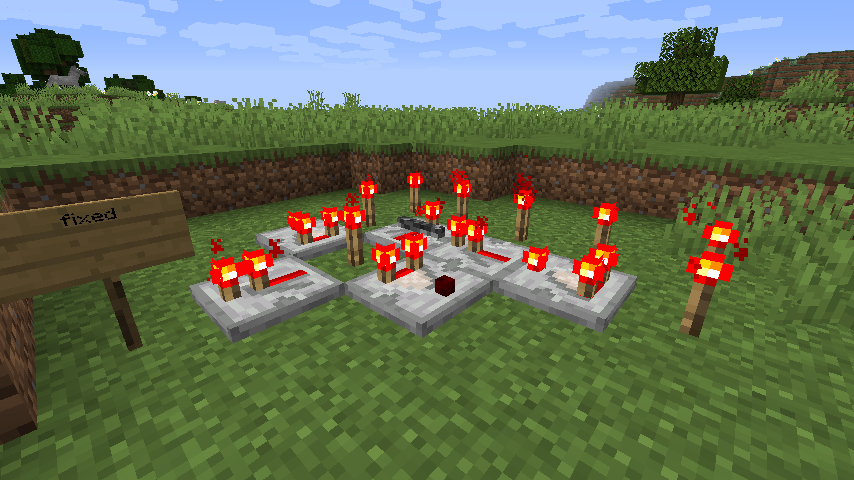
The torches on redstone repeaters and redstone comparators appear darker than expected, and are shaded depending on the view direction. This is not the case with redstone torches themselves, which are fully lit regardless of the view direction.
This began in 1.8, and was not the case in 1.7 or earlier. In addition, this is not the case in Bedrock Edition, effectively also making this a parity issue.
While this was listed in MC-68302, I still strongly consider this behaviour unintended for many reasons, including the two stated above. In addition, MC-67830's resolution contradicts such an assertion of this being intended. Other reasons are listed in MC-236474, a very similar issue.
How to reproduce
- Place down a redstone torch, noting how bright it appears when in the "on" state
- Place down a redstone repeater in a way that the torch powers it
- Note that the torches on said redstone repeater are darker than the standalone torch
- Now place down a comparator which also receives power
- Note that it, too, has darker torches than one would expect
Expected behaviour
The torches on repeaters and comparators would appear as bright as redstone torches themselves
Actual behaviour
Repeater and comparator torches are noticeably darker
How to fix
The resource pack attached to MC-214686 fixes this issue completely.
Linked Issues
relates to6
 MC-277950Open potted eyeblossom is shaded (flower_pot_cross_emissive)FixedMC-129826["shade": false] is missing from potted cross models, resulting in most potted plants appearing darker than they shouldFixedMC-214625Unlit redstone torches are unaffected by block shading / are evenly lit on all sidesFixedMC-275515Programmer Art: Lit torches on comparators are still shaded when they should not beInvalidMC-262696Potted mangrove propagules appear darker than they should due to shading not being disabledPlausibleMC-275520Programmer Art: Lit torches on repeaters are still shaded when they should not beInvalid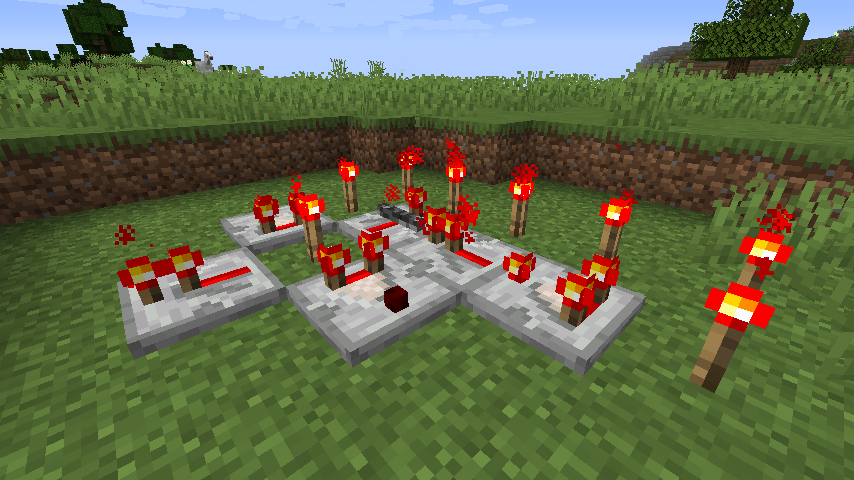


Created Issue:
Redstone torches on repeaters and comparators are shaded differently from normal redstone torches
Redstone torches themselves are not at all affected by the shading which is applied to many other blocks. However, those which are part of redstone repeaters and comparators are affected for some reason.
Which of these two visual behaviours is intended is unknown. The fixing of
MC-67830implies that the no-shading approach as applied to standalone torches is the intended behaviour. However, the WAI resolution ofMC-68302contradictorily states that them being shaded is the expected appearance.As the behaviour in 1.7 and earlier was not shading the torches, this is what the attached fix resource pack below changes.
Attachments2
Redstone torches themselves are not at all affected by the shading which is applied to many other blocks. However, those which are part of redstone repeaters and comparators are affected for some reason.
Which of these two visual behaviours is intended is unknown. The fixing of
MC-67830implies that the no-shading approach as applied to standalone torches is the intended behaviour. However, the WAI resolution ofMC-68302contradictorily states that them being shaded is the expected appearance.As the behaviour in 1.7 and earlier was not shading the torches, this is what the attached fix resource pack below changes.
This is also a parity issue, as neither are shaded in Bedrock Edition.
Redstone torches themselves are not at all affected by the shading which is applied to many other blocks. However, those which are part of redstone repeaters and comparators are affected for some reason.
Which of these two visual behaviours is intended is unknown. The fixing of
MC-implies that the no-shading approach as applied to standalone torches is the intended behaviour. However, the WAI resolution of67830MC-68302contradictorily states that them being shaded is the expected appearance.As the behaviour in 1.7 and earlier was not shading the torches, this is what the attached fix resource pack below changes.
This is also a parity issue, as neither are shaded in Bedrock Edition.
Redstone torches themselves are not at all affected by the shading which is applied to many other blocks. However, those which are part of redstone repeaters and comparators are affected for some reason.
Which of these two visual behaviours is intended is unknown. The fixing of
MC-57159implies that the no-shading approach as applied to standalone torches is the intended behaviour. However, the WAI resolution ofMC-68302contradictorily states that them being shaded is the expected appearance.As the behaviour in 1.7 and earlier was not shading the torches, this is what the attached fix resource pack below changes.
This is also a parity issue, as neither are shaded in Bedrock Edition.
Redstone torches themselves are not at all affected by the shading which is applied to many other blocks. However, those which are part of redstone repeaters and comparators are affected for some reason.
Which of these two visual behaviours is intended is unknown. The fixing of
MC-implies that the no-shading approach as applied to standalone torches is the intended behaviour. However, the WAI resolution of57159MC-68302contradictorily states that them being shaded is the expected appearance.As the behaviour in 1.7 and earlier was not shading the torches, this is what the attached fix resource pack below changes.
This is also a parity issue, as neither are shaded in Bedrock Edition.
Redstone torches themselves are not at all affected by the shading which is applied to many other blocks. However, those which are part of redstone repeaters and comparators are affected for some reason.
Which of these two visual behaviours is intended is unknown. The fixing of
MC-67830implies that the no-shading approach as applied to standalone torches is the intended behaviour. However, the WAI resolution ofMC-68302contradictorily states that them being shaded is the expected appearance.As the behaviour in 1.7 and earlier was not shading the torches, this is what the attached fix resource pack below changes.
This is also a parity issue, as neither are shaded in Bedrock Edition.
![[Mod] Michael Wobst](../../../data/avatars/users/37868.png)
![[Mod] violine1101](../../../data/avatars/users/92858.png)
Duplicate of
MC-68302
![[Helper] Johnibur](../../../data/avatars/users/28381.png)
Redstone torches themselves are not at all affected by the shading which is applied to many other blocks. However, those which are part of redstone repeaters and comparators are affected for some reason.
Which of these two visual behaviours is intended is unknown. The fixing of
MC-67830implies that the no-shading approach as applied to standalone torches is the intended behaviour. However, the WAI resolutionofMC-68302contradictorily states thatthembeingshaded is the expected appearance.As the behaviour in 1.7 and earlier was not shading the torches, this is what the attached fix resource pack below changes.
This is also a parity issue, as neither are shaded in Bedrock Edition.
The resource pack attached to
MC-214686offers a complete fix for this issue. Mojang have my full permission to (and are encouraged to) replace the affected vanilla model files with the contents of the resource pack.The bug
The torches on redstone repeaters and redstone comparators appear darker than expected, and are shaded depending on the view direction. This is not the case with redstone torches themselves, which are fully lit regardless of the view direction.
This began in 1.8, and was not the case in 1.7 or earlier. In addition, this is not the case in Bedrock Edition, effectively also making this a parity issue.
While this was listed in
MC-68302, I still strongly consider this behaviour unintended for many reasons, including the two stated above. In addition,MC-67830's resolution contradicts such an assertion of this being intended. Other reasons are listed in MC-236474, a very similar issue.How to reproduce
- Place down a redstone torch, noting how bright it appears when in the "on" state
- Place down a redstone repeater in a way that the torch powers it
- Note that the torches on said redstone repeater are darker than the standalone torch
- Now place down a comparator which also receives power
- Note that it, too, has darker torches than one would expect
Expected behaviour
The torches on repeaters and comparators would appear as bright as redstone torches themselves
Actual behaviour
Repeater and comparator torches are noticeably darker
How to fix
The resource pack attached to
MC-214686fixes this issue completely.
![[Helper] osfanbuff63](../../../data/avatars/users/94394.png)

windows11bootscreen.exe.png
![[Mod] markderickson](../../../data/avatars/users/18946.svg)
![[Mod] OcelotOnesie](../../../data/avatars/users/43220.png)
![[Mod] ampolive](../../../data/avatars/users/18949.svg)
![[Mod] Avoma](../../../data/avatars/users/86198.png)
![[Mod] Les3awe](../../../data/avatars/users/79847.png)
relates to
![[Mod] Jarl-Penguin](../../../data/avatars/users/92849.png)
relates to
relates to
The resource pack attached offers a complete fix for this issue. Mojang have my full permission to (and are encouraged to) replace the affected vanilla model files with the contents of the resource pack.
Download resource pack:
- 21w39a - v1.0: consistent-torches-21w39a-v1.0.zip

- 21w40a - v1.1: consistent-torches-21w40a-v1.1.zip
The bug
The template model used for wall torches is called "template_torch_wall.json". This name is inconsistent and unintuitive - all of the model sthat actually refer to this template are called "wall_torch.json" and similar such terms, and the IDs of the blocks which use these models are also called "wall_torch" and similar.
How to reproduce
- Extract the minecraft.jar file by one's preferred method
- Navigate to assets/minecraft/models/block
- Locate wall_torch.json
- Note that the template it references is called template_torch_wall.json, rather than template_wall_torch.json.
Expected result
The template model would be called something like tempalte_wall_torch.json to be consistent with those that use it.
Actual result
The template model is called template_torch_wall.json, completely defying the expected name order.
How to fix
The resource pack attached fixes a substantial amount of issues with torches. As well as resolving this naming quirk, it fixes all of the following problems:
- (1.0+) MC-109087 (partially) - The bottom faces of floor torches are now culled against solid blocks
- (1.1+)
MC-177452- Several faces which are never visible under normal circumstances have been removed from repeaters - (1.1+)
MC-177453- Several faces which are never visible under normal circumstances have been removed from comparators - (1.0+)
MC-214625- Unlit redstone torches are now shaded differently per side to match other non-light-emitting cuboids - (1.1+)
MC-214662- Lit torches on redstone repeaters and comparators are no longer shaded depending on direction - (1.0+) The wall torch template model has been changed to face south by default rather than east, to alleviate confusion
- (1.1+) Ambient occlusion has been re-enabled for inactive redstone repeaters and comparators
In addition, formatting has been fixed for all of the models to improve readability and for consistency.
A resource pack which exclusively fixes the naming issue can be attached upon request, however I'd strongly recommend fixing all of these other issues as well, as it comes at no extra time or labor cost.
The resource pack attached to MC-212630 offers a complete fix for this issue. Mojang have my full permission to (and are encouraged to) replace the affected vanilla model files with the contents of the resource pack.
The bug
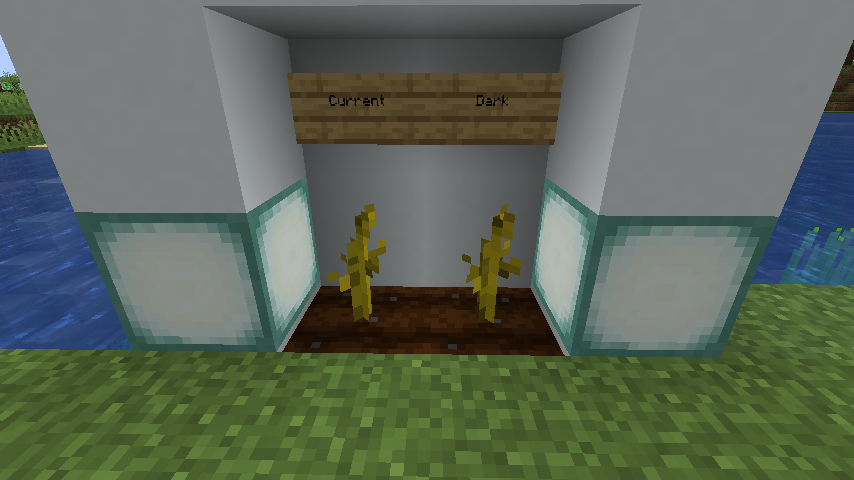
Melon and pumpkin stems appear considerably darker in-game than they should due to missing ["shade": false] parameters in their model files.
How to reproduce
- Plant melon or pumpkin seeds
- Have the seeds grow to their full size
- Notice how the stem looks somewhat dark. If you look at the point where the two planes intersect, a clear boundary can be seen where the shading changes, which does not apply to other crosses. this can be seen to not be a texture issue by looking at both of the planes individually, which reveals they are lit differently.
Current appearence:
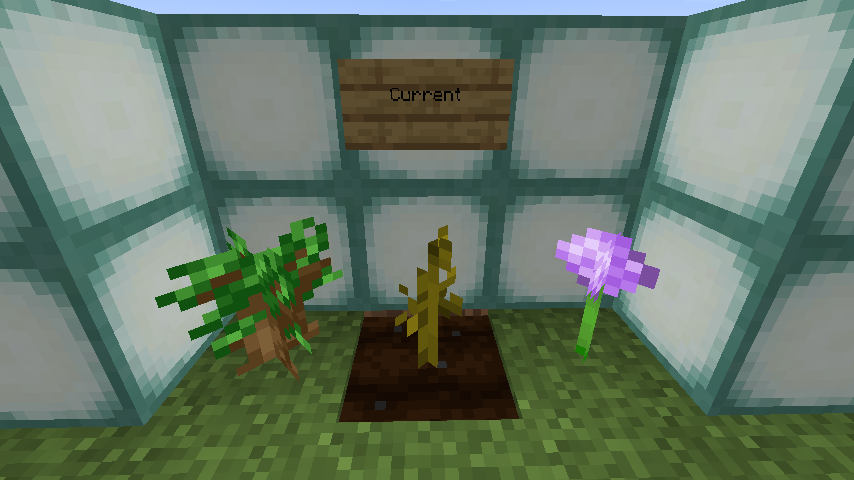
Expected appearance:

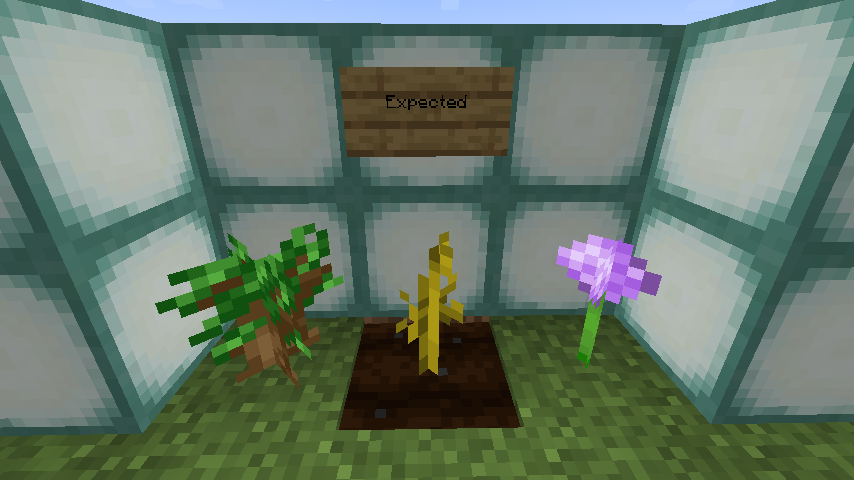
How to fix
The resource pack attached to MC-212630 fixes this issue completely, alongside fixing multiple other issues with the stem model.
Notes
While this was one of the cases listed in MC-68302, a 2014 ticket which was resolved as Works as Intended, I'm still reporting this independently of it for a multitude of reasons:
- This bug makes melon and pumpkin stems very inconsistent with all other crops, as well as all other cross-shaped plants, as absolutely none of these use shading.
- This behaviour is an unannounced change from 1.7 and prior versions, as these all had the stem render without this problematic shading.
MC-68302lumped several different model issues into one ticket, which is very confusing, and a discontinued practice which is generally not recommended much in more modern times. The individual issues in such tickets deserve a chance on their own as to allow for cleaner bug reports, fixes, communication and feedback, analyses, and so on.- Two other issues split off from
MC-68302, namelyMC-129826andMC-214662, are still considered valid issues. - It just looks downright unsightly.
This ticket concerns an unannounced model change from 1.8; as said change is unannounced I've reported it as it may not be intended. I'm a tad more neutral on this case and whether it should be considered intended or should be fixed, however such a decision is ultimately up to Mojang. More information below.
The bug
In 14w25a, many changes were made to how custom models rendered which resulted in certain blocks and model elements gaining directional shading that should not have. Among those affected by this change was cocoa, in which the previously bright plane or "root" connecting the pod to the supporting log gained this darker shading.
While this issue is nowhere near as severe as other lingering 14w25a issues such as MC-129826, MC-214662 and MC-236474, I am reporting this anyway as this change was ultimately not formally announced, and many others like it have since been fixed. It also weakly constitutes a parity issue due to this not being the case on Bedrock Edition.
I ultimately find the current behaviour to be much more preferable, as it matches other similar blocks in the game, unlike the three issues mentioned in the above paragraph which result in major visual clashes. Ultimately whether this is intended is Mojang's decision - I'm just being the messenger. This is admittedly much less visually unpleasant than MC-249035, so I'd be less angry if this was fixed and not that.
How to reproduce
- Place cocoa
- Pay close attention to the thin connecting plane, and take a very close note of its appearance and brightness (screenshots for later comparison recommended)
- Repeat this test in 14w21b or earlier (14w10a-14w21b recommended, as it'll appear much brighter than the main fruiting body)
- Note how it appears much brighter in these versions
Expected results
The fully lit stem would remain so in current versions.
Actual results
It appears darker in modern versions.
How to fix
If this is determined to be a bug, it can be fixed by simply adding a "shade: false" line to the stem element in the cocoa models. A resource pack is attached to the issue which does this, with a comparison as follows:
| Current vanilla models | With shading removed |
|---|---|
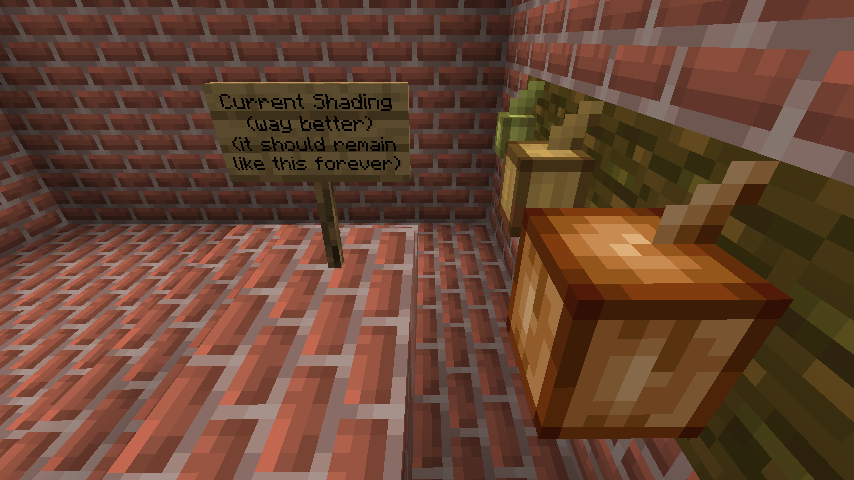 |
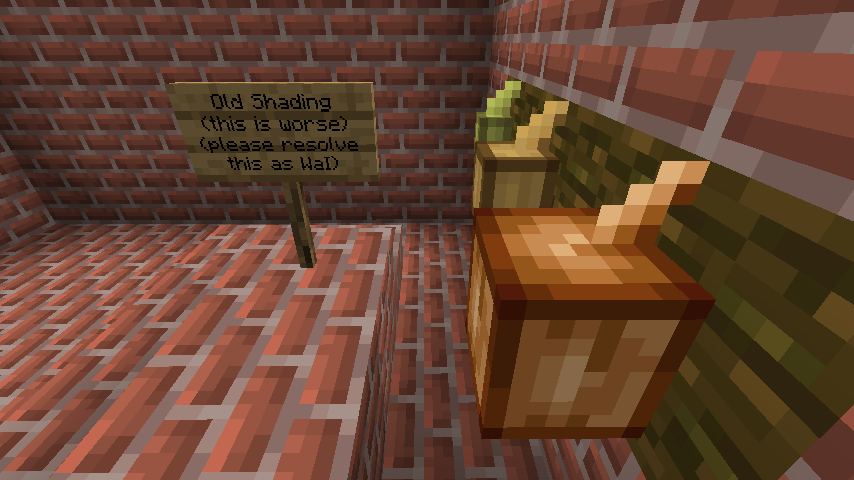 |
Finally time to get around to reporting this - I've been holding on to this one for a couple of years at this point. Closely related to MC-236474 (which is not a duplicate), MC-129826 and MC-214662.
The bug
The three arms that come off of brewing stands appear darker than they should due to the absence of '"shade": false' entries for these elements.
This was originally reported under MC-68302. Since three cases of this have been split off into other tickets (MC-129826, MC-214662 and MC-236474), this is following suit, as it's fixable via models only (unlike the mushroom case, for example, which is reported under MC-248703 and is a rendering issue rather than a model issue).
How to reproduce
This can be done easily by comparing a brewing stand (clearest if bottles are present within) in 1.7.10 or earlier to one in 1.8 or later. The older brewing stand will correctly have the bottles appear bright, whereas in modern versions they appear dark.
How to fix
I have attached two resource packs to this ticket to fix this issue. The "45-degree fix" is the simplest one, and is designed to work with the current model. It functionally only changes the arm models to include the parameter that disables shading. I've also cleaned up the model code and added a missing cullface parameter to the middle rod.
There is also a "60-degree fix", which rotates the arms to be at 120-degree angles from each other, which is another thing that changed in 1.8 (MC-257054). However, as Minecraft: Java Edition does not currently support rotation values in increments other than 22.5 degrees, the game's code will need to be modified to permit this. The screenshots of this model were taken in 1.16.1 using the ModelsUnlocked Fabric mod to permit this.
Closely relates to MC-129826, MC-214662, MC-236474 and MC-262410.
The bug
When placed, mangrove propagules appear darker than other cross models and darker than their item form would imply.
How to reproduce
- Place a mangrove propagule
- Compare it to its item texture
Expected results
The mangrove propagule would be brighter.
Actual results
It isn't.
How to fix
This is an incredibly easy fix - just add
"shade": false
to each of the four elements of models/block/mangrove_propagule.json. I've attached a fixed model file and fixed resource pack to demonstrate this fix. Mojang have my full permission to use this fix.
Further notes
Potted mangrove propagules are also affected and will need a separate fix (MC-129826's fix alone will not carry over to them). MC-262433's optimization fixes this issue for potted mangrove propagules.
Relates to: MC-275511 MC-275514 MC-275519
The bug
MC-214662 was fixed for the default resource pack in 24w33a. The old comparator models were moved to the Programmer Art resource pack, however, and this existing issue was not fixed for them.
How to fix
A resource pack is attached to this ticket that fixes this issue entirely. Mojang have my full permission (and encouragement) to use these resources or their derivatives to fix this issue.
Relates to: MC-275511 MC-275514 MC-275519
The bug
MC-214662 was fixed for the default resource pack in 24w33a. The old repeater models were moved to the Programmer Art resource pack, however, and this existing issue was not fixed for them.
How to fix
A resource pack is attached to this ticket that fixes this issue entirely. Mojang have my full permission (and encouragement) to use these resources or their derivatives to fix this issue.
Relates to: MC-129826 MC-214662 MC-236474 MC-262410 MC-262676 MC-262696
The bug
For normal potted cross models, shading is not applied to the cross planes (a 10-year-old issue that was finally fixed in 1.21.2: see MC-129826). However, the newly implemented flower_pot_cross_emissive.json model unaccountably shades each plane of the cross for unknown reasons. This causes one plane to look darker than the other.
How to fix
Very easy to fix - just add
"shade": false,
to the four last planes in that json model so that they appear at the correct brightness in-game.
This same general idea can also be used to fix MC-236474, MC-262410, MC-262676 and MC-262696, the other four extant erroneous model shading issues.
Can confirm.
Can confirm in 21w06a.
Can confirm in 21w07a.
Can confirm in 21w08b.
Can confirm in 21w13a.
Can confirm in 21w17a.
Can confirm in 1.17 Pre-release 3.
Can confirm in 1.17 and 1.17.1 Pre-release 1.
Can confirm in 1.17.1.
Can confirm in 21w39a.
Can confirm in 21w40a.
Can confirm in 21w42a.
Can confirm in 1.18 Pre-release 1.
Can confirm in 1.18 and 1.18.1 Pre-release 1.
Can confirm in 1.18.1.
Can confirm in 1.18.2.
Comparators and Repeaters cannot glow, you know. While Torches can.
Light emmision is not at all related to this report...
Can confirm in 1.19.
Affects 1.21
Partially fixed in 24w33a, only for lit redstone torches
As per
MC-214625the issue is that normal redstone torches should appear darker, so this is completely fixed.