Night vision rendered darker and orange when nearing light sources with brightness on moody
The bug
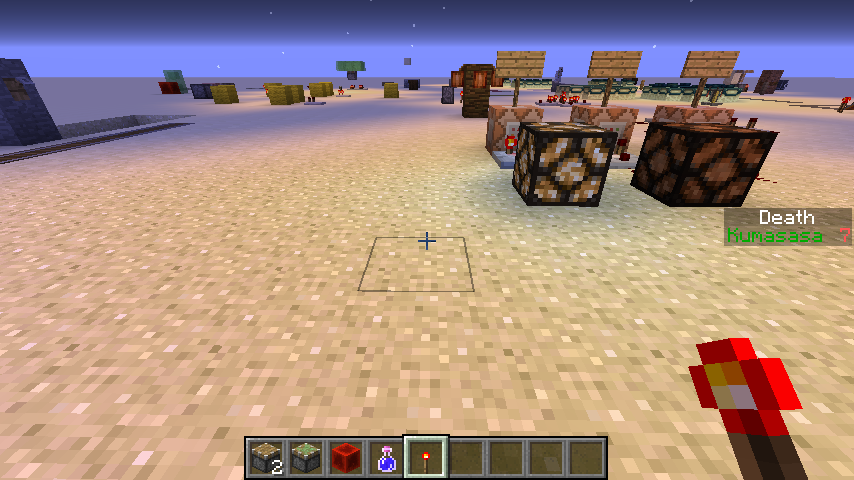
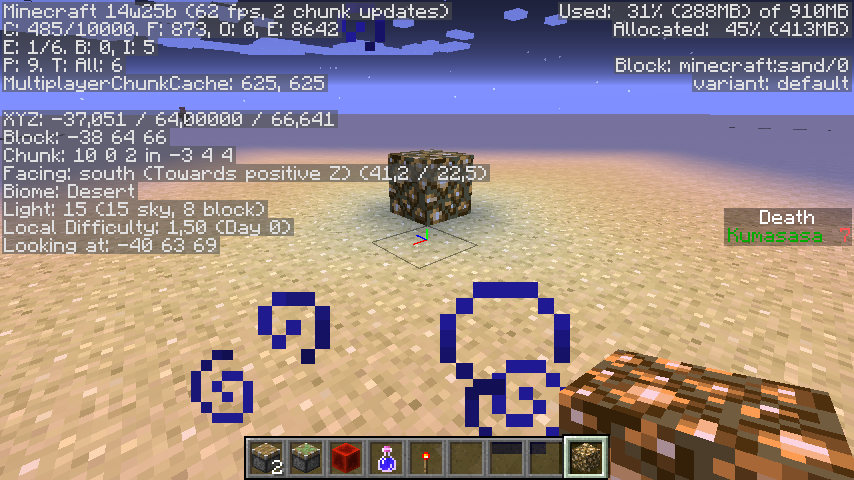
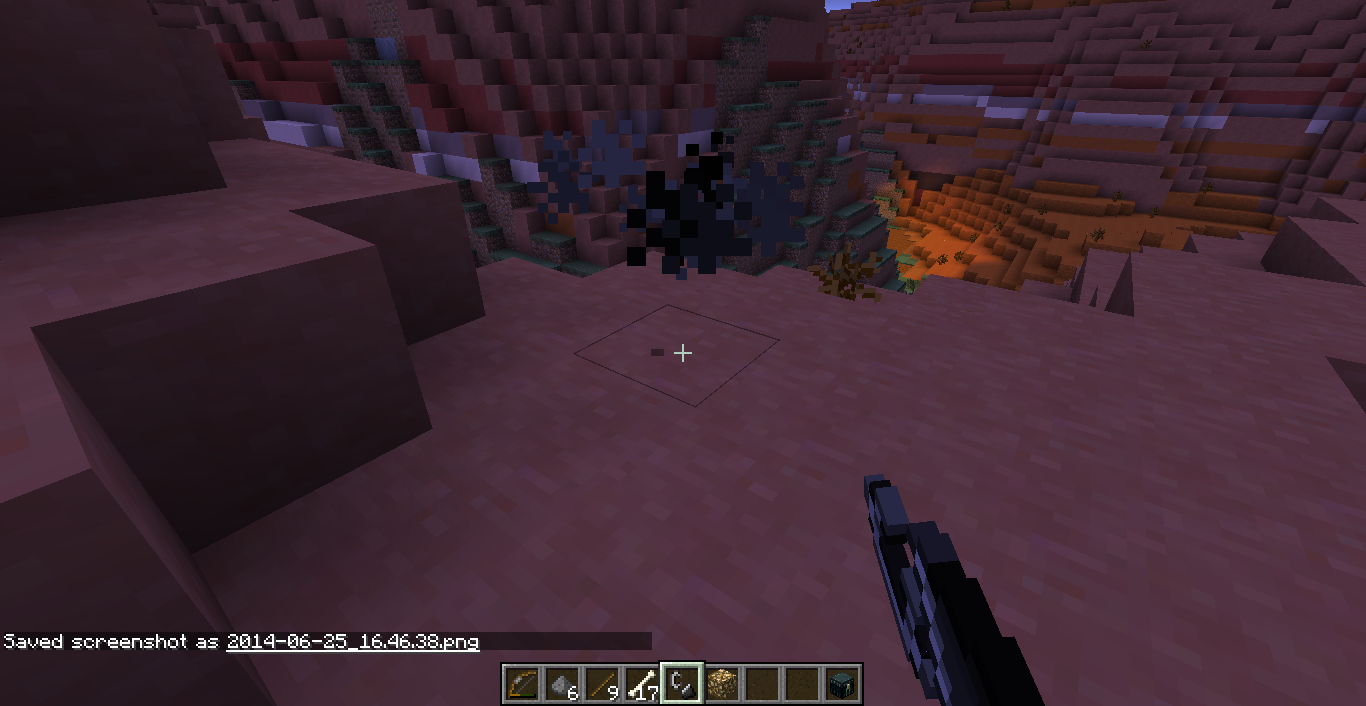
When exploring mineshafts using night vision, I found that the blocks nearing light sources always become darker and more orange. But the block just beside the light source is normal.
How to reproduce
- Set brightness in video options to minimum
- Make/Go to a place with light level 0. (Note: It does something else if exposed to sky, but still looks weird though.)
- Get Night Vision effect.
- Place any kind of light source.
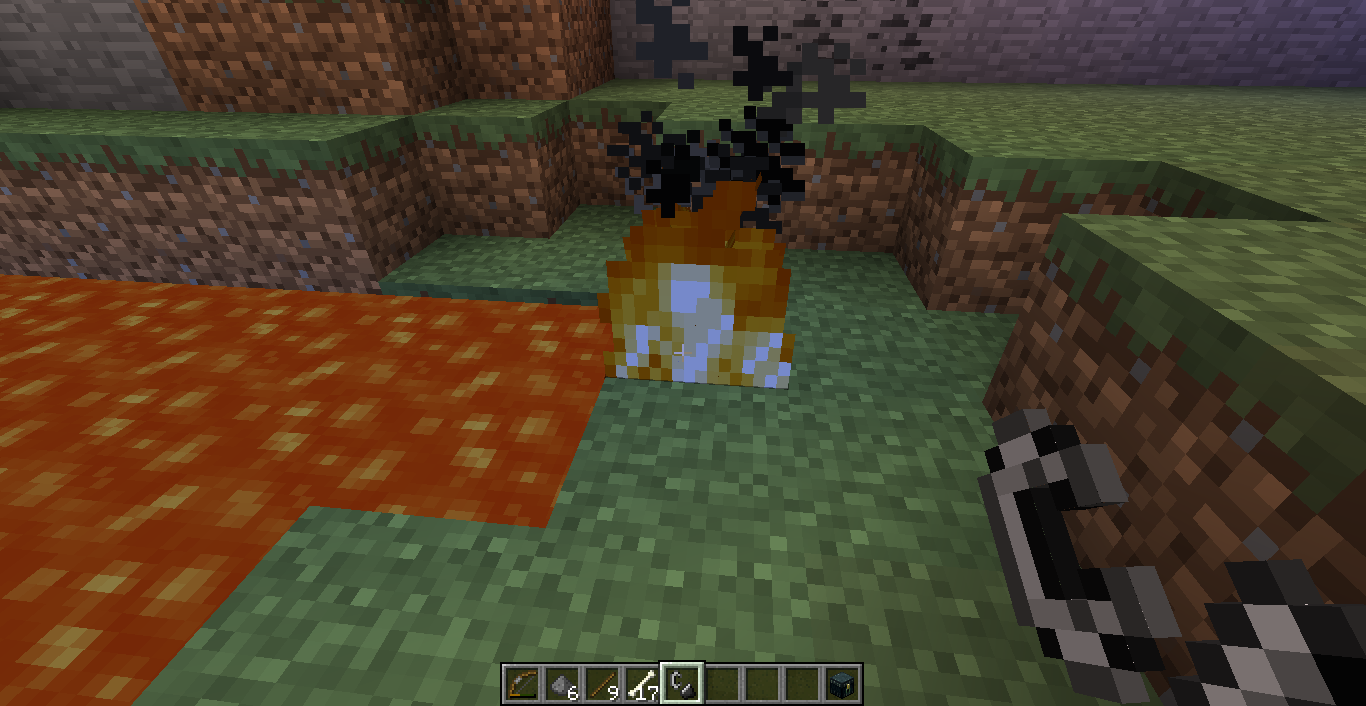
- The blocks near but not beside the light source are rendered darker. (Note: Lava blocks and Fire blocks are rendered too dark too!)
New founds added 6/24:
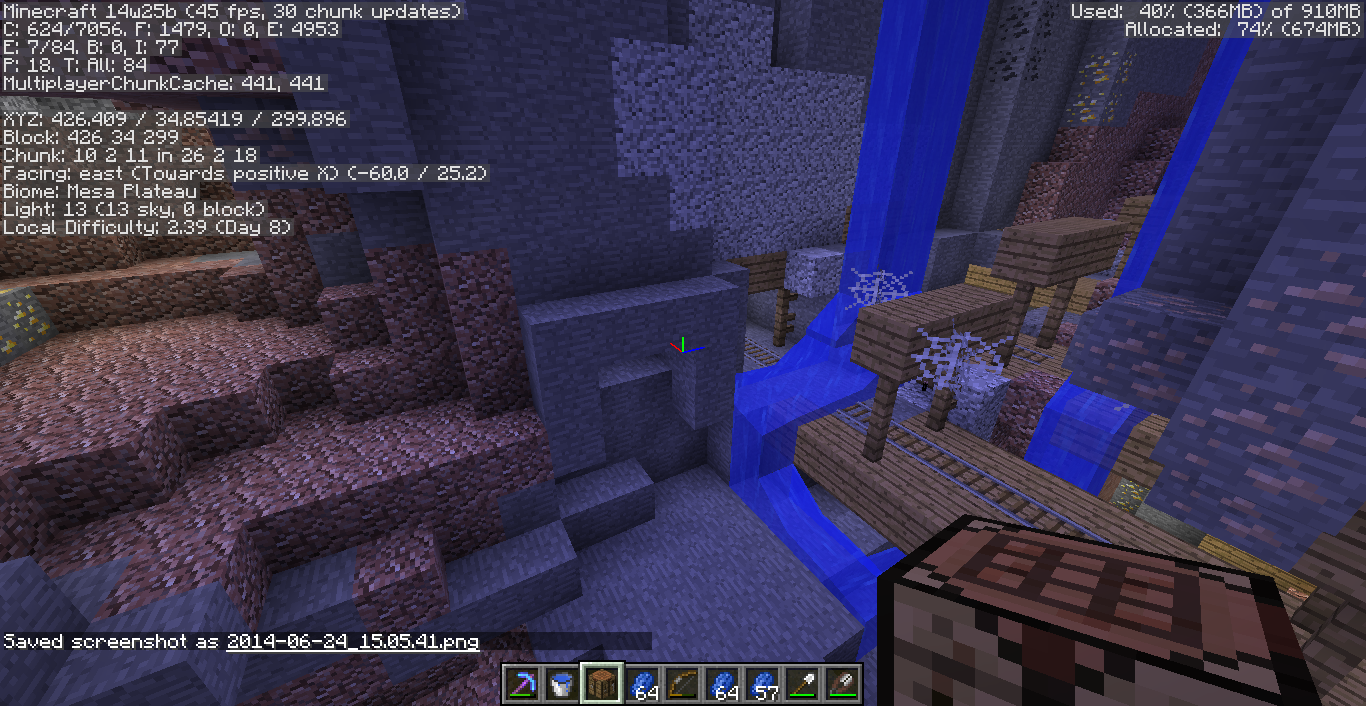
Finally I got the idea why night vision looks weird under night sky. I found a ravine with a hole above it, and compare to the non exposed area, the place under the night sky are extremely blue.
How to reproduce
- Set brightness in video options to minimum
- Make (since it's a little difficult to find) a huge (at least 30x10x30) room with light level 0. (Suggested that use stone with some lapis ores)
- Get Night Vision effect.
- Make sure it's night time in game.
- Break a hole on the roof.
- Enjoy! Don't forget to try Fire blocks, they look FUNNY!! (?! Just kidding XD)
Code analysis
Code analysis by Ben Staddon can be found in this comment.
Linked Issues
 Normal
is duplicated by6
 MC-75747Torches not properly giving lightDuplicateMC-130403Nightvision effect glitches when a light source is present DuplicateMC-130886Night vision potion makes lighted place darker.DuplicateMC-132830Blue FireDuplicateMC-139502Glowstone looks terrible when using Night visionDuplicateMC-144201Night vision makes light blue.Duplicate
relates to5
MC-104537Potion particle color leaking into other particlesCannot Reproduce MCPE-116172Night Vision doesn't work properly under moody brightnessWon't FixMC-48666Cobwebs are affected by block lighting in full sky lighting
 LowMC-69696Fire animation is dark for spiders, endermen and phantomsFixedMC-161849Items in inventory, subtitles, background, chat, notifications on the screen and game menu are darker and have a blue tint when you have the night vision effectFixed
Attachments17








Created Issue:
Night vision rendered darker and orange when nearing light sources
When exploring mineshafts using night vision, I found that the blocks nearing light sources always become darker and more orange. But the block just beside the light source is normal.
Reproduce:
1. Make/Go to a place with light level 0.
2. Get Night Vision effect.
3. place any kind of light source.
4. The blocks near but not beside the light source are rendered darker.Environment
Java 7
Windows 7
Attachments2
2014-06-20_09.27.01.png
Cannot confirm, see screenshots.
Java 7u60
Windows 7 (x64)
Java 7 (u60)
Windows 7 (x64)
When exploring mineshafts using night vision, I found that the blocks nearing light sources always become darker and more orange. But the block just beside the light source is normal.
Reproduce:
1. Make/Go to a place with light level 0.
(Note: It does something else if exposed to sky, but still looks weird though.)
2. Get Night Vision effect.
3. place any kind of light source.
4. The blocks near but not beside the light source are rendered darker.
When exploring mineshafts using night vision, I found that the blocks nearing light sources always become darker and more orange. But the block just beside the light source is normal.
Reproduce:
1. Make/Go to a place with light level 0.
(Note: It does something else if exposed to sky, but still looks weird though.)
2. Get Night Vision effect.
3. place any kind of light source.
4. The blocks near but not beside the light source are rendered darker.New founds added 6/24:
Finally I got the idea why night vision looks weird under night sky. I found a ravine with a hole above it, and compare to the non exposed area, the place under the night sky are extremely blue.
Reproduce:
1. Make (since it's a little difficult to find) a huge (at least 30x10x30) room with light level 0. (Suggested that use stone with some lapis ores)
2. Make sure it's night time in game.
3. Break a hole on the roof.
4. Enjoy! (?! Just kidding)
When exploring mineshafts using night vision, I found that the blocks nearing light sources always become darker and more orange. But the block just beside the light source is normal.
Reproduce:
1. Make/Go to a place with light level 0.
(Note: It does something else if exposed to sky, but still looks weird though.)
2. Get Night Vision effect.
3. place any kind of light source.
4. The blocks near but not beside the light source are rendered darker.New founds added 6/24:
Finally I got the idea why night vision looks weird under night sky. I found a ravine with a hole above it, and compare to the non exposed area, the place under the night sky are extremely blue.
Reproduce:
1. Make (since it's a little difficult to find) a huge (at least 30x10x30) room with light level 0. (Suggested that use stone with some lapis ores)
2. Make sure it's night time in game.
3. Break a hole on the roof.
4. Enjoy! (?! Just kiddingWhen exploring mineshafts using night vision, I found that the blocks nearing light sources always become darker and more orange. But the block just beside the light source is normal.
Reproduce:
1. Make/Go to a place with light level 0.
(Note: It does something else if exposed to sky, but still looks weird though.)
2. Get Night Vision effect.
3. place any kind of light source.
4. The blocks near but not beside the light source are rendered darker.New founds added 6/24:
Finally I got the idea why night vision looks weird under night sky. I found a ravine with a hole above it, and compare to the non exposed area, the place under the night sky are extremely blue.
Reproduce:
1. Make (since it's a little difficult to find) a huge (at least 30x10x30) room with light level 0. (Suggested that use stone with some lapis ores)
2. Make sure it's night time in game.
3. Break a hole on the roof.
4. Enjoy! (?! Just kidding XD)
When exploring mineshafts using night vision, I found that the blocks nearing light sources always become darker and more orange. But the block just beside the light source is normal.
Reproduce:
1.Make/Go to a place with light level 0.
(Note: It does something else if exposed to sky, but still looks weird though.)
2. Get Night Vision effect.
3. place any kind of light source.
4. The blocks near but not beside the light source are rendered darker.New founds added 6/24:
Finally I got the idea why night vision looks weird under night sky. I found a ravine with a hole above it, and compare to the non exposed area, the place under the night sky are extremely blue.
Reproduce:
1. Make (since it's a little difficult to find) a huge (at least 30x10x30) room with light level 0. (Suggested that use stone with some lapis ores)
2. Make sure it's night time in game.
3. Break a hole on the roof.
4. Enjoy! (?! Just kidding XD)When exploring mineshafts using night vision, I found that the blocks nearing light sources always become darker and more orange. But the block just beside the light source is normal.
Reproduce:
0. Set brightness in video options to minimum
1. Make/Go to a place with light level 0.
(Note: It does something else if exposed to sky, but still looks weird though.)
2. Get Night Vision effect.
3. place any kind of light source.
4. The blocks near but not beside the light source are rendered darker.New founds added 6/24:
Finally I got the idea why night vision looks weird under night sky. I found a ravine with a hole above it, and compare to the non exposed area, the place under the night sky are extremely blue.
Reproduce:
0. Set brightness in video options to minimum
1. Make (since it's a little difficult to find) a huge (at least 30x10x30) room with light level 0. (Suggested that use stone with some lapis ores)
2. Make sure it's night time in game.
3. Break a hole on the roof.
4. Enjoy! (?! Just kidding XD)
When exploring mineshafts using night vision, I found that the blocks nearing light sources always become darker and more orange. But the block just beside the light source is normal.
Reproduce:
0. Set brightness in video options to minimum
1. Make/Go to a place with light level 0.
(Note: It does something else if exposed to sky, but still looks weird though.)
2. Get Night Vision effect.
3. place any kind of light source.
4. The blocks near but not beside the light source are rendered darker.
(Note-2: Lava block is rendered too dark too!)New founds added 6/24:
Finally I got the idea why night vision looks weird under night sky. I found a ravine with a hole above it, and compare to the non exposed area, the place under the night sky are extremely blue.
Reproduce:
0. Set brightness in video options to minimum
1. Make (since it's a little difficult to find) a huge (at least 30x10x30) room with light level 0. (Suggested that use stone with some lapis ores)
2. Make sure it's night time in game.
3. Break a hole on the roof.
4. Enjoy! (?! Just kidding XD)
When exploring mineshafts using night vision, I found that the blocks nearing light sources always become darker and more orange. But the block just beside the light source is normal.
Reproduce:
0. Set brightness in video options to minimum
1. Make/Go to a place with light level 0.
(Note: It does something else if exposed to sky, but still looks weird though.)
2. Get Night Vision effect.
3. place any kind of light source.
4. The blocks near but not beside the light source are rendered darker.
(Note-2: Lava blockisrendered too dark too!)New founds added 6/24:
Finally I got the idea why night vision looks weird under night sky. I found a ravine with a hole above it, and compare to the non exposed area, the place under the night sky are extremely blue.
Reproduce:
0. Set brightness in video options to minimum
1. Make (since it's a little difficult to find) a huge (at least 30x10x30) room with light level 0. (Suggested that use stone with some lapis ores)
2.Make sure it's night time in game.
3.Break a holeonthe roof.
4. Enjoy! (?! Just kidding XD)When exploring mineshafts using night vision, I found that the blocks nearing light sources always become darker and more orange. But the block just beside the light source is normal.
Reproduce:
0. Set brightness in video options to minimum
1. Make/Go to a place with light level 0.
(Note: It does something else if exposed to sky, but still looks weird though.)
2. Get Night Vision effect.
3. place any kind of light source.
4. The blocks near but not beside the light source are rendered darker.
(Note-2: Lava blocks are rendered too dark too!)New founds added 6/24:
Finally I got the idea why night vision looks weird under night sky. I found a ravine with a hole above it, and compare to the non exposed area, the place under the night sky are extremely blue.
Reproduce:
0. Set brightness in video options to minimum
1. Make (since it's a little difficult to find) a huge (at least 30x10x30) room with light level 0. (Suggested that use stone with some lapis ores)
2. Get Night Vision effect.
3. Make sure it's night time in game.
4. Break a hole on the roof.
5. Enjoy! Don't forget to try Fire blocks, they look FUN!! (?! Just kidding XD)
When exploring mineshafts using night vision, I found that the blocks nearing light sources always become darker and more orange. But the block just beside the light source is normal.
Reproduce:
0. Set brightness in video options to minimum
1. Make/Go to a place with light level 0.
(Note: It does something else if exposed to sky, but still looks weird though.)
2. Get Night Vision effect.
3. place any kind of light source.
4. The blocks near but not beside the light source are rendered darker.
(Note-2: Lava blocks and Fire blocks are rendered too dark too!)New founds added 6/24:
Finally I got the idea why night vision looks weird under night sky. I found a ravine with a hole above it, and compare to the non exposed area, the place under the night sky are extremely blue.
Reproduce:
0. Set brightness in video options to minimum
1. Make (since it's a little difficult to find) a huge (at least 30x10x30) room with light level 0. (Suggested that use stone with some lapis ores)
2. Get Night Vision effect.
3. Make sure it's night time in game.
4. Break a hole on the roof.
5. Enjoy! Don't forget to try Fire blocks, they look FUN!! (?! Just kidding XD)
Java 7 (u60)
Windows 7 (x64)
Brightness set to mininum
When exploring mineshafts using night vision, I found that the blocks nearing light sources always become darker and more orange. But the block just beside the light source is normal.
Reproduce:
0. Set brightness in video options to minimum
1. Make/Go to a place with light level 0.
(Note: It does something else if exposed to sky, but still looks weird though.)
2. Get Night Vision effect.
3. place any kind of light source.
4. The blocks near but not beside the light source are rendered darker.
(Note-2: Lava blocks and Fire blocks are rendered too dark too!)New founds added 6/24:
Finally I got the idea why night vision looks weird under night sky. I found a ravine with a hole above it, and compare to the non exposed area, the place under the night sky are extremely blue.
Reproduce:
0. Set brightness in video options to minimum
1. Make (since it's a little difficult to find) a huge (at least 30x10x30) room with light level 0. (Suggested that use stone with some lapis ores)
2. Get Night Vision effect.
3. Make sure it's night time in game.
4. Break a hole on the roof.
5. Enjoy! Don't forget to try Fire blocks, they look FUNNY!! (?! Just kidding XD)

is duplicated by
![[Mod] Torabi](../../../data/assets/gravatar/torabi.png)

Java 7 (u60)
Windows 7 (x64)
Brightness set to mininum
When exploring mineshafts using night vision, I found that the blocks nearing light sources always become darker and more orange. But the block just beside the light source is normal.
Reproduce:
0. Set brightness in video options to minimum
1. Make/Go to a place with light level 0.
(Note: It does something else if exposed to sky, but still looks weird though.)
2. Get Night Vision effect.
3. place any kind of light source.
4. The blocks near but not beside the light source are rendered darker.
(Note-2: Lava blocks and Fire blocks are rendered too dark too!)New founds added 6/24:
Finally I got the idea why night vision looks weird under night sky. I found a ravine with a hole above it, and compare to the non exposed area, the place under the night sky are extremely blue.
Reproduce:
0. Set brightness in video options to minimum
1. Make (since it's a little difficult to find) a huge (at least 30x10x30) room with light level 0. (Suggested that use stone with some lapis ores)
2. Get Night Vision effect.
3. Make sure it's night time in game.
4. Break a hole on the roof.
5. Enjoy! Don't forget to try Fire blocks, they look FUNNY!! (?! Just kidding XD)When exploring mineshafts using night vision, I found that the blocks nearing light sources always become darker and more orange. But the block just beside the light source is normal.
Reproduce:
0. Set brightness in video options to minimum
1. Make/Go to a place with light level 0.
(Note: It does something else if exposed to sky, but still looks weird though.)
2. Get Night Vision effect.
3. place any kind of light source.
4. The blocks near but not beside the light source are rendered darker.
(Note-2: Lava blocks and Fire blocks are rendered too dark too!)New founds added 6/24:
Finally I got the idea why night vision looks weird under night sky. I found a ravine with a hole above it, and compare to the non exposed area, the place under the night sky are extremely blue.
Reproduce:
1. Set brightness in video options to minimum
2. Make (since it's a little difficult to find) a huge (at least 30x10x30) room with light level 0. (Suggested that use stone with some lapis ores)
3. Get Night Vision effect.
4. Make sure it's night time in game.
5. Break a hole on the roof.
6. Enjoy! Don't forget to try Fire blocks, they look FUNNY!! (?! Just kidding XD)
Night vision rendered darker and orange when nearing light sources with brightness on moody
relates to
![[Mod] Michael Wobst](../../../data/avatars/users/37868.png)
When exploring
mineshafts using night vision, I found that the blocks nearing light sources always become darker and more orange. But the block just beside the light source is normal.Reproduce:
0. Set brightness in video options to minimum
1. Make/Go to a place with light level 0.
(Note: It does something else if exposed to sky, but still looks weird though.)
2. Get Night Vision effect.
3. place any kind of light source.
4. The blocks near but not beside the light source are rendered darker.
(Note-2: Lava blocks and Fire blocks are rendered too dark too!)New founds added 6/24:
Finally I got the idea why night vision looks weird under night sky. I found a ravine with a hole above it, and compare to the non exposed area, the place under the night sky are extremely blue.
Reproduce:
1. Set brightness in video options to minimum
2. Make (since it's a little difficult to find) a huge (at least 30x10x30) room with light level 0. (Suggested that use stone with some lapis ores)
3. Get Night Vision effect.
4. Make sure it's night time in game.
5. Break a hole on the roof.
6. Enjoy! Don't forget to try Fire blocks, they look FUNNY!! (?! Just kidding XD)When exploring Mineshafts using night vision, I found that the blocks nearing light sources always become darker and more orange. But the block just beside the light source is normal.
Reproduce:
- Set brightness in video options to minimum
- Make/Go to a place with light level 0. (Note: It does something else if exposed to sky, but still looks weird though.)
- Get Night Vision effect.
- Place any kind of light source.
- The blocks near but not beside the light source are rendered darker. (Note-2: Lava blocks and Fire blocks are rendered too dark too!)
New founds added 6/24:
Finally I got the idea why night vision looks weird under night sky. I found a ravine with a hole above it, and compare to the non exposed area, the place under the night sky are extremely blue.
Steps to reproduce:
- Set brightness in video options to minimum
- Make (since it's a little difficult to find) a huge (at least 30x10x30) room with light level 0. (Suggested that use stone with some lapis ores)
- Get Night Vision effect.
- Make sure it's night time in game.
- Break a hole on the roof.
- Enjoy! Don't forget to try Fire blocks, they look FUNNY!! (?! Just kidding XD)
When exploring Mineshafts using night vision, I found that the blocks nearing light sources always become darker and more orange. But the block just beside the light source is normal.
Reproduce:
- Set brightness in video options to minimum
- Make/Go to a place with light level 0. (Note: It does something else if exposed to sky, but still looks weird though.)
- Get Night Vision effect.
- Place any kind of light source.
- The blocks near but not beside the light source are rendered darker. (Note-2: Lava blocks and Fire blocks are rendered too dark too!)
New founds added 6/24:
Finally I got the idea why night vision looks weird under night sky. I found a ravine with a hole above it, and compare to the non exposed area, the place under the night sky are extremely blue.
Steps to reproduce:
- Set brightness in video options to minimum
- Make (since it's a little difficult to find) a huge (at least 30x10x30) room with light level 0. (Suggested that use stone with some lapis ores)
- Get Night Vision effect.
- Make sure it's night time in game.
- Break a hole on the roof.
- Enjoy! Don't forget to try Fire blocks, they look FUNNY!! (?! Just kidding XD)
When exploring Mineshafts using night vision, I found that the blocks nearing light sources always become darker and more orange. But the block just beside the light source is normal.
Steps to reproduce:
- Set brightness in video options to minimum
- Make/Go to a place with light level 0. (Note: It does something else if exposed to sky, but still looks weird though.)
- Get Night Vision effect.
- Place any kind of light source.
- The blocks near but not beside the light source are rendered darker. (Note-2: Lava blocks and Fire blocks are rendered too dark too!)
New founds added 6/24:
Finally I got the idea why night vision looks weird under night sky. I found a ravine with a hole above it, and compare to the non exposed area, the place under the night sky are extremely blue.
Steps to reproduce:
- Set brightness in video options to minimum
- Make (since it's a little difficult to find) a huge (at least 30x10x30) room with light level 0. (Suggested that use stone with some lapis ores)
- Get Night Vision effect.
- Make sure it's night time in game.
- Break a hole on the roof.
- Enjoy! Don't forget to try Fire blocks, they look FUNNY!! (?! Just kidding XD)
When exploring Mineshafts using night vision, I found that the blocks nearing light sources always become darker and more orange. But the block just beside the light source is normal.
Steps to reproduce:
- Set brightness in video options to minimum
- Make/Go to a place with light level 0. (Note: It does something else if exposed to sky, but still looks weird though.)
- Get Night Vision effect.
- Place any kind of light source.
- The blocks near but not beside the light source are rendered darker. (Note
-2: Lava blocks and Fire blocks are rendered too dark too!)New founds added 6/24:
Finally I got the idea why night vision looks weird under night sky. I found a ravine with a hole above it, and compare to the non exposed area, the place under the night sky are extremely blue.
Steps to reproduce:
- Set brightness in video options to minimum
- Make (since it's a little difficult to find) a huge (at least 30x10x30) room with light level 0. (Suggested that use stone with some lapis ores)
- Get Night Vision effect.
- Make sure it's night time in game.
- Break a hole on the roof.
- Enjoy! Don't forget to try Fire blocks, they look FUNNY!! (?! Just kidding XD)
![[Mod] bemoty](../../../data/avatars/users/50554.png)
When exploring Mineshafts using night vision, I found that the blocks nearing light sources always become darker and more orange. But the block just beside the light source is normal.
Steps to reproduce:
- Set brightness in video options to minimum
- Make/Go to a place with light level 0. (Note: It does something else if exposed to sky, but still looks weird though.)
- Get Night Vision effect.
- Place any kind of light source.
- The blocks near but not beside the light source are rendered darker. (Note: Lava blocks and Fire blocks are rendered too dark too!)
New founds added 6/24:
Finally I got the idea why night vision looks weird under night sky. I found a ravine with a hole above it, and compare to the non exposed area, the place under the night sky are extremely blue.
Steps to reproduce:
- Set brightness in video options to minimum
- Make (since it's a little difficult to find) a huge (at least 30x10x30) room with light level 0. (Suggested that use stone with some lapis ores)
- Get Night Vision effect.
- Make sure it's night time in game.
- Break a hole on the roof.
- Enjoy! Don't forget to try Fire blocks, they look FUNNY!! (?! Just kidding XD)
—
Code analysis by Ben Staddon can be found in [this|] comment.
When exploring Mineshafts using night vision, I found that the blocks nearing light sources always become darker and more orange. But the block just beside the light source is normal.
Steps to reproduce:
- Set brightness in video options to minimum
- Make/Go to a place with light level 0. (Note: It does something else if exposed to sky, but still looks weird though.)
- Get Night Vision effect.
- Place any kind of light source.
- The blocks near but not beside the light source are rendered darker. (Note: Lava blocks and Fire blocks are rendered too dark too!)
New founds added 6/24:
Finally I got the idea why night vision looks weird under night sky. I found a ravine with a hole above it, and compare to the non exposed area, the place under the night sky are extremely blue.
Steps to reproduce:
- Set brightness in video options to minimum
- Make (since it's a little difficult to find) a huge (at least 30x10x30) room with light level 0. (Suggested that use stone with some lapis ores)
- Get Night Vision effect.
- Make sure it's night time in game.
- Break a hole on the roof.
- Enjoy! Don't forget to try Fire blocks, they look FUNNY!! (?! Just kidding XD)
—
Code analysis by Ben Staddon can be found in [this|] comment.
When exploring Mineshafts using night vision, I found that the blocks nearing light sources always become darker and more orange. But the block just beside the light source is normal.
Steps to reproduce:
- Set brightness in video options to minimum
- Make/Go to a place with light level 0. (Note: It does something else if exposed to sky, but still looks weird though.)
- Get Night Vision effect.
- Place any kind of light source.
- The blocks near but not beside the light source are rendered darker. (Note: Lava blocks and Fire blocks are rendered too dark too!)
New founds added 6/24:
Finally I got the idea why night vision looks weird under night sky. I found a ravine with a hole above it, and compare to the non exposed area, the place under the night sky are extremely blue.
Steps to reproduce:
- Set brightness in video options to minimum
- Make (since it's a little difficult to find) a huge (at least 30x10x30) room with light level 0. (Suggested that use stone with some lapis ores)
- Get Night Vision effect.
- Make sure it's night time in game.
- Break a hole on the roof.
- Enjoy! Don't forget to try Fire blocks, they look FUNNY!! (?! Just kidding XD)
—
Code analysis by Ben Staddon can be found in this comment.
When exploring Mineshafts using night vision, I found that the blocks nearing light sources always become darker and more orange. But the block just beside the light source is normal.
Steps to reproduce:
- Set brightness in video options to minimum
- Make/Go to a place with light level 0. (Note: It does something else if exposed to sky, but still looks weird though.)
- Get Night Vision effect.
- Place any kind of light source.
- The blocks near but not beside the light source are rendered darker. (Note: Lava blocks and Fire blocks are rendered too dark too!)
New founds added 6/24:
Finally I got the idea why night vision looks weird under night sky. I found a ravine with a hole above it, and compare to the non exposed area, the place under the night sky are extremely blue.
Steps to reproduce:
- Set brightness in video options to minimum
- Make (since it's a little difficult to find) a huge (at least 30x10x30) room with light level 0. (Suggested that use stone with some lapis ores)
- Get Night Vision effect.
- Make sure it's night time in game.
- Break a hole on the roof.
- Enjoy! Don't forget to try Fire blocks, they look FUNNY!! (?! Just kidding XD)
—
Code analysis by Ben Staddon can be found in this comment.
When exploring Mineshafts using night vision, I found that the blocks nearing light sources always become darker and more orange. But the block just beside the light source is normal.
Steps to reproduce:
- Set brightness in video options to minimum
- Make/Go to a place with light level 0. (Note: It does something else if exposed to sky, but still looks weird though.)
- Get Night Vision effect.
- Place any kind of light source.
- The blocks near but not beside the light source are rendered darker. (Note: Lava blocks and Fire blocks are rendered too dark too!)
New founds added 6/24:
Finally I got the idea why night vision looks weird under night sky. I found a ravine with a hole above it, and compare to the non exposed area, the place under the night sky are extremely blue.
Steps to reproduce:
- Set brightness in video options to minimum
- Make (since it's a little difficult to find) a huge (at least 30x10x30) room with light level 0. (Suggested that use stone with some lapis ores)
- Get Night Vision effect.
- Make sure it's night time in game.
- Break a hole on the roof.
- Enjoy! Don't forget to try Fire blocks, they look FUNNY!! (?! Just kidding XD)
Code analysis by Ben Staddon can be found in this comment.
![[Mod] violine1101](../../../data/avatars/users/92858.png)
![[Mod] Pokechu22](../../../data/avatars/users/92931.png)
relates to
Java 7 (u60)
Windows 7 (x64)
When exploring
Mineshafts using night vision, I found that the blocks nearing light sources always become darker and more orange. But the block just beside the light source is normal.Steps to reproduce:
- Set brightness in video options to minimum
- Make/Go to a place with light level 0. (Note: It does something else if exposed to sky, but still looks weird though.)
- Get Night Vision effect.
- Place any kind of light source.
- The blocks near but not beside the light source are rendered darker. (Note: Lava blocks and Fire blocks are rendered too dark too!)
New founds added 6/24:
Finally I got the idea why night vision looks weird under night sky. I found a ravine with a hole above it, and compare to the non exposed area, the place under the night sky are extremely blue.
Steps to reproduce:
- Set brightness in video options to minimum
- Make (since it's a little difficult to find) a huge (at least 30x10x30) room with light level 0. (Suggested that use stone with some lapis ores)
- Get Night Vision effect.
- Make sure it's night time in game.
- Break a hole on the roof.
- Enjoy! Don't forget to try Fire blocks, they look FUNNY!! (?! Just kidding XD)
Code analysis by Ben Staddon can be found in this
comment.The bug
When exploring mineshafts using night vision, I found that the blocks nearing light sources always become darker and more orange. But the block just beside the light source is normal.
How to reproduce
- Set brightness in video options to minimum
- Make/Go to a place with light level 0. (Note: It does something else if exposed to sky, but still looks weird though.)
- Get Night Vision effect.
- Place any kind of light source.
- The blocks near but not beside the light source are rendered darker. (Note: Lava blocks and Fire blocks are rendered too dark too!)
New founds added 6/24:
Finally I got the idea why night vision looks weird under night sky. I found a ravine with a hole above it, and compare to the non exposed area, the place under the night sky are extremely blue.
How to reproduce
- Set brightness in video options to minimum
- Make (since it's a little difficult to find) a huge (at least 30x10x30) room with light level 0. (Suggested that use stone with some lapis ores)
- Get Night Vision effect.
- Make sure it's night time in game.
- Break a hole on the roof.
- Enjoy! Don't forget to try Fire blocks, they look FUNNY!! (?! Just kidding XD)
Code analysis
Code analysis by Ben Staddon can be found in this comment.
![[Mod] Neko](../../../data/avatars/users/92901.png)
is duplicated by
is duplicated by
is duplicated by
![[Mod] Asteraoth](../../../data/avatars/users/92886.png)
is duplicated by

is duplicated by
![[Mod] tryashtar](../../../data/avatars/users/41963.png)
![[Mojang] Nathan Adams](../../../data/assets/gravatar/dinnerbone.png)
![[Mod] CubeTheThird](../../../data/assets/gravatar/cubethethird.jpeg)
![[Mod] Les3awe](../../../data/avatars/users/79847.png)
![[Mod] SPGoding](../../../data/avatars/users/44622.png)
is cloned by
![[Mod] LateLag](../../../data/avatars/users/92884.png)
relates to
![[Mod] Sonicwave](../../../data/avatars/users/94627.png)
Lucas Ignacio Morrison Osorio: From your screenshot (the 1st one) it appears that you are under the "Night Vision" potion effect (which is similar to MC-58177).
EDIT: After some testing I was able to reproduce this while under the Night Vision effect with Moody (lowest) brightness setting on both Fast and Fancy graphics. Placing a torch makes the whole area around it darker, so this seems to be a duplicate of MC-58177.
Thank you for your report!
However, this issue is a Duplicate of MC-58177.
If you have additional information, please add it to that report.
Please search before reporting, as it's likely that one exists already.
Quick Links:
📓 Issue Guidelines – 💬 Community Support – 📧 Customer Support – 📖 Game Wiki
The bug
The mere existence of this orange colouring in the visibility of block/sky light in general is nonsensical, since everything is meant to be fully lit with the effect. This is caused by dim lighting either from blocks that are distant from the light source or by low brightness settings. This is much more noticeable with the Lighting set to "Moody", but it occurs in all settings.
The code analysis in MC-58177 may apply here.
To reproduce
- Give yourself Night Vision.
- Go in a cave and find some flowing lava.
- Notice that the blocks about seven blocks away have an orange tinge and are darker than they should.
Steps to Reproduce:
- Set Brightness to 0;
- Set time to night/midnight;
- Get night vision;
- Experiment with dark areas and light sources.
Observed Results:
Areas near light sources will appear darker, with an orange tint. Light sources appear with a blue tint. Areas exposed to sky light will still be darker than they should.
Expected Results:
The same behavior that can be observed on maximum brightness should happen on minimum brightness.
Screenshots/Videos attached: Yes (comparison between different brightness settings).
Notes: This also affects structure block previews, and the same thing used to occur on Java Edition. See MC-58177.
Is your Java already the latest Java, if it is please add it to the "Java 7" in your environment.
can confirm with brightness on minimal
Somewhat confirmed with brightness on minimum.
Lava blocks and Fire blocks also have REALLY WEIRD dark blue color! :I
Confirmed for 14w26a and b
Still a concern in 14w27a and 14w27b.
Is this still an issue in 14w30c ?
Yes~ It still works for me
Still an issue up to 1.8.2-pre1.
Can confirm for 1.11. Easiest to see with moody brightness and smooth lighting off.
The issue appears to be that some values can be outside of the range expected by the night vision effect code.
Fix is easy, just requires moving the code in EntityRenderer.updateLightmap() a little:
Confirmed for 1.13.1.
Confirmed for 1.14-prerelease-5
Confirmed for 19w42a. It also affects the UI, color now, tinting it blue and darkening it. Should I make a separate bug report for that?
@Curtis Stofer, 19w42a is this ticket
MC-161849.Is this fixed in 19w45a? It's hard for me to tell
Yeah it seem to be fixed in 19w45a for me.
Still fixed in 19w45b.
this seems to be a glitch in 1.18!