Score tag in books doesn't work with cheats off/ as non-op
The bug
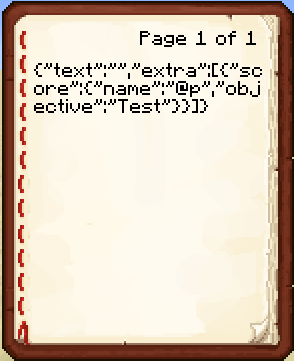
The score-tag in a book does not work, if you /give it to someone who is not an operator or, in a singleplayer world, if cheats are disabled. Video demonstrating the issue: http://youtu.be/QTfumET7Apo
How to reproduce
- Start a world with cheats off
- Open the world in LAN and and set 'allow cheats' to ON
- /give yourself a command block and insert the command below
- Reopen your world
- Activate the command block. You should now get a book that shows the JSON-text instead of the score.
Alternatively, you can test it on a server if you deop yourself after you entered the following command
/give @a written_book{
	title:"Test",
	author:"Test",
	pages:
	[
		"{
			\"text\":\"\",
			\"bold\":true,
			\"extra\":
			[
				{
					\"score\":
					{
						\"name\":\"@p\",
						\"objective\":\"Test\"
					}
				}
			]
		}"
	]
}
Linked Issues
is duplicated by7
 MC-73054Written Book Raw JSON Bug With Cheats Off / Not opped playersDuplicateMC-73839Books showing json when non op and using score:{}DuplicateMC-74156Using target in book gived to player brokes content DuplicateMC-78066JSON code showing for non-ops (1.8.3)DuplicateMC-78534Books not working as intendedDuplicateMC-86609Book JSON bugDuplicateMC-136808Give a book with a score inside the bookDuplicate
 Important
![[Mod] Ezekiel (ezfe)](../../../data/assets/gravatar/ezekielelin.jpeg)
![[Mod] NeunEinser](../../../data/avatars/users/39263.png)
 Low
LowCreated Issue:
Tellraw in books doesn't work if it's too long
If there's a long tellraw-formatted book, the tellraw formatting does not work after reloading the world. But if I just rightclick the command block and press the finish button without change something, the formatting works again.
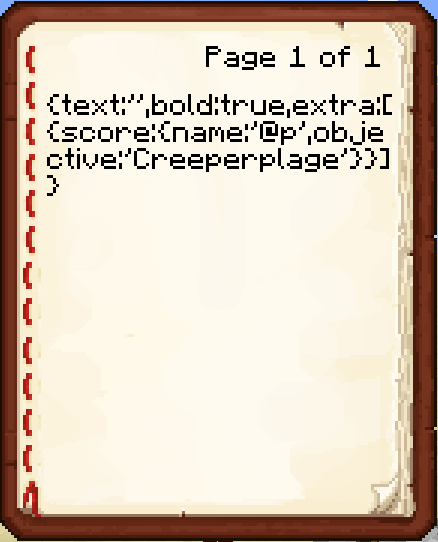
Here is my command (translations comes from the *.lang file in the ressourcepack, they aren't default translations)/give @p written_book 1 0 { title:"Creeperplage", author:"Tiran", pages: [ "{ text:'', bold:true, extra: [ { translate:'Adventure.quest.generic.book.task', with: [ { translate:'Adventure.quest.creeperplage.book.task', with: [ { translate:'entity.Creeper.name' }, { score: { name:'@p', objective:'Creeperplage' } } ], bold:false } ] }, { text:'\n' }, { translate:'Adventure.quest.generic.book.npc', with: [ { translate:'Adventure.quest.creeperplage.npc.name', bold:false } ] }, { text:'\n' }, { translate:'Adventure.quest.generic.book.description', with: [ { translate:'Adventure.quest.creeperplage.book.descriptionPage1', with: [ { translate:'entity.Creeper.name' } ], bold:false } ] } ] }", "{ translate:'Adventure.quest.creeperplage.book.descriptionPage2', with: [ { translate:'entity.Creeper.name' } ] }" ] }Page 1 looks like in the screenshot, page 2 works.
Environment
Windows 7, Java 7 Update 65
Attachments1
tellraw-formatting-does-not-work.png
Tellraw in books doesn'twork if it's too longTellraw in books doesn't alwayd
Tellraw in books doesn't alwaydTellraw in books doesn't always
If there's a long tellraw-formatted book, the tellraw formatting does not work after reloading the world. But if I just rightclick the command block and press the finish button without change something, the formatting works again.
Here is my command (translations comes from the *.lang file in the ressourcepack, they aren't default translations)/give @p written_book 1 0 { title:"Creeperplage", author:"Tiran", pages: [ "{ text:'', bold:true, extra: [ { translate:'Adventure.quest.generic.book.task', with: [ { translate:'Adventure.quest.creeperplage.book.task', with: [ { translate:'entity.Creeper.name' }, { score: { name:'@p', objective:'Creeperplage' } } ], bold:false } ] }, { text:'\n' }, { translate:'Adventure.quest.generic.book.npc', with: [ { translate:'Adventure.quest.creeperplage.npc.name', bold:false } ] }, { text:'\n' }, { translate:'Adventure.quest.generic.book.description', with: [ { translate:'Adventure.quest.creeperplage.book.descriptionPage1', with: [ { translate:'entity.Creeper.name' } ], bold:false } ] } ] }", "{ translate:'Adventure.quest.creeperplage.book.descriptionPage2', with: [ { translate:'entity.Creeper.name' } ] }" ] }Page 1 looks like in the screenshot, page 2 works.
If there's a long tellraw-formatted book, the tellraw formatting does not work after reloading the world. But if I just rightclick the command block and press the finish button without change something, the formatting works again.
Here is my command (translations comes from the *.lang file in the ressourcepack, they aren't default translations)/give @p written_book 1 0 { title:"Creeperplage", author:"Tiran", pages: [ "{ text:'', bold:true, extra: [ { translate:'Adventure.quest.generic.book.task', with: [ { translate:'Adventure.quest.creeperplage.book.task', with: [ { translate:'entity.Creeper.name' }, { score: { name:'@p', objective:'Creeperplage' } } ], bold:false } ] }, { text:'\n' }, { translate:'Adventure.quest.generic.book.npc', with: [ { translate:'Adventure.quest.creeperplage.npc.name', bold:false } ] }, { text:'\n' }, { translate:'Adventure.quest.generic.book.description', with: [ { translate:'Adventure.quest.creeperplage.book.descriptionPage1', with: [ { translate:'entity.Creeper.name' } ], bold:false } ] } ] }", "{ translate:'Adventure.quest.creeperplage.book.descriptionPage2', with: [ { translate:'entity.Creeper.name' } ] }" ] }Page 1 looks like in the screenshot, page 2 works.
Well, I don't know because of what page 1 does not work after reload the world...
Tellraw in books doesn't work always
If there's a long tellraw-formatted book, the tellraw formatting does not work after reloading the world. But if I just rightclick the command block and press the finish button without change something, the formatting works again.
Here is my command (translations comesfrom the *.lang file in the ressourcepack, they aren't default translations)/give @p written_book 1 0 { title:"Creeperplage", author:"Tiran", pages: [ "{ text:'', bold:true, extra: [ { translate:'Adventure.quest.generic.book.task', with: [ { translate:'Adventure.quest.creeperplage.book.task', with: [ { translate:'entity.Creeper.name' }, { score: { name:'@p', objective:'Creeperplage' } } ], bold:false } ] }, { text:'\n' }, { translate:'Adventure.quest.generic.book.npc', with: [ { translate:'Adventure.quest.creeperplage.npc.name', bold:false } ] }, { text:'\n' }, { translate:'Adventure.quest.generic.book.description', with: [ { translate:'Adventure.quest.creeperplage.book.descriptionPage1', with: [ { translate:'entity.Creeper.name' } ], bold:false } ] } ] }", "{ translate:'Adventure.quest.creeperplage.book.descriptionPage2', with: [ { translate:'entity.Creeper.name' } ] }" ] }Page 1 looks like in the screenshot, page 2 works.
Well, I don't know because of what page 1 does not work after reload the world...
Tellraw in books doesn't workalwaysTellraw in books doesn't work with score-tag
If there's a long tellraw-formatted book, the tellraw formatting does not work after reloading the world. But if I just rightclick the command block and press the finish button without change something, the formatting works again.
Here is my command (translations come from the *.lang file in the ressourcepack, they aren't default translations)/give @p written_book 1 0 { title:"Creeperplage", author:"Tiran", pages: [ "{ text:'', bold:true, extra: [ { translate:'Adventure.quest.generic.book.task', with: [ { translate:'Adventure.quest.creeperplage.book.task', with: [ { translate:'entity.Creeper.name' }, { score: { name:'@p', objective:'Creeperplage' } } ], bold:false } ] }, { text:'\n' }, { translate:'Adventure.quest.generic.book.npc', with: [ { translate:'Adventure.quest.creeperplage.npc.name', bold:false } ] }, { text:'\n' }, { translate:'Adventure.quest.generic.book.description', with: [ { translate:'Adventure.quest.creeperplage.book.descriptionPage1', with: [ { translate:'entity.Creeper.name' } ], bold:false } ] } ] }", "{ translate:'Adventure.quest.creeperplage.book.descriptionPage2', with: [ { translate:'entity.Creeper.name' } ] }" ] }Page 1 looks like in the screenshot, page 2 works.
Well, I don't know because of what page 1 does not work after reload the world...If there is a formatted book with a score-tag in a extra-tag, the formatting of the book doesn't work, if you have reloaded the world after input the command. But if you just rightclick the command block and press the finish button without change anything, the command works.
/give @a[score_TalkTiran_min=5,score_TalkTiran=5] written_book 1 0 { title:"Test", author:"Test", pages: [ "{ text:'', bold:true, extra: [ { score: { name:'@p', objective:'Test' } } ] }" ] }
If there is a formatted book with a score-tag in a extra-tag, the formatting of the book doesn't work, if you have reloaded the world after input the command. But if you just rightclick the command block and press the finish button without change anything, the command works.
/give @a[score_TalkTiran_min=5,score_TalkTiran=5]written_book 1 0 {title:"Test",author:"Test",pages:[ "{text:'',bold:true,extra:[ { score: {name:'@p',objective:'Test'} } ]}"] }If there is a formatted book with a score-tag in a extra-tag, the formatting of the book doesn't work, if you have reloaded the world after input the command. But if you just rightclick the command block and press the finish button without change anything, the command works.
/give @a written_book 1 0 { title:"Test", author:"Test", pages: [ "{ text:'', bold:true, extra: [ { score: { name:'@p', objective:'Test' } } ] }" ] }

If there is a formatted book with a score-tag in a extra-tag, the formatting of the book doesn't work, if you have reloaded the world after input the command. But if you just rightclick the command block and press the finish button without change anything, the command works.
/give @a written_book 1 0 { title:"Test", author:"Test", pages: [ "{text:'',bold:true, extra: [ { score: { name:'@p', objective:'Test' } } ] }" ] }
If there is a formatted book with a score-tag in a extra-tag, the formatting of the book doesn't work, if you have reloaded the world after input the command. But if you just rightclick the command block and press the finish button without change anything, the command works.
/give @a written_book 1 0 { title:"Test", author:"Test", pages: [ "{ text:'' bold:true, extra: [ { score: { name:'@p', objective:'Test' } } ] }" ] }
Answer foe [Mod] Ezekiel: Reload the world AND THEN activate the command block!
If there is a formatted book with a score-tag in a extra-tag, the formatting of the book doesn't work, if you have reloaded the world after input the command. But if you just rightclick the command block and press the finish button without change anything, the command works./give @a written_book 1 0 { title:"Test", author:"Test", pages: [ "{ text:'' bold:true, extra: [ { score: { name:'@p', objective:'Test' } } ] }" ] }Steps to reproduce the bug
3. write in the command block one of the commands, which were posted here... Let's take this, because it's from a Mod and Mods knows everything better than we stupid users:/give @a written_book 1 0 {pages:["{\"text\":\"\",\"extra\":[{\"score\":{\"name\":\"@p\",\"objective\":\"Test\"}}]}"],title:Book,author:TellrawGenerator}4. build a button on the command block. (If you want to, you can press it right now, but as you will see, the command works at this time)
5. press the "esc" button on your keyboard and click "Save and Quit to Title" in the menu.
6. open again the minecraft world.
7. If there already some books in your inventory remember their places, so that you don't confuse them with the book you'll get now
8. Press the button.
9. Open the book and you'll see, that something is wrong with it.Hope you can't misunderstand me now. I have wrote this in a shorter from in the main description, now
/give @a written_book 1 0 { title:"Test", author:"Test", pages: [ "{ text:'' bold:true, extra: [ { score: { name:'@p', objective:'Test' } } ] }" ] }
Steps to reproduce the bug
3. write in the command block one of the commands, which were posted here... Let's take this, because it's from a Mod and Mods knows everything better than we stupid users:/give @a written_book 1 0 {pages:["{\"text\":\"\",\"extra\":[{\"score\":{\"name\":\"@p\",\"objective\":\"Test\"}}]}"],title:Book,author:TellrawGenerator}4. build a button on the command block. (If you want to, you can press it right now, but as you will see, the command works at this time)
5. press the "esc" button on your keyboard and click "Save and Quit to Title" in the menu.
6. open again the minecraft world.
7. If there already some books in your inventory remember their places, so that you don't confuse them with the book you'll get now
8. Press the button.
9. Open the book and you'll see, that something is wrong with it.Hope you can't misunderstand me now. I have wrote this in a shorter from in the main description, now
/give @a written_book 1 0 { title:"Test", author:"Test", pages: [ "{ text:'' bold:true, extra: [ { score: { name:'@p', objective:'Test' } } ] }" ] }
Steps to reproduce the bug
3. write in the command block one of the commands, which were posted here:/give @a written_book 1 0 {pages:["{\"text\":\"\",\"extra\":[{\"score\":{\"name\":\"@p\",\"objective\":\"Test\"}}]}"],title:Book,author:TellrawGenerator}4. build a button on the command block. (If you want to, you can press it right now, but as you will see, the command works at this time)
5.press the "esc" button on your keyboard and click "Save and Quit to Title" in the menu.
6.open again the minecraft world.
7. If there already some books in your inventory remember their places, so that you don't confuse them with the book you'll get now
8. Press the button.
9. Open the book and you'll see, that something is wrong with it.Hope you can't misunderstand me now. I have wrote this in a shorter from in the main description, now
/give @a written_book 1 0 { title:"Test", author:"Test", pages: [ "{ text:'' bold:true, extra: [ { score: { name:'@p', objective:'Test' } } ] }" ] }Steps to reproduce the bug
1. write in a command block the command at the end of the description
2. Quit to Title screen and open the world again
3. Activate the command block/give @a written_book 1 0 { title:"Test", author:"Test", pages: [ "{ text:'' bold:true, extra: [ { score: { name:'@p', objective:'Test' } } ] }" ] }This commands are working, too:
Steps to reproduce the bug
1. write in a command block the command at the end of the description
2. Quit to Title screen and open the world again
3. Activate the command block/give @a written_book 1 0 { title:"Test", author:"Test", pages: [ "{ text:'' bold:true, extra: [ { score: { name:'@p', objective:'Test' } } ] }" ] }This commands are working, too:
/give @a written_book 1 0 { title:"Test", author:"Test", pages: [ "{ text:\"\" bold:true, extra: [ { score: { name:\"@p\", objective:\"Test\" } } ] }" ] }
Steps to reproduce the bug
1. write in a command block the command at the end of the description
2. Quit to Title screen and open the world again
3. Activate the command block/give @a written_book 1 0 { title:"Test", author:"Test", pages: [ "{ text:'' bold:true, extra: [ { score: { name:'@p', objective:'Test' } } ] }" ] }This commands are working, too:
/give @a written_book 1 0 { title:"Test", author:"Test", pages: [ "{ text:\"\" bold:true, extra: [ { score: { name:\"@p\", objective:\"Test\" } } ] }" ] }/give @a written_book 1 0 { pages: [ "{ \"text\":\"\", \"extra\": [ { \"score\": { \"name\":\"@p\", \"objective\":\"Test\" } } ] }" ], title:Book, author:TellrawGenerator }
Steps to reproduce the bug
1. write in a command block on of the command at the end of the description
2. Quit to Title screen and open the world again
3. Activate the command block/give @a written_book 1 0 { title:"Test", author:"Test", pages: [ "{ text:'' bold:true, extra: [ { score: { name:'@p', objective:'Test' } } ] }" ] }This commands are working, too:
/give @a written_book 1 0 { title:"Test", author:"Test", pages: [ "{ text:\"\" bold:true, extra: [ { score: { name:\"@p\", objective:\"Test\" } } ] }" ] }/give @a written_book 1 0 { pages: [ "{ \"text\":\"\", \"extra\": [ { \"score\": { \"name\":\"@p\", \"objective\":\"Test\" } } ] }" ], title:Book, author:TellrawGenerator }
Steps to reproduce the bug
1. write in a command block on of the command at the end of the description
2. Quit to Title screen and open the world again
3. Activate the command block/give @a written_book 1 0 { title:"Test", author:"Test", pages: [ "{ text:'' bold:true, extra: [ { score: { name:'@p', objective:'Test' } } ] }" ] }This commands are
working, too:/give @a written_book 1 0 { title:"Test", author:"Test", pages: [ "{ text:\"\" bold:true, extra: [ { score: { name:\"@p\", objective:\"Test\" } } ] }" ] }/give @a written_book 1 0 { pages: [ "{ \"text\":\"\", \"extra\": [ { \"score\": { \"name\":\"@p\", \"objective\":\"Test\" } } ] }" ], title:Book, author:TellrawGenerator }Steps to reproduce the bug
1. write in a command block on of the command at the end of the description
2. Quit to Title screen and open the world again
3. Activate the command block/give @a written_book 1 0 { title:"Test", author:"Test", pages: [ "{ text:'' bold:true, extra: [ { score: { name:'@p', objective:'Test' } } ] }" ] }This commands are alternates:
/give @a written_book 1 0 { title:"Test", author:"Test", pages: [ "{ text:\"\" bold:true, extra: [ { score: { name:\"@p\", objective:\"Test\" } } ] }" ] }/give @a written_book 1 0 { pages: [ "{ \"text\":\"\", \"extra\": [ { \"score\": { \"name\":\"@p\", \"objective\":\"Test\" } } ] }" ], title:Book, author:TellrawGenerator }
Steps to reproduce the bug
1. write in a command block on of the command at the end of the description
2. Quit to Title screen and open the world again
3. Activate the command block/give @a written_book 1 0 { title:"Test", author:"Test", pages: [ "{ text:'' bold:true, extra: [ { score: { name:'@p', objective:'Test' } } ] }" ] }This commands are alternates:
/give @a written_book 1 0 { title:"Test", author:"Test", pages: [ "{ text:\"\" bold:true, extra: [ { score: { name:\"@p\", objective:\"Test\" } } ] }" ] }/give @a written_book 1 0 { pages: [ "{ \"text\":\"\", \"extra\": [ { \"score\": { \"name\":\"@p\", \"objective\":\"Test\" } } ] }" ], title:Book, author:TellrawGenerator }Steps to reproduce the bug
1. write in a command block on of the commands at the end of the description
2. Quit to Title screen and open the world again
3. Activate the command blockcommands at the end of the description
/give @a written_book 1 0 { title:"Test", author:"Test", pages: [ "{ text:'' bold:true, extra: [ { score: { name:'@p', objective:'Test' } } ] }" ] }This commands are alternates:
/give @a written_book 1 0 { title:"Test", author:"Test", pages: [ "{ text:\"\" bold:true, extra: [ { score: { name:\"@p\", objective:\"Test\" } } ] }" ] }/give @a written_book 1 0 { pages: [ "{ \"text\":\"\", \"extra\": [ { \"score\": { \"name\":\"@p\", \"objective\":\"Test\" } } ] }" ], title:Book, author:TellrawGenerator }
Tellraw in books doesn't work with score-tag after reload the world
Steps to reproduce the bug
1. write in a command block one of the commands at the end of the description
2. Quit to Title screen and open the world again
3. Activate the command blockcommands at the end of the description
/give @a written_book 1 0 { title:"Test", author:"Test", pages: [ "{ text:'' bold:true, extra: [ { score: { name:'@p', objective:'Test' } } ] }" ] }This commands are alternates:
/give @a written_book 1 0 { title:"Test", author:"Test", pages: [ "{ text:\"\" bold:true, extra: [ { score: { name:\"@p\", objective:\"Test\" } } ] }" ] }/give @a written_book 1 0 { pages: [ "{ \"text\":\"\", \"extra\": [ { \"score\": { \"name\":\"@p\", \"objective\":\"Test\" } } ] }" ], title:Book, author:TellrawGenerator }
Tellrawin books doesn'twork with score-tag after reload the worldscore tag in books doesn't update when score is changed
Post updating finished ... and where is my comment, I posted before?!
And please, lovely mods, put the "Invalid" away...
Steps to reproducethe bug
1. write in a command block one of the commands at the end of the description
2. Quit to Title screen and open the world again
3. Activate the command blockcommands at the end of the description
/give @a written_book 1 0 { title:"Test", author:"Test", pages: [ "{ text:'' bold:true, extra: [ { score: { name:'@p', objective:'Test' } } ] }" ] }This commands are alternates:
/give @a written_book 1 0 { title:"Test", author:"Test", pages: [ "{ text:\"\" bold:true, extra: [ { score: { name:\"@p\", objective:\"Test\" } } ] }" ] }/give @a written_book 1 0 { pages: [ "{ \"text\":\"\", \"extra\": [ { \"score\": { \"name\":\"@p\", \"objective\":\"Test\" } } ] }" ], title:Book, author:TellrawGenerator }Description of the bug
If you activate a command block, during you're not allowed to use commands, which gives you a book with a score-tag, the formatting of the book doesn't work (see attachments).Steps to reproduce the bug
1. Start a world with disabled commands
2. Open the world in Lan and allow commands to be able to build a command block.
3. Enter on of the commands below
4. Quit to title and open the world again, so it isn't opend in Lan anymore and commands are disabled again.
5. Activate the command block. The book, you get now is buggy.commands
/give @a written_book 1 0 { title:"Test", author:"Test", pages: [ "{ text:'' bold:true, extra: [ { score: { name:'@p', objective:'Test' } } ] }" ] }This commands are alternates:
/give @a written_book 1 0 { title:"Test", author:"Test", pages: [ "{ text:\"\" bold:true, extra: [ { score: { name:\"@p\", objective:\"Test\" } } ] }" ] }/give @a written_book 1 0 { pages: [ "{ \"text\":\"\", \"extra\": [ { \"score\": { \"name\":\"@p\", \"objective\":\"Test\" } } ] }" ], title:Book, author:TellrawGenerator }
scoretag in books doesn'tupdate when score ischangedscore-tag in books doesn't work, if commands are disabled
Description of the bug
If you activate a command block, during you're not allowed to use commands, which gives you a book with a score-tag, the formatting of the book doesn't work (see attachments).Steps to reproduce the bug
1. Start a world with disabled commands
2. Open the world in Lan and allow commands to be able to build a command block.
3. Enter on of the commands below
4. Quit to title and open the world again, so it isn't opend in Lan anymore and commands are disabled again.
5. Activate the command block. The book, you get now is buggy.commands
/give @a written_book 1 0 { title:"Test", author:"Test", pages: [ "{ text:'' bold:true, extra: [ { score: { name:'@p', objective:'Test' } } ] }" ] }This commands are alternates:
/give @a written_book 1 0 { title:"Test", author:"Test", pages: [ "{ text:\"\" bold:true, extra: [ { score: { name:\"@p\", objective:\"Test\" } } ] }" ] }/give @a written_book 1 0 { pages: [ "{ \"text\":\"\", \"extra\": [ { \"score\": { \"name\":\"@p\", \"objective\":\"Test\" } } ] }" ], title:Book, author:TellrawGenerator }Description of the bug
If you activate a command block, during you're not allowed to use commands, which gives you a book with a score-tag, the formatting of the book doesn't work (see attachments or this video: http://youtu.be/QTfumET7Apo).Steps to reproduce the bug
1. Start a world with disabled commands
2. Open the world in Lan and allow commands to be able to build a command block.
3. Enter on of the commands below
4. Quit to title and open the world again, so it isn't opend in Lan anymore and commands are disabled again.
5. Activate the command block. The book, you get now is buggy.commands
/give @a written_book 1 0 { title:"Test", author:"Test", pages: [ "{ text:'' bold:true, extra: [ { score: { name:'@p', objective:'Test' } } ] }" ] }This commands are alternates:
/give @a written_book 1 0 { title:"Test", author:"Test", pages: [ "{ text:\"\" bold:true, extra: [ { score: { name:\"@p\", objective:\"Test\" } } ] }" ] }/give @a written_book 1 0 { pages: [ "{ \"text\":\"\", \"extra\": [ { \"score\": { \"name\":\"@p\", \"objective\":\"Test\" } } ] }" ], title:Book, author:TellrawGenerator }
score-tag in books doesn't work, if commands are disabled
score-tag in books doesn't workScore tag in books doesn't work with cheats off
Description of the bug
If you activate a command block, during you're not allowed to use commands, which gives you a book with a score-tag, the formatting of the book doesn't work (see attachments or this video: http://youtu.be/QTfumET7Apo).Steps to reproduce the bug
1. Start a world with disabled commands
2. Open the world in Lan and allow commands to be able to build a command block.
3. Enter on of the commands below
4. Quit to title and open the world again, so it isn't opend in Lan anymore and commands are disabled again.
5. Activate the command block. The book, you get now is buggy.commands
/give @a written_book 1 0{title:"Test",author:"Test",pages:[ "{text:''bold:true,extra:[ { score: {name:'@p',objective:'Test'} } ]}"] }This commands are alternates:
/give @a written_book 1 0 {title:"Test",author:"Test",pages:[ "{text:\"\"bold:true,extra:[ { score: {name:\"@p\",objective:\"Test\"} } ]}"] }/give @a written_book 1 0 {pages:[ "{\"text\":\"\",\"extra\":[ {\"score\":{\"name\":\"@p\",\"objective\":\"Test\"} } ]}"],title:Book,author:TellrawGenerator }Description of the bug
If you activate a command block, during you're not allowed to use commands, which gives you a book with a score-tag, the formatting of the book doesn't work (see attachments or this video: http://youtu.be/QTfumET7Apo).Steps to reproduce the bug
1. Start a world with disabled commands
2. Open the world in Lan and allow commands to be able to build a command block.
3. Enter on of the commands below
4. Quit to title and open the world again, so it isn't opend in Lan anymore and commands are disabled again.
5. Activate the command block. The book, you get now is buggy.commands
/give @a written_book 1 0 { title:"Test", author:"Test", pages: [ "{ text:'' bold:true, extra: [ { score: { name:'@p', objective:'Test' } } ] }" ] }This commands are alternates:
/give @a written_book 1 0 { title:"Test", author:"Test", pages: [ "{ text:\"\" bold:true, extra: [ { score: { name:\"@p\", objective:\"Test\" } } ] }" ] }/give @a written_book 1 0 { pages: [ "{ \"text\":\"\", \"extra\": [ { \"score\": { \"name\":\"@p\", \"objective\":\"Test\" } } ] }" ], title:Book, author:TellrawGenerator }
Description of the bug
If you activate a command block, during you're not allowed to use commands, which gives you a book with a score-tag, the formatting of the book doesn't work (see attachments or this video: http://youtu.be/QTfumET7Apo).Steps to reproduce the bug
1. Start a world with disabled commands
2. Open the world in Lan and allow commands to be able to build a command block.
3. Enter on of the commands below
4. Quit to title and open the world again, so it isn't opend in Lan anymore and commands are disabled again.
5. Activate the command block. The book, you get now is buggy.commands
/give @a written_book 1 0 {title:"Test",author:"Test",pages:[ "{ text:'' bold:true, extra: [ { score: { name:'@p', objective:'Test'} } ] }" ]}This commands are alternates:
/give @a written_book 1 0{title:"Test",author:"Test",pages:[ "{ text:\"\"bold:true, extra: [ { score: { name:\"@p\",objective:\"Test\"} } ] }" ]}/give @a written_book 1 0{pages:[ "{ \"text\":\"\",\"extra\": [ {\"score\": {\"name\":\"@p\",\"objective\":\"Test\"} } ] }" ],title:Book,author:TellrawGenerator}Description of the bug
If you activate a command block, during you're not allowed to use commands, which gives you a book with a score-tag, the formatting of the book doesn't work (see attachments or this video: http://youtu.be/QTfumET7Apo).Steps to reproduce the bug
1. Start a world with disabled commands
2. Open the world in Lan and allow commands to be able to build a command block.
3. Enter on of the commands below
4. Quit to title and open the world again, so it isn't opend in Lan anymore and commands are disabled again.
5. Activate the command block. The book, you get now is buggy.commands
/give @a written_book 1 0 {title:"Test",author:"Test",pages:["{text:''bold:true,extra:[{score:{name:'@p',objective:'Test'}}]}"]}This commands are alternates:
/give @a written_book 1 0 {title:"Test",author:"Test",pages:["{text:\"\"bold:true,extra:[{score:{name:\"@p\",objective:\"Test\"}}]}"]}/give @a written_book 1 0 {pages:["{\"text\":\"\",\"extra\":[{\"score\":{\"name\":\"@p\",\"objective\":\"Test\"}}]}"],title:Book,author:TellrawGenerator}
Description of the bug
If you activate a command block, during you're not allowed to use commands, which gives you a book with a score-tag, the formatting of the book doesn't work (see attachments or this video: http://youtu.be/QTfumET7Apo).Steps to reproduce the bug
1. Start a world with disabled commands
2. Open the world in Lan and allow commands to be able to build a command block.
3. Enter on of the commands below
4. Quit to title and open the world again, so it isn't opend in Lan anymore and commands are disabled again.
5. Activate the command block. The book, you get now is buggy.commands
/give @a written_book 1 0 {title:"Test",author:"Test",pages:["{text:'',bold:true,extra:[{score:{name:'@p',objective:'Test'}}]}"]}This commands are alternates:
/give @a written_book 1 0 {title:"Test",author:"Test",pages:["{text:\"\"bold:true,extra:[{score:{name:\"@p\",objective:\"Test\"}}]}"]}/give @a written_book 1 0 {pages:["{\"text\":\"\",\"extra\":[{\"score\":{\"name\":\"@p\",\"objective\":\"Test\"}}]}"],title:Book,author:TellrawGenerator}
Description of the bug
If you activate a command block, during you're not allowed to use commands, which gives you a book with a score-tag, the formatting of the book doesn't work (see attachments or this video: http://youtu.be/QTfumET7Apo).Steps to reproduce the bug
1. Start a world with disabled commands
2. Open the world in Lan and allow commands to be able to build a command block.
3. Enter on of the commands below
4. Quit to title and open the world again, so it isn't opend in Lan anymore and commands are disabled again.
5. Activate the command block. The book, you get now is buggy.commands
/give @a written_book 1 0{title:"Test",author:"Test",pages:["{text:'',bold:true,extra:[{score:{name:'@p',objective:'Test'}}]}"]}This commands are alternates:
/give @a written_book 1 0{title:"Test",author:"Test",pages:["{text:\"\"bold:true,extra:[{score:{name:\"@p\",objective:\"Test\"}}]}"]}/give @a written_book 1 0{pages:["{\"text\":\"\",\"extra\":[{\"score\":{\"name\":\"@p\",\"objective\":\"Test\"}}]}"],title:Book,author:TellrawGenerator}Description of the bug
If you activate a command block, during you're not allowed to use commands, which gives you a book with a score-tag, the formatting of the book doesn't work (see attachments or this video: http://youtu.be/QTfumET7Apo).Steps to reproduce the bug
1. Start a world with disabled commands
2. Open the world in Lan and allow commands to be able to build a command block.
3. Enter on of the commands below
4. Quit to title and open the world again, so it isn't opend in Lan anymore and commands are disabled again.
5. Activate the command block. The book, you get now is buggy.commands
/give @a written_book 1 0 { title:"Test", author:"Test", pages: [ "{ text:'', bold:true, extra: [ { score: { name:'@p', objective:'Test' } } ] }" ] }This commands are alternates:
/give @a written_book 1 0 { title:"Test", author:"Test", pages: [ "{ text:\"\", bold:true, extra: [ { score: { name:\"@p\", objective:\"Test\" } } ] }" ] }/give @a written_book 1 0 { pages: [ "{ \"text\":\"\", \"extra\": [ { \"score\": { \"name\":\"@p\", \"objective\":\"Test\" } } ] }" ], title:Book, author:TellrawGenerator }
Description of the bug
If you activate a command block, during you're not allowed to use commands, which gives you a book with a score-tag, the formatting of the book doesn't work (see attachments or this video: http://youtu.be/QTfumET7Apo).Steps to reproduce the bug
1. Start a world with disabled commands
2. Open the world in Lan and allow commands to be able to build a command block.
3. Enter on of the commands below
4. Quit to title and open the world again, so it isn't opend in Lan anymore and commands are disabled again.
5. Activate the command block. The book, you get now is buggy.commands
/give @a written_book 1 0 { title:"Test", author:"Test", pages: [ "{ text:'', bold:true, extra: [ { score: { name:'@p', objective:'Test' } } ] }" ] }This commands are alternates:
/give @a written_book 1 0 { title:"Test", author:"Test", pages: [ "{ text:\"\", bold:true, extra: [ { score: { name:\"@p\", objective:\"Test\" } } ] }" ] }/give @a written_book 1 0 { pages: [ "{ \"text\":\"\", \"extra\": [ { \"score\": { \"name\":\"@p\", \"objective\":\"Test\" } } ] }" ], title:Book, author:TellrawGenerator }

![[Mod] Skylinerw](../../../data/assets/gravatar/skylinerw.png)

is duplicated by
Score tag in books doesn't work with cheats off/ as non-op
Description of the bug
If you activate a command block, during you're not allowed to use commands, which gives you a book with a score-tag, the formatting of the book doesn't work (see attachments or this video: http://youtu.be/QTfumET7Apo).Steps to reproduce the bug
1. Start a world with disabled commands
2. Open the world in Lan and allow commands to be able to build a command block.
3. Enter on of the commands below
4. Quit to title and open the world again, so it isn't opend in Lan anymore and commands are disabled again.
5. Activate the command block. The book, you get now is buggy.commands
/give @a written_book 1 0 { title:"Test", author:"Test", pages: [ "{ text:'', bold:true, extra: [ { score: { name:'@p', objective:'Test' } } ] }" ] }This commands are alternates:
/give @a written_book 1 0 { title:"Test", author:"Test", pages: [ "{ text:\"\", bold:true, extra: [ { score: { name:\"@p\", objective:\"Test\" } } ] }" ] }/give @a written_book 1 0 { pages: [ "{ \"text\":\"\",\"extra\": [ {\"score\":{\"name\":\"@p\", \"objective\":\"Test\" } } ] }" ], title:Book, author:TellrawGenerator }Description of the bug
If you activate a command block, during you're not allowed to use commands, which gives you a book with a score-tag, the formatting of the book doesn't work (see attachments or this video: http://youtu.be/QTfumET7Apo).Steps to reproduce the bug
1. Start a world with disabled commands
2. Open the world in Lan and allow commands to be able to build a command block.
3. Enter on of the commands below
4. Quit to title and open the world again, so it isn't opend in Lan anymore and commands are disabled again.
5. Activate the command block. The book, you get now is buggy.commands
/give @a written_book 1 0 { title:"Test", author:"Test", pages: [ "{ \"text\":\"\", \"bold\":true, \"extra\": [ { \"score\": { \"name\":\"@p\", \"objective\":\"Test\" } } ] }" ] }
Description of the bug
If you activate a command block, during you're not allowed to use commands, which gives you a book with a score-tag, the formatting of the book doesn't work (see attachments or this video: http://youtu.be/QTfumET7Apo).Steps to reproduce the bug
1. Start a world withdisabled commands
2. Open the world in Lan and allow commands to be able to build a command block.
3.Enter on ofthe commandsbelow
4. Quit to title and open the world again, so it isn't opend in Lan anymore and commands are disabled again.
5. Activate the command block.The book, you get now is buggy.commands
/give @a written_book 1 0 { title:"Test", author:"Test", pages: [ "{ \"text\":\"\", \"bold\":true, \"extra\": [ { \"score\": { \"name\":\"@p\", \"objective\":\"Test\" } } ] }" ] }Description of the bug
If you activate a command block, during you're not allowed to use commands, which gives you a book with a score-tag, the formatting of the book doesn't work (see attachments or this video: http://youtu.be/QTfumET7Apo).Steps to reproduce the bug
1. Start a world with cheats off
2. Open the world in Lan and and set 'allow cheats' to ON
3. give yourself a command block and insert the command below.
4. Reopen your world.
5. Activate the command block. You should now get a book that shows the JSON-text instead of the score.Alternatively, you can test it on a server if you deop yourself after you entered the command.
commands
/give @a written_book 1 0 { title:"Test", author:"Test", pages: [ "{ \"text\":\"\", \"bold\":true, \"extra\": [ { \"score\": { \"name\":\"@p\", \"objective\":\"Test\" } } ] }" ] }
Description of the bug
If you activate a command block, during you're not allowed to use commands, which gives you a book with a score-tag, the formatting of the book doesn't work (see attachments or this video: http://youtu.be/QTfumET7Apo).Steps to reproduce the bug
1. Start a world with cheats off
2. Open the world in Lan and and set 'allow cheats' to ON
3. give yourself a command block and insert the command below.
4. Reopen your world.
5. Activate the command block. You should now get a book that shows the JSON-text instead of the score.Alternatively, you can test it on a server if you deop yourself after you entered the command.
commands/give @a written_book 1 0 { title:"Test", author:"Test", pages: [ "{ \"text\":\"\", \"bold\":true, \"extra\": [ { \"score\": { \"name\":\"@p\", \"objective\":\"Test\" } } ] }" ] }Description of the bug
If you activate a command block, during you're not allowed to use commands, which gives you a book with a score-tag, the formatting of the book doesn't work (see attachments or this video: http://youtu.be/QTfumET7Apo).Steps to reproduce the bug
1. Start a world with cheats off
2. Open the world in Lan and and set 'allow cheats' to ON
3. give yourself a command block and insert the command below.
4. Reopen your world.
5. Activate the command block. You should now get a book that shows the JSON-text instead of the score.Alternatively, you can test it on a server if you deop yourself after you entered the command.
Command
/give @a written_book 1 0 { title:"Test", author:"Test", pages: [ "{ \"text\":\"\", \"bold\":true, \"extra\": [ { \"score\": { \"name\":\"@p\", \"objective\":\"Test\" } } ] }" ] }
Description of the bug
If you activate a command block, during you're not allowed to use commands, which gives you a book with a score-tag, the formatting ofthebook doesn't work (see attachments or this video: http://youtu.be/QTfumET7Apo).Steps to reproduce the bug
1. Start a world with cheats off
2. Open the world in Lan and and set 'allow cheats' to ON
3. give yourself a command block and insert the command below.
4. Reopen your world.
5. Activate the command block. You should now get a book that shows the JSON-text instead of the score.Alternatively, you can test it on a server if you deop yourself after you entered the command.
Command
/give @a written_book 1 0 { title:"Test", author:"Test", pages: [ "{ \"text\":\"\", \"bold\":true, \"extra\": [ { \"score\": { \"name\":\"@p\", \"objective\":\"Test\" } } ] }" ] }Description of the bug
The score-tag in a book does not work, if it is given to someone who is not an operator or if cheats are disabled in a singleplayer world. (Video: http://youtu.be/QTfumET7Apo).Steps to reproduce the bug
1. Start a world with cheats off
2. Open the world in Lan and and set 'allow cheats' to ON
3. give yourself a command block and insert the command below.
4. Reopen your world.
5. Activate the command block. You should now get a book that shows the JSON-text instead of the score.Alternatively, you can test it on a server if you deop yourself after you entered the command.
Command
/give @a written_book 1 0 { title:"Test", author:"Test", pages: [ "{ \"text\":\"\", \"bold\":true, \"extra\": [ { \"score\": { \"name\":\"@p\", \"objective\":\"Test\" } } ] }" ] }
Description of the bug
The score-tag in a book does not work, ifit isgivento someone who is not an operator orif cheats are disabled in a singleplayer world. (Video: http://youtu.be/QTfumET7Apo).Steps to reproduce the bug
1. Start a world with cheats off
2. Open the world in Lan and and set 'allow cheats' to ON
3. give yourself a command block and insert the command below.
4. Reopen your world.
5. Activate the command block. You should now get a book that shows the JSON-text instead of the score.Alternatively, you can test it on a server if you deop yourself after you entered the command.
Command
/give @a written_book 1 0 { title:"Test", author:"Test", pages: [ "{ \"text\":\"\", \"bold\":true, \"extra\": [ { \"score\": { \"name\":\"@p\", \"objective\":\"Test\" } } ] }" ] }Description of the bug
The score-tag in a book does not work, if you /give it to someone who is not an operator or, in a singleplayer world, if cheats are disabled. (Video: http://youtu.be/QTfumET7Apo).Steps to reproduce the bug
1. Start a world with cheats off
2. Open the world in Lan and and set 'allow cheats' to ON
3. give yourself a command block and insert the command below.
4. Reopen your world.
5. Activate the command block. You should now get a book that shows the JSON-text instead of the score.Alternatively, you can test it on a server if you deop yourself after you entered the command.
Command
/give @a written_book 1 0 { title:"Test", author:"Test", pages: [ "{ \"text\":\"\", \"bold\":true, \"extra\": [ { \"score\": { \"name\":\"@p\", \"objective\":\"Test\" } } ] }" ] }
duplicates
is duplicated by
relates to
MC-72530
duplicates
![[Mod] Michael Wobst](../../../data/avatars/users/37868.png)
Description of the bug
The score-tag in a book does not work, if you /giveit to someone who is not an operator or, in a singleplayer world, if cheats are disabled.(Video: http://youtu.be/QTfumET7Apo).Steps to reproduce the bug
1. Start a world with cheats off
2. Open the world in Lan and and set 'allow cheats' to ON
3. give yourself a command block and insert the command below.
4. Reopen your world.
5. Activate the command block. You should now get a book that shows the JSON-text instead of the score.Alternatively, you can test it on a server if you deop yourself after you entered the command
.Command
/give @a written_book 1 0 { title:"Test", author:"Test", pages: [ "{ \"text\":\"\", \"bold\":true, \"extra\": [ { \"score\": { \"name\":\"@p\", \"objective\":\"Test\" } } ] }" ] }The bug
The score-tag in a book does not work, if you /give it to someone who is not an operator or, in a singleplayer world, if cheats are disabled. Video demonstrating the issue: http://youtu.be/QTfumET7Apo
How to reproduce
- Start a world with cheats off
- Open the world in LAN and and set 'allow cheats' to ON
- /give yourself a command block and insert the command below
- Reopen your world
- Activate the command block. You should now get a book that shows the JSON-text instead of the score.
Alternatively, you can test it on a server if you deop yourself after you entered the following command
/give @a written_book 1 0 { title:"Test", author:"Test", pages: [ "{ \"text\":\"\", \"bold\":true, \"extra\": [ { \"score\": { \"name\":\"@p\", \"objective\":\"Test\" } } ] }" ] }
Windows 7, Java 7 Update 65
The bug
The score-tag in a book does not work, if you /give it to someone who is not an operator or, in a singleplayer world, if cheats are disabled. Video demonstrating the issue: http://youtu.be/QTfumET7Apo
How to reproduce
- Start a world with cheats off
- Open the world in LAN and and set 'allow cheats' to ON
- /give yourself a command block and insert the command below
- Reopen your world
- Activate the command block. You should now get a book that shows the JSON-text instead of the score.
Alternatively, you can test it on a server if you deop yourself after you entered the following command
/give @a written_book1 0{ title:"Test", author:"Test", pages: [ "{ \"text\":\"\", \"bold\":true, \"extra\": [ { \"score\": { \"name\":\"@p\", \"objective\":\"Test\" } } ] }" ] }
![[Mod] Pokechu22](../../../data/avatars/users/92931.png)
is duplicated by
![[Mojang] Nathan Adams](../../../data/assets/gravatar/dinnerbone.png)

![[Mod] CubeTheThird](../../../data/assets/gravatar/cubethethird.jpeg)
![[Mod] Greymagic27](../../../data/avatars/users/92875.png)
![[Mojang] Adrian Östergård](../../../data/assets/gravatar/nighter.jpeg)

is duplicated by
![[Bot] Arisa](../../../data/avatars/users/43007.png)
relates to
is duplicated by
![[Mod] ampolive](../../../data/avatars/users/18949.svg)
![[Mojang] slicedlime](../../../data/assets/gravatar/slicedlime.jpeg)

Shouldn't the "is duplicated by" and "is related to" links be moved to MC-63988 as well, then?
![[Mod] Asteraoth](../../../data/avatars/users/92886.png)
The environment is only supposed to contain PC details.
Thank you for your report!
However, this issue is a Duplicate of MC-63988.
If you have additional information, please add it to that report.
Please search before reporting, as it's likely that one exists already.
Quick Links:
📓 Issue Guidelines – 💬 Community Support – 📧 Customer Support – 📖 Game Wiki
Just updated the post, because I have reproduced the bug.
You can't use single quotes in valid JSON.
Eeehmm, if I've use " before, it's like \", or? And because of what works the command upto reload the world again, if I just rightclick the command block and press "finish" without change anything?
And because of what does it only not work with the score tag? This works fantastic:
/give @a written_book 1 0 { title:"Test", author:"Test", pages: [ "{ text:'', bold:true, extra: [ { text:'Hello world!' } ] }" ] }btw: For this it's the same:
/give @a written_book 1 0 { title:"Test", author:"Test", pages: [ "{ text:\"\", bold:true, extra: [ { score: { name:\"@p\", objective:\"Test\" } } ] }" ] }/give @a written_book 1 0 {pages:["{\"text\":\"\",\"extra\":[{\"score\":{\"name\":\"@p\",\"objective\":\"Test\"}}]}"],title:Book,author:TellrawGenerator}Well, if i write this in a command block and reload the world, it doesn't work as well... It doesn't work, because it's a bug! What's so complicated? Just try it out and don't forget to reload the world before activating the command block...
Please explain what I am doing wrong: https://www.youtube.com/watch?v=y1NLRdssCk0
Hmm, strange. Try relogging, giving yourself the book again, opening it, closing it, setting your score to something else, and then reopening the book. For me it remains at whatever the original value was.
Okay, sorry about that, but the bug comes at another time than I thought...
1. Your world have to be with disabled cheats.
2. You can use "Open the world in Lan" to allow cheats during build the command block and input the command
3. Quit to title and Open the world again, so it isn't open in Lan anymore and commands are disabled again.
4. Now the command doesnt' work. It doesn't work, if commands are disabled. A book, that was created when commands are allowed works all time, a book, that was created when commands are disabled doesn't work all the time...
Im going to update description...
Okay, I've created a video, too which shows the bug: http://youtu.be/QTfumET7Apo
It's not necessary to have a cheats-off world.
Can you explain this?
You should maybe change the title to something like: "Score and selector tag in books doesn't work with cheats off"
or something like this
Also it is happening with the selector tag in 14w30c but the game just leaves the space then blank instead of showing the command
I have changed it again... I have had another title, but I think a Mod has changed it for any reason...
@ Mod Anon Ymus: I've detected a little mistake in the JSON from the commands I posted here. Now it should work with cheats on, and only not if cheats off... Try again
This bug is still happens in 1.8
Please update it and add to the title "Score and Selector tag..."
Most likely caused by the fix of
MC-43984I can confirm this, I tried listing all the players in the game. OP's could see it, Non-Ops couldn't.
15w43a
Confirmed for 1.10
Both score and selector tags do not work in books. However, with the score tag, If you use a UUID for the name it will work for non-ops as well.
Oh dear, this is old. I couldn't even speak English properly back then...
I updated this issue a little bit, should be less painful to read now.
Still in 1.11, 1.11.1 and 1.11.2
Confirmed for 1.13-pre6. Please update the description command to
/give @a written_book{ title:"Test", author:"Test", pages: [ "{ \"text\":\"\", \"bold\":true, \"extra\": [ { \"score\": { \"name\":\"@p\", \"objective\":\"Test\" } } ] }" ] }Issue persists in 1.13 & 1.13.1 full releases.
Both in singleplayer without cheats enabled and on a server where the player is non-OP.
Book is resolved with raw JSON rather than being rendered correctly.
And I thought I was doing something wrong. Good to know it's only a bug.
Question: is this the same bug that affects opening a book in the off-hand that ignores selectors?
Bug is still here in latest snapshot (19w08b)
Still present in release 1.14
Still affects 1.14.3
Present in 1.14.4 as well.
Still present in 1.15
Still in 1.17 and 1.18
Still in 1.19
Still in 1.20.1