Player sneaking animation is not showing when clipping through a block
The bug
When the player is at the same block/position as a closed door or trapdoor, and the player is inside of that door (clipping through it), upon sneaking / crouching, the sneak animation does not show up at all, even though the player is sneaking (the player's speed decreases, and becomes the same as the sneaking speed, therefore the player is sneaking).
To reproduce
- Place a door
- Open the door
- Go stand at the position of that door, so when the door closes, you end up clipping through that door.
- Close the door.
- Attempt to sneak.
- Move while sneaking.
Linked Issues
is duplicated by9
 MC-160834Crouching then closing a door onto yourself uncrouches youDuplicateMC-163241crouching perspective issuesDuplicateMC-166833cant sneak while inside a block or on a boatDuplicateMC-179259Hitbox Misaligns when you walk under a slab and a trapdoorDuplicateMC-192614Fast walking while crouched in door hitbox and under slabDuplicateMC-213649Sneak-Bug with Hopper & TrapdoorDuplicateMC-221489Unable to shift on trapdoor.DuplicateMC-266649Visual Crouch Glitch DoorDuplicateMC-266941Trapdoors on the ground closing while crouching under a slab has weird behaviorDuplicate
relates to7
MC-149259Crouching inside fence gate, but no crouching hit box or visualConfirmedMC-165423Allows you to walk at the same speed while being crouchedConfirmedMC-131942Player's hitbox doesn't change while crouching inside of some blocksAwaiting ResponseMC-148390Cannot sneak while inside a blockWon't FixMC-158131When crouching on top of shulkers, the player sneaking animation does not showFixedMC-174149Players in creative mode appear to be standing up while flying in a 1.5 block tall space LowMC-181404Pressing shift in a door will let you sprintCommunity Consensus
Attachments1

![[Mod] Avoma](../../../data/avatars/users/86198.png)

Created Issue:
Player sneak animation not showing when in a door
Description:
When the player is at the same block/position as a closed door, and the player is inside of that door (clipping thru it), upon sneaking (left shift), the sneak animation does not show up at all even tho the player is sneaking (the player's speed decreases, and becomes the same as the sneaking speed, therefore the player is sneaking).How to reproduce:
- Place a door
- Open the door
- Go stand at the position of that door,
so when the door closes, you (Player) end up
end up clipping thru that door.- Close the door.
- Attempt to sneak.
- Move while sneaking.
Environment
Minecraft Version: 1.14.4
OS: Windows 10, 64 bit.
Java: 1.8.0_51 64 bit
Player sneak animation not showing whenina doorPlayer sneak animation not showing when clipping thru a door
![[Mod] violine1101](../../../data/avatars/users/92858.png)
Minecraft Version: 1.14.4
OS: Windows 10, 64 bit.
Java: 1.8.0_51 64 bit
Player sneak animation not showing when clipping thrua doorPlayer sneak animation is not showing when clipping through a door
is duplicated by
relates to
![[Mod] tryashtar](../../../data/avatars/users/41963.png)
is duplicated by
relates to
relates to
![[Helper] Johnibur](../../../data/avatars/users/28381.png)
![[Mod] Michael Wobst](../../../data/avatars/users/37868.png)
Description:
When the player is at the same block/position as a closed door, and the player is inside of that door (clipping thru it), upon sneaking (left shift), the sneak animation does not show up at all even tho the player is sneaking (the player's speed decreases, and becomes the same as the sneaking speed, therefore the player is sneaking).How to reproduce:
- Place a door
- Open the door
- Go stand at the position of that door,
so when the door closes, you (Player) end up
end up clipping thru that door.- Close the door.
- Attempt to sneak.
- Move while sneaking.
The bug
When the player is at the same block/position as a closed door or trapdoor, and the player is inside of that door (clipping through it), upon sneaking / crouching, the sneak animation does not show up at all, even though the player is sneaking (the player's speed decreases, and becomes the same as the sneaking speed, therefore the player is sneaking).
To reproduce
- Place a door
- Open the door
- Go stand at the position of that door, so when the door closes, you end up clipping through that door.
- Close the door.
- Attempt to sneak.
- Move while sneaking.
Player sneak animation is not showing when clipping through adoorPlayer sneaking animation is not showing when clipping through a block
relates to
is duplicated by
![[Bot] Arisa](../../../data/avatars/users/43007.png)
![[Helper] Jack McKalling](../../../data/avatars/users/92859.png)
![[Mod] LateLag](../../../data/avatars/users/92884.png)
relates to
relates to
relates to
![[Mojang] Adrian Östergård](../../../data/assets/gravatar/nighter.jpeg)

Affects 1.16.3
![[Mod] SPGoding](../../../data/avatars/users/44622.png)
is duplicated by
is duplicated by
is duplicated by
is duplicated by
![[Mojang] slicedlime](../../../data/assets/gravatar/slicedlime.jpeg)
![[Mod] turbo](../../../data/avatars/users/92867.png)
is duplicated by
is duplicated by
Thank you for your report!
We're actually already tracking this issue in MC-157183, so I resolved and linked this ticket as a duplicate.
If you would like to add a vote and any extra information to the main ticket it would be appreciated.
If you haven't already, you might like to make use of the search feature in the future to see if the issue has already been reported.
Quick Links:
📓 Issue Guidelines – 💬 Community Support – 📧 Customer Support – 📖 Game Wiki
Thank you for your report!
We're tracking this issue in MC-157183, so this ticket is being resolved and linked as a duplicate.
If you would like to add a vote and any extra information to the main ticket it would be appreciated.
If you haven't already, you might like to make use of the search feature to see if the issue has already been mentioned.
Quick Links:
📓 Issue Guidelines – 💬 Community Support – 📧 Customer Support – ✍️ Feedback and Suggestions – 📖 Game Wiki
![[Mod] markderickson](../../../data/avatars/users/18946.svg)
Brief summary
Courtesy of misterblue28: While sneaking, set the block where your feet are to glass. After releasing the sneak key, your hitbox and eye level will remain lowered, but otherwise you will behave as if not sneaking.
Some info
- This bug can be reproduced in snapshot 20w29a or release 1.16.1. I haven't tested this in any other versions (may change in the future as newer versions are released).
- It was difficult to search for this bug because the only summary I could think of was the really long one you see above, so I'm sorry if this duplicates any other reports.
- The screenshots taken that are directly embedded within the description were taken in release 1.16.1.
- Sorry if the images are resized strangely; I'm not too sure why that's happening.
- This relates to many reports, so I'll explain all relations here:
- MC-157183 is slightly different than this report as that report deals specifically with doors; also, that report mentions that the speed of the player is reduced while in that position, unlike this report.
- MC-181404 contradicts MC-157183 by stating that speed isn't affected by crouching in the door.
MC-131942is different than this report because when the player released their crouch key, their appearance reverted to standing up. The appearance in this report is locked until the block is broken or the player moves out of the block.MC-148390is different than this report because this report is about the appearance of the player in third-person view more than their hitbox; yes, this report is about hitboxes but talks about the relationship between the hitbox and third-person view.- MC-165423 is included in this report, and the method described in that ticket is now obsolete. This contains more information (including new reproduction steps). I'll link the video included in that report here
- MC-149259 relates to MC-165423, and the same relations apply.
The bug
If a solid transparent block* (that confused me, so it might confuse you; take a look at the links at the end of the report to learn more) is forced into the space where the player's feet are located, then the player's hitbox remains the same size as a sneaking player's, even though the player, seen from third person view, is shown as not sneaking anymore.
While in this state, the player can walk at normal speed, even while their hitbox is shortened. This can be used to their advantage in a PVP situation where a tiny difference in hitbox sizes can make a huge difference.
When the block described above is broken, the camera shifts upwards (as if the player was leaving sneak mode), even though the rendered player does not change at all (but the hitbox reverts to its normal size).
How to reproduce
- Place a wooden pressure plate with 10 redstone ticks of delay in repeaters coming out of it:
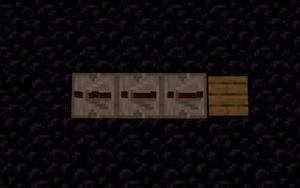
- Place a command block (Impulse, Needs Redstone) at the end of the repeater chain:
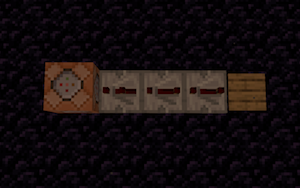
- Insert the following command into the command block (note that glass can be replaced by any solid transparent blocks*):
execute at @p run setblock ~ ~ ~ minecraft:glass
- Stand on a block that isn't part of the contraption you've built.
- Enter third-person view mode by pressing F5 and enable hitboxes by pressing F3 + B (note: keybinds may differ):

- Throw an item onto the pressure plate while sneaking (set to left shift by default) and wait for the redstone signal to reach the command block.
- When the block is set, notice how player appears to have stood up, but the hitbox is still shortened (and notice how player can now walk at normal speed instead of sneaking speed).
- Release sneaking key, and notice how nothing changes.
- Break the solid transparent block, and notice how hitbox expands and camera shifts upwards, even though the player doesn't appear to have changed in any way.
Alternate reproduction method
Instead of using a command block to insert the block, the player can surround themselves with solid blocks and then, using a piston or a one-tick sticky piston, push the glass block into themself. The same results can be achieved, replacing steps 1-3 above; steps 4-9 must still be followed.
Footnotes
- Opacity (solid transparent block): https://minecraft.gamepedia.com/Opacity
- *note: full-block solids, non-full-block solids, and solid mechanisms, as shown on this wiki page, are all considered solid transparent blocks for the simplicity of this report.

Looks like a duplicate of MC-157183
Could be considered either as a dupe of MC-157183, or invalid.
This appears to be a duplicate of MC-157183, which hasn't yet been resolved. If you have any additional information to provide regarding this issue, feel free to comment on the parent ticket. If you feel that this issue is affecting you, feel free to vote for the duplicated ticket, to give Mojang a basic idea of how many people are impacted by the problem. Just to further inform you, this will not determine how quickly the bug gets handled or fixed.
Thank you for your report!
We're tracking this issue in MC-157183, so this ticket is being resolved and linked as a duplicate.
If you would like to add a vote and any extra information to the main ticket it would be appreciated.
If you haven't already, you might like to make use of the search feature to see if the issue has already been mentioned.
Quick Links:
📓 Bug Tracker Guidelines – 💬 Community Support – 📧 Mojang Support
📓 Project Summary – ✍️ Feedback and Suggestions – 📖 Game Wiki
Potentially a duplicate of MC-157183.
Thank you for your report!
We're tracking this issue in MC-157183, so this ticket is being resolved and linked as a duplicate.
If you would like to add a vote and any extra information to the main ticket it would be appreciated.
If you haven't already, you might like to make use of the search feature to see if the issue has already been mentioned.
Quick Links:
📓 Bug Tracker Guidelines – 💬 Community Support – 📧 Mojang Support
📓 Project Summary – ✍️ Feedback and Suggestions – 📖 Game Wiki
– I am a bot. This action was performed automatically! If you think it was incorrect, please notify us on Discord or Reddit

Duplicate of MC-157183.
Thank you for your report!
We're tracking this issue in MC-157183, so this ticket is being resolved and linked as a duplicate.
If you would like to add a vote and any extra information to the main ticket it would be appreciated.
If you haven't already, you might like to make use of the search feature to see if the issue has already been mentioned.
Quick Links:
📓 Bug Tracker Guidelines – 💬 Community Support – 📧 Mojang Support
📓 Project Summary – ✍️ Feedback and Suggestions – 📖 Game Wiki
– I am a bot. This action was performed automatically! The ticket was resolved by one of our moderators, and I left this message to give more information to you.
Duplicate of MC-157183.
Thank you for your report!
We're tracking this issue in MC-157183, so this ticket is being resolved and linked as a duplicate.
If you would like to add a vote and any extra information to the main ticket it would be appreciated.
If you haven't already, you might like to make use of the search feature to see if the issue has already been mentioned.
Quick Links:
📓 Bug Tracker Guidelines – 💬 Community Support – 📧 Mojang Support (Technical Issues) – 📧 Microsoft Support (Account Issues)
📓 Project Summary – ✍️ Feedback and Suggestions – 📖 Game Wiki
– I am a bot. This action was performed automatically! The ticket was resolved by one of our moderators, and I left this message to give more information to you.
![[Mod] Jiingy](../../../data/avatars/users/91802.png)
still in 1.15 pre 6
Still in 20w08a
in 20w18a
in 1.16RC1
Affects 1.16.3
Can confirm in 21w03a.
Can confirm in 21w06a.
Can confirm in 21w11a.
Can confirm in 1.17.1
Can confirm in 1.18.1.
in 1.19.3 is also happening
This bug has been in the game for a very long time, according to my tests, and I have personally used it for PVP, partcore, and escape rooms. Because of its age and uses, I do not think Mojang will take action. But who knows?
This issue is a bit broader that what is mentioned in the report. This does not only affect entering sneaking, but changing between all heights. Whatever height you were at before being clipped inside of the block is what you will be stuck in. For example, if you crawl under a trapdoor, then move against the block that the trapdoor is attached to and close the trapdoor again, you will be stuck in crawl mode. See the attached screenshot.
Furthermore, from my testing, this does not only affect the animation, but behavior as well. By following the steps to reproduce the bug in from the report, I still moved at walking speed. Additionally, this affects the player's hitbox - when attempting to sneak in a door, the player's hitbox does not change; when closing a trapdoor on the player in crawl mode, the hitbox of the player is still in crawl mode. The only effect of sneaking that I experienced when in a door was not falling off the edge of blocks.
Also, can confirm in 1.20.3 Pre-Release 2.
can confirm in 1.20.4