 Mateus Pereira Milbradt
- Tettet
- JIRAUSER509480
- America/Sao_Paulo
- Yes
- No
 MC-190901
![[Mojang] eowyn36](../../../data/avatars/users/18935.svg)
 WEB-2982





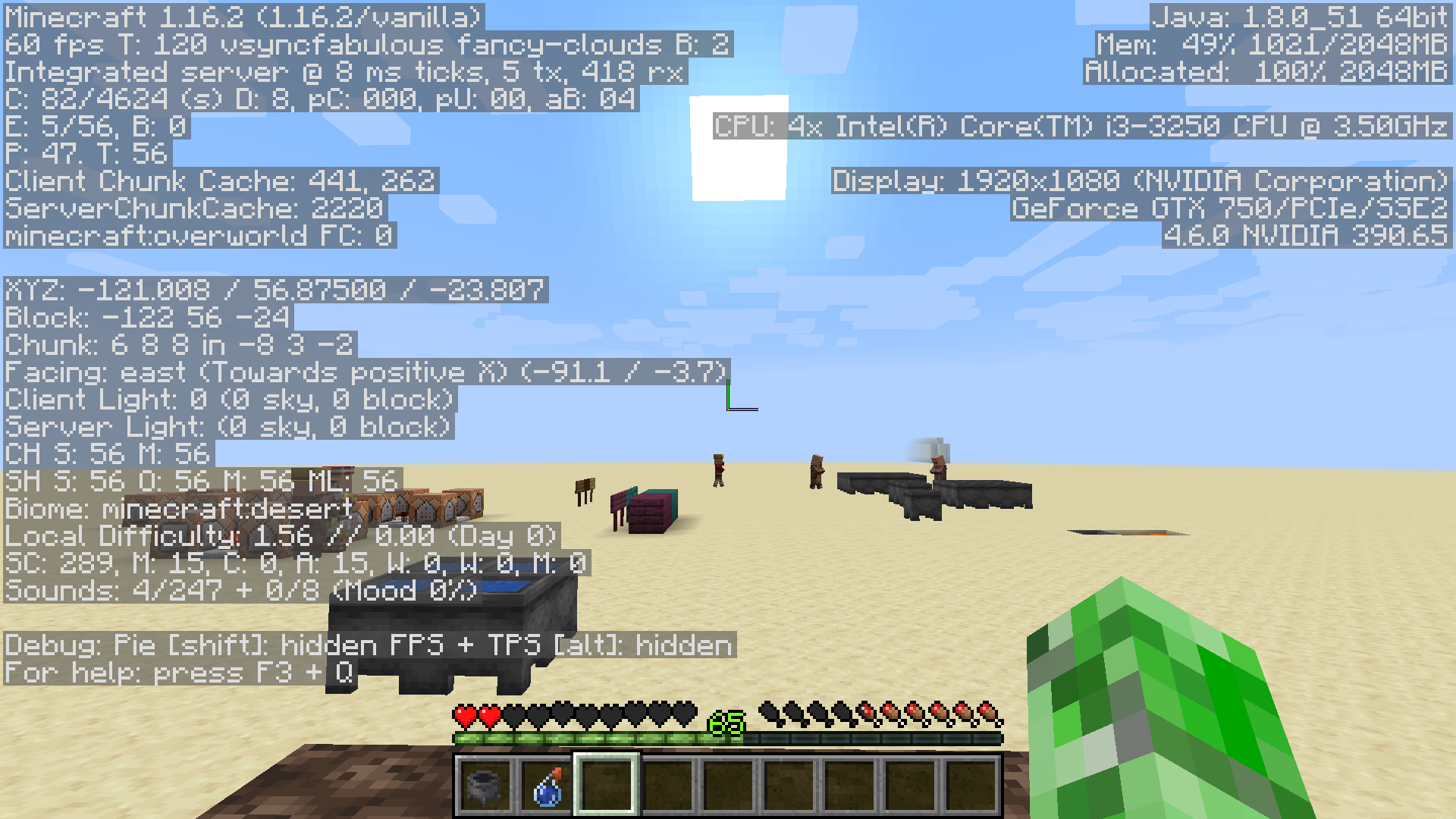
















This Issue Has Deleted all My Worlds, But if I go to 1.15.2 all My World Appear, and If I go again to 1.16 Release Canditate 1, Appear All My Worlds Created in 1.16 Release Candidate 1.
This Issue Has Deleted all My Worlds, But if I go to 1.15.2 all My Worlds Appear, and If I go again to 1.16 Release Canditate 1, Appear All My Worlds Created in 1.16 Release Candidate 1.
This Issue Has Deleted all My Worlds, But if I go to 1.15.2 all My Worlds Appear, and If I go again to 1.16 Release Candi
tate 1, Appear All My Worlds Created in 1.16 Release Candidate 1.This Issue Has Deleted all My Worlds, But if I go to 1.15.2 all My Worlds Appear, and If I go again to 1.16 Release Candidate 1, Appear All My Worlds Created in 1.16 Release Candidate 1.
Strider.gif
It's so fast
Crash when you click "Presets" after replacing the "biome:plains" to "biome:the_nether" Crash Report:
// espaço reservado de código---- Minecraft Crash Report -------- Minecraft Crash Report ---
// Sorry-------------------------------------------------------------------------------------- – Head --Thread: Render threadStacktrace: at gm.d(SourceFile:378) at don.b(SourceFile:276) at don$$Lambda$3420/1211426838.get(Unknown Source) at cpc.e(SourceFile:188) at don.b(SourceFile:292) at don.b(SourceFile:307) at doq.b(SourceFile:325) at djw.a(SourceFile:897) at dns.c(SourceFile:82) at dns$$Lambda$3387/1896438195.onPress(Unknown Source) at dlg.b(SourceFile:33) at dla.a(SourceFile:16) at dle.a(SourceFile:149) at dme.a(SourceFile:27) at djx.b(SourceFile:92) at djx$$Lambda$2979/73990450.run(Unknown Source) – Affected screen --Details: Screen name: dnsStacktrace: at doq.a(SourceFile:435) at djx.a(SourceFile:92) at djx.c(SourceFile:162) at djx$$Lambda$2978/721445303.run(Unknown Source) at any.execute(SourceFile:94) at djx.b(SourceFile:162) at djx$$Lambda$2331/650715738.invoke(Unknown Source) at org.lwjgl.glfw.GLFWMouseButtonCallbackI.callback(GLFWMouseButtonCallbackI.java:36) at org.lwjgl.system.JNI.invokeV(Native Method) at org.lwjgl.glfw.GLFW.glfwPollEvents(GLFW.java:3101) at com.mojang.blaze3d.systems.RenderSystem.flipFrame(SourceFile:109) at dew.e(SourceFile:308) at djw.e(SourceFile:1043) at djw.e(SourceFile:656) at net.minecraft.client.main.Main.main(SourceFile:215) – System Details --Details: Minecraft Version: 1.16.2 Minecraft Version ID: 1.16.2 Operating System: Windows 10 (amd64) version 10.0 Java Version: 1.8.0_51, Oracle Corporation Java VM Version: Java HotSpot(TM) 64-Bit Server VM (mixed mode), Oracle Corporation Memory: 714994576 bytes (681 MB) / 1912602624 bytes (1824 MB) up to 2147483648 bytes (2048 MB) CPUs: 4 JVM Flags: 9 total; -XX:HeapDumpPath=MojangTricksIntelDriversForPerformance_javaw.exe_minecraft.exe.heapdump -Xss1M -Xmx2G -XX:+UnlockExperimentalVMOptions -XX:+UseG1GC -XX:G1NewSizePercent=20 -XX:G1ReservePercent=20 -XX:MaxGCPauseMillis=50 -XX:G1HeapRegionSize=32M Launched Version: 1.16.2 Backend library: LWJGL version 3.2.2 build 10 Backend API: GeForce GTX 1050 Ti/PCIe/SSE2 GL version 4.5.0 NVIDIA 385.41, NVIDIA Corporation GL Caps: Using framebuffer usingTime: 22/08/20 17:51Description: mouseClicked event handler java.lang.IllegalStateException: Missing: ResourceKey[minecraft:worldgen/biome / minecraft:the_nether] at gm.d(SourceFile:378) at don.b(SourceFile:276) at don$$Lambda$3420/1211426838.get(Unknown Source) at cpc.e(SourceFile:188) at don.b(SourceFile:292) at don.b(SourceFile:307) at doq.b(SourceFile:325) at djw.a(SourceFile:897) at dns.c(SourceFile:82) at dns$$Lambda$3387/1896438195.onPress(Unknown Source) at dlg.b(SourceFile:33) at dla.a(SourceFile:16) at dle.a(SourceFile:149) at dme.a(SourceFile:27) at djx.b(SourceFile:92) at djx$$Lambda$2979/73990450.run(Unknown Source) at doq.a(SourceFile:435) at djx.a(SourceFile:92) at djx.c(SourceFile:162) at djx$$Lambda$2978/721445303.run(Unknown Source) at any.execute(SourceFile:94) at djx.b(SourceFile:162) at djx$$Lambda$2331/650715738.invoke(Unknown Source) at org.lwjgl.glfw.GLFWMouseButtonCallbackI.callback(GLFWMouseButtonCallbackI.java:36) at org.lwjgl.system.JNI.invokeV(Native Method) at org.lwjgl.glfw.GLFW.glfwPollEvents(GLFW.java:3101) at com.mojang.blaze3d.systems.RenderSystem.flipFrame(SourceFile:109) at dew.e(SourceFile:308) at djw.e(SourceFile:1043) at djw.e(SourceFile:656) at net.minecraft.client.main.Main.main(SourceFile:215)A detailed walkthrough of the error, its code path and all known details is as follows:
Crash when you click "Presets" after replacing the "biome:plains" to "biome:the_nether" Crash Report:
"
---- Minecraft Crash Report -------- Minecraft Crash Report ----// Sorry
Time: 22/08/20 17:51Description: mouseClicked event handler
java.lang.IllegalStateException: Missing: ResourceKey[minecraft:worldgen/biome / minecraft:the_nether] at gm.d(SourceFile:378) at don.b(SourceFile:276) at don$$Lambda$3420/1211426838.get(Unknown Source) at cpc.e(SourceFile:188) at don.b(SourceFile:292) at don.b(SourceFile:307) at doq.b(SourceFile:325) at djw.a(SourceFile:897) at dns.c(SourceFile:82) at dns$$Lambda$3387/1896438195.onPress(Unknown Source) at dlg.b(SourceFile:33) at dla.a(SourceFile:16) at dle.a(SourceFile:149) at dme.a(SourceFile:27) at djx.b(SourceFile:92) at djx$$Lambda$2979/73990450.run(Unknown Source) at doq.a(SourceFile:435) at djx.a(SourceFile:92) at djx.c(SourceFile:162) at djx$$Lambda$2978/721445303.run(Unknown Source) at any.execute(SourceFile:94) at djx.b(SourceFile:162) at djx$$Lambda$2331/650715738.invoke(Unknown Source) at org.lwjgl.glfw.GLFWMouseButtonCallbackI.callback(GLFWMouseButtonCallbackI.java:36) at org.lwjgl.system.JNI.invokeV(Native Method) at org.lwjgl.glfw.GLFW.glfwPollEvents(GLFW.java:3101) at com.mojang.blaze3d.systems.RenderSystem.flipFrame(SourceFile:109) at dew.e(SourceFile:308) at djw.e(SourceFile:1043) at djw.e(SourceFile:656) at net.minecraft.client.main.Main.main(SourceFile:215)A detailed walkthrough of the error, its code path and all known details is as follows:---------------------------------------------------------------------------------------
– Head --Thread: Render threadStacktrace: at gm.d(SourceFile:378) at don.b(SourceFile:276) at don$$Lambda$3420/1211426838.get(Unknown Source) at cpc.e(SourceFile:188) at don.b(SourceFile:292) at don.b(SourceFile:307) at doq.b(SourceFile:325) at djw.a(SourceFile:897) at dns.c(SourceFile:82) at dns$$Lambda$3387/1896438195.onPress(Unknown Source) at dlg.b(SourceFile:33) at dla.a(SourceFile:16) at dle.a(SourceFile:149) at dme.a(SourceFile:27) at djx.b(SourceFile:92) at djx$$Lambda$2979/73990450.run(Unknown Source)
– Affected screen --Details: Screen name: dnsStacktrace: at doq.a(SourceFile:435) at djx.a(SourceFile:92) at djx.c(SourceFile:162) at djx$$Lambda$2978/721445303.run(Unknown Source) at any.execute(SourceFile:94) at djx.b(SourceFile:162) at djx$$Lambda$2331/650715738.invoke(Unknown Source) at org.lwjgl.glfw.GLFWMouseButtonCallbackI.callback(GLFWMouseButtonCallbackI.java:36) at org.lwjgl.system.JNI.invokeV(Native Method) at org.lwjgl.glfw.GLFW.glfwPollEvents(GLFW.java:3101) at com.mojang.blaze3d.systems.RenderSystem.flipFrame(SourceFile:109) at dew.e(SourceFile:308) at djw.e(SourceFile:1043) at djw.e(SourceFile:656) at net.minecraft.client.main.Main.main(SourceFile:215)
– System Details --Details: Minecraft Version: 1.16.2 Minecraft Version ID: 1.16.2 Operating System: Windows 10 (amd64) version 10.0 Java Version: 1.8.0_51, Oracle Corporation Java VM Version: Java HotSpot(TM) 64-Bit Server VM (mixed mode), Oracle Corporation Memory: 714994576 bytes (681 MB) / 1912602624 bytes (1824 MB) up to 2147483648 bytes (2048 MB) CPUs: 4 JVM Flags: 9 total; -XX:HeapDumpPath=MojangTricksIntelDriversForPerformance_javaw.exe_minecraft.exe.heapdump -Xss1M -Xmx2G -XX:+UnlockExperimentalVMOptions -XX:+UseG1GC -XX:G1NewSizePercent=20 -XX:G1ReservePercent=20 -XX:MaxGCPauseMillis=50 -XX:G1HeapRegionSize=32M Launched Version: 1.16.2 Backend library: LWJGL version 3.2.2 build 10 Backend API: GeForce GTX 1050 Ti/PCIe/SSE2 GL version 4.5.0 NVIDIA 385.41, NVIDIA Corporation GL Caps: Using framebuffer using "
Crash when you click "Presets" after replacing the "biome:plains" to "biome:the_nether"
Crash Report:
"---- Minecraft Crash Report -------- Minecraft Crash Report ----// Sorry
Time: 22/08/20 17:51Description: mouseClicked event handler
java.lang.IllegalStateException: Missing: ResourceKey[minecraft:worldgen/biome / minecraft:the_nether] at gm.d(SourceFile:378) at don.b(SourceFile:276) at don$$Lambda$3420/1211426838.get(Unknown Source) at cpc.e(SourceFile:188) at don.b(SourceFile:292) at don.b(SourceFile:307) at doq.b(SourceFile:325) at djw.a(SourceFile:897) at dns.c(SourceFile:82) at dns$$Lambda$3387/1896438195.onPress(Unknown Source) at dlg.b(SourceFile:33) at dla.a(SourceFile:16) at dle.a(SourceFile:149) at dme.a(SourceFile:27) at djx.b(SourceFile:92) at djx$$Lambda$2979/73990450.run(Unknown Source) at doq.a(SourceFile:435) at djx.a(SourceFile:92) at djx.c(SourceFile:162) at djx$$Lambda$2978/721445303.run(Unknown Source) at any.execute(SourceFile:94) at djx.b(SourceFile:162) at djx$$Lambda$2331/650715738.invoke(Unknown Source) at org.lwjgl.glfw.GLFWMouseButtonCallbackI.callback(GLFWMouseButtonCallbackI.java:36) at org.lwjgl.system.JNI.invokeV(Native Method) at org.lwjgl.glfw.GLFW.glfwPollEvents(GLFW.java:3101) at com.mojang.blaze3d.systems.RenderSystem.flipFrame(SourceFile:109) at dew.e(SourceFile:308) at djw.e(SourceFile:1043) at djw.e(SourceFile:656) at net.minecraft.client.main.Main.main(SourceFile:215)A detailed walkthrough of the error, its code path and all known details is as follows:---------------------------------------------------------------------------------------
– Head --Thread: Render threadStacktrace: at gm.d(SourceFile:378) at don.b(SourceFile:276) at don$$Lambda$3420/1211426838.get(Unknown Source) at cpc.e(SourceFile:188) at don.b(SourceFile:292) at don.b(SourceFile:307) at doq.b(SourceFile:325) at djw.a(SourceFile:897) at dns.c(SourceFile:82) at dns$$Lambda$3387/1896438195.onPress(Unknown Source) at dlg.b(SourceFile:33) at dla.a(SourceFile:16) at dle.a(SourceFile:149) at dme.a(SourceFile:27) at djx.b(SourceFile:92) at djx$$Lambda$2979/73990450.run(Unknown Source)
– Affected screen --Details: Screen name: dnsStacktrace: at doq.a(SourceFile:435) at djx.a(SourceFile:92) at djx.c(SourceFile:162) at djx$$Lambda$2978/721445303.run(Unknown Source) at any.execute(SourceFile:94) at djx.b(SourceFile:162) at djx$$Lambda$2331/650715738.invoke(Unknown Source) at org.lwjgl.glfw.GLFWMouseButtonCallbackI.callback(GLFWMouseButtonCallbackI.java:36) at org.lwjgl.system.JNI.invokeV(Native Method) at org.lwjgl.glfw.GLFW.glfwPollEvents(GLFW.java:3101) at com.mojang.blaze3d.systems.RenderSystem.flipFrame(SourceFile:109) at dew.e(SourceFile:308) at djw.e(SourceFile:1043) at djw.e(SourceFile:656) at net.minecraft.client.main.Main.main(SourceFile:215)
– System Details --Details: Minecraft Version: 1.16.2 Minecraft Version ID: 1.16.2 Operating System: Windows 10 (amd64) version 10.0 Java Version: 1.8.0_51, Oracle Corporation Java VM Version: Java HotSpot(TM) 64-Bit Server VM (mixed mode), Oracle Corporation Memory: 714994576 bytes (681 MB) / 1912602624 bytes (1824 MB) up to 2147483648 bytes (2048 MB) CPUs: 4 JVM Flags: 9 total; -XX:HeapDumpPath=MojangTricksIntelDriversForPerformance_javaw.exe_minecraft.exe.heapdump -Xss1M -Xmx2G -XX:+UnlockExperimentalVMOptions -XX:+UseG1GC -XX:G1NewSizePercent=20 -XX:G1ReservePercent=20 -XX:MaxGCPauseMillis=50 -XX:G1HeapRegionSize=32M Launched Version: 1.16.2 Backend library: LWJGL version 3.2.2 build 10 Backend API: GeForce GTX 1050 Ti/PCIe/SSE2 GL version 4.5.0 NVIDIA 385.41, NVIDIA Corporation GL Caps: Using framebuffer using "
Crash when you click "Presets" after replacing the "biome:plains" to "biome:the_nether"
Crash clicking presets after replacing "biome:plains" to "biome:the_nether"
Crash when you click "Presets" after replacing the "
biome:plains" to "biome:the_nether"
Crash when you click "Presets" after replacing the "minecraft:plains" to "minecraft:the_nether"
I was creating a world called "Nether" with Superflat, I replaced "minecraft:plains" to "minecraft:the_nether" to see if the piglins won't turn to zombified piglins, I clicked "Done" and clicked"
Crash when you click "Presets" after replacing the "minecraft:plains" to "minecraft:the_nether"
I was creating a world called "Nether" with Superflat, I replaced "minecraft:plains" to "minecraft:the_nether" to see if the piglins won't turn to zombified piglins, I clicked "Done" and clicked
"
Crash when you click "Presets" after replacing the "minecraft:plains" to "minecraft:the_nether"
I was creating a world called "Nether" with Superflat, I replaced "minecraft:plains" to "minecraft:the_nether" to see if the piglins won't turn to zombified piglins, I clicked "Done" and clicked "Presets" again to see if "minecraft:the_nether" doesn't has turn onto "minecraft:plains" again, and The Game Crashed
Crash when you click "Presets" after replacing the "minecraft:plains" to "minecraft:the_nether"
I was creating a world called "Nether" with Superflat, I replaced "minecraft:plains" to "minecraft:the_nether" to see if the piglins won't turn to zombified piglins, I clicked "Done" and clicked "Presets" again to see if "minecraft:the_nether" doesn't has turn onto "minecraft:plains" again, and The Game Crashed
Crash when you click "Presets" after replacing the "minecraft:plains" to "minecraft:the_nether"
I was creating a world called "Nether" with Superflat, I replaced "minecraft:plains" to "minecraft:the_nether" to see if the piglins won't turn to zombified piglins, I clicked "Done" and clicked "Presets" again to see if "minecraft:the_nether" doesn't has turn onto "minecraft:plains" again, and The Game Crashed
How to reproduce:
Create a new world in Superflat click on Customize, after click on Presets replace the biome from "minecraft:plains" to "minecraft:the_nether" after click on Done and Presets again and see if it crash
Crash when you click "Presets" after replacing the "minecraft:plains" to
"minecraft:the_nether"I was creating a world called "Nether" with Superflat, I replaced "minecraft:plains" to "minecraft:the_nether" to see if the piglins won't turn to zombified piglins, I clicked "Done" and clicked "Presets" again to see if "minecraft:the_nether" doesn't has turn onto "minecraft:plains" again, and The Game Crashed
How to reproduce:
Create a new world in Superflat click on Customize, after click on Presets replace the biome from "minecraft:plains" t
o "minecraft:the_nether" after click on Done and Presets again and see if it crashCrash when you click "Presets" after replacing the "minecraft:plains" to a non-existent biome in the superflat customization menu
I was creating a world called "Nether" with Superflat, I replaced "minecraft:plains" to "minecraft:the_nether" to see if the piglins won't turn to zombified piglins, I clicked "Done" and clicked "Presets" again to see if "minecraft:the_nether" doesn't has turn onto "minecraft:plains" again, and The Game Crashed
How to reproduce:
Create a new world in Superflat click on Customize, after click on Presets replace the biome from "minecraft:plains" t"" after click on Done and Presets again and see if it crash
Crash when you click "Presets" after replacing the "minecraft:plains" to a non-existent biome in the superflat customization menu
I was creating a world called "Nether" with Superflat, I replaced "minecraft:plains" to "minecraft:the_nether" to see if the piglins won't turn to zombified piglins, I clicked "Done" and clicked "Presets" again to see if "minecraft:the_nether" doesn't has turn onto "minecraft:plains" again, and The Game Crashed
How to reproduce:
Create a new world in Superflat click on Customize, after click on Presets replace the biome from "minecraft:plains" t
""after click on Done and Presets again and see if it crashCrash when you click "Presets" after replacing the "minecraft:plains" to a non-existent biome in the superflat customization menu
I was creating a world called "Nether" with Superflat, I replaced "minecraft:plains" to "minecraft:the_nether" to see if the piglins won't turn to zombified piglins, I clicked "Done" and clicked "Presets" again to see if "minecraft:the_nether" doesn't has turn onto "minecraft:plains" again, and The Game Crashed
How to reproduce:
Create a new world in Superflat click on Customize, after click on Presets replace the biome from "minecraft:plains" to a non-existent biome in the superflat customization menu after click on Done and Presets again and see if it crash
d
Windows 10 Pro
This need to be fixed, because if you comit any error typing the biome, it crashes
But if mojang add Dimension Customization in the superflat customization menu? is this possible?
If you see in the Minecraft game output after it crashing, it says that this was planned
Crash when you click "Presets" after replacing the "minecraft:plains" to a non-existent biome in the superflat customization menu
I was creating a world called "Nether" with Superflat, I replaced "minecraft:plains" to "minecraft:the_nether" to see if the piglins won't turn to zombified piglins, I clicked "Done" and clicked "Presets" again to see if "minecraft:the_nether" doesn't has turn onto "minecraft:plains" again, and The Game Crashed
How to reproduce:
Create a new world in Superflat click on Customize, after click on Presets replace the biome from "minecraft:plains" to a non-existent biome in the superflat customization menu after click on Done and Presets again and see if it crash
Crash when you click "Presets" after replacing the "minecraft:plains" to a non-existent biome in the superflat customization menu
I was creating a world called "Nether" with Superflat, I replaced "minecraft:plains" to "minecraft:the_nether" to see if the piglins won't turn to zombified piglins, I clicked "Done" and clicked "Presets" again to see if "minecraft:the_nether" doesn't has turn onto "minecraft:plains" again, and The Game Crashed
What I expected to happen was:
When I click presets or done after replacing it, it should reset
How to reproduce:
Create a new world in Superflat click on Customize, after click on Presets replace the biome from "minecraft:plains" to a non-existent biome in the superflat customization menu after click on Done and Presets again and see if it crash
Crash when you click "Presets" after replacing the "minecraft:plains" to a non-existent biome in the superflat customization menu
I was creating a world called "Nether" with Superflat, I replaced "minecraft:plains" to "minecraft:the_nether" to see if the piglins won't turn to zombified piglins, I clicked "Done" and clicked "Presets" again to see if "minecraft:the_nether" doesn't has turn onto "minecraft:plains" again, and The Game Crashed
What I expected to happen was:
When I click presets or done after replacing it, it should reset
How to reproduce:
Create a new world in Superflat click on Customize, after click on Presets replace the biome from "minecraft:plains" to a non-existent biome in the superflat customization menu after click on Done and Presets again and see if it crash
Crash when you click "Presets" after replacing the "minecraft:plains" to a non-existent biome in the superflat customization menu
I was creating a world called "Nether" with Superflat, I replaced "minecraft:plains" to "minecraft:the_nether" to see if the piglins won't turn to zombified piglins, I clicked "Done" and clicked "Presets" again to see if "minecraft:the_nether" doesn't has turn onto "minecraft:plains" again, and The Game Crashed
What I expected to happen was:
When I click presets or done after replacing it, it should resets.
What happened was:
It crashed after I press presets.
How to reproduce:
Create a new world in Superflat click on Customize, after click on Presets replace the biome from "minecraft:plains" to a non-existent biome in the superflat customization menu after click on Done and Presets again and see if it crash
Is there any activity in this issue?
Crash when you click "Presets" after replacing the "minecraft:plains" to a non-existent biome in the superflat customization menu
I was creating a world called "Nether" with Superflat, I replaced "minecraft:plains" to "minecraft:the_nether" to see if the piglins won't turn to zombified piglins, I clicked "Done" and clicked "Presets" again to see if "minecraft:the_nether" doesn't has turn onto "minecraft:plains" again, and The Game Crashed
What I expected to happen was:
When I click presets or done after replacing it, it should resets.
What happened was:
It crashed after I press presets.
How to reproduce:
Create a new world in Superflat click on Customize, after click on Presets replace the biome from "minecraft:plains" to a non-existent biome in the superflat customization menu after click on Done and Presets again and see if it crash(If you press cancel it won't crash)
Crash when you click "Presets" after replacing the "minecraft:plains" to a non-existent biome in the superflat customization menu
I was creating a world called "Nether" with Superflat, I replaced "minecraft:plains" to "minecraft:the_nether" to see if the piglins won't turn to zombified piglins, I clicked "Done" and clicked "Presets" again to see if "minecraft:the_nether" doesn't has turn onto "minecraft:plains" again, and The Game Crashed
What I expected to happen was:
When I click presets
or doneafter replacing it, it should resets.What happened was:
It crashed after I press presets.
How to reproduce:
Create a new world in Superflat click on Customize, after click on Presets replace the biome from "minecraft:plains" to a non-existent biome in the superflat customization menu after click on Done and Presets again and see if it crash(If you press cancel it won't crash)
Crash when you click "Presets" after replacing the "minecraft:plains" to a non-existent biome in the superflat customization menu
I was creating a world called "Nether" with Superflat, I replaced "minecraft:plains" to "minecraft:the_nether" to see if the piglins won't turn to zombified piglins, I clicked "Done" and clicked "Presets" again to see if "minecraft:the_nether" doesn't has turn onto "minecraft:plains" again, and The Game Crashed
What I expected to happen was:
When I click presets after replacing it, it should resets to the default .
What happened was:
It crashed after I press presets.
How to reproduce:
Create a new world in Superflat click on Customize, after click on Presets replace the biome from "minecraft:plains" to a non-existent biome in the superflat customization menu after click on Done and Presets again and see if it crash(If you press cancel it won't crash)
Crash when you click "Presets" after replacing the "minecraft:plains" to a non-existent biome in the superflat customization menu
I was creating a world called "Nether" with Superflat, I replaced "minecraft:plains" to "minecraft:the_nether" to see if the piglins won't turn to zombified piglins, I clicked "Done" and clicked "Presets" again to see if "minecraft:the_nether" doesn't has turn onto "minecraft:plains" again, and The Game Crashed
What I expected to happen was:
When I click presets after replacing it, it should resets to
thedefault.What happened was:
It crashed after I press presets.
How to reproduce:
Create a new world in Superflat click on Customize, after click on Presets replace the biome from "minecraft:plains" to a non-existent biome in the superflat customization menu after click on Done and Presets again and see if it crash(If you press cancel it won't crash)
Oh fixed
I thought it was fixed 20w45
This issue Isn't invalid, I experienced this bug after log in other accoun and log back to my account in Java Edition.
Yeah, this bug is back, this bug was Initially in 1.13 and came back to 1.16.2.
How to Reproduce:
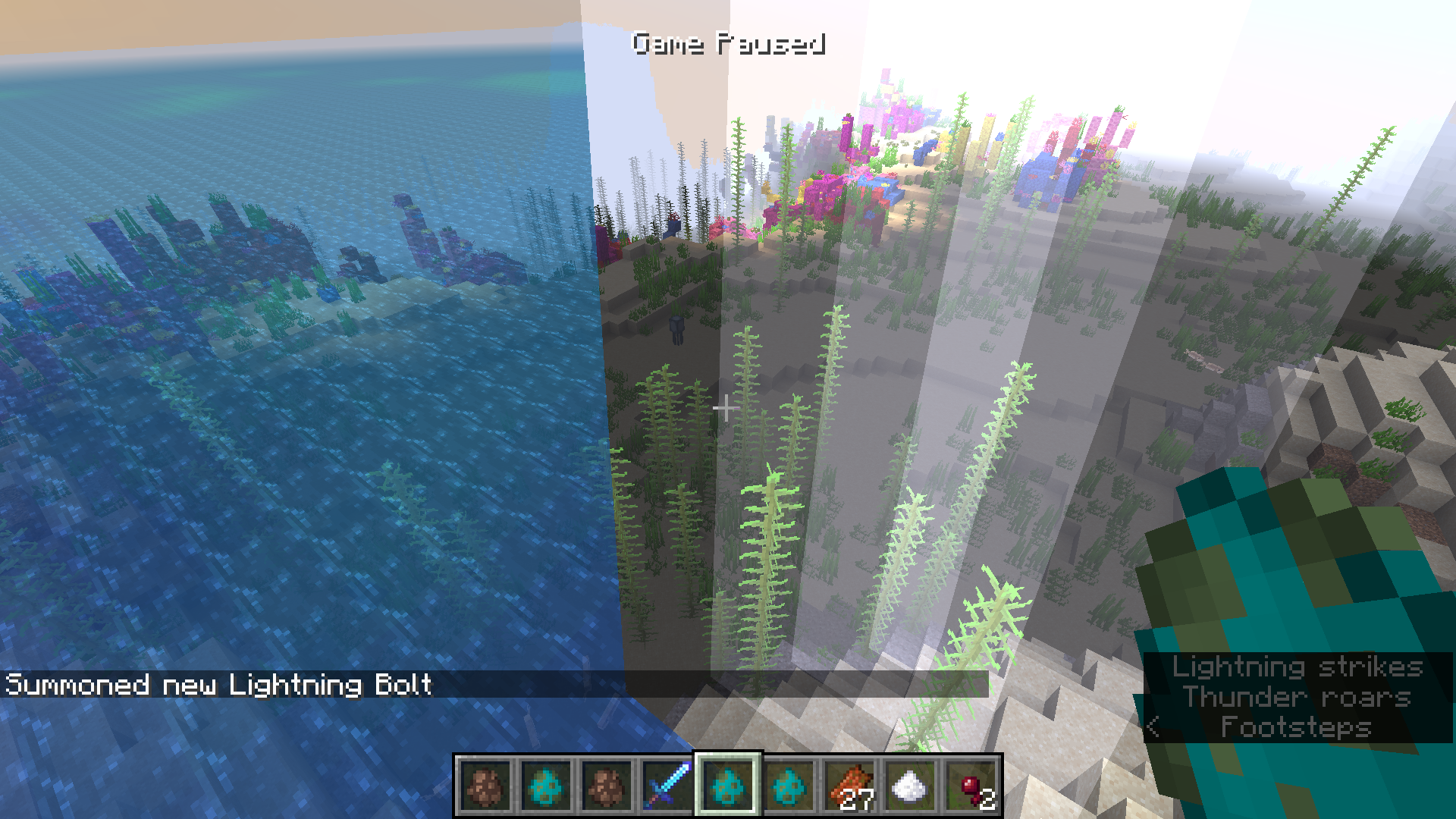
do /summon lightning_bolt ~ ~ ~ looking for water and do F3 + Esc to pause the game
you will see all the blocks underwater without night vision
How I found this bug:
I was playing Minecraft and I thinked: ""
Yeah, this bug is back, this bug was Initially in 1.13 and came back to 1.16.2.
How to Reproduce:
do /summon lightning_bolt ~ ~ ~ looking for water and do F3 + Esc to pause the game
you will see all the blocks underwater without night vision
How I found this bug:
I was playing Minecraft and I thinked: "
"Yeah, this bug is back, this bug was Initially in 1.13 and came back to 1.16.2.
How to Reproduce:
do /summon lightning_bolt ~ ~ ~ looking for water and do F3 + Esc to pause the game
you will see all the blocks underwater without night vision
How I found this bug:
I was playing Minecraft and I thinked: "Is the lightning bolt bug back?" I tested and the bug was found
This can be marked as Invalid or Works As Intended because I was using Fancy Graphics, if you switch to Fabulous! Graphics you can see the water through lightning bolt
This can be fixed using Fabulous Graphics.
I was seeying some bugs here and I thinked:"Is possible to post a blank comment in the Bug Tracker?"
How to Reproduce:
Click on Comment button and Press Alt + s to submit the comment, a blank comment should appear.
Example:
type one or two spaces:
It will not post the comment
type more spaces:
I will post the comment
Please mark as Invalid if this issue is Invalid
Did we can join two Items with command blocks in 1.16.2?
I used Xbox game bar to record the video
I don't even know what is the difference in posting a feature request and bug reports
Ainda não está marcado como inválido
Why did mojang make commands that is so hard to newer players
This can be marked as "Works as Intended"
The crash report says: "This doesn't make any sense!"
Please provide some videos with the xbox game bar(Windows key + G or Windows key + alt + r)
Fireball is a non-mob entity?
 ?
?
I can't confirm.
I am acostumed with the newer commands now
I am acostumed with the newer commands now
Now you can summon the skeleton and use the command /attribute generic.follow_range base set 100 to modify the skeleton follow range attribute
Incorrect shadows without any reason.
Here is a link: file:///D:/Documentos/Videos/Captures/Minecraft%201.16.3%20Release%20Candidate%201%2008_09_20%2017_55_56.mp4
Incorrect shadows without any reason.
How to reproduce:
1-Make a hole with at least 5 blocks depth
2-Make a space to place tnts
3-Place tnts
4-Place water arround the tnts
5-Place a any pressure plate in the middle
6-Place some blocks arround the hole
7-Summon a Zombie next to the hole
8-Let the Zombie knock you to the hole
9-You and the Zombie will die
10-Summon other Zombie next to the hole
11-Let he knock you(Make sure you has placed some tnts arround the pressure plate)
12-You and the Zombie will die again
13-
Incorrect shadows without any reason.
How to reproduce:
1-Make a hole with at least 5 blocks depth
2-Make a space to place tnts
3-Place tnts
4-Place water arround the tnts
5-Place a any pressure plate in the middle
6-Place some blocks arround the hole
7-Summon a Zombie next to the hole
8-Let the Zombie knock you to the hole
9-You and the Zombie will die
10-Summon other Zombie next to the hole
11-Let he knock you(Make sure you has placed some tnts arround the pressure plate)
12-You and the Zombie will die again
13-
Incorrect shadows without any reason.
How to reproduce:
1-Make a hole with at least 5 blocks depth
2-Make a space to place tnts
3-Place tnts
4-Place water arround the tnts
5-Place a any pressure plate in the middle
6-Place some blocks arround the hole
7-Summon a Zombie next to the hole
8-Let the Zombie knock you to the hole
9-You and the Zombie will die
10-Summon other Zombie next to the hole
11-Let he knock you(Make sure you has placed some tnts arround the pressure plate)
12-You and the Zombie will die again
13-Break blocks arround the hole and you might see the Incorrect shadow
Incorrect shadows without any reason.
How to reproduce:
1-Make a hole with at least 5 blocks depth
2-Make a space to place tnts
3-Place tnts
4-Place water arround the tnts
5-Place a any pressure plate in the middle
6-Place some blocks arround the hole
7-Summon a Zombie next to the hole
8-Let the Zombie knock you to the hole
9-You and the Zombie will die
10-Summon other Zombie next to the hole
11-Let the Zombie knock you to the hole (Make sure you has placed some tnts arround the pressure plate)
12-You and the Zombie will die again
13-Break blocks arround the hole and you might see the Incorrect shadow
Incorrect shadows without any reason.
How to reproduce:
1-Make a hole with at least 5 blocks depth
2-Make a space to place tnts
3-Place tnts
4-Place water arround the tnts
5-Place a any pressure plate in the middle
6-Place some blocks arround the hole
7-Summon a Zombie next to the hole
8-Let the Zombie knock you to the hole
9-You and the Zombie will die
10-Summon other Zombie next to the hole
11-Let the Zombie knock you to the hole (Make sure you has placed some tnts arround the pressure plate)
12-You and the Zombie will die again
13-Break blocks arround the hole and you might see the Incorrect shadow
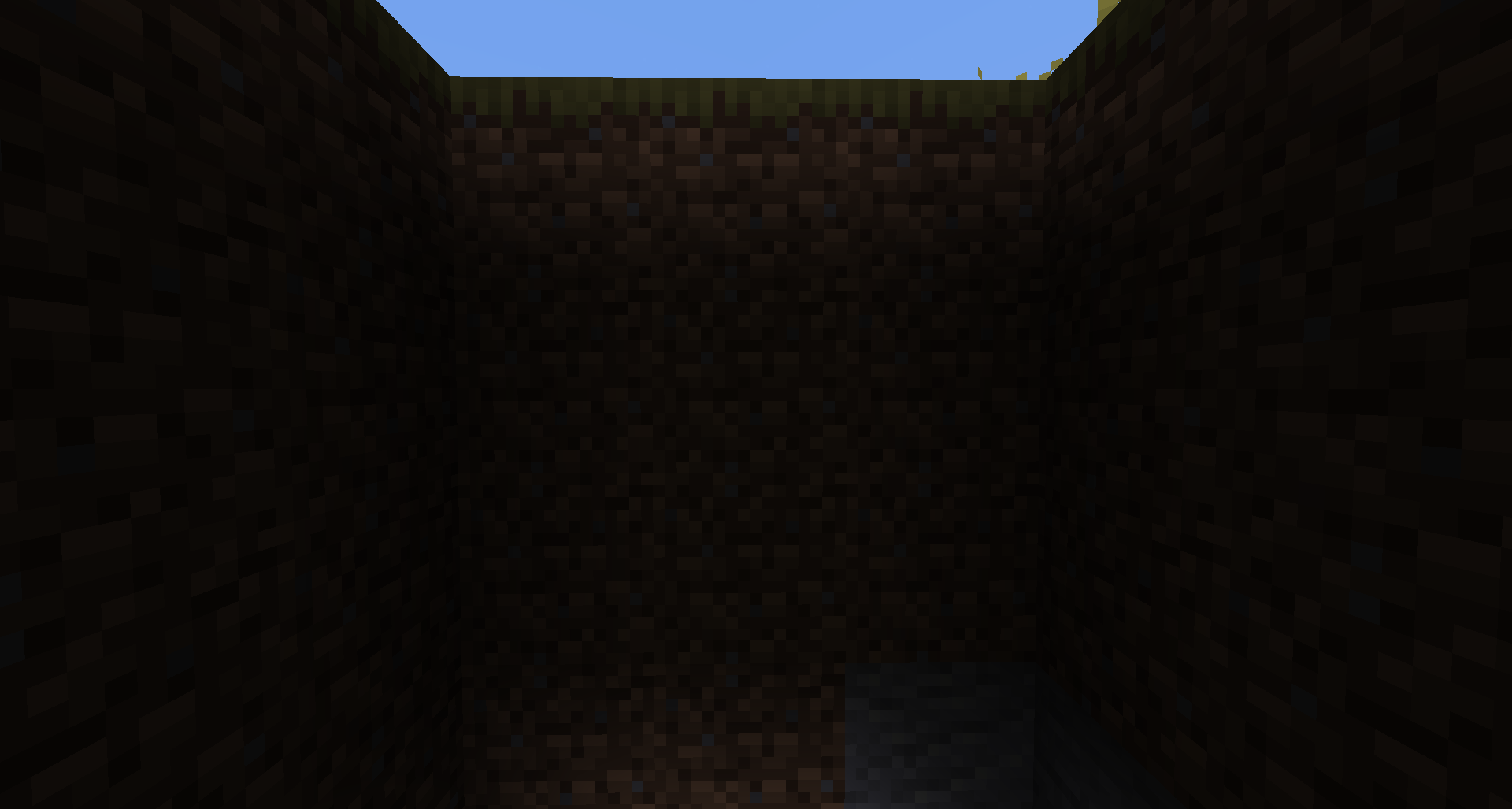
Here is a screenshot of the hole: 2020
Incorrect shadows without any reason.
How to reproduce:
1-Make a hole with at least 5 blocks depth
2-Make a space to place tnts
3-Place tnts
4-Place water arround the tnts
5-Place a any pressure plate in the middle
6-Place some blocks arround the hole
7-Summon a Zombie next to the hole
8-Let the Zombie knock you to the hole
9-You and the Zombie will die
10-Summon other Zombie next to the hole
11-Let the Zombie knock you to the hole (Make sure you has placed some tnts arround the pressure plate)
12-You and the Zombie will die again
13-Break blocks arround the hole and you might see the Incorrect shadow
Here is a screenshot of the hole: 2020-09-08_18.44.52.png
Incorrect shadows without any reason.
How to reproduce:
1-Make a hole with at least 5 blocks depth
2-Make a space to place tnts
3-Place tnts
4-Place water arround the tnts
5-Place a any pressure plate in the middle
6-Place some blocks arround the hole
7-Summon a Zombie next to the hole
8-Let the Zombie knock you to the hole
9-You and the Zombie will die
10-Summon other Zombie next to the hole
11-Let the Zombie knock you to the hole (Make sure you has placed some tnts arround the pressure plate)
12-You and the Zombie will die again
13-Break blocks arround the hole and you might see the Incorrect shadow
Here is a screenshot of the hole:
2020-09-08_18.44.52.png
Incorrect shadows without any reason.
How to reproduce:
1-Make a hole with at least 5 blocks depth
2-Make a space to place tnts
3-Place tnts
4-Place water arround the tnts
5-Place a any pressure plate in the middle
6-Place some blocks arround the hole
7-Summon a Zombie next to the hole
8-Let the Zombie knock you to the hole
9-You and the Zombie will die
10-Summon other Zombie next to the hole
11-Let the Zombie knock you to the hole (Make sure you has placed some tnts arround the pressure plate)
12-You and the Zombie will die again
13-Break blocks arround the hole and you might see the Incorrect shadow
Here is a screenshot of the hole:
Incorrect shadows without any reason.
How to reproduce:
1-Make a hole with at least 5 blocks depth
2-Make a space to place tnts
3-Place tnts
4-Place water arround the tnts
5-Place a any pressure plate in the middle
6-Place some blocks arround the hole
7-Summon a Zombie next to the hole
8-Let the Zombie knock you to the hole
9-You and the Zombie will die
10-Summon other Zombie next to the hole
11-Let the Zombie knock you to the hole (Make sure you has placed some tnts arround the pressure plate)
12-You and the Zombie will die again
13-Break blocks arround the hole and you might see the Incorrect shadow
Here is a screenshot of the hole:
Incorrect shadows without any reason.
How to reproduce:
1-Make a hole with at least 5 blocks depth
2-Make a space to place tnts
3-Place tnts
4-Place water arround the tnts
5-Place a any pressure plate in the middle
6-Place some blocks arround the hole
7-Summon a Zombie next to the hole
8-Let the Zombie knock you to the hole
9-You and the Zombie will die
10-Summon other Zombie next to the hole
11-Let the Zombie knock you to the hole (Make sure you has placed some tnts arround the pressure plate)
12-You and the Zombie will die again
13-Break blocks arround the hole and you might see the Incorrect shadow
Here is a screenshot of the hole:
Incorrect shadows without any reason.
How to reproduce:
1-Make a hole with at least 5 blocks depth
2-Make a space to place tnts
3-Place tnts
4-Place water arround the tnts
5-Place a any pressure plate in the middle
6-Place some blocks arround the hole
7-Summon a Zombie next to the hole
8-Let the Zombie knock you to the hole
9-You and the Zombie will die
10-Summon other Zombie next to the hole
11-Let the Zombie knock you to the hole (Make sure you has placed some tnts arround the pressure plate)
12-You and the Zombie will die again
13-Break blocks arround the hole and you might see the Incorrect shadow
Here is a screenshot of the hole:
Incorrect shadows without any reason.
How to reproduce:
1-Make a hole with at least 5 blocks depth
2-Make a space to place tnts
3-Place tnts
4-Place water arround the tnts
5-Place a any pressure plate in the middle
6-Place some blocks arround the hole
7-Summon a Zombie next to the hole
8-Let the Zombie knock you to the hole
9-You and the Zombie will die
10-Summon other Zombie next to the hole
11-Let the Zombie knock you to the hole (Make sure you has placed some tnts arround the pressure plate)
12-You and the Zombie will die again
13-Break blocks arround the hole and you might see the Incorrect shadow
Here is a screenshot of the hole: [ 2020-09-23_12.05.03|https://bugs.mojang.com/secure/attachment/338246/2020-09-23_12.05.03.png]
Incorrect shadows without any reason.
How to reproduce:
1-Make a hole with at least 5 blocks depth
2-Make a space to place tnts
3-Place tnts
4-Place water arround the tnts
5-Place a any pressure plate in the middle
6-Place some blocks arround the hole
7-Summon a Zombie next to the hole
8-Let the Zombie knock you to the hole
9-You and the Zombie will die
10-Summon other Zombie next to the hole
11-Let the Zombie knock you to the hole (Make sure you has placed some tnts arround the pressure plate)
12-You and the Zombie will die again
13-Break blocks arround the hole and you might see the Incorrect shadow
Here is a screenshot of the hole: [ 2020-09-23_12.05.03|https://bugs.mojang.com/secure/attachment/338246/2020-09-23_12.05.03.png]
Incorrect shadows without any reason.
How to reproduce:
1-Make a hole with at least 5 blocks depth
2-Make a space to place tnts
3-Place tnts
4-Place water arround the tnts
5-Place a any pressure plate in the middle
6-Place some blocks arround the hole
7-Summon a Zombie next to the hole
8-Let the Zombie knock you to the hole
9-You and the Zombie will die
10-Summon other Zombie next to the hole
11-Let the Zombie knock you to the hole (Make sure you has placed some tnts arround the pressure plate)
12-You and the Zombie will die again
13-Break blocks arround the hole and you might see the Incorrect shadow
Here is a screenshot of the hole: https://bugs.mojang.com/secure/attachment/338246/2020-09-23_12.05.03.png
Now, I just need to test in 1.16.3
Yes, they work.
Ok now I will test the steps to make sure they will work.
Please provide a screenshot with your F3 debug screen enabled.
Any mob.
What is mipmap?
[Mod] Kumasasa
And when the team is a zoglin and an iron golem, the iron golem didn't attack the zoglin, but the zoglin attacks the golem
Strider attacks?
Can't it be reopen?
The site "http://www.needcoolshoes.com/banner" is outdated, now we need the loom to create a banner and the command is incorrect for 1.13+
e.g. /give @p banner 1 0 {BlockEntityTag:[
{<Patterns here>}]} should be /give @p white_banner{BlockEntityTag:[{<Patterns here>}]} 1. I would use http://minecraft.tools/en/banner.php
Caleb Muñoz then this issue is invalid.
Works As Intended if you are using fancy graphics, if you switch to Fabulous! Graphics the water will be seen through lightning bolt
[Mod] Neko Then why zombies drown transforming to drowned?
Is a issue about crash hard to fix?
Please do not mark unreleased versions as affected, you don't have access to them yet.
Java 1.8.0_51 64 bit
It makes even others shulker bullets invisible
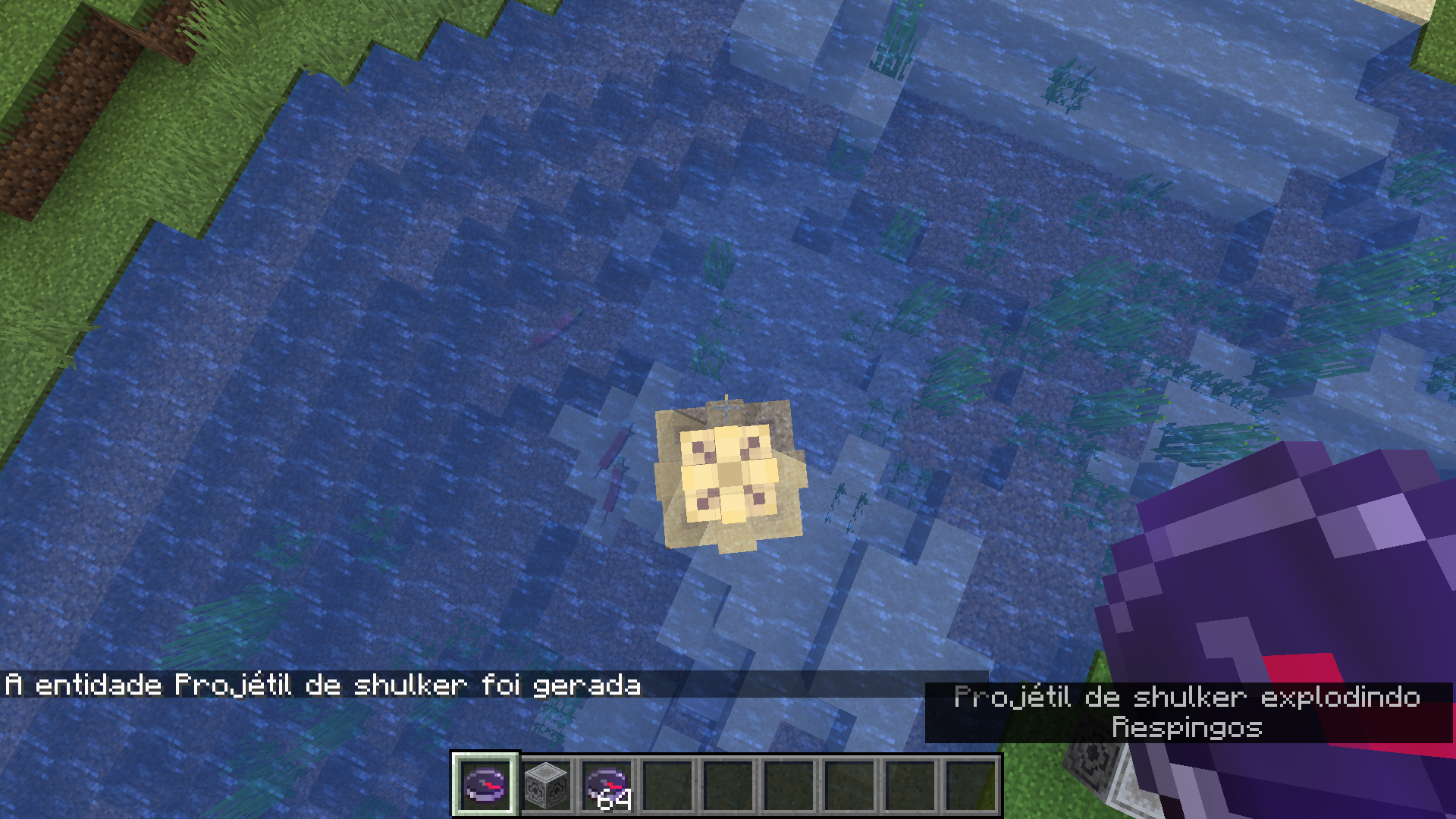
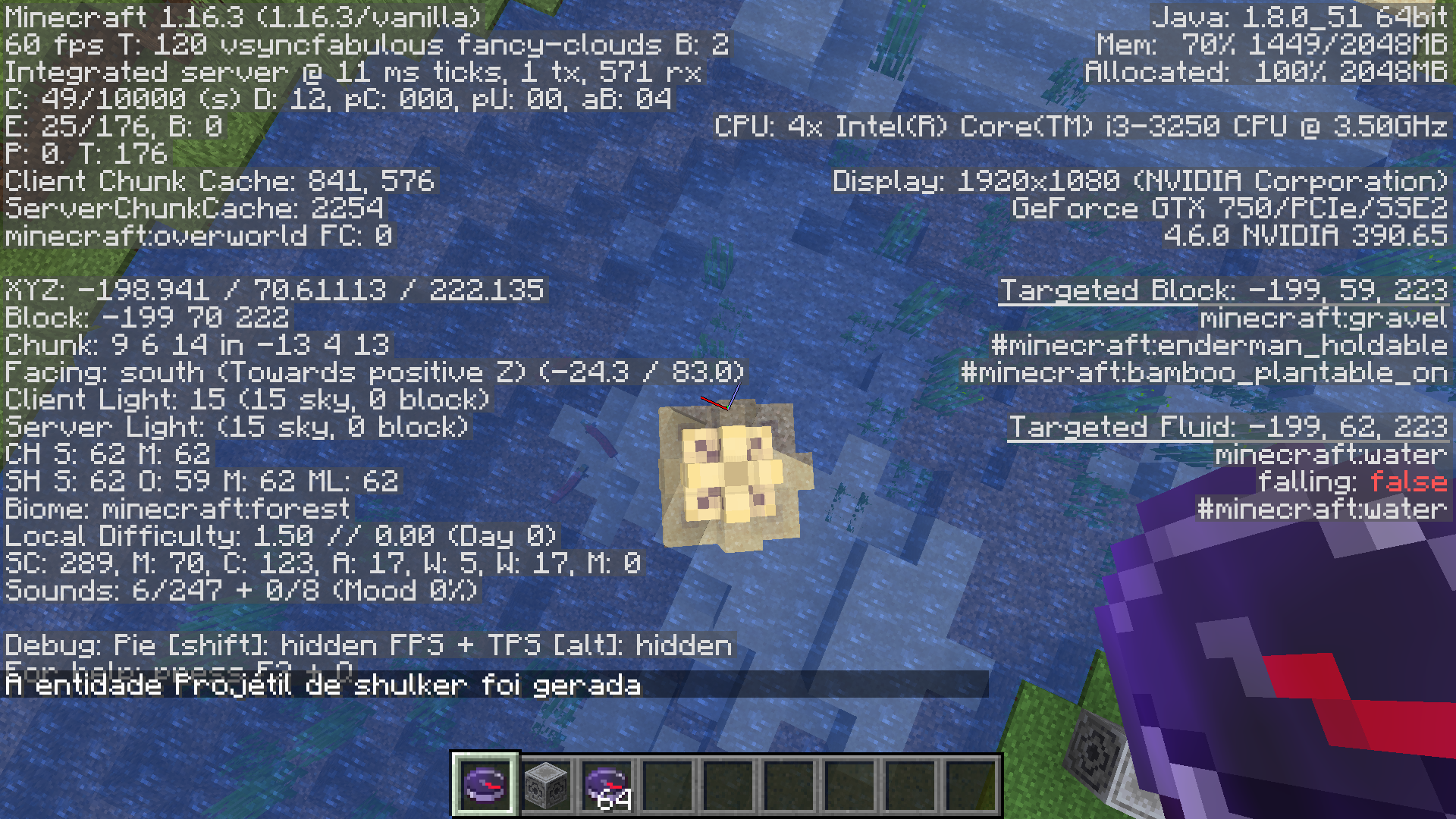
Shulker bullet makes water invisible even when using Fabulous graphics, this was fixed for lightning bolt using Fabulous graphics.
How to reproduce:
- Summon a shulker bullet and pause the game with F3 + Esc.(Or just do /summon shulker_bullet ~ ~ ~ {NoGravity:1b} near water)
- Look the water through the border of the shulker bullet(You will see inside the water).
I don't know if there is another issue that I'm duplicating, because I search, but nothing.
I found an similar issue in 1.16.3 that makes villagers move whilst in the bed, but they wake up when they leave a bed
Summing up: They go sleep in other villager's bed
"Wet sponge or water drying in Nether (shows "Fire extinguishes" minecraft:block.fire.extinguish)" Didn't the 'Wet sponge drying in the nether' just works in Bedrock Edition?
Se fosse adicionada a tag "Dacing" ou "Celebrating", também seria necessário adicionar uma tag "DanceTick" ou "CelebratingTick" para corrigir isso.
Can you provide a image with your F3 debug screen enabled?
Didn't it relates to
MC-199850?
Affects 1.16.3.
I think the game just make the following command:
Meu título?
I think the game just enter the following command:
/playsound minecraft:entity.enderman.stare hostile @a
in the location of the enderman(Sorry if it's bad)
Affects 1.16.3
[Mod] Anthony Cicinelli Didn't even relates to
MC-165208
See
MC-198725
It shows air for me, and is tranlated
I don't want this to be 'Works as Intended'
Trying to animate transparent biome-colored blocks causes wrong texture
Can you confirm it also affects Fabulous graphics?
MiniTheMB Did you mean pulled?
Affects 20w46a
Command fix for 1.13+:
/give @p minecraft:diamond_boots{Enchantments:[{id:"minecraft:feather_falling",lvl:10s}]}
If its not a duplicate of
MC-198725then this issue was probably fixed in 20w46a.
DripstonefarmDripstone duplicating
Dripstone duplicating with /setblock
[Mod] Chandler Did you mean 20w48a, because there was no dripstone in 20w28a.
It take a time to me finally understand what you mean
This issue is Invalid. This bug tracker only supports English language.
This issue is Invalid. This bug tracker only supports English language.
Yay fixed!
Duplicate of
MC-1555which was fixed in 20w45a.
The only snapshot missing on my launcher is 20w49a
There's no caves dimension when I use the datapack
[Mod] markderickson They are literally the opposite HOW WILL THIS ISSUE BE A DUPLICATE OF
MC-207254?
[Mod] markderickson They are literally the opposite HOW WILL THIS ISSUE BE A DUPLICATE OF
MC-207254?
![[Mod] violine1101](../../../data/avatars/users/92858.png)
Mateus Pereira Milbradt, please don't post completely unrelated comments.
![[Mod] markderickson](../../../data/avatars/users/18946.svg)
Hello!
Mateus Pereira Milbradt, these issues are accepted on the tracker in the WEB project. Only Mojang can delete accounts (regular users can't), and this is where these types of requests are supposed to go.
Hope that clears it up 
![[Mod] Anthony Cicinelli](../../../data/avatars/users/10122.svg)
Mateus Pereira Milbradt you can make a request on the Mojira Discord is this still happens in the current version or just say in the comments that it affects <insert version> because your response doesn't give any information if this affects the current version.

Mateus Pereira Milbradt That is MC-169187
![[Mod] Chandler](../../../data/assets/gravatar/triwonder81.png)
Mateus Pereira Milbradt I have noticed a lot of comments from you over the past few weeks and I would just like to say a few things:
1. Please don't add useless comments to reports. These are the kind of comments that add absolutely nothing to the report, like asking what something means. Those comments clutter the tracker and are completely unnecessary. (and are going to be deleted)
2. You don't need to comment on your own reports about your status with your tracking, or asking whether or not your report has been looked at etc. It will be seen eventually.
Finally, I just want to thank you for being a part of the bug tracker, and just know that I mean no offense by any of this. You have been helpful on the tracker and I don't want this to seem like I'm trying to be mean to you, I am just trying to help you learn more about the guidelines of the bug tracker.
Mateus Pereira Milbradt I agree, that it doesn’t make sense and should be changed, however mojang decides whether something is intended or not and [Mojang] slicedlime marked it as Works As Intended.

Mateus Pereira Milbradt. Mojang on feedback site says: "Java and Bedrock will not have the exact same the same redstone systems", so we may never get movable tile entities in Java Edition.
But Already?
Why My Worlds Has Been Deleted?
I think this is not resolved
When I playing Minecraft, I goed to nether and, I, found a bunch of floating lava, I will try to get the seed and the coordinates
You remember your password and your email? If you put your password and your email corretly and you can't access your account, you lost your account or is just a unexpected bug, if you accessed your account after my comment, this was the problem if you accessed your account before, ignore my comment
You is really lucky
This isn't a bug, this is clearly the texture of the jack o'lanterns or carved pumpkins
This happen with me too, the loading screen appear, load and, the game crashes, actually in 2020 the latest version is 1.16.2, but I wanted to know how was minecraft in older versions, and I went to beta 1.8.1 and I found a bug that probably already has been fixed, this is the bug: I can hit a mob in a longer distance, such as 30 blocks
Ok, but what I do to create a new world in The Nether?
Why does zoglin attacks armor stands? Are armor stands mobs?
thcrafter06 And I died in spectator mode after switching from survival to spectator mode right when I falled from too high in Survival
I had this error much times
It doesn't say this to me, the only thing it do is Open the Minecraft and I play
This is an Invalid bug report, because you didn't provide the correct arguments
I didn't know that piglins can't pick up gold ingots if mob griefing is disabled
When you hover your mouse to the "Fancy" in the Graphics GUI you can see "Particles can't be seen in through translucent blocks" across the text
This isn't exactly a bug, because caves aren't home for trees.
Wouldn't make sense if netherite ingot wouldn't burn on lava if ancient debris and netherite scrap did burn on lava?
This happened with me in Java Edition.
Can you put some images of this bug?
You can make this command: /give @s shears{Unbreakable:1,display:{Name:'
{"text":"Unbreakable Shears"}'}} or /give @s shears{Unbreakable:1,display:{Name:'
{"text":"Unbreakable Shears"}'},Enchantments:[\{id:"nothing"}]} to get a Shears with an enchanted texture but without any enchantment
And the higher level is 32767
When I try to login in Minecraft Feedback, I want to login with My Minecraft Account not with Microsoft Account
I think this issue report is Invalid because you are asking how to delete your account, not reporting a bug
This system was probably broken
Why does this bug is Impossible to fix?
How this is works as intended??
And if you harvest honey with a bottle in the creative you lost the bottle!
This isn't resolved, this still works in 1.16.2
And I doesn't have a Microsoft Account, when I try to login in Microsoft Account with my dad's email, it says "This account does not exist, you can create one with this email", but when I try to create an Account with the same email, it says "This account does already exist, you can login with this email", what I do with the Microsoft Account???
It says that I hit the ground too hard not death.fell.accident.water
Then why they burn when you throw then on fire?
You'll need to type some spaces like this: " " and Press Alt + s
nether "woods" are marked as "non_flammable_wood"
Did netherite block is marked as non-flammable?
Isn't marked as Invalid yet
Affects 1.16.2
Works As Intended, there are nothing in the sign, so the player need to edit it
Ok
This was my first report
This site is for bug report.
Didn't they are just having a short holiday?
Switch to Fabulous! Graphics to see the water through lightning bolt
Test in singleplayer please
Are you using any optifine?
If this issue was created 25 minutes ago, why does the attached crash report was created 27 minutes ago?
I don't know if a screenshot helps, a video helps more
What?
Affects 1.16.2
Did you mean Mobs?
And please provide a report in english
Can you provide some screenshots or videos?
Can you provide some screenshots?
Their name is Zombified Piglin
This was permanently fixed in 1.16 or 1.15, that you can't anymore disable the vanilla datapack
Affects all versions after 1.14
I think that this mysteriously affects Warped and Crimson Signs.
@The Creative Sketchy, the back side of the signs also hasn't been updated
Can you attach the crash report?
I think this can be easily reproduced in vanilla, let me try.
You killed the ender dragon 20 times without die??
I will try this.
Can confirm for 1.16.2
You don't need to start a new world, just open to lan, activate cheats and click in done, after this you just type: /setblock ~ ~ ~ end_portal
I can confirm.
But I didn't know if this is a minecraft issue or other
This may be reported in the MCL tab
Hmm.. interesting
My portal spawned near to flowing lava causing me to stay with 0.5 hearts
I can't place sugar cane underwater.
This was fixed yet. I tried to make this but nothing happened
No, I can place yet
Which is the difference in put a sugar cane in the water on a superflat world and a normal world??
Barrier is intentional, barrier is a full block.
I think that this has even caused hardcore deaths just because the snow doesn't has melted yet
This may be intentional, but with slab... not
You can even do this for the command: /summon wither ~ ~ ~ {HandItems:[{id:"stone",Count:1b,tag:{display:{Name:'
{"text":"test"}'}}}]}
Now you just click with the right button on the sign holding a dye in hand, and the text of your sign is colored with the color of the dye
What did you mean?
I am acostumed with the newer commands now
They move normally for me.
Works As Intended. The grass blocks and the dirts are intentional to generate as they can make variants to the path
And It works for any seed
Hi there, I can't reproduce this, bacause my keyboard does not have this inverted "/" symbol
This is a visual ilusion. Because when you take distance from things, you see they become distorted, is the same in real life.
Confirmed for 1.16.2
This happens when you scroll to the left too
The wandering trader has a separated gamerule
Please provide some screenshots of your game with F3 debug screen enabled
Works when harvests honey from a bee nest/bee hive in creative mode
Affects 1.16.2
Affects 1.16.2
This works to all entities, even the player
I can't reproduce this in any version
What is task manager?
Can you provide a screenshot of it with your F3 debug screen enabled.
And also sometimes when the game is lagging, the sound won't lag.
This issue is Invalid. This is a launcher issue.
It works with any mob.
Today I dreamed with herobrine but I won't get scared because I want to see Herobrine in Real Minecraft without mods.
I think this is a feature to the banners
What you mean with this issue?
Can you attach a screenshot of the flower pot?
If this be fixed, would be like Minecraft Bedrock Edition makes with entities, but except item , which is obvious
What is mipmap?
1.16.3 has been released?
This sound isn't from Herobrine, it's just a cave sound.
How is that "Herobrine Spawner"?
Domenico Rotolo No, command block has a limit, if i'm not mistaken the limit is 32767.
Let me test in 1.16.3
Affects 1.16.3 Release Candidate 1 and 1.16.3
ZYX_2D But they can recognize if the entity is an item
/team add Owner "[Owner]"
I can't reproduce in 1.16.3.
And the zoglin will try to attack the piglin.
But I will try.
I tested and happened.
If you aren't playing in Hardcore just put in peaceful another time you see a creeper there.
Sometimes when you are in a boat that is riding a enderman and look down to the enderman head, he will start teleporting and you will be thrown out of the boat, if you are in a cave you will start suffocating, because you are in the boat with the head in a block, and If you hit any mob, the mob will start walking to the boat and start attacking you, press shift and you will be in the boat(out of it).
Can make this by setting the Right Button control to any letter and start putting vines by pressing the current set letter
Try also /help tp and /help teleport
Not fixed. It happens in 1.16.3, and in this version can freezes for 30 seconds or more(or minus)
[Bot] Arisa Why you added this comment 3 times?
But one day will they be added to the creative inventory?
What actually does MaxCommandChainLength do?
If you want to do this in 1.16.3, use /clear @a chest{display:{Name:'
{"text":"Backpack"}',Lore:['
{"text":"Put in 9th slot to use."}']}} 1.
Kumasasa I would use https://minecraft.tools/en/banner.php
Then this issue is Invalid.
Isn't this intentional?
Why this issue is still in 1.16.3?
Just switch to Fabulous graphics
Probably just lag.
Can you change "4. Observe the fact the zombie villager is still riding the chicken" to "4. Observe the fact the villager is still riding the chicken"?
So, now I found the problem: I changed the directory of the latest snapshot editing it because I didn't knew what this exactly do.
Now I just copy all the worlds in the directory and put it them in the original saves folder.
It has no lag to me, but I think it's relative to the power of the computer and the size of the jungle.
Try falling from 49 or 50 blocks high, if you just hear a big fall sound, press W,A,S or D.
If you are using Windows 10 press Windows key + Alt + R to record a video of the sounds.
Now, in 2020 the game just freezes for at least 30 seconds or more, or minus
Affects 1.16.3.
This isn't works as intended, if snow golems won't attack iron golems, then iron golems shouldn't attack snow golems.
Affects 1.16.3.
Isn't time to close this issue as Can't Reproduce? This issue isn't updated for almost 4 years.
This is probably a problem with your operating system, because I never experienced this lag spike/massive lag in this situation, if anyone else can reproduce, comment it.
Can anyone update the affected versions?
If this is a issue and will be fixed, we will need to find other way to make a obsidian farm.
Press F3 + F4 and select the gamemode you want.
Make a backup of the world and drag the attachment file. The browser will be able to read the backup file because it's format is zip.
Affects 1.16.3
Please provide the command.
Anyone able to reproduce this in 1.16.3?
Also try spawn any mob 6 blocks on front of you with a spawn egg.
Just press "enter"
They didn't ignore zombified piglins in recent versions when attacking players.
If giants are not undead or even supported why iron golems attack them?
Why you attached a list of archives?
I think it deal 0.5 damage, that is less than 0.5 hearts(1 health point)
Edit: It deals 0.36 damage with netherite armor with protection 4
Can confirm
Trying to reproduce this issue in 1.16.3 makes the cow drop cooked beef.
I tested in 1.16.3 and the score was 7
And if you put a chest above? Chests aren't full blocks
Affects 1.16.3
Affects 1.16.3
They become angered and pathfind to the invulnerable target but didn't attack, why this will not be fixed?
Oh, wait, they are not attacking anymore the iron golems
But if the mob attack them, they will be angered
[Mod] redstonehelper The invisible underneath texture of the flower pot is finally fixed because of
MC-120335But you can make a spawn egg to any of these mobs just using commands like this: /give @s <A spawn egg>{EntityTag:
{id:"<Mob/Entity>"},display:{Name:'
{"text":"<Mob/Entity> Spawn Egg","italic":"false"}'}}.
What do you mean with NPC spawning?
Affects 1.16.3
I can't reproduce in 1.16.3. Edit: nevermind, is really needed to test with cheats disabled.
Affects 1.16.3
Can you confirm that this issue is still working with Fabulous Graphics?
I didn`t tested in 1.12.2 or 18w03b, but I tested in 1.16.3 and it works, but they teleport back to the water. Also affects 1.16.4.
Then it is intended.
Try using: '/tp @e[type=villager,name="Force Push"] @a[scores=
{skillTree=1..<max number>},limit=1]' or '/execute as @e[scores={skillTree=1..<max number>}] run tp @e[type=villager,name="Force Push"] @s' now
If were added a "Dancing" or "Celebrating" tag, would be also needed to add a "DanceTick" or "CelebratingTick" tag to fix this.
So now "/kill" without specify targets the target selector defaults to @s
And it said "burn in hell" to you then is obviously a mod.
Dlawso the Really Lucky Rabbit Then why they can be pushed/pulled in bedrock edition?
Just don't give cookies to parrots, they will die
Try using fabulous graphics. And provide the images with your F3 debug screen enabled.
Duplicates
MC-198725that was fixed in 20w46a.Fixed sometime in 1.16, I don't know exactly which version.
Affects 1.16.3
It should move with the enderman not with the player.
I think the game just enter the following command:
at the location of the enderman when he angered
Why this issue will not be fixed?
Affects 1.16.3
I didn't test in 1.14.1 but I'm sure it's still an issue in 1.16.3.
Actually they just run to ring the village's bell, enters their houses, but they leaves again to ring the village's bell.
Affects 1.16.3
Affects 1.16.3
I can confirm, if you spawn them while in spectator it's easier
This issue is exclusive to the hoglin (and piglin brutes), even the zoglin don't have this issue.
Not exactly fixed, if you be killed by a zombified piglin that were in a longer distance and respawn in the nether, they will be in aggro mode yet.
Yes, it's still an issue in 1.16 Release Candidade 1 and later. The easiest way to reproduce is to throw a bread in other villager's bed. I know I'm not the owner of the issue, but I can confirm it's still an issue in 1.16 Release Candidate 1 and later. It's probably because the very small hitbox of them(MC-148559).
If you want to get the seed 0, type "creashaks organzine". I also found a pink sheep on this seed.
This was implemented in bedrock edition, so it's not impossible to make pistons move tile entities
TheBlueCore Hoglins and Piglins now turn into zombified piglin/zombie pigman in the end
Affects 1.16.3
It shows "air" for me, but is translated