Clouds, transparent blocks, and other semi-transparent textures do not render behind semi-transparent entities
Relates to MC-163982. See also my comment there.
Reproduce steps
- Create a team.
/team add test
- Summon an invisible entity belonging to this team:
/summon minecraft:armor_stand ~ ~ ~ {NoGravity: 1b, Team: test, Invisible: 1b} - Join the team:
/team join test
- Put transparent blocks behind the entity OR move the camera to make the entity in front of cloud OR whatever.
Affects:
- Specially rendered or transparent blocks (except for regular glass)
- Clouds
- Breaking animations
- Beacon beam
- Nether portal
- Particles
- Campfire smoke
- Water
This also affect players in spectator mode.
Linked Issues
is duplicated by18
 MC-166652Block Outline Transparent Instead of Black and Colored Transparent Blocks Not Showing Clouds Behind ThemDuplicateMC-166923Honey blocks dont work with team invisibilityDuplicateMC-167911Another rendering issueDuplicateMC-168293Fireworks look weird when exploding infront of a cloud and spectator mode ghost rendering over particles water etc (small video)DuplicateMC-168357players in spectator mode can be seen through water, nether portals, and lava.DuplicateMC-168560Honey block is invisible if you watch through your head in spectatorDuplicateMC-168637Stained glass appears invisible through the head a of a spectatorDuplicateMC-168747Water behind transparent players doesn't renderDuplicateMC-169366Clouds are rendering in front of beacon beam.DuplicateMC-169883Invisible Armor stand when on gm3 and Player name tag bugs out some models visibilityDuplicateMC-170022Invisible entities causing rendering issueDuplicateMC-170060Certain Blocks; Liquids do not render through invisible entitiesDuplicateMC-170220Water Is not rendered correctly behind Invisible entities while in spectator modeDuplicateMC-170980You can see throw slim blocks if you are in spectator mode in 3rd personDuplicateMC-174223Invisible armor stand render bug in spectatorDuplicateMC-175020Spectator Visual GlitchesDuplicateMC-182786Uhmm... you can see through some blocks like chests... using your head in spectator mode...DuplicateMC-248796rendering bug while looking through invisible entity in spectator modeDuplicate
relates to6
MC-163982Semi-transparent entities are rendered behind clouds, transparent blocks, breaking animations, etc.FixedMC-165962Some transparent items make transparent blocks and beacon beams not render behind them when dropped (again)FixedMC-168137Entities sometimes do not render behind semi-transparent entitiesFixedMC-169079Held items do not render behind semi-transparent entitiesFixedMC-162693Entities, semi-transparent blocks, and blocks with special renderers do not render behind the name tags of sneaking players ImportantMC-223559Transparent blocks, particles, and clouds are not rendered behind semi-transparent marker armor standsConfirmed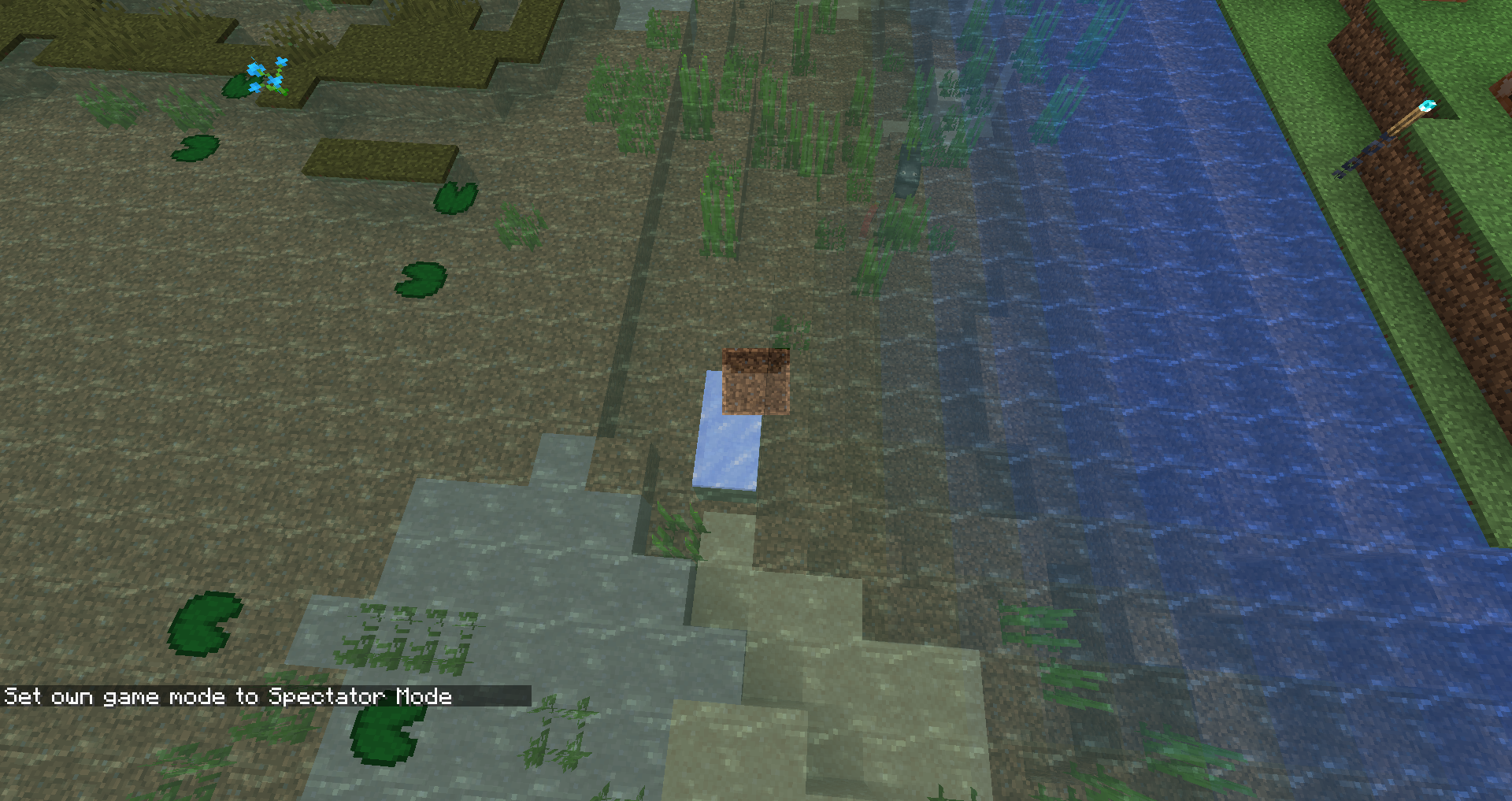


![[Mod] SPGoding](../../../data/avatars/users/44622.png)
Created Issue:
Clouds, transparent blocks, etc. are not rendered if they are behind semi-transparent entities
Relates to
MC-163982.Reproduce steps
1. Create a team: /team add test
2. Summon an invisible entity belonging to this team: /summon minecraft:armor_stand ~ ~ ~ {NoGravity: 1b, Team: test, Invisible: 1b}
3. Join the team: /team join test
4. Put transparent blocks behind the entity OR move the camera to make the entity in front of cloud OR whatever.Affects:
- Specially rendered or transparent blocks (except for regular glass)
- Clouds
- Breaking animations
- Beacon beam
- Nether portal
- Particles
- Campfire smoke
- Water
This also affect players in spectator mode.
Attachments2
Relates to
MC-163982. See also my comment there.Reproduce steps
1. Create a team: /team add test
2. Summon an invisible entity belonging to this team: /summon minecraft:armor_stand ~ ~ ~ {NoGravity: 1b, Team: test, Invisible: 1b}
3. Join the team: /team join test
4. Put transparent blocks behind the entity OR move the camera to make the entity in front of cloud OR whatever.Affects:
- Specially rendered or transparent blocks (except for regular glass)
- Clouds
- Breaking animations
- Beacon beam
- Nether portal
- Particles
- Campfire smoke
- Water
This also affect players in spectator mode.
Clouds, transparent blocks, etc. are not rendered if they arebehind semi-transparent entitiesClouds and many things do not render behind semi-transparent entities
![[Mod] violine1101](../../../data/avatars/users/92858.png)
![[Mod] Michael Wobst](../../../data/avatars/users/37868.png)
![[Mojang] Adrian Östergård](../../../data/assets/gravatar/nighter.jpeg)
 Normal
![[Mod] Pokechu22](../../../data/avatars/users/92931.png)
is duplicated by
![[Mod] NeunEinser](../../../data/avatars/users/39263.png)
is duplicated by
![[Mod] Greymagic27](../../../data/avatars/users/92875.png)
is duplicated by
![[Mod] tryashtar](../../../data/avatars/users/41963.png)
is duplicated by
![[Mod] Asteraoth](../../../data/avatars/users/92886.png)
is duplicated by
is duplicated by
Cloudsand many things do not render behind semi-transparent entitiesClouds, transparent blocks and other semi-transparent textures do not render behind semi-transparent entities
is duplicated by
Clouds, transparent blocks, and other semi-transparent textures do not render behind semi-transparent entities
is duplicated by
![[Mod] Urielsalis](../../../data/assets/gravatar/urielsalis.jpeg)
relates to
![[Mod] CubeTheThird](../../../data/assets/gravatar/cubethethird.jpeg)
is duplicated by
Relates to
MC-163982. See also my comment there.Reproduce steps
1. Create a team: /team add test
2. Summon an invisible entity belonging to this team: /summon minecraft:armor_stand ~ ~ ~ {NoGravity: 1b, Team: test, Invisible: 1b}
3. Join the team: /team join test
4. Put transparent blocks behind the entity OR move the camera to make the entity in front of cloud OR whatever.Affects:
- Specially rendered or transparent blocks (except for regular glass)
- Clouds
- Breaking animations
- Beacon beam
- Nether portal
- Particles
- Campfire smoke
- Water
This also affect players in spectator mode.
Relates to
MC-163982. See also my comment there.Reproduce steps
- Create a team.
team add test- Summon an invisible entity belonging to this team:
/summon minecraft:armor_stand ~ ~ ~ {NoGravity: 1b, Team: test, Invisible: 1b}- Join the team:
/team join test- Put transparent blocks behind the entity OR move the camera to make the entity in front of cloud OR whatever.
Affects:
- Specially rendered or transparent blocks (except for regular glass)
- Clouds
- Breaking animations
- Beacon beam
- Nether portal
- Particles
- Campfire smoke
- Water
This also affect players in spectator mode.
is duplicated by
is duplicated by

is duplicated by
is duplicated by
is duplicated by

Relates to
MC-163982. See also my comment there.Reproduce steps
- Create a team.
/team add test- Summon an invisible entity belonging to this team:
/summon minecraft:armor_stand ~ ~ ~ {NoGravity: 1b, Team: test, Invisible: 1b}- Join the team:
/team join test- Put transparent blocks behind the entity OR move the camera to make the entity in front of cloud OR whatever.
Affects:
- Specially rendered or transparent blocks (except for regular glass)
- Clouds
- Breaking animations
- Beacon beam
- Nether portal
- Particles
- Campfire smoke
- Water
This also affect players in spectator mode.
is duplicated by
is duplicated by
is duplicated by
![[Bot] Arisa](../../../data/avatars/users/43007.png)
![[Helper] Johnibur](../../../data/avatars/users/28381.png)
is duplicated by
![[Mod] turbo](../../../data/avatars/users/92867.png)
FIXED IN 1.15-PRE1. Sorry my bad.
Prior to 1.15-pre1, all the things listed are rendered in front of semi-transparent entities, as claimed in the summary.
In 1.15-pre1, they are not being rendered any more if they are behind semi-transparent entities. I just opened a new ticket for this: MC-165958.
Yup, just checked. Everything in the list above is now affected by MC-165958 instead.
Thank you for your report!
However, this issue is a Duplicate of MC-165957 and MC-165958.
If you would like to add a vote and any extra information to the main tickets it would be appreciated.
If you haven't already, you might like to make use of the search feature to see if the issue has already been mentioned.
Quick Links:
📓 Issue Guidelines – 💬 Community Support – 📧 Customer Support – 📖 Game Wiki
Thank you for your report!
However, this issue is a Duplicate of MC-165958.
If you would like to add a vote and any extra information to the main ticket it would be appreciated.
If you haven't already, you might like to make use of the search feature to see if the issue has already been mentioned.
Quick Links:
📓 Issue Guidelines – 💬 Community Support – 📧 Customer Support – 📖 Game Wiki
Does MC-165958 describe your issue?
@user-2a4c8, the bug shown in the screenshot is already tracked as MC-165958.
Thank you for your report!
We're already tracking this issue at MC-165958, so I will resolve and link this ticket as a duplicate.
If you would like to add a vote and any extra information to the main ticket it would be appreciated.
If you haven't already, you might like to make use of the search feature to see if the issue has already been mentioned.
Quick Links:
📓 Issue Guidelines – 💬 Community Support – 📧 Customer Support – 📖 Game Wiki
Thank you for your report!
However, this issue is a Duplicate of MC-165958.
If you would like to add a vote and any extra information to the main ticket it would be appreciated.
If you haven't already, you might like to make use of the search feature to see if the issue has already been mentioned.
Quick Links:
📓 Issue Guidelines – 💬 Community Support – 📧 Customer Support – 📖 Game Wiki
Thank you for your report!
We're actually already tracking this issue in MC-165958, so I resolved and linked this ticket as a duplicate.
If you would like to add a vote and any extra information to the main ticket it would be appreciated.
If you haven't already, you might like to make use of the search feature in the future to see if the issue has already been reported.
Quick Links:
📓 Issue Guidelines – 💬 Community Support – 📧 Customer Support – 📖 Game Wiki
Thank you for your report!
We're actually already tracking this issue in MC-165958, so I resolved and linked this ticket as a duplicate.
If you would like to add a vote and any extra information to the main ticket it would be appreciated.
If you haven't already, you might like to make use of the search feature in the future to see if the issue has already been reported.
Quick Links:
📓 Issue Guidelines – 💬 Community Support – 📧 Customer Support – 📖 Game Wiki
Thank you for your report!
We're actually already tracking this issue in MC-165958, so I resolved and linked this ticket as a duplicate.
If you would like to add a vote and any extra information to the main ticket it would be appreciated.
If you haven't already, you might like to make use of the search feature in the future to see if the issue has already been reported.
Quick Links:
📓 Issue Guidelines – 💬 Community Support – 📧 Customer Support – 📖 Game Wiki
Thank you for your report!
However, this issue is a Duplicate of MC-165958.
If you would like to add a vote and any extra information to the main ticket it would be appreciated.
If you haven't already, you might like to make use of the search feature to see if the issue has already been mentioned.
Quick Links:
📓 Issue Guidelines – 💬 Community Support – 📧 Customer Support – 📖 Game Wiki
Duplicate of MC-165958.
Thank you for your report!
However, this issue is a Duplicate of MC-165958.
If you would like to add a vote and any extra information to the main ticket it would be appreciated.
If you haven't already, you might like to make use of the search feature to see if the issue has already been mentioned.
Quick Links:
📓 Issue Guidelines – 💬 Community Support – 📧 Customer Support – 📖 Game Wiki
Thank you for your report!
We're actually already tracking these issues in MC-162693 and MC-165958, so I resolved and linked this ticket as a duplicate.
If you would like to add a vote and any extra information to the main tickets it would be appreciated.
In the future, please only put one bug in each ticket.
If you haven't already, you might like to make use of the search feature in the future to see if the issue has already been reported.
Quick Links:
📓 Issue Guidelines – 💬 Community Support – 📧 Customer Support – 📖 Game Wiki
Thank you for your report!
We're actually already tracking this issue in MC-165958, so I resolved and linked this ticket as a duplicate.
If you would like to add a vote and any extra information to the main ticket it would be appreciated.
If you haven't already, you might like to make use of the search feature in the future to see if the issue has already been reported.
Quick Links:
📓 Issue Guidelines – 💬 Community Support – 📧 Customer Support – 📖 Game Wiki
Thank you for your report!
However, this issue is a Duplicate of MC-165958.
If you would like to add a vote and any extra information to the main ticket it would be appreciated.
If you haven't already, you might like to make use of the search feature to see if the issue has already been mentioned.
Quick Links:
📓 Issue Guidelines – 💬 Community Support – 📧 Customer Support – 📖 Game Wiki
Thank you for your report!
We're actually already tracking this issue in MC-165958, so I've resolved and linked this ticket as a duplicate.
If you would like to add a vote and any extra information to the main ticket it would be appreciated.
If you haven't already, you might like to make use of the search feature to see if the issue has already been mentioned.
Quick Links:
📓 Issue Guidelines – 💬 Community Support – 📧 Customer Support – 📖 Game Wiki
Thank you for your report!
We're actually already tracking this issue in MC-165958 (and its related tickets), so I resolved and linked this ticket as a duplicate.
If you would like to add a vote and any extra information to the main ticket it would be appreciated.
If you haven't already, you might like to make use of the search feature in the future to see if the issue has already been reported.
Quick Links:
📓 Issue Guidelines – 💬 Community Support – 📧 Customer Support – 📖 Game Wiki
Does MC-165958 describe your issue?

Thank you for your report!
We're tracking this issue in MC-165958, so this ticket is being resolved and linked as a duplicate.
That ticket has already been resolved as Fixed. Please check the Fix Version/s field in that ticket to see in which version this behavior was or will be fixed.
If you haven't already, you might like to make use of the search feature to see if the issue has already been mentioned.
Quick Links:
📓 Bug Tracker Guidelines – 💬 Community Support – 📧 Mojang Support
📓 Project Summary – ✍️ Feedback and Suggestions – 📖 Game Wiki
– I am a bot. This action was performed automatically! The ticket was resolved by one of our moderators, and I left this message to give more information to you.
damn, i thought I would be the only person to look at a honey block through an invisible spider in spectator mode.
Affects 20w20a
Affects 20w21a
This is fixed in 20w22a
this affects 1.18.1
Video showing it: https://www.youtube.com/watch?v=J0DjgQkQYzk
Mart, make sure to set the Graphics mode to Fabulous!
[Mod] Michael Wobst why?
See https://minecraft.fandom.com/wiki/Graphics_setting
Fabulous was added in order to fix this problem, and not on fancy, as this may require a lot more processing/memory.
that seams like a dumb way to do it.