Sign Colors Fading (NOT vanishing!) when facing north or south
Sometimes color on signs look faded and are hardly readable.
In the screenshot I attached all 4 signs read "test" in the exact same color ("§f").
This seems to be happening in various versions of Minecraft (i have some screenshots where the problem exists as far back as at least 1.4).
The problem only seems to apply when the sign is facing certain directions (SOUTH and NORTH is what F3 says on the attached screenshot).
This is a big issue since it disables server owners to reliably use colored signs.
It was repeatably reported on various Minecraft Forums as for example here: https://forums.bukkit.org/threads/sign-color-fading.126097/
Sadly I have no way of reproducing it, it just happens randomly every so often and stays like that for some time, then vanishes again.
Of course, I was using a vanilla minecraft version when doing the screenshot!
Summary:
What I expected to happen was...:
Sign colors get displayed normally all the time
What actually happened was...:
Sometimes sign colors are faded out.
Steps to Reproduce:
1. Place 4 signs like in the screenshot
2. Wait
3. After some time (try logging into the world every few hours) the colors will be faded. I guess it won't happen if you stare at it the whole time, but i don't know.
Sadly it is hard to reproduce since it doesnt always happen, rather the colors start to fade after some time.
Re-Placing the sign does not help.
Environment
Windows 7 (64 bit)
Java Version 1.7.0
Videocard: NVIDIA GeForce GTX 560 Ti
Processor: AMD Phenom II X6 1100T
RAM: 8.00GB
Linked Issues
is duplicated by35
 MC-50471Sign Colors Are Darker :(DuplicateMC-61796Sign colorsDuplicateMC-69852sign's write color changes with her rotationDuplicateMC-72990Color signs being discoloredDuplicateMC-73498Color signs being discolored and NOT fadingDuplicateMC-73501West + East signs being discolored in singleplayer/multiplayer at any biomes and hightDuplicateMC-74250Colored Signs appears darker in North and SouthDuplicateMC-76489Colored signs darkened DuplicateMC-76866Sign bugs!DuplicateMC-77138Signs facing south or north have slightly darker colorsDuplicateMC-77336The sign changes color depending on the cardinal point.DuplicateMC-78136Sign Coloured TextDuplicateMC-78387Certain sign rotations don't display colors properlyDuplicateMC-80292Sign Colored Text Positioning BugDuplicateMC-81703Colored text on signs distorted in North and South directionsDuplicateMC-81860Colored signs are unreadable when facing NORTH or SOUTH.DuplicateMC-86377Color GlitchDuplicateMC-91707git-Spigot-5f38d38-18fbb24DuplicateMC-92326About Writings colors on a SignDuplicateMC-92731Sign Color Changes with Direction (GRUM!, This is not intended!!! Please Read!)DuplicateMC-93241Signs that don't face a certain direction are darker then usualDuplicateMC-94768Signs are very unclearDuplicateMC-101333Coloured json text on signs unreadable in North and South directionsDuplicateMC-105896Color redering issueDuplicateMC-108960Signs are lighter/darker due to their rotationDuplicateMC-121070Signs have weird ligh variantsDuplicateMC-132549Directional Sign Color GlitchDuplicateMC-148389The color of text on my friend's signs are different than mine (faded)DuplicateMC-167625Signs sometimes show incorrect coloursDuplicateMC-177231White text on sign changes shade when signs are facing north/southDuplicateMC-192887Text on north/south wall signs is slightly dimmer than text on east/west wall signsDuplicateMC-198359White sign text color is grey when sign facing north/southDuplicateMC-252869Sign Text Becomes Faded When ColoredDuplicateMC-263226Dyed signs have different colors depending on the orientation of the sign.DuplicateMC-273243Sign color is changing with orientationDuplicate
 Low
Low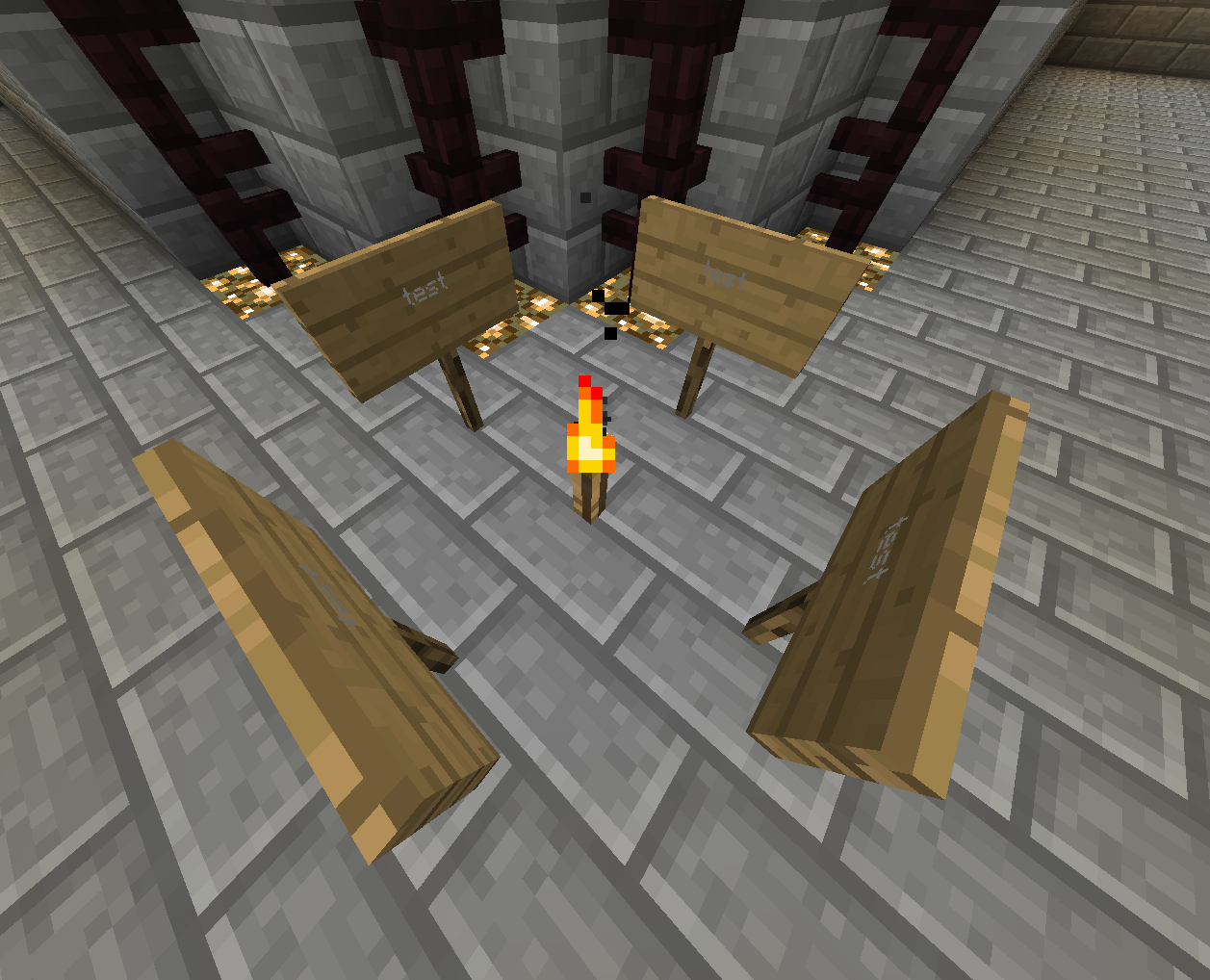




Created Issue:
Sign Colors Fading
Sometimes color on signs look faded and are hardly readable.
In the screenshot I attached all 4 signs read "test" in the exact same color ("§f").
This seems to be happening in various versions of Minecraft (i have some screenshots where the problem exists as far back as at least 1.4).The problem only seems to apply when the sign is facing certain directions (SOUTH and NORTH is what F3 says on the attached screenshot).
This is a big issue since it disables server owners to reliably use colored signs.
It was repeatably reported on various Minecraft Forums as for example here: https://forums.bukkit.org/threads/sign-color-fading.126097/
Sadly I have no way of reproducing it, it just happens randomly every so often and stays like that for some time, then vanishes again.
Of course, I was using a vanilla minecraft version when doing the screenshot!
Summary:
What I expected to happen was...:
Sign colors get displayed normally all the timeWhat actually happened was...:
Sometimes sign colors are faded out.Steps to Reproduce:
1. Place 4 signs like in the screenshot
2. Wait
3. After some time (minutes/hours/days?) the colors will be faded. I guess it won't happen if you stare at it the whole time, but i don't know.Sadly it is hard to reproduce since it doesnt always happen, rather the colors start to fade after some time.
Re-Placing the sign does not help.Environment
Windows 7 (64 bit)
Java Version 1.7.0
Videocard: NVIDIA GeForce GTX 560 Ti
Processor: AMD Phenom II X6 1100T
RAM: 8.00GB
Linked Issues
is duplicated by1
TRASH-24107
Attachments1
- Unresolved
- Open
- Minecraft - Public
- Unconfirmed
- bug colors fading minecraft sign
- 1.6.2
Sometimes color on signs look faded and are hardly readable.
In the screenshot I attached all 4 signs read "test" in the exact same color ("§f").
This seems to be happening in various versions of Minecraft (i have some screenshots where the problem exists as far back as at least 1.4).The problem only seems to apply when the sign is facing certain directions (SOUTH and NORTH is what F3 says on the attached screenshot).
This is a big issue since it disables server owners to reliably use colored signs.
It was repeatably reported on various Minecraft Forums as for example here: https://forums.bukkit.org/threads/sign-color-fading.126097/
Sadly I have no way of reproducing it, it just happens randomly every so often and stays like that for some time, then vanishes again.
Of course, I was using a vanilla minecraft version when doing the screenshot!
Summary:
What I expected to happen was...:
Sign colors get displayed normally all the timeWhat actually happened was...:
Sometimes sign colors are faded out.Steps to Reproduce:
1. Place 4 signs like in the screenshot
2. Wait
3. After some time (minutes/hours/days?) the colors will be faded. I guess it won't happen if you stare at it the whole time, but i don't know.Sadly it is hard to reproduce since it doesnt always happen, rather the colors start to fade after some time.
Re-Placing the sign does not help.Sometimes color on signs look faded and are hardly readable.
In the screenshot I attached all 4 signs read "test" in the exact same color ("§f").
This seems to be happening in various versions of Minecraft (i have some screenshots where the problem exists as far back as at least 1.4).The problem only seems to apply when the sign is facing certain directions (SOUTH and NORTH is what F3 says on the attached screenshot).
This is a big issue since it disables server owners to reliably use colored signs.
It was repeatably reported on various Minecraft Forums as for example here: https://forums.bukkit.org/threads/sign-color-fading.126097/
Sadly I have no way of reproducing it, it just happens randomly every so often and stays like that for some time, then vanishes again.
Of course, I was using a vanilla minecraft version when doing the screenshot!
Summary:
What I expected to happen was...:
Sign colors get displayed normally all the timeWhat actually happened was...:
Sometimes sign colors are faded out.Steps to Reproduce:
1. Place 4 signs like in the screenshot
2. Wait
3. After some time (try logging to the world every few hours) the colors will be faded. I guess it won't happen if you stare at it the whole time, but i don't know.Sadly it is hard to reproduce since it doesnt always happen, rather the colors start to fade after some time.
Re-Placing the sign does not help.
Sometimes color on signs look faded and are hardly readable.
In the screenshot I attached all 4 signs read "test" in the exact same color ("§f").
This seems to be happening in various versions of Minecraft (i have some screenshots where the problem exists as far back as at least 1.4).The problem only seems to apply when the sign is facing certain directions (SOUTH and NORTH is what F3 says on the attached screenshot).
This is a big issue since it disables server owners to reliably use colored signs.
It was repeatably reported on various Minecraft Forums as for example here: https://forums.bukkit.org/threads/sign-color-fading.126097/
Sadly I have no way of reproducing it, it just happens randomly every so often and stays like that for some time, then vanishes again.
Of course, I was using a vanilla minecraft version when doing the screenshot!
Summary:
What I expected to happen was...:
Sign colors get displayed normally all the timeWhat actually happened was...:
Sometimes sign colors are faded out.Steps to Reproduce:
1. Place 4 signs like in the screenshot
2. Wait
3. After some time (try logging into the world every few hours) the colors will be faded. I guess it won't happen if you stare at it the whole time, but i don't know.Sadly it is hard to reproduce since it doesnt always happen, rather the colors start to fade after some time.
Re-Placing the sign does not help.

duplicates
Sign Colors Fading (NOT vanishing!)

relates to
is duplicated by
duplicates
is duplicated by
is duplicated by
is duplicated by
67fe1e703288bf1b41463caf7a9dc35e (1).png

is duplicated by
is duplicated by
is duplicated by
is duplicated by
is duplicated by
![[Mojang] Grum (Erik Broes)](../../../data/assets/gravatar/grum.png) [Mojang] Grum (Erik Broes)
[Mojang] Grum (Erik Broes)I want this bug fixed #POWERCRAFTARMY

is duplicated by
is duplicated by
is duplicated by
is duplicated by
is duplicated by
![[Mod] Ezekiel (ezfe)](../../../data/assets/gravatar/ezekielelin.jpeg)
![[Mod] CubeTheThird](../../../data/assets/gravatar/cubethethird.jpeg)
is duplicated by
is duplicated by
is duplicated by

Sign Colors Fading (NOT vanishing!) when facing north or south
is duplicated by
is duplicated by
is duplicated by
is duplicated by
is duplicated by
is duplicated by
relates to

is duplicated by
is duplicated by
![[Mod] Neko](../../../data/avatars/users/92901.png)
is duplicated by

is duplicated by
is duplicated by
is duplicated by
is duplicated by
![[Mod] violine1101](../../../data/avatars/users/92858.png)
is duplicated by
relates to
![[Mod] Michael Wobst](../../../data/avatars/users/37868.png)
is duplicated by
is duplicated by
is duplicated by
is duplicated by
is duplicated by
![[Mod] markderickson](../../../data/avatars/users/18946.svg)
is duplicated by
Random signs at different locations sometimes just get displayed too dark. Happens in Vanilla singleplayer as well as on my Bukkit Server.
Replacing the sign or changing the light level does not fix the issue.
Additionally, when the HUD is hidden (F1 mode), ALL signs are displayed too dark.
This wouldn't really be a problem (besides looking weird), but when using colored text, you can't read some colors.
Yes, I know this is a duplicate of MC-33304, but since that issue was marked as resolved (which it isn't) i added this bug report.
Maybe there are two issues.
Most of the linked issues are OS X issues. Please see if MC-33304 better describes your issue, will reopen that ticket then.
I think it only concerns 2.4 GHz Intel Core i5. I recently switched to a 1.5GHz and I'm not anymore encountering it.
Edit : MC-33304 is NOT the same bug.
Dupe of MC-33304
Duplicate of MC-33304
No, it's MC-33304. Here's a picture form that thread: https://bugs.mojang.com/secure/attachment/43105/2013-09-30_14.35.35.png
It's still MC-33304. Making multiple reports doesn't change that fact. Yes, more systems are affected now in 1.8.
Duplicate of MC-33304
Dupe of MC-33304
Dupe of MC-33304
Issue MC-33304 get removed after flood by stupid people... (You could have also deleted their account, but...lol).
So please reopen that !
Why is there no report listed as the duplicate? I believe it should be MC-33304.
That's not what this bug is about. I think you want MC-33304.
1. For example, why was MC-33304 private for a while?
12. If I notice this happening somewhere, should I bother reporting it?
16. It seems to only happen on comments, someone will make a comment and I won't get a notification. And it's not going to spam, I get most of the emails, but every once in a while one doesn't get sent.
19. If someone makes a comment confirming a bug in a new version, and the issue isn't updated, how long should they wait before posting again? What if it keeps happening?
20. If you have relevant information to add to a closed report, like it's been fixed or regressed, how should you do that?
The only reason I see MC-33304 as being private for a while is because of spam comments that were removed.
For 12, you can leave a comment on the report to have it modified.
For 16, it is possible to leave a comment via the Update Issue button, in which case you would not get the email.
For 19, it's mainly important that someone paid attention to the issue, to comment about it. If the actual Affected Versions isn't updated, it's not such a big deal, so long as, once the report is being checked to see if it still needs fixing, the comment is present.
For 20, I don't see why a relevant report would be closed, if it is a valid and open. If it was regressed though, a new bug report may be in order.
Its still a dupe of MC-33304, which was resolved as intended behavior by a Mojang employee.
This bug has been reported numerous times and was closed as "Working as intended" each time.
Example: MC-33304
Please take a look at the screenshot I have attached. In case you can't read it, which you'll probably have a hard time doing because of this very bug, it says:
"Please care to explain how not being to read this sign at all is considered "working as intended" behavior. ???"
Erik Broes commented on the previously closed issue that players are responsible for choosing a color that is readable because we chose to use a colored sign.
Quote: "The reason is because you are using colors. Because you are you are also responsible for picking colors you can see well."
Picking a color other than black is virtually impossible because of this bug, because it affects all colors other than black, not just the one I used in my screenshot.
I don't understand why you would force the player to use the default black color on signs on 2 out of only 4 possible directions? Especially since colored signs are now possible to create in Vanilla Minecraft through JSON formatting, it's not right that the player's creativity is restricted because of a bug in the game.
Please reconsider this, Erik Broes. Thanks for reading
Still a dupe of MC-33304 for obvious comment from Grum:
This is fully working as intended, the shading on the sign is 'as it should' and it is ok if some colors do not work well on that as long as black works as intended.
MC-33304 is resolved:
[Mojang] Grum (Erik Broes) made changes - 21/Jan/15 7:49 AM
| Status | Reopened [ 4 ] | Resolved [ 5 ] |
| Resolution | Works As Intended [ 6 ] |
[Mojang] Grum (Erik Broes) added a comment - 23/Jan/15 6:32 PM
The reason is because you are using colors. Because you are you are also responsible for picking colors you can see well.
Post your findings here, and perhaps it'll be marked for review
Making intentional duplicates doesn't help at all and only makes this bug tracker harder to manage

This post may look like a duplicate of MC-33304 but is, rather, "related"
REASON: this ticket was closed due to (on my opinion) incorrect reasoning. (Please read this ticket thoroughly!)
Please reconsider fixing/looking into this bug, (putting it on the low-medium priority bug-fix list?)
FACTS:
- It is not about the color of the sign, but about the texture of the sign! (IMPORTANT)
- It may seem to affect colors, but as seen in the attachments, it's just an illusion.
- Because of how lighting works in minecraft, the shading on the sign makes the sign look lighter/darker depending on rotation around the Y-axis; pointing one in X or Z direction will alter the sign's texture, NOT the colors.
Steps to reproduce
1: place sign facing X and Z direction.
2: coloring is only useful to see the major difference in shading.
using resourcepack:
- Can be seen that colors are fine.
- Because Black (Color #000000) does not alter it's shading, due to it being the most dark color.
- Changes in color are about #4F4124 -> #766034, which is a "color difference" of
{Red: (dec) 39, Green: (dec) 31, Blue: (dec) 16}
which is on average about (dec) 29 difference in color => 11.35% color difference.
(found on upper right most pixel of sign)
[math might not be accurate]
Way to fix:
- Possibly: involves rewriting (parts) of lighting/shading system.
- Alternatively: Changing the way signs are rendered.
- Or some other way.
Comment on Attachments
2016-02-11_21.04.19.png = (no Res-pack) Viewed in line with Z-axis
2016-02-11_21.04.33.png = (no Res-pack) Viewed in line with X-axis
2016-02-11_21.21.18.png = (Res-pack: sign texture completely black) Proof that colors aren't changing, average color difference of maybe 1 or 2 (hex)(0.5%)
2016-02-11_21.21.47.png = (no Res-pack) colors "seem" to change, but actually it is the texture of the sign. (use a color picking tool for proof)
Final words and notes:
The coloring/formatting system, may not be fully supported, but texture/rendering bugs/errors are. The unreadability of the colored signs is just a side effect of the texture/rendering being darker/lighter. Black text is also harder to read, but since the contrast is so high, nobody will have problems with it. Unless the texture was darker, in which case you may or may not be able to read the text.
Duplicate of MC-33304, which is resolved as intended.
![[Mod] tryashtar](../../../data/avatars/users/41963.png)
Duplicate of MC-33304

Duplicate of MC-33304, an issue marked as WAI.
Please use the search function next time.
This is caused by MC-33304.
See MC-33304.

See MC-33304.
Note: We don't generally accept issues that aren't written in English as English is the common language used here. But because this is a duplicate, we'll link it anyways.
Thank you for your report!
However, we are already tracking this issue, and this report is a Duplicate of MC-33304, which has been marked as Works as Intended - this is an intentional game feature. If you have a different opinion, please visit the Feedback website.
Please use the search function in the future to prevent duplicate reports.
Quick Links:
📓 Issue Guidelines – 🛠 Community Support – 📧 Customer Support – ✍️ Feedback and Suggestions – 📖 Game Wiki
💬 Mojira Subreddit – 💬 Mojira Discord
![[Mod] Chandler](../../../data/assets/gravatar/triwonder81.png)
Thank you for your report!
We're tracking this issue as MC-33304, so this ticket is being resolved and linked as a duplicate.
That ticket has already been resolved as working as intended, which means this is not considered a bug and won't be fixed. Please do not leave a comment on the linked ticket.
If you haven't already, you might like to make use of the search feature to see if the issue has already been mentioned.
Quick Links:
📓 Issue Guidelines – 💬 Community Support – 📧 Mojang Support – ✍️ Feedback and Suggestions – 📖 Game Wiki
Duplicate of MC-33304.
![[Bot] Arisa](../../../data/avatars/users/43007.png)
Thank you for your report!
We're tracking this issue in MC-33304, so this ticket is being resolved and linked as a duplicate.
That ticket has already been resolved as working as intended, which means this is not considered a bug and won't be fixed. Please do not leave a comment on the linked ticket.
If you haven't already, you might like to make use of the search feature to see if the issue has already been mentioned.
Quick Links:
📓 Bug Tracker Guidelines – 💬 Community Support – 📧 Mojang Support
📓 Project Summary – ✍️ Feedback and Suggestions – 📖 Game Wiki
– I am a bot. This action was performed automatically! The ticket was resolved by one of our moderators, and I left this message to give more information to you.
Thank you for your report!
We're tracking this issue in MC-33304 and MC-96916, so this ticket is being resolved and linked as a duplicate.
If you would like to add a vote and any extra information to the main ticket it would be appreciated.
If you haven't already, you might like to make use of the search feature to see if the issue has already been mentioned.
Quick Links:
📓 Bug Tracker Guidelines – 💬 Community Support – 📧 Mojang Support
📓 Project Summary – ✍️ Feedback and Suggestions – 📖 Game Wiki
– I am a bot. This action was performed automatically! The ticket was resolved by one of our moderators, and I left this message to give more information to you.
![[Mod] Jarl-Penguin](../../../data/avatars/users/92849.png)
Thank you for your report!
We're tracking this issue in MC-33304, so this ticket is being resolved and linked as a duplicate.
That ticket has already been resolved as working as intended, which means this is not considered a bug and won't be fixed. Please do not leave a comment on the linked ticket.
If you haven't already, you might like to make use of the search feature to see if the issue has already been mentioned.
Quick Links:
📓 Bug Tracker Guidelines – 💬 Community Support – 📧 Mojang Support (Technical Issues) – 📧 Microsoft Support (Account Issues)
📓 Project Summary – ✍️ Feedback and Suggestions – 📖 Game Wiki
Same with me. colours only show up if i stand directly infront of the sign.
No, that is actually not at all the issue me and a number of other players are experiencing.
This is a whole other matter. It is not a duplicate to
MC-1313.The comment of Zakary Walker is also not related to this problem.
Please do read the information i provided with the ticket.
Based on what I just said, this issue is not resolved at all.
I also could not find a earlier version of this exact problem, so I don't think it is a duplicate.
If you find that the matter of colored signs is no vanilla issue at all, please update the status of this ticket to invalid, and not resolved.
Regards, Michael
Since no one seems to read anything I gathered here I think the best course of action would be to open another issue.
I feel like this problem has not been recognized. I do not mean to pile up additional unnecessary work in opening duplicates. I actually do not see this issue as a duplicate and would at least like to get a statement as to why it is flagged as a duplicate.
I will open another issue (with the explanation that this is no duplicate made clearer) tomorrow, if I still have the feeling this one got ignored completely.
Thanks,
Michael
Reopened.
MC-1313is a OS X issue, this is kinda different.This is still happening in 1.8
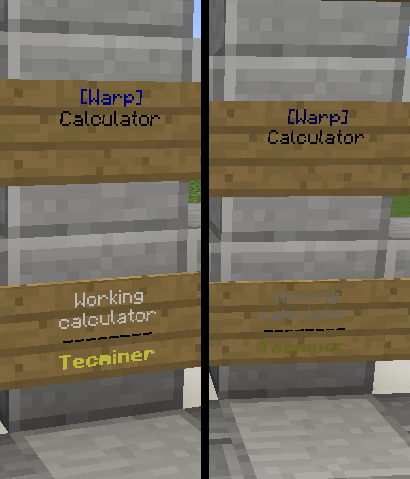
Sign colors shift from dark to light based on rotation: east/west are the brightest, north/south are the darkest.The shading on the signs is actually the cause, as Carl said below. East/west use the darkest shading, north/south use the lightest.
-edit: picture way too big, just linking instead
http://i.imgur.com/9tnEknN.png
Repro steps:
Actually, the colors do not change at all – the shading on the sign does however, and this creates the shade difference.
All the color signs that exists or is being placed in the directions south and north are discolored so you almost can't see some of the colors.
While all the signs in the directions west and east looks just fine.
Well this is a really small bug that effects servers and regular singleplayer, and it is only the 1.8 clients that has the issue.
All the color signs that exists or is being placed in the directions south and north are discolored so you almost can't see some of the colors.
While all the signs in the directions west and east looks just fine.
Bug again in Minecraft 1.8.2-pre1 version.
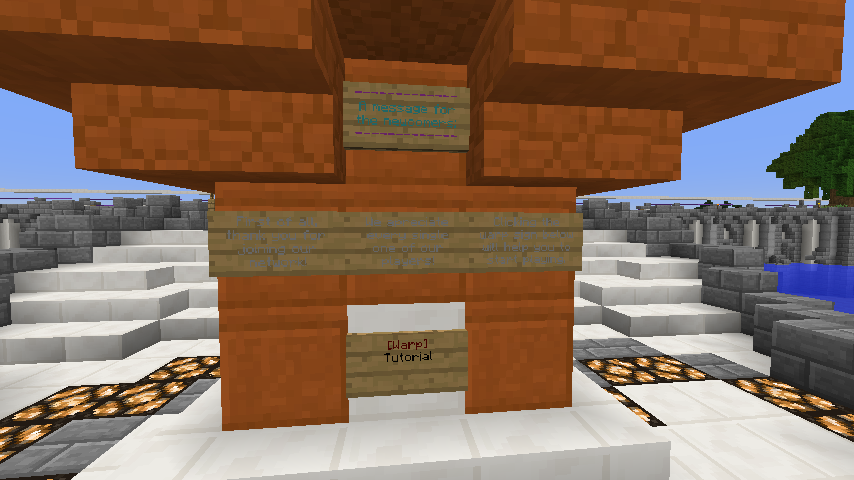
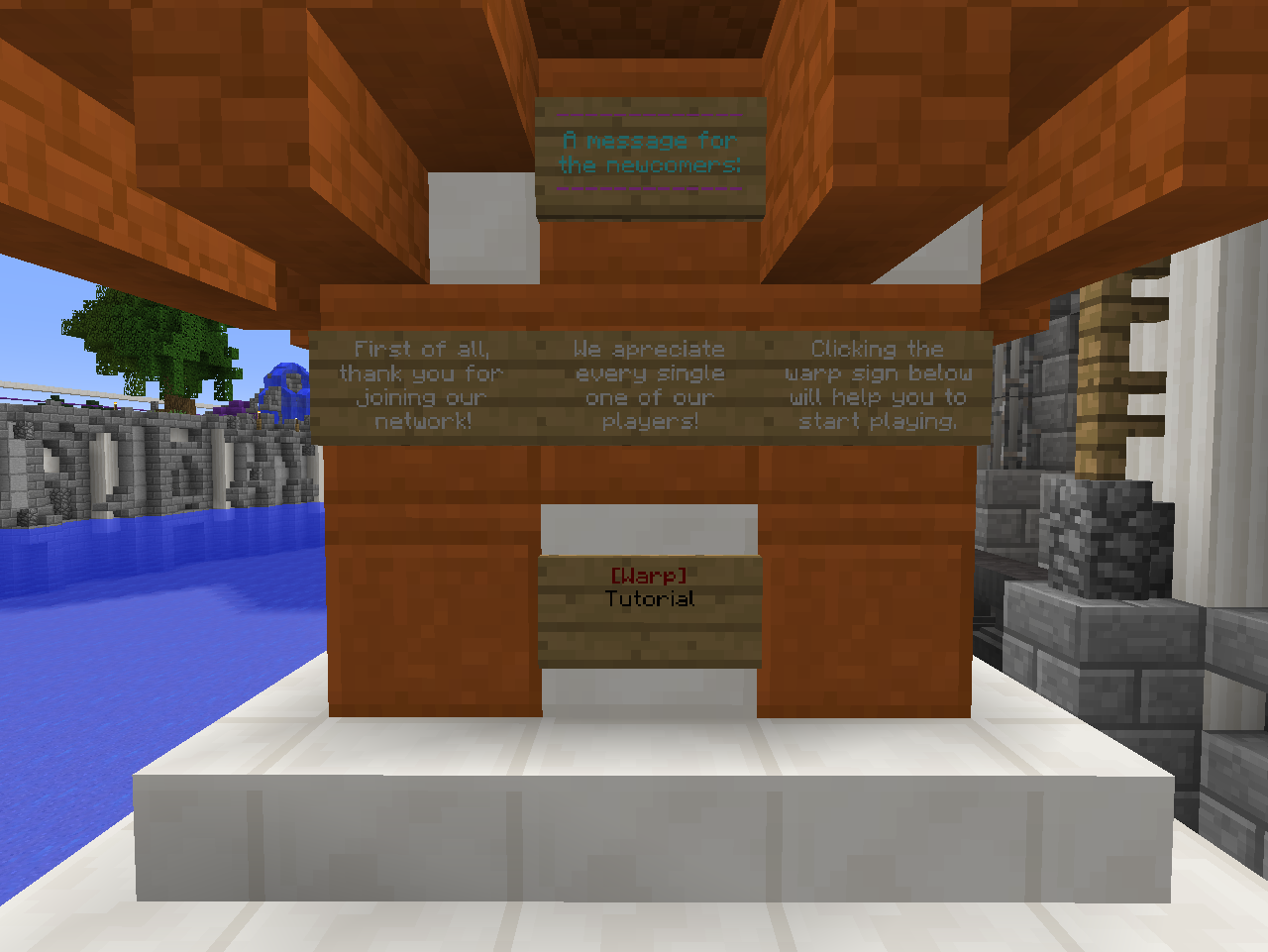
In the first picture you can see the signs facing North/South, in the second one I rotated them 90 degrees to face East/West.
This bug is so annoying!
Please spread the awareness! Still not fixed in 1.8.1 Pre2!!!!!
Still not fixed in 1.8.2-pre4 version.
This is fully working as intended, the shading on the sign is 'as it should' and it is ok if some colors do not work well on that as long as black works as intended.
So it won't be fixed??
Even if this is 'working as intended', it is obviously counter-intuitive and I can see no gain in having the shading of the text looking wrong half of the time. Since the text on these signs is extremely hard to read aswell, I would still like to see a fix at some point.
As this doesn't affect black text, it might not be a priority, I understand that.
Still it would be nice-to-have if one could reliably use colored signs.
Please revisit the screenshot from 30 of September 2013 and evaluate if this is really working 'as it should'.
https://bugs.mojang.com/secure/attachment/43105/2013-09-30_14.35.35.png
Regards,
Michael
+1 "working as intented" wtf ? The text is just unreadable... and for no reason.
The reason is because you are using colors. Because you are you are also responsible for picking colors you can see well.
But all colors can be seen well when the sign works correctly.
I don't understand why sign are not displayed the same way depending to their orientation.