Text Background Opacity doesn't work for most text
Steps To Reproduce:
1. Go to Settings -> Accessibility tab
2. Set the Text Background Opacity to any amount of opacity (0%-100%)
Observed Results:
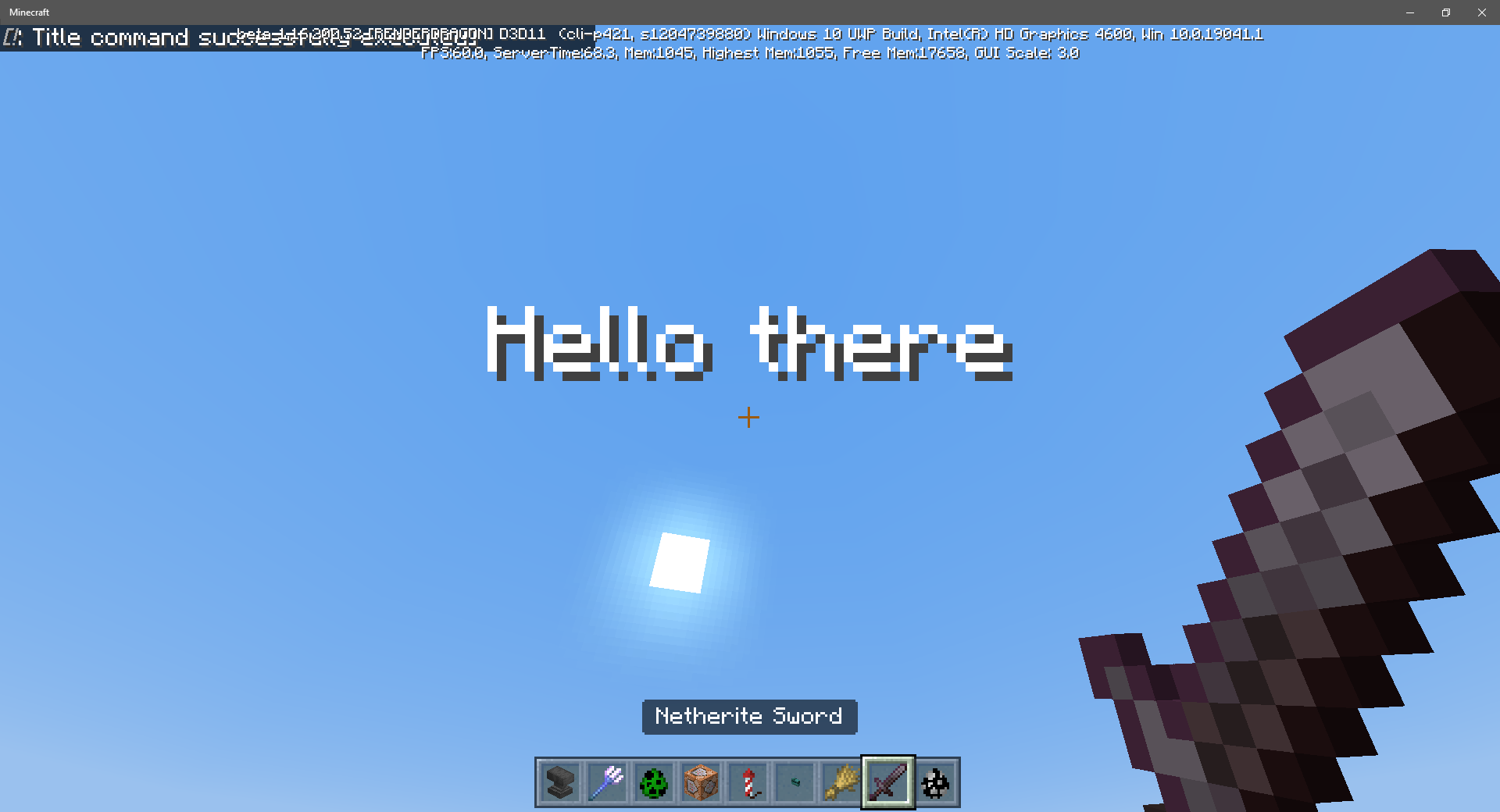
Opacity doesn't changed.
Expected Results:
Opacity should change.
Linked Issues
is duplicated by17
 MCPE-85949Opacity Background Text not working.DuplicateMCPE-92148Text background opacity doesn’t work correctly when at 0%DuplicateMCPE-104554The "Text Background Opacity" doesn't work with the text showing the name of the item DuplicateMCPE-133450Text background opacity settings can’t be costimazed DuplicateMCPE-141270Ui BUGDuplicateMCPE-164069Text backround opacity slider still not working on hotbar textDuplicateMCPE-164794Text Background Opacity doesn't work for most textDuplicateMCPE-166418The text background opacity slider doesn’t work.DuplicateMCPE-171471Text Background Opacity DuplicateMCPE-171697Text background opacity doesn't workDuplicateMCPE-173317Text Background Opacity not workingDuplicateMCPE-178023Text Background Opacity doesn't work for most text (again)DuplicateMCPE-180103Action Bar Background Opacity bar does not work. DuplicateMCPE-180838Accessibility - Opacity setting brokenDuplicateMCPE-181894HUD opacity slider not working for hotbar tool textDuplicateMCPE-187415Hotbar Item name display parityDuplicateMCPE-190245Background text opacity setting doenst workDuplicate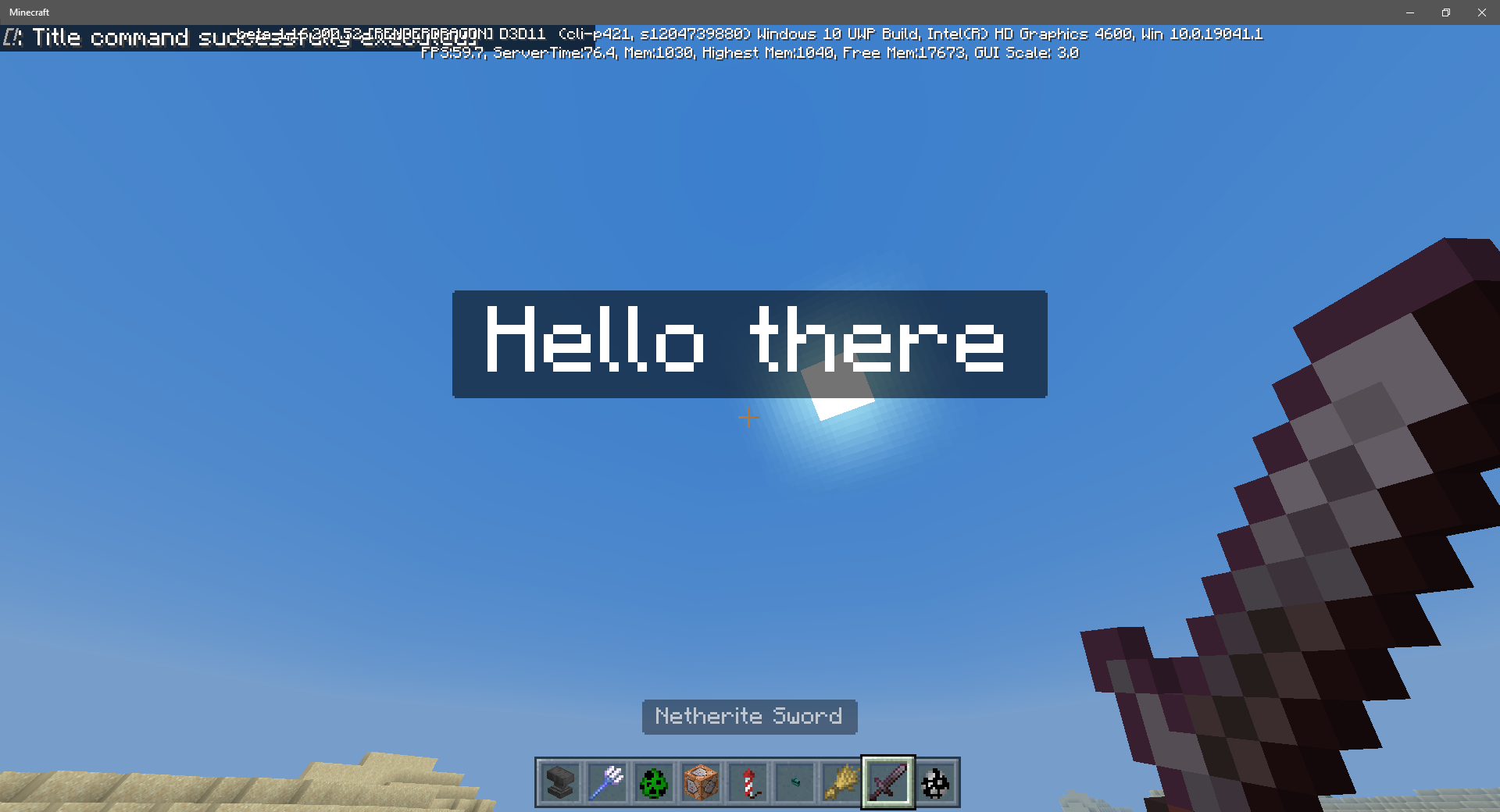



- Unresolved
![[Helper] lillybeacon](../../../data/avatars/users/93893.png) [Helper] lillybeacon
[Helper] lillybeacon- 98
- 41
- Confirmed
- 357853
- Multiple
- accessibility
1.21.50.22 Preview - 1.21.51 Hotfix
1.21.50.22 Preview 1.21.50.20 Preview 1.21.40.25 Preview 1.21.40.20 Preview 1.21.0.22 Preview 1.20.10.21 Preview 1.19.60.20 Preview 1.18.32 1.18.10.20 Beta 1.18.0.21 Beta 1.17.40.21 Beta 1.17.40.20 Beta 1.17.30.23 Beta 1.17.30.20 Beta 1.17.11 Hotfix 1.17.20.21 Beta 1.17.10 1.17.20.20 Beta 1.17.10.23 Beta 1.17.10.22 Beta 1.17.1 Hotfix 1.17.10.21 Beta 1.17.10.20 Beta 1.17.0.56 Beta 1.17.0.54 Beta 1.17.0.50 Beta 1.16.230.54 Beta 1.16.220 1.16.220.51 Beta 1.16.210.61 Beta 1.16.210.56 Beta 1.16.210.53 Beta 1.16.200.56 Beta 1.16.200.55 Beta 1.16.200.53 Beta 1.16.200.52 Beta 1.16.200.51 Beta 1.16.100.56 Beta 1.16.100.55 Beta 1.16.100.54 Beta 1.16.100.53 Beta 1.16.100.52 Beta 1.16.100.51 Beta 1.16.100.50 Beta 1.16.20.54 Beta 1.16.20.53 Beta 1.16.20.50 Beta 1.16.0.68 Beta 1.16.0.67 Beta 1.16.0.66 Beta 1.16.0.64 Beta 1.16.0.63 Beta 1.16.0 1.16.1 1.16.10 1.16.20 1.16.40 Hotfix (All other platforms) 1.16.50 Hotfix (iOS) 1.16.40 Hotfix 1.16.61 (PS4) 1.16.100 1.16.201 Hotfix 1.16.210 1.16.221 Hotfix 1.17.0 1.17.2 Hotfix 1.17.30 1.17.40 1.17.41 Hotfix 1.18.0 1.19.50.23 Preview 1.19.50.24 Preview 1.19.41 1.19.51 1.19.83 Hotfix 1.20.0 1.20.12 Hotfix 1.20.60.21 Preview 1.20.41 Hotfix 1.20.50 1.20.60.23 Preview 1.20.60.24 Preview 1.20.51 Hotfix 1.20.72 Hotfix 1.20.73 Hotfix 1.21.10.20 Preview 1.21.31 Hotfix 1.21.51 Hotfix- 1.19.50.20 Preview 1.19.40.20 Preview
Created Issue:
Text Background Opacity doesn't work
Steps To Reproduce:
1. Go to Settings -> Accessibility tab
2. Set the Text Background Opacity to any amount of opacity (0%-100%)Observed Results:
Opacity doesn't changed.Expected Results:
Opacity should change.
![[Mod] OcelotOnesie](../../../data/avatars/users/43220.png)

relates to

is duplicated by
Text Background Opacity doesn't work on item tooltips
![[Mod] LateLag](../../../data/avatars/users/92884.png)
relates to
is duplicated by
![[Mod] tryashtar](../../../data/avatars/users/41963.png)
Text Background Opacity doesn't workon item tooltipsText Background Opacity doesn't work for most text

is duplicated by
![[Bot] Arisa](../../../data/avatars/users/43007.png)
affects 1.16.200.52
is duplicated by
is duplicated by
Affects 1.17.40.20
Affects 1.17.30
Affects 1.17.40.21
Affects 1.18.0.20
![[Mojang] Mega_Spud (Jay Wells)](../../../data/avatars/users/92696.png)
relates to
is duplicated by
is duplicated by
is duplicated by
is duplicated by
is duplicated by
is duplicated by
![[Mod] turbo](../../../data/avatars/users/92867.png)
is duplicated by
is duplicated by
is duplicated by
is duplicated by
![[Mod] Jarl-Penguin](../../../data/avatars/users/92849.png)
relates to
relates to
![[Mod] ManosSef](../../../data/avatars/users/61702.png)
is duplicated by
is duplicated by
However is affected by MCPE-79331 which prevents changing it back to pre-.63 state.
Thank you for your report!
We're tracking this issue in MCPE-79331, so this ticket is being resolved and linked as a duplicate.
If you would like to add a vote and any extra information to the main ticket it would be appreciated.
If you haven't already, you might like to make use of the search feature to see if the issue has already been mentioned.
Quick Links:
📓 Issue Guidelines – 💬 Community Support – 📧 Customer Support – ✍️ Feedback and Suggestions – 📖 Game Wiki
Does MCPE-79331 describe your issue?
Thank you for your report!
We're actually already tracking this issue at MCPE-79331, so I will resolve and link this ticket as a duplicate.
If you would like to add a vote and any extra information to the main ticket it would be appreciated.
If you haven't already, you might like to make use of the search feature to see if the issue has already been mentioned.
Quick Links:
📓 Issue Guidelines – 💬 Community Support – 📧 Customer Support – ✍️ Feedback and Suggestions – 📖 Game Wiki
Thank you for your report!
We're actually already tracking this issue at MCPE-79331, so I will resolve and link this ticket as a duplicate.
If you would like to add a vote and any extra information to the main ticket it would be appreciated.
If you haven't already, you might like to make use of the search feature to see if the issue has already been mentioned.
Quick Links:
📓 Bug Tracker Guidelines – 💬 Community Support – 📧 Mojang Support
📓 Project Summary – ✍️ Feedback and Suggestions – 📖 Game Wiki
Thank you for your report!
We're tracking this issue in MCPE-79331, so this ticket is being resolved and linked as a duplicate.
If you would like to add a vote and any extra information to the main ticket it would be appreciated.
If you haven't already, you might like to make use of the search feature to see if the issue has already been mentioned.
Quick Links:
📓 Bug Tracker Guidelines – 💬 Community Support – 📧 Mojang Support
📓 Project Summary – ✍️ Feedback and Suggestions – 📖 Game Wiki
Thank you for your report!
We're tracking this issue in MCPE-79331, so this ticket is being resolved and linked as a duplicate.
If you would like to add a vote and any extra information to the main ticket it would be appreciated.
If you haven't already, you might like to make use of the search feature to see if the issue has already been mentioned.
Quick Links:
📓 Bug Tracker Guidelines – 💬 Community Support – 📧 Mojang Support
📓 Project Summary – ✍️ Feedback and Suggestions – 📖 Game Wiki
That's another issue, which is being tracked at MCPE-79331.
The latest beta has fixed the Text Background Opacity for hotbar text (MCPE-79331), however, it hasn't been fixed for actionbar text.
How To Reproduce
1. Go to Settings -> Accessibility tab.
2. Set the Text Background Opacity to any amount of opacity (0%-100%).
3. Ride a horse/boat/minecart or other mountable.
4. Pay attention to the actionbar text.
Observed Results:
Opacity doesn't change.
Expected Results:
Opacity should change.
Thank you for your report!
We're tracking this issue in MCPE-79331, so this ticket is being resolved and linked as a duplicate.
If you would like to add a vote and any extra information to the main ticket it would be appreciated.
If you haven't already, you might like to make use of the search feature to see if the issue has already been mentioned.
Quick Links:
📓 Bug Tracker Guidelines – 💬 Community Support – 📧 Mojang Support
📓 Project Summary – ✍️ Feedback and Suggestions – 📖 Game Wiki
– I am a bot. This action was performed automatically! The ticket was resolved by one of our moderators, and I left this message to give more information to you.
![[Mod] EVGENSYPERPRO](../../../data/avatars/users/92853.png)
Thank you for your report!
We're tracking this issue in MCPE-79331, so this ticket is being resolved and linked as a duplicate.
If you would like to add a vote and any extra information to the main ticket it would be appreciated.
If you haven't already, you might like to make use of the search feature to see if the issue has already been mentioned.
Quick Links:
📓 Bug Tracker Guidelines – 💬 Community Support – 📧 Mojang Support
📓 Project Summary – ✍️ Feedback and Suggestions – 📖 Game Wiki
Thank you for your report!
We're tracking this issue in MCPE-79331, so this ticket is being resolved and linked as a duplicate.
If you would like to add a vote and any extra information to the main ticket it would be appreciated.
If you haven't already, you might like to make use of the search feature to see if the issue has already been mentioned.
Quick Links:
📓 Bug Tracker Guidelines – 💬 Community Support – 📧 Mojang Support
📓 Project Summary – ✍️ Feedback and Suggestions – 📖 Game Wiki
Thank you for your report!
We're tracking this issue in MCPE-79331, so this ticket is being resolved and linked as a duplicate.
If you would like to add a vote and any extra information to the main ticket it would be appreciated.
If you haven't already, you might like to make use of the search feature to see if the issue has already been mentioned.
Quick Links:
📓 Bug Tracker Guidelines – 💬 Community Support – 📧 Mojang Support
📓 Project Summary – ✍️ Feedback and Suggestions – 📖 Game Wiki
– I am a bot. This action was performed automatically! The ticket was resolved by one of our moderators, and I left this message to give more information to you.
Thank you for your report!
We're tracking this issue in MCPE-79331, so this ticket is being resolved and linked as a duplicate.
If you would like to add a vote and any extra information to the main ticket it would be appreciated.
If you haven't already, you might like to make use of the search feature to see if the issue has already been mentioned.
Quick Links:
📓 Bug Tracker Guidelines – 💬 Community Support – 📧 Mojang Support
📓 Project Summary – ✍️ Feedback and Suggestions – 📖 Game Wiki
Thank you for your report!
We're tracking this issue in MCPE-79331, so this ticket is being resolved and linked as a duplicate.
If you would like to add a vote and any extra information to the main ticket it would be appreciated.
If you haven't already, you might like to make use of the search feature to see if the issue has already been mentioned.
Quick Links:
📓 Bug Tracker Guidelines – 💬 Community Support – 📧 Mojang Support
📓 Project Summary – ✍️ Feedback and Suggestions – 📖 Game Wiki
– I am a bot. This action was performed automatically! The ticket was resolved by one of our moderators, and I left this message to give more information to you.

1:go to settings --> accessibility
2:change text background opacity to 0
3:and doesn't work
Note: this bug on 1.16 to 1.20.60.24 beta/preview
Edit I copying MCPE-79331 to fix this bug and after 1.19.50.22 reverted this issue without telling Like (Temporarily reverted a change that linked Item Text Background with existing Text Background opacity slider in Accessibility Options) in 1.19.50.22 change log
Thank you for your report!
We're tracking this issue in MCPE-79331, so this ticket is being resolved and linked as a duplicate.
If you would like to add a vote and any extra information to the main ticket it would be appreciated.
If you haven't already, you might like to make use of the search feature to see if the issue has already been mentioned.
Quick Links:
📓 Bug Tracker Guidelines – 💬 Community Support – 📧 Mojang Support (Technical Issues) – 📧 Microsoft Support (Account Issues)
📓 Project Summary – ✍️ Feedback and Suggestions – 📖 Game Wiki
– I am a bot. This action was performed automatically! The ticket was resolved by one of our moderators, and I left this message to give more information to you.
Thank you for your report!
We're tracking this issue in MCPE-79331, so this ticket is being resolved and linked as a duplicate.
If you would like to add a vote and any extra information to the main ticket it would be appreciated.
If you haven't already, you might like to make use of the search feature to see if the issue has already been mentioned.
Quick Links:
📓 Bug Tracker Guidelines – 💬 Community Support – 📧 Mojang Support (Technical Issues) – 📧 Microsoft Support (Account Issues)
📓 Project Summary – ✍️ Feedback and Suggestions – 📖 Game Wiki
– I am a bot. This action was performed automatically! The ticket was resolved by one of our moderators, and I left this message to give more information to you.
Thank you for your report!
We're tracking this issue in MCPE-79331, so this ticket is being resolved and linked as a duplicate.
If you would like to add a vote and any extra information to the main ticket it would be appreciated.
If you haven't already, you might like to make use of the search feature to see if the issue has already been mentioned.
Quick Links:
📓 Bug Tracker Guidelines – 💬 Community Support – 📧 Mojang Support (Technical Issues) – 📧 Microsoft Support (Account Issues)
📓 Project Summary – ✍️ Feedback and Suggestions – 📖 Game Wiki
– I am a bot. This action was performed automatically! The ticket was resolved by one of our moderators, and I left this message to give more information to you.

Text shadow for Text Background and Action Bar Background are missing. This makes reading the text difficult on some cases
Steps to Reproduce:
Set Text Background Opacity (currently not working due to MCPE-79331) or Action Bar Background Opacity to 0% (for more noticeable)
Observed Results:
Text shadows are missing
Expected Results:
The text shadows are showing
There is an option to remove the background in Settings > Accessibility, but it currently does not work. This issue is being tracked at MCPE-79331, so I am resolving this ticket as a duplicate.
Thank you for your report!
We're tracking this issue in MCPE-79331, so this ticket is being resolved and linked as a duplicate.
If you would like to add a vote and any extra information to the main ticket it would be appreciated.
If you haven't already, you might like to make use of the search feature to see if the issue has already been mentioned.
Quick Links:
📓 Bug Tracker Guidelines – 💬 Community Support – 📧 Mojang Support (Technical Issues) – 📧 Microsoft Support (Account Issues)
📓 Project Summary – ✍️ Feedback and Suggestions – 📖 Game Wiki
– I am a bot. This action was performed automatically! The ticket was resolved by one of our moderators, and I left this message to give more information to you.
Does the text also overlap over the hotbar? because it does that for me
This bug occurs Windows 10 Edition as well.
@SoolaBlaidd Issue which is you mentioned, tracking in
MCPE-79566.It works for /title titles and subtitles apparently, but doesn't work for:
Java Edition has an additional toggle to set whether the option should apply only to chat background, or to all these additional things (if not, they have default backgrounds)
It also affects 1.16.0
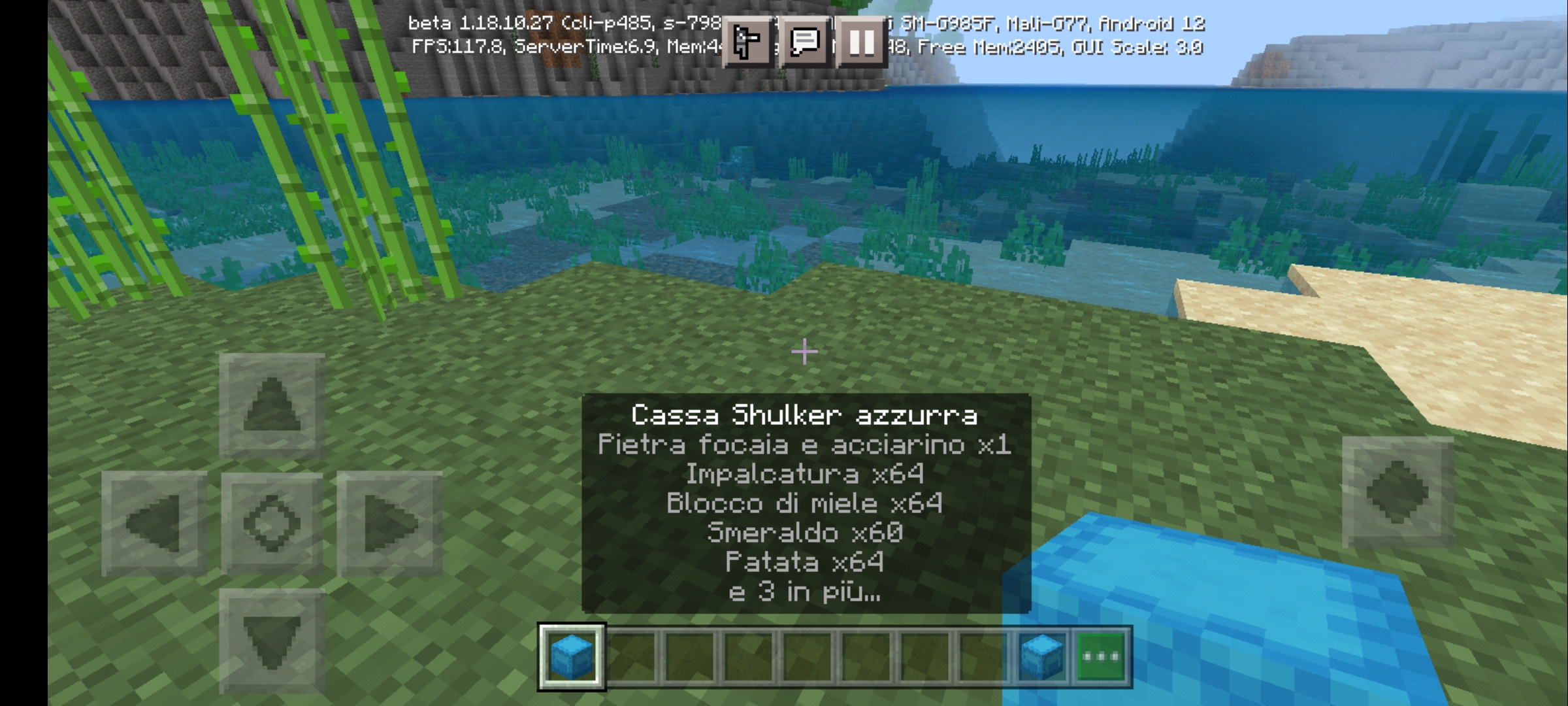
This is very annoying when having enchanted items. This transparent background takes up much of your screen.
Affects 1.16.1
Enchanted items often overlay with your hotbar
I politely ask the developers to resolve this bug. The black borders are really ugly when we touch the items.
i may look boring and probably this comment of mine will not help at all. but is it really that hard to fix this bug? if anyone has an answer to that, please answer me.
Affects 1.16.40
Affects 1.16.100.55
Affects 1.16.200.53
affects 1.17.20.22
1.16.100 too
affects 1.16.210
Affects 1.16.210.53 beta
Affects 1.16.210.54 beta
@[Mod] tryashtar, It isn't supposed to affect Chat background, Mob nameplate background, and Scoreboard sidebar background. This bug affects forced background text added in the 1.16.0.63 beta.
Affects 1.16.210.55 beta
Affects 1.16.210.58 beta
Affects 1.16.220 release
I tried to see whether this bug is fixed. It is not yet fixed. On my android, this even affects all the versions of 1.17 betas.
It's so strange that this bug has been around for such a long time now when it is seemingly so simple. But yeah, it still exists in the official release of 1.17 part 1.
I got good news for this bug its partially fixed in 1.17.10 1/2 worlds I load or reload its fixed in
Affects 1.18.0.21
This really bother me, expecially with enchanted items and Shulker Boxes. They already covered half of the screen, but now is way worse
Still the same problem. Touching item in hotbar pops up description with dark gray background that can't be changed with accessibility 'text background opacity'. This is REALLY annoying.
Bedrock pe Android 1.18.32
Still present in 1.19.1. Wish it was fixed already as it’s so ugly and takes up so much screenspace with enhancements especially on switch handheld
I know this is a small thing but please fix this. I'm so tired of the text taking up half the screen. I can't see through it because my sword has so many enchantments!
Although this bug had been fixed for the Hotbar tooltips, it still applies to the Actionbar.
Issue came back for hotbar tooltips in 1.19.40.24 preview
It looks like the issue returned once again in 1.19.50.24
This was fixed in a previous beta but than it was reverted back in another. Haven’t heard anything about it since
Can confirm still an issue as of latest release 1.20.41 and beta/preview 1.20.60.21
(06/12/2023) EDIT: Still an issue as of release 1.20.50
(14/12/2023) EDIT: Still an issue as of betas/previews 1.20.60.22 and 1.20.60.23
It's fixed in actionbar
This bug is still happening, would love for it to be fixed.