Worlds will not delete
The bug
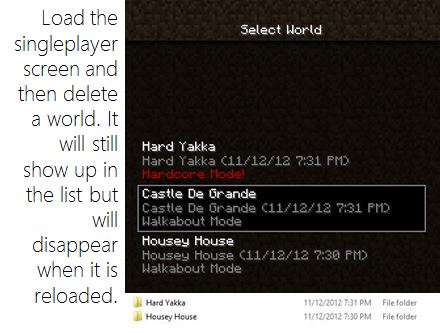
When trying to delete a world, the world would still show up in the single player world selection screen. I was expecting the world to delete, but instead it just stayed in the world selection screen. To trigger this, create a world, (I just did creative, I don't know about survival) and attempt to delete it.
Code analysis / reason
See the following comments
Solution ideas
See the following comments
- Server deletes files (probably preferred)
- Client deletes files
Environment
Windows 7
Java 6
Linked Issues
is duplicated by41
 MC-33400Unable to Delete Worlds Named "Dinnerbone"DuplicateMC-47384Flatland BugDuplicateMC-5454014w18b customized world terrain errorsDuplicateMC-55387Trees leaves not spawning on one side of treeDuplicateMC-55804Extreme Hills (Corruption?) ChunkDuplicateMC-56774I was playing minecraft PC, and these chunks were not loading. This is happening with all new updates with meDuplicateMC-57349Chunck generating can fail if moving towards posetive XDuplicateMC-57722Same Name Old CopyDuplicateMC-57768World not generating correctlyDuplicateMC-59297Biomes No Longer Blend Properly Into Each OtherDuplicateMC-59794huge bugDuplicateMC-59863Newly spawned worlds in 14w27a have some biome chunk errorsDuplicateMC-61705Unnatural Chunk LoadingDuplicateMC-61874Superflat still generates regular chuncksDuplicateMC-61952Customized worlds sometimes generate wrongDuplicateMC-62544World Generation Issue 19w29b DuplicateMC-62884Superflat Generation ErrorDuplicateMC-63338Deep ocean Biome cut offDuplicateMC-63658Chunks loaded incorrectlyDuplicateMC-63675World not generate right.DuplicateMC-63863Terrain generation bug (forest + plains chunk dont merge naturally)DuplicateMC-63864Unlit blocks bugDuplicateMC-64112Failed terrain generationDuplicateMC-72261New map glitchDuplicateMC-74412World MixturesDuplicateMC-78282World generation glitch? Normal world generated with debug worldDuplicateMC-79179Chunks raised from the groundDuplicateMC-80653Superflat world with a piece of normal world in it.DuplicateMC-81634New Hardcore World has achievements from deleted hardcore worldDuplicateMC-81881Bug with worlds.DuplicateMC-86230Bug generation mapDuplicateMC-91356Village BugDuplicateMC-94668Chunks Being Weird (Not The Normal Chunk Error)DuplicateMC-96152I'm very concerned about what has happened to my game.There are strange walls surrounding my world with trees,oceans,plants,and animals behind these walls. DuplicateMC-105341I logged in to my new server and I started see some world generator bugs:DuplicateMC-106255bug chunkDuplicateMC-113219Pls fix asapDuplicateMC-114284Chunk generating around WorldDuplicateMC-130354Hardcore Worlds are not deleted upon death and clicking "Delete World"DuplicateMC-1041You can't delete worlds in Minecraft 1.4.2!DuplicateMC-2406Not being able to delete world properly after defeating The Ender DragonDuplicate


Created Issue:
Worlds Will not Delete
When trying to delete a world, the world would still show up in the single player world selection screen. I was expecting the world to delete, but instead it just stayed in the world selection screen. To trigger this, create a world, (I just did creative, I don't know about survival) and attempt to delete it.
Environment
Windows 7
Java 6
is duplicated by


is duplicated by
relates to
![[Mod] Ezekiel (ezfe)](../../../data/assets/gravatar/ezekielelin.jpeg)
is duplicated by
is duplicated by
A comment with security level 'global-moderators' was removed.
is duplicated by
is duplicated by
is duplicated by
is duplicated by
is duplicated by
is duplicated by
is duplicated by
is duplicated by
is duplicated by
is duplicated by
is duplicated by
is duplicated by
is duplicated by
is duplicated by
is duplicated by
is duplicated by
is duplicated by
is duplicated by
is duplicated by
is duplicated by
is duplicated by
is duplicated by
is duplicated by
is duplicated by
is duplicated by
 MC-79579
is duplicated by
is duplicated by
is duplicated by
is duplicated by
is duplicated by
is duplicated by
relates to
is duplicated by
is duplicated by
is duplicated by
![[Mod] violine1101](../../../data/avatars/users/92858.png)

The bug
When trying to delete a world, the world would still show up in the single player world selection screen. I was expecting the world to delete, but instead it just stayed in the world selection screen. To trigger this, create a world, (I just did creative, I don't know about survival) and attempt to delete it.
Code analysis / reason
See the following comments
Solution ideas
See the following comments
- Server deletes files (probably preferred)
- Client deletes files
is duplicated by
WorldsWill notDeleteWorlds will not delete
![[Mod] tryashtar](../../../data/avatars/users/41963.png)
is duplicated by
![[Mojang] Nathan Adams](../../../data/assets/gravatar/dinnerbone.png)

Crude fix
MCP naming...
    ...
    ISaveHandler var4 = this.saveLoader.getSaveLoader(dirName, false);
    WorldInfo var5 = var4.loadWorldInfo();

    if (var5 == null && par3WorldSettings != null) {
        // A new world, ensure deletion of possible old junk and reinitialize var4:
        this.saveLoader.deleteWorldDirectory(dirName);         // ADDED
        var4 = this.saveLoader.getSaveLoader(dirName, false);  // ADDED

        this.statFileWriter.readStat(StatList.createWorldStat, 1);
        var5 = new WorldInfo(par3WorldSettings, dirName);
        var4.saveWorldInfo(var5);
    }
    ...
It is kinda bad coding, but I am trying to keep using existing methods. The ugliness comes from that method handling both new and existing worlds, and it needs to init and use both var4 and var5 in order to know if the world is new. But by that time those calls have already created the world directory and a file, which the deletion then immediately remove. Thus it needs to redo the var4 stuff.
The proper fix would be add a new method that specifically checks the existence of world save left-overs and then cleans them up, and use that method from those places which create new worlds (and only create, not open existing ones).
Tested on 1.4.7, works wonders. My messed up results from testing MC-526 and sheep color testing, and even manually "broken" world save directories were all handled correctly. That is, the world creation first wiped the remains of the old directory (confirmed by watching the console and checking that marker files disappeared) before generating the new world with the same directory name.
 ), so good night, Tails, and thanks for all the updates. Though two more are waiting for the same handling,
 @crazyman: those steps (as described) are not always enough, as timing is part of the problem. Better description for reproduction in the comments of the related MC-526. (The crucial thing is to do the step from leave world -> delete world quickly; on my machine (SSD drive etc) I have to even exercise a bit (e.g. to know to move mouse cursor to proper spot even before I can see the button to be pressed) in order to be quick enough.)
Apart from the user error part, Steelcrow's comment was otherwise correct, and was one of the comments that allowed me to find the problem code quicker.
As another note, there are more duplicates than votes for this issue. Sigh.
Actually, it does justify reopening this issue, but not the related MC-526. This issue is now profiled more about deleting any garbage at the time of taking a possible old folder to be reused - whatever the reason for having that garbage there.
My crude fix shown in a previous comment does just that; even if some ancient stuff is around, they are cleared out first. That action is also necessary even if the deletion process is fixed, as there could still be events which interrupt deletion, like crash or power-down etc. and those can not be avoided or handled at deletion time. They must be handled later, at the time of creating a new world. (A fancy fix might occasionally try to check and cleanup folders that are obviously no longer in use but have some garbage...)
The MC-526 is purely about the deletion itself, when the action is started by the player, but fails to complete (for reasons that can be fixed and avoided). No need to even try to create another world by the same name. This MC-315 is just the most common consequence of the MC-526. But not the only consequence for it, and there are other reasons for MC-315 than having MC-526 first. (Thus, the need to have these separate issues for them.)
Confirmed in 14w05b (OSX 10.8.5, log attached).
Just accidentally created a checkerboard of two different worlds due to the deletion of the previous world failing to complete before a new world (with the same name) was created.
I meant to create a new Creative world but created a Survival world by mistake (as "New World"). I quit out to the menu, deleted the Survival world and created a Creative one instead (also "New World"). Creative world has a mixture of chunks from the deleted world and the world that actually goes with the seed given by /seed.
Edit: Actually, this may be an instance of MC-526 instead.
Note, the sequence used by Bruce also indicates that MC-526 affects 14w05b (couple more versions than the latest reported). The delete and recreate -sequence, when causing issues, automatically confirms both issues (as both the deletion fails at the time of deletion, and no attempt to clear the old dir is made at the time of creation).
Blah, Andrew and Bruce, and Sonic:
Read my comments in both this issue and MC-526.
- Both are fixable, and can be quite easily at least improved so much that we wouldn't get 180 duplicates... (And Searge's comment in
MC-62627in no way claims that these are not fixable, he merely states the reason for that issue to be this bug.) - The issue is both failing to delete a world properly at the time of deletion, and failing to delete the remains at the time of creating a new one. (The first is obviously good to have, the latter is a must.)
- "Don't do that then" is a joke, not a valid solution for these issues. These issues are not user errors, but coding bugs.
There are, in a way, two issues caused by one failure. However, both issues should be fixed as the MC-526's "worlds will not delete" can not be 100% ensured in e.g. crash situations (power outages etc.). The world deletion can be made more robust (I've even provided some suggestions of tested fixes). The lingering worlds can be deleted (100%) properly before taking them into new use (I've even provided some tested, though ugly code fixes).
These issues have now been, and has been for last 1.5 years, only waiting for Mojang dev's to adapt those fixes to their code (or make even better fixes if they want).
May be caused by MC-526
Did you create the new hardcore world with the same name as the deleted hardcore world or did you chose a different name ?
This is MC-526.
Name the world to something else as "Nouveau Monde" (and delete all those "Nouveau Monde" saves if you don't need them any more...)
The bug
While testing MC-30646 "Hardcore game is not deleted" I found what may be another manifestation of the same bug, or maybe a new bug (perhaps related to MC-526 "Worlds will not delete").
Not only does a hardcore world not delete with the hardcore death screen deletion button (MC-30646), but additionally the world continues to run behind the UI. You get dropped to the title screen, but can hear the game sounds and music. You can also see the world still running on a second deletion confirmation screen. And even after the apparently successful second deletion action, the world is still not deleted.
How to reproduce
- Create singleplayer hardcore world
- Die in your hardcore world
- Choose "Delete world" on the death screen (not "Spectate world")
- Get dropped back to title screen
→ Notice the game sounds continue, as if your world is still running - Choose singleplayer and view list of worlds
→ Observe that the hardcore world is not deleted, as perMC-30646 - Highlight hardcore world and choose delete
- On confirmation screen ("forever is a long time!"), confirm deletion
→ Notice that you can see your world still running in the background here, as well as hear it. Instead of the expected dirt texture background - Get dropped back to singleplayer world list
→ Observe that hardcore world is not on the list, indicating (apparently) that it was deleted successfully. - Hit escape (don't click the cancel button with mouse cursor)
Expected result
Go to title screen. Hardcore world remains deleted.
Actual result
Get kicked back into your hardcore world, facing once again the choice to delete or spectate. The first time I arrived here, I chose to spectate and my world was full of chunks that wouldn't load, and the game crashed with a memory overflow shortly, indicating maybe some part of the deletion was successful. On subsequent attempts, spectator mode worked fine, with no crashes, in the supposedly deleted world. Hitting delete at this screen will repeat the loop without deleting the world.
Note that hitting the escape key on the world select screen should probably behave the same as clicking the cancel button. That they behave differently may be another bug.
Note
Code analysis can be found in this comment
This might be MC-315 / MC-526.
Chose a different name as "New World".
If the issue is persising:
Please attach the complete output of the "Game Output (Your Minecraft name) " which can be found on the fourth tab of the launcher to this ticket.
If the launcher closes after game start, please edit your profile and select "Launcher visibility" then, "Keep the launcher open".
Michael Connel, this issue is quite easily fixable, just see my comment made 3 years ago. Granted it is quite awful piece of code, but it was just an example. (I do not expect mojang to solve the issue with that code, it just proves it can be fixed with code.)
The way how some operating systems/file systems delete files has nothing to do with this issue. It has more to do with how minecraft does the deletion, server vs. client architecture, and in some cases too quick exit. Note well the related issue MC-526.
Fabian:
Since this issue is about deleting random left-overs before creating new world into existing directory, it is easy to simulate a situation where the previous world deletion has failed: simply backup random files from a test world before deleting it, delete it, create the directory again if necessary, then copy those backed up random files back into that directory. Create a new world with the same name and compare results, i.e. are the wrong files still in the save directory.
For continued testing, simply store the collection of random files and their world-directory into a zip-file and re-plant them over the deleted world and re-create...
(I didn't test the sequence above, making it up from my memory, but it should give the idea close enough.)
The related MC-526 is much more difficult to test, but luckily this is the more important issue to be fixed and can be tested easily. 3.5 years gone now, plenty of duplicates (more than votes in this issue), nearly trivial to fix and an (somewhat bad) example code given... sigh...
Read both this and MC-526 through (comments, too), that should clarify things a little.
You asked for a reliably reproducible test for this issue; putting the files there manually is an easy and reproducible test to check if this issue is fixed or not. (Manually putting the files is like simulating the effect of issue MC-526, which is the typical, but not the only reason for hitting this issue later on.) NOTE: not all the files of an old world, just such a subset that makes the game think the world is not there, yet old wrong chunks gets rendered after new world gets created on top of the remains.
When creating a new world, its files are supposed to go into a very specific (and a new) directory. The directory is not supposed to be there, and if it is, there is supposed to be no files in it. Otherwise the world creation should not be allowed to happen to the name used in the first place. (In fact, one could argue that allowing to name the world in a way that leads to issues is already a bug, but such claim is in the territory that can cause heated discussion among developers about bugs, priorities, right and wrong ways to solve things etc. Lets not continue to there.) But since the world creation is allowed to happen with that name, it is, imho, perfectly fine to assume that if there are any files in the way, they are leftovers of a failed removal, or that they are put there manually by a user, and if a user is putting files in such a place where user's manipulation is not welcome (taking backup needs only copying the whole directory, not individual files inside it), it can be assumed he knows what he is doing and is thus responsible for the fate of those files - the game does not need to account for that kind of messing with its operation.
A really fancy fix for this issue would actually check what kinds of files are there, and only remove the ones that are related to this game, and leave other files as is. I have no idea what other kinds of files users could possibly want to put in there, though... perhaps some sort of README-file or such (though such would likely be needed only when dropping in a full world for playing, and thus world creation is not needed or wanted). But in any case, that kind of fancy change would be way beyond just a bugfix, and belongs to wherever they want the feature requests to be put and forgotten.
MC-63 is sort of similar to MC-526, not to this. At least the way these two issues are split now (and should stay split). MC-526 is about the failure of deleting after doing that delete-action; this is about failing to clean up the possible left-overs when doing create-action. Possible crashes during creating a new world are much easier to handle, even when there might be something to clean up first.
This issue is more important to fix (and easier, too), because it is indeed pretty much impossible to ensure 100% certain deletion (crashes etc.) Put more simply; fix only this easy one and MC-526 (and other causes) will not matter as much (and won't be seen in the game, only in the filesystem), but if only MC-526 is fixed, there will still be issues caused by other reasons (thus not as often).
(There are still ways to handle the MC-63 sort of properly, i.e. either everything gets saved (pure success) or nothing gets saved-and-later-loaded (pure crash), but it gets quite deep in the coding (somewhat common exercise in business critical systems, though), more than suitable to paste here, should someone even get the motivation to try and do such fixes.)
Do read the comments; the reproduction is not deterministic if using only Minecraft (one would need really tight timing and luck), and the reproduction steps in the description are woefully inadequate.
From my memory, from years back, so might not work as is, but... a better process could be:
- create world with specific name
- exit game
- delete certain world save files (enough to make the game think the world is not there), but leave some chunk data files. This manual step simulates effects of world deletion being incomplete (for reason or other, e.g.
MC-526). - start game again
- create a new world (random or explicitly different seed) with that same specific name
- move around to notice chunk issues
Note also the relate issues MC-526 and its comments.
Could not duplicate in 1.4.2 client single player.
I had the same thing happen.
Restarting minecraft and trying to delete the world did work.
We need some more information on how to reproduce this error. I'm unable to reproduce it myself
This happens if you have the world open in a different Minecraft instance, with no visible error message.
How are you deleting the world (are you deleting it in-game or through file deletion)? If you are deleting the file itself and not through the Delete button in-game, the world will still be listed until you reload the world list. This is possibly because the list is not live; it fetches the files when it is loaded and then is static.
Steps to reproduce:
Remains of second world (region/r0.0.mca) still on harddisk.
Console logfile of above procedure with several error messages ("yr: Failed to check session lock, aborting") is attached.
Related to
MC-315.Reproduction
In order to reproduce, no need to create two worlds. Simply starting the creation of a world and then as soon as possible, "save and quit" and go to delete that same world.
Depending on the exact timings, user can get (at least) two different types of console logs. (Or with superfast computer, third case: success).
One case is similar to what Kumasasa has shown: lots of "Failed to check session lock, aborting", apparently one message per chunk being saved (without success). In this case, the session.lock file has been successfully deleted. The end result is a lingering region/r.0.0.mca file (or perhaps another name depending on players initial location).
The other case is when the deletion process does not complete properly, again due to saving process on the background. In this case, there will be two lingering files, the session.lock, and the region/r.0.0.mca. I've attached a log snippet 'deleting-world-fail.txt' showing this case.
Root cause
The root cause is that the change to use "integrated server" is not completed fully; world creation and saving is done in the server (own thread), but deletion is still done in the client (another thread), asynchronously from the server and without knowing/checking hows it going with server. The server in turn can not know when the last/only user to quit the world simply wants to drop it all, and thus it has to always save the world. The saving takes a bit of time, enough for the user to reach deletion at the same time.
(Edit: seems the deletion process does some kind of try to enforce/check that saving is completed, but I guess it is not working as expected. Looks like it will only try to enforce closing any region files still open. That is not very graceful, as it does not check whether some other thread is still trying to write to them.)
Possible fix
A fix would likely include adding a check and set of session lock in the deletion routine. This would enforce waiting until the server has finished saving. A crude fix will try a number of times and fail silently (the world stays in the list). More polished fix would tell the user that the world is currently locked ("in use") and it is retrying for a short period, and if failing, tells the user to retry a bit later.
(Edit: if in single-player both the client and the server somehow would share the session lock, the above idea will not work, as both would already have the session lock and be happy. Maybe better idea would be to improve the method that tries to release all the region files so that it waits until it is actually ok to release them (no pending writes).)
Edit2: I managed to enforce the deletion to work properly by adding an enforced flush() before deletion (in GuiSelectWorld by MCP naming), but this in turn causes lots of ugly console stacktraces ("The save is being accessed from another location, aborting"). Nevertheless, it apparently manages to delay the deletion just enough that the saving processes have finished/cancelled themselves.
Well while the reason is now clear, the code and fix are not so much, so I'll leave the rest for Mojang.
Note
The related
MC-315still needs a check and proper cleanup of the save directory, so that already failed deletions and their left-overs can be handled properly. And there is no saying that there isn't or never will be any other deletion failures (say, a crash during deletion), so it would be some good added robustness.Affects 13w09b.
Maybe use Java 7 kit 13 or 15 , use the highest
This is not a bug by Java, but in the Minecraft code, see my long explanation and testing fixes above.
Reproduction hint
See my longer explanation above, but for Mojang specifically: add additional delays/micro-sleeps into the saving methods to artificially slow it down to levels of the computers owned by us mortals. Will be easier to do the reproduction (more time to do the necessary clicks). On my own computer (which isn't the latest and greatest, but not slow, either), I am sometimes half a second too slow to trigger the problem.
Sorry guys for the long wait for a response, I was having MAJOR issues involving my computer. But I am finally able to say that this issue has been fixed, I checked and it actually had to do with the computer that I was using, so sorry for the inconvenience!
EDIT: Actually, now that I think about it, there DOES seem to be a small issue with worlds not deleting. I have been experiencing this since Beta 1.8. I would go into my .minecraft\saves directory, and the world that I THOUGHT was deleted was actually still there, just not popping up in the client.
Did you by chance improve your computer when solving those issues? As hinted above by me, a fast enough computer might not have these world deletion problems. That is why I hinted the devs to add extra delays to the save routines to "simulate" ordinary (i.e. slow) PCs, so they can reproduce the problem easier.
Recently my computer has actually been working sometimes and not others. When this problem occurred the computer I was using was actually quite fast, but still the worlds wouldn't delete. Same goes for the computer I have now.
This is happened to me all back from version beta 1.5! This is really old bug and should be fixed!!
Cannot reproduce in the latest version of minecraft
Could still reproduce in 1.6.2. Follow the reproduction instructions in my earlier comment and needs a bit of quick clicking (or slower machine). Having the development console now in the launcher makes it even easier to notice when/how the deletion fails...
Reopened, see
MC-315Reproduced in 13w42a. Quite tricky to do so, though.
@Jeff Claessen: Please attach the complete output of the "Development console" tab of the launcher.
Repruduced in both ways. The first time it showed exactly the same as in Markku's latest comment, the second time it spammed my console with:
The "Failed to check session lock, aborting" is revealing, and has been caught before (see earlier comments). There is basically two ways to fail (two different patterns of log), depending on the exact timings between the two processes going on. End result is still the same, failure.
Is this still a concern in the latest Minecraft version 14w03b? If so, please update the affected versions in order to best aid Mojang ensuring bugs are still valid in the latest releases/pre-releases.
Deleted account: Please attach the development console when having this issue.
Kumasasa: Can't get it to work right now, I'll try again tomorrow.
No need to, I had the issue right now:
Created again "New World" and having mixed flatland and default world type:
Can't really reproduce in 1.8.7
Is it possible to provide other steps to reproduce it? I know that I had this in the past as well but I don't know what caused it
Marcono1234, see 8th and 12th comments. At least one way (that worked back then). However, it was tricky to execute, requiring some care with (quite fast) timing, at least on my PC. (EDIT: remembered this the wrong way around:
Slower computers might trip on this more easily, faster ones perhaps nearly never.) Slower computers might perhaps nevery trip on this easily, faster ones could be easier to get hit by this. Even if the root cause would not be fixed yet, changes in other processes related to saving and deletion of worlds could now hide the issue, either completely or just make it rarer event (and that much more difficult to find and fix properly).I tried the 8th comment but when I click to early "Save and Quit to Title" Minecraft just stops responding for some seconds
Ooops, I wrote/remembered that the wrong way around. Slow computers might get enough delay in leaving the game, so that server has time to finish saving, and thus deletion will succeed. It is the fast computers (and with quick users) that may reach the deletion too quickly. (Even with my relatively fast computer, after learning where to move the mouse to "blind click" the right places, I could not reproduce this on every try.)
Reproducing this issue easily and predictably requires (or required) tweaking the code a bit; that would be for the devs to do, whenever, if ever... For this particular bug, the expected status should be always "still broken unless devs actually inform to have tried to fix it", as it is too difficult for the users to verify.
Confirmed for
Like Markku said, the problem is that deleting a world is client-side and does not test if the server already finished saving the world. This can be reproduced by having the method net.minecraft.server.MinecraftServer.stopServer() wait for some seconds before starting to save the level.
A late idea for a solution base: move the deletion activity to server-side, while a client only requests the server to do that action. Server can then decide (if or) when it will fulfill that request. In single-player mode this may still be a bit iffy to do, depending on how its "server" gets started and/or connected; with brute-force implementation, it might create another server instance (while the old one still saving and shutting down), and you'd still have the root cause of two processes not knowing about each other or their states.
In any case, it would be closer to the correct solution, using the chosen client-server -model for this action, too, even in single-player.
The client thread could maybe call the join() method of the server thread. This way the client continues once the server thread finished. But then the client would appear as not responding. Maybe the server should call a method of the client once it finished saving. Until then the client displays some GUI and waits for the server.
its still a bug but it shouldn't bother you to much because you can delete it from the saves folder i think it just might be a problem that for some reason you computer didn't "want" to delete the file
Cannot reproduce for 1.13.1, is anyone else able to reproduce it?
I can not test this on my current setup as easily any more, as I now have quite a bit faster SSD than few years ago, so any saving will happen in a blink (thus preventing this bug to appear). Also, the user interface was slooow this time, giving more time for the saving to finish (as if it even needed it); no idea if that was due to my setup or changes in the game.
That is, whether the bug is fixed or not, I would not be able to get this bug to happen at current setup. I would either need to change things so that saves go to a slower device (HDD), or spend lots of time to decompile etc. and tweak the saving process to be artificially slower. Not going to waste my time with the latter any more, so have to try by changing the save directory to a HDD... some day Soon(tm).
confirmed 19w13b. Created a world, joined it, left, clicked delete after clicking it, and it would freeze for a moment than still hang around. I believe it has something to do with the game hanging onto some files not allowing them to be deleted since they are still being used. You can not delete the world from the saves folder either unless you close the game.
Assuming they haven't changed the deletion process since... years... the two ways/reasons why things fail have been figured out (buried in the comments of this and the related issue). Also some ways to work around them (at code level) have been provided (but not a nice proper fix, as that would have been too big a change to be shown here). This bug is mostly waiting for some developer to fix it (at least a workaround, but even a proper solution is not really that difficult), or users to just confirm they still find the symptoms.
I'm unable to reproduce this on 1.14-pre5 on a slow harddrive, can someone else still reproduce this? If so, I will make you the reporter of this ticket so you can keep it updated.
This report is currently missing crucial information. Please take a look at the other comments to find out what we are looking for.
If you added the required information and a moderator sees your comment, they will reopen and update the report. However, if you think your update to this report has been overlooked or you want to make sure that this report is reopened, you can contact the Mojira staff on Discord or Reddit.
– I am a bot. This action was performed automatically! Please report any issues on Discord or Reddit