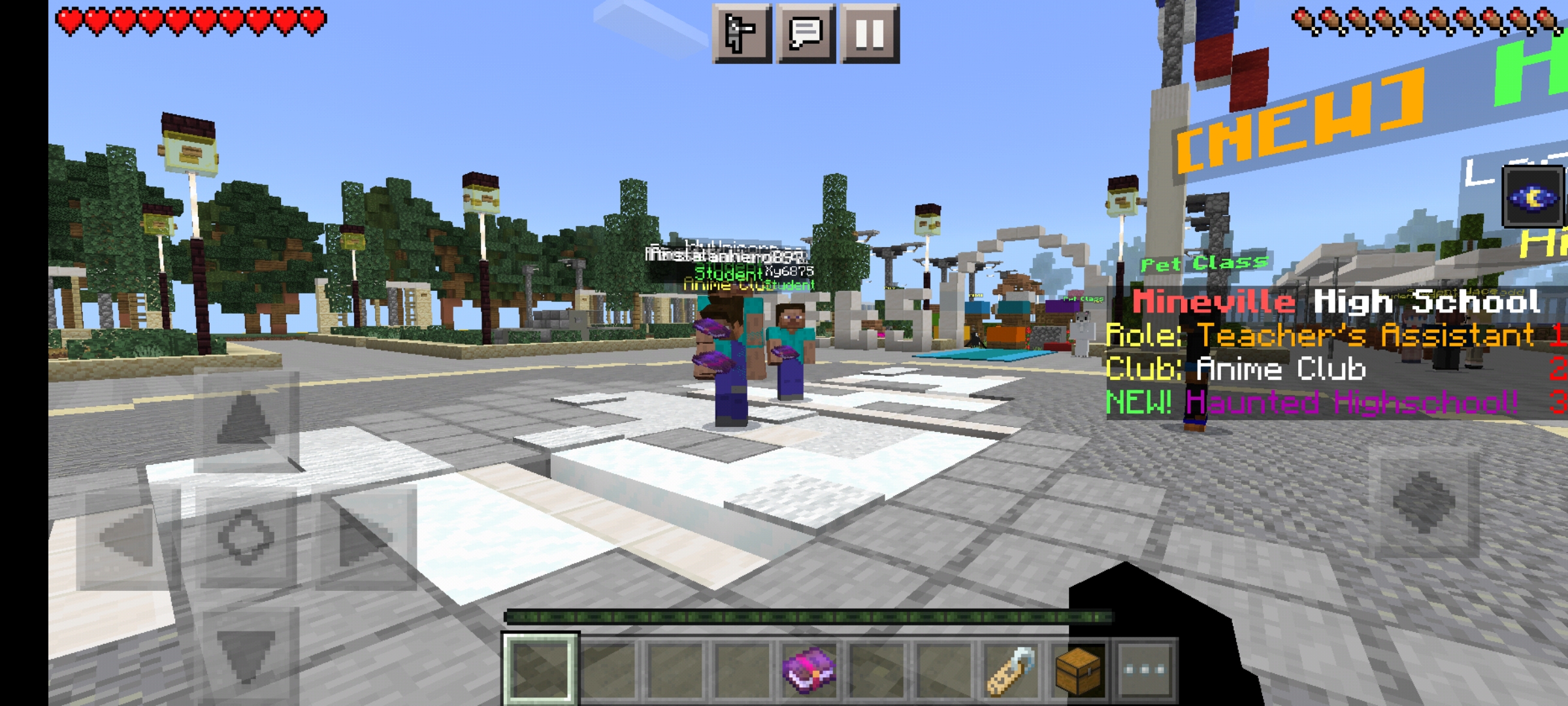
Own and other custom skins are shown as Steve, Alex, or other default skins
This issue is usually caused by malware or other software that is interfering with Minecraft.
If you have this issue, check whether you have any incompatible software installed, and if so, remove it from your computer.
Also, try to run a Adware & Malware Scan (e.g. Malwarebytes Adwcleaner & Anti-Malware), and report back if this issue occurs after a full scan and clean.
If that didn't solve the issue, please contact community support (linked below) for further assistance.
Quick Links:
📓 Issue Guidelines – 💬 Community Support – 📧 Customer Support – 📖 Game Wiki
For a few weeks if i downloaded minecraft.ex then opened the launcher and closed it, then downloaded Minecraft.exe (the old version) i could see the skins but it doesnt work anymore and its so frustrating please help (i update my java too!).
I tried finding a fix to this so long ago and i sill am but nothing is coming up! I cant see other peoples skins none of them not even my own, i cant see it on single i cant see any on realms or on any servers! This is really anoyying if i do roleplays i cant tell who is who and i like being able to take screen shots with skins in them please help me this is in 1.9 and up!
Linked Issues
is duplicated by624
 MC-98760Skin on multi player no working?DuplicateMC-100792Multiplayer skin errorDuplicateMC-101336Skins Not SHOWING UPDuplicateMC-101380Skin issueDuplicateMC-101405Multiplayer skins not working. DuplicateMC-101622when I connect to a sever or play on singleplayer i can not see my skin or any one elsesDuplicateMC-101651Skin GlitchDuplicateMC-101915The skins in servers, and mine, are not working!DuplicateMC-101954Minecraft Skins not showingDuplicateMC-102318skin not loadingDuplicateMC-102622Skins glitch where everyone is steve and alexDuplicateMC-102672Will not show players custom skins, only an Alex or Steve depending on which is usedDuplicateMC-102710My skins folder isn't downloading everyone's skinsDuplicateMC-102807Skin Server issueDuplicateMC-102825Can't see skin due to the ip conflict with official ipDuplicateMC-102951Skin bugDuplicateMC-103132Everyone's skins are default on my screenDuplicateMC-103287I am using Minecraft for PC, and whenever I log in to a Minecraft sever, which would be Hypixel, Uberminecraft, or just survival, it shows me as a Steve instead of my downloaded skin.DuplicateMC-103880If i join minecraft servers then everyone looks like Steve Or Alex.i only see my skin...they have their own skin but i cant see themDuplicateMC-104169SKINS DuplicateMC-104581my skinDuplicateMC-104735Skins will not load on the gameDuplicateMC-105033I can't see my skin or other peoples skins, but they can see mine.DuplicateMC-105063Shows same skin as player but on hosted side shows other player skinDuplicateMC-1051651.9 and above not showing skins or optifine capesDuplicateMC-105219Skin Glitch DuplicateMC-105417Cant see anyone's skinDuplicateMC-105428Cant see any skins (problem was never resolved)DuplicateMC-105430Cant see any skins (problem was never resolved)DuplicateMC-105647I Can't see my skins or anyone else's DuplicateMC-105655Everyone's skin is a Steve or Alex DuplicateMC-106293i got the Steve glich and alot of people are getting it can you fix it please it is anoying me so muchDuplicateMC-106832Hello! So I've created this because my skins are broken and won't load in. This has happened to some of my friends so far so if you could help that would be amazing! Like i said for any server my skins won't load in for players.DuplicateMC-107345my minecraft skins wont show up and my update notes on the main menu wont show up eitherDuplicateMC-107371WHY AM I STEVE??DuplicateMC-107813Skin bugDuplicateMC-108049nobody with a skin bugDuplicateMC-108852all skins are steve/alexDuplicateMC-109750Skin Is Steve When Play MitiplayerDuplicateMC-110334All skins are steve and alexDuplicateMC-110450No skin-Client side bugDuplicateMC-110613My skin isn't showing in multiplayer either is anyone else's and in the regular game it doesn't show up either. This happened after the 1.11 update. I've tried everything on the articles nothing worked. (its not the skin servers either) : (DuplicateMC-110864Texturing issues with multiplayer skins in 1.9,1.10, and 1.11DuplicateMC-111086Skin stuck as alex!!DuplicateMC-111261Skin GlitchDuplicateMC-112087My skin is steve and all the other skins i see are steves and alex's but to others my skin is workingDuplicateMC-112100Everybody Has A Steve Or An Alex Skin, No Matter How Many Times I Relog.DuplicateMC-112169Steve Skin IssueDuplicateMC-112171Skin Steve Issue #2DuplicateMC-112296skin doesn's show's in multiplayerDuplicateMC-112300I only see Steve's and Alex's, However other players are able to see my skin, but I can't see any.DuplicateMC-112427Minecraft Skin Glitch in Minecraft version 1.11.2DuplicateMC-112645My skin doesn't appear (but the steve/alex arm thing does)DuplicateMC-112671I see everyone as steve and alex!DuplicateMC-112852Skins won't show at all/default skins only showDuplicateMC-112869Skin won't change using Minecraft.net, stuck as AlexDuplicateMC-113056NO SKINSDuplicateMC-113436Bug Skins and TextureDuplicateMC-114376no skin for my characterDuplicateMC-116401Skin Is Always AlexDuplicateMC-116809No ones custom skins show up and crashes when I press play most of the timeDuplicateMC-118192all players skin are steve or alexDuplicateMC-118276No one's skins showing upDuplicateMC-118560Cannot see own skin in 1.12.DuplicateMC-119472Skin BugDuplicateMC-119718Only see alex and steve skinsDuplicateMC-119899Customized skins don't appear in gameDuplicateMC-120165Minecraft servers don't display skins. All skins are Steve or Alex.DuplicateMC-120351i cant see other skins and mine DuplicateMC-120623Skin glitch in multiplayer and singleplayerDuplicateMC-120841I Cant See Their SkinsDuplicateMC-120855MC Custom Content Issue/Custom SkinsDuplicateMC-120929Own skin displays as Alex on MPDuplicateMC-120992Skins not showingDuplicateMC-121003Single player worlds and branch off serversDuplicateMC-121049When i use the new launcher, minecraft wont open so i have to use the old one, however everyone is a steve or an alex DuplicateMC-121133Skins not showing up for meDuplicateMC-123188crash and skinsDuplicateMC-123705Everyone including myself are steve and alexesDuplicateMC-124599I can't see skins, only Steve's and Alex'sDuplicateMC-124776Character skin appearing as Alex in Singleplayer, but skin appears fine in MultiplayerDuplicateMC-125186Bug Skin AgainDuplicateMC-131309Skins not showing up.DuplicateMC-133605All skins only show Alex and SteveDuplicateMC-135859No skin will show up for me (only steve and alex)DuplicateMC-136458Skins Not Showing Up At All, Multiplayer and SingleplayerDuplicateMC-136740Skin IssueDuplicateMC-136830Can't see skinsDuplicateMC-136929Minecraft won't open, and when it does i can only see steve skins.DuplicateMC-136985Minecraft skinsDuplicateMC-137171Skin BugDuplicateMC-140189Skins not showing upDuplicateMC-140869Skin does not loadDuplicateMC-141726Skins For MinecraftDuplicateMC-142887everyone's skin is either Alex or SteveDuplicateMC-143188In any 1.12 And Up My Skin Wont ShowDuplicateMC-144215Skin does not uploadDuplicateMC-145937All Skins & custom player heads are steve.DuplicateMC-146048Minecraft Not Showing Any SkinsDuplicateMC-147098New skins won't appearDuplicateMC-147898What i have to put here?DuplicateMC-150084Skin Loading in as AlexDuplicateMC-150770Skin won't loadDuplicateMC-151153Minecraft Skins not loading in 1.13.2 and Above?DuplicateMC-151404Skin problèmeDuplicateMC-151486Showing Only Default SkinsDuplicateMC-151640Skin ProblemsDuplicateMC-152583Everyone is appearing as a Steve or an Alex.DuplicateMC-153347everyone is steve or alexDuplicateMC-153419I can see my skin but not other player's skins...DuplicateMC-153563I Lost My Skin And Now I Am Only SteveDuplicateMC-154292i cant see any skins anywhereDuplicateMC-154322Everyone having Default skin (Steve and Alex)DuplicateMC-155524Skins Not WorkingDuplicateMC-155634Skin is stuck to steveDuplicateMC-155712Everyone is Steve and Alex DuplicateMC-155730When I play any version of Minecraft, I can't see skins or heads. DuplicateMC-156190Skin not appearing on my client end but can be seen by other player on multiplayerDuplicateMC-156333HELP!!!DuplicateMC-156629I cannot see any skins I checked if I have a virus nope, no problems on my malware DuplicateMC-156650Skins are not showing up in Singleplayer and Multiplayer.DuplicateMC-157380Minecraft skin won't appearDuplicateMC-157431No Skins Load in gameDuplicateMC-157561Skin not loadingDuplicateMC-157601Every skin I see is either steve or alex and I don't know how to fix itDuplicateMC-157691Whenever I go into any server most of the people are Steves and Alexes, I've looked for a way to fix it and nothing worked. So please fix this.DuplicateMC-157966i cant see my skin or anyboddys else skinDuplicateMC-157976Can't see skinsDuplicateMC-158255Skins Not loading DuplicateMC-158594minecraft skin IS NOT showing up in singleplayer at all! even if i restart minecraftDuplicateMC-158627Can't see my skin or other player skins in multiplayer servers!DuplicateMC-158749I can't see my skin or other peoples skins but they can see mineDuplicateMC-158916Skins are not displaying on serversDuplicateMC-159115when in minecraft me and everyone else are Steve or Alex.DuplicateMC-159157Skin not working on multiplayerDuplicateMC-159317Only shows up Alex & Steve Skins and not our own skinDuplicateMC-159443Slim skins show up as SteveDuplicateMC-159775My custom skin doesn't workDuplicateMC-159838Can't see any skins on minecraftDuplicateMC-159992Skins will not show for me, singleplayer or multiplayer, depsite them and I having skinsDuplicateMC-160122Skin LoadingDuplicateMC-161327cant see others skinsDuplicateMC-161378When I play minecraft, to me everyones skin including mine are either steve or alex skins.DuplicateMC-161892Every one is a Steve and Alex skinDuplicateMC-162218Something wrong with skins folderDuplicateMC-162380My skins don't work?DuplicateMC-162483Skin not workingDuplicateMC-162506I dont see my skin and skins other pleyersDuplicateMC-163379So my skins for Minecraft Java edition are down and yet my brothers isn't.When io go into a server all of the skins are steve and Alex's.We're are on the same updateDuplicateMC-163584I don't see skin in multiplayer modeDuplicateMC-165172Skins are not showing upDuplicateMC-165257Been days since I changed my skin and still can't see it. DuplicateMC-165456When i get in minecraft my skin dose not show and i can not fix itDuplicateMC-166711cant see skins DuplicateMC-166912Skins wont load for me on either servers like hypixel nor on my own worlds, my skin wont even show up, The only thing I see for my skin and other user's skins are either steve or alex, player heads always show as steve too!DuplicateMC-167174It doesn't reflect the skins.DuplicateMC-167476I cant see skins DuplicateMC-167522I can not see skinsDuplicateMC-167907skins and launcherDuplicateMC-167955My new skin is not loading.DuplicateMC-167998weird skin glitchDuplicateMC-168619Some players can't view skins, only steve and alex'sDuplicateMC-169507my skin is only steveDuplicateMC-170290Help please!!!my skin doesnt show up.DuplicateMC-170492Skins won't showDuplicateMC-170598Everyone Skin Is Steve And AlexDuplicateMC-170758everyone looks like Steve and AlexDuplicateMC-170761everyone look like steve and alex but can seen the skin in 1.8DuplicateMC-171535Everybody can see all skins except me (everywhere and all versions)DuplicateMC-172427Cannot see any skins.DuplicateMC-173033When I join any multiplayer server or create a single player world. my skin and other peoples skins are either alex or steveDuplicateMC-173062skinsDuplicateMC-173148Game crashes at start up and cant see skins DuplicateMC-174667can't load a skinDuplicateMC-175056Only Steve and Alex skinsDuplicateMC-176398no me cargan las skinsDuplicateMC-176550When i play multiplayer i cant see anyones skins. they all appear as steve or alex. i also cannot see my own skinDuplicateMC-176791Can't see skins in 1.5 and up, but have mad lag below 1.5DuplicateMC-177043i can not change my skin DuplicateMC-177555Skin BugDuplicateMC-178194Minecraft Skin stuck as alexDuplicateMC-178345Everyone is AlexDuplicateMC-178500No skins appearingDuplicateMC-178746can not see any skins nor mine on a server for what i know it only has affected 1.13.2-1.15.2DuplicateMC-178773Everyone in every server I join is either a Steve or Alex skin including mine and i don't know how to fix it. DuplicateMC-17892220w16a Skin not correct for guest player in sessionDuplicateMC-179335Skins don't show upDuplicateMC-179422skinDuplicateMC-179682New Custom Skin Turns to Steve or Alex when loading into gameDuplicateMC-180428my skin wont change DuplicateMC-180959I cannot see anyone's skins on serversDuplicateMC-182432Skin isn't working despite confirmation on the Launcher and Minecraft.netDuplicateMC-183238Bug with changing skins.DuplicateMC-183253Minecraft unable to load and Players' skin unable to Load in Multiplayer Public ServersDuplicateMC-183266odd version of no skin bugDuplicateMC-183667Everyone looks like steve and alex on my screenDuplicateMC-183844Everybody is Steve or Alex and same as meDuplicateMC-184323Skin BugDuplicateMC-184360No skin in SingleplayerDuplicateMC-185108Everyone is a Steve Or Alex please helpDuplicateMC-185519Skin's problemDuplicateMC-189688Skin ProblemDuplicateMC-191445i cant see any skins including my ownDuplicateMC-194425Steve glitch may have been foundDuplicateMC-194623Everyone is either Steve or AlexDuplicateMC-196529I can't see anyones skin DuplicateMC-197210I cant see other skins or my ownDuplicateMC-197819Can't change my Minecraft avatar, bug/solvedDuplicateMC-198866I cannot see skins in minecraft and everything is updatedDuplicateMC-199770Skin GlitchDuplicateMC-203044i cant see skins like i only see steve or alexDuplicateMC-203544Skins aren't showing up. DuplicateMC-205614 Same bug as 1.16.2 and 1.16.3DuplicateMC-206141Changing my skin won't work in 1.16.4 at all.DuplicateMC-206513skin doesnt load in game.DuplicateMC-206549My skin isn't showing in multiplayer, please help.DuplicateMC-207491skins wont load and everyone is a steve/alexDuplicateMC-207578Steve Alex Skin BugDuplicateMC-207707Skins and chunks are not loadedDuplicateMC-207713skin wont loadDuplicateMC-208405Minecraft skin stuck as alex!!!DuplicateMC-208536my skin and other peoples skin not loading in for me DuplicateMC-208900SkinsDuplicateMC-208983My Skin is Alex or Steve when im in Singleplayer but if im in Multiplayer it works DuplicateMC-209012SkinsDuplicateMC-209162Can´t change skin and login in serversDuplicateMC-209360My skin that I put does not appear in my gameDuplicateMC-209362I don't see my skin and other's skinsDuplicateMC-209372only alex's skin appears.DuplicateMC-209413No veo mi skin en mundos de un Jugador, cuando entro a servidores premium si la veo. / I do not see my skin in Worlds of single player, when I enter premium servers I do. DuplicateMC-209444i cant see my skin and cant play serversDuplicateMC-209538Minecraft does not detect me as premium in all versions.DuplicateMC-209579My skin isn't changing. Its stuck in SteveDuplicateMC-209691everyone is steve and alex even myselfDuplicateMC-209767I Can't see anyones skins in any gameDuplicateMC-209809Minecraft Launcher not workingDuplicateMC-209887Everytime I try to change my Minecraft skin, it keeps changing it back to Alex whenever I join a game or create a new worldDuplicateMC-209984I can't use Minecraft skin.Please help me.DuplicateMC-209988Every skin loads except for my skinDuplicateMC-210045Skin DuplicateMC-210223I can't see any of my skins in my game, neither in online, nor offlineDuplicateMC-210311Many players turn into Steve and Alex in my vision and my friends can see my normal skinDuplicateMC-210703skinDuplicateMC-210875Skin BugDuplicateMC-211196I cant see skinsDuplicateMC-211281When i Upload my skin and click use then get into a world my skin is still alexDuplicateMC-211358Only some minecraft skins work.DuplicateMC-211396Skins never showing up and server always down for maintenanceDuplicateMC-211539Cant see custom skinsDuplicateMC-211563Custom skins does not work (1.16.5)DuplicateMC-211615Skins not loading!DuplicateMC-211645Błąd ze skinemDuplicateMC-211668My skin and other peoples skins aren't loadingDuplicateMC-211772I can´t see any skin in game, non mine non any players skinDuplicateMC-211858Can not change my skinDuplicateMC-211915Skin not loadingDuplicateMC-212377Skin not showing up anywhere in Minecraft.DuplicateMC-212522I can't see my skin and that of other people, what do I do?DuplicateMC-212832The skin is not displayed and I cannot play the realms because it takes time to loadDuplicateMC-212857skinDuplicateMC-212930Skins DuplicateMC-212954Can't see skins.DuplicateMC-213056Everyone is steve/alexDuplicateMC-213322Skin issueDuplicateMC-214408Skin Shown As Default Steve To My FriendDuplicateMC-214490Can't See SkinsDuplicateMC-214746Skins and chunks are not displayed on 3rd party serversDuplicateMC-215034Skin DuplicateMC-215475SKIN WONT CHANGE IN MY SERVERDuplicateMC-216062Skin bugDuplicateMC-216180My skin isnt changingDuplicateMC-216471skin not showing up in 1.13+DuplicateMC-216519My Minecraft Skin And Other People Skins Aren't ShowingDuplicateMC-216577I can't see other people's and my own skins in 1.16DuplicateMC-216629I have a problem with changing skins and ServersDuplicateMC-216659Skins not workingDuplicateMC-216887Skins only showing up as steve and alex DuplicateMC-217083Not being able to log into the Original Minecraft Servers such as "Hypixel" and "Mineplex" and steve's skin in "One Player"DuplicateMC-217147I can't see my skin nor others' skins, but they can see mineDuplicateMC-217362I can only see steven and alex skinsDuplicateMC-217363i can only see alex and steve skinsDuplicateMC-217366Shows only steve and alex skins.DuplicateMC-217426Skins only showing Steve and alexDuplicateMC-217558Problem whit skinDuplicateMC-217597Skin Not Showing in multiplayerDuplicateMC-217691Everyone is steve and alexDuplicateMC-217728I cant change skins and still be alex i need help to change this issue or bugDuplicateMC-217730can't play as my Minecraft skin.DuplicateMC-217735i can't see anyone's skinsDuplicateMC-217791I can't see my skin on minecraft in singleplayer and multiplayer, while the other player can see it.DuplicateMC-217842SkinsDuplicateMC-217969Custom MC skin replaced with default steve skinDuplicateMC-218062Skins not workingDuplicateMC-219139My Minecraft skin isn't appearing and I can't join any servers.DuplicateMC-219311Skins can´t be loaded in the gameDuplicateMC-219546I cant see my and others skins on multiplayer.DuplicateMC-219556The problem with the skins.DuplicateMC-219599everyone's skins show up as steve or alex, including mineDuplicateMC-219757Skin glitchDuplicateMC-220111I can't see skins in multiplayer now.DuplicateMC-220146Skin shows up in sp mut not mpDuplicateMC-220171Skin not loadingDuplicateMC-220177skin stays alexDuplicateMC-220371i see everyone as steve/alex even myself webgl i guessDuplicateMC-220380I can't see my skin or anyone elses skins.DuplicateMC-220461skin not loding in one playerDuplicateMC-220855Everyone's Skin is Steve/AlexDuplicateMC-220871The skins for my premium account are not workingDuplicateMC-220984BUgDuplicateMC-221052I cant see any skins including my own in Minecraft 1.16.5, multiplayer and singleplayer DuplicateMC-221306I can't see my custom skinDuplicateMC-221375I can only see default skins in realm and multiplayer DuplicateMC-221529Skin not loadingDuplicateMC-221742Minecraft custom skins wont loadDuplicateMC-221762Cannot see any player skins (they become steve and alex)DuplicateMC-222184My minecraft skin not changeDuplicateMC-222592It looks like my friend play on a cracked version of minecraft, but he bought his gameDuplicateMC-222719i load in the game and see all stevesDuplicateMC-222810I've never had this issue before. Starting from about last week none of the players skins were loading, including mine (in both singleworlds and public servers like hypixel). This has been constantly happening and I even tried to redownload minecraft.DuplicateMC-222890I made another one of these yesterday where none of my skins were loading, and I fixed itDuplicateMC-222952i cant see my skinDuplicateMC-222982My skin is stuck as steveDuplicateMC-223094Skin not load in gameDuplicateMC-223549My Minecraft custom skin switches to a default SteveDuplicateMC-223562Skins not showingDuplicateMC-223618My Skin isent fully loaded DuplicateMC-223633Skins not loadingDuplicateMC-223727No skins appear in the gameDuplicateMC-223811I don t see any skinDuplicateMC-223989Can't use my skinDuplicateMC-224028Skin change: I changed my skin online but when I want to use it in singleplayer worlds (while offline),it resets to the default alex skin please resolve this annoying issueDuplicateMC-224032Minecraft SkinDuplicateMC-224073Skins not appearing at allDuplicateMC-224182minecraft skin doesn't workDuplicateMC-224236I can not see skinsDuplicateMC-224250Loading Minecraft Skin IssueDuplicateMC-224366I can't see my skin in gameDuplicateMC-224487I cant see others skins nor my skins. But others can see my skin. HUHDuplicateMC-224598Minecraft skin not changing from defaultDuplicateMC-224619skins not showing on character or mob heads DuplicateMC-224620My problem is with mi gamertag and my skinDuplicateMC-225114Skin does not workDuplicateMC-225154i cant change skin no mather what i doDuplicateMC-225250skinsDuplicateMC-225299Skins stuck on steve and alexDuplicateMC-225330My Minecraft skin is always set to Alex DuplicateMC-225331skin bugDuplicateMC-225561Almost Everybody shows up as a steve or alex skinDuplicateMC-225631Skin w minecraft mi się nie wgrywa.DuplicateMC-225640I have a problem with my Minecraft skinDuplicateMC-225729My skin won't show up DuplicateMC-226014i cant see my friends and my skins in multiplayer serverDuplicateMC-226120skin does not appearDuplicateMC-226422Skin won't changeDuplicateMC-226555i can`t see my skin DuplicateMC-2267211.16.5 Skin Application ErrorDuplicateMC-226829skin doesnt workDuplicateMC-227215I can't see my Skin in single player mode no matter what I do.DuplicateMC-227442 I can't see my skin on serversDuplicateMC-227512every skin i see its only alex and steve.DuplicateMC-227516I cannot change my skin its been this way for months on bedrock i have no problem but when i switch to java it says its switched but keeps me as Steve please fix your game or give me a refund. DuplicateMC-227551Skins dont show in gameDuplicateMC-227592Skin does not loadDuplicateMC-227675My skin isn't showingDuplicateMC-227698cant see skinsDuplicateMC-227761skin not loadingDuplicateMC-227910Everyone is Steve or AlexDuplicateMC-227970custom skin always reverting back to Alex skinDuplicateMC-228155my skin is stuck as SteveDuplicateMC-228211Skins Not WorkingDuplicateMC-228335Can't change SkinDuplicateMC-228441skin DuplicateMC-228447Game loads in with the alex skin despite which one I applyDuplicateMC-228519java.io.IOException: Could not load image: Image not of any known type, or corruptDuplicateMC-228584skins only working in server DuplicateMC-228871Skin stuck as AlexDuplicateMC-228936Public server Skin issuesDuplicateMC-229022Skin problemDuplicateMC-229340All skins on Hypixel only are Steve & Alex apart from my own.DuplicateMC-229389my skin does not appear in the game even if it changes in the launcher and on the websiteDuplicateMC-229420My skin doesn´t show up in the gameDuplicateMC-229460missing skinsDuplicateMC-229467my skin doesn't work in the new updateDuplicateMC-229569none of my skins work and multiplayer also doesnt workDuplicateMC-229573skins, launcher and offline modeDuplicateMC-229658No skinDuplicateMC-229703please fix itDuplicateMC-229841SKINDuplicateMC-229965no condigo enters the hypixel service and I also can't play my manigraft with skin in my own world.DuplicateMC-230094Minecraft player skin is not workingDuplicateMC-230149My launcher doesn't show skinDuplicateMC-230243Skin not loading in gameDuplicateMC-230365my skin doesnt change when i select it.DuplicateMC-230501I can’t see my skin in my minecraft and i buy the Genuine Minecraft DuplicateMC-230508My sister skins vanishedDuplicateMC-230581I can't change my skinDuplicateMC-230583my skin is stuck on alex and i cant change itDuplicateMC-230605Minecraft skins bugDuplicateMC-230864only steve and alex skinsDuplicateMC-231027SkinyDuplicateMC-231028skinsDuplicateMC-231113skinsDuplicateMC-231124skins bugDuplicateMC-231220Skin is not working on Minecraft JavaDuplicateMC-231320I recently bought Minecraft, when I go to the Minecraft site I can switch my skin, and I can do the same in the launcher, but when I go in game no matter what I do it always shows up the Alex skin.DuplicateMC-231607Problem with the skinsDuplicateMC-231660Stuck as Steve and can't host local gameDuplicateMC-231673When i upload a skin, it resetsDuplicateMC-231726my minecraft skin keeps reseting to alexDuplicateMC-231767my skin is not placed in the game but in the launcherDuplicateMC-231805Non-functioning skins of othersDuplicateMC-232169my skin doesn't appear in the gameDuplicateMC-232173Plz fix this bug its so annyoing my minecraft wont open gets stuck half way loading and it stops responding I never had issues before. minecraft skins does not works.DuplicateMC-232536Can't edit my characterDuplicateMC-232828Skin can't even change to alexDuplicateMC-232923my minecraft account wont load skins or serversDuplicateMC-233064my skin does not appear in the gameDuplicateMC-233103Skins seen by me not saving to assets/skins folderDuplicateMC-233634skin beug DuplicateMC-233638skin loadingDuplicateMC-233714Everyone is steve and alexDuplicateMC-233781Minecraft SkinDuplicateMC-233895I can not see my skin others can do but i can only see the default steve skinDuplicateMC-233913i can't see my skin and of the others players but they se mineDuplicateMC-233917skin not loadingDuplicateMC-233990Skin bugDuplicateMC-234079problem with skins DuplicateMC-234124Can Only see steve and alex as skins on multiplayer and singleplayer on javaDuplicateMC-234325Skins not loadingDuplicateMC-234402Skins not working DuplicateMC-234416i can't change my skinDuplicateMC-234448skins are not showingDuplicateMC-234542Problem with my skin. DuplicateMC-234645When i join a game both multi and singleplayer everyone can see my skin but i can't see other ppl skin or my own (steve glitch)DuplicateMC-234706I can't change my skinDuplicateMC-234772Skin is not showing up both in Singleplayer and MultiplayerDuplicateMC-234855SteveDuplicateMC-234938Skin does not show up despite it being selected in the launcherDuplicateMC-234993Skin not showing upDuplicateMC-235011Cannot load skinDuplicateMC-235259i have one problem with skin DuplicateMC-235323 the skin doesn't changeDuplicateMC-235628Bug skinDuplicateMC-235654My friends see my skin, but I don't.DuplicateMC-235803Error: Skin display in Multiplayer GamemodeDuplicateMC-235834Minecraft doesn't load skins and doesn't let me go to premium servers.DuplicateMC-235907Skins dont show upDuplicateMC-236182My skin randomly became alex and when I try and turn it back into my skin, it won't let me. DuplicateMC-236460My skin isn't loadingDuplicateMC-236472cant run minecraft properlyDuplicateMC-237071Not Showing Minecraft Skins. DuplicateMC-237241My skin doesn't change.DuplicateMC-237691Skin Not Showing In SingleplayerDuplicateMC-237722i can not see my skin but my friends can see my skinDuplicateMC-237772Skin will not show my own skin on Mac... it's weird and I dunno why.DuplicateMC-238310Can't See Any Skins After Offline ModeDuplicateMC-238691Minecraft Custom Skins won't loadDuplicateMC-238774friend's skin is not displayed/скин друга не отображается DuplicateMC-239253my skin is not showing up in single player DuplicateMC-239358I can't use skinsDuplicateMC-239636Skin does not appear in the gameDuplicateMC-239782Custom skin not loading on singleplayer or multiplayerDuplicateMC-240022My custom skin is still Alex in the game. It's okay in the serverDuplicateMC-240069I can't change my skin. DuplicateMC-240075My custom skin is still Alex in the game. It's okay in the serverDuplicateMC-240866Stuck as Alex skin in Minecraft javaDuplicateMC-240880charcterDuplicateMC-241143Skin didn't show upDuplicateMC-241572Skin not showing on LAN and SingleplayerDuplicateMC-241663Problem with Skin in MCDuplicateMC-241762skins dont workDuplicateMC-241783Skins reverting back to SteveDuplicateMC-242091From the Internet to the skin, and some changes on the Internet, but it can’t be displayed in the game, nor can it be single player, and the default skin is displayed in the game. How can I solve this problem?DuplicateMC-242093Cannot replace skinDuplicateMC-242551 skin glitch on Minecraft multiplayer servers DuplicateMC-242560Skin bug?DuplicateMC-242768The skins won't loadDuplicateMC-242853My skin is stuck on the default Alex skin when I load in minecraftDuplicateMC-243786skin issueDuplicateMC-244792My custom skin became steve skin DuplicateMC-245948Minecraft Skin shows in Launcher but not in gameDuplicateMC-246254PERSONAL SKIN DISPLAY BUGDuplicateMC-246997Bugs with premium servers and skinsDuplicateMC-247223I don't see any skin in multiplayerDuplicateMC-247834Skin doesn't show upDuplicateMC-248063I can not change my skin. I bought the game and followed the instructions, but the skin "Alex" remainsDuplicateMC-251289Change skinDuplicateMC-251431Skin DuplicateMC-252826custom skin is not showing up it's only showing as alex DuplicateMC-253246I'm not able to get my skin to show no matter how much I try DuplicateMC-253340SkinsDuplicateMC-253350Can*t change my skinDuplicateMC-253504The skin works in the Launcher but not in the gameDuplicateMC-254152Skin doesnt work!!DuplicateMC-254167Skin BugDuplicateMC-254905skin is not seenDuplicateMC-255873Skin not activating in game and Not being able to play MultiplayerDuplicateMC-255883No in-game skins, no ability to go to serversDuplicateMC-256018Hello Mojang, well, my problem is that I can't see my own skin, if I can see other people's but I don't see mine, how could I fix it?DuplicateMC-256140Skin doesn't workDuplicateMC-256412Every time i load into a server or a world everybody is steve. I have tried everything to fix this.DuplicateMC-256457Skins Can't be LoadedDuplicateMC-256988My skins wont load and i can just find help for bedrock edition. vanila and with clients :(DuplicateMC-257080Problems with my skinDuplicateMC-257083My skin don't showsDuplicateMC-257659Skin not workingDuplicateMC-257745Skins doesn't work properlyDuplicateMC-257802Every skin is steveDuplicateMC-257854Every skin is steveDuplicateMC-257864Skin isn't loadingDuplicateMC-258250Steve skin glitchDuplicateMC-258305SKIN PROBLEMDuplicateMC-258356Skin defaults to Steve despite having a skinDuplicateMC-259078cannot see mine or others skinsDuplicateMC-259335When I enter minecraft my skin doesn't load or I don't know what's going onDuplicateMC-259349microsoft account skins not workingDuplicateMC-259482when i try to change my skin in minecraft it show the new default skin instead of my selected skinDuplicateMC-259516I don't see any skins. Instead of a cape, the texture of Steve.DuplicateMC-259594Zuri skin bugDuplicateMC-259738skin wont load in game DuplicateMC-260507Skin bug not showDuplicateMC-260580Skin is not change at all MC Java 1.19.3DuplicateMC-260707Skin not changingDuplicateMC-260832Noor shown regardles of selected skin in Java 1.19.3DuplicateMC-260872Problem with skinsDuplicateMC-260934My skin doesn't changeDuplicateMC-260997Minecraft not using selected skinDuplicateMC-261905My Skin Is Not Showing Up And I Cannot Find Any Videos On It that work.DuplicateMC-262058I am unable change my skinDuplicateMC-262683Steve Skin GlitchDuplicateMC-262826Skin doesn't showDuplicateMC-262902My skin is not working in solo worldDuplicateMC-262912Skin not changingDuplicateMC-263618Verification, Skin Display, and Minecraft Version IssuesDuplicateMC-263717Skins not workingDuplicateMC-263751Skin not loading only on java edition DuplicateMC-263871Minecraft Java skin not showing DuplicateMC-263919skin bugDuplicateMC-264063Default Skin Appearing in Singleplayer WorldsDuplicateMC-264095I doesn´t have my custom skinDuplicateMC-264096No me sale mi skinDuplicateMC-264425npc and player skins not loaded only default minecraft skins appearDuplicateMC-264532Why is my custom skin not showing?DuplicateMC-264551I can just see default skinsDuplicateMC-264844Problem with skins on private server (titanaxe hosting)DuplicateMC-265451Skin errorDuplicateMC-265452Skin changed by itselfDuplicateMC-265648Unable to see custom skins on multiplayer but friends can see mine.DuplicateMC-267822SkinDuplicateMC-268700Unable to load skin locallyDuplicateMC-269864My Minecraft skin is glitched on MultiplayerDuplicateMC-270545Skins feature non-functional on my accountDuplicateMC-271909My Skin doesn't change Please help meDuplicateMC-272125Can't see custom skin in single player world.DuplicateMC-272921Skin keep lock as Efe I can't change skinDuplicateMC-273258i Dont See my skin, my skin doesn't loadDuplicateMC-273268I can't see my skin in multiplayerDuplicateMC-274174my skin is not showing when i play the gameDuplicateMC-274563Skin keeps changing to other default selectionDuplicateMC-274710Why wont my in game skin load?DuplicateMC-274783Skin not showing in either singleplayer or multiplayerDuplicateMC-275557Skins bugDuplicateMC-276258Skins don't work on serversDuplicateMC-278878Game character skin change problemDuplicateMC-279852My skin is visible in multiplayer mode without any problems, but I have an issue with it displaying when playing in single-player mode.Duplicate
 MCL-4821all the player look like steveDuplicateMCL-4855Skin GlitchDuplicateMCL-6353Skin GlitchDuplicateMCL-8319Launcher Error and Dont See SkinsDuplicateMCL-84421.7.2 skins do not shown correctly with the new launcherDuplicateMCL-9166me and everyone is a steve or alexDuplicateMCL-9449No skins appearing on anyone.DuplicateMCL-9956Steve or Alex skin only Bug 1.13DuplicateMCL-12441Custom skin not workingDuplicateMCL-12785Skins wont load DuplicateMCL-12970Unable to fetch skins with internet accessDuplicateMCL-13002not appearing skin and not loaded multiplayer worldDuplicateMCL-13417MC wont let me change my skinDuplicateMCL-13843Skins dont show upDuplicateMCL-14519A glitch?DuplicateMCL-14973Cannot use custom skinDuplicateMCL-14977I am SteveDuplicateMCL-14978I am SteveDuplicateMCL-15395Doesnt create skins folderDuplicateMCL-16036I can not change my skinDuplicateMCL-16037Changing skin not working when using a Microsoft accountDuplicateMCL-16098Can't change skin.DuplicateMCL-16389This is a bug of the launcher and the game that have to be whit the skins.DuplicateMCL-16735help meDuplicateMCL-16746skins are not displayedDuplicateMCL-17122My minecraft skin won't load and keeps returning to SteveDuplicateMCL-17194my Minecraft skins are not workingDuplicateMCL-17906I am downloading a skin and when I use it it shows on a server but in singleplayer it not showing please helpDuplicateMCL-18009BugDuplicateMCL-18073The skin of minecraft java edition does not work if I apply the skin from the launcer in single player it does not workDuplicateMCL-18204bug with the amount of the skin in singleplayer worldsDuplicateMCL-18571skin glitch 1.17DuplicateMCL-18722i've tried everything and my skin wont change pls help meDuplicateMCL-18913I cant join servers nor change skinDuplicateMCL-19266My skin is not showing.DuplicateMCL-19290I can't see my skinDuplicateMCL-19354Skin don't showing upDuplicateMCL-19409my skin is a steve in minecraft 1.17.1 java editionDuplicateMCL-19627my selected skin does not appearDuplicateMCL-19721Everyone is a Steve, or AlexDuplicateMCL-19801Minecraft skin turn into Steve when I have a custom skin equipped DuplicateMCL-19810Skin changing issueDuplicateMCL-19828My skin not change in single player but in Multiplayer it changeDuplicateMCL-19975My minecraft skin does not appearDuplicateMCL-20984Skins do not show and neither does mineDuplicateMCL-21729SkinDuplicateMCL-22059My skins doesn´t work DuplicateMCL-22475Skin MistakeDuplicateMCL-22476Skin mistakeDuplicateMCL-22643Sometimes the custom skin I had set would change to the default Steve skinDuplicateMCL-22884My skin doesn't appear in gameDuplicateMCL-23009you can't change your default skin so now I'm stuck as Alex one a server (is very annoying Cuz everyone else has a Steve skin)DuplicateMCL-23546skins wont workDuplicateMCL-23615Bug Skin ProblemDuplicateMCL-23628I don't see my selected skin in-game in a local gameDuplicateMCL-23730Minecraft Skin Custom Skin Reset to Default on slow internet connectionsFixedMCL-24739Custom Skin Not Rendered on JavaDuplicate
 REALMS-4676Cant See SkinsDuplicate
 WEB-1961I can't see my skin but my friends canDuplicate
Attachments12




Created Issue:
I cant see any body's skin or my own!
For a few weeks if i downloaded minecraft.ex then opened the launcher and closed it, then downloaded Minecraft.exe (the old version) i could see the skins but it doesnt work anymore and its so frustrating please help (i update my java too!).
Environment
I tried finding a fix to this so long ago and i sill am but nothing is coming up! I cant see other peoples skins none of them not even my own, i cant see it on single i cant see any on realms or on any servers! This is really anoyying if i do roleplays i cant tell who is who and i like being able to take screen shots with skins in them please help me this is in 1.9 and up!
Linked Issues
![[Mod] CubeTheThird](../../../data/assets/gravatar/cubethethird.jpeg)

is duplicated by
![[Bot] Arisa](../../../data/assets/gravatar/mustek2.png)
is duplicated by

is duplicated by
is duplicated by
is duplicated by
is duplicated by
is duplicated by
I cant see any body's skin or my own!Own and other skins are
Own and other customs skins are shown as Steve or Alex
is duplicated by

is duplicated by
is duplicated by
relates to
is duplicated by
is duplicated by
I tried finding a fix to this so long ago and i sill am but nothing is coming up! I cant see other peoples skins none of them not even my own, i cant see it on single i cant see any on realms or on any servers! This is really anoyying if i do roleplays i cant tell who is who and i like being able to take screen shots with skins in them please help me this is in 1.9 and up!
For a few weeks if i downloaded minecraft.ex then opened the launcher and closed it, then downloaded Minecraft.exe (the old version) i could see the skins but it doesnt work anymore and its so frustrating please help (i update my java too!).
I tried finding a fix to this so long ago and i sill am but nothing is coming up! I cant see other peoples skins none of them not even my own, i cant see it on single i cant see any on realms or on any servers! This is really anoyying if i do roleplays i cant tell who is who and i like being able to take screen shots with skins in them please help me this is in 1.9 and up!
is duplicated by
is duplicated by
is duplicated by
is duplicated by
is duplicated by
is duplicated by
is duplicated by
is duplicated by
is duplicated by
is duplicated by
is duplicated by
![[Mod] Skylinerw](../../../data/assets/gravatar/skylinerw.png)
is duplicated by
is duplicated by
is duplicated by
![[Mod] Neko](../../../data/avatars/users/92901.png)
is duplicated by
is duplicated by
is duplicated by
is duplicated by
is duplicated by
crash-2016-10-18_11.51.10-client.txt
is duplicated by
is duplicated by
is duplicated by
is duplicated by
is duplicated by
is duplicated by
is duplicated by
is duplicated by
is duplicated by
is duplicated by
is duplicated by
is duplicated by
is duplicated by
is duplicated by
is duplicated by
is duplicated by
is duplicated by
is duplicated by
is duplicated by
is duplicated by
is duplicated by
I'm having the same problem with the skins not showing. BUT another thing is that my game won.t launch unless i go to task manager and end the minecraft launcher 64bit which is extremely Anoyying
is duplicated by
is duplicated by
is duplicated by
![[Mod] Michael Wobst](../../../data/avatars/users/37868.png)
is duplicated by
is duplicated by

is duplicated by
is duplicated by
is duplicated by

is duplicated by
![[Mod] violine1101](../../../data/avatars/users/92858.png)
is duplicated by
![[Mod] bemoty](../../../data/avatars/users/50554.png)
is duplicated by
is duplicated by
is duplicated by
is duplicated by
is duplicated by
is duplicated by
I also have the same problem, even if my texture pack is fine. I am using the old launcher as the new one always crash when I tried to load/join. I did F3+C for 10 seconds and this is my crash report:
---- Minecraft Crash Report ----
// There are four lights!Time: 10/10/17 4:31 PM
Description: Manually triggered debug crashjava.lang.Throwable
at bib.aD(SourceFile:1745)
at bib.t(SourceFile:1665)
at bib.az(SourceFile:1000)
at bib.a(SourceFile:419)
at net.minecraft.client.main.Main.main(SourceFile:123)A detailed walkthrough of the error, its code path and all known details is as follows:
---------------------------------------------------------------------------------------– Head –
Thread: Client thread
Stacktrace:
at bib.aD(SourceFile:1745)– Affected level –
Details:
Level name: MpServer
All players: 1 total; [bud['HttpPotato'/1679, l='MpServer', x=-106.22, y=76.24, z=259.49]]
Chunk stats: MultiplayerChunkCache: 535, 535
Level seed: 0
Level generator: ID 00 - default, ver 1. Features enabled: false
Level generator options:
Level spawn location: World: (-116,64,252), Chunk: (at 12,4,12 in -8,15; contains blocks -128,0,240 to -113,255,255), Region: (-1,0; contains chunks -32,0 to -1,31, blocks -512,0,0 to -1,255,511)
Level time: 320 game time, 320 day time
Level dimension: 0
Level storage version: 0x00000 - Unknown?
Level weather: Rain time: 0 (now: false), thunder time: 0 (now: false)
Level game mode: Game mode: creative (ID 1). Hardcore: false. Cheats: false
Forced entities: 77 total; [zt['Bat'/1920, l='MpServer', x=-115.70, y=26.97, z=334.66], acs['Creeper'/2433, l='MpServer', x=-75.50, y=12.00, z=230.50], acs['Creeper'/2818, l='MpServer', x=-120.50, y=14.00, z=292.50], acs['Creeper'/2819, l='MpServer', x=-122.50, y=14.00, z=291.50], adk['Skeleton'/1807, l='MpServer', x=-36.50, y=15.00, z=244.50], bud['HttpPotato'/1679, l='MpServer', x=-106.22, y=76.24, z=259.49], adt['Zombie'/2581, l='MpServer', x=-74.50, y=16.00, z=183.50], zt['Bat'/2070, l='MpServer', x=-167.44, y=58.99, z=248.10], acu['Enderman'/2457, l='MpServer', x=-66.29, y=18.00, z=183.45], acu['Enderman'/2458, l='MpServer', x=-66.50, y=16.00, z=187.50], adt['Zombie'/2205, l='MpServer', x=-42.50, y=15.00, z=325.50], adt['Zombie'/2206, l='MpServer', x=-40.50, y=15.00, z=323.79], adt['Zombie'/2207, l='MpServer', x=-42.50, y=15.00, z=322.50], adn['Spider'/1830, l='MpServer', x=-72.50, y=25.00, z=210.50], aaj['Squid'/1703, l='MpServer', x=-72.77, y=58.16, z=198.88], aaj['Squid'/1704, l='MpServer', x=-75.64, y=61.86, z=201.11], aaj['Squid'/1705, l='MpServer', x=-74.20, y=60.68, z=202.43], adk['Skeleton'/2475, l='MpServer', x=-51.50, y=26.00, z=332.50], acs['Creeper'/2737, l='MpServer', x=-55.50, y=17.00, z=215.50], zt['Bat'/1977, l='MpServer', x=-71.25, y=54.00, z=214.75], zt['Bat'/1979, l='MpServer', x=-83.75, y=50.83, z=212.48], adk['Skeleton'/2235, l='MpServer', x=-83.50, y=21.00, z=212.50], adk['Skeleton'/2363, l='MpServer', x=-71.50, y=28.00, z=186.50], zt['Bat'/1980, l='MpServer', x=-76.25, y=52.07, z=213.44], zt['Bat'/1725, l='MpServer', x=-163.60, y=40.64, z=214.75], zt['Bat'/1729, l='MpServer', x=-114.94, y=26.14, z=207.14], aad['Pig'/73, l='MpServer', x=-177.50, y=63.00, z=243.50], aad['Pig'/74, l='MpServer', x=-180.52, y=63.00, z=233.65], adk['Skeleton'/2762, l='MpServer', x=-156.50, y=20.00, z=334.50], aad['Pig'/75, l='MpServer', x=-179.60, y=63.00, z=241.57], adk['Skeleton'/2763, l='MpServer', x=-154.50, y=20.00, z=333.50], aad['Pig'/76, l='MpServer', x=-180.50, y=63.00, z=239.50], zt['Bat'/2636, l='MpServer', x=-91.53, y=30.33, z=249.40], aad['Pig'/77, l='MpServer', x=-169.50, y=69.00, z=266.50], adk['Skeleton'/2125, l='MpServer', x=-123.50, y=26.00, z=323.50], aad['Pig'/78, l='MpServer', x=-173.50, y=70.00, z=269.50], aad['Pig'/79, l='MpServer', x=-176.50, y=70.00, z=267.50], aad['Pig'/80, l='MpServer', x=-177.50, y=70.00, z=266.50], zt['Bat'/2640, l='MpServer', x=-88.32, y=42.99, z=214.34], aad['Pig'/81, l='MpServer', x=-172.76, y=68.00, z=317.50], aad['Pig'/82, l='MpServer', x=-177.50, y=69.00, z=321.50], aaj['Squid'/1746, l='MpServer', x=-100.65, y=61.97, z=202.03], aad['Pig'/83, l='MpServer', x=-172.47, y=68.00, z=319.77], aaj['Squid'/1747, l='MpServer', x=-98.42, y=59.16, z=196.76], aad['Pig'/84, l='MpServer', x=-176.50, y=69.00, z=320.50], adt['Zombie'/2516, l='MpServer', x=-95.50, y=48.00, z=219.50], aad['Pig'/85, l='MpServer', x=-161.50, y=67.00, z=307.50], adt['Zombie'/2517, l='MpServer', x=-95.50, y=48.00, z=221.50], aad['Pig'/86, l='MpServer', x=-166.28, y=66.00, z=316.32], aad['Pig'/87, l='MpServer', x=-161.50, y=66.00, z=306.50], aad['Pig'/88, l='MpServer', x=-161.50, y=66.00, z=306.50], zt['Bat'/2010, l='MpServer', x=-72.70, y=30.22, z=186.12], adk['Skeleton'/2779, l='MpServer', x=-140.50, y=25.00, z=277.50], aad['Pig'/93, l='MpServer', x=-137.27, y=63.00, z=220.51], adk['Skeleton'/1757, l='MpServer', x=-52.50, y=18.00, z=215.50], aad['Pig'/94, l='MpServer', x=-129.50, y=64.00, z=215.50], adt['Zombie'/2784, l='MpServer', x=-45.78, y=31.00, z=209.50], adt['Zombie'/2785, l='MpServer', x=-53.59, y=30.00, z=210.08], adt['Zombie'/2786, l='MpServer', x=-55.50, y=30.00, z=210.50], acs['Creeper'/2787, l='MpServer', x=-50.50, y=30.00, z=206.50], aad['Pig'/100, l='MpServer', x=-59.50, y=68.00, z=264.50], acs['Creeper'/2788, l='MpServer', x=-61.50, y=26.00, z=204.50], aad['Pig'/101, l='MpServer', x=-61.50, y=68.00, z=267.50], aad['Pig'/102, l='MpServer', x=-60.50, y=68.00, z=266.50], aad['Pig'/103, l='MpServer', x=-59.50, y=68.00, z=266.50], aad['Pig'/107, l='MpServer', x=-65.50, y=66.00, z=337.50], aad['Pig'/108, l='MpServer', x=-56.53, y=68.00, z=282.32], aad['Pig'/109, l='MpServer', x=-54.50, y=69.00, z=272.50], adn['Spider'/2797, l='MpServer', x=-157.50, y=38.00, z=335.50], aad['Pig'/110, l='MpServer', x=-58.24, y=68.00, z=266.77], aad['Pig'/111, l='MpServer', x=-55.50, y=69.00, z=273.50], acu['Enderman'/2801, l='MpServer', x=-66.50, y=54.00, z=226.50], acs['Creeper'/2293, l='MpServer', x=-81.50, y=27.00, z=201.50], acs['Creeper'/1911, l='MpServer', x=-150.50, y=38.00, z=326.50], adt['Zombie'/1912, l='MpServer', x=-149.50, y=38.00, z=330.50], adn['Spider'/2299, l='MpServer', x=-126.50, y=23.00, z=283.50], adu['Zombie Villager'/2687, l='MpServer', x=-135.50, y=23.00, z=202.50]]
Retry entities: 0 total; []
Server brand: vanilla
Server type: Integrated singleplayer server
Stacktrace:
at bsb.a(SourceFile:366)
at bib.b(SourceFile:2587)
at bib.a(SourceFile:428)
at net.minecraft.client.main.Main.main(SourceFile:123)– System Details –
Details:
Minecraft Version: 1.12.2
Operating System: Windows 10 (amd64) version 10.0
Java Version: 1.8.0_111, Oracle Corporation
Java VM Version: Java HotSpot(TM) 64-Bit Server VM (mixed mode), Oracle Corporation
Memory: 188973640 bytes (180 MB) / 353525760 bytes (337 MB) up to 1060372480 bytes (1011 MB)
JVM Flags: 6 total; -XX:HeapDumpPath=MojangTricksIntelDriversForPerformance_javaw.exe_minecraft.exe.heapdump -Xmx1G -XX:+UseConcMarkSweepGC -XX:+CMSIncrementalMode -XX:-UseAdaptiveSizePolicy -Xmn128M
IntCache: cache: 1, tcache: 1, allocated: 12, tallocated: 94
Launched Version: 1.12.2
LWJGL: 2.9.4
OpenGL: Intel(R) HD Graphics 530 GL version 4.4.0 - Build 21.20.16.4534, Intel
GL Caps: Using GL 1.3 multitexturing.
Using GL 1.3 texture combiners.
Using framebuffer objects because OpenGL 3.0 is supported and separate blending is supported.
Shaders are available because OpenGL 2.1 is supported.
VBOs are available because OpenGL 1.5 is supported.Using VBOs: Yes
Is Modded: Probably not. Jar signature remains and client brand is untouched.
Type: Client (map_client.txt)
Resource Packs:
Current Language: English (US)
Profiler Position: N/A (disabled)
CPU: 4x Intel(R) Core(TM) i5-6400 CPU @ 2.70GHz
is duplicated by
is duplicated by
is duplicated by
is duplicated by
is duplicated by
is duplicated by
is duplicated by
is duplicated by
is duplicated by
is duplicated by
is duplicated by
is duplicated by
is duplicated by
is duplicated by
![[Mod] Pokechu22](../../../data/avatars/users/92931.png)
is duplicated by

is duplicated by
is duplicated by
is duplicated by
is duplicated by
![[Mod] tryashtar](../../../data/avatars/users/41963.png)
is duplicated by
is duplicated by

is duplicated by
is duplicated by
is duplicated by
is duplicated by
is duplicated by
is duplicated by
![[Mod] Asteraoth](../../../data/avatars/users/92886.png)
is duplicated by
is duplicated by
![[Mojang] Nathan Adams](../../../data/assets/gravatar/dinnerbone.png)
is duplicated by

Moderator NoteTry to run a Adware & Malware Scan (e.g. Malwarebytes Adwcleaner & Anti-Malware), and report back if this issue occurs after a full scan and clean.
For a few weeks if i downloaded minecraft.ex then opened the launcher and closed it, then downloaded Minecraft.exe (the old version) i could see the skins but it doesnt work anymore and its so frustrating please help (i update my java too!).
I tried finding a fix to this so long ago and i sill am but nothing is coming up! I cant see other peoples skins none of them not even my own, i cant see it on single i cant see any on realms or on any servers! This is really anoyying if i do roleplays i cant tell who is who and i like being able to take screen shots with skins in them please help me this is in 1.9 and up!
is duplicated by
is duplicated by
is duplicated by
I didn't have PremierOpinion on my computer, but I had an Anti-Malware program which I deleted. I restarted Minecraft and it still came up with not responding. I used Task Manager and ended one of the tasks. It loaded up Minecraft but when I join a singleplayer or a multiplayer server the skin still doesn't show up. Does anyone have any solutions?
is duplicated by
is duplicated by
is duplicated by
is duplicated by
is duplicated by
is duplicated by
is duplicated by
is duplicated by
is duplicated by
is duplicated by
is duplicated by
is duplicated by
1.13.2, I've tried reinstalling minecraft multiple times nothing has worked, i noticed my .minecraft/assets/skins folder was missing, tried downloading my friends skins folder which showed his skin on my side but not my own skin

is duplicated by
is duplicated by
is duplicated by
![[Mod] Urielsalis](../../../data/assets/gravatar/urielsalis.jpeg)
is duplicated by
is duplicated by
is duplicated by
is duplicated by
is duplicated by
is duplicated by
is duplicated by
is duplicated by
relates to
is duplicated by
is duplicated by
is duplicated by
is duplicated by
is duplicated by
is duplicated by
is duplicated by
is duplicated by
is duplicated by
is duplicated by
is duplicated by
is duplicated by
is duplicated by
is duplicated by
is duplicated by
is duplicated by
is duplicated by
is duplicated by
is duplicated by
Own and other customsskins are shown as Steve or Alex
is duplicated by
Moderator NoteTry to run a Adware & Malware Scan (e.g. Malwarebytes Adwcleaner & Anti-Malware), and report back if this issue occurs after a full scan and clean.
Also, you can check whether you have installed any incompatible software, and if so, remove it from your computer.
For a few weeks if i downloaded minecraft.ex then opened the launcher and closed it, then downloaded Minecraft.exe (the old version) i could see the skins but it doesnt work anymore and its so frustrating please help (i update my java too!).
I tried finding a fix to this so long ago and i sill am but nothing is coming up! I cant see other peoples skins none of them not even my own, i cant see it on single i cant see any on realms or on any servers! This is really anoyying if i do roleplays i cant tell who is who and i like being able to take screen shots with skins in them please help me this is in 1.9 and up!
is duplicated by
is duplicated by
is duplicated by
is duplicated by
is duplicated by
Moderator NoteT
ry to run a Adware & Malware Scan (e.g. Malwarebytes Adwcleaner & Anti-Malware), and report back if this issue occurs after a full scan and clean.
Also, you cancheck whether you haveinstalledany incompatible software, and if so, remove it from your computer.For a few weeks if i downloaded minecraft.ex then opened the launcher and closed it, then downloaded Minecraft.exe (the old version) i could see the skins but it doesnt work anymore and its so frustrating please help (i update my java too!).
I tried finding a fix to this so long ago and i sill am but nothing is coming up! I cant see other peoples skins none of them not even my own, i cant see it on single i cant see any on realms or on any servers! This is really anoyying if i do roleplays i cant tell who is who and i like being able to take screen shots with skins in them please help me this is in 1.9 and up!
Moderator NoteThis issue is usually caused by malware or other software that is interfering with Minecraft.
If you have this issue, check whether you have any incompatible software installed, and if so, remove it from your computer.
Also, try to run a Adware & Malware Scan (e.g. Malwarebytes Adwcleaner & Anti-Malware), and report back if this issue occurs after a full scan and clean.
If that didn't solve the issue, please contact community support (linked below) for further assistance.
Quick Links:
📓 Issue Guidelines – 💬 Community Support – 📧 Customer Support – 📖 Game WikiFor a few weeks if i downloaded minecraft.ex then opened the launcher and closed it, then downloaded Minecraft.exe (the old version) i could see the skins but it doesnt work anymore and its so frustrating please help (i update my java too!).
I tried finding a fix to this so long ago and i sill am but nothing is coming up! I cant see other peoples skins none of them not even my own, i cant see it on single i cant see any on realms or on any servers! This is really anoyying if i do roleplays i cant tell who is who and i like being able to take screen shots with skins in them please help me this is in 1.9 and up!
The skin problem is actually MC-101579, keep this ticket to the blank launcher only.
MC-101579 is exactly the same issue: All skin files do not get downloaded.
Does MC-101579 describe your issue?
Sounds like MC-101579.
Dupe of MC-101579
This could be a duplicate of MC-101579.
This is a known issue, see MC-101579.
You can try the following:
- Stop Minecraft
- Delete the contents of the skin folder .minecraft/assets/skins/
- Restart Minecraft
Hm I tried that but I still have the same issues. I attached a crash report to the original post as directed in MC-101579
No skins: MC-101579.
All other bugs: What do you mean with no languages? What do you mean with no etc? Please be more exact and attach a crash report. Also, one bug per ticket only please. Search whether your bug is reported already, someone else might have experienced the exact same issue.
Another question, which launcher are you using? Have you tried pressing F3+T already?
You might have to wait for some time or to restart Minecraft so the skin change is visible ingame.
This might also be MC-101579.
![[Helper] Misode](../../../data/avatars/users/93314.png)
Duplicate of MC-101579
Please search before creating a new bug report
Thank you for your report!
However, this issue is a Duplicate of MC-101579.
It will be linked to this report. If you have additional information, please add it to that report.
Please search before reporting, as it's likely that one exists already.
Quick Links:
📓 Issue Guidelines – 💬 Community Support – 📧 Customer Support – 📖 Game Wiki
Thank you for your report!
However, this issue is a Duplicate of MC-101579.
It has been linked to this report. If you have additional information, please add it to that report.
Please search before reporting, as it's likely that one exists already.
Quick Links:
📓 Issue Guidelines – 💬 Community Support – 📧 Customer Support – 📖 Game Wiki
Thank you for your report!
However, this issue is a Duplicate of MC-101579.
It has been linked to this report. If you have additional information, please add it to that report.
Please search before reporting, as it's likely that one exists already.
Quick Links:
📓 Issue Guidelines – 💬 Community Support – 📧 Customer Support – 📖 Game Wiki
Thank you for your report!
However, this issue has been closed as a Duplicate of MC-101579.
It has been linked to this report. If you have additional information, please add it to the duplicated report.
Please search before reporting, as it's likely that one exists already.
Quick Links:
📓 Issue Guidelines – 💬 Community Support – 📧 Customer Support – 📖 Game Wiki
Thank you for your report!
However, this issue is a Duplicate of MC-101579.
It has been linked to this report. If you have additional information, please add it to that report.
Please search before reporting, as it's likely that one exists already.
Quick Links:
📓 Issue Guidelines – 💬 Community Support – 📧 Customer Support – 📖 Game Wiki
 Please do not mark issues as private, unless your bug report is an exploit or contains information about your username or server.
Thank you for your report!
However, this issue is a Duplicate of MC-101579.
It has been linked to this report. If you have additional information, please add it to that report.
Please search before reporting, as it's likely that one exists already.
(Also, MC-104818)
Quick Links:
📓 Issue Guidelines – 💬 Community Support – 📧 Customer Support – 📖 Game Wiki
Thank you for your report!
However, this issue is a Duplicate of MC-101579.
It has been linked to this report. If you have additional information, please add it to that report.
Please search before reporting, as it's likely that one exists already.
Also, please don't simply change what the ticket is about, simply create a new one in the future (after searching whether it already has been reported, of course)
Quick Links:
📓 Issue Guidelines – 💬 Community Support – 📧 Customer Support – 📖 Game Wiki
Sorry for the inconvenient caused, and thanks for helping me. Also I'm sorry for creating another duplicate of that same problem, it's just that I can't find MC-101579. (And sure, I'm going to take your words and create a new report rather than changing it)
Thank you for your report!
However, this issue is a Duplicate of MC-101579.
It has been linked to this report. If you have additional information, please add it to that report.
Please search before reporting, as it's likely that one exists already.
Quick Links:
📓 Issue Guidelines – 💬 Community Support – 📧 Customer Support – 📖 Game Wiki
The skin issue is MC-101579.
Regarding the launcher issue:
This is a technical support issue; this site is for bug reports only. We do not have the resources to provide you with technical support.
Please contact the community support, linked below.
Quick Links:
📓 Issue Guidelines – 💬 Community Support – 📧 Customer Support – 📖 Game Wiki
Thank you for your report!
However, this issue is a Duplicate of MC-101579.
If you have additional information, please add it to that report.
Please search before reporting, as it's likely that one exists already.
Quick Links:
📓 Issue Guidelines – 💬 Community Support – 📧 Customer Support – 📖 Game Wiki
The environment is only supposed to contain PC details.
Thank you for your report!
However, this issue is a Duplicate of MC-101579.
If you have additional information, please add it to that report.
Please search before reporting, as it's likely that one exists already.
Quick Links:
📓 Issue Guidelines – 💬 Community Support – 📧 Customer Support – 📖 Game Wiki
Thank you for your report!
However, this issue is a Duplicate of MC-101579.
If you have additional information, please add it to that report.
Please search before reporting, as it's likely that one exists already.
Quick Links:
📓 Issue Guidelines – 💬 Community Support – 📧 Customer Support – 📖 Game Wiki

Thank you for your report!
However, this issue is a Duplicate of MC-101579.
If you have additional information, please add it to that report.
Please search before reporting, as it's likely that one exists already.
Quick Links:
📓 Issue Guidelines – 💬 Community Support – 📧 Customer Support – 📖 Game Wiki

So I have been having a very annoying and frustrating problem for a long time now. This problem is a problem that I know a lot of people have experienced MINECRAFT IS NOT SHOWING ANY SKINS WHETHER YOUR IN SINGLEPLAYER OR MULTIPLAYER INCLUDING YOUR OWN SKIN. So I have had this problem for a couple of months now and I know already someone is gonna say "Oh Go to MC-101579 That Will Solve Everything". Well no, I don't have "Premier Opinion" in my computer that is stopping skins it's some other problem. I've tried different versions, reinstalling minecraft, looking through my skin files for problems, and i've tried to see if I have "Premier Opinion (Just to let you know I didn't go through anything specific in the skin files I just did %appdata% > .minecraft > assests > skins). So I've tried many things, also my connection is good btw. So the reason why this is so frustrating is because as you can see I can't figure out what to do and whenever my friends ask me to look at their new skin all I see is a Steve or an Alex. This is annoying problem has been happening for a long time now and I need help please!
Check out the moderator note on MC-101579 please.
Duplicate of MC-101579
Duplicate of MC-101579
Duplicate of MC-101579
Duplicate of MC-101579
Duplicate of MC-101579
Only one issue per ticket please.
Minecraft not loading is a technical support issue; this site is for bug reports only. We do not have the resources to provide you with technical support.
Please contact the community support, linked below.
Custom skins not showing up is MC-101579.
Quick Links:
📓 Issue Guidelines – 💬 Community Support – 📧 Customer Support – 📖 Game Wiki
Duplicate of MC-101579
Duplicate of MC-101579
Duplicate of MC-101579
Duplicate of MC-101579
Duplicate of MC-101579
Duplicate of MC-101579
Thank you for your report!
We're actually already tracking this issue in MC-101579, so I resolved and linked this ticket as a duplicate.
If you would like to add a vote and any extra information to the main ticket it would be appreciated.
If you haven't already, you might like to make use of the search feature to see if the issue has already been mentioned.
Duplicates MC-101579.
In the future, please use the search function to see if your issue has already been reported.
Duplicates MC-101579. Please see the mod notice for possible fixes for your issue.
Seems like MC-101579.
Thank you for your report!
We're actually already tracking this issue in MC-101579, so I resolved and linked this ticket as a duplicate.
If you would like to add a vote and any extra information to the main ticket it would be appreciated.
If you haven't already, you might like to make use of the search feature in the future to see if the issue has already been reported.
Thank you for your report!
We're actually already tracking this issue in MC-101579, so I resolved and linked this ticket as a duplicate.
If you would like to add a vote and any extra information to the main ticket it would be appreciated.
If you haven't already, you might like to make use of the search feature in the future to see if the issue has already been reported.
Thank you for your report!
We're actually already tracking this issue in MC-101579, so I resolved and linked this ticket as a duplicate.
If you would like to add a vote and any extra information to the main ticket it would be appreciated.
If you haven't already, you might like to make use of the search feature in the future to see if the issue has already been reported.
Thank you for your report!
We're actually already tracking this issue in MC-101579, so I resolved and linked this ticket as a duplicate.
If you would like to add a vote and any extra information to the main ticket it would be appreciated.
If you haven't already, you might like to make use of the search feature in the future to see if the issue has already been reported.
Thank you for your report!
We're actually already tracking this issue in MC-101579, so I resolved and linked this ticket as a duplicate.
If you would like to add a vote and any extra information to the main ticket it would be appreciated.
If you haven't already, you might like to make use of the search feature in the future to see if the issue has already been reported.
Thank you for your report!
We're actually already tracking this issue in MC-101579, so I resolved and linked this ticket as a duplicate.
If you would like to add a vote and any extra information to the main ticket it would be appreciated.
If you haven't already, you might like to make use of the search feature in the future to see if the issue has already been reported.
Thank you for your report!
We're actually already tracking this issue in MC-101579, so I resolved and linked this ticket as a duplicate.
If you would like to add a vote and any extra information to the main ticket it would be appreciated.
If you haven't already, you might like to make use of the search feature in the future to see if the issue has already been reported.
Thank you for your report!
We're actually already tracking this issue in MC-101579, so I resolved and linked this ticket as a duplicate.
If you would like to add a vote and any extra information to the main ticket it would be appreciated.
If you haven't already, you might like to make use of the search feature in the future to see if the issue has already been reported.
Thank you for your report!
We're actually already tracking this issue in MC-101579, so I resolved and linked this ticket as a duplicate.
If you would like to add a vote and any extra information to the main ticket it would be appreciated.
If you haven't already, you might like to make use of the search feature in the future to see if the issue has already been reported.
Thank you for your report!
We're actually already tracking this issue in MC-101579, so I resolved and linked this ticket as a duplicate.
If you would like to add a vote and any extra information to the main ticket it would be appreciated.
If you haven't already, you might like to make use of the search feature in the future to see if the issue has already been reported.
Thank you for your report!
We're actually already tracking this issue in MC-101579, so I resolved and linked this ticket as a duplicate.
If you would like to add a vote and any extra information to the main ticket it would be appreciated.
If you haven't already, you might like to make use of the search feature in the future to see if the issue has already been reported.
Quick Links:
📓 Issue Guidelines – 💬 Community Support – 📧 Customer Support – 📖 Game Wiki
Thank you for your report!
We're actually already tracking this issue in MC-101579, so I resolved and linked this ticket as a duplicate.
If you would like to add a vote and any extra information to the main ticket it would be appreciated.
If you haven't already, you might like to make use of the search feature in the future to see if the issue has already been reported.
Quick Links:
📓 Issue Guidelines – 💬 Community Support – 📧 Customer Support – 📖 Game Wiki
Thank you for your report!
We're actually already tracking this issue in MC-101579, so I resolved and linked this ticket as a duplicate.
If you would like to add a vote and any extra information to the main ticket it would be appreciated.
If you haven't already, you might like to make use of the search feature in the future to see if the issue has already been reported.
Quick Links:
📓 Issue Guidelines – 💬 Community Support – 📧 Customer Support – 📖 Game Wiki
Thank you for your report!
We're actually already tracking this issue in MC-101579, so I resolved and linked this ticket as a duplicate.
If you would like to add a vote and any extra information to the main ticket it would be appreciated.
If you haven't already, you might like to make use of the search feature in the future to see if the issue has already been reported.
Quick Links:
📓 Issue Guidelines – 💬 Community Support – 📧 Customer Support – 📖 Game Wiki
Thank you for your report!
We're actually already tracking this issue in MC-101579, so I resolved and linked this ticket as a duplicate.
If you would like to add a vote and any extra information to the main ticket it would be appreciated.
If you haven't already, you might like to make use of the search feature in the future to see if the issue has already been reported.
Quick Links:
📓 Issue Guidelines – 💬 Community Support – 📧 Customer Support – 📖 Game Wiki
Thank you for your report!
We're actually already tracking this issue in MC-101579, so I resolved and linked this ticket as a duplicate.
If you would like to add a vote and any extra information to the main ticket it would be appreciated.
If you haven't already, you might like to make use of the search feature in the future to see if the issue has already been reported.
Quick Links:
📓 Issue Guidelines – 💬 Community Support – 📧 Customer Support – 📖 Game Wiki
Thank you for your report!
We're actually already tracking this issue in MC-101579, so I resolved and linked this ticket as a duplicate.
If you would like to add a vote and any extra information to the main ticket it would be appreciated.
If you haven't already, you might like to make use of the search feature in the future to see if the issue has already been reported.
Quick Links:
📓 Issue Guidelines – 💬 Community Support – 📧 Customer Support – 📖 Game Wiki
Thank you for your report!
We're actually already tracking this issue in MC-101579, so I resolved and linked this ticket as a duplicate.
If you would like to add a vote and any extra information to the main ticket it would be appreciated.
If you haven't already, you might like to make use of the search feature in the future to see if the issue has already been reported.
Quick Links:
📓 Issue Guidelines – 💬 Community Support – 📧 Customer Support – 📖 Game Wiki
Thank you for your report!
We're actually already tracking this issue in MC-101579, so I resolved and linked this ticket as a duplicate.
If you would like to add a vote and any extra information to the main ticket it would be appreciated.
If you haven't already, you might like to make use of the search feature in the future to see if the issue has already been reported.
Quick Links:
📓 Issue Guidelines – 💬 Community Support – 📧 Customer Support – 📖 Game Wiki
Thank you for your report!
We're actually already tracking this issue in MC-101579, so I resolved and linked this ticket as a duplicate.
If you would like to add a vote and any extra information to the main ticket it would be appreciated.
If you haven't already, you might like to make use of the search feature in the future to see if the issue has already been reported.
Quick Links:
📓 Issue Guidelines – 💬 Community Support – 📧 Customer Support – 📖 Game Wiki
Thank you for your report!
We're actually already tracking this issue in MC-101579, so I resolved and linked this ticket as a duplicate.
If you would like to add a vote and any extra information to the main ticket it would be appreciated.
If you haven't already, you might like to make use of the search feature in the future to see if the issue has already been reported.
Quick Links:
📓 Issue Guidelines – 💬 Community Support – 📧 Customer Support – 📖 Game Wiki
Thank you for your report!
We're actually already tracking this issue in MC-101579, so I resolved and linked this ticket as a duplicate.
If you would like to add a vote and any extra information to the main ticket it would be appreciated.
If you haven't already, you might like to make use of the search feature in the future to see if the issue has already been reported.
Quick Links:
📓 Issue Guidelines – 💬 Community Support – 📧 Customer Support – 📖 Game Wiki
Thank you for your report!
We're actually already tracking this issue in MC-101579, so I resolved and linked this ticket as a duplicate.
If you would like to add a vote and any extra information to the main ticket it would be appreciated.
If you haven't already, you might like to make use of the search feature in the future to see if the issue has already been reported.
Quick Links:
📓 Issue Guidelines – 💬 Community Support – 📧 Customer Support – 📖 Game Wiki
Thank you for your report!
We're actually already tracking this issue in MC-101579, so I resolved and linked this ticket as a duplicate.
If you would like to add a vote and any extra information to the main ticket it would be appreciated.
If you haven't already, you might like to make use of the search feature in the future to see if the issue has already been reported.
Quick Links:
📓 Issue Guidelines – 💬 Community Support – 📧 Customer Support – 📖 Game Wiki
Thank you for your report!
We're actually already tracking this issue in MC-101579, so I resolved and linked this ticket as a duplicate.
If you would like to add a vote and any extra information to the main ticket it would be appreciated.
If you haven't already, you might like to make use of the search feature in the future to see if the issue has already been reported.
Quick Links:
📓 Issue Guidelines – 💬 Community Support – 📧 Customer Support – 📖 Game Wiki
Thank you for your report!
We're actually already tracking this issue in MC-101579, so I resolved and linked this ticket as a duplicate.
If you would like to add a vote and any extra information to the main ticket it would be appreciated.
If you haven't already, you might like to make use of the search feature in the future to see if the issue has already been reported.
Quick Links:
📓 Issue Guidelines – 💬 Community Support – 📧 Customer Support – 📖 Game Wiki
See MC-101579.
Thank you for your report!
This is a technical support issue, which we're already tracking in MC-101579, so I resolved and linked this ticket as a duplicate. We do not have the resources to provide you with technical support.
Please check that ticket for help with solving your issue. If you need further assistance, please contact Community Support, linked below.
If you haven't already, you might like to make use of the search feature in the future to see if the issue has already been reported.
Quick Links:
📓 Issue Guidelines – 💬 Community Support – 📧 Customer Support – 📖 Game Wiki
Thank you for your report!
This is a technical support issue, which we're already tracking in MC-101579, so I resolved and linked this ticket as a duplicate. We do not have the resources to provide you with technical support.
Please check that ticket for help with solving your issue. If you need further assistance, please contact Community Support, linked below.
If you haven't already, you might like to make use of the search feature in the future to see if the issue has already been reported.
Quick Links:
📓 Issue Guidelines – 💬 Community Support – 📧 Customer Support – 📖 Game Wiki
Thank you for your report!
This is a technical support issue, which we're already tracking in MC-101579, so I resolved and linked this ticket as a duplicate. We do not have the resources to provide you with technical support.
Please check that ticket for help with solving your issue. If you need further assistance, please contact Community Support, linked below.
If you haven't already, you might like to make use of the search feature in the future to see if the issue has already been reported.
Quick Links:
📓 Issue Guidelines – 💬 Community Support – 📧 Customer Support – 📖 Game Wiki
See MC-101579.
Thank you for your report!
This is a technical support issue, which we're already tracking in MC-101579, so I resolved and linked this ticket as a duplicate. We do not have the resources to provide you with technical support.
Please check that ticket for help with solving your issue. If you need further assistance, please contact Community Support, linked below.
If you haven't already, you might like to make use of the search feature in the future to see if the issue has already been reported.
Quick Links:
📓 Issue Guidelines – 💬 Community Support – 📧 Customer Support – 📖 Game Wiki
![[Mod] Greymagic27](../../../data/avatars/users/92875.png)
Thank you for your report!
However, this issue is a Duplicate of MC-101579.
If you would like to add a vote and any extra information to the main ticket it would be appreciated.
If you haven't already, you might like to make use of the search feature to see if the issue has already been mentioned.
Quick Links:
📓 Issue Guidelines – 💬 Community Support – 📧 Customer Support – 📖 Game Wiki
Thank you for your report!
However, this issue is a Duplicate of MC-101579.
If you would like to add a vote and any extra information to the main ticket it would be appreciated.
If you haven't already, you might like to make use of the search feature to see if the issue has already been mentioned.
Quick Links:
📓 Issue Guidelines – 💬 Community Support – 📧 Customer Support – 📖 Game Wiki
Thank you for your report!
This is a technical support issue, which we're already tracking in MC-101579, so I resolved and linked this ticket as a duplicate. We do not have the resources to provide you with technical support.
Please check that ticket for help with solving your issue. If you need further assistance, please contact Community Support, linked below.
If you haven't already, you might like to make use of the search feature in the future to see if the issue has already been reported.
Quick Links:
📓 Issue Guidelines – 💬 Community Support – 📧 Customer Support – 📖 Game Wiki
See MC-101579.
Thank you for your report!
This is a technical support issue, which we're already tracking in MC-101579, so I resolved and linked this ticket as a duplicate. We do not have the resources to provide you with technical support.
Please check that ticket for help with solving your issue. If you need further assistance, please contact Community Support, linked below.
If you haven't already, you might like to make use of the search feature in the future to see if the issue has already been reported.
Quick Links:
📓 Issue Guidelines – 💬 Community Support – 📧 Customer Support – 📖 Game Wiki
Thank you for your report!
This is a technical support issue, which we're already tracking in MC-101579, so I resolved and linked this ticket as a duplicate. We do not have the resources to provide you with technical support.
Please check that ticket for help with solving your issue. If you need further assistance, please contact Community Support, linked below.
If you haven't already, you might like to make use of the search feature in the future to see if the issue has already been reported.
Quick Links:
📓 Issue Guidelines – 💬 Community Support – 📧 Customer Support – 📖 Game Wiki
Thank you for your report!
This is a technical support issue, which we're already tracking in MC-101579, so I resolved and linked this ticket as a duplicate. We do not have the resources to provide you with technical support.
Please check that ticket for help with solving your issue. If you need further assistance, please contact Community Support, linked below.
If you haven't already, you might like to make use of the search feature in the future to see if the issue has already been reported.
Quick Links:
📓 Issue Guidelines – 💬 Community Support – 📧 Customer Support – 📖 Game Wiki
Thank you for your report!
We're actually already tracking this issue in MC-101579, so I've resolved and linked this ticket as a duplicate.
If you would like to add a vote and any extra information to the main ticket it would be appreciated.
If you haven't already, you might like to make use of the search feature to see if the issue has already been mentioned.
Quick Links:
📓 Issue Guidelines – 💬 Community Support – 📧 Customer Support – 📖 Game Wiki
Thank you for your report!
We're actually already tracking this issue in MC-101579, so I've resolved and linked this ticket as a duplicate.
If you would like to add a vote and any extra information to the main ticket it would be appreciated.
If you haven't already, you might like to make use of the search feature to see if the issue has already been mentioned.
Quick Links:
📓 Issue Guidelines – 💬 Community Support – 📧 Customer Support – 📖 Game Wiki
Thank you for your report!
We're actually already tracking this issue in MC-101579, so I've resolved and linked this ticket as a duplicate.
If you would like to add a vote and any extra information to the main ticket it would be appreciated.
If you haven't already, you might like to make use of the search feature to see if the issue has already been mentioned.
Quick Links:
📓 Issue Guidelines – 💬 Community Support – 📧 Customer Support – 📖 Game Wiki
See here for how to resolve the skin issue: MC-101579
In the future, report only one bug per ticket.
Thank you for your report!
We're actually already tracking this issue in MC-101579, so I've resolved and linked this ticket as a duplicate.
If you would like to add a vote and any extra information to the main ticket it would be appreciated.
If you haven't already, you might like to make use of the search feature to see if the issue has already been mentioned.
Quick Links:
📓 Issue Guidelines – 💬 Community Support – 📧 Customer Support – 📖 Game Wiki

![[Mod] NeunEinser](../../../data/avatars/users/39263.png)
If the fix from MC-101579 don't work, please get in touch with the Community Support
Quick Links:
📓 Issue Guidelines – 💬 Community Support – 📧 Customer Support – 📖 Game Wiki
Thank you for your report!
This is a technical support issue, which we're already tracking in MC-101579, so I resolved and linked this ticket as a duplicate. We do not have the resources to provide you with technical support.
Please check that ticket for help with solving your issue. If you need further assistance, please contact Community Support, linked below.
If you haven't already, you might like to make use of the search feature in the future to see if the issue has already been reported.
Quick Links:
📓 Issue Guidelines – 💬 Community Support – 📧 Customer Support – 📖 Game Wiki
Thank you for your report!
We're actually already tracking this issue in MC-101579, so I've resolved and linked this ticket as a duplicate.
If you would like to add a vote and any extra information to the main ticket it would be appreciated.
If you haven't already, you might like to make use of the search feature to see if the issue has already been mentioned.
Quick Links:
📓 Issue Guidelines – 💬 Community Support – 📧 Customer Support – 📖 Game Wiki
Thank you for your report!
This is a technical support issue, which we're already tracking in MC-101579, so I resolved and linked this ticket as a duplicate. We do not have the resources to provide you with technical support.
Please check that ticket for help with solving your issue. If you need further assistance, please contact Community Support, linked below.
If you haven't already, you might like to make use of the search feature in the future to see if the issue has already been reported.
Quick Links:
📓 Issue Guidelines – 💬 Community Support – 📧 Customer Support – 📖 Game Wiki
Thank you for your report!
We're actually already tracking this issue in MC-101579, so I've resolved and linked this ticket as a duplicate.
If you would like to add a vote and any extra information to the main ticket it would be appreciated.
If you haven't already, you might like to make use of the search feature to see if the issue has already been mentioned.
Quick Links:
📓 Issue Guidelines – 💬 Community Support – 📧 Customer Support – 📖 Game Wiki
See if the fix in MC-101579 helps at all.
Thank you for your report!
We're actually already tracking this issue in MC-101579, so I've resolved and linked this ticket as a duplicate.
If you would like to add a vote and any extra information to the main ticket it would be appreciated.
If you haven't already, you might like to make use of the search feature to see if the issue has already been mentioned.
Quick Links:
📓 Issue Guidelines – 💬 Community Support – 📧 Customer Support – 📖 Game Wiki
Thank you for your report!
We're actually already tracking this issue in MC-101579, so I've resolved and linked this ticket as a duplicate.
If you would like to add a vote and any extra information to the main ticket it would be appreciated.
If you haven't already, you might like to make use of the search feature to see if the issue has already been mentioned.
Quick Links:
📓 Issue Guidelines – 💬 Community Support – 📧 Customer Support – 📖 Game Wiki
Thank you for your report!
We're actually already tracking this issue in MC-101579, so I've resolved and linked this ticket as a duplicate.
That ticket has already been resolved, which means this is a technical support problem. Please check the linked ticket, and if that does not solve the problem, please contact the Community Support
If you haven't already, you might like to make use of the search feature to see if the issue has already been mentioned.
Quick Links:
📓 Issue Guidelines – 💬 Community Support – 📧 Customer Support – 📖 Game Wiki
Does MC-101579 describe the issue?
Does MC-101579 describe your issue?
Thank you for your report!
This is a technical support issue, which we're already tracking in MC-101579, so I resolved and linked this ticket as a duplicate. We do not have the resources to provide you with technical support.
Please check that ticket for help with solving your issue. If you need further assistance, please contact Community Support, linked below.
If you haven't already, you might like to make use of the search feature in the future to see if the issue has already been reported.
Quick Links:
📓 Issue Guidelines – 💬 Community Support – 📧 Customer Support – ✍️ Feedback and Suggestions – 📖 Game Wiki
Thank you for your report!
We're actually already tracking this issue in MC-101579, so I've resolved and linked this ticket as a duplicate.
If you would like to add a vote and any extra information to the main ticket it would be appreciated.
If you haven't already, you might like to make use of the search feature to see if the issue has already been mentioned.
Quick Links:
📓 Issue Guidelines – 💬 Community Support – 📧 Customer Support – ✍️ Feedback and Suggestions – 📖 Game Wiki
Thank you for your report!
This is a technical support issue, which we're already tracking in MC-101579, so I resolved and linked this ticket as a duplicate. We do not have the resources to provide you with technical support.
Please check that ticket for help with solving your issue. If you need further assistance, please contact Community Support, linked below.
If you haven't already, you might like to make use of the search feature in the future to see if the issue has already been reported.
Quick Links:
📓 Issue Guidelines – 💬 Community Support – 📧 Customer Support – ✍️ Feedback and Suggestions – 📖 Game Wiki
Thank you for your report!
We're tracking this issue as MC-101579, so this ticket is being resolved and linked as a duplicate.
If you would like to add a vote and any extra information to the main ticket it would be appreciated.
If you haven't already, you might like to make use of the search feature to see if the issue has already been reported.
Quick Links:
📓 Issue Guidelines – 💬 Community Support – 📧 Customer Support – ✍️ Feedback and Suggestions – 📖 Game Wiki
Thank you for your report!
This is a technical support issue, which we're already tracking in MC-101579, so I resolved and linked this ticket as a duplicate. We do not have the resources to provide you with technical support.
Please check that ticket for help with solving your issue. If you need further assistance, please contact Community Support, linked below.
If you haven't already, you might like to make use of the search feature in the future to see if the issue has already been reported.
Quick Links:
📓 Issue Guidelines – 💬 Community Support – 📧 Customer Support – ✍️ Feedback and Suggestions – 📖 Game Wiki
Thank you for your report!
This is a technical support issue, which we're already tracking in MC-101579, so I resolved and linked this ticket as a duplicate. We do not have the resources to provide you with technical support.
Please check that ticket for help with solving your issue. If you need further assistance, please contact Community Support, linked below.
If you haven't already, you might like to make use of the search feature in the future to see if the issue has already been reported.
Quick Links:
📓 Issue Guidelines – 💬 Community Support – 📧 Customer Support – ✍️ Feedback and Suggestions – 📖 Game Wiki
![[Helper] Whomsky](../../../data/avatars/users/90300.png)
See MC-101579 - Follow the instructions in the "Moderator Note" for further help with your issue
Thank you for your report!
This is a technical support issue, which we're already tracking in MC-101579, so I resolved and linked this ticket as a duplicate. We do not have the resources to provide you with technical support.
Please check that ticket for help with solving your issue. If you need further assistance, please contact Community Support, linked below.
If you haven't already, you might like to make use of the search feature in the future to see if the issue has already been reported.
Quick Links:
📓 Issue Guidelines – 💬 Community Support – 📧 Customer Support – ✍️ Feedback and Suggestions – 📖 Game Wiki
Thank you for your report!
This is a technical support issue, which we're already tracking in MC-101579, so I resolved and linked this ticket as a duplicate. We do not have the resources to provide you with technical support.
Please check that ticket for help with solving your issue. If you need further assistance, please contact Community Support, linked below.
If you haven't already, you might like to make use of the search feature in the future to see if the issue has already been reported.
Quick Links:
📓 Issue Guidelines – 💬 Community Support – 📧 Customer Support – ✍️ Feedback and Suggestions – 📖 Game Wiki
Thank you for your report!
This is a technical support issue, which we're already tracking in MC-101579, so I resolved and linked this ticket as a duplicate. We do not have the resources to provide you with technical support.
Please check that ticket for help with solving your issue. If you need further assistance, please contact Community Support, linked below.
If you haven't already, you might like to make use of the search feature in the future to see if the issue has already been reported.
Quick Links:
📓 Issue Guidelines – 💬 Community Support – 📧 Customer Support – ✍️ Feedback and Suggestions – 📖 Game Wiki
Thank you for your report!
This is a technical support issue, which we're already tracking in MC-101579, so I resolved and linked this ticket as a duplicate. We do not have the resources to provide you with technical support.
Please check that ticket for help with solving your issue. If you need further assistance, please contact Community Support, linked below.
If you haven't already, you might like to make use of the search feature in the future to see if the issue has already been reported.
Quick Links:
📓 Issue Guidelines – 💬 Community Support – 📧 Customer Support – ✍️ Feedback and Suggestions – 📖 Game Wiki
See MC-101579.
Thank you for your report!
We're tracking this issue in MC-101579, so this ticket is being resolved and linked as a duplicate.
That ticket has already been resolved as invalid, which means this is a technical support issue. Please take a look at the parent ticket (%s%) and see if a solution is provided there.
If you need additional help to fix this problem, please contact the Community Support
If you haven't already, you might like to make use of the search feature to see if the issue has already been mentioned.
Quick Links:
📓 Issue Guidelines – 💬 Community Support – 📧 Customer Support – ✍️ Feedback and Suggestions – 📖 Game Wiki
Thank you for your report!
We're tracking this issue in MC-101579, so this ticket is being resolved and linked as a duplicate.
That ticket has already been resolved as invalid, which means this is a technical support issue. Please take a look at the parent ticket (MC-101579) and see if a solution is provided there.
If you need additional help to fix this problem, please contact Community Support
If you haven't already, you might like to make use of the search feature in the future to see if the issue has already been reported.
Quick Links:
📓 Issue Guidelines – 💬 Community Support – 📧 Customer Support – ✍️ Feedback and Suggestions – 📖 Game Wiki
Duplicate of MC-101579
Thank you for your report!
We're tracking this issue in MC-101579, so this ticket is being resolved and linked as a duplicate.
That ticket has already been resolved as invalid, which means this is a technical support issue. Please take a look at the parent ticket (MC-101579) and see if a solution is provided there.
If you need additional help to fix this problem, please contact Community Support
If you haven't already, you might like to make use of the search feature in the future to see if the issue has already been reported.
Quick Links:
📓 Issue Guidelines – 💬 Community Support – 📧 Customer Support – ✍️ Feedback and Suggestions – 📖 Game Wiki
![[Mod] Chandler](../../../data/assets/gravatar/triwonder81.png)
Duplicate of MC-101579
Thank you for your report!
We're tracking this issue in MC-101579, so this ticket is being resolved and linked as a duplicate.
That ticket has already been resolved as invalid, which means this is a technical support issue. Please take a look at the parent ticket (MC-101579) and see if a solution is provided there.
If you need additional help to fix this problem, please contact the Community Support
If you haven't already, you might like to make use of the search feature to see if the issue has already been mentioned.
Quick Links:
📓 Issue Guidelines – 💬 Community Support – 📧 Customer Support – ✍️ Feedback and Suggestions – 📖 Game Wiki
![[Mod] markderickson](../../../data/avatars/users/18946.svg)
Hi there!
This may be a duplicate of MC-101579. I'm copying in the moderator note from that ticket, which may help you out:
This issue is usually caused by malware or other software that is interfering with Minecraft.
If you have this issue, check whether you have any incompatible software installed, and if so, remove it from your computer.
Also, try to run a Adware & Malware Scan (e.g. Malwarebytes Adwcleaner & Anti-Malware), and comment on MC-101579 if this issue occurs after a full scan and clean.
If that didn't solve the issue, please contact community support (linked below) for further assistance.
Quick Links:
📓 Issue Guidelines – 💬 Community Support – 📧 Customer Support – 📖 Game Wiki
Thank you for your report!
We're tracking this issue in MC-101579, so this ticket is being resolved and linked as a duplicate.
If you would like to add a vote and any extra information to the main ticket it would be appreciated.
If you haven't already, you might like to make use of the search feature to see if the issue has already been mentioned.
Quick Links:
📓 Issue Guidelines – 💬 Community Support – 📧 Customer Support – ✍️ Feedback and Suggestions – 📖 Game Wiki
Dupe of MC-101579.
Sounds like a dupe of MC-101579
Thank you for your report!
We're tracking this issue in MC-101579, so this ticket is being resolved and linked as a duplicate.
That ticket has already been resolved as invalid, which means this is a technical support issue. Please take a look at the parent ticket (MC-101579) and see if a solution is provided there.
If you need additional help to fix this problem, please contact the Community Support
If you haven't already, you might like to make use of the search feature to see if the issue has already been mentioned.
Quick Links:
📓 Issue Guidelines – 💬 Community Support – 📧 Mojang Support – ✍️ Feedback and Suggestions – 📖 Game Wiki
Thank you for your report!
We're tracking this issue in MC-101579, so this ticket is being resolved and linked as a duplicate.
That ticket has already been resolved as invalid, which means this is a technical support issue. Please take a look at the parent ticket (MC-101579) and see if a solution is provided there.
If you need additional help to fix this problem, please contact Community Support
If you haven't already, you might like to make use of the search feature in the future to see if the issue has already been reported.
Quick Links:
📓 Issue Guidelines – 💬 Community Support – 📧 Customer Support – ✍️ Feedback and Suggestions – 📖 Game Wiki
Thank you for your report!
We're tracking this issue in MC-101579, so this ticket is being resolved and linked as a duplicate.
That ticket has already been resolved as invalid, which means this is a technical support issue. Please take a look at the parent ticket (MC-101579) and see if a solution is provided there.
If you need additional help to fix this problem, please contact Community Support
If you haven't already, you might like to make use of the search feature in the future to see if the issue has already been reported.
Quick Links:
📓 Issue Guidelines – 💬 Community Support – 📧 Customer Support – ✍️ Feedback and Suggestions – 📖 Game Wiki
Duplicate of MC-101579 which is marked as Invalid. See the moderator note on there
Duplicate of MC-101579 which is marked as Invalid. Check the moderator note on that report.
![[Bot] Arisa](../../../data/avatars/users/43007.png)
Thank you for your report!
We're tracking this issue in MC-101579, so this ticket is being resolved and linked as a duplicate.
If you would like to add a vote and any extra information to the main ticket it would be appreciated.
If you haven't already, you might like to make use of the search feature to see if the issue has already been mentioned.
Quick Links:
📓 Issue Guidelines – 💬 Community Support – 📧 Mojang Support – ✍️ Feedback and Suggestions – 📖 Game Wiki
– I am a bot. This action was performed automatically! Please report any issues in Discord or Reddit

Duplicate of MC-101579
Dupe of MC-101579
Thank you for your report!
We're tracking this issue in MC-101579, so this ticket is being resolved and linked as a duplicate.
That ticket has already been resolved as invalid, which means this is a technical support issue. Please take a look at the parent ticket (MC-101579) and see if a solution is provided there.
If you need additional help to fix this problem, please contact the Community Support
If you haven't already, you might like to make use of the search feature to see if the issue has already been mentioned.
Quick Links:
📓 Bug Tracker Guidelines – 💬 Community Support – 📧 Mojang Support
📓 Project Summary – ✍️ Feedback and Suggestions – 📖 Game Wiki
Thank you for your report!
We're tracking this issue in MC-101579, so this ticket is being resolved and linked as a duplicate.
That ticket has already been resolved as invalid, which means this is a technical support issue. Please take a look at the parent ticket (MC-101579) and see if a solution is provided there.
If you need additional help to fix this problem, please contact the Community Support
If you haven't already, you might like to make use of the search feature to see if the issue has already been mentioned.
Quick Links:
📓 Bug Tracker Guidelines – 💬 Community Support – 📧 Mojang Support
📓 Project Summary – ✍️ Feedback and Suggestions – 📖 Game Wiki
Thank you for your report!
We're tracking this issue in MC-101579, so this ticket is being resolved and linked as a duplicate.
That ticket has already been resolved as invalid, which means this is a technical support issue. Please take a look at the parent ticket (MC-101579) and see if a solution is provided there.
If you need additional help to fix this problem, please contact the Community Support
If you haven't already, you might like to make use of the search feature to see if the issue has already been mentioned.
Quick Links:
📓 Bug Tracker Guidelines – 💬 Community Support – 📧 Mojang Support
📓 Project Summary – ✍️ Feedback and Suggestions – 📖 Game Wiki
Thank you for your report!
We're tracking this issue in MC-101579, so this ticket is being resolved and linked as a duplicate.
That ticket has already been resolved as invalid, which means this is a technical support issue. Please take a look at the parent ticket (MC-101579) and see if a solution is provided there.
If you need additional help to fix this problem, please contact the Community Support
If you haven't already, you might like to make use of the search feature to see if the issue has already been mentioned.
Quick Links:
📓 Bug Tracker Guidelines – 💬 Community Support – 📧 Mojang Support
📓 Project Summary – ✍️ Feedback and Suggestions – 📖 Game Wiki
Thank you for your report!
We're tracking this issue in MC-101579, so this ticket is being resolved and linked as a duplicate.
That ticket has already been resolved as invalid, which means this is a technical support issue. Please take a look at the parent ticket (MC-101579) and see if a solution is provided there.
If you need additional help to fix this problem, please contact the Community Support
If you haven't already, you might like to make use of the search feature to see if the issue has already been mentioned.
Quick Links:
📓 Bug Tracker Guidelines – 💬 Community Support – 📧 Mojang Support
📓 Project Summary – ✍️ Feedback and Suggestions – 📖 Game Wiki
Thank you for your report!
We're tracking this issue in MC-101579, so this ticket is being resolved and linked as a duplicate.
If you would like to add a vote and any extra information to the main ticket it would be appreciated.
If you haven't already, you might like to make use of the search feature to see if the issue has already been mentioned.
Quick Links:
📓 Bug Tracker Guidelines – 💬 Community Support – 📧 Mojang Support
📓 Project Summary – ✍️ Feedback and Suggestions – 📖 Game Wiki
– I am a bot. This action was performed automatically! Please report any issues on Discord or Reddit
Thank you for your report!
We're tracking this issue in MC-101579, so this ticket is being resolved and linked as a duplicate.
If you would like to add a vote and any extra information to the main ticket it would be appreciated.
If you haven't already, you might like to make use of the search feature to see if the issue has already been mentioned.
Quick Links:
📓 Bug Tracker Guidelines – 💬 Community Support – 📧 Mojang Support
📓 Project Summary – ✍️ Feedback and Suggestions – 📖 Game Wiki
– I am a bot. This action was performed automatically! Please report any issues on Discord or Reddit
![[Mod] Avoma](../../../data/avatars/users/86198.png)
Hey there!
This issue seems to be quite a common occurrence. Does MC-101579 happen to describe your issue?
Thank you for your report!
We're tracking this issue in MC-101579, so this ticket is being resolved and linked as a duplicate.
If you would like to add a vote and any extra information to the main ticket it would be appreciated.
If you haven't already, you might like to make use of the search feature to see if the issue has already been mentioned.
Quick Links:
📓 Bug Tracker Guidelines – 💬 Community Support – 📧 Mojang Support
📓 Project Summary – ✍️ Feedback and Suggestions – 📖 Game Wiki
– I am a bot. This action was performed automatically! Please report any issues on Discord or Reddit
Hey there!
This looks to be a duplicate of MC-101579. See the moderator note and follow the steps to fix this issue. If this problem didn't fix itself after doing this, contact Community Support.
Hey there!
Does MC-101579 describe your issue?
Hey there!
Does MC-101579 describe your issue?
See MC-101579
Hey there!
Does MC-101579 happen to describe your issue? If yes, please read the Moderator Note attached to the provided link in order to fix the problem.
Hey there!
This report appears to be a duplicate of MC-101579 and this was later marked as invalid, as this issue is usually caused by malware or other software that is interfering with Minecraft. See the duplicated link for more information regarding this problem. I hope this helps clear any confusion and Merry Christmas!
Hey there!
This looks to be a duplicate of MC-101579, which was later marked as Invalid. The reason for this is because the problem that you are experiencing here, is caused by malware interfering with Minecraft. Please read the Moderator Note on the duplicated link for instructions on how to solve this problem. If this does not fix the issue, please contact Community Support, as the bug tracker does not have the appropriate resources to provide you with assistance. Merry Christmas!
Hey there!
The skin problem is a duplicate of MC-101579, which was later marked as Invalid. The reason for this is because the problem that you are experiencing here, is caused by malware interfering with Minecraft. Please read the Moderator Note on the duplicated link for instructions on how to solve this problem. If this does not fix the issue, please contact Community Support, as the bug tracker does not have the appropriate resources to provide you with assistance.
The other problem is a duplicate of MC-207896. This issue is caused by illegal or incompatible software. Please see the Mojang Notice attached to this ticket for steps on how to fix this problem. If the issue still persists after following the given advice, contact Community Support, as the bug tracker is unable to help you.
Hey there!
This looks to be a duplicate of MC-101579, which was later marked as Invalid. The reason for this is because the problem that you are experiencing here, is caused by malware interfering with Minecraft. Please read the Moderator Note on the duplicated link for instructions on how to solve this problem. If this does not fix the issue, please contact Community Support, as the bug tracker does not have the appropriate resources to provide you with assistance. Merry Christmas!

Hey there! This looks to be a duplicate of MC-101579, which was later marked as Invalid. The reason for this is because the problem that you are experiencing here, is caused by malware interfering with Minecraft. Please read the Moderator Note on the duplicated link for instructions on how to solve this problem. If this does not fix the issue, please contact Community Support, as the bug tracker does not have the appropriate resources to provide you with assistance.
Additionally, the bug tracker only handles issues relating with unmodified game versions and I can see from the screenshots that you've provided that you're using some kind of shaders. Since this can be reproduced in a vanilla environment, it's alright however, when posted issues in the future, make sure that they occur in vanilla.
Hey there! This looks to be a duplicate of MC-101579, which was later marked as Invalid. The reason for this is because the problem that you are experiencing here, is caused by malware interfering with Minecraft. Please read the Moderator Note on the duplicated link for instructions on how to solve this problem. If this does not fix the issue, please contact Community Support, as the bug tracker does not have the appropriate resources to provide you with assistance.
Hey there!
This looks to be a duplicate of MC-101579, which was later marked as Invalid. The reason for this is because the problem that you are experiencing here, is caused by malware interfering with Minecraft. Please read the Moderator Note on the duplicated link for instructions on how to solve this problem. If this does not fix the issue, please contact Community Support, as the bug tracker does not have the appropriate resources to provide you with assistance.
This report is very difficult to understand and I'm guessing English is not your main language. Nonetheless, I think I'm able to recognize what the issues are here. I'm getting the impression that you cannot see your skin and that you're also unable to join servers. Using information from similar reports, here's some advice.
As for the skin problem, this appears to be a duplicate of MC-101579, which was later marked as Invalid. The reason for this is because the problem that you are experiencing here, is caused by malware interfering with Minecraft. Please read the Moderator Note on the duplicated link for instructions on how to solve this problem. If this does not fix the issue, please contact Community Support, as the bug tracker does not have the appropriate resources to provide you with assistance.
As for the server connection issues, this appears to be a duplicate of MC-207896. I'd recommend reading through the Mojang Notice attached to the duplicated link in order to fix this problem and if the issue still persists after following the provided instructions, please contact Community Support as the bug tracker is unable to provide you with assistance.
Hey there! This looks to be a duplicate of MC-101579, which was later marked as Invalid. The reason for this is because the problem that you are experiencing here, is caused by malware interfering with Minecraft. Please read the Moderator Note on the duplicated link for instructions on how to solve this problem. If this does not fix the issue, please contact Community Support, as the bug tracker does not have the appropriate resources to provide you with assistance.
Thank you for your report!
We're tracking this issue in MC-101579, so this ticket is being resolved and linked as a duplicate.
If you would like to add a vote and any extra information to the main ticket it would be appreciated.
If you haven't already, you might like to make use of the search feature to see if the issue has already been mentioned.
Quick Links:
📓 Bug Tracker Guidelines – 💬 Community Support – 📧 Mojang Support
📓 Project Summary – ✍️ Feedback and Suggestions – 📖 Game Wiki
– I am a bot. This action was performed automatically! Please report any issues on Discord or Reddit
See MC-101579
This looks to be a duplicate of MC-101579, which was later marked as Invalid. The reason for this is because the problem that you are experiencing here, is caused by malware interfering with Minecraft. Please read the Moderator Note on the duplicated link for instructions on how to solve this problem. If this does not fix the issue, please contact Community Support, as the bug tracker does not have the appropriate resources to provide you with assistance.
This looks to be a duplicate of MC-101579, which was later marked as Invalid. The reason for this is because the problem that you are experiencing here, is caused by malware interfering with Minecraft. Please read the Moderator Note on the duplicated link for instructions on how to solve this problem. If this does not fix the issue, please contact Community Support, as the bug tracker does not have the appropriate resources to provide you with assistance. Additionally, if the launcher or game won't load, please contact Community Support using the link above.
Thank you for your report!
We're tracking this issue in MC-101579, so this ticket is being resolved and linked as a duplicate.
That ticket has already been resolved as invalid, which means this is a technical support issue. Please take a look at the parent ticket (MC-101579) and see if a solution is provided there.
If you need additional help to fix this problem, please contact the Community Support and refer to this ticket (e.g. "I have reported this issue on Mojira as MC-XYZ.").
If you haven't already, you might like to make use of the search feature to see if the issue has already been mentioned.
Quick Links:
📓 Bug Tracker Guidelines – 💬 Community Support – 📧 Mojang Support
📓 Project Summary – ✍️ Feedback and Suggestions – 📖 Game Wiki
Thank you for your report!
We're tracking this issue in MC-101579, so this ticket is being resolved and linked as a duplicate.
That ticket has already been resolved as invalid, which means this is a technical support issue. Please take a look at the parent ticket (MC-101579) and see if a solution is provided there.
If you need additional help to fix this problem, please contact the Community Support and refer to this ticket (e.g. "I have reported this issue on Mojira as MC-XYZ.").
If you haven't already, you might like to make use of the search feature to see if the issue has already been mentioned.
Quick Links:
📓 Bug Tracker Guidelines – 💬 Community Support – 📧 Mojang Support
📓 Project Summary – ✍️ Feedback and Suggestions – 📖 Game Wiki
This looks to be a duplicate of MC-101579, which was later marked as Invalid. The reason for this is because the problem that you are experiencing here, is caused by malware interfering with Minecraft. Please read the Moderator Note on the duplicated link for instructions on how to solve this problem. If this does not fix the issue, please contact Community Support, as the bug tracker does not have the appropriate resources to provide you with assistance.
Thank you for your report!
We're tracking this issue in MC-101579, so this ticket is being resolved and linked as a duplicate.
That ticket has already been resolved as invalid, which means this is a technical support issue. Please take a look at the parent ticket (MC-101579) and see if a solution is provided there.
If you need additional help to fix this problem, please contact the Community Support and refer to this ticket (e.g. "I have reported this issue on Mojira as MC-XYZ.").
If you haven't already, you might like to make use of the search feature to see if the issue has already been mentioned.
Quick Links:
📓 Bug Tracker Guidelines – 💬 Community Support – 📧 Mojang Support
📓 Project Summary – ✍️ Feedback and Suggestions – 📖 Game Wiki
This looks to be a duplicate of MC-101579, which was later marked as Invalid. The reason for this is because the problem that you are experiencing here, is caused by malware interfering with Minecraft. Please read the Moderator Note on the duplicated link for instructions on how to solve this problem. If this does not fix the issue, please contact Community Support, as the bug tracker does not have the appropriate resources to provide you with assistance.
This looks to be a duplicate of MC-101579, which was later marked as Invalid. The reason for this is because the problem that you are experiencing here, is caused by malware interfering with Minecraft. Please read the Moderator Note on the duplicated link for instructions on how to solve this problem. If this does not fix the issue, please contact Community Support, as the bug tracker does not have the appropriate resources to provide you with assistance.
This looks to be a duplicate of MC-101579, which was later marked as Invalid. The reason for this is because the problem that you are experiencing here, is caused by malware interfering with Minecraft. Please read the Moderator Note on the duplicated link for instructions on how to solve this problem. If this does not fix the issue, please contact Community Support, as the bug tracker does not have the appropriate resources to provide you with assistance.
This looks to be a duplicate of MC-101579, which was later marked as Invalid. The reason for this is because the problem that you are experiencing here, is caused by malware interfering with Minecraft. Please read the Moderator Note on the duplicated link for instructions on how to solve this problem. If this does not fix the issue, please contact Community Support, as the bug tracker does not have the appropriate resources to provide you with assistance.
This looks to be a duplicate of MC-101579, which was later marked as Invalid. The reason for this is because the problem that you are experiencing here, is caused by malware interfering with Minecraft. Please read the Moderator Note on the duplicated link for instructions on how to solve this problem. If this does not fix the issue, please contact Community Support, as the bug tracker does not have the appropriate resources to provide you with assistance.
This report actually appears to be a duplicate of MC-101579, which was later resolved as invalid. The reason for this is because, this issue is most likely caused by malware or other software, that is interfering with Minecraft. In order to fix the issue, I'd recommend reading through the Moderator Note attached to the parent ticket (MC-101579), and if the problem still persists after following the provided instructions, please contact Community Support as the bug tracker is unable to provide you with assistance.
Thank you for your report!
We're tracking this issue in MC-101579, so this ticket is being resolved and linked as a duplicate.
That ticket has already been resolved as invalid, which means this is a technical support issue. Please take a look at the parent ticket (MC-101579) and see if a solution is provided there.
If you need additional help to fix this problem, please contact the Community Support and refer to this ticket (e.g. "I have reported this issue on Mojira as MC-XYZ.").
If you haven't already, you might like to make use of the search feature to see if the issue has already been mentioned.
Quick Links:
📓 Bug Tracker Guidelines – 💬 Community Support – 📧 Mojang Support
📓 Project Summary – ✍️ Feedback and Suggestions – 📖 Game Wiki
Does MC-101579 happen to describe your issue?
This report is a duplicate of MC-101579, which was later resolved as invalid. The reason for this is because, this issue is most likely caused by malware or other software, that is interfering with Minecraft. In order to fix the issue, I'd recommend reading through the Moderator Note attached to the parent ticket (MC-101579), and if the problem still persists after following the provided instructions, please contact Community Support as the bug tracker is unable to provide you with assistance.
Thank you for your report!
We're tracking this issue in MC-101579, so this ticket is being resolved and linked as a duplicate.
That ticket has already been resolved as invalid, which means this is a technical support issue. Please take a look at the parent ticket (MC-101579) and see if a solution is provided there.
If you need additional help to fix this problem, please contact the Community Support and refer to this ticket (e.g. "I have reported this issue on Mojira as MC-XYZ.").
If you haven't already, you might like to make use of the search feature to see if the issue has already been mentioned.
Quick Links:
📓 Bug Tracker Guidelines – 💬 Community Support – 📧 Mojang Support
📓 Project Summary – ✍️ Feedback and Suggestions – 📖 Game Wiki
Thank you for your report!
We're tracking this issue in MC-101579, so this ticket is being resolved and linked as a duplicate.
That ticket has already been resolved as invalid, which means this is a technical support issue. Please take a look at the parent ticket (MC-101579) and see if a solution is provided there.
If you need additional help to fix this problem, please contact the Community Support and refer to this ticket (e.g. "I have reported this issue on Mojira as MC-XYZ.").
If you haven't already, you might like to make use of the search feature to see if the issue has already been mentioned.
Quick Links:
📓 Bug Tracker Guidelines – 💬 Community Support – 📧 Mojang Support
📓 Project Summary – ✍️ Feedback and Suggestions – 📖 Game Wiki
Thank you for your report!
We're tracking this issue in MC-101579, so this ticket is being resolved and linked as a duplicate.
That ticket has already been resolved as invalid, which means this is a technical support issue. Please take a look at the parent ticket (MC-101579) and see if a solution is provided there.
If you need additional help to fix this problem, please contact the Community Support and refer to this ticket (e.g. "I have reported this issue on Mojira as MCL-XYZ.").
If you haven't already, you might like to make use of the search feature to see if the issue has already been mentioned.
Quick Links:
📓 Bug Tracker Guidelines – 💬 Community Support – 📧 Mojang Support
📓 Project Summary – ✍️ Feedback and Suggestions – 📖 Game Wiki
This report is a duplicate of MC-101579, which was later resolved as invalid. The reason for this is because, this issue is most likely caused by malware or other software, that is interfering with Minecraft. In order to fix the issue, I'd recommend reading through the Moderator Note attached to the parent ticket (MC-101579), and if the problem still persists after following the provided instructions, please contact Community Support as the bug tracker is unable to provide you with assistance.
Thank you for your report!
We're tracking this issue in MC-101579, so this ticket is being resolved and linked as a duplicate.
That ticket has already been resolved as invalid, which means this is a technical support issue. Please take a look at the parent ticket (MC-101579) and see if a solution is provided there.
If you need additional help to fix this problem, please contact the Community Support and refer to this ticket (e.g. "I have reported this issue on Mojira as MC-XYZ.").
If you haven't already, you might like to make use of the search feature to see if the issue has already been mentioned.
Quick Links:
📓 Bug Tracker Guidelines – 💬 Community Support – 📧 Mojang Support
📓 Project Summary – ✍️ Feedback and Suggestions – 📖 Game Wiki
See MC-101579
Thank you for your report!
We're tracking this issue in MC-101579, so this ticket is being resolved and linked as a duplicate.
That ticket has already been resolved as invalid, which means this is a technical support issue. Please take a look at the parent ticket (MC-101579) and see if a solution is provided there.
If you need additional help to fix this problem, please contact the Community Support and refer to this ticket (e.g. "I have reported this issue on Mojira as MC-XYZ.").
If you haven't already, you might like to make use of the search feature to see if the issue has already been mentioned.
Quick Links:
📓 Bug Tracker Guidelines – 💬 Community Support – 📧 Mojang Support
📓 Project Summary – ✍️ Feedback and Suggestions – 📖 Game Wiki
This report is a duplicate of MC-101579, which was later resolved as invalid. The reason for this is because, this issue is most likely caused by malware or other software, that is interfering with Minecraft. In order to fix the issue, I'd recommend reading through the Moderator Note attached to the parent ticket (MC-101579), and if the problem still persists after following the provided instructions, please contact Community Support as the bug tracker is unable to provide you with assistance.
This report is a duplicate of MC-101579, which was later resolved as invalid. The reason for this is because, this issue is most likely caused by malware or other software, that is interfering with Minecraft. In order to fix the issue, I'd recommend reading through the Moderator Note attached to the parent ticket (MC-101579), and if the problem still persists after following the provided instructions, please contact Community Support as the bug tracker is unable to provide you with assistance.
Thank you for your report!
We're tracking this issue in MC-101579, so this ticket is being resolved and linked as a duplicate.
If you would like to add a vote and any extra information to the main ticket it would be appreciated.
If you haven't already, you might like to make use of the search feature to see if the issue has already been mentioned.
Quick Links:
📓 Bug Tracker Guidelines – 💬 Community Support – 📧 Mojang Support
📓 Project Summary – ✍️ Feedback and Suggestions – 📖 Game Wiki
– I am a bot. This action was performed automatically! Please report any issues on Discord or Reddit
This report is a duplicate of MC-101579, which was later resolved as invalid. The reason for this is because, this issue is most likely caused by malware or other software, that is interfering with Minecraft. In order to fix the issue, I'd recommend reading through the Moderator Note attached to the parent ticket (MC-101579), and if the problem still persists after following the provided instructions, please contact Community Support as the bug tracker is unable to provide you with assistance.
Thank you for your report!
We're tracking this issue in MC-101579, so this ticket is being resolved and linked as a duplicate.
If you would like to add a vote and any extra information to the main ticket it would be appreciated.
If you haven't already, you might like to make use of the search feature to see if the issue has already been mentioned.
Quick Links:
📓 Bug Tracker Guidelines – 💬 Community Support – 📧 Mojang Support
📓 Project Summary – ✍️ Feedback and Suggestions – 📖 Game Wiki
– I am a bot. This action was performed automatically! Please report any issues on Discord or Reddit
This report is a duplicate of MC-101579, which was later resolved as invalid. The reason for this is because, this issue is most likely caused by malware or other software, that is interfering with Minecraft. In order to fix the issue, I'd recommend reading through the Moderator Note attached to the parent ticket (MC-101579), and if the problem still persists after following the provided instructions, please contact Community Support as the bug tracker is unable to provide you with assistance.
Thank you for your report!
We're tracking this issue in MC-101579, so this ticket is being resolved and linked as a duplicate.
That ticket has already been resolved as invalid, which means this is a technical support issue. Please take a look at the parent ticket (MC-101579) and see if a solution is provided there.
If you need additional help to fix this problem, please contact the Community Support and refer to this ticket (e.g. "I have reported this issue on Mojira as MC-XYZ.").
If you haven't already, you might like to make use of the search feature to see if the issue has already been mentioned.
Quick Links:
📓 Bug Tracker Guidelines – 💬 Community Support – 📧 Mojang Support
📓 Project Summary – ✍️ Feedback and Suggestions – 📖 Game Wiki
This report is a duplicate of MC-101579, which was later resolved as invalid. The reason for this is because, this issue is most likely caused by malware or other software, that is interfering with Minecraft. In order to fix the issue, I'd recommend reading through the Moderator Note attached to the parent ticket (MC-101579), and if the problem still persists after following the provided instructions, please contact Community Support as the bug tracker is unable to provide you with assistance.
Thank you for your report!
We're tracking this issue in MC-101579, so this ticket is being resolved and linked as a duplicate.
That ticket has already been resolved as invalid, which means this is a technical support issue. Please take a look at the parent ticket (MC-101579) and see if a solution is provided there.
If you need additional help to fix this problem, please contact the Community Support and refer to this ticket (e.g. "I have reported this issue on Mojira as MC-XYZ.").
If you haven't already, you might like to make use of the search feature to see if the issue has already been mentioned.
Quick Links:
📓 Bug Tracker Guidelines – 💬 Community Support – 📧 Mojang Support
📓 Project Summary – ✍️ Feedback and Suggestions – 📖 Game Wiki
Please force a crash by pressing F3 + C for 10 seconds while in-game and attach the crash report (minecraft/crash-reports/crash-<DATE>-client.txt) here.
Please try the following:
Are you using any mods?
So your operating system and other specs are "I tried finding a fix to this so long ago and i sill am but nothing is coming up! I cant see other peoples skins none of them not even my own, i cant see it on single i cant see any on realms or on any servers! This is really anoyying if i do roleplays i cant tell who is who and i like being able to take screen shots with skins in them please help me this is in 1.9 and up!"? Interesting.
Funniness aside, I see a lot of Alex and Steve skins on a lot of servers I join. Some just don't have skins, and others I know are glitched, because I've seen them with a skin before. I don't know HOW it works, but it hasn't happened so far when I've played 1.8+.
The enviroment is supposed to only contain pc details.
still doesnt fix it.
Everyone who is experiencing this issue:
Please force a crash report (F3+C for 10 seconds) and attach it here as well as the client log (launcher tab with your name(if launcher closes on start, change this in the launcher profile settings))using the Attach Files button on the top left of this page.
Ryan Walt, the crash report you attached was from a modded environment. Please only attach reports found in the base unmodded Minecraft.
I have the same problem. When I playing at 1.8 I can see all Skins. But if I playing with 1.9 + I have the problem that every one has a Steve Skin. Thanks for the Help hope that your have an Idee.
I did this with the [F3 + C] for 10 sec. Should I add the content here as an attachment?
Steve Colg, the crash report you attached was from a modded environment and outdated (1.10.2). Please only attach reports found in the most recent version (currently it's 1.11.2) of the base unmodded Minecraft.
But what can I do I want to see the Skins of cause but there is the Bug. D:
I'm having the same issue, also the update notes aren't showing up... that and I'm not getting any sound on my game!
I don't have a skins folder under assets
Tad Robert Baker it sounds like you have something like anti-virus blocking the download of certain files.
Please visit tech support at the Mojang Support Center for assistance with that issue.
I'm having the same problem with the skins not showing. BUT another thing is that my game won.t launch unless i go to task manager and end the minecraft launcher 32 or 34 bit which is extremely Annoying. i've attached my crash report
I also have the same problem, even if my texture pack is fine. I am using the old launcher as the new one always crash when I tried to load/join. I did F3+C for 10 seconds and this is my crash report:
crash-2017-10-10_16.38.23-client.txt
Seems to affect 1.13.1, see
MC-136458.I'm having the same problem with my game, I've tried uninstalling and then re-installing the game. I cannot fix this issue. I was wondering if you managed to fix this problem at any time and how it would be done?
Im in 1.13.1 and everything is steve and alex here is my log crash-2018-09-26_19.03.33-client.txt
I put up my own issue,
MC-137207, and I solved it by uninstalling some applications from my computer. To be specific, the antivirus McAfee, and something on my computer called PremierOpinion. At the time of my issue, I also had the same problem as you and was planning to post about it. But as I started Minecraft, it was solved! Apparently one of the things I deleted solved the problem. If you have any of the mentioned applications(an easy way to see is to open task manager), delete them. If not, then there is probably an antivirus/virus somewhere on your computer that needs to be deleted. I hope I helped, good luck.Try uninstalling Premier Opinion or any other mal-/adware in your control panel. (Searchbar>control panel>uninstall or edit a program) fixed it for me after weeks of searching so happy
Replying to Esther Gao, thank you so much. It's PremierOpinion REMOVE THIS APPLICATION FROM YOUR COMPUTER! It's actually the reason my Minecraft was destroyed. EVERY issue I had with Minecraft (Realms not downloading resource packs/world backups, skins not loading, launcher crashing if I didn't close all launchers in task manager) is now fixed only because I removed PremierOpinion. So anyone reading this, check if you have it. If you do, get rid of it!
Try to run a Adware & Malware Scan (e.g. Malwarebytes Adwcleaner & Anti-Malware), and report back if this issue occurs after a full scan and clean.
1.13.2 I've tried reinstalling minecraft multiple times and nothing has worked, I noticed my .minecraft/assests/skins folder was missing and tried to install my friend "skins" folder and it ended up showing his skin in the server on my side but not my own, We've tried using my account from a different computer and it worked fine there but here nobodies skins are showing for me in singleplayer nor multiplayer.
crash-2019-07-02_06.20.50-client.txt
Hi,
Im playing on 1.12.2 but everyones skin is steve, including mine. But others can see my skin, how do I fix it?
So there is a solution to this issue.What you have to do to fix it is to completely get rid of the PremierOpinion ++ and if your Minecraft is already open restart it and now try it.It should work.
thank you so much moderator, running malwarebytes worked to show the skins in my minecraft
its happening to me
For some reason I can only see certain skins including mine but everyone else is either a steve or an alex.
if anyone has this problem and uses a VPN: try turning it off. when my VPN is enabled, i can't see any skins other than my own.
Im having trouble with this and nothing is helping. I can view some skins including mine, but everyone else is steve/alex. I think that the issue is that skins are not downloading properly. I also have 253 folders in the skins folder in .minecraft, but im not sure if thats the problem. This all started when I changed my skin. Ive ran adwcleaner and I am not using a VPN. Can someone please help?
If you have this issue, check whether you have any incompatible software installed, and if so, remove it from your computer.
If that didn't solve the issue, please contact community support (linked below) for further assistance.
Quick Links:
📓 Issue Guidelines – 💬 Community Support – 📧 Customer Support – 📖 Game Wiki
Is Norton Security (isn't listed) another incompatible software that will cause this?
Yeah im having the same issue, and its not bit defender since i uninstalled it
Nvm, I fixed it myself, for MY case it was a router issue blocking the skin servers. I encourage everyone to double check that too
argon thanks so much! that was my problem!
i found this video on youtube and it solved the problem for me. hope it is helpfull.
https://www.youtube.com/watch?v=_5zspXW7CFs.
This ticket has been resolved as Invalid as it always seems to be caused by some kind of technical issue, such as malware, other incompatible software, or a faulty internet connection configuration.
If you have any issues, please read the Moderator Note in this ticket's description. If that did not solve your issue, please contact Community support (linked below), where you'll receive help. Unfortunately, we aren't able to help you here, as this is merely a bug tracker.
Quick Links:
📓 Issue Guidelines – 💬 Community Support – 📧 Customer Support – 📖 Game Wiki
Hello from Russia! NOTHING helped to me. I tried reinstall Windows, deleted inc software, used adwcleaner, launched minecraft through TLauncher, tried to play on my old PC, tried to use another router... My friend have this issue too
@Mikhail_Chashchin Please use the official launcher. Cracked launchers aren’t supported. Sorry kiddo. :/
On what configurations, devices, etc., are but report fixers using to fix bugs???
I notice that Discord is listed at the link you posted in the highlighted section https://minecrafthopper.net/help/known-incompatible-software/ . Do you realize how many Minecraft developers have Discord as a communication site? Of course, this bug side is only for 'vanilla' or basic minecraft, right? Is the Overlay incompatibiity on the list limited to some kind of gaming in Discord? Does the Overlay incompatibility exist in Discord communications?
If this happens to you after you downloaded the official Minecraft launcher, this is the sign that the Minecraft Launcher download file is hacked.
If the official Minecraft launcher download file is hacked thats like a BIG problem. They hacked the official Minecraft website and change the official download to malware?!?
This might happen on some devices only, this does not happen every single user.
Mojang's servers have not been compromised; it is much more likely that malware on your own PC is interrupting the download.
As said above, incompatible software is the cause of this bug - not a corrupted launcher file.
I ran AdwCleaner and still can't see my skin. Is there something else I am supposed to do?
Please go to Community Support, linked at the bottom of the moderator note, for help with your problem.
This might be caused by settings. Since you are on Bedrock you can go to Profile and then go to show untrusted skins and turn in off. This is just on by default for security and only allos you to see steve alex and marketplace skins. Hope this helps
I'm playing Java and I recently experienced this issue. Everything was working until I installed Impact Client and Altening. After wiping all of that off of my system and even uninstalling Minecraft and even deleting the .minecraft folder, nothing has worked. Even re installing with a fresh .minecraft folder didn't work either. If ANYONE has a fix, please get back to me ASAP. Thanks in advance.
This issue is known to be caused by progams installed on your PC. For help with the issue please contact Community Support as instructed by the moderator note.
I tried these options but it didn't work.
I formatted the pc (removing all the files) and it resolved. I wish I had not resorted to it, but anyway...
Please go to Community Support (https://discord.gg/58Sxm23) for technical support. The bugtracker is not a help forum.
Having the same problem, skins work on multiplayer servers, although not in singleplayer...
Win 10
Minecraft from Xbox Game Pass (PC)
I'm having the same problem, but I can't find where is the problem, I don't have any of the incompatible software but I still appear with the Alex skin. I've tried changing my skin in minecraft.net and in the launcher, but it doesn't work.
I'm trying it in 1.18.1 in java.
same
needs to be reopened as a 22w17a bug that is effecting everybody.
@Dave That's a separate issue with a different cause (unlike this issue, which is a problem on the player's side).
Gotcha Thanks!
It looks like this may also be caused by the "Bullguard" antivirus software (https://bugs.mojang.com/browse/MC-253350?focusedCommentId=1175209&page=com.atlassian.jira.plugin.system.issuetabpanels:comment-tabpanel#comment-1175209)
I'm having the same issue, tried all of the possible solutions here. In the multiplayer server my friends can see my updated skin. But when I look myself its still, and always Zuri. any idea what is causing this?
I checked the list of softwares and I dont have any of those installed
I'm using 1.19.4 version
Windows 11
I'm encountering the same issue on Windows 11/Launcher v3.6.2-2.1.3/Vanilla 1.21.3 & 1.21.4.
Up to this point, no solutions provided from this ticket, the Community Support server or the official support team are working.
My current device has been confirmed to not contain any malware or incompatible software.