 X1Crafts
- X1Crafts
- JIRAUSER773371
- America/New_York
- Yes
- No
 MCPE-185900
 WEB-7475MCPE-188226MCPE-188390MCPE-188725
![[Mojang] Web Team](../../../data/avatars/users/10122.svg) MCPE-189881
MCPE-189881











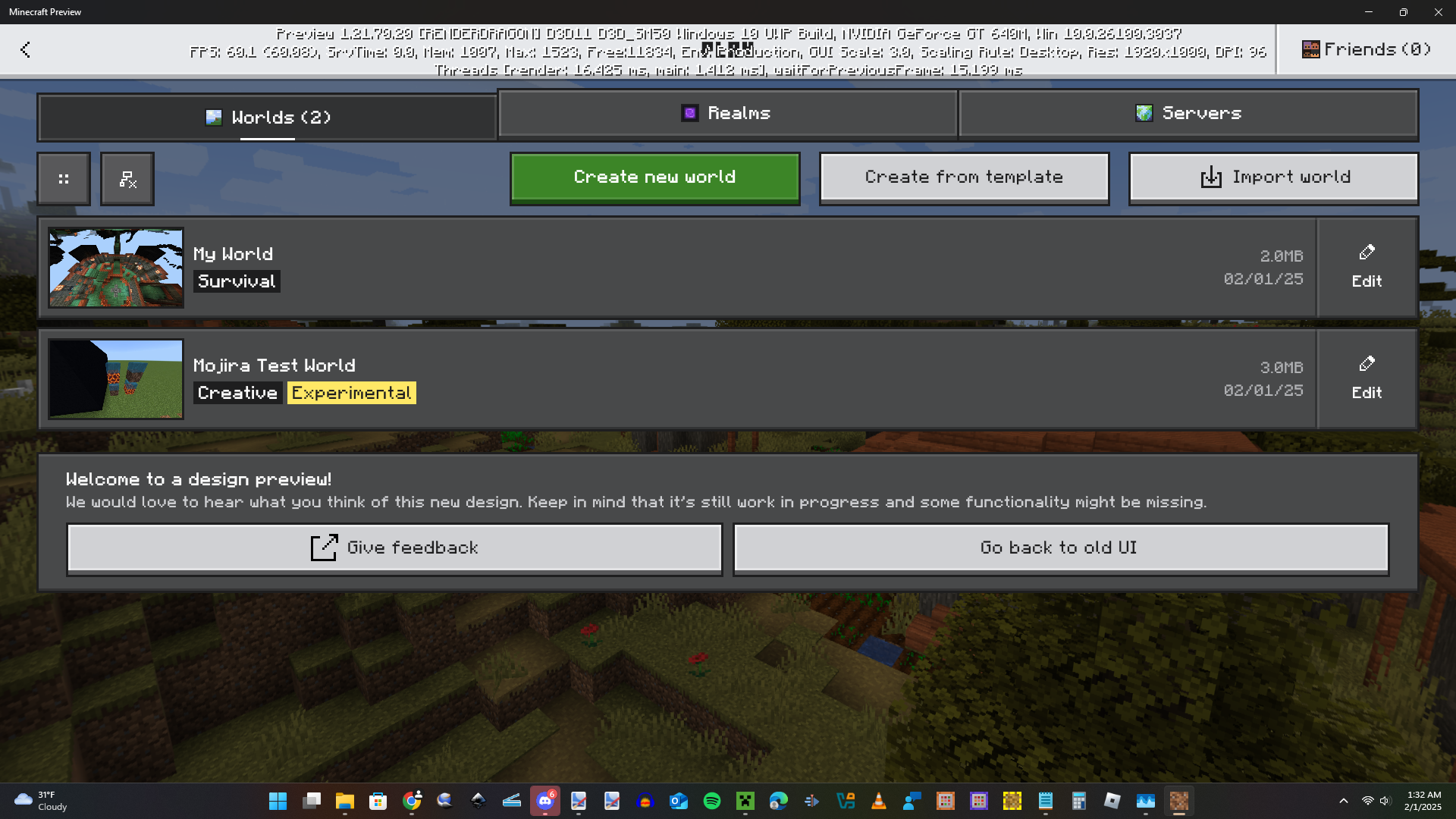


The scrollbar in the "Filter options" menu glitches out approximately 0.5 seconds after it is opened. It seems to originally load the long version of the scroll bar first, and then readjust itself to fit the actual size of the menu.
Steps to reproduce:
- Launch Minecraft Preview (1.21.30.24)
- Navigate to Play Preview > Create from template > Owned by Me (#)
- Click "Show All (#)"
Expected Result:
No visual glitch is shown, and scrollbar adjusts to its correct size when
the "Filter options" menuappears.Observed result:
Scrollbar briefly appears with the wrong size, then corrects itself to fit the menu.
The scrollbar in the "Filter options" menu glitches out approximately 0.5 seconds after it is opened. It seems to originally load the long version of the scroll bar first, and then readjust itself to fit the actual size of the menu.
Steps to reproduce:
- Launch Minecraft Preview (1.21.30.24)
- Navigate to Play Preview > Create from template > Owned by Me (#)
- Click "Show All (#)"
Expected Result:
No visual glitch is shown, and scrollbar adjusts to its correct size when it first appears.
Observed result:
Scrollbar briefly appears with the wrong size, then corrects itself to fit the menu.
The scrollbar in the "Filter options" menu glitches out approximately 0.5 seconds after
it isopened. It seems to originally load the long version of the scroll bar first, and then readjust itself to fit the actual size of the menu.Steps to reproduce:
- Launch Minecraft Preview (1.21.30.24)
- Navigate to Play Preview > Create from template > Owned by Me (#)
- Click "Show All (#)"
Expected Result:
No visual glitch is shown, and scrollbar adjusts to its correct size when it first appears.
Observed result:
Scrollbar briefly appears with the wrong size, then corrects itself to fit the menu.
The scrollbar in the "Filter options" menu glitches out approximately 0.5 seconds after the menu opened. It seems to originally load the long version of the scroll bar first, and then readjust itself to fit the actual size of the menu.
Steps to reproduce:
- Launch Minecraft Preview (1.21.30.24)
- Navigate to Play Preview > Create from template > Owned by Me (#)
- Click "Show All (#)"
Expected Result:
No visual glitch is shown, and scrollbar adjusts to its correct size when it first appears.
Observed result:
Scrollbar briefly appears with the wrong size, then corrects itself to fit the menu.
The scrollbar in the "Filter options" menu glitches out approximately 0.5 seconds after the menu opened. It seems to originally load the long version of the scroll bar first, and then readjust itself to fit the actual
sizeof the menu.Steps to reproduce:
- Launch Minecraft Preview (1.21.30.24)
- Navigate to Play Preview > Create from template > Owned by Me (#)
- Click "Show All (#)"
Expected Result:
No visual glitch is shown, and scrollbar adjusts to its correct size when it first appears.
Observed result:
Scrollbar briefly appears with the wrong size, then corrects itself to fit the menu.
The scrollbar in the "Filter options" menu glitches out approximately 0.5 seconds after the menu opened. It seems to originally load the long version of the scroll bar first, and then readjusts itself to fit the actual length of the menu.
Steps to reproduce:
- Launch Minecraft Preview (1.21.30.24)
- Navigate to Play Preview > Create from template > Owned by Me (#)
- Click "Show All (#)"
Expected Result:
No visual glitch is shown, and scrollbar adjusts to its correct size when it first appears.
Observed result:
Scrollbar briefly appears with the wrong size, then corrects itself to fit the menu.
The scrollbar in the "Filter options" menu glitches out approximately 0.5 seconds after the menu is opened. It seems to originally load the long version of the scroll bar first, and then readjusts itself to fit the actual length of the menu.
Steps to reproduce:
- Launch Minecraft Preview (1.21.30.24)
- Navigate to Play Preview > Create from template > Owned by Me (#)
- Click "Show All (#)"
Expected Result:
No visual glitch is shown, and scrollbar adjusts to its correct size when it first appears.
Observed result:
Scrollbar briefly appears with the wrong size, then corrects itself to fit the menu.
The scrollbar in the "Filter options" menu glitches out approximately 0.5 seconds after the menu is opened. It seems to originally load the long version of the scroll bar first, and then readjusts itself to fit the actual length of the menu.
Steps to reproduce:
- Launch Minecraft Preview (1.21.30.24)
- Navigate to Play Preview > Create from template > Owned by Me (#)
- Click "Show All (#)"
Expected Result:
No visual glitch is shown, and scrollbar adjusts to its correct size when it first appears.
Observed result:
Scrollbar briefly appears with the wrong size, then corrects itself to fit the menu.
Note: I produced this issue on a Windows 11 (23h2) computer with a max resolution of 1920x1080 (Windowed Mode) and with a GUI Scale of -1.
The scrollbar in the "Filter options" menu glitches out approximately 0.5 seconds after the menu is opened. It seems to originally load the long version of the scroll bar first, and then readjusts itself to fit the actual length of the menu.
Steps to reproduce:
- Launch Minecraft Preview (1.21.30.24)
- Navigate to Play Preview > Create from template > Owned by Me (#)
- Click "Show All (#)"
Expected Result:
No visual glitch is shown, and scrollbar adjusts to its correct size when it first appears.
Observed result:
Scrollbar briefly appears with the wrong size, then corrects itself to fit the menu.
Note: I produced this issue on a Windows 11 (23h2) computer with a max resolution of 1920x1080 (Windowed Mode) and with a GUI Scale of -1.The scrollbar in the "Filter options" menu glitches out approximately 0.5 seconds after the menu is opened. It seems to originally load the long version of the scroll bar first, and then readjusts itself to fit the actual length of the menu.
Note: I produced this issue on a Windows 11 (23h2) computer with a max resolution of 1920x1080 (Windowed Mode) and with a GUI Scale of -1.
Steps to reproduce:
- Launch Minecraft Preview (1.21.30.24)
- Navigate to Play Preview > Create from template > Owned by Me (#)
- Click "Show All (#)"
Expected Result:
No visual glitch is shown, and scrollbar adjusts to its correct size when it first appears.
Observed result:
Scrollbar briefly appears with the wrong size, then corrects itself to fit the menu.
The scrollbar in the "Filter options" menu glitches out approximately 0.5 seconds after the menu is opened. It seems to originally load the long version of the scroll bar first, and then readjusts itself to fit the actual length of the menu.
Note: I produced this issue on a Windows 11 (23h2) computer with a max resolution of 1920x1080 (Windowed Mode) and with a GUI Scale of -1. Unfortunately, I cannot confirm if this issue is restricted to only that specific GUI scale.
Steps to reproduce:
- Launch Minecraft Preview (1.21.30.24)
- Navigate to Play Preview > Create from template > Owned by Me (#)
- Click "Show All (#)"
Expected Result:
No visual glitch is shown, and scrollbar adjusts to its correct size when it first appears.
Observed result:
Scrollbar briefly appears with the wrong size, then corrects itself to fit the menu.
The scrollbar in the "Filter options" menu glitches out approximately 0.5 seconds after the menu is opened. It seems to originally load the long version of the scroll bar first, and then readjusts itself to fit the actual length of the menu.
Note: I produced this issue on a Windows 11 (23h2) computer with a max resolution of 1920x1080 (Windowed Mode) and with a GUI Scale of -1. Unfortunately, I cannot confirm if this issue is restricted to only that specific GUI scale.
Steps to reproduce:
- Launch Minecraft Preview (1.21.30.24)
- Navigate to Play Preview > Create from template > Owned by Me (#)
- Click "Show All (#)"
Expected Result:
No visual glitch is shown, and scrollbar adjusts to its correct size when it first appears.
Observed result:
Scrollbar briefly appears with the wrong size, then corrects itself to fit the menu.
The scrollbar in the "Filter options" menu glitches out approximately 0.5 seconds after the menu is opened. It seems to originally load the long version of the scroll bar first, and then readjusts itself to fit the actual length of the menu.
Note: I produced this issue on a Windows 11 (23h2) computer with a max resolution of 1920x1080 (Windowed Mode) and with a GUI Scale of -1. Unfortunately, I cannot confirm if this issue is restricted to only that specific GUI scale.
Steps to reproduce:
- Launch Minecraft Preview (1.21.30.24)
- Navigate to Play Preview > Create from template > Owned by Me (#)
- Click "Show All (#)"
Expected Result:
No visual glitch is shown, and scrollbar adjusts to its correct size when it first appears.
Observed result:
Scrollbar briefly appears with the wrong size, then corrects itself to fit the menu.
The scrollbar in the "Filter options" menu glitches out approximately 0.5 seconds after the menu is opened. It seems to originally load the long version of the scroll bar first, and then readjusts itself to fit the actual length of the menu.
Note: I produced this issue on a Windows 11 (23h2) computer with a max resolution of 1920x1080 (Windowed Mode) and with a GUI Scale of -1. Unfortunately, I cannot confirm if this issue is restricted to only that specific GUI scale.
Steps to reproduce:
- Launch Minecraft Preview (1.21.30.24)
- Navigate to Play Preview > Create from template > Owned by Me (#)
- Click "Show All (#)"
Expected Result:
No visual glitch is shown, and scrollbar adjusts to its correct size when it first appears.
Observed result:
Scrollbar briefly appears with the wrong size, then corrects itself to fit the menu.
The scrollbar in the "Filter options" menu glitches out approximately 0.5 seconds after the menu is opened. It seems to originally load the long version of the scroll bar first, and then readjusts itself to fit the actual length of the menu.
Note: I produced this issue on a Windows 11 (23h2) computer with a max resolution of 1920x1080 (Windowed Mode) and with a GUI Scale of -1. Unfortunately, I cannot confirm if this issue is restricted to only that specific GUI scale.
Steps to reproduce:
- Launch Minecraft Preview (1.21.30.24)
- Navigate to Play Preview > Create from template > Owned by Me (#)
- Click "Show All (#)"
Expected Result:
No visual glitch is shown, and scrollbar adjusts to its correct size when it first appears.
Observed result:
Scrollbar briefly appears with the wrong size, then corrects itself to fit the menu.
The scrollbar in the "Filter options" menu glitches out approximately 0.5 seconds after the menu is opened. It seems to originally load the long version of the scroll bar first, and then readjusts itself to fit the actual length of the menu.
Note: I produced this issue on a Windows 11 (23
h2) computer with a max resolution of 1920x1080 (Windowed Mode) and with a GUI Scale of -1. Unfortunately, I cannot confirm if this issue is restricted to only that specific GUI scale.Steps to reproduce:
- Launch Minecraft Preview (1.21.30.24)
- Navigate to Play Preview > Create from template > Owned by Me (#)
- Click "Show All (#)"
Expected Result:
No visual glitch is shown, and scrollbar adjusts to its correct size when it first appears.
Observed result:
Scrollbar briefly appears with the wrong size, then corrects itself to fit the menu.
The scrollbar in the "Filter options" menu glitches out approximately 0.5 seconds after the menu is opened. It seems to originally load the long version of the scroll bar first, and then readjusts itself to fit the actual length of the menu.
Note: I produced this issue on a Windows 11 (23H2) computer with a max resolution of 1920x1080 (Windowed Mode) and with a GUI Scale of -1. Unfortunately, I cannot confirm if this issue is restricted to only that specific GUI scale.
Steps to reproduce:
- Launch Minecraft Preview (1.21.30.24)
- Navigate to Play Preview > Create from template > Owned by Me (#)
- Click "Show All (#)"
Expected Result:
No visual glitch is shown, and scrollbar adjusts to its correct size when it first appears.
Observed result:
Scrollbar briefly appears with the wrong size, then corrects itself to fit the menu.
Could produce in 1.21.20.21 Preview.
Affects 1.21.40.22 Preview
The scrollbar in the "Filter options" menu glitches out approximately 0.5 seconds after the menu is opened. It seems to originally load the long version of the scroll bar first, and then readjusts itself to fit the actual length of the menu.
Note: I produced this issue on a Windows 11 (23H2) computer with a max resolution of 1920x1080 (Windowed Mode) and with a GUI Scale of -1. Unfortunately, I cannot confirm if this issue is restricted to only that specific GUI scale.
Steps to reproduce:
- Launch Minecraft Preview (1.21.30.24)
- Navigate to Play Preview > Create from template > Owned by Me (#)
- Click "Show All (#)"
Expected Result:
No visual glitch is shown, and scrollbar adjusts to its correct size when the moment it first appears.
Observed result:
Scrollbar briefly appears with the wrong size, then corrects itself to fit the menu.
The scrollbar in the "Filter options" menu glitches out approximately 0.5 seconds after the menu is opened. It seems to originally load the long version of the scroll bar first, and then readjusts itself to fit the actual length of the menu.
Note: I produced this issue on a Windows 11 (23H2) computer with a max resolution of 1920x1080 (Windowed Mode) and with a GUI Scale of -1. Unfortunately, I cannot confirm if this issue is restricted to only that specific GUI scale.
Steps to reproduce:
- Launch Minecraft Preview (1.21.30.24)
- Navigate to Play Preview > Create from template > Owned by Me (#)
- Click "Show All (#)"
Expected Result:
No visual glitch is shown, and scrollbar adjusts to its correct size when the moment it first appears.
Observed result:
Scrollbar briefly appears with the wrong size, then corrects itself to fit the menu.The scrollbar in the "Filter options" menu glitches out approximately 0.5 seconds after the menu is opened. It seems to originally load the long version of the scroll bar first, and then readjusts itself to fit the actual length of the menu.
Steps to reproduce:
- Launch Minecraft Preview (1.21.30.24)
- Navigate to Play Preview > Create from template > Owned by Me (#)
- Click "Show All (#)"
Expected Result:
No visual glitch is shown, and scrollbar adjusts to its correct size when the moment it first appears.
Observed result:
Scrollbar briefly appears with the wrong size, then corrects itself to fit the menu.
Notes:
I produced this issue on a Windows 11 (23H2) computer with a max resolution of 1920x1080 (Windowed Mode) and with a GUI Scale of -1. Unfortunately, I cannot confirm if this issue is restricted to only that specific GUI scale.
Repeatedly clicking buttons like the "Show/Hide Land Worlds" button in the OreUI "Play" screen or the "Copy Gamertag" button in the OreUI "Search For Players" screen, will cause a toast notification to be repeatedly sent for every time the button has been clicked regardless of if the player is still clicking.
Steps To Reproduce:{}
- Open the OreUI "Play" screen by clicking the "Play Preview" button after launching Minecraft Preview.
- Repeatedly click the show or hide "Show/Hide Land Worlds" button located to the left of the "Create new world" button (but do this in quick succession).
Expected Results:
The toast notification should continue to stay on screen as long as the player keeps clicking the button while the notification is still visible. In addition, the notification sound should not be repeatedly played. In the case of the "Show/Hide Land Worlds" button, the text of the toast notification should update in real-time according to the state of the button.
Observed Results:
The toast notification is repeatedly sent for every time the "Show/Hide Land Worlds" button is clicked. The toast notification sound is also repeatedly played every time the toast appears on screen.
Note: I will include a video later in the day to explain exactly what's happening.
Repeatedly clicking buttons like the "Show/Hide Land Worlds" button in the OreUI "Play" screen or the "Copy Gamertag" button in the OreUI "Search For Players" screen, will cause a toast notification to be repeatedly sent for every time the button has been clicked regardless of if the player is still clicking.
Steps To Reproduce:{}
- Open the OreUI "Play" screen by clicking the "Play Preview" button after launching Minecraft Preview.
- Repeatedly click the show or hide "Show/Hide Land Worlds" button located to the left of the "Create new world" button (but do this in quick succession).
Expected Results:
The toast notification should continue to stay on screen as long as the player keeps clicking the button while the notification is still visible. In addition, the notification sound should not be repeatedly played. In the case of the "Show/Hide Land Worlds" button, the text of the toast notification should update in real-time according to the state of the button.
Observed Results:
The toast notification is repeatedly sent for every time the "Show/Hide Land Worlds" button is clicked. The toast notification sound is also repeatedly played every time the toast appears on screen.
Note: I will include a video later in the day to explain exactly what's happening.
Repeatedly clicking buttons like the "Show/Hide Land Worlds" button in the OreUI "Play" screen or the "Copy Gamertag" button in the OreUI "Search For Players" screen, will cause a toast notification to be repeatedly sent for every time the button has been clicked regardless of if the player is still clicking.
Steps
To Reproduce:
- Open the OreUI "Play" screen by clicking the "Play Preview" button after launching Minecraft Preview.
- Repeatedly click the show or hide "Show/Hide Land Worlds" button located to the left of the "Create new world" button (but do this in quick succession).
Expected Results:
The toast notification should continue to stay on screen as long as the player keeps clicking the button while the notification is still visible. In addition, the notification sound should not be repeatedly played. In the case of the "Show/Hide Land Worlds" button, the text of the toast notification should update in real-time according to the state of the button.
Observed Results:
The toast notification is repeatedly sent for every time the "Show/Hide Land Worlds" button is clicked. The toast notification sound is also repeatedly played every time the toast appears on screen.
Note: I will include a video later in the day to explain exactly what's happening.
Repeatedly clicking buttons like the "Show/Hide Land Worlds" button in the OreUI "Play" screen or the "Copy Gamertag" button in the OreUI "Search For Players" screen, will cause a toast notification to be repeatedly sent for every time the button has been clicked regardless of if the player is still clicking.
Steps to Reproduce:
- Open the OreUI "Play" screen by clicking the "Play Preview" button after launching Minecraft Preview.
- Repeatedly click the show or hide "Show/Hide Land Worlds" button located to the left of the "Create new world" button (but do this in quick succession).
Expected Results:
The toast notification should continue to stay on screen as long as the player keeps clicking the button while the notification is still visible. In addition, the notification sound should not be repeatedly played. In the case of the "Show/Hide Land Worlds" button, the text of the toast notification should update in real-time according to the state of the button.
Observed Results:
The toast notification is repeatedly sent for every time the "Show/Hide Land Worlds" button is clicked. The toast notification sound is also repeatedly played every time the toast appears on screen.
Note: I will include a video later in the day to explain exactly what's happening.
Repeatedly clicking buttons like the "Show/Hide Land Worlds" button in the OreUI "Play" screen or the "Copy Gamertag" button in the OreUI "Search For Players" screen, will cause a toast notification to be repeatedly sent for every time the button has been clicked regardless of if the player is still clicking.
Steps to Reproduce:
- Open the OreUI "Play" screen by clicking the "Play Preview" button after launching Minecraft Preview.
- Repeatedly click the show or hide "Show/Hide Land Worlds" button located to the left of the "Create new world" button (but do this in quick succession).
Expected Results:
The toast notification should continue to stay on screen as long as the player keeps clicking the button while the notification is still visible. In addition, the notification sound should not be repeatedly played. In the case of the "Show/Hide Land Worlds" button, the text of the toast notification should update in real-time according to the state of the button.
Observed Results:
The toast notification is repeatedly sent for every time the "Show/Hide Land Worlds" button is clicked
. The toast notification sound is also repeatedly played every time the toast appears on screen.Note: I will include a video later in the day to explain exactly what's happening.
Repeatedly clicking buttons like the "Show/Hide Land Worlds" button in the OreUI "Play" screen or the "Copy Gamertag" button in the OreUI "Search For Players" screen, will cause a toast notification to be repeatedly sent for every time the button has been clicked regardless of if the player is still clicking.
Steps to Reproduce:
- Open the OreUI "Play" screen by clicking the "Play Preview" button after launching Minecraft Preview.
- Repeatedly click the show or hide "Show/Hide Land Worlds" button located to the left of the "Create new world" button (but do this in quick succession).
Expected Results:
The toast notification should continue to stay on screen as long as the player keeps clicking the button while the notification is still visible. In addition, the notification sound should not be repeatedly played. In the case of the "Show/Hide Land Worlds" button, the text of the toast notification should update in real-time according to the state of the button.
Observed Results:
The toast notification is repeatedly sent for every time the "Show/Hide Land Worlds" button is clicked and the toast notification sound is also repeatedly played every time the toast appears on screen, as shown in the video attached by
Note: I will include a video later in the day to explain exactly what's happening.
Repeatedly clicking buttons like the "
Show/Hide LandWorlds" button in the OreUI "Play" screen or the "Copy Gamertag" button in the OreUI "Search For Players" screen, will cause a toast notification to be repeatedly sent for every time the button has been clicked regardless of if the player is still clicking.Steps to Reproduce:
- Open the OreUI "Play" screen by clicking the "Play Preview" button after launching Minecraft Preview.
- Repeatedly click the show or hide "
Show/Hide LandWorlds" button located to the left of the "Create new world" button (but do this in quick succession).Expected Results:
The toast notification should continue to stay on screen as long as the player keeps clicking the button while the notification is still visible. In addition, the notification sound should not be repeatedly played. In the case of the "
Show/Hide LandWorlds" button, the text of the toast notification should update in real-time according to the state of the button.Observed Results:
The toast notification is repeatedly sent for every time the "Show/Hide Land Worlds" button is clicked and the toast notification sound is also repeatedly played every time the toast appears on screen, as shown in the video attached by
Note: I will include a video later in the day to explain exactly what's happening.
Repeatedly clicking buttons like the "LAN Worlds" button in the OreUI "Play" screen or the "Copy Gamertag" button in the OreUI "Search For Players" screen, will cause a toast notification to be repeatedly sent for every time the button has been clicked regardless of if the player is still clicking.
Steps to Reproduce:
- Open the OreUI "Play" screen by clicking the "Play Preview" button after launching Minecraft Preview.
- Repeatedly click the show or hide "LAN Worlds" button located to the left of the "Create new world" button (but do this in quick succession).
Expected Results:
The toast notification should continue to stay on screen as long as the player keeps clicking the button while the notification is still visible. In addition, the notification sound should not be repeatedly played. In the case of the "LAN Worlds" button, the text of the toast notification should update in real-time according to the state of the button.
Observed Results:
The toast notification is repeatedly sent for every time the "Show/Hide Land Worlds" button is clicked and the toast notification sound is also repeatedly played every time the toast appears on screen, as shown in the video attached by JervieA20.
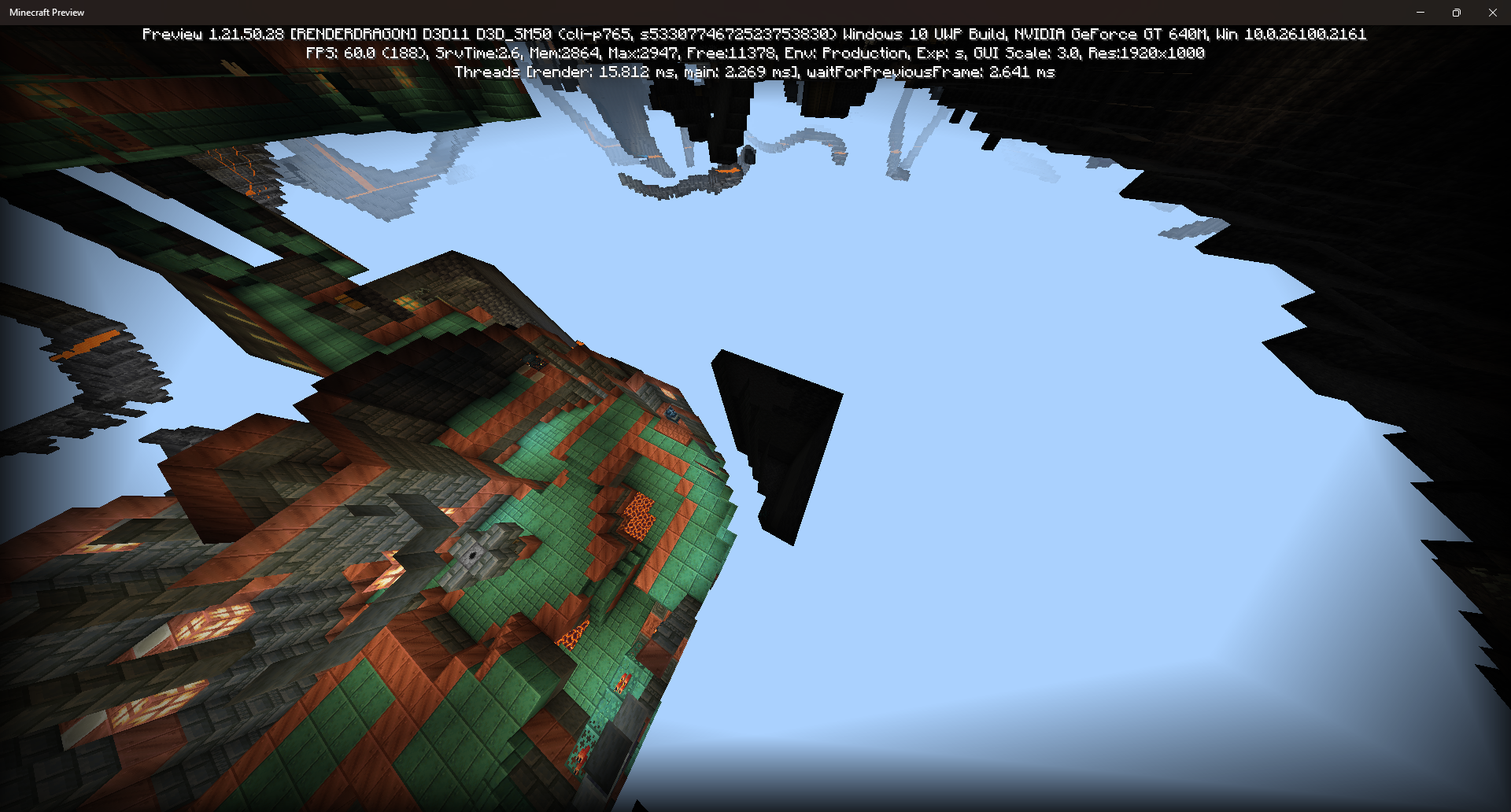
The chamber Eruption generates with 4 large spaces filled with air at its corners.
Seeds and Coordinates:
Version Seed Coordinates 1.21.50.29 5330774672523753830 -2590, -44, -960 1.21.44 -1147951365380032727 151, -17, 95
Steps to Reproduce:
- Generate world with a seed from the table above
- Go to the respective coordinates of the chosen seed
- Observe the corners of the Eruption chamber
Expected Results:
The surrounding terrain of Eruption is mostly filled with solid blocks.
Observed Results:
The corners of Eruption have large empty air pockets that will sometimes mess with the generation of the Trial Chamber often creating hallways that lead to pits.
Eruption in Trial Chambers generates with large air pockets at its corners.
The chamber Eruption generates with 4 large spaces filled with air at its corners.
Seeds and Coordinates:
Version Seed Coordinates 1.21. 50.295330774672523753830- 2590, -44, -9601.21. 44-1147951365380032727151, -17, 95Steps to Reproduce:
- Generate world with a seed from the table above
- Go to the respective coordinates of the chosen seed
- Observe the corners of the Eruption chamber
Expected Results:
The surrounding terrain of Eruption is mostly filled with solid blocks.
Observed Results:
The corners of Eruption have large empty air pockets that will sometimes mess with the generation of the Trial Chamber often creating hallways that lead to pits.
The chamber Eruption generates with 4 large spaces filled with air at its corners.
Seeds and Coordinates:
Version Seed Coordinates 1.21.60.23 Preview -4177720610968189288 -369, -28, -247 1.21.50.29 Preview 5330774672523753830 -2590, -44, -960 1.21.44 -1147951365380032727 151, -17, 95 Steps to Reproduce:
- Generate world with a seed from the table above
- Go to the respective coordinates of the chosen seed
- Observe the corners of the Eruption chamber
Expected Results:
The surrounding terrain of Eruption is mostly filled with solid blocks.
Observed Results:
The corners of Eruption have large empty air pockets that will sometimes mess with the generation of the Trial Chamber often creating hallways that lead to pits.
The chamber Eruption generates with 4 large spaces filled with air at its corners.
Seeds and Coordinates:
Version Seed Coordinates 1.21.60.23 Preview -4177720610968189288 -369, -28, -247 1.21.50.29 Preview 5330774672523753830 -2590, -44, -960 1.21.44 -1147951365380032727 151, -17, 95 Steps to Reproduce:
- Generate world with a seed from the table above
- Go to the respective coordinates of the chosen seed
- Observe the corners of the Eruption chamber
Expected Results:
The surrounding terrain of Eruption is mostly filled with solid blocks.
Observed Results:
The corners of Eruption have large empty air pockets that will sometimes mess with the generation of the Trial Chamber often creating hallways that lead to pits.
The chamber Eruption generates with 4 large spaces filled with air at its corners.
Seeds and Coordinates:
Version Seed Coordinates 1.21.60.23 Preview -4177720610968189288 -369, -28, -247 1.21.50.29 Preview 5330774672523753830 -2590, -44, -960 1.21.44 -1147951365380032727 151, -17, 95 Steps to Reproduce:
- Generate world with a seed from the table above
- Go to the respective coordinates of the chosen seed
- Observe the corners of the Eruption chamber
Expected Results:
The surrounding terrain of Eruption is mostly filled with solid blocks.
Observed Results:
The corners of Eruption have large empty air pockets that will sometimes mess with the generation of the Trial Chamber often creating hallways that lead to pits.
The chamber Eruption generates with 4 large spaces filled with air at its corners.
Seeds and Coordinates:
Version Seed Coordinates 1.21.60.23 Preview -4177720610968189288 -369, -28, -247 1.21.50.29 Preview 5330774672523753830 -2590, -44, -960 1.21.44 -1147951365380032727 151, -17, 95 1.21.50 Steps to Reproduce:
- Generate world with a seed from the table above
- Go to the respective coordinates of the chosen seed
- Observe the corners of the Eruption chamber
Expected Results:
The surrounding terrain of Eruption is mostly filled with solid blocks.
Observed Results:
The corners of Eruption have large empty air pockets that will sometimes mess with the generation of the Trial Chamber often creating hallways that lead to pits.
The chamber Eruption generates with 4 large spaces filled with air at its corners.
Seeds and Coordinates:
Version Seed Coordinates 1.21. 60.23 Preview- 4177720610968189288- 369, -28, -2471.21. 50.29 Preview5330774672523753830-2590, -44, -9601.21. 44-1147951365380032727151, -17, 951.21. 50Steps to Reproduce:
- Generate world with a seed from the table above
- Go to the respective coordinates of the chosen seed
- Observe the corners of the Eruption chamber
Expected Results:
The surrounding terrain of Eruption is mostly filled with solid blocks.
Observed Results:
The corners of Eruption have large empty air pockets that will sometimes mess with the generation of the Trial Chamber often creating hallways that lead to pits.
The chamber Eruption generates with 4 large spaces filled with air at its corners.
Seeds and Coordinates:
Version Seed Coordinates 1.21.50 -212567406451901533 -279, -6, -647 1.21.44 -1147951365380032727 151, -17, 95 1.21.50.29 5330774672523753830 -2590, -44, -960 1.21.60.23 -4177720610968189288 -369, -28, -247 Steps to Reproduce:
- Generate world with a seed from the table above
- Go to the respective coordinates of the chosen seed
- Observe the corners of the Eruption chamber
Expected Results:
The surrounding terrain of Eruption is mostly filled with solid blocks.
Observed Results:
The corners of Eruption have large empty air pockets that will sometimes mess with the generation of the Trial Chamber often creating hallways that lead to pits.
The chamber Eruption generates with 4 large spaces filled with air at its corners.
Seeds and Coordinates:
Version Seed Coordinates 1.21.50 -212567406451901533 -279, -6, -647 1.21.44 -1147951365380032727 151, -17, 95 1.21. 50.295330774672523753830- 2590, -44, -9601.21. 60.23-4177720610968189288- 369, -28, -247Steps to Reproduce:
- Generate world with a seed from the table above
- Go to the respective coordinates of the chosen seed
- Observe the corners of the Eruption chamber
Expected Results:
The surrounding terrain of Eruption is mostly filled with solid blocks.
Observed Results:
The corners of Eruption have large empty air pockets that will sometimes mess with the generation of the Trial Chamber often creating hallways that lead to pits.
The chamber Eruption generates with 4 large spaces filled with air at its corners.
Seeds and Coordinates:
Version Seed Coordinates 1.21.50 -212567406451901533 -279, -6, -647 1.21.44 -1147951365380032727 151, -17, 95 1.21.60.23 -4177720610968189288 -369, -28, -247 1.21.50.29 5330774672523753830 -2590, -44, -960 Steps to Reproduce:
- Generate world with a seed from the table above
- Go to the respective coordinates of the chosen seed
- Observe the corners of the Eruption chamber
Expected Results:
The surrounding terrain of Eruption is mostly filled with solid blocks.
Observed Results:
The corners of Eruption have large empty air pockets that will sometimes mess with the generation of the Trial Chamber often creating hallways that lead to pits.
The chamber Eruption generates with 4 large spaces filled with air at its corners.
Seeds and Coordinates:
Version Seed Coordinates 1.21.50 -212567406451901533 -279, -6, -647 1.21.44 -1147951365380032727 151, -17, 95 1.21.60.23-4177720610968189288-369, -28, -2471.21. 50.295330774672523753830- 2590, -44, -960Steps to Reproduce:
- Generate world with a seed from the table above
- Go to the respective coordinates of the chosen seed
- Observe the corners of the Eruption chamber
Expected Results:
The surrounding terrain of Eruption is mostly filled with solid blocks.
Observed Results:
The corners of Eruption have large empty air pockets that will sometimes mess with the generation of the Trial Chamber often creating hallways that lead to pits.
The chamber Eruption generates with 4 large spaces filled with air at its corners.
Seeds and Coordinates:
Release Version Seed Coordinates 1.21.50 -212567406451901533 -279, -6, -647 1.21.44 -1147951365380032727 151, -17, 95
Preview Version Seed Coordinates 1.21.60.23 -4177720610968189288 -369, -28, -247 1.21.50.29 5330774672523753830 -2590, -44, -960
Steps to Reproduce:
- Generate world with a seed from the table above
- Go to the respective coordinates of the chosen seed
- Observe the corners of the Eruption chamber
Expected Results:
The surrounding terrain of Eruption is mostly filled with solid blocks.
Observed Results:
The corners of Eruption have large empty air pockets that will sometimes mess with the generation of the Trial Chamber often creating hallways that lead to pits.
The chamber Eruption generates with 4 large spaces filled with air at its corners.
Seeds and Coordinates:
Release Version Seed Coordinates 1.21.50 -212567406451901533 -279, -6, -647 1.21.44 -1147951365380032727 151, -17, 95
Preview Version Seed Coordinates 1.21.60.23 -4177720610968189288 -369, -28, -247 1.21.50.29 5330774672523753830 -2590, -44, -960
Steps to Reproduce:
- Generate world with a seed from the table above
- Go to the respective coordinates of the chosen seed
- Observe the corners of the Eruption chamber
Expected Results:
The surrounding terrain of Eruption is mostly filled with solid blocks.
Observed Results:
The corners of Eruption have large empty air pockets that will sometimes mess with the generation of the Trial Chamber often creating hallways that lead to pits.
The chamber Eruption generates with 4 large spaces filled with air at its corners.
Seeds and Coordinates:
Release Version Seed Coordinates 1.21.50 -212567406451901533 -279, -6, -647 1.21.44 -1147951365380032727 151, -17, 95 Preview Version Seed Coordinates 1.21.60.23 -4177720610968189288 -369, -28, -247 1.21.50.29 5330774672523753830 -2590, -44, -960
Steps to Reproduce:
- Generate world with a seed from the table above
- Go to the respective coordinates of the chosen seed
- Observe the corners of the Eruption chamber
Expected Results:
The surrounding terrain of Eruption is mostly filled with solid blocks.
Observed Results:
The corners of Eruption have large empty air pockets that will sometimes mess with the generation of the Trial Chamber often creating hallways that lead to pits.
The chamber Eruption generates with 4 large spaces filled with air at its corners.
Seeds and Coordinates:
Release Version Seed Coordinates 1.21.50 -212567406451901533 -279, -6, -647 1.21.44 -1147951365380032727 151, -17, 95 Preview Version Seed Coordinates 1.21.60.23 -4177720610968189288 -369, -28, -247 1.21.50.29 5330774672523753830 -2590, -44, -960
Steps to Reproduce:
- Generate world with a seed from the table above
- Go to the respective coordinates of the chosen seed
- Observe the corners of the Eruption chamber
Expected Results:
The surrounding terrain of Eruption is mostly filled with solid blocks.
Observed Results:
The corners of Eruption have large empty air pockets that will sometimes mess with the generation of the Trial Chamber often creating hallways that lead to pits.
The chamber Eruption generates with 4 large spaces filled with air at its corners.
Seeds and Coordinates:
Release Version Seed Coordinates 1.21.50 -212567406451901533 -279, -6, -647 1.21.44 -1147951365380032727 151, -17, 95 Preview Version Seed Coordinates 1.21.60.23 -4177720610968189288 -369, -28, -247 1.21.50.29 5330774672523753830 -2590, -44, -960
Steps to Reproduce:
- Generate world with a seed from the table above
- Go to the respective coordinates of the chosen seed
- Observe the corners of the Eruption chamber
Expected Results:
The surrounding terrain of Eruption is mostly filled with solid blocks.
Observed Results:
The corners of Eruption have large empty air pockets that will sometimes mess with the generation of the Trial Chamber often creating hallways that lead to pits.
Every time you first generate and spawn a new world; the edges of the screen will darken before fading away.
Steps to reproduce:
- Launch Minecraft Preview (1.21.60.21)
- Create a new world
- Observe
rthe edges of the screenExpected Result:
The Edges of the screen are not dark unless the player is spawned in at a y level lower than -10.
Observed result:
The Edges of the screen are dark no matter what y level the player spawns at, but they do end up fading away with time.
Notes:
This bug was likely an unintended side effect of the fix for MCPE-121983.
Every time you first generate and spawn a new world; the edges of the screen will darken before fading away.
Steps to reproduce:
- Launch Minecraft Preview (1.21.60.21)
- Create a new world
- Observe the edges of the screen
Expected Result:
The Edges of the screen are not dark unless the player is spawned in at a y level lower than -10.
Observed result:
The Edges of the screen are dark no matter what y level the player spawns at, but they do end up fading away with time.
Notes:
This bug was likely an unintended side effect of the fix for MCPE-121983.
If you're having trouble noticing it, here are some example seeds with bright block spawns:
Version Seed 1.21.60.23 2772778412417363574 1.21.60.23 -6830901644802456559 1.21.60.23 7159945935325451318
Every time you first generate and spawn a new world; the edges of the screen will darken before fading away.
Steps to reproduce:
- Launch Minecraft Preview (1.21.60.21)
- Create a new world
- Observe the edges of the screen
Expected Result:
The Edges of the screen are not dark unless the player is spawned in at a y level lower than -10.
Observed result:
The Edges of the screen are dark no matter what y level the player spawns at, but they do end up fading away with time.
Notes:
This bug was likely an unintended side effect of the fix for MCPE-121983.
If you're having trouble noticing it, here are some example seeds with bright
block spawns:
Version Seed 1.21.60.23 2772778412417363574 1.21.60.23 -6830901644802456559 1.21.60.23 7159945935325451318
Every time you first generate and spawn a new world; the edges of the screen will darken before fading away.
Steps to reproduce:
- Launch Minecraft Preview (1.21.60.21)
- Create a new world
- Observe the edges of the screen
Expected Result:
The Edges of the screen are not dark unless the player is spawned in at a y level lower than -10.
Observed result:
The Edges of the screen are dark no matter what y level the player spawns at, but they do end up fading away with time.
Notes:
This bug was likely an unintended side effect of the fix for MCPE-121983.
If you're having trouble noticing it, here are some example seeds with bright surroundings:
Version Seed 1.21.60.23 2772778412417363574 1.21.60.23 -6830901644802456559 1.21.60.23 7159945935325451318
Every time you first generate and spawn a new world; the edges of the screen will darken before fading away.
Steps to reproduce:
- Launch Minecraft Preview (1.21.60.21)
- Create a new world
- Observe the edges of the screen
Expected Result:
The Edges of the screen are not dark unless the player is spawned in at a y level lower than -10.
Observed result:
The Edges of the screen are dark no matter what y level the player spawns at, but they do end up fading away with time.
Notes:
This bug was likely an unintended side effect of the fix for MCPE-121983.
If you're having trouble noticing it, here are some example seeds with generally bright surroundings:
Version Seed 1.21.60.23 2772778412417363574 1.21.60.23 -6830901644802456559 1.21.60.23 7159945935325451318
Every time you first generate and spawn a new world; the edges of the screen will darken before fading away.
Steps to reproduce:
- Launch Minecraft Preview (1.21.60.2
1)- Create a new world
- Observe the edges of the screen
Expected Result:
The Edges of the screen are not dark unless the player is spawned in at a y level lower than -10.
Observed result:
The Edges of the screen are dark no matter what y level the player spawns at, but they do end up fading away with time.
Notes:
This bug was likely an unintended side effect of the fix for MCPE-121983.
If you're having trouble noticing it, here are some example seeds with generally bright surroundings:
Version Seed 1.21.60.23 2772778412417363574 1.21.60.23 -6830901644802456559 1.21.60.23 7159945935325451318
Every time you first generate and spawn a new world; the edges of the screen will darken before fading away.
Steps to reproduce:
- Launch Minecraft Preview (1.21.60.23)
- Create a new world
- Observe the edges of the screen
Expected Result:
The Edges of the screen are not dark unless the player is spawned in at a y level lower than -10.
Observed result:
The Edges of the screen are dark no matter what y level the player spawns at, but they do end up fading away with time.
Notes:
This bug was likely an unintended side effect of the fix for MCPE-121983.
If you're having trouble noticing it, here are some example seeds with generally bright surroundings:
Version Seed 1.21.60.23 2772778412417363574 1.21.60.23 -6830901644802456559 1.21.60.23 7159945935325451318
Every time you first generate and spawn a new world; the edges of the screen will darken before fading away.
Steps to reproduce:
- Launch Minecraft Preview (1.21.60.23)
- Create a new world
- Observe the edges of the screen
Expected Result:
The Edges of the screen are not dark unless the player is spawned in at a y level lower than -10.
Observed result:
The Edges of the screen are dark no matter what y level the player spawns at, but they do end up fading away with time.
Notes:
This bug
was likely an unintended side effect of the fix forMCPE-121983.If you're having trouble noticing it, here are some example seeds with generally bright surroundings:
Version Seed 1.21.60.23 2772778412417363574 1.21.60.23 -6830901644802456559 1.21.60.23 7159945935325451318
Every time you first generate and spawn a new world; the edges of the screen will darken before fading away.
Steps to reproduce:
- Launch Minecraft Preview (1.21.60.23)
- Create a new world
- Observe the edges of the screen
Expected Result:
The Edges of the screen are not dark unless the player is spawned in at a y level lower than -10.
Observed result:
The Edges of the screen are dark no matter what y level the player spawns at, but they do end up fading away with time.
Notes:
This bug relates to MCPE-121983 and was likely an unintended side effect caused by its fix.
If you're having trouble noticing it, here are some example seeds with generally bright surroundings:
Version Seed 1.21.60.23 2772778412417363574 1.21.60.23 -6830901644802456559 1.21.60.23 7159945935325451318
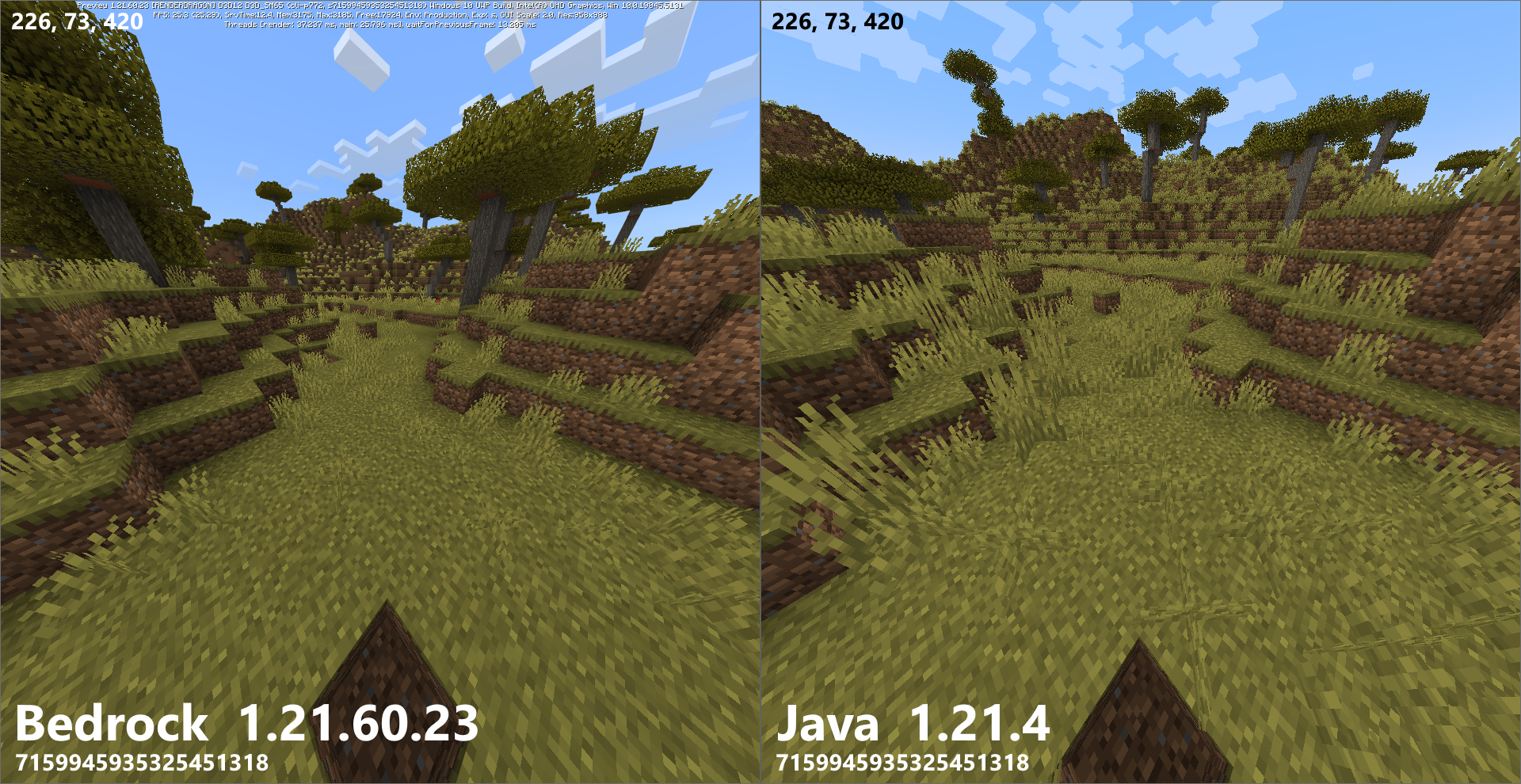
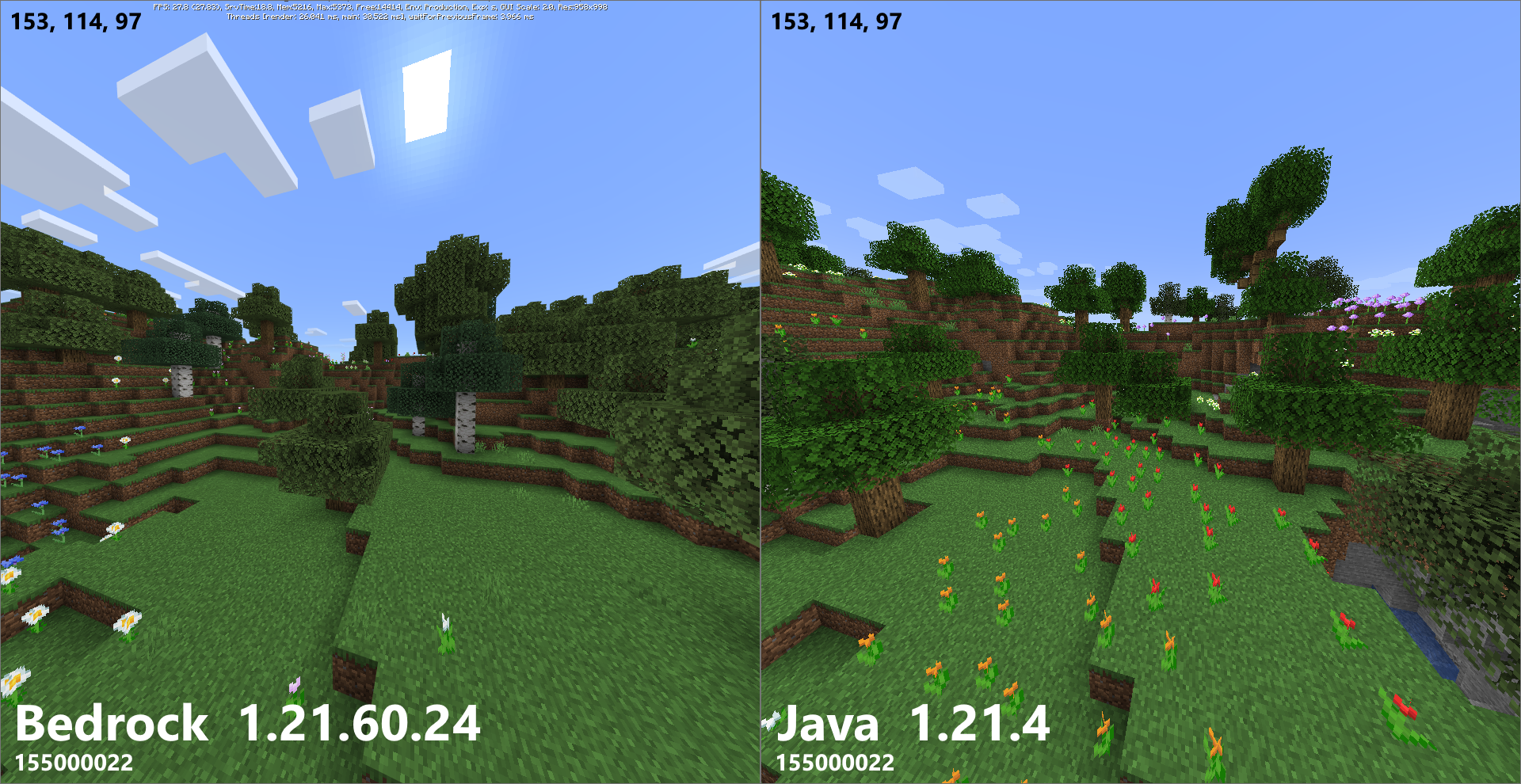
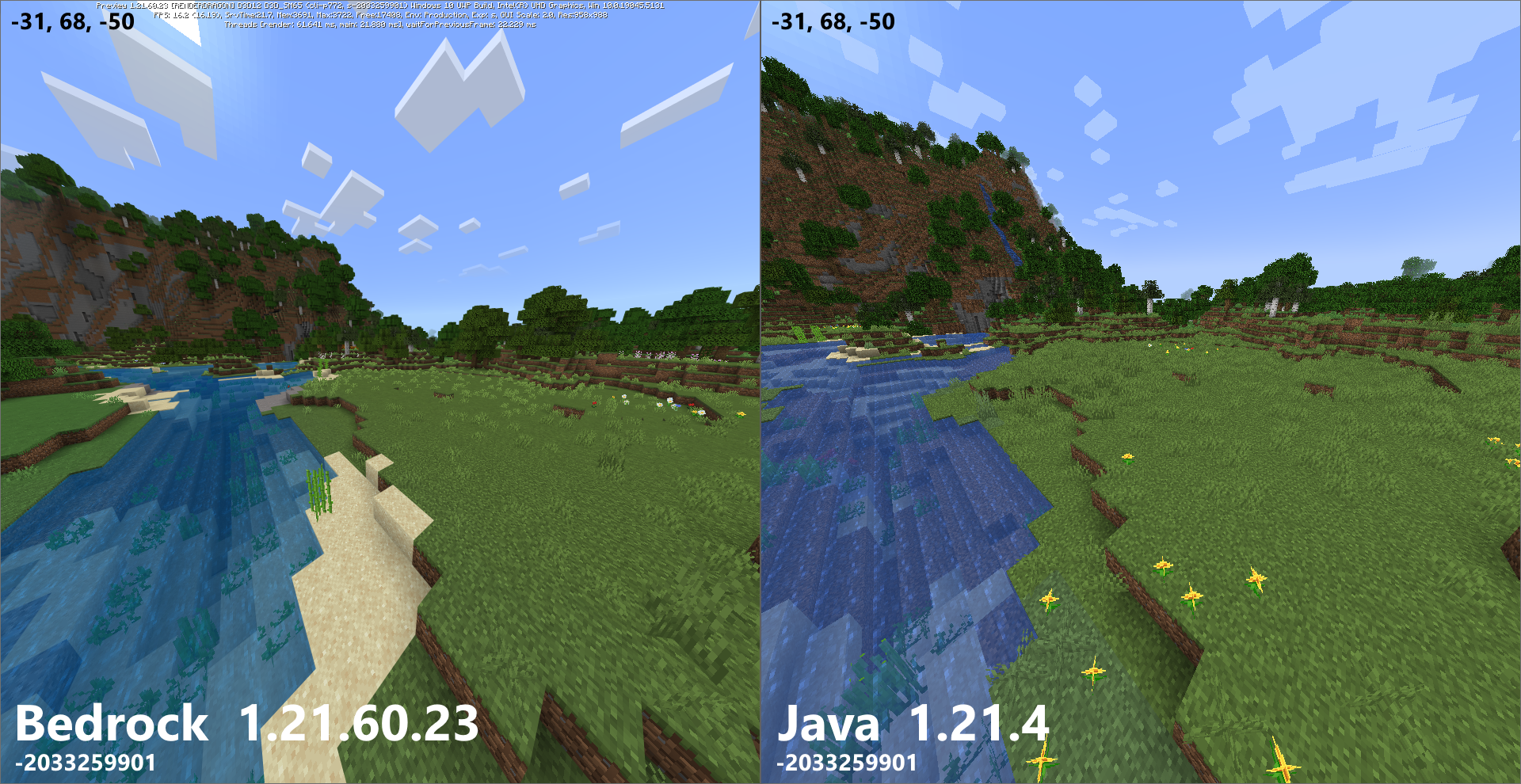
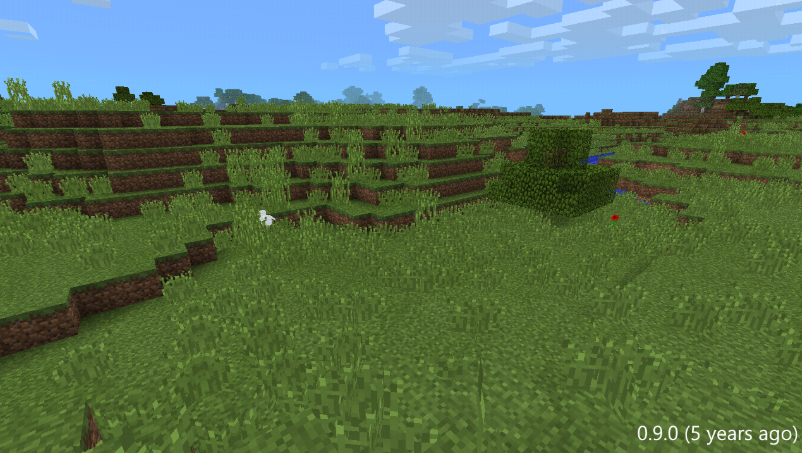
The world still seems to generate less grass compared to Java Edition
Even after the parity changes introduced in the 1.21.60.23 Preview. This is especially noticeable in the plains biome and other generally flat areas.Steps to reproduce:
- Launch Minecraft Preview (1.21.60.23)
- Create a new world in creative mode
- Navigate to a plains biome
- Observe your surroundings.
Expected Result:
Like Java
edition, both tall and short grass are significantly more present and generate frequently in large clumps.Observed result:
There is more grass present then in previous versions, but unlike Java edition, there is si
nicalless of both grass types and the grassis more spreadout for some reason.Notes:
To be clear, this is not meant to be a duplicate of MCPE-141364. Rather, this post is directed toward the changes made in 1.21.60.23 that do improve the overall generation of grass. While grass generation is better, it needs some fine tuning, and it would be best to give generation more tweaks over the next couple of Previews until the community is satisfied.
The world still seems to generate less grass compared to Java Edition even after the parity changes introduced in the 1.21.60.23 Preview. This is especially noticeable in the plains biome and other generally flat areas.
Steps to reproduce:
- Launch Minecraft Preview (1.21.60.23)
- Create a new world in creative mode
- Navigate to a plains biome
- Observe your surroundings.
Expected Result:
Like Java Edition, both tall and short grass are significantly more present and generate frequently in large clumps.
Observed result:
There is more grass present then in previous versions, but unlike Java edition, there is significantly less of both grass types, and it is more spread.
Notes:
To be clear, this is not meant to be a duplicate of MCPE-141364. Rather, this post is directed toward the changes made in 1.21.60.23 that do improve the overall generation of grass. While grass generation is better, it needs some fine tuning, and it would be best to give generation more tweaks over the next couple of Previews until the community is satisfied.
mojira_mcpe_grass_comparison_3.png
The world still seems to generate less grass compared to Java Edition even after the parity changes introduced in the 1.21.60.23 Preview. This is especially noticeable in the plains biome and other generally flat areas.
Steps to reproduce:
- Launch Minecraft Preview (1.21.60.23)
- Create a new world in creative mode
- Navigate to a plains biome
- Observe your surroundings.
Expected Result:
Like Java Edition, both tall and short grass are significantly more present and generate frequently in large clumps.
Observed result:
There is more grass present then in previous versions, but unlike Java edition, there is significantly less of both grass types, and it is more spread out.
Notes:
To be clear, this is not meant to be a duplicate of MCPE-141364. Rather, this post is directed toward the changes made in 1.21.60.23 that do improve the overall generation of grass. While grass generation is better, it needs some fine tuning, and it would be best to give generation more tweaks over the next couple of Previews until the community is satisfied.
World still generates lessgrassin 1.21.60.23 compared to Java EditionWorld still generates less foliage in 1.21.60.23 compared to Java Edition
The world still seems to generate less
grasscompared to Java Edition even after the parity changes introduced in the 1.21.60.23 Preview.This is especially noticeable in the plains biome and other generally flat areas.Steps to reproduce:
- Launch Minecraft Preview (1.21.60.23)
- Create a new world in creative mode
- Navigate to a plains biome
- Observe your surroundings.
Expected Result:
Like Java Edition, both tall and short grass are significantly more present and generate frequently in large clumps.
Observed result:
There is more grass present then in previous versions, but unlike Java edition, there is significantly less of both grass types, and it is more spread out.
Notes:
To be clear, this is not meant to be a duplicate of MCPE-141364. Rather, this post is directed toward the changes made in 1.21.60.23 that do improve the overall generation of grass. While
grassgeneration is better, it needs some fine tuning, and it would be best to give generation more tweaks over the next couple of Previews until the community is satisfied.The world still seems to generate less foliage compared to Java Edition even after the parity changes introduced in the 1.21.60.23 Preview. Not only is this especially noticeable in the plains biome and other generally flat areas, but less or almost no foliage can also be observed in underwater areas.
Steps to reproduce:
- Launch Minecraft Preview (1.21.60.23)
- Create a new world in creative mode
- Navigate to a plains biome
- Observe your surroundings.
Expected Result:
Like Java Edition, both tall and short grass are significantly more present and generate frequently in large clumps. The oceans are also filled with more kelp, and flowers are more prevalent in Flower Forests or in other biomes known for having a lot of Flowers. There is generally more foliage in general across all locations in the world.
Observed result:
There is more grass present compared to previous previews or release versions, but unlike Java edition, there is significantly less of both tall and short grass which is also more spread out. Oceans can sometimes have almost no kelp and consist of only seaweed. Flowers are also less common in many flower-bearing biomes. There is generally less foliage in general across all locations in the world.
Notes:
To be clear, this is not meant to be a duplicate of MCPE-141364. Rather, this post is directed toward the changes made in 1.21.60.23 that do improve the overall generation of grass, kelp, flowers, and other plants in their respective biomes and locations. While foliage generation is better, it still needs some fine tuning, and it would be best to give generation more tweaks over the next couple of Previews until the community is satisfied.
World still generates less foliage in 1.21.60.23+ compared to Java Edition
The world still seems to generate less foliage compared to Java Edition even after the parity changes introduced in the 1.21.60.23 Preview. Not only is this especially noticeable in the plains biome and other generally flat areas, but less or almost no foliage can also be observed in underwater areas.
Steps to reproduce:
- Launch Minecraft Preview (1.21.60.23)
- Create a new world in creative mode
- Navigate to a plains biome
- Observe your surroundings.
Expected Result:
Like Java Edition, both tall and short grass are significantly more present and generate frequently in large clumps. The oceans are also filled with more kelp, and flowers are more prevalent in Flower Forests or in other biomes known for having a lot of Flowers. There is generally more foliage in general across all locations in the world.
Observed result:
There is more grass present compared to previous previews or release versions, but unlike Java edition, there is significantly less of both tall and short grass which is also more spread out.
Oceans can sometimes have almost no kelp and consist of only seaweed. Flowers are also less common in many flower-bearing biomes.There is generally less foliage in general across all locations in the world.Notes:
To be clear, this is not meant to be a duplicate of MCPE-141364. Rather, this post is directed toward the changes made in 1.21.60.23 that do improve the overall generation of grass, kelp, flowers, and other plants in their respective biomes and locations. While foliage generation is better, it still needs some fine tuning, and it would be best to give generation more tweaks over the next couple of Previews until the community is satisfied.
The world still seems to generate less foliage compared to Java Edition even after the parity changes introduced in the 1.21.60.23 Preview. Not only is this especially noticeable in the plains biome and other generally flat areas, but less or almost no foliage can also be observed in underwater areas.
Steps to reproduce:
- Launch Minecraft Preview (1.21.60.23)
- Create a new world in creative mode
- Navigate to a plains biome
- Observe your surroundings.
Expected Result:
Like Java Edition, both tall and short grass are significantly more present and generate frequently in large clumps. The oceans are also filled with more kelp, and flowers are more prevalent in Flower Forests or in other biomes known for having a lot of Flowers. There is generally more foliage in general across all locations in the world.
Observed result:
There is more grass present compared to previous previews or release versions, but unlike Java edition, there is significantly less of both tall and short grass which is also more spread out.
Oceans can sometimes have almost no kelp and consist of only seaweed(Fixed in 1.21.60.26) . Flowers are also less common in many flower-bearing biomes. There is generally less foliage in general across all locations in the world.Notes:
To be clear, this is not meant to be a duplicate of MCPE-141364. Rather, this post is directed toward the changes made in 1.21.60.23 that do improve the overall generation of grass, kelp, flowers, and other plants in their respective biomes and locations. While foliage generation is better, it still needs some fine tuning, and it would be best to give generation more tweaks over the next couple of Previews until the community is satisfied.
The world still seems to generate less foliage compared to Java Edition even after the parity changes introduced in the 1.21.60.23 Preview. Not only is this especially noticeable in the plains biome and other generally flat areas, but less or almost no foliage can also be observed in underwater areas.
Steps to reproduce:
- Launch Minecraft Preview (1.21.60.23)
- Create a new world in creative mode
- Navigate to a plains biome
- Observe your surroundings.
Expected Result:
Like Java Edition, both tall and short grass are significantly more present and generate frequently in large clumps. The oceans are also filled with more kelp, and flowers are more prevalent in Flower Forests or in other biomes known for having a lot of Flowers. There is generally more foliage in general across all locations in the world.
Observed result:
There is more grass present compared to previous previews or release versions, but unlike Java edition, there is significantly less of both tall and short grass which is also more spread out.
Oceans can sometimes have almost no kelp and consist of only seaweed(Fixed in 1.21.60.26) . Flowers are also less common in many flower-bearing biomes. There is generally less foliage in general across all locations in the world.Notes:
To be clear, this is not meant to be a duplicate of MCPE-141364. Rather, this post is directed toward the changes made in 1.21.60.23 that do improve the overall generation of grass, kelp, flowers, and other plants in their respective biomes and locations. While foliage generation is better, it still needs some fine tuning, and it would be best to give generation more tweaks over the next couple of Previews until the community is satisfied.
The world still seems to generate less foliage compared to Java Edition even after the parity changes introduced in the 1.21.60.23 Preview. Not only is this especially noticeable in the plains biome and other generally flat areas, but less or almost no foliage can also be observed in underwater areas.
Steps to reproduce:
- Launch Minecraft Preview (1.21.60.23)
- Create a new world in creative mode
- Navigate to a plains biome
- Observe your surroundings.
Expected Result:
Like Java Edition, both tall and short grass are significantly more present and generate frequently in large clumps. The oceans are also filled with more kelp, and flowers are more prevalent in Flower Forests or in other biomes known for having a lot of Flowers. There is generally more foliage in general across all locations in the world.
Observed result:
There is more grass present compared to previous previews or release versions, but unlike Java edition, there is significantly less of both tall and short grass which is also more spread out.
Oceans can sometimes have almost no kelp and consist of only seaweed(Fixed in 1.21.60.27) . Flowers are also less common in many flower-bearing biomes. There is generally less foliage in general across all locations in the world.Notes:
To be clear, this is not meant to be a duplicate of MCPE-141364. Rather, this post is directed toward the changes made in 1.21.60.23 that do improve the overall generation of grass, kelp, flowers, and other plants in their respective biomes and locations. While foliage generation is better, it still needs some fine tuning, and it would be best to give generation more tweaks over the next couple of Previews until the community is satisfied.
The world still seems to generate less foliage compared to Java Edition even after the parity changes introduced in the 1.21.60.23 Preview. Not only is this especially noticeable in the plains biome and other generally flat areas, but less or almost no foliage can also be observed in underwater areas.
Steps to reproduce:
- Launch Minecraft Preview (1.21.60.23 & above)
- Create a new world in creative mode
- Navigate to a plains biome
- Observe your surroundings.
Expected Result:
Like Java Edition, both tall and short grass are significantly more present and generate frequently in large clumps. The oceans are also filled with more kelp, and flowers are more prevalent in Flower Forests or in other biomes known for having a lot of Flowers. There is generally more foliage in general across all locations in the world.
Observed result:
There is more grass present compared to previous previews or release versions, but unlike Java edition, there is significantly less of both tall and short grass which is also more spread out.
Oceans can sometimes have almost no kelp and consist of only seaweed(Fixed in 1.21.60.27) . Flowers are also less common in many flower-bearing biomes. There is generally less foliage in general across all locations in the world.Notes:
To be clear, this is not meant to be a duplicate of MCPE-141364. Rather, this post is directed toward the changes made in 1.21.60.23 that do improve the overall generation of grass, kelp, flowers, and other plants in their respective biomes and locations. While foliage generation is better, it still needs some fine tuning, and it would be best to give generation more tweaks over the next couple of Previews until the community is satisfied.
The world still seems to generate less foliage compared to Java Edition even after the parity changes introduced in the 1.21.60.23 Preview. Not only is this especially noticeable in the plains biome and other generally flat areas, but less or almost no foliage can also be observed in underwater areas.
Steps to reproduce:
- Launch Minecraft Preview (1.21.60.23
&above)- Create a new world in creative mode
- Navigate to a plains biome
- Observe your surroundings.
Expected Result:
Like Java Edition, both tall and short grass are significantly more present and generate frequently in large clumps. The oceans are also filled with more kelp, and flowers are more prevalent in Flower Forests or in other biomes known for having a lot of Flowers. There is generally more foliage in general across all locations in the world.
Observed result:
There is more grass present compared to previous previews or release versions, but unlike Java edition, there is significantly less of both tall and short grass which is also more spread out.
Oceans can sometimes have almost no kelp and consist of only seaweed(Fixed in 1.21.60.27) . Flowers are also less common in many flower-bearing biomes. There is generally less foliage in general across all locations in the world.Notes:
To be clear, this is not meant to be a duplicate of MCPE-141364. Rather, this post is directed toward the changes made in 1.21.60.23 that do improve the overall generation of grass, kelp, flowers, and other plants in their respective biomes and locations. While foliage generation is better, it still needs some fine tuning, and it would be best to give generation more tweaks over the next couple of Previews until the community is satisfied.
The world still seems to generate less foliage compared to Java Edition even after the parity changes introduced in the 1.21.60.23 Preview. Not only is this especially noticeable in the plains biome and other generally flat areas, but less or almost no foliage can also be observed in underwater areas.
Steps to reproduce:
- Launch Minecraft Preview (1.21.60.23 and above)
- Create a new world in creative mode
- Navigate to a plains biome
- Observe your surroundings.
Expected Result:
Like Java Edition, both tall and short grass are significantly more present and generate frequently in large clumps. The oceans are also filled with more kelp, and flowers are more prevalent in Flower Forests or in other biomes known for having a lot of Flowers. There is generally more foliage in general across all locations in the world.
Observed result:
There is more grass present compared to previous previews or release versions, but unlike Java edition, there is significantly less of both tall and short grass which is also more spread out.
Oceans can sometimes have almost no kelp and consist of only seaweed(Fixed in 1.21.60.27) . Flowers are also less common in many flower-bearing biomes. There is generally less foliage in general across all locations in the world.Notes:
To be clear, this is not meant to be a duplicate of MCPE-141364. Rather, this post is directed toward the changes made in 1.21.60.23 that do improve the overall generation of grass, kelp, flowers, and other plants in their respective biomes and locations. While foliage generation is better, it still needs some fine tuning, and it would be best to give generation more tweaks over the next couple of Previews until the community is satisfied.
Images can no longer be directly attached to posts or comments. While the Posting Guidelines and Creating Great Ideas pages do not make any mention of mention of Pictures being removed or being no longer allowed, the functionality seems to have been removed between late 2022 and early 2023.
Steps to reproduce:
- Navigate to the New Post page on the Minecraft Feedback site.
- Look at the options available on the toolbar of the "Details" text box.
- Drag and drop an image from a file manager to the text box.
Expected Result:
The "Insert Image" button is still in the toolbar, and located between the "Insert/Edit link" and "Quote" buttons. Dragging and dropping an image onto the text box attaches it to the post.
Observed result:
The "Insert Image" button is missing from the toolbar, and Images can no longer be inserted if one tries to drag and drop an image onto the text box.
Notes:
While the functionality has been removed from the initial interface, editing a post or comment insert an image by dragging and dropping the image onto the text box. In addition, there have been multiple occasions (Unique Editor Icon, Bundle Enchantments, Tooltip Opacity, OreUI Player Profile, Turtle Helmet Blocks Mace, Hoppers Access Crafters) where comments with images have been approved by moderators even after the disappearance of the "Insert Image" button, so this is definitely NOT a moderation issue.
Images can no longer be directly attached to posts or comments. While the Posting Guidelines and Creating Great Ideas pages do not make any mention of mention of Pictures being removed or being no longer allowed, the functionality seems to have been removed between late 2022 and early 2023.
Steps to reproduce:
- Navigate to the New Post page on the Minecraft Feedback site.
- Look at the options available on the toolbar of the "Details" text box.
- Drag and drop an image from a file manager to the text box.
Expected Result:
The "Insert Image" button is still in the toolbar, and located between the "Insert/Edit link" and "Quote" buttons. Dragging and dropping an image onto the text box attaches it to the post.
Observed result:
The "Insert Image" button is missing from the toolbar, and Images can no longer be inserted if one tries to drag and drop an image onto the text box.
Notes:
While the functionality has been removed from the initial interface, editing a post or comment insert an image by dragging and dropping the image onto the text box. In addition, there have been multiple occasions (Unique Editor Icon, Bundle Enchantments, Tooltip Opacity, OreUI Player Profile, Turtle Helmet Blocks Mace, Hoppers Access Crafters) where comments with images have been approved by moderators even after the disappearance of the "Insert Image" button, so this is definitely NOT a moderation issue.

Images can no longer be directly attached to posts or comments. While the Posting Guidelines and Creating Great Ideas pages do not make any mention of mention of Pictures being removed or being no longer allowed, the functionality seems to have been removed between late 2022 and early 2023.
Steps to reproduce:
- Navigate to the New Post page on the Minecraft Feedback site.
- Look at the options available on the toolbar of the "Details" text box.
- Drag and drop an image from a file manager to the text box.
Expected Result:
The "Insert Image" button is still in the toolbar, and located between the "Insert/Edit link" and "Quote" buttons. Dragging and dropping an image onto the text box attaches it to the post.
Observed result:
The "Insert Image" button is missing from the toolbar, and Images can no longer be inserted if one tries to drag and drop an image onto the text box.
Notes:
While the functionality has been removed from the initial interface, editing a post or comment insert an image by dragging and dropping the image onto the text box. In addition, there have been multiple occasions (Unique Editor Icon, Bundle Enchantments, Tooltip Opacity, OreUI Player Profile, Turtle Helmet Blocks Mace, Hoppers Access Crafters) where comments with images have been approved by moderators even after the disappearance of the "Insert Image" button, so this is definitely NOT a moderation issue.
Images can no longer be directly attached to posts or comments. While the Posting Guidelines and Creating Great Ideas pages do not make any mention of mention of Pictures being removed or being no longer allowed, the functionality seems to have been removed between late 2022 and early 2023.
Steps to reproduce:
- Navigate to the New Post page on the Minecraft Feedback site.
- Look at the options available on the toolbar of the "Details" text box.
- Drag and drop an image from a file manager to the text box.
Expected Result:
The "Insert Image" button is still in the toolbar, and located between the "Insert/Edit link" and "Quote" buttons. Dragging and dropping an image onto the text box attaches it to the post.
Observed result:
The "Insert Image" button is missing from the toolbar, and Images can no longer be inserted if one tries to drag and drop an image onto the text box.
Notes:
While the functionality has been removed from the initial interface, editing a post or comment insert an image by dragging and dropping the image onto the text box. In addition, there have been multiple occasions (Unique Editor Icon, Bundle Enchantments, Tooltip Opacity, OreUI Player Profile, Turtle Helmet Blocks Mace, Hoppers Access Crafters) where comments and posts with images have been approved by moderators even after the disappearance of the "Insert Image" button, so this is definitely NOT a moderation issue.
Images can no longer be directly attached to posts or comments.
Whilethe Posting Guidelines and Creating Great Ideas pages do not make any mention of mention of Pictures being removed or being no longer allowed, the functionality seems to have been removed between late 2022 and early 2023.Steps to reproduce:
- Navigate to the New Post page on the Minecraft Feedback site.
- Look at the options available on the toolbar of the "Details" text box.
- Drag and drop an image from a file manager to the text box.
Expected Result:
The "Insert Image" button is still in the toolbar, and located between the "Insert/Edit link" and "Quote" buttons. Dragging and dropping an image onto the text box attaches it to the post.
Observed result:
The "Insert Image" button is missing from the toolbar, and Images can no longer be inserted if one tries to drag and drop an image onto the text box.
Notes:
While the functionality has been removed from the initial interface, editing a post or comment insert an image by dragging and dropping the image onto the text box. In addition, there have been multiple occasions (Unique Editor Icon, Bundle Enchantments, Tooltip Opacity, OreUI Player Profile, Turtle Helmet Blocks Mace, Hoppers Access Crafters) where comments and posts with images have been approved by moderators even after the disappearance of the "Insert Image" button, so this is definitely NOT a moderation issue.
Images can no longer be directly attached to posts or comments. Even though the Posting Guidelines and Creating Great Ideas pages do not make any mention of mention of Pictures being removed or being no longer allowed, the functionality seems to have been removed between late 2022 and early 2023.
Steps to reproduce:
- Navigate to the New Post page on the Minecraft Feedback site.
- Look at the options available on the toolbar of the "Details" text box.
- Drag and drop an image from a file manager to the text box.
Expected Result:
The "Insert Image" button is still in the toolbar, and located between the "Insert/Edit link" and "Quote" buttons. Dragging and dropping an image onto the text box attaches it to the post.
Observed result:
The "Insert Image" button is missing from the toolbar, and Images can no longer be inserted if one tries to drag and drop an image onto the text box.
Notes:
While the functionality has been removed from the initial interface, editing a post or comment insert an image by dragging and dropping the image onto the text box. In addition, there have been multiple occasions (Unique Editor Icon, Bundle Enchantments, Tooltip Opacity, OreUI Player Profile, Turtle Helmet Blocks Mace, Hoppers Access Crafters) where comments and posts with images have been approved by moderators even after the disappearance of the "Insert Image" button, so this is definitely NOT a moderation issue.
Images can no longer be directly attached to posts or comments. Even though the Posting Guidelines and Creating Great Ideas pages do not make any mention of mention of Pictures being removed or being no longer allowed, the functionality seems to have been removed between late 2022 and early 2023.
Steps to reproduce:
- Navigate to the New Post page on the Minecraft Feedback site.
- Look at the options available on the toolbar of the "Details" text box.
- Drag and drop an image from a file manager to the text box.
Expected Result:
The "Insert Image" button is still in the toolbar, and located between the "Insert/Edit link" and "Quote" buttons. Dragging and dropping an image onto
thetext box attaches it to the post.
Observed result:
The "Insert Image" button is missing from the toolbar, and Images can no longer be inserted if one tries to drag and drop an image onto the text box.
Notes:
While the functionality has been removed from the initial interface, editing a post or comment
insert an imageby dragging and dropping the image onto the text box. In addition, there have been multiple occasions (Unique Editor Icon, Bundle Enchantments, Tooltip Opacity, OreUI Player Profile, Turtle Helmet Blocks Mace, Hoppers Access Crafters) where comments and posts with images have been approved by moderators even after the disappearance of the "Insert Image" button, so this is definitely NOT a moderation issue.Images can no longer be directly attached to posts or comments. Even though the Posting Guidelines and Creating Great Ideas pages do not make any mention of mention of Pictures being removed or being no longer allowed, the functionality seems to have been removed between late 2022 and early 2023.
Steps to reproduce (Attaching an image to a post):
- Navigate to the New Post page on the Minecraft Feedback site.
- Log in with your Microsoft Account if you are not already.
- Look at the options available on the toolbar of the "Details" text box.
- Drag and drop an image from a file manager to the text box.
Steps to reproduce (Attaching an image to a comment):
- Navigate to any post with open comments on the Minecraft Feedback site (Ex: Bedrock Editor Icon)
- Click on the "FEEDBACK LOGIN" button to log in with your Microsoft Account if not already.
- Click on the textbox located under the subtitle "Post a new comment:"
- Look at the options available on the toolbar of textbox
- Drag and drop an image from a file manager to the text box.
Expected Result:
The "Insert Image" button is still in the toolbar, and located between the "Insert/Edit link" and "Quote" buttons. Dragging and dropping an image onto a text box attaches it to the post or comment.
Observed result:
The "Insert Image" button is missing from the toolbar, and Images can no longer be inserted in both posts and comments if one tries to drag and drop an image onto the text box.
Notes:
While the functionality has been removed from the initial interface, an image can be inserted while editing a post or comment by dragging and dropping the image onto the text box. In addition, there have been multiple occasions (Ex: Unique Editor Icon, Bundle Enchantments, Tooltip Opacity, OreUI Player Profile, Turtle Helmet Blocks Mace, Hoppers Access Crafters) where comments and posts with images have been approved by moderators even after the disappearance of the "Insert Image" button, so this is definitely NOT a moderation issue.
Images can no longer be directly attached to posts or comments. Even though the Posting Guidelines and Creating Great Ideas pages do not make any mention of mention of Pictures being removed or being no longer allowed, the functionality seems to have been removed between late 2022 and early 2023.
Steps to reproduce (Attaching an image to a post):
- Navigate to the New Post page on the Minecraft Feedback site.
- Log in with your Microsoft Account if you are not already.
- Look at the options available on the toolbar of the "Details" text box.
- Drag and drop an image from a file manager to the text box.
Steps to reproduce (Attaching an image to a comment):
- Navigate to any post with open comments on the Minecraft Feedback site (Ex: Bedrock Editor Icon)
- Click on the "FEEDBACK LOGIN" button to log in with your Microsoft Account if not already.
- Click on the textbox located under the subtitle "Post a new comment:"
- Look at the options available on the toolbar of textbox
- Drag and drop an image from a file manager to the text box.
Expected Result:
The "Insert Image" button is still in the toolbar, and located between the "Insert/Edit link" and "Quote" buttons. Dragging and dropping an image onto a text box attaches it to the post or comment.
Observed result:
The "Insert Image" button is missing from the toolbar, and Images can no longer be inserted in both posts and comments if one tries to drag and drop an image onto the text box.
Notes:
While the functionality has been removed from the initial interface, an image can be inserted while editing a post or comment by dragging and dropping the image onto the text box. In addition, there have been multiple occasions (Ex: Unique Editor Icon, Bundle Enchantments, Tooltip Opacity, OreUI Player Profile, Turtle Helmet Blocks Mace, Hoppers Access Crafters) where comments and posts with images have been approved by moderators even after the disappearance of the "Insert Image" button, so this is definitely NOT a moderation issue. The issue affects both Google Chrome (version 131.0.6778.205) and Microsoft Edge version (131.0.2903.112) as of December 30, 2024.
Images can no longer be directly attached to posts or comments. Even though the Posting Guidelines and Creating Great Ideas pages do not make any mention of mention of Pictures being removed or being no longer allowed, the functionality seems to have been removed between late 2022 and early 2023 (Archived from the original).
Steps to reproduce (Attaching an image to a post):
- Navigate to the New Post page on the Minecraft Feedback site.
- Log in with your Microsoft Account if you are not already.
- Look at the options available on the toolbar of the "Details" text box.
- Drag and drop an image from a file manager to the text box.
Steps to reproduce (Attaching an image to a comment):
- Navigate to any post with open comments on the Minecraft Feedback site (Ex: Bedrock Editor Icon)
- Click on the "FEEDBACK LOGIN" button to log in with your Microsoft Account if not already.
- Click on the textbox located under the subtitle "Post a new comment:"
- Look at the options available on the toolbar of textbox
- Drag and drop an image from a file manager to the text box.
Expected Result:
The "Insert Image" button is still in the toolbar, and located between the "Insert/Edit link" and "Quote" buttons. Dragging and dropping an image onto a text box attaches it to the post or comment.
Observed result:
The "Insert Image" button is missing from the toolbar, and Images can no longer be inserted in both posts and comments if one tries to drag and drop an image onto the text box.
Notes:
While the functionality has been removed from the initial interface, an image can be inserted while editing a post or comment by dragging and dropping the image onto the text box. In addition, there have been multiple occasions (Ex: Unique Editor Icon, Bundle Enchantments, Tooltip Opacity, OreUI Player Profile, Turtle Helmet Blocks Mace, Hoppers Access Crafters) where comments and posts with images have been approved by moderators even after the disappearance of the "Insert Image" button, so this is definitely NOT a moderation issue. The issue affects both Google Chrome (version 131.0.6778.205) and Microsoft Edge version (131.0.2903.112) as of December 30, 2024.
Images can no longer be directly attached to posts or comments. Even though the Posting Guidelines and Creating Great Ideas pages do not make any mention of mention of Pictures being removed or being no longer allowed, the functionality seems to have been removed between late 2022 and early 2023 (Archived from the original).
Steps to reproduce (Attaching an image to a post):
- Navigate to the New Post page on the Minecraft Feedback site.
- Log in with your Microsoft Account if you are not already.
- Look at the options available on the toolbar of the "Details" text box.
- Drag and drop an image from a file manager to the text box.
Steps to reproduce (Attaching an image to a comment):
- Navigate to any post with open comments on the Minecraft Feedback site (Ex: Bedrock Editor Icon)
- Click on the "FEEDBACK LOGIN" button to log in with your Microsoft Account if not already.
- Click on the textbox located under the subtitle "Post a new comment:"
- Look at the options available on the toolbar of textbox
- Drag and drop an image from a file manager to the text box.
Expected Result:
The "Insert Image" button is still in the toolbar, and located between the "Insert/Edit link" and "Quote" buttons. Dragging and dropping an image onto a text box attaches it to the post or comment.
Observed result:
The "Insert Image" button is missing from the toolbar, and Images can no longer be inserted in both posts and comments if one tries to drag and drop an image onto the text box.
Notes:
While the functionality has been removed from the initial interface, an image can be inserted while editing a post or comment by dragging and dropping the image onto the text box. In addition, there have been multiple occasions (Ex: Unique Editor Icon, Bundle Enchantments, Tooltip Opacity, OreUI Player Profile, Turtle Helmet Blocks Mace, Hoppers Access Crafters) where comments and posts with images have been approved by moderators even after the disappearance of the "Insert Image" button, so this is definitely NOT a moderation issue. The issue affects both Google Chrome (version 131.0.6778.205) and Microsoft Edge version (131.0.2903.112) as of December 30, 2024.
Images can no longer be directly attached to posts or comments. Even though the Posting Guidelines and Creating Great Ideas pages do not make any mention of mention of Pictures being removed or being no longer allowed, the functionality seems to have been removed between late 2022 and early 2023 Archived from the original.
Steps to reproduce (Attaching an image to a post):
- Navigate to the New Post page on the Minecraft Feedback site.
- Log in with your Microsoft Account if you are not already.
- Look at the options available on the toolbar of the "Details" text box.
- Drag and drop an image from a file manager to the text box.
Steps to reproduce (Attaching an image to a comment):
- Navigate to any post with open comments on the Minecraft Feedback site (Ex: Bedrock Editor Icon)
- Click on the "FEEDBACK LOGIN" button to log in with your Microsoft Account if not already.
- Click on the textbox located under the subtitle "Post a new comment:"
- Look at the options available on the toolbar of textbox
- Drag and drop an image from a file manager to the text box.
Expected Result:
The "Insert Image" button is still in the toolbar, and located between the "Insert/Edit link" and "Quote" buttons. Dragging and dropping an image onto a text box attaches it to the post or comment.
Observed result:
The "Insert Image" button is missing from the toolbar, and Images can no longer be inserted in both posts and comments if one tries to drag and drop an image onto the text box.
Notes:
While the functionality has been removed from the initial interface, an image can be inserted while editing a post or comment by dragging and dropping the image onto the text box. In addition, there have been multiple occasions (Ex: Unique Editor Icon, Bundle Enchantments, Tooltip Opacity, OreUI Player Profile, Turtle Helmet Blocks Mace, Hoppers Access Crafters) where comments and posts with images have been approved by moderators even after the disappearance of the "Insert Image" button, so this is definitely NOT a moderation issue. The issue affects both Google Chrome (version 131.0.6778.205) and Microsoft Edge version (131.0.2903.112) as of December 30, 2024.
Images can no longer be directly attached to posts or comments. Even though the Posting Guidelines and Creating Great Ideas pages do not make any mention of mention of Pictures being removed or being no longer allowed, the functionality seems to have been removed between late 2022 and early 2023 Archived from
the original.Steps to reproduce (Attaching an image to a post):
- Navigate to the New Post page on the Minecraft Feedback site.
- Log in with your Microsoft Account if you are not already.
- Look at the options available on the toolbar of the "Details" text box.
- Drag and drop an image from a file manager to the text box.
Steps to reproduce (Attaching an image to a comment):
- Navigate to any post with open comments on the Minecraft Feedback site (Ex: Bedrock Editor Icon)
- Click on the "FEEDBACK LOGIN" button to log in with your Microsoft Account if not already.
- Click on the textbox located under the subtitle "Post a new comment:"
- Look at the options available on the toolbar of textbox
- Drag and drop an image from a file manager to the text box.
Expected Result:
The "Insert Image" button is still in the toolbar, and located between the "Insert/Edit link" and "Quote" buttons. Dragging and dropping an image onto a text box attaches it to the post or comment.
Observed result:
The "Insert Image" button is missing from the toolbar, and Images can no longer be inserted in both posts and comments if one tries to drag and drop an image onto the text box.
Notes:
While the functionality has been removed from the initial interface, an image can be inserted while editing a post or comment by dragging and dropping the image onto the text box. In addition, there have been multiple occasions (Ex: Unique Editor Icon, Bundle Enchantments, Tooltip Opacity, OreUI Player Profile, Turtle Helmet Blocks Mace, Hoppers Access Crafters) where comments and posts with images have been approved by moderators even after the disappearance of the "Insert Image" button, so this is definitely NOT a moderation issue. The issue affects both Google Chrome (version 131.0.6778.205) and Microsoft Edge version (131.0.2903.112) as of December 30, 2024.
Images can no longer be directly attached to posts or comments. Even though the Posting Guidelines and Creating Great Ideas pages do not make any mention of mention of Pictures being removed or being no longer allowed, the functionality seems to have been removed between late 2022 and early 2023 Archived version.
Steps to reproduce (Attaching an image to a post):
- Navigate to the New Post page on the Minecraft Feedback site.
- Log in with your Microsoft Account if you are not already.
- Look at the options available on the toolbar of the "Details" text box.
- Drag and drop an image from a file manager to the text box.
Steps to reproduce (Attaching an image to a comment):
- Navigate to any post with open comments on the Minecraft Feedback site (Ex: Bedrock Editor Icon)
- Click on the "FEEDBACK LOGIN" button to log in with your Microsoft Account if not already.
- Click on the textbox located under the subtitle "Post a new comment:"
- Look at the options available on the toolbar of textbox
- Drag and drop an image from a file manager to the text box.
Expected Result:
The "Insert Image" button is still in the toolbar, and located between the "Insert/Edit link" and "Quote" buttons. Dragging and dropping an image onto a text box attaches it to the post or comment.
Observed result:
The "Insert Image" button is missing from the toolbar, and Images can no longer be inserted in both posts and comments if one tries to drag and drop an image onto the text box.
Notes:
While the functionality has been removed from the initial interface, an image can be inserted while editing a post or comment by dragging and dropping the image onto the text box. In addition, there have been multiple occasions (Ex: Unique Editor Icon, Bundle Enchantments, Tooltip Opacity, OreUI Player Profile, Turtle Helmet Blocks Mace, Hoppers Access Crafters) where comments and posts with images have been approved by moderators even after the disappearance of the "Insert Image" button, so this is definitely NOT a moderation issue. The issue affects both Google Chrome (version 131.0.6778.205) and Microsoft Edge version (131.0.2903.112) as of December 30, 2024.
Images can no longer be directly attached to posts or comments. Even though the Posting Guidelines and Creating Great Ideas pages do not make any mention of mention of Pictures being removed or being no longer allowed, the functionality seems to have been removed between late 2022 and early 2023 Archive
d version.Steps to reproduce (Attaching an image to a post):
- Navigate to the New Post page on the Minecraft Feedback site.
- Log in with your Microsoft Account if you are not already.
- Look at the options available on the toolbar of the "Details" text box.
- Drag and drop an image from a file manager to the text box.
Steps to reproduce (Attaching an image to a comment):
- Navigate to any post with open comments on the Minecraft Feedback site (Ex: Bedrock Editor Icon)
- Click on the "FEEDBACK LOGIN" button to log in with your Microsoft Account if not already.
- Click on the textbox located under the subtitle "Post a new comment:"
- Look at the options available on the toolbar of textbox
- Drag and drop an image from a file manager to the text box.
Expected Result:
The "Insert Image" button is still in the toolbar, and located between the "Insert/Edit link" and "Quote" buttons. Dragging and dropping an image onto a text box attaches it to the post or comment.
Observed result:
The "Insert Image" button is missing from the toolbar, and Images can no longer be inserted in both posts and comments if one tries to drag and drop an image onto the text box.
Notes:
While the functionality has been removed from the initial interface, an image can be inserted while editing a post or comment by dragging and dropping the image onto the text box. In addition, there have been multiple occasions (Ex: Unique Editor Icon, Bundle Enchantments, Tooltip Opacity, OreUI Player Profile, Turtle Helmet Blocks Mace, Hoppers Access Crafters) where comments and posts with images have been approved by moderators even after the disappearance of the "Insert Image" button, so this is definitely NOT a moderation issue. The issue affects both Google Chrome (version 131.0.6778.205) and Microsoft Edge version (131.0.2903.112) as of December 30, 2024.
Images can no longer be directly attached to posts or comments. Even though the Posting Guidelines and Creating Great Ideas pages do not make any mention of mention of Pictures being removed or being no longer allowed, the functionality seems to have been removed between late 2022 and early 2023 Wayback Machine Archive.
Steps to reproduce (Attaching an image to a post):
- Navigate to the New Post page on the Minecraft Feedback site.
- Log in with your Microsoft Account if you are not already.
- Look at the options available on the toolbar of the "Details" text box.
- Drag and drop an image from a file manager to the text box.
Steps to reproduce (Attaching an image to a comment):
- Navigate to any post with open comments on the Minecraft Feedback site (Ex: Bedrock Editor Icon)
- Click on the "FEEDBACK LOGIN" button to log in with your Microsoft Account if not already.
- Click on the textbox located under the subtitle "Post a new comment:"
- Look at the options available on the toolbar of textbox
- Drag and drop an image from a file manager to the text box.
Expected Result:
The "Insert Image" button is still in the toolbar, and located between the "Insert/Edit link" and "Quote" buttons. Dragging and dropping an image onto a text box attaches it to the post or comment.
Observed result:
The "Insert Image" button is missing from the toolbar, and Images can no longer be inserted in both posts and comments if one tries to drag and drop an image onto the text box.
Notes:
While the functionality has been removed from the initial interface, an image can be inserted while editing a post or comment by dragging and dropping the image onto the text box. In addition, there have been multiple occasions (Ex: Unique Editor Icon, Bundle Enchantments, Tooltip Opacity, OreUI Player Profile, Turtle Helmet Blocks Mace, Hoppers Access Crafters) where comments and posts with images have been approved by moderators even after the disappearance of the "Insert Image" button, so this is definitely NOT a moderation issue. The issue affects both Google Chrome (version 131.0.6778.205) and Microsoft Edge version (131.0.2903.112) as of December 30, 2024.
Images can no longer be directly attached to posts or comments. Even though the Posting Guidelines and Creating Great Ideas pages do not make any mention of mention of Pictures being removed or being no longer allowed, the functionality seems to have been removed between late 2022 and early 2023 Wayback Machine Archive.
Steps to reproduce (Attaching an image to a post):
- Navigate to the New Post page on the Minecraft Feedback site.
- Log in with your Microsoft Account if you are not already.
- Look at the options available on the toolbar of the "Details" text box.
- Drag and drop an image from a file manager to the text box.
Steps to reproduce (Attaching an image to a comment):
- Navigate to any post with open comments on the Minecraft Feedback site (Ex: Bedrock Editor Icon)
- Click on the "FEEDBACK LOGIN" button to log in with your Microsoft Account if not already.
- Click on the textbox located under the subtitle "Post a new comment:"
- Look at the options available on the toolbar of textbox
- Drag and drop an image from a file manager to the text box.
Expected Result:
The "Insert Image" button is still in the toolbar, and located between the "Insert/Edit link" and "Quote" buttons. Dragging and dropping an image onto a text box attaches it to the post or comment.
Observed result:
The "Insert Image" button is missing from the toolbar, and Images can no longer be inserted in both posts and comments if one tries to drag and drop an image onto the text box.
Notes:
While the functionality has been removed from the initial interface, an image can be inserted while editing a post or comment by dragging and dropping the image onto the text box. In addition, there have been multiple occasions (Ex: Unique Editor Icon, Bundle Enchantments, Tooltip Opacity, OreUI Player Profile, Turtle Helmet Blocks Mace, Hoppers Access Crafters) where comments and posts with images have been approved by moderators even after the disappearance of the "Insert Image" button, so this is definitely NOT a moderation issue. The issue affects both Google Chrome (version 131.0.6778.205) and Microsoft Edge version (131.0.2903.112) as of December 30, 2024.
Images can no longer be directly attached to posts or comments. Even though the Posting Guidelines and Creating Great Ideas pages do not make any mention of mention of Pictures being removed or being no longer allowed, the functionality seems to have been removed between late 2022 and early 2023 Archived via Wayback Machine.
Steps to reproduce (Attaching an image to a post):
- Navigate to the New Post page on the Minecraft Feedback site.
- Log in with your Microsoft Account if you are not already.
- Look at the options available on the toolbar of the "Details" text box.
- Drag and drop an image from a file manager to the text box.
Steps to reproduce (Attaching an image to a comment):
- Navigate to any post with open comments on the Minecraft Feedback site (Ex: Bedrock Editor Icon)
- Click on the "FEEDBACK LOGIN" button to log in with your Microsoft Account if not already.
- Click on the textbox located under the subtitle "Post a new comment:"
- Look at the options available on the toolbar of textbox
- Drag and drop an image from a file manager to the text box.
Expected Result:
The "Insert Image" button is still in the toolbar, and located between the "Insert/Edit link" and "Quote" buttons. Dragging and dropping an image onto a text box attaches it to the post or comment.
Observed result:
The "Insert Image" button is missing from the toolbar, and Images can no longer be inserted in both posts and comments if one tries to drag and drop an image onto the text box.
Notes:
While the functionality has been removed from the initial interface, an image can be inserted while editing a post or comment by dragging and dropping the image onto the text box. In addition, there have been multiple occasions (Ex: Unique Editor Icon, Bundle Enchantments, Tooltip Opacity, OreUI Player Profile, Turtle Helmet Blocks Mace, Hoppers Access Crafters) where comments and posts with images have been approved by moderators even after the disappearance of the "Insert Image" button, so this is definitely NOT a moderation issue. The issue affects both Google Chrome (version 131.0.6778.205) and Microsoft Edge version (131.0.2903.112) as of December 30, 2024.
Images can no longer be directly attached to posts or comments. Even though the Posting Guidelines and Creating Great Ideas pages do not make any mention of mention of Pictures being removed or being no longer allowed, the functionality seems to have been removed between late 2022 and early 2023 Archived via Wayback Machine.
Steps to reproduce (Attaching an image to a post):
- Navigate to the New Post page on the Minecraft Feedback site.
- Log in with your Microsoft Account if you are not already.
- Look at the options available on the toolbar of the "Details" text box.
- Drag and drop an image from a file manager to the text box.
Steps to reproduce (Attaching an image to a comment):
- Navigate to any post with open comments on the Minecraft Feedback site (Ex: Bedrock Editor Icon)
- Click on the "FEEDBACK LOGIN" button to log in with your Microsoft Account if not already.
- Click on the textbox located under the subtitle "Post a new comment:"
- Look at the options available on the toolbar of textbox
- Drag and drop an image from a file manager to the text box.
Expected Result:
The "Insert Image" button is still in the toolbar, and located between the "Insert/Edit link" and "Quote" buttons. Dragging and dropping an image onto a text box attaches it to the post or comment.
Observed result:
The "Insert Image" button is missing from the toolbar, and Images can no longer be inserted in both posts and comments if one tries to drag and drop an image onto the text box.
Notes:
While the functionality has been removed from the initial interface, an image can be inserted while editing a post or comment by dragging and dropping the image onto the text box. In addition, there have been multiple occasions (Ex: Unique Editor Icon, Bundle Enchantments, Tooltip Opacity, OreUI Player Profile, Turtle Helmet Blocks Mace, Hoppers Access Crafters) where comments and posts with images have been approved by moderators even after the disappearance of the "Insert Image" button, so this is definitely NOT a moderation issue. The issue affects both Google Chrome (version 131.0.6778.205) and Microsoft Edge version (131.0.2903.112) as of December 30, 2024.
Images can no longer be directly attached to posts or comments. Even though the Posting Guidelines and Creating Great Ideas pages do not make any mention of mention of Pictures being removed or being no longer allowed, the functionality seems to have been removed between late 2022 and early 2023 Archived Sep 10, 2024)
Steps to reproduce (Attaching an image to a post):
- Navigate to the New Post page on the Minecraft Feedback site.
- Log in with your Microsoft Account if you are not already.
- Look at the options available on the toolbar of the "Details" text box.
- Drag and drop an image from a file manager to the text box.
Steps to reproduce (Attaching an image to a comment):
- Navigate to any post with open comments on the Minecraft Feedback site (Ex: Bedrock Editor Icon)
- Click on the "FEEDBACK LOGIN" button to log in with your Microsoft Account if not already.
- Click on the textbox located under the subtitle "Post a new comment:"
- Look at the options available on the toolbar of textbox
- Drag and drop an image from a file manager to the text box.
Expected Result:
The "Insert Image" button is still in the toolbar, and located between the "Insert/Edit link" and "Quote" buttons. Dragging and dropping an image onto a text box attaches it to the post or comment.
Observed result:
The "Insert Image" button is missing from the toolbar, and Images can no longer be inserted in both posts and comments if one tries to drag and drop an image onto the text box.
Notes:
While the functionality has been removed from the initial interface, an image can be inserted while editing a post or comment by dragging and dropping the image onto the text box. In addition, there have been multiple occasions (Ex: Unique Editor Icon, Bundle Enchantments, Tooltip Opacity, OreUI Player Profile, Turtle Helmet Blocks Mace, Hoppers Access Crafters) where comments and posts with images have been approved by moderators even after the disappearance of the "Insert Image" button, so this is definitely NOT a moderation issue. The issue affects both Google Chrome (version 131.0.6778.205) and Microsoft Edge version (131.0.2903.112) as of December 30, 2024.
Images can no longer be directly attached to posts or comments. Even though the Posting Guidelines and Creating Great Ideas pages do not make any mention of mention of Pictures being removed or being no longer allowed, the functionality seems to have been removed between late 2022 and early 2023 Archived Sep 10, 2024
)Steps to reproduce (Attaching an image to a post):
- Navigate to the New Post page on the Minecraft Feedback site.
- Log in with your Microsoft Account if you are not already.
- Look at the options available on the toolbar of the "Details" text box.
- Drag and drop an image from a file manager to the text box.
Steps to reproduce (Attaching an image to a comment):
- Navigate to any post with open comments on the Minecraft Feedback site (Ex: Bedrock Editor Icon)
- Click on the "FEEDBACK LOGIN" button to log in with your Microsoft Account if not already.
- Click on the textbox located under the subtitle "Post a new comment:"
- Look at the options available on the toolbar of textbox
- Drag and drop an image from a file manager to the text box.
Expected Result:
The "Insert Image" button is still in the toolbar, and located between the "Insert/Edit link" and "Quote" buttons. Dragging and dropping an image onto a text box attaches it to the post or comment.
Observed result:
The "Insert Image" button is missing from the toolbar, and Images can no longer be inserted in both posts and comments if one tries to drag and drop an image onto the text box.
Notes:
While the functionality has been removed from the initial interface, an image can be inserted while editing a post or comment by dragging and dropping the image onto the text box. In addition, there have been multiple occasions (Ex: Unique Editor Icon, Bundle Enchantments, Tooltip Opacity, OreUI Player Profile, Turtle Helmet Blocks Mace, Hoppers Access Crafters) where comments and posts with images have been approved by moderators even after the disappearance of the "Insert Image" button, so this is definitely NOT a moderation issue. The issue affects both Google Chrome (version 131.0.6778.205) and Microsoft Edge version (131.0.2903.112) as of December 30, 2024.
Images can no longer be directly attached to posts or comments. Even though the Posting Guidelines and Creating Great Ideas pages do not make any mention of mention of Pictures being removed or being no longer allowed, the functionality seems to have been removed between late 2022 and early 2023 Archived Sep 10, 2024.
Steps to reproduce (Attaching an image to a post):
- Navigate to the New Post page on the Minecraft Feedback site.
- Log in with your Microsoft Account if you are not already.
- Look at the options available on the toolbar of the "Details" text box.
- Drag and drop an image from a file manager to the text box.
Steps to reproduce (Attaching an image to a comment):
- Navigate to any post with open comments on the Minecraft Feedback site (Ex: Bedrock Editor Icon)
- Click on the "FEEDBACK LOGIN" button to log in with your Microsoft Account if not already.
- Click on the textbox located under the subtitle "Post a new comment:"
- Look at the options available on the toolbar of textbox
- Drag and drop an image from a file manager to the text box.
Expected Result:
The "Insert Image" button is still in the toolbar, and located between the "Insert/Edit link" and "Quote" buttons. Dragging and dropping an image onto a text box attaches it to the post or comment.
Observed result:
The "Insert Image" button is missing from the toolbar, and Images can no longer be inserted in both posts and comments if one tries to drag and drop an image onto the text box.
Notes:
While the functionality has been removed from the initial interface, an image can be inserted while editing a post or comment by dragging and dropping the image onto the text box. In addition, there have been multiple occasions (Ex: Unique Editor Icon, Bundle Enchantments, Tooltip Opacity, OreUI Player Profile, Turtle Helmet Blocks Mace, Hoppers Access Crafters) where comments and posts with images have been approved by moderators even after the disappearance of the "Insert Image" button, so this is definitely NOT a moderation issue. The issue affects both Google Chrome (version 131.0.6778.205) and Microsoft Edge version (131.0.2903.112) as of December 30, 2024.
Despite the resolving of
MCPE-188870, the world still suffers from less grass and flower generation compared to Java Edition even after the changes made in the 1.21.60.27 Preview(though I'm still not sure whyMCPE-188870was closed considering that 1.21.60.27 did not address any of the issues with grass and flower generation).Steps to reproduce:
- Launch Minecraft Preview (1.21.60.27+)
- Create a new world in creative mode
- Navigate to a Plains, Savannah, or Flower Forest biome
- Observe your surroundings
Expected Result:
Like Java Edition, both tall and short grass are significantly more present and generate frequently in large clumps. Flowers are more prevalent in all biomes known for having a lot of Flowers.
Observed result:
Grass and flower generation is still exactly the same as it was in 1.21.60.23 and the experimental changes introduced in 1.21.60.25 make no difference. Like I mentioned previously in
MCPE-188870most foliage generation (besides kelp and seaweed) is unlike Java edition. In summary:
- There is significantly less of both tall and short grass. On bedrock both grass types generate very spread apart.
- Flowers are less common in many flower-bearing biomes.
Notes:
This is a new report containing the unfixed issues found in
MCPE-188870and is not meant to be a duplicate of MCPE-141364 either. Like I also mentioned inMCPE-188870, while foliage generation is better, it still needs some fine tuning. Again, I implore the team to please give foliage generation some more tweaks over the next couple of Previews similar to how we've received improvements to the generation of kelp and seaweed in the 1.21.60.27 Preview.Despite the resolving of
MCPE-188870, the world still suffers from less grass and flower generation compared to Java Edition even after the changes made in the 1.21.60.27 Preview (though I'm still not sure whyMCPE-188870was closed considering that 1.21.60.27 did not address any of the issues with grass and flower generation).Steps to reproduce:
- Launch Minecraft Preview (1.21.60.27+)
- Create a new world in creative mode
- Navigate to a Plains, Savannah, or Flower Forest biome
- Observe your surroundings
Expected Result:
Like Java Edition, both tall and short grass are significantly more present and generate frequently in large clumps. Flowers are more prevalent in all biomes known for having a lot of Flowers.
Observed result:
Grass and flower generation is still exactly the same as it was in 1.21.60.23 and the experimental changes introduced in 1.21.60.25 make no difference. Like I mentioned previously in
MCPE-188870most foliage generation (besides kelp and seaweed) is unlike Java edition. In summary:
- There is significantly less of both tall and short grass. On bedrock both grass types generate very spread apart.
- Flowers are less common in many flower-bearing biomes.
Notes:
This is a new report containing the unfixed issues found in
MCPE-188870and is not meant to be a duplicate of MCPE-141364 either. Like I also mentioned inMCPE-188870, while foliage generation is better, it still needs some fine tuning. Again, I implore the team to please give foliage generation some more tweaks over the next couple of Previews similar to how we've received improvements to the generation of kelp and seaweed in the 1.21.60.27 Preview.
Despite the resolving of
MCPE-188870, the world still suffers from less grass and flower generation compared to Java Edition even after the changes made in the 1.21.60.27 Preview (though I'm still not sure whyMCPE-188870was closed considering the fact that 1.21.60.27 did not address any of the issues with grass and flower generation).Steps to reproduce:
- Launch Minecraft Preview (1.21.60.27+)
- Create a new world in creative mode
- Navigate to a Plains, Savannah, or Flower Forest biome
- Observe your surroundings
Expected Result:
Like Java Edition, both tall and short grass are significantly more present and generate frequently in large clumps. Flowers are more prevalent in all biomes known for having a lot of Flowers.
Observed result:
Grass and flower generation is still exactly the same as it was in 1.21.60.23 and the experimental changes introduced in 1.21.60.25 make no difference. Like I mentioned previously in
MCPE-188870most foliage generation (besides kelp and seaweed) is unlike Java edition. In summary:
- There is significantly less of both tall and short grass. On bedrock both grass types generate very spread apart.
- Flowers are less common in many flower-bearing biomes.
Notes:
This is a new report containing the unfixed issues found in
MCPE-188870and is not meant to be a duplicate of MCPE-141364 either. Like I also mentioned inMCPE-188870, while foliage generation is better, it still needs some fine tuning. Again, I implore the team to please give foliage generation some more tweaks over the next couple of Previews similar to how we've received improvements to the generation of kelp and seaweed in the 1.21.60.27 Preview.
Despite the resolving of
MCPE-188870, the world still suffers from less grass and flower generation compared to Java Edition even after the changes made in the 1.21.60.27 Preview (though I'm still not sure whyMCPE-188870was closed considering the fact that 1.21.60.27 did not address any of the issues with grass and flower generation).Steps to reproduce:
- Launch Minecraft Preview (1.21.60.27+)
- Create a new world in creative mode
- Navigate to a Plains, Savannah, or Flower Forest biome
- Observe your surroundings
Expected Result:
Like Java Edition, both tall and short grass are significantly more present and generate frequently in large clumps. Flowers are more prevalent in all biomes known for having a lot of Flowers.
Observed result:
Grass and flower generation is still exactly the same as it was in 1.21.60.23 and the experimental changes introduced in 1.21.60.25 make no difference. Like I mentioned previously in
MCPE-188870most foliage generation (besides kelp and seaweed) is unlike Java edition. In summary:
- There is significantly less of both tall and short grass. On bedrock both grass types generate very spread apart.
- Flowers are less common in many flower-bearing biomes.
Notes:
This is a new report containing the unfixed issues found in
MCPE-188870and is not meant to be a duplicate of MCPE-141364 either. Like I also mentioned inMCPE-188870, while foliage generation is better, it still needs some fine tuning. Again, I implore the team to please give foliage generation some more tweaks over the next couple of Previews similar to how we've received improvements to the generation of kelp and seaweed in the 1.21.60.27 Preview.Despite the resolving of
MCPE-188870, the world still suffers from less grass and flower generation compared to Java Edition even after the changes made in the 1.21.60.27 Preview (though I'm still not sure whyMCPE-188870was closed considering the fact that 1.21.60.27 did not address any of the issues with grass and flower generation).Steps to reproduce:
- Launch Minecraft Preview (1.21.60.27+)
- Create a new world in creative mode
- Navigate to a Plains, Savannah, or Flower Forest biome
- Observe your surroundings
Expected Result:
Like Java Edition, both tall and short grass are significantly more present and generate frequently in large clumps. Flowers are more prevalent in all biomes known for having a lot of Flowers.
Observed result:
Grass and flower generation is still exactly the same as it was in 1.21.60.23 and the experimental changes introduced in 1.21.60.25 make no difference. Like I mentioned previously in
MCPE-188870most foliage generation (besides kelp and seaweed) is unlike Java edition. In summary:
- There is significantly less of both tall and short grass. On bedrock both grass types generate very spread apart.
- Flowers are less common in many flower-bearing biomes.
Notes:
This is a new report containing the unfixed issues found in
MCPE-188870and is not meant to be a duplicate of MCPE-141364 either. Like I also mentioned inMCPE-188870, while foliage generation is better, it still needs some fine tuning. Again, I implore the team to please give foliage generation some more tweaks over the next couple of Previews similar to how we've received improvements to the generation of kelp and seaweed in the 1.21.60.27 Preview.
Despite the resolving of
MCPE-188870, the world still suffers from less grass and flower generation compared to Java Edition even after the changes made in the 1.21.60.27 Preview (though I'm still not sure whyMCPE-188870was closed considering the fact that 1.21.60.27 did not address any of the issues with grass and flower generation).Steps to reproduce:
- Launch Minecraft Preview (1.21.60.27+)
- Create a new world in creative mode
- Navigate to a Plains, Savannah, or Flower Forest biome
- Observe your surroundings
Expected Result:
Like Java Edition, both tall and short grass are significantly more present and generate frequently in large clumps. Flowers are more prevalent in all biomes known for having a lot of Flowers.
Observed result:
Grass and flower generation is still exactly the same as it was in 1.21.60.23 and the experimental changes introduced in 1.21.60.25 make no difference. Like I mentioned previously in
MCPE-188870most foliage generation (besides kelp and seaweed) is unlike Java edition. In summary:
- There is significantly less of both tall and short grass. On bedrock both grass types generate very spread apart.
- Flowers are less common in many flower-bearing biomes.
Notes:
This is a new report containing the unfixed issues found in
MCPE-188870and is not meant to be a duplicate of MCPE-141364 either. Like I also mentioned inMCPE-188870, while foliage generation is better, it still needs some fine tuning. Again, I implore the team to please give foliage generation some more tweaks over the next couple of Previews similar to how we've received improvements to the generation of kelp and seaweed in the 1.21.60.27 Preview.Despite the resolving of
MCPE-188870, the world still suffers from less grass and flower generation compared to Java Edition even after the changes made in the 1.21.60.27 Preview (though I'm still not sure whyMCPE-188870was closed considering the fact that 1.21.60.27 did not address any of the issues with grass and flower generation).Steps to reproduce:
- Launch Minecraft Preview (1.21.60.27+)
- Create a new world in creative mode
- Navigate to a Plains, Savannah, or Flower Forest biome
- Observe your surroundings
Expected Result:
Like Java Edition, both tall and short grass are significantly more present and generate frequently in large clumps. Flowers are more prevalent in all biomes known for having a lot of Flowers.
Observed result:
Grass and flower generation is still exactly the same as it was in 1.21.60.23 and the experimental changes introduced in 1.21.60.25 make no difference. Like I mentioned previously in
MCPE-188870most foliage generation (besides kelp and seaweed) is unlike Java edition. In summary:
- There is significantly less of both tall and short grass. On bedrock both grass types generate very spread apart.
- Flowers are less common in many flower-bearing biomes.
Notes:
This is a new report containing the unfixed issues found in
MCPE-188870and is not meant to be a duplicate of MCPE-141364 either. Like I also mentioned inMCPE-188870, while foliage generation is better, it still needs some fine tuning. Again, I implore the team to please give foliage generation some more tweaks over the next couple of Previews similar to how we've received improvements to the generation of kelp and seaweed in the 1.21.60.27 Preview.
Despite the resolving of
MCPE-188870, the world still suffers from less grass and flower generation compared to Java Edition even after the changes made in the 1.21.60.27 Preview (though I'm still not sure whyMCPE-188870was closed considering the fact that 1.21.60.27 did not address any of the issues with grass and flower generation).Steps to reproduce:
- Launch Minecraft Preview (1.21.60.27+)
- Create a new world in creative mode
- Navigate to a Plains, Savannah, or Flower Forest biome
- Observe your surroundings
Expected Result:
Like Java Edition, both tall and short grass are significantly more present and generate frequently in large clumps. Flowers are more prevalent in all biomes known for having a lot of Flowers.
Observed result:
Grass and flower generation is still exactly the same as it was in 1.21.60.23 and the experimental changes introduced in 1.21.60.25 make no difference. Like I mentioned previously in
MCPE-188870most foliage generation (besides kelp and seaweed) is unlike Java edition. In summary:
- There is significantly less of both tall and short grass. On bedrock both grass types generate very spread apart.
- Flowers are less common in many flower-bearing biomes.
Notes:
This is a new report containing the unfixed issues found in
MCPE-188870and is not meant to be a duplicate of MCPE-141364 either. Like I also mentioned inMCPE-188870, while foliage generation is better, it still needs some fine tuning. Again, I implore the team to please give foliage generation some more tweaks over the next couple of Previews similar to how we've received improvements to the generation of kelp and seaweed in the 1.21.60.27 Preview.Despite the resolving of
MCPE-188870, the world still suffers from less grass and flower generation compared to Java Edition even after the changes made in the 1.21.60.27 Preview (though I'm still not sure whyMCPE-188870was closed considering the fact that 1.21.60.27 did not address any of the issues with grass and flower generation).Steps to reproduce:
- Launch Minecraft Preview (1.21.60.27+)
- Create a new world in creative mode
- Navigate to a Plains, Savannah, or Flower Forest biome
- Observe your surroundings
Expected Result:
Like Java Edition, both tall and short grass are significantly more present and generate frequently in large clumps. Flowers are more prevalent in all biomes known for having a lot of Flowers.
Observed result:
Grass and flower generation is still exactly the same as it was in 1.21.60.23 and the experimental changes introduced in 1.21.60.25 make no difference. Like I mentioned previously in
MCPE-188870most foliage generation (besides kelp and seaweed) is unlike Java edition. In summary:
- There is significantly less of both tall and short grass. On bedrock both grass types generate very spread apart.
- Flowers are less common in many flower-bearing biomes.
Notes:
This is a new report containing the unfixed issues found in
MCPE-188870(thanks again to AgentMindStorm2) and is not meant to be a duplicate of MCPE-141364 either. Like I also mentioned inMCPE-188870, while foliage generation is better, it still needs some fine tuning. Again, I implore the team to please give foliage generation some more tweaks over the next couple of Previews similar to how we've received improvements to the generation of kelp and seaweed in the 1.21.60.27 Preview.
Despite the resolving of
MCPE-188870, the world still suffers from less grass and flower generation compared to Java Edition even after the changes made in the 1.21.60.27 Preview (though I'm still not sure whyMCPE-188870was closed considering the fact that 1.21.60.27 did not address any of the issues with grass and flower generation).Steps to reproduce:
- Launch Minecraft Preview (1.21.60.27+)
- Create a new world in creative mode
- Navigate to a Plains, Savannah, or Flower Forest biome
- Observe your surroundings
Expected Result:
Like Java Edition, both tall and short grass are significantly more present and generate frequently in large clumps. Flowers are more prevalent in all biomes known for having a lot of Flowers.
Observed result:
Grass and flower generation is still exactly the same as it was in 1.21.60.23 and the experimental changes introduced in 1.21.60.25 make no difference. Like I mentioned previously in
MCPE-188870most foliage generation (besides kelp and seaweed) is unlike Java edition. In summary:
- There is significantly less of both tall and short grass. On bedrock both grass types generate very spread apart.
- Flowers are less common in many flower-bearing biomes.
Notes:
This is a new report containing the unfixed issues found in
MCPE-188870(thanks again to AgentMindStorm2) and is not meant to be a duplicate of MCPE-141364 either. Like I also mentioned inMCPE-188870, while foliage generation is better, it still needs some fine tuning. Again, I implore the team to please give foliage generation some more tweaks over the next couple of Previews similar to how we've received improvements to the generation of kelp and seaweed in the 1.21.60.27 Preview.Despite the resolving of
MCPE-188870, the world still suffers from less grass and flower generation compared to Java Edition even after the changes made in the 1.21.60.27 Preview (though I'm still not sure whyMCPE-188870was closed considering the fact that 1.21.60.27 did not address any of the issues with grass and flower generation).Steps to reproduce:
- Launch Minecraft Preview (1.21.60.27+)
- Create a new world in creative mode
- Navigate to a Plains, Savannah, or Flower Forest biome
- Observe your surroundings
Expected Result:
Like Java Edition, both tall and short grass are significantly more present and generate frequently in large clumps. Flowers are more prevalent in all biomes known for having a lot of Flowers.
Observed result:
Grass and flower generation is still exactly the same as it was in 1.21.60.23 and the experimental changes introduced in 1.21.60.25 make no difference. Like I mentioned previously in
MCPE-188870most foliage generation (besides kelp and seaweed) is unlike Java edition. In summary:
- There is significantly less of both tall and short grass. On bedrock both grass types generate very spread apart.
- Flowers are less common in many flower-bearing biomes.
Notes:
This is a new report containing the unfixed issues found in
MCPE-188870(thanks again to AgentMindStorm2) and is not meant to be a duplicate of MCPE-141364 either. Like I also mentioned inMCPE-188870, while foliage generation is better, it still needs some fine tuning. Again, I implore the team to please give foliage generation some more tweaks over the next couple of Previews similar to how we've received improvements to the generation of kelp and seaweed in the 1.21.60.27 Preview. The team should draw inspiration from version 0.9.0 of Pocket Edition in regards to grass generation:
Despite the resolving of
MCPE-188870, the world still suffers from less grass and flower generation compared to Java Edition even after the changes made in the 1.21.60.27 Preview (though I'm still not sure whyMCPE-188870was closed considering the fact that 1.21.60.27 did not address any of the issues with grass and flower generation).Steps to reproduce:
- Launch Minecraft Preview (1.21.60.27+)
- Create a new world in creative mode
- Navigate to a Plains, Savannah, or Flower Forest biome
- Observe your surroundings
Expected Result:
Like Java Edition, both tall and short grass are significantly more present and generate frequently in large clumps. Flowers are more prevalent in all biomes known for having a lot of Flowers.
Observed result:
Grass and flower generation is still exactly the same as it was in 1.21.60.23 and the experimental changes introduced in 1.21.60.25 make no difference. Like I mentioned previously in
MCPE-188870most foliage generation (besides kelp and seaweed) is unlike Java edition. In summary:
- There is significantly less of both tall and short grass. On bedrock both grass types generate very spread apart.
- Flowers are less common in many flower-bearing biomes.
Notes:
This is a new report containing the unfixed issues found in
MCPE-188870(thanks again to AgentMindStorm2) and is not meant to be a duplicate of MCPE-141364 either. Like I also mentioned inMCPE-188870, while foliage generation is better, it still needs some fine tuning. Again, I implore the team to please give foliage generation some more tweaks over the next couple of Previews similar to how we've received improvements to the generation of kelp and seaweed in the 1.21.60.27 Preview. The team should draw inspiration from version 0.9.0 of Pocket Edition in regards to grass generation:
Despite the resolving of
MCPE-188870, the world still suffers from less grass and flower generation compared to Java Edition even after the changes made in the 1.21.60.27 Preview (though I'm still not sure whyMCPE-188870was closed considering the fact that 1.21.60.27 did not address any of the issues with grass and flower generation).Steps to reproduce:
- Launch Minecraft Preview (1.21.60.27+)
- Create a new world in creative mode
- Navigate to a Plains, Savannah, or Flower Forest biome
- Observe your surroundings
Expected Result:
Like Java Edition, both tall and short grass are significantly more present and generate frequently in large clumps. Flowers are more prevalent in all biomes known for having a lot of Flowers.
Observed result:
Grass and flower generation is still exactly the same as it was in 1.21.60.23 and the experimental changes introduced in 1.21.60.25 make no difference. Like I mentioned previously in
MCPE-188870most foliage generation (besides kelp and seaweed) is unlike Java edition. In summary:
- There is significantly less of both tall and short grass. On bedrock both grass types generate very spread apart.
- Flowers are less common in many flower-bearing biomes.
Notes:
This is a new report containing the unfixed issues found in
MCPE-188870(thanks again to AgentMindStorm2) and is not meant to be a duplicate of MCPE-141364 either. Like I also mentioned inMCPE-188870, while foliage generation is better, it still needs some fine tuning. Again, I implore the team to please give foliage generation some more tweaks over the next couple of Previews similar to how we've received improvements to the generation of kelp and seaweed in the 1.21.60.27 Preview. The team should draw inspiration from version 0.9.0 of Pocket Edition in regards to grass generation:
Despite the resolving of
MCPE-188870, the world still suffers from less grass and flower generation compared to Java Edition even after the changes made in the 1.21.60.27 Preview (though I'm still not sure whyMCPE-188870was closed considering the fact that 1.21.60.27 did not address any of the issues with grass and flower generation).Steps to reproduce:
- Launch Minecraft Preview (1.21.60.27+)
- Create a new world in creative mode
- Navigate to a Plains, Savannah, or Flower Forest biome
- Observe your surroundings
Expected Result:
Like Java Edition, both tall and short grass are significantly more present and generate frequently in large clumps. Flowers are more prevalent in all biomes known for having a lot of Flowers.
Observed result:
Grass and flower generation is still exactly the same as it was in 1.21.60.23 and the experimental changes introduced in 1.21.60.25 make no difference. Like I mentioned previously in
MCPE-188870most foliage generation (besides kelp and seaweed) is unlike Java edition. In summary:
- There is significantly less of both tall and short grass. On bedrock both grass types generate very spread apart.
- Flowers are less common in many flower-bearing biomes.
Notes:
This is a new report containing the unfixed issues found in
MCPE-188870(thanks again to AgentMindStorm2) and is not meant to be a duplicate of MCPE-141364 either. Like I also mentioned inMCPE-188870, while foliage generation is better, it still needs some fine tuning. Again, I implore the team to please give foliage generation some more tweaks over the next couple of Previews similar to how we've received improvements to the generation of kelp and seaweed in the 1.21.60.27 Preview. The team should preferably draw inspiration from version 0.9.0 of Pocket Edition in regards to grass generation because it more closely matches modern day Java's grass generation compared to the generation present in 1.21.60.23 and 1.21.50.27:
Despite the resolving of
MCPE-188870, the world still suffers from less grass and flower generation compared to Java Edition even after the changes made in the 1.21.60.27 Preview (though I'm still not sure whyMCPE-188870was closed considering the fact that 1.21.60.27 did not address any of the issues with grass and flower generation).Steps to reproduce:
- Launch Minecraft Preview (1.21.60.27+)
- Create a new world in creative mode
- Navigate to a Plains, Savannah, or Flower Forest biome
- Observe your surroundings
Expected Result:
Like Java Edition, both tall and short grass are significantly more present and generate frequently in large clumps. Flowers are more prevalent in all biomes known for having a lot of Flowers.
Observed result:
Grass and flower generation is still exactly the same as it was in 1.21.60.23 and the experimental changes introduced in 1.21.60.25 make no difference. Like I mentioned previously in
MCPE-188870most foliage generation (besides kelp and seaweed) is unlike Java edition. In summary:
- There is significantly less of both tall and short grass. On bedrock both grass types generate very spread apart.
- Flowers are less common in many flower-bearing biomes.
Notes:
This is a new report containing the unfixed issues found in
MCPE-188870(thanks again to AgentMindStorm2) and is not meant to be a duplicate of MCPE-141364 either. Like I also mentioned inMCPE-188870, while foliage generation is better, it still needs some fine tuning. Again, I implore the team to please give foliage generation some more tweaks over the next couple of Previews similar to how we've received improvements to the generation of kelp and seaweed in the 1.21.60.27 Preview.The team should preferably draw inspiration from version 0.9.0 of Pocket Edition in regards to grass generation because it more closely matches modern day Java's grass generation compared to the generation present in 1.21.60.23 and 1.21.50.27:
Despite the resolving of
MCPE-188870, the world still suffers from less grass and flower generation compared to Java Edition even after the changes made in the 1.21.60.27 Preview (though I'm still not sure whyMCPE-188870was closed considering the fact that 1.21.60.27 did not address any of the issues with grass and flower generation).Steps to reproduce:
- Launch Minecraft Preview (1.21.60.27+)
- Create a new world in creative mode
- Navigate to a Plains, Savannah, or Flower Forest biome
- Observe your surroundings
Expected Result:
Like Java Edition, both tall and short grass are significantly more present and generate frequently in large clumps. Flowers are more prevalent in all biomes known for having a lot of Flowers.
Observed result:
Grass and flower generation is still exactly the same as it was in 1.21.60.23 and the experimental changes introduced in 1.21.60.25 make no difference. Like I mentioned previously in
MCPE-188870most foliage generation (besides kelp and seaweed) is unlike Java edition. In summary:
- There is significantly less of both tall and short grass. On bedrock both grass types generate very spread apart.
- Flowers are less common in many flower-bearing biomes.
Notes:
This is a new report containing the unfixed issues found in
MCPE-188870(thanks again to AgentMindStorm2) and is not meant to be a duplicate of MCPE-141364 either. Like I also mentioned inMCPE-188870, while foliage generation is better, it still needs some fine tuning. Again, I implore the team to please give foliage generation some more tweaks over the next couple of Previews similar to how we've received improvements to the generation of kelp and seaweed in the 1.21.60.27 Preview. The team should preferably draw inspiration from version 0.9.0 of Pocket Edition in regards to grass generation because it more closely matches modern day Java's grass generation compared to the generation present in 1.21.60.23 and 1.21.50.27:
Despite the resolving of
MCPE-188870, the world still suffers from less grass and flower generation compared to Java Edition even after the changes made in the 1.21.60.27 Preview (though I'm still not sure whyMCPE-188870was closed considering the fact that 1.21.60.27 did not address any of the issues with grass and flower generation).Steps to reproduce:
- Launch Minecraft Preview (1.21.60.27+)
- Create a new world in creative mode
- Navigate to a Plains, Savannah, or Flower Forest biome
- Observe your surroundings
Expected Result:
Like Java Edition, both tall and short grass are significantly more present and generate frequently in large clumps. Flowers are more prevalent in all biomes known for having a lot of Flowers.
Observed result:
Grass and flower generation is still exactly the same as it was in 1.21.60.23 and the experimental changes introduced in 1.21.60.25 make no difference. Like I mentioned previously in
MCPE-188870most foliage generation (besides kelp and seaweed) is unlike Java edition. In summary:
- There is significantly less of both tall and short grass. On bedrock both grass types generate very spread apart.
- Flowers are less common in many flower-bearing biomes.
Notes:
This is a new report containing the unfixed issues found in
MCPE-188870(thanks again to AgentMindStorm2) and is not meant to be a duplicate of MCPE-141364 either. Like I also mentioned inMCPE-188870, while foliage generation is better, it still needs some fine tuning. Again, I implore the team to please give foliage generation some more tweaks over the next couple of Previews similar to how we've received improvements to the generation of kelp and seaweed in the 1.21.60.27 Preview. The team should preferably draw inspiration from version 0.9.0 of Pocket Edition in regards to grass generation because it more closely matches modern day Java's grass generation compared to the generation present in 1.21.60.23 and 1.21.50.27:
Despite the resolving of
MCPE-188870, the world still suffers from less grass and flower generation compared to Java Edition even after the changes made in the 1.21.60.27 Preview (though I'm still not sure whyMCPE-188870was closed considering the fact that 1.21.60.27 did not address any of the issues with grass and flower generation).Steps to reproduce:
- Launch Minecraft Preview (1.21.60.27+)
- Create a new world in creative mode
- Navigate to a Plains, Savannah, or Flower Forest biome
- Observe your surroundings
Expected Result:
Like Java Edition, both tall and short grass are significantly more present and generate frequently in large clumps. Flowers are more prevalent in all biomes known for having a lot of Flowers.
Observed result:
Grass and flower generation is still exactly the same as it was in 1.21.60.23 and the experimental changes introduced in 1.21.60.25 make no difference. Like I mentioned previously in
MCPE-188870most foliage generation (besides kelp and seaweed) is unlike Java edition. In summary:
- There is significantly less of both tall and short grass. On bedrock both grass types generate very spread apart.
- Flowers are less common in many flower-bearing biomes.
Notes:
This is a new report containing the unfixed issues found in
MCPE-188870(thanks again to AgentMindStorm2) and is not meant to be a duplicate of MCPE-141364 either. Like I also mentioned inMCPE-188870, while foliage generation is better, it still needs some fine tuning. Again, I implore the team to please give foliage generation some more tweaks over the next couple of Previews similar to how we've received improvements to the generation of kelp and seaweed in the 1.21.60.27 Preview. The team should preferably draw inspiration from version 0.9.0 of Pocket Edition (as highlighted by LumiQuest at MCPE-141364) in regards to grass generation because it more closely matches modern day Java's grass generation compared to the generation present in 1.21.60.23 and 1.21.50.27:
Despite the resolving of
MCPE-188870, the world still suffers from less grass and flower generation compared to Java Edition even after the changes made in the 1.21.60.27 Preview (though I'm still not sure whyMCPE-188870was closed considering the fact that 1.21.60.27 did not address any of the issues with grass and flower generation).Steps to reproduce:
- Launch Minecraft Preview (1.21.60.27+)
- Create a new world in creative mode
- Navigate to a Plains, Savannah, or Flower Forest biome
- Observe your surroundings
Expected Result:
Like Java Edition, both tall and short grass are significantly more present and generate frequently in large clumps. Flowers are more prevalent in all biomes known for having a lot of Flowers.
Observed result:
Grass and flower generation is still exactly the same as it was in 1.21.60.23 and the experimental changes introduced in 1.21.60.25 make no difference. Like I mentioned previously in
MCPE-188870most foliage generation (besides kelp and seaweed) is unlike Java edition. In summary:
- There is significantly less of both tall and short grass. On bedrock both grass types generate very spread apart.
- Flowers are less common in many flower-bearing biomes.
Notes:
This is a new report containing the unfixed issues found in
MCPE-188870(thanks again to AgentMindStorm2) and is not meant to be a duplicate of MCPE-141364 either. Like I also mentioned inMCPE-188870, while foliage generation is better, it still needs some fine tuning. Again, I implore the team to please give foliage generation some more tweaks over the next couple of Previews similar to how we've received improvements to the generation of kelp and seaweed in the 1.21.60.27 Preview. The team should preferably draw inspiration from version 0.9.0 of Pocket Edition (as highlighted by LumiQuest at MCPE-141364) in regards to grass generation because it more closely matches modern day Java's grass generation compared to the generation present in 1.21.60.23 and 1.21.50.27:
Despite the resolving of
MCPE-188870, the world still suffers from less grass and flower generation compared to Java Edition even after the changes made in the 1.21.60.27 Preview (though I'm still not sure whyMCPE-188870was closed considering the fact that 1.21.60.27 did not address any of the issues with grass and flower generation).Steps to reproduce:
- Launch Minecraft Preview (1.21.60.27+)
- Create a new world in creative mode
- Navigate to a Plains, Savannah, or Flower Forest biome
- Observe your surroundings
Expected Result:
Like Java Edition, both tall and short grass are significantly more present and generate frequently in large clumps. Flowers are more prevalent in all biomes known for having a lot of Flowers.
Observed result:
Grass and flower generation is still exactly the same as it was in 1.21.60.23 and the experimental changes introduced in 1.21.60.25 make no difference. Like I mentioned previously in
MCPE-188870most foliage generation (besides kelp and seaweed) is unlike Java edition. In summary:
- There is significantly less of both tall and short grass. On bedrock both grass types generate very spread apart.
- Flowers are less common in many flower-bearing biomes.
Notes:
This is a new report containing the unfixed issues found in
MCPE-188870(thanks again to AgentMindStorm2) and is not meant to be a duplicate of MCPE-141364 either. Like I also mentioned inMCPE-188870, while foliage generation is better, it still needs some fine tuning. Again, I implore the team to please give foliage generation some more tweaks over the next couple of Previews similar to how we've received improvements to the generation of kelp and seaweed in the 1.21.60.27 Preview.The team should preferably draw inspiration from version 0.9.0 of Pocket Edition (as highlighted by LumiQuest at MCPE-141364) in regards to grass generation because it more closely matches modern day Java's grass generation compared to the generation present in 1.21.60.23 and 1.21.50.27:
Despite the resolving of
MCPE-188870, the world still suffers from less grass and flower generation compared to Java Edition even after the changes made in the 1.21.60.27 Preview (though I'm still not sure whyMCPE-188870was closed considering the fact that 1.21.60.27 did not address any of the issues with grass and flower generation).Steps to reproduce:
- Launch Minecraft Preview (1.21.60.27+)
- Create a new world in creative mode
- Navigate to a Plains, Savannah, or Flower Forest biome
- Observe your surroundings
Expected Result:
Like Java Edition, both tall and short grass are significantly more present and generate frequently in large clumps. Flowers are more prevalent in all biomes known for having a lot of Flowers.
Observed result:
Grass and flower generation is still exactly the same as it was in 1.21.60.23 and the experimental changes introduced in 1.21.60.25 make no difference. Like I mentioned previously in
MCPE-188870most foliage generation (besides kelp and seaweed) is unlike Java edition. In summary:
- There is significantly less of both tall and short grass. On bedrock both grass types generate very spread apart.
- Flowers are less common in many flower-bearing biomes.
Notes:
This is a new report containing the unfixed issues found in
MCPE-188870(thanks again to AgentMindStorm2) and is not meant to be a duplicate of MCPE-141364 either. Like I also mentioned inMCPE-188870, while foliage generation is better, it still needs some fine tuning. Again, I implore the team to please give foliage generation some more tweaks over the next couple of Previews similar to how we've received improvements to the generation of kelp and seaweed in the 1.21.60.27 Preview.The team should preferably draw inspiration from version 0.9.0 of Pocket Edition (as highlighted by LumiQuest at MCPE-141364) in regards to grass generation because it more closely matches modern day Java's grass generation compared to the generation present in 1.21.60.23
and1.21.50.27:
Despite the resolving of
MCPE-188870, the world still suffers from less grass and flower generation compared to Java Edition even after the changes made in the 1.21.60.27 Preview (though I'm still not sure whyMCPE-188870was closed considering the fact that 1.21.60.27 did not address any of the issues with grass and flower generation).Steps to reproduce:
- Launch Minecraft Preview (1.21.60.27+)
- Create a new world in creative mode
- Navigate to a Plains, Savannah, or Flower Forest biome
- Observe your surroundings
Expected Result:
Like Java Edition, both tall and short grass are significantly more present and generate frequently in large clumps. Flowers are more prevalent in all biomes known for having a lot of Flowers.
Observed result:
Grass and flower generation is still exactly the same as it was in 1.21.60.23 and the experimental changes introduced in 1.21.60.25 make no difference. Like I mentioned previously in
MCPE-188870most foliage generation (besides kelp and seaweed) is unlike Java edition. In summary:
- There is significantly less of both tall and short grass. On bedrock both grass types generate very spread apart.
- Flowers are less common in many flower-bearing biomes.
Notes:
This is a new report containing the unfixed issues found in
MCPE-188870(thanks again to AgentMindStorm2) and is not meant to be a duplicate of MCPE-141364 either. Like I also mentioned inMCPE-188870, while foliage generation is better, it still needs some fine tuning. Again, I implore the team to please give foliage generation some more tweaks over the next couple of Previews similar to how we've received improvements to the generation of kelp and seaweed in the 1.21.60.27 Preview.The team should preferably draw inspiration from version 0.9.0 of Pocket Edition (as highlighted by LumiQuest at MCPE-141364) in regards to grass generation because it more closely matches modern day Java's grass generation compared to the generation present in 1.21.60.23 or 1.21.60.27:
Despite the resolving of
MCPE-188870, the world still suffers from less grass and flower generation compared to Java Edition even after the changes made in the 1.21.60.27 Preview (though I'm still not sure whyMCPE-188870was closed considering the fact that 1.21.60.27 did not address any of the issues with grass and flower generation).Steps to reproduce:
- Launch Minecraft Preview (1.21.60.27+)
- Create a new world in creative mode
- Navigate to a Plains, Savannah, or Flower Forest biome
- Observe your surroundings
Expected Result:
Like Java Edition, both tall and short grass are significantly more present and generate frequently in large clumps. Flowers are more prevalent in all biomes known for having a lot of Flowers.
Observed result:
Grass and flower generation is still exactly the same as it was in 1.21.60.23 and the experimental changes introduced in 1.21.60.25 make no difference. Like I mentioned previously in
MCPE-188870most foliage generation (besides kelp and seaweed) is unlike Java edition. In summary:
- There is significantly less of both tall and short grass. On
bedrock both grass types generate very spread apart.- Flowers are less common in many flower-bearing biomes.
Notes:
This is a new report containing the unfixed issues found in
MCPE-188870(thanks again to AgentMindStorm2) and is not meant to be a duplicate of MCPE-141364 either. Like I also mentioned inMCPE-188870, while foliage generation is better, it still needs some fine tuning. Again, I implore the team to please give foliage generation some more tweaks over the next couple of Previews similar to how we've received improvements to the generation of kelp and seaweed in the 1.21.60.27 Preview.The team should preferably draw inspiration from version 0.9.0 of Pocket Edition (as highlighted by LumiQuest at MCPE-141364) in regards to grass generation because it more closely matches modern day Java's grass generation compared to the generation present in 1.21.60.23 or 1.21.60.27:
Despite the resolving of
MCPE-188870, the world still suffers from less grass and flower generation compared to Java Edition even after the changes made in the 1.21.60.27 Preview (though I'm still not sure whyMCPE-188870was closed considering the fact that 1.21.60.27 did not address any of the issues with grass and flower generation).Steps to reproduce:
- Launch Minecraft Preview (1.21.60.27+)
- Create a new world in creative mode
- Navigate to a Plains, Savannah, or Flower Forest biome
- Observe your surroundings
Expected Result:
Like Java Edition, both tall and short grass are significantly more present and generate frequently in large clumps. Flowers are more prevalent in all biomes known for having a lot of Flowers.
Observed result:
Grass and flower generation is still exactly the same as it was in 1.21.60.23 and the experimental changes introduced in 1.21.60.25 make no difference. Like I mentioned previously in
MCPE-188870most foliage generation (besides kelp and seaweed) is unlike Java edition. In summary:
- There is significantly less of both tall and short grass. On Bedrock both grass types generate very spread apart.
- Flowers are less common in many flower-bearing biomes.
Notes:
This is a new report containing the unfixed issues found in
MCPE-188870(thanks again to AgentMindStorm2) and is not meant to be a duplicate of MCPE-141364 either. Like I also mentioned inMCPE-188870, while foliage generation is better, it still needs some fine tuning. Again, I implore the team to please give foliage generation some more tweaks over the next couple of Previews similar to how we've received improvements to the generation of kelp and seaweed in the 1.21.60.27 Preview.The team should preferably draw inspiration from version 0.9.0 of Pocket Edition (as highlighted by LumiQuest at MCPE-141364) in regards to grass generation because it more closely matches modern day Java's grass generation compared to the generation present in 1.21.60.23 or 1.21.60.27:
Despite the resolving of
MCPE-188870, the world still suffers from less grass and flower generation compared to Java Edition even after the changes made in the 1.21.60.27 Preview (though I'm still not sure whyMCPE-188870was closed considering the fact that 1.21.60.27 did not address any of the issues with grass and flower generation).Steps to reproduce:
- Launch Minecraft Preview (1.21.60.27+)
- Create a new world in creative mode
- Navigate to a Plains, Savannah, or Flower Forest biome
- Observe your surroundings
Expected Result:
Like Java Edition, both tall and short grass are significantly more present and generate frequently in large clumps. Flowers are more prevalent in all biomes known for having a lot of Flowers.
Observed result:
Grass and flower generation is still exactly the same as it was in 1.21.60.23 and the experimental changes introduced in 1.21.60.25 make no difference. Like I mentioned previously in
MCPE-188870most foliage generation (besides kelp and seaweed) is unlike Java edition. In summary:
- There is significantly less of both tall and short grass. On Bedrock both grass types generate very spread apart.
- Flowers are less common in many flower-bearing biomes.
Notes:
This is a new report containing the unfixed issues found in
MCPE-188870(thanks again to AgentMindStorm2) and is not meant to be a duplicate of MCPE-141364either. Like I also mentioned inMCPE-188870, while foliage generation is better, it still needs some fine tuning. Again, I implore the team to please give foliage generation some more tweaks over the next couple of Previews similar to how we've received improvements to the generation of kelp and seaweed in the 1.21.60.27 Preview.The team should preferably draw inspiration from version 0.9.0 of Pocket Edition (as highlighted by LumiQuest at MCPE-141364) in regards to grass generation because it more closely matches modern day Java's grass generation compared to the generation present in 1.21.60.23 or 1.21.60.27:
Despite the resolving of
MCPE-188870, the world still suffers from less grass and flower generation compared to Java Edition even after the changes made in the 1.21.60.27 Preview (though I'm still not sure whyMCPE-188870was closed considering the fact that 1.21.60.27 did not address any of the issues with grass and flower generation).Steps to reproduce:
- Launch Minecraft Preview (1.21.60.27+)
- Create a new world in creative mode
- Navigate to a Plains, Savannah, or Flower Forest biome
- Observe your surroundings
Expected Result:
Like Java Edition, both tall and short grass are significantly more present and generate frequently in large clumps. Flowers are more prevalent in all biomes known for having a lot of Flowers.
Observed result:
Grass and flower generation is still exactly the same as it was in 1.21.60.23 and the experimental changes introduced in 1.21.60.25 make no difference. Like I mentioned previously in
MCPE-188870most foliage generation (besideskelp andseaweed) is unlike Java edition. In summary:
- There is significantly less of both tall and short grass. On Bedrock both grass types generate very spread apart.
- Flowers are less common in many flower-bearing biomes.
Notes:
This is a new report containing the unfixed issues found in
MCPE-188870(thanks again to AgentMindStorm2) and is not meant to be a duplicate of MCPE-141364. Like I also mentioned inMCPE-188870, while foliage generation is better, it still needs some fine tuning. Again, I implore the team to please give foliage generation some more tweaks over the next couple of Previews similar to how we've received improvements to the generation ofkelp andseaweedin the 1.21.60.27 Preview.The team should preferably draw inspiration from version 0.9.0 of Pocket Edition (as highlighted by LumiQuest at MCPE-141364) in regards to grass generation because it more closely matches modern day Java's grass generation compared to the generation present in 1.21.60.23 or 1.21.60.27:
Despite the resolving of
MCPE-188870, the world still suffers from less grass and flower generation compared to Java Edition even after the changes made in the 1.21.60.27 Preview (though I'm still not sure whyMCPE-188870was closed considering the fact that 1.21.60.27 did not address any of the issues with grass and flower generation).Steps to reproduce:
- Launch Minecraft Preview (1.21.60.27+)
- Create a new world in creative mode
- Navigate to a Plains, Savannah, or Flower Forest biome
- Observe your surroundings
Expected Result:
Like Java Edition, both tall and short grass are significantly more present and generate frequently in large clumps. Flowers are more prevalent in all biomes known for having a lot of Flowers.
Observed result:
Grass and flower generation is still exactly the same as it was in 1.21.60.23 and the experimental changes introduced in 1.21.60.25 make no difference. Like I mentioned previously in
MCPE-188870most foliage generation (besides Kelp and Seagrass) is unlike Java edition. In summary:
- There is significantly less of both tall and short grass. On Bedrock both grass types generate very spread apart.
- Flowers are less common in many flower-bearing biomes.
Notes:
This is a new report containing the unfixed issues found in
MCPE-188870(thanks again to AgentMindStorm2) and is not meant to be a duplicate of MCPE-141364. Like I also mentioned inMCPE-188870, while foliage generation is better, it still needs some fine tuning. Again, I implore the team to please give foliage generation some more tweaks over the next couple of Previews similar to how we've received improvements to the generation of Kelp and Seagrass in the 1.21.60.27 Preview.The team should preferably draw inspiration from version 0.9.0 of Pocket Edition (as highlighted by LumiQuest at MCPE-141364) in regards to grass generation because it more closely matches modern day Java's grass generation compared to the generation present in 1.21.60.23 or 1.21.60.27:
The Firefly particles produced by the Firefly bush continue to
animate even after the game has been paused. This is related to the issue mentioned at MCPE-188461.Steps to reproduce:
- Launch Minecraft Preview (1.21.70.20)
- Create a new world in creative mode
- Place down a few Firefly Bushes
- Set the time to night (You can use this command: /time set night)
- Pause the game
Expected Result:
The Firefly particles freeze in place, and to not disappear.
Observed result:
The Firefly particles continue to animate for some time and then eventually disappear.
The Firefly particles produced by the Firefly bush continue to be active for some time even after the game has been paused. This is related to the issue mentioned at MCPE-188461.
Steps to reproduce:
- Launch Minecraft Preview (1.21.70.20)
- Create a new world in creative mode
- Place down a few Firefly Bushes
- Set the time to night (You can use this command: /time set night)
- Pause the game
Expected Result:
The Firefly particles freeze in place, and to not disappear.
Observed result:
The Firefly particles continue to animate for some time and then eventually disappear.
The Firefly particles produced by the Firefly bush continue to be active for some time even after the game has been paused. This is related to the issue mentioned at MCPE-188461.
Steps to reproduce:
- Launch Minecraft Preview (1.21.70.20)
- Create a new world in creative mode
- Place down a few Firefly Bushes
- Set the time to night (You can use this command: /time set night)
- Pause the game
Expected Result:
The Firefly particles freeze in place, and to not disappear.
Observed result:
The Firefly particles continue to animate for some time and then eventually disappear.
The Firefly particles produced by the Firefly bush continue to be active for some time even after the game has been paused.
{}Steps to reproduce:
- Launch Minecraft Preview (1.21.70.20)
- Create a new world in creative mode
- Place down a few Firefly Bushes
- Set the time to night (You can use this command: /time set night)
- Pause the game
Expected Result:
The Firefly particles freeze in place, and to not disappear.
Observed result:
The Firefly particles continue to animate for some time and then eventually disappear.
Notes:
This is related to the issue mentioned at MCPE-188461.
The Firefly particles produced by the Firefly bush continue to be active for some time even after the game has been paused.
{}Steps to reproduce:
- Launch Minecraft Preview (1.21.70.20)
- Create a new world in creative mode
- Place down a few Firefly Bushes
- Set the time to night (You can use this command: /time set night)
- Pause the game
Expected Result:
The Firefly particles freeze in place, and to not disappear.
Observed result:
The Firefly particles continue to animate for some time and then eventually disappear.
Notes:
This is related to the issue mentioned at MCPE-188461.
Due to changes in the
Scaling and moving of the Minecraft logo in the 1.21.70.22 Preview, the Splash text is no longer in its correct location because it hasn't been updated along with the logo.Steps to Reproduce:
- Launch Minecraft Preview (1.21.70.22)
- Observe the location of the Splash text in relation to the logo
Expected Result:
Despite the changes to the size and position of the Minecraft logo, the Splash text is correctly placed over the bottom of the "T" in "MINECRAFT".
Observed Result:
The Splash text is incorrectly shifted over to the right because it hasn't been properly updated to match with the changes to the logo. The location of the Splash Text also no longer matches Java Edition.
Due to changes in the scaling and moving of the Minecraft logo in the 1.21.70.22 Preview, the Splash text is no longer in its correct location because it hasn't been updated along with the logo.
Steps to Reproduce:
- Launch Minecraft Preview (1.21.70.22)
- Observe the location of the Splash text in relation to the logo
Expected Result:
Despite the changes to the size and position of the Minecraft logo, the Splash text is correctly placed over the bottom of the "T" in "MINECRAFT".
Observed Result:
The Splash text is incorrectly shifted over to the right because it hasn't been properly updated to match with the changes to the logo. The location of the Splash Text also no longer matches Java Edition.
Due to changes in the scaling and
moving of the Minecraft logo in the 1.21.70.22 Preview, the Splash text is no longer in its correct location because it hasn't been updated along with the logo.Steps to Reproduce:
- Launch Minecraft Preview (1.21.70.22)
- Observe the location of the Splash text in relation to the logo
Expected Result:
Despite the changes to the size and position of the Minecraft logo, the Splash text is correctly placed over the bottom of the "T" in "MINECRAFT".
Observed Result:
The Splash text is incorrectly shifted over to the right because it hasn't been properly updated to match with the changes to the logo. The location of the Splash Text also no longer matches Java Edition.
Due to changes in the scaling and positioning of the Minecraft logo in the 1.21.70.22 Preview, the Splash text is no longer in its correct location because it hasn't been updated along with the logo.
Steps to Reproduce:
- Launch Minecraft Preview (1.21.70.22)
- Observe the location of the Splash text in relation to the logo
Expected Result:
Despite the changes to the size and position of the Minecraft logo, the Splash text is correctly placed over the bottom of the "T" in "MINECRAFT".
Observed Result:
The Splash text is incorrectly shifted over to the right because it hasn't been properly updated to match with the changes to the logo. The location of the Splash Text also no longer matches Java Edition.
Due to changes in the scaling and positioning of the Minecraft logo
in the1.21.70.22 Preview, the Splash text is no longer in its correct location because it hasn't been updated along with the logo.Steps to Reproduce:
- Launch Minecraft Preview (1.21.70.22)
- Observe the location of the Splash text in relation to the logo
Expected Result:
Despite the changes to the size and position of the Minecraft logo, the Splash text is correctly placed over the bottom of the "T" in "MINECRAFT".
Observed Result:
The Splash text is incorrectly shifted over to the right because it hasn't been properly updated to match with the changes to the logo. The location of the Splash Text also no longer matches Java Edition.
Due to changes in the scaling and positioning of the Minecraft logo in the 1.21.70.22 Preview, the Splash text is no longer in its correct location because it hasn't been updated along with the logo.
Steps to Reproduce:
- Launch Minecraft Preview (1.21.70.22)
- Observe the location of the Splash text in relation to the logo
Expected Result:
Despite the changes to the size and position of the Minecraft logo, the Splash text is correctly placed over the bottom of the "T" in "MINECRAFT".
Observed Result:
The Splash text is incorrectly shifted over to the right because it hasn't been properly updated to match with the changes to the logo. The location of the Splash Text also no longer matches Java Edition.
Due to changes in the scaling and position
ingof the Minecraft logo in the 1.21.70.22 Preview, the Splash text is no longer in its correct location because it hasn't been updated along with the logo.Steps to Reproduce:
- Launch Minecraft Preview (1.21.70.22)
- Observe the location of the Splash text in relation to the logo
Expected Result:
Despite the changes to the size and position of the Minecraft logo, the Splash text is correctly placed over the bottom of the "T" in "MINECRAFT".
Observed Result:
The Splash text is incorrectly shifted over to the right because it hasn't been properly updated to match with the changes to the logo. The location of the Splash Text also no longer matches Java Edition.


X1Crafts: Yes, we know. This was reported in a 1.21.0 Preview and wasn't fixed until 1.21.10 Preview so it'll still be in 1.21.0 when it's released. This will be updated at the appropriate time.
X1Crafts: Thank you. We're currently unable to enter 1.21.10.22 Preview as a fix version. We will update it later when Mojang updates the fix version list.
Just so you're aware, we don't always resolve a report when it's fixed in a Preview/Beta release. If the bug has ever appeared in a full retail release, we wait until the next retail release to resolve it because that's when the fix hits the retail version. Otherwise our users can get confused, because it looks like we've said the problem is fixed but they still experience it.
X1Crafts, MCPE-169754 requires a resource pack to trigger, this does not.
X1Crafts, 1.21.20.22 is already marked as an affected version.

Is it for the Mojang-Team possible to change it so that Bedrock has more of these bits?
![[Mod] Jarl-Penguin](../../../data/avatars/users/92849.png)
X1Crafts: This issue appeared alongside with MCPE-182594, so the fix for this issue cannot be the cause of MCPE-182594.

X1Crafts spyglass trident and crossbow are attachable items, they simply have unfinished animations, and their geometry is broken that's why they bob diagonally instead of up and down which they supposed to do according to the data-drven animation which is also wrong
X1Crafts What exactly do you mean by "nauseating camera animation"? Camera bobbing doesn't play twice it's just different from 1.12.1 for some reason even though camera animations weren't made data-driven, if you're referring to hand sway when turning, they should either make it a bit less intense but more intense than on Java, so it's more noticeable, or just add slider in accessibility settings which scales from 0% to 100%, obviously the lowest value is no movement at all and highest is the 0.13.0 one that is currently used, so that way everyone will be able to adjust hand sway to their preference separately from view bobbing option, so everyone can be happy.
[Mod] Jarl-Penguin, does that mean that
MCPE-183157andMCPE-182594have both not been fixed by the 1.21.30.21 Preview?
X1Crafts: No, this bug has clearly been fixed in 1.21.30.22; that is why the Fix Version/s field exists and is not empty. Same goes for MCPE-183157, which was fixed in 1.21.30.21.

X1Crafts i'm using GUI Scale -1, i've also tried GUI Scale 0 but the issue didn't occurs on there as it display the entire list.

X1Crafts: This is not the case for the incomplete report due to non-response.
X1Crafts i'll make the report
Hopefully this gets fixed before Bedrock Hardcore is released. I've made sure to vote for this.
This is intentional.
affects 1.20.81
I believe the new interface is either still being worked on or, still being rolled out.
As Skaijie mentioned, this relates to
MC-67which has recently been fixed in Java, so it can also be considered vanilla-parity.I don't think this is a bug, and even if it is, its not a huge issue.
The animation was probably changed
Likely a duplicate of MCPE-180677.
I can see a glimpse of a bug-free bedrock in the horizon.
This has been fixed in 1.21.10.22 according to Minecraft Beta & Preview - 1.21.10.22 – Minecraft Feedback.
Fixed in 1.21.10.22 according to: Minecraft Beta & Preview - 1.21.10.22 – Minecraft Feedback.
@Auldrick, I wasn’t exactly sure of the update procedure that Mojang uses. Thanks for clarifying!
Reply from [Mod] Umija5895M:
To request action on a bug report, you may want to join the Mojira Discord. This is both more reliable and reduces clutter on the bug tracker.
This might be similar to MCPE-178976 which is about smooth lighting not working correctly on some non-full blocks. This also includes the slabs and stairs that the reporter mentioned.
This issue is still present in 1.21.1 and it is making it very hard to trade with villagers. When can we expect this bug to be fixed so parity with Java edition can be achieved?
One possible solution that I have not seen mentioned below is to possibly make villagers “look for” a workstation with-in the default radius, but only link to that station when the are in an even smaller radius (lets say five blocks). I believe this is how the mechanic works in Java edition. The villager appears to walk close to the work station first, before trying to link to it. While on Bedrock edition, the villager links to the workstation, before checking whether or not they can actually reach it.
Can confirm. The video linked in the Reddit post below was recorded in 1.20, but the issue persists in 1.21, and as you can see, bobbing for the string is more intense than the bobbing for the sword or the redstone lamp. Same the same thing is present with wolf armor.
Video from Reddit Comparing Idle Bobbing Between Bedrock And Java.
This is intentional. As of 1.19.80, Mobs can now enter a Boat only if they are smaller than the Boat itself. See
MCPE-170011andMC-96536Likely a duplicate of MCPE-175138.
This issue also affects the items listed below as of the 1.21.20.21 preview:
*These items have a broken animation that is a bit different from the rest in the sense that their animation plays very very slowly, and the item often slides in a strange direction instead of just vertically. (If a better explanation is needed, I'm willing to add attach a video.)
It is also interesting to note that the first-person view of cobwebs is completely bugged and consists of just a gray and white squares. But this is mentioned by @HARYAMC_ at MCPE-169754.
Can Confirm!
Could not replicate, could your provide some more detailed steps?
Can Confirm. Also attached video showing this bug in action. mojira_Minecraft Preview 2024-07-03 13-15-57.mp4
This issue also relates to MCPE-142934. I really hope it gets fixed, because Minecraft on Xbox One suffers from lag when opening chests and interacting with entities that have menus. I wonder if Render Dragon is also the cause of client-server desyncs, or if those are instead caused by autosave.
Affects 1.21.20.21. The spider.json file can also be found here: https://learn.microsoft.com/en-us/minecraft/creator/reference/source/vanillabehaviorpack_snippets/entities/spider?view=minecraft-bedrock-stable
If the current Reporter could pin @Valiante's links to a solution so someone at Mojang could see it, that would be great!
This is likely a duplicate of MCPE-42912 and MCPE-162250.
This is a duplicate of MCPE-174371.
This is a duplicate of
MCPE-182594. Regarding slow generation, that is a parity request that should be directed to the Minecraft Feedback website. Please see here: (Java Parity) Fast Regeneration After EatingMost likely relates to or is caused by
MCPE-182594.If possible, please attach pictures of the issue.
I'm pretty sure this is not an issue with the game. Windows is still tracking your mouse position no matter what window you are focused on. Have you tested this with another game?
Could not reproduce in 1.21.20.21, but multiple instances of this issue can be found across the bug tracker. For example at MCPE-169722, MCPE-178118 or
MCPE-28401. Can you confirm your font is set to Mojangles?Are the textures for these blocks identical? If so, this could be a lighting issue.
This is a duplicate of
MCPE-41479(fixed) & MCPE-40976, or MCPE-152718.This likely caused by MCPE-152487. But in theory, there should be no difference in the held positions of items between RTX, and the default graphics.
This issue is also likely present on the Xbox platform. Specifically, I was experiencing it on my Xbox One X when playing the game at 1080p.
A temporary workaround would be to disable the "Tutorial" option in "General".
Also interesting to note that this issue is also present on an Xbox One X.
This seems to be related to, or caused by MCPE-152718.
This might be the cause of MCPE-53665 or may be related to it.
@radcoolsteve30 That's more of a feature request than a direct fix. I do agree autosave should be optional and customizable, but please refer to here: Add the ability to disable autosaving and to exit without saving (Feedback)
Could not replicate on Windows 1.21.20.22, but this could be a lighting issue.
This issue can be closed as "Resolved" because it is likely invalid and intentional. This is caused by the fact that the realms page has a slightly purple background which makes it darker compared to other Ore UI screens. This also makes sense from a design and marketing perspective because the color purple is often associated with the Minecraft Realms brand. I have attached a picture which shows the difference. The version in the picture is version 1.21.2
The issue is still present in 1.21.20.22
This issue is present in 1.21.2 and a similar issue is present in 1.21.20.22 where clicking on a friend's profile will cause a gap to appear between the two transparent backgrounds.
Can confirm in 1.21.20.22
Still an issue in 1.21.20.22
Thankfully this has been fixed in Beta & Preview 1.21.20.23 and can likely be closed "Resolved" in the near future.
This has been happening very frequently on the Xbox platform, (specifically the standard Xbox One and the X) in versions 1.21, 1.21.1, and 1.21.2. I imagine this is also present on PlayStation and Switch.
This is a duplicate of MCPE-169754 where the cobweb's broken first-person view is already mentioned.
Can confirm. This issue is present in 1.21.20.22
This issue is present in 1.21.2 (Retail Release) and 1.21.20.22 (Preview). The hand movement is too exaggerated (even when view bobbing is disabled) . For a more detailed comparison, please see this video.
Is this present with the new Ore UI?
This issue is related to MCPE-174371.
This is not really a bug. But you most likely have the “Only Show Trusted Skins” option off.
Likely related to
MCPE-154308.Can confirm in 1.21.20.24
Hotcoco-cat, According to the wiki While Bedrock Uses 32-bit floating points, only 23 its are used of precision because the other 9 are used for the sign and the order of magnitude. On the other hand, Java uses 64-bit floating points but in the same way not all of those bits are used for precision. 52 bits of precision (double fraction format) are used for Java instead of bedrocks 23 bits (single fraction format).
This seems like its related to MCPE-60667, where Xbox One players cannot connect to players on other platforms through LAN. Has anyone confirmed a similar thing is happening with the switch version?
SaveTheBedrock, Its likely possible but may be a huge task. The reason Bedrock is partially 32-bit is because during its inception, most mobile phones had 32-bit arm CPU's. If 32-bit support was dropped, there is no telling the number of players would lose access to the game. In addition, this is not really high priority for them unfortunately. Mojang probably has telemetry that tells them that most bedrock players don't travel the far distances required to experience these jitters. So they don't feel the need to address it immediately. 32-bit support has begun to fade away as time has passed, I'm sure Mojang will fix this issue when they are ready.
Can confirm in 1.21.30.21
Affects 1.21.30.21 Preview, and 1.21.2 Release.
Can not reproduce on Windows in 1.21.2 or 1.21.20.12
This is also related to MCPE-47288, which highlights the missing portal mechanic that was recently fixed for Java at
MC-67.While this seems more like a feature request than a bug, I would like to see the skin viewer return too. You may want to make your thoughts known here: Updated Player Profile in Bedrock Preview! or upvote this comment in that same post.
I made a comment about this on the feedback page highlighting the Updated Player Profile, but I just wanted to share my concept design of what that profile would look like if the skin preview and Gamerscore counter were added to it.
This is present in 1.21.30 and 1.21.40.23 Beta & Preview. In addition, this bug is likely related to or is what causes MCPE-47877.
Present in 1.21.20 and 1.21.30.22 Preview. This also relates to, or is likely caused by MCPE-129922.
This issue also causes the panorama to freeze often when switching menus in OreUI.
GreasyBat735419, yeah that would be the plan if I were to add a skin viewer to the profile page.
Issue is present in 1.21.20 and 1.21.30.22 Preview.
This issue affects the 1.21.20 Release and the 1.21.30.22 Preview. AgentMindStorm2, Is the nauseating camera animation also being played twice (like the hand bobbing)?
Can confirm in 1.21.30.22 Preview for Windows. The issue is also present with the Minecraft default resource pack.
I can't confirm at the moment, but I have experienced this bug on Xbox in singleplayer and on Windows, most notably while playing on the MCC Official Server.
The most likely reason I think this might be happening is that the Players crosshair comes into contact with the Enderman while they are teleporting.
If you pay attention closely in Bedrock, when an Enderman teleports, they do not disappear in one location and then appear in another like in Java. Rather in Bedrock, when an Enderman teleports they appear to slide from one place to another incredibly fast. During this movement is when I think the their head somehow comes into contact with the crosshair causing them to become Aggro.
I've attached a video of how an Enderman moves when it teleports (in slow motion) to explain this better:
mojira_MCPE Recording 2024-08-14 190259.mp4
Reply from [Mod] GoldenHelmet:
The appearance of movement when endermen teleport is just visual interpolation. Server-side they move instantly. This "animated" teleport is how all movement is rendered by the client since 1.16.100, as reported in MCPE-179969. I have made a new report just about teleports at MCPE-188176.
Affects 1.21.40.20 Preview and 1.21.23 Release.
Is it possible that this issue was also the original cause of
MCPE-42310before it was fixed?I believe that the Holiday Creator Feature toggle was removed from world settings because it, along with the features it enables, have been integrated into the main game and are no longer experimental. This is an issue that the creator has to resolve by updating their pack to work with these new changes.
Is the skin your using a character creator skin, or classic skin?
Apparently this issue seems to be caused by the fix for
MCPE-183157in the 1.21.30.21 Beta & Preview. While the health is in fact rounding up, the HUD does not seem to be updating to indicate this, because the game already thinks the player's HP is Full.The fix to this issue in the 1.21.30.21 Beta & Preview, is likely what causes
MCPE-182594.[Mod] Jarl-Penguin, I apologize for spreading some incorrect information. Can I assume that
MCPE-182594andMCPE-183157cover the same bug, and that they have both not been fixed in the 1.21.30.21 Preview?[Mod] Jarl-Penguin, does that mean that
MCPE-183157andMCPE-182594have both not been fixed by the 1.21.30.21 Preview?Try turning off the option "Multiplayer game" located in the Multiplayer side menu.
This has become a bigger issue with the introduction of bundles as their tooltip covers a large portion of the screen.
Duplicate of
MCPE-182594.This is related to
MCPE-182594.The issue with enchanted armor is most likely related to
MCPE-174535.Is it possible that this issue is caused by an intentional performance optimization feature?
Is it possible that this bug causes many of the "instant fall damage deaths" that Bedrock is known for? If so, fixing this bug should be a priority before releasing hardcore, because client-server desyncs happen much more frequently on consoles, and other low-powered devices.
Is there any timeline or roadmap on when we can expect this to be fixed? This issue is making transportation via elytra, and creative mode movement very difficult (Especially on Xbox).
[Mod] GoldenHelmet, I believe rather than fixing the root cause, they simply gave the player invulnerability during the loading and changing dimensions sequence. And in my opinion this is kind of lazy.
This can also occur even when the player is not eating according to the example here: https://www.reddit.com/r/Minecraft/comments/1f0l8bb
Some people in the comments of this post have mentioned that this could be caused by rounding point errors with the players coordinates. This issue becomes more and more common the farther a player is from 0, 0. I cannot confirm if this is true though.
Issue is present in 1.21.40.20 Beta & Preview.
This issue works at a GUI Scale of -1.
Can confirm in 1.21.40.20 Preview.
Can confirm. I would also like to see this issue resolved entirely without the need of the "Improved Input Response" option. On consoles Input delay is a big issue. In addition to the delay provided between the controller and the console, Minecraft also introduces its own input delay.
Rather than the fixing slow regeneration on bedrock, they resolve a parity issue that was not even valid.
Vitor Gabriel, Your link of
MCPE-98861actually goes to MCPE-85756. Mojira should automatically link the right page when you include a bug tracker code, so you don't need to use the built-in Link feature provided by Atlassian.Experienced this in at least once in 1.21.30.24 Preview. It is most prevalent when switching between items in the hot bar, as it also affects that hand animation.
GreasyBat735419, That fix was for Nintendo Switch specifically, and unrelated to this issue which affects multiple platforms.
As of 1.21.40.20, the progress bar is now shown in the hotbar. This brings it into parity with Java where the same behavior is present.
Java Bedrock
KR_, That may be the problem. But to confirm this is not contained one pc, I installed Minecraft Preview on a completely different computer and the problem was still present at the specified GUI scale. The resolution of the first pc I experienced this on (2012 iMac) was 1920 x 1080, and the resolution of the second pc (2019 Hp Pavilion 15 Laptop) was also 1920 x 1080 at the same GUI scale. Both computers were running Windows 11 23H2.
Can confirm
KejuGorenk, What GUI Scale were you using at that time?
Can confirm. The corner radius is inconsistent, and the background is not transparent. This also relates to MCPE-166098.
Relates to MCPE-186353 where it mentions that tooltips are not consistent between versions.
Can confirm in 1.21.40.21 Preview
Issue is present in 1.21.40.21 Preview.
Could not reproduce in 1.21.40.21
Issue is present in 1.21.20 update.
This issue seems to only affect flowing water, as still water remains transparent.
[Mod] OcelotOnesie, is it possible that this was caused by 1.21.40.20 which Mojang mentioned contained some graphical issues?
Issue Affects 1.21.40.22 Preview.
I strongly believe that this issue could be related to or caused by MCPE-180268. What I believe is happening is that the gravity simulation for entities begins before the world or chunk is fully loaded. This causes entities to fall, then be covered by the terrain. This is just a theory though.
Issue affects 1.21.30 release and 1.21.40.23 Beta & Preview.
Very likely this is related to MCPE-152718. While it does mention PlayStation specifically, the issue of lag when auto-saving can be found on all platforms. And in the video that AgentMindStorm2 linked, suffocation damage begun almost immediately when auto-saving started.
Likely a duplicate of MCPE-175138. If not, then please see
MCPE-46604.Exactly what you mentioned can also be seen in several videos at MCPE-65291. For example:
Note: It is important to understand that both videos are from 1.16, so the specific cause may have changed.
This issue is likely a duplicate of, or related to
MCPE-105892.I cannot watch the attached video as it is playing like an audio.
Please attach a video showcasing this issue, along with steps to reproduce.
This may also be related to
MCPE-116961because the cape animation does not match Java. For some reason though, the issue was marked as resolved despite not actually being fixed.I believed this is caused by soul sand and mud actually being less than one block, as mentioned by HubbiGamingTV .
This may be related to that fact that bundles are now no longer experimental as of the 1.21.40.23 preview.
I suggest linking a video and including steps to reproduce your issue.
I'm just warning you, because when making a post on the bug tracker, reporters are strongly encouraged to at least include steps to reproduce. Otherwise you risk getting your issue closed by a Mod or a Bot for not having enough information.
I understand your frustration, but its best to keep duplicate issues contained to one post, as mentioned in the guidelines. From what I see, this post is a duplicate of
MCPE-185038.I highly recommend checking with your computer manufacturer for the most up-to-date drivers. If using the newest drivers does not solve the issue, then try downgrading to an older driver.
Most likely related to MCPE-65815.
When I'm able to get on my computer, I will try to reproduce this. In the meantime though, please include steps to reproduce this issue as mentioned in the guidelines for posting a bug report.
While this issue seems to have been addressed by the 1.21.32 Hotfix, like
MCPE-42310, I believe the solution was only a band-aid fix. It does not actually address the real issue which is MCPE-180268. In addition the changelog only mentions this fix being applied to armor stands even though villagers, tridents, and other entities are also affected. To be honest I'm quite disappointed that again, Mojang has chosen the easy solution rather than the one that will do the most good overall.My computer has a Nvidia GeForce GT 640M, i did not experience any crashes.
I managed to reproduce this on in 1.21.50.24 Preview and 1.21.41 Hotfix. My specs are as follows:
One thing to note is that in order to successfully reproduce this bug, you need to make sure that the Wither Skeletons do not take any external damage, including damage from the wither explosion, fire damage, freezing damage, or fall damage. They need to be at full health first.
This issue seems to also affect all 17 variants of the Bundle in 1.21.40 and in the 1.21.41 Hotfix.
Also, note for the current reporter of this issue xX_d3stroy3r_Xx, please update the Affects Version/s list.
I believe this issue is invalid as its more of a feature request than an actual bug. Please restrict feature requests to the Minecraft Feedback Site.
This is intentional. Unlike Zombified Piglins who only attack when provoked, Wither's attack all almost all entities according to the Wiki.
This issue seems to be related to MCPE-27167 as mentioned by Adrien H . Could you include a video where you put 32 bundles in 2 bundles? I can only seem to fit 16 empty bundle inside a single bundle. In addition, I cannot reproduce the lag as described on Windows.
This issue seems to also strangely affect dyed water in a way as seen below:
ScreenRecording2024-10-29221215-ezgif.com-video-speed.mp4
Could this be related to MCPE-54410?
Experienced the same issue on PC multiple times as well.
This seems to be related to MCPE-186295 which I've been experiencing in 1.21.41 and the other hotfixes following it.
1.21.50.26 Preview proves this fix can also be applied to the weather system.
Could this be related to MCPE-169754?
This has finally been fixed in the 1.21.50.28 Beta & Preview. One step closer to a bug free Bedrock!
I've experienced a similar issue happen to me on a realm. After not joining for a couple mounts, I log into the server and find out I'm at (0, 0) thousands of blocks away from me bed and base, and my inventory is empty. Rejoining did not fix the issue.
The 1.21.50.28 Preview did not fix this as you can see here. I could also reproduce the issue on my own as well.
Could not reproduce in 1.21.50.28 Preview on Windows.
JervieA20, thanks for attaching a video! And your right, the buttons correct name should be "LAN Worlds", I'll make sure to update that.
Could reproduce this issue on Windows in the 1.21.50.28 Preview.
Should I attach the same video that I used at MCPE-23544 that describes how an Enderman slide when moving?
This issue is most likely invalid as the eyes of the creaking were intentionally made to be visible when invisibility was applied to the entity in Java Edition 24w45a. In addition, this change puts the creaking into parity with cave spiders and regular spiders whose eyes remain visible in both MCPE and Java as shown by the wiki.Never mind, I misread your description. Yes this is a parity issue between MCPE and Java introduced in 24w45a. I could reproduce this on Windows in the 1.21.50.28 Preview.
Likely a duplicate of MCPE-181194 or related to it.
Seems to still affect 1.21.50.28 Preview.
Unlike Java, MCPE does not stop time in the game when the player pauses. If you would like this to change, please support the related post on the feedback site.
Duplicate of MCPE-184791 and MCPE-184806.
Could this be related to the issue in which the mouse would unlock from a game after opening and closing Game bar? If so, this might be a Windows issue that was recently fixed in Build 26120.2222 for the Dev Channel.
Considering this was marked as “Won’t Fix” in Java, it’s unlikely to be fixed in Bedrock. Personally I think elements of structures that intersect like this are pretty cool and unique.
Clay, this fix has not even reached the Beta or Release Preview channel, so its unlikely that we will see it roll out any time soon to either stable 23H2 or stable 24H2.
Good news! pausing has been added to the bedrock as of the 1.21.60.21 Preview. This Issue can now be marked as "Resolved" and closed.
The background music also continues to play even when paused, and new music will even start despite the game being paused.
This can sometimes also accompanied by the game reloading/re-rendering chunks.
I wonder if the new pause feature can be used to fix this issue. Maybe every time you load a world, or change dimensions, the game should completely feezed everything (besides chuck generation).
Confirmed on Windows. Now that pausing actually pauses the game, blur effects like these should be added without hindering gameplay.
Believe this relates to MCPE-188467 because both issues consist of first-person objects resetting to their default position when the screen is paused.
KB5046740 for 24H2 and KB5046732 for 23H2 include the fix for the issue causing mouses to unlock from a game when the Game Bar was opened and then closed. If this is in-fact and issue caused by Windows, then it should be fixed upon the installation of this update.
Please note that these updates might are still rolling out to Windows 11 users, so you might not receive them immediately.
This issue is invalid. The word "Hardcore" is spelled correctly and what you are seeing are just the effects of MCPE-180676 which causes blurry text especially at lower resolutions.
The blurriness also seems to increase at lower resolutions as you can see in the picture I attached.
Duplicate of MCPE-171940.
This happened to me recently In my friends realm and it was quite frustrating as I had just obtained netherite and took a break from that realm only to discover my inventory was wiped and I was sent all the way back to spawn. Its like the game thought I was an entirely new player.
This happened to me recently In my friends realm and it was quite frustrating as I had just obtained netherite and took a break from that realm only to discover my inventory was wiped and I was sent all the way back to spawn. It's like the game thought I was an entirely new player. (Comment copied here from
MCPE-164765)I believe this bug report is invalid. As confirmed by the poster of this reddit thread, the issue is caused by is misbehaving data pack. Though it would be best to verify if those experience the issue have the same addons/packs enabled.
This issue is invalid. Map markers were added in 1.13 which violates the rule on what kinds of parity are accepted on the bug tracker. If you would like Map markers to come to bedrock, please support the related feedback post.
Can confirm on Windows.
Continues to affect not only the 1.21.60.23 and 1.21.60.24 Previews, but also the 1.21.51 Hotfix.
What makes this even more difficult to deal with is that sometimes the game will ignore inputs as the players is struggling to get themselves out of the bed to avoid being forcefully pushed out and falling to death. This bug should Definitely be a priority because of how much it poses a risk during gameplay, especially since the drop of hardcore in armored paws.
The problem this bug poses has again been exemplified in the 1.21.50 drop. I've had friends mention to me how difficult it is to deal with this on their large realms as they have had to travel thousands of blocks just to find a Pale Garden. I really hope Mojang considers reopening this issue because like stated by SaveTheBedrock , players with older worlds are forced to explore farther and farther just to engage with new the content in each update. A lot of these players do not have access to chunk trimmers or other tools which could help to remedy this because of platform limitations.
While the changes to grass distribution in 1.21.60.23 do look significantly better, Java still has way more grass. From what I've observed:
I hope the team takes the time over multiple previews to fine tune grass generation.
I have a hunch that this could be caused by MCPE-180268. If this is truly caused by the respective issue, then it would certainly make sense because it implies that as the world is loading in, the player might have fallen a couple blocks down due to the fact that simulation is active. The fact that the issue in regards to villagers or other entities falling is observed in
MCPE-186726and MCPE-186753 would make it not a stretch to suggest the player can be also affected.Could this be related to MCPE-180268? Maybe the player is switched out of the crawling position because the blocks above them have not fully loaded.
This has become even more noticeable with the foliage parity introduced in the 1.21.60.23 Preview as there is more grass in general across biomes. I believe this issue should at least be addressed in regard to grass.
I believe this issue also affects consoles, more specifically my Xbox does not feature a slow fade to the loading screen. While the exact cause may be different across platforms, the observed result is still the same, so this is unlikely to be Windows only.
Your issue with less Creaking Hearts is
MCPE-187337.This issue also seems to happen when the game window is dragged via its titlebar or when the currently focused app changes. The game seems to un-focus and then focus itself as you can see in this video: unfocused_2_mcpe_mojira_ScreenRecording2025-01-12.mp4
This could possibly be related to MCPE-109879 which involves the game "realizing" that focus is being switched, and then suspending the app. In this case the game incorrectly "thinks" it's being unfocused when in reality it's not.
This change is intentional, so it seems best to request for the button to return through player feedback.There is a post about this on the Minecraft Feedback site.
Most likely a duplicate of MCPE-180268.
Duplicate of
MCPE-189039.Most likely a duplicate of MCPE-19965 as the video and description match.
This issue is invalid. The 1.21.51 changelog specifically mentions that the updates to the play screen are still rolling out and will not come to everyone at once.
Duplicate of
MCPE-153672which was automatically closed because reporter did not respond.I don't believe this i valid. The red color shown in the attached picture is just the default accent color of the UWP Bedrock application. It also appears if you resize the window too quickly.
Possibly related to MCPE-180268?
Issue is most likely a duplicate of, or is related to MCPE-188337.
This issue seems to be reproduced at
MCPE-189262which is reported as affecting the 1.21.51 Hotfix.Can confirm, I have the new skin viewer in the latest preview as well. In my case both it and my profile picture are stuck on my character creator skin and will not update to my custom one. Relaunching the game does not fix this, but if I choose a different character creator skin or an official skin pack skin (ex: 1st Birthday Skin Pack), it will update.
Its also worth pointing out that all non-character creator skins render incorrectly:
This is also an issue in the latest preview (1.21.60.24). This bug makes it hard to do seed comparisons between versions because no matter how close you line up shots, they will never be the same. For example, see the attached images at
MCPE-188870.KejuGorenk, do you want to create a report on the rendering issue in regard to the skin viewer, or do you want me to create it instead? To me, it seems like you have a better understanding of the skin system in MCPE.
Duplicate of MCPE-189094.
Confirmed on Windows.
Same here, its gone for me as well.