While the player is moving the fishing rod line isn't connected to a fixed spot on the rod (moves separately)
The Bug
While the player is moving, the fishing line doesn't stay connected to the same spot on the rod. It looks like it isn't connected to it (sometimes not even touching - see the attachment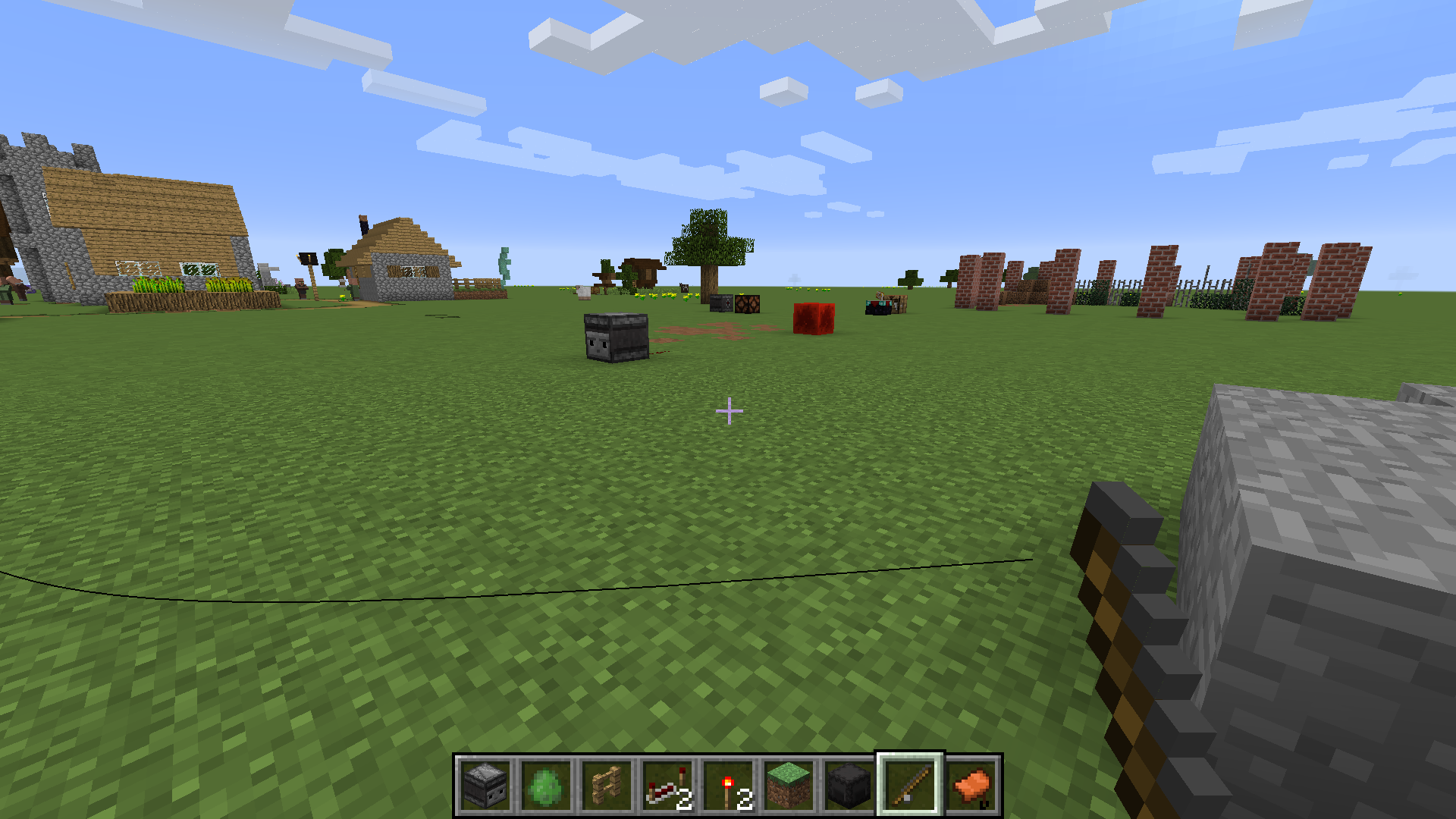 )
)
How to reproduce
- Wield a fishing rod
- Right-click it to cast a line
- Now move around a bit without reeling in
→ Notice that the fishing line keeps some distance from the rod
Linked Issues
relates to10
 MC-116379Punching with a cast fishing rod in the off-hand detaches fishing line from rod
 LowMC-148088Fishing line doesn't adjust to the player's sneaking animationLowMC-190324Fishing line renders incorrectly when casting and retrieving a fishing rod in the left handConfirmedMC-198777Fishing line doesn't connect to fishing rod correctly while in a boat and in third person viewLowMC-270173Fishing rod line positioned incorrectly in third-person while crawling/swimmingLowMC-270174Fishing rod line positioned incorrectly in all view perspectives while sleepingLowMC-6579Fishing line ignores FOV modifiersLowMC-176514Fishing Rod's Rope doesn't render correctly when riding entities (third person mode)LowMC-4490Fishing line not attached to fishing rod in third person while crouchingLowMC-175958Fishing line isn't attached to held fishing rod in first personCannot Reproduce
![[Mod] violine1101](../../../data/avatars/users/92858.png)
- Unresolved
 Ivan
Ivan- 14
- 10
- Confirmed
- Low
- Gameplay
- Items Rendering
- fishing-line fishing_rod
1.11-pre1 - 1.21
1.11-pre1 1.11 1.11.2 1.12.1 1.13.1 1.13.2 19w05a 19w06a 19w07a 1.14.4 1.16.2 1.16.3-rc1 1.16.3 1.16.4-pre1 1.16.4-pre2 1.16.4-rc1 1.16.4 20w45a 20w46a 20w48a 20w49a 20w51a 21w03a 1.16.5 21w05a 21w05b 21w06a 21w07a 21w08b 21w10a 21w14a 21w15a 21w16a 21w17a 21w18a 21w19a 21w20a 1.17-rc2 1.17 1.17.1 1.18.1 22w07a 1.21
Created Issue:
While the player is moving the fishing rod line isn't connected to a fixed spot on the rod (moves seperately)
While the player is moving the line doesn't stay connected to the same spot on the rod so it looks like it isn't connected to it (sometimes not even touching - see the attachment)
Attachments1
![[Mod] Michael Wobst](../../../data/avatars/users/37868.png)
While the player is moving the line doesn't stay connected to the same spot on the rod so it looks like it isn't connected to it (sometimes not even touching - see the attachment)
While the player is moving the line doesn't stay connected to the same spot on the rod so it looks like it isn't connected to it (sometimes not even touching - see the attachment
)
While the player is moving the fishing rod line isn't connected to a fixed spot on the rod (moves seperately)While the player is moving the fishing rod line isn't connected to a fixed spot on the rod (moves separately)

![[Mod] Asteraoth](../../../data/avatars/users/92886.png)

![[Mojang] Nathan Adams](../../../data/assets/gravatar/dinnerbone.png)
![[Mod] LateLag](../../../data/avatars/users/92884.png)
![[Helper] Jack McKalling](../../../data/avatars/users/92859.png)
![[Mod] Les3awe](../../../data/avatars/users/79847.png)
relates to
![[Helper] Johnibur](../../../data/avatars/users/28381.png)
relates to
![[Bot] Arisa](../../../data/avatars/users/43007.png)
relates to

![[Mojang] slicedlime](../../../data/assets/gravatar/slicedlime.jpeg)
is blocked by
While the player is moving the line doesn't stay connected to the same spot on the rod
so it looks like it isn't connected to it (sometimes not even touching - see the attachmentThe Bug
While the player is moving, the fishing line doesn't stay connected to the same spot on the rod. It looks like it isn't connected to it (sometimes not even touching - see the attachment
How to reproduce
- Wield a fishing rod
- Right-click it to cast a line
- Now move around a bit without reeling in
→
Low![[Mod] turbo](../../../data/avatars/users/92867.png)
relates to
relates to
![[Mod] Jarl-Penguin](../../../data/avatars/users/92849.png)
![[Mod] Greymagic27](../../../data/avatars/users/92875.png)
Does MC-109884 describe your issue?
The position that the game renders the fishing line changes depending on what aspect ratio the game is being played in. Correct behaviour only occurs with a resolution that has an aspect ratio of ~16:9.
Note: Issue occurs no matter what FOV is set. Screenshots taken at 80 FOV.
What I expected to happen was...:
The fishing line should take the aspect ratio into account when determining its position on screen.
What actually happened was...:
Fishing line is rendered offset to left of the Fishing Rod when playing with an aspect ratio with a lower width, such as 4:3. Fishing line is rendered offset to the right of the Fishing Rod when playing with an aspect ratio with a higher width, such as 21:9. Offset direction is reversed when the Fishing Rod is held in the left hand.
Steps to Reproduce:
1. Use Fishing Rod to throw the line.
2. Change the horizontal size of the window.
3. Notice how the fishing line's location disconnects from the Fishing Rod as the width is changed.
Possibly related to:
Also seems to be the actual issue reported in MC-190324 as the linked video's resolution of 1744x1080 has an aspect ratio with a width lower than 16:9 and I was unable to reproduce the issue in a 1920x1080 window.
![[Mod] ampolive](../../../data/avatars/users/18949.svg)
![[Mod] Jiingy](../../../data/avatars/users/91802.png)
When a player has a non-standard scale attribute and casts a fishing rod, the line will will appear detatched from the held fishing rod item.
Steps to Reproduce:
- Modify the player's scale
/attribute @p minecraft:generic.scale base set 10 - Get a fishing rod
- Cast it
→ The line is placed unrelated to the fishing rod item.
Screenshots/Videos:

Notes:
Related to MC-109884 MC-211561 MC-198777 MC-116379 MC-148088 MC-247425 MC-6579 MC-160926 MC-270174 MC-270178

Can confirm for MC 1.12.1.
Confirmed for 1.13.1.
Confirm for 1.14.4
I have seen this for a long time and I am pretty sure I can confirm this for 1.14.4. If I get the time, I will confirm for the latest snapshot of 1.15. Mojang, it would be really great if you fixed this rather old problem. It should have been fixed a long time ago and since 1.15 is dedicated to bug fixes...
Occurs in 1.16.5
Blocked from testing in 21w11a, by
MC-219849