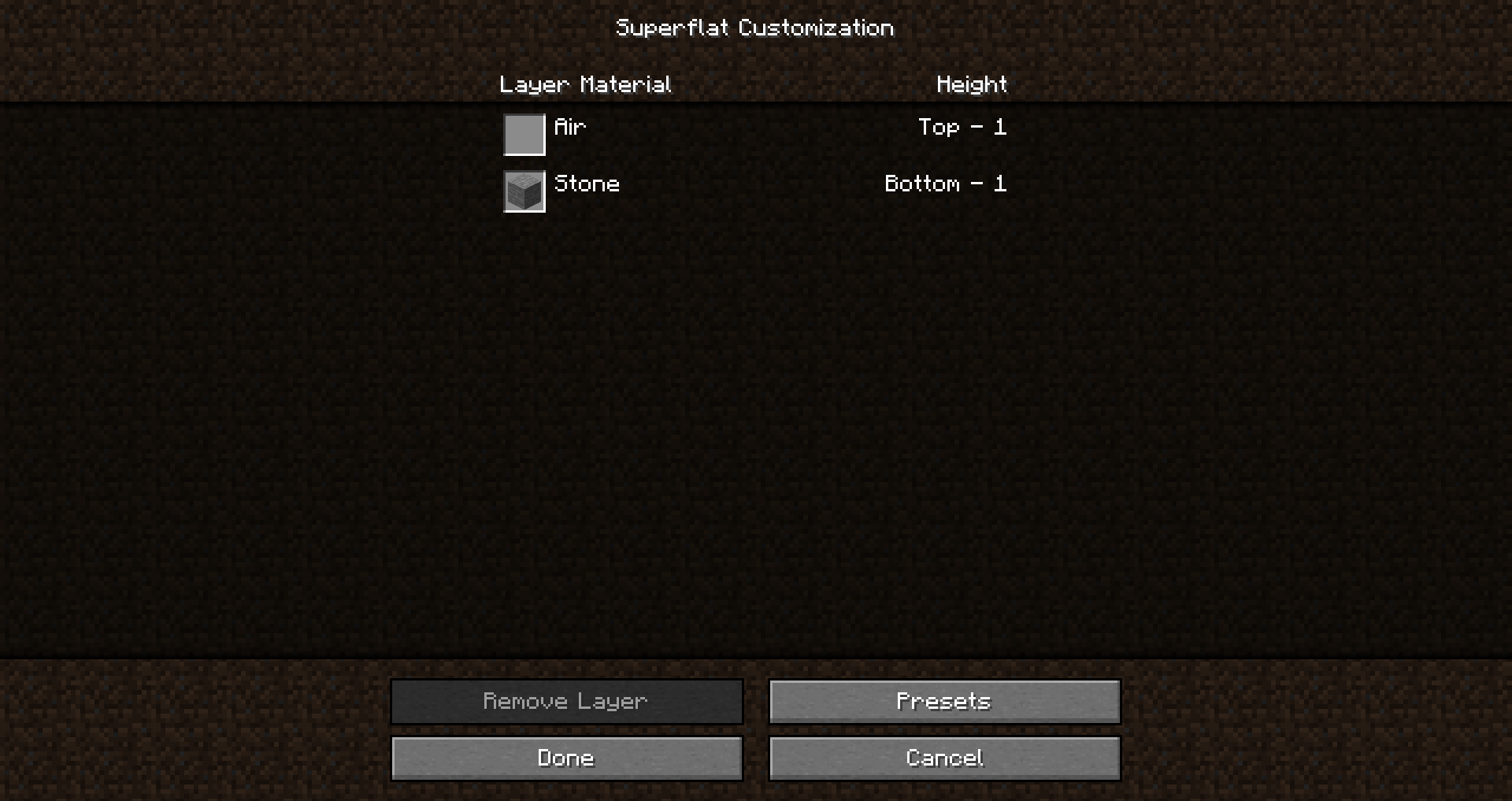
Blocks that don't exist as an item show up as "Air" in Superflat customisation GUI
What I expected to happen was...:
The name of the block to appear in the graphical list of block layers, along with either a blank icon or some representation of the texture.
What actually happened was...:
The name and the icon of the block is replaced by "Air"
Steps to Reproduce:
1. Go to Singleplayer → Create new world → More world options → Customise (with Superflat selected as the world type)
2. Enter the following preset code: minecraft:stone,minecraft:nether_portal;minecraft:plains; and select Use Preset.
Linked Issues
discovered while testing1
is duplicated by7
 MC-66728tripwire is reported as air blocks in the superflat customization menuDuplicateMC-77423Using Cake in a preset cause it to show up as airDuplicateMC-90818Frosted ice in the Superflat Customization menu displayed to the airDuplicateMC-92147Superflat menu shows portal and end_portal as air but places correct blockDuplicateMC-119169Superflat customization "hidden" blockstates show as AirDuplicateMC-141614Superflat world customization screen display "Air" for some block that have no item formDuplicateMC-244996Frosted Ice appear as Air in Superflat world presetDuplicate
relates to3
MC-169678Superflat worlds containing blocks with different associated blockitems display name of item instead of name of block LowMC-70806Blocks with a data value > 0 have missing texture in superflat customizationFixedMC-260882Crossbows summoned with an invalid projectile are "Charged with Air"Won't Fix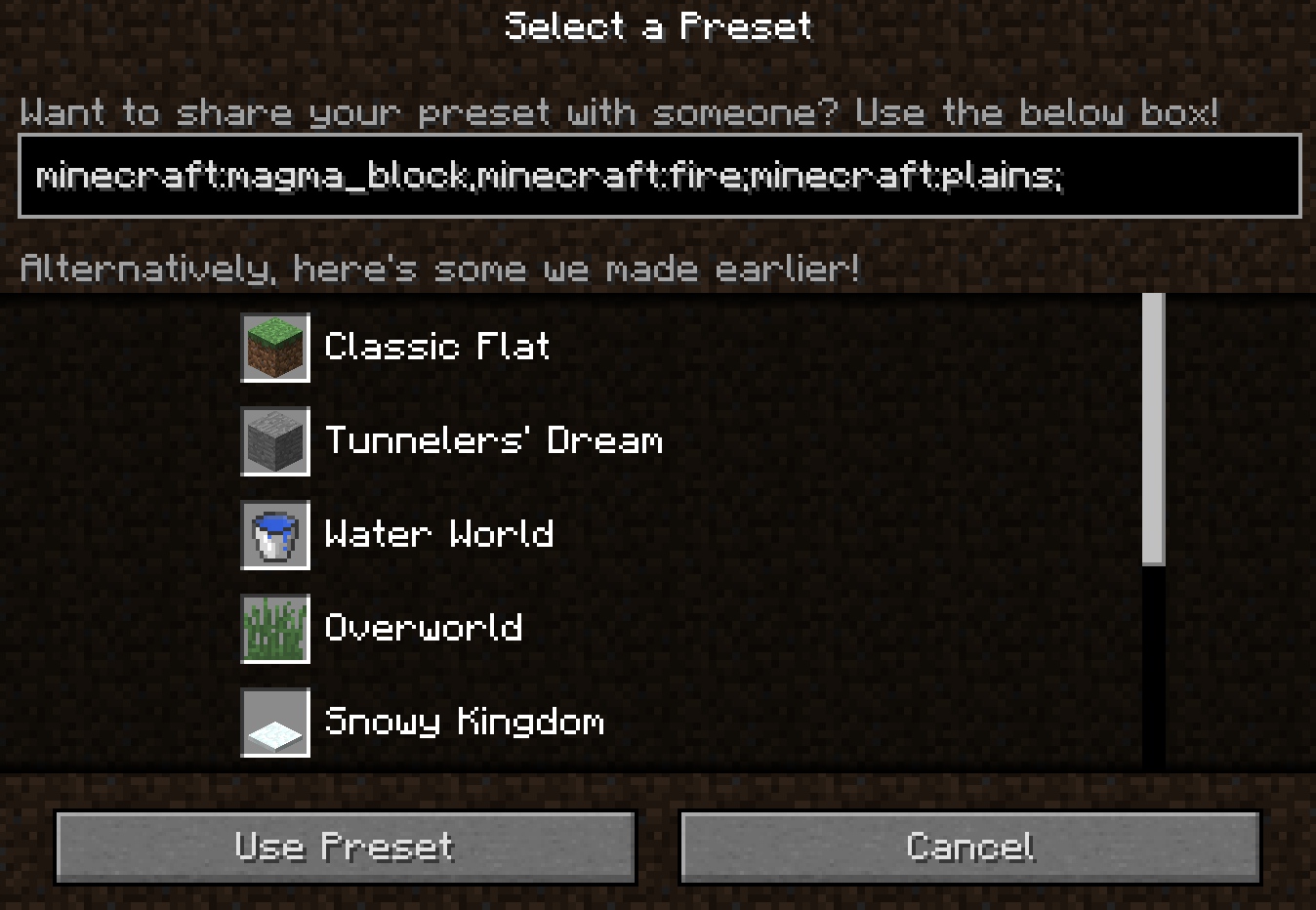

![[Mod] Avoma](../../../data/avatars/users/86198.png)
- Unresolved
![[Mod] turbo](../../../data/avatars/users/92867.png) [Mod] turbo
[Mod] turbo Kumasasa
- 23
- 15
- Confirmed
- Low
- Platform
- UI
- cake end_gateway end_portal frosted_ice nether_portal tripwire
14w06b - 1.21.3
14w06b 14w07a 14w11b 14w18b 14w26c 14w32d 1.8-pre2 1.8 1.8.1 1.8.2-pre1 1.8.2-pre6 1.8.6 1.8.8 15w32c 15w42a 15w45a 1.10.2 16w32b 16w40a 16w42a 1.11.2 17w06a 1.12.1 1.13.1 1.13.2 18w48a 18w48b 18w49a 18w50a 19w02a 19w08b 19w09a 19w11a 20w17a 1.16-pre2 1.16.2 1.16.3-rc1 1.16.3 1.16.4 20w48a 20w51a 21w03a 21w05b 21w06a 21w07a 21w17a 1.17 1.17.1 1.18 1.18.2 22w11a 22w19a 1.19 1.19.2 1.19.3 23w03a 1.19.4-pre2 1.19.4 23w43b 1.20.3-rc1 1.21.1 24w38a 1.21.3
Created Issue:
Blocks don't exist as an item dont show up as "Air" in Superflat customisation GUI
What I expected to happen was...:
The name of the block to appear in the graphical list of block layers, along with either a blank icon or some representation of the texture.What actually happened was...:
The name of the block was replaced by "Air"Steps to Reproduce:
1. Go to Singleplayer → Create new world → More world options → Customise (with Superflat selected as the world type)
2. Enter the following preset code: 2;92;1; and select Use Preset.Environment
Win7-64
Java7U51
Attachments2
2014-02-09_10.18.36.png
discovered while testing
Blocks don't exist as an itemdontshow up as "Air" in Superflat customisation GUIBlocks that don't exist as an item show up as "Air" in Superflat customisation GUI
What I expected to happen was...:
The name of the block to appear in the graphical list of block layers, along with either a blank icon or some representation of the texture.What actually happened was...:
The name of the block was replaced by "Air"Steps to Reproduce:
1. Go to Singleplayer → Create new world → More world options → Customise (with Superflat selected as the world type)
2. Enter the following preset code:2;92;1; and select Use Preset.What I expected to happen was...:
The name of the block to appear in the graphical list of block layers, along with either a blank icon or some representation of the texture.What actually happened was...:
The name of the block was replaced by "Air"Steps to Reproduce:
1. Go to Singleplayer → Create new world → More world options → Customise (with Superflat selected as the world type)
2. Enter the following preset code: 2;92;1; or 3;minecraft:cake;1; and select Use Preset.
What I expected to happen was...:
The name of the block to appear in the graphical list of block layers, along with either a blank icon or some representation of the texture.What actually happened was...:
The name of the blockwas replaced by "Air"Steps to Reproduce:
1. Go to Singleplayer → Create new world → More world options → Customise (with Superflat selected as the world type)
2. Enter the following preset code: 2;92;1; or 3;minecraft:cake;1; and select Use Preset.What I expected to happen was...:
The name of the block to appear in the graphical list of block layers, along with either a blank icon or some representation of the texture.What actually happened was...:
The name and the icon of the block is replaced by "Air"Steps to Reproduce:
1. Go to Singleplayer → Create new world → More world options → Customise (with Superflat selected as the world type)
2. Enter the following preset code: 2;92;1; or 3;minecraft:cake;1; and select Use Preset.
is duplicated by
is duplicated by
![[Mod] redstonehelper](../../../data/avatars/users/10122.svg)
is duplicated by
is duplicated by

relates to
![[Mod] Michael Wobst](../../../data/avatars/users/37868.png)

is duplicated by
![[Mod] tryashtar](../../../data/avatars/users/41963.png)

Can -
not- reproduce for 1.13.1. Now it shows the Classic preset, not Air. Also, if you remove the first 3; the "Cake preset" will work.
![[Mod] Asteraoth](../../../data/avatars/users/92886.png)
is duplicated by

![[Mojang] Nathan Adams](../../../data/assets/gravatar/dinnerbone.png)
![[Mod] CubeTheThird](../../../data/assets/gravatar/cubethethird.jpeg)
![[Mod] NeunEinser](../../../data/avatars/users/39263.png)

What I expected to happen was...:
The name of the block to appear in the graphical list of block layers, along with either a blank icon or some representation of the texture.What actually happened was...:
The name and the icon of the block is replaced by "Air"Steps to Reproduce:
1. Go to Singleplayer → Create new world → More world options → Customise (with Superflat selected as the world type)
2. Enter the following preset code: 2;92;1; or 3;minecraft:cake;1; and select Use Preset.What I expected to happen was...:
The name of the block to appear in the graphical list of block layers, along with either a blank icon or some representation of the texture.What actually happened was...:
The name and the icon of the block is replaced by "Air"Steps to Reproduce:
1. Go to Singleplayer → Create new world → More world options → Customise (with Superflat selected as the world type)
2. Enter the following preset code: minecraft:stone,minecraft:nether_portal;minecraft:plains; and select Use Preset.
![[Mod] Chandler](../../../data/assets/gravatar/triwonder81.png)
![[Helper] Johnibur](../../../data/avatars/users/28381.png)
![[Mod] Les3awe](../../../data/avatars/users/79847.png)
![[Mod] markderickson](../../../data/avatars/users/18946.svg)
![[Mojang] Adrian Östergård](../../../data/assets/gravatar/nighter.jpeg)
![[Mod] OcelotOnesie](../../../data/avatars/users/43220.png)
is duplicated by
![[Mod] ampolive](../../../data/avatars/users/18949.svg)
relates to
![[Mojang] slicedlime](../../../data/assets/gravatar/slicedlime.jpeg)
![[Mod] ManosSef](../../../data/avatars/users/61702.png)
But testing this gave another issue : MC-48058 (Hi-jacked most of your ticket  )
)
This issue duplicates MC-48058
Relates to MC-48058
Thank you for your report!
However, this issue has been resolved as a Duplicate of MC-48058.
It has been linked to this report. If you have additional information, please add it to that report.
Please search before reporting, as it's likely that one exists already.
Quick Links:
📓 Issue Guidelines – 💬 Community Support – 📧 Customer Support – 📖 Game Wiki
Duplicate of MC-48058
When creating a superflat world out of blocks which do not have direct item counterparts, but do have dedicated items to place them (such as fluids and crops), since they do not have an actual block icon the item is displayed instead. However, the name of the item is also displayed as well, which can lead to nonsensical results; for example, a superflat world with minecraft:water in it is a world with a layer of water, not a world with a layer of water buckets.
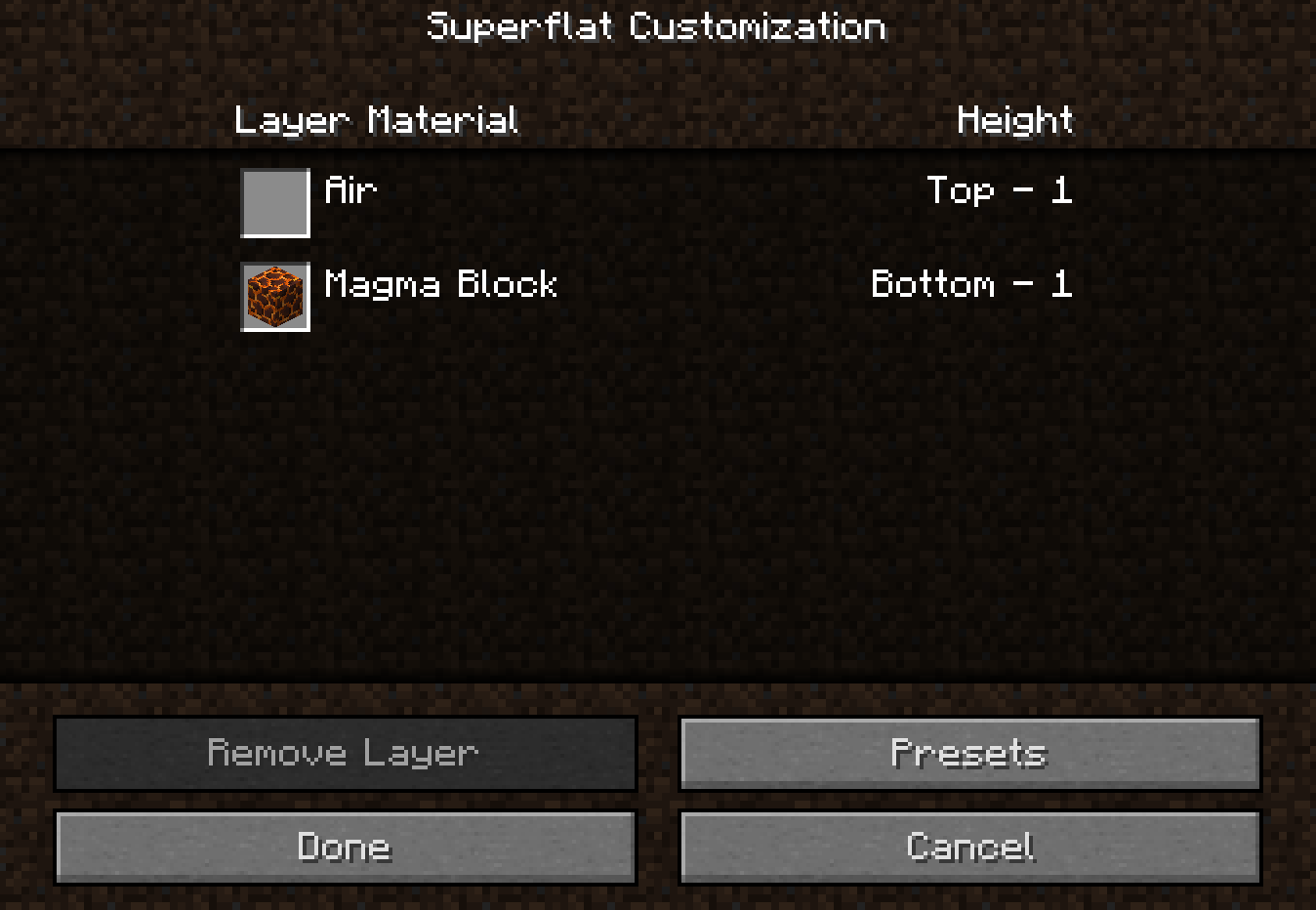
Fire appears to be an exception to this rule; it is displayed as air instead of flint and steel.
As all blocks should have translation strings and associated names, a fix would be to only display the item in the inventory slot to the left, and the actual name of the block to the right. This would also fix the names for MC-48058.
To reproduce, use the following preset:
minecraft:carrots,minecraft:potatoes,minecraft:beetroots,minecraft:wheat,minecraft:melon_stem,minecraft:pumpkin_stem,minecraft:tripwire,minecraft:water,minecraft:lava,minecraft:sweet_berry_bush,minecraft:cocoa,minecraft:fire;minecraft:swamp;village
This will probably crash the world shortly after load due to invalid block positions, however the world can be subsequently recreated to test the bug without entering the world.
Duplicate of MC-48058.
![[Bot] Arisa](../../../data/avatars/users/43007.png)
Thank you for your report!
We're tracking this issue in MC-48058, so this ticket is being resolved and linked as a duplicate.
If you would like to add a vote and any extra information to the main ticket it would be appreciated.
If you haven't already, you might like to make use of the search feature to see if the issue has already been mentioned.
Quick Links:
📓 Bug Tracker Guidelines – 💬 Community Support – 📧 Mojang Support
📓 Project Summary – ✍️ Feedback and Suggestions – 📖 Game Wiki
– I am a bot. This action was performed automatically! The ticket was resolved by one of our moderators, and I left this message to give more information to you.
The bug
Unlike many other similar blocks, fire is not assigned a dedicated item form. This results in several issues arising which are not present for other blocks:
- Nothing is returned when using Pick Block on fire (
MC-167842) - Fire is displayed as "Air" in the Superflat menu (MC-48058)
- Endermen which hold fire do not drop anything beyond their usual drops when killed (
MC-206449) - The amount of fires put out (i.e. fire blocks "broken") is not displayed at all in Statistics. There exists a statistic intended to track this (according to the comments of
MC-36191), but this never increments. - Blocks which have multiple block states can have a BlockStateTag assigned to their item form which will result in the item placing the block with a specified block state combination. However, despite fire having many block states to choose from, the lack of an assigned item form means that this tag can never be used to get a desired state combination for fire from an item that places it.
How to reproduce
Since this ticket concerns many issues that arise due to a central problem, there exist different ways to reproduce each sub-issue. A brief demonstration of some of these cases follow:
- Attempt to use Pick Block on fire, and note that nothing is returned
- Paste the following Superflat preset into the custom preset text box, and note the "Air" entry despite no air being specified in the preset:
minecraft:netherrack,minecraft:fire;minecraft:the_void
- Execute the following command to summon an enderman holding fire and kill it, noting that it can only drop experience and ender pearls, and nothing else:
/summon minecraft:enderman ~ ~ ~ {carriedBlockState:{Name:"minecraft:fire"},Health:1} - Put out a large amount of fires in a Survival world, then open Statistics and search for any fire-related entries; ultimately there will be no relevant cases
- Give yourself a fire charge (item most fitting for fire's item form) with the following command and place it, and use F3 to check the age state to note whether or not it's actually 7:
/give @p minecraft:fire_charge{BlockStateTag:{age:"7"}}
Expected results
Fire would have an associated item form.
Actual results
Fire does not have an item form. As a result, all of the above issues arise.
How to fix
The best candidate for fire's item form would be the fire charge, as it places fire on a right-click and is consumed upon use, unlike a flint and steel which has durability.
This matches up with other items that were assigned to the role of the item form of a block in 17w47a, such as seeds being tied to their respective crops, cases where distinct "floor" and "wall" variants neccessitated different item forms (e.g. heads, signs, banners), and other blocks which had a "different" item form beforehand (e.g. repeaters, comparators, cauldrons, cake, flower pots, redstone dust) being merged.
Plenty of other items were also given item forms that seem like a stretch when comapred to the fire charge being the item for fire; for example, buckets being made to be the item form of their respective fluids, despite not being entirely consumed upon use (and also likely being partially responsible for MC-205563).
Can confirm
Also affects 07a
Confirmed for 1.8pre2
Confirmed for
Confirmed for
Still doesn't work with frosted_ice and end_portal. Haven't checked others.
Yes, sorry for that. Also does not work with end_gateway. However, the preset in the description isn't "working", it shows the "Classic Preset".
Confirmed for 19w02a
Confirmed for 19w11a
Confirmed in 1.16-pre2. Since the ticket was last updated quite a long time ago, I request being the reporter of it, I'll update it accordingly.
Can confirm in 20w48a.
Can confirm in 20w51a.
Can confirm in 21w03a.
Can confirm in 21w05b.
Can confirm in 21w06a.
Can confirm in 21w07a.
Video attached.
Can confirm in 21w17a.
Can confirm in 1.17.
Can confirm in 1.17.1.
Can confirm in 1.18.
Can confiirm in 1.18.2 and 22w19a.
Can confirm in 1.19.
Can confirm in 1.19.2.
Confirmed for 1.19.3.
Perhaps a good fix for the lack of icon would be "if there's no item form, show the block marker texture". The text should just insert the block translation keys directly, rather than look for an item.
Can confirm in 23w03a
Can confirm in 1.19.4
Confirmed for 1.20.2; requesting ownership, seeing kumasasa's inactivity.