Block cracks remain on blocks in adventure mode when losing focus of them
The Bug:
Block cracks remain on blocks in adventure mode when losing focus of them
Steps to Reproduce:
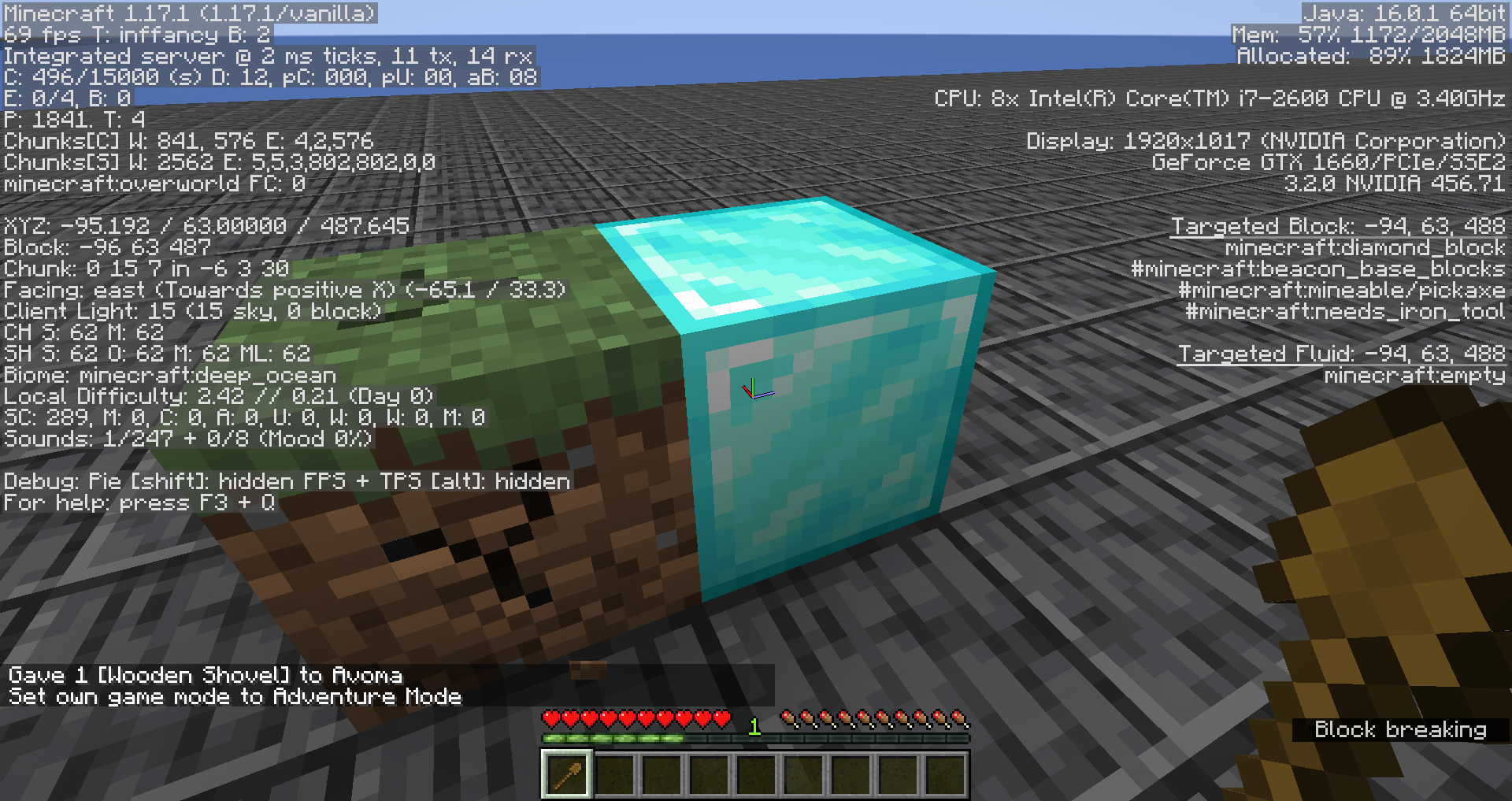
- Place a grass block and a diamond block next to one another.
- Switch into adventure mode.
- Give yourself a shovel that can destroy grass blocks by using the command provided below.
/give @s minecraft:wooden_shovel[can_break={blocks:"minecraft:grass_block"}] - Start breaking the grass block but quickly move your focus to the diamond block, whilst keeping the Attack/Destroy button held down.
- Take note as to whether or not block cracks remain on blocks in adventure mode when losing focus of them
Observed Behavior:
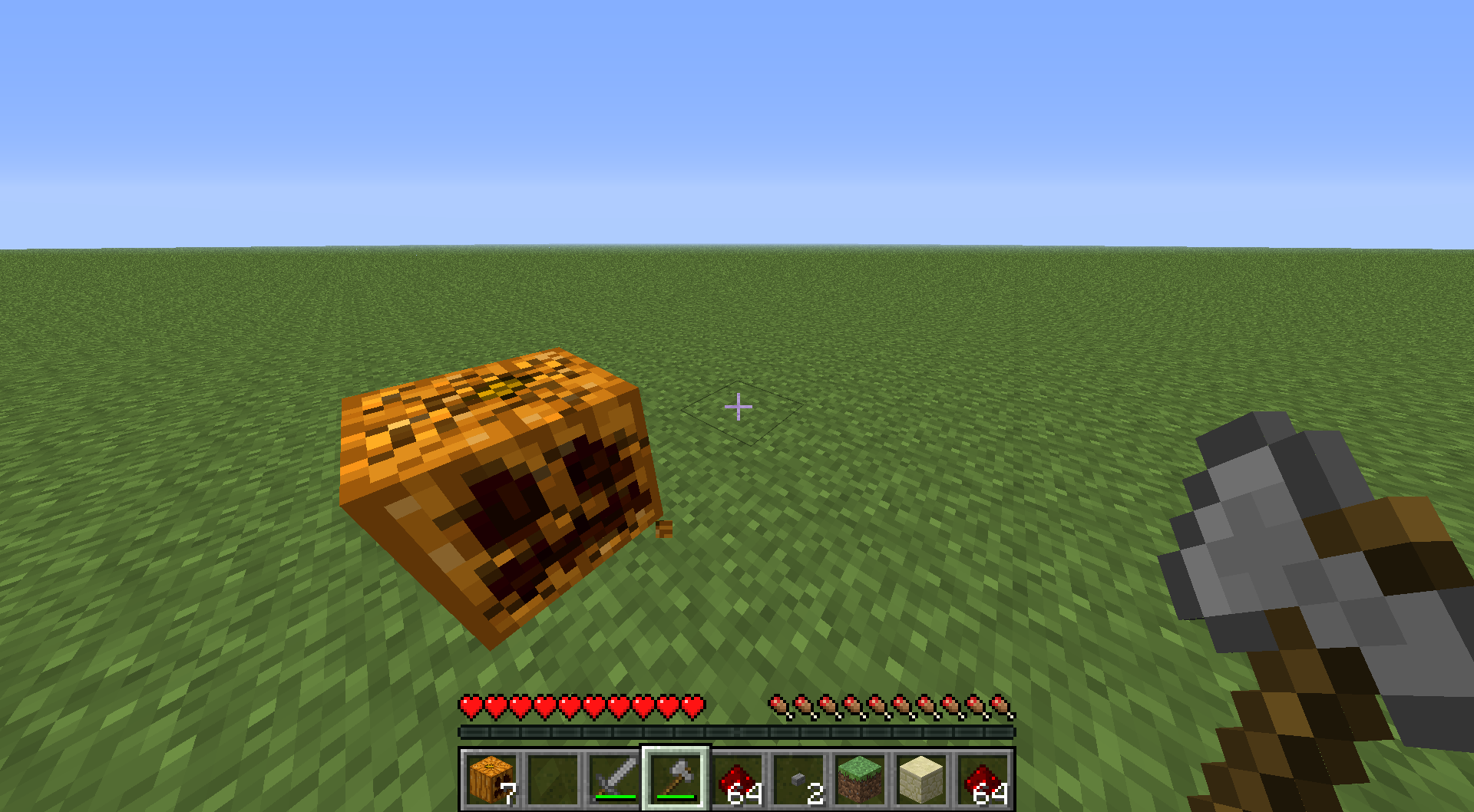
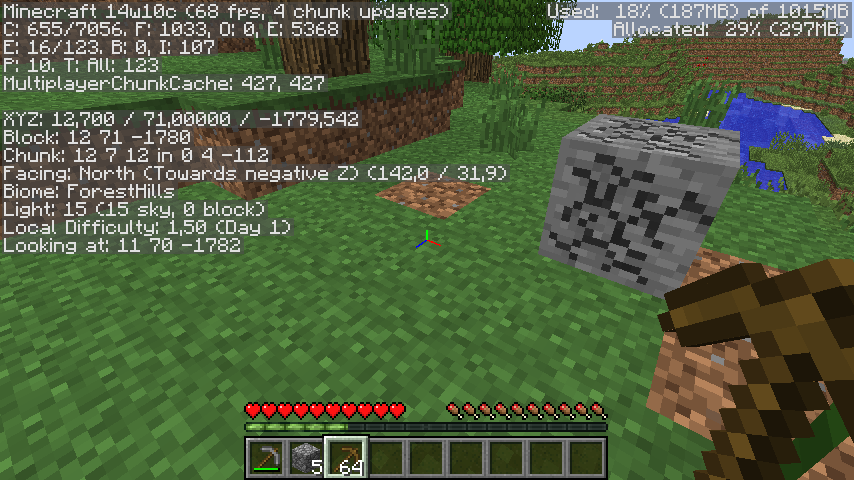
Block cracks remain on blocks when losing focus of them.
Expected Behavior:
Block cracks would not remain on blocks when losing focus of them.
Linked Issues
is duplicated by13
 MC-8866Breaking snow layersDuplicateMC-11395Glass Breaking Adventure Mode, than look to another block still looks a bit brokenDuplicateMC-11926Breaking animation bugs on glass in adventure modeDuplicateMC-29002Breaking can be "Paused" in Adventure Mode for transparent blocksDuplicateMC-42499Ice/Glass breaking glitchDuplicateMC-42511Adventure mode breaking things!DuplicateMC-47196Mining blocks then mousing off keeps crack graphic in adventure modeDuplicateMC-51939block damage maintained when looking away from block in adventure modeDuplicateMC-53211when breaking item in adventuremode with specific item leaves breaking state.DuplicateMC-60104Animation for Block Breaking StickingDuplicateMC-74899Mining blocks in Adventure game mode will leave cracks if you stop mining the blockDuplicateMC-90858If You Are Breaking A Block In Adventure Mode And the Block Changes To A Block You Can't Break, The Cracks Will GlitchDuplicateMC-96667Signs can be broken with swords in Adventure modeDuplicate
relates to9
MC-73786Static breaking cracks using specific tools and consumables LowMC-255057Client/server desync when breaking block from continueDestroyBlock
 NormalMC-19676Breaking particles, sounds, and block cracks can be created in adventure modeLowMC-69865Block breaking is not canceled when losing focus of a blockNormalMC-157404Breaking blocks that can be instantly destroyed slowly breaks the targeted block behind themLowMC-6315Adventure mode animation not playing after 1 swing when breaking insta-breakable blocksInvalidMC-62124Cracks remain on blocks if the mouse is getting moved to or from a chest or a signFixedMC-1378Adventure mode graphical issue breaking blocksFixedMC-173876Block cracking state not reset upon rejoining a worldConfirmed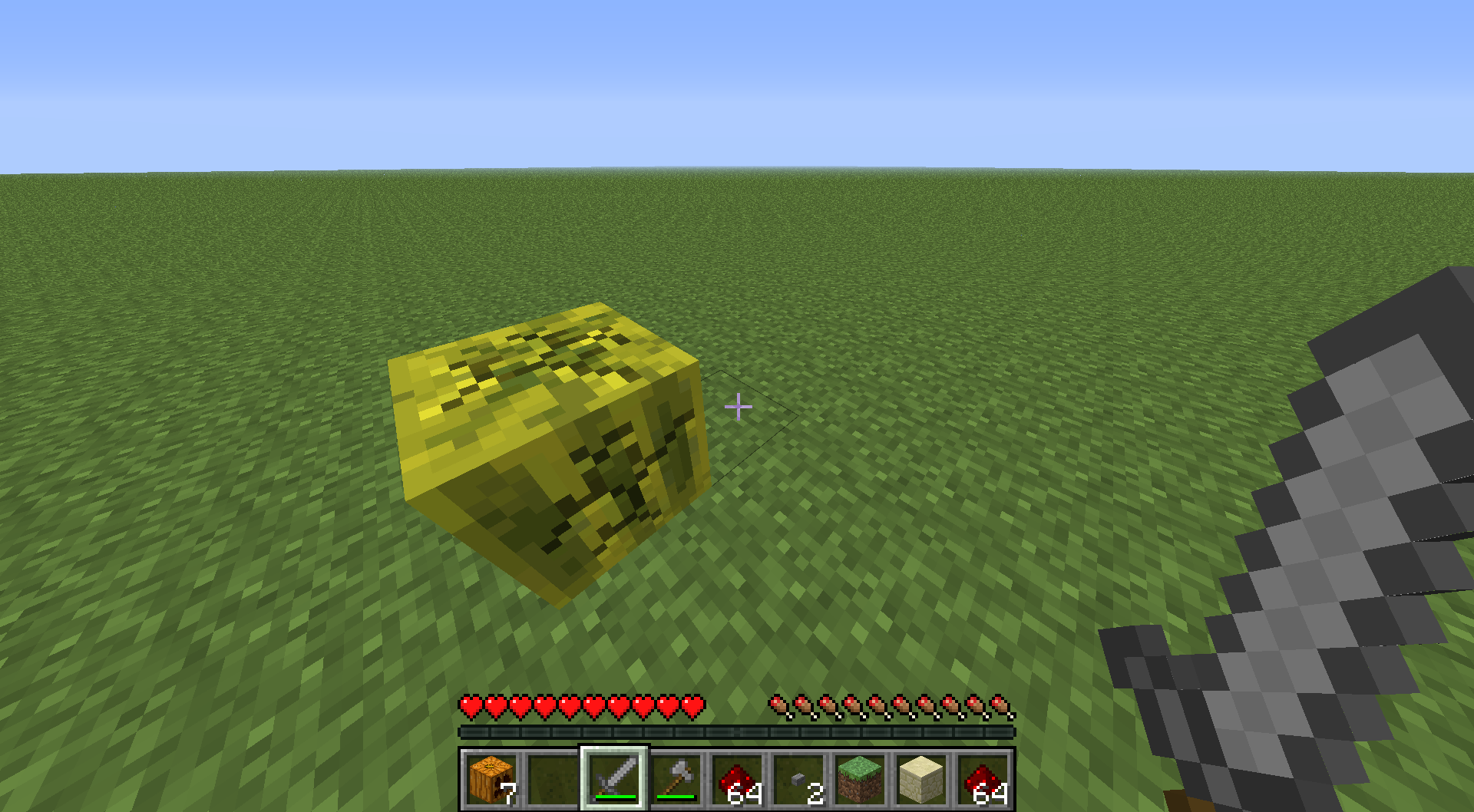
- Unresolved
![[Mod] Avoma](../../../data/avatars/users/86198.png) [Mod] Avoma
[Mod] Avoma Dylan Hendrickson
- 30
- 10
- Confirmed
- Low
- Platform
- Block states Rendering
- Adventure
1.4.7 - 1.21.4
1.4.7 13w04a 13w10b 1.5 13w11a 1.5.2 1.6.1 1.6.2 1.6.4 1.7.1 1.7.2 13w48a 13w48b 13w49a 1.7.3 1.7.4 1.7.5 14w11b 14w27b 1.8 1.8.1 1.8.8 15w42a 16w05b 1.10.2 16w38a 1.11.2 1.13.1 1.13.2 19w04b 19w05a 1.15.2 20w20b 20w22a 1.16.1 20w30a 1.16.2-pre1 1.16.2-rc1 1.16.2 1.16.3-rc1 1.16.3 1.16.4-pre2 1.16.4 20w46a 20w48a 20w51a 21w03a 1.16.5 21w05a 21w05b 21w06a 21w07a 21w08b 21w10a 21w11a 21w13a 21w14a 21w15a 21w16a 21w17a 21w19a 21w20a 1.17-pre1 1.17-pre3 1.17-pre4 1.17-pre5 1.17-rc1 1.17-rc2 1.17 1.17.1-pre1 1.17.1-pre2 1.17.1-pre3 1.17.1-rc1 1.17.1-rc2 1.17.1 21w37a 21w38a 21w40a 21w41a 21w42a 21w43a 21w44a 1.18-pre1 1.18 1.18.1 22w03a 22w05a 1.18.2-rc1 1.18.2 1.19 1.19.1 1.19.2 22w43a 1.19.3 1.19.4 1.20 1.20.1 23w31a 23w33a 24w11a 24w12a 1.20.6 1.21-pre1 1.21 1.21.1 1.21.2-pre3 1.21.3 1.21.4
Created Issue:
Cracks on blocks remain in adventure mode
When you are in the middle of breaking a block in adventure mode and look away from it, the cracks remain. If you then look back at it you resume breaking it where you left off.
What I expected to happen was...:
The cracks should disappear when you stop looking at a block.What actually happened was...:
The cracks remain, and progress towards breaking the block also remains.Steps to Reproduce:
1. Place a block.
2. Be in adventure mode.
3. Begin breaking the block with the correct tool, then look to a different block (that requires a different tool) (hold the mouse button down).
4. The cracks remain.
5. Look back at the block.
6. You keep the progress towards breaking it.Environment
Windows 7
Attachments2
- Unresolved
- Open
- Unconfirmed
- Survival
- adventure_mode block breaking tool
- 1.4.7

is duplicated by
is duplicated by
When you are in the middle of breaking a block in adventure mode and look away from it, the cracks remain. If you then look back at it you resume breaking it where you left off.
What I expected to happen was...:
The cracks should disappear when you stop looking at a block.What actually happened was...:
The cracks remain, and progress towards breaking the block also remains.Steps to Reproduce:
1. Place a block.
2. Be in adventure mode.
3. Begin breaking the block with the correct tool, then look to a different block (that requires a different tool) (hold the mouse button down).
4. The cracks remain.
5. Look back at the block.
6. You keep the progress towards breaking it.
is duplicated by
relates to
relates to
is duplicated by
is duplicated by
is duplicated by

is duplicated by
is duplicated by

relates to
is duplicated by
relates to

is duplicated by
is duplicated by
is duplicated by
relates to
is duplicated by
is duplicated by
![[Mod] Michael Wobst](../../../data/avatars/users/37868.png)

relates to
relates to
![[Mod] Asteraoth](../../../data/avatars/users/92886.png)

When you are in the middle of breaking a block in adventure mode and look away from it, the cracks remain. If you then look back at it you resume breaking it where you left off.
What I expected to happen was...:
The cracks should disappear when you stop looking at a block.What actually happened was...:
The cracks remain, and progress towards breaking the block also remains.Steps to Reproduce:
1. Place a block.
2. Be in adventure mode.
3. Begin breaking the block with the correct tool, then look to a different block (that requires a different tool) (hold the mouse button down).
4. The cracks remain.
5. Look back at the block.
6. You keep the progress towards breaking it.The bug
When you are in the middle of breaking a block in adventure mode and look away from it, the cracks remain. If you then look back at it you resume breaking it where you left off.
How to reproduce
- Place a grass block and a glass block next to it.
- Run:
/gamemode adventure /give @s minecraft:wooden_shovel{CanDestroy:["minecraft:grass_block"]}- Start breaking the grass block but quickly move to the glass block while holding down.
→Cracks remains on the block and you keep your progress.
![[Mojang] Nathan Adams](../../../data/assets/gravatar/dinnerbone.png)
relates to
![[Helper] Lord_Quadrato](../../../data/avatars/users/26105.png)
![[Mod] NeunEinser](../../../data/avatars/users/39263.png)
duplicates
![[Bot] Arisa](../../../data/avatars/users/43007.png)
is duplicated by
relates to
relates to
is duplicated by
duplicates
relates to
relates to
relates to
![[Mod] Jarl-Penguin](../../../data/avatars/users/92849.png)
![[Mod] Chandler](../../../data/assets/gravatar/triwonder81.png)
![[Helper] Jack McKalling](../../../data/avatars/users/92859.png)
![[Mod] SPGoding](../../../data/avatars/users/44622.png)
![[Helper] Johnibur](../../../data/avatars/users/28381.png)
![[Mojang] Adrian Östergård](../../../data/assets/gravatar/nighter.jpeg)
The bug
When you are in the middle of breaking a block in adventure mode and look away from it, the cracks remain. If you then look back at it you resume breaking it where you left off.
How to reproduce
- Place a grass block and a glass block next to it.
- Run:
/gamemode adventure /give @s minecraft:wooden_shovel{CanDestroy:["minecraft:grass_block"]}- Start breaking the grass block but quickly move to the glass block while holding down.
→The Bug:
Cracks on blocks remain in adventure mode.
Steps to Reproduce:
- Place a grass block and a diamond block next to one another.
- Switch into adventure mode.
- Give yourself a shovel that can destroy grass blocks.
/give @s minecraft:wooden_shovel{CanDestroy:["minecraft:grass_block"]}
- Start breaking the grass block but quickly move your focus to the diamond block, whilst keeping the Attack/Destroy button held down.
- →
The Bug:
Cracks on blocks remain in adventure mode.
Steps to Reproduce:
- Place a grass block and a diamond block next to one another.
- Switch into adventure mode.
- Give yourself a shovel that can destroy grass blocks.
/give @s minecraft:wooden_shovel{CanDestroy:["minecraft:grass_block"]}
- Start breaking the grass block but quickly move your focus to the diamond block, whilst keeping the Attack/Destroy button held down.
- →
The Bug:
Cracks on blocks remain in adventure mode.
Steps to Reproduce:
- Place a grass block and a diamond block next to one another.
- Switch into adventure mode.
- Give yourself a shovel that can destroy grass blocks.
- Start breaking the grass block but quickly move your focus to the diamond block, whilst keeping the Attack/Destroy button held down.
- →
The Bug:
Cracks on blocks remain in adventure mode.
Steps to Reproduce:
- Place a grass block and a diamond block next to one another.
- Switch into adventure mode.
- Give yourself a shovel that can destroy grass blocks.
- Start breaking the grass block but quickly move your focus to the diamond block, whilst keeping the Attack/Destroy button held down.
- →
Expected Behavior:
The expected behavior would be that cracks on blocks would not remain in adventure mode.
The Bug:
Cracks on blocks remain in adventure mode.
Steps to Reproduce:
- Place a grass block and a diamond block next to one another.
- Switch into adventure mode.
- Give yourself a shovel that can destroy grass blocks.
- Start breaking the grass block but quickly move your focus to the diamond block, whilst keeping the Attack/Destroy button held down.
- →
Expected Behavior:
The expected behavior would be that cracks on blocks would not remain in adventure mode.The Bug:
Cracks on blocks remain in adventure mode.
Steps to Reproduce:
- Place a grass block and a diamond block next to one another.
- Switch into adventure mode.
- Give yourself a shovel that can destroy grass blocks.
- Start breaking the grass block but quickly move your focus to the diamond block, whilst keeping the Attack/Destroy button held down.
Expected Behavior:
Cracks on blocks remain in adventure mode.
Expected Behavior:
Cracks on blocks would not remain in adventure mode.
The Bug:
Cracks on blocks remain in adventure mode.
Steps to Reproduce:
- Place a grass block and a diamond block next to one another.
- Switch into adventure mode.
- Give yourself a shovel that can destroy grass blocks.
- Start breaking the grass block but quickly move your focus to the diamond block, whilst keeping the Attack/Destroy button held down.
Expected Behavior:Cracks on blocks remain in adventure mode.
Expected Behavior:
Cracks on blocks would not remain in adventure mode.
The Bug:
Cracks on blocks remain in adventure mode.
Steps to Reproduce:
- Place a grass block and a diamond block next to one another.
- Switch into adventure mode.
- Give yourself a shovel that can destroy grass blocks.
- Start breaking the grass block but quickly move your focus to the diamond block, whilst keeping the Attack/Destroy button held down.
Observed Behavior:
Cracks on blocks remain in adventure mode.
Expected Behavior:
Cracks on blocks would not remain in adventure mode.
The Bug:
Cracks on blocks remain in adventure mode.
Steps to Reproduce:
- Place a grass block and a diamond block next to one another.
- Switch into adventure mode.
- Give yourself a shovel that can destroy grass blocks.
- Start breaking the grass block but quickly move your focus to the diamond block, whilst keeping the Attack/Destroy button held down.
Observed Behavior:
Cracks on blocks remain in adventure mode.
Expected Behavior:
Cracks on blocks would not remain in adventure mode.
The Bug:
Cracks on blocks remain in adventure mode.
Steps to Reproduce:
- Place a grass block and a diamond block next to one another.
- Switch into adventure mode.
- Give yourself a shovel that can destroy grass blocks.
- Start breaking the grass block but quickly move your focus to the diamond block, whilst keeping the Attack/Destroy button held down.
- Take note as to whether or not cracks on blocks remain in adventure mode.
Observed Behavior:
Cracks on blocks remain in adventure mode.
Expected Behavior:
Cracks on blocks would not remain in adventure mode.
![[Mod] ampolive](../../../data/avatars/users/18949.svg)
relates to
The Bug:
Crackson blocksremainin adventure mode.Steps to Reproduce:
- Place a grass block and a diamond block next to one another.
- Switch into adventure mode.
- Give yourself a shovel that can destroy grass blocks.
- Start breaking the grass block but quickly move your focus to the diamond block, whilst keeping the Attack/Destroy button held down.
- Take note as to whether or not cracks on blocks remain in adventure mode.
Observed Behavior:
Cracks on blocks remain in adventure mode.Expected Behavior:
Cracks on blocks would not remaininadventure mode.The Bug:
Block cracks remain on blocks in adventure mode when losing focus of them
Steps to Reproduce:
- Place a grass block and a diamond block next to one another.
- Switch into adventure mode.
- Give yourself a shovel that can destroy grass blocks by using the command provided below.
/give @s minecraft:wooden_shovel{CanDestroy:["minecraft:grass_block"]}- Start breaking the grass block but quickly move your focus to the diamond block, whilst keeping the Attack/Destroy button held down.
- Take note as to whether or not block cracks remain on blocks in adventure mode when losing focus of them
Observed Behavior:
Block cracks remain on blocks when losing focus of them.
Expected Behavior:
Block cracks would not remain on blocks when losing focus of them.
Crackson blocksremainin adventure modeBlock cracks remain on blocks in adventure mode when losing focus of them
![[Mojang] slicedlime](../../../data/assets/gravatar/slicedlime.jpeg)
The Bug:
Block cracks remain on blocks in adventure mode when losing focus of them
Steps to Reproduce:
- Place a grass block and a diamond block next to one another.
- Switch into adventure mode.
- Give yourself a shovel that can destroy grass blocks by using the command provided below.
/give @s minecraft:wooden_shovel{CanDestroy:["minecraft:grass_block"]}- Start breaking the grass block but quickly move your focus to the diamond block, whilst keeping the Attack/Destroy button held down.
- Take note as to whether or not block cracks remain on blocks in adventure mode when losing focus of them
Observed Behavior:
Block cracks remain on blocks when losing focus of them.
Expected Behavior:
Block cracks would not remain on blocks when losing focus of them.
The Bug:
Block cracks remain on blocks in adventure mode when losing focus of them
Steps to Reproduce:
- Place a grass block and a diamond block next to one another.
- Switch into adventure mode.
- Give yourself a shovel that can destroy grass blocks by using the command provided below.
/give @s minecraft:wooden_shovel[can_break={blocks:"minecraft:grass_block"}]- Start breaking the grass block but quickly move your focus to the diamond block, whilst keeping the Attack/Destroy button held down.
- Take note as to whether or not block cracks remain on blocks in adventure mode when losing focus of them
Observed Behavior:
Block cracks remain on blocks when losing focus of them.
Expected Behavior:
Block cracks would not remain on blocks when losing focus of them.
Duplicate of MC-8472, please use the search function to see if your bug has already been submitted. Currently over 50% of tickets are being closed as duplicate.
Duplicate of MC-8472, please use the search function to see if your bug has already been submitted. Currently over 53% of tickets are being closed as duplicate.
Duplicate of MC-8472, please use the search function to see if your bug has already been submitted. Currently over 54% of tickets are being closed as duplicate.
Duplicate of MC-8472, please use the search function to see if your bug has already been submitted. Currently over 57% of tickets are being resolved as duplicate.
Duplicate of MC-8472 - If you have not, please use the search function in the future, to see if your bug has already been submitted. If you could not find the original report, please comment with the keywords you searched for.
Duplicate of MC-8472 - If you have not, please use the search function in the future, to see if your bug has already been submitted. If you could not find the original report, please comment with the keywords you searched for.
Duplicate of MC-8472 - If you have not, please use the search function in the future, to see if your bug has already been submitted. If you could not find the original report, please comment with the keywords you searched for.

Looks like MC-8472, which this report is a regression of.

![[Mod] Sonicwave](../../../data/avatars/users/94627.png)
Confirmed for 18w02a; this is also related to MC-8472 as the breaking animation will remain if you stop mining in Adventure mode. The hand now also makes the punching animation contrary to the description.
Thank you for your report!
We're tracking this issue in MC-69865 and MC-8472, so this ticket is being resolved and linked as a duplicate.
If you would like to add a vote and any extra information to the main ticket it would be appreciated.
If you haven't already, you might like to make use of the search feature to see if the issue has already been mentioned.
Quick Links:
📓 Issue Guidelines – 💬 Community Support – 📧 Customer Support – ✍️ Feedback and Suggestions – 📖 Game Wiki
– I am a bot. This action was performed automagically! Please report any issues in Discord or Reddit
![[Mod] j_p_smith](../../../data/avatars/users/92851.png)
(Apologies that this bug has been reported before, but this ticket actually describes the 1-line solution, so please don't close my ticket)
Bug
If a client finishes/aborts breaking a block, then starts breaking a block at the same position, the client will fail to send START_BREAKING_BLOCK. This results in client/server desync - the client is breaking a block but the server doesn't realize it.
Vanilla Reproducer
The easiest way to see this bug in action (using a vanilla client/server), is to make a command block that continually sets a block, then break it while in survival: https://youtu.be/u4nn48TTpkE
Code Analysis / Fix
The fix for this bug is very simple:
The check `this.sameDestroyTarget(var1)` inside the method `MultiPlayerGameMode#continueDestroyBlock` should be replaced with `this.sameDestroyTarget(var1) && this.isDestroying`
This simple change will make the client send START_BREAKING_BLOCK, informing the server that the client intends to start breaking a block.
Addendum
This bug occurs very frequently and is the root cause of a lot of "breaking animation" glitches, some of which date back to Jan 2013:
MC-8472 (adventure mode CanDestroy)
MC-19676 (survival -> adventure mode breaking)
MC-69865 (refocusing same block)
MC-157404 (breaking block behind insta-break block)
... and over 50 more

The Bug
While breaking a block and pressing the Escape key to open up the pause menu, then clicking Save and Quit and reopening the world, it will still show the block's mining progress. However, this seems to be a visual glitch, as breaking the block once logged in again seems to restart the mining progress without restarting the actual visual block breaking. Additionally, breaking and replacing the block does not erase the breaking progress. However, after interacting with the block for a bit, the visual effect will disappear. See the video attached for more details.
Note that this bug has no effect on gameplay. The mining progress is most likely a visual glitch.
How to Reproduce
See the attached video for a visual step-by-step example.
- Break a block that takes a while to mine such as stone in singleplayer Survival mode.
- While holding down the mining button, press the Escape key so that you do not reset your progress while pressing the key.
- Save and quit the world, and then reopen it.
- Note how the block still has the mining progress. If you try to break it, you will notice how it restarts the mining progress, but not the visual from when you left the world. Also, breaking and replacing the block will sometimes leave the mining progress.
Additional Notes
Related to:
- MC-73786 (Static breaking cracks using specific tools and consumables)
- MC-54587 (Block breaking progress can be retained by using the world border)
- MC-255057 (Client/server desync when breaking block from continueDestroyBlock)
- MC-19676 (Breaking particles, sounds, and block cracks can be created in adventure mode)
- MC-8472 (Block cracks remain on blocks in adventure mode when losing focus of them)
- MC-69865 (Block breaking is not canceled when losing focus of a block)
- MC-157404 (Placing/breaking instant-breaking blocks slowly breaks block behind them)
- MC-205451 (Breaking block texture remains after breaking item frame/painting)
Confirmed in 13w04a.
Can people vote up this?
Confirmed for 1.7.5, 14w08a and 14w10c
Fixed in 1.8pre2
Not completely. You can reproduce using a sword, holding as a shield (rightclicked) and trying to break a block. In survival
karstvgl, that's
MC-64066Please mark this issue as resolved
Sorry for the long delay. We're not allmighty, so we cannot see everything happening on the tracker. Marked it as Fixed.
Reopened (
MC-74899)Confirmed for 1.13.1. Also happens with Survival Mode.
Confirmed in 1.15.2 and 20w20b.
Affects 20w30a
Can confirm in 20w48a.
Confirmed in 20w46a.
Can confirm in 20w51a. I'd like to request ownership since the reporter has been inactive since February 2013.
Can confirm in 21w06a.
Video attached.