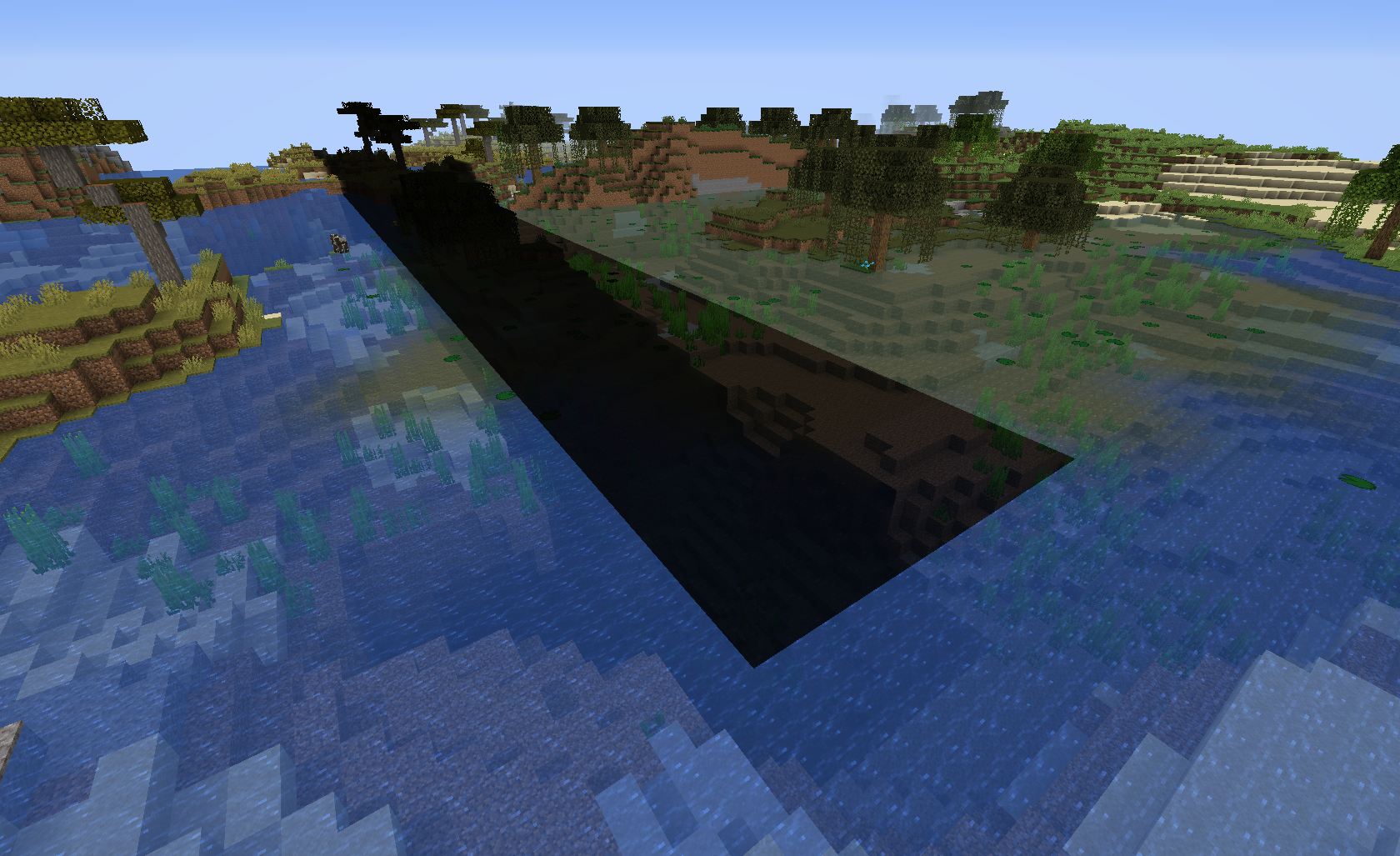
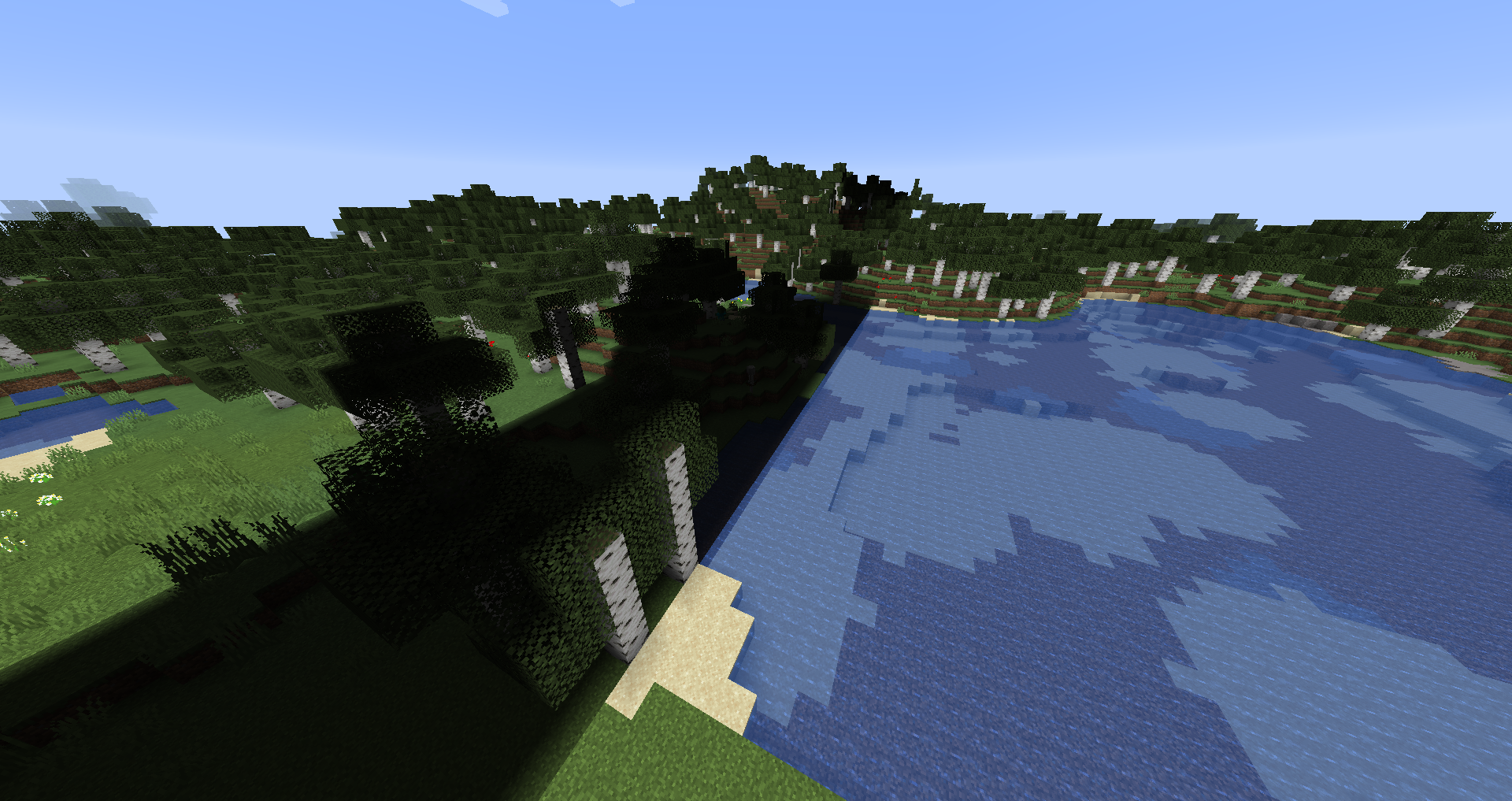
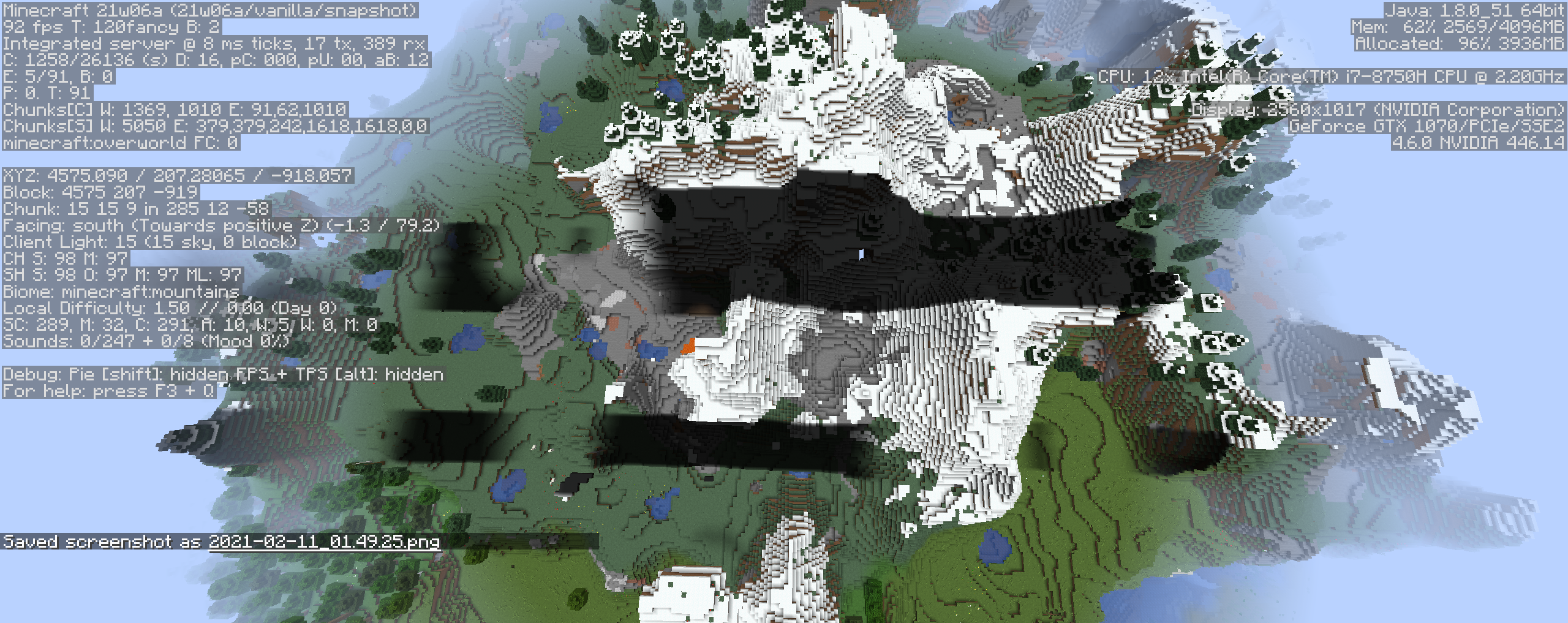
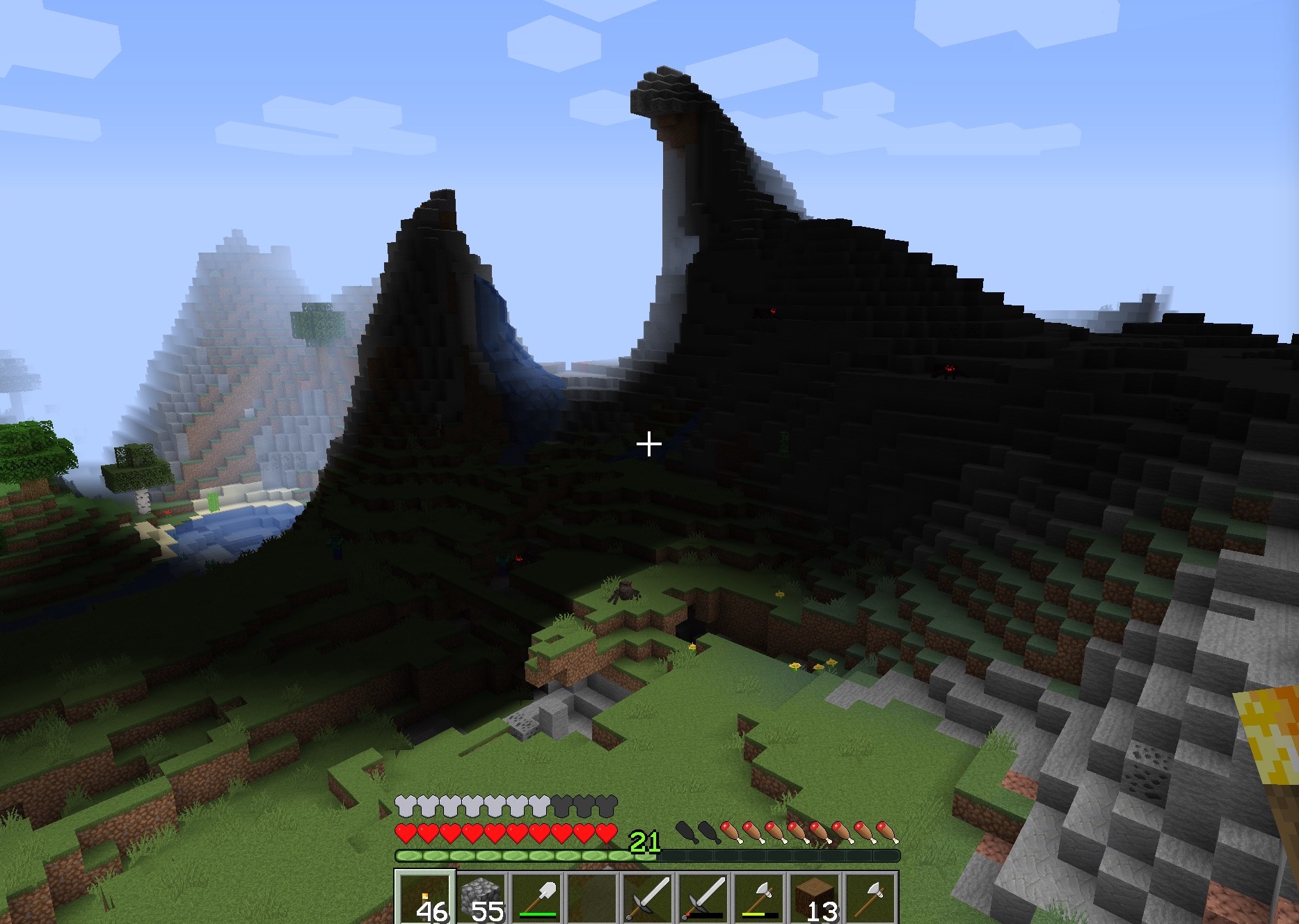
Some strips of chunks generate completely dark
there is a glitch where a stripe of shadow and different tree generation (wich we can see with cut trees) appears on the map.
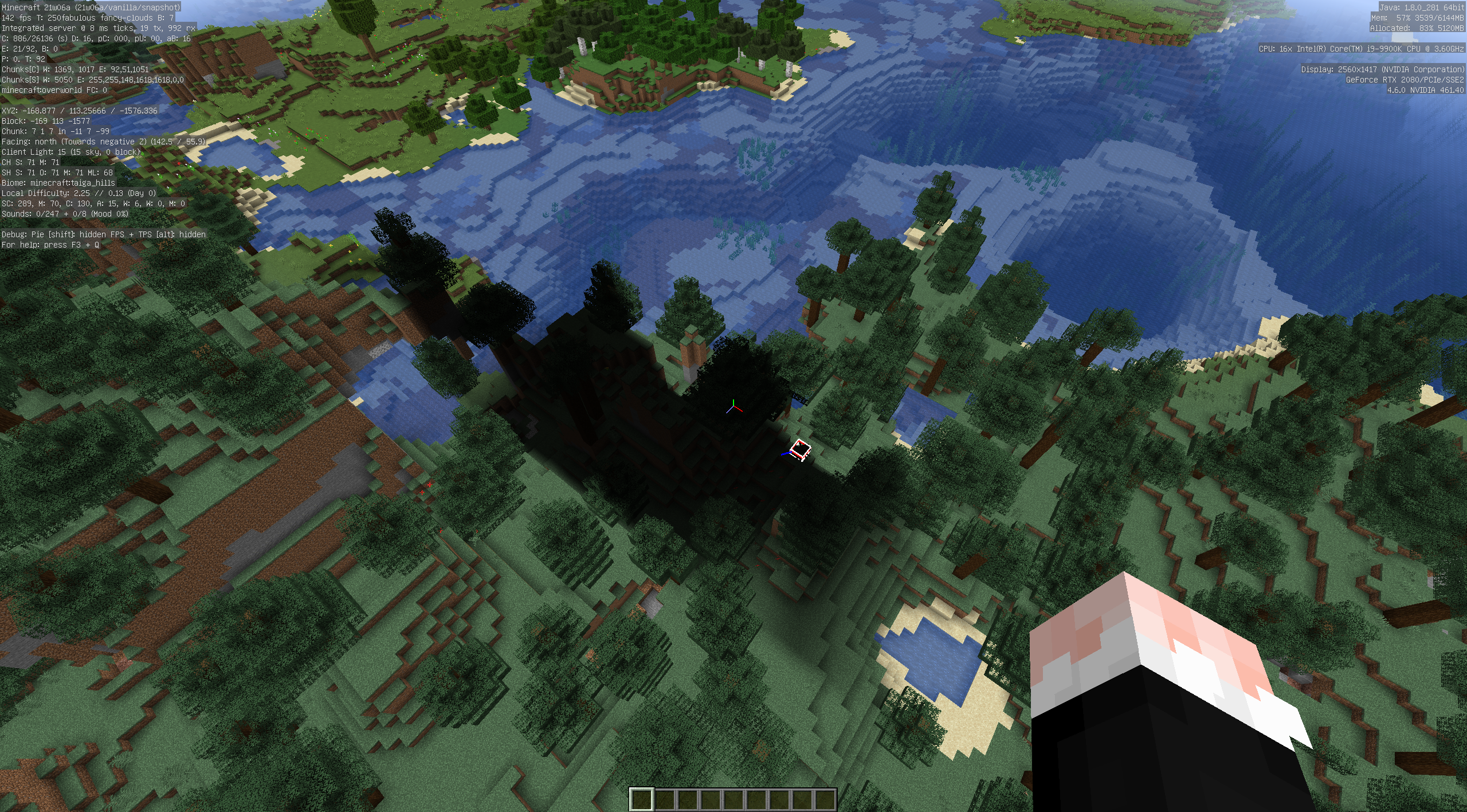
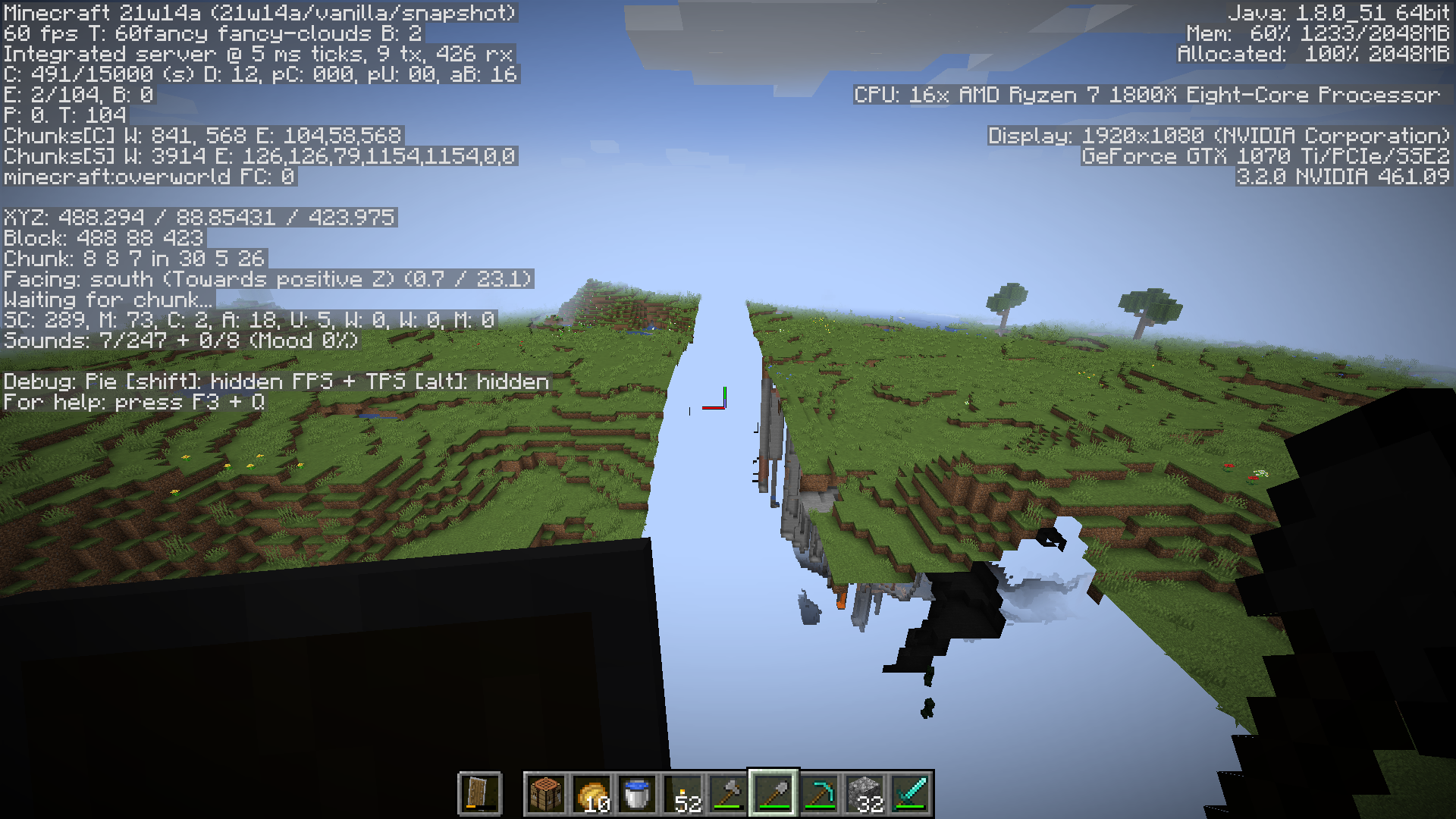
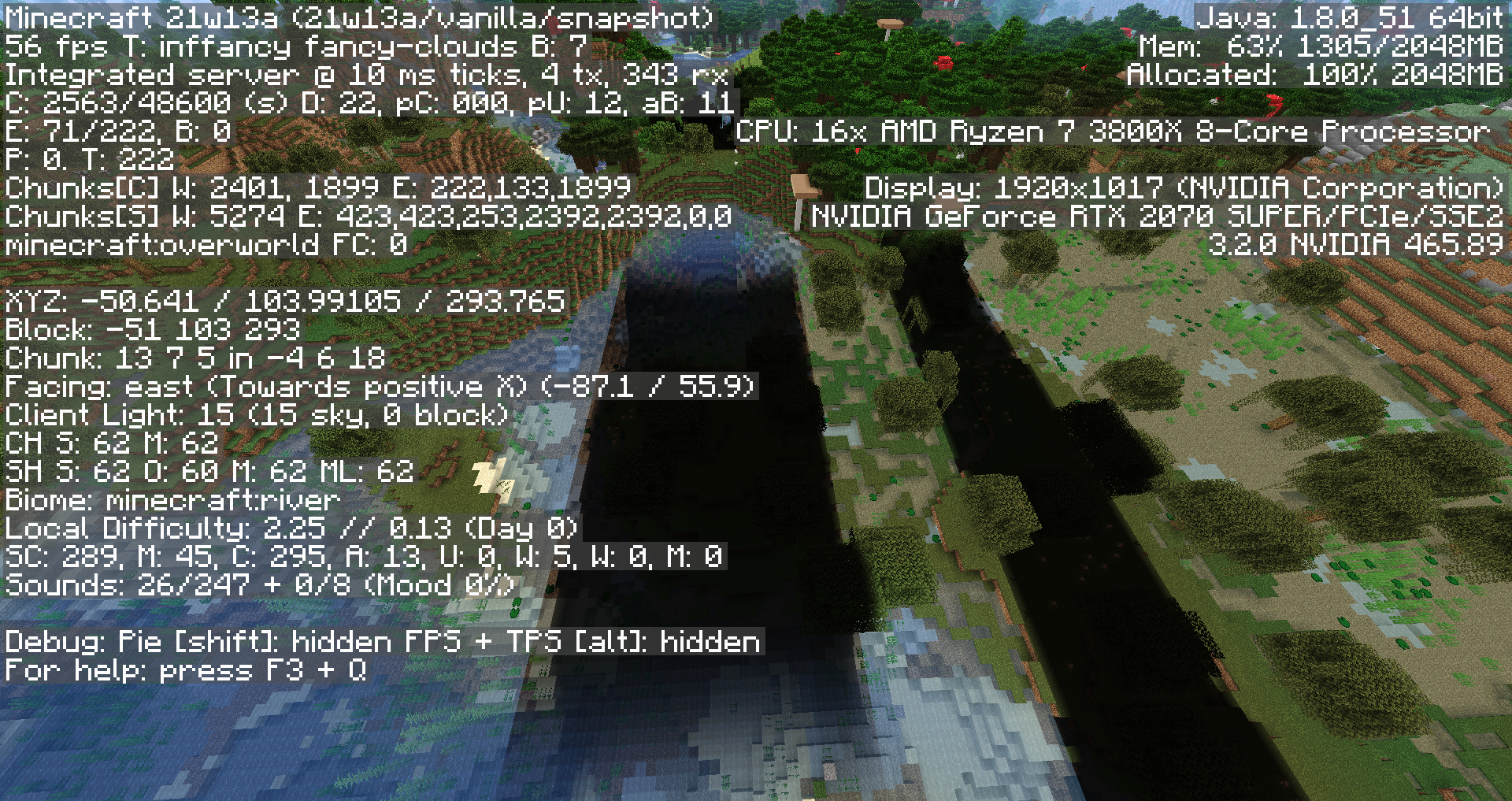
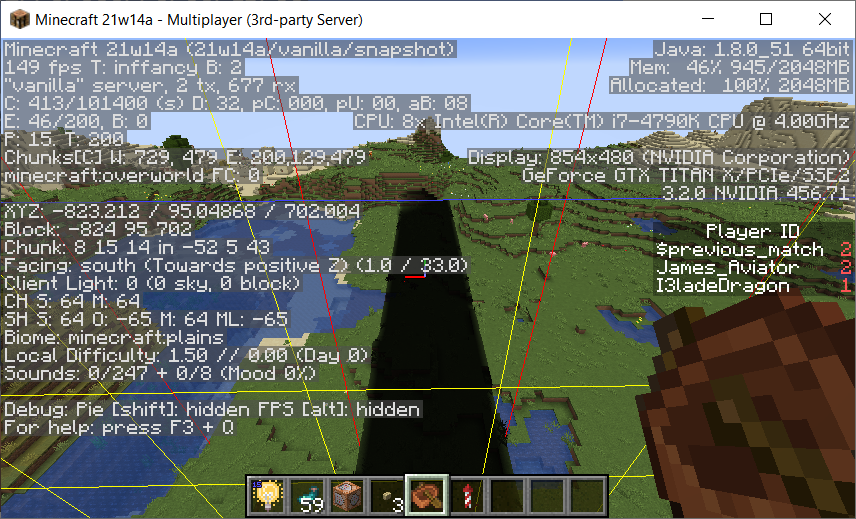
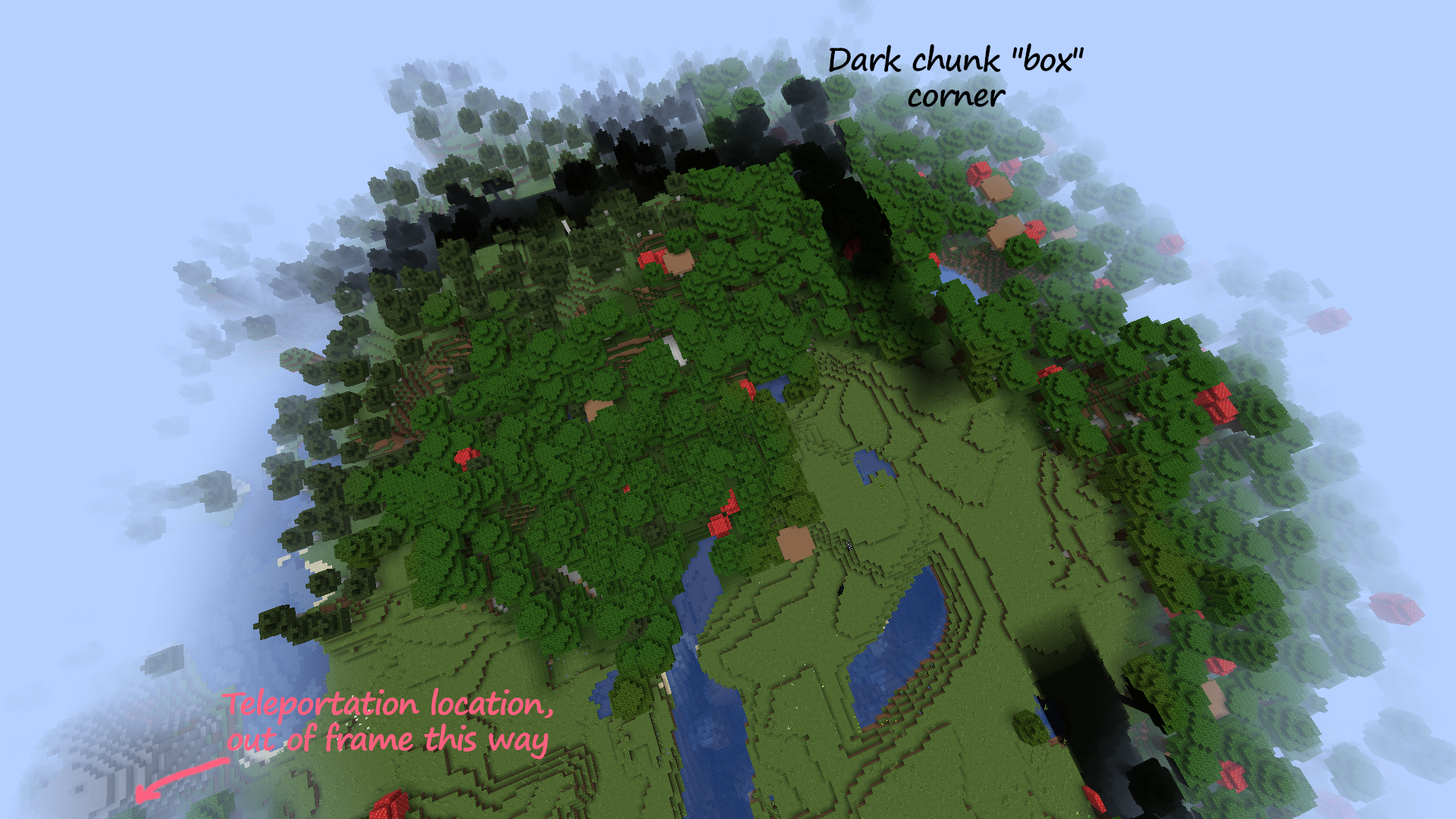
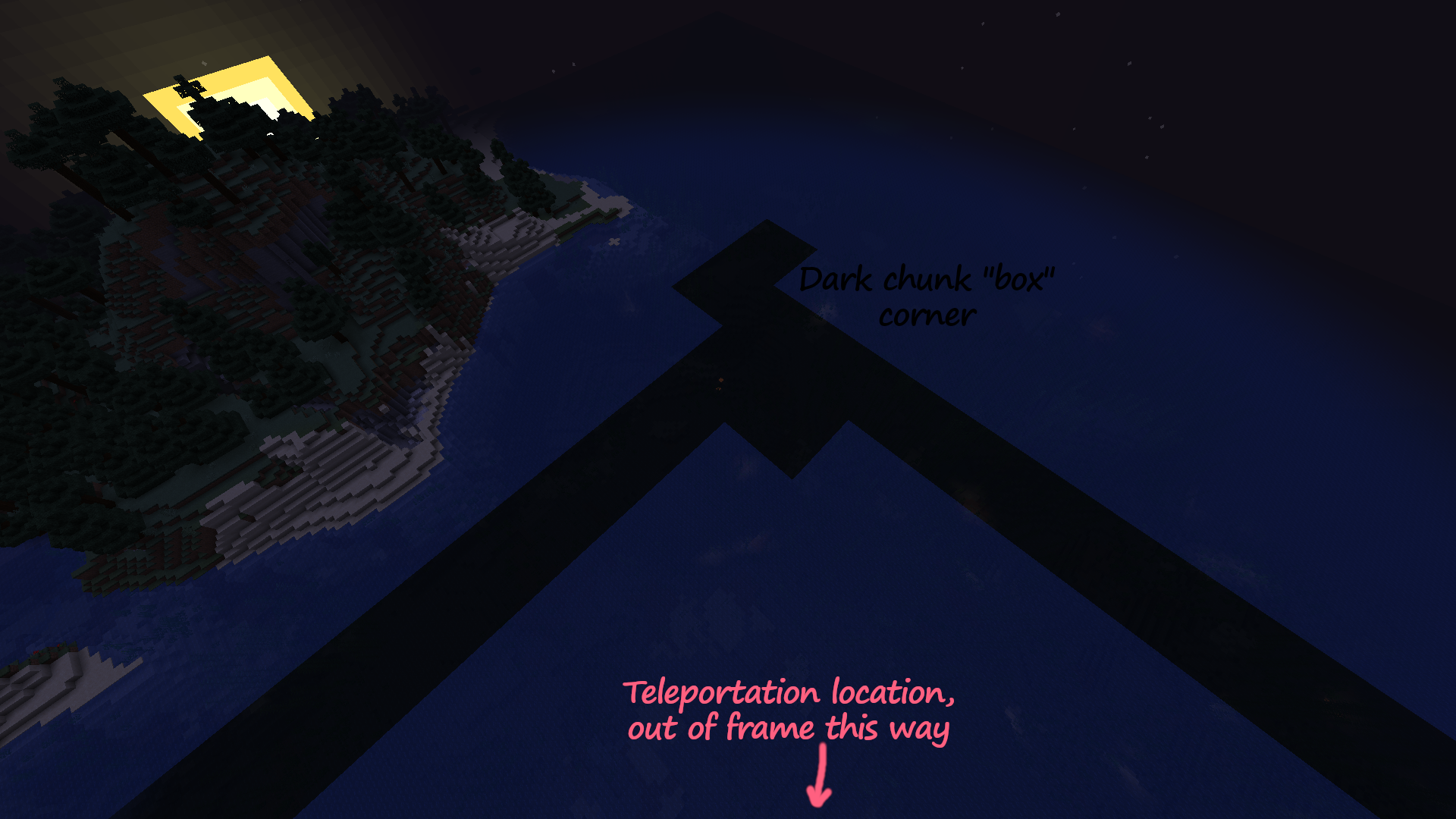
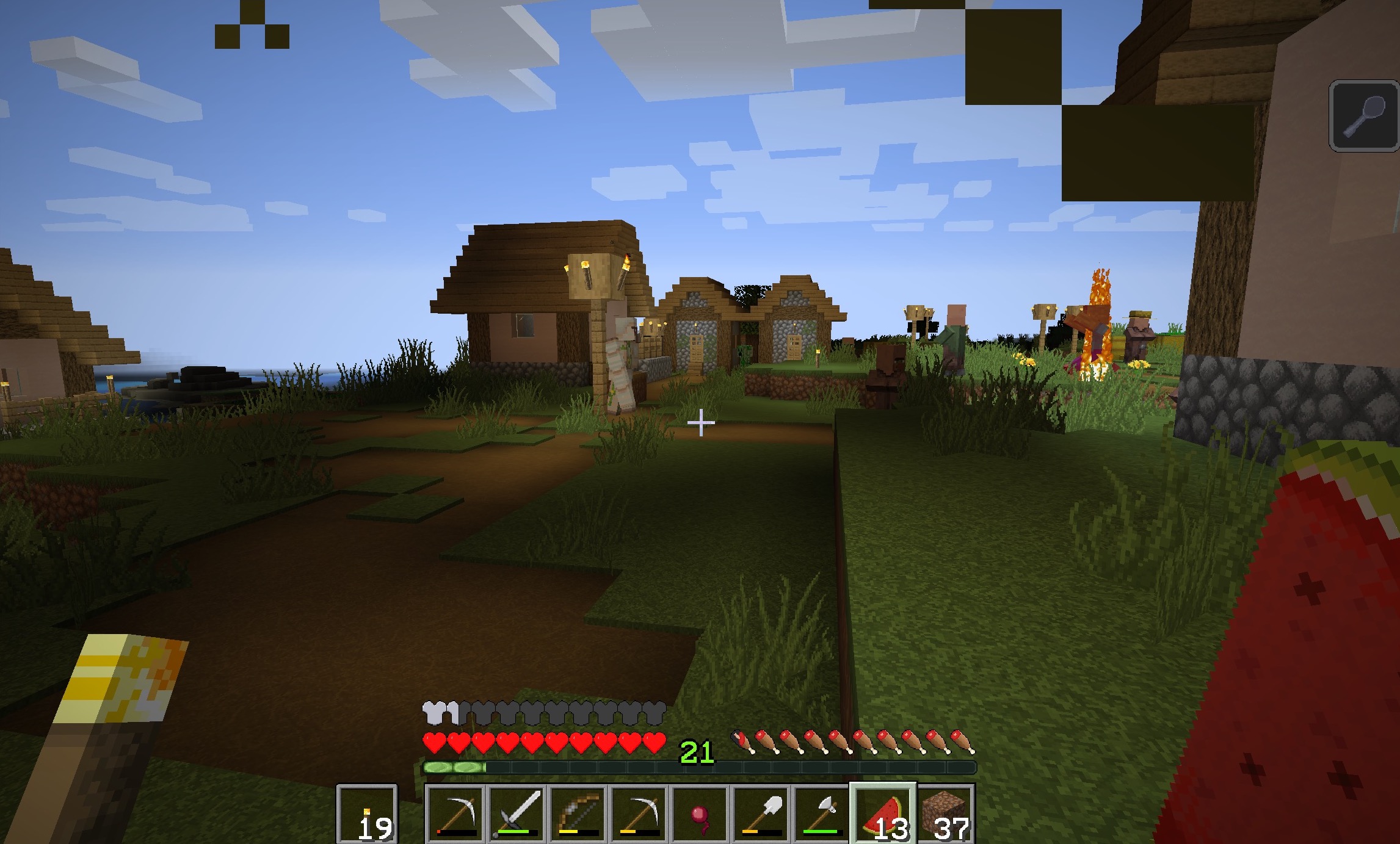
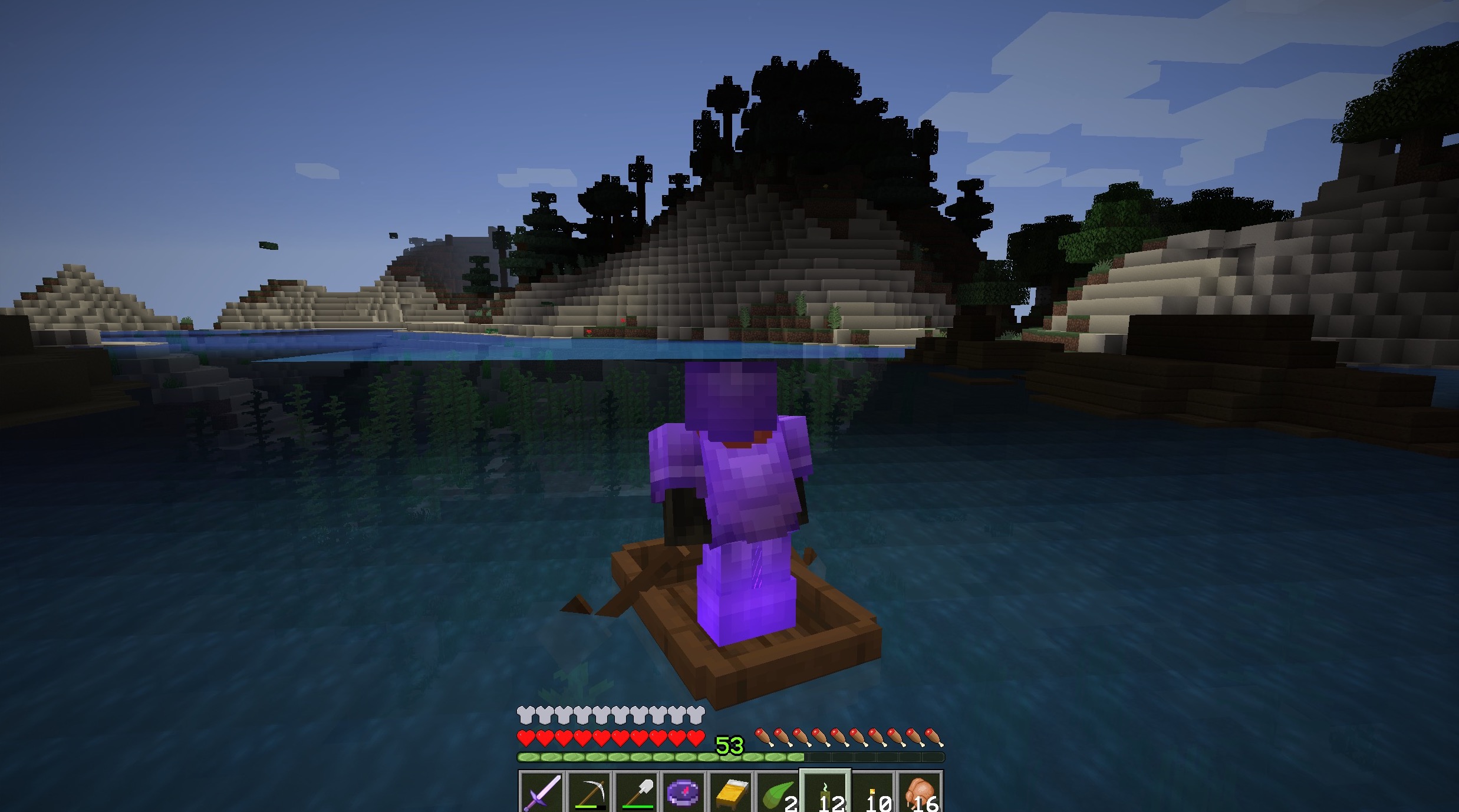
on the first picture you can see the bug as it is when found
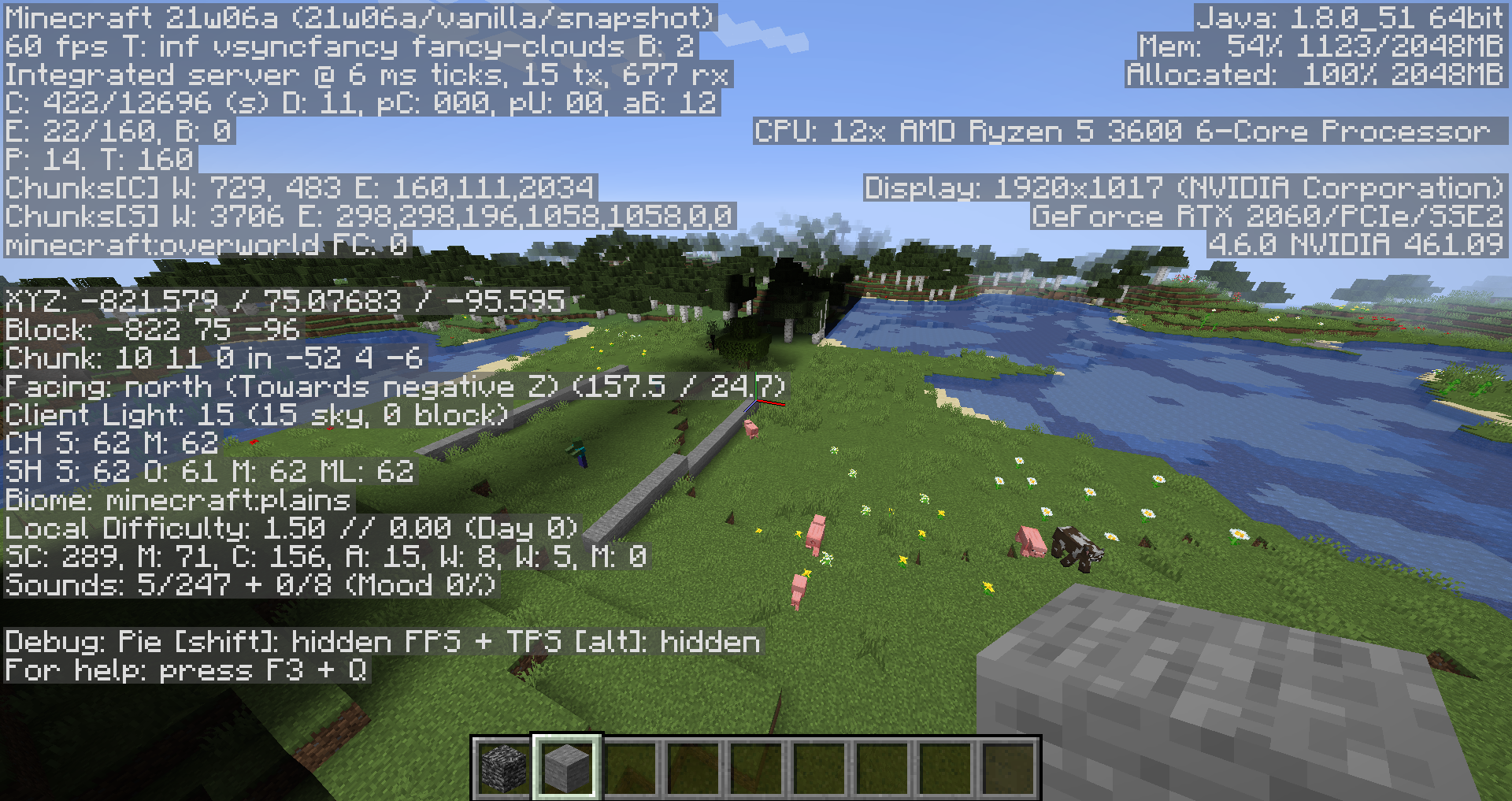
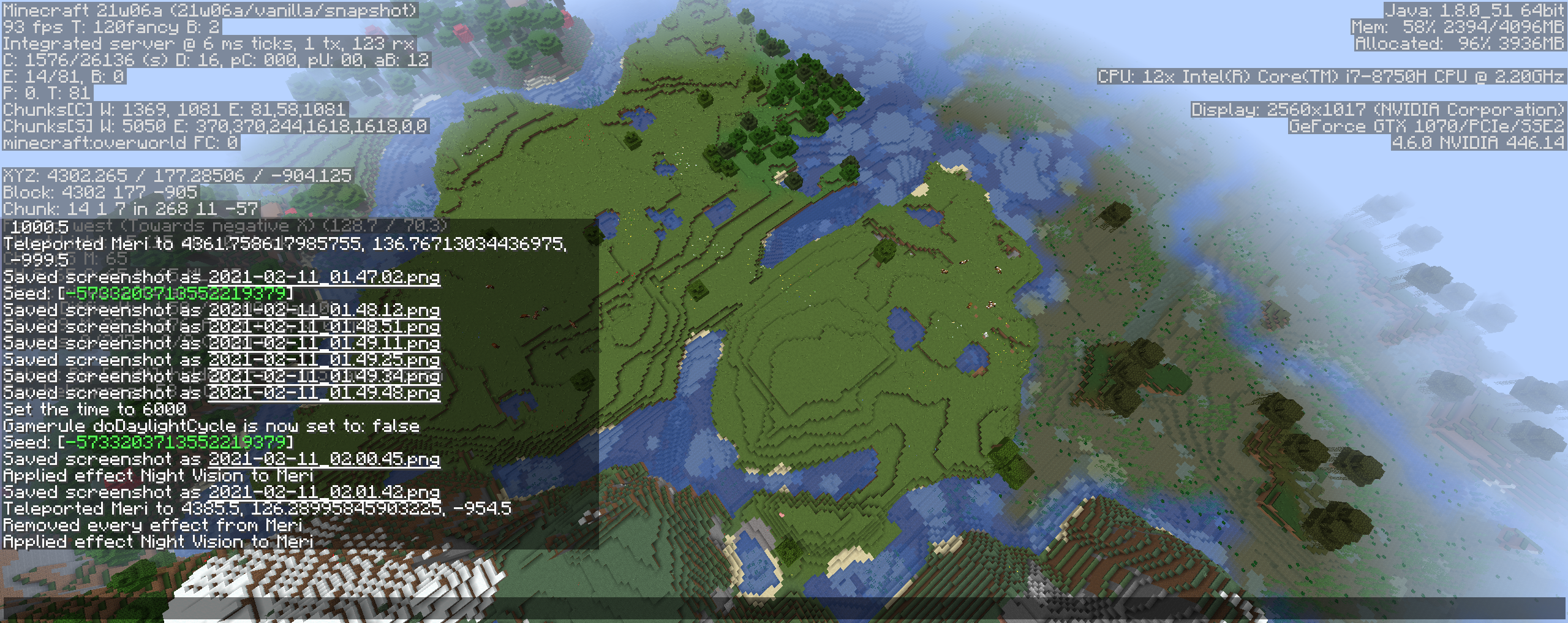
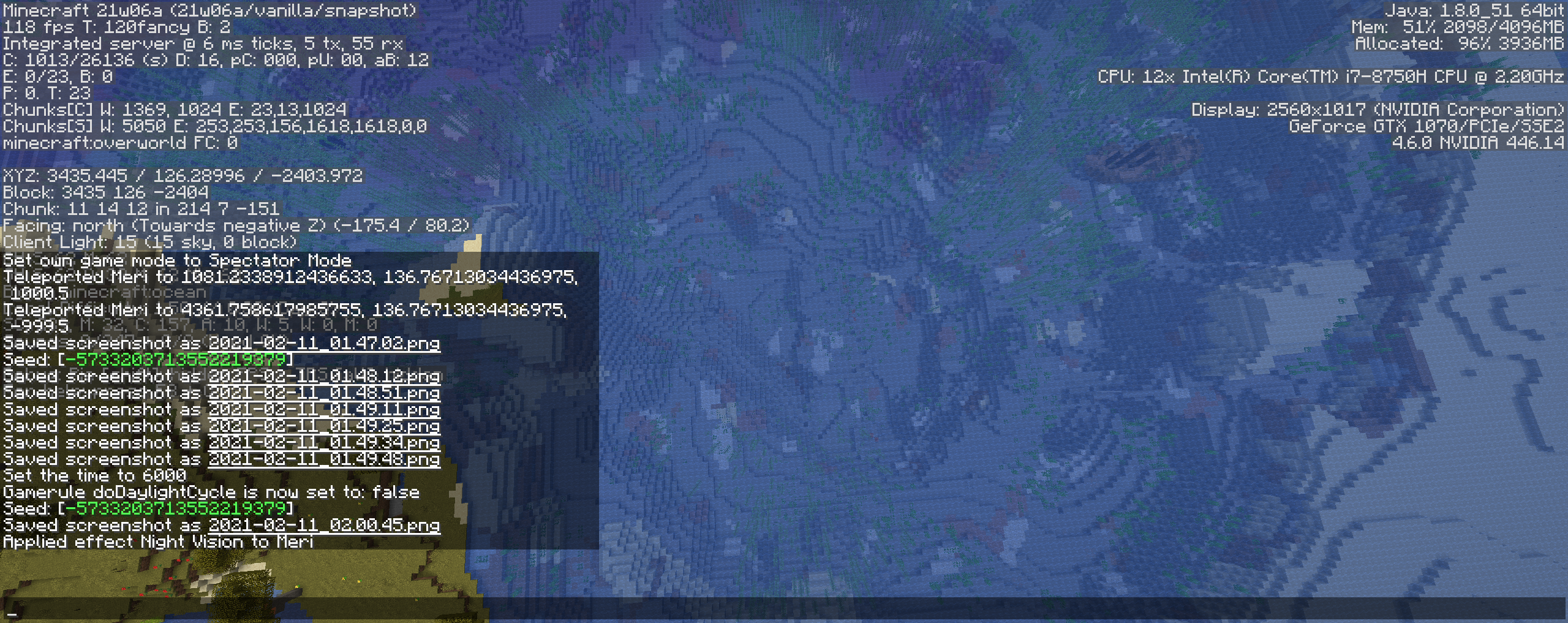
on the second picture you can see my f3 menu (if that helps) and also block that i placed to update the light.
note: you can only light by placing block on the border of the strip if you place a block on the middle of the strip light won't update
edit: someone should verify if this happens multiple times in a world or if it only happen once and if multiple time is it alway's the same axis
edit: it is answered it can appear multiple times and on both x ans z axis
Linked Issues
is duplicated by113
 BDS-11657The lighting is broken on a one chuck line in the worldDuplicate
 MC-214820Strange black chunks appearing in the world.DuplicateMC-214835Chunk GlitchesDuplicateMC-214847Zombies and skeletons have inconsitent burningDuplicateMC-214884Illumination bugDuplicateMC-214887A giant shadow is coming from nowhere.DuplicateMC-214920Long ShadowDuplicateMC-214926Lighting errors in 21w06aDuplicateMC-214938Large strips of the overworld are not properly litDuplicateMC-214956A graphical issue?DuplicateMC-215020Zombies and Skeletons not burning in the daytimeDuplicateMC-215033strongholds generate wrongly in the new snapshotDuplicateMC-215069Random Dark patches in waterDuplicateMC-215102Lighting Bug: sometimes while loading chunks lighting doesn't update on the surface.DuplicateMC-215113No Light Chunk ErrorDuplicateMC-215175Strange rows of darkness generatingDuplicateMC-215234Weird black line bugDuplicateMC-215274Multiple chunks are generating with a light level of 0DuplicateMC-215284Strange Patches of No Light in OverworldDuplicateMC-215355Certain chunks have no light even though there are no blocks placed above. Trees in this chunk also have no leaves and no mobs spawn even though the debug menu shows the sky and block light level as 0DuplicateMC-215358Chunks Load ProblemDuplicateMC-215442Light bugsDuplicateMC-215469Night Areas in sunlight with monsters spawning DuplicateMC-215517Dark stripes on the terrainDuplicateMC-215640Line of chunks completely darkDuplicateMC-215663Lighting bug (multiple chunks with light level 0)DuplicateMC-215778weird shadow issues in newest snapshotDuplicateMC-215889Lighting not updating properly in chunkDuplicateMC-215913Big shadowsDuplicateMC-215961Light level bug in chunks generationDuplicateMC-216006Lighting IssueDuplicateMC-216068The light levels are 0DuplicateMC-216114Light Level Zero in Overworld, Cutting trees in halfDuplicateMC-216213Weird Lighting ErrorDuplicateMC-216250Block Light at roughly 0 Where it Should be 15DuplicateMC-216350Darkness Glitch Across Certain AreaDuplicateMC-216357Shadows appear for no reasonDuplicateMC-216391Random Black SpotsDuplicateMC-216399light bug on some chunkDuplicateMC-216447In terrain generation, Lighting glitch "strips" generateDuplicateMC-216486Night Chunks in 21w07aDuplicateMC-216501Lighting Glitches DuplicateMC-216517Lighting IssuesDuplicateMC-216565Rectangular dark patches in random places around a worldDuplicateMC-216806Large areas of darkness in overworldDuplicateMC-216872Large Area of No Light in Overworld in Broad Day lightDuplicateMC-216884Light don't work correctlyDuplicateMC-216928 Generate faultDuplicateMC-216929Huge shadows in 21w08aDuplicateMC-216984Full chunk light bugDuplicateMC-217097Lighting error along a row of chunksDuplicateMC-217232Chunk lighting, when switching from Night -> Day, random chunks appear to be locked at Zero light levelDuplicateMC-217327Lightning issues in Snapshot 21w08bDuplicateMC-217353Two areas with light level 0 at daytimeDuplicateMC-217357Strips of darkness in landscape, light=0DuplicateMC-217453Dark Sections of SurfaceDuplicateMC-217468Lighting Problems affecting most chunks along a certain Z AxisDuplicateMC-217545Lighting Glitch on surface that spawns mobsDuplicateMC-217700Areas of the overworld appear to be in shade when there is nothing above them to cast a shadowDuplicateMC-217726Dark ChunksDuplicateMC-217800Black water lineDuplicateMC-217904light bugDuplicateMC-217929Long Strips of Dark ChunksDuplicateMC-217993Light bug in latest snapshot 21w08bDuplicateMC-218417Random chunks completely DarkDuplicateMC-218516black shadows during the day timeDuplicateMC-218622Lighting bug affecting random chunksDuplicateMC-218651dark lines in worldDuplicateMC-218897Chunks loading with lighting errorsDuplicateMC-219069Weird lightning glitchDuplicateMC-219277Weird Chunk Lighting bugDuplicateMC-219316Weird lighting glitchesDuplicateMC-219369Lighting Issues in latest snapshotDuplicateMC-219491Night in an isolated chunkDuplicateMC-219796Long line of darkness during the day that spawns mobsDuplicateMC-219800Sections of the world act like its night and spawn mobs in the day timeDuplicateMC-220015Zones d'ombresDuplicateMC-220241Broken LightingDuplicateMC-220336shadow chunk stripeDuplicateMC-220481Skylight breaksDuplicateMC-220807Light level bug at irregularly continuous chunksDuplicateMC-221160Random strips of dark chunks in oceansDuplicateMC-221282There are black "spots" in some areasDuplicateMC-221598Lightning Issues in Snapshot 21w13aDuplicateMC-221690Light glitches and chunk rendering issues.DuplicateMC-221943World generation glitchDuplicateMC-221968Dark chunksDuplicateMC-222188Dark patches light bugDuplicateMC-222299Lighting issuesDuplicateMC-222697Dark patches in world; light not rendering.DuplicateMC-222736Shadow chunk BugDuplicateMC-223017Dark spotsDuplicateMC-223046Area is completly darkDuplicateMC-223134Dark chunkDuplicateMC-223255Hostile mobs spawning on the surface in daylightDuplicateMC-223273Chunks full of 0 light levelDuplicateMC-223287World Lighting bug causes hostile mobs to spawn during daytimeDuplicateMC-223396Lighting glitch results in scattered areas of light level 0DuplicateMC-223428no skylightDuplicateMC-223443ОсвещениеDuplicateMC-223624Mobs don't burning in the sun on selected chunks.DuplicateMC-223636Mobs do not burn in sunlight sometimesDuplicateMC-223642light bugDuplicateMC-223802Light level bug (one time bug)DuplicateMC-223894Chunk/light loading errorDuplicateMC-223921More lighting bugsDuplicateMC-223933Long patch of nighttime during the dayDuplicateMC-223954Snapshot 21w16a bugsDuplicateMC-223971Unusual mob spawningDuplicateMC-224085Huge black shadow line across my worldDuplicateMC-224319Light glitchDuplicateMC-224380mobs survive during daytimeDuplicate
 MCL-17504Giant shadows over large spaces in the overworldDuplicate
 Normal
Attachments56





![[Mod] Les3awe](../../../data/avatars/users/79847.png)


















 Very Important
Created Issue:
weird glitch with light and tree generation (from what i have seen)
there is a glitch where a stripe of shadow and different tree generation (wich we can see with cut trees) appears on the map.
on the second picture you can see the bug as it is when found
on the first picture you can see my f3 menu (if that helps) and also block that i placed to update the light.
note: you can only light by placing block on the border of the stip, id you place a block on the middle of the strip light won't update
Environment
this was a newly generated word in the newest snapshot at the moment of it's realease
Attachments2
edit: when i describe pic 1 i'm talking about pic 2 sorry for the inconvinience
there is a glitch where a stripe of shadow and different tree generation (wich we can see with cut trees) appears on the map.
on the
secondpicture you can see the bug as it is when foundon the
firstpicture you can see my f3 menu (if that helps) and also block that i placed to update the light.note: you can only light by placing block on the border of the stip, id you place a block on the middle of the strip light won't update
there is a glitch where a stripe of shadow and different tree generation (wich we can see with cut trees) appears on the map.
on the first picture you can see the bug as it is when found
on the second picture you can see my f3 menu (if that helps) and also block that i placed to update the light.
note: you can only light by placing block on the border of the stip, id you place a block on the middle of the strip light won't update
![[Mod] Neko](../../../data/avatars/users/92901.png)
is duplicated by
relates to
this was a newly generated word in the newest snapshot at the moment of it's realease
OS : Windows 10 Pro 64-bit
Java version : 1.8.0_281 64-bit
CPU : Intel® Core™ i9-9900K CPU @ 3.60 GHz
GPU : NVIDIA GeForce RTX 2080
Drivers : GeForce 461.40
RAM: 32GB
![[Mod] violine1101](../../../data/avatars/users/92858.png)
weird glitch with light and tree generation (from what i have seen)Some chunks generate completely dark
is duplicated by
relates to
Some strip of chunks generate completely dark and generate trees differently
there is a glitch where a stripe of shadow and different tree generation (wich we can see with cut trees) appears on the map.
on the first picture you can see the bug as it is when found
on the second picture you can see my f3 menu (if that helps) and also block that i placed to update the light.
note: you can only light by placing block on the border of the stip, id you place a block on the middle of the strip light won't update
edit: someone should verify if this happens multiple times in a world or if it only happen once and if multiple time is it alway's the same axis
Some strip of chunks generate completely darkand generate trees differently
is duplicated by
2021-02-10_23.24.49.png
is duplicated by
relates to
is duplicated by
is duplicated by
is duplicated by
![[Mojang] Adrian Östergård](../../../data/assets/gravatar/nighter.jpeg)
there is a glitch where a stripe of shadow and different tree generation (wich we can see with cut trees) appears on the map.
on the first picture you can see the bug as it is when found
on the second picture you can see my f3 menu (if that helps) and also block that i placed to update the light.
note: you can only light by placing block on the border of the stip, id you place a block on the middle of the strip light won't update
edit: someone should verify if this happens multiple times in a world or if it only happen once and if multiple time is it alway's the same axis
edit: it is answered it can appear multiple times and on both x ans z axis
![[Mod] tryashtar](../../../data/avatars/users/41963.png)
is duplicated by
![[Mod] Chandler](../../../data/assets/gravatar/triwonder81.png)
is duplicated by
Some strips of chunks generate completely dark
is duplicated by
is duplicated by
is duplicated by
is duplicated by
![[Mod] OcelotOnesie](../../../data/avatars/users/43220.png)
is duplicated by
is duplicated by
is duplicated by
![[Mod] Greymagic27](../../../data/avatars/users/92875.png)
is duplicated by
is duplicated by
is duplicated by
is duplicated by
is duplicated by
![[Bot] Arisa](../../../data/avatars/users/43007.png)
is duplicated by
is duplicated by
is duplicated by
is duplicated by
![[Mod] Michael Wobst](../../../data/avatars/users/37868.png)
is duplicated by
is duplicated by
is duplicated by
is duplicated by
is duplicated by
is duplicated by
is duplicated by
is duplicated by
is duplicated by
is duplicated by
is duplicated by
is duplicated by
OS : Windows 10 Pro 64-bit
Java version : 1.8.0_281 64-bit
CPU : Intel® Core™ i9-9900K CPU @ 3.60 GHz
GPU : NVIDIA GeForce RTX 2080
Drivers : GeForce 461.40
RAM: 32GB
is duplicated by
is duplicated by
is duplicated by
is duplicated by
is duplicated by
is duplicated by
is duplicated by
is duplicated by

is duplicated by
is duplicated by
is duplicated by
![[Mod] Asteraoth](../../../data/avatars/users/92886.png)
is duplicated by
is duplicated by
is duplicated by
is duplicated by
is duplicated by
is duplicated by
is duplicated by
is duplicated by
is duplicated by
is duplicated by
there is a glitch where a stripe of shadow and different tree generation (wich we can see with cut trees) appears on the map.
on the first picture you can see the bug as it is when found
on the second picture you can see my f3 menu (if that helps) and also block that i placed to update the light.
note: you can only light by placing block on the border of the stip
,idyou place a block on the middle of the strip light won't update
edit: someone should verify if this happens multiple times in a world or if it only happen once and if multiple time is it alway's the same axis
edit: it is answered it can appear multiple times and on both x ans z axis
there is a glitch where a stripe of shadow and different tree generation (wich we can see with cut trees) appears on the map.
on the first picture you can see the bug as it is when found
on the second picture you can see my f3 menu (if that helps) and also block that i placed to update the light.
note: you can only light by placing block on the border of the strip if you place a block on the middle of the strip light won't update
edit: someone should verify if this happens multiple times in a world or if it only happen once and if multiple time is it alway's the same axis
edit: it is answered it can appear multiple times and on both x ans z axis
is duplicated by
is duplicated by
![[Helper] Jack McKalling](../../../data/avatars/users/92859.png)
I found a large example at:
Seed: -5714366179045292125
Around coords: -200 100 -600
is duplicated by
is duplicated by
is duplicated by
is duplicated by
is duplicated by
is duplicated by
is duplicated by
is duplicated by
is duplicated by
is duplicated by
is duplicated by
is duplicated by
is duplicated by
is duplicated by
is duplicated by
is duplicated by
is duplicated by
is duplicated by
is duplicated by
is duplicated by
![[Mod] SPGoding](../../../data/avatars/users/44622.png)
is duplicated by
relates to
is duplicated by
relates to
is duplicated by
is duplicated by
is duplicated by
is duplicated by
is duplicated by
is duplicated by
is duplicated by
is duplicated by
is duplicated by
is duplicated by
is duplicated by
is duplicated by
is duplicated by

is duplicated by
MC-224720
relates to
![[Mojang] slicedlime](../../../data/assets/gravatar/slicedlime.jpeg)
Thank you for your report!
We're tracking this issue in MC-214793 and MC-214808, so this ticket is being resolved and linked as a duplicate.
If you would like to add a vote and any extra information to the main ticket it would be appreciated.
If you haven't already, you might like to make use of the search feature to see if the issue has already been mentioned.
Quick Links:
📓 Bug Tracker Guidelines – 💬 Community Support – 📧 Mojang Support
📓 Project Summary – ✍️ Feedback and Suggestions – 📖 Game Wiki
– I am a bot. This action was performed automatically! Please report any issues on Discord or Reddit
Thank you for your report!
We're tracking this issue in MC-214793, so this ticket is being resolved and linked as a duplicate.
If you would like to add a vote and any extra information to the main ticket it would be appreciated.
If you haven't already, you might like to make use of the search feature to see if the issue has already been mentioned.
Quick Links:
📓 Bug Tracker Guidelines – 💬 Community Support – 📧 Mojang Support
📓 Project Summary – ✍️ Feedback and Suggestions – 📖 Game Wiki

duplicate MC-214793
duplicate
MC-214793
Thank you for your report!
We're tracking this issue in MC-214793, so this ticket is being resolved and linked as a duplicate.
If you would like to add a vote and any extra information to the main ticket it would be appreciated.
If you haven't already, you might like to make use of the search feature to see if the issue has already been mentioned.
Quick Links:
📓 Bug Tracker Guidelines – 💬 Community Support – 📧 Mojang Support
📓 Project Summary – ✍️ Feedback and Suggestions – 📖 Game Wiki
Duplicate of
MC-214793
Duplicate of
MC-214793
Duplicate of
MC-214793
This is not the same bug shown in MC-214793
Duplicate of
MC-214793
Duplicate of
MC-214793
Thank you for your report!
We're tracking this issue in MC-214793, so this ticket is being resolved and linked as a duplicate.
If you would like to add a vote and any extra information to the main ticket it would be appreciated.
If you haven't already, you might like to make use of the search feature to see if the issue has already been mentioned.
Quick Links:
📓 Bug Tracker Guidelines – 💬 Community Support – 📧 Mojang Support
📓 Project Summary – ✍️ Feedback and Suggestions – 📖 Game Wiki
Thank you for your report!
We're tracking this issue in MC-214793, so this ticket is being resolved and linked as a duplicate.
If you would like to add a vote and any extra information to the main ticket it would be appreciated.
If you haven't already, you might like to make use of the search feature to see if the issue has already been mentioned.
Quick Links:
📓 Bug Tracker Guidelines – 💬 Community Support – 📧 Mojang Support
📓 Project Summary – ✍️ Feedback and Suggestions – 📖 Game Wiki

just found that this is also posted
Thank you for your report!
We're tracking this issue in MC-214793, so this ticket is being resolved and linked as a duplicate.
If you would like to add a vote and any extra information to the main ticket it would be appreciated.
If you haven't already, you might like to make use of the search feature to see if the issue has already been mentioned.
Quick Links:
📓 Bug Tracker Guidelines – 💬 Community Support – 📧 Mojang Support
📓 Project Summary – ✍️ Feedback and Suggestions – 📖 Game Wiki
– I am a bot. This action was performed automatically! Please report any issues on Discord or Reddit

Duplicates MC-214793
Duplicates MC-214793

Duplicate of MC-214793
Thank you for your report!
We're tracking this issue in MC-214793, so this ticket is being resolved and linked as a duplicate.
If you would like to add a vote and any extra information to the main ticket it would be appreciated.
If you haven't already, you might like to make use of the search feature to see if the issue has already been mentioned.
Quick Links:
📓 Bug Tracker Guidelines – 💬 Community Support – 📧 Mojang Support
📓 Project Summary – ✍️ Feedback and Suggestions – 📖 Game Wiki
Thank you for your report!
We're tracking this issue in MC-214793, so this ticket is being resolved and linked as a duplicate.
If you would like to add a vote and any extra information to the main ticket it would be appreciated.
If you haven't already, you might like to make use of the search feature to see if the issue has already been mentioned.
Quick Links:
📓 Bug Tracker Guidelines – 💬 Community Support – 📧 Mojang Support
📓 Project Summary – ✍️ Feedback and Suggestions – 📖 Game Wiki
Thank you for your report!
We're tracking this issue in MC-214793, so this ticket is being resolved and linked as a duplicate.
If you would like to add a vote and any extra information to the main ticket it would be appreciated.
If you haven't already, you might like to make use of the search feature to see if the issue has already been mentioned.
Quick Links:
📓 Bug Tracker Guidelines – 💬 Community Support – 📧 Mojang Support
📓 Project Summary – ✍️ Feedback and Suggestions – 📖 Game Wiki
Thank you for your report!
We're tracking this issue in MC-214793, so this ticket is being resolved and linked as a duplicate.
If you would like to add a vote and any extra information to the main ticket it would be appreciated.
If you haven't already, you might like to make use of the search feature to see if the issue has already been mentioned.
Quick Links:
📓 Bug Tracker Guidelines – 💬 Community Support – 📧 Mojang Support
📓 Project Summary – ✍️ Feedback and Suggestions – 📖 Game Wiki
– I am a bot. This action was performed automatically! Please report any issues on Discord or Reddit
Hello, this appears to duplicate MC-214793
Thank you for your report!
We're tracking this issue in MC-214793 and MC-214808, so this ticket is being resolved and linked as a duplicate.
If you would like to add a vote and any extra information to the main tickets it would be appreciated.
If you haven't already, you might like to make use of the search feature to see if the issue has already been mentioned.
Quick Links:
📓 Bug Tracker Guidelines – 💬 Community Support – 📧 Mojang Support
📓 Project Summary – ✍️ Feedback and Suggestions – 📖 Game Wiki
Thank you for your report!
We're tracking this issue in MC-214793, so this ticket is being resolved and linked as a duplicate.
If you would like to add a vote and any extra information to the main ticket it would be appreciated.
If you haven't already, you might like to make use of the search feature to see if the issue has already been mentioned.
Quick Links:
📓 Bug Tracker Guidelines – 💬 Community Support – 📧 Mojang Support
📓 Project Summary – ✍️ Feedback and Suggestions – 📖 Game Wiki
Thank you for your report!
We're tracking this issue in MC-214793, so this ticket is being resolved and linked as a duplicate.
If you would like to add a vote and any extra information to the main ticket it would be appreciated.
If you haven't already, you might like to make use of the search feature to see if the issue has already been mentioned.
Quick Links:
📓 Bug Tracker Guidelines – 💬 Community Support – 📧 Mojang Support
📓 Project Summary – ✍️ Feedback and Suggestions – 📖 Game Wiki
– I am a bot. This action was performed automatically! Please report any issues on Discord or Reddit
Thank you for your report!
We're tracking this issue in MC-214793, so this ticket is being resolved and linked as a duplicate.
If you would like to add a vote and any extra information to the main ticket it would be appreciated.
If you haven't already, you might like to make use of the search feature to see if the issue has already been mentioned.
Quick Links:
📓 Bug Tracker Guidelines – 💬 Community Support – 📧 Mojang Support
📓 Project Summary – ✍️ Feedback and Suggestions – 📖 Game Wiki
![[Mod] Avoma](../../../data/avatars/users/86198.png)
This appears to be a duplicate of MC-214793, which hasn't yet been resolved. If you have any additional information to provide regarding this issue, feel free to comment on the parent ticket. If you feel that this issue is affecting you, feel free to vote for the duplicated ticket, to give Mojang a basic idea of how many people are impacted by the problem. Just to further inform you, this will not determine how quickly the bug gets handled or fixed.
Thank you for your report!
We're tracking this issue in MC-214793, so this ticket is being resolved and linked as a duplicate.
If you would like to add a vote and any extra information to the main ticket it would be appreciated.
If you haven't already, you might like to make use of the search feature to see if the issue has already been mentioned.
Quick Links:
📓 Bug Tracker Guidelines – 💬 Community Support – 📧 Mojang Support
📓 Project Summary – ✍️ Feedback and Suggestions – 📖 Game Wiki
Thank you for your report!
We're tracking this issue in MC-214793, so this ticket is being resolved and linked as a duplicate.
If you would like to add a vote and any extra information to the main ticket it would be appreciated.
If you haven't already, you might like to make use of the search feature to see if the issue has already been mentioned.
Quick Links:
📓 Bug Tracker Guidelines – 💬 Community Support – 📧 Mojang Support
📓 Project Summary – ✍️ Feedback and Suggestions – 📖 Game Wiki
Thank you for your report!
We're tracking this issue in MC-214793, so this ticket is being resolved and linked as a duplicate.
If you would like to add a vote and any extra information to the main ticket it would be appreciated.
If you haven't already, you might like to make use of the search feature to see if the issue has already been mentioned.
Quick Links:
📓 Bug Tracker Guidelines – 💬 Community Support – 📧 Mojang Support
📓 Project Summary – ✍️ Feedback and Suggestions – 📖 Game Wiki
Does MC-214793 describe your issue?
Thank you for your report!
We're tracking this issue in MC-214793, so this ticket is being resolved and linked as a duplicate.
If you would like to add a vote and any extra information to the main ticket it would be appreciated.
If you haven't already, you might like to make use of the search feature to see if the issue has already been mentioned.
Quick Links:
📓 Bug Tracker Guidelines – 💬 Community Support – 📧 Mojang Support
📓 Project Summary – ✍️ Feedback and Suggestions – 📖 Game Wiki
Hello! This appears to be a duplicate of MC-214793
Thank you for your report!
We're tracking this issue in MC-214793, so this ticket is being resolved and linked as a duplicate.
If you would like to add a vote and any extra information to the main ticket it would be appreciated.
If you haven't already, you might like to make use of the search feature to see if the issue has already been mentioned.
Quick Links:
📓 Bug Tracker Guidelines – 💬 Community Support – 📧 Mojang Support
📓 Project Summary – ✍️ Feedback and Suggestions – 📖 Game Wiki
Thank you for your report!
We're tracking this issue in MC-214793, so this ticket is being resolved and linked as a duplicate.
If you would like to add a vote and any extra information to the main ticket it would be appreciated.
If you haven't already, you might like to make use of the search feature to see if the issue has already been mentioned.
Quick Links:
📓 Bug Tracker Guidelines – 💬 Community Support – 📧 Mojang Support
📓 Project Summary – ✍️ Feedback and Suggestions – 📖 Game Wiki
Duplicate of MC-214793.
Thank you for your report!
We're tracking this issue in MC-214793, so this ticket is being resolved and linked as a duplicate.
If you would like to add a vote and any extra information to the main ticket it would be appreciated.
If you haven't already, you might like to make use of the search feature to see if the issue has already been mentioned.
Quick Links:
📓 Bug Tracker Guidelines – 💬 Community Support – 📧 Mojang Support
📓 Project Summary – ✍️ Feedback and Suggestions – 📖 Game Wiki
Thank you for your report!
We're tracking this issue in MC-214793, so this ticket is being resolved and linked as a duplicate.
If you would like to add a vote and any extra information to the main ticket it would be appreciated.
If you haven't already, you might like to make use of the search feature to see if the issue has already been mentioned.
Quick Links:
📓 Bug Tracker Guidelines – 💬 Community Support – 📧 Mojang Support
📓 Project Summary – ✍️ Feedback and Suggestions – 📖 Game Wiki
![[Mod] markderickson](../../../data/avatars/users/18946.svg)
Hello! This appears to be a duplicate of MC-214793.
Thank you for your report!
We're tracking this issue in MC-214793, so this ticket is being resolved and linked as a duplicate.
If you would like to add a vote and any extra information to the main ticket it would be appreciated.
If you haven't already, you might like to make use of the search feature to see if the issue has already been mentioned.
Quick Links:
📓 Bug Tracker Guidelines – 💬 Community Support – 📧 Mojang Support
📓 Project Summary – ✍️ Feedback and Suggestions – 📖 Game Wiki
Duplicate of MC-214793.
This appears to be a duplicate of MC-214793, which hasn't yet been resolved. If you have any additional information to provide regarding this issue, feel free to comment on the parent ticket. If you feel that this issue is affecting you, feel free to vote for the duplicated ticket, to give Mojang a basic idea of how many people are impacted by the problem. Just to further inform you, this will not determine how quickly the bug gets handled or fixed.
Thank you for your report!
We're tracking this issue in MC-214793, so this ticket is being resolved and linked as a duplicate.
If you would like to add a vote and any extra information to the main ticket it would be appreciated.
If you haven't already, you might like to make use of the search feature to see if the issue has already been mentioned.
Quick Links:
📓 Bug Tracker Guidelines – 💬 Community Support – 📧 Mojang Support
📓 Project Summary – ✍️ Feedback and Suggestions – 📖 Game Wiki
– I am a bot. This action was performed automatically! Please report any issues on Discord or Reddit
Thank you for your report!
We're tracking this issue in MC-214793, so this ticket is being resolved and linked as a duplicate.
If you would like to add a vote and any extra information to the main ticket it would be appreciated.
If you haven't already, you might like to make use of the search feature to see if the issue has already been mentioned.
Quick Links:
📓 Bug Tracker Guidelines – 💬 Community Support – 📧 Mojang Support
📓 Project Summary – ✍️ Feedback and Suggestions – 📖 Game Wiki
– I am a bot. This action was performed automatically! Please report any issues on Discord or Reddit
This appears to be a duplicate of MC-214793, which hasn't yet been resolved. If you have any additional information to provide regarding this issue, feel free to comment on the parent ticket. If you feel that this issue is affecting you, feel free to vote for the duplicated ticket, to give Mojang a basic idea of how many people are impacted by the problem. Just to further inform you, this will not determine how quickly the bug gets handled or fixed.

Duplicate of MC-214793.
Hello! This appears to be a duplicate of MC-214793.
Thank you for your report!
We're tracking this issue in MC-214793, so this ticket is being resolved and linked as a duplicate.
If you would like to add a vote and any extra information to the main ticket it would be appreciated.
If you haven't already, you might like to make use of the search feature to see if the issue has already been mentioned.
Quick Links:
📓 Bug Tracker Guidelines – 💬 Community Support – 📧 Mojang Support
📓 Project Summary – ✍️ Feedback and Suggestions – 📖 Game Wiki
– I am a bot. This action was performed automatically! Please report any issues on Discord or Reddit
Thank you for your report!
We're tracking this issue in MC-214793, so this ticket is being resolved and linked as a duplicate.
If you would like to add a vote and any extra information to the main ticket it would be appreciated.
If you haven't already, you might like to make use of the search feature to see if the issue has already been mentioned.
Quick Links:
📓 Bug Tracker Guidelines – 💬 Community Support – 📧 Mojang Support
📓 Project Summary – ✍️ Feedback and Suggestions – 📖 Game Wiki
– I am a bot. This action was performed automatically! Please report any issues on Discord or Reddit
Thank you for your report!
We're tracking this issue in MC-214793, so this ticket is being resolved and linked as a duplicate.
If you would like to add a vote and any extra information to the main ticket it would be appreciated.
If you haven't already, you might like to make use of the search feature to see if the issue has already been mentioned.
Quick Links:
📓 Bug Tracker Guidelines – 💬 Community Support – 📧 Mojang Support
📓 Project Summary – ✍️ Feedback and Suggestions – 📖 Game Wiki
– I am a bot. This action was performed automatically! Please report any issues on Discord or Reddit
Looks like a duplicate of MC-214793
Thank you for your report!
We're tracking this issue in MC-214793, so this ticket is being resolved and linked as a duplicate.
If you would like to add a vote and any extra information to the main ticket it would be appreciated.
If you haven't already, you might like to make use of the search feature to see if the issue has already been mentioned.
Quick Links:
📓 Bug Tracker Guidelines – 💬 Community Support – 📧 Mojang Support
📓 Project Summary – ✍️ Feedback and Suggestions – 📖 Game Wiki
– I am a bot. This action was performed automatically! Please report any issues on Discord or Reddit
This seems to have become noticeably more common since 21w06a, but I don't know what specifically caused it to. It also seems to happen alongside MC-214793 a lot.
Thank you for your report!
We're tracking this issue in MC-214793, so this ticket is being resolved and linked as a duplicate.
If you would like to add a vote and any extra information to the main ticket it would be appreciated.
If you haven't already, you might like to make use of the search feature to see if the issue has already been mentioned.
Quick Links:
📓 Bug Tracker Guidelines – 💬 Community Support – 📧 Mojang Support
📓 Project Summary – ✍️ Feedback and Suggestions – 📖 Game Wiki
– I am a bot. This action was performed automatically! Please report any issues on Discord or Reddit
Duplicate of MC-214793
Duplicate of MC-214793
Duplicate of MC-214793
Thank you for your report!
We're tracking this issue in MC-214793, so this ticket is being resolved and linked as a duplicate.
If you would like to add a vote and any extra information to the main ticket it would be appreciated.
If you haven't already, you might like to make use of the search feature to see if the issue has already been mentioned.
Quick Links:
📓 Bug Tracker Guidelines – 💬 Community Support – 📧 Mojang Support
📓 Project Summary – ✍️ Feedback and Suggestions – 📖 Game Wiki
– I am a bot. This action was performed automatically! Please report any issues on Discord or Reddit

Duplicate of MC-214793.
Thank you for your report!
We're tracking this issue in MC-214793, so this ticket is being resolved and linked as a duplicate.
If you would like to add a vote and any extra information to the main ticket it would be appreciated.
If you haven't already, you might like to make use of the search feature to see if the issue has already been mentioned.
Quick Links:
📓 Bug Tracker Guidelines – 💬 Community Support – 📧 Mojang Support
📓 Project Summary – ✍️ Feedback and Suggestions – 📖 Game Wiki
– I am a bot. This action was performed automatically! Please report any issues on Discord or Reddit
Thank you for your report!
We're tracking this issue in MC-214793, so this ticket is being resolved and linked as a duplicate.
If you would like to add a vote and any extra information to the main ticket it would be appreciated.
If you haven't already, you might like to make use of the search feature to see if the issue has already been mentioned.
Quick Links:
📓 Bug Tracker Guidelines – 💬 Community Support – 📧 Mojang Support
📓 Project Summary – ✍️ Feedback and Suggestions – 📖 Game Wiki
Most likely a duplicate of MC-214793.
Duplicate of MC-214793
Duplicate of MC-214793
Duplicate of MC-214793
Thank you for your report!
We're tracking this issue in MC-214793, so this ticket is being resolved and linked as a duplicate.
If you would like to add a vote and any extra information to the main ticket it would be appreciated.
If you haven't already, you might like to make use of the search feature to see if the issue has already been mentioned.
Quick Links:
📓 Bug Tracker Guidelines – 💬 Community Support – 📧 Mojang Support
📓 Project Summary – ✍️ Feedback and Suggestions – 📖 Game Wiki
Duplicate of MC-214793
Thank you for your report!
We're tracking this issue in MC-214793, so this ticket is being resolved and linked as a duplicate.
If you would like to add a vote and any extra information to the main ticket it would be appreciated.
If you haven't already, you might like to make use of the search feature to see if the issue has already been mentioned.
Quick Links:
📓 Bug Tracker Guidelines – 💬 Community Support – 📧 Mojang Support
📓 Project Summary – ✍️ Feedback and Suggestions – 📖 Game Wiki
Hello!
Does MC-214793 happen to describe your issue?
If not, can you please provide the world seed and coordinates as well as screenshots of the issue with your debug screen (F3) open in the picture(s)?  Thank you!
Duplicate of MC-214793.
Thank you for your report!
We're tracking this issue in MC-214793, so this ticket is being resolved and linked as a duplicate.
If you would like to add a vote and any extra information to the main ticket it would be appreciated.
If you haven't already, you might like to make use of the search feature to see if the issue has already been mentioned.
Quick Links:
📓 Bug Tracker Guidelines – 💬 Community Support – 📧 Mojang Support
📓 Project Summary – ✍️ Feedback and Suggestions – 📖 Game Wiki
Duplicate of MC-214793.
Duplicate of MC-214793.
Thank you for your report!
We're tracking this issue in MC-214793, so this ticket is being resolved and linked as a duplicate.
If you would like to add a vote and any extra information to the main ticket it would be appreciated.
If you haven't already, you might like to make use of the search feature to see if the issue has already been mentioned.
Quick Links:
📓 Bug Tracker Guidelines – 💬 Community Support – 📧 Mojang Support
📓 Project Summary – ✍️ Feedback and Suggestions – 📖 Game Wiki
Thank you for your report!
We're tracking this issue in MC-214793, so this ticket is being resolved and linked as a duplicate.
If you would like to add a vote and any extra information to the main ticket it would be appreciated.
If you haven't already, you might like to make use of the search feature to see if the issue has already been mentioned.
Quick Links:
📓 Bug Tracker Guidelines – 💬 Community Support – 📧 Mojang Support
📓 Project Summary – ✍️ Feedback and Suggestions – 📖 Game Wiki
– I am a bot. This action was performed automatically! Please report any issues on Discord or Reddit
Duplicate of MC-214793
Thank you for your report!
We're tracking this issue in MC-214793, so this ticket is being resolved and linked as a duplicate.
If you would like to add a vote and any extra information to the main ticket it would be appreciated.
If you haven't already, you might like to make use of the search feature to see if the issue has already been mentioned.
Quick Links:
📓 Bug Tracker Guidelines – 💬 Community Support – 📧 Mojang Support
📓 Project Summary – ✍️ Feedback and Suggestions – 📖 Game Wiki
– I am a bot. This action was performed automatically! Please report any issues on Discord or Reddit
Duplicate of MC-214793
Duplicate of MC-214793
Duplicate of MC-214793
Duplicate of MC-214793.
Duplicate of MC-214793.
Thank you for your report!
We're tracking this issue in MC-214793, so this ticket is being resolved and linked as a duplicate.
If you would like to add a vote and any extra information to the main ticket it would be appreciated.
If you haven't already, you might like to make use of the search feature to see if the issue has already been mentioned.
Quick Links:
📓 Bug Tracker Guidelines – 💬 Community Support – 📧 Mojang Support
📓 Project Summary – ✍️ Feedback and Suggestions – 📖 Game Wiki
Duplicate of MC-214793.
Duplicate of MC-214793
Thank you for your report!
We're tracking this issue in MC-214793, so this ticket is being resolved and linked as a duplicate.
If you would like to add a vote and any extra information to the main ticket it would be appreciated.
If you haven't already, you might like to make use of the search feature to see if the issue has already been mentioned.
Quick Links:
📓 Bug Tracker Guidelines – 💬 Community Support – 📧 Mojang Support
📓 Project Summary – ✍️ Feedback and Suggestions – 📖 Game Wiki
– I am a bot. This action was performed automatically! Please report any issues on Discord or Reddit
Duplicate of MC-214793
Duplicate of MC-214793.
Duplicate of MC-214793.
Thank you for your report!
We're tracking this issue in MC-214793, so this ticket is being resolved and linked as a duplicate.
If you would like to add a vote and any extra information to the main ticket it would be appreciated.
If you haven't already, you might like to make use of the search feature to see if the issue has already been mentioned.
Quick Links:
📓 Bug Tracker Guidelines – 💬 Community Support – 📧 Mojang Support
📓 Project Summary – ✍️ Feedback and Suggestions – 📖 Game Wiki
– I am a bot. This action was performed automatically! Please report any issues on Discord or Reddit
Looks like a duplicate of MC-214793
Duplicate of MC-214793.
Hello! This has already been reported, and is being tracked as MC-214793.
Duplicate of MC-214793.
Duplicate of MC-214793.
Duplicate of MC-214793.
Duplicate of MC-214793.
Possibly related to: MC-214793. (Please read entire report before marking a duplicate)
The bug
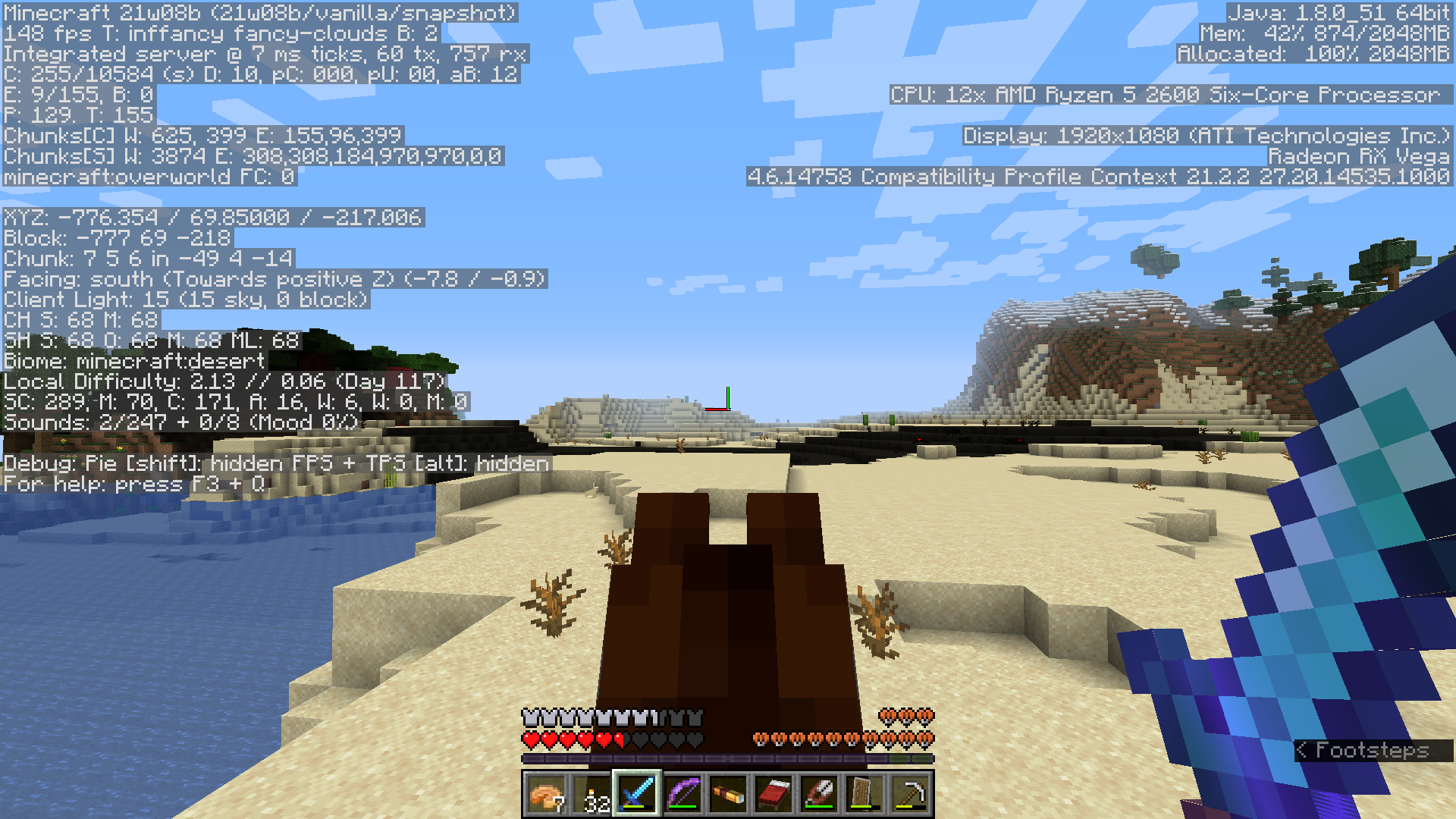
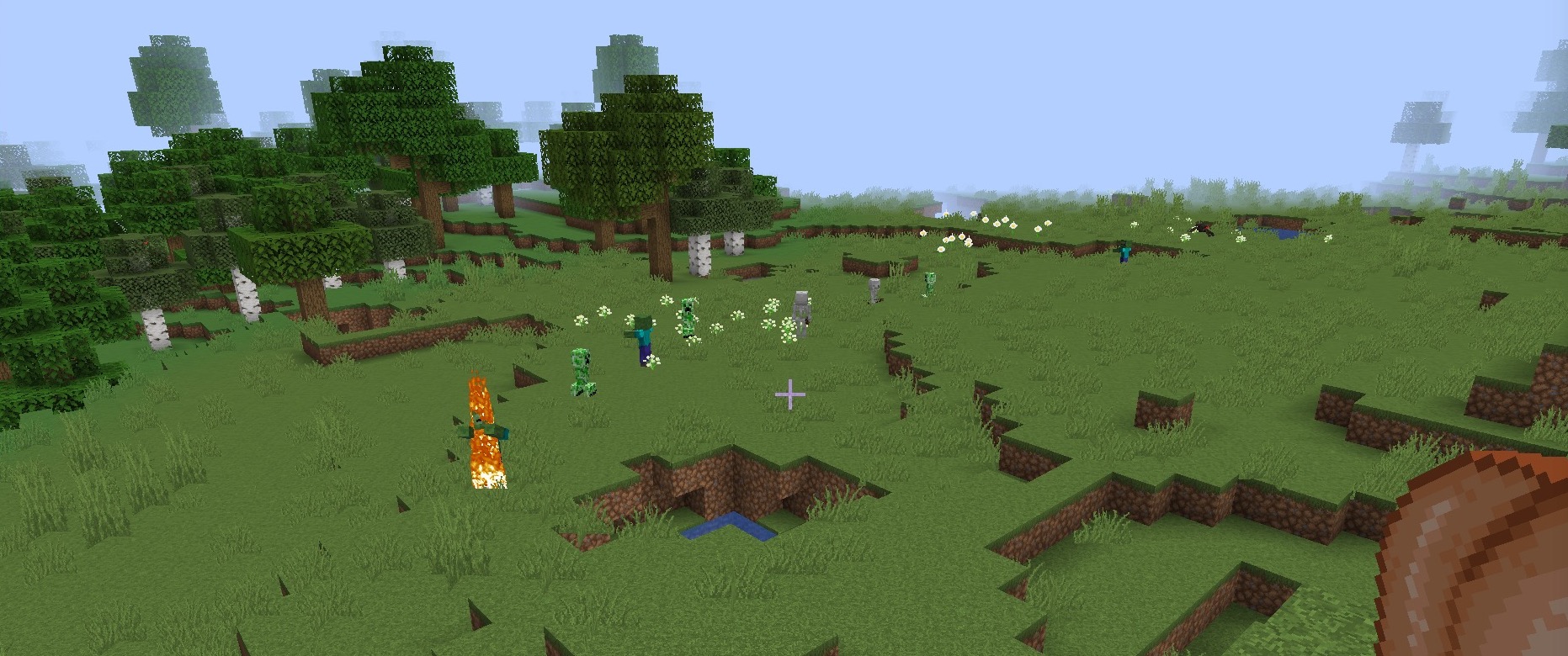
I generated a new world with the same seed as my main survival world in 21w15a. I flew around a bit to see how different world generation is in 21w15a vs 21w05b. I soon saw that there were a ton of creepers spawning, some zombies and skeletons that were burning, and a few spiders, even though it was broad daylight. Some skeletons and zombies in the water. (The world was fundamentally broken in other ways in this area, as well, such as a glitched out ruined portal, partial trees, and caves with glitched out generation.) The sky light says that it was light level 15 also, so the chunks were lit normally, making this a distinct bug from MC-214793.
Note that it only happened once. I loaded a new world with the same seed, and all the glitched out structures were normal, and the mobs did not spawn. In addition, the mobs stopped spawning once I reloaded the world.
Info from duplicate reports: Sometimes the zombies and skeletons burn immediately after spawning, and sometimes they don't burn at all.
Crash report (this was a forced crash, the game did not crash on its own):
---- Minecraft Crash Report -------- Minecraft Crash Report ----// I let you down. Sorry 
Time: 4/15/21 12:11 AMDescription: Manually triggered debug crash
java.lang.Throwable at dul.b(SourceFile:475) at dun.q(SourceFile:1668) at dun.e(SourceFile:1042) at dun.e(SourceFile:700) at net.minecraft.client.main.Main.main(SourceFile:217)
A detailed walkthrough of the error, its code path and all known details is as follows:---------------------------------------------------------------------------------------
– Head --Thread: Render threadStacktrace: at dul.b(SourceFile:475)
– Affected level --Details: All players: 1 total; [ekw['PlatinumMine'/46625, l='ClientLevel', x=-352.71, y=70.51, z=-305.08]] Chunk stats: 1681, 1296 Level dimension: minecraft:overworld Level spawn location: World: (128,66,14), Section: (at 0,2,14 in 8,4,0; chunk contains blocks 128,0,0 to 143,255,15), Region: (0,0; contains chunks 0,0 to 31,31, blocks 0,0,0 to 511,255,511) Level time: 5282 game time, 5282 day time Server brand: vanilla Server type: Integrated singleplayer serverStacktrace: at ehy.a(SourceFile:370) at dun.c(SourceFile:2259) at dun.e(SourceFile:719) at net.minecraft.client.main.Main.main(SourceFile:217)
– System Details --Details: Minecraft Version: 21w15a Minecraft Version ID: 21w15a Operating System: Windows 10 (amd64) version 10.0 Java Version: 1.8.0_51, Oracle Corporation Java VM Version: Java HotSpot(TM) 64-Bit Server VM (mixed mode), Oracle Corporation Memory: 1216994440 bytes (1160 MB) / 2147483648 bytes (2048 MB) up to 2147483648 bytes (2048 MB) CPUs: 8 JVM Flags: 9 total; -XX:HeapDumpPath=MojangTricksIntelDriversForPerformance_javaw.exe_minecraft.exe.heapdump -Xss1M -Xmx2G -XX:+UnlockExperimentalVMOptions -XX:+UseG1GC -XX:G1NewSizePercent=20 -XX:G1ReservePercent=20 -XX:MaxGCPauseMillis=50 -XX:G1HeapRegionSize=32M Launched Version: 21w15a Backend library: LWJGL version 3.2.2 build 10 Backend API: GeForce GT 530/PCIe/SSE2 GL version 3.2.0 NVIDIA 388.73, NVIDIA Corporation GL Caps: Using framebuffer using OpenGL 3.2 Using VBOs: Yes Is Modded: Probably not. Jar signature remains and client brand is untouched. Type: Client (map_client.txt) Graphics mode: fancy Resource Packs: vanilla Current Language: English (United Kingdom) CPU: 8x Intel(R) Core(TM) i7-2600 CPU @ 3.40GHz
Duplicate of MC-214793
Duplicate of MC-214793
Duplicate of MC-214793
Thank you for your report!
We're tracking this issue in MC-214793, so this ticket is being resolved and linked as a duplicate.
If you would like to add a vote and any extra information to the main ticket it would be appreciated.
If you haven't already, you might like to make use of the search feature to see if the issue has already been mentioned.
Quick Links:
📓 Bug Tracker Guidelines – 💬 Community Support – 📧 Mojang Support
📓 Project Summary – ✍️ Feedback and Suggestions – 📖 Game Wiki
– I am a bot. This action was performed automatically! Please report any issues on Discord or Reddit
Duplicate of MC-214793. In the future, please make sure to report issues in English.
Duplicate of MC-214793.
Actually a duplicate of MC-214793
Thank you for your report!
We're tracking this issue in MC-214793, so this ticket is being resolved and linked as a duplicate.
If you would like to add a vote and any extra information to the main ticket it would be appreciated.
If you haven't already, you might like to make use of the search feature to see if the issue has already been mentioned.
Quick Links:
📓 Bug Tracker Guidelines – 💬 Community Support – 📧 Mojang Support
📓 Project Summary – ✍️ Feedback and Suggestions – 📖 Game Wiki
– I am a bot. This action was performed automatically! Please report any issues on Discord or Reddit
This is actually a duplicate of MC-214793.
Duplicate of MC-214793
So there seems some general behaviors regarding which chunk borders cause issues. I'm starting to find patterns in a world I generated, testing on a server that is run on my computer, on 21w16a with the caves and cliffs data pack loaded. It seems that for me, the issues exclusively occur on a server run with the datapack as it doesnt happen on a 21w14a server (before the datapack), nor in singleplayer, but still match the issues described in this report and should still be of use to know and may help pinpoint the general issues regardless. My situation seems to have, if anything, amplified the issues.
note: upon further reading, it seems that while this issue can be taken generally, it does specifically address some sources regarding the server+C&C datapack combo in bug report MC-223383
There seem to be 'permanently problematic' (type A) areas, as well as 'semi-problematic' (type B) areas that I'll refer to as (fig.1, below). I'll be referencing type A and type B regions numerous times, so here's how I'm defining them here on out:
- Type A Region, Permanently Problematic: The region in question always causes lag spikes.
- Type B Region, Semi-Problematic: The region in question only sometimes causes lag spikes, and depends on whether the player has loaded the type A region, and what the player is doing.
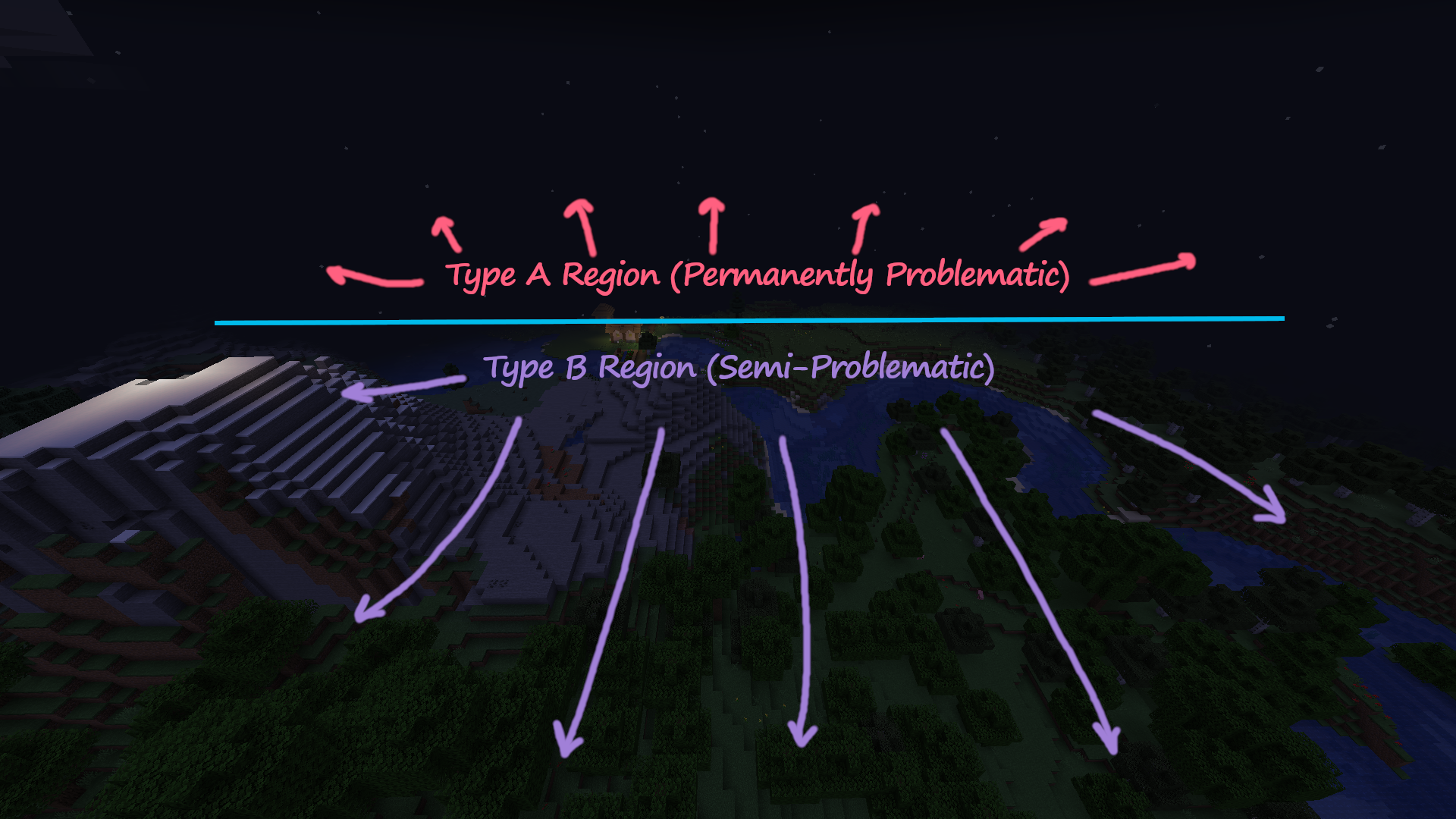
Fig.1 - Hovering in a location in the type B region, that is about to load in the type A region in front.
The area near spawn in my world was a village, and a type A region-- leaving the area and returning, logging out and back in, restarting the server... lag spikes always occurred when crossing chunk borders in the area, and also resulted in the shift+F3 pie chart reading increasingly higher "scheduled executables" with each lag spike to no bound. This happened in other areas of the world too. These type A regions can be separated by hundreds of blocks or more, discovered from any mode of gameplay.
It is worth noting that all villages I encountered were type A regions, but not all type A regions were villages (the issues also occurred in seemingly 'random' areas with no notable features/pattern). ** Note in fig.1, that the chunks stopped loading at the village boundary, and a massive lag spike followed. To verify that this occurs with villages at the least, and does not completely depend on what the player is doing, I recreated the world from scratch, and teleported to near the village in question. Loading the village the first time (i.e. chunks freshly created) did not result in formation of a type A region. However, completely leaving the area and returning to the village boundary (now that the chunks are already generated) results in type A region formation. So the general point here to note, is that the issue might only occur after the chunks are generated, when they are revisited. In the case of the village, approaching the village from any side of the rectangular bounding box, results in lag spikes once the village boundary is loaded.
Upon leaving type A areas (i.e. villages), it induced type B areas, and it gets a little complicated in how it works. There are two states that type B regions can be in: problematic, and non-problematic. Chunks that were not problematic before, became problematic temporarily. The problematic behavior however will vanish when moving further away from both the type A and type B areas to unload everything. Returning to the type B area alone will no longer be problematic, you can move in any direction without any spikes, as long as you are away from the type A area. Returning to the type A area again will restart the issues in the type B area.
Problematic behaviors noted:
- Directional-dependent lag spikes
- **Example, directions are random: moving north, east or south across chunk borders caused lag spikes, but moving west didn't. You can move east across chunk borders successively-- 1, 2, 3, 4 and 5, and every single crossing will cause a spike. But, moving west in the opposite direction across the same borders successively-- 5, 4, 3, 2, 1, never causes a spike.
- The directional dependence is somewhat inconsistent if speaking generally, however upon further investigation, there is one reliable pattern that occurs when flying through the problematic type B region, away from the type A region. When moving away, at some point the lag spikes will stop. As soon as the spiking stops when moving away, indicating you are sufficiently far from the type A region, immediately backtracking causes the spikes occur, and switch behaviors to become directionally-dependent. They no longer occur moving away, but will only occur moving toward the type A region. Moving back and forth anywhere in the type B region at this point will stay directionally-dependent until either: (1) unloading the type B region, or (2) revisiting the type A region.
- Biome identifying and rendering issues
- When a type B region is in a non-problematic state, biomes are identified correctly. When a type B region is in a problematic state, as induced by loading the type A region, biome identification is scrambled-- biomes are misnamed in the F3 info, and therefore biome colors are also incorrectly rendered (see figures 2-4 below)

Fig.2 - Type B region in a non-problematic state with correct naming and (mostly fine) rendering.
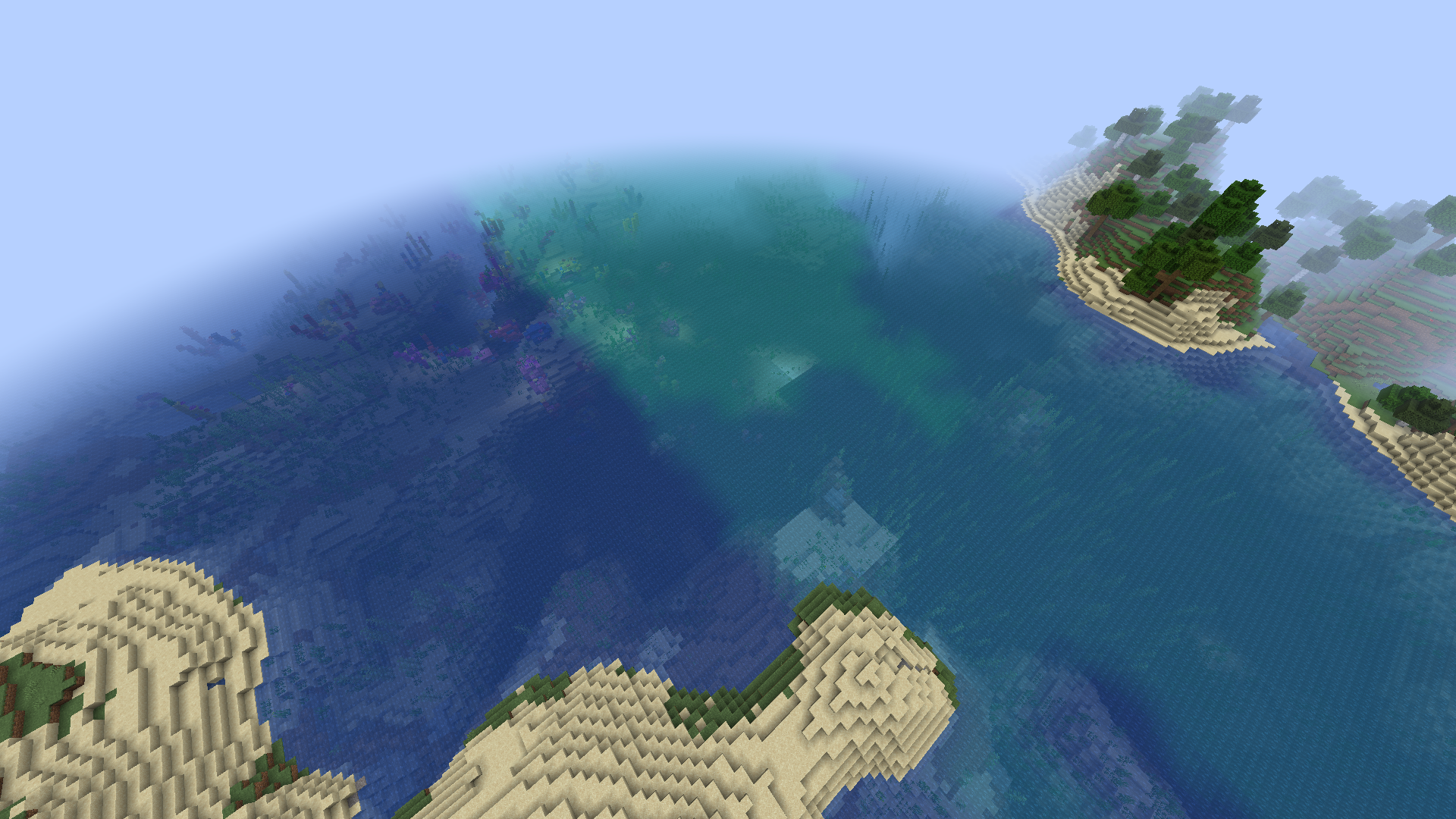
Fig.3 - Same Type B region in a problematic state with incorrect naming and rendering. The colors of the ocean shows a line along a chunk boundary revealing where issues are occurring. The grass in the lower left corner of the image is also visibly less saturated compared to fig.2, due to it being miscategorized as ocean.
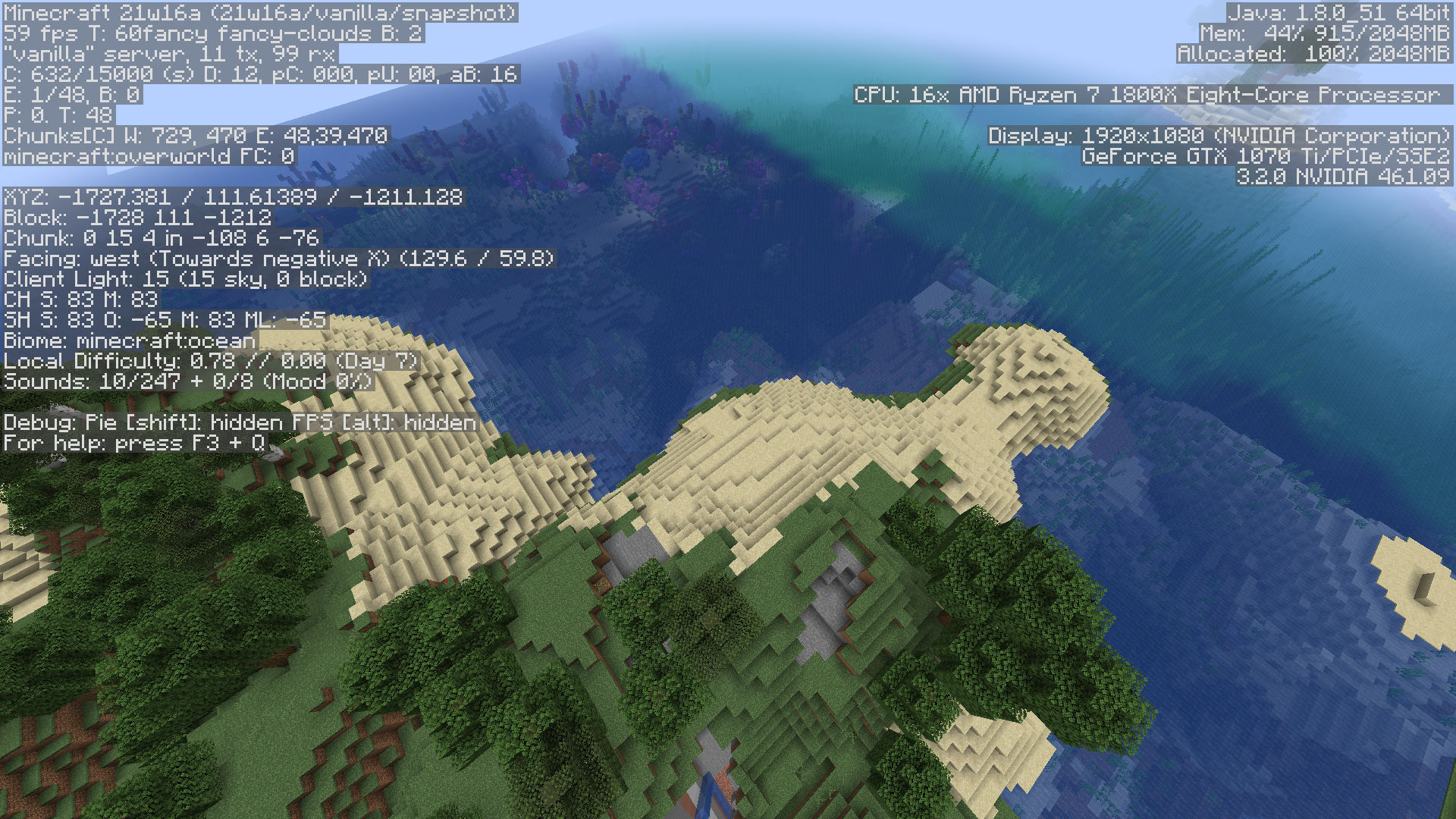
Fig.4 - Same Type B region, hovering over landmass that is being miscategorized as ocean, per F3 info. Following the terrain in the direction of the bottom left corner of the image goes deeper into the type B region, towards the type A region, pictured in fig.1. All of the type B region spanning 24-26 more chunks in this direction, is all land, but still all considered ocean by the game.
- When a type B region is in a non-problematic state, biomes are identified correctly. When a type B region is in a problematic state, as induced by loading the type A region, biome identification is scrambled-- biomes are misnamed in the F3 info, and therefore biome colors are also incorrectly rendered (see figures 2-4 below)
- Potential correlation to bug
MC-214793- Dark/Incorrectly Lit Chunks & Mob Spawning- In the type B region near its edge, several chunk lighting issues were found.

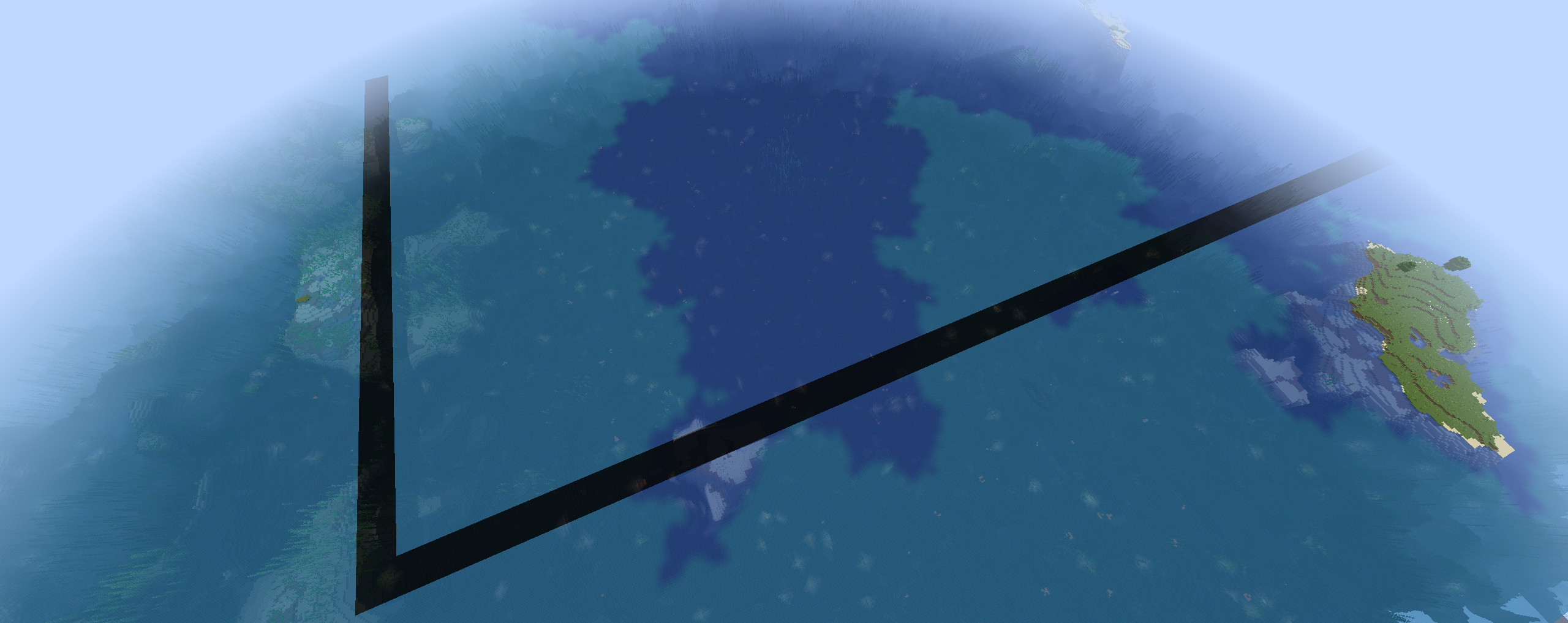
Fig.5 - Same Type B region, looking at the same area pictured in figs.2-4 from a different angle. The landmass in the left side of the image here, matches the land in the middle of the previous figures. Some chunks are completely dark, and other locations see an abrupt change in light level at chunk borders, particularly from the coral reef in the top part of the image. The dark chunks also approximately defined the lag spike region-- moving up to the left results in lag spikes, chunks down to the right were not problematic.
- In the type B region near its edge, several chunk lighting issues were found.

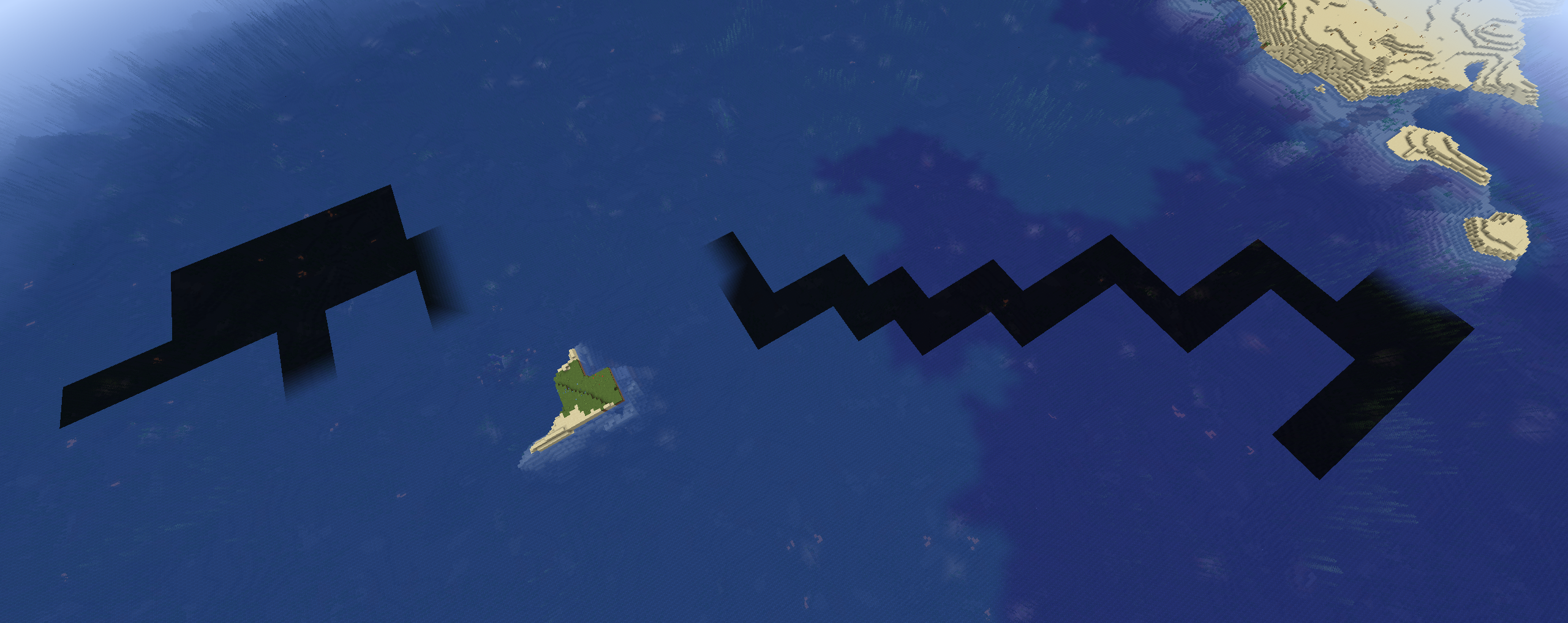
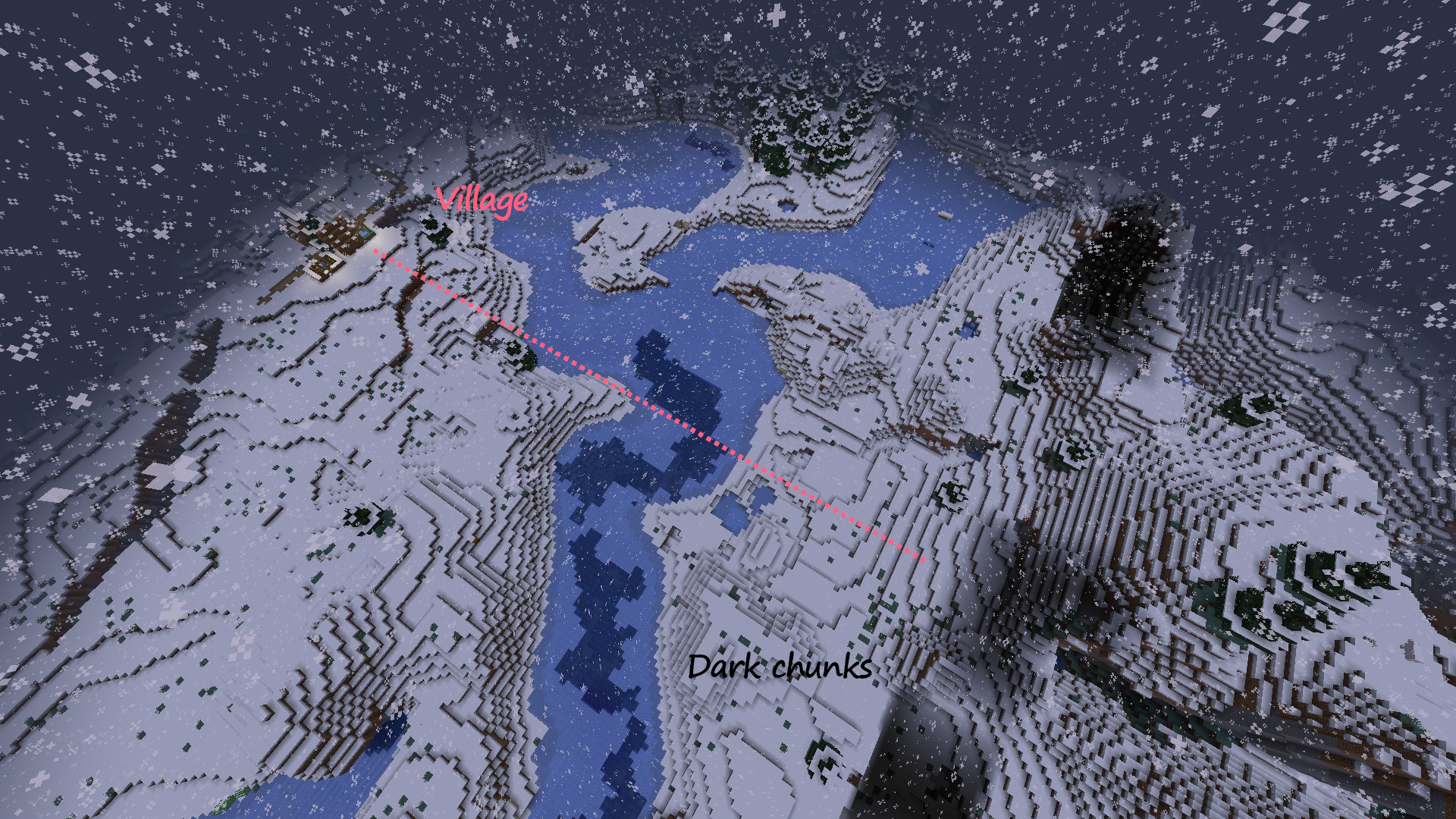
Fig.6 - Two long strips of dark chunks, with potential correlation to type B regions. The dark chunk strip on the right was created when moving away from a village type A region, located directly to the right. The dark chunk strip on the left was created when moving away from an unknown source type A region, located directly to the left. In both cases, the dark chunk strip is perpendicular to the line of sight to the type A region.
-
- The dark chunk issues are inconsistent in the aspect that they do not always materialize every time the type B region is problematic. While inconsistent, the issue is sometimes reproducible in the the exact same chunks if it occurs-- the dark chunks can appear in the same arrangement in the same location. However, the abrupt lighting changes at chunk boundaries in the coral reef still remain regardless.
- Dark chunk issues are however consistent in the aspect that they will occur no matter which side of the type A region that you start at and fly directly away from, and happen in the type B region when you move some distance away.
- The perfectly dark chunks are treated as mob-spawnable by the game, regardless of night or daytime (mobs will spawn in such dark chunks midday)
- On the rare occasion, dark chunks can sometimes be completely missing, and F3 gives "waiting for chunk" indefinitely.
Anyone else able to find and agree with any patterns? On a server running the caves & cliffs datapack? In singleplayer?
Hope this helps find the source of the issue!
Duplicate of MC-214793
Duplicate of MC-214793.
Duplicate of MC-214793.
Duplicate of MC-214793.
Thank you for your report!
We're tracking this issue in MC-214793 and MC-214808, so this ticket is being resolved and linked as a duplicate.
If you would like to add a vote and any extra information to the main ticket it would be appreciated.
If you haven't already, you might like to make use of the search feature to see if the issue has already been mentioned.
Quick Links:
📓 Bug Tracker Guidelines – 💬 Community Support – 📧 Mojang Support
📓 Project Summary – ✍️ Feedback and Suggestions – 📖 Game Wiki
– I am a bot. This action was performed automatically! Please report any issues on Discord or Reddit
Duplicate of MC-214793.
Thank you for your report!
We're tracking this issue in MC-214793, so this ticket is being resolved and linked as a duplicate.
If you would like to add a vote and any extra information to the main ticket it would be appreciated.
If you haven't already, you might like to make use of the search feature to see if the issue has already been mentioned.
Quick Links:
📓 Bug Tracker Guidelines – 💬 Community Support – 📧 Mojang Support
📓 Project Summary – ✍️ Feedback and Suggestions – 📖 Game Wiki
– I am a bot. This action was performed automatically! Please report any issues on Discord or Reddit
Thank you for your report!
We're tracking this issue in MC-214793, so this ticket is being resolved and linked as a duplicate.
If you would like to add a vote and any extra information to the main ticket it would be appreciated.
If you haven't already, you might like to make use of the search feature to see if the issue has already been mentioned.
Quick Links:
📓 Bug Tracker Guidelines – 💬 Community Support – 📧 Mojang Support
📓 Project Summary – ✍️ Feedback and Suggestions – 📖 Game Wiki
– I am a bot. This action was performed automatically! Please report any issues on Discord or Reddit
Thank you for your report!
We're tracking this issue in MC-214793, so this ticket is being resolved and linked as a duplicate.
If you would like to add a vote and any extra information to the main ticket it would be appreciated.
If you haven't already, you might like to make use of the search feature to see if the issue has already been mentioned.
Quick Links:
📓 Bug Tracker Guidelines – 💬 Community Support – 📧 Mojang Support
📓 Project Summary – ✍️ Feedback and Suggestions – 📖 Game Wiki
– I am a bot. This action was performed automatically! Please report any issues on Discord or Reddit
Thank you for your report!
We're tracking this issue in MC-214793, so this ticket is being resolved and linked as a duplicate.
If you would like to add a vote and any extra information to the main ticket it would be appreciated.
If you haven't already, you might like to make use of the search feature to see if the issue has already been mentioned.
Quick Links:
📓 Bug Tracker Guidelines – 💬 Community Support – 📧 Mojang Support
📓 Project Summary – ✍️ Feedback and Suggestions – 📖 Game Wiki
– I am a bot. This action was performed automatically! Please report any issues on Discord or Reddit
Duplicate of MC-214793.
Duplicate of MC-214793
Thank you for your report!
We're tracking this issue in MC-214793, so this ticket is being resolved and linked as a duplicate.
If you would like to add a vote and any extra information to the main ticket it would be appreciated.
If you haven't already, you might like to make use of the search feature to see if the issue has already been mentioned.
Quick Links:
📓 Bug Tracker Guidelines – 💬 Community Support – 📧 Mojang Support
📓 Project Summary – ✍️ Feedback and Suggestions – 📖 Game Wiki
– I am a bot. This action was performed automatically! Please report any issues on Discord or Reddit
Thank you for your report!
We're tracking this issue in MC-214793, so this ticket is being resolved and linked as a duplicate.
If you would like to add a vote and any extra information to the main ticket it would be appreciated.
If you haven't already, you might like to make use of the search feature to see if the issue has already been mentioned.
Quick Links:
📓 Bug Tracker Guidelines – 💬 Community Support – 📧 Mojang Support
📓 Project Summary – ✍️ Feedback and Suggestions – 📖 Game Wiki
– I am a bot. This action was performed automatically! Please report any issues on Discord or Reddit
Duplicate of MC-214793
Thank you for your report!
We're tracking this issue in MC-214793, so this ticket is being resolved and linked as a duplicate.
If you would like to add a vote and any extra information to the main ticket it would be appreciated.
If you haven't already, you might like to make use of the search feature to see if the issue has already been mentioned.
Quick Links:
📓 Bug Tracker Guidelines – 💬 Community Support – 📧 Mojang Support
📓 Project Summary – ✍️ Feedback and Suggestions – 📖 Game Wiki
– I am a bot. This action was performed automatically! Please report any issues on Discord or Reddit
There are two codepaths that invoke saving of chunks.
1. ThreadedAnvilChunkStorage.tryUnloadChunk(...) which saves chunks that are no longer kept alive by any chunk ticket, before finally unloading them from the world.
2. ThreadedAnvilChunkStorage.save(flush) which saves chunks periodically and upon closing the world.
protected void save(boolean flush) {
  if (flush) {
     ...
  } else {
     this.chunkHolders.values().stream().filter(ChunkHolder::isAccessible).forEach((chunkHolder) -> {
        Chunk chunk = (Chunk)chunkHolder.getSavingFuture().getNow((Object)null);
        if (chunk instanceof ReadOnlyChunk || chunk instanceof WorldChunk) {
           this.save(chunk);
           chunkHolder.updateAccessibleStatus();
        }
     });
  }
}
This code saves all accessible chunks, i.e., chunks that were in the BORDER status at some point since the last save, periodically (when flush is false) and upon closing the world (when flush is true). The second case is similar (and hence not included in the code snippet) but additionally waits for pending futures in the accessible chunks.
The point is now that neither of these cases covers chunks that are still kept alive by chunk tickets when closing the world, but do not have a sufficient ticket level to be BORDER chunks. Those are chunks that are only partially generated, but can already contain features and light propagations from adjacent chunks. Not saving these chunks will hence lead to corrupted features and broken light at chunk borders.
In the following I will present some concrete examples where chunk tickets can keep such chunks alive and will hence prevent saving. Some other ticket types can most certainly lead to the same effect.
1. Spawn chunks
The first example uses START tickets created on spawn chunks (the same works with FORCED tickets), which are not removed upon unloading the world and hence will keep some chunks alive.
- Create a new world with render distance 2 (e.g., with seed -4530634556500121041)
- Quit and reload directly after generating the world
- One can now turn up the render distance again
- Observe that features between the 11th and 12th chunk away from the spawn point are broken (World spawn loads chunks in a radius of 11 into BORDER status)
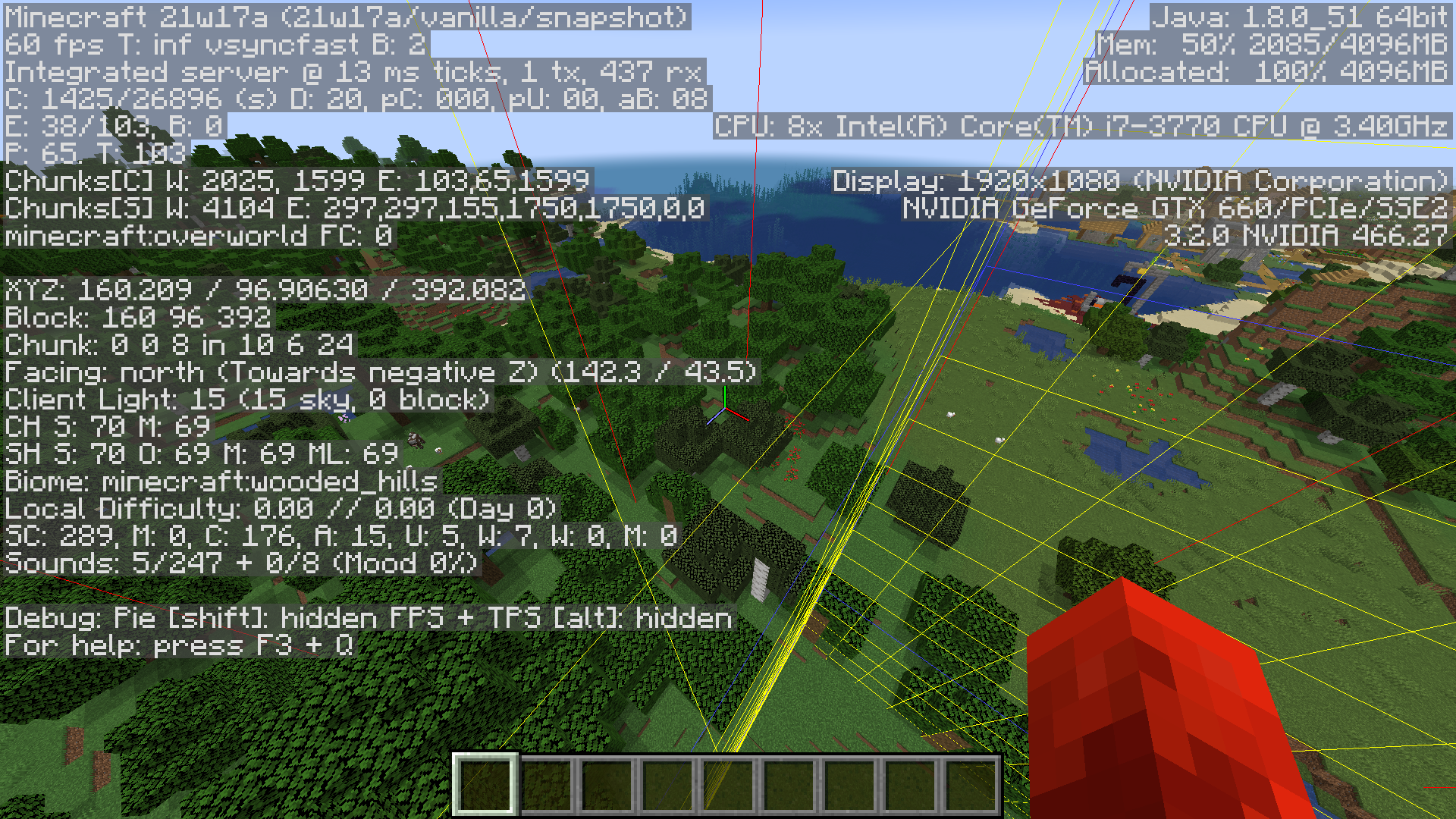
Due to the low render distance, chunks in distance 12 from the spawn point are not requested into BORDER status, but still kept from unloading due to the START ticket, hence triggering the described issue.
2. Overload the lighting engine
The second example uses LIGHT tickets created during worldgen to keep chunks alive. While these tickets will eventually be removed when the worldgen is finished, the goal here is to overload the lighting engine so that these generations steps will not be finished (and hence the tickets will not be removed) in time before the flush save completes. Note that the flush save only waits for accessible chunks to finish any remaining futures, but not for partially generated chunks.
Note that this behavior is quite random and hence the following steps might require several attempts for reproduction or may not work at all, depending on the setup. Nevertheless, I think this example is still of practical relevance as described in the final section.
In order to stress the lighting engine we can try the following steps
- Create an AMPLIFIED world with render distance 32
- Fly a few chunks in one direction and then close the world immediately
- Repeat the previous step several times, always flying in the same direction
- After repeating for a few times, revisit the generated chunks again and see if some corrupted features or light glitches occur.
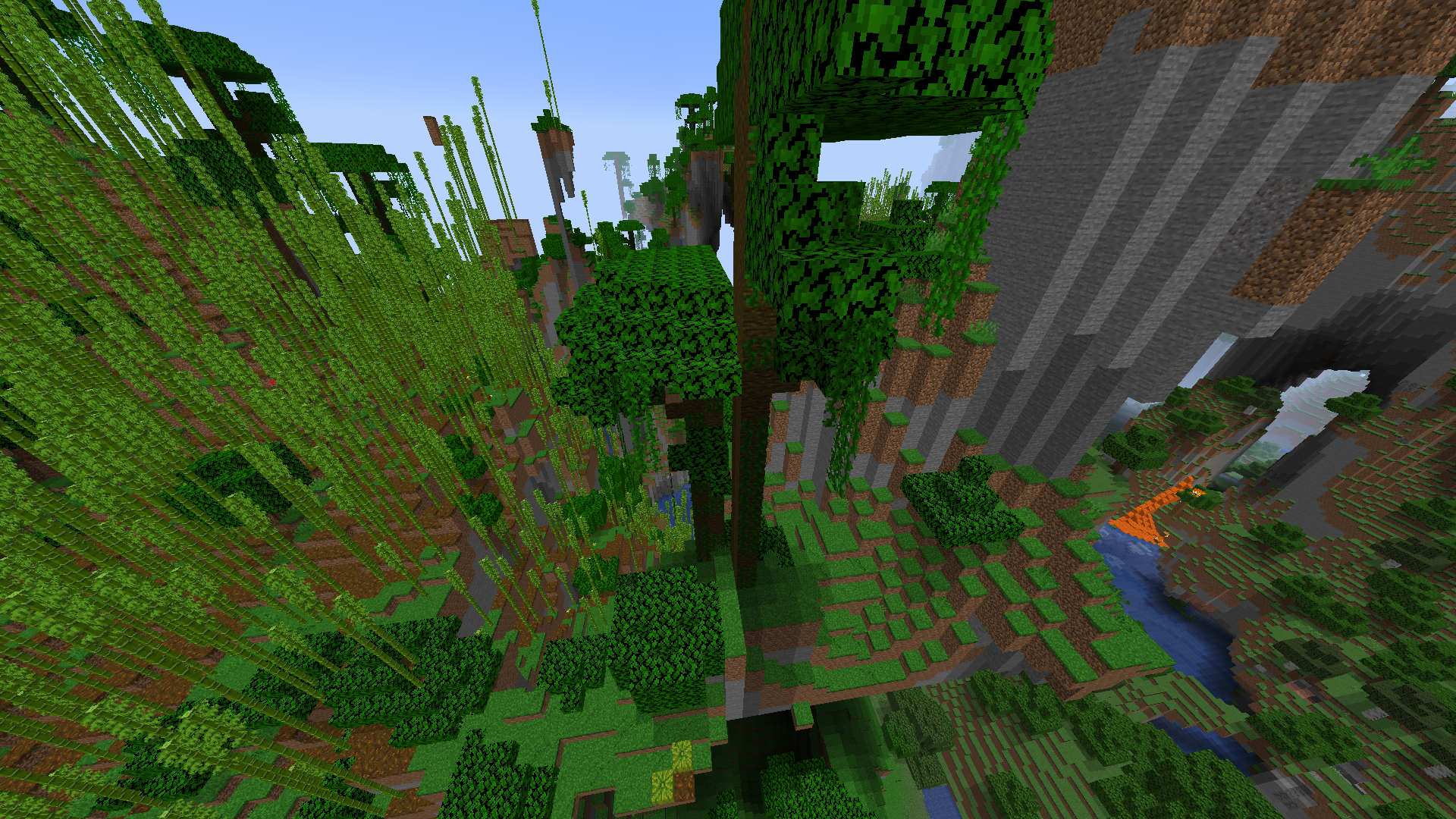
(Note that there are also some lighting glitches on the chunk border)
Closing the world immediately after flying a few chunks does not give the lighting engine enough time to finish its jobs before unloading the world (at least sometimes), hence causing the described issue.
3. Player tickets
As pointed out by Rik Lubking, PLAYER tickets can cause this issue very deterministically (comparable to the START tickets) and are hence probably the most common and severe case. While PLAYER tickets are explicitly removed upon shutting down the world by disconnecting all players before saving, this ticket removal does involve some threading and hence might not be completed before the saving executes, hence keeping all chunks loaded by players alive during saving and consequently triggering the issue.
4. Interacting with the world
Every world interaction, or more precisely every call to World.getChunk(...), creates an UNKNOWN chunk ticket with the intent to keep the chunk loaded and hence valid until the end of the tick. Every ticking entity and every player creates such a ticket at its location every tick, e.g., due to movement operations querying the chunk. These UNKNOWN tickets are in fact not cleared at the end of the current tick, but at the start of the next one. Consequently, these UNKNOWN tickets from the last tick are not purged upon shutting down the world and are hence still present during saving, prohibiting unloading and saving of some chunks (in contrast, PLAYER tickets are explicitly removed upon shutting down the world by disconnecting all players).
This does not seem to be an issue on high render distances, presumably because there are no entities far away from the player, at least not in the very last tick, and hence no such UNKNOWN tickets are created away from the player, whereas the PLAYER ticket itself has a much higher range and hence dominates these UNKNOWN tickets. Hence the UNKNOWN tickets only affect chunks that were already accessible due to the PLAYER ticket and hence do not trigger the saving issue.
However, this argument does not work for small render distances, e.g., render distance 2, where the UNKNOWN tickets do keep chunks alive that were not yet accessible, hence causing the saving issues. Indeed, the issue does show up deterministically when exploring new chunks with a render distance of 2 and reloading the world every few chunks.
Remarks
I think the issue described here is a good candidate for explaining MC-125007 (respectively MC-188086).
I am not sure, though, to which extent it is related to MC-214793. It again seems to be a good explanation for the corrupted features that seem to occur in conjunction with the dark chunks. However, it fails to explain why these chunks are completely dark; it only explains missing light propagations at the chunk borders, since these are discarded upon saving. So, it looks like some other unknown issue is interfering here as well.
Are you sure that you are experiencing this in 1.16.5?
We have the existing report MC-214793, but that is only for snapshot versions.
It turns out that MC-214808, MC-216148 and MC-214793 are all caused by the same code change introduced in the 1.17 snapshots. In the following I will describe this change and explain how it leads to each of these bugs. I post this as a separate report as it affects multiple other reports, so it doesn't really fit anywhere as a comment.
World generation/loading stores one Future for each generation stage of a chunk in a corresponding ChunkHolder. These Futures are created once something requests the chunk in the respective stage, under the condition that the chunk ticket level is sufficiently large to issue generation into that stage. What changed in the 1.17 snapshots is the handling of demotion of chunk ticket levels.
In 1.16 demoting the chunk ticket level completed all pending Future s above the new level with a special UNLOADED_CHUNK marker, while leaving already finished Future s untouched.
protected void tick(ThreadedAnvilChunkStorage chunkStorage) {
  ...
  Either<Chunk, ChunkHolder.Unloaded> either = Either.right(new ChunkHolder.Unloaded() {...});

  for(int i = bl2 ? chunkStatus2.getIndex() + 1 : 0; i <= chunkStatus.getIndex(); ++i) {
    completableFuture = (CompletableFuture)this.futuresByStatus.get(i);
    if (completableFuture != null) {
      completableFuture.complete(either);
    } else {
      this.futuresByStatus.set(i, CompletableFuture.completedFuture(either));
    }
  }
  ...
}
This has two important consequences:
- Once a generation stage finishes, the Future stays completed with the correct result until the chunk is unloaded
- A Future that is still pending at some point can only be aborted (completed with UNLOADED_CHUNK, which does not abort the actual generation step) if the chunk ticket level drops too low, otherwise it will complete with a valid chunk. This requires some small argument since the Future cannot only be aborted directly by the above code, but also indirectly if any of its dependencies is aborted (completed with UNLOADED_CHUNK). However, the latter cannot happen if the ticket level stays high enough (after observing the pending Future), by construction of the ticket system.
In the 1.17 snapshots, this handling of demotion fundamentally changed. Instead of directly aborting the pending Future s above the new level, all Future s, including already finished ones, are replaced with a new one that completes with an UNLOADED_CHUNK once the original Future completes.
protected void tick(ThreadedAnvilChunkStorage chunkStorage) {
  ...
  Either<Chunk, ChunkHolder.Unloaded> either = Either.right(new ChunkHolder.Unloaded() {...});

  for(int i = bl2 ? chunkStatus2.getIndex() + 1 : 0; i <= chunkStatus.getIndex(); ++i) {
    completableFuture = (CompletableFuture)this.futuresByStatus.get(i);
    if (completableFuture != null) {
      this.futuresByStatus.set(i, completableFuture.thenApply(__ -> either));
    } else {
      this.futuresByStatus.set(i, CompletableFuture.completedFuture(either));
    }
  }
  ...
}
As a result, both of the above properties are no longer valid:
- An already finished stage might be replaced with an UNLOADED_CHUNK_FUTURE
- If the chunk ticket level drops below, say, t then the corresponding Future is not directly aborted, but instead replaced with a Future that will be lazily aborted. If the ticket level is now raised above t again while the original Future is still running, then no new Future will be issued for this generation stage.
net.minecraft.server.world.ChunkHolder.java
public CompletableFuture<Either<Chunk, ChunkHolder.Unloaded>> getChunkAt(ChunkStatus targetStatus, ThreadedAnvilChunkStorage chunkStorage) {
  int i = targetStatus.getIndex();
  CompletableFuture<Either<Chunk, ChunkHolder.Unloaded>> completableFuture = (CompletableFuture)this.futuresByStatus.get(i);
  if (completableFuture != null) {
    Either<Chunk, ChunkHolder.Unloaded> either = (Either)completableFuture.getNow((Object)null);
    if (either == null || either.left().isPresent()) {
      return completableFuture;
    }
  }
  if (getTargetStatusForLevel(this.level).isAtLeast(targetStatus)) {
    CompletableFuture<Either<Chunk, ChunkHolder.Unloaded>> completableFuture2 = chunkStorage.getChunk(this, targetStatus);
    this.combineSavingFuture(completableFuture2, "schedule " + targetStatus);
    this.futuresByStatus.set(i, completableFuture2);
      return completableFuture2;
  } else {
    return completableFuture == null ? UNLOADED_CHUNK_FUTURE : completableFuture;
  }
}
This was fine in 1.16 since the Future could only be pending if it was not already (indirectly) aborted (which is exactly point 2 above). However, in 1.17 the Future is already indirectly aborted (it is replaced by a lazily aborted one) so it will always produce an UNLOADED_CHUNK even if the ticket level does not fall again. This breaks property 2.
It turns out that this code was changed in 21w06a, which is precisely the version where all 3 bugs were reported. (I actually checked the precise version retrospectively after figuring out the cause for these issues).
So, how does violation of these 2 properties cause the 3 linked bugs?
1. Ticking-Futures might never complete
Every time the ticket level is raised high enough, a chunk is promoted to BORDER, TICKING and ENTITY_TICKING state respectively. This will create additional Future s that depend on the generation Future s in some small neighborhood of the chunk. Upon completion, these will execute the respective tasks for promoting the chunk to the respective state, like registering tick schedulers, marking the chunk tickable/entity-tickable and sending the chunk data to players.
Assuming property 2 above, these Future s will always complete with a valid chunk at some point, unless the ticket level drops too low. In the latter case, the Future s get recreated once the chunk is promoted again, so this is not an issue.
Now, in the 1.17 snapshots property 2 is violated and hence these special Future s might never complete (with a valid chunk) since they might depend on lazily aborted Future s upon creation. Hence the respective promotion tasks might never execute. In particular, the ticking-Future, which is responsible for sending the chunk data to players, might not execute, hence causing MC-214808.
Note that all 3 Future s can fail independently. For example, I did observe chunks where the ticking-Future completed but the entity-ticking-Future did not, causing the chunk to load but entities to get stuck in these chunks. Also note that this issue can similarly lead to the "Chunk not there when requested: " error when the ServerChunkManager queries a lazily aborted Future for the FULL stage. I actually observed this crash a few time during debugging.
In order to provoke this issue, one can try the following steps. Due to the random nature of these bugs, several attempts might be needed. Run
- /tp ~1000 ~ ~
- /tp ~-1000 ~ ~
- /tp ~1000 ~ ~
in quick succession, e.g., with one tick in-between, or while pausing the server thread through the debugger. The first teleport will create the ChunkHolder s at the target location and create the generation Future s up to FULL stage. The second tp will then lazily abort these Future s again and the third and final tp will create the ticking-Future s on the lazily aborted but still pending generation Future s, hence causingMC-214808.
I also observed this issue with only a single tp, although this was less reproducible. This might seem strange at first, since the ticket levels should change monotonically in this case and not experience the jitter required for the above explanation. I think this is caused by an interaction of the POST_TELEPORT chunk ticket and the player ticket throttling. The POST_TELEPORT ticket is created right after teleporting, but expires before the player tickets are added because of the throttling, hence causing the required jitter.
2. Futures might be erased completely
If the chunk ticket level drops low enough, the corresponding ChunkHolder is scheduled for unloading. It can still be revoked up to the point where it is actually saved to NBT and all the unloading tasks are done. This can be a few ticks from the actual scheduling, depending on server load. By property 1, once the corresponding chunk has passed the first generation/loading stage, all Future s will keep the reference to this chunk, so that it can indeed be revoked from the ChunkHolder.
However, in 1.17 when the ChunkHolder is scheduled for unloading, all generation Future s are replaced with (lazily) aborted ones. If this ChunkHolder gets then later on revoked (before it could properly save and unload) all generation Future s are recreated and the very first stage then reloads the chunk from disk again. Hence, the chunk object gets replaced with a completely new version that is reloaded from disk, erasing any progress since the last save. This is exactly MC-216148.
Note that the unloading tasks did not run in this scenario, so any externally stored data is still present. In particular, the chunk is still marked as loaded and will hence skip the block-entity loading step.
private CompletableFuture<Either<Chunk, ChunkHolder.Unloaded>> convertToFullChunk(ChunkHolder chunkHolder) {
  ...
  worldChunk2.loadToWorld();
  if (this.loadedChunks.add(chunkPos.toLong())) {
    worldChunk2.setLoadedToWorld(true);
    worldChunk2.updateAllBlockEntities();
  }
  ...
}
As a consequence, block-entity tickers will not be recreated and still reference the old copies, hence block-entities will not be ticked. This is indeed a side effect noted in the bug report.
In order to provoke this issue, run for example
- /tp ~1000 ~ ~
- /tp ~-1000 ~ ~
in quick succession, so that the ChunkHolder s do not save and unload in-between. This can be achieved by pausing the server thread, for example. The first tp will erase all generation Future s and the second tp will then regenerate them and reload the chunk from disk.
In the report, it is noted that this seems to happen near nether portals. I'm not really sure how this is correlated. Most certainly, the relevant feature of nether portals are the PORTAL tickets created upon using them. However, I don't know how they enter the equation. They might play a similar role to the POST_TELEPORT_TICKET of the previous section or it might be something else.
3. Chunks might drop below FEATURES stage during initial lighting
While MC-214793 is actually caused by another concurrency bug, namely MC-224894, it might still be worthwhile to explain why this issue only showed up recently, even though the other bug is way older than 1.16.
Chunks below the FEATURES stage, i.e., chunks for which the FEATURES generation Future does return UNLOADED_CHUNK, are considered opaque by the lighting engine. Due to MC-224894, chunks are not kept in this required stage during initial lighting and hence might become opaque to the lighting engine.
However, due to property 1, in 1.16 the chunk always stayed in FEATURES stage once it was scheduled for initial lighting (and even was kept from unloading due to the pending light task). What could have happened even in 1.16 is that neighbor chunks might be unloaded between starting the initial lighting and finishing, which would cause glitches at the border. However, these neighbor chunks were kept loaded by the light ticket that is only removed (wrongly) at the start of the initial lighting, so the time frame was usually way too small, given that the actual unloading usually requires some extra ticks.
On the other hand, in 1.17 the chunk will immediately lose its FEATURES status once the light ticket is removed (and the player is sufficiently far away), hence triggering the issue with a relatively small amount of work required by the server thread which thus gives a large enough time frame for the issue to happen.
Furthermore, note that in 1.16 the light generation stage can be aborted before execution if any pending dependency was aborted due to ticket levels dropping too low. In 1.17 this is no longer the case since generation Future s don't get aborted directly. Hence, 1.17 more often processes initial lighting even if the player is already far away, compared to 1.16, increasing the chance for glitches at he chunk borders.
MC-224894 already describes how to trigger this lighting issue alone. However, MC-214793 mentions corrupted features in conjunction with this, I am not sure what is happening here, but I think this is a combination of the pure lighting issue and the previous section (progress being reverted). For example, one might argue that chunks which do make it to the LIGHT stage are kept from unloading a bit longer than their neighbors (which already finish after the FEATURES stage), due to the additional FUTURE that is waited upon by the unloading code. Hence, these ChunkHolder s might still be alive while their neighbors are already saved and unloaded and are hence susceptible to the previous issue which then regenerates these chunks completely, erasing all features that were leaking in from neighbors. However, as the light data is stored externally in the lighting engine, it will stay broken and not be regenerated. The neighbors were already saved to disk and will hence not need to regenerate, so they keep their features, causing corruption at the boundary.
Anyway, this is just a wild guess and probably not the whole story. But I think it's not too important to know precisely what's going on here. Debugging this is a real nightmare due to the rather random nature of everything involved and light tickets interacting with the whole argument.
Conclusion
The actual bug should be reasonably easy to understand and fix, e.g., by reverting to the 1.16 behavior. On the other hand, there might be good reasons for this change, so some more sophisticated solution might be necessary.
In any case, I hope these explanations have made clear the connections to the other 3 bugs and improved understanding of the general concurrency issues.
Best,
PhiPro
The issue described in the following is the root cause of MC-214793. While it has only become visible in practice recently due to MC-224893, I think this is still an important concurrency issue on its own and hence deserves its own report.
During worldgen, special light chunk tickets are created just before the light generation stage, in order to keep the chunk and its neighbors loaded until initial lighting is finished. Or at least this seems to be the idea behind this mechanism. However, the ticket is removed right before starting the actual initial lighting, rather than waiting until it is finished.
public CompletableFuture<Chunk> light(Chunk chunk, boolean excludeBlocks) {
  ChunkPos chunkPos = chunk.getPos();
  chunk.setLightOn(false);
  this.enqueue(chunkPos.x, chunkPos.z, ServerLightingProvider.Stage.PRE_UPDATE, Util.debugRunnable(() -> {
...
super.setColumnEnabled(chunkPos, true);
...
this.chunkStorage.releaseLightTicket(chunkPos);
  },
    () -> "lightChunk " + chunkPos + " " + excludeBlocks
  ));
  return CompletableFuture.supplyAsync(() -> {
chunk.setLightOn(true);
super.setRetainData(chunkPos, false);
return chunk;
  },
    (runnable) -> this.enqueue(chunkPos.x, chunkPos.z, ServerLightingProvider.Stage.POST_UPDATE, runnable)
  );
}
This is of course too early and leaves the possibility for the neighbor chunks to unload before the initial lighting has finished, causing lighting glitches at the chunk borders (the chunk itself is actually kept from unloading due to the pending light task). These border glitches can happen even in 1.16.
Note that chunks below the FEATURES stage are considered opaque by the lighting engine. Hence, even though the chunk itself is kept from completely unloading, its ticket level might drop below FEATURES stage which would make the chunk opaque to the lighting engine (during initial lighting), hence causing dark chunks as observed in MC-214793. In 1.16, this issue does actually not occur since chunks won't be demoted once they finish a generation stage (more precisely, the respective Future for that generation stage stays valid, which is precisely what the lighting engine checks). However, this is no longer true in 1.17 due to MC-224893 and hence the issue actually becomes visible.
In order to provoke this issue, one can traverse the world at high speed, e.g., using spectator mode (with very high speed) or tp commands in quick succession. Only a sparse set of chunks will make it to the LIGHT stage during this traversion, other chunks will already abort generation after the FEATURES stage. Furthermore, at the time these LIGHT stages are processed, the player is already far away, leaving the ticket level below the FEATURES level. Both of these facts together, sparseness of light tickets and chunk ticket levels being too low when the initial lighting is processed, make the above explanation applicable. And indeed one can observe completely dark chunks when visiting the traversed region again. Note however, that this might require some attempts due to the random nature of this bug. (In my test cases these were however quite reliably reproducible).
Note that while MC-214793 mentions corrupted features that often occur in conjunction with dark chunks when flying in spirals, no corrupted features were observed with the above steps. In conclusion, I think that the above steps really isolate the lighting bug itself, whereas the situation described in MC-214793 is a convolution of the pure lighting bug and other phenomena of MC-224893, see the latter for a small discussion.
Finally, let me mention that I did move the releaseLightTicket(...) call to the POST_UPDATE phase and no further dark chunks were observed, as expected. However, I did observe some small lighting glitches at chunk boundaries. This was in fact expected, since the light ticket only loads neighbors into LIQUID_CARVERS stage, whereas they should really be in FEATURES stage for the lighting engine to interact with them. So this is actually yet another issue with the light ticket mechanism (in 1.17).
Remarks
Let me also remark that this issue is actually an instance of a more general concurrency issue present in the chunk loading code. As mentioned in the beginning, it could already happen in 1.16 that neighbor chunks unload before the initial lighting is completed, causing light glitches at the boundaries, due to the light ticket being removed too early. This effect is not new to 1.17.
More generally, the chunk loading/worldgen code does not take any precautions to guarantee that a chunk stays loaded once it is passed to any worldgen step. Once a Future completes, the chunk is passed to the next generation step (on the worldgen thread) which can then hold on to the reference indefinitely. Independently, on the server thread, the chunk then may be unloaded before this next generation step does its work, so any progress after this point would be lost.
Similarly, the light ticket only handles the case of initial lighting. Any further updates after the initial lighting do not take any measures to keep the chunk and its neighbors in a state where the lighting engine can interact with them. So, any light updates after the LIGHT generation stage (but before promotion to FULL stage) might get stuck randomly due to chunks being unloaded or being demoted from the correct state.
As a solution, one should consider to implement a mechanism similar to the light tickets for general interactions during worldgen.
Best,
PhiPro
![[Helper] clam lol](../../../data/avatars/users/92852.png)
@Jacob Brockman you're probably referring to MC-214793, which was fixed recently.
I loaded up a backup of a world which was first generated in 21w05b so I could look around random chunks I had explored but not done anything in because I planned on resetting some old chunks for when the 1.18 snapshots come out. (I haven't actually edited the save files in anyway yet.) The particular area in which this occurred was loaded once in 21w05b and was not loaded again until now in 1.17. It is about 1 km from my base but I rarely ever explore, especially in that direction because there is nothing really interesting in that direction. However, when I went in spectator mode and started exploring, I found a single chunk which has no skylight from it.
This reminded me of the bug MC-214793, but this was different in that it had skylight protruding in from the adjacent chunks and it was only one chunk. Also that bug was fixed in 21w18a and the one I experienced occurred in 1.17. Reloading the world fixed the problem, so I am 95% sure it was caused by loading the chunk in that instance, not from when it was generated or loaded in the past. I have seen this bug occur two other times in this world but it was during the era of MC-214793, so I assumed that was the cause. However, I have never seen MC-214793 occur in this particular world. Also, those two instances were within about 100 blocks of my base.
I forced a crash report which will be attached. Screenshots will also be attached. I have included one of the sky to show that there is nothing above that may be blocking the light in anyway.
The bugged tree generation is a separate unrelated issue: MC-125007
Chunk loading issues in water: https://www.youtube.com/watch?v=LhCd__Lr8Rs
Meri Diana, that's a perhaps related but different issue –
MC-214808[Mod] violine1101 Thank you, will post it there then.
I've seen this is several places in this world, both above ground and underground.
Generation seed "Mandatory" XYZ 416/112/233.
Those dark areas can appear in various places, and they can go from both North-South as well as East-West-axis.

So far, I couldn't reproduce this with a specific seed, as in: "Dark areas always appear in this seed at this location." Furthermore, when I re-entered the world, those dark areas were gone. Likewise, opening the world to LAN and having a second account look at the affected area resulted in not seeing the dark area, while the first/host account still saw the dark area. For the secondary account, Sky light level was 15, for the first/host account 0.
So this issue seems to be client-side.
If you apply a night vision effect, those dark areas cannot be seen anymore; however, if you clear that effect, you'll see them again.
They are actually, really dark; Hostiles can spawn during daylight, and F3 shows 0 for Sky at Client Light.

The dark areas also remain visible during night/are darker than the surrounding areas, as opposed to the normal sections (chunk parts).
After just quick testing (unsure if what I write now is for certain), the dark areas can be removed if you place (or change or update already-existing blocks, e.g. via running water) at maximum 2 away from a chunk border, however, it seems that this only succeeds if the block of a neighbouring chunk has a certain light level, presumably just higher than 0 (can be probably better seen if you turn off Smooth Lighting).
It seems the Skylight is normal again at a certain height above the dark area; it appears to be the 2nd chunk above the highest block of affected chunk, e.g.: Dark area, highest block in that chunk at Y=69, Skylight 0; Skylight 15 would be then at Y=96. (69/16=4etc.; 4+2=6, 6x16 = 96). Dark area, highest block in that chunk at Y=105, Skylight 0, Skylight 15 at Y=128 (105/16=6etc. 6+2=8, 8x16=128).
Quick testing video (Hostiles spawn, block placing, night vision effect): https://www.youtube.com/watch?v=959q91bRXmg
Demo Client Light Sky 0/15 dependent on Y-level, and relog fixing dark areas: https://www.youtube.com/watch?v=KjFJOOAkQww
Render distance 16.
Relates to
MC-214898Observed in current 1.17 snapshot at Z=-2225. Hostile mobs spawn on the line in midday. Save and Quit and Reopen causes the chunks to be lit again.
Placing a block at y319 causes a few chunks around it to be restored to normal.
The tree issue has been marked as "unrelated and separate iusse MC-125007)
but I find it unsuall that most of the areas with bugged lighting also contain these cut off trees
ive had the same problem but yours is on a much bigger scale. maybe it was because i was close to spawn and it made it smaller but i got rid of some of it with torches if you place it on the edge and get rid of the torch. and i dont know if it was just me, but i saw way more trees and mountains cut off then usual, right at the border of the chunk.
Still happening in 21w08a
still 21w08b
Noticed this too, they are gone when reloading the world though!
This happend to me on 1.16.5 but they just didnt load. at ALL.
still 21w10a
Is this going to be fixed?
Of course it's going to be fixed, but these are snapshots and large bugs are often pushed until all the features are in.
I was doing some tests and noticed that while the lighting updates visually when you put blocks, or, in my case, torches, on the edge, that only affects the rendering, and not things like mob spawning. Then I went into a nether portal and came back, and the area looked almost normal, but the mobs were still spawning in daylight.
Happening still in 21w10a
Cannot reproduce with intel graphics 3000
Even with a light update at the border of one such chunk, like with a jack o'lantern, the darkness is never fully lifted. It comes back when the light block is removed again although the darkness near the chunk's edges might have smoothed out a bit.
When I recreated the world with the same seed, the glitch was gone in that particular place. Seems to be at either random times or random places.
Is the bug similar to
MC-214808?Confirmed for 21w13a
Not sure if this is a direct cause from the issue but it looks like it also might break tree generation
Can confirm NVIDIA GeForce GTX 1060 6GB
21w14a
Definitely confirmed for 21w14a. This all occurs in singleplayer, and can confirm it also happens when running a server at least in 21w13a. The lighting issue does not disappear with F3+a chunk reloading, but fixed when saving and quitting to title, and rejoining the world.
The lighting glitch is more than just client-side visual, because mob spawning is able to occur in it midday.
Furthermore, the glitch can be more severe sometimes where the chunk entirely fails to render. When inside the chunk space, F3 is missing chunk info and states "waiting for chunk" indefinitely. This cannot be solved with F3+a either.
Just made a new report for the missing chunk thing,
MC-222574, same bug?That is probably
MC-214808Maybe relates to
MC-142134?Can confirm for 21w14a
If at y=95, it will think you are standing out in the light. If at y=94, it will think you are in the shade.
Setting a block above y=80 will cause the lighting to update. If you set a block below y=80 it will not update.

A similar thing has happened to me where I the /fill command and the lighting acts as if it didn't have any blocks above it, making it impossible to turn back to darkness, and this is annoying in my mob farm.
Confirmed for 21w15a
Does this issue seem to coincide with other unusual chunk glitches, such as cliffs stopping sharply on the borders, structures that are partially missing, etc.? I have a similar (but also quite different) issue to this, but I noticed that there were all kinds of peculiarities in the area, such as a messed up ruined portal, a glitched out cave, a half a tree, etc.
Also, does this issue resolve itself upon relogging? Or does it persist?
Yeah, this frequently coincides with other worldgen bugs like half generated trees- this should be marked as relates to MC-125007 IMO, almost every time I see this bug there are half-trees at the edge of it
Any chance someone could post a screenshot of this in a version before 21w06a/after 21w14a (with the debug screen)? I can't seem to reproduce it in a standard-height world and would be interested to see if it looks any different from what I ran into during the extended-height snapshots.
Cannot reproduce in 21w15a, probably due to the reverted world generation changes, so this is likely not fixed yet.
I've attached a screenshot of this issue in 21w15a.
Can also confirm for 21w15a.
Does reloading the world fix this, or does the issue persist?
I can reproduce it now again too, maybe I didn't cover enough distance before. This time I've covered over 40k blocks outwards and circled around an entire (huge) desert.
It appears that the lighting glitches occur in chunks that were newly generated in 21w15a. All these lighting glitch occurrences seem to disappear upon logging out and back in, but always come back in different places (so it's not just a first-load problem but doesn't persist either).
Lastly I also experienced this glitch in a 1.16.5 world, HOWEVER that was in a modded game so I still need to check that version back in vanilla.
Doesn't seem to be an issue in 1.16.5, though we can't be sure.
Do they sometimes appear to be lit up despite being dark? Like even without night vision or high gamma values?
Found some dark chunks again in 21w16a (along with what I believe is MC-125007). Definitely seems less common after the height revert.
I would like to bump this again because I am finding a pattern and probable cause for its occurrence, as well as evidence for linkage to another significant bug.
I've done extensive testing for hours trying different things, and it actually started with bug
MC-166005- "Stuttering when crossing chunk borders/loading chunks", in which I discovered that villages in 21w16a with the Caves & Cliffs datapack, created enormous lag spikes in the region, up to 30 chunks away from the village boundary. It turns out that in the same lag spike region, the dark/missing chunk issues were often found. I would repeat it over and over-- fly to a new village, fly around it a bit, and I would get both lag spikes, and dark chunks. Repeat with a new village. While I found that severe lag spikes were unique to having the Caves & Cliffs datapack running, the dark chunks are still repeatable under the same circumstances even in prior versions before datapack usage, i.e. 21w14a.There are 2 good ways to predictably reproduce the dark/missing chunks, and anticipate where they will occur. Start in spectator, and go full speed with the mouse wheel + sprinting in either case.
In either case, here is what I think is happening:
Here's a few examples to illustrate what commonly happens in each method:
Case 1 Examples: Dark chunk line perpendicular to village line of sight
Case 2 Examples: Dark chunk "box" surrounding a teleportation location & Other irregular shapes
I'm heavily inclined to believe that the dark/missing chunk issues are caused by anything that causes excess stress during the chunk generation process, and some chunk data is getting at least temporarily corrupted. Example: the game is generating a chunk, something interrupts the process, causing data to be incomplete. Let's say we roll with that idea. Sky lighting maybe doesn't get the chance to have data populated in the sub-chunk, so the default value is 0 (dark) unless otherwise given the opportunity to be filled with a "15". As some have noticed, the dark chunks can also coincide with trees being chopped at the boundary, which seems like it would be consistent with chunk generation being interrupted as well. Maybe there's other generation features that can be interrupted too. They seem like different issues at face value, but might have the same root cause.
note: On a server, some dark chunks will disappear after relogging, some won't. For the ones that won't disappear, even completely shutting down the server and restarting it multiple times won't fix it, and remain 'permanently' mob-spawnable.
And maybe the reason why it's more difficult to reproduce this issue with the non-C&C generation, is because it's harder to achieve the amount of stress needed to start corrupting chunk data-- less chunk height means less to generate, and a smaller window of opportunity for something to interrupt the chunk generation process? So something would need to be optimized/fixed with chunk generation so that it's much harder or impossible to interrupt chunk data creation? And something about villages would need to be potentially optimized?
Just my thoughts based on the patterns I've observed, hope this helps!
What about 1.16.5?
I seem to have this glitch too, but sometimes it's not a strip of chunks, but entire areas.
Signing in and out of the server sometimes fixes the light but the mobs keep spawning.
Anything you build in these zones does not save if you sign in and out.
Dark zones above villages causes the villagers to run in and out of their houses repeatedly, they don't seem to understand whether it's day or night. (Which is strange, I thought they went by the day cycle, not light.)
I've tried running my world through the "Optimize world" function but it causes the launcher to crash about halfway through on a total of three different computers, both MacOS and Windows.
Found a very broken seed where this occurs extremely frequently: -2171582531736847681. About 1/10 of the world is lighting errors. Occurring in areas that were previously lit. Occurred in spectator mode, which was thought to be impossible. Without teleportation, just flying around, huge lighting errors everywhere. They clearly do not always generate completely dark, they just fail to load the proper lighting for some reason.