Viewing text in Right-to-Left language while in another language renders backwards and non-connected
Viewing Arabic text in another languages renders non-connected, which is annoying that we have to switch the language to read Arabic text.
When reading Arabic the words flip on another language like English, it will be viewed as " f t a r c e n i M". The words are not connected and it is rendered left to right.
This still occurs when Force Unicode Font option is on.
To reproduce:
Copy: ماينمكرافت
Paste into chat
Should appear as the following in default language settings: 
If appears non-connected meaning it isn't fixed, like: 
Linked Issues
is duplicated by15
 MC-8273Right to left languages come out backwards in gameDuplicateMC-22076Language- Hebrew DuplicateMC-29380Hebrew Chat DirectionDuplicateMC-94382Right-to-Left Languages are backwards in chatDuplicateMC-94433Right to left languages render left to rightDuplicateMC-115607Arabic Language Chatting Problem (Not Solved)DuplicateMC-116322Oldly Duplicated (But Not Fixed)DuplicateMC-117192arabic text is not connected if you are using another languageDuplicateMC-141813Persian language is messed upDuplicateMC-152474Hebrew is written from left to right instead of from right to leftDuplicateMC-152477Hebrew is written from left to right instead of from right to left *It is NOT a duplicate of MC-152474, its a different bug.*DuplicateMC-152674Right to left text appears backwards in non right to left languagesDuplicateMC-169628Arabic font issuesDuplicateMC-171283Hebrew language is in reverseDuplicateMC-192126Hebrew right to left is left to right.Duplicate
 Normal
 Low
Low




- Fixed
 mbcx2
mbcx2- [Mojang] Bartosz Bok
- 16
- 12
- Confirmed
- UI
- language
13w42a - 1.16.1
13w42a 1.7.4 14w11b 1.7.9 1.7.10 14w30a 14w30b 14w31a 1.8 1.8.1-pre2 1.8.1 1.8.3 15w42a 1.10.2 16w41a 16w42a 1.11.2 17w18b 1.12.1 1.12.2 17w43a 17w43b 1.13-pre6 1.13 18w30b 18w31a 18w32a 18w33a 1.13.1 1.13.2-pre2 1.13.2 18w48a 18w48b 18w49a 1.14.1 1.14.2 1.14.4 19w39a 1.15 1.15.1 1.15.2 20w17a 1.16-pre3 1.16-pre5 1.16-pre7 1.16.1- 20w30a
Created Issue:
Viewing Arabic text while in another language renders non-connected
Viewing Arabic text while the language is non-Arabic will appear non-connected.
Attachments2
A comment with security level 'global-moderators' was removed.
A comment with security level 'global-moderators' was removed.
Viewing Arabic text while the language is non-Arabic will appear non-connected.
Also example writing "Minecraft" will display "Minecraft" in Arabic when language is set to Arabic, but once you switch to English or other language, it will do like "f t a r c e n i M", the words flip from right to left, to left to right, the space is just example that the letters are not connected.
ماينكرافت (Might not appear connected to some people reading this)
This also applies to Chat, Resource pack localization, MOTD, or anything that renders Arabic text.
![[Mod] Ezekiel (ezfe)](../../../data/assets/gravatar/ezekielelin.jpeg)
Viewing Arabic text while the language is non-Arabic will appear non-connected.
Also example writing "Minecraft" will display "Minecraft" in Arabic when language is set to Arabic, but once you switch to English or other language, it will do like "f t a r c e n i M", the words flip from right to left, to left to right, the space is just example that the letters are not connected.
ماينكرافت (Might not appear connected to some people reading this)
This also applies to Chat, Resource pack localization, MOTD, or anything that renders Arabic text.
Viewing Arabic text while the language is non-Arabic will appear non-connected.
Also example writing "Minecraft" will display "Minecraft" inArabicwhen language is set to Arabic, but once you switch to English or other language,it willdo like "f t a r c e n i M",the words flip from right to left, to left to right, the space is just example that the letters are not connected.
ماينكرافت (Might not appear connected to some people reading this)This also applies to Chat, Resource pack localization, MOTD, or anything that renders Arabic text.
Viewing Arabic text while the language is non-Arabic will appear non-connected.
When writing Arabic the words flip, example I type "Minecraft" it will be " f t a r c e n i M", spaces just means the words are not connected, words flip too, making it even harder to read.
This still occurs when Force Unicode Font is on.
Viewing Arabic text
whilethe languageis non-Arabic will appear non-connected.When writing Arabic the words flip, example I type "Minecraft" it will be " f t a r c e n i M", spaces just means the words are not connected, words flip too, making it even harder to read.
This still occurs when Force Unicode Font is on.
Viewing Arabic text in another languages renders non-connected, which is annoying that we have to switch the language to read Arabic text.
When writing Arabic the words flip, example I type "Minecraft" it will be " f t a r c e n i M", spaces just means the words are not connected, words flip too, making it even harder to read, it Arabic is Right-to-Left language while Minecraft does it Left-to-Right.
This still occurs when Force Unicode Font is on.
Viewing Arabic text while in another language renders non-connected.
Viewing Arabic text in another languages renders non-connected, which is annoying that we have to switch the language to read Arabic text.
When
writing Arabic the words flip, example I type "Minecraft"it will be " f t a r c e n i M", spaces just means the words are not connected, words flip too, making it even harder to read, it Arabic is Right-to-Left language while Minecraft does it Left-to-Right.This still occurs when Force Unicode Font is on.
Viewing Arabic text in another languages renders non-connected, which is annoying that we have to switch the language to read Arabic text.
When reading Arabic the words flip on another language like English, it will be viewed as " f t a r c e n i M". The words are not connected and it is rendered left to right.
This still occurs when Force Unicode Font option is on.
Viewing Arabic text in another languages renders non-connected, which is annoying that we have to switch the language to read Arabic text.
When reading Arabic the words flip on another language like English, it will be viewed as " f t a r c e n i M". The words are not connected and it is rendered left to right.
This still occurs when Force Unicode Font option is on.
To reproduce:
Copy: ماينمكرافت
Paste into chat
Should appear as the following in default language settings:
If appears non-connected meaning it isn't fixed, like:
![[Mod] Michael Wobst](../../../data/avatars/users/37868.png)

is duplicated by

ViewingArabic textwhile in another language renders non-connectedViewing text in Right-to-Left language while in another language renders backwards and non-connected
is duplicated by
![[Mod] tryashtar](../../../data/avatars/users/41963.png)
![[Mod] violine1101](../../../data/avatars/users/92858.png)
relates to
![[Mod] Urielsalis](../../../data/assets/gravatar/urielsalis.jpeg)

![[Mod] Pokechu22](../../../data/avatars/users/92931.png)
![[Mojang] Nathan Adams](../../../data/assets/gravatar/dinnerbone.png)
is duplicated by
is duplicated by
![[Mod] CubeTheThird](../../../data/assets/gravatar/cubethethird.jpeg)
is duplicated by
![[Mod] NeunEinser](../../../data/avatars/users/39263.png)
is duplicated by
![[Bot] Arisa](../../../data/avatars/users/43007.png)
is duplicated by
is duplicated by
![[Mod] Greymagic27](../../../data/avatars/users/92875.png)
is duplicated by
![[Mojang] slicedlime](../../../data/assets/gravatar/slicedlime.jpeg) [Mojang] Bartosz Bok
[Mojang] Bartosz Bok![[Mod] ampolive](../../../data/avatars/users/18949.svg)
relates to
relates to
Thank you for your report!
However, this issue has been closed as a Duplicate of MC-35765.
It has been linked to this report. If you have additional information, please add it to that report.
Please search before reporting, as it's likely that one exists already.
Quick Links:
📓 Issue Guidelines – 💬 Community Support – 📧 Customer Support – 📖 Game Wiki
The letters not being connected is MC-35765, please change the report to be only about the "r" in front of the message which appears for other right-to-left languages as well
Duplicate of MC-35765
Yes, sorry, I misread your ticket. However, this is a duplicate of MC-35765.
Duplicate of MC-35765
Does MC-35765 describe your issue?

yes, MC-35765 describe this issue but MC-35765 when you use another language but now from 1.15.x we have problems in the hole language, until 1.15.2 when you use Arabic and restart the game you need to click on language button and it will fix automatically but in the last snapshots of 1.16 it's broken !!! and clicking on lang button don't fix it.
Arabic is an RTL language and its letters are connected together to make the words, Arabic has a lot of issues in Minecraft, please work to fix it otherwise a lot of players who are not good in English will stop playing the game.
MC-35765 describe this issue but MC-35765 when you use another language but now from 1.15.x, we have more problems, until 1.15.2 when you use Arabic and restart the game you find the words not connected in all the game and you need to click on language button and it will fix automatically but in the last snapshots of 1.16 it's broken !!! and clicking on lang button don't fix it.
Arabic word should look like: خشب
and it looks like: خشب
this bug has been in the game in old versions 1.4,1.5 ... but it fixed
bugs related to Arabic:
thanks for reading
Thank you for your report!
We're tracking this issue in MC-35765, so this ticket is being resolved and linked as a duplicate.
If you would like to add a vote and any extra information to the main ticket it would be appreciated.
If you haven't already, you might like to make use of the search feature to see if the issue has already been mentioned.
Quick Links:
📓 Issue Guidelines – 💬 Community Support – 📧 Customer Support – ✍️ Feedback and Suggestions – 📖 Game Wiki
Changing the language does not reconnect right-to-left texts.
In order for the texts to appear correctly, you need to be in the right-to-left language originally, and then you enter the world, or you change the language and then go out and enter the world.
The written text appears according to the chosen language only when it is displayed. In the case of writing while selecting a left-to-right language (Arabic), the writing will appear correctly, but if it is written in a left-to-right language (English) it will appear incorrectly and disconnected, this effect will disappear when leaving the world and entering once Others

Note that if you write in the right-to-left language (for example Arabic) the texts will appear in the chat correctly even if you change the language (for English, for example) the texts will still appear correctly, this means that it is easy for you to fix the error MC-35765 ، And making the right-to-left languages appear right for everyone without problems.
fixed by fixing MC-35765
After MC-35765 was fixed, I have noticed a new rendering glitch.
If typing in chat the following:
!בדיקה
It shows in chat:
בדיקה!
- If writing Hebrew after the symbols, it renders correctly in the middle of the sentence
So as I see you've fixed here: MC-35765
As I see you've done a great job at fixing the issue but seems like there are still a few issues
for example:
The language fix works only after actually sending the text but not on the client-side!
Let's take the word "שלום" which is in Hebrew (RTL language)
When I try to write it in the text bar I get an unfixed and flipped version of the word : 
if I send this text It shows the right text : 
Another really bad issue is the fixing of the RTL languages when you enter an English word inside!
let's say I want to say "The player <player> has died" but in Hebrew which is an RTL language.
"נהרג בקרב <player> השחקן"
I'll add the player's name to show the bug:
"נהרג בקרב RDev_ השחקן"
Can't help but notice that even when I try to use it here I get the same exact issue so I had to engineer writing this text!
If I wanted to write this text without engineering it then the text would be:
"השחקן RDev_ נהרג בקרב"
but the right version is: "נהרג בקרב RDev_ השחקן"
So when I add any English letter the whole sentence would just flip...
here it is in Minecraft as well:

I know the second bug is very very complicated to fix but it is very essential!
Edit: for the second bug shown I have a code that can fix the issue on the server-side, I'll link it here in case it would be helpful to understand the current issue and how to we handle it on the server side to fix it via a spigot plugin.
link: https://github.com/LielAmar/LanguageFix/blob/master/src/main/java/com/lielamar/languagefix/shared/handlers/FixHandlerPost1_16.java
I found a bug almost like it, but for java edition: MC-35765
Arabic language's letters are not connected and are rendered backwards, which makes the language unreadable and makes a big group of people unable to communicate correctly because of this.
Explination if you dont understand arabic:
English is left to right, Arabic is right to left, meaning that: English text is read from left to right, Arabic text is read from right to left.
Backwards example:
Imagine its like saying: "noitidE kcordeB tfarceniM", which actually reads "Minecraft Bedrock Edition" but backwardly, it's hard to read backwards right? Well, this is the same, but for Arabic.
And the letters connected thing:
In english every letter there are 2 types, capital letters and non-capital letters, same for Arabic, but 4 types: Solo/Seperate letter, Initial letter, Medial letter, Final letter. Without these, Arabic is unreadable, and these letters are done automatically, and that's what people are used to, so without it, its unreadable. Unlike English, where you choose if their Capital or Non-capital.

Would MC-160469 describe you're issue? The reason I ask is because a part of the issue in MC-160469 is the fact that not using the Minecraft font doesn't seem to connect the characters.
Update: Could also duplicate MC-35765 since the report mentions non-connected Arabic letters but it seems to be fixed in 20w30a.
cannot reproduce please tell how to make those arabic letters
@Mevlid Schop
Try to add an Arabic keyboard and switch input language.
Place a sign and type(Anything if you don't have an Arabic keyboard or don't know Arabic)
Switch Minecraft language from English to Arabic you can notice the text render will render incorrectly.
Is this still a concern in the latest Minecraft version 13w48b? If so, please update the affected versions in order to best aid Mojang ensuring bugs are still valid in the latest releases/pre-releases.
Ok updated, did not check my email for a long time ;D
Updated!
Still exists in latest official release (1.7.9) and snapshot release (14w11b).
To reproduce copy ماينكرافت to the Minecraft chat, same thing will happen.
Reproduced in 14w30b, but still exists
This is a HUGE thing, since we do not want to change our Minecraft language to read Arabic.
Any reason why this is opened yet there is a fix version?
Because it was attempted to be fixed but found to still be broken.
Sonic: No, because I added a fixed version instead of an affected version. Thanks for noticing.
Should affect every right-to-left language, shouldn't it?
It should, but it won't hurt if you check if it's true
Confirmed for 1.13 & 18w30b.
Confirmed for 18w31a.
Confirmed for 18w32a.
Confirmed for 18w33a.
Confirmed for 1.13.1.
Confirmed for 1.13.2-pre2.
Confirmed for 18w49a
Confirmed for 1.14.1 and 1.14.2pre2 and 1.14.2pre3
Confirmed for 1.14.2
I FOUND A TEMPORARY SOLUTION.
All you need is to install attached resource pack (FixedRTL.zip ), select "English (Arab World)" from the language selection menu and the issue will be fixed.
When creating a new language in minecraft, in the pack.mcmeta file you can put "bidirectional" : false if the language is not rendered from right to left.
However, if you set it to true it will fix the issue and view both LTR and RTL correctly.
Confirmed for 1.14.3, 1.14.4 and all 1.15 snapshots up until 19w39a.
Confirmed for 1.15.
Confirmed in 1.16 Pre-release 2.
Confirmed in 1.16-pre3.
Confirmed in 1.16-pre4.
Confirmed in 1.16-pre5.
Confirmed in 1.16-pre6.
Confirmed in 1.16-pre7.
Confirmed in 1.16-pre8.
confirmed in 1.16 rc-1
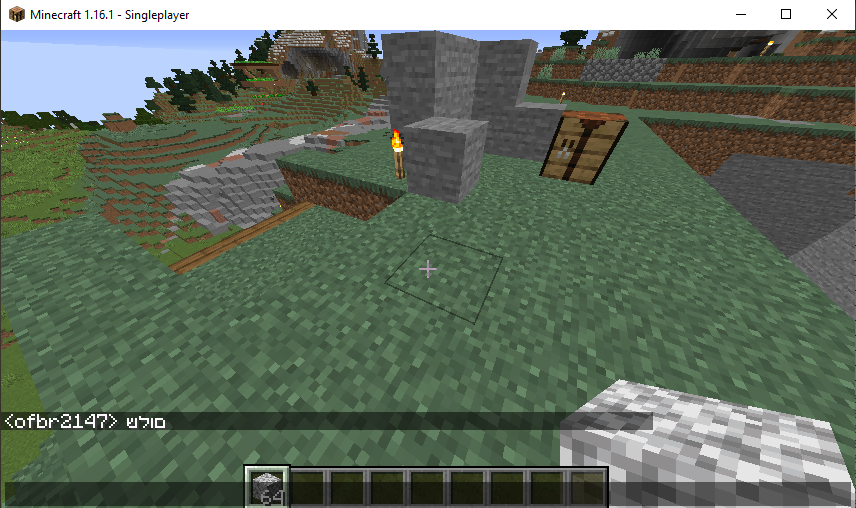
It hasn't been fixed for Hebrew though. Even though 1.16 is out.
in the photo it says םולש it should say שלום.
I also noticed that the arabic letters do not seem to be connected (actually touching) to one another (given the screenshots)…
This has been fixed in version 20w30a which is a snapshot for the not yet released version 1.16.2. If you are still experiencing this or a similar issue in 20w30a or a newer version please search and if you did not find an existing report create a new one.
Note: they are still not rendered connected, but that's separate issue (which probably is not going to be fixed for long time). This fix restores behavior from description (i.e. characters are correctly reordered and shaped, no matter what language is selected)
this says resolved as fixed but i just tried ingame with the example from the description and it does not work as it should, the characters are backwards.
Did you read the comment above yours?
I think that commenter is referring to the fact that RtL text is still reversed in text boxes like the chat, even though it shows up properly in the right direction