Water graphical glitch when connecting diagonally
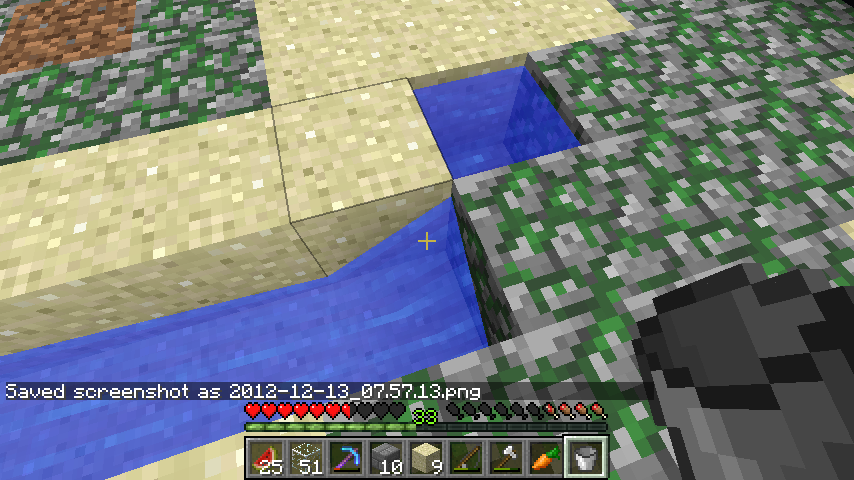
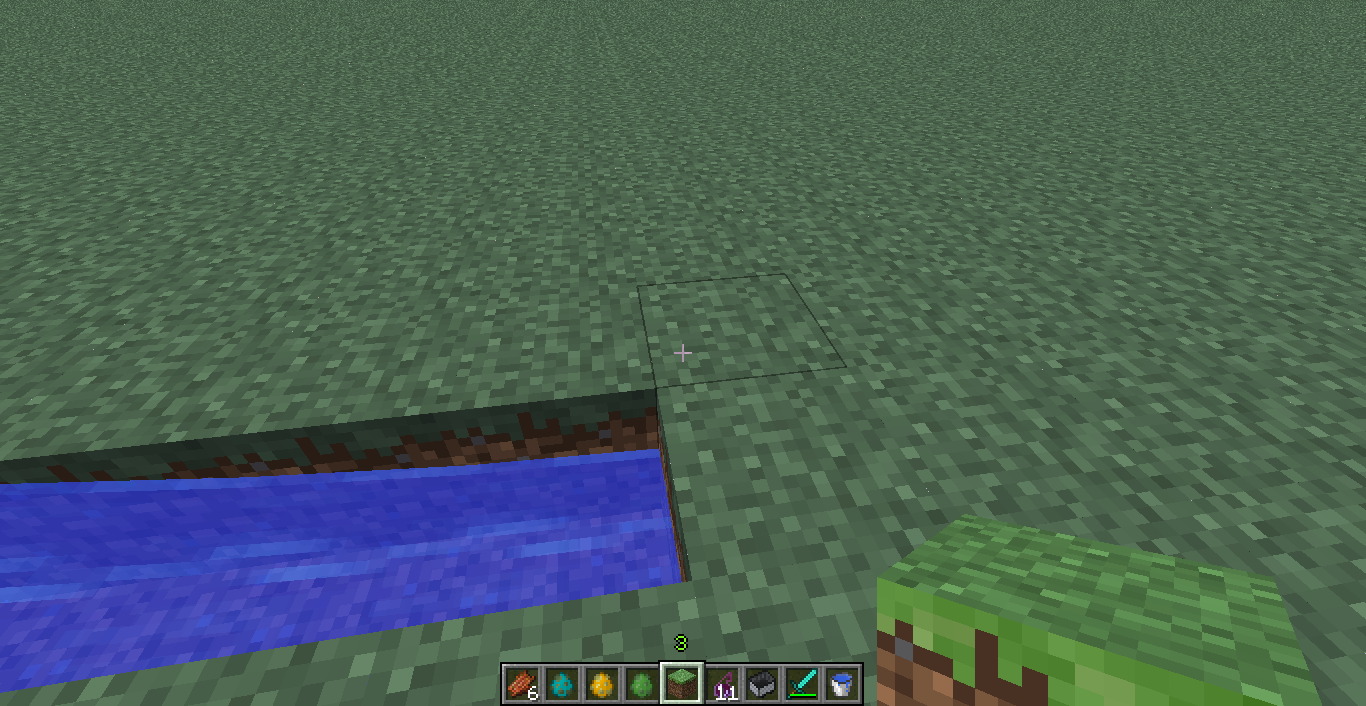
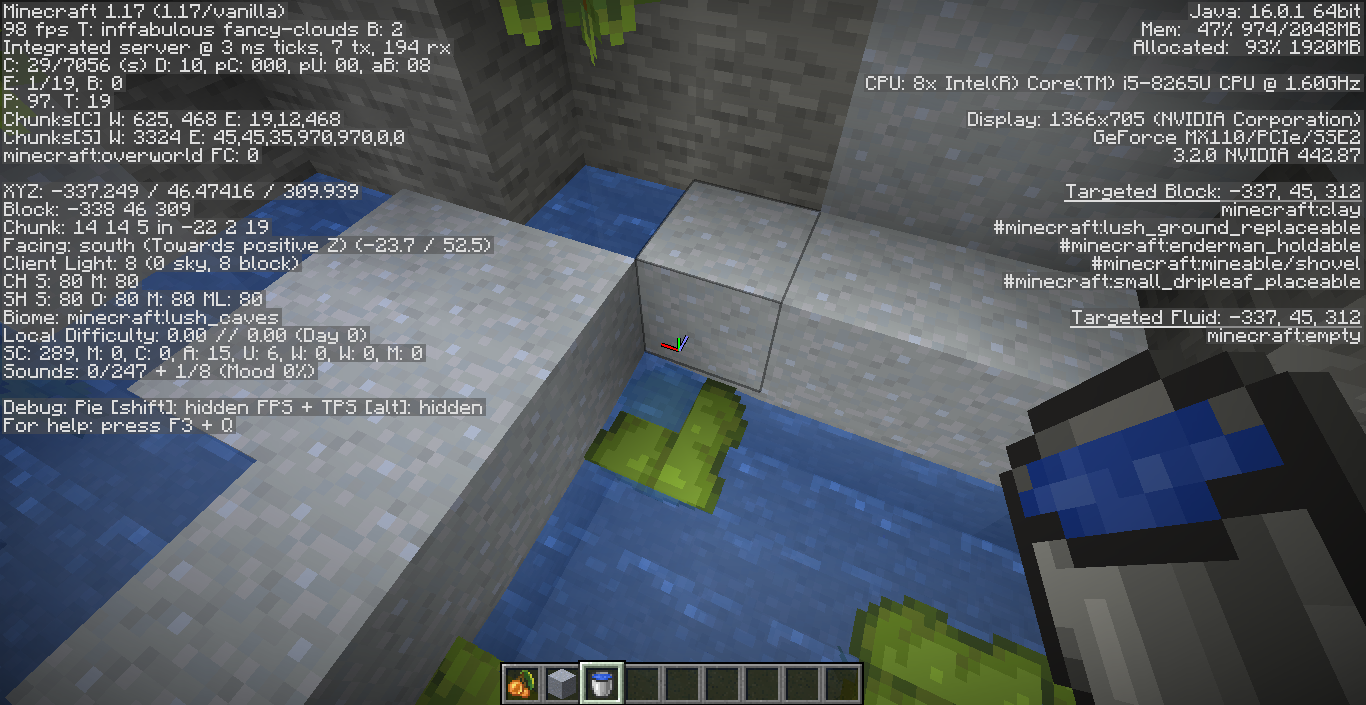
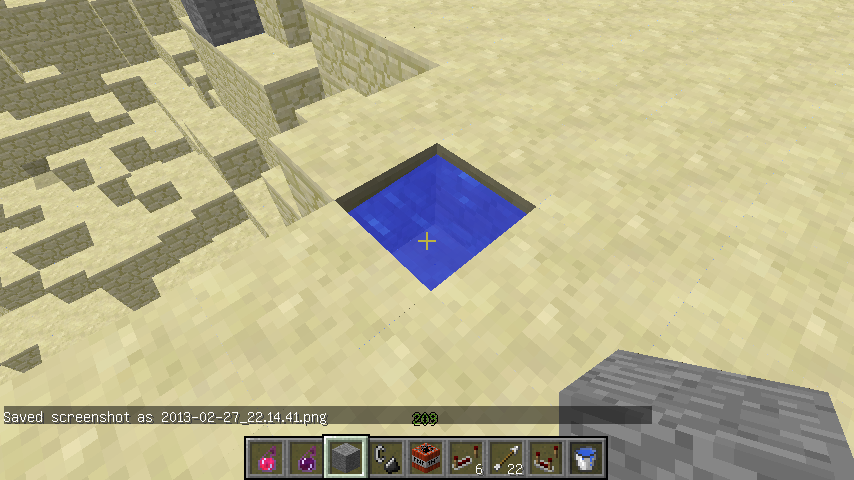
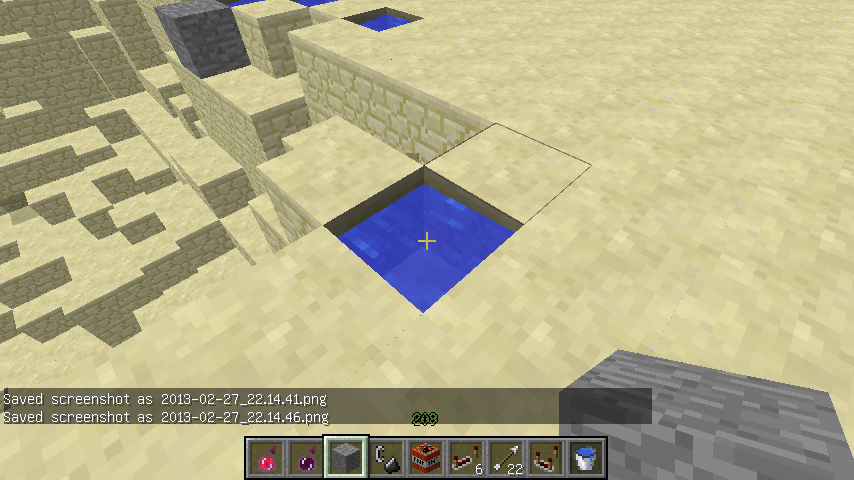
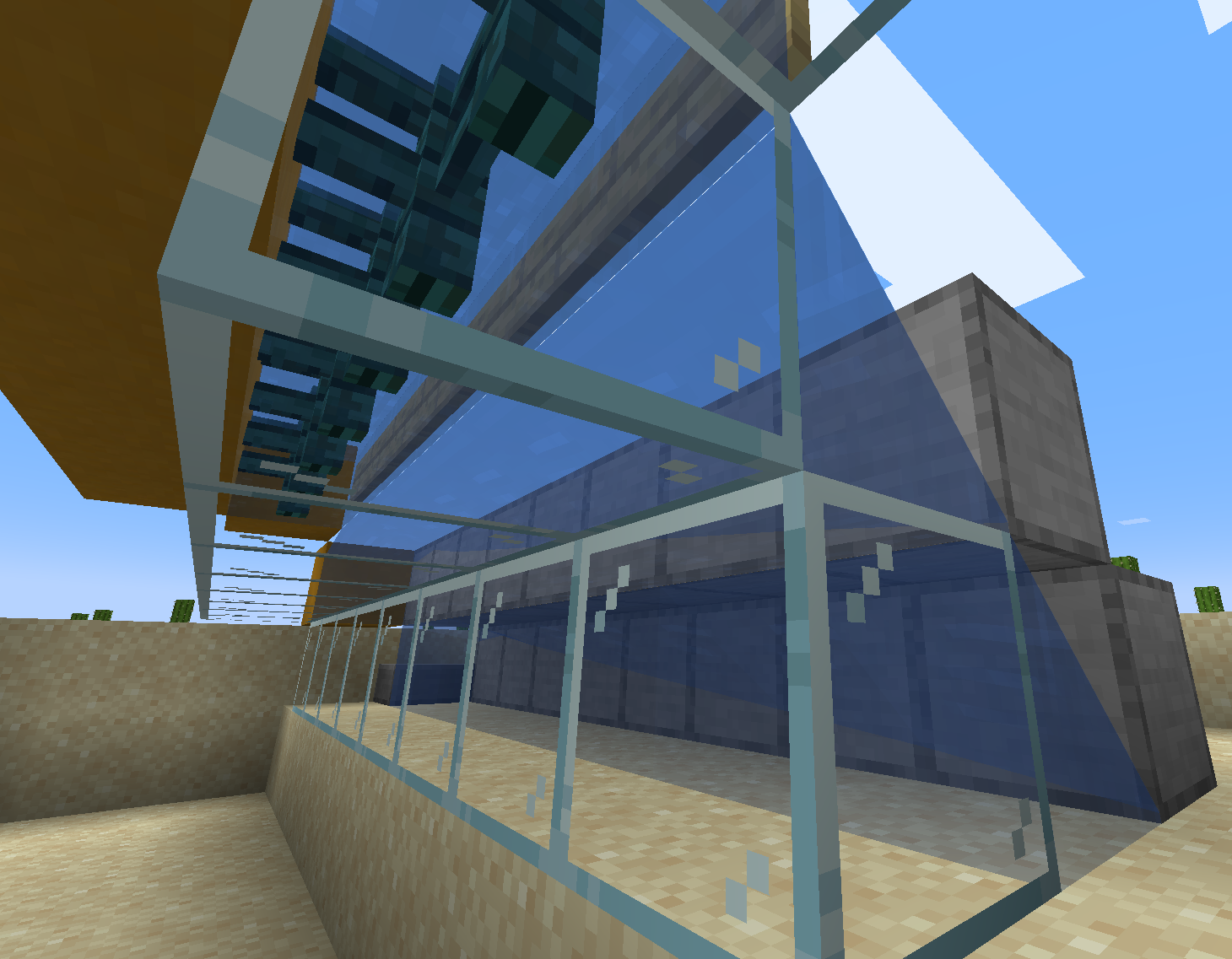
When water is placed diagonally from other water blocks like it does in the screenshots below, it causes a graphical glitch.
You must connect the second source at the farthest point of the first. Let the first stretch all the way out.
It doesn't matter what block is near the water.
Code analysis
Code analysis by Markku can be found in this comment.
Linked Issues
is duplicated by21
 MC-17598a bug with the water currentsDuplicateMC-18415When water flows, then adjacent clay block is broken, water flows UPWARDSDuplicateMC-89633Water SnappingDuplicateMC-111664Water and lava is rendered lower at corner if there is no block diagonallyDuplicateMC-127722Water (and lava) height is different at different y-values?DuplicateMC-129124Slight difference of the lava surfaceDuplicateMC-135015Water flowing upwards, when touching each otherDuplicateMC-148909waterlogged double chest graphical glitch?DuplicateMC-194711water in 4x4 sqareDuplicateMC-195113Flowing water connects weirdly when there's a blockDuplicateMC-198176Water Mechanics Have issuesDuplicateMC-202771Water tries to connect with water aboveDuplicateMC-218747Water renders over dripleavesDuplicateMC-219867Water renders weirdly in edges, causing issuesDuplicateMC-221940Waterlogged dripleaf texture overlaps the normal dripleaf textureDuplicateMC-232473Water with raised corners clip through Big DripleafDuplicateMC-236748Half-Waterlogged Big DripleafsDuplicateMC-239803Dripleaf and water BugDuplicateMC-248093Weird Water physicsDuplicateMC-248585The Flowing Lava Connects Up But The Source Is Down !DuplicateMC-2679Water in some corners not levelDuplicate
relates to6
MC-127030Flowing water visually slopes up towards waterlogged blocks when it shouldn't, causing several issues LowMC-127270Visual water level inside waterlogged blocks does not adjust correctlyLowMC-257125Water texture appears on top of dripleaf plants with flowing water diagonally above themLowMC-213789Water behaves as if moss blocks were airFixedMC-174862Water height doesn't always match visual water heightLowMC-70848Water looks like it flows upFixed
Attachments11




![[Mod] ampolive](../../../data/avatars/users/18949.svg)



Created Issue:
Water graphical glitch when connecting diagonally
When water connect like it does in the screenshots below, it causes a graphical glitch.
You must connect the second source at the farthest point of the first. Let the first stretch all the way out.
Attachments2
When water connect like it does in the screenshots below, it causes a graphical glitch.
You must connect the second source at the farthest point of the first. Let the first stretch all the way out.
When water connect like it does in the screenshots below, it causes a graphical glitch.
You must connect the second source at the farthest point of the first. Let the first stretch all the way out.
It doesn't matter what block is near the water.
When water connect like it does in the screenshots below, it causes a graphical glitch.
You must connect the second source at the farthest point of the first. Let the first stretch all the way out.
It doesn't matter what block is near the water.
When water
connectlike it does in the screenshots below, it causes a graphical glitch.You must connect the second source at the farthest point of the first. Let the first stretch all the way out.
It doesn't matter what block is near the water.When water is placed diagonally from other water blocks like it does in the screenshots below, it causes a graphical glitch.
You must connect the second source at the farthest point of the first. Let the first stretch all the way out.
It doesn't matter what block is near the water.

is duplicated by
2013-02-27_22.14.41.png
is duplicated by
is duplicated by
A comment with security level 'global-moderators' was removed.
![[Mojang] Searge (Michael Stoyke)](../../../data/assets/gravatar/searge.png) [Mojang] Searge (Michael Stoyke)
[Mojang] Searge (Michael Stoyke)is duplicated by
relates to
![[Mod] Neko](../../../data/avatars/users/92901.png)
relates to

is duplicated by
relates to
![[Mod] tryashtar](../../../data/avatars/users/41963.png)
is duplicated by
is duplicated by
![[Mod] Asteraoth](../../../data/avatars/users/92886.png)
is duplicated by
is duplicated by
![[Mod] LateLag](../../../data/avatars/users/92884.png)
is duplicated by

is duplicated by
relates to
is duplicated by
is duplicated by
![[Mod] violine1101](../../../data/avatars/users/92858.png)
relates to
Relates to MC-127270
relates to
When water is placed diagonally from other water blocks like it does in the screenshots below, it causes a graphical glitch.
You must connect the second source at the farthest point of the first. Let the first stretch all the way out.
It doesn't matter what block is near the water.Code analysis
Code analysis by Markku can be found in this comment.
![[Mojang] Adrian Östergård](../../../data/assets/gravatar/nighter.jpeg) [Mojang] Searge (Michael Stoyke)Low
[Mojang] Searge (Michael Stoyke)Low![[Mod] Urielsalis](../../../data/assets/gravatar/urielsalis.jpeg)
![[Mod] Michael Wobst](../../../data/avatars/users/37868.png)
is duplicated by
![[Bot] Arisa](../../../data/avatars/users/43007.png)
relates to
is duplicated by
is duplicated by
![[Mod] SPGoding](../../../data/avatars/users/44622.png)
is duplicated by
is duplicated by
![[Mod] Chandler](../../../data/assets/gravatar/triwonder81.png)
is duplicated by
is duplicated by
![[Bot] Piston](../../../data/avatars/users/31202.png)
![[Mod] Les3awe](../../../data/avatars/users/79847.png)
relates to
relates to
is duplicated by
relates to
This ticket has been marked as a duplicate of MC-4533, in favor of the better description/information provided.
Water will always try to connect to nearby water blocks visually, duplicate of MC-4533.

Relates to or even duplicates MC-4533
Is this only intended for water being diagonally or also an air block, as shown in some of the screenshots and described in MC-4533?
Based on your screenshots and my attempts at reproducing, I have identified this as MC-4533 – the water level is "pulled up" on any side (including the diagonal corners) that have a block in that space.
Connor Steppie, as the reporter of this issue, you might be able to add that "relates to" link to MC-4533 yourself (to this issue, that is).
However, considering that issue got the nonsensical "working as intended" as its resolution, I'd probably try to keep as far away from that bug entry as possible 

Duplicate of MC-4533 which is Works as Intended
Thank you for your report!
However, we are already tracking this issue, and this report is a Duplicate of MC-4533, which has been marked as Works as Intended - this is an intentional game feature. If you have a different opinion, please visit the Feedback website.
Please use the search function in the future to prevent duplicate reports.
Quick Links:
📓 Issue Guidelines – 🛠 Community Support – 📧 Customer Support – ✍️ Feedback and Suggestions – 📖 Game Wiki
💬 Mojira Subreddit – 💬 Mojira Discord
Thank you for your report!
However, we are already tracking this issue, and this report is a Duplicate of MC-4533, which has been marked as Works as Intended - this is an intentional game feature. If you have a different opinion, please visit the Feedback website.
Please use the search function in the future to prevent duplicate reports.
Quick Links:
📓 Issue Guidelines – 🛠 Community Support – 📧 Customer Support – ✍️ Feedback and Suggestions – 📖 Game Wiki
💬 Mojira Subreddit – 💬 Mojira Discord
Thank you for your report!
However, we are already tracking this issue, and this report is a Duplicate of MC-4533, which has been marked as Works as Intended - this is an intentional game feature. If you have a different opinion, please visit the Feedback website.
Please use the search function in the future to prevent duplicate reports.
Quick Links:
📓 Issue Guidelines – 🛠 Community Support – 📧 Customer Support – ✍️ Feedback and Suggestions – 📖 Game Wiki
💬 Mojira Subreddit – 💬 Mojira Discord

Thank you for your report!
We're tracking this issue in MC-4533, so this ticket is being resolved and linked as a duplicate.
If you would like to add a vote and any extra information to the main ticket it would be appreciated.
If you haven't already, you might like to make use of the search feature to see if the issue has already been mentioned.
Quick Links:
📓 Bug Tracker Guidelines – 💬 Community Support – 📧 Mojang Support
📓 Project Summary – ✍️ Feedback and Suggestions – 📖 Game Wiki
– I am a bot. This action was performed automatically! Please report any issues on Discord or Reddit
Duplicate of MC-4533
Duplicate of MC-4533.
Thank you for your report!
We're tracking this issue in MC-4533, so this ticket is being resolved and linked as a duplicate.
If you would like to add a vote and any extra information to the main ticket it would be appreciated.
If you haven't already, you might like to make use of the search feature to see if the issue has already been mentioned.
Quick Links:
📓 Bug Tracker Guidelines – 💬 Community Support – 📧 Mojang Support
📓 Project Summary – ✍️ Feedback and Suggestions – 📖 Game Wiki
Duplicate of MC-4533.
Thank you for your report!
We're tracking this issue in MC-4533, so this ticket is being resolved and linked as a duplicate.
If you would like to add a vote and any extra information to the main ticket it would be appreciated.
If you haven't already, you might like to make use of the search feature to see if the issue has already been mentioned.
Quick Links:
📓 Bug Tracker Guidelines – 💬 Community Support – 📧 Mojang Support
📓 Project Summary – ✍️ Feedback and Suggestions – 📖 Game Wiki
– I am a bot. This action was performed automatically! The ticket was resolved by one of our moderators, and I left this message to give more information to you.
![[Mod] Avoma](../../../data/avatars/users/86198.png)
Duplicate of MC-4533
Thank you for your report!
We're tracking this issue in MC-4533, so this ticket is being resolved and linked as a duplicate.
If you would like to add a vote and any extra information to the main ticket it would be appreciated.
If you haven't already, you might like to make use of the search feature to see if the issue has already been mentioned.
Quick Links:
📓 Bug Tracker Guidelines – 💬 Community Support – 📧 Mojang Support
📓 Project Summary – ✍️ Feedback and Suggestions – 📖 Game Wiki
– I am a bot. This action was performed automatically! The ticket was resolved by one of our moderators, and I left this message to give more information to you.

Thank you for your report!
We're tracking this issue in MC-4533, so this ticket is being resolved and linked as a duplicate.
If you would like to add a vote and any extra information to the main ticket it would be appreciated.
If you haven't already, you might like to make use of the search feature to see if the issue has already been mentioned.
Quick Links:
📓 Bug Tracker Guidelines – 💬 Community Support – 📧 Mojang Support
📓 Project Summary – ✍️ Feedback and Suggestions – 📖 Game Wiki
Discovered while testing the fixes to MC-4533 and MC-70848.
The bug
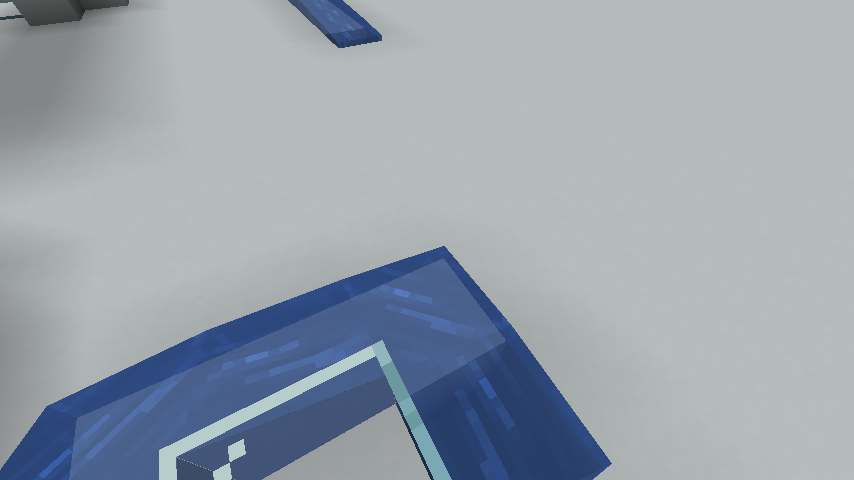
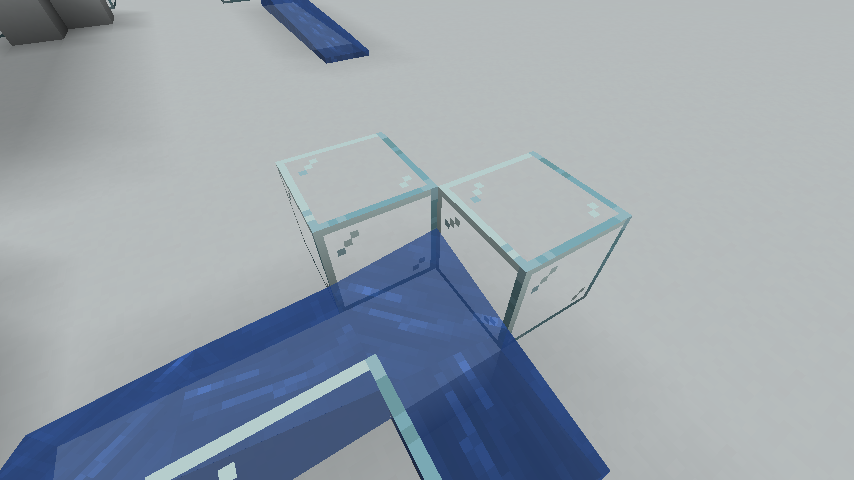
Certain configurations of blocks can still make water appear to be flowing slightly upwards. This is generally due to the presence of orthogonally-adjacent blocks, as removing said blocks often results in this upwards-flowing shape changing to something more believable.
How to reproduce
- Recreate the following structure:

- Note how the water appears to flow upwards at the corner when two blocks are placed at it as such, yet does not appear to flow upwards if absent.
Expected results
Fluids wouldn't flow in illogical-looking ways.
Actual results
They do in this situation.
How to fix
I'm not sure if making fluids not change shape in response to solid blocks would help anything, and instead only make them change in response to other fluids of the same type. This, as well as defining more fluid shapes instead of having them be created on the fly, may resolve this issue somewhat.
Converting fluids over to using models like blocks do would be a great solution, allowing for resource pack customization as well as allowing the then-useless fluid height rendering code to be removed. Doing triangles to emulate how fluids currently look may prove difficult, however, so it may require changing fluids to appear more blocky and cuboidal, which would bring them more in line with other blocks but would likely end up as a controversial design change.
Wouldn't this actually duplicate MC-4533?
Bugfix parity report for MC-4533 (mark as relates to), although the issue's manifestation differs slightly. I searched, but there didn't seem to be any tickets on the matter.
The bug
The shape of a fluid depends on blocks diagonally adjacent to it, which should not happen since there's technically no contact between these blocks and the fluid.
This was recently fixed for Java Edition (MC-4533), however an extremely similar issue to this still exists in Bedrock Edition, which this report concerns.
How to reproduce
- Create an eight-block ring as seen in the screenshots attached
- Place water inside this ring
- Break one of the four corner blocks, and note how the water's shape changes with a corner moving down
- Now look at the other screenshots, and place a water source "triagonally" adjacent (offset (1,1,1)) to the initial water, barricaded so they don't properly connect but such that it flows down into the diagonally adjacent block, and note how the water's shape changes with a corner moving up
Expected results
Neither of these actions would change the water's shape.
Actual results
They do.
Further notes
Where this issue differs from Java Edition pre-1.18.2 seems to be the fact that fluids can only form these erroneous geometrical connections to fluids on their same Y-level. The issue with connecting upwards (as seen in MC-70848) does not seem to manifest in such simple setups. A ticket on a similar equivalent case to this is upcoming.
I think that this may ne intended, but I am not entirely sure.
Not really intended, but one more case of "it works well enough and doesn't completely break things, so leave it as is for now".
It has been around a long time, and iirc, has even been (ab)used for benefits, but that does not make it less of a bug.
In addition, removing a block diagonally makes the water dip in that corner.
The code calculates the corner water levels based on the existence and levels of water in 8 blocks around each corner/edge. However, it is quite naive and does not make any checks whether the neighbor blocks provide a path for the water to actually affect the block being rendered.
There are a number of cases (block patterns) to check, but it seems doable. This has been "bugging" me, too, so... Working on a fix, lets see what I can come up with.
Current code
I will only include the method signature for the method getFluidHeight() here as the method body gets changed quite a bit, no point in showing the original.
Better code
I will attach a screenshot showing the results (for the changed rendering; there are other cases of rendering, which I managed to mess up temporarily while working on the fix, but since they haven't changed with the version above, I won't include screenshots of those.)
Sample screenshot with the fixed code. 'fixed-water-corners.png'
Hi another example with multiple screenshots, happens in 13w09b too
Could you edit that comment to list the names of the screenshot files. Otherwise it is somewhat difficult to tell which screenshot is which. (EDIT: just realized, applies to my screenshot, too )
)
Edited with "another_example" names
Yeah I noticed that when you place a block diagonal to a water source block the edge of the water seems to rise up slightly.
Still seeing this in 1.6.2-3ish, maybe 1.6.4, I can't remember quite when I updated to 1.6.4. And there's actually a minor exploit you can sometimes do with it; if there's a hidden cave diagonally connected to the one you're in, you might be able to find the 'thin corner'.
Affects 1.6.4.
Is this still a concern in the latest Minecraft version 14w05b? If so, please update the affected versions in order to best aid Mojang ensuring bugs are still valid in the latest releases/pre-releases.
Still there in 14w05b. I find it less noticeable but I might be mistaken. I can attach new screenshot if needed.
Confirmed for 14w19a.
"Working as intended"? Really? Those silly corners were really designed to be so? I seriously don't think so... Was my proposed fix somehow lacking or having side-effects (or did any dev actually read through the comments to notice the fix in the first place)? Or is this another case that should actually gotten resolved as "Won't fix" (for whatever mysterious reason)?
Confirmed for 15w39c.
Shame this bug was closed, this seems like an easy fix.
Please at least include the fix provided by Markku
Nope, WAI is WAI.
WAI is WAI but probably it took Markku anyways some or a lot of work to create this fix and I did not say you have to reopen the report
There is no point in keeping closed reports up to date.
A bit "rant"ish, a small bit of info for marcono in there:
Well, from our ordinary users point of view, considering the amount of information given from devs (i.e. none), there was no point to close this issue/report in the first place, at least not as WAI. Possibly as "Won't fix", depending on the background (which we do not know of). But as far as I know, there hasn't been any mentions (other than the dev's resolution) that such weird behavior was really the way it was meant and designed to work. It just does not make sense (at least not to me, without proper explanation).
So, welcome to the normal users world; they end up commenting in closed issues as long as things stay like this
Marcono1234: It took a bit of time to fix, but it wasn't really that difficult; the most of the time usually goes into just finding where the relevant functionality is in the code, since all I had was just the decompiled and partially deobfuscated code to crawl through. I don't remember exactly how long it took, but judging from my old comments, likely about two hours total.
I did these source code fixes initially, but after years went and tens of bugs which I had even provided somewhat ready fixes for stayed untouched, I gave up. (And since it is now big business, there is no motivation to help with free work, either, like I would for a small indie studio. With a tiny fraction of the money that has been moved around, they could hire enough temporary devs to fix all the bugs in less than few months. At least the ones that won't require major rewrites to the whole framework )
)
But as redstonehelper says, once it is closed, it typically stays so, unless someone gets to ping the devs through other channels; at least I tend to unregister any notifications from issues already closed (in a satisfactory way) (both as a user here, and a dev myself elsewhere), otherwise it causes too much "noise". Mod's can only reopen cases that are plain simply obvious; if it had already been confirmed as a bug, claimed fixed, and the symptoms are back. But for this issue, devs have claimed it is not a bug, so mods would get a slap on their fingers if they reopened it just like that.
So, now only 12 watchers and mods will notice anything on this issue. And even I am probably going to stop watching some day, half my emails are coming from this JIRA (and I'm not even following that many issues), and less than 1% is the good kind (basically "fixed").
Is this only intended for water being diagonally or also an air block, as shown in some of the screenshots and described in
MC-4533?No I don't think this is a normal way water should be working.
As the original reporter has not been active since 2015 and I own several similar tickets, can I request ownership of this?
Affects 21w11a (
MC-219867)Can confirm in 21w19a.
Affects 1.17
Also affects lava.
Can confirm in 21w37a.
Can confirm in 21w42a.
can confirm in 1.17.1 and added another example:

(the orange blocks are normal solid blocks and the fences on top are all waterlogged and blocked with sings.)
Oh and it doesn't look at all like never fixing these old issues didn't create any new problems later on.... (<- be aware of the sarcasm! And I'm not sure if the amount of negations is right in there)
-> MC-239475, MC-228434 and more...
Can confirm in 21w44a.
I got a similar issue to this bug
MC-236748with a quarter-waterlogged big dripleaf.
Version: 1.18.1-pre1
The glitch persists after server restart and client restart.
Affects 1.18.1