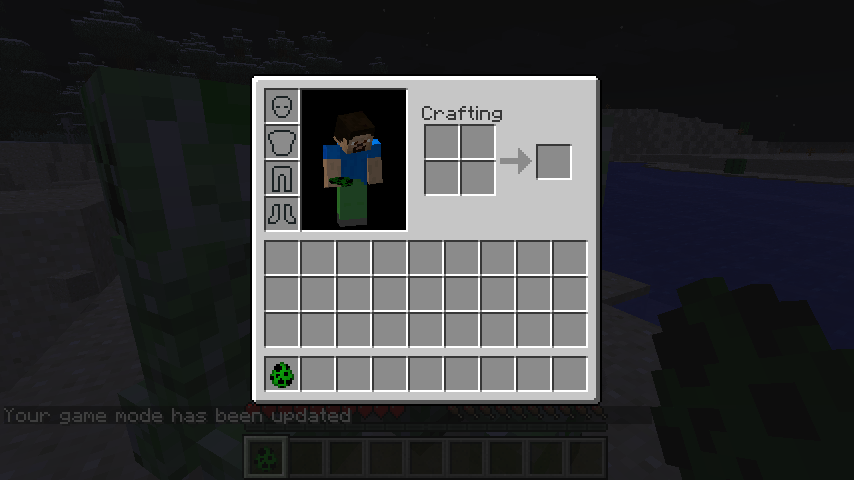
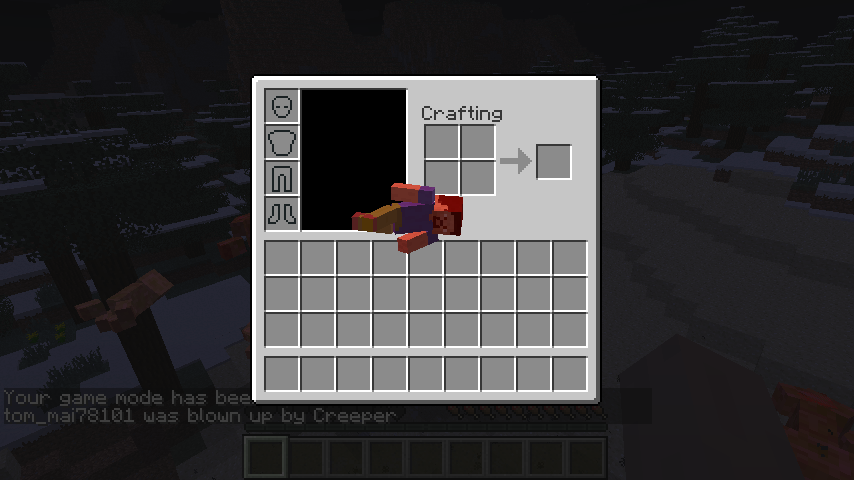
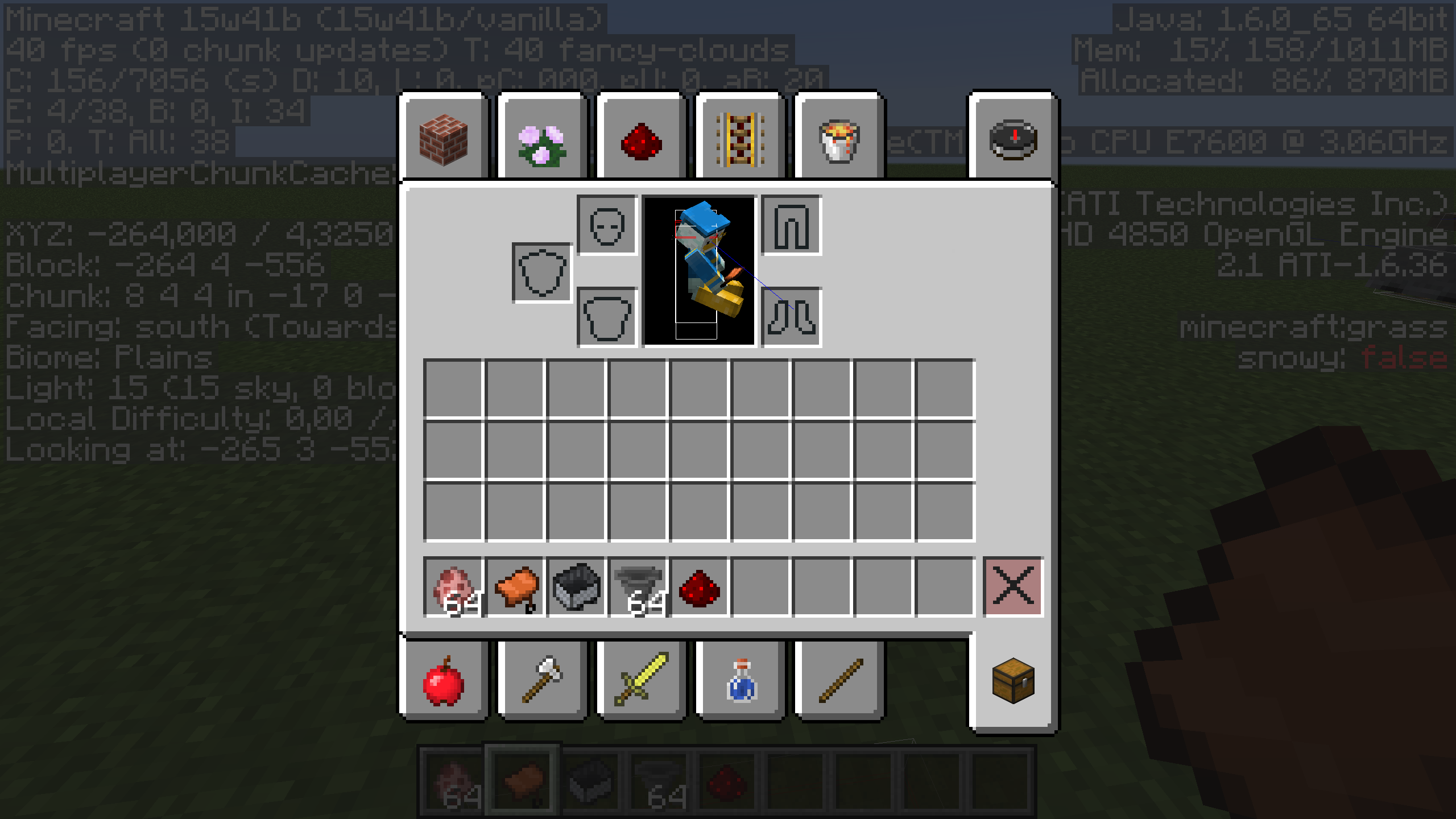
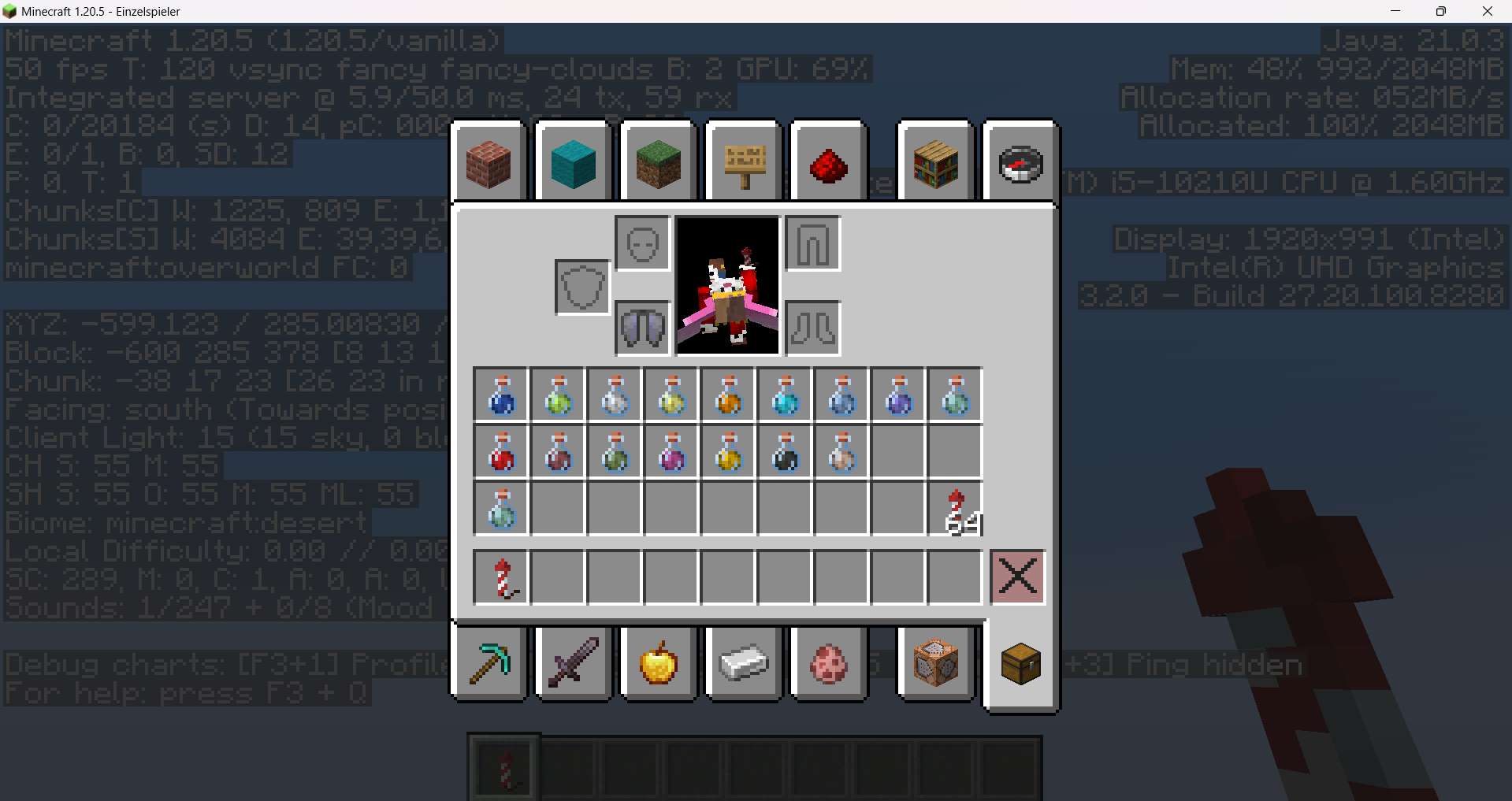
The player model in the inventory screen renders in the wrong orientation when it's not standing up straight
The bug
When the player is flying, the model in the inventory doesn't shifting its body correctly relative to the mouse position. For example, suppose the game is set to full-screen. If your cursor is at the left side of the screen, the model would look towards your cursor correctly. However, if your cursor is at the right side of the screen, the model would be shifting in the opposite direction relative to the cursor.
This issue does not seem to affect the player's swimming pose.
How to reproduce
- Equip elytra
- Fly using your elytra
- Open your inventory menu
- Move your mouse around, especially to the left and right side of Minecraft (or screen, if you're playing in full-screen mode.)
- Note the model's behavior in relation to the mouse cursor
History of this issue
Originally, this ticket was reported for the inventory screen if the player is dead/dying. However, as of 15w41b, the inventory now closes when you die. It has then been suggested that this issue also occurs when opening the inventory after right-clicking a bed, but before getting into it. This video shows how that looks as of 20w07a: https://youtu.be/1bJgALyjt1Y.
Linked Issues
is duplicated by14
 MC-19485Sneaking Dead BodyDuplicateMC-56513Weird Inventory!!! Not Common But Please Fix!!!DuplicateMC-89922Players render upsidedownDuplicateMC-90048Bug When Use Elytra And Open InventoryDuplicateMC-90079If gliding with Elytra Character in Inventory looks StrangeDuplicateMC-90403Inventory flyingDuplicateMC-93706Inventory model inverted while glidingDuplicateMC-99849When flying, the display of the character in the inventory is absurdly posed.DuplicateMC-111855inventory bug when glidingDuplicateMC-137242Inventory avator upside-downDuplicateMC-183507Player model issueDuplicateMC-207845MistakeDuplicateMC-236820avatar is not staying in its slot in the inventory while flying or swimming/crawlingDuplicateMC-267043Elytra Animation tends to be upside down and facing the wrong direction whilst in menuDuplicate


![[Mod] Avoma](../../../data/avatars/users/86198.png)


- Unresolved
 Tom Lee
- 53
- 27
- Confirmed
 Low
Low- Platform
- Player Rendering
- behavior model
1.4.2 - 24w34a
1.4.2 1.4.4 13w10b 1.5 13w11a 1.5.1 13w16a 13w16b 1.5.2 13w17a 13w18a 13w18b 13w19a 13w21a 13w21b 13w22a 13w23a 13w23b 13w24a 13w24b 13w25a 13w25b 13w26a 1.6 1.6.1 1.6.2 1.6.4 13w38a 13w38b 13w38c 1.7.4 14w03b 14w05b 14w06b 14w07a 14w08a 1.7.5 14w11b 14w20b 14w21a 14w21b 1.8 1.8.1-pre3 15w41b 15w49a 1.10.2 16w32a 16w32b 16w33a 16w35a 1.11.2 17w06a 1.12-pre5 1.12.2 17w50a 18w01a 18w02a 1.13.1 19w39a 1.15.2 20w07a 20w19a 1.16.1 20w29a 20w30a 1.16.2-pre1 1.16.4 20w48a 20w49a 20w51a 21w03a 1.16.5 21w05b 21w06a 21w07a 21w11a 21w15a 21w17a 1.17 21w37a 1.19.2 22w45a 1.19.3 1.19.4 23w14a 1.20.1 1.20.2 1.20.4 24w34a
Created Issue:
The player model in the inventory screen doesn't accurately shift correctly in relation to the mouse position when it's dead.
Description: When the player is dead, the model in the inventory wouldn't be shifting its body correctly relative to the mouse position. For example, suppose the game is set to full-screen. If your cursor is at the left side of the screen, the model would look towards your cursor correctly. However, if your cursor is at the right side of the screen, the model would be shifting in the opposite direction relative to the cursor.
How to reproduce:
- Create a Survival world.
- Wait until night time, or use "/time set 14000".
- Open your inventory menu.
- Wait until any mobs attack you.
- Let them attack you until you die.
- Without closing the inventory menu, move your mouse around, especially to the left and right side of Minecraft (or screen, if you're playing in full-screen mode.)
- Note the model's behavior in relation to the mouse cursor.
Environment
Windows 7 64-bit, Java 7 64-bit


is duplicated by

![[Mod] Ezekiel (ezfe)](../../../data/assets/gravatar/ezekielelin.jpeg)
relates to
relates to
is duplicated by
Description: When the player is dead, the model in the inventory wouldn't be shifting its body correctly relative to the mouse position. For example, suppose the game is set to full-screen. If your cursor is at the left side of the screen, the model would look towards your cursor correctly. However, if your cursor is at the right side of the screen, the model would be shifting in the opposite direction relative to the cursor.
How to reproduce:
- Create a Survival world.
- Wait until night time, or use "/time set 14000".
- Open your inventory menu.
- Wait until any mobs attack you.
- Let them attack you until you die.
- Without closing the inventory menu, move your mouse around, especially to the left and right side of Minecraft (or screen, if you're playing in full-screen mode.)
- Note the model's behavior in relation to the mouse cursor.
15w41b: Seems like the inventory now closes when you die, however you can still get the "desired" effect by opening your inventory after right-clicking a bed and before getting in it.
relates to
is duplicated by
relates to
is duplicated by
is duplicated by
is duplicated by
The player model in the inventory screen doesn't accurately shift correctly in relation to the mouse position when it'sdead.The player model in the inventory screen doesn't accurately shift correctly in relation to the mouse position when it's not standing up
The player model in the inventory screen doesn't accurately shift correctly in relation to the mouse position when it's not standing up straight
is duplicated by
is duplicated by


![[Mod] Michael Wobst](../../../data/avatars/users/37868.png)
![[Mod] Neko](../../../data/avatars/users/92901.png)
is duplicated by
Description: When the player is dead, the model in the inventory wouldn't be shifting its body correctly relative to the mouse position. For example, suppose the game is set to full-screen. If your cursor is at the left side of the screen, the model would look towards your cursor correctly. However, if your cursor is at the right side of the screen, the model would be shifting in the opposite direction relative to the cursor.
How to reproduce:
- Create a Survival world.
- Wait until night time, or use "/time set 14000".
- Open your inventory menu
.- Wait until any mobs attack you
.- Let them attack you until you die
.- Without closing the inventory menu, move your mouse around, especially to the left and right side of Minecraft (or screen, if you're playing in full-screen mode.)
- Note the model's behavior in relation to the mouse cursor
.15w41b: Seems like the inventory now closes when you die, however you can still get the "desired" effect by opening your inventory after right-clicking a bed and before getting in it.
The bug
When the player is dead, the model in the inventory wouldn't be shifting its body correctly relative to the mouse position. For example, suppose the game is set to full-screen. If your cursor is at the left side of the screen, the model would look towards your cursor correctly. However, if your cursor is at the right side of the screen, the model would be shifting in the opposite direction relative to the cursor.
How to reproduce
- Create a Survival world.
- Wait until night time, or use /time set 14000
- Open your inventory menu
- Wait until any mobs attack you
- Let them attack you until you die
- Without closing the inventory menu, move your mouse around, especially to the left and right side of Minecraft (or screen, if you're playing in full-screen mode.)
- Note the model's behavior in relation to the mouse cursor
15w41b: Seems like the inventory now closes when you die, however you can still get the "desired" effect by opening your inventory after right-clicking a bed and before getting in it.
Windows 7 64-bit, Java 7 64-bit
is duplicated by
![[Mojang] Nathan Adams](../../../data/assets/gravatar/dinnerbone.png)
![[Mod] CubeTheThird](../../../data/assets/gravatar/cubethethird.jpeg)
![[Mod] violine1101](../../../data/avatars/users/92858.png)
The bug
When the player is
dead, the model in the inventorywouldn't beshifting its body correctly relative to the mouse position. For example, suppose the game is set to full-screen. If your cursor is at the left side of the screen, the model would look towards your cursor correctly. However, if your cursor is at the right side of the screen, the model would be shifting in the opposite direction relative to the cursor.How to reproduce
Create a Survival world.- Wait until night time, or use /time set 14000
- Open your inventory menu
- Wait until any mobs attack you
- Let them attack you until you die
Without closing the inventory menu, move your mouse around, especially to the left and right side of Minecraft (or screen, if you're playing in full-screen mode.)- Note the model's behavior in relation to the mouse cursor
15w41b: Seems like the inventory now closes when you die, however you can still get the "desired" effect by opening your inventory after right-clicking a bed and before getting in it.
The bug
When the player is flying, the model in the inventory doesn't shifting its body correctly relative to the mouse position. For example, suppose the game is set to full-screen. If your cursor is at the left side of the screen, the model would look towards your cursor correctly. However, if your cursor is at the right side of the screen, the model would be shifting in the opposite direction relative to the cursor.
This issue does not seem to affect the player's swimming pose.
How to reproduce
- Equip elytra
- Fly using your elytra
- Open your inventory menu
- Move your mouse around, especially to the left and right side of Minecraft (or screen, if you're playing in full-screen mode.)
- Note the model's behavior in relation to the mouse cursor
History of this issue
Originally, this ticket was reported for the inventory screen if the player is dead/dying. However, as of 15w41b, the inventory now closes when you die. It has then been suggested that this issue also occurs when opening the inventory after right-clicking a bed, but before getting into it. This video shows how that looks as of 20w07a: https://youtu.be/1bJgALyjt1Y.
![[Mod] Greymagic27](../../../data/avatars/users/92875.png)
is duplicated by
![[Bot] Arisa](../../../data/avatars/users/43007.png)
![[Mod] Asteraoth](../../../data/avatars/users/92886.png)

Requesting ownership. Original reporter hasn't been online in 10 months. (Affects 1.16.1 and 20w29a)
![[Mod] SPGoding](../../../data/avatars/users/44622.png)
![[Mod] Chandler](../../../data/assets/gravatar/triwonder81.png)
![[Mojang] Adrian Östergård](../../../data/assets/gravatar/nighter.jpeg)
 Important
![[Mod] tryashtar](../../../data/avatars/users/41963.png)
is duplicated by
Relates to
MC-191431.
![[Helper] Jack McKalling](../../../data/avatars/users/92859.png)
is duplicated by
![[Mod] ampolive](../../../data/avatars/users/18949.svg)
![[Mojang] slicedlime](../../../data/assets/gravatar/slicedlime.jpeg)
![[Mod] turbo](../../../data/avatars/users/92867.png)
is duplicated by
![[Helper] clam lol](../../../data/avatars/users/92852.png)
The player model in the inventory screendoesn't accurately shift correctly in relation to the mouse position when it's not standing up straightThe player model in the inventory screen renders in the wrong orientation when it's not standing up straight
![[Mojang] SHugoh](../../../data/avatars/users/18947.svg)
Still an issue as of 13w10b. Hitbox is also still rendered in inventory, which may be partially related to MC-2791.
Dupe of MC-2791
Changed it back to you, sorry about that. Did I understand your original report right, it's not a duplicate of MC-2791?
Duplicate of MC-2791
Duplicate of MC-2791
Hey there!
Just to let you know, this report seems to be a duplicate of MC-2791. This basically means that the issue has already been reported before and is being tracked elsewhere.

MC-2791 is going about were the player looks at, not about the fact that it renders over the inventory.
Thank you for your report!
We're tracking this issue in MC-2791, so this ticket is being resolved and linked as a duplicate.
If you would like to add a vote and any extra information to the main ticket it would be appreciated.
If you haven't already, you might like to make use of the search feature to see if the issue has already been mentioned.
Quick Links:
📓 Bug Tracker Guidelines – 💬 Community Support – 📧 Mojang Support
📓 Project Summary – ✍️ Feedback and Suggestions – 📖 Game Wiki
– I am a bot. This action was performed automatically! The ticket was resolved by one of our moderators, and I left this message to give more information to you.
HubbiGamingTV Could you please not go through tons of tickets, making either obvious/redundant (MC-201, MC-1531, MC-3266, MC-1673, …) or incorrect (MC-180, MC-212, MC-2157, MC-2112, MC-2791, MC-1297, …) statements? I got lots of mails from your comments over night, followed by a bunch of mails of people correcting you. Please only contribute if you actually have new and relevant information, not baseless speculation. Also, if you want go through all currently open bugs, prepare some meals first, because you'll need a really long time for 8375 reports…

Issue:
Entity models in the inventory can render outside the boundaries of the black box.
Steps to Reproduce:
1.Obtain elytra and begin flying.
2.Open your inventory, move your mouse cursor around, and look at your player model.
Take note as to whether or not entity models in the inventory can render outside the boundaries of the black box.
Observed Behavior:
Entity models in the inventory can render outside the boundaries of the black box.
Expected Behavior:
Entity models in the inventory would not be able to render outside the boundaries of the black box.
![[Mod] j_p_smith](../../../data/avatars/users/92851.png)
Thank you for your report!
We're actually already tracking this issue in MC-2791, so this ticket is being resolved and linked as a duplicate.
If you would like to add a vote or any additional information to the main ticket it would be appreciated.
Please be sure to use the search feature before creating a ticket to see if the issue has already been reported.
Quick Links:
📓 Bug Tracker Guidelines – 🛠 Community Support – 📧 Mojang Support – ✍️ Feedback and Suggestions – 💬 Mojira Discord
I think the bug should be that you can access your inventory at all during death. It may be better to simply force the inventory GUI to close upon death, as you shouldn't have access to it until you respawn.
What if you're doing something in your inventory, while you're at half a heart left, a zombie came up and killed you, and your mouse is outside of the inventory while you're holding a stack of diamonds?
Especially when the server has settings:
/gamerule keepInventory true
When all of the mentioned above happens, your diamonds will pop out of your inventory, and risk being thrown into a pit of lava, when you can avoid that entirely by not having the inventory GUI affect you when you're holding a stack of items.
It'll become an annoyance for you in the long run.
Thus, I propose that when you die with the inventory menu opened, your model falls down but the inventory doesn't close up immediately. This tells the player that he/she has died, and will take actions upon it.
As of snapshot 13w10b, this problem still exists. Note that when a player dies, the player's skin is reverted back to the default skin.
The bug isn't that the player model doesn't follow the mouse correctly, it's that you can actively use the inventory while dead, as stated above. That means that if you couldn't use the inventory, the bug would be fixed.
Seems easy enough!
I'm going to let others decide on this issue then. As mentioned, it's really easy to fix this.
Confirmed in 1.5pre. Also the skin is reverted back to default skin when you wait long enough.
Confirmed.
Is this still a concern in the current Minecraft version? If so, please update the affected versions in order to best aid Mojang ensuring bugs are still valid in the latest releases/pre-releases.
Yes, it's still an issue.
I'll try to keep up.
To the mods:
Can anyone help monitoring this issue? I'm going to start my conscription service soon, and I won't be available to continue tracking this issue. As of now, this issue is still valid.
Thanks in advance.
Confirmed for 08a
Confirmed for 14w11b
Seems to be fixed in 14w21b there is no sneaking animation anymore
Nope, still a problem.
Is this still a concern in the current Minecraft version 1.8.1 Prerelease 3 / Launcher version 1.5.3 or later? If so, please update the affected versions in order to best aid Mojang ensuring bugs are still valid in the latest releases/pre-releases.
in 1.8.1-pre3, the dead body still shifts in strange ways based on the cursor.
However, I think the bigger issue is should the inventory stay open when you die, as discussed above. If keepinventory is off, then it should probably close immediately. As for when it's on, I'm not sure what I think. I'll have to do some testing. Is there any way to set that property on a single player world?
It's the same as in Multiplayer, "/gamerule keepInventory true/false".
Ok I don't mess with that stuff ever so I was confused.
I tried setting it to on, and the game told me it was on, but every time I died, it deleted the inventory anyway and dropped the items on the map.
It seems that, now, when you die, you get kicked out of the inventory screen.
However, can confirm with the elytra.
Confirmed for 1.13.1 (elytra).
Affects 19w38b with crawling. Can I request ownership?
Connor Steppie, the ownership is at Microsoft/Mojang at this point.
...so you're Microsoft?
Affects 19w39a
Easiest way to reproduce now, is by using Elytra and open inventory.
Affects 19w42a.
Interestingly, this does not happen when swimming / crawling. Also, it's no longer possible to keep the inventory screen open while dying, so I'll update the ticket's description accordingly.
Here's a video of me trying to reproduce the issue in 20w07a by sleeping: https://youtu.be/1bJgALyjt1Y. Not sure if this still qualifies as an instance of this bug (the player's animation looks fairly reasonable to me).
Affects 1.16-rc1
I'd like to request the ownership of this report as the reporter has been inactive since September 2019.
@Avoma,
I'm still active, and am still receiving email updates from this bug. It's just that, the bug is still there in the game, and I don't know what new information I can provide about the bug.
The thing to do would be to test it in new snapshots and releases and add those to the version list. Since there already is a somewhat recent version added, it's not that important, but it might help a bit. Also, if you wanted to really put a lot of effort into it, you could do a code analysis or tell people in other places to vote for it, but that's about it.
Can confirm in 20w48a.
Can confirm in 20w51a.
Can confirm in 21w03a.
Can confirm in 21w05b.
Can confirm in 21w06a.
Can confirm in 21w07a. Video attached.
Can confirm in 1.16.5 and 21w11a.
Can confirm in 21w15a.
Can confirm in 21w17a.
Can confirm in 1.17.
I actually think this ticket hasn't even been triaged by the team yet. Still hoping they would fix this.
It got priority, so it got triaged.
Can confirm in 1.19.2 and 22w45a.
The rotation of the model when flying with an elytra has something to do with the facing direction. If you fly north, it looks normal, if you fly south, the model is upside down.
Can confirm in 23w06a
Affect 1.20 Re-release 7
Can confirm fixed in 23w31a
Cannot confirm; this has been fixed prior to 1.20.4 and 1.20.5
Oh nice! Finally, we can put this issue to bed.
I can still reproduce it in 1.20.5
I updated the title because from my testing the orientation generally was problematic, the shifting in relation to the cursor seemed mostly fine