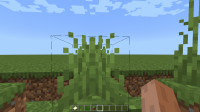
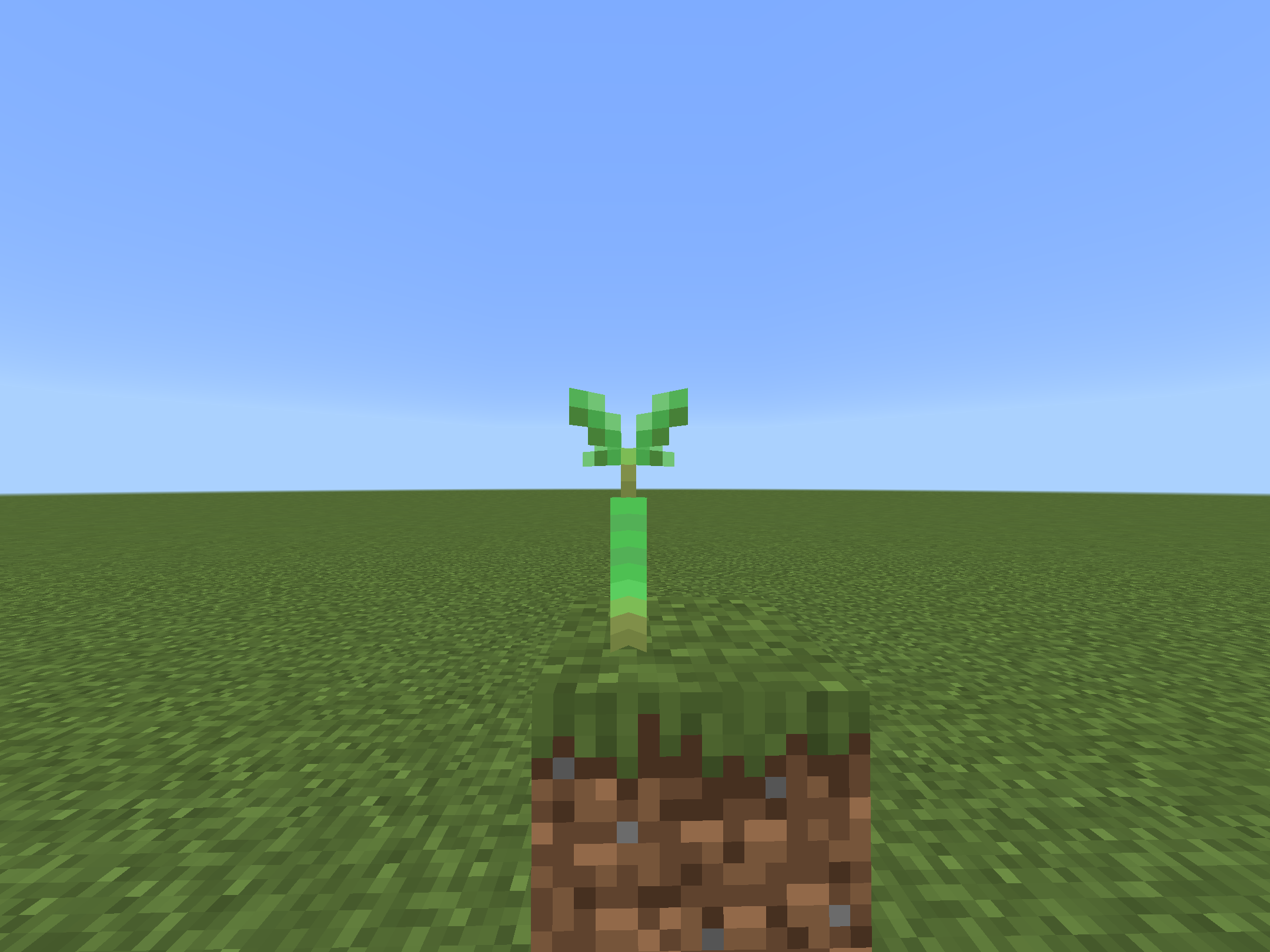
Cross models are displayed wrongly from east and west sides
When viewed from the north and south, cross models (like many plants and cobwebs) display correctly.


However when viewed from the east and west, the block appears mirrored.


Linked Issues
is duplicated by10
 MCPE-53270Flower and grass textures mirroredDuplicateMCPE-952592d textures don't mirror correctlyDuplicateMCPE-123338Cross model(X model) blocks mirror textureDuplicateMCPE-156492Grass and other foliage textures are incorrect when placedDuplicateMCPE-166032植物贴图从其他角落看不一样DuplicateMCPE-168381The flowers and campfire textures are too uniformed DuplicateMCPE-168671Flowers don’t use the exact same texture on all sidesDuplicateMCPE-169603Some blocks are axisymmetric in visual when viewed from the east or westDuplicateMCPE-171483The seagrass model is wrongDuplicateMCPE-184430The peony flower looks wrongDuplicate
relates to3
 MC-199241
Attachments25









- Unresolved
![[Mod] tryashtar](../../../data/avatars/users/41963.png) [Mod] tryashtar
[Mod] tryashtar- 468
- 92
- Confirmed
- 774140
- Multiple
- Textures-and-models plane-mirroring vanilla-parity
1.21.50.25 Preview - 1.21.41 Hotfix
1.21.50.25 Preview 1.21.20.21 Preview 1.20.20.23 Preview 1.20.20.22 Preview 1.20.10.24 Preview 1.20.10.21 Preview 1.20.0.20 Preview 1.19.80.22 Preview 1.19.80.21 Preview 1.19.80.20 Preview 1.19.70.23 Preview 1.19.70.22 Preview 1.19.60.26 Preview 1.13.0.1 Beta 1.19.30.22 Preview 1.19.10.20 Preview 1.18.33 Hotfix 1.18.32 1.18.10.27 Beta 1.18.10.26 Beta 1.17.40.23 Beta 1.17.40.21 Beta 1.17.10.20 Beta 1.17.0.50 Beta 1.16.230.52 Beta 1.16.220 1.16.210.56 Beta 1.16.100.51 Beta 1.16.0.61 Beta 1.16.0.57 Beta 1.16.0.53 Beta 1.16.0.51 Beta 1.15.0.56 Beta 1.15.0.55 Beta 1.15.0.53 Beta 1.15.0.51 Beta 1.14.0.2 Beta 1.13.0.9 Beta 1.12.0.11 Beta 1.12.0.2 Beta 1.11.0.10 Beta 1.9.0.3 Beta 1.8.1 1.9.0.5 Beta 1.9.0 1.10.0 1.14.0 1.14.30 Hotfix 1.16.0 1.16.10 1.16.20 1.16.201 Hotfix 1.16.210 1.16.221 Hotfix 1.17.30 1.17.32 1.18.2 Hotfix 1.18.31 1.19.20 1.19.51 1.19.60 1.19.70 1.19.71 1.19.72 1.20.0.22 Preview 1.19.73 1.19.80 1.19.83 Hotfix 1.20.0 1.20.12 Hotfix 1.20.13 Hotfix 1.20.50.22 Preview 1.20.50.21 Preview 1.20.40 1.20.50 1.20.60 1.20.81 Hotfix 1.21.1 Hotfix 1.21.2 Hotfix 1.21.31 Hotfix 1.21.40 1.21.41 Hotfix- 1.21.60.21 Preview
Created Issue:
Cross models are displayed wrongly from east and west sides
When viewed from the north and south, cross models (like many plants and cobwebs) display correctly.
However when viewed from the east and west, the block appears mirrored.
Attachments7
image-2019-01-10-19-11-50-475.png

When viewed from the north and south, cross models (like many plants and cobwebs) display correctly.
However when viewed from the east and west, the block appears mirrored.
When viewed from the north and south, cross models (like many plants and cobwebs) display correctly.
However when viewed from the east and west, the block appears mirrored.
When viewed from the north and south, cross models (like many plants and cobwebs) display correctly.
However when viewed from the east and west, the block appears mirrored.
![[Mod] Asteraoth](../../../data/avatars/users/92886.png)

![[MCPE Mod] Celesian](../../../data/avatars/users/81635.png)
is duplicated by
![[Mojang] Mega_Spud (Jay Wells)](../../../data/avatars/users/92696.png)
![[Mod] OcelotOnesie](../../../data/avatars/users/43220.png)
![[Mod] Urielsalis](../../../data/assets/gravatar/urielsalis.jpeg)
![[Mod] Umija5895M](../../../data/avatars/users/10122.svg)
![[Helper] Jack McKalling](../../../data/avatars/users/92859.png)

![[Mod] Jarl-Penguin](../../../data/avatars/users/92849.png)
![[Helper] lillybeacon](../../../data/avatars/users/93893.png)
is duplicated by
![[Bot] Arisa](../../../data/avatars/users/43007.png)
![[Mod] Chandler](../../../data/assets/gravatar/triwonder81.png)
relates to
![[MCQA] v-weszaj](../../../data/avatars/users/18941.svg)
is duplicated by
is duplicated by
relates to
![[Mod] EVGENSYPERPRO](../../../data/avatars/users/92853.png)
is duplicated by
is duplicated by
is duplicated by
![[Mod] LateLag](../../../data/avatars/users/92884.png)
is duplicated by
![[Mod] turbo](../../../data/avatars/users/92867.png)
![[MCQA] v-magwar](../../../data/avatars/users/18935.svg)
is duplicated by
Affects version 1.19.70.20
I think a new sniffer plant will be added soon, so please fix it!
Affected 1.20.10
Affected 1.20.20.20
Affected 1.20.10.24
Affected 1.20.10.23
Affected 1.19.80
Affected 1.20.30.22
Affected 1.20.20.22
Affected 1.20.20.21
Affected 1.20.10.21
Affects 1.19.80.20
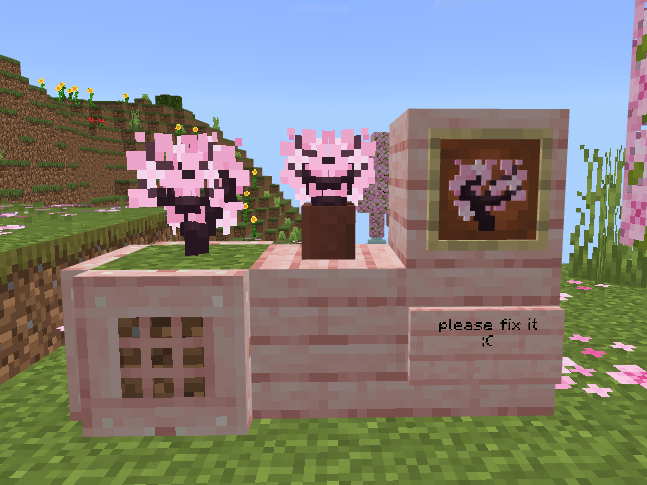
Cherry blossom sapling mirroring looks very strange. And not only Cherry blossom sapling but also peonies and twisted vines look strange. Please fix.
Affected 1.19.81
Affected 1.19.70.24/25
I do not want to see my cherry saplings mirrored!
Affected 1.20.0.22
is duplicated by
Affected 1.20.0.21
Affected 1.20.0.23
Affected 1.20.0.24
Affected 1.20.0.25
Affected 1.19.83
Affected 1.20.10.20
Affected 1.20.30.20
Affected 1.20.40.20
Affected 1.20.40.21
Affected 1.20.30 & 1.20.40.22
Affected 1.20.50.20
Affected 1.20.50.22
Reply from [Mod] Umija5895M:
Please do not add lots of "affected..." comments to reports like this. It just adds clutter, creates extra notifications, and hides important information.
To request adding affected versions, come to the Mojira Discord.
(For extra credit, you can delete all of your old affected ... comments on this report.)
Affected 1.19.70.22
Affects 1.19.70.23
Affects torch flowers
Please fix quickly
Affects 1.19.70.26
Please Fix it.
Affected 1.19.80.21
Affected 1.19.80.22
Affected 1.20.0.20
Pitcher pots are not affected
Affected 1.19.80.23
relates to
Thank you for your report!
However, this issue is a Duplicate of MCPE-40646.
If you would like to add a vote and any extra information to the main ticket it would be appreciated.
If you haven't already, you might like to make use of the search feature to see if the issue has already been mentioned.
Quick Links:
📓 Issue Guidelines – 💬 Community Support – 📧 Customer Support – 📖 Game Wiki
Thank you for your report!
We're actually already tracking this issue at MCPE-40646, so I will resolve and link this ticket as a duplicate.
If you would like to add a vote and any extra information to the main ticket it would be appreciated.
If you haven't already, you might like to make use of the search feature to see if the issue has already been mentioned.
Quick Links:
📓 Issue Guidelines – 💬 Community Support – 📧 Customer Support – ✍️ Feedback and Suggestions – 📖 Game Wiki
May relate to MCPE-40646 (which is the opposite of this issue).
Relates to: MCPE-40646
I think this is a duplicate of MCPE-40646.
Relates to MCPE-40646?
Duplicate of MCPE-40646
Thank you for your report!
We're tracking this issue in MCPE-40646, so this ticket is being resolved and linked as a duplicate.
If you would like to add a vote and any extra information to the main ticket it would be appreciated.
If you haven't already, you might like to make use of the search feature to see if the issue has already been mentioned.
Quick Links:
📓 Bug Tracker Guidelines – 📧 Mojang Support – 📓 Project Summary – ✍️ Feedback and Suggestions – 📖 Game Wiki
Glass panes are two pixel thick blocks, so it'd be expected that the textures applied on the back faces were of constant orientation as the panes are not completely flat. This, however, is not the case.
This results in some ugly mirroring effects when crosses of glass panes are viewed from some angles, much like those demonstrated in MCPE-40646.
In fact, such an x-shaped rendering is not for all blocks. For example, pointed stone and glow berries don't have such x-shaped rendering. Also such an x-shaped rendering in bedrock is considered bug MCPE-40646. It also doesn't match the java version and doesn't look pretty.
When first added, pointed dripstone had an x-shaped rendering how in MCPE-119916, but was then changed to java rendering as it didn't look very good. I think it will be decided as WAI.
related to MCPE-40646
Thank you for your report!
We're tracking this issue in MCPE-40646, so this ticket is being resolved and linked as a duplicate.
If you would like to add a vote and any extra information to the main ticket it would be appreciated.
If you haven't already, you might like to make use of the search feature to see if the issue has already been mentioned.
Quick Links:
📓 Bug Tracker Guidelines – 💬 Community Support – 📧 Mojang Support
📓 Project Summary – ✍️ Feedback and Suggestions – 📖 Game Wiki
– I am a bot. This action was performed automatically! The ticket was resolved by one of our moderators, and I left this message to give more information to you.
Thank you for your report!
We're tracking this issue in MCPE-40646, so this ticket is being resolved and linked as a duplicate.
If you would like to add a vote and any extra information to the main ticket it would be appreciated.
If you haven't already, you might like to make use of the search feature to see if the issue has already been mentioned.
Quick Links:
📓 Bug Tracker Guidelines – 💬 Community Support – 📧 Mojang Support
📓 Project Summary – ✍️ Feedback and Suggestions – 📖 Game Wiki
Do you mean MCPE-40646?
Thank you for your report!
We're tracking this issue in MCPE-40646, so this ticket is being resolved and linked as a duplicate.
If you would like to add a vote and any extra information to the main ticket it would be appreciated.
If you haven't already, you might like to make use of the search feature to see if the issue has already been mentioned.
Quick Links:
📓 Bug Tracker Guidelines – 💬 Community Support – 📧 Mojang Support
📓 Project Summary – ✍️ Feedback and Suggestions – 📖 Game Wiki
Hey! Thanks for taking your time to report this issue!
However, this has already been reported before in MCPE-40646, so I'll be resolving this issue as a duplicate.
Quick Links:
📓 Bug Tracker Guidelines – 💬 Community Support – 📧 Mojang Support
📓 Project Summary – ✍️ Feedback and Suggestions – 📖 Game Wiki
Closely relates to MCPE-40646 - I'm reporting this separately since MC-252099 was reported separately from MC-96463 and was recently fixed independently from it.
The bug
Mangrove propagates placed in flower pots appear strangely mirrored from some viewing angles. This issue was fixed very recently in Java Edition (MC-252099), but the flawed model remains in Bedrock Edition.
How to reproduce
- Plant a mangrove propagule in a flower pot
- Inspect from all angles
Expected results
There would be no weird mirror symmetry.
Actual results
There is.
Thank you for your report!
We're tracking this issue in MCPE-40646, so this ticket is being resolved and linked as a duplicate.
If you would like to add a vote and any extra information to the main ticket it would be appreciated.
If you haven't already, you might like to make use of the search feature to see if the issue has already been mentioned.
Quick Links:
📓 Bug Tracker Guidelines – 📧 Mojang Support
📓 Project Summary – ✍️ Feedback and Suggestions – 📖 Game Wiki

bug:

no bug:

The Java Edition developers made the player look at the peony flower in any direction, and they would always see that one of the surfaces was flipped horizontally,This report is in addition to MCPE-40646 detailing the bug
Steps to Reproduce:
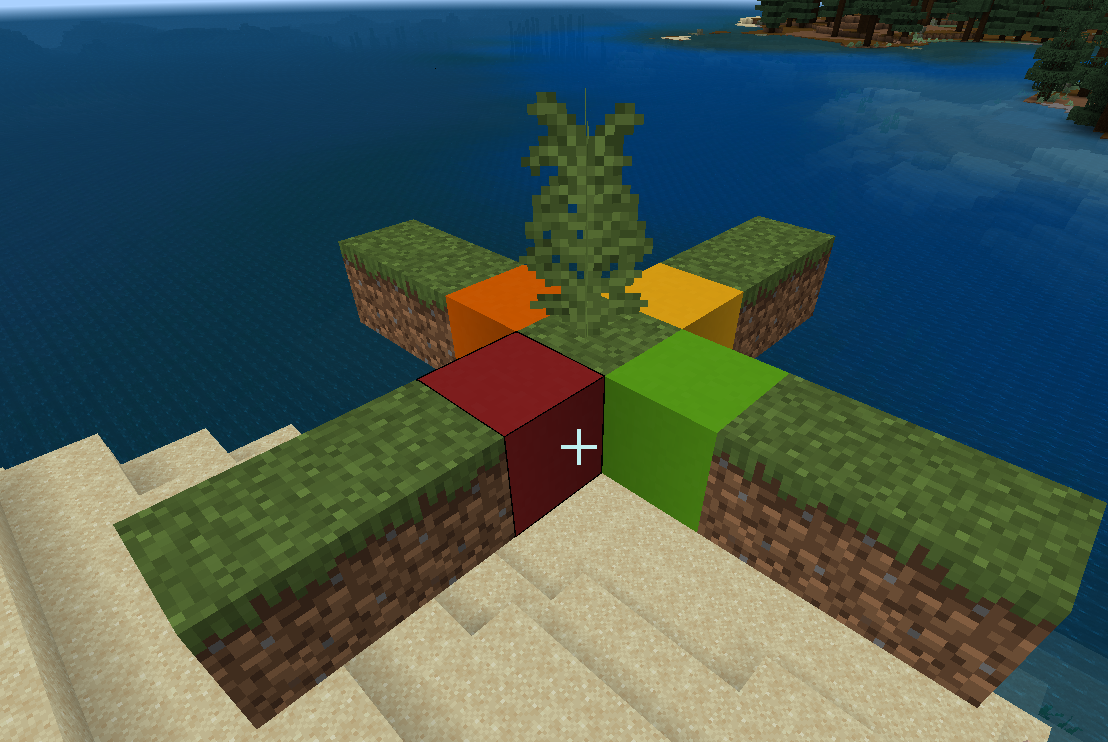
- In Bedrock Edition (as a counterexample), Java Edition (as a positive example). Make a simulation model for each one,This bug shouldn't be treated as parity, and that's where Bedrock Edition does the foliage rendering wrong,Most of the wrong blocks are rendered in a cross shape, and tall grass is used here to illustrate this bug
- Standing on the red, orange, yellow, and green blocks, looking at the tall grass,Try it in Bedrock Edition and Java Edition, respectively
bedrock:
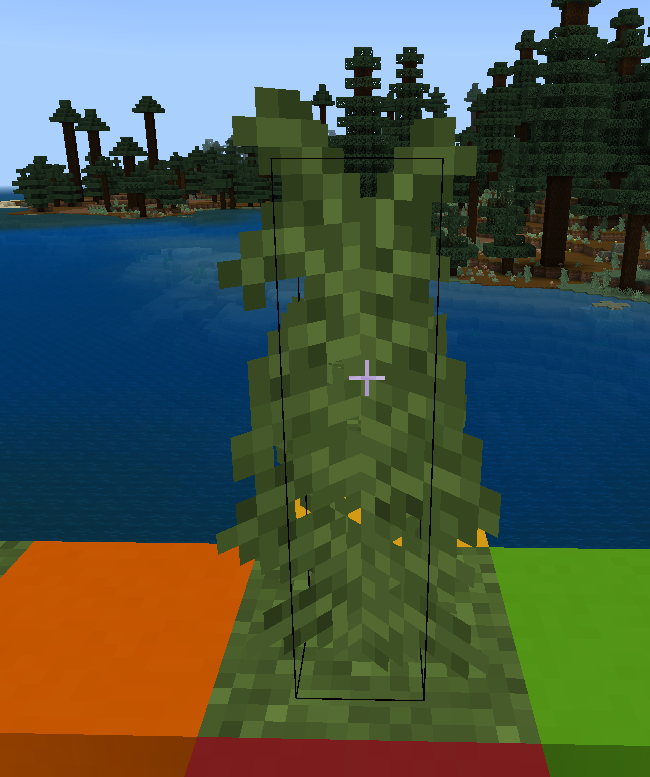
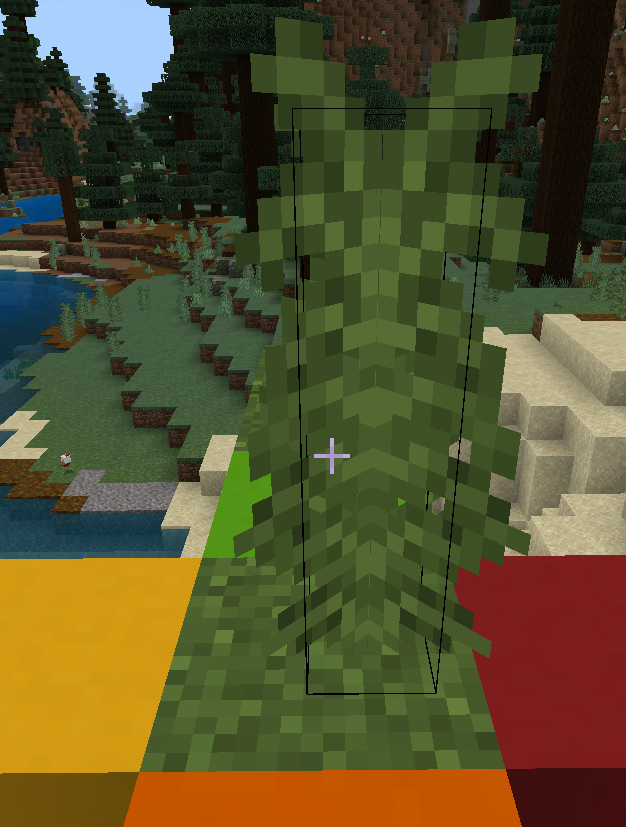


java:
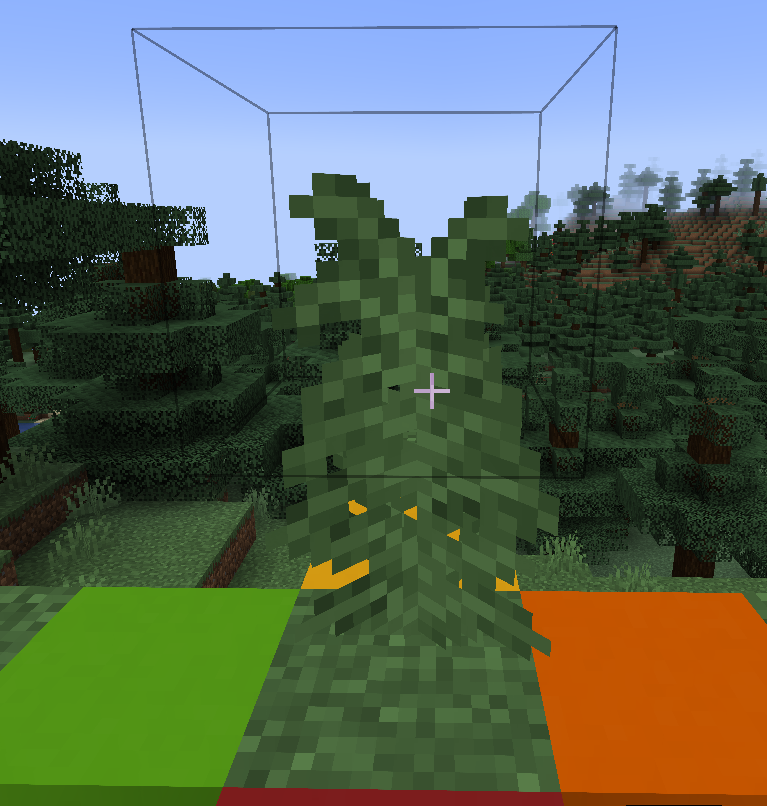

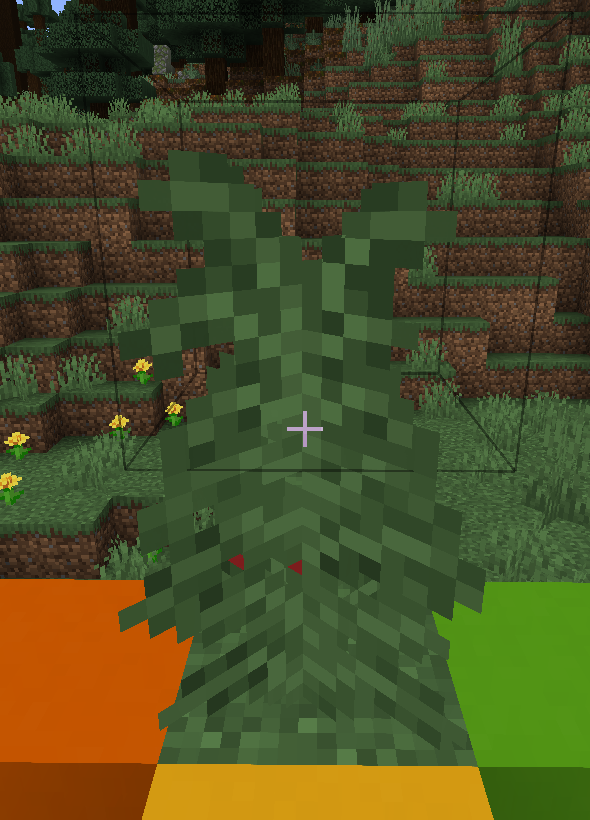

Observed Results:
Bedrock Edition looks different when looking at tall grass from block to block
Expected Results:
The correct rendering (like Java) looks the same, but it's definitely not parity, because Bedrock Edition is just wrong
Simulation model:

Duplicate of MCPE-40646
MCPE-40646 doesn't accurately describe this bug, my trace is still informative
Are you sure? Because your screenshot attached to the report is very similar to the issue described in MCPE-40646, unless i'm misunderstanding it, you might want to give a reproduce step then
So what you're saying is that every Cross model when looked at specific directions is mirrored right? Because if yes then this report is indeed a duplicate of MCPE-40646
i understand, i'm just saying that the issue you describe in here is exactly what MCPE-40646 is for
Thank you for your report!
We're tracking this issue in MCPE-40646, so this ticket is being resolved and linked as a duplicate.
If you would like to add a vote and any extra information to the main ticket it would be appreciated.
If you haven't already, you might like to make use of the search feature to see if the issue has already been mentioned.
Quick Links:
📓 Bug Tracker Guidelines – 💬 Community Support – 📧 Mojang Support (Technical Issues) – 📧 Microsoft Support (Account Issues)
📓 Project Summary – ✍️ Feedback and Suggestions – 📖 Game Wiki

Can confirm. However, do note that cross-shaped models being stretched (including cave vines) are currently considered a bug on Java, see MC-209634
The issue with them not rendering properly when viewed from the east and west is already being tracked at MCPE-40646
Blocks that use the double sided cross shaped model render incorrectly in ray tracing graphics mode.
This issue is indirectly related to MCPE-188463 and MCPE-40646
The new double-sided model is being used for more and more cross-shaped plane blocks in vanilla game to address the issue with textures appearing mirrored in the vanilla game
Which in turn is causing more and more blocks in ray-traced graphics mode to render incorrectly
To further clarify, this new model appears to include a flipped version of the texture on the backside of the plane, in vanilla and deferred lighting graphics modes, the backface of the plane is culled
But in ray tracing graphics mode, both sides are rendered at the same time, leading to z-fighting and incorrect visuals as demonstrated in the images.
Steps to re-produce:
- Enable ray tracing, you can use the empty ray tracing pack from the attachments which uses only vanilla games' files and allows you to turn ray tracing on.
- Place down cross-shaped blocks that use the new double-sided model, some examples include: grass, tallgrass, saplings, all flowers, and likely more
- Observe, the flipped version of the texture is rendered on the backside of the plane instead of being culled like in vanilla game


Additional Notes:
This issue is less about which blocks this bug applies to, and more about the double-sided crossed-shaped block shape rendering incorrectly with ray tracing.
If this particular block shape is used with any other block or texture or in even in custom add-ons, the same issue will be present, so instead of compiling a list of blocks with this bug, the report focuses on the root cause of the issue.
This issue is even more critical because in the recent previews this new double-sided render method is being enabled for more and more cross-shaped plane blocks
which means every cross-shaped block will be rendered incorrectly in ray tracing graphics mode.
This was probably marked as "fixed" internally, so I suggest opening a new ticket for the other two suspicious stews. Other half-fixed reports (e.g. MCPE-189881 and MCPE-40646) got new tickets for the remaining issues (MCPE-189881 and MCPE-188463)
Affects 1.9.0.5
Does this have any impact on gameplay, or does it affect models that are made in custom resource packs?
Still happening in 1.14 all the way to the 1.15 beta
In java edition: it can be mirrored as X-crossed
In bedrock edition: It has XI cross on it.
Always not fixing. It matches java model and bedrock has simply weird model thus.
Affects 1.16.230.52
Please fix it
Custom resource packs appear to be affected
The grass texture grass is supposed to be facing one side. It probably isn't the artists intention for it took like that.
This bug has not been fixed in almost 8 years and has been there since alpha 0.9.0.
All X-shaped blocks in Java Edition, their textures look will never flip horizontally no matter which direction they are viewed from.
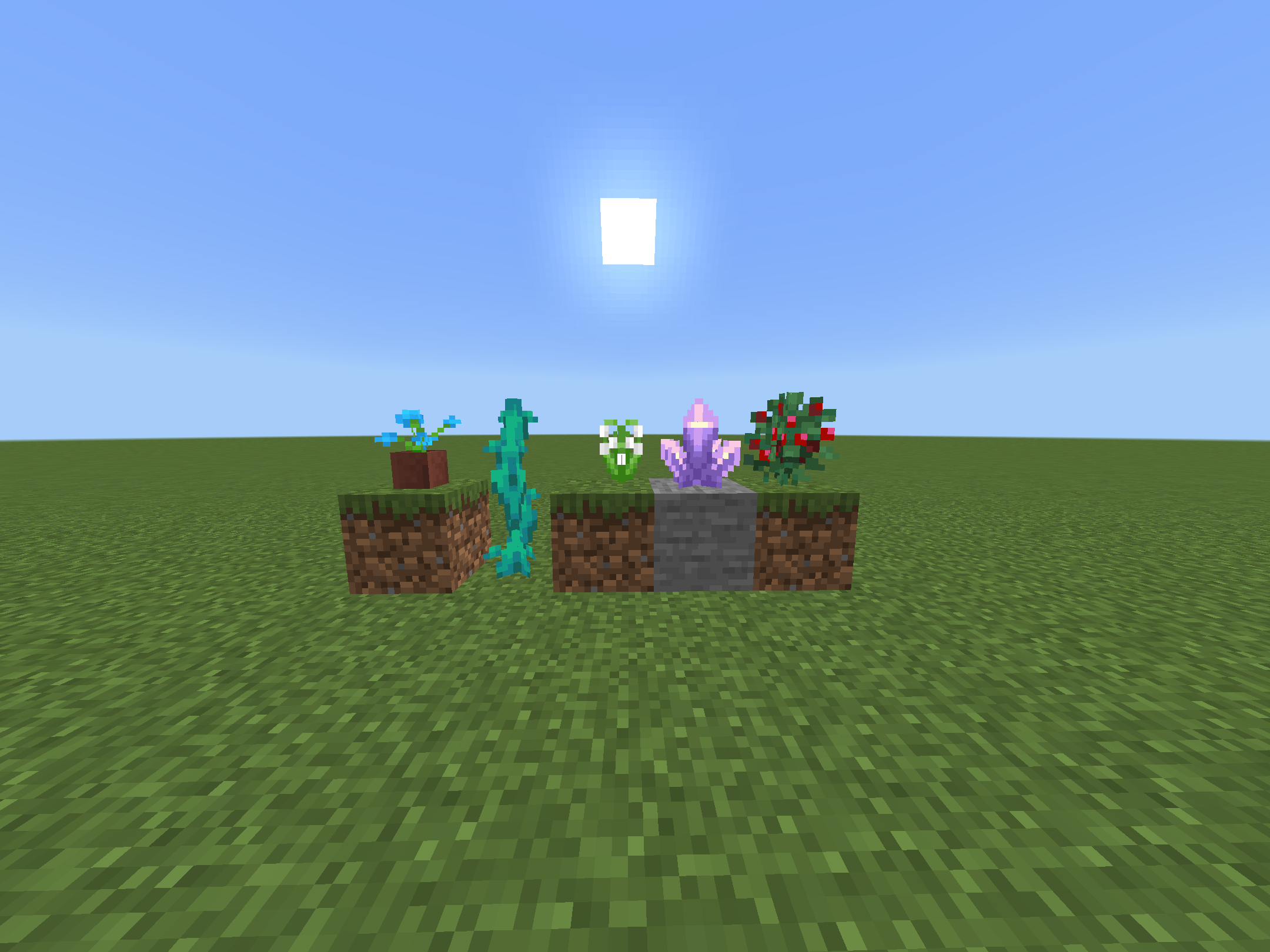
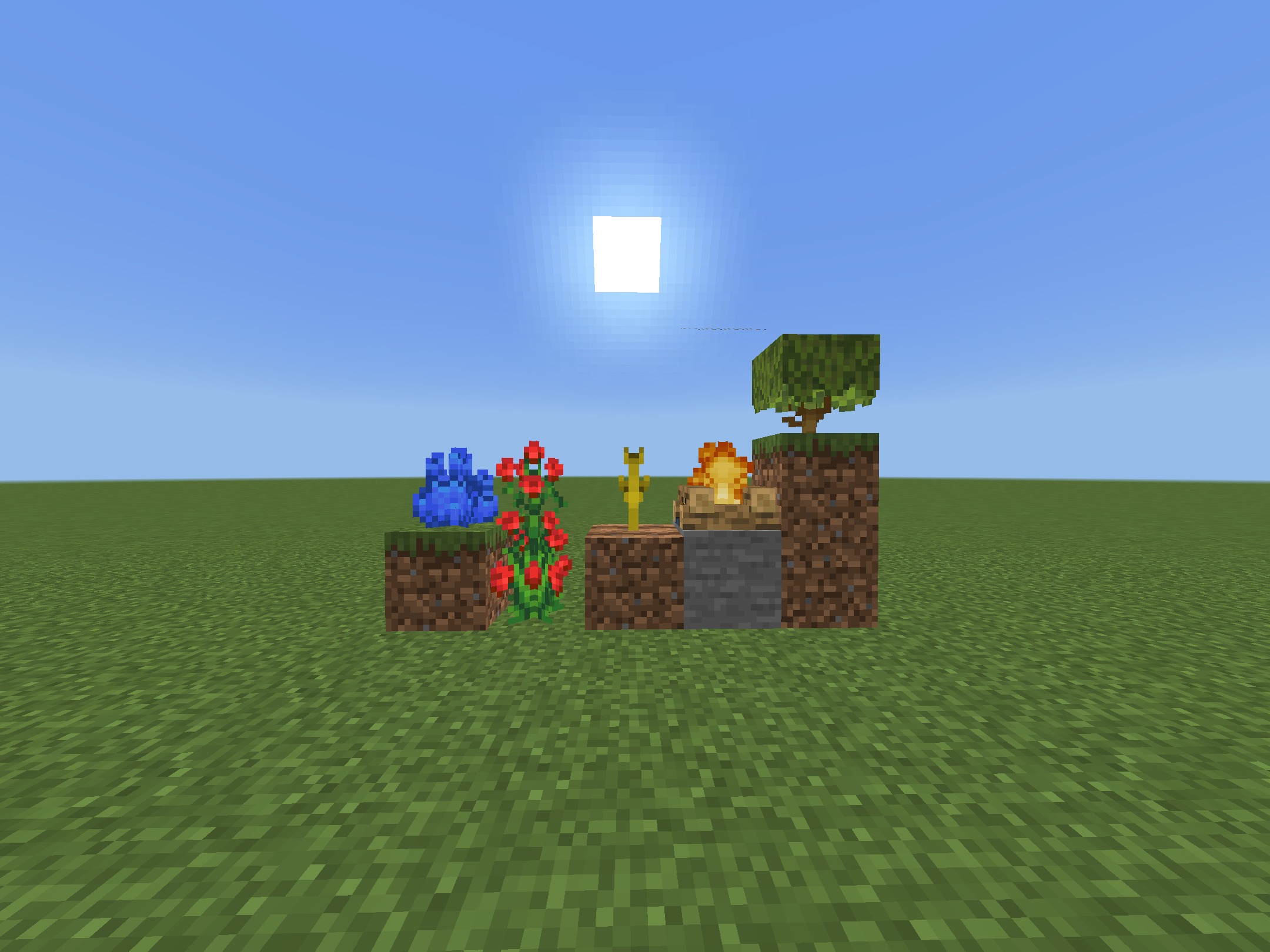
But in Bedrock, some textures will flip horizontally then cause axisymmetric in visual:
Grass, Fern, Flowers Except Pitcher Plants), Dead Bush, Saplings, Bamboo Spling, Corals, Amethyst Buds, Amethyst Cluster, Cobweb, Weeping Vine, Twisting Vine, Hanging Roots, Warped Roots, Crimson Roots, Nether Sprouts, (Flowering) Azalea (Bottom Model), Kelp, Campfire, Soul Campfire, Sweet Berry Bushes, Mangrove Propagule.
I noticed develpers have solved this problem in some new X-shaped blocks like Pitcher Plants, Pointed Dripstone, Cave Vines, so the blocks using outdated blockshapes and render methods, they should be updated because axisymmetric is ugly if watch the model carefully.
Great, I cannot unsee it now!
I can confirm this bug still happens and is NOT FIXED in 1.21.60.21 Preview.
All Flower Pot, Cobweb, Sugarcane, all Corals, Kelp, Bamboo Spling, Amethyst Buds, Amethyst Cluster, Weeping Vine, Twisting Vine, Hanging Roots, Nether Sprouts, Azalea (Bottom Model), Flowering Azalea (Bottom Model), Campfire, Soul Campfire and Mangrove Propagule are not fixed yet, as they are still displayed wrongly from east and west sides.
A fix has been implemented for this in one of the recent Minecraft Previews.
As Rainvay commented, a similar fix was already there for newer blocks after 1.17 that consisted of two planes together in an X shape.
However I like to point out this fix which entails rendering only one side of the plane, with one side having a flipped texture, is completely broken with ray tracing.
Instead of only one side of the plane being rendered, both sides are rendered at the same time, leading to Z-Fighting with the texture, and its mirrored self being rendered on the same plane simultaneously.
Effectively resolving the bug in vanilla graphics, and making things worse in ray tracing graphics mode. I hope this issue won't be marked as resolved, because this fixes one issue and introduces another, which is closely related.
Edit, here's a detailed report:
MCPE-189266 Double-sided cross-shaped blocks render incorrectly in ray tracing graphics mode - Mojang Studios Jira
Can confirm 1.21.60.23.
Please redirect new issues elsewhere. We have MCPE-188463 for the remaining blocks. I'm not aware of any ticket about the ray tracing issue; please make one.