Lava / water / powder snow bucket desync when using it while rapidly turning
The bug
A desync can happen when rapidly turning and trying to use a lava, water, or powder snow bucket. The bucket might appear full but you placed lava / water / powder snow; or the bucket might appear empty but you did not place lava / water / powder snow.
How to reproduce
- Give yourself a lava bucket
- Spin around (move mouse) standing on a flat plain and repeatedly try to put down and pick up the lava in the bucket
→ About 1 in 10 times, the client and server desync (e.g. I see the lava on the ground, and also in my bucket, until I use the bucket again or move it in my inventory; or I see no lava on the ground and my inventory displays the bucket as empty, but I actually still have lava and can place it).
Code analysis
Based on 1.12.2 decompiled using MCP 9.40
Using a bucket calls server-side net.minecraft.item.ItemBucket.onItemRightClick(World, EntityPlayer, EnumHand) which calculates the position itself and therefore can cause a desync. Ideally the position for picking up liquids and placing them should be calculated client-side only and then the server should only validate it and use that position.
Examples

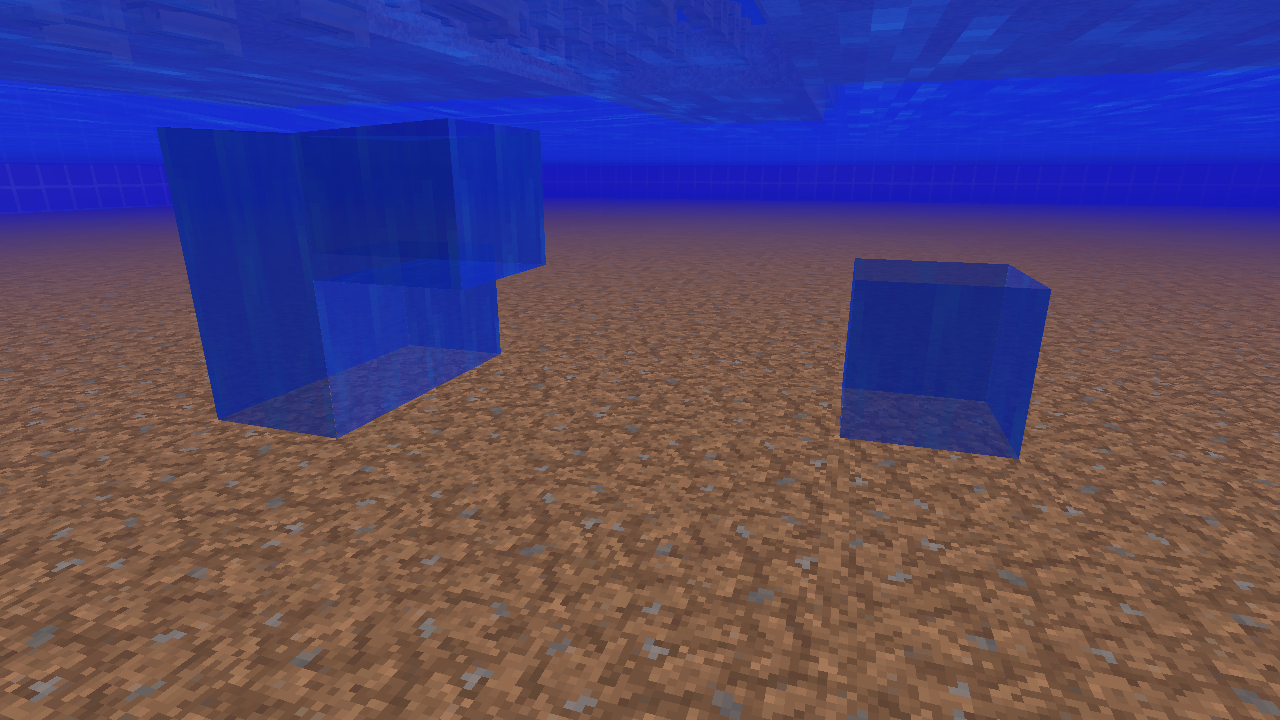
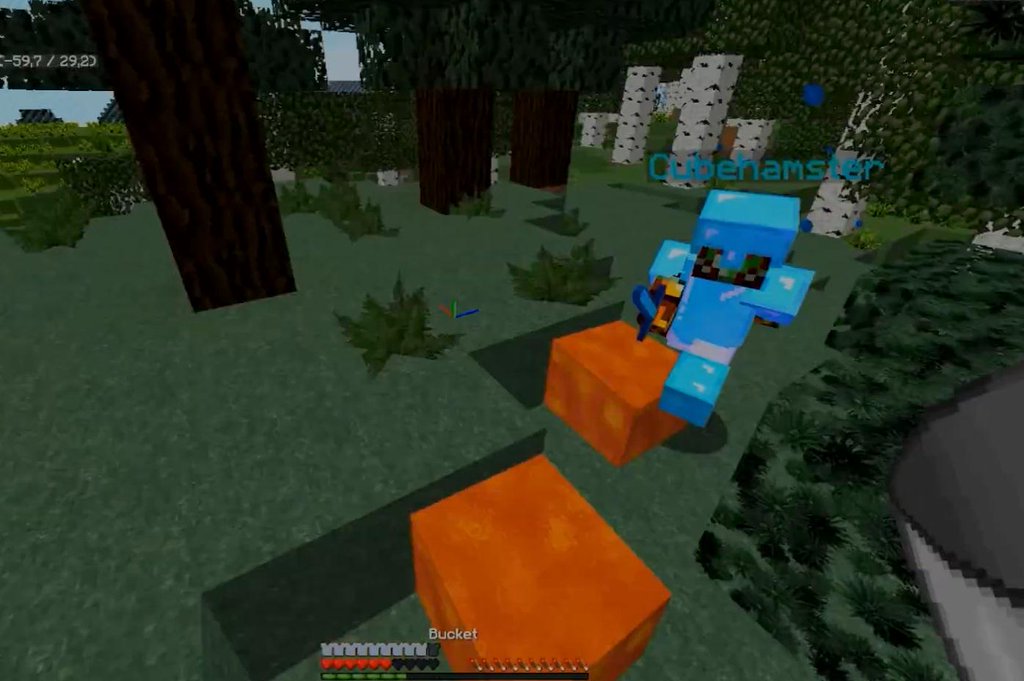
Linked Issues
is duplicated by117
 MC-22377Lava buckets in inventory randomly become emptyDuplicateMC-60815Placing lava in water fast causes lava to stay lavaDuplicateMC-84326Buckets emptying with torches in shield slotDuplicateMC-127133Breathing bubbles flickering if in air pocket underwaterDuplicateMC-1271471x1 bubble created by bucket underwater doesn't disappearDuplicateMC-127233Spamming buckets creates phantom airDuplicateMC-133539Water does not fill empty spacesDuplicateMC-133550Holes in waterDuplicateMC-134139Water does not refilledDuplicateMC-134343 When spam filling a water bucket with water, air can be created under water.DuplicateMC-134714Minor water bugDuplicateMC-134918Source water blocksDuplicateMC-136140"Water bubble" in water if you spam empty bucketsDuplicateMC-136623ghost water blocksDuplicateMC-137083Water BugDuplicateMC-139568water is emptyDuplicateMC-140875Picking up water very fast makes an "air" block DuplicateMC-141794Water Bucket or waters glitchDuplicateMC-143878Water is not flowing occasionallyDuplicateMC-144219Disappearing blocks and reappearing blocksDuplicateMC-146039Right click with bucket in the water leaves air bubbleDuplicateMC-146180Water doesn't flow after using a bucketDuplicateMC-148261water doesnt flowDuplicateMC-148288Right clicking a bucket on a body of water sources while moving your mouse really fast removes two water sources instead of oneDuplicateMC-150162There is a problem with water buckets. Sometimes when placing water down from a water bucket, the water disappears.DuplicateMC-150863air block in the middle of waterDuplicateMC-151665Water fails to be picked up and stays in current location but turns invisible.DuplicateMC-153123Water Pickup BugDuplicateMC-157975Picking water with buckets sometimes doesn't workDuplicateMC-160166Disappearing Water?DuplicateMC-160970Blocks of water disappearDuplicateMC-161504Infinite Water BugDuplicateMC-162880Man Made Air Pocket in WaterDuplicateMC-166672Water source block issueDuplicateMC-168506Using buckets towards fish underwater can sometimes cause air to appear in the waterDuplicateMC-168953When a water is placed with a water bucket on a server, it has a chance to dissapear.DuplicateMC-169081Bucket falsely fills with waterDuplicateMC-169119Infinite water source doesn't replenishDuplicateMC-170369Buckets cause water sources to disappear and not reflow until water is updatedDuplicateMC-170404Water disapeared after placing down the water using a water bucketDuplicateMC-177039Placing water quickly on grass makes water floatDuplicateMC-177303Lava in the buckets acts weirdDuplicateMC-178363Causes a air gap in waterDuplicateMC-178416Water Source Blocks are not being formed back after they are picked up with a BucketDuplicateMC-178492Water/Bucket bugDuplicateMC-178709Air block in water lake not filling in.DuplicateMC-181969Picking up water or lava sometimes causes syncing issues, making ghost source blocksDuplicateMC-182510Water bugDuplicateMC-182713Water gathering issue using Frost Walker enchantment and teleportation between Water Bucket iconsDuplicateMC-183993Water does not flow properly/create new water source block once removedDuplicateMC-184310Water Buckets filling when they aren't supposed toDuplicateMC-184584invisible waterDuplicateMC-187017Invisible water issueDuplicateMC-187376Air bubbles when clicking on water with a empty bucket DuplicateMC-187505Lava not turning into obsidian in water.DuplicateMC-188016Buckets Sometimes Doesn't Place The WaterDuplicateMC-190185Ghost Water or Lava BlocksDuplicateMC-190377Sometimes water gets picked up in bucket, but source staysDuplicateMC-190391broken water mechanics DuplicateMC-191486Item Disappearing when placedDuplicateMC-192405WaterDuplicateMC-195662Water glitchDuplicateMC-196051Water Randomly Disappears From BucketDuplicateMC-196352Water Update GlitchDuplicateMC-196546Waterbucket displaying wrong icoDuplicateMC-196690water air blocksDuplicateMC-198038Water disappear (visual bug)DuplicateMC-198094Inviseble waterDuplicateMC-198704Lava doesn't go awayDuplicateMC-199800Water BugDuplicateMC-199963Water bugDuplicateMC-2003391 bucket + 2 clicks fast = 1 air 1 water (1b+2cf=1a1w)DuplicateMC-200792Picking up water and the code not registering it being picked upDuplicateMC-202085Bug with Endless source of water on 1. 16. 3.DuplicateMC-202100Weird water bucket behaviourDuplicateMC-202878Ghost water bucketsDuplicateMC-202897Sometimes water and lava are not collected/placed correctlyDuplicateMC-203422Water/lava client side cavity DuplicateMC-204250Water source block deleted on rare occasionsDuplicateMC-204517Bucketing water too fast causes visual(?) errorDuplicateMC-204699water replaces with air when filling buckets with water at a river/can't place water bucketsDuplicateMC-204728The water bucket has a chance of glitching and not being usableDuplicateMC-205225Attempting to pick up Powder Snow in a bucket while running and jumping simultaneously doesn't remove block, but temporarily fills bucket.DuplicateMC-205507ghost waterDuplicateMC-206511You Can Create Fake Air Pockets By Filling Up Buckets Too FastDuplicateMC-206537Water and Lava Disappears RandomlyDuplicateMC-206782Water Bucket Glitches DuplicateMC-206882Invisible water bugDuplicateMC-207166water buckets doesnt work as propperlyDuplicateMC-207990Bucket bugDuplicateMC-208190Invisible lava in 20w49aDuplicateMC-208414Water bugDuplicateMC-20910520w51a Issue (Axolotl)DuplicateMC-209179Water doesnt dissapear (Bucket)DuplicateMC-209358Water doesn't go in my bucketDuplicateMC-210157Lava glitchDuplicateMC-210297water buckets act wierdlyDuplicateMC-210862Buckets used at previous crosshair locationsDuplicateMC-211203Water will sometimes appear in the bucket but it won't actually be in the bucketDuplicateMC-213453Desynced water with bucketsDuplicateMC-214247Server-client desync when turning camera quickly (duplicate)DuplicateMC-214391Water BugDuplicateMC-214542Water GlitchDuplicateMC-215523water bugDuplicateMC-215572Using a bucket underwater will pick up the water block you are inDuplicateMC-216021Spamming a bucket under water results in infinite oxygen.DuplicateMC-216069Invisible lava source block?!DuplicateMC-216531Water Physics IssueDuplicateMC-217438Bug with water and bucketDuplicateMC-217508Water stops updating?DuplicateMC-217598Water glitchDuplicateMC-217744water does not get picked up sometimesDuplicateMC-219644When you fill a bucket with water while moving the camera quickly, an empty block will remain in the water source, which should not be thereDuplicateMC-219801Water Dissapearing When PlacedDuplicateMC-222975Water BugDuplicateMC-223332Fake lava bucket/ Ghost bucketDuplicateMC-231630 Water source doesent pick up when it looks like it is Duplicate
relates to10
MC-95720Client-server desync on seemingly invalid block placement ImportantMC-189969Taking away lava while it converts to obsidian will create a fake lava bucketConfirmedMC-210301Desync when trying to use a bucket in spawn protection
 NormalMC-9591Players are able to create ghost lily padsFixedMC-90022Movement packets arrive too lateAwaiting ResponseMC-107103Trying to interact with entity 3 or more blocks away without seeing its eyes only interacts client-sideFixedMC-219875You can cause a desync when repeatably picking up liquidsFixedMC-268282Picking up lava, powder snow or water using a bucket can be desyncedFixedMC-134622You can breathe indefinitely underwater by filling and emptying buckets or by playing blocks that can be placed in water and replaced by waterConfirmedMC-193187Phantom Lava Source Block / Invisible Source BlockAwaiting Response
Attachments17


![[Mod] Michael Wobst](../../../data/avatars/users/37868.png)
![[Helper] ZeNico13](../../../data/avatars/users/31913.png)
- Fixed
![[Mod] Avoma](../../../data/avatars/users/86198.png) [Mod] Avoma
[Mod] Avoma Kuczora Tibor
![[Mojang] Panda](../../../data/avatars/users/41658.png) [Mojang] Panda
[Mojang] Panda- 138
- 55
- Confirmed
- Important
- Block states Networking
- Survival
- bucket desync empty lava water
1.5 - 21w10a
1.5 1.6.1 1.6.2 1.7.4 14w27b 1.8 1.8.1-pre3 1.8.8 15w31c 15w35e 15w43a 15w46a 1.10.2 16w42a 1.12 1.12.1-pre1 1.12.1 1.12.2 18w03b 18w10d 18w20c 1.13-pre2 1.13-pre3 1.13-pre8 1.13-pre9 1.13-pre10 1.13 18w30b 18w31a 18w32a 18w33a 1.13.1-pre1 1.13.1 1.13.2-pre1 1.13.2-pre2 1.13.2 18w43b 18w45a 18w46a 18w49a 19w02a 19w03a 19w05a 19w06a 19w07a 19w08a 19w09a 19w11a 19w11b 19w12b 19w13a 19w13b 19w14a 19w14b 1.14-pre1 1.14-pre2 1.14-pre3 1.14-pre4 1.14-pre5 1.14 1.14.1 1.14.2-pre1 1.14.2-pre2 1.14.2 1.14.3-pre2 1.14.3 1.14.4-pre1 1.14.4-pre3 1.14.4-pre4 1.14.4-pre5 1.14.4-pre6 1.14.4 19w34a 19w35a 19w36a 19w37a 19w38b 19w39a 19w40a 19w41a 19w42a 19w45b 19w46b 1.15-pre1 1.15-pre2 1.15-pre3 1.15-pre4 1.15-pre5 1.15-pre6 1.15-pre7 1.15 1.15.1 1.15.1-pre1 1.15.2-pre1 1.15.2-pre2 1.15.2 20w06a 20w07a 20w08a 20w09a 20w10a 20w11a 20w12a 20w13a 20w13b 20w14a 20w15a 20w17a 20w18a 20w19a 20w20a 20w20b 20w21a 20w22a 1.16-pre1 1.16-pre2 1.16-pre3 1.16-pre5 1.16-pre6 1.16-pre7 1.16-pre8 1.16-rc1 1.16 1.16.1 20w28a 20w30a 1.16.2-pre1 1.16.2-rc1 1.16.2-rc2 1.16.2 1.16.3-rc1 1.16.3 1.16.4-pre1 1.16.4-pre2 1.16.4-rc1 1.16.4 20w45a 20w46a 20w48a 20w49a 20w51a 21w03a 1.16.5 21w05a 21w05b 21w06a 21w07a 21w08b 21w10a- 14w30c 21w11a
Created Issue:
Lava bucket vs Wooden door
I filled my bucket with lava, and went back to our little base.
When I opened the door, the lava from the bucket "disappeared".
It was an empty bucket in my hand, but I could open a door.. I have to say, didn't worth it!
So I had to go back that far for another lava load.Environment
Windows 7 / Java version: 7
Linked Issues
is duplicated by1
TRASH-37642

is duplicated by


Lava bucketvs Wooden doorLava bucket in inventory becomes empty bucket
![[Mod] Ezekiel (ezfe)](../../../data/assets/gravatar/ezekielelin.jpeg)

is duplicated by
relates to
relates to
relates to
![[Mod] Neko](../../../data/avatars/users/92901.png)
relates to
relates to
![[Bot] Arisa](../../../data/assets/gravatar/mustek2.png)
![[Mod] violine1101](../../../data/avatars/users/92858.png)

![[Mod] tryashtar](../../../data/avatars/users/41963.png)

I filled my bucket with lava, and went back to our little base.
When I opened the door, the lava from the bucket "disappeared".
It was an empty bucket in my hand, but I could open a door.. I have to say, didn't worth it!
So I had to go back that far for another lava load.The bug
A desync can happen when rapidly turning and trying to use a lava or water bucket. The bucket might appear full but you placed lava or water; or the bucket might appear empty but you did not place lava or water.
How to reproduce
- Give yourself a lava bucket
- Spin around (move mouse) standing on a flat plain and repeatedly try to put down and pick up the lava in the bucket
→
Lavabucket in inventory becomes empty bucketLava / water bucket desync when using it while rapidly turning
is duplicated by
is duplicated by
is duplicated by
![[Mod] Pokechu22](../../../data/avatars/users/92931.png)
is duplicated by
is duplicated by
The bug
A desync can happen when rapidly turning and trying to use a lava or water bucket. The bucket might appear full but you placed lava or water; or the bucket might appear empty but you did not place lava or water.
How to reproduce
- Give yourself a lava bucket
- Spin around (move mouse) standing on a flat plain and repeatedly try to put down and pick up the lava in the bucket
→Code analysis
Based on 1.12.2 decompiled using MCP 9.40
Using a bucket calls server-side net.minecraft.item.ItemBucket.onItemRightClick(World, EntityPlayer, EnumHand) which calculates the position itself and therefore can cause a desync. Ideally the position for picking up liquids and placing them should be calculated client-side only and then the server should only validate it and use that position.
Windows 7 / Java version: 7
2018-07-17_01.07.45.png

is duplicated by
is duplicated by
is duplicated by
is duplicated by
![[Helper] Lord_Quadrato](../../../data/avatars/users/26105.png)

is duplicated by
is duplicated by
is duplicated by
![[Mod] Asteraoth](../../../data/avatars/users/92886.png)
![[Mod] Les3awe](../../../data/avatars/users/79847.png)
is duplicated by
is duplicated by

is duplicated by
is duplicated by
is duplicated by
is duplicated by
![[Mod] Urielsalis](../../../data/assets/gravatar/urielsalis.jpeg)
![[Mojang] Nathan Adams](../../../data/assets/gravatar/dinnerbone.png)
![[Mod] Sonicwave](../../../data/avatars/users/94627.png)
is duplicated by
is duplicated by
Still in 1.14 Release!
is duplicated by
is duplicated by
is duplicated by
is duplicated by
is duplicated by
is duplicated by
is duplicated by
is duplicated by
is duplicated by
is duplicated by
is duplicated by
relates to
relates to
is duplicated by
is duplicated by
is duplicated by
is duplicated by
is duplicated by
![[Mojang] Adrian Östergård](../../../data/assets/gravatar/nighter.jpeg) Important
Important![[Mod] OcelotOnesie](../../../data/avatars/users/43220.png)
is duplicated by
is duplicated by
is duplicated by
is duplicated by
is duplicated by
![[Bot] Arisa](../../../data/avatars/users/43007.png)
is duplicated by
is duplicated by
is duplicated by
![[Helper] Johnibur](../../../data/avatars/users/28381.png)

is duplicated by
is duplicated by
is duplicated by
is duplicated by
is duplicated by
is duplicated by
The bug
A desync can happen when rapidly turning and trying to use a lava or water bucket. The bucket might appear full but you placed lava or water; or the bucket might appear empty but you did not place lava or water.
How to reproduce
- Give yourself a lava bucket
- Spin around (move mouse) standing on a flat plain and repeatedly try to put down and pick up the lava in the bucket
→Code analysis
Based on 1.12.2 decompiled using MCP 9.40
Using a bucket calls server-side net.minecraft.item.ItemBucket.onItemRightClick(World, EntityPlayer, EnumHand) which calculates the position itself and therefore can cause a desync. Ideally the position for picking up liquids and placing them should be calculated client-side only and then the server should only validate it and use that position.
Examples
is duplicated by
is duplicated by
is duplicated by
is duplicated by
is duplicated by
is duplicated by
is duplicated by
is duplicated by
is duplicated by
is duplicated by
is duplicated by
is duplicated by
is duplicated by
relates to
So I believe the interpretation here is that the client sees the milk bucket filling, but the server does not. This may even have the same root cause of bug MC-12363
Sound related to MC-12363
Sound related to
MC-12363
I guess it is a similar sort of desync as the end result is identical (wrong client-side inventory), and I can see an additional "update your inventory, client!"-message after the client failed to perform an action "band-aid-fixing" both issues.
But this report is about specific instances where the server thinks you couldn't place a block because you tried to place it inside your character model even though that can clearly not be the case, which is something that shouldn't happen in the first place, even if the band-aid-fix still makes sense. 
Marcono1234 wow, is it possible that same cause of click-cooldown client-v-server is what causes MC-12363 / MC-95720?
Sounds mostly like MC-12363. Did the air block disappear after relogging?
Yes it's actually becuse of MC-12363 I noticed. Very strange...
Does it stay that way after relogging? If no, it's seems more like MC-12363.

Thank you for your report!
However, this issue is a Duplicate of MC-12363.
If you have additional information, please add it to that report.
Please search before reporting, as it's likely that one exists already.
Quick Links:
📓 Issue Guidelines – 💬 Community Support – 📧 Customer Support – 📖 Game Wiki
Duplicate of MC-12363.
Thank you for your report!
However, this issue is a Duplicate of MC-12363.
If you have additional information, please add it to that report.
Please search before reporting, as it's likely that one exists already.
Quick Links:
📓 Issue Guidelines – 💬 Community Support – 📧 Customer Support – 📖 Game Wiki
Thank you for your report!
However, this issue is a Duplicate of MC-12363.
If you have additional information, please add it to that report.
Please search before reporting, as it's likely that one exists already.
Quick Links:
📓 Issue Guidelines – 💬 Community Support – 📧 Customer Support – 📖 Game Wiki
Thank you for your report!
However, this issue is a Duplicate of MC-12363.
If you have additional information, please add it to that report.
Please search before reporting, as it's likely that one exists already.
Quick Links:
📓 Issue Guidelines – 💬 Community Support – 📧 Customer Support – 📖 Game Wiki
Thank you for your report!
We're actually already tracking this issue at MC-12363, so we will resolve and link this ticket as a duplicate.
If you would like to add a vote and any extra information to the main ticket it would be appreciated.
If you haven't already, you might like to make use of the search feature to see if the issue has already been mentioned.
Thank you for your report!
We're actually already tracking this issue at MC-12363, so we will resolve and link this ticket as a duplicate.
If you would like to add a vote and any extra information to the main ticket it would be appreciated.
If you haven't already, you might like to make use of the search feature to see if the issue has already been mentioned.
Duplicate of MC-12363
Duplicate of MC-12363
Does MC-12363 describe your issue?
Thank you for your report!
We're actually already tracking this issue in MC-12363, so I resolved and linked this ticket as a duplicate.
If you would like to add a vote and any extra information to the main ticket it would be appreciated.
If you haven't already, you might like to make use of the search feature in the future to see if the issue has already been reported.
Does MC-12363 describe your issue?
Thank you for your report!
We're actually already tracking this issue in MC-12363, so I resolved and linked this ticket as a duplicate.
If you would like to add a vote and any extra information to the main ticket it would be appreciated.
If you haven't already, you might like to make use of the search feature in the future to see if the issue has already been reported.
Quick Links:
📓 Issue Guidelines – 💬 Community Support – 📧 Customer Support – 📖 Game Wiki
Perhaps this is MC-12363?
Nein m8. In MC-12363 the bug happens when you pick up with the bucket and the bucket looks empty.
But the bug i found, is when you pick up water (i dont proved with lava), from a infinite water system, the 'block' of water dissapears and only appears when you exit from the world and enter again. Don't matter if you do this quickly or slow. And only in the system of infinite water, don't happen when you pick up water on the sea.
19w38b/i5-4460/rx 480/W7x64
This is already covered by MC-12363. Explanation: This does not only happen when "rapidly turning" as said in the report title, but also in other cases. Particularily on servers, it might just happen seemingly randomly. The ticket is a general ticket about the client-server desync that occasionally happens with buckets.
![[Helper] gaspoweredpick](../../../data/avatars/users/80904.png)
Duplicate of MC-12363
Thank you for your report!
We're actually already tracking this issue in MC-12363, so I resolved and linked this ticket as a duplicate.
If you would like to add a vote and any extra information to the main ticket it would be appreciated.
If you haven't already, you might like to make use of the search feature in the future to see if the issue has already been reported.
Quick Links:
📓 Issue Guidelines – 💬 Community Support – 📧 Customer Support – 📖 Game Wiki
Ah, then I believe this is MC-12363.
dont know if original reporter's issue is the same as mine, but my issue looked similar to MC-12363 indeed. I wasn't turning though. Don't know if it changes anything. 
Thank you for your report!
We're actually already tracking this issue in MC-12363, so I resolved and linked this ticket as a duplicate.
If you would like to add a vote and any extra information to the main ticket it would be appreciated.
If you haven't already, you might like to make use of the search feature in the future to see if the issue has already been reported.
Quick Links:
📓 Issue Guidelines – 💬 Community Support – 📧 Customer Support – 📖 Game Wiki
Thank you for your report!
We're actually already tracking this issue in MC-12363, so I resolved and linked this ticket as a duplicate.
If you would like to add a vote and any extra information to the main ticket it would be appreciated.
If you haven't already, you might like to make use of the search feature in the future to see if the issue has already been reported.
Quick Links:
📓 Issue Guidelines – 💬 Community Support – 📧 Customer Support – 📖 Game Wiki

If not, does MC-12363 describe your issue?
Thank you for your report!
We're actually already tracking this issue in MC-12363, so I resolved and linked this ticket as a duplicate.
If you would like to add a vote and any extra information to the main ticket it would be appreciated.
Quick Links:
📓 Issue Guidelines – 💬 Community Support – 📧 Customer Support – 📖 Game Wiki
Thank you for your report!
We're actually already tracking this issue in MC-12363, so I've resolved and linked this ticket as a duplicate.
If you would like to add a vote and any extra information to the main ticket it would be appreciated.
If you haven't already, you might like to make use of the search feature to see if the issue has already been mentioned.
Quick Links:
📓 Issue Guidelines – 💬 Community Support – 📧 Customer Support – 📖 Game Wiki
Thank you for your report!
We're actually already tracking this issue in MC-12363, so I resolved and linked this ticket as a duplicate.
If you would like to add a vote and any extra information to the main ticket it would be appreciated.
If you haven't already, you might like to make use of the search feature in the future to see if the issue has already been reported.
Quick Links:
📓 Issue Guidelines – 💬 Community Support – 📧 Customer Support – ✍️ Feedback and Suggestions – 📖 Game Wiki
Thank you for your report!
We're actually already tracking this issue in MC-12363, so I resolved and linked this ticket as a duplicate.
If you would like to add a vote and any extra information to the main ticket it would be appreciated.
If you haven't already, you might like to make use of the search feature in the future to see if the issue has already been reported.
Quick Links:
📓 Issue Guidelines – 💬 Community Support – 📧 Customer Support – ✍️ Feedback and Suggestions – 📖 Game Wiki
This has the same cause as MC-12363, resolved as a duplicate of that ticket.
In that case, this is probably MC-12363.
Thank you for your report!
We're tracking this issue as MC-12363, so this ticket is being resolved and linked as a duplicate.
If you would like to add a vote and any extra information to the main ticket it would be appreciated.
If you haven't already, you might like to make use of the search feature to see if the issue has already been reported.
Quick Links:
📓 Issue Guidelines – 💬 Community Support – 📧 Customer Support – ✍️ Feedback and Suggestions – 📖 Game Wiki

Duplicate of MC-12363
![[Mod] j_p_smith](../../../data/avatars/users/92851.png)
Duplicate of MC-12363.
How is this different from MC-12363?
Probably a duplicate of MC-12363.
Thank you for your report!
We're tracking this issue in MC-12363, so this ticket is being resolved and linked as a duplicate.
If you would like to add a vote and any extra information to the main ticket it would be appreciated.
If you haven't already, you might like to make use of the search feature in the future to see if the issue has already been reported.
Quick Links:
📓 Issue Guidelines – 💬 Community Support – 📧 Customer Support – ✍️ Feedback and Suggestions – 📖 Game Wiki
I believe this is caused by MC-12363
Thank you for your report!
However, we are already tracking this issue, and this report is a Duplicate of MC-12363.
Please use the search function in the future to prevent duplicate reports.
Quick Links:
📓 Issue Guidelines – 💬 Community Support – 📧 Customer Support – ✍️ Feedback and Suggestions – 📖 Game Wiki
Thank you for your report!
We're tracking this issue in MC-12363, so this ticket is being resolved and linked as a duplicate.
If you would like to add a vote and any extra information to the main ticket it would be appreciated.
If you haven't already, you might like to make use of the search feature in the future to see if the issue has already been reported.
Quick Links:
📓 Issue Guidelines – 💬 Community Support – 📧 Customer Support – ✍️ Feedback and Suggestions – 📖 Game Wiki

Duplicates MC-12363
Thank you for your report!
We're tracking this issue in MC-12363, so this ticket is being resolved and linked as a duplicate.
If you would like to add a vote and any extra information to the main ticket it would be appreciated.
If you haven't already, you might like to make use of the search feature in the future to see if the issue has already been reported.
Quick Links:
📓 Issue Guidelines – 💬 Community Support – 📧 Customer Support – ✍️ Feedback and Suggestions – 📖 Game Wiki
Duplicate of MC-12363
Thank you for your report!
We're tracking this issue in MC-12363, so this ticket is being resolved and linked as a duplicate.
If you would like to add a vote and any extra information to the main ticket it would be appreciated.
If you haven't already, you might like to make use of the search feature in the future to see if the issue has already been reported.
Quick Links:
📓 Issue Guidelines – 💬 Community Support – 📧 Customer Support – ✍️ Feedback and Suggestions – 📖 Game Wiki
Thank you for your report!
We're tracking this issue in MC-12363, so this ticket is being resolved and linked as a duplicate.
If you would like to add a vote and any extra information to the main ticket it would be appreciated.
If you haven't already, you might like to make use of the search feature to see if the issue has already been mentioned.
Quick Links:
📓 Issue Guidelines – 💬 Community Support – 📧 Customer Support – ✍️ Feedback and Suggestions – 📖 Game Wiki
– I am a bot. This action was performed automagically! Please report any issues in Discord or Reddit
Thank you for your report!
However, we are already tracking this issue, and this report is a Duplicate of MC-12363, which is a report that has not been resolved yet.
If you want, you can upvote the parent ticket, and enable watching to receive any updates about it - if you believe you have any information that may be important for this issue, please leave a comment on the parent. Please also use the search function in the future to prevent duplicate reports.
Quick Links:
📓 Issue Guidelines – 🛠 Community Support – 📧 Customer Support – ✍️ Feedback and Suggestions – 📖 Game Wiki
💬 Mojira Subreddit – 💬 Mojira Discord
Thank you for your report!
However, we are already tracking this issue, and this report is a Duplicate of MC-12363, which is a report that has not been resolved yet.
If you want, you can upvote the parent ticket, and enable watching to receive any updates about it - if you believe you have any information that may be important for this issue, please leave a comment on the parent. Please also use the search function in the future to prevent duplicate reports.
Quick Links:
📓 Issue Guidelines – 🛠 Community Support – 📧 Customer Support – ✍️ Feedback and Suggestions – 📖 Game Wiki
💬 Mojira Subreddit – 💬 Mojira Discord

Invicible "Lava Source Blocks", These cannot be removed; placing blocks or using an empty bucket won't remove them. This seems pretty similar to MC-12363, it might be related to a bucket desync but it doesn't work in the exact same way.
Attatchment 1: (Cobbleston is placed)

Attachment 2: (Cobblestone Removed)

Attatchment 3: (Flowing Lava source block appears from where the lava was removed)

These lava blocks cannot be removed via bucket. After a few minutes of testing I concluded that the "Lava Source Block" might have turned invisible, using a bucket on a different block made the lava disappear.
Note: This is pretty similar to MC-12363 but it highlights a different issue in the rendering engine rather than the internal server desyncing. It also is similar to MC-122957 but the requirements for the bug to occur are not the same as the ones depicted in that bug report.
Returning to this bug report:
I described the bug poorly, sorry if there was confusion. This report is a duplicate of MC-12363.
Thank you for your report!
However, we are already tracking this issue, and this report is a Duplicate of MC-12363, which is a report that has not been resolved yet.
If you want, you can upvote the parent ticket, and enable watching to receive any updates about it - if you believe you have any information that may be important for this issue, please leave a comment on the parent. Please also use the search function in the future to prevent duplicate reports.
Quick Links:
📓 Issue Guidelines – 🛠 Community Support – 📧 Customer Support – ✍️ Feedback and Suggestions – 📖 Game Wiki
💬 Mojira Subreddit – 💬 Mojira Discord
Thank you for your report!
However, we are already tracking this issue, and this report is a Duplicate of MC-12363, which is a report that has not been resolved yet.
If you want, you can upvote the parent ticket, and enable watching to receive any updates about it - if you believe you have any information that may be important for this issue, please leave a comment on the parent. Please also use the search function in the future to prevent duplicate reports.
Quick Links:
📓 Issue Guidelines – 🛠 Community Support – 📧 Customer Support – ✍️ Feedback and Suggestions – 📖 Game Wiki
💬 Mojira Subreddit – 💬 Mojira Discord
Thank you for your report!
However, we are already tracking this issue, and this report is a Duplicate of MC-12363, which is a report that has not been resolved yet.
If you want, you can upvote the parent ticket, and enable watching to receive any updates about it - if you believe you have any information that may be important for this issue, please leave a comment on the parent. Please also use the search function in the future to prevent duplicate reports.
Quick Links:
📓 Issue Guidelines – 🛠 Community Support – 📧 Customer Support – ✍️ Feedback and Suggestions – 📖 Game Wiki
💬 Mojira Subreddit – 💬 Mojira Discord
Thank you for your report!
We're tracking this issue in MC-12363, so this ticket is being resolved and linked as a duplicate.
If you would like to add a vote and any extra information to the main ticket it would be appreciated.
If you haven't already, you might like to make use of the search feature to see if the issue has already been mentioned.
Quick Links:
📓 Issue Guidelines – 💬 Community Support – 📧 Customer Support – ✍️ Feedback and Suggestions – 📖 Game Wiki
– I am a bot. This action was performed automatically! Please report any issues in Discord or Reddit
Duplicate of MC-12363
![[Mod] markderickson](../../../data/avatars/users/18946.svg)
Hi there!
This looks like a duplicate of MC-12363.
Thank you for your report!
However, we are already tracking this issue, and this report is a Duplicate of MC-12363, which is a report that has not been resolved yet.
If you want, you can upvote the parent ticket, and enable watching to receive any updates about it - if you believe you have any information that may be important for this issue, please leave a comment on the parent. Please also use the search function in the future to prevent duplicate reports.
Quick Links:
📓 Issue Guidelines – 🛠 Community Support – 📧 Customer Support – ✍️ Feedback and Suggestions – 📖 Game Wiki
💬 Mojira Subreddit – 💬 Mojira Discord
I am going to make this report public since it sounds like this is a client-server desynchronization (similar to, or the same as MC-12363).
But somehow, in some cases, this item will become a real lava bucket.
Please let us know if you found a way to reproduce this (ideally make a separate private report).
Thank you for your report!
We're tracking this issue in MC-12363, so this ticket is being resolved and linked as a duplicate.
If you would like to add a vote and any extra information to the main ticket it would be appreciated.
If you haven't already, you might like to make use of the search feature to see if the issue has already been mentioned.
Quick Links:
📓 Issue Guidelines – 💬 Community Support – 📧 Mojang Support – ✍️ Feedback and Suggestions – 📖 Game Wiki
– I am a bot. This action was performed automatically! Please report any issues in Discord or Reddit
Thank you for your report!
However, we are already tracking this issue, and this report is a Duplicate of MC-12363, which is a report that has not been resolved yet.
If you want, you can upvote the parent ticket, and enable watching to receive any updates about it - if you believe you have any information that may be important for this issue, please leave a comment on the parent. Please also use the search function in the future to prevent duplicate reports.
Quick Links:
📓 Issue Guidelines – 🛠 Community Support – 📧 Customer Support – ✍️ Feedback and Suggestions – 📖 Game Wiki
💬 Mojira Subreddit – 💬 Mojira Discord
Thank you for your report!
However, we are already tracking this issue, and this report is a Duplicate of MC-12363, which is a report that has not been resolved yet.
If you want, you can upvote the parent ticket, and enable watching to receive any updates about it - if you believe you have any information that may be important for this issue, please leave a comment on the parent. Please also use the search function in the future to prevent duplicate reports.
Quick Links:
📓 Issue Guidelines – 🛠 Community Support – 📧 Customer Support – ✍️ Feedback and Suggestions – 📖 Game Wiki
💬 Mojira Subreddit – 💬 Mojira Discord
Thank you for your report!
However, we are already tracking this issue, and this report is a Duplicate of MC-12363, which is a report that has not been resolved yet.
If you want, you can upvote the parent ticket, and enable watching to receive any updates about it - if you believe you have any information that may be important for this issue, please leave a comment on the parent. Please also use the search function in the future to prevent duplicate reports.
Quick Links:
📓 Issue Guidelines – 🛠 Community Support – 📧 Customer Support – ✍️ Feedback and Suggestions – 📖 Game Wiki
💬 Mojira Subreddit – 💬 Mojira Discord
Thank you for your report!
We're tracking this issue in MC-12363, so this ticket is being resolved and linked as a duplicate.
If you would like to add a vote and any extra information to the main ticket it would be appreciated.
If you haven't already, you might like to make use of the search feature to see if the issue has already been mentioned.
Quick Links:
📓 Bug Tracker Guidelines – 💬 Community Support – 📧 Mojang Support
📓 Project Summary – ✍️ Feedback and Suggestions – 📖 Game Wiki
– I am a bot. This action was performed automatically! Please report any issues in Discord or Reddit
Thank you for your report!
However, we are already tracking this issue, and this report is a Duplicate of MC-12363, which is a report that has not been resolved yet.
If you want, you can upvote the parent ticket, and enable watching to receive any updates about it - if you believe you have any information that may be important for this issue, please leave a comment on the parent. Please also use the search function in the future to prevent duplicate reports.
Quick Links:
📓 Issue Guidelines – 🛠 Community Support – 📧 Customer Support – ✍️ Feedback and Suggestions – 📖 Game Wiki
💬 Mojira Subreddit – 💬 Mojira Discord
Thank you for your report!
However, we are already tracking this issue, and this report is a Duplicate of MC-12363, which is a report that has not been resolved yet.
If you want, you can upvote the parent ticket, and enable watching to receive any updates about it - if you believe you have any information that may be important for this issue, please leave a comment on the parent. Please also use the search function in the future to prevent duplicate reports.
Quick Links:
📓 Issue Guidelines – 🛠 Community Support – 📧 Customer Support – ✍️ Feedback and Suggestions – 📖 Game Wiki
💬 Mojira Subreddit – 💬 Mojira Discord
Thank you for your report!
However, we are already tracking this issue, and this report is a Duplicate of MC-12363, which is a report that has not been resolved yet.
If you want, you can upvote the parent ticket, and enable watching to receive any updates about it - if you believe you have any information that may be important for this issue, please leave a comment on the parent. Please also use the search function in the future to prevent duplicate reports.
Quick Links:
📓 Issue Guidelines – 🛠 Community Support – 📧 Customer Support – ✍️ Feedback and Suggestions – 📖 Game Wiki
💬 Mojira Subreddit – 💬 Mojira Discord
The link MC-12363 has discovered GIF image, but turned into a broken image. Image link is https://bugs.mojang.com/secure/attachment/175109/175109_Water+source+pre8.gif
Result is incorrectly rendered as a GIF image turned into a broken image. This is the stupidly GIF image places. net::ERR_CONTENT_LENGTH_MISMATCH

Thanks for fixing, [Mod] Galaxy_2Alex!
The GIF image response being rendered but turned into a broken image. Now we fixed it as a broken image to GIF image. From
MC-12363.
Thank you for your report!
We're tracking this issue in MC-12363, so this ticket is being resolved and linked as a duplicate.
If you would like to add a vote and any extra information to the main ticket it would be appreciated.
If you haven't already, you might like to make use of the search feature to see if the issue has already been mentioned.
Quick Links:
📓 Bug Tracker Guidelines – 💬 Community Support – 📧 Mojang Support
📓 Project Summary – ✍️ Feedback and Suggestions – 📖 Game Wiki
– I am a bot. This action was performed automatically! Please report any issues in Discord or Reddit
Thank you for your report!
We're tracking this issue in MC-12363, so this ticket is being resolved and linked as a duplicate.
If you would like to add a vote and any extra information to the main ticket it would be appreciated.
If you haven't already, you might like to make use of the search feature to see if the issue has already been mentioned.
Quick Links:
📓 Bug Tracker Guidelines – 💬 Community Support – 📧 Mojang Support
📓 Project Summary – ✍️ Feedback and Suggestions – 📖 Game Wiki
Duplicate of MC-12363, try relogging and the air should disappear.
![[Mod] Greymagic27](../../../data/avatars/users/92875.png)
Thank you for your report!
We're tracking this issue in MC-12363, so this ticket is being resolved and linked as a duplicate.
If you would like to add a vote and any extra information to the main ticket it would be appreciated.
If you haven't already, you might like to make use of the search feature to see if the issue has already been mentioned.
Quick Links:
📓 Bug Tracker Guidelines – 💬 Community Support – 📧 Mojang Support
📓 Project Summary – ✍️ Feedback and Suggestions – 📖 Game Wiki
Thank you for your report!
We're tracking this issue in MC-12363, so this ticket is being resolved and linked as a duplicate.
If you would like to add a vote and any extra information to the main ticket it would be appreciated.
If you haven't already, you might like to make use of the search feature to see if the issue has already been mentioned.
Quick Links:
📓 Bug Tracker Guidelines – 💬 Community Support – 📧 Mojang Support
📓 Project Summary – ✍️ Feedback and Suggestions – 📖 Game Wiki
Duplicate of MC-12363
Duplicate of MC-12363
Thank you for your report!
We're tracking this issue in MC-12363, so this ticket is being resolved and linked as a duplicate.
If you would like to add a vote and any extra information to the main ticket it would be appreciated.
If you haven't already, you might like to make use of the search feature to see if the issue has already been mentioned.
Quick Links:
📓 Bug Tracker Guidelines – 💬 Community Support – 📧 Mojang Support
📓 Project Summary – ✍️ Feedback and Suggestions – 📖 Game Wiki
Thank you for your report!
We're tracking this issue in MC-12363, so this ticket is being resolved and linked as a duplicate.
If you would like to add a vote and any extra information to the main ticket it would be appreciated.
If you haven't already, you might like to make use of the search feature to see if the issue has already been mentioned.
Quick Links:
📓 Bug Tracker Guidelines – 💬 Community Support – 📧 Mojang Support
📓 Project Summary – ✍️ Feedback and Suggestions – 📖 Game Wiki
Hello! Does MC-12363 describe your issue?
Thank you for your report!
We're tracking this issue in MC-12363, so this ticket is being resolved and linked as a duplicate.
If you would like to add a vote and any extra information to the main ticket it would be appreciated.
If you haven't already, you might like to make use of the search feature to see if the issue has already been mentioned.
Quick Links:
📓 Bug Tracker Guidelines – 💬 Community Support – 📧 Mojang Support
📓 Project Summary – ✍️ Feedback and Suggestions – 📖 Game Wiki
Duplicates MC-12363
Hey there!
This looks to be a duplicate of MC-12363. This basically means that the issue has already been reported before and is being tracked elsewhere.
Hey there!
This looks to be a duplicate of MC-12363.
Do you mean MC-12363?

@Devu , yes but in MC-12363 there's no explaining why it's going on 2nd-3rd photos.
Dupe of MC-12363
Hey there!
This looks to be a duplicate of MC-12363. See the report for more details as to why this problem is occurring.
Hey there!
This looks to be a duplicate of MC-12363.
Hey there!
This appears to be a duplicate of MC-12363.
Duplicate of MC-12363.
Duplicate of MC-12363.
This appears to be a duplicate of MC-12363.
Thank you for your report!
We're tracking this issue in MC-12363, so this ticket is being resolved and linked as a duplicate.
If you would like to add a vote and any extra information to the main ticket it would be appreciated.
If you haven't already, you might like to make use of the search feature to see if the issue has already been mentioned.
Quick Links:
📓 Bug Tracker Guidelines – 💬 Community Support – 📧 Mojang Support
📓 Project Summary – ✍️ Feedback and Suggestions – 📖 Game Wiki
When trying to empty a bucket in spawn protection, client-side the action succeeds, but it fails server-side. However that is not communicated to the client, causing a desync.
To reproduce
Emptying
- Start a server
- Join the server
- Op any player other than you (from the console) to activate spawn protection
- Give yourself any bucket (water, lava, powder snow, fish, axolotl)
- Try to empty the bucket
→ Nothing happens but the bucket gets emptied - Click on the bucket in your inventory
→ The bucket is full again
Picking up
- Start a server
- Join the server
- Op any player other than you (from the console) to activate spawn protection
- Give yourself an empty bucket
- Try to pick up water or lava
→ The block is removed and the bucket gets filled
→ The removed block does not update (similar to MC-12363) - Click on the bucket in your inventory
→ The bucket is empty again
This appears to be a duplicate of MC-12363, which hasn't yet been resolved. If you have any additional information to provide regarding this issue, feel free to comment on the parent ticket. If you feel that this issue is affecting you, feel free to vote for the duplicated ticket, to give Mojang a basic idea of how many people are impacted by the problem. Just to further inform you, this will not determine how quickly the bug gets handled or fixed.
Thank you for your report!
We're tracking this issue in MC-12363, so this ticket is being resolved and linked as a duplicate.
If you would like to add a vote and any extra information to the main ticket it would be appreciated.
If you haven't already, you might like to make use of the search feature to see if the issue has already been mentioned.
Quick Links:
📓 Bug Tracker Guidelines – 💬 Community Support – 📧 Mojang Support
📓 Project Summary – ✍️ Feedback and Suggestions – 📖 Game Wiki
This appears to be a duplicate of MC-12363, which hasn't yet been resolved. If you have any additional information to provide regarding this issue, feel free to comment on the parent ticket. If you feel that this issue is affecting you, feel free to vote for the duplicated ticket, to give Mojang a basic idea of how many people are impacted by the problem. Just to further inform you, this will not determine how quickly the bug gets handled or fixed.
This appears to be a duplicate of MC-12363, which hasn't yet been resolved. If you have any additional information to provide regarding this issue, feel free to comment on the parent ticket. If you feel that this issue is affecting you, feel free to vote for the duplicated ticket, to give Mojang a basic idea of how many people are impacted by the problem. Just to further inform you, this will not determine how quickly the bug gets handled or fixed.
Thank you for your report!
We're tracking this issue in MC-12363, so this ticket is being resolved and linked as a duplicate.
If you would like to add a vote and any extra information to the main ticket it would be appreciated.
If you haven't already, you might like to make use of the search feature to see if the issue has already been mentioned.
Quick Links:
📓 Bug Tracker Guidelines – 💬 Community Support – 📧 Mojang Support
📓 Project Summary – ✍️ Feedback and Suggestions – 📖 Game Wiki
As stated above, this appears to be a duplicate of MC-12363, which hasn't yet been resolved. If you have any additional information to provide regarding this issue, feel free to comment on the parent ticket. If you feel that this issue is affecting you, feel free to vote for the duplicated ticket, to give Mojang a basic idea of how many people are impacted by the problem. Just to further inform you, this will not determine how quickly the bug gets handled or fixed.

Oops, this is a duplicate. I couldn't find anything on it before issuing this, but after searching a bit better, I found MC-12363.
When making quick movements with the mouse, there might be disagreement between the client and the server regarding item events. For example, when using a glass bottle on water after a fast movement, or using a water bucket will make the water momentaneously appear in the incorrect location. Block placing seems unaffected by this.
I found this bug while working on a mod of my own, as this issue affected some of my items, but then I realized it affected many items in game.
What I expected to happen was...:
The glass bottle would appear as empty and no sound would play, or it'd be full and a sound woud play.
What actually happened was...:
Either:
• The glass bottle becomes a "ghost item" and appears as full on the client until, for example, dropped.
or
• The glass bottle fills up with water but no animation nor sound is played.
Steps to Reproduce:
1. Look just above a water source with a glass bottle in hand
2. Simultaneously right click and quickly swipe down with the mouse
3. The item should now be a ghost water bottle.
The other way around can also be done (looking at the water and swiping up) and the bottle will fill up, albeit with no feedback on the client side.
Edit: As a little more insight, it seems like the bug only occurs when the item uses the onItemRightClick method (aka item's "innate" right click behavior), but it doesn't seem to affect onItemUse/onBlockActivated (aka using the item on a block).
For example, trying to reproduce the bug with a cauldron didn't work, since the cauldron logic works with onBlockActivated. The same applies to block placing, as it happens on onItemUse.
Thank you for your report!
We're tracking this issue in MC-12363, so this ticket is being resolved and linked as a duplicate.
If you would like to add a vote and any extra information to the main ticket it would be appreciated.
If you haven't already, you might like to make use of the search feature to see if the issue has already been mentioned.
Quick Links:
📓 Bug Tracker Guidelines – 💬 Community Support – 📧 Mojang Support
📓 Project Summary – ✍️ Feedback and Suggestions – 📖 Game Wiki
– I am a bot. This action was performed automatically! Please report any issues on Discord or Reddit
Duplicate of MC-12363. You can solve this by relogging or changing dimension.
Duplicates MC-12363
In the future, only vanilla instances of the game are supported in the bug tracker.
Does MC-12363 describe your issue?
Thank you for your report!
We're tracking this issue in MC-12363, so this ticket is being resolved and linked as a duplicate.
If you would like to add a vote and any extra information to the main ticket it would be appreciated.
If you haven't already, you might like to make use of the search feature to see if the issue has already been mentioned.
Quick Links:
📓 Bug Tracker Guidelines – 💬 Community Support – 📧 Mojang Support
📓 Project Summary – ✍️ Feedback and Suggestions – 📖 Game Wiki
![[Mod] Chandler](../../../data/assets/gravatar/triwonder81.png)
Thank you for your report!
We're tracking this issue in MC-12363, so this ticket is being resolved and linked as a duplicate.
If you would like to add a vote and any extra information to the main ticket it would be appreciated.
If you haven't already, you might like to make use of the search feature to see if the issue has already been mentioned.
Quick Links:
📓 Bug Tracker Guidelines – 💬 Community Support – 📧 Mojang Support
📓 Project Summary – ✍️ Feedback and Suggestions – 📖 Game Wiki
This report appears to be a duplicate of MC-12363, which hasn't yet been resolved. If you have any additional information to provide regarding this issue, feel free to comment on the parent ticket. If you feel that this issue is affecting you, feel free to vote for the duplicated ticket, to give Mojang a basic idea of how many people are impacted by the problem. Just to further inform you, this will not determine how quickly the bug gets handled or fixed.
Thank you for your report!
We're tracking this issue in MC-12363, so this ticket is being resolved and linked as a duplicate.
If you would like to add a vote and any extra information to the main ticket it would be appreciated.
If you haven't already, you might like to make use of the search feature to see if the issue has already been mentioned.
Quick Links:
📓 Bug Tracker Guidelines – 💬 Community Support – 📧 Mojang Support
📓 Project Summary – ✍️ Feedback and Suggestions – 📖 Game Wiki
Thank you for your report!
We're tracking this issue in MC-12363, so this ticket is being resolved and linked as a duplicate.
If you would like to add a vote and any extra information to the main ticket it would be appreciated.
If you haven't already, you might like to make use of the search feature to see if the issue has already been mentioned.
Quick Links:
📓 Bug Tracker Guidelines – 💬 Community Support – 📧 Mojang Support
📓 Project Summary – ✍️ Feedback and Suggestions – 📖 Game Wiki
Might be a desync caused by MC-12363. What happens if you relog? Does the issue remain?
This appears to be a duplicate of MC-12363, which hasn't yet been resolved. If you have any additional information to provide regarding this issue, feel free to comment on the parent ticket. If you feel that this issue is affecting you, feel free to vote for the duplicated ticket, to give Mojang a basic idea of how many people are impacted by the problem. Just to further inform you, this will not determine how quickly the bug gets handled or fixed.
Does MC-12363 describe your issue?
Judging by the information and screenshots you've provided in the report, this ticket is most likely a duplicate of MC-12363.
Duplicate of MC-12363
Duplicate of MC-12363.
Actually a duplicate of MC-12363
Thank you for your report!
We're tracking this issue in MC-12363, so this ticket is being resolved and linked as a duplicate.
If you would like to add a vote and any extra information to the main ticket it would be appreciated.
If you haven't already, you might like to make use of the search feature to see if the issue has already been mentioned.
Quick Links:
📓 Bug Tracker Guidelines – 💬 Community Support – 📧 Mojang Support
📓 Project Summary – ✍️ Feedback and Suggestions – 📖 Game Wiki
– I am a bot. This action was performed automatically! Please report any issues on Discord or Reddit
Duplicate of MC-12363.
Duplicate of MC-12363
Duplicate of MC-12363
Having difficulty launching older snapshot to see if this was previously present in 21w10a. But I don't remember having mini-lag spikes the last time I played 21w10a. This issue might be a result of the fix for MC-12363
Hello mojang. I rellay appreciate that you finally finally finally fixed MC-12363! This was a very very very very annoying bug! Thank you for fixing! Now I like buckets. Thank you mojang!
Duplicate of MC-12363, which is fixed in 1.17
Duplicate of MC-12363, which is fixed in 1.17
The water bucket thing should be fixed in 1.17+ MC-12363
Invisible mobs has been caused by Optifine in the past, if you are using Optifine try updating it.
Does MC-12363 describe your issue?
Are you certain that you were playing in 1.17.1 when experiencing this issue? This sounds similar to MC-12363 which was fixed in 21w11a.
![[Mod] ampolive](../../../data/avatars/users/18949.svg)
Duplicate of MC-12363, which is already marked as Fixed. Are you sure you are in 1.17.1?
Please provide some screenshots or videos of this issue occurring whilst the F3 debug screen is enabled as this issue was fixed in 21w11a as stated in MC-12363.
Are you sure that you were playing the latest version of Minecraft, that being 1.17.1 at this moment in time? This issue was fixed in 21w11a as stated in MC-12363.
I hope somebody will response!

This is an old bug and does not actually relate to doors.
Occasionally lava source blocks do not fill buckets correctly (serverside) and minecraft restates the faulty bucket (clientside) in your inventory as empty when you happen to update its item. If the item is in your hand it restates immediately after you use it (right click) even if you actually use something else like a door. Because you cannot stack full buckets, they also appear full in your inventory when (pseudo)filled. In this case your bucket will be restated when you try to move it in inventory.
Guide to reproduce:
1. Take 10-20 empty buckets to the lava source.
2. Quickly use them to drain as much source blocks as you can reach.
3. Try to move your lava buckets within your inventory or use them in any way. There is a chance some of them would reappear empty. Repeat if necessary.
Alright!
Thank you for your reply!
Is this still a concern in the latest Minecraft version 14w30c? If so, please update the affected versions in order to best aid Mojang ensuring bugs are still valid in the latest releases/pre-releases.
Probably fixed. Spent 4 stacks of buckets in survival to drain a small lake - no bucket was considered empty by the game.
This just happened to me today on the latest snapshot 15w35e - was quite happily filling buckets of lava from a deep underground pool got to the surface to find the bucket was empty when I tried to placer it in a chest, had been carrying it in my hand on the way up not in my inventory. Happened after 7 buckets of lava had been transported.
I can still reproduce this in SSP in 15w46a. A single bucket and a single lava source is enough; I just walked around constantly placing and the picking up the lava. After a minute, I ended up with a full bucket, but also lava flowing in front of me. Moving the bucket in my inventory cause the bucket to magically 'empty'. Simple client-server mismatch.
It sounds like possibly
MC-94008has some simple repro steps to reproduce this bug with milk, though I've not confirmed it.MC-95720 has some useful demo/repro of possible de-sync conditions
Made a quick video https://www.youtube.com/watch?v=GiCs20Rcn9Q
Can also be abused on servers https://www.youtube.com/watch?v=TMJefiUYleI
I can confirm that this issue is still occurring sporadically, playing on Minecraft 1.10.2. Yesterday I was able to carry lava around in buckets just fine, but for some reason when I tried to do it today I encountered this issue where I would fill the bucket with lava, and then I would walk a little ways and look down and see that the bucket is empty.
Can someone tell me reproduction steps with lava or water for the current snapshot version?
I tried several tests, but couldn't manage to reproduce it so far with lava or water. Someone said (in 2015) it seemed to occur more frequently with high ping, which messes badly in PvP of course, if this is still the case.
I only could reproduce it in 17w16b with milk (
MC-107103) as demonstrated inMC-94008.(Offer to overtake this bugpost for more frequent updating, in case it still occurs with water/lava in the newest snapshot.)
Here you go, did the same thing I did a year ago (but now on the latest snapshot ofc). The second test (placing water) behaved a bit different this time around. This is all on singleplayer, once again the higher your ping to a server, the more often this happens.
Is this still an issue in the most recent versions (currently that is 1.12.2, or 18w02a) of Minecraft? If so, please update the affected versions and help us keeping this ticket updated from time to time. If you are the owner/reporter of this ticket, you can modify the affected version(s) yourself.
I am the Reporter, yes. I don't really play the game anymore so I can't tell, if it is still an issue or not.
If it's possible I give anyone the right who is currently active to modify the version.
This is trivial to reproduce:
Give yourself a lava bucket. As you spin around (move mouse) standing on a flat plain, repeatedly try to put down and pick up the lava in the bucket. About 1 in 10 times, the client and server desync (e.g. I see the lava on the ground, and also in my bucket, until I use the bucket again or move it in my inventory; or I see no lava on the ground and my inventory displays the bucket as empty, but I actually still have lava and can place it).
(I just reproduced in in 18w02a)
Gave the report to Brian McNamara.
Happened to me with water as well, therefore I am going to change the report.
Confirmed for 18w20c
[Helper] Lord_Quadrato, please write new comments (and delete your old ones if you want to keep the comment section clean) instead of just editing your latest comment. If you edit a comment, that's only visible to users that are watching the report, and doesn't appear in the activity feed.
Thank you, I did'nt know that
Confirmed for 1.13-pre2
Confirmed for 1.13-pre3
Confirmed for 1.13-pre9
@[Helper] ZeNico13, thank you very much, but there is no need to provide screenshots or gifs every time you confirm this bug. The now attached examples should be enough.
@Marcono1234 Oh okay! Sorry
And also... Confirmed for 1.13-pre10!
Just a question : why no manager is still associated with this bug report?
Because this bug isn't being worked on right now.
Still in 18w30b
Still in 18w31a
Still in 18w32a
Still in 18w33a
Still in 1.13.1-pre1
Still in 1.13.1 release
Ghost water blocks are still a thing in 1.13.1
Still in 1.13.2-pre1
Still in 1.13.2-pre2
Still in 18w43b
Why is there still a fixed version for a bug that was reopened ? Also, it can happen in creative too (not only in gamemode survival)
Still in 19w05a
Still in 19w06a
Still in 19w07a
Still in 19w08a
Still in 19w09a
Still in 19w11a
Still in 19w11b
Still in 19w12b
Still in 19w13a
Still in 19w14a
Still in 1.14 Pre-Release 1
Still in 1.14 Pre-Release 2
Still in 1.14 pre-3 and 1.14 pre-4
Still in 1.14 pre-5
Still in 1.14 Release
Still in 1.14.1 Release
Still in 1.14.2 Pre-Release 1 and 1.14.2 Pre-Release 2
Still in 19w36a
Relates to
MC-9591Affects 20w12a
Also affects multiplayer from my experience.
Affects 1.16 pre-release 5
Affects 1.16.2 snapshot 20w28a
Can't imagine this has never been reported, almost positive this is a duplicate.
This is the original report? It was created in 2013
The eternal bug
Just replicated this bug in the latest version (1.16.3). Saving and exiting the world then relaunching it fixes the holes in the water. With this you can theoritically make an empty pool on nothing and have a player drown in the air.
Also affects powder snow buckets, see
MC-205225Confirmed in 20w46a
Confirmed in 20w51a
I wonder if they will ever fix this, it is marked as important and should be a simple fix
Try making the max speed of picking up water less.
I feel like this is from the bucket picking up two blocks of water/lava simultaneously then not filling in the gap that's left over, making the speed of picking up water less would still cause the bug but just less frequently
Can confirm in 21w07a.
Can confirm in 21w08b.
I'd like to request ownership of this ticket since the reporter has been inactive since February 2018. I'm willing to keep this ticket updated and provided all of the necessary information.
It is not fully fixed in 21w11a, but it seems harder to reproduce now. MC-12363 not fixed..mp4
bugsbugsbugs Thanks for testing! Impressive how fast you managed to break it

I was able to reproduce what you showed, though it turns out to be a different issue with a similar effect.
This report is about the desync when rapidly turning the camera (because the position and rotation server and client would simulate the right click action with could be mismatched), the other version you found happens when picking up two liquid blocks that are behind each other in close succession. It can be reproduced by having two water blocks with empty space behind them and then clicking two times with an empty bucket with roughly 250ms delay in between. LiquidDesync.mp4
This issue warrants a new report.
New report is
MC-219875@panda4994 Why exactly are liquids calculated server-side? It would be much simpler to calculate it client-side and have the server validate it, just like the rest off the blocks.
Laurens Yes, you are absolutely right, it should work like this. However it's not a simple change to do at the moment, as it has implications for how the offhand is handled, and the resulting changes have implications for modded servers.
The current fix is a small patch to avoid the most annoying part of the issue from showing up.
I can confirm this happening on 1.16.5. In vanilla survival on a vanilla server.
Scenarios that can happen (from experience) that can be related to this:
1.
2. Your water bucket looks full with water, but when you try to place it, your water disappears.
This issue has been fixed in the 1.17 snapshots, and should be released alongside Caves and Cliffs: Part 1 on June 8th (in a little less than two days).
Not fixed, Reproduced in 1.17
Are you experiencing
MC-219875?